





Google Cloud’s Professional Service Organization: How it Accelerates Operational Health Review Cloud Migration

3383
Of your peers have already read this article.
2:00 Minutes
The most insightful time you'll spend today!
Introduction
The Google Cloud Professional Services Organization’s (PSO) mission is to help our customers get the most out of Google products. PSO is responsible for customer success by sharing our technical expertise in order to unlock business value from the cloud by providing cloud strategy and best practice advice, implementation guidance, and training using our proven methodology.
In this blog post, we want to focus specifically on Operational Health Reviews and how PSO engages in a myriad of activities to ensure the overall success and health of a customer engagement while ensuring we are meeting customer expectations and objectives, managing risk, and ultimately delivering value during or after the Google Cloud migration. We will discuss the assets, methodology, and tools that we leverage to ensure this success.
What is an Operational Health Review and what purpose does it serve?
Operational Health Reviews (OHR) are regular reviews to proactively address the below topics:
- A customer’s support experience
- Analysis of trends in key operational metrics
- Analysis of trends in Google Cloud usage
- Status reports for high-priority cloud projects
- Discussion of upcoming events
- Discussion of potential opportunities for training
- Review of feature requests
The core aim of an OHR is to measure progress and advise customers on the overall health of the account and migration progress while providing recommendations as a team on what adjustments should be considered to ensure continued success. During the OHR, we will address any pain points as well as identify and remediate any negative trends in support interfaces and usage metrics.
The intention of the activity is to also perform a blameless reflection for continuous improvement. This supports the effort to maintain common ground and obtain mutual optimism for the next phase of the customer’s journey on Google Cloud.
Let’s dive a little deeper into some of the activities that go into an OHR.
Support experience
One of the Google Cloud’s Support Organization’s goals is to simplify and streamline our customer’s support experience with a scalable and flexible set of offerings built with the customer needs at the center. This includes supporting an ongoing partnership model, with a proactive and collaborative approach. Premium Support is our top-tier support model which is a paid support offering designed for enterprises that run mission critical workloads and require fast response times, platform stability, and increased operational efficiencies. As part of this offering, customers are provided with a Technical Account Manager (TAM) who is in charge of delivering frequent touchpoints, including OHRs.
During the support experience section of an OHR, some of the following topics may be reviewed:
- Case volume by priority
- Case volume by product
- Cases linked to Google Cloud incidents
- Escalated cases or incidents
- Case initial response time (IRT)
- Case IRT SLO Met Rate
- Case total resolution time (TRT) hours
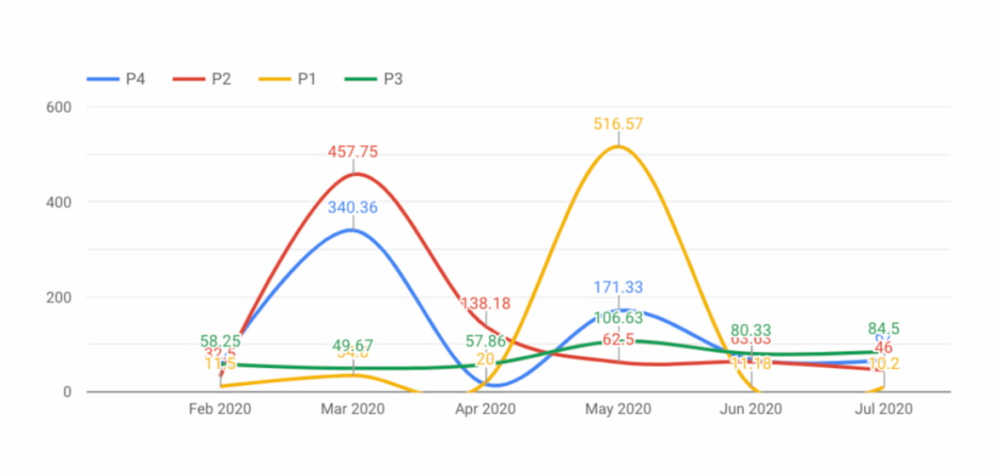
The purpose of this activity is to better understand the efficiency of both the customer’s and Google’s cloud operations from a support trend perspective. The goal is to celebrate any positive trends, but also to identify potential negative trends and proactively determine a remediation strategy.
Status reports for high-priority cloud projects
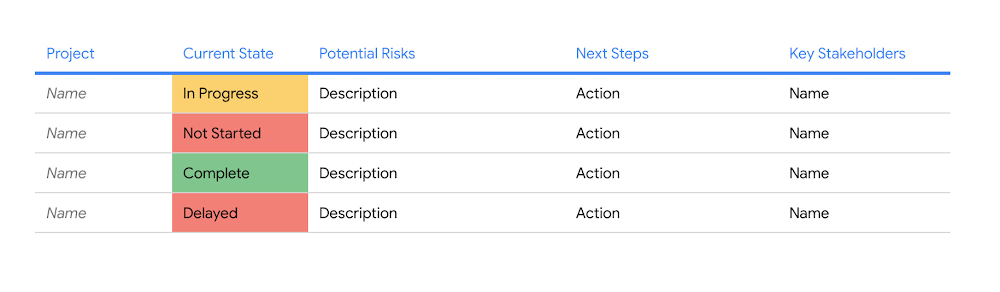
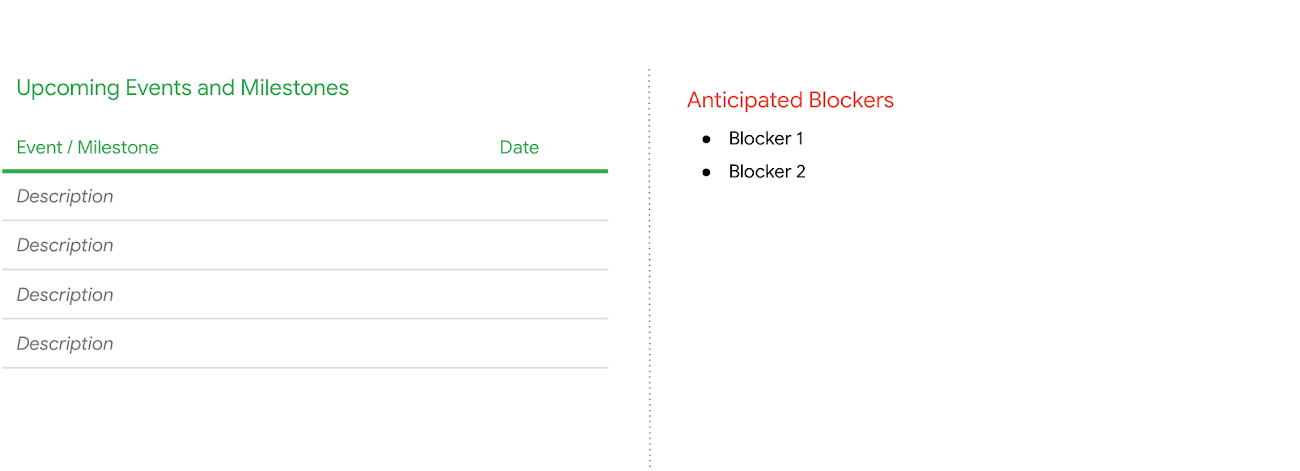
The purpose of this part of the OHR is to ensure the senior management stakeholders have continued visibility into the status of all their high-priority cloud initiatives with an easy-to-read, sometimes color-coded assessment on the status of each project. The assessment [Figure 1] may include, but is not limited to potential identified risks, key next steps, key stakeholders, and a mitigation plan for any high priority issues that may occur during their migration engagement. Additionally, the TAM may also cover any upcoming milestones or events, as well as any potential anticipated future blockers [Figure 2].
Review trends in Google Cloud usage
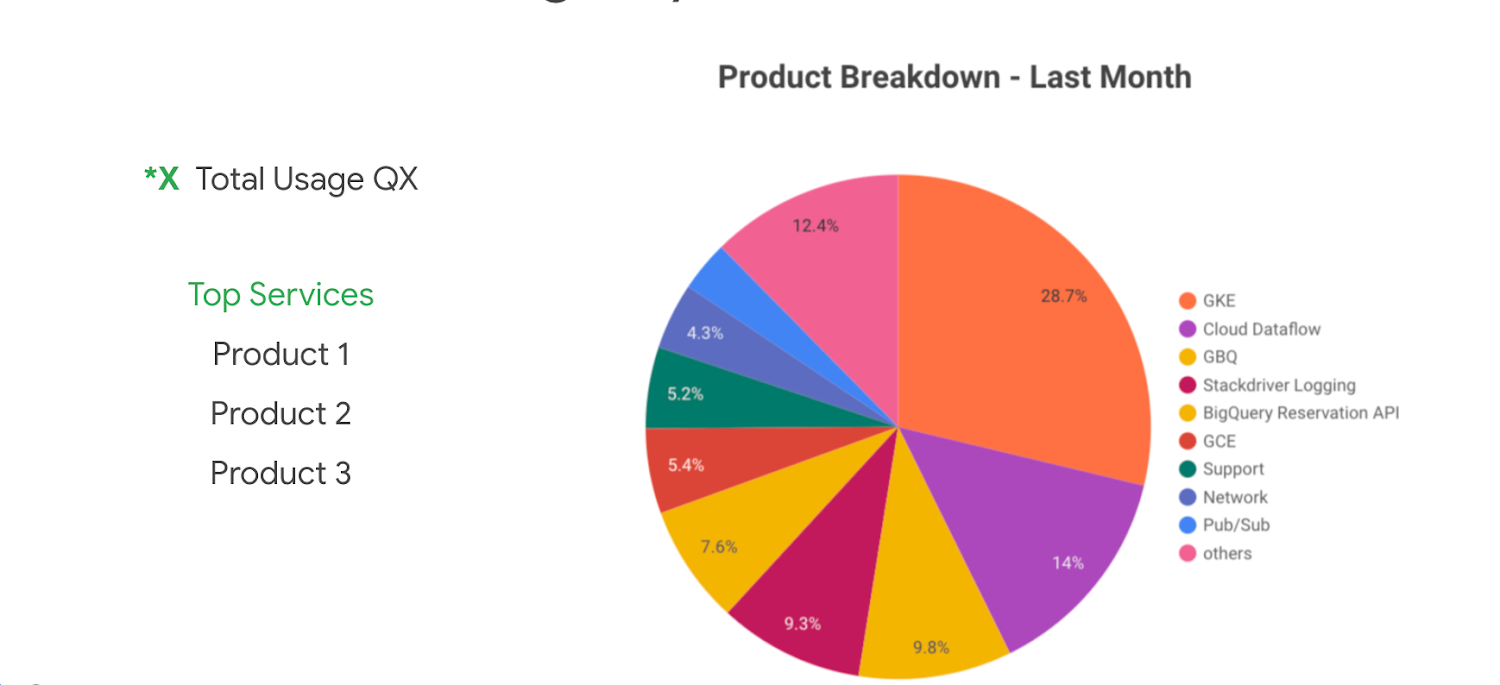
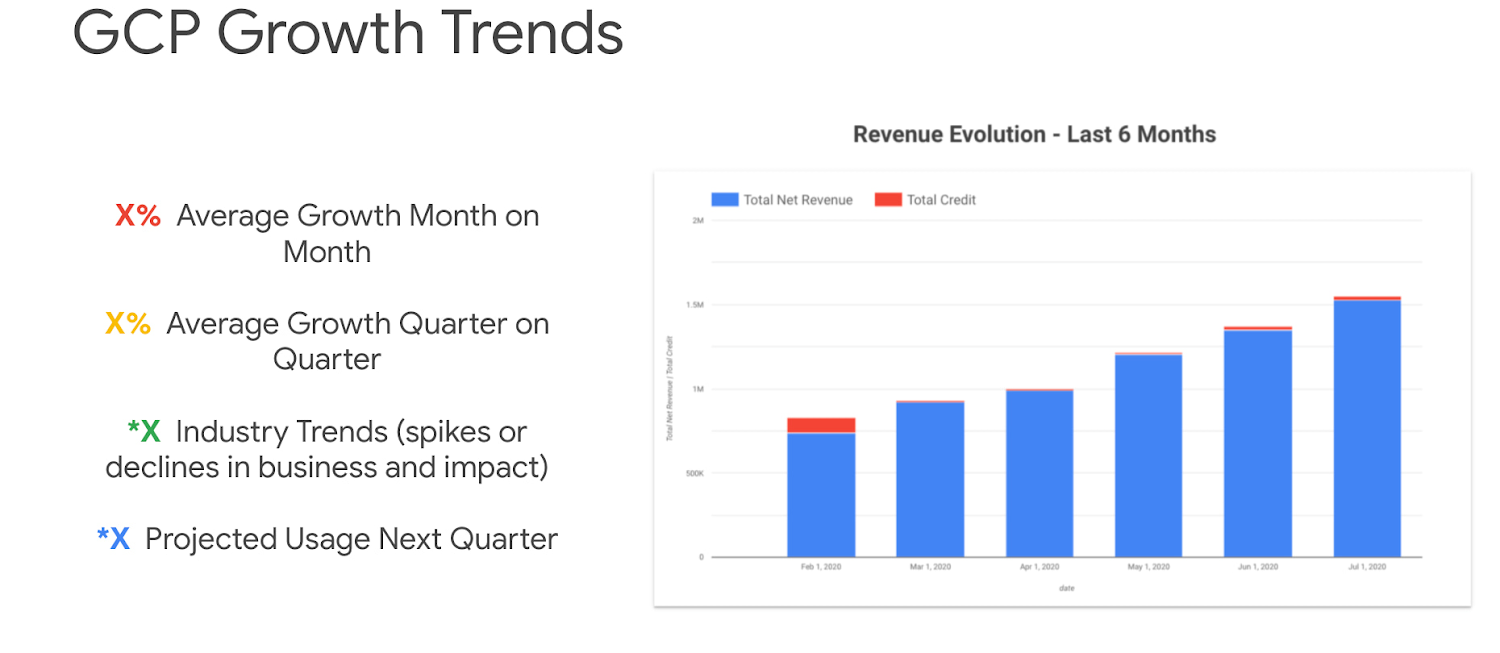
This part of the OHR is meant to provide the customer with a holistic view of their overall Google Cloud usage. The purpose is to provide understanding around what products are being used on Google Cloud and also where cost is generally being allocated for overall cost management and budget tracking purposes. This can help customers with their overall cost optimization efforts. Some of the metrics we may cover in this section are:
- Current Google Cloud usage by service
- Google Cloud growth trends
- Google Cloud growth trends by service
- Google Cloud growth trends by project
- Review of used and available service credits
Feature request review and advocacy
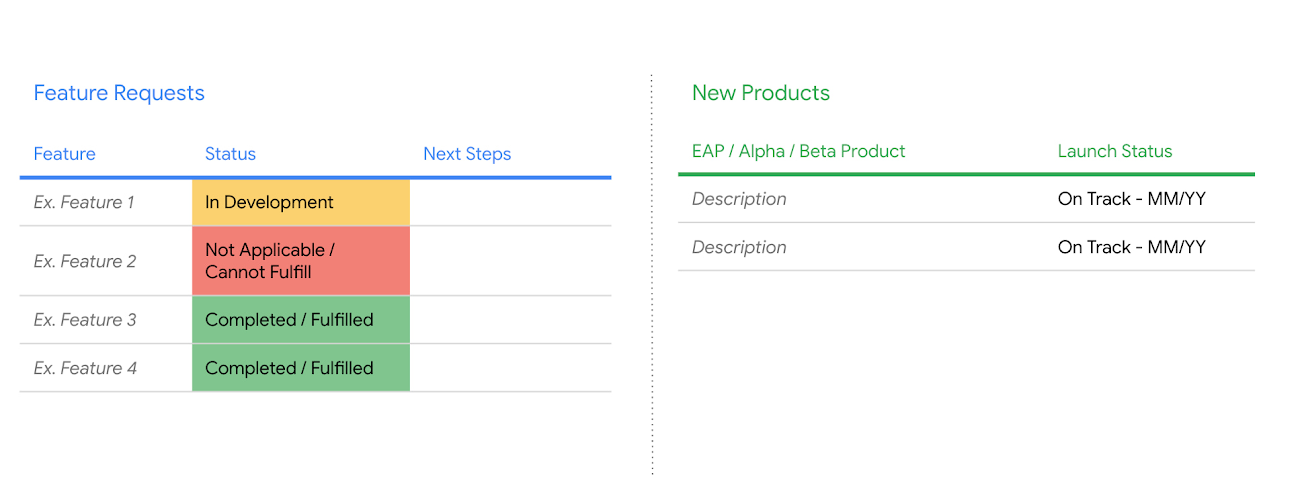
TAMs will work with customers to help identify product needs and advocate for feature requests with Google Product Management and Engineering teams. While feature request advocacy is an ongoing activity, during the OHR, the TAM will review any high priority feature requests that have previously been submitted, providing updates on status including potential release dates.
When a feature is coming up for the release, the TAM can help the customer prepare for implementation (providing early Preview access, coordinating a meeting with the Product Manager to review the feature, etc.) and then continue to provide support until the feature is successfully implemented in the customer environment. Similarly, if a high priority or technical blocking feature is not yet coming available, the TAM can help offer an alternative solution that can unblock the customer in the short term.
The OHR is also a great time for the TAM to work with the customer to ensure they have early access to new and exciting features that are in Alpha or Beta, and that would be beneficial to the customer and their environment.
Training strategy
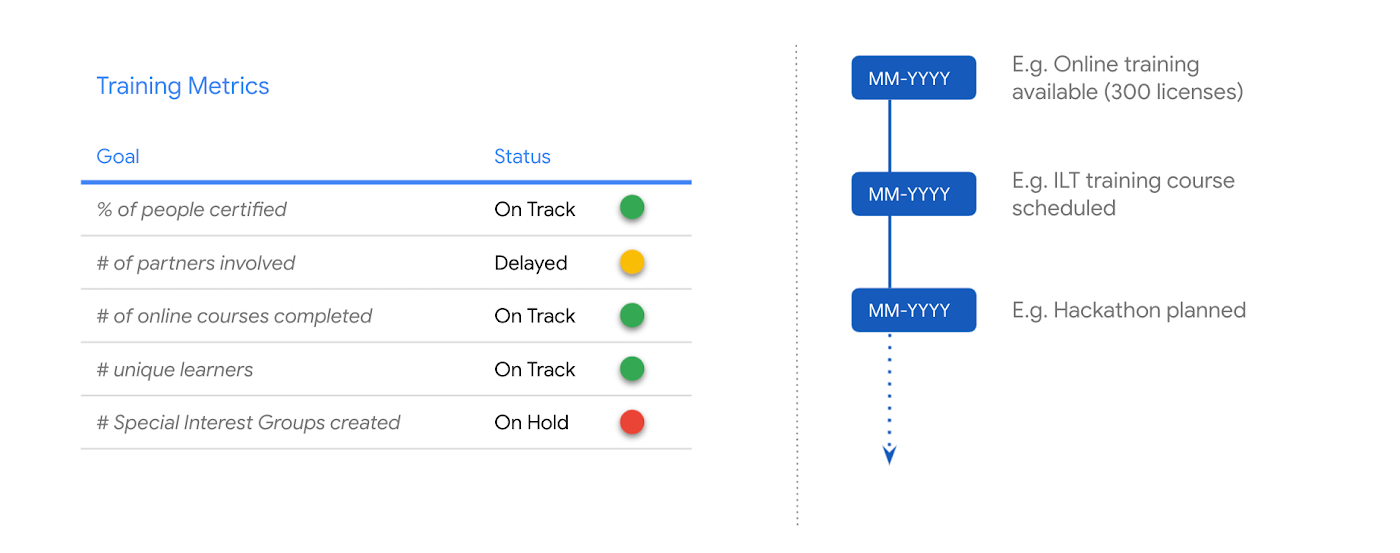
Training is a primary component to ensuring the overall success in adopting Google Cloud. During the OHR, a review of training metrics will be provided. This may include tracking metrics to determine how the customer is tracking towards an initially agreed upon learning plan or coming up with additional upskilling strategies as necessary. Additionally, throughout an engagement, the customer’s TAM will provide opportunities for both free and paid Google Cloud training.
Conclusion
PSO is the voice of customer health, maintaining priority to proactively and strategically guide large enterprise customers to operate effectively and efficiently in the cloud, both during and after the migration process. The OHR is an efficient and effective way to maintain alignment, ensure expectations and objectives are being met, manage risk, and overall ensure the success of the customer.
Learn more about our methodology and get started with Google Cloud by completing a free discovery and assessment of your migration. Alternatively, if you’d like to engage directly with our PSO team on your migration, contact us!
Towards The Next Wave of Google Cloud Infrastructure Innovation: New C3 VM and Hyperdisk

2805
Of your peers have already read this article.
3:00 Minutes
The most insightful time you'll spend today!
Meeting the rapidly growing demands of our customers’ high performance computing and data-intensive workloads requires deep innovation — at Google Cloud, we know we can’t rely on ever-faster CPUs alone, like Moore’s Law has enabled in the past. Customers can either optimize their workloads for a given platform, or we can offer them a platform that is optimized for their specific needs. At Google Cloud, we choose the latter.
Today, we have an exciting new release resulting from these efforts: the new C3 machine series powered by the 4th Gen Intel Xeon Scalable processor and Google’s custom Intel Infrastructure Processing Unit (IPU). Along with the recently announced Hyperdisk block storage which offers 80% higher IOPS per vCPU for high-end database management system (DBMS) workloads when compared to other hyperscalers. C3 machine instances can deliver strong performance gains to enable high performance computing and data-intensive workloads. Customers such as Snap, for example, have seen approximately a 20% increase in performance for a key workload over the previous generation C2.
The C3 machine series is just the latest example of this architectural approach. For over two decades, Google has purpose-built and designed some of the world’s most efficient and scalable computing systems to meet the needs of our customers. We built the Tensor Processing Unit (TPU) to power real-time voice search, photo object recognition, and interactive language translation; unveiled Titan, a secure, low-power microcontroller to help ensure that every machine boots from a trusted state; and launched Video Coding Units (VCUs) to enable video distribution that addresses a range of formats and client requirements. We engineer golden paths from silicon to the console, using a combination of purpose-built infrastructure, prescriptive architectures, and an open ecosystem to deliver what we term workload-optimized infrastructure.
Getting to know the C3 machine series
The Compute Engine C3 machine series, now available in Private Preview, is the first VM in the public cloud with the 4th Gen Intel Xeon Scalable processor and with Google’s custom Intel IPU. C3 machine instances use offload hardware for more predictable and efficient compute, high-performance storage, and a programmable packet processing capability for low latency and accelerated, secure networking.
“We are pleased to have co-designed the first ASIC Infrastructure Processing Unit with Google Cloud, which has now launched in the new C3 machine series. A first of its kind in any public cloud, C3 VMs will run workloads on 4th Gen Intel Xeon Scalable processors while they free up programmable packet processing to the IPUs securely at line rates of 200Gb/s. This Intel and Google collaboration enables customers through infrastructure that is more secure, flexible, and performant.” – Nick McKeown, Senior Vice President, Intel Fellow and General Manager of Network and Edge Group
The System on a Chip hardware architecture introduced in C3 VMs can enable better security, isolation, and performance. In the future, this purpose-built architecture will also allow us to offer a richer product portfolio, such as support for native bare-metal instances.
Hyperdisk block storage and 200 Gbps networking
Block storage and VMs go hand in hand. Last month, we announced the Preview release of Hyperdisk, our next-generation block storage. The new architecture decouples compute instance sizing from storage performance to deliver 80% higher IOPS per vCPU than other leading hyperscale cloud provider. And compared with the previous generation C2, C3 VMs with Hyperdisk deliver 4x higher throughput and 10x higher IOPS. Now, you don’t have to choose expensive, larger compute instances just to get the storage performance you need for data workloads such as Hadoop and Microsoft SQL Server.
To enable high performance computing workloads, C3 VMs also feature 200 Gbps low-latency networking powered by our custom IPU, as well as line-rate encryption using the open source PSP protocol.
What our customers and partners are saying

“We were pleased to observe a 20% increase in performance over the current generation C2 VMs from Google Cloud in testing with one of our key workloads. These continued performance improvements enable better end user experience and application cost efficiency.” – Aaron Sheldon, Sr. Software Engineer, Snap Inc.

“Based on the initial performance data, running weather research and forecasting (WRF) on C3 clusters can deliver as much as 10x quicker time to results for about the same computational cost. This will significantly accelerate R&D for our customers in weather, environment, and engineering domains.” — Michael Wilde, CEO, Parallel Works Inc.

“In early testing with our flagship products, including Ansys Fluent, Mechanical and LS-DYNA, on the new Google Cloud C3 VM, we’re seeing up to 3x performance gains over C2 VMs due to higher memory bandwidth and lower network latency.” – Shane Emswiler, Senior Vice President of Products, Ansys
Where we are headed
With the exponential rise in the complexity of cloud infrastructure, we as an industry must turn to automation to manage these platforms efficiently at scale. Along with Infrastructure as Code, custom chips like the Titan, the TPU and the IPU, pave the way for a not-so-distant future where we’ll automate over half of all infrastructure decisions, configuring systems dynamically in response to usage patterns. At Google Cloud, we are committed to continuing our long history of hardware innovation with a focus on workload optimization and automation.
To learn more about C3 VMs and Hyperdisk, check out our session at NEXT ‘22, How Google Cloud optimizes infrastructure for your workloads. To request access to the C3 VMs or Hyperdisk, please reach out to your sales representative or account manager.
Google Cloud Platform Gives Us 5x the Processing Power to Analyze Physician Performance at 75% Lower Cost

6746
Of your peers have already read this article.
6:30 Minutes
The most insightful time you'll spend today!
Patients about to undergo a healthcare procedure understandably want the best medical professionals they can get. But how can they know which doctors have had the most experience and the best outcomes with that particular procedure? How can they make an informed decision about which doctor to select when the information they have is limited to the doctor’s practice area and subjective reviews from other patients?
MD Insider is working to solve that problem using machine learning (ML) to objectively analyze doctor performance. By analyzing data from thousands of institutions and millions of doctor-patient interactions and medical events, MD Insider identifies physician performance insights based on their experience and outcomes. Insights are then integrated into a triage engine, that enables consumers to search for and schedule appointments with providers who meet their clinical criteria and convenience preferences, such as insurances accepted, office hours, locations, and language.
MD Insider also offers robust data APIs to help health systems, health plans, and employers reduce costs and improve quality of care. Payers use the APIs to curate high-quality provider networks and manage provider directories. Examples of MD Insider’s data APIs include Provider Experience and Share of Practice metrics, Provider Quality and Outcomes, Network Modeling, Expert Clinical Search Taxonomy, Find a Provider, Acute-Care Hospital Quality, and Provider and Facility Metadata.
“We use Google Cloud Platform the way the cloud was supposed to be used. By comparison, other cloud providers feel like you’re renting somebody else’s data center.”
—Ed Holsinger, Lead Data Engineer and Head of Data Science, MD Insider
MD Insider is continuously ingesting the latest performance data about physicians and analyzing billions of rows of data. Requiring constant scalability, the company was born in the cloud; however, it had difficulty configuring server instances for the optimal balance of memory and CPU, and its Hadoop cluster had to be kept running 24/7. Network performance was often slow for no apparent reason. As a result, failure rates from node timeouts increased, and costs grew along with the data. MD Insider had to estimate its usage and pay up front, and received little financial benefit from sustained use commitments.
Knowing that data would continue to grow, MD Insider decided to move its data services — the most demanding and complex portion of its infrastructure — to Google Cloud Platform (GCP), and took advantage of GCP managed services for container management and big data analytics.
“One of the reasons we decided to move to Google Cloud Platform is because it feels like a unified, well-designed cloud architecture and pricing model,” says Ed Holsinger, Lead Data Engineer and Head of Data Science at MD Insider. “We use Google Cloud Platform the way the cloud was supposed to be used. By comparison, other cloud providers feel like you’re renting somebody else’s data center.”
“Moving to Google Cloud Platform and using Kubernetes Engine gave us 5x the processing power for analyzing physician performance at 75% less cost. Our data scientists have more power than ever before to generate insights for our customers.”
—Ed Holsinger, Lead Data Engineer and Head of Data Science, MD Insider
5x the performance, 75% less cost
MD Insider now uses Kubernetes Engine to automate container management and deploy clusters in minutes with just a few clicks. When hundreds of machines are required to analyze a large dataset, automation in Kubernetes Engine deploys ML models as containers, each of which manages the full lifecycle of its task, including scaling up resources, deploying results, and scaling back down when the task is finished. It’s easy for MD Insider to specify exactly how much CPU and memory each container needs, helping maximize performance while reducing costs.
“Moving to Google Cloud Platform and Kubernetes Engine gave us 5x the processing power for analyzing physician performance at 75% less cost,” says Ed. “Our data scientists have more power than ever before to generate insights for our customers. Data scoring jobs that used to take three business days now take four hours.”
Adds Galen Meurer, Senior Software Engineer at MD Insider: “Even if all Google Cloud Platform had to offer was Kubernetes Engine, I would still want to use it. Previously we spent up to 30% of our time managing our container infrastructure, which we can now use for product development.”
A foundation for data science
MD Insider was happy to find that GCP offers a wide variety of managed services. For example, the company is supplementing its Kubernetes Engine clusters with BigQuery for its big data masters and selection jobs, enabling scientists to analyze new and different types of data as well as analyze larger datasets in less time. MD Insider also uses Cloud Storage for big data staging and Cloud Dataproc to run managed Apache Spark clusters for data processing.
“Google Cloud Platform gives us an incredibly powerful cloud architecture for data engineering and data science,” says Eric Wilson, CEO of MD Insider. “That gives our scientists independence, they can do what they need to do without waiting and with no contention between them.”
A developer-friendly platform
Migrating its data services was such a success that MD Insider decided to move the rest of its infrastructure to GCP, including the front end for its web application. Since the migration, MD Insider has experienced no unplanned downtime on GCP, allowing it to easily meet the 99.5% uptime SLA it promises to customers. It’s also taking advantage of Build Triggers in Kubernetes Engine to automate container builds and reduce build times by more than 40%. Production code can be updated in seconds, with no impact to end users other than making new features available.
“GCP has simplified our workflow in so many ways, from intelligent load balancing to content delivery and automating builds,” says Matthew Frey, Software Engineer. “Everything on GCP is cohesive and developer friendly, with a superior UI and better network performance than other cloud providers.”
Ryan Beaini, Senior Software Engineer at MD Insider, agrees: “Since we moved to GCP, our developers are definitely happier. The pain and the headaches we experienced because of the limitations of our previous toolset all went away.”
“We’re a small company, but what we’re doing is incredibly important. We’re helping people make decisions about healthcare providers that could impact their lives and even be life-saving. Google Cloud Platform is helping us make our mission bigger, better, and brighter.”
—Eric Wilson, CEO, MD Insider
Securing billions of rows of clinical and non-clinical healthcare data
As a healthcare technology company, MD Insider processes billions of rows of clinical and non-clinical healthcare data. To control user access to GCP, it uses Identity & Access Management (IAM) along with Yubico YubiKeys for hardware-based two-factor authentication when logging into Google Workspace. MD Insider takes comfort that GCP encrypts data at rest by default, and encrypts and authenticates data in transit when data moves outside physical boundaries not controlled by Google or on behalf of Google.
“On GCP, everything that we need to be encrypted for compliance purposes is encrypted, which is fantastic,” says Eric. “When I tell our potential clients and partners about the resources that Google has dedicated to security, it gives them the confidence that their data will be protected.”
Transforming how teams work
As a growing company, MD Insider must collaborate seamlessly between offices in California, Colorado, and Illinois. It relies on Google Workspace for communication and productivity, using Docs, Sheets, and Slides to drive the business. Employee and team files are stored in Drive, and meetings are conducted via Google Meet with Chromebox for Meetings videoconferencing hardware kits. Google Workspace also helps MD Insider maintain information security by authenticating email domains with digital signatures in Gmail and scanning outgoing email using Gmail Data Loss Prevention (DLP).
“I use Google Workspace every day, and everyone else here does too,” says Eric. “Team Drives are a big time saver for us. We’ve let our previous office software expire, because there’s no need to pay for those licenses anymore.”
Promoting healthcare transparency
With GCP helping MD Insider increase velocity and momentum, the company is making exciting progress. For example, it has entered into a strategic partnership with Zelis Healthcare, which will use MD Insider’s API to provide insights for a next-gen analytics platform that will give health plans unprecedented transparency around physician performance.
“We’re a small company, but what we’re doing is incredibly important,” says Eric. “We’re helping people make decisions about healthcare providers that could impact their lives and even be life-saving. Google Cloud Platform is helping us make our mission bigger, better, and brighter.”
*Google Workspace was formerly known as G Suite prior to Oct. 6, 2020.
Cloud FinOps: Maximizing Business Value and Optimizing Cloud Spend

1193
Of your peers have already read this article.
6:30 Minutes
The most insightful time you'll spend today!
We’ve been saying it for years, the benefits and potential of the cloud abound.
And yet, more than 80% of respondents in a survey of 753 business leaders point to managing cloud spend as their top organizational challenge, and these same respondents estimate that nearly 1/3 of their cloud spend is inefficient or wasted (Flexera, 2023). Many organizations are new to optimizing cloud costs and ensuring resources are used efficiently.
As your organization digitally transforms you may be realizing what other organizations are realizing too: When it comes to business value, simply migrating to the cloud isn’t enough. Achieving the full benefits of cloud requires fundamental changes to both mindset and behaviors around existing financial-management practices. It requires changing the way your disparate teams work together.
Enter the Cloud FinOps Building Blocks
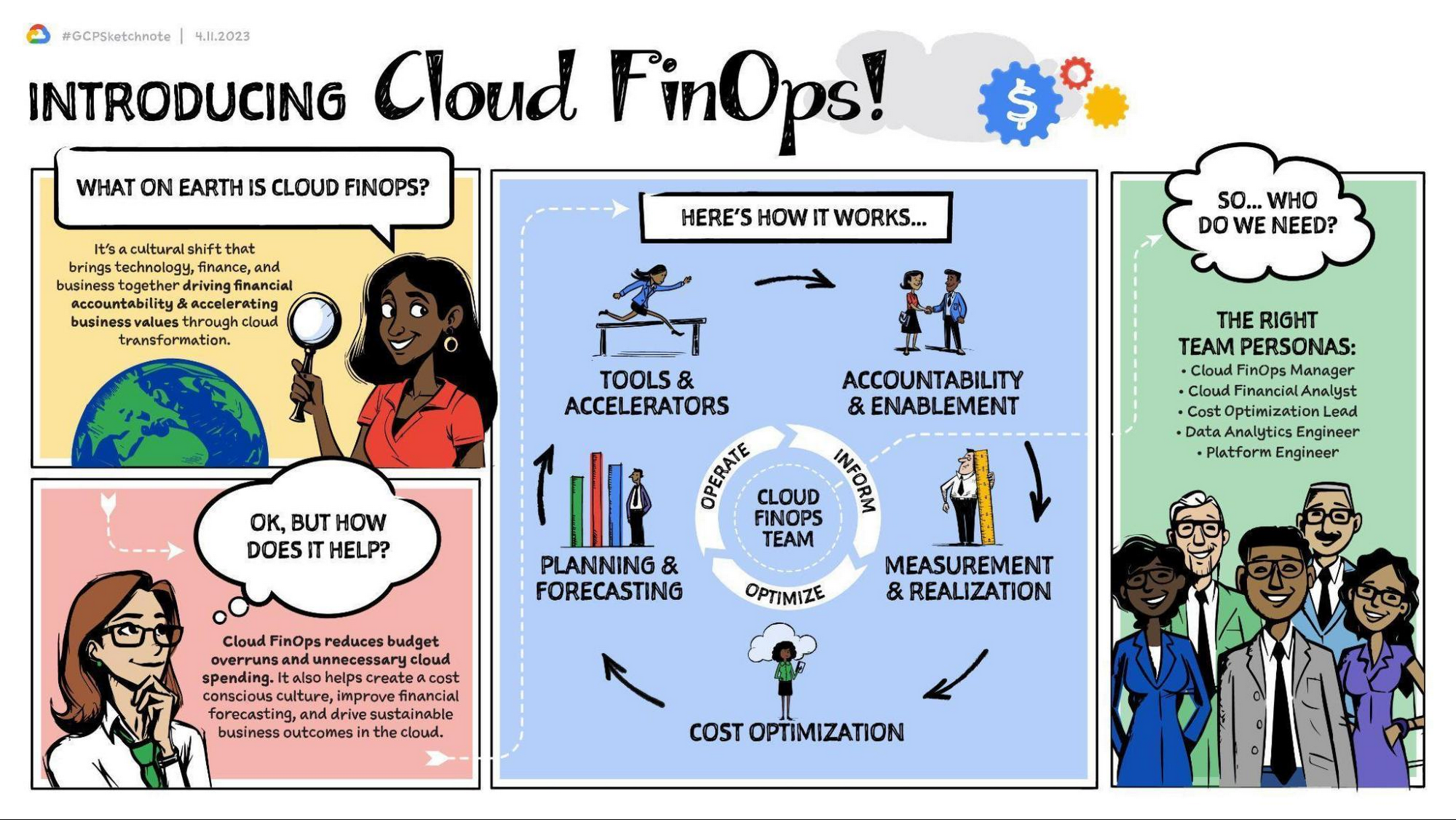
Cloud FinOps is a framework, discipline, and cultural shift combining people, processes, and technology to drive financial awareness and accountability. FinOps practices align engineering, finance, technology and business leaders and teams under a primary objective: to maximize business value from the cloud. With Cloud FinOps practices, every business stakeholder is charged not only to take responsibility for their spending and costs, but also to optimize them. These practices enable businesses to manage consumption and make sound, data-informed cloud-spend decisions. Cloud FinOps is comprised of five building blocks:
- Accountability and enablement
Establishing governance and policies to manage cloud spend and realize business value. - Measurement and realization
Driving financial accountability and value realization with a defined set of KPIs and success metrics. - Cost optimization
Providing financial visibility and recommendations of IT resource usage to optimize cloud spend. - Planning and forecasting
Modernizing budgeting, forecasting, and chargeback methods to allow for iterative, innovative and cost effective development practices. - Tools and accelerators
Deploying and integrating a set of cloud cost tooling to effectively manage and track cloud spend. Learn more here.
For a general overview of the Cloud FinOps framework and more on the five building blocks, check out these resources:
- Video | What is FinOps and 3 reasons why you should care about it.
This 5-minute video provides an overview of FinOps, the 5 building blocks, and how they can benefit your organization. - Podcast | FinOps with Joe Daly
In this podcast, Joe Daly of the FinOps Foundation shares about the key principles of FinOps, which he refers to as financial DevOps. Daly discusses how this framework is helping companies make better and more efficient financial decisions while taking advantage of the cloud. - Blog | Decoding Cloud FinOps to accelerate digital transformation
This blogpost discusses the critical role of FinOps in a successful digital transformation. It outlines key metrics to help measure and track business value and to increase visibility into the effects of digital transformation on top-line revenue. - Article | Cloud FinOps: The secret to unlocking the economic potential of public cloud
This Forbes article profiles OpenX, the first major advertising exchange platform to migrate entirely to the cloud. It details the 5 key pillars of the Cloud FinOps framework, which OpenX leveraged in their digital transformation strategy. In just 9 months, they reduced their per-unit costs by more than 60%.
Importantly, Cloud FinOps isn’t about saving money; it’s about making money. It’s about promoting a cost-conscious culture, financial accountability, and business agility in the cloud. Whatever stage of the cloud journey you’re at, cloud FinOps practices will help you get the most value out of Google Cloud. This framework can help to remove blockers, implement the building blocks, and empower your teams to make better business decisions.
The Cloud FinOps Journey
Implementing Cloud FinOps is neither a destination nor a box your organization will check then archive. Rather, Cloud FinOps is an ongoing journey and discipline. It’s inherently iterative. As such, growth and maturity across processes, capabilities, and domains requires action, repetition, and continuous learning.
Across the five FinOps building blocks, we’ve identified 50 subprocesses to best understand organizations’ FinOps proficiency, capabilities, practice domains, and blind spots. We scale them from 1 to 5 and categorize them in one of three phases of maturity: Crawl, Walk, or Run. Organizations in the Crawl phase tend to focus on technical problem solving and cloud-cost visibility. Organizations in the Walk phase emphasize strategic improvements such as employing cost visibility dashboards to realize better business value. And organizations in the Run phase are focused primarily on transformational change and strategic innovation, factoring cost considerations into both processes and cloud architecture.
Through this “crawl, walk, run” maturity model, we can evaluate proficiency, establish a benchmark, and recommend a targeted action plan for FinOps adoption. And whatever your level of maturity, your organization can take quick scalable action not only to foster improvement but also to evaluate outcomes and gain insights.
The key here is that regardless of your organization’s Cloud FinOps maturity level, you can take small steps now toward continuous improvement. Here are some common focus areas and several more resources organized by maturity level that you can access.
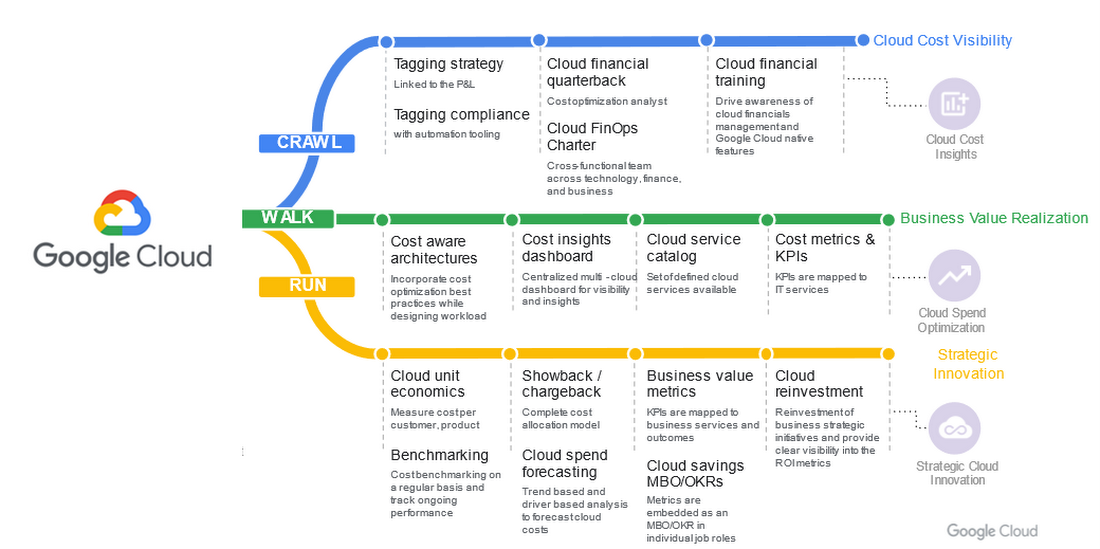
Crawl phase
Improve cloud-cost visibility.
- Whitepaper | Drive Cloud FinOps at scale with Google Cloud Tagging
Tags and labels can be useful and flexible tools to help your organization segment cloud spend and allocate costs. This whitepaper introduces Google Cloud Tags and best practices for implementing them. It differentiates tags, which offer reliable reporting and governance features, from labels, which can be prone to problems, including poor coverage and a lack of integrity in data labeling. - Whitepaper | Unlocking the value of Cloud FinOps with a new operating model
This white paper unpacks the details of the FinOps operating model, including roles, organizational alignment, and driving culture change. It details how to establish strong financial governance and a cost-conscious culture. - Whitepaper | Cloud FinOps: Shared services cost allocation
In this whitepaper, you’ll explore the elements of cost allocation as well as the complexities and challenges associated with shared-services cost allocation. While some of these concepts and models are interchangeable between legacy and cloud environments, this whitepaper focuses primarily on cloud computing and associated services.
Walk phase
Improve business-value realization.
- Blog | 5 key metrics to measure Cloud FinOps impact in your organization in 2022 and beyond
To drive business growth and topline revenue, business leaders must be able to connect cloud investments to business outcomes. As such, traditional IT metrics and KPIs must continue to evolve. In this blogpost, we’ll explore five key business-value metrics aligned to the five Cloud FinOps building blocks. - Whitepaper | Maximize business value with Cloud FinOps
The cloud introduces new complexity and challenges to traditional IT financial management. As such, it requires strategic financial governance, processes, and partnership across the organization. This whitepaper explains how Cloud FinOps helps enterprises that have invested in cloud to drive financial accountability and accelerate business value.
Run phase
Improve strategic cloud innovation.
- Whitepaper | Unit costing: The next frontier in cloud
In this whitepaper, you’ll explore the nature of and need for cloud unit costing, the standard by which FinOps practitioners obtain full business context for their cloud costs. It features examples from cloud-first organizations that have pioneered FinOps practices. Additionally, it examines several cloud forecasting and budgeting methods, ranging from least to most rigorous. - Blog | You get what you pay for: Principles for designing a chargeback process
Chargeback, a crucial Cloud FinOps capability, is the process of mapping cloud consumption to internal users within an organization. It provides transparency, facilitates accountability, enables recovery of cloud costs, and fosters a culture of fiscal responsibility. This blogpost will walk you through some best practices in designing an effective chargeback process in Google Cloud.
Success with Cloud FinOps
As global markets continue to face challenges, there’s never been a better time to increase the return on your cloud investments. Adopting and implementing FinOps practices will help. For some real-world examples of how organizations across a range of FinOps maturity levels have collectively saved millions of dollars on their overall cloud spend, check out these customers’ stories.
- Video | Next 2022: Top 10 ways to lower your costs on Google Cloud with General Mills
In this video, which highlights ten leading cloud cost optimization practices, hear how General Mills, which is on pace to increase their cloud footprint by 60%, has approached the discipline of cost savings and accelerated their adoption of Cloud FinOps to drive waste out of their cloud usage. - Video | How Nuro optimized their costs on Google Cloud
In this video, you’ll get an overview of the Google Cloud FinOps framework, a deep dive on cost-optimization best practices, and hear about how startup Nuro AI has adopted their own cost-savings discipline and Cloud FinOps practice. - Video | How OpenX reduce per unit costs by 60%
In this video, you’ll learn how to establish a cost center of excellence within your cloud practice, explore several cost-optimization recommendations, and hear from OpenX about how they reduced their costs on Google Cloud. - Case Study | How Sky saved millions with Google Cloud
In this case study, read how a few years into their cloud adoption journey, media and entertainment company, Sky Group discovered over $1.5 million in savings and optimized costs with BigQuery, Compute Engine, and Cloud Storage. - Case Study | Etsy: Doing more with less cost and infrastructure
In this case study, read how after migrating their data center and ecommerce platform to the cloud, Etsy realized more than 50% savings in compute energy and leveraged committed use discounts (CUDs) to reduce their compute costs by 42%.
It’s important to remember that FinOps success looks different for different organizations. It’s neither a one-time fix nor a destination reached by way of a single path. But for every organization, success requires small actions, refinement, and continuous improvement. As you leverage Google Cloud FinOps resources and tools, your organization can:
- Drive financial accountability and visibility.
- Optimize cloud usage and cost efficiency.
- Enable cross organizational trust and collaboration.
- Prevent cloud-spend sprawl.
- Break down departmental silos.
- Accelerate innovation.
Getting started with Cloud FinOps
At Google, we have a team of experts in leading FinOps practices dedicated to helping you create an actionable plan to optimize cloud spend and drive cost efficiency. We’ve created numerous resources to help you get started from any stage in the FinOps journey.
Whitepaper | Maximize Business Value with Cloud FinOps
This whitepaper outlines steps to help your organization implement FinOps. It details required teams and processes as well as the optimal behaviors, approaches, and outcomes to help maximize your investment on Google Cloud.
With Google Cloud FinOps, your organization can also accelerate business value in the cloud. To find out more, join us on the Google Cloud Twitter channel twice a month for open Twitter Spaces discussions or reach out to your Google Cloud Sales Representative for a 1:1 discussion.
IBM Spectrum LSF and Google Collab: Leverage Google Cloud’s Scalability and Compute Engine Infrastructure

3585
Of your peers have already read this article.
3:00 Minutes
The most insightful time you'll spend today!
High Performance Computing (HPC) is prevalent today across many industries, including financial services, life sciences, higher education research, manufacturing, and energy. More and more businesses are deploying HPC workloads in the cloud to take advantage of its elasticity, scalability, and availability. Job schedulers are critical for HPC applications given the nature of these workloads that create, process, and tear down thousands, and sometimes millions, of vCPU and network resources with TB to PB of storage capacity. Job scheduling tools lead to improved operational efficiency and a degree of certainty that a particular HPC job, which can run for hours to weeks, will complete successfully.
IBM Spectrum LSF is used extensively in the manufacturing and semiconductor industry to manage Electronic Design Automation (EDA) workloads. Dynamically running workloads on-premises and in the cloud, also known as cloud bursting, is becoming a more common practice to address capacity and provisioning time constraints within data centers and enable enterprises to take advantage of virtually unlimited resources.
However, the challenge with cloud bursting is integrating and maintaining operational consistency across on-premises and cloud environments. IBM Spectrum LSF, in combination with Google Cloud, addresses this problem head on.
Google Cloud is excited to announce, in collaboration with IBM, enhanced capabilities to IBM Spectrum LSF that enables organizations to integrate their on-premises job scheduling scripts with resources deployed in Google Cloud. Customers are now able to fully leverage Google Cloud’s highly scalable and secure Compute Engine, networking and storage infrastructure.
The LSF-Google Cloud resource connector patch supports key Google Cloud differentiators including Local SSDs, GCE instance templates, Preemptible VMs, and more:
- Bulk API support– Deploy large fleets of VM instances in a matter of seconds.
- Instance Templates – Simplify VM configuration by creating reusable templates.
- All Machine Types – Supports all GCE VM families and machine types, including Custom Machine Types.
- GPUs – Attach up to 16 GPUs per instance, including the largest A2 instances with up to 16 NVIDIA A100 GPUs
- Preemptible VMs – Preemptible VMs are provisioned from excess Compute Engine capacity and is a significant way to save money on GCE resources.
- Local SSD – Attach up to 9TB of NVMe SSD per instance
- Hyperthreading – Supports the “threads-per-core” option in GCE, which allows per-VM hypervisor level Hyperthread configuration (when supported by Instance Templates)
- Images – Supports custom disk images, including full support for Windows, for all attached Persistent Disks
- Placement Policies – Control where the instances are physically located relative to each other within a zone for improved low-latency performance
- Labels – Supports GCE Labels, which can be used for management of firewall rules, tracking billing, etc
- Minimum CPU Platform – Supports the ability to specify a minimum CPU Platform for your Virtual Machines.
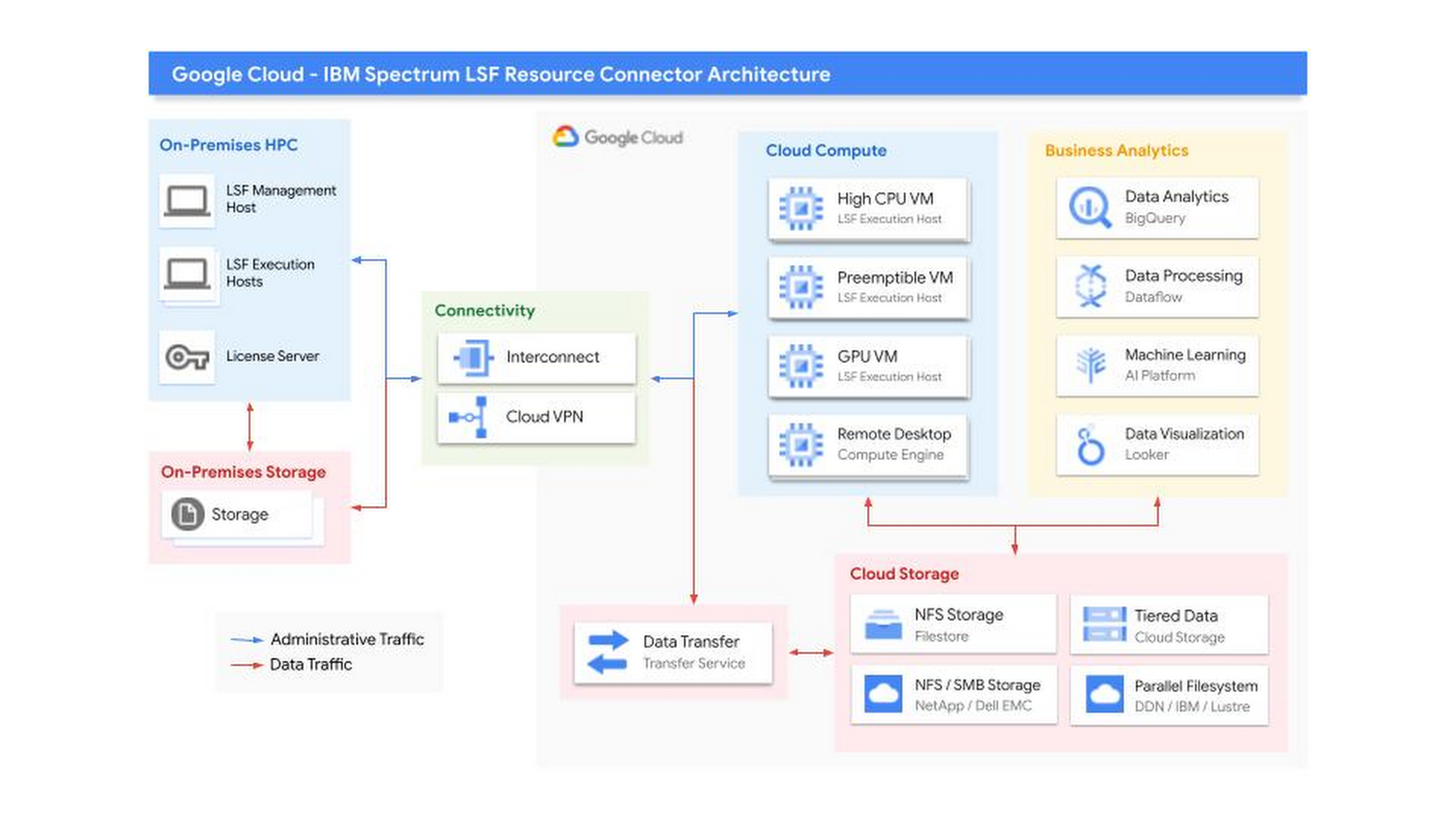
Getting Started
This improvement to the IBM LSF Resource Connector was developed by IBM in coordination with Google. Find out more about the new supported features and their operation in the official IBM Spectrum LSF Resource Connector Documentation. You can also find additional documentation and download the software in the IBM Spectrum Computing Community. If you have further questions, you can contact IBM, or Google Cloud Sales.
Special thanks to Annie Ma-Weaver, Mark Mims, and Wyatt Gorman for their contributions.
Three Typical Connectivity Use Cases to Pick the Right Option for Your Enterprise

3310
Of your peers have already read this article.
3:00 Minutes
The most insightful time you'll spend today!
Enterprises today have a very broad mix of networks — from SD-WANs, dedicated WANs such as MPLS, cloud interconnects, to VPNs. At the same time, they’re moving those WANs to the cloud to take advantage of faster turn-up, lower cost, and increased feature velocity. As workloads migrate to the cloud and multi-cloud environments, we believe that it’s critical to simplify enterprises’ networking model.
Each major cloud provider uses distinct abstraction models to configure networks or connections between your resources. Some use gateways, some use connections or links. Network Connectivity Center, launched last year, provides a simple management solution for your network connection, and is now Generally Available.
In this post, we outline the typical connectivity use cases for customers to help you select and set up the best connectivity option for your environment.
Understanding cloud network connectivity
Cloud networking refers to the ability to connect two resources together inside a cloud, across clouds and with on-premises data centers. A cloud provider needs to provide three main types of connectivity:
- Site-to-cloud – Between on-premises equipment and cloud resources
- Site-to-site – To connect on-premises resources together
- VPC-to-VPC – Connectivity between cloud resources
- Let’s take a look at each one.
Site-to-cloud connectivity
Site-to-cloud connectivity traditionally is done via a cloud interconnect or a cloud VPN. The automatic exchange of routes between on-premises and multiple VPCs can be done using a transit VPC.
A newer approach is to add cloud providers into an SD-WAN mesh using a router virtual appliance in Google Cloud. Network Connectivity Center brings the capacity to synchronize the appliance routes dynamically via BGP to Cloud Router and hence their VPCs. It enables connectivity between on-premises data centers and branch offices and their cloud workloads via SD-WAN-enabled connectivity. This capability is available globally across all 29+ Google Cloud regions. Several of our partners also support this capability in their router appliances.
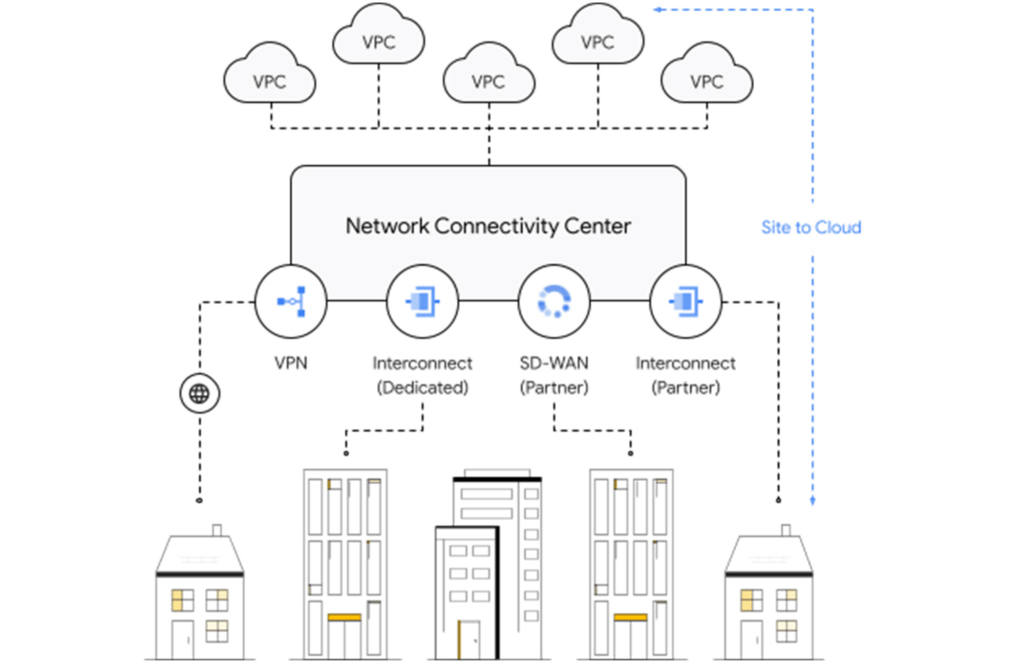
Site-to-site connectivity
Site-to-site connectivity enables network connectivity directly between two or more hybrid connection points (VPN, Interconnect or SD-WAN). Network Connectivity Center simplifies this model by automating the routing announcements in this environment, such that all sites connected to a single global Network Connectivity Center hub are able to communicate freely in any-any fashion. You can see an example of this for a specific market vertical use case in a recent blog, Voice trading in the cloud — digital transformation of private wires.
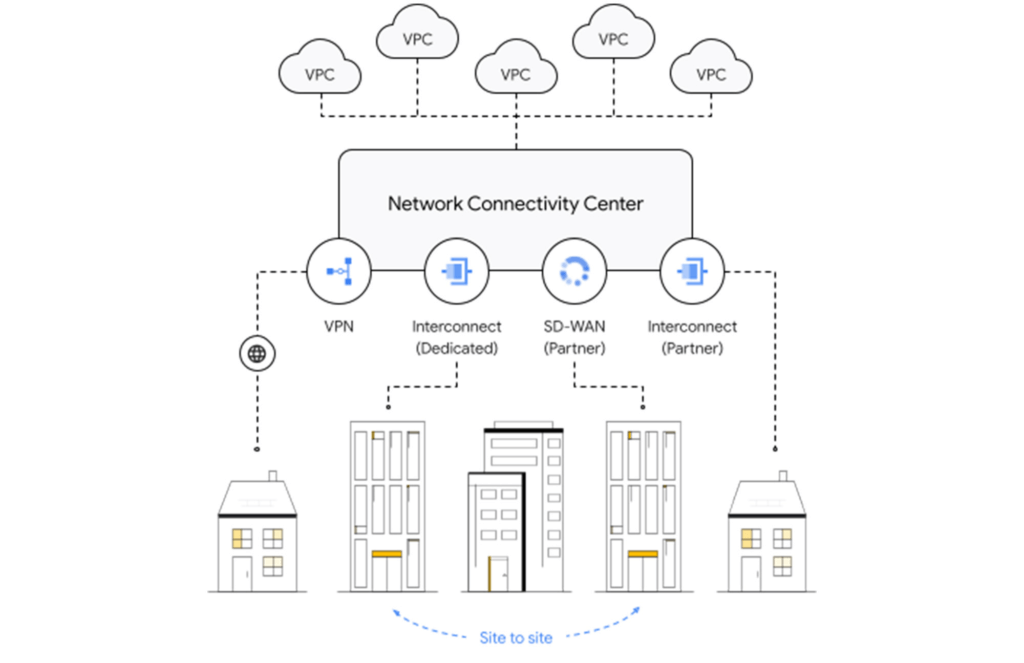
VPC-to-VPC connectivity
You can create a full or partial mesh of VPC connections using multiple technologies, with VPC peering being the most common. VPC peering provides highly performant, low latency, private connectivity for customer networks connected via hybrid connectivity and Network Connectivity Center to multiple VPCs containing workloads, which can be segmented via granular firewall policies as needed. Alternatively, you can use a transit VPC model to connect multiple VPCs together in a hub and spoke topology.
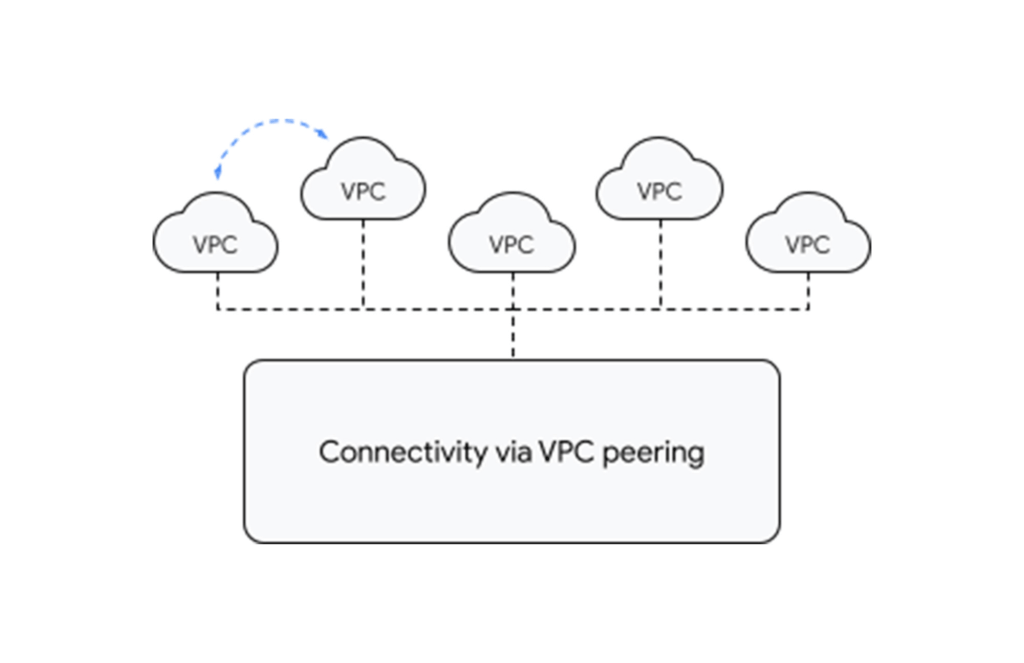
With tight integration with third-party router appliances as mentioned earlier, you can also leverage their third-party supported solutions such as next-generation firewalls to connect your VPCs together to meet specific compliance and segmentation requirements. Network Connectivity Center allows you to synchronize the routing tables of these appliances with your VPC’s routing table, simplifying the process of setting up redundant configurations.
What’s next for cloud networking connectivity in Google Cloud?
As enterprises continue to migrate different types of workloads to public cloud providers, networking topologies are becoming more complex. In summary, we have solutions for all connectivity needs. We aim to keep our models and solutions understandable and simple. Over time, look for Network Connectivity Center to become Google Cloud’s single point of configuration for all your connectivity needs, with capabilities to handle the most complex network.
More Relevant Stories for Your Company



Accelerate Your Digital Transformation Through a Modern Infrastructure
Learn about the latest advancements to Google Cloud Platform’s unique infrastructure to accelerate enterprise workloads and build planet scalable solutions. Hear how Google Cloud’s infrastructure enables you to solve problems faster, more securely, and at greater scale. See how Google Cloud is accelerating the support for enterprise workloads like SAP,

4 Steps to a Successful Cloud Migration
Digital transformation and migration to the cloud are top priorities for a lot of enterprises. At Google Cloud, we’re working hard to make this journey easier. For example, we recently launched Migrate for Compute Engine and Migrate for Anthos to simplify cloud migration and modernization. These services have helped customers like Cardinal Health perform successful, large-scale migrations to

How One Company Improved Security Significantly–Without Increasing Staff
Quanta Services is the leading specialty contractor with the largest and highly-skilled trained workforce in North America. It provides fully-integrated solutions for the electric power pipeline industrial and telecommunications industries the company's geographic footprint which includes North America Latin America and Australia. It’s network of companies ensures world-class execution with

Google Announced Leader in 2021 Gartner Magic Quadrant for Cloud Infrastructure and Platform Services
For the fourth consecutive year, Gartner has positioned Google as a Leader in the 2021 Gartner Magic Quadrant for Cloud Infrastructure and Platform Services (formerly titled as Magic Quadrant for Cloud Infrastructure as a Service upto 2014 Infrastructure as a Service, or (IaaS). With our customers and communities adjusting to new ways
