





4 Steps to a Successful Cloud Migration

3959
Of your peers have already read this article.
2:00 Minutes
The most insightful time you'll spend today!
Digital transformation and migration to the cloud are top priorities for a lot of enterprises. At Google Cloud, we’re working hard to make this journey easier. For example, we recently launched Migrate for Compute Engine and Migrate for Anthos to simplify cloud migration and modernization. These services have helped customers like Cardinal Health perform successful, large-scale migrations to GCP.
But we understand that the migration journey can be daunting. To make things easier, we developed a whitepaper on application migration featuring investigative processes and advice to help you design an effective migration and modernization strategy. This guide outlines the four basic steps you need to follow to migrate successfully and efficiently:
- Build an inventory of your applications and infrastructure: Understanding how many items, such as applications and hardware appliances, exist in your current environment is an important first step.
- Categorize your applications: Analyze the characteristics of all of your applications and evaluate them across two dimensions: migration to cloud, and modernization.
- Decide whether or not to migrate an application to the cloud: Not all applications should move to the cloud quite yet. The whitepaper lists the questions to ask to determine whether or not to migrate a given application.
- Pick your migration strategy: For the applications you decided to migrate, decide on your ideal strategy—pure lift and shift, containers, cloud managed services, or a combination thereof.
There’s a lot to consider when you start thinking about digital transformation, and every cloud modernization project has its nuances and unique considerations. The secret to success is understanding the advantages and disadvantages of the options at your disposal, and weighing them against what you want to transform and why. To learn how to migrate and modernize your applications with Google Cloud, download this whitepaper.
Quick Recap on Google Cloud: Latest News, Launches, Updates, Events and More

12926
Of your peers have already read this article.
2:00 Minutes
The most insightful time you'll spend today!
Want to know the latest from Google Cloud? Find it here in one handy location. Check back regularly for our newest updates, announcements, resources, events, learning opportunities, and more.
Tip: Not sure where to find what you’re looking for on the Google Cloud blog? Start here: Google Cloud blog 101: Full list of topics, links, and resources.
Week of May 24-May 28 2021
- Google Cloud for financial services: driving your transformation cloud journey–As we welcome the industry to our Financial Services Summit, we’re sharing more on how Google Cloud accelerates a financial organization’s digital transformation through app and infrastructure modernization, data democratization, people connections, and trusted transactions. Read more or watch the summit on demand.
- Introducing Datashare solution for financial services–We announced the general availability of Datashare for financial services, a new Google Cloud solution that brings together the entire capital markets ecosystem—data publishers and data consumers—to exchange market data securely and easily. Read more.
- Announcing Datastream in Preview–Datastream, a serverless change data capture (CDC) and replication service, allows enterprises to synchronize data across heterogeneous databases, storage systems, and applications reliably and with minimal latency to support real-time analytics, database replication, and event-driven architectures. Read more.
- Introducing Dataplex: An intelligent data fabric for analytics at scale–Dataplex provides a way to centrally manage, monitor, and govern your data across data lakes, data warehouses and data marts, and make this data securely accessible to a variety of analytics and data science tools. Read more.
- Announcing Dataflow Prime–Available in Preview in Q3 2021, Dataflow Prime is a new platform based on a serverless, no-ops, auto-tuning architecture built to bring unparalleled resource utilization and radical operational simplicity to big data processing. Dataflow Prime builds on Dataflow and brings new user benefits with innovations in resource utilization and distributed diagnostics. The new capabilities in Dataflow significantly reduce the time spent on infrastructure sizing and tuning tasks, as well as time spent diagnosing data freshness problems. Read more.
- Secure and scalable sharing for data and analytics with Analytics Hub–With Analytics Hub, available in Preview in Q3, organizations get a rich data ecosystem by publishing and subscribing to analytics-ready datasets; control and monitoring over how their data is being used; a self-service way to access valuable and trusted data assets; and an easy way to monetize their data assets without the overhead of building and managing the infrastructure. Read more.
- Cloud Spanner trims entry cost by 90%–Coming soon to Preview, granular instance sizing in Spanner lets organizations run workloads at as low as 1/10th the cost of regular instances, equating to approximately $65/month. Read more.
- Cloud Bigtable lifts SLA and adds new security features for regulated industries–Bigtable instances with a multi-cluster routing policy across 3 or more regions are now covered by a 99.999% monthly uptime percentage under the new SLA. In addition, new Data Access audit logs can help determine whether sensitive customer information has been accessed in the event of a security incident, and if so, when, and by whom. Read more.
- Build a no-code journaling app–In honor of Mental Health Awareness Month, Google Cloud’s no-code application development platform, AppSheet, demonstrates how you can build a journaling app complete with titles, time stamps, mood entries, and more. Learn how with this blog and video here.
- New features in Security Command Center—On May 24th, Security Command Center Premium launched the general availability of granular access controls at project- and folder-level and Center for Internet Security (CIS) 1.1 benchmarks for Google Cloud Platform Foundation. These new capabilities enable organizations to improve their security posture and efficiently manage risk for their Google Cloud environment. Learn more.
- Simplified API operations with AI–Google Cloud’s API management platform Apigee applies Google’s industry leading ML and AI to your API metadata. Understand how it works with anomaly detection here.
- This week: Data Cloud and Financial Services Summits–Our Google Cloud Summit series begins this week with the Data Cloud Summit on Wednesday May 26 (Global). At this half-day event, you’ll learn how leading companies like PayPal, Workday, Equifax, and many others are driving competitive differentiation using Google Cloud technologies to build their data clouds and transform data into value that drives innovation. The following day, Thursday May 27 (Global & EMEA) at the Financial Services Summit, discover how Google Cloud is helping financial institutions such as PayPal, Global Payments, HSBC, Credit Suisse, AXA Switzerland and more unlock new possibilities and accelerate business through innovation. Read more and explore the entire summit series.
- Announcing the Google for Games Developer Summit 2021 on July 12th-13th–With a surge of new gamers and an increase in time spent playing games in the last year, it’s more important than ever for game developers to delight and engage players. To help developers with this opportunity, the games teams at Google are back to announce the return of the Google for Games Developer Summit 2021 on July 12th-13th. Hear from experts across Google about new game solutions they’re building to make it easier for you to continue creating great games, connecting with players and scaling your business. Registration is free and open to all game developers. Register for the free online event at g.co/gamedevsummit to get more details in the coming weeks. We can’t wait to share our latest innovations with the developer community. Learn more.
Google Cloud’s Role in Minimizing Memory Errors Impact for SAP Customers
3745
Of your peers have already read this article.
2:00 Minutes
The most insightful time you'll spend today!
Every cloud system begins with high-quality hardware infrastructure. Sometimes, however, hardware breaks — and when it happens, our most important goal is to minimize the impact on our customers and their cloud workloads.
Memory errors are the most common type of hardware failure, and they’re also one of the most challenging in terms of their impact on production workloads and system reliability. That’s why we’re excited to share what Google Cloud has been doing to minimize the impact of memory errors. If your business runs SAP HANA in the cloud, this is an important innovation — one that Google Cloud is proud to deliver to our customers.
Memory errors: A big problem with a long history
First things first: Memory errors are a high priority because they happen often. And when they happen, the disruption can have far-reaching effects on your customers and your business.
In 2009, Google Cloud published the first major study on memory reliability. We found an average error rate of over 8% per year in DIMM modules installed in production systems. Given that each generation of DDR RAM packs more capacity into smaller packages, it’s safe to think that memory hardware has become less reliable since then.
Memory error impacts: They could be worse, but they’re far from good
What happens when a system detects a bad segment in a DIMM module? While data loss or corruption from memory errors is not common, some errors are correctable but some are not, potentially resulting in a critical system failure..
Modern CPUs are equipped with error-correcting memory features and are very good at correcting simple errors with ECC (Error Correction Code). The challenge is that most of the software that runs on a host system — whether it’s a hypervisor, a virtual machine, an operating system, a database or an application — will crash instantly when it encounters an uncorrectable memory error. In a cloud environment, this kind of crash can take down cached data and even data saved to a local SSD. The crashed applications will recover, but the process means several minutes of downtime. The more data you have, the longer this process will take.
Sometimes, that’s merely an inconvenience. Other times, it’s a very big deal. A Google Cloud customer running business-critical SAP applications and an in-memory HANA database might measure downtime costs well over $10,000 per minute in lost revenue and other direct impacts. Many HANA databases load into terabytes of memory, and it can take an hour or longer to get everything restarted and back to normal after a crash. For SAP HANA, a fast recovery with up to 10 minutes of downtime requires a redundant replica provisioned all the time, doubling the cost.
And statistically speaking, when a HANA instance occupies almost all of the memory on a host system, it’s also the most likely application to stumble across a memory error. You can see why this would be a problem.
The ‘victim neighbor’ VM challenge
There’s a final problem to consider when a memory error takes out production applications: what we call the “victim neighbor” issue.
In any cloud, a single physical host is a multi-tenant environment that might run dozens of VMs, potentially owned by dozens of different customers. A memory error won’t just crash the VM actually using the bad section, it will crash every VM running on the system. That’s a standard VM response to memory errors on a host system, and it will happen to any VM architecture available on the market today to avoid memory corruption.
Overall, this “victim neighbor” effect accounts for more than 90% of the VMs that get knocked down by a memory error on a physical server. That’s a huge blast radius for such a common problem.
A practical solution to memory-error impacts
You can see why managing this problem is a big deal for Google Cloud. While we know that some failures are inevitable, we have developed another way to tackle the problem. Google Cloud already maintains some unique and valuable tools, such as Live Migration, that help our customers minimize unplanned downtime.When we integrate these tools with recent work that leverages error-handling capabilities built into CPUs (courtesy of Intel) and into certain applications (in particular, SAP HANA), we get a solution that dramatically reduces downtime and disruptions related to memory errors — in many cases, to the point where customers won’t even know there was a problem.
The Google Cloud solution: Memory poisoning recovery
At a big picture level, we refer to our solution as Memory Poisoning Recovery (MPR). It combines some existing Google Cloud capabilities, some new capabilities, and some important third-party capabilities at the CPU (Intel) and application (SAP HANA) levels. MPR can be broken down into two main processes:
Memory Error Isolation
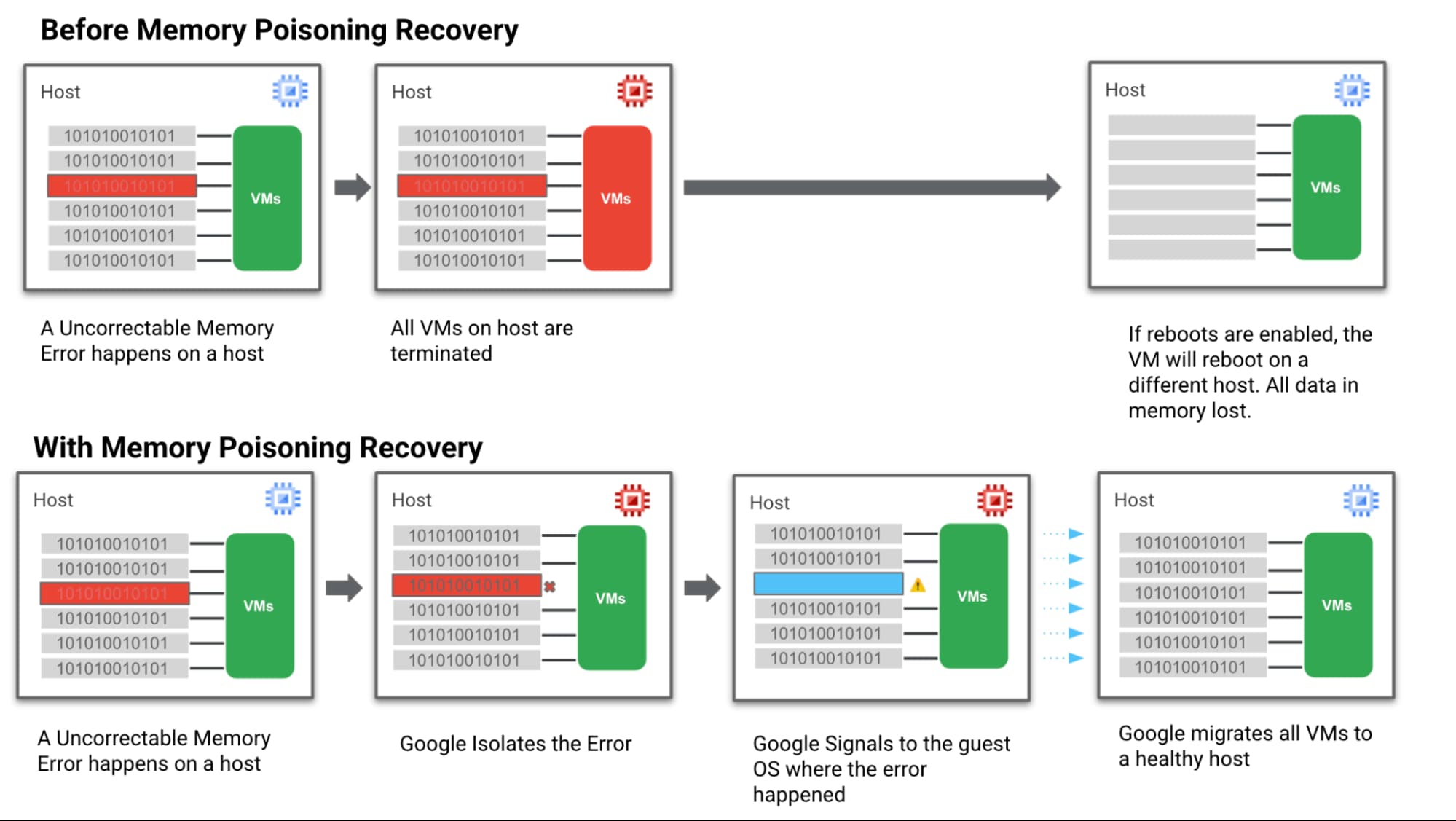
- Step 1: We hardened our VM technology to be more robust against memory errors. We intercept and analyse the memory error coming from the system. Then we flag the signaled region of a memory DIMM with an uncorrectable error as “poisoned”.
- Step 2: Then we trigger processes to keep track of these “poisoned” regions and the VMs they affect so they can’t affect data integrity.
Memory Error Recovery
- Step 3: Then we notify the Guest OS & the MCE-aware applications that a memory error has been recorded, in a manner that allows the applications to execute application relevant memory error handling.
- Step 4: At the same time we communicate with Google Cloud Live Migration to begin moving guest VMs off the affected host. This ensures customers are running on a healthy host which reduces the probability of more uncorrectable errors happening and avoids further downtime.
Below is a simple visual of how this all works:
How MPR makes life better for customers
Let’s look again at the different groups of Google Cloud customers involved in a memory error scenario and how we can help them achieve a happier ending after a crash — starting with the customer running the VM and application that actually triggered the memory error.
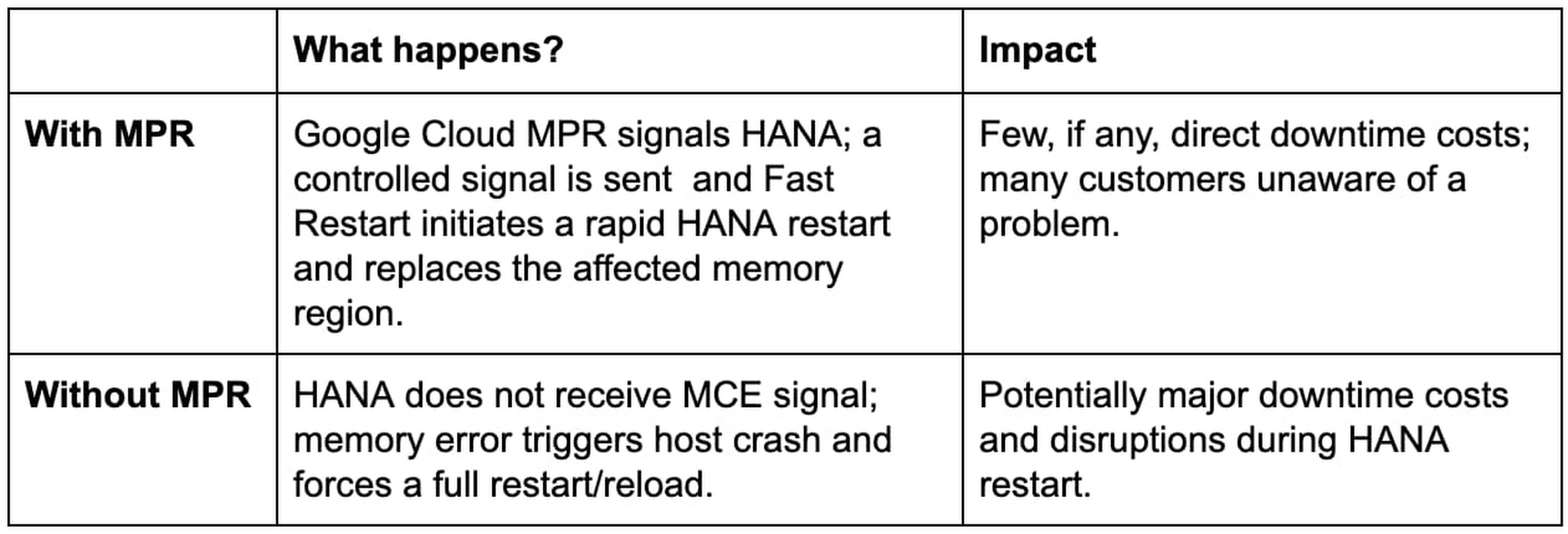
Customer Group: MCE-Aware SAP HANA with Fast Restart enabled on a VM directly affected by a memory error.
Customer Group: Customers running other, non MCE Aware applications on a VM directly affected by a memory error

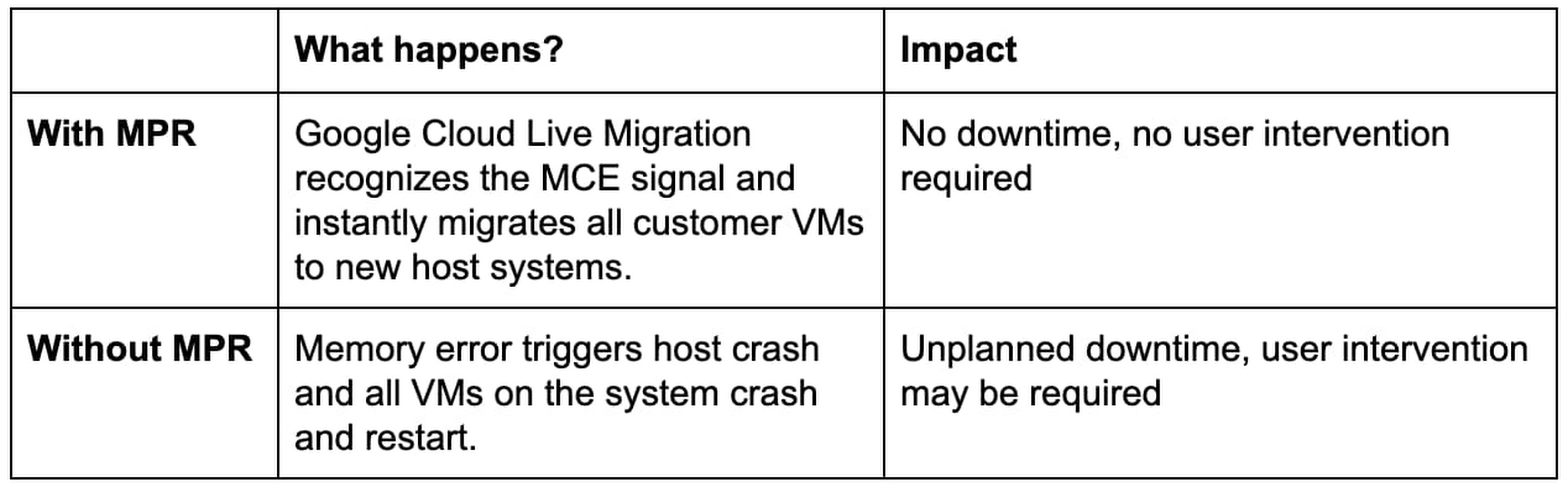
Next, our “victim neighbors” group probably won’t even know there was a problem with the host system. Google Cloud Live Migration will move them to a new host, instantly and automatically, and avoid the crash-and-restart scenario.
Customer Group: Customers running other, any application on a VM not directly affected by a memory error
Simple steps for taking advantage of MPR
Our MPR capabilities will be available on our Google Cloud memory-optimized Compute Engine second generation instances in Q4 of 2021. We’ll continue to roll out the capability during the months ahead to additional instances and look for new ways to work with applications that adopt a MCE Aware architecture.
Most customers in the “victim neighbor” category will not need to lift a finger to experience the benefits. By marrying our Live Migration feature to some awareness of those MCE signals, we ensure that it hears the alarm first and gets a critical head start on the migration process before issues begin with the guest VMs. Our customers land safely on a new host, and their applications keep running.
For our SAP customers running HANA, MPR is all about protecting against loss. Unplanned downtime for a HANA environment is incredibly expensive, the recovery process from a hard crash is extremely long, and the business disruptions can be truly damaging to the business. Thanks to MPR, all of that cost and worry can get compressed almost to nothing — with Fast Restart reducing what can be an hour or more of downtime to a matter of seconds.
But our SAP customers have to take a critical first step to claim these benefits. Fast Restart is a crucial piece of the MPR solution, and it is not enabled by default. Configuring your SAP HANA instance for Fast Restart involves changing a few configuration settings; the process is fast, easy, and doesn’t involve risk.
Finally, if you’re not running your workloads — SAP or otherwise — on Google Cloud, consider the benefits of running on a cloud that mitigates a hardware reliability issue affecting businesses of every size and industry. And consider the value of tools like Live Migration that already help Google Cloud customers improve uptime and reduce risk.
Hardware failures happen, and they probably always will. But we’re proving how valuable it can be to avoid the bad things that usually happen when memory failures occur. Right now, only Google Cloud has a practical solution to this very difficult problem.
Learn more about Fast Restart for SAP HANA, Live Migration and other key Google Cloud capabilities for your SAP environment.

3450
Of your peers have already downloaded this article
5:30 Minutes
The most insightful time you'll spend today!
While innovation remains a top priority across all industries, many companies are not achieving the results they want from their innovation efforts. As companies migrate their SAP enterprise resource planning (ERP) systems to the cloud, technology leaders see this as an opportunity to reimagine business processes and propel their innovation strategies.
This paper will explore the benefits that companies have reaped from their SAP cloud migration, such as using IT resources more effectively, gaining deeper insights from data, and improving innovation. It will also examine the approach organizations are taking to gain buy-in from other stakeholders in their operations, positioning the SAP migration for a successful outcome.
SevenRooms: Building a profitable, sustainable future in food and beverage with Google Cloud

2948
Of your peers have already read this article.
3:30 Minutes
The most insightful time you'll spend today!
Finding ways to increase customer loyalty and profitability in a post-COVID world is top of mind for hotels, bars, and restaurants. Unfortunately, many food and beverage services providers struggle to deliver the personalized experiences that keep guests coming back for more. The reality is that most traditional hospitality apps offer only limited insight into guest activities, preferences, underlying operating costs, and other essential details.
We built SevenRooms to help food and beverage operators create truly memorable experiences by managing and personalizing every step of the guest journey. With SevenRooms, restaurants in more than 250 cities globally leverage technology and data to provide unforgettable hospitality experiences with a human touch. That includes seating guests at their favorite table, pouring complimentary glasses of wine from a preferred vintage, offering special menu options, and personalized experiences for special occasions.
Scaling guest experience and retention on Google Cloud
When developing SevenRooms, we needed a technology partner that would enable our small team to securely scale services, automate manual tasks, and accelerate time to market while reducing IT costs. That’s why we started working with Google App Engine—and later became more involved with the Google for Startups Cloud Program.
We soon realized many traditional apps lacked the integrations and capabilities needed to respond to the unique challenges facing food and beverage operators that the Google for Startups Cloud Program services provide. With guidance from experts on the Google Startups Success team, we quickly transformed SevenRooms from a beta restaurant and nightclub reservation and guest management point solution into a full-fledged guest experience and retention platform that analyzes actionable data to automatically build and continuously update detailed guest profiles.
The combination of Google App Engine and other Google Cloud solutions makes everything easier to build and scale. We’re seeing our total cost of ownership (TCO) decline by 10-15%, so we can shift additional resources to R&D to help customers create one-of-a-kind interactions with their guests. And importantly, we can bring new products to market 200-300% faster than competitors.
Because SevenRooms handles a lot of sensitive guest data, stringent security protocols are vital. We store all data on Google Cloud, taking advantage of its highly secure-by-design infrastructure and built-in support for international data privacy laws such as GDPR. We use BigQuery and Looker for data analysis and reporting, and power our NoSQL database with Firestore. We also scale workloads and run Elasticsearch on Google Compute Engine (GCE)—and seamlessly integrate our reservation booking engine with Google Maps and Google Search.
In the future, we’re looking to further market actionable guest data with the help of advanced machine learning (ML) models with TensorFlow and Google Cloud Tensor Processing Units (TPUs). Cloud TPUs and Google Cloud data and analytics services are fully integrated with other Google Cloud offerings, including Google Kubernetes Engine (GKE). By running ML workloads on Cloud TPUs, SevenRooms will benefit from Google Cloud’s leading networking and data analytics technologies such as BigQuery.
We’re also exploring additional Google Cloud solutions such as Anthos to unify the management of infrastructure and applications across on-premises, edge, and multiple public clouds, as well as Google Cloud Run to deploy scalable containerized applications on a fully managed serverless platform. These solutions will enable us to continue to quickly expand our services and offer customers a variety of new benefits.
Building a profitable, sustainable future in food and beverage
Our work with the Google Startups Success team has been instrumental to helping us get where we are today. Their responsiveness is incredible and stands out compared to services from other technology providers. Google Cloud gives us a highly secure infrastructure and next-level training to evolve our infrastructure using solutions such as BigQuery and Backup and Disaster Recovery.
We also work with Google Cloud partner, DoiT International, to further scale and optimize our operations. In particular, DoiT provided expert scripts to short-cut lengthy processes, while actively troubleshooting any issues or questions that came up. DoiT continues to share guidance in key areas for future products and features. They have provided expertise for architecture, infrastructure and cost management. Moving forward, we’re excited to work with Google Cloud and DoiT to handle a growing surge in users which we anticipate in 2023 and beyond.
With Google Cloud, SevenRooms is revitalizing food and beverage service delivery by enabling businesses to cultivate and maintain direct guest relationships, deliver exceptional experiences, and encourage repeat visits. We’ve compiled many case studies that demonstrate how our customers see great results by personalizing their interactions with guests, from $1.5M in cost savings, to $400K of additional revenue, to a 68% jump in email open rates.
Demand for our guest experience and retention platform keeps growing as we help our customers take a people-first approach by delivering unique and tailored dining experiences. We can’t wait to see what we accomplish next as we expand our team and reach new markets worldwide.
If you want to learn more about how Google Cloud can help your startup, visit our page here to get more information about our program, and sign up for our communications to get a look at our community activities, digital events, special offers, and more.
Attract Investor Funding by Harnessing the Power of Cloud Operations, Billing, and Customer Care

1395
Of your peers have already read this article.
4:30 Minutes
The most insightful time you'll spend today!
More and more startups are choosing to build their business on Google Cloud, and if yours is one of them — welcome! And even though Google Cloud is easy to use, there’s still a lot to learn, starting with how to create and activate your account, and how to create projects, folders, and organizations as part of Google Cloud’s resource hierarchy. If you prefer, you can also watch our video on how to get started with Google Cloud.
Once you’ve mastered those concepts, you’re ready to learn how to get the most out of your investment in Google Cloud. In this blog, we’ll show you how to manage and monitor your cloud resources with Google Cloud’s operations suite, administer your billing with Cloud Billing, and improve the support you receive with Google Cloud Customer Care. Whether you’re new to Google Cloud or an experienced user, these services will help improve your experience.
Let’s get started!
Improve the performance and reliability of your applications with the operations suite
Sometimes you want to check how your deployment is behaving, or if there is something happening with your server, database, or application that is affecting your customers. With so many tools to check, finding and solving the issue can become overwhelming very quickly. This is where Google Cloud’s operations suite comes in.
This suite of products for integrated monitoring, logging, and tracing managed services for applications and systems running on Google Cloud and beyond. It can help you visualize and monitor incidents with dashboards and Metrics Explorer, manage and analyze log data in real-time all in one place with Cloud Logging, visualize metrics at scale with Cloud Monitoring, manage latency with Cloud Trace, and perform performance and cost management with Cloud Profiler.
Learn more about the operations suite in the video below:
Manage budgets and alerts with Cloud Billing
Google Cloud billing management is easier than you might think. Google Cloud charges for compute resources monthly on a consumption basis, which is different from the traditional upfront purchase model. With the right tools and resources, you can more easily manage your costs and optimize your use of Google Cloud resources.
One of the most important things to do is to set up billing and alerts. This will help you avoid unexpected charges and ensure that you are only paying for the resources you use. You can also use budgets and alerts to track your costs and help ensure that you are staying within your budget.
You can also view your costs through console billing reports, monthly invoices or build customized dashboards on BigQuery, Google Data Studio, or a BI tool of your preference. This allows you to see where your costs come from and identify areas where you can save money. You can also use cost management to optimize your use of Google Cloud resources and get the most out of your investment.
Finally, Google Cloud offers a variety of discounts and optimization options. These can help you save money on your overall costs. For example, you can get a discount if you commit to using Google Cloud for a certain period of time. You can also save money by using preemptible VMs, which are VMs that are available at a lower price but can be terminated at any time.
Google Cloud Customer Care
To meet customer needs and deliver a better experience, we’ve reenvisioned our Customer Care portfolio, a scalable set of offerings built with your needs at the center, so you can simplify and streamline your support experience.
Choose from the core offerings:
- Basic – the support tier you receive when you sign up on Google Cloud. You can use this at no cost but support is offered for billing issues only.
- Standard – simple, flexible way to ensure that your workloads run smoothly on Google Cloud. Standard enables you to receive technical help from Google experts with a four hour response time and 8 hours response time during 5 days a week availability.
- Enhanced – rapid response times and additional services to boost your productivity and help you run in Google Cloud efficiently. There is both case and phone support for technical issues, with a one-hour response time. There is 24/5 availability overall with 24/7 for critical issues. You can also have add-ons or value-add services like Technical Account Adviser Service and Event management.
- Premium – the highest value support offering, supplying incredibly fast response times, a named Technical Account Manager, Customer Aware support and additional services. There is case and phone support for technical issues and also third-party technology support, with a 15-minute response time and a 24/5 availability overall with 24/7 for critical issues.
Watch the video to find out how to purchase support, create support cases and learn more about support.
Supercharge your growth with the Google for Startups Cloud Program
Growing a startup requires technology that can keep up with and enhance your ideas. The Google for Startups Cloud Program provides the tech you need to help develop better software and deliver innovative experiences with confidence. At the same time, you’ll help boost your team’s capabilities with expert cloud guidance, Google Cloud credits, training opportunities, and more.
The program has two tiers:
- Start: for pre-seed startups that have not yet received equity funding. Get up to $2,000 USD in Google Cloud credit that’s valid for two years toward Google Cloud services and even toward a Cloud Customer Care plan with unlimited access to technical support, networking opportunities with the global Google Cloud Startup Community, and more.
- Scale: for seed to series A startups with verified equity funding. Get Google Cloud and Firebase costs covered up to $100,000 USD a year for your first two years, unlimited access to technical support when credits are applied to a Cloud Customer Care plan, partnerships with Google Cloud Startup Customer Engineers and a dedicated Startup Success Manager, networking opportunities with the global Google Cloud Startup Community, co-marketing for select startups, and more.
Once enrolled, Google startup experts will recommend Google products and services that can help your startup grow in the cloud. Learn more about the Google for Startups program, eligibility criteria, credit usage and migration incentives in the our Startup Programs video linked down below.
That’s a wrap!
Let’s recap: The operations suite includes tools to monitor incidents, analyze log data in real-time, manage latency, and more. Cloud Billing offers billing management tools and resources to help you save costs and make the most of your resources. If you need help, Cloud Customer Care services are available to streamline your support experience. Also, if you’re a startup, don’t forget to check the Google for Startups Cloud Program!
The Google Cloud Technical Guides for Startups series has many detailed videos and handbooks to support you on all steps of your startup growth journey. Check out our full playlist on the Google Cloud Tech channel and website. Don’t forget to subscribe to stay up to date.
See you in the cloud!
More Relevant Stories for Your Company
What Are India’s Biggest Companies Doing on Google Cloud?
In the last year, there’s been an upward trend in cloud adoption in India. In fact, NASSCOM finds that cloud spending in India is estimated to grow at 30% per annum to cross the US$7 billion mark by 2022. At Google, in our conversations with customers, discussions have evolved beyond cost savings

Explore Google Cloud’s Bi-monthly Technical Learning Series for Innovators in Public Sector
Cloud engineers face a constant barrage of new cloud services, products, and innovations. By late 2021, Google Cloud alone had released thousands of new features across hundreds of services. Couple this with other technologies and service releases, and it quickly becomes a herculean task for engineers to navigate, consume, and

Financial Firms Can Enjoy These 8 Benefits by Migrating and Running on Google Cloud VMware Engine
The COVID-19 pandemic brought dramatic changes to the financial services industry. Already under pressure from nimble young fintechs to modernize, established banks and insurers were undergoing incremental digital transformation. But in 2020, they hit the gas pedal. Branches closed and remote work became the norm. Almost overnight, employees needed secure remote access

Manhattan Associates and Google Cloud: How the Partnership Accelerates Future of Digital Retail
While the shift to digital business and the cloud has been well under way for some years now, organizations today have a new sense of urgency due to COVID-19. Delivering digital transformation is no longer a ‘nice to have’ option, rather, it is an operational imperative. Taking advantage of the
