





Gmail’s BIMI Increases Confidence about Security and Delivers Immersive Email Experiences

5469
Of your peers have already read this article.
3:00 Minutes
The most insightful time you'll spend today!
Creating a secure-by-default experience based on robust defenses has always been a core design principle for Gmail. That’s why we’ve established a strong baseline of security in Gmail, with built-in protections to help automatically filter out potentially malicious messages. While these defenses help keep Gmail users safe, email functions as part of a large, complex, interconnected ecosystem that we continually invest in and work to protect. After first announcing Gmail’s Brand Indicators for Message Identification (BIMI) pilot last year, today we’re announcing that over the coming weeks we’re rolling out Gmail’s general support of BIMI, an industry standard that aims to drive adoption of strong sender authentication for the entire email ecosystem. BIMI provides email recipients and email security systems increased confidence in the source of emails, and enables senders to provide their audience with a more immersive experience.


“Bank of America has a wide range of security measures in place to support our customers, and we constantly evolve our program to deliver best in class protection. Part of this effort is our partnership with Google on BIMI, which provides an easy way to validate if correspondence is from us.” — Bank of America
BIMI enables organizations that authenticate their emails using Domain-based Message Authentication, Reporting, and Conformance (DMARC)—a standard for providing strong sender authentication that allows security systems to perform better filtering, separating legitimate messages from potentially spoofed ones—to validate ownership of their logos and securely transmit them to Google. BIMI is designed to be easy: for organizations with DMARC in place, validated logos display on authenticated emails from their domains and subdomains.
Here’s how it works: Organizations who authenticate their emails using Sender Policy Framework (SPF) or Domain Keys Identified Mail (DKIM) and deploy DMARC can provide their validated trademarked logos to Google via a Verified Mark Certificate (VMC). BIMI leverages Mark Verifying Authorities, like Certification Authorities, to verify logo ownership and provide proof of verification in a VMC. Once these authenticated emails pass our other anti-abuse checks, Gmail will start displaying the logo in the existing avatar slot.
“Gmail’s support of BIMI is a win for email authentication, brand trust, and consumers alike. BIMI gives organizations the opportunity to provide their customers with a more immersive email experience, strengthening email sender authentication across the entire email ecosystem.” — Seth Blank, Chair of the AuthIndicators Working Group
This is just the start for BIMI. The standard expects to expand support across logo types and validators. For logo validation, BIMI is starting by supporting the validation of trademarked logos, since they are a common target of impersonation. Today, Entrust and DigiCert support BIMI as Certification Authorities, and in the future the BIMI working group expects this list of supporting validation authorities to expand further. To learn more about BIMI and see the latest news, visit the working group’s website.
To take advantage of BIMI, ensure that your organization has adopted DMARC, and that you have validated your logo with a VMC. For Gmail users, no action is required. We’re proud to be one of the leading members in both establishing and supporting the BIMI standard and will continue to support efforts that contribute to security for the entire email ecosystem.
Maximize your downtime with these 12 cost-effective Google Cloud learning opportunities

3000
Of your peers have already read this article.
3:30 Minutes
The most insightful time you'll spend today!
The holiday season is upon us! If you are making your list and checking it twice, we’ve got a few learning gifts you can tick off the list and share with others too. For the season of giving, we’ve wrapped up some of our most popular training and certification opportunities and made them available at no-cost.
This December we’re aiming to offer something for everyone, whether you’re just getting started with cloud, or knee deep in preparing for a professional certification exam. Start with the fundamentals to gain a deeper understanding of cloud whether you’re in a business or technical role. Perhaps you’re looking to flex your data analytics and ML muscle with BigQuery and SQL, earn a Google Cloud skill badge, or enhance your technical cloud skills. Or jump into a hot topic like sustainability and learn about Google’s commitment to a clean cloud, and how to use sustainability tools. Read on to find something on your learning wishlist.
We also have a variety of learning formats to fit your needs. Complete hands-on labs, view courses and webinars, or jump into competitions like the Google Cloud Fly Cup Challenge or our most popular #GoogleClout Challenge of 2022 – and let the fun begin!
Are you ready to learn? Take a look at the training we’ve recommended below to work towards your goals as we head into the new year, with new skills, to make the most of new opportunities.
We’re giving plenty of learning gifts to choose from this month, so take your pick from the topics below:
ML, AI and data analytics
Who it’s for: ML, AI and data engineers
What you’ll take away: A deeper understanding of working in BigQuery and SQL.
Level: Foundational
Start learning now:
- Introduction to SQL for BigQuery and Cloud SQL – Get started with this one hour and 15 minute hands-on lab to learn fundamental SQL querying keywords, which you will run in the BigQuery console on a public dataset, and how to export subsets of a dataset into CSV files, then upload to Cloud SQL. You’ll also learn how to use Cloud SQL to create and manage databases and tables, with hands-on practice on additional SQL keywords that manipulate and edit data.
- Weather Data with BigQuery – In this 45 minute lab, you’ll use BigQuery to analyze historical weather observations, and run analytics on multiple datasets.
- Insights from Data with BigQuery – Earn a shareable skill badge when you complete this five hour quest. It includes interactive labs covering the basics of BigQuery, from writing SQL queries, creating and managing database tables in Cloud SQL, and querying public tables to loading sample data into BigQuery.
- The Google Cloud Fly Cup Challenge – This is a three-stage competition in the sport of drone racing in the Drone Racing League (DRL). You will use DRL’s race data to predict outcomes and give performance improvement tips to pilots (these are the best drone pilots in the world!). There’s a chance to win exclusive swag, prizes, and an expenses paid trip to the DRL World Championship. Registration closes on December 31, 2022.
CI/CD
Who it’s for: Software Developers
What you’ll take away: Take part in our most popular #GoogleClout challenge of 2022! Build a simple containerized application.
Level: Fundamental
Start learning now:
- GoogleClout – CI/CD in a Google Cloud World – Flex your #GoogleClout in this cloud puzzle that challenges you in a lab format to create a Cloud Build Trigger to rebuild a containerized application hosted on a remote repository. Register it in the Artifact Registry and deploy. You’ll be scored on your results and earn a badge to share.
Preparing for Google Cloud certification
Who it’s for: Cloud engineers and architects, network and security engineers and Google Workspace administrators
What you’ll take away: Explore the breadth and scope of the domains covered in the cloud certification exams, assess your exam readiness and create a study plan.
Level: Foundational to advanced
Start learning now:
- Preparing for Google Cloud certification – These courses are for Associate Cloud Engineers, Professional Cloud Architects, Professional Cloud Network Engineers, Professional Cloud Security Engineers, and Google Workspace Administrators preparing for Google Cloud certification exams. You’ll also earn a completion badge when you finish the course.
- Preparing for the Cloud Architect certification exam – Join this 30 minute on-demand webinar to learn about resources to maximize your study plan, and get tips from a #GoogleCloudCertified Professional Cloud Architect.
Intro to Google Cloud for technical professionals
Who it’s for: Software Developers
What you’ll take away: Boost your Google Cloud operational and efficiency skills to drive innovation by navigating the fundamentals of compute, containers, cloud storage, virtual machines, and data and machine learning services.
Level: Foundational
Start learning now:
- Getting Started with Google Cloud Fundamentals – This on-demand webinar takes a little less than three hours to complete. Navigate Compute Engine, container strategies, and cloud storage options through sessions and demos. You’ll also learn how to create VM instances, and discover Google Cloud’s big data and machine learning options.
Intro to Google Cloud for business professionals
Who it’s for: Business roles in the cloud space like HR, marketing, operations and sales
What you’ll take away: A deeper understanding of cloud computing and how Google Cloud products help achieve organizational goals.
Level: Foundational
Start learning now:
- Cloud Digital Leader learning path -There are four courses in this learning path covering digital transformation, innovating with data, infrastructure and application modernization, and Google Cloud security and operations.
- Preparing for the Cloud Digital Leader certification exam – In this 30 minute webinar continue your learning journey by preparing for the Google Cloud Digital Leader certification exam. The webinar covers all the resources we’ve made available to help you prepare.
Sustainability
Who it’s for: Software Developers
What you’ll take away: Learn how the cleanest cloud in the industry can help you save your cloud bill, and save the planet.
Level: Foundational
Start learning now
- A Tour of Google Cloud Sustainability -Work through this one hour, hands-on lab, to explore your carbon footprint data, use the Cloud Region Picker, and reduce your cloud carbon footprint with Active Assist recommendations.
Keep connected and learning with us in 2023
Accelerate your growth on Google Cloud by joining the Innovators Program. No-cost for users of Google Cloud (including Workspace), it’s for anyone who wants to advance their personal and professional development around digital transformation, drive innovation, and solve difficult business challenges.
Continue your learning with Google Cloud in 2023 by starting an annual subscription1 with Innovators Plus benefits. Gain access to $500 in Google Cloud credits, live learning events, our entire on-demand training catalog, a certification voucher, access to special events, and other benefits.
Build your skills, reach your goals and advance your career with 12 no-cost ways to learn Google Cloud!
- Start an annual subscription on Google Cloud Skills Boost with Innovators Plus for $299/year, subject to eligibility limitations.
Google Cloud CCAI’s Support for the Public Sector Soars during the Pandemic

5282
Of your peers have already read this article.
2:00 Minutes
The most insightful time you'll spend today!
Scaling Virtual Support in the Pandemic Era: The AI Connection
Since the early days of the pandemic, we’ve partnered with government organizations and academic institutions to serve communities at scale with Contact Center Artificial Intelligence (CCAI). I sat down with Bill MacKenzie, IT liaison for the Upper Grand School District in Ontario, and Marco Palermo, director of digital government and modernization, to discuss how they embraced CCAI to introduce scalable service delivery to residents and students alike. I’m sharing more on their stories below, and for the full overview, check out our Google Cloud Public Sector Summit session, Scaling Virtual Support in the Pandemic Era: The AI Connection.
Upper Grand School District: Answering questions with speed and accuracy
Bill MacKenzie described the Upper Grand School District’s struggles at the beginning of the pandemic, particularly helping parents with IT issues. The staff-oriented help desk was not equipped to assist parents trying to securely login for students as young as kindergarten. Without sufficient support for parents, the District was struggling to handle thousands of phone calls a day.
To alleviate the manual strain, they turned to Quantiphi, a Google Cloud partner, to implement Google Cloud Dialogflow. They were fully functional within a few weeks. The new website provided real-time responses as well as clear documentation to help parents get up and running quickly.
“In the first 10 days, we had over 5,000 hits, and the accuracy rate was 92%,” MacKenzie said.
The district doesn’t know what the future holds, but now that they have been through the process, they are confident they now understand how to create their own bots to meet critical needs.
City of Toronto: Getting critical information to the community
Marco Palermo explained how the city of Toronto was facing a very rapid and fluid situation at the beginning of the pandemic. Getting information to constituents was extremely important, and they needed alternative channels to deliver that information.
Toronto has been committed to workforce equity and inclusivity in order to best represent the diversity of its residents. As a result, solutions had to be accessible to all. The bot handled 25,330 unique users and addressed 20,174 total questions with an 80% accurate response rate in the first four months. It’s been a huge success for the city, with plans to expand its capabilities.
Personalized response to the pandemic challenge
I noted that even before the pandemic, government leaders were asking for a way to provide more flexible personal experiences and better support outside of normal business hours. Around 60% of constituents want more self-service options and 75% would happily interact with digital resources if they could get the answers they needed.
Google Cloud CCAI addresses these needs with a single core of intelligence that provides a consistently high-quality conversational experience—human or virtual—across all channels and platforms. It can be deployed on legacy infrastructure without upgrades in an average of two weeks.
CCAI operates with a conversational core that centralizes the ability to talk, understand, and interact, orchestrating high-quality conversations at scale. It provides services in three different ways:
- Virtual Agent AI allows natural conversation with customers to identify and address their issues effectively
- Agent Assist AI helps human agents by providing real-time turn-by-turn guidance so they can better serve constituents
- Insight AI determines metrics and trends in real-time to enable faster and more accurate insights
CCAI provides consistency across every application. It can go off-script when answering complex questions, adjusting human conversation with the capacity to handle unexpected stops and starts, odd word choices, or implied meanings. It can also handle multiple use cases for the customer, such as taking payments, updating information, providing information, and more. By allowing agencies to automate routine tasks and reduce the amount of time employees need to dedicate to answering calls, the solution created cost savings for the agency.
Explore more on this session by visiting the Public Sector Summit on-demand video.
4090
Of your peers have already watched this video.
1:00 Minutes
The most insightful time you'll spend today!
Say Hello to Google Workspace
Make way for Google Workspace to connect, create, and collaborate with your team and organization. Watch the video to explore how you can achieve more with Google Workspace and how it can transform the future of workplace!
4648
Of your peers have already watched this video.
1:30 Minutes
The most insightful time you'll spend today!
How a Furniture Retailer Found a Cool Way to Innovate Every Day and Beat Competition
MADE.COM is a London-based company that designs and retails homewares and furniture online, and across a network of experiential showrooms in Europe.
Founded by serial entrepreneur Ning Li and Brent Hoberman, with Julien Callède and Chloe Macintosh in 2010, the company works with independent designers to create world-class furniture for its customers at affordable prices.
With a team of over 150 people, spread across four countries, collaboration was beginning to be a huge challenge and would eventually slow them down. In a competitive market, that’s something it couldn’t afford.
“For a company that was built online, it’s in our culture to do things fast. That’s the big part of our culture: moving fast and keep innovating every day,” says Li.
In order to make that possible, MADE.COM turned to G Suite. Watch the video to find out how G Suite makes that happen.
Google Launches Smart Canvas to Stir-up Collaboration in Google Workspace

5458
Of your peers have already read this article.
2:00 Minutes
The most insightful time you'll spend today!
After more than a year of remote collaboration, many people are showing signs of digital fatigue. Throughout the pandemic, millions of employees bridged the physical distances with their colleagues by making themselves more available, joining a deluge of virtual meetings, and leaning into a dizzying array of tools and applications. As part of our mission to build the future of work, we’re addressing these challenges in Google Workspace.
As we announced today at I/O, we’re launching smart canvas—a new product experience that delivers the next evolution of collaboration for Google Workspace. Between now and the end of the year, we’re rolling out innovations that make it easier for people to stay connected, focus their time and attention, and transform their ideas into impact.
Specifically, we’re enhancing the apps that hundreds of millions of people use every day—like Docs, Sheets, and Slides—to make them even more flexible, interactive, and intelligent. With smart canvas, we’re bringing the content and connections that transform collaboration into a richer, better experience in Google Workspace.
When we launched Google Docs and Sheets 15 years ago, these apps introduced the world to a new way of working. They enabled anytime, anywhere teamwork—a stark contrast to the legacy tools that were designed for an era of individual work on office desktops. For over a decade now, we’ve been pushing documents away from being just digital pieces of paper and toward collaborative, linked content inspired by the web. Smart canvas is our next big step.https://www.youtube.com/embed/SDBbFETGiA4?enablejsapi=1&
Making collaboration more flexible and helpful
The evolving hybrid work model gives new urgency to existing collaboration challenges. How do teams stay focused and connected as they work together, regardless of where people are located? With smart canvas, we’re building deeper connections across Google Workspace to transform collaboration anywhere it happens.
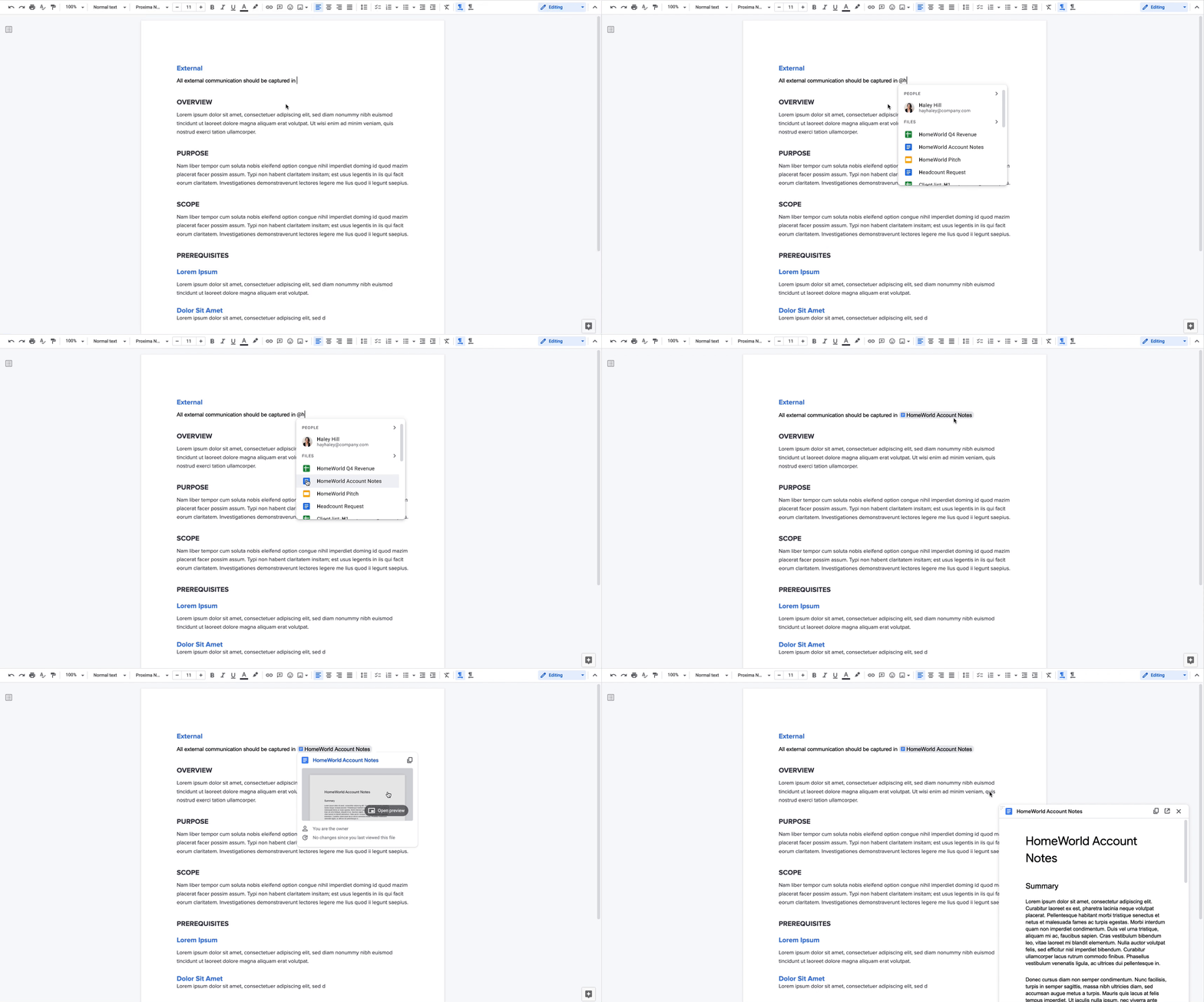
For example, we’re taking something that people already use every day—@-mentions—to open up new, powerful collaboration capabilities. New interactive building blocks—smart chips, templates, and checklists—will connect people, content, and events into one seamless experience.
Already available, when you @ mention a person in a document, a smart chip shows you additional information like the person’s location, job title, and contact information. And starting today, we’re introducing new smart chips in Docs for recommended files and meetings. To insert smart chips into your work, simply type “@” to see a list of recommended people, files, and meetings. From web or mobile, your collaborators can then quickly skim associated meetings and people or preview linked documents, all without changing tabs or contexts. Smart chips will come to Sheets in the coming months.
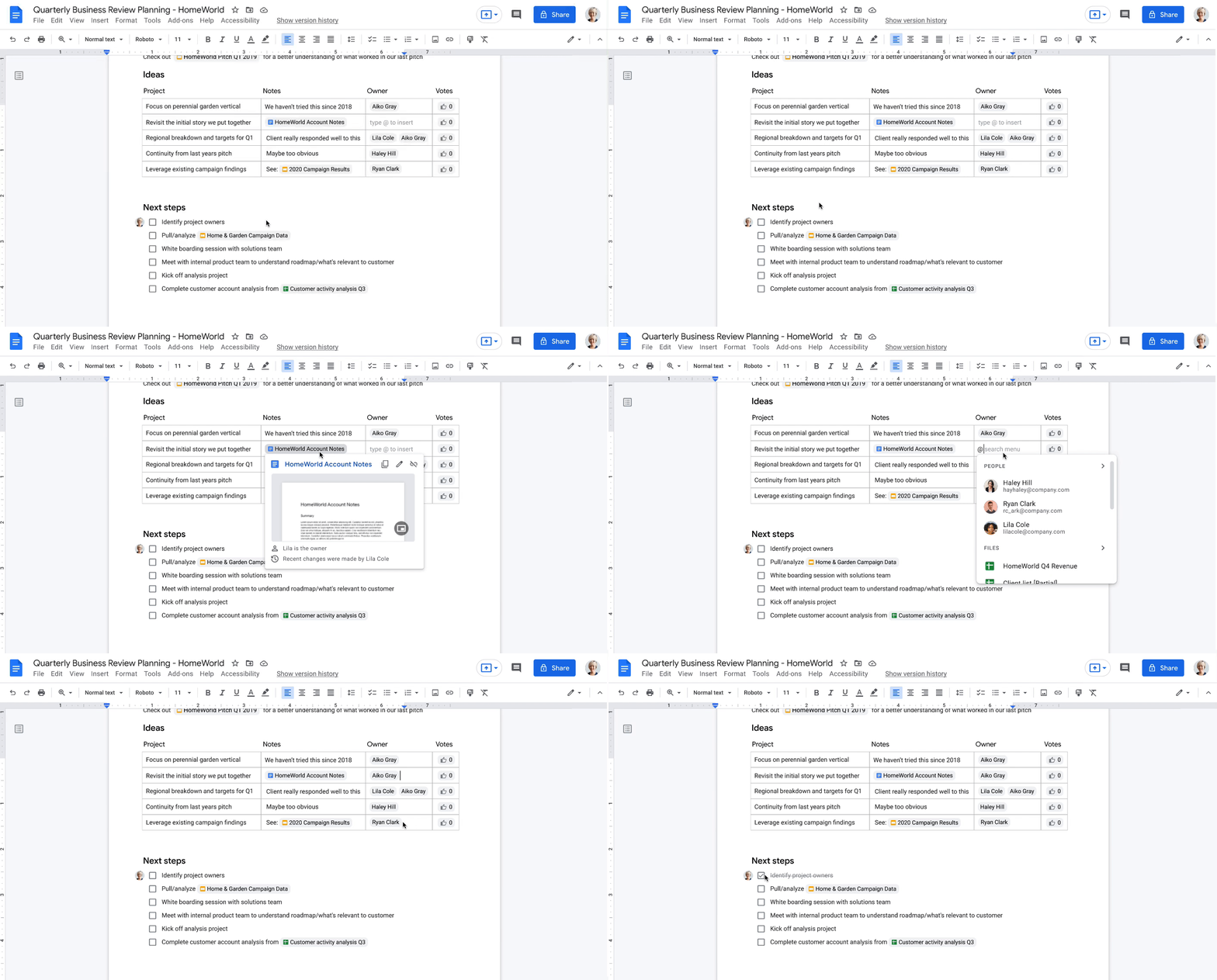
Additionally, we’re making it easier to drive projects forward by streamlining common team workflows. Starting today in Docs, checklists are available on web and mobile, and you’ll soon be able to assign checklist action items to other people. These action items will show up in Google Tasks, making it easier for everyone to manage a project’s To Do list.
We’re also introducing table templates in Docs. Topic-voting tables will allow you to easily gather team feedback while project-tracker tables will help you capture milestones and statuses on the fly. And a new document template for capturing meeting notes will automatically import any relevant information from a Calendar meeting invite, including smart chips for attendees and attached files.
With our new pageless format in Docs, you’ll be able to remove the boundaries of a page to create a surface that expands to whatever device or screen you’re using, making it easier to work with wide tables, large images, or detailed feedback in comments. And if you want to print or convert to PDF, you’ll be able to easily switch back to a paginated view.
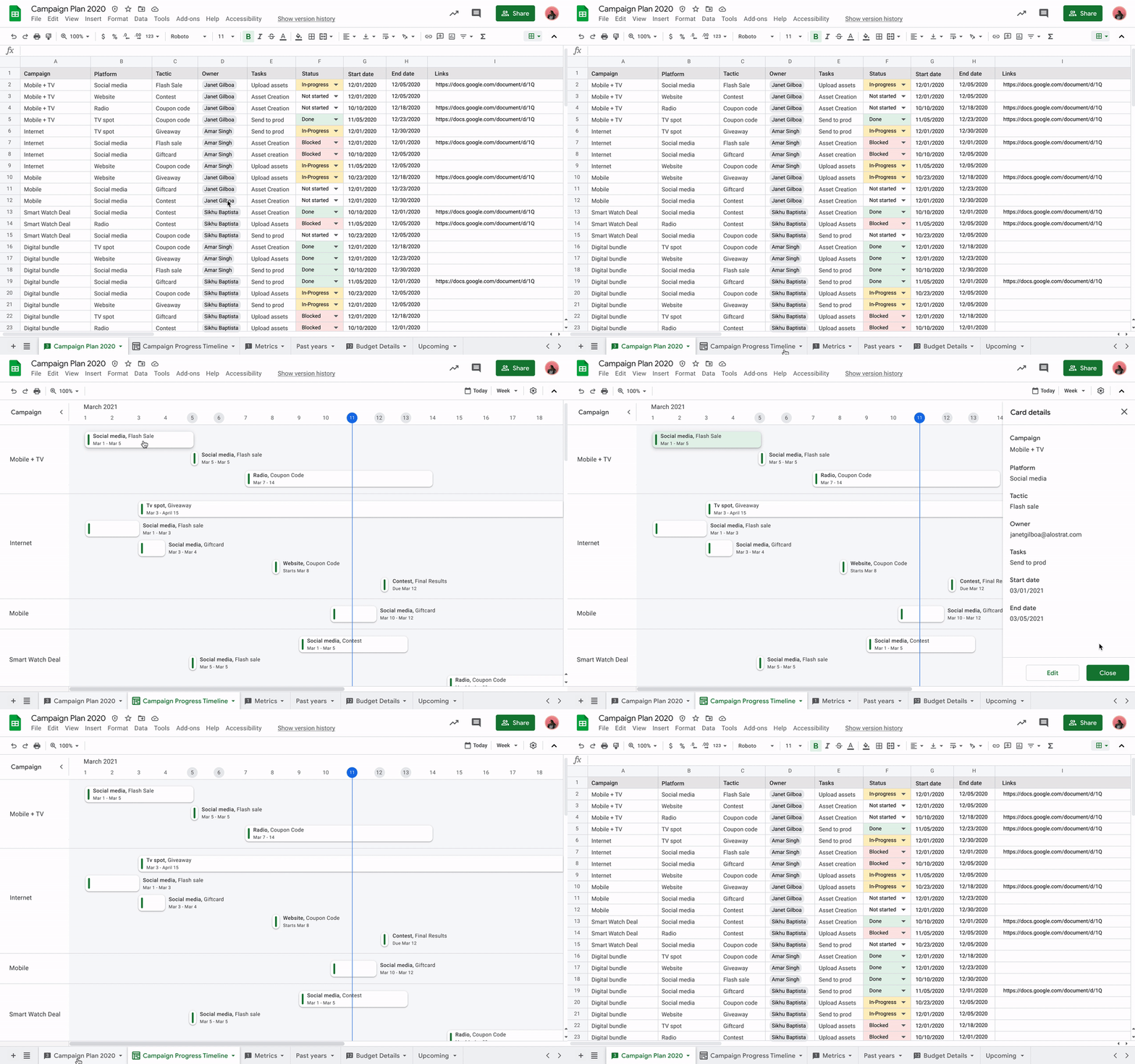
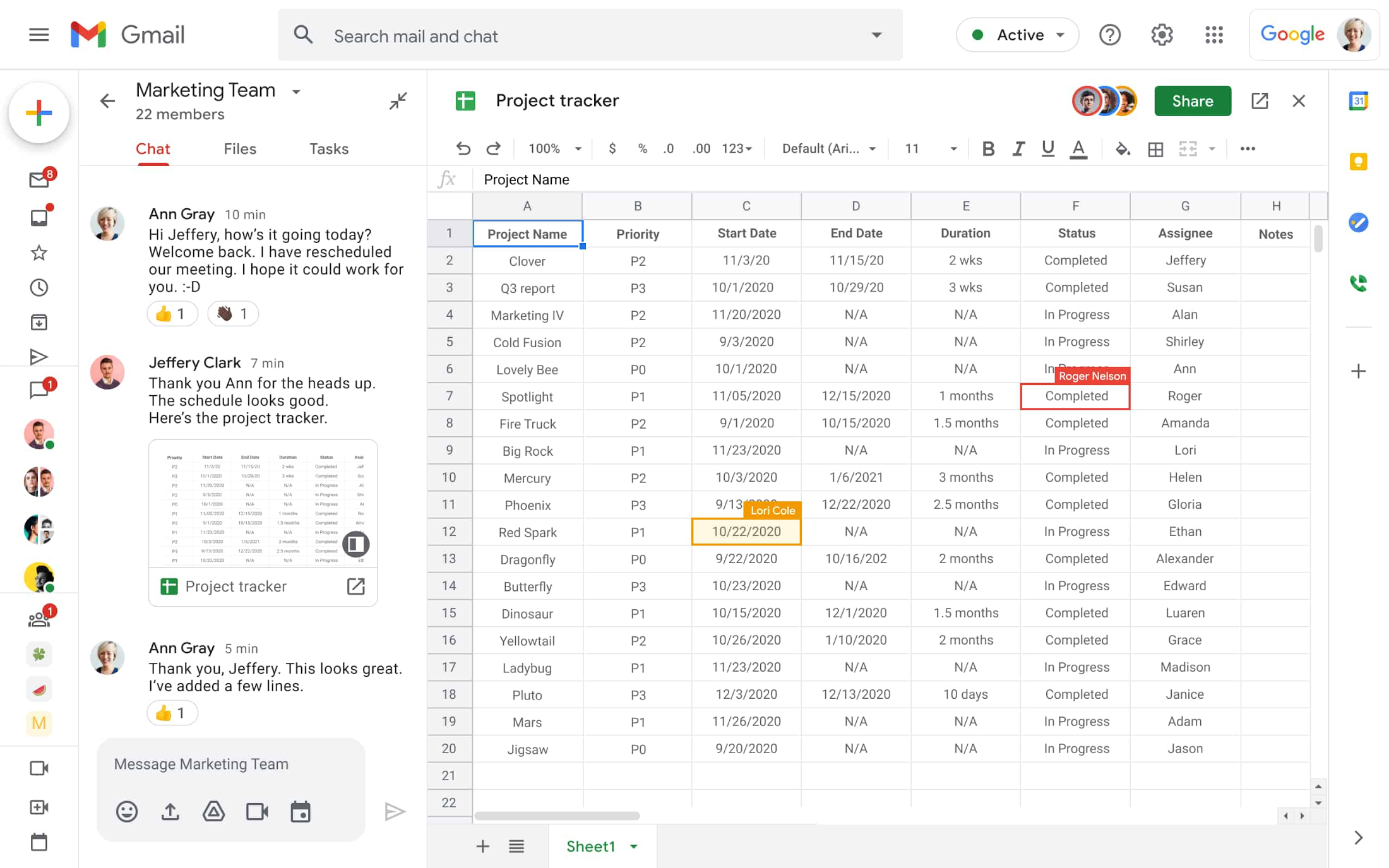
Meanwhile, you’ll be able to toggle between new views in Sheets to better manage and interact with your data. Our first launch will be a timeline view that makes tracking tasks easier and faster. This flexible view allows you to organize your data by owner, category, campaign, or whichever attribute fits best. Using a dynamic, interactive timeline strengthens your ability to manage things like marketing campaigns, project milestones, schedules, and cross-team collaborations.
Fostering human connection—wherever people work
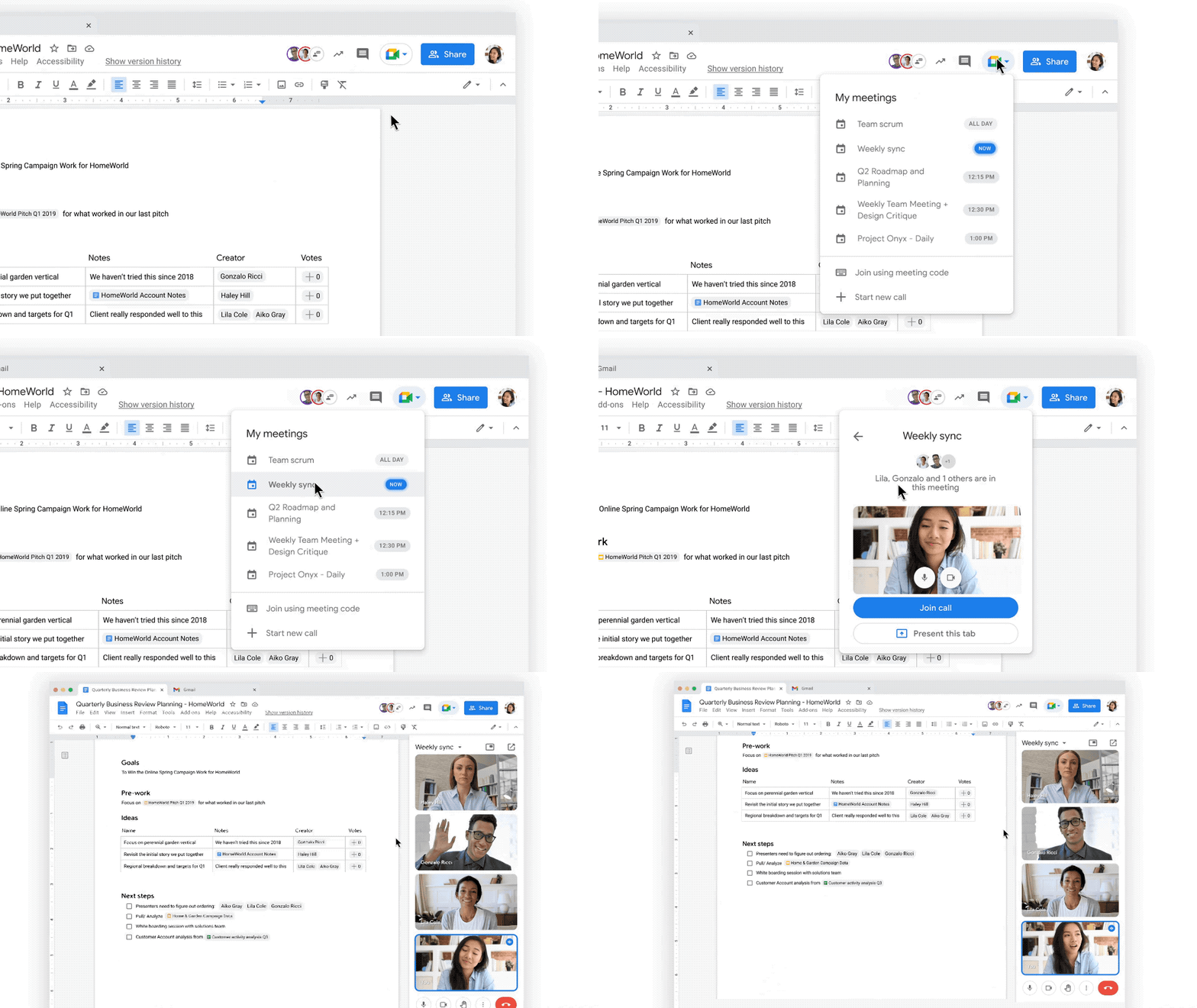
With smart canvas and innovations in Google Meet, we’re making it easy to bring the voices and faces of your team directly into the collaboration experience, to help people share ideas and solve problems together from anywhere. As part of that, we’re building tighter integrations between our communication and collaboration tools so you can pull content into conversations and conversations into content.
Starting today, we’re rolling out the ability to present your content to a Google Meet call on the web directly from the Doc, Sheet, or Slide where you’re already working with your team. Jumping between collaborating in a document and a live conversation without skipping a beat helps the project—and the team—stay focused. And in the fall, we’re bringing Meet directly to Docs, Sheets, and Slides on the web, so people can actually see and hear each other while they’re collaborating.
Live captions and translations in Google Meet will also play a crucial role in keeping people connected as they work together in distributed teams. We currently offer live captions in five languages, with more on the way. And we’re introducing live translations of captions later this year, starting with English-language live captions translated into Spanish, Portuguese, French, or German, with many more languages to follow.
With recent enhancements to Google Meet, we’re also giving people more control and flexibility over the meeting experience, including more space to see people and content, plus the ability to pin and unpin content and video feeds. And to help with meeting fatigue, you can now turn off your self-feed entirely.
Because we know that collaboration is fluid and fast-moving, we’re making it easier for teams to give feedback on the fly and to move seamlessly between conversations and building content together. Teams can now jump from a discussion in Google Chat directly to building content together. Creating and editing Sheets and Docs from Google Chat rooms is already live in our web experience, and we’ll enable it for Slides in the coming weeks. And to gauge the team’s reactions along the way, we’re introducing emoji reactions in Docs in the next few months.
Working smarter and safer
Google Workspace is already infused with powerful intelligence that enables people to make the best use of their time and attention. Whether it’s with the two billion grammar suggestions we surface in Docs every month, or the intelligent file suggestions in Drive’s Priority and Quick Access features that cut file finding time by 50%.
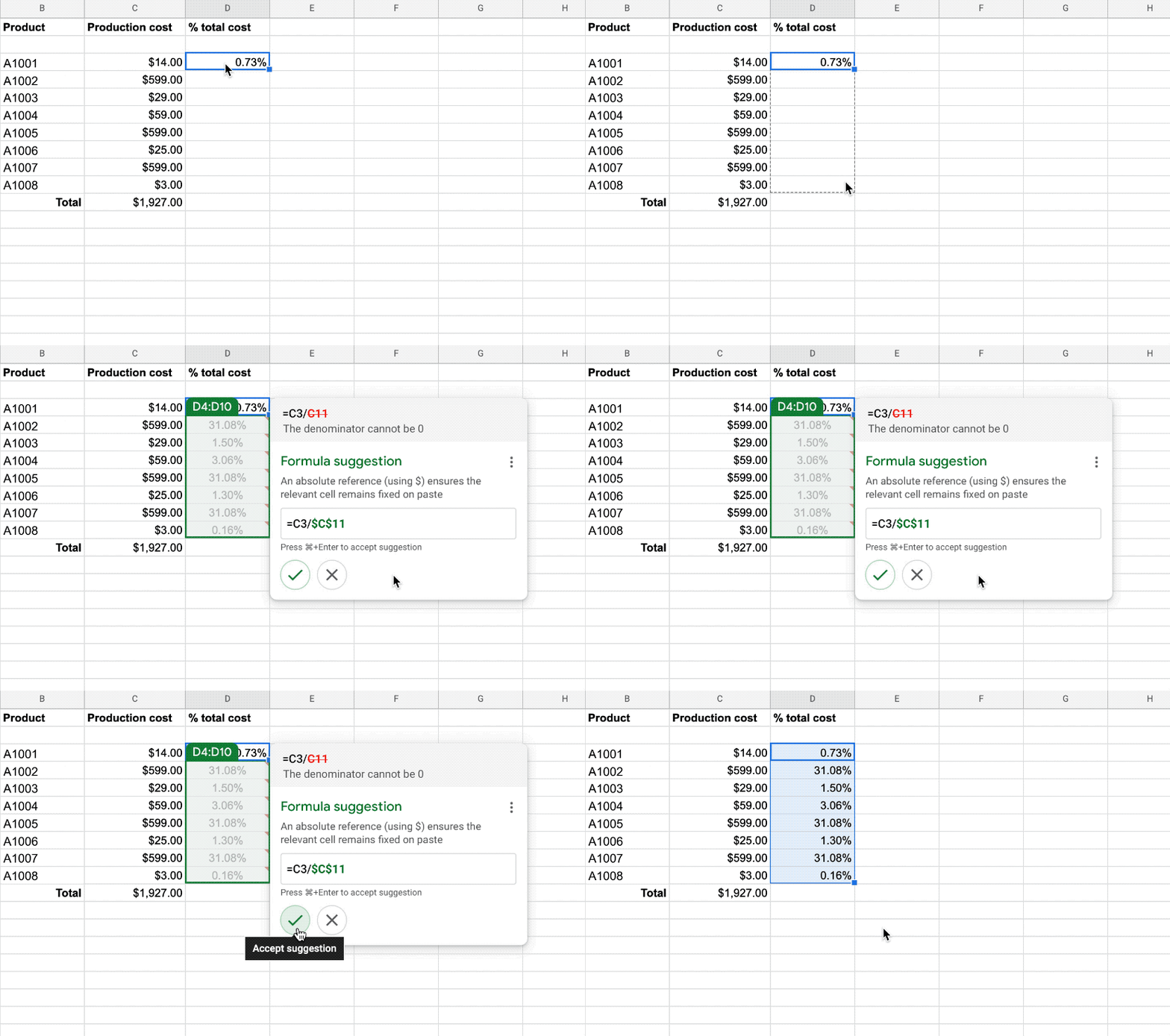
To help everyone work smarter, in the next few months we’re introducing additional assisted writing features in Docs on the web. This includes warnings about offensive words and language, as well as other stylistic suggestions that can speed up editing and help make your writing more impactful. We’re also adding more assisted analysis functionality in our Sheets web experience, with formula suggestions that make it easier for everyone, not just analysts, to derive insights from data. Sheets intelligence helps you build and troubleshoot formulas, making data analysis faster and reducing errors.
As smart canvas evolves, we’re making it easy for businesses to connect the apps and tools they rely on to Google Workspace. This builds on our history of supporting a variety of add-on features that take the friction out of collaboration—from adding e-signatures directly in Google Workspace with DocuSign to the Salesforce connector that integrates with Sheets. To help people work even smarter, we recently announced that AppSheet Automation is generally available, so that you can automate time-consuming tasks—like approving invoices and onboarding new hires—without having to write a single line of code.
Looking ahead, we’re planning to build additional APIs so you can bring the information and actions you need from third-party tools directly into smart canvas elements like smart chips, checklists, and table templates.
And because trust is at the center of all collaboration within Google Workspace, today we’re also launching advanced capabilities that help protect users against security threats and abuse as they work together.
Transforming how people work to deliver real-world innovation
While there’s no one way to collaborate, we know from our customers that transforming how people work results in real-world innovation.
Google Workspace fuels a new way of working together. It lets our teams around the world—whether they’re in the office, at home, or in the grocery store aisle—work more flexibly and translate their ideas into new ways of delighting customers.
—Thibaud Cainne, Global Head of Tech Infra and Digital Workplace, Carrefour
Transformation happens at all levels, and often in every tool. We were able to get 17,000 of our people to make the shift from Excel to Google Sheets in just six months by demonstrating how we could optimize, automate, and connect spreadsheets and their data. That kind of collaboration leads to real-world innovation for our clients.
—Monica Andrea Diaz Pinzon, Chief of Digital Transformation (Special Projects), Banco Davivienda
We built a digital hub on Google Workspace to transform the way we connect with employees and partners across multiple locations and organizations. It allowed us to spin up major research projects in days instead of months, including delivery of major COVID-19 vaccine studies.
—Justin Riordan-Jones, Head of System and Information (Research), Department of Health & Social Care, National Institute for Health Research (UK)
As smart canvas drives the next era of collaboration in Google Workspace, we remain committed to providing a solution that’s flexible, helpful, and that fuels innovation for organizations in every industry. On the frontlines, in corporate offices, and across the countless workspaces in between, Google Workspace will continue to transform how work gets done.
More Relevant Stories for Your Company

Google Workspace and Chrome Enterprise Integral for Colgate-Palmolive’s Flexible Work-Culture
Editor’s note: Today’s post is by Roger Lim, IT Manager of Collaboration Infrastructure Development, and Jim Arcure, Director of Infrastructure Development, both with Colgate-Palmolive, the multinational consumer products company. Colgate-Palmolive is in the midst of a multiyear project to create a collaborative, flexible work culture, leveraging Google Workspace and Chrome

Ease Your Migration and Modernization Journey with Microsoft and Windows on Google Cloud Demo Center
If you’re looking to migrate and modernize your Microsoft and Windows workloads, Google Cloud is your premiere destination. No matter what migration strategy you’ve selected or what value you’re looking to achieve, with Google Cloud you’re able to: simplify your migration and modernization journeyreduce your on-prem footprint and increase agilityoptimize license

How EDI empowers its workforce in the field, in the office, and at home
For consulting companies such as EDI Environmental Dynamics Inc. (EDI), interactions among employees and customers are the direct drivers of value, and helping them collaborate has a tangible impact on the bottom line. However, connecting people from the field to work-from-home spaces to the office is no easy task. EDI, an environmental

Why settle for the status quo?
Virtual meetings, remote collaboration, flexible hours: it’s becoming clear that these new ways of working are here to stay. Business leaders, since the onset of COVID-19, have seen workplace transformation go from an almost theoretical long-term goal to an urgent priority. Employers and employees want more flexible ways of working, and delivering
