





Google Workspace and Chrome Enterprise Integral for Colgate-Palmolive’s Flexible Work-Culture

3878
Of your peers have already read this article.
2:00 Minutes
The most insightful time you'll spend today!
Editor’s note: Today’s post is by Roger Lim, IT Manager of Collaboration Infrastructure Development, and Jim Arcure, Director of Infrastructure Development, both with Colgate-Palmolive, the multinational consumer products company. Colgate-Palmolive is in the midst of a multiyear project to create a collaborative, flexible work culture, leveraging Google Workspace and Chrome Enterprise.
Colgate-Palmolive Company is a caring, innovative growth company reimagining a healthier future for all people, their pets, and our planet. Focused on Oral Care, Personal Care, Home Care, and Pet Nutrition, and reaching more than 200 countries and territories, Colgate teams are developing and selling product offerings essential to society through brands such as Colgate, Palmolive, elmex, meridol, Tom’s of Maine, hello, Sorriso, Speed Stick, Softsoap, Irish Spring, Protex, Sanex, Filorga, eltaMD, PCA Skin, Ajax, Axion, Fabuloso, Soupline and Suavitel, as well as Hill’s Science Diet and Hill’s Prescription Diet.
Colgate-Palmolive has been accelerating growth and delivering meaningful innovation and attracting new and diverse talent in areas such as ecommerce, innovation and digital. That speed and agility comes in large part from the Chrome Enterprise tools that allow the business to move faster and stay competitive.
Changing out software and hardware for 30,000 employees in 70+ countries is a massive project. Early on, we chose Chrome Enterprise as our partner. We had to move away from our dependency on legacy platforms, software, and devices if our business was going to thrive. We knew cloud-based tools like Chrome and Google Workspace would do what on-premises solutions can’t—ease the IT workload while keeping employees happy and productive.
Why we’re escaping legacy apps and embracing the cloud
We don’t want Colgate-Palmolive’s size and geographical breadth to get in the way of people working together and maintaining its strength in global teamwork. That’s why we’re replacing bulky, hard-to-maintain, on-premises applications and software with cloud versions that everyone can securely access in a web browser.
As an IT team, we thought about how much work time we spent installing, updating, and troubleshooting software (up to 30 percent of work hours during big upgrades!). As we were looking at ways to work together better, we had our eyes on the cloud revolution—and, specifically, Chrome Enterprise and Google Workspace.
First step, switch to a new browser
Back in 2016, the IT team was working to move everyone to Google Workspace and away from legacy productivity applications. Once you start Google Workspace adoption, it’s time to take a closer look at browser options.
We chose Chrome Browser for several reasons. It updates automatically, so we could cross lengthy upgrade tasks off our list. An even bigger benefit is that Chrome Browser’s management tools, data protection, and malware detection are all built in. We anticipate a lot of synergy here by leveraging these features and having our users go all Chrome.
Chrome Browser also gave us tools to manage and grant access to apps across our multi-platform device fleet. We call Chrome Browser Cloud Management our “golden nugget” because every browser gets enrolled automatically in browser management.
It’s now much easier to push out new extensions and apps (and allowlist or blocklist them) compared to the time-consuming process of using our existing desktop policy management settings. The ability to easily manage extensions is a huge benefit since it enabled IT to provide new and safe functionality to our end users.
Next, share new ways of working together
Our IT team wants workers to see the benefits of Google Workspace and Chrome Browser on their own, but sometimes we have to guide them toward the finish line. At the beginning of the project, we developed “Going Google” tools to notify users to consider Google Workspace when opening legacy applications that are no longer needed.
As Chrome Enterprise and Google Workplace became our primary productivity tools, it was also important to ensure our users did not fall back on old habits. Our “Going Google” tools gave our IT organization the ability to not only notify, but turn off specific legacy apps per user. Though IT could easily restore access to these legacy apps on a temporary basis, we have seen a significant dropoff in these types of requests over the past few months. Our goal is to give Colgate people a gentle and consistent reminder that we will be a Google Workspace-only company. By taking these active and decisive steps, we ensure that our users and teams are migrating to Google Workspace today.
To that end, we’ve provided lots of support. We use over 1,000 Colgate “Google Guides” around the world who run on-site classes and webinars on Google Workspace, and are available for one-on-one help, as well as roughly 700 “Google Gurus” who are savvy early-adopters and can lend a hand to colleagues with questions about Google Workspace. Our training classes and webinars are playing to packed houses, and we’re scheduling sessions that focus on specific skills, like a class about using Google Sheets attended by 250 people via Google Meet.
Finally, start rolling out new devices
If we can get everyone at Colgate-Palmolive working in Google Workspace and Chrome Browser, then offering Chromebooks is another natural fit: Chromebooks and the Chrome OS are built for the cloud world we want to work in. We’re pilot testing about 200 Chromebooks for employees, mostly in our customer development department. The Chromebooks are in high demand in challenging locations because they’re easier to deploy for new hires. When employees eventually get back to their offices, we are eager to expand Grab-and-Go racks for people that need a temporary loaner. These Grab-and-Go racks in our New York City and Piscataway, N.J. offices will provide another way for people to test drive Chromebooks.
Two hundred-odd years after Colgate-Palmolive started doing business, we’re excited about the modern focus of our workplace tools. The Google tools that allow us to collaborate also allow the company to succeed well into our third century.
3913
Of your peers have already watched this video.
26:56 Minutes
The most insightful time you'll spend today!
Teamwork from anywhere: G Suite’s vision for content collaboration
So the world has changed. We all know that the COVID-19 pandemic has fundamentally shifted where we work, when we work, and how we work.
And during this time period, there has been a dramatic increase in the number of people working from home. It went from just 13% before to 47% in April 2020. And these numbers are likely to be greater today with upcoming fluctuations as companies figure out how to return to work. We are all now operating in this new normal together.
Overnight, we lost the ability to build face-to-face connections with our teams, to work hand-in-hand on a project in the same room with the real-time back and forth exchange of ideas, and to just be able to stop by someone’s desk to ask them for feedback on a document.
Now, our need to collaborate and operate effectively as a team hasn’t changed through all this. But being remote has made that so much harder. And in this new environment, virtual collaboration is no longer just a strategic priority. But needs to be a necessity for all organizations. Now across the entire world, we saw organizations had to react quickly to the disruptions that were caused by COVID-19 in order to keep going.
In this video, find out how teams across the world are collaborating to enable faster decision-making, increasing productivity, and enhancing customer experience.
BHI: Embracing Google Workspace and AppSheet to transform the workplace

4257
Of your peers have already read this article.
4:30 Minutes
The most insightful time you'll spend today!
In the last two decades, BHI, once a small construction company in Vernal, Utah, has expanded its operations to dozens of industries in over 25 states. But while the company grew, its technology trailed behind. File sharing and emails both ran off a single server. Editing a document was a grueling undertaking that required an employee to VPN in, patiently download the file, edit it, then upload it again—all from a job site with a limited internet connection. Acknowledging the need for better technology, BHI adopted Google Workspace and AppSheet and transformed its business to be more innovative, productive, and profitable.
Rebuilding collaboration and productivity
BHI first looked to replace its archaic email and file-sharing systems. They found that Google Workspace—as a proven and popular collaboration solution for remote teams and a familiar, preferred platform that most employees use in their personal lives—was the clear choice. BHI migrated its 500 employees to Google Workspace in less than a week. Productivity immediately soared, since employees could collaborate more easily with Google Workspace’s products and access them from any device, from anywhere—even at the construction sites.
For instance, the contract writing process drastically improved with Google Workspace. Version control had always been a struggle—as employees circulated a draft contract from one computer to the next, versions became unruly and randomized, untracked changes popped up, and files went missing. With Google Workspace, the pre-construction, legal, and finance teams can all edit and track changes of a contract from wherever they work. Version control has become a thing of the past, as everyone is always working on the latest version.
By adopting Google Workspace, BHI decentralized its operations and began collaborating in real time across over 150 job sites. Management and IT gained new insights into challenges that they may never have uncovered nor confronted without a cloud-based productivity tool. The IT team also saw an opportunity to overhaul the methods of their deskless workforce, which accounts for 90% of the company. This deskless majority needed to connect directly to the data that influenced, impacted, and comprised their work. They also required more streamlined processes. AppSheet provided the answer to the workforce’s needs, enabling IT to create applications that simplified key tasks so mobile workers could get their jobs done faster and better.
For example, one BHI client required extensive inspections multiple times a day. Before using AppSheet, a BHI inspector would perform the inspection, return to a computer, record the results from paper to a spreadsheet, copy and paste them into a formatted report in a Google Docs, convert the Doc to a PDF, and email the final inspection report to the customer. This manual process took two hours to complete. Now, using AppSheet, the inspector inputs the results on their mobile device while performing the inspection. As soon as the device connects to the internet, it automatically updates the database with the inspector’s inputs, adds the inspection results to a preformatted report built-in Google Docs, and emails the final report as a PDF to the customer. With AppSheet, BHI shortened this inspection process from two hours to six minutes, saving over $50,000 a month in labor. “With Google Workspace and AppSheet, BHI has turned into a digital company with real-time data allowing for real-time decisions, collaboration, and transparency in a decentralized environment,” says
Johnny Hacking, Director of IT.
An easier software choice for faster results
BHI also found that building apps with AppSheet is much easier than using other solutions, such as developing with low- or full-code tools or purchasing third-party products. Because AppSheet is a true no-code platform, anyone can learn to build and maintain apps. Since adopting AppSheet, the BHI IT team has become so proficient with the platform that they have eliminated the company’s previous backlog of software needs. Now, when a new site opens up, IT proactively works with the site managers to understand its unique requirements in order to build a custom app. Start to finish, scoping, and building this site-specific app typically takes less than a week—compared to months with traditional development platforms.
IT team members aren’t the only BHI employees building apps. As Hacking explains, “We have people that aren’t in IT, and when they have an idea we say hey, log into AppSheet, build it out, and then we’ll help out with some final touches on it.”
Empowering employees outside of IT to build AppSheet apps has benefited teams across the company. For example, one team on a solar farm construction project needed to perform inspections of an array of specialized technical equipment with which IT was not familiar. In this case, the solar team, being the subject matter experts, simply built the app according to their specifications. All IT had to do was jump in at the end to help finalize the app—the final product was completely customized to the solar team’s very specific needs. This highlights the benefits of no-code development: on-the-ground experts build and prototype job-specific apps and IT puts the finishing touches on the functionality, all while keeping guardrails in place.
Using Google Workspace and AppSheet also simplifies BHI’s reliance on third-party software. “Our company divisions are so diverse that they each require different software,” says Hacking. “Plus, if we buy a third-party software, we still have to customize it by getting other software, because they don’t play well together. By replacing this software with AppSheet apps, we save a lot of money. And it’s easy to integrate those apps because on the back end, they’re all connected to Google Sheets.”
For the few third-party software products that BHI hasn’t been able to replace, they’ve used Apps Scripts to import the software’s data into Google Sheets, so that their data all lives on one platform. Overall, BHI has been able to free up 10% of its total IT spend by replacing third-party software with Google Workspace and AppSheet apps.
Company culture transformed by technology
“Because we’ve used Google Workspace and AppSheet and it’s been so successful, people are very willing to use them,” Hacking says. “And for a construction company to gain so much trust in these platforms in such a short period of time—that’s huge. Now we’re at the point where employees are asking, ‘What else can we do?’”
Adopting Google Workspace and AppSheet has not only made BHI more productive, but also transformed the company culture. Employees feel empowered to be more innovative and are constantly seeking ways to improve. Simplifying employees’ work has led to a direct boost in morale.
The role of IT has also transformed. As Hacking explains, “In just three years of using these technologies, IT has gone from being support overhead to being proactively brought to the table to take part in the business strategy.” Increased IT visibility and culpability has helped solve business problems and led to increased profitability.
BHI continues to find new ways to leverage Google Workspace and AppSheet to improve business. In response to COVID, they created a timesheet app that allows employees to clock in without touching a device. Most meetings are now held virtually using Google Meet. Fleet maintenance and repairs are all managed with apps. And, of course, the company has better data and insights than ever. As Hacking puts it, “We’re continuing to stay on the cusp of innovation because of Google Workspace and AppSheet.”
5330
Of your peers have already watched this video.
31:30 Minutes
The most insightful time you'll spend today!
Enhancing Collaboration with Sheets, Python, and Google Cloud
See how you can enhance collaboration within your organization using Google Sheets. Watch to learn about a new set of tools to create custom functions that tap into the power of Python and to expose functions in a standardized fashion throughout your organization.
How Mailjet Sends 1.5 billion Emails a Month with Google Cloud
5745
Of your peers have already read this article.
3:30 Minutes
The most insightful time you'll spend today!
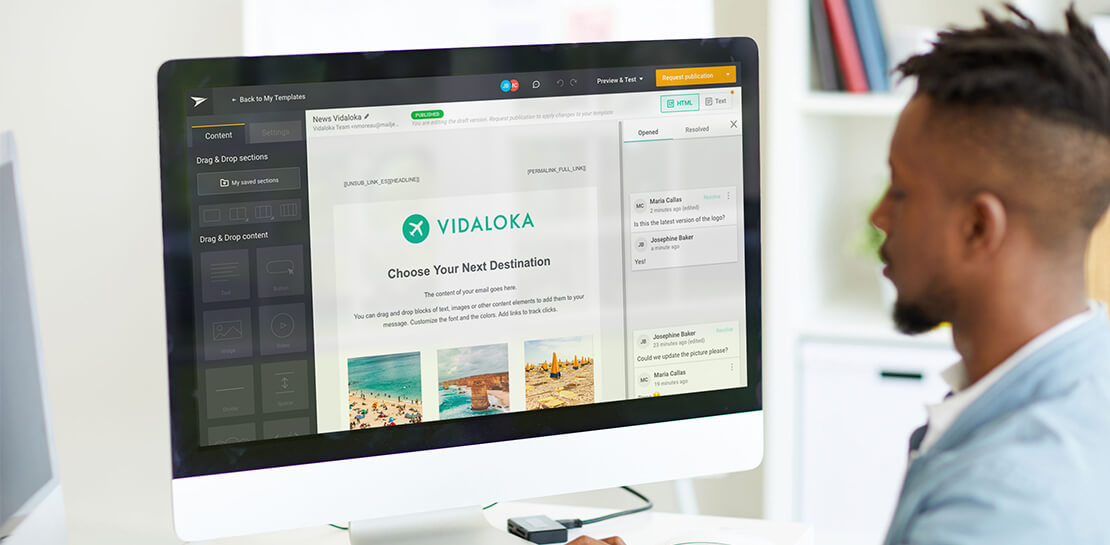
Mailjet allows companies to create, send, and track millions of emails to their customers and prospects around the world each month. The company’s offerings range from routing these emails to tailor-made tools that allow clients to design and send marketing campaigns with messages related to sales, user clubs, coupons and discounts, and promotions, as well as transactional emails such as purchase confirmations, shipping confirmations, e-tickets, or password resets.
“All of our services are accessible through programming interfaces. We use the same APIs for ourselves and for our customers. This is part of our unique selling point, which is to make life easier for developers and marketers,” explains François Fanuel, IT Operations Manager at Mailjet.
Google Cloud Results
- Provides development, testing, and distribution infrastructure for Mailjet
- Smoothly absorbs up to 20X normal computing power
- Offers technical and economic flexibility on a pay-per-use basis, depending on the computing power consumed
The company scrupulously monitors its service quality to help ensure that emails sent on behalf of its customers don’t trigger spam filters, and that they obtain the best possible open and click rates.
From hosting to the cloud
In its early years, Mailjet used hosted servers. This model had several disadvantages. It was impossible to instantly activate or deactivate computing power; the company could not be charged for actual, to-the-minute usage; and it lacked the flexibility to add disk space or scale servers in real time.
At the beginning of 2016, Mailjet decided to switch to the public cloud in order to improve technical and economic flexibility. “This two-year evolution required us to review our developments. If we use a virtual machine even for just one hour, our computer code must be able to support it in order to preserve the consistency and integrity of the data and processes,” says Fanuel.
“We needed a way to port our IP addresses to Google Compute Engine. In less than a month, the feature had been developed by Google engineers. This reactivity really impressed us and was definitely a deciding factor.”
—François Fanuel, IT Operations Manager, Mailjet
Mailjet and Google were already partners. The marketing and transactional email specialist is one of only three providers in the world, and the only one in Europe, accredited by Google to send bulk emails through Google Cloud Platform. The choice—based on three main factors—was obvious.
Financial and technical considerations
Factor 1: the right price proportionality. “We are able to activate Google Compute Engine virtual machines on demand, without needing to reserve these instances. While the machine remains active, a sliding-scale price is applied, which is particularly attractive to us,” explains Fanuel.
Factor 2: the quality and level of technical communication. Mailjet has direct access to Google Cloud Platform engineers when required. The company has its own IP addressing infrastructure, which is the foundation of its service quality. “We needed a way to port our IP addresses to Google Compute Engine. In less than a month, the feature had been developed by Google engineers. This reactivity really impressed us and was definitely a deciding factor.” Since then, via specific tunnels, Mailjet IP addresses have been ported directly into Google Compute Engine.
Factor 3: conformity to international data regulations. Mailjet is the only email service provider to be ISO 27001 certified and GDPR-ready, enabling the company to offer its clients the highest level of data security and privacy. Google Cloud Platform is also ISO 27001 certified, which was an important factor for Mailjet.
Power through minimalism
In mid-2016, Mailjet replaced its 30 or so email sending servers installed at a hosting company with smaller Google Compute Engine virtual machines, using the automatic load-balancing function. “Using smaller virtual machines—but more of them—optimized our computing power.” This precision mechanism accompanied an increase in activity for the company, with the number of emails sent doubling every year. As for the company’s some 300 TB of data, this is stored in Google Cloud Storage.
The flexibility and power of Google Cloud Platform helps ensure that Mailjet can adapt to peaks in activity that can reach up to 20 times the normal flow—our customers usually send their messages at the same times and during the same peak periods. “Previously, we had to reserve a lot of computing power with our hosting company, equivalent to 150 servers. Moving to an on-demand infrastructure means we can avoid paying a disproportionate fixed annual cost.”
Google Cloud Platform also provides Mailjet with the infrastructure needed to process events centrally, which facilitates technical support. A new analytics dashboard in the making will provide customers access to their campaigns’ key metrics in real time—a circulation report, open rates, and click-through rates, as well as invalid email addresses— regardless of the volume of emails at stake.
From distribution to development
Following routing operations, the development environment is currently being ported to Google Cloud Platform, and will eventually represent 100 virtual servers. “The addition of any new code is iteratively tested in Google Cloud Platform. We benefit from machines that are custom made for our needs, from machines with one core and 3 gigabytes of memory, up to machines with 64 cores.”
Mailjet uses the Google Cloud Interconnect virtual private network to tailor sending flows by geographical location. “For customers who only use our routing service, we will soon have worldwide load balancers. This will help ensure their API requests are received and their emails are sent to Europe and America from one single IP point, thus avoiding transatlantic latency issues.”
Mailjet also uses the Google Identity Aware Proxy authentication tool. All its employees around the world benefit from unique, more secure access, whether they use Google Sites intranets, or the development, or production environment. “Google Cloud Platform delivers on all the promises of a public cloud: service customization, real-time computing power adjustment during periods of high and low demand, and instant activation of computing resources. For us, it’s the best possible ratio between price, performance, availability, and quality,” concludes Fanuel.
Making Hybrid Work Human: Google Workspace and Economist Impact Survey

5470
Of your peers have already read this article.
2:30 Minutes
The most insightful time you'll spend today!
Google Workspace recently commissioned Economist Impact to complete a global survey (October 2021)* on the state of hybrid work, including its challenges and opportunities. We already knew that the pandemic had fundamentally changed the world of work, but the survey emphasizes the scale, reach, and longevity of those changes..
Over 75% of respondents believe that hybrid/flexible work will be a standard practice within their organizations in the coming three years. Given that 70% of respondents said they never worked remotely before the pandemic, it’s clear that hybrid has become the dominant model for work and that it’s here to stay.
But it’s also clear, as we’ll see below, that hybrid has some serious gaps that need to be addressed if it’s going to be sustainable and successful in the long term.
Defining hybrid work
As part of our work on the hybrid work survey and a broader project with The Economist Group, we interviewed a group of experts across research, consulting, business, and the advocacy world to arrive at a definition of hybrid work that captures all ways work is changing.
As Brian Kropp, one of the interviewees and vice president at Gartner, puts it: “Hybrid work is not just about different locations, but also different timings and different schedules.”
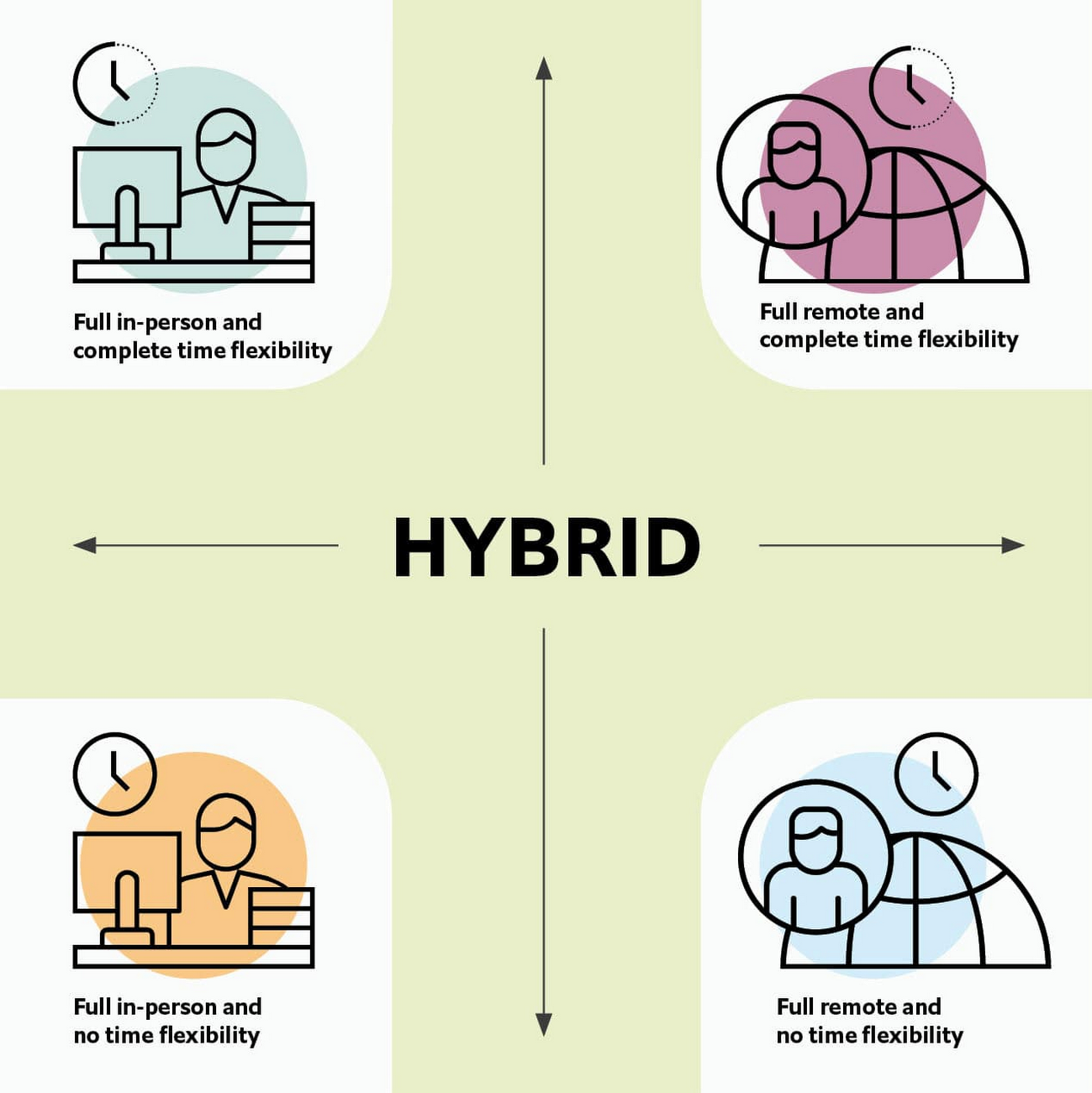
Harriet Molyneaux, managing director at HSM Advisory, a future-of-work research and advisory group, adds to this notion by describing the time-location work spectrum: “At one end of the spectrum is everyone in the office, nine till five, so both restricted time and location. And then at the other end of the spectrum is anywhere around the world at any time. So no restricted time or location. A hybrid is anything that sits in the middle of that.”
I agree with Brian and Harriet’s views. Flexibility in both location and hours is a core part of our working definition of hybrid work: a spectrum of flexible work arrangements in which an employee’s work location and/or hours are not strictly standardized.
Given this definition and framework, how is hybrid work faring and what lies ahead?
Individual wellbeing is coming at the cost of organizational connection
Early on in the pandemic, productivity remained steady or even increased for many organizations. But it came at a cost, with levels of burnout spiking as employees juggled caregiving, homeschooling, and other demands in their personal lives with work responsibilities.
Based on the survey data, wellbeing has made an upward shift, no doubt aided by things like students returning to schools in many regions and fewer demands being made of working parents. The majority of respondents said that hybrid work, based on their own experiences, can have a positive impact on the physical, mental, financial, and social wellbeing of employees.
But it appears that individual wellbeing is coming at the cost of organizational connection. The majority of respondents said they feel disconnected from their organization and co-workers (57%), that limited networking opportunities negatively impact career growth (62%), and that limited social interactions with co-workers has had a negative impact on their mental health (54%).
To be sustainable, hybrid work models must address this sense of disconnection in real and tangible ways. And it won’t happen just by increasing the number of virtual meetings. Although 72% of people say that virtual meetings improve inclusion and participation, 68% also say there are too many virtual meetings to begin with. We need new ways for people to connect spontaneously.
Hybrid workers are often using tools built for a bygone desktop era
When asked about the most important conditions needed to achieve the long-term success of hybrid work models, the number one choice globally was “new technologies that allow for time and location flexibility.”
Naturally, it was gratifying to see this, since Google Workspace is built on a cloud-based platform that empowers collaboration from anywhere, on any device, but the survey answer also highlights how much organizations have had to scramble to meet the demands of the pandemic. Some had to take legacy, office-centric systems and make them work for a distributed workforce overnight, often leveraging less-than-ideal technologies like VPNs that introduce digital friction.
As a result, top technology concerns of respondents include:
- unreliable internet access (if only all our WiFi connections were hybrid-ready!)
- reliance on slow or outdated tools
- accessing and maintaining files in multiple places
- relying on too many applications in order to get work done
Hybrid work, it seems to me, doesn’t need more applications and collaboration surfaces. It needs deeper, more meaningful connections in the tools and surfaces we already have.
As organizations assess their tech stacks, they should consider whether they can shape the behaviors they want from hybrid employees (e.g., real-time collaboration, ease of information sharing) with the tools they have in place. Or are the limits of the technology determining hybrid employee behavior?
The management and culture gap
In the same way that tools have often been built for a shared physical workspace, organizational culture seems to lag behind the hybrid moment. The majority of respondents said that a lack of face-to-face supervision creates a sense of distrust among managers and employees, and that they feel stressed by increased monitoring associated with flexible work. And more than 62% said that limited networking opportunities with senior employees and co-workers has a negative impact on career growth.
Strikingly, more than 70% of respondents indicated that the culture of trust between managers and employees needed improvement. Training and management best practices (60% of people want more of both) might help fill some of the gaps, but a manager can’t build trust with their hybrid teams by going through a training program.
The role of manager must itself evolve to meet the demands of a hybrid model. How can we empower managers to be the bridge between the “office of one” and the “office of many”? And as I discussed previously on Forbes, driving towards impact rather than output is a more sustainable metric for team engagement and productivity. It also dispenses with monitoring as a core part of a manager’s role, freeing them up to be a coach-and-connector.
How Google Workspace can help bridge the hybrid work gaps
No one has all the answers for how to make hybrid work successful, and I suspect we will see iterations of the model into 2022 and beyond as organizations—including Google—experiment with the right mix of location, culture, processes, and tools.
On the technology front, Google Workspace is uniquely positioned to bridge many of the emerging hybrid work gaps. Over the last year, we’ve delivered a set of innovations that are designed to deepen collaboration experiences while strengthening social connections within and across teams.
For example, we launched smart canvas to bring new collaboration capabilities to the places where people are already working together, helping to keep them connected, rather than having them switch tabs or open new apps. And we delivered Spaces as a central place for collaboration, where teams can share ideas, work on documents together, and manage tasks from a single place. Because all their work is preserved for future reference, team members can easily jump in and contribute at a time that works best for them, seeing a full history of the conversations, context, and content along the way. Spaces helps people maintain individual wellbeing while preserving the health of a group project.
In Google Meet, we’ve introduced real-time captions in multiple languages (in preview now), the ability for people to customize their video tiles, including being able to turn off their own to help with meeting fatigue, and we’ve implemented automatic light adjustments and noise cancellation. These changes help ensure that everyone can be seen and heard.
Meanwhile, features like hand-raise, Q&A, and polls have helped make meetings more inclusive and companion mode (in preview) can bring these to life in hybrid settings, to help ensure that there’s one cohesive conversation between the people in the office and their colleagues working somewhere else. We view companion mode as a bridge between the office and “somewhere else.”
On the personal wellbeing front, we launched Focus Time, which lets people block out their calendars for uninterrupted focus work, and Time Insights in Google Calendar, where employees can look at how they’re spending their time and adjust as needed.
As hybrid work continues to evolve, Google Workspace is committed to supporting wellbeing and seamless collaboration with tools that can remove digital friction and help people maintain connections—to each other and the organizations they work for.
*Survey details: The survey, completed in October 2021, polled a total of 1,244 employees and managers in four regions (North America, Europe, APAC, and Latin America), from more than 15 industries, in every age group, and from both small and large organizations. The focus was on knowledge workers, though it’s important to note that some of those people have been working on the frontlines; 20% of respondents indicated they haven’t worked remotely at all during the pandemic. This includes people in hospitality, retail, transportation and logistics, and healthcare.
More Relevant Stories for Your Company

Customer Voices: How Firms from Across Industries Leverage Google Cloud
From powering everyday operations and accelerating application innovation, to providing tools for specific business needs and executing on big ideas, to advancing the security of technology solutions, companies from across industries have leveraged Google Cloud for business benefits. Companies from across industries have turned to Google Cloud for transforming their


A Quick Guide to Cloud Monitoring
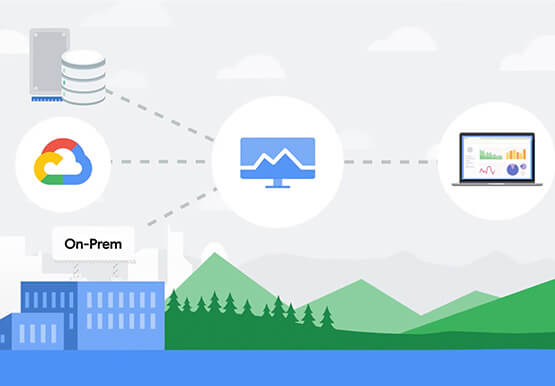
Cloud Monitoring is a tool that allows you to gain visibility into the performance, availability, and health of your applications and infrastructure. In this video, we show you what Cloud Monitoring is and how you can use it to custom define service-level objectives (SLOs), monitor application metrics, and the overall
Google Workspace Bolsters Data Security by Adding Client-Side Encryption to Gmail and Calendar
Editor's note: This post originally appeared on the Google Workspace blog. We consistently hear from our customers that the privacy of their data is top of mind, which is why we’ve built state-of-the-art security and privacy-preserving technologies into our products — to keep customer data private and secure. We’ve put



Video: How Did GANT Get Products to Market in Just Three Months?
It was in 1949 that a Ukranian immigrant Berl Gantmacher launched--what was going to be an iconic shirt-making company--GANT in Connecticut, America. Since then, the company has reinvented shirts every single day. Headquartered in Stockholm, Sweden, GANT operates in 70 countries. In 2017, GANT wanted to launch a flagship store
