





Enhancing Developer Productivity with Skaffold v2 GA

2851
Of your peers have already read this article.
2:30 Minutes
The most insightful time you'll spend today!
For years, Google has been committed to maximizing developer productivity. In 2019, we announced the general availability of Skaffold, a command-line tool that facilitates continuous development and delivery for containerized applications. Today, we’re excited to announce that Skaffold V2 is now generally available.
Skaffold V2 expands Skaffold’s supported platforms and architectures with the introduction of Cloud Run as a supported deployer, and now supports building from and deploying to both ARM and x86 architectures. Skaffold V2 also offers enhanced support for CI/CD and GitOps workflows, with the introduction of the skaffold render phase, verify phase, and kpt integration. Best of all, all existing Skaffold configurations are fully compatible with Skaffold V2, and upgrading from V1 is as easy as running skaffold fix.
Expanded platform support
Since its inception, Skaffold has supported deploying applications to Kubernetes, using either kubectl or Helm deployers. Deploying to Kubernetes with Skaffold unlocks the benefits of improved velocity from source to prod, with reusable building blocks for iterative development and CI/CD.
We’re excited to expand these benefits to Cloud Run, Google’s serverless container runtime. Cloud Run provides a fully managed platform for any containerized application, and includes features such as automatic resource scaling and integrated storage, security, and monitoring solutions.
It’s easy to get started with Skaffold and Cloud Run; all you need is a Cloud Run service config and a few small updates to your skaffold.yaml. Skaffold also powers Cloud Deploy’s support of Cloud Run. Check out our documentation to learn more.
In addition to the new deployment target, the expanded set of compatible image-architecture configurations with Skaffold V2 helps developers ensure that the architecture of the machine on which an image is built is compatible with the architecture of the machine on which the image is intended to be run. Skaffold now intelligently checks the architecture of your local machine as well as the target Kubernetes cluster before building your images, allowing you to deploy to ARM, x86 or multi-arch clusters from a x86 or ARM machine without any manual configuration.
Check out our documentation to learn more about deploying to Cloud Run and managing ARM workloads.
CI/CD and DevOps, simplified
Skaffold helps developers implement CI/CD and DevOps workflows by providing a set of reusable building blocks for repeatable build, tag, and deploy steps. With Skaffold, the same config can be shared in development and production, leveraging Skaffold profiles to implement environment-specific configuration.
With Skaffold V2, the Skaffold render phase is now distinct from the deploy phase. The output of the Skaffold render phase is a manifest, hydrated with tagged image names and templated values, which can then be persisted in source control before deployment as part of a GitOps workflow.
In addition to the render phase, Skaffold V2’s new verify phase helps to configure post-deployment tests. This phase can be used to configure a series of test containers that are then monitored to ensure that the deployment was successful. This allows developers to integrate this verification step into reusable deployment pipelines rather than running these tests manually.
Finally, the introduction of kpt as a supported renderer in Skaffold V2 provides a sophisticated syntax for serially transforming and validating your manifests, unlocking additional customizability and verification in your GitOps workflows. Using Skaffold makes it easy to adopt kpt because you can take advantage of kpt’s transformation and validation functionality without needing to write any separate kpt configuration. It’s as easy as adding a few stanzas to your existing skaffold.yaml. Kpt can also be used alongside Skaffold’s pre-existing integrations with renderers Helm and Kustomize.
Check out our documentation to learn more about the Skaffold render phase, verify phase, and kpt integration.
Upgrading to Skaffold V2
Getting started with Skaffold V2 is easy. If you’re new to Skaffold, check out the V2 installation guide for platform-specific installation instructions.
If you’re an existing Skaffold user, upgrading to Skaffold V2 is simple and requires no manual configuration changes. All of your existing Skaffold configurations will continue to work as-is with Skaffold V2. Simply download the Skaffold V2 binary and run skaffold fix to update your config. Check out the V2 upgrade guide for more details.
Finally, check out our documentation for more detailed instructions on taking advantage of all of the new features introduced in Skaffold V2.
What’s next?
If you’re interested in harnessing the power of Skaffold for serverless workloads, check out our documentation for using Skaffold V2 with Cloud Run.
Also, be sure to check out Cloud Deploy, Google’s fully managed continuous delivery offering, which leverages Skaffold to construct reusable deployment pipelines.
We’re excited to hear from you. As always, you can reach out to us on GitHub and Slack.
3438
Of your peers have already watched this video.
1:30 Minutes
The most insightful time you'll spend today!
Lowe’s: Building a Centralized Price Management Solution
Watch how American retail company specializing in home improvement Lowe’s used Google Cloud to build a centralized price management solution. The company’s application development team leveraged Google Cloud to enable the improvement of their software development life cycle – from code development to CI/CD and monitoring.
Maximizing Reliability, Minimizing Costs: Right-Sizing Kubernetes Workloads

942
Of your peers have already read this article.
3:30 Minutes
The most insightful time you'll spend today!
Do you know how much money you could save by adjusting workload requests to better represent their actual usage? If you’re not rightsizing your workloads, you might be overpaying for resources that your workloads aren’t even using or worse, putting your workloads at risk for reliability issues due to under provisioning.
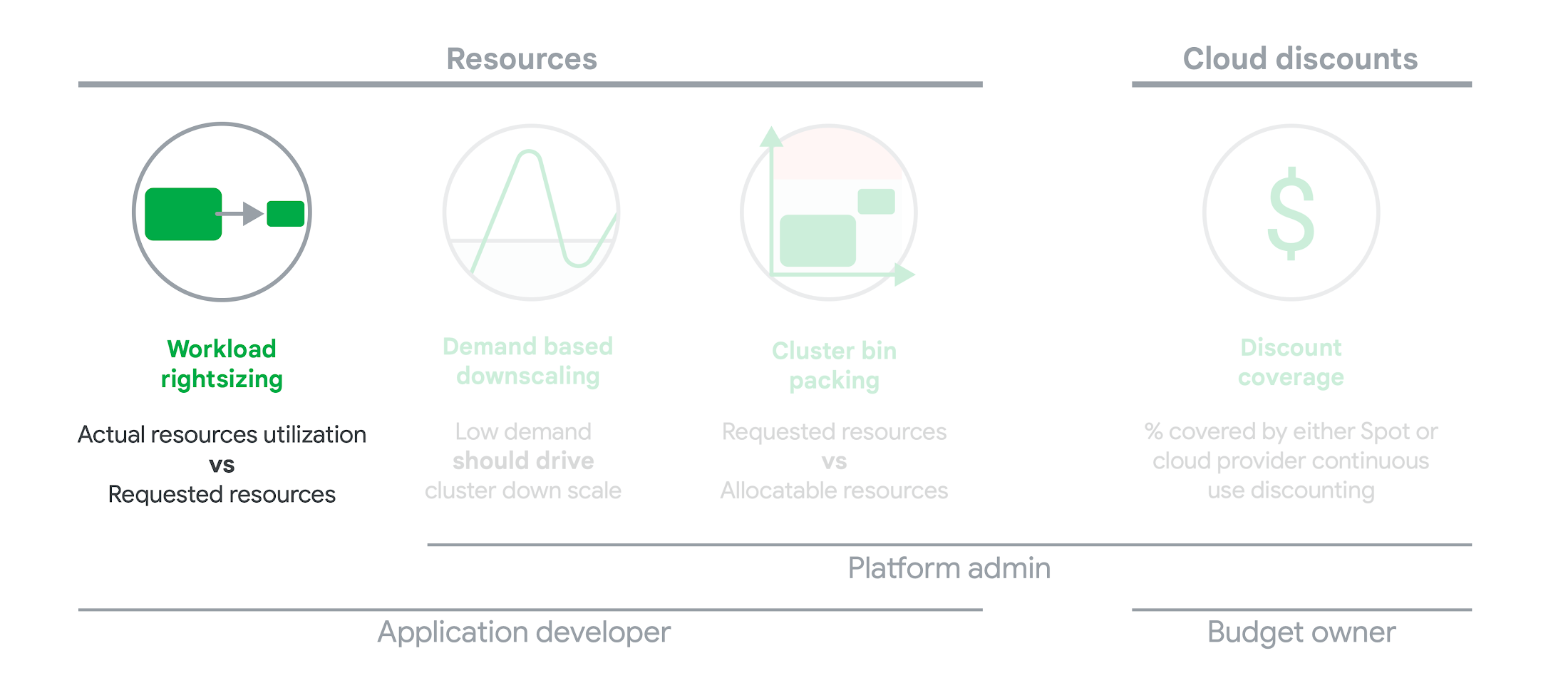
As we’ve previously discussed, setting the resources is the most important thing you can do to increase the reliability of your Kubernetes workloads. In this blog we will help you with the second key finding from the State of Kubernetes Cost Optimization report!
The research … found that workload rightsizing has the biggest opportunity to reduce resource waste.
State of Kubernetes Cost Optimization report
According to our research findings, workload rightsizing is the most important golden signal. Workload rightsizing measures the capacity of developers to properly use the CPU and memory they have requested for their applications.
Rightsizing is challenging
It can be quite difficult to predict the resource needs of your applications, which historically has not been a concern for developers in traditional data center environments.In traditional data center environments, resources were typically over-provisioned upfront to ensure capacity for peak demand and future growth, so developers didn’t need to focus on accurately predicting resource needs as they were covered by the excess capacity, whereas in cloud environments, resources are consumed on-demand. Finding a balance between efficiency and reliability can often feel like a delicate balancing act.
Tools for workload rightsizing
There are native tools in Cloud Monitoring and the GKE UI you can use to rightsize your workloads running on GKE.
Rightsizing in the console
The Workload Cost Optimization tab helps you identify workloads that can be optimized by displaying the resources used versus what’s requested.
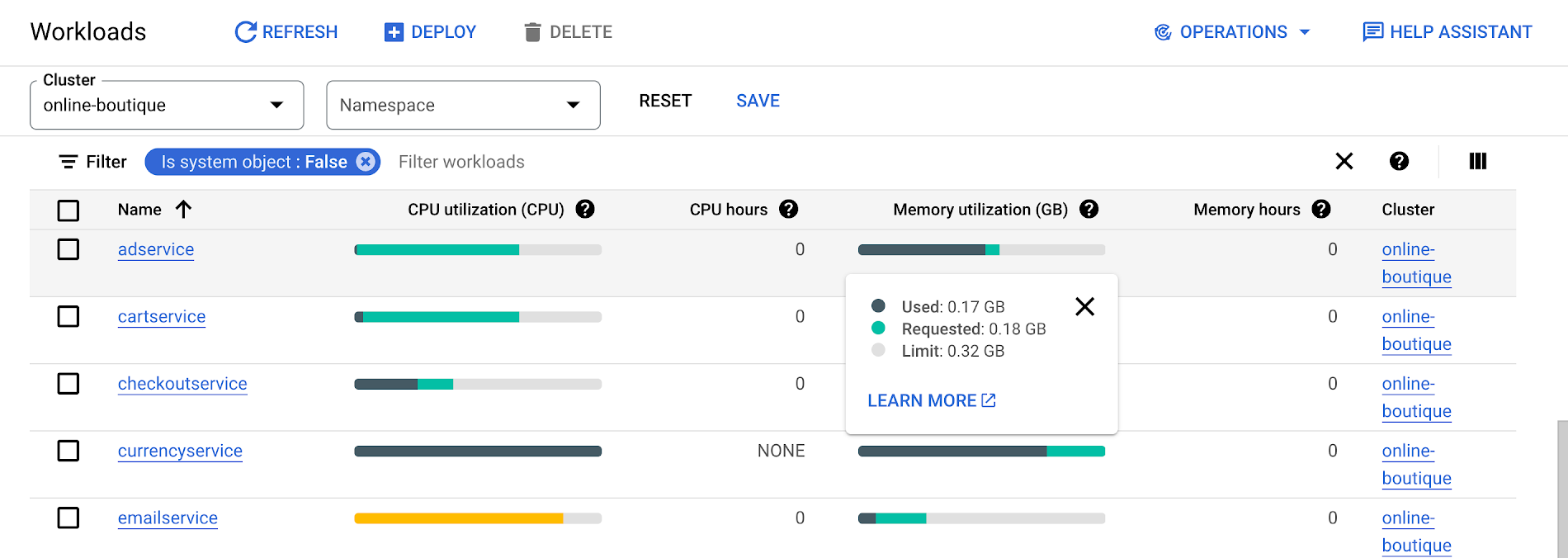
To take advantage of potential cost savings, you can drill into clusters to see workload level resource recommendations.
To view workload resource recommendations for Deployment objects only:
- In the GKE Cost Optimization.
- Select a cluster.
- Click Workloads > Cost Optimization.
- Select one Deployment workloads
- In the workload’s detail page, select Actions > Scale > Edit Resource Requests
Rightsizing with Cloud Monitoring
Cloud Monitoring provides built-in VPA scale recommendations metrics that you can use to monitor the performance of your workloads and to identify opportunities to rightsize them without the need to create VPA objects.
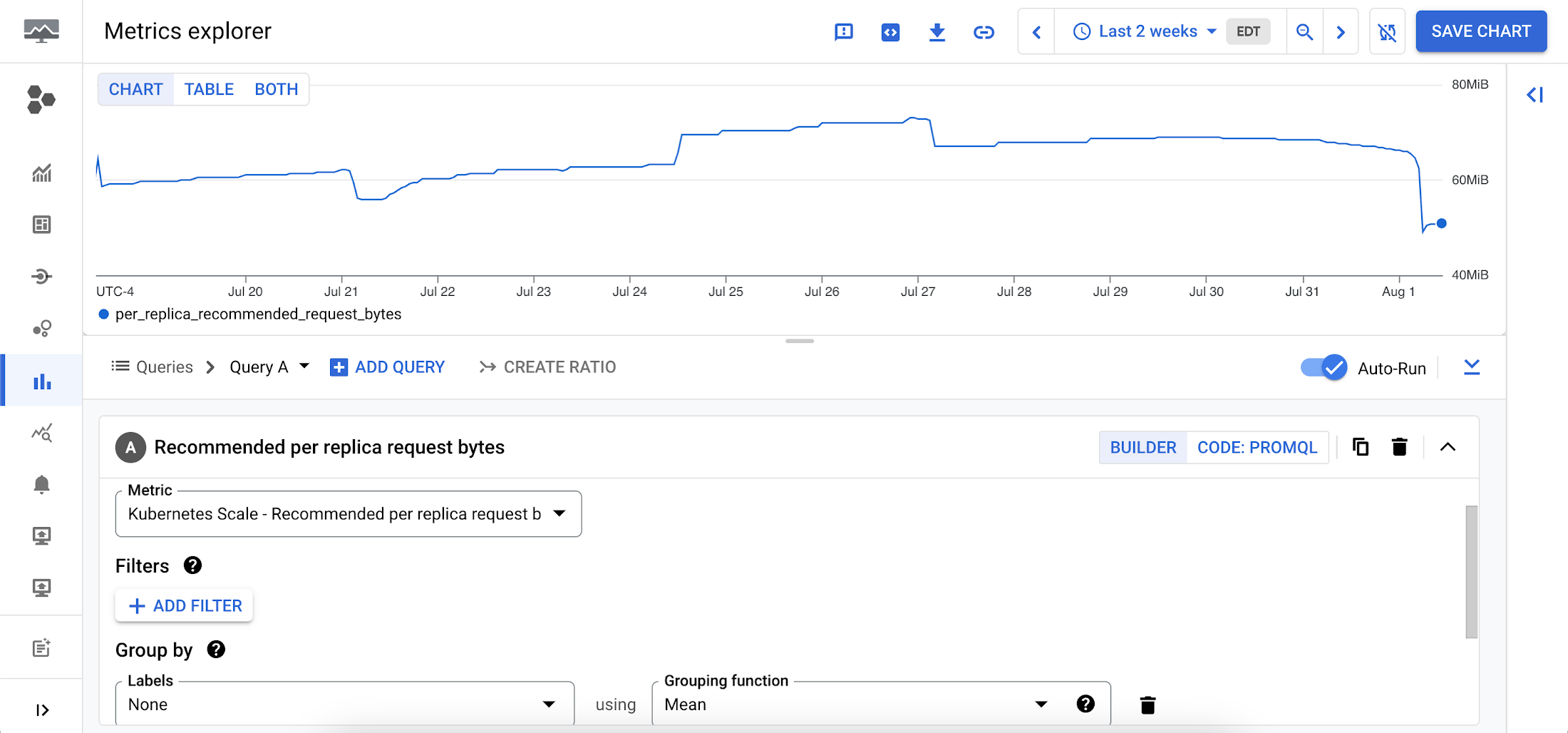
To view these metrics:
1. Go to the Cloud Monitoring > Metric Explore console.
2. In the Metric dropdown, select the metrics:
- Memory recommendations:
Kubernetes Scale > autoscaler > Recommended per replica request bytes - CPU recommendations:
Kubernetes Scale > autoscaler > Recommended per replica request cores
Rightsizing at scale
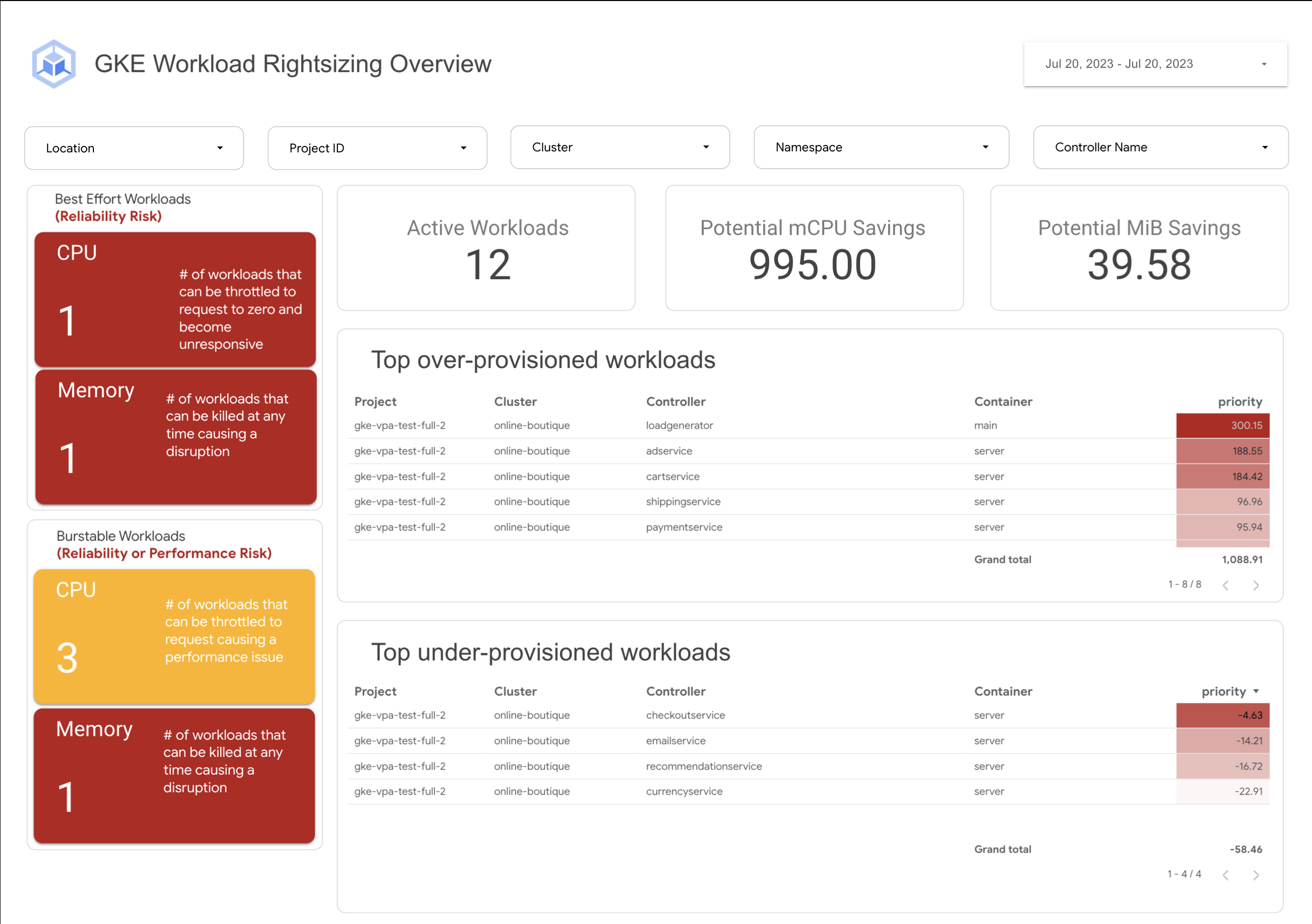
If you’re interested in viewing recommendations across clusters and projects, We’ve created a guide that you can use today to help you right-size your GKE workloads at scale. This solution leverages your actual cluster’s metric data and built-in workload recommendations provided by Cloud Monitoring. You can determine the resource requirements for all your workloads without having to create additional VPA autoscaler objects in each of your clusters. The guide walks you through deploying the solution.
In conclusion
In conclusion, rightsizing your workloads is essential for both cost savings and reliability. By following the tips in this blog, you can ensure that your workloads are using the right amount of resources, which will save you money and increase your workload’s reliability.
Links to the solution presented in this blog and other useful tools to help you optimize your cluster are listed below:
- The Right-sizing workloads at scale solution guide
- Setting resource requests: the key to Kubernetes cost optimization
- The simple kube-requests-checker tool
- An interactive tutorial to get set up in GKE with a set of sample workloads
Download the State of Kubernetes Optimization report, review the key findings, and stay tuned for our next blog post.
Beyond Traditional Learning: AI-based Online Learning Platform and Google Cloud Solutions Push Learners to Get Ahead

10358
Of your peers have already read this article.
1:30 Minutes
The most insightful time you'll spend today!
The combination of a vital need for IT experts among businesses and a digital skills gap is making lifelong learning increasingly critical. Beyond professional development, learning new skills offers additional rewards from building peer connections to boosting your creativity. That’s why in 2020 Krishna Deepak Nallamilli and I launched KIMO.ai to reimagine how people approach learning, especially in developing markets. Our team is building the artificial intelligence needed to generate individual learning paths through a wide range of quality digital learning content.
Google Cloud and its Startup Program have been instrumental in connecting our team with the tools, people, processes, and best practices to grow our business.
Existing learning platforms lack engagement
Outside of traditional education settings, massive open online learning courses (MOOCs)—often modeled after university courses—can provide a flexible and affordable way to upskill or reskill. But the vast majority of people who participate in MOOC programs fail to complete courses. Based on our research, the challenge with existing learning platforms is a lack of engagement, primarily caused by limited direction on which skills to learn, whether AI, fintech, blockchain, or other in-demand disciplines.
We’ve also received feedback that many corporate learning management systems–developed as online training systems to upskill employees–tend to be poorly designed and time-consuming to use.
Overall, a significant challenge with most existing learning platforms is that they’re generic. For example, suppose you’re interested in learning about AI. In that case, you need AI-related coursework that applies to your industry and the job you want because AI in medicine is vastly different from AI in financial services. Today’s online learning options typically take a one-size-fits-all approach and fail to capture the nuances of what learners really need to get ahead.
Building a future-proof learning platform
The commitment to highly personalized, accessible learning inspired KIMO.ai, a platform that we believe is the future of education. Depending on your goals, current skills, location, and other factors, our AI-based platform will identify which coursework (and where to find those classes) to build the skills you need. The more personalized, relevant learning recommendations even take into account people’s preferences for podcasts, MOOCs, books, articles, videos, courses, publications, and more.
In a mix of cooperation and competition we call “coopetition,” KIMO.ai will regularly recommend courses from other established online learning systems if, based on our automated assessment, it’s the best option for a learner. There’s also the option to access free content only.
Google cultural alignment fosters trust
Our platform started with one developer exploring NLP models and Google APIs. As we’ve grown our team and launched our beta to 110,000 users in developing markets, we discovered there is a lot of interest in our platform, and we believe we can make a significant impact. In feedback forums, we also learned that we need to focus our efforts on the mobile experience to improve engagement since 99% of the beta testers use mobile devices.
Beyond our team’s high level of trust in Google Cloud solutions, our team also appreciates the cultural alignment with Google. We value Google’s developer-centric approach and rely on tools like Dataflow for batch data processing and Cloud TPU to reliably run machine learning models with AI services on Google Cloud. We also build all of our deployments on Google Kubernetes Engine (GKE), which makes it easy to manage all our containerized workloads
On the front end, Google App Engine makes it easy to deploy apps and experiment, and it integrates seamlessly with Firebase for authentication and more. BigQuery is our serverless data warehouse that efficiently scales to support the millions of articles, videos, and other learning resources we need to analyze to provide the targeted coursework recommendations our learners require.
As we grow our business having a network of trusted advisors is also extremely valuable. By working closely with DoIT International, the 2020 Google Cloud Global Reseller Partner of the Year, our team has access to their cloud, Kubernetes, and machine learning expertise. DoIT has already helped us quickly resolve IT issues and create analytics dashboards that give us insights to continually enhance our services.
Building for a growing industry
The dynamic edtech market is growing rapidly and estimated to become an $11B industry by 2025. We’re proud to be part of the next wave of personalized education that has the potential to empower people in developing markets and beyond to grow their skills with coursework tailored to their exact needs and how they like to learn. This year, we will deliver our platform to at least 400,000 more people. We’re excited to see how they use it and where it takes them.
If you want to learn more about how Google Cloud can help your startup, visit our Startup Program application page here to get more information about our program, and sign up for our communications to get a look at our community activities, digital events, special offers, and more.
Google Unveils New Cloud Region in Delhi NCR to Power India’s Digitization

8340
Of your peers have already read this article.
2:00 Minutes
The most insightful time you'll spend today!
In the past year, Google has worked to surface timely and reliable health information, amplify public health campaigns, and help nonprofits get urgent support to Indians in need. Now, we are continuing to focus on helping India’s businesses accelerate their digital transformation, deepening our commitment to India’s digitization and economic recovery. To support customers and the public sector in India and across Asia Pacific, we’re excited to announce that our new Google Cloud region in Delhi National Capital Region (NCR) is now open.
Designed to help both Indian and global companies alike build highly available applications for their customers, the Delhi NCR region is our second Google Cloud region in India and 10th to open in Asia Pacific.
What customers and partners are saying
Navigating this past year has been a challenge for companies as they grapple with changing customers demands and economic uncertainty. Technology has played a critical role, and we’ve been fortunate to partner with and serve people, companies, and government institutions around the world to help them adapt. The Google Cloud region in Delhi NCR will help our customers adapt to new requirements, new opportunities and new ways of working, like we’ve helped so many companies do in the region:
- InMobi scaled a personalized AI platform to support 120+ million active users. “With the arrival of the Google Cloud Delhi NCR, InMobi Group sees the opportunity to continue closing the gap between our users and products,” says Mohit Saxena, Co-founder and Group CTO of Inmobi. “Glance, especially, has been serving AI-powered personalised content to over 120 million active users. We can’t wait to continue giving them truly meaningful experiences that are speedy, scale well, and are relevant to them, by expanding the use of our current tools working on Google Cloud with the opening of a new region.”
- Groww now supports a sizable user base. “Google Cloud provides great technology that enables us to build and scale infrastructure to millions of users, and the new Google Cloud region in Delhi NCR will continue to help more businesses and startups in India access powerful cloud-based infrastructure, products and services,” says Neeraj Singh, Co-founder and Chief Technology Officer, Groww.
- HDFC Bank is positioned for the future. “At HDFC Bank, we are harnessing technology platforms to both run and build the bank. As we progress to be future ready, the objective is to invest in future technologies that give us scale, efficiency and resiliency. Towards this the Google Cloud region in Delhi NCR will enable us to enhance our resiliency and help us in building an active-active design framework for our new generation applications on cloud,” says Ramesh Lakshminarayanan, CIO, HDFC Bank.
- Dr. Reddy’s Lab built a modern data platform with Google Cloud. “At Dr Reddy’s, we pride ourselves in helping patients regain good health, acting quickly to provide innovative solutions to address patients’ unmet needs and in accelerating access to medicines to people worldwide. Our Google Cloud-powered data platform is helping us realize these objectives and we welcome Google’s investment in the new Delhi NCR region as helping us and other businesses in India make further contributions to our social and economic future,” says Mukesh Rathi, Senior Vice President & CIO, Dr. Reddy’s Laboratories.
- “To survive the disruption caused by the pandemic and to succeed in the long term, organizations need to become digital natives, so they can be more agile, explore new business models and build new capabilities that boost resilience. A cloud-first strategy plays a key role in enabling businesses to do this,” said Piyush N. Singh, Lead – India market unit & lead – Growth and Strategic Client Relationships, Asia Pacific and Latin America, Accenture. “Harnessing the potential of cloud requires the right data infrastructure and this expansion by Google Cloud will undoubtedly help Indian enterprises in their digital transformation journeys.”
A global network of regions
Delhi NCR joins 25 existing Google Cloud regions connected via our high-performance network, helping customers better serve their users and customers throughout the globe. As the second region in India, customers benefit from improved business continuity planning with distributed, secure infrastructure needed to meet IT and business requirements for disaster recovery, while maintaining data sovereignty.
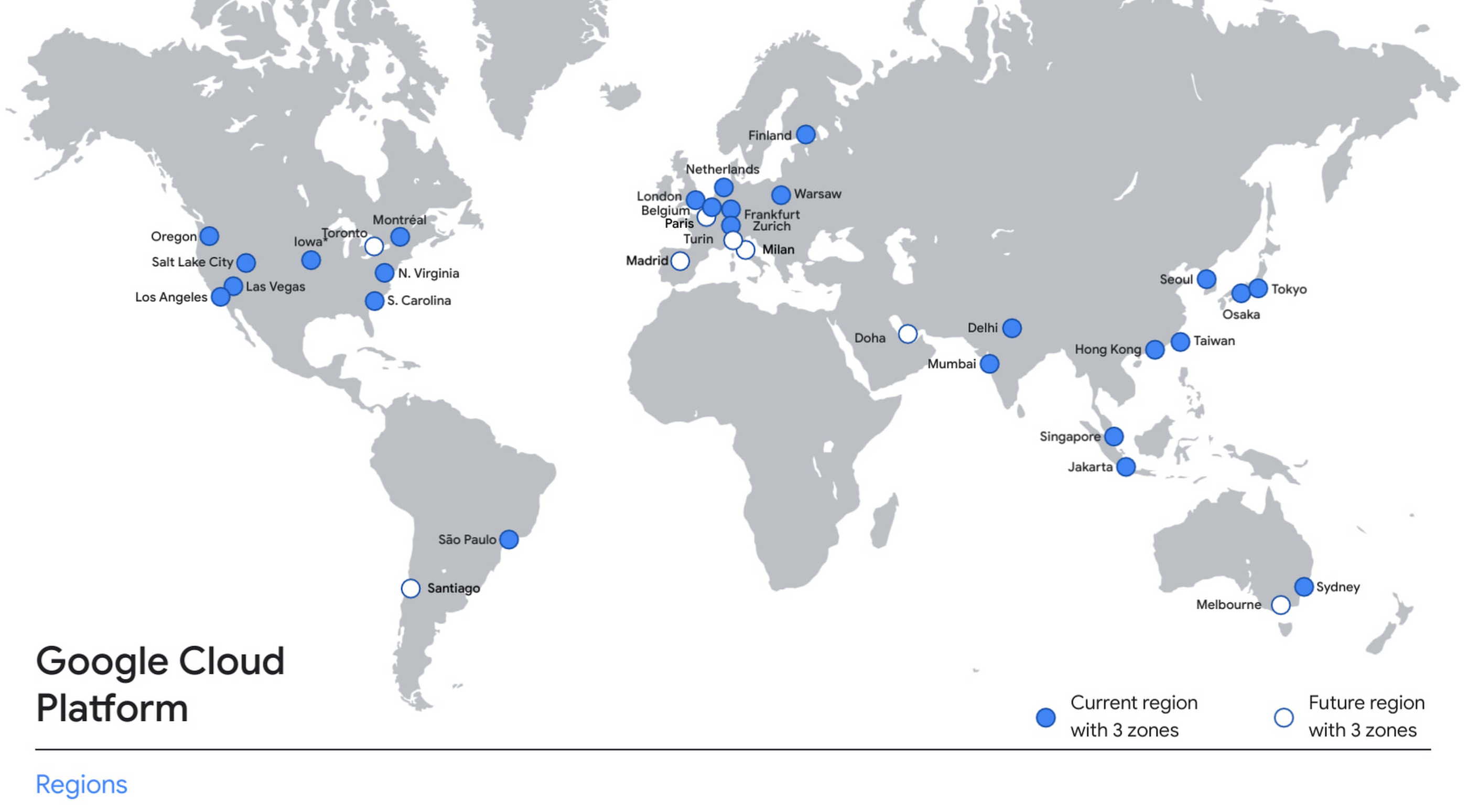
With this new region, Google Cloud customers operating in India also benefit from low latency and high performance of their cloud-based workloads and data. Designed for high availability, the region opens with three availability zones to protect against service disruptions, and offers a portfolio of key products, including Compute Engine, App Engine, Google Kubernetes Engine, Cloud Bigtable, Cloud Spanner, and BigQuery.
Supporting India’s recovery with training and education
Google and Google Cloud will also continue to support our customers with people and education programs. We’re investing in local talent and the local developer community to help enterprises digitally transform and support economic recovery.
Through the India Digitization Fund, we expanded our efforts to support India’s recovery from COVID-19—in particular, through programs to support education and small businesses. In addition to expanding internet access, and investments to help start-ups accelerate India’s digital transformation, we’ve grown our Grow with Google efforts. Businesses can access digital tools to maintain business continuity, find resources like quick help videos, and learn digital skills—in both English and in Hindi.
Helping customers build their transformation clouds
Google Cloud is here to support businesses, helping them get smarter with data, deploy faster, connect more easily with people and customers throughout the globe, and protect everything that matters to their businesses. The cloud region in Delhi NCR offers new technology and tools that can be a catalyst for this change. To learn more, visit the Google Cloud locations page, and be sure to watch the region launch event here.

4191
Of your peers have already downloaded this article
10:47 Minutes
The most insightful time you'll spend today!
The rapid growth in mobile, big data, and cloud technologies has profoundly changed market dynamics in every industry, driving the convergence of the digital and physical worlds, and changing customer behaviour. It’s an evolution that IT organizations struggle to keep up with. To succeed, a new approach is required; one that enables agile and web-scale innovation so that IT can meet evolving business requirements while enabling existing systems to continue running reliably, efficiently, and securely.
There’s a way to enable the stability of enterprises’ operational systems of record while also fostering the speed and agility necessary to create powerful new applications and services that serve customers, partners, and employees in a digital economy that’s moving at blinding speed.
Whether you think about this as bimodal IT, two-speed IT, or traditional IT/agile IT, this new approach recognizes the value of both the back-end operational systems and the fast-changing world of user engagement. Read this eBook to explore how two-speed IT can usher a new approach that recognizes the value of both the back-end operational systems and the fast-changing world of user engagement.
More Relevant Stories for Your Company

Harnessing the Power of AI with Google Cloud: What Every IT Pro Needs to Know
As an IT architect or IT professional, you are essential to the success of your organization, responsible for designing, building, and maintaining the IT systems that your businesses and governments rely on. As if that wasn’t enough, you’ve also got to constantly learn and adapt to keep up with the

How APIs are Helping Malaysia’s Largest Investment Company Innovate Quickly
Permodalan Nasional Berhad (PNB) is one of Malaysia’s largest investment institutions with more than RM300 billion ($71 milion) in assets under management. Through our wholly-owned company, Amanah Saham Nasional Berhad (ASNB), we manage 14 funds with a total value of RM235.74 billion ($56.34 million) as of Dec. 31, 2018. To expand

The Unintended Consequences of Scale
Cloud infrastructure offers so many advantages: on-demand scalability, built-in security, and a bevy of tooling to scale your business at the speed of the Internet. It enables companies to pursue “blitzscaling,” as Reid Hoffman calls it. Capital expenses that take years or decades to pay off are no longer required to

Memorystore for Redis Read Replicas to Scale App Read Requests by 6X
Modern applications need to process large-scale data at millisecond latency to provide experiences like instant gaming leaderboards, fast analysis of streaming data from millions of IoT sensors, or real-time threat detection of malicious websites. In-memory datastores are a critical component to deliver the scale, performance, and availability required by these
