





BURGER KING Germany: Serving Up Marketing Insights and Supply Chain Visibility Easily

13925
Of your peers have already read this article.
8:30 Minutes
The most insightful time you'll spend today!
Do hamburgers really come from Hamburg? This may still be a matter of debate, but the popularity of American-style burger joints not just in Hamburg but all over Germany, is clear. Germany’s top two fast food companies are both burger chains. One of them is BURGER KING®, a global brand that welcomes more than 11 million customers worldwide every day. The company arrived in Germany in 1976, when its first restaurant opened in Berlin. It now operates more than 100 restaurants across Germany, with franchisees operating more than 600 restaurants of their own.
“In the fast food industry, being able to move quickly is very important. That means delivering the right promotion to our app or launching a viral campaign within days. To do that across more than 700 restaurants, we need the support of the right technology.”
—Oliver Mielentz, IT Manager, BURGER KING® Deutschland GmbH
Previously a subsidiary of the U.S. business, BURGER KING® Germany became an independent company in 2015. As a result, it needed to develop its own IT infrastructure, and the changeover needed to happen fast. “We had to put in place systems that would work for the entire network of franchisees and enable us to easily roll out campaigns,” explains Oliver Mielentz, IT Manager at BURGER KING® Deutschland GmbH.
With the help of Google Cloud Premier partner Cloudwürdig, BURGER KING® Germany chose Google Cloud and G Suite as the right combination to suit its needs.
“In the fast food industry, being able to move quickly is very important,” says Oliver. “That means delivering the right promotion to our app or launching a viral campaign within days. To do that across more than 700 restaurants, we need the support of the right technology.”
Building a franchisee platform in just three months
When a business has multiple franchisees, it’s important to make sure everyone is on the same page, especially in the fast-paced fast food environment. “We have to collate data from all our franchisees and produce reports quickly in order to react to changes in customer behavior,” explains Oliver. “That means processing every transaction that takes place in our restaurants.” Following the restructure, BURGER KING® Germany also needed to build a secure invoicing system with data storage and optimize its communication channels.
“Using Tableau with BigQuery, we’re able to produce reports very quickly. Previously, it took much longer, as data had to be fetched manually. Our reaction time is now almost a business day faster.”
—Oliver Mielentz, IT Manager, BURGER KING® Deutschland GmbH
With support from Witter-IT, BURGER KING® Germany chose Cloudwürdig to build its BKD Connect internal platform on Google Cloud. Thanks to the ready-to-go tools on Google Cloud, it was able to put its invoicing system and data warehouse in place in just three months.
For the BURGER KING® Germany data warehouse, Cloudwürdig built an ETL pipeline that channels ticket data for every sale into BigQuery. “Data is gathered from the restaurants,” says Oliver, “and using Tableau with BigQuery, we’re able to produce reports very quickly. Previously, it took much longer, as data had to be fetched manually. Our reaction time is now almost a business day faster.”
As the ticket data for every transaction is stored in BigQuery, the marketing team can easily see exactly which products are selling well. That’s crucial for tweaking promotions as well as monitoring the supply chain to make sure enough produce is delivered to restaurants in response to changes in demand.
“Thanks to BigQuery, we have a speedy data pipeline that enables us to react on the same day to changes in the market and eliminate bottlenecks in production,” says Oliver.
Switching to G Suite to improve communication
To enable franchisees to sign in to its BKD Connect Platform, BURGER KING® Germany needed a secure authentication system. To solve that problem, it chose to provide franchisees with G Suite accounts. “It’s really easy to set up a new franchisee on the platform. I just create a new G Suite account and Drive folder for it, and it’s ready to go,” says Oliver. G Suite also helps the franchise network to run efficiently, as daily reports are automatically saved to Drive and shared to the appropriate regional network. “Thanks to that system, it’s much easier for any team at headquarters to access the information it needs,” Oliver explains.
BURGER KING® Germany also recently extended its use of G Suite across the whole company. “Following an evaluation of our previous email and productivity software, I made the decision to switch solely to G Suite,” says Oliver. BURGER KING® Germany employees now use Gmail, Calendar, and Drive for their day-to-day productivity needs. “We only just completed the migration, but already, everyone’s happy,” says Oliver. “It’s so easy to share a file using Drive or set up a meeting on Calendar.”
“We’re big fans of Hangouts Meet, and we have two rooms here at our Hanover headquarters equipped with Hangouts Meet hardware,” Oliver adds. “The speech quality is good, and it’s helpful to be able to see every participant, especially when you’re running a meeting with multiple franchisees.”
Optimizing infrastructure to power innovative campaigns
The BURGER KING® app, available for iOS and Android, helps the company to deliver a great customer experience. Through their MyBK accounts, guests can access coupons and special promotions. “We had a really interesting campaign for Easter: guests used the app to hunt for virtual Easter eggs,” explains Oliver. “We knew it was going to be big, and our previous back end wouldn’t have been able to handle the traffic.”
To enable the marketing campaign to go ahead, BURGER KING® Germany moved the back end of the app, along with its website, to Google Cloud. For developing and running its web and app back ends, it now uses App Engine and virtual machines on Compute Engine, as well as Memorystore and Cloud Functions. For monitoring and logging, it uses Stackdriver, and Cloud CDN and Cloud DNS to easily handle its traffic.
“We ran the campaign without any performance issues, even though we were receiving several million hits a day,” says Oliver. Since migrating the back end to Google Cloud, the marketing team also launched the popular “Escape the Clown” campaign. “That campaign blew our minds!” says Oliver. “It wouldn’t have been possible without Google Cloud, because it required a lot of back end capacity.”
To develop the app infrastructure it needs, BURGER KING® Germany relies on Cloudwürdig. “Working with Cloudwürdig is great because the team has the same agile mindset as us,” says Oliver. “When we have a new idea, we just set up a meeting, and in a couple of days the new infrastructure is in place. For Escape the Clown, it only took a few weeks to get everything ready to launch.”
Leveraging integrated tools to grow the business
Using Google Cloud together with G Suite enables BURGER KING® Germany to run its franchise network efficiently, while keeping its IT team lean. “Google Cloud and G Suite are the perfect fit for the way of working at BURGER KING® Germany,” says Oliver. “Many of the company’s operatives are often on the road, visiting restaurants and franchisees. With these tools, they can work flexibly and react quickly to the situation on the ground.”
“In order to grow the business, we need to use the data we receive every day to understand exactly what is happening in our restaurants. With the tools provided by Google Cloud, we can get more guests through the door and offer them a better experience.”
—Oliver Mielentz, IT Manager, BURGER KING® Deutschland GmbH
It also helps to keep infrastructure costs under control. “With Google Cloud, we only pay for what we use, which is really important for us,” Oliver explains. “It means we can scale up quickly if we see an opportunity to react to a trend in customer behavior and launch a new marketing campaign that resonates with the moment. When it’s finished, we can then scale down again, and that definitely saves us money.”
BURGER KING® is now working with Cloudwürdig to add more functionality to the BURGER KING® app using Google Kubernetes Engine. “We like to work with customers long-term to support their digital transformation. BURGER KING® Germany is a great example of how one project can develop into a great collaboration,” says Benny Woletz, Managing Director of Cloudwürdig.
BURGER KING® also plans to expand its presence in Germany and gain a greater market share by further tailoring both its marketing and the way it runs its restaurants to answer its guests’ needs. “In order to grow the business, we need to use the data we receive every day to understand exactly what is happening in our restaurants,” says Oliver. “With the tools provided by Google Cloud, we can get more guests through the door and offer them a better experience.”
KRM Series Part 5: Learn to Manage and Configure Hosted Resources with Kubernetes

3199
Of your peers have already read this article.
3:00 Minutes
The most insightful time you'll spend today!
This is the fifth and final post in a multi-part series about the Kubernetes Resource Model. Check out parts 1, 2, 3, and 4 to learn more.
In part 2 of this series, we learned how the Kubernetes Resource Model works, and how the Kubernetes control plane takes action to ensure that your desired resource state matches the running state.
Up until now, that “running resource state” has existed inside the world of Kubernetes- Pods, for example, run on Nodes inside a cluster. The exception to this is any core Kubernetes resource that depends on your cloud provider. For instance, GKE Services of type Load Balancer depend on Google Cloud network load balancers, and GKE has a Google Cloud-specific controller that will spin up those resources on your behalf.
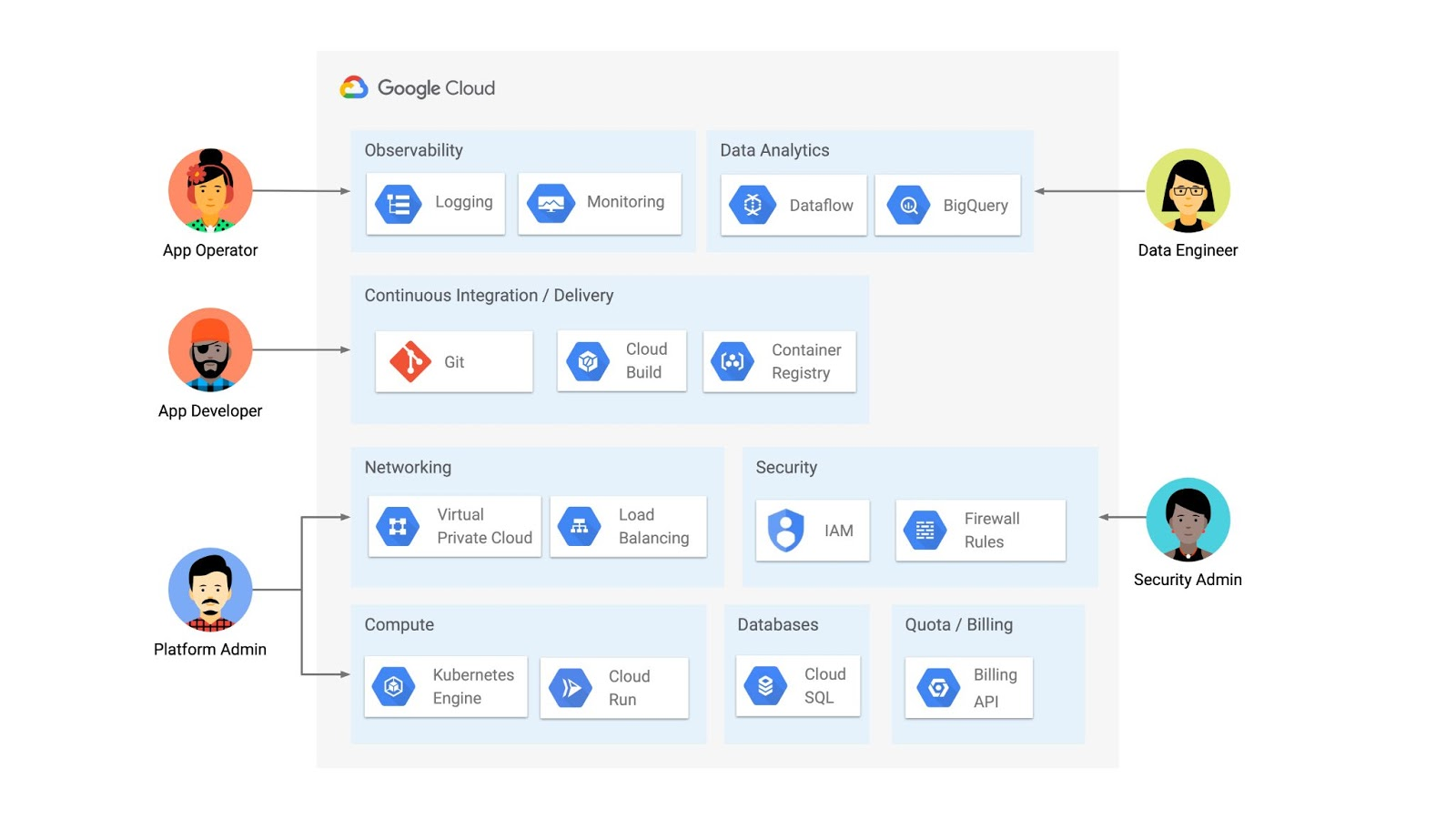
But if you’re operating a Kubernetes platform, it’s likely that you have resources that live entirely outside of Kubernetes. You might have CI/CD triggers, IAM policies, firewall rules, databases. The first post of this series introduced the platform diagram below, and asserted that “Kubernetes can be the powerful declarative control plane that manages large swaths” of that platform. Let’s close that loop by exploring how to use the Kubernetes Resource Model to configure and provision resources hosted in Google Cloud.
Why use KRM for hosted resources?
Before diving into the “what” and “how” of using KRM for cloud-hosted resources, let’s first ask “why.” There is already an active ecosystem of infrastructure-as-code tools, including Terraform, that can manage cloud-hosted resources. Why use KRM to manage resources outside of the cluster boundary?
Three big reasons. The first is consistency. The last post explored ways to ensure consistency across multiple Kubernetes clusters- but what about consistency between Kubernetes resources and cloud resources? If you have org-wide policies you’d like to enforce on Kubernetes resources, chances are that you also have policies around hosted resources. So one reason to manage cloud resources with KRM is to standardize your infrastructure toolchain, unifying your Kubernetes and cloud resource configuration into one language (YAML), one Git config repo, one policy enforcement mechanism.
The second reason is continuous reconciliation. One major advantage of Kubernetes is its control-loop architecture. So if you use KRM to deploy a hosted firewall rule, Kubernetes will work constantly to make sure that resource is always deployed to your cloud provider- even if it gets manually deleted.
A third reason to consider using KRM for hosted resources is the ability to integrate tools like kustomize into your hosted resource specs, allowing you to customize resource specifications without templating languages.
These benefits have resulted in a new ecosystem of KRM tools designed to manage cloud-hosted resources, including the Crossplane project, as well as first-party tools from AWS, Azure, and Google Cloud.
Let’s explore how to use Google Cloud Config Connector to manage GCP-hosted resources with KRM.
Introducing Config Connector
Config Connector is a tool designed specifically for managing Google Cloud resources with the Kubernetes Resource Model. It works by installing a set of GCP-specific resource controllers onto your GKE cluster, along with a set of Kubernetes Custom Resources for Google Cloud products, from Cloud DNS to Pub/Sub.
How does it work? Let’s say that a security administrator at Cymbal Bank wants to start working more closely with the platform team to define and test Policy Controller constraints. But they don’t have access to a Linux machine, which is the operating system used by the platform team. The platform team can address this by manually setting up a Google Compute Engine (GCE) Linux instance for the security admin. But with Config Connector, the platform team can instead create a declarative KRM resource for a GCE instance, commit it to the config repo, and Config Connector will spin up the instance on their behalf.
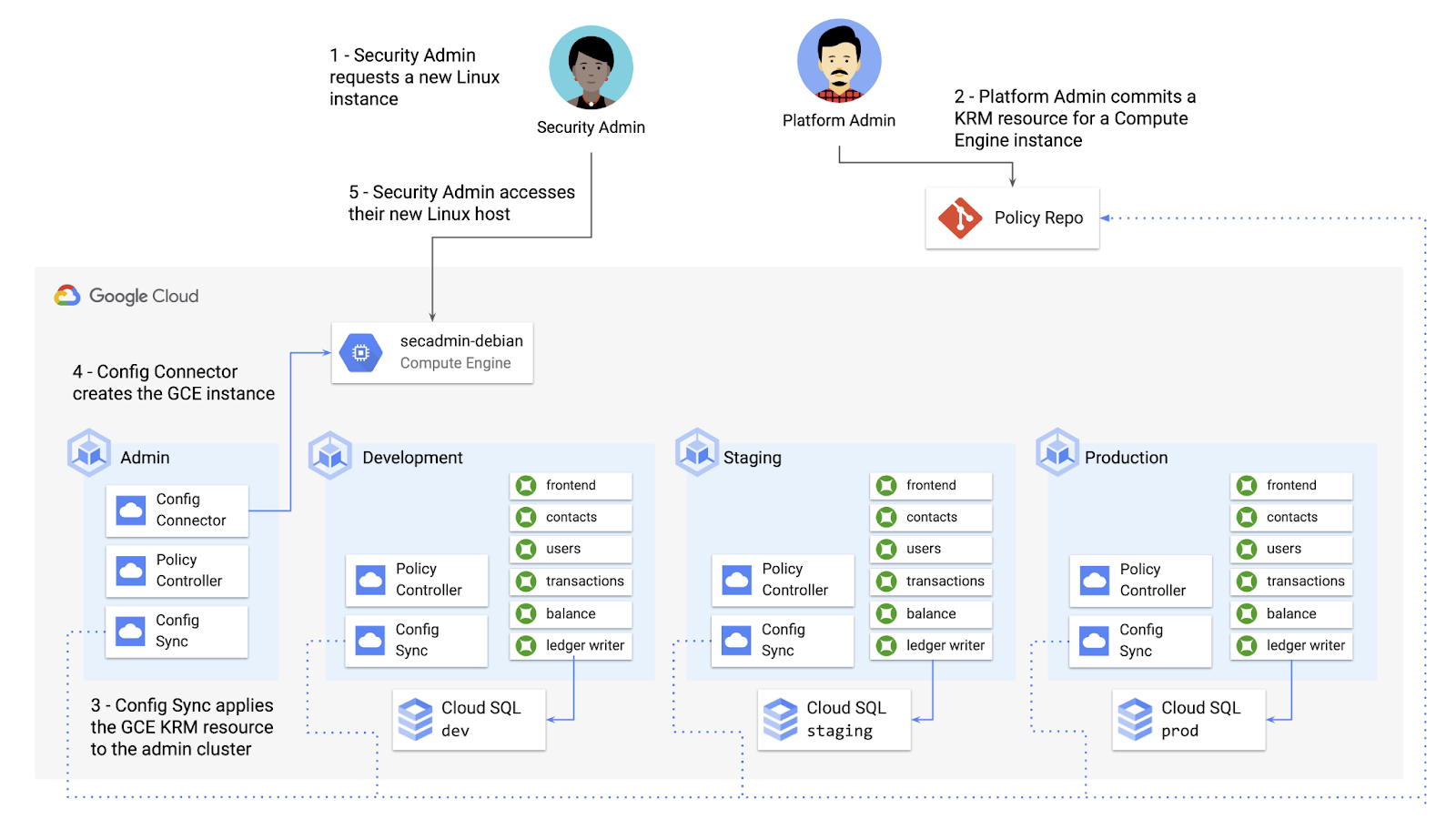
What does this declarative resource look like? A Config Connector resource is just a regular Kubernetes-style YAML file- in this case, a custom resource called Compute Instance. In the resource spec, the platform team can define specific fields, like what GCE machine type to use.
apiVersion: compute.cnrm.cloud.google.com/v1beta1kind: ComputeInstancemetadata:annotations:cnrm.cloud.google.com/allow-stopping-for-update: "true"name: secadmin-debianlabels:created-from: "image"network-type: "subnetwork"spec:machineType: n1-standard-1zone: us-west1-abootDisk:initializeParams:size: 24type: pd-ssdsourceImageRef:external: debian-cloud/debian-9...
Once the platform team commits this resource to the Config Sync repo, Config Sync will deploy the resource to the cymbal-admin GKE cluster, and Config Connector, running on that same cluster, will spin up the GCE resource represented in the file.
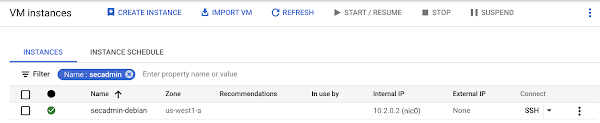
This KRM workflow for cloud resources opens the door for powerful automation, like custom UIs to automate resource requests within the Cymbal Bank org.
Integrating Config Connector with Policy Controller
By using Config Connector to manage Google Cloud-hosted resources as KRM, you can adopt Policy Controller to enforce guardrails across your cloud and Kubernetes resources.
Let’s say that the data analytics team at Cymbal Bank is beginning to adopt BigQuery. While the security team is approving production usage of that product, the platform team wants to make sure no real customer data is imported. Together, Config Connector and Policy Controller can set up guardrails for BigQuery usage within Cymbal Bank.
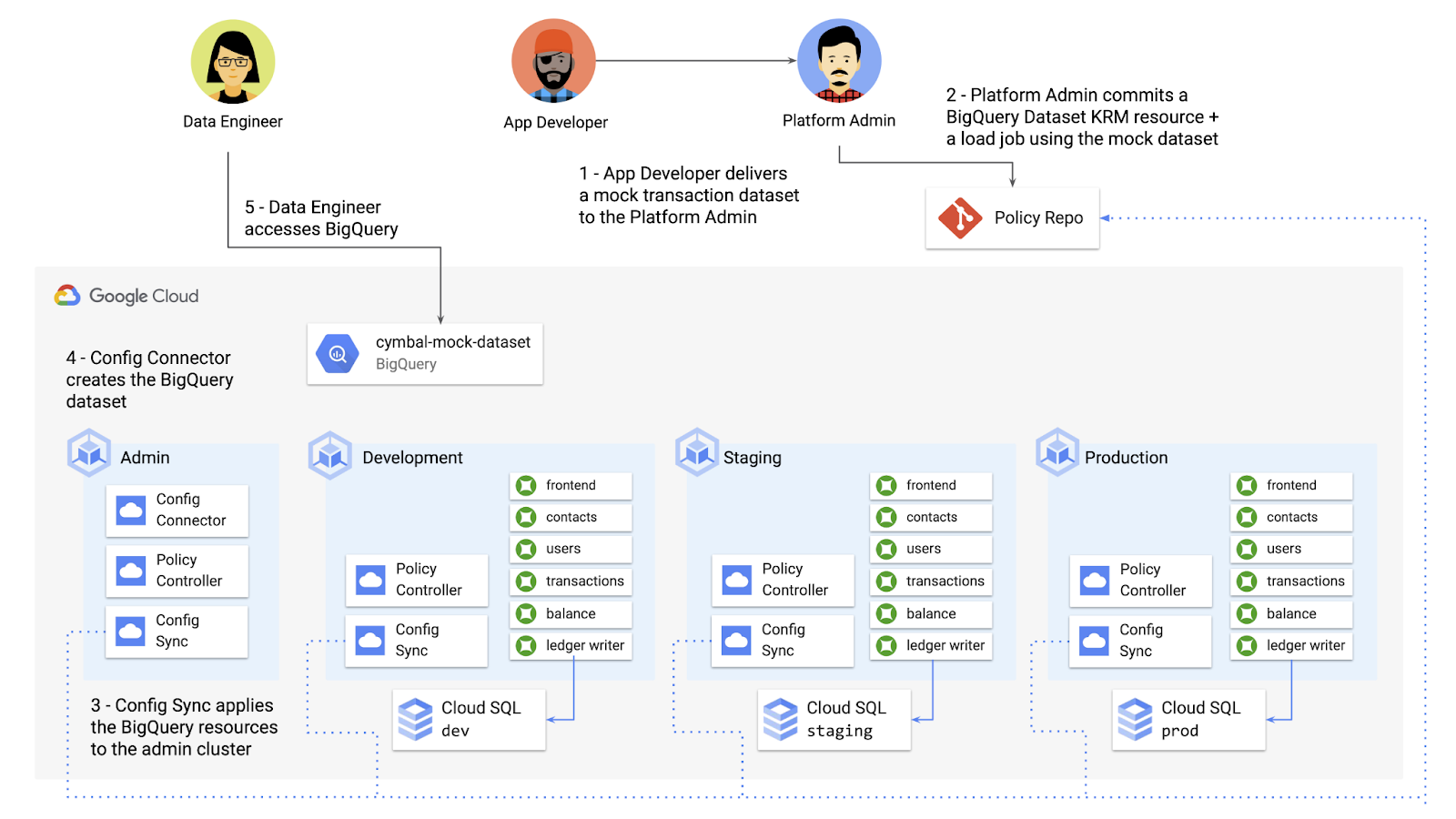
Config Connector supports BigQuery resources, including Jobs, Datasets, and Tables. The platform team can work with the analytics team to define a test dataset, containing mocked data, as KRM, pushing those resources to the Config Sync repo as they did with the GCE instance resource.
apiVersion: bigquery.cnrm.cloud.google.com/v1beta1kind: BigQueryJobmetadata:name: cymbal-mock-load-jobannotations:configsync.gke.io/cluster-name-selector: cymbal-adminspec:location: "US"jobTimeoutMs: "600000"load:sourceUris:- "gs://cymbal-bank-datasets/cymbal-mock-transactions.csv"
From there, the platform team can create a custom Constraint Template for Policy Controller, limiting the allowed Cymbal datasets to only the pre-vetted mock dataset:
rego: |package bigquerydatasetallownameviolation[{"msg": msg}] {input.review.object.kind == "BigQueryDataset"input.review.object.metadata.name != input.parameters.allowedNamemsg := sprintf("The BigQuery dataset name %v is not allowed", [input.review.object.metadata.name])}apiVersion: constraints.gatekeeper.sh/v1beta1
These guardrails, combined with IAM, can allow your organization to adopt new cloud products safely- not only defining who can set up certain resources, but within those resources, what field values are allowed.
Manage existing GCP resources with Config Connector
Another useful feature of Config Connector is that it supports importing existing Google Cloud resources into KRM format, allowing you to bring live-running resources into the management domain of Config Connector.
You can use the config-connector command line tool to do this, exporting specific resource URIs into static files:
config-connector export "//sqladmin.googleapis.com/sql/v1beta4/projects/cymbal-bank/instances/cymbal-dev" \--output cloudsql/
Output:
apiVersion: sql.cnrm.cloud.google.com/v1beta1kind: SQLInstancemetadata:annotations:cnrm.cloud.google.com/project-id: cymbal-bankname: cymbal-devspec:databaseVersion: POSTGRES_12region: us-east1resourceID: cymbal-dev...
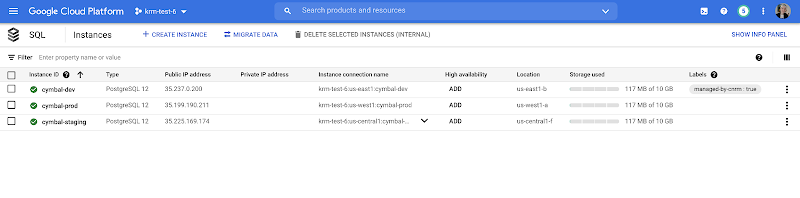
From here, we can push these KRM resources to the config repo, and allow Config Sync and Config Controller to start lifecycling the resources on our behalf. The screenshot below shows that the cymbal-dev Cloud SQL database now has the “managed-by-cnrm” label, indicating that it’s now being managed from Config Connector (CNRM = “cloud-native resource management”).
This resource export tool is especially useful for teams looking to try out KRM for hosted resources, without having to invest in writing a new set of YAML files for their existing resources. And if you’re ready to adopt Config Connector for lots of existing resources, the tool has a bulk export option as well.
Overall, while managing hosted resources with KRM is still a newer paradigm, it can provide lots of benefits for resource consistency and policy enforcement. Want to try out Config Connector yourself? Check out the part 5 demo.
This post concludes the Build a Platform with KRM series. Hopefully these posts and demos provided some inspiration on how to build a platform around Kubernetes, with the right abstractions and base-layer tools in mind.
Thanks for reading, and stay tuned for new KRM products and features from Google.
Why America’s Leading Mortgage Technology Provider Runs its Business on Apigee

3981
Of your peers have already read this article.
3:30 Minutes
The most insightful time you'll spend today!
Black Knight is a leading provider of technology, data, and analytics to the mortgage industry, catering to both large and mid-tier banks in the United States. Over the past few decades, we tended to manage customer integrations on a case-by-case basis. Whenever a bank needed to connect with a Black Knight app, we’d launch another integration project. Lather, rinse, repeat. Needless to say, this was inefficient; we knew we had to do something to centralize this process.
Building versus buying an API management platform
To start, we created some homegrown API solutions. Despite being largely successful with one of these solutions, we saw that technology advances were outpacing our capacity to update our solutions in-house. We knew we needed to move toward an API platform that would support RESTful architecture and that would fully enable mobile solutions. It also had to be extremely secure. Knowing how complicated such a platform would be to build ourselves, we decided that our developers were better off focusing on providing core solutions to Black Knight clients; engaging with an outside provider was the right way for us to advance our API strategy.
After a lengthy proof-of-concept process, we went into production with the Apigee API Management Platform from Google Cloud in 2018. In our opinion, Apigee was the most complete, robust, technically sound and full-featured option from among all of the API management tools we evaluated. Its ease of use was the deciding factor for our developers, and the Apigee analytics capabilities provided considerable insight into the anatomy of an API call—something the other platforms we considered didn’t do as well.
Choosing Apigee meant that we didn’t have to focus on developing and maintaining a tool or spend enormous amounts of money trying to keep up with security patching. For a large company like Black Knight, an API management tool is something we don’t want to spend a lot of time on. We know that Google Cloud devotes tremendous resources to it, and it would be difficult to replicate that in-house.
Black Knight has more than 150 client-facing applications. Almost half of them now are built with APIs that are externally facing, and many of these apps use APIs that integrated with other Black Knight applications. Add to that the huge number of applications out there that come from clients and third-party vendors, and suddenly, we had a management challenge from an API perspective.
Driving cultural change
We came to Apigee with the goal of containing and empowering our huge ecosystem of APIs, customers, third parties, and internal users.
Given Black Knight’s size, our developers and customers understandably each have different business goals, so getting everyone to come to a centralized platform is a great opportunity. My role is to help people consider other options so they can be open to the benefits that Apigee brings us.
Now that we’ve engaged with Apigee for over a year, we see two big benefits. First, the huge reduction in point-to-point integrations has produced tremendous efficiencies for us and our customers, who now get instant integration once they’ve been authorized for a particular API. Second, Apigee’s capacity for mobile enablement lets us satisfy our customers’ needs for secure mobile apps.
Simplifying security
From a technical perspective, security is complicated for mobile apps. We’re often accessing sensitive information on a mobile device that can’t always be trusted. This kind of scenario requires us to implement a number of security precautions to help ensure confidential information remains protected.
The Apigee API management platform addresses these needs in the simplest way possible. It solves complex problems related to security without having to deploy a new API proxy each time we need to support a particular mobile device upgrade. Our back-end applications remain protected because Apigee helps manage security, requests, access tokens, and authorizations. Today, our back-end applications work with Apigee to communicate with mobile devices or servers coming over the internet.
Apigee has also enabled us to do a better job sharing a variety of APIs. The developer portal lets us stitch together APIs and get more creative about how we can innovate and build new solutions based on these collections of APIs. At this point, anybody that has a nondisclosure agreement with us can register for the developer portal. The nature of our business is such that we can’t just open up our APIs to anybody, but it’s available to our contracted third parties.
Our Apigee journey has been exciting, and we’re making great progress. I’m looking forward to what innovations we will come up with next, thanks to the way Apigee enables us to create, implement, and deliver.
The Latest in Spring Cloud GCP: Upgrading the Sample Bank of Anthos App

1388
Of your peers have already read this article.
3:30 Minutes
The most insightful time you'll spend today!
We’re excited to announce that Spring Cloud GCP version 4.0 is now generally available! In this post, we’ll be describing what the new major version has to offer, and demonstrating the process of using the migration guide on one of our reference architectures, Bank of Anthos.
What’s new?
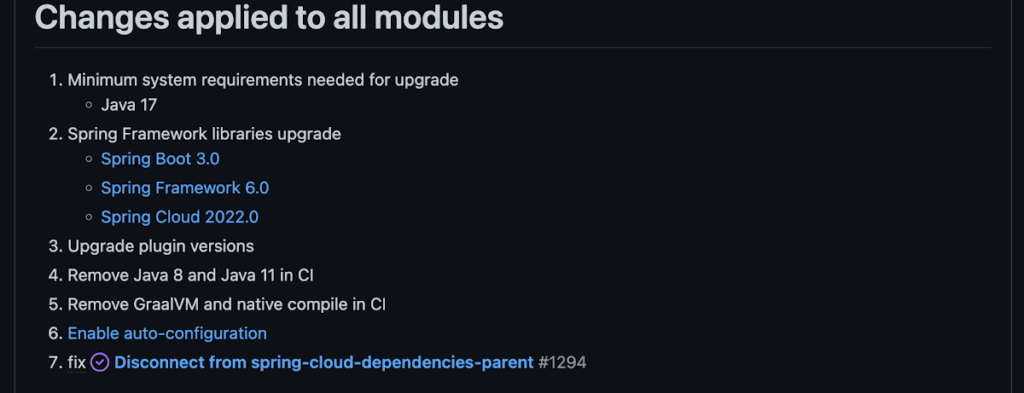
With this release, Spring Cloud GCP officially supports Spring Boot 3.x. However, this migration involves a number of breaking changes as outlined in the migration guide. The full list of changes made is available on Github, but the one of the most significant differences is that Java 17 is now a minimum requirement.
Another notable feature of this release is the addition of starter artifacts – Spring Boot starters for Google Cloud – that provide dependencies and auto-configurations for 80+ Google Client libraries. Just as the name suggests, these starters can serve as helpful starting points when working with a new client library. For now, they’re in preview.
These starters are not included in the BOM by default and need to be added as a dependency to your project before they can be used. For example, if you wanted to get started with Cloud Text-to-Speech, you would include the following:
<dependency>
    <groupId>com.google.cloud</groupId>
    <artifactId>google-cloud-texttospeech-spring-starter</artifactId>
    <version>4.0.0-preview</version>
  </dependency>
The upgrade process
We prepared a migration guide to help answer any questions involved with moving from 3.x to 4.x. Let’s follow those instructions to migrate Bank of Anthos.
We’ll start by cloning and building the application before the upgrade, according to the quickstart and development guide:
PROJECT_ID=<YOUR-PROJECT-ID>
gcloud services enable container --project ${PROJECT_ID}

git clone https://github.com/GoogleCloudPlatform/bank-of-anthos.git
cd bank-of-anthos/

gcloud services enable container.googleapis.com monitoring.googleapis.com \
  --project ${PROJECT_ID}

REGION=us-central1
gcloud container clusters create-auto bank-of-anthos \
  --project=${PROJECT_ID} --region=${REGION}

gcloud container clusters get-credentials bank-of-anthos \
  --project=${PROJECT_ID} --region=${REGION}

skaffold run --default-repo=gcr.io/${PROJECT_ID}/bank-of-anthos
At the end of this, you should see a “deployment stabilized” message:
Deployments stabilized in 9.657 secondsWith the environment set up for development, we’re ready to move on to the actual migration. The migration is already complete at time of writing, but here’s the full list of changes made:
- We began by checking the current Java, Spring Boot and Spring Cloud GCP versions.
- Our Java version is okay, but the other two are out of date, and will need to be updated.
We can also add the Spring Cloud GCP BOM to manage our versions going forward while we’re here.
- Our Java version is okay, but the other two are out of date, and will need to be updated.
- Then, in no particular order, we can make the following code changes:
- Remove the explicit type declarations from our ResponseEntity instantiations.
- Replace all javax.* imports with Jakarta.* counterparts, since Spring 3.0 makes use of Jakarta EE 9.0
With those changes in place, the app is upgraded and ready to re-deploy!
Live example
For a finished example of this migration, check out the Bank of Anthos repository on Github. It’s an excellent sample application that showcases a polyglot Java & Python app, served on Kubernetes and Google Cloud. All CI/CD and configurations are open source, so it may be instructive as you approach this migration.
Thanks for reading, and feel free to provide comments or feedback on Twitter, or in the issues section of the repository.
Speeding up migrations to Google Cloud with migVisor by EPAM

3087
Of your peers have already read this article.
2:30 Minutes
The most insightful time you'll spend today!
Application modernization is quickly becoming one of the pillars of successful digital transformation and cloud migration initiatives. Many organizations are becoming aware of the dramatic benefits that can be achieved by moving legacy, on-premises apps and databases into cloud native infrastructure and services, such as reduced Total Cost of Ownership (TCO), elimination of expensive commercial software licenses, and improved performance, scalability, security and availability.
The complexity of applications and databases to a cloud-centric architecture requires a rapid, accurate, and customized assessment of modernization potential and identification of challenges. Addressing business and functional drivers, TCO calculations, uncovering technological challenges and cross-platform incompatibilities, preparation of migration, and rollback plans can be essential to the success and outcome of the migration.
These cloud migration initiatives are often divided into three high-level phases:
- Discovery: identifying and cataloging the source inventory. Output is usually an inventory of source apps, databases, servers, networking, storage, etc. The discovery of existing assets within a data center is usually straightforward and can often be highly automated.
- Pre-migration readiness: the planning phase. This includes the analysis of the current portfolio of the databases and applications for migration readiness, determining the target architecture, identifying technological challenges or incompatibilities, calculating TCO, and preparing detailed migration plans.
- Migration execution: where the rubber hits the road. During this phase of the migration process, database schemas are actively converted, the application data access layer is refactored, data is replicated from source to target, often in real-time, and the application is deployed in its determined compute platform(s).
Successful evaluation and planning phase as part of the pre-migration readiness phase can bolster confidence in investment towards modernization. Skipping or inaccurately completing the pre-migration phase can lead to a costly and sub-optimal result. Relying on manual pre-migration assessments can lead to long migration timelines, reduced success rates and poor confidence in the post-migration state, increased risk and total migration cost.
Some of the commonly asked question during pre-migration include:
- How compatible are my source databases, which are often commercial and proprietary in nature, with their open-source cloud-native alternatives? For example, how compatible are my Oracle workloads and usage patterns with Cloud SQL for PostgreSQL?
- What’s my degree of vendor lock-in with my current technology stack? Are proprietary features and capabilities being used that are incompatible with open-source database technologies?
- How tightly-coupled are my applications with my current database engine technology? Can my applications be deployed as-is, refactored for cloud readiness with ease, or will it be a big undertaking?
- How much effort will my migration require? How expensive will it be? What will be my run-rate in Google Cloud post-migration and my ROI?
- Can we identify quick-win applications and databases to start with?
There is a direct association between the accuracy and speed of the pre-migration phase and the outcome of the migration itself. The faster and more accurately organizations complete the required pre-migration analysis, the more cost efficient and successful the migration itself will usually be.
EPAM Systems, Inc., a leader in digital transformation, worked with Google Cloud as a preferred partner to accelerate cloud migrations beginning with pre-migration assessments. Leveraging EPAM’s migVisor for Google Cloud—a unique pre-migration accelerator that automates the pre-migration process—and EPAM’s consulting and support services, organizations can quickly generate a cloud migration roadmap for rapid and systematic pre-migration analysis. This approach has resulted in the completion of thousands of database assessments for hundreds of customers.
migVisor is agentless, non-intrusive, and hosted in the EPAM cloud. migVisor seamlessly connects to your source databases and runs SQL queries to ascertain the database configuration, code, schema objects and infrastructure setup. Scanning of source databases is done rapidly and without interruption to production workloads.
migVisor prepares customers to land applications in Google Cloud and its managed suite of databases services and platforms such as Cloud SQL, bare metal hosting, Spanner and Cloud Bigtable. migVisor supports re-hosting (lift-and-shift), re-platforming, and re-factoring.
“EPAM’s recent application assessment update to its migration tooling system, migVisor, will bring a new level of transparency to the entire application and database modernization process”, said Dan Sandlin, Google Cloud Data GTM Director at Google Cloud. “This enables organizations to make the most of digital technologies and provides a clear IT ecosystem transformation that allows our customers to build a flexible foundation for future innovation.”
Previously, migVisor focused on assessments of the source databases and the compatibility of customers’ existing database portfolio with cloud-centric database technologies. Coming this quarter, migVisor adds support for application assessments, augmenting its existing and class-leading capabilities in the database space.
The addition of application modernization assessment functionality in migVisor, combined with EPAM’s certification and specialization in Google Cloud Data Management and hands-on engineering experience, strengthens EPAM’s position as a leader for large-scale digital transformation projects and migVisor as a trusted product for cloud migration assessments to Google Cloud customers. EPAM provides customers an end-to-end solution for faster and more cost-effective migrations. Assessments that used to take weeks can now be completed in mere days.
Within minutes of registering for an account, anyone can start using migVisor by EPAM to automatically assess applications and application code. Visit the migVisor page to learn more and sign up for your account.
Transform ‘Dark Data’ from Documents with Document AI, Cloud Functions and Workflows

8181
Of your peers have already read this article.
2:00 Minutes
The most insightful time you'll spend today!
At enterprises across industries, documents are at the center of core business processes. Documents store a treasure trove of valuable information whether it’s a company’s invoices, HR documents, tax forms and much more. However, the unstructured nature of documents make them difficult to work with as a data source. We call this “dark data” or unstructured data that businesses collect, process and store but do not utilize for purposes such as analytics, monetization, etc. These documents in pdf or image formats, often trigger complex processes that have historically relied on fragmented technology and manual steps. With compute solutions on Google Cloud and Document AI, you can create seamless integrations and easy to use applications for your users. Document AI is a platform and a family of solutions that help businesses to transform documents into structured data backed by machine learning. In this blog post we’ll walk you through how to use Serverless technology to process documents with Cloud Functions, and with workflows of business processes orchestrating microservices, API calls, and functions, thanks to Workflows.
At Cloud Next 2021, we presented how to build easy AI-powered applications with Google Cloud. We introduced a sample application for handling incoming expense reports, analyzing expense receipts with Procurement Document AI, a DocAI solution for automating procurement data capture from forms including invoices, utility statements and more. Then organizing the logic of a report approval process with Workflows, and used Cloud Functions as glue to invoke the workflow, and do analysis of the parsed document.

We also open sourced the code on this Github repository, if you’re interested in learning more about this application.

In the above diagram, there are two user journeys: the employee submitting an expense report where multiple receipts are processed at once, and the manager validating or rejecting the expense report.
First, the employee goes to the website, powered by Vue.js for the frontend progressive JavaScript framework and Shoelace for the library of web components. The website is hosted via Firebase Hosting. The frontend invokes an HTTP function that triggers the execution of our business workflow, defined using the Workflows YAML syntax.
Workflows is able to handle long-running operations without any additional code required, in our case we are asynchronously processing a set receipt files. Here, the Document AI connector directly calls the batch processing endpoint for service. This API returns a long-running operation: if you poll the API, the operation state will be “RUNNING” until it has reached a “SUCCEEDED” or “FAILED” state. You would have to wait for its completion. However, Workflows’ connectors handle such long-running operations, without you having to poll the API multiple times till the state changes. Here’s how we call the batch processing operation of the Document AI connector:
- invoke_document_ai:call: googleapis.documentai.v1.projects.locations.processors.batchProcessargs:name: ${"projects/" + project + "/locations/eu/processors/" + processorId}location: "eu"body:inputDocuments:gcsPrefix:gcsUriPrefix: ${bucket_input + report_id}documentOutputConfig:gcsOutputConfig:gcsUri: ${bucket_output + report_id}skipHumanReview: trueresult: document_ai_response
Machine learning uses state of the art Vision and Natural Language Processing models to intelligently extract schematized data from documents with Document AI. As a developer, you don’t have to figure out how to fine tune or reframe the receipt pictures, or how to find the relevant field and information in the receipt. It’s Document AI’s job to help you here: it will return a JSON document whose fields are: line_item, currency, supplier_name, total_amount, etc. Document AI is capable of understanding standardized papers and forms, including invoices, lending documents, pay slips, driver licenses, and more.
A cloud function retrieves all the relevant fields of the receipts, and makes its own tallies, before submitting the expense report for approval to the manager. Another useful feature of Workflows is put to good use: Callbacks, that we introduced last year. In the workflow definition we create a callback endpoint, and the workflow execution will wait for the callback to be called to continue its flow, thanks to those two instructions:
- create_callback:call: events.create_callback_endpointargs:http_callback_method: "POST"result: callback_details...- await_callback:try:call: events.await_callbackargs:callback: ${callback_details}timeout: 3600result: callback_requestexcept:as: esteps:- update_status_to_error:...
In this example application, we combined the intelligent capabilities of Document AI to transform complex image documents into usable structured data, with Cloud Functions for data transformation, process triggering, and callback handling logic, and Workflows enabled us to orchestrate the underlying business process and its service call logic.
Going further
If you’re looking to make sense of your documents, turning dark data into structured information, be sure to check out what Document AI offers. You can also get your hands on a codelab to get started quickly, in which you’ll get a chance at processing handwritten forms. If you want to explore Workflows, quickstarts are available to guide you through your first steps, and likewise, another codelab explores the basics of Workflows. As mentioned earlier, for a concrete example, the source code of our smart expense application is available on Github. Don’t hesitate to reach out to us at @glaforge and @asrivas_dev to discuss smart scalable apps with us.
More Relevant Stories for Your Company

Investing for Future: Why Shifting Security Left Helps Your Bottom Line
The concept of "shifting left" has been widely promoted in the software development lifecycle. The concept is that introducing security earlier, or leftwards, in the development process will lead to fewer software-related security defects later, or rightwards, in production. Shifting cloud security left can help identify potential misconfigurations earlier in

State of DevOps 2019
The 2019 Accelerate State of DevOps Report confirms analyst reports that DevOps is crossing the chasm with the proportion of elite performers almost tripling compared to last year. The report finds that delivering software quickly, reliably, and safely is at the heart of technology transformation and organizational performance. The report

Ensuring Reliability in a DevOps World: Insights from the 2022 State of DevOps Report
When a software change is deployed — after being designed, coded, tested, packaged, and tested some more — a journey comes to an end. At the same time, a new journey begins: your customer’s relationship with your service. It’s here, in the domain of operations, that abstract risks like launch

Application Rationalization: Your App Development Team is Gonna Love It!
On April 6th, 2022, Google Cloud established a new partnership with CAST, to help accelerate the migration and application modernization programs of customers worldwide, complementing the Google capabilities already available through the Google Cloud Application Modernization Program (CAMP). Application Rationalization (App Rat) is the first step towards a cloud adoption
