





The Unintended Consequences of Scale

3513
Of your peers have already read this article.
3:00 Minutes
The most insightful time you'll spend today!
Cloud infrastructure offers so many advantages: on-demand scalability, built-in security, and a bevy of tooling to scale your business at the speed of the Internet.
It enables companies to pursue “blitzscaling,” as Reid Hoffman calls it. Capital expenses that take years or decades to pay off are no longer required to establish global networking, compute capacity, storage resources, and application enablement tooling. By renting these assets from cloud providers, you can translate capital costs to operational costs, help your company to manage resources efficiently, keep expenses aligned with growth trajectory, and develop a portfolio of business-driving technology assets faster than would have previously been possible.
Certainly, this is the message from many founders and venture capitalists: move to the cloud, build a ton of software, scale like crazy, and win. Sounds great, right?
But history has shown us that the process is not quite this simple. Scale can be great and is a prerequisite to many of today’s most exciting business opportunities — but scale also frequently produces unintended consequences. You need to be able not only to achieve scale but also to manage it.
When scale produces bloat
To understand how unforeseen impacts can ripple out from a rapidly-scaled technology, consider the first mass-produced vehicle, the Model T. The first production model was produced in 1908, and less than two decades later, Ford had produced 15 million. This rapid growth profoundly affected urban living for decades.
Thanks to cars, fewer workers needed to live near cities or along major public transportation lines. The ease-of-access to personal transportation led to suburban population centers and, ultimately, urban sprawl. “Sub-cities” extricated homeowners from the density of urban population centers but also created a complex web of unintended consequences: new and often duplicative administrative bodies, new taxes, new zoning laws, and more intricate infrastructure projects. We are arguably still dealing with this fallout today as communities grapple with antiquated zoning laws and, in their attempts to find ways forward, often produce only more sprawl.
If your technology is in the cloud, you may be challenged with similar issues. For example, when developers build software in the cloud, many of the barriers to building software are removed. As a result, developers build a lot of software — but often without a lot of intentional design. This in turn results in companies building a large number of disparate systems and overwhelming app sprawl.
The cloud can help you proliferate technologies so quickly, in other words, that effective management and re-use of resources becomes incredibly tough.
Managing scale
Software assets are often seen as comprising the “brains” of a company — but to effectively grow, you should consider not only brains but also the digital nervous system. You need systems that connect the brains to all of the other important limbs that have to coordinate in order for your company to drive value.
One way of creating this nervous system and managing this complexity is to leverage the facade design pattern: applying an API layer that abstracts the underlying complexity of multiple systems into an elegant, reliable interface that encourages discovery and re-use of applications, functions, and other technology artifacts such as build and deployment pipelines.
For example, too many enterprises build a new digital “road” for each application that needs to authenticate or authorize users. Instead, you can leverage a facade pattern to help establish one “main road” for these purposes, encourage reuse of the road for new projects, and — with API management — monitor and control all traffic along the road. For tasks such as aligning risk and compliance operations or unifying developer onboarding functions, the distinction between reusing elegant roads and continually building new complicated ones could not be more important.
API management tools mean you can establish a single-pane-of-glass view into your network of digital roads and destinations or, if you prefer the biology metaphor, into the nervous system routes connecting your company’s software brains. This view becomes a point at which suspicious API usage patterns can be detected, reported, and handled and through which business-driving insights from legitimate traffic can be gleaned. Rather than dealing with IT sprawl, you can maintain visibility over your assets, control how they are used, roll out experimental digital products and get immediate feedback on adoption, and generate analytics to help you effectively divest from and invest in opportunities as the market demands.
More is not always better
More is not always better, and, in fact, it is sometimes worse.
It’s a time-worn sales axiom that would-be customers are more likely to make a choice when presented with two or three options rather than fifty, for example, and virtually all of us can relate to moments of “analysis paralysis” triggered by too many choices. These dynamics of choice are such that the diminishing marginal utility of each choice can detract from each option: with each choice comes a little stress, and as these stresses accumulate, customer satisfaction suffers. IT systems are no different; if developers building new connected experiences are left to their own designs, rather than encouraged with standardized resources and best practices, their work may add to complexity and customer dissatisfaction.
One need look only at the various open air markets around the world to see this point in action. They may offer many things to see but the experience is anything but efficient. The multitude of shops selling similar and duplicate items, the zigzag layout, and the expected friction from bargaining with each vendor all mean concepts such as market-wide product discovery and product inventory go out the window. If your developer experience mirrors these marketplaces, your efforts to scale are more likely to tangle up your operations than to satisfy customers.
Contrast this experience with luxury retail experiences where product areas are clearly demarcated in different retail spaces, product explanations accompany showcase items, inventory is available locally or ready to ship, clear pricing is readily available, and similar stores are intentionally anchored to strategic physical areas to encourage customer flow among them. The developer programs that cloud efforts are often meant to enable require a similar focus on luxurious experiences.
If your growth strategy creates bloat, internal developers will not use resources efficiently and your ability to share resources with external partners will likely be hamstrung. Applying API facades helps to ensure that your growing software portfolio is not a complicated maze to be navigated but rather a series of technology products for developers to leverage.
Indeed, you should think of the API itself as a product, not just a way of surfacing or connecting technology. The better the product, the more easily it can be managed, the better the experience developers will have using it, and the more control you’ll have harnessing the cloud to extend your business’s footprint.
Investing for Future: Why Shifting Security Left Helps Your Bottom Line

4475
Of your peers have already read this article.
3:30 Minutes
The most insightful time you'll spend today!
The concept of “shifting left” has been widely promoted in the software development lifecycle. The concept is that introducing security earlier, or leftwards, in the development process will lead to fewer software-related security defects later, or rightwards, in production.
Shifting cloud security left can help identify potential misconfigurations earlier in the development cycle, which if unresolved can lead to security defects. Catching those misconfigurations early can improve the security posture of production deployments.
Why shifting security left matters
Google’s DevOps Research and Assessment (DORA) highlights the importance of integrating security into DevOps in the 2016 State of DevOps Report. The report discussed the placement of security testing in the software development lifecycle. The survey found that most security testing and tool usage happened after the development of a release, rather than continuously throughout the development lifecycle. This led to increased costs and friction because remediating problems found in testing may involve big architectural changes and additional integration testing, as shown in Figure 1. For example, security defects in production can lead to GDPR violations, which can carry fines up to 4% of global annual revenue.
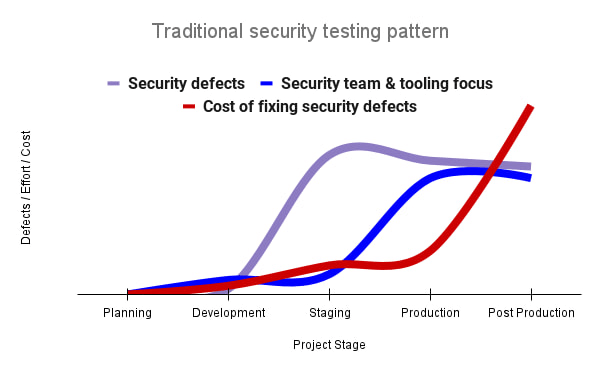
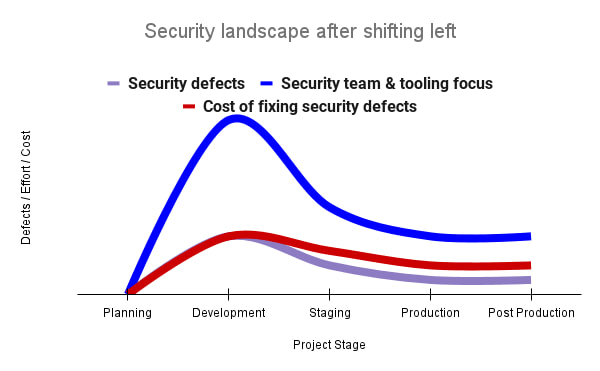
By inserting security testing into the development phase, we can identify security defects earlier and perform the appropriate remediation sooner. This results in fewer defects post-production and reduces remediation efforts and architectural changes. Figure 2 shows us that integrating security earlier in the SDLC results in overall decreases in security defects and associated remediation costs.
The 2021 State of DevOps Report expands the work of the 2016 report and advocates for integrating automated testing throughout the software development lifecycle. Automated testing is useful for continuously testing development code without the need for additional skills or intervention by the developer. Developers can continue to iterate quickly while other stakeholders can be confident that common defects are being identified and remediated.
From code to cloud
The DORA findings with regard to code security can also be applied to cloud infrastructure security. As more organizations deploy their workloads to the cloud, it’s important to test the security and configurations of cloud infrastructure. Misconfigurations in cloud resources can lead toward security incidents that could lead to data theft. Examples of such misconfigurations include overly permissive firewall rules, public IP addresses for VMs, or excessive Identity and Access Management (IAM) permissions on service accounts and storage buckets.
We can and should leverage different Google Cloud services to identify these misconfigurations early in the development process and prevent such errors from emerging in production to reduce the costs of future remediation, potential legal fines, and compromised customer trust.
The key tools in our toolshed are Security Command Center and Cloud Build. Security Command Center provides visibility into misconfigurations, vulnerabilities, and threats within a Google Cloud organization. This information is critical when protecting your cloud infrastructure (such as virtual machines, containers, web applications) against threats, or identifying potential gaps from compliance frameworks (such as CIS Benchmarks, PCI-DSS, NIST 800-53, or ISO 27001.
Security Command Center further supports shifting security left by allowing visibility of security findings at the cloud project level for individual developers, while still allowing global visibility for Security Operations. Cloud Build provides for the creation of cloud-native CI/CD pipelines. You can insert custom health checks into a pipeline to evaluate certain conditions (such as security metrics) and fail the pipeline when irregularities are detected. We will now explore two use cases that take advantage of these tools.
Security Health Checker
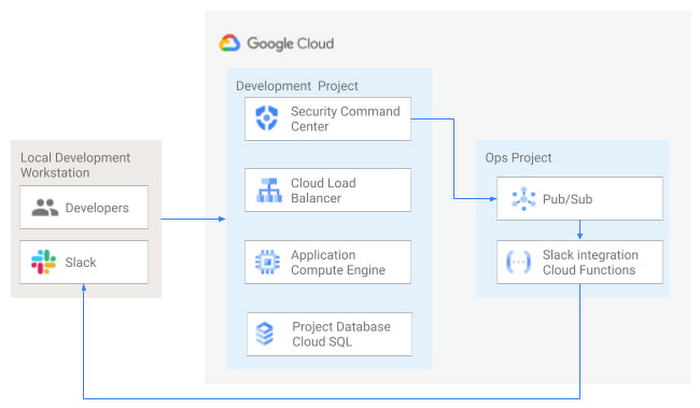
Security Health Checker continuously monitors the security health of a Google Cloud project and promptly notifies project members of security findings. Figure 3 shows developers interacting with a Google Cloud environment with network, compute, and database components. Security Command Center is configured to monitor the health of the project.
When Security Command Center identifies findings, it sends them to a Cloud Pub/Sub topic. A Cloud Function then takes the findings published to that topic and sends them to a Slack channel monitored by infrastructure developers. Just like a spell checker providing quick feedback on misspellings, Security Health Checker provides prompt feedback on security misconfigurations in a Google Cloud project that could lead to deployment failures or post-production compromises. No additional effort is required on the part of developers.
Security Pipeline Checker
In addition to using Security Command Center for timely notification of security concerns during the development process, we can also integrate security checks into the CI/CD pipeline by using Security Command Center along with Cloud Build as shown in Figure 4.
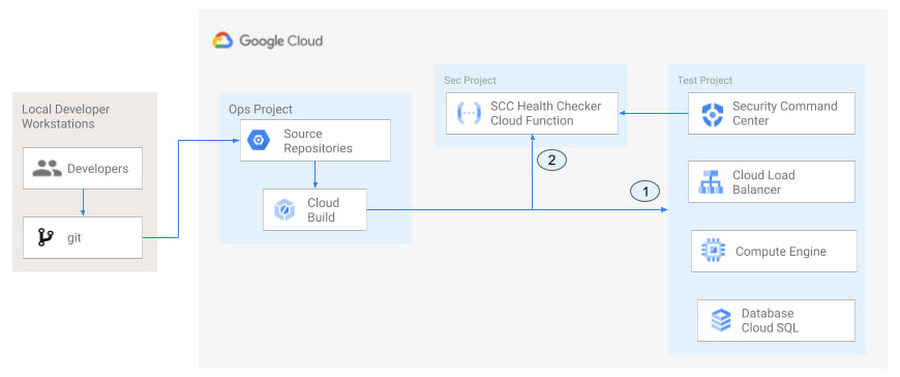
The pipeline begins with a developer checking code into a git repository. This repository is mirrored to Cloud Source Repositories. A build trigger will begin the build process. The build pipeline will include a short waiting period of a few minutes to give Security Command Center a chance to identify security vulnerabilities. A brief delay may appear undesirable at first, but the analysis that takes place during that interval can result in the reduction of security defects post-production.
At the end of the waiting period, a Cloud Function serving as a Security Health Checker will evaluate the findings from Security Command Center (Connector 1 in Figure 4). If the validator determines that unacceptable security findings exist, the validator will inject a failure indication into the pipeline to terminate the build process (Connector 2 in Figure 4). Developers have visibility into the failure triggers and remediate them before successfully deploying code to production. This is in contrast to the findings in the 2016 State of DevOps Report wherein organizations that didn’t integrate security into their DevOps processes spent 50% more time remediating security issues than those who “shifted left” on security.
Closing thoughts
DORA’s 2016 State of DevOps report called out the need for “shifting left” with security, introducing security earlier in the development process to identify security vulnerabilities early to reduce mitigation efforts post-production. The report also advocated for automated testing throughout the software development lifecycle.
We looked at two ways of achieving these objectives in Google Cloud. The Security Health Checker provides feedback to developers using Security Command Center and Slack to notify developers of security findings as they pursue their development activities. The Security Pipeline Checker uses Security Command Center as part of a Cloud Build pipeline to terminate a build pipeline if vulnerabilities are identified during the build process. To implement the Security Heath Checker and the Security Pipeline Checker, check out the GitHub repository. We hope these examples will help you to “shift left” using Google Cloud services. Happy coding!
This article was co-authored with Jason Bisson, Bakh Inamov, Jeff Levne, Lanre Ogunmola, Luis Urena, and Holly Willey, Security & Compliance Specialists at Google Cloud.

4112
Of your peers have already downloaded this article
10:32 Minutes
The most insightful time you'll spend today!
While microservices are lauded as catalysts for speed and scale, the conversation is incomplete if it does not include APIs. Without APIs, microservices cannot be securely, reliably, and adaptably scaled across an organization or to outside partners. Moreover, because these APIs and their microservices are meant to be widely consumed and reused, it’s not enough for companies to merely create the APIs and move on. Rather, the APIs should be continually managed so the business can control how its microservices are accessed, generate insight into how they are used, and encourage reliability of its services.
As microservices grow beyond their original use cases and are being leveraged to share important functionality throughout the enterprises and even with external partners, the problem that arises is how this sharing creates challenges for teams trying to secure, monitor, understand usage of, and fully take advantage of microservices.
In this eBook we explore how leading enterprises are facing these challenges head-on and scaling their microservices strategies. Learn how APIs make it possible for microservices to be securely, reliably, and adaptably shared, and how an API management platform enables enterprises to ensure that they maintain control over their microservices as consumption grows.

Google is the Top Provider for Continuous Integration Tools, According to Forrester
DOWNLOAD WHITEPAPER3590
Of your peers have already downloaded this article
12:30 Minutes
The most insightful time you'll spend today!
Google’s continuous integration (CI) and continuous delivery (CD) platform, Cloud Build, emerges as a Leader for Continuous Integration.
“Google Cloud Build comes out swinging, going toe to toe with other cloud giants. Google Cloud Build is relatively new when compared to the other public cloud CI offerings, they had a lot to prove, and they did so.”
— Forrester Wave: Continuous Integration Tools
Forrester Wave on Continuous Integration identifies most significant continuous integration (CI) tool providers and shows how each vendor measures up on 27 criteria. Download the full report to see what makes Cloud Build a Leader in Continuous Integration.

In the report, you will learn:
- Where the market stands and where it’s going
- Why Google has the strongest score for security and compliance within CI/CD
- How Cloud Build ranks amongst the other vendors on performance and scalability
- How Cloud Build’s enterprise strategy and vision are superior to other vendors
Google Maps Platform Can Elevate FinTech Experience with Less Risks and Higher Security

4730
Of your peers have already read this article.
3:00 Minutes
The most insightful time you'll spend today!
The financial services industry is changing—an estimated $68 trillion in wealth transferring from baby boomers to millennials.1 This means financial service providers will have to deliver the speed, ease-of-use, technological sophistication, and tailored services that millennials have come to expect. In fact, half of all millennials are willing to switch to a competing institution if it offers a better digital experience.2 This and many other trends are driving unprecedented growth for mobile Fintech experiences in banking, digital payments, financial management and insurance.3
Google Maps Platform financial services solutions
To help you respond to customer’s changing demands, we’re launching financial services solutions that can help you improve your customer experience, security and operations. We’ve outlined the technical guidance and APIs you need to build out three financial services solutions: Enriched Transactions, Quick and Verified Sign-up, and Branch and ATM Locator Plus. We’ve also highlighted two use cases that customers are using our APIs to solve: Contextual Experiences and Fraud Detection.
Clarify financial statements with Enriched Transactions solution
Transaction statements are often hard for customers to understand, using abbreviations like “ACMEHCORP” instead of customer-facing names like “Acme Houseware”. Our Enriched Transactions solution clarifies these transactions and makes them instantly recognizable by adding the merchant name and business category, a photo of the storefront, its location on a map, and full contact info. Making transactions easier to recognize not only boosts consumer confidence, with reported increases in NPS of 15% or higher, but decreases costly support calls by approximately 67%.4
In addition, you can help customers easily visualize a series of transactions by adding the merchant name to the transaction amount and date, and displaying their transactions on a Google map. This enables you to give customers insights about where and how they spend money. See the guide to implement Enriched Transactions today.


Enable faster sign-up with Quick and Verified Sign-up solution
Manually entered addresses can lead to lowered conversions, erroneous customer data, and costly delivery mistakes. Our Quick and Verified Sign-up solution makes sign-up faster, suggesting nearby addresses with just a few thumb taps—cutting sign-up time by up to 64% and increasing conversion rates by up to 15%.5
The solution also provides one additional level of address verification that helps reduce the risk of fraudulent account sign-ups—and companies have decreased fraudulent account setups by approximately 30% through using geospatial data to verify customer identities.4 See the Quick and Verified Sign-up solution guide to get started today.
- Faster sign-ups 1An application form requires an address
- Faster sign-ups 2Autocomplete quickly suggests addresses
- Faster sign-ups 3Select the address with visual confirmation
- Faster sign-ups 4Address verification options are presented
- Faster sign-ups 5Location permission is granted by the user
- Faster sign-ups 6The address is verified
Help customers visit you with Branch and ATM Locator Plus solution
74% of customers now search for specific details prior to their visit, which makes detailed, accurate profiles for each location a must.5 Our Branch and ATM Locator Plus solution enhances your own websites and apps with the same information shown about your branches and ATMs on Google Maps. Include hours of operation, available services, user reviews, photos of the location, driving directions and more.
Financial services companies using geospatial data to provide additional information (e.g. opening hours, available services, etc.) on branch and ATM services have seen a 14% increase in Net Promoter Score (NPS), and a 7% decrease in customer support calls.4 Implement Branch and ATM Locator Plus today using the guide or build it in minutes with Quick Builder.
- ATM locator 1Customers can enable location permissions, or enter their address
- ATM locator 2Quickly enter the address with Autocomplete
- ATM locator 3Nearby location listings, ranked by distance and ETA
- ATM locator 4Map view and directions
Enable offers and rewards with Contextual Experiences
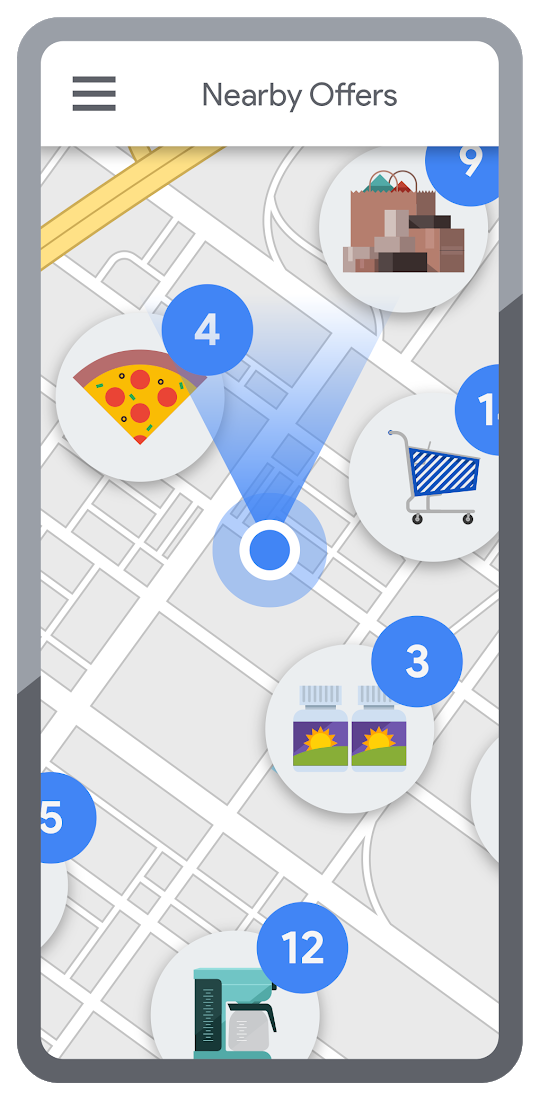
Real-time, geo-targeted offers can power deals, rewards, and cash-back programs—all visualized with rich Google Maps. By combining the insights of purchase histories with customer opt-in to location-based features, companies can implement the Contextual Experiences use case to enable personalized offers and rewards programs that drive engagement with brands while putting money in customers’ pockets at the same time.This is a win for banks and their customers, validated by encouraging metrics like NPS rating boosts of 8% or higher, and an increase of 8% or more time spent in-app.4 Learn how Current uses Google Maps Platform to create innovative customer rewards programs with location intelligence.

Detect suspicious transactions with Fraud Detection
With the Fraud Detection use case, companies can use customer opted-in mobile device location to flag suspicious activity based on geographic distance, such as an ATM withdrawal that is far from the customer’s phone. Our APIs can also help companies recognize suspicious transaction patterns such as a purchase made at a location that is physically distant from a recent transaction.
Financial services companies that use geospatial data to verify customers’ identities have reduced fraudulent transactions by approximately 70%, and false positives in fraud detection by 45%, on average.4 Learn how Starling Bank uses Google Maps Platform to enable real-time notification of transactions and their locations, and enhance data-driven decision-making.
Start elevating customer experiences, reducing risk and increasing efficiency today with our financial services offerings. Visit our financial services solutions page to learn more about how to start implementing these solutions.
For more information on Google Maps Platform, visit our website.
Why You Should Consider API-first Integration

3157
Of your peers have already read this article.
1:30 Minutes
The most insightful time you'll spend today!
Enterprises need to move faster than ever to gain a competitive advantage in today’s customer-focused environment. Time-to-market for products and services has shortened dramatically, from years to days. IT teams must move fast, react fast, and enable business strategies via constant innovation.
All of this digital transformation is about more than adopting the latest technologies. It is also about maximizing the use of existing data and services to improve efficiency and productivity, drive engagement and growth, and ultimately make the lives of customers, partners, and staff better. Connecting existing data and services and making them easily accessible via APIs promises a path forward, empowering enterprises to extend the value they already possess with new technologies, managed services, ecosystems, and support.
In addition to the challenges of legacy data and systems, today’s organizations are overwhelmed by the variety of cloud applications to meet their business needs and deliver innovative services to their customers.
Managing all of this data, connecting sources, integrating applications, and surfacing them as easy-to-use APIs for development is a crucial competency for any IT organization.
Design APIs with an Outside-in Approach
Many IT organizations have focused on solving this challenge with an “inside-out” approach: starting with the integration layer, building the flow, and then developing the APIs. But this approach is inefficient and fundamentally flawed because it looks at the problem from an “exposure” model; rather than designing for the business use cases of developers and other API consumers. Leaders in the organization end up seeing all of this data, connectivity, and integration as the “table stakes plumbing”, and thus do not seek inputs regarding business value from key business stakeholders.
The key issue is not exposure but rather how you leverage your data, services, and systems to drive impact across your digital value chain. Goals such as meeting your adoption or sales targets, reducing costs across lines of business, speeding up time to market, and reducing time spent supporting your customers may all be within reach. Easy-to-use APIs, rather than crudely exposed systems, are foundational enablers of this impact, and they are almost always designed from the outside-in, from the perspective of teams that are consuming the APIs to achieve a business goal.
Embrace API-first Integration
To accelerate the speed of development, enterprise IT teams need to take an API-first approach to integration, starting with the consumers’ use cases rather than the structure of the data in their systems.
The notion of outside-in thinking should be familiar to product managers, who routinely have to demonstrate customer empathy and put themselves in their customers’ shoes. If your team has a product owner, be sure they are empowered to decide what functionality is needed from their data.
Maximize your APIs with the right technology enablers
An API-first strategy treats the API not as middleware but as a software product that empowers developers, enables partnerships, and accelerates innovation—a big shift from integration-first operations in which APIs are typically exposed and then forgotten.
Possessing APIs is only part of the equation. If a company is going to share valuable digital assets with outsiders, it needs API management tools to:
- apply security protections, such as authentication and authorization
- protect assets from malicious attacks
- monitor digital services to ensure availability and high performance
- measure and track usage of the assets
With the right tools in place, APIs can unlock incredible business opportunities—which is a reason for every enterprise to aspire to be API-first!
Visit our website to learn more about API management with Google Cloud.
More Relevant Stories for Your Company

Google Cloud Helped Digitec Galaxus Personalize Over 2 Million Newsletters in a Week
Digitec Galaxus AG is the biggest online retailer in Switzerland, operating two online stores: Digitec, Switzerland's online market leader for consumer electronics and media products, and Galaxus, the largest Swiss online shop with a steadily growing range of consistently low-priced products for almost all daily needs. Known for its efficient, personalized shopping experiences,

Without an API Product Owner, Your APIs Have a Limited Lifespan
Product teams often serve as the nexus between all organizational units within a company, ensuring that a specific line of business follows a clear roadmap and that cross-functional alignment drives success. At their most empowered, product owners are like miniature CEOs for each offering within a company. Unfortunately, in today’s




Swarovski’s Journey towards Online and Offline Conversion with Predictive Analytics
Luxury brand and leader in crystals and glass production, Swarovski has charmed customers with its exquisite collections for over 125 years. To understand their customers better and map their online behaviors, Swarovski had to overcome prediction hurdles as majority of the purchases are not frequent or habitual. They are mostly

Maximizing Reliability, Minimizing Costs: Right-Sizing Kubernetes Workloads
Do you know how much money you could save by adjusting workload requests to better represent their actual usage? If you're not rightsizing your workloads, you might be overpaying for resources that your workloads aren't even using or worse, putting your workloads at risk for reliability issues due to under
