





Confidential GKE Nodes: Now Available on Compute Optimized C2D VMs

1253
Of your peers have already read this article.
1:30 Minutes
The most insightful time you'll spend today!
Today, we are happy to announce that Confidential GKE Nodes are available on compute optimized C2D VMs.
Many companies have adopted Google Kubernetes Engine (GKE) as a key component in their application infrastructure. In some cases, the advantages of using containers and Kubernetes can surpass those of traditional architectures, but migrating to and operating apps in the cloud often requires strategic planning to reduce risk and prevent data breaches. This is where Confidential GKE Nodes can be utilized to enhance the security of your GKE clusters or node pools.
Confidential GKE Nodes leverage specialized hardware to encrypt data in-use and are ideal for organizations processing sensitive data in the cloud. To make it easier to start using Confidential GKE Nodes, GKE standard workloads you run today can run as confidential GKE workloads without code changes on your end.
Security underpinnings of Confidential GKE Nodes
As we expand the Confidential Computing product portfolio from Confidential VMs to Confidential GKE Nodes to Confidential Dataproc, ensuring high performance is key. Confidential GKE Nodes are built on the same technology foundation as Confidential VM and utilize the Secure Encrypted Virtualization (SEV) capability of AMD EPYC™ processors. This feature allows you to keep data encrypted in memory with node-specific, dedicated keys that are generated and managed by the processor. The keys are generated in hardware during node creation and reside solely within the processor, making them unavailable to Google Cloud or other nodes running on the host.
Combined with the high performance of C2D VMs
Previously, Confidential GKE Nodes were generally available only on general purpose N2D VMs, but now they’re also available on compute optimized C2D VMs. The C2D machine series provides VM sizes ranging from 2 vCPUs to 112 vCPUs, offers up to 896 GB of memory, and are suited for performance-intensive workloads. C2D standard and C2D high-CPU machines serve compute-bound workloads including high-performance web servers and media transcoding. C2D high-memory machines serve specialized workloads such as high-performance computing (HPC) and electronic design automation (EDA), which require more memory.
Confidential GKE Nodes on compute-optimized C2D VMs could be a fit for use cases that require high performance and security. You can achieve encryption in-use for data processed inside your GKE cluster or just on specific node pools, without significant performance degradation. This is relevant for industries such as financial services, healthcare, retail, blockchain, and telecommunications, which often have sensitive data or personally identifiable information (PII) that requires additional security measures.
How MATRIXX used Confidential GKE Nodes
MATRIXX Software chose Confidential GKE Nodes to provide transparent encryption for data in-use to supplement encryption for data at-rest to secure personal subscriber data as required by privacy regulations.
MATRIXX Digital Commerce Platform (DCP) is a real-time 5G monetization for the communications industry, serving many of the world’s largest operator groups, regional carriers, and emerging digital service providers. MATRIXX used Google Cloud Confidential GKE Nodes to deliver a cloud-first digital commerce solution that enables commercial and operational agility for current and new telco business models.
A whitepaper titled “Protecting Your 5G Revenue Stream in the Cloud,” described how when MATRIXX DCP is deployed with Confidential Computing on Google Cloud, “its subscriber data, account balances, network events and charges/revenue streams are encrypted in use without making any code changes to the application or compromising on performance.”
Confidential GKE Nodes are globally available
At Google Cloud, we’re committed to investing in Confidential Computing, so we’ve expanded our support to VM families like C2D VMs. Confidential GKE Nodes running on C2D VMs are available in regions across the globe, including us-central1 (Iowa), asia-southeast1 (Singapore), us-east1 (South Carolina), us-east4 (North Virginia), asia-east1 (Taiwan), and europe-west4 (Netherlands). Note that Confidential GKE Nodes are available where C2D or N2D machines are available.
Pricing for Confidential GKE Nodes
There is no additional cost to deploy Confidential GKE Nodes, other than the costs of Compute Engine and Confidential VM pricing.
Try out Confidential GKE Nodes for cluster-level enablement
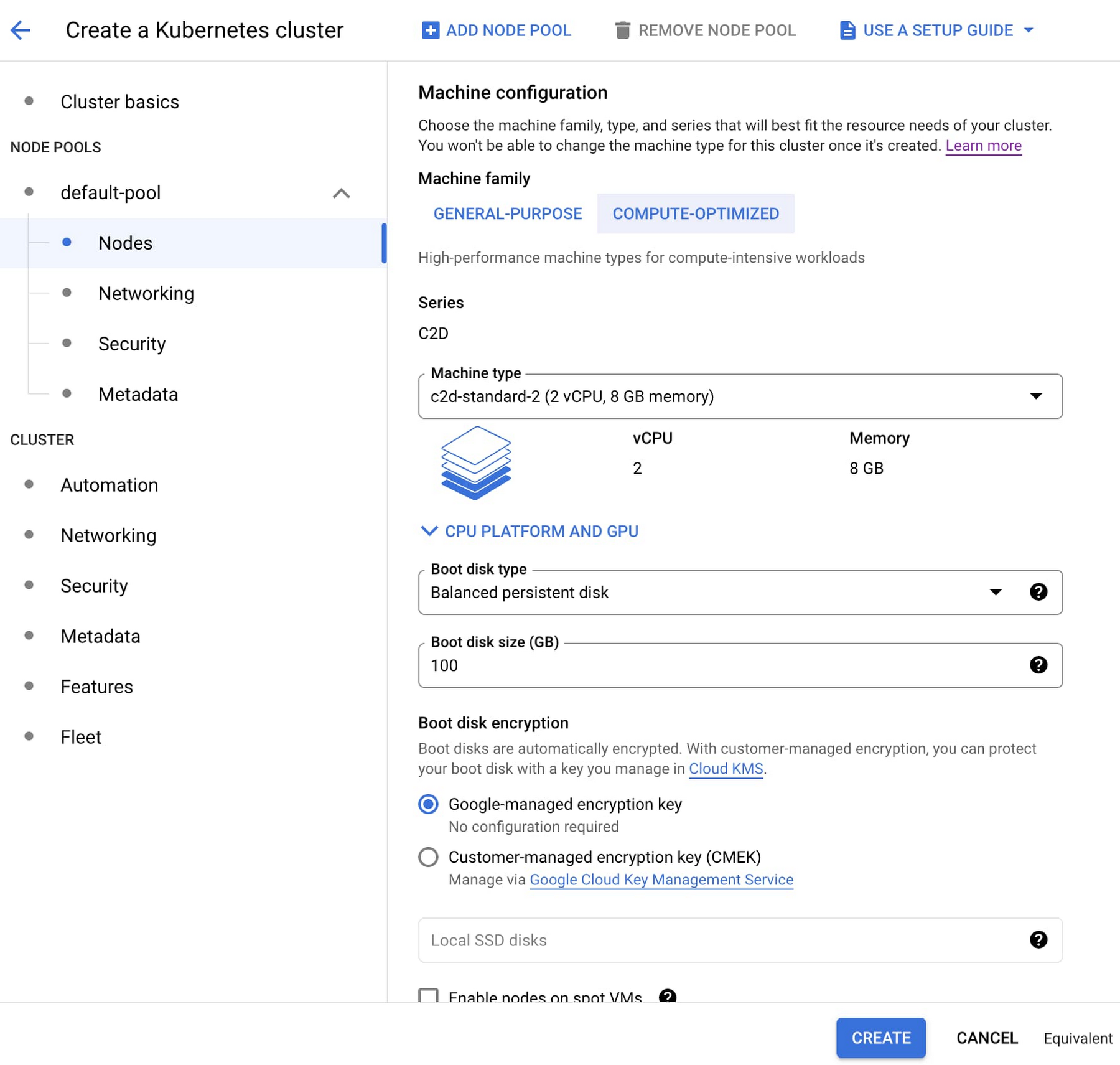
- First, go to the Google Kubernetes Engine page in the Google Cloud console. In the top navigation bar, click Create. In the Create Cluster modal, choose ‘Standard: You manage your cluster’ and click Configure.
- Next, from the left navigation pane, under Cluster, click Security. Select the ‘Enable Confidential GKE Nodes’ checkbox.
- Then, from the left navigation pane again, under Node Pools, click Nodes. Under Machine Configuration and Machine family, select the Compute-optimized tab, and choose a C2D machine type.
Configure the rest of the cluster as desired and click Create.
Making secure design choices should be easy, especially when the workloads involve high-performance processing of sensitive data. You can help protect your sensitive applications and data today by adding Confidential GKE Nodes to your GKE workloads. Learn more about Confidential Computing here.
Chrome OS’s Hybrid Work Model Powers Google’s Return to Work Strategy

7493
Of your peers have already read this article.
1:30 Minutes
The most insightful time you'll spend today!
The pandemic continues to deeply affect our lives around the globe. In some places, new cases are surging and returning to work is the last thing on people’s minds. In other areas, conditions are improving and companies are starting to think about transitioning their workforce back to the office.
Exactly when and how to do this remains complex and varies by country, industry, and company. What’s certain is that hybrid work will become an essential part of the business world moving forward. And finding solutions that bridge the gap between “in-person” and “somewhere else” are crucial.
At Google, we’ve been focused on what the hybrid transformation means for us. To prepare for hybrid work, using modern solutions is a key enabler.
Chrome OS: Supporting Google’s return to office strategy
At Google, we’ll move to a hybrid work week where most Googlers spend approximately three days in the office and two days wherever they work best. It’s no surprise that as the modern, secure, cloud-first platform, Chrome OS is playing a key role in our transition to a hybrid work model. Because Chrome OS devices can easily be shared, more flexible working models and spaces are now possible. And with user profiles stored in the cloud and collaboration solutions like Google Workspace, employees can log in to any Chrome OS device, access what they need and pick up where they left off.
Here are just a few ways we are using Chrome OS and its tools to support the return to the office:
- In select office locations, Googlers can reserve desks through an internal booking tool set up with a high-performance Chromebox, keyboard, mouse, and monitor. Employees can log in to the Chromebox which syncs their cloud profile, and start working with the same environment they have on all their Chrome OS devices.
- We’re announcing new docking stations that are designed for Chrome OS devices and allow employees to bring in their Chromebook from home, connect to the dock with one USB-C cable, and use a monitor, keyboard, and mouse for a full desktop experience.
- Every Chrome OS device enables a zero-trust security working model with BeyondCorp Enterprise providing our workforce with simple and secure access to applications while providing additional security controls for IT.
- We’ve deployed the new Chrome OS Readiness Tool to our extended workforce to identify employees that are able to switch to Chrome OS. This allows us to expand the latest security, deployment, and manageability benefits to more of the workforce.
Additional ways Chrome OS is helping organizations with return to office
We aren’t the only ones supporting our return to office and hybrid work strategy with Chrome OS. We’ve heard more ways our customers are using Chrome OS to make the transition as smooth as possible. These include:
- Streamlining deployment and management of Chrome OS devices using zero-touch enrollment which allows devices to automatically enroll into a corporate domain without IT configuration.
Grab & Go Chromebooks being used for frontline and hybrid information workers, allowing employees to grab a Chromebook from a cart and get to work right away. - Parallels Desktop for Chrome OS being deployed to allow employees to access Windows or legacy apps locally on their Chrome OS devices.
- Existing Windows and Mac devices being modernized and repurposed to run a Chrome OS experience using CloudReady. (Google is currently offering a CloudReady promotion. Learn more here.)
While the Chrome OS team has been working towards making remote working as seamless as possible for IT, we’ve also made advancements in supporting traditional technology that’s required in the office.
- In October, we announced Chrome Enterprise Recommended: a collection of identity, printing, productivity, communications, and virtualization solutions that are verified to run great on Chrome OS.
- With the increased usage of video conferencing on Chrome OS devices, we’ve made improvements to Google Meet and Zoom performance including camera and video improvements to reduce any unnecessary processing and features that intelligently adapt to your device, your network, and what you are working on.
- For improved access to Windows and legacy apps, VMware Horizon introduced multi-monitor support and USB redirection and Citrix Workspace released a tech preview with webcam enhancements and Microsoft Teams optimizations.
- We integrated with the Okta Workflows platform, so IT administrators can include Chrome OS in it’s access logic and deploy quickly without code. Recently, we’ve added the ability to require users to reauthenticate on their Chrome OS device once Okta has detected that the user has changed their password. Try out this new capability by signing up for our Trusted Tester program.
- We’ve increased our support for direct IP printing with additional printer models since the beginning of 2020. In addition, we have made improvements to management features, including support for multiple print servers and launched policy APIs to provide a better IT admin experience.
Join us for a digital event with Modern Computing Alliance and its newest member HP
Last year we announced the launch of the Modern Computing Alliance—a collaboration of industry leaders including Box, Chrome Enterprise, Citrix, Dell, Google Workspace, Imprivata, Intel, Okta, RingCentral, Slack, VMware, and Zoom aim to create the pioneering solutions that businesses need. We are thrilled to introduce HP, who brings their innovative hardware and enterprise hardware expertise to the Modern Computing Alliance and has been working closely with the alliance to ensure true silicon-to-cloud innovation.
As an alliance, we’ve been deeply engaged in the hybrid work shift. We invite you to join us for a digital event where we discuss questions about returning to work. Like how product design can encourage participation and collaboration regardless of where employees are, important security issues to keep in mind, and what factors businesses should consider to support a safe, working environment.
Home. Heading back. Hybrid.
Hear from the experts on hybrid work and return to office.
Date: May 20th, 2021
Register here.
If you are ready to try Chrome OS today, it’s easy to get started. You can contact us to get connected to a partner, sign up for a free 30-day trial of Chrome Enterprise Upgrade to start managing Chrome OS devices, or deploy the Chrome OS Readiness Tool to identify employees that are ready to switch to Chrome OS.POSTED IN:
Confidential Computing at Google Cloud

3128
Of your peers have already read this article.
2:00 Minutes
The most insightful time you'll spend today!
This blog includes content from Episode One “Confidentially Speaking” of our Cloud Security Podcast, hosted by Anton Chuvakin (Head of Solutions Strategy) and Timothy Peacock (Product Manager). You should listen to the whole conversation for more insights and deeper context.LEARN MORECloud Security Podcast – Confidentially SpeakingListen to the Cloud Security Podcast with guest Nelly Porter, Group Product Manager @ Google.
We all deal with a lot of sensitive data and today, enterprises must entrust all of this sensitive data to their cloud providers. With on-premises systems, companies used to have a very clear idea about who could access data and who was responsible for protecting that data. Now, data lives in many different places—on-premises, at the edge, or in the cloud.
You may already know that Google Cloud provides encryption for data when it is in transit or at rest by default, but did you also know we also allow you to encrypt data in use—while it’s being processed?
In this podcast episode, Product Manager Nelly Porter gave us a peek under the hood of confidential computing at Google Cloud.
What is confidential computing?
Google Cloud’s Confidential Computing started with a dream to find a way to protect data when it’s being used. We developed breakthrough technology to encrypt data when it is in use, leveraging Confidential VMs and GKE Nodes to keep code and other data encrypted when it’s being processed in memory. The idea is to ensure encrypted data stays private while being processed, reducing exposure.
During the episode, Nelly Porter explained that Google Cloud’s approach is based on hardware and CPU capability. Confidential Computing is built on the newest generation of AMD CPU processors, which have a Secure Encrypted Virtualization extension that enables the hardware to generate encryption keys that are ephemeral and associated with a single VM. Basically, they are never stored anywhere else and are not extractable—the software will never have access to those keys.
“You can do whatever you need to do, but you will be in a cryptographically isolated space that no other strangers passing by can see.”
Memory controllers use the keys to quickly decrypt cache lines when you need to execute an instruction and then immediately encrypts them again. In the CPU itself, data is decrypted but it remains encrypted in memory.
Confidential computing aims to mitigate gaps in data security
Nelly also shed some light on why confidential computing will continue to play a central role in the future of cloud computing. She pointed out that one of the biggest gaps companies are looking to cover is securing data when it is in use.
Data that is encrypted on-premises or in cloud storage, but the biggest risk for companies is when they start working with that data. For instance, imagine you encrypted your data on-premises and only you hold the keys. You upload that data into Cloud Storage buckets—simple, safe, and secure.
But now, you want to train machine learning models based on that data. When you upload it into your environment, it’s no longer protected. Specifically, data in reserved memory is not encrypted.We’re trying to ensure that your data is always protected in whatever state it exists, so fewer people have the opportunity to make mistakes or maliciously expose your data.
Top takeaways about confidential computing
Throughout the conversation, Nelly also shared interesting points about the development and direction of confidential computing at Google Cloud.
Here were our favorite takeaways from the podcast:
We worked hard to make Google Cloud’s approach simple.
We’ve invested a lot of time and effort into investigating the possibilities (and limitations) of confidential computing to avoid introducing residual risks to our approach. For instance, the early introduction of hardware capable of confidential computing in the industry required IT teams to have the resources to rewrite or refactor their app, severely limiting their ability to adopt it within their organizations.
With Confidential Computing, teams can encrypt data in use without making any code changes in their applications. All Google Cloud workloads can run as Confidential VMs, enabled with a single checkbox, making the transition to confidential computing completely simple and seamless.
“A lot of customers understand the values of confidential computing, but simply cannot support re-writing the entire application. It’s why Google Cloud, in particular, decided to take a different approach and use models that were incredibly easy to implement, ensuring that our customers would not have those barriers to cross.”
Confidential computing is for more than just fintech.
There is, of course, a compelling use case for confidential computing at highly-regulated companies in financial, government, life sciences, and public sectors. However, Nelly shared that her team didn’t anticipate that even verticals without significant regulation or compliance requirements would be so interested in this technology, mostly to pre-empt privacy concerns.
Many companies see confidential computing as a way to create cryptographic isolation in the public cloud, allowing them to further ease any user or client concerns about what they are doing to protect sensitive data. For instance, during COVID-19, there was an increase in small research organizations that wanted to collaborate across large datasets of sensitive data.
“Prior to confidential computing, it wasn’t possible to collaborate because you needed the ability to share very sensitive data sets among multiple parties while ensuring none of them will have access to this data, but the results will benefit all of them—and us.”
An open community, working together will be key for the future.
Nelly also shared that there are plans to extend memory protections beyond just CPUs to cover GPUs, TPUs, and FPGAs. Google Cloud is working with multiple industry vendors and companies to develop confidential computing solutions that will cover specific requirements and use cases.
Confidential computing will not be achieved by a single organization – it will require many people to come together. We are a member of the Confidential Computing Consortium, which aims to solve security for data in use and includes other vendors like Red Hat, Intel, IBM, and Microsoft.
“Google alone would not be able to accomplish confidential computing. We need to ensure that all vendors, GPU, CPU, and all of them follow suit. Part of that trust model is that it’s third parties’ keys and hardware that we’re exposing to a customer.”
There are no magic bullets when it comes to security.
Confidential computing is still an emerging, very new technology and unsurprisingly, there are a lot of questions about what it does and how it works. It’s important to remember that there is no such thing as the one-tool-fits-all-threats security solution. Instead, Nelly notes that confidential computing is yet another tool that can be added to your security arsenal.
“No solution will ever be the magic bullet that will make everyone happy and secure, guaranteed. But confidential computing is an addition to our toolbox of defense against gaps we have to take super seriously and invest in solving.”
Did you enjoy this blog post? To listen to the full conversation, head over to Episode One “Confidentially Speaking” of our Cloud Security Podcast, hosted by Anton Chuvakin (Head of Solutions Strategy) and Timothy Peacock (Product Manager).
We also recommend checking out other episodes of the Cloud Security Podcast by Google for more interesting stories and insights about security in the cloud, from the cloud, and of course, what we’re doing at Google Cloud.

3302
Of your peers have already downloaded this article
11:30 Minutes
The most insightful time you'll spend today!
Today’s security professionals face not only an ever-expanding list of threats, old and new, but also an excruciating choice of security approaches and tools.
Nearly 2000 security vendors are trying to sell to large enterprises and small businesses. Most organizations have already invested heavily in cybersecurity solutions. From firewalls to proxies and endpoint protection to DLP, the average firm has more than 40 types of security technologies in place, each generating telemetry that grows every year.
With employees, contractors, partners, and customers all accessing online business processes that were once hidden in a back office, corporate network traffic has also increased significantly. There is more noise than ever before, hiding more attacks than ever before — with greater impacts than ever before.
Security analytics promises to help analysts make sense of this data, to find useful signals in the noise before it’s too late.
For most organizations, however, an effective security analytics solution is an expensive and complex exercise in systems integration, with heavy IT operations support required simply to keep the system up and
running as it grows.
As CIOs migrate corporate IT to the cloud, CISOs roll out advanced threat protection such as EDR and network traffic analyzers to protect the pieces
that remain under their control.
In theory, a SIEM or centralized log management product consolidates and correlates all of this information, but in practice, SIEMs buckle under large data volumes.
Moreover, high-volume telemetry from EDR systems is rarely fed into a SIEM. If high volume telemetry is ingested, it’s typically only retained for a few weeks, if at all.
While it sounds counter-intuitive that we need another type of a tool, the world has changed dramatically and many existing security tools did not evolve fast enough to maintain relevance.
Today, organizations still operate legacy systems, have vast on-premise IT presence, but also a large cloud presence, often across multiple cloud providers. The types of security telemetry they collect expands,
and the volumes grow.
3437
Of your peers have already watched this video.
2:30 Minutes
The most insightful time you'll spend today!
Learn to Use reCAPTCHA Enterprise to Protect Your Website from Fraud
One of the top questions enterprises have is: How can I use reCAPTCHA Enterprise to protect my website from online fraudulent activity?
Fraudulent web activities cost enterprises billions of dollars each year. Security teams need to keep the bad actors out of their websites and ensure that their customers can always get in.
Google reCAPTCHA has been defending millions of sites for almost a decade, and the reCAPTCHA Enterprise service built on this technology with capabilities designed specifically for enterprise security concerns.
In this demo, you can see how reCAPTCHA Enterprise identifies the difference between a real user and a bad actor and how you can view this within the Admin Analytics dashboard to see what is happening with your website.
Google Workspace to Extend Digital Sovereignity for EU Organizations in Later Part of 2022
4806
Of your peers have already read this article.
2:00 Minutes
The most insightful time you'll spend today!
European organizations are moving their operations and data to the cloud in increasing numbers to enable collaboration, drive business value, and transition to hybrid work. However, the cloud solutions that underpin these powerful capabilities must meet an organization’s critical requirements for security, privacy, and digital sovereignty. We often hear from European Union policymakers and business leaders that ensuring the sovereignty of their cloud data, through regionalization and additional controls over administrative access, is crucial in this evolving landscape.
Today, we’re announcing Sovereign Controls for Google Workspace, which will provide digital sovereignty capabilities for organizations, both in the public and private sector, to control, limit, and monitor transfers of data to and from the EU starting at the end of 2022, with additional capabilities delivered throughout 2023. This commitment builds on our existing Client-side encryption, Data regions, and Access Controls capabilities.
Offering enhanced customer controls, including Client-side encryption
Encryption is an important technical control that limits a cloud provider’s access to customer data. Google Workspace already uses the latest cryptographic standards to encrypt all data at rest and in transit between our facilities. The European Data Protection Board recommendations include encryption as part of the supplementary measures to protect data. Google Workspace is leading the way on such measures with our Client-side encryption feature that allows customers to continue benefiting from the powerful innovations of Google Cloud while retaining complete confidentiality and control over their data.
Google Workspace’s unique approach to client-side encryption provides our customers with authoritative privacy control over their data through encryption keys that they can hold on site, within a nation’s borders, or within any other boundary they define. Google never has access to the keys or key holders, which means the data is indecipherable to us and we have no technical ability to access it. We deliver this level of encryption without the need for legacy desktop clients, while maintaining the same high-quality experience for your users such as online co-authoring.
Organizations can choose to use Client-side encryption pervasively across all their users, or create rules that apply to specific users, organizational units, or shared drives. Client-side encryption is now generally available for Google Drive, Docs, Sheets, and Slides, with plans to extend the functionality to Gmail, Google Calendar, and Meet by the end of 2022.
Expanding data location controls
Data regions already allow our customers to control the storage location of their covered data at-rest. We will enhance this capability by the end of 2023 through expanded coverage of data storage and processing in-region along with an in-country copy.
As employees and organizations adopt new ways of working in a hybrid world, they need secure access to data to drive key business outcomes. But this trend, combined with complex technical architectures, presents significant challenges to retaining control over where data resides.
Our cloud-native architecture means that Google Workspace functions fully within a browser, without requiring caches or installed software on employee devices. We adopt a zero-trust approach, with built-in security that provides controls to geo-fence devices and users through Context Aware Access. Moreover, admins can set sharing boundaries and define rules that govern user communication.
In short, we empower admins with critical capabilities that can give them granular control over the flow of their data without hindering the modern collaboration capabilities that form the foundation of Google Workspace. We are enabling organizations to strike the right balance between data location and collaboration across teams, partners, and customers.
Control and transparency for administrative access
When moving to a cloud-based service, organizations need greater visibility and control over all forms of administrative access to their systems, including who has access, the nature and circumstances of that access, and the ability to specify that only certain personnel—in designated countries or regions—have access. These capabilities are core to our approach for meeting evolving digital sovereignty standards.
Building on this approach, we will implement a series of new Access Controls by the end of 2023 that will enable customers to:
- Restrict and/or approve Google support access through Access Approvals.
- Limit customer support to EU-based support staff through Access Management.
- Ensure round-the-clock support from Google Engineering staff, when needed, with remote-in virtual desktop infrastructure .
- Generate comprehensive log reports on data access and actions through Access Transparency, which is already available in GA.
Sovereign Controls for Google Workspace will deliver digital sovereignty through a comprehensive set of capabilities for organizations working in and across EU regions. In parallel, Google Cloud will continue to provide customers with legal mechanisms for international data transfer, which will include making the protections offered by the new EU data transfer framework available once it is implemented.
We remain committed to equipping our customers in Europe and across the globe with powerful technical solutions that help them adapt to, and stay on top of, a rapidly evolving regulatory landscape. We’ve designed and built Google Workspace to operate on a secure foundation, providing capabilities to keep our users safe, their data secure, and their information private. Digital sovereignty is core to our ongoing mission in Europe and elsewhere, and a guiding principle that customers can rely on now and into the future.
More Relevant Stories for Your Company

Next-Level Ecommerce Engagement: Transforming User Identities with GCIP
One of the fundamental questions that retailers constantly ask themselves is how well they know their customers and how they can build deeper relationships. Knowing who their customers are can have a direct impact on improving customer engagement, which can lead to increased conversion rates, customer loyalty, lifetime value, and
Latest Enhancements in reCAPTCHA Enterprise Helps Govts Sites Protect against Digital Frauds
Download our guidebook to learn how reCAPTCHA Enterprise can help strengthen your website security quickly. Cyber threats on the rise In 2021, the United States saw 40.5% of website attacks committed through “bad bots” on the internet, with 37.2% of government website traffic being bad bots, according to research by



AppSheet: Reduce Shadow IT and Accelerate Development of Enterprise-grade Apps
Google Cloud findings suggest that nearly 40 percent of organizations' investments are consumed by shadow IT and can be a detractor to the adoption of cutting-edge tools and solutions. Also, about 51 percent of the surveyed executives are of the opinion that the inability to adapt to digital transformation trends

Strengthening Your Network: The Benefits of Network Firewall Policies Over VPC Firewall Rules
In the fall of 2022, we announced new policy constructs for Google Cloud Firewall, a scalable, cloud-first firewall service that helps secure traffic flow to and from workloads in Google Cloud, and whose distributed architecture enables simplified, granular control including micro-segmentation. Whereas legacy VPC firewall rules included network tags that were not governed
