





Strengthening Your Network: The Benefits of Network Firewall Policies Over VPC Firewall Rules

1260
Of your peers have already read this article.
3:30 Minutes
The most insightful time you'll spend today!
In the fall of 2022, we announced new policy constructs for Google Cloud Firewall, a scalable, cloud-first firewall service that helps secure traffic flow to and from workloads in Google Cloud, and whose distributed architecture enables simplified, granular control including micro-segmentation. Whereas legacy VPC firewall rules included network tags that were not governed by our IAM infrastructure, Cloud Firewall’s new network firewall policies with IAM-governed tags conform to our hierarchical control model and can help improve security operations.
We recommend that customers migrate from VPC firewall rules to the newly introduced network firewall policies. To assist with the migration, we developed a migration tool that creates a global network firewall policy and converts existing VPC firewall rules into the new policy.
With Google Cloud’s network firewall policies, we offer rules defined on a per-VPC network basis, either for all regions of the network (global network firewall policies) or a single region (regional network firewall policies). Granular controls enforced at the virtual machine (VM) level using IAM-governed Tags deliver intra-subnet micro-segmentation with pervasive policy coverage that automatically applies to workloads wherever they are deployed, independent of network architecture.
Network firewall policies allow for:
- Batch editing of multiple rules within a single policy, which saves time, simplifies rule management, and eliminates race conditions created by single rule update patterns
- A single resource to contain all the firewall rule sets applied to a VPC network, making it easy to modify and update the firewall configurations with unified APIs on the single resource
- Granular IAM controls based on your needs and requirements, such as separate IAM permissions for firewall policy creation, update, and association
- Sharing and attaching of firewall configurations across VPC networks in the same project, which simplifies configuration and management
With these increased capabilities, the combination of the new policy structures and the IAM-governed tags can help simplify operations, while achieving more reliable granular control and the implementation of least-privilege policies.
Going forward, all new enhancements and features for Cloud Firewall will only be supported through firewall policies. Network firewall policies and Tags integration are part of the Cloud Firewall Essentials tier, which is offered to customers at no additional charge. We encourage customers to migrate to network firewall policies to take advantage of future Cloud Firewall product enhancements, such as the Threat Intelligence, FQDN, and geo-location filtering features introduced in the Cloud Firewall Standard tier. For more details, please see our Cloud Firewall Standard announcement blog.
Network firewall policy migration tool overview
The new migration tool helps you convert existing VPC firewall rules into the new policy. This tool does not delete or affect existing VPC firewall rules. Once the new global network firewall policy is created, you can attach the network firewall policy to a VPC. You also have the option to swap the evaluation order of network firewall policies and VPC firewall rules.
Existing VPC firewall rules can be removed after you confirm the newly created network firewall policy works as intended. The best way to verify this is to enable firewall logging on both the existing VPC firewall rules and the new network firewall policy. After the evaluation order has been swapped to evaluate the new global policy first, you can review the firewall logs to confirm that the new network firewall policy rules are evaluated and hit as intended, and the hit count for the equivalent VPC firewall rules are shadowed and no longer getting hits. Support for the hit count and shadowed rule analysis will also be available in the upcoming release of Firewall Insights. More details can be found in the migration tool guide.
You can access the migration tool as a gcloud command. There are two mandatory arguments in this command: (1) the source VPC Network (SOURCE_VPC_NETWORK) and (2) the target network firewall policy (TARGET_NETWORK_FIREWALL_POLICY).
gcloud compute firewall-rules migrate --source-network=SOURCE_VPC_NETWORK –target-firewall-policy=TARGET_NETWORK_FIREWALL_POLICY [OTHER_FLAGS]
Please note, a network firewall policy with the same name cannot exist before running this command, since the migration tool will create it.
Additionally, logging will remain unchanged for any migration, meaning that if a VPC firewall rule has logging turned on, the migration tool will leave it on and if logging is turned off, the migration tool will keep it off.
For a more detailed guide, including information on how to change the rule evaluation order, and how to migrate from VPC firewall rules that contain network tags and/or service accounts, please refer to the migration guide.
Migrate today
We encourage you to migrate your firewall configuration from VPC firewall rules to the newly introduced network firewall policies to enhance your security posture with a fully distributed, cloud-first stateful inspection firewall service. In addition, migrating to network firewall policies ensures you will have access to the latest firewall features, such as Cloud Firewall Standard. The migration tool is here to help you with this transition. Check out the guide to learn more.
Boost Security with Google’s reCAPTCHA Enterprise Fraud Prevention

1182
Of your peers have already read this article.
2:30 Minutes
The most insightful time you'll spend today!
Today, we are putting the power of Google’s insights and intelligence in the hands of risk, fraud, and security teams everywhere. We are pleased to announce the general availability of reCAPTCHA Enterprise Fraud Prevention, a new product that uses Google’s own fraud models, machine learning, and intelligence from protecting more than 6 million websites to help stop payment fraud.
reCAPTCHA Enterprise Fraud Prevention can help protect payment transactions by identifying targeted manual attacks and large-scale fraud attempts. It automatically trains fraud models based on behavior and transaction data to identify events that are likely fraudulent and could cause a dispute or chargeback if accepted.
When threat actors are identified and blocked on any site in the reCAPTCHA network, the intelligence is made available to help protect other organizations from those same attackers. Organizations can then use the scores to send the transaction for manual review or directly block suspicious transactions, drive increased trust in their legitimate transactions, reduce the amount of friction for good users, and reduce erroneous rejection rates.
“Being a safe and trusted place to give and receive help is our top priority. We are constantly innovating, refining and enhancing our fraud defenses and Google’s reCAPTCHA Enterprise Fraud Prevention adds another layer of industry-leading protection for our users. Combining Google’s rich security expertise with GoFundMe’s focus on fraud prevention is already showing promising results as we strive to keep our platform the safest place to give online,” said Matthew Murray, director of risk, GoFundMe.
According to data obtained from our customers using reCAPTCHA Enterprise Fraud Prevention in private Preview, the new solution can help drive comprehensive value for organizations by:
- Reducing fraud losses: Get behavior modeling (not just mouse movements), stop financial damage created by account takeovers (ATOs), and connect fraud and abuse intelligence across your site and application.
- Increasing legitimate sales: Fraud Prevention can help businesses increase their revenue by providing insights to understand who good users are, who may otherwise be caught in an overly aggressive, customer restrictive fraud model.*
These benefits are enabled for organizations by:
- Preventing advanced attacks: Stopping sophisticated attacks in an environment where attackers use cloud fraud infrastructure, and data leaks, virtual cards and VPN usage are on the rise
- Increasing trust in good transactions: Focus on good approval rates through a unique combination of supervised and unsupervised models
- Improving customer experience: By preventing fraudulent transactions with zero user friction, Fraud Prevention can help businesses protect legitimate users and increase customer retention
Our customers have used these new capabilities in preview in customer experiences that include online checkouts and payment transactions. Fraud Prevention has been used by merchants and payment processors to block millions of dollars in fraudulent transactions in a frictionless way.
reCAPTCHA Enterprise provides a comprehensive online fraud detection platform that helps prevent fraudulent, spammy, and abusive digital client activity across your web and application footprint. This platform includes Account Defender, which protects users from account takeovers (ATO), frictionless bot management capabilities, and password leak detection to identify compromised accounts. With an additional API call for Fraud Prevention, organizations can leverage a comprehensive solution to secure financial transactions along with core reCAPTCHA Enterprise capabilities.
To get started, organizations can install a score-based site key on each part of the payment user flow front end and send transaction data when a purchase occurs. This site key helps train site-specific fraud models and start returning fraud scores for each transaction.
Ready to put reCAPTCHA Enterprise Fraud Prevention to work? Contact our fraud specialists or your customer success CSM team and sign up with the free tier. You learn more about these new capabilities in reCAPTCHA Enterprise in our product documentation. You can also register for our webinar where our experts will be discussing this capability in great detail on June 1, 2023.
Coming up at our Security Summit on June 13-14, you can hear how reCAPTCHA Enterprise helped GoFundMe secure their donors from fraud. Sign up here for free Security Summit registration.
Data Security Excellence: Google Takes the Lead in Forrester’s Wave Report

1300
Of your peers have already read this article.
3:30 Minutes
The most insightful time you'll spend today!
To help organizations confidently move their sensitive data to the cloud, Google Cloud works diligently to earn and maintain customer trust. Our Trusted Cloud is committed to giving you a secure foundation that you can verify and independently control. Discovery and protection of sensitive data are integral parts of Google Cloud’s strategy to safeguard customer data. With this as our longstanding approach to protecting customers, we are happy to share that Forrester Research has ranked Google Cloud a Leader in The Forrester Wave™ Data Security Platforms Q1 2023.
Relentless security innovation leveraging Google’s core strengths
Google keeps more people safe online than anyone else. The scale at which we operate allows us to pioneer approaches to cloud-native security and then bring them to commercial and public sector organizations everywhere they operate. Leveraging our data processing and novel analytics capabilities with artificial intelligence and machine learning (AI/ML) allows our technology to help protect enterprises and their end users. At the core of our data security capabilities is our data loss prevention (DLP) technology, which enables customers to discover, classify, and de-identify data in real-time, on-demand, continuously, and in event-driven workloads.
In their explanation for the ranking, Forrester noted in its report “Cloud-first, Google has notable areas of innovation focus, such as harnessing machine learning (ML) and artificial intelligence (AI), productizing internal innovations, and co-innovation with partners in areas like confidential computing, data sovereignty controls, and external cloud key management services.”
Embedded across multiple Google products
Our platform supports the discovery of corporate assets in Chrome Enterprise and Google Workspace applications including Gmail and Google Drive. We also provide support for discovering production and analytical assets such as object storage, relational databases, data warehouses, data lakes, production apps, and workloads such as migration/ETL. This technology identifies and detects various types of sensitive data using a comprehensive set of built-in infoType detectors that are ready to use out-of-the-box along with flexible custom detection options and rules. Types of sensitive data include personal identifiable information and personal health information (PII/PHI), financial identifiers, health context, multi-cloud credentials/secrets, and ML-based full document classification (including source code, SEC filings, and legal briefings).
Driven by Zero Trust principles
The Forrester Wave identified the 14 top significant data security platform providers. Forrester notes in the report that “[Google] also stands out for manageability and integrations for Zero Trust.” and “Google is a strong choice for organizations considering or currently using GCP as well as those using Google Workspace who are taking a Zero Trust approach to enabling bring your own device (BYOD) and remote work.”
Delivering value for our customers
We are honored to be a Leader in The Forrester Wave™: Data Security Platforms, Q1 2023 report. We look forward to continuing to innovate with you and make your digital transformation journey safer with our Trusted Cloud.
A copy of the full report can be viewed here.
Ubuntu Pro Images Now Available on Google Cloud

4838
Of your peers have already read this article.
2:00 Minutes
The most insightful time you'll spend today!
Today, we’re pleased to announce the general availability of Ubuntu Pro images on Google Cloud, providing customers with an improved Ubuntu experience, expanded security coverage, and integration with critical Google Cloud features. In partnership with Canonical, we’re making it even easier for customers that have fully embraced open source to ensure security and compliance for their most mission-critical and enterprise workloads.
With Ubuntu Pro on Google Cloud, you now have access to features like:
- 10-year lifetime security updates – Canonical backs Ubuntu Pro for 10 years with security updates and a guaranteed upgrade path.
- FIPS & CC-EAL2 certification – Ubuntu Pro includes components that meet requirements from entities like FedRAMP, HIPAA, ISO, and PCI.
- Open-source security coverage – Protect your most important open-source workloads including MongoDB, Apache Kafka, Redis, NGINX, and PostgreSQL.
- Multi-version availability – Pro images are available for the three most popular Ubuntu Server distributions: 16.04 LTS, 18.04 LTS, and 20.04 LTS.
- Kernel Livepatch – Kernel patches are delivered immediately without having to reboot your VMs.
- Optional CIS and DISA STIG profiles – Choose from two leading profiles to harden your environment according to industry benchmarks.
- Cloud-based pricing – Ubuntu Pro does not require a contract, and pricing tracks with the underlying compute cost depending on the instance type.
Extended Security Maintenance (ESM) for Ubuntu 16.04 LTS with Ubuntu Pro
Availability of Ubuntu Pro images is especially important if you’re an Ubuntu 16.04 LTS customer and want extended security maintenance (ESM) for your virtual machines but don’t want to upgrade to Ubuntu 18.04 LTS or Ubuntu 20.04 LTS versions immediately. ESM is included with Ubuntu Pro 16.04. You can move your workloads from Ubuntu 16.04 LTS VM instances to Ubuntu Pro 16.04 instances to continue receiving ESM and all the above-mentioned benefits, without having to test your applications on a new version of the OS.
Gojek has evolved from offering just ride-hailing to a suite of more than 20 services today, serving everyday solutions for millions of users across Southeast Asia.
“We needed more time to comprehensively test and migrate our Ubuntu 16.04 LTS workloads to Ubuntu 20.04 LTS, which would mean stretching beyond the standard maintenance timelines for Ubuntu 16.04 LTS. With Ubuntu Pro on Google Cloud, we now have the ability to postpone this, and in moving our 16.04 workloads to Ubuntu Pro, we benefit from its live kernel patching and improved security coverage for our key open source components.”—Kartik Gupta, Engineering Manager for CI/CD & FinOps at Gojek
“With the launch of Ubuntu Pro on Google Cloud, we build on our joint investments with Google to optimize Ubuntu performance on Google Cloud, and add comprehensive security patching and Long Term Support for another 30,000 open source packages—the widest range of security-maintained open source on the planet,” said Mark Shuttleworth, CEO of Canonical. “As the world moves to open source for everything, Canonical offers the safety net of security maintenance that enterprises count on to unleash their developers.”
Getting started
Getting started with Ubuntu Pro on Google Cloud is simple. You can now purchase these premium images directly from Google Cloud by selecting Ubuntu Pro as the operating system straight from the Google Cloud Console.
To learn more about Ubuntu Pro on Google Cloud, please visit the documentation page and read the announcement from Canonical.
How Firewall Insights can Simplify Corporate Firewall Rules

3125
Of your peers have already read this article.
3:30 Minutes
The most insightful time you'll spend today!
Corporate firewalls typically include a massive number of rules, which accumulate over time as new workloads are added. When rules stack up piecemeal like this, misconfigurations occur that, at best, create headaches for security administrators, and at worst, create vulnerabilities that lead to security breaches.
To address this, we have introduced the Firewall Insights module in our Network Intelligence Center, which provides a single console for managing Google Cloud network visibility, monitoring and troubleshooting.
What are Firewall insights?
Historically, there hasn’t been an easy way to deal with the accumulation of complicated firewall rules. That was until we created Firewall Insights, which provides metrics reports and insight reports. These two reports contain information about firewall usage and the impact of various firewall rules on your VPC network. Even better, these insights and metrics are integrated into your Google Cloud Console for the VPC firewall and are also available via APIs.
You can use metrics reports to verify that firewall rules are being used appropriately and as intended. This report can uncover leftover rules from the past that are not actively used, review that the firewall rules allow or deny what is intended, perform live debugging of connections dropped, and leverage Cloud Monitoring to discover malicious attempts to access your network.
You can use insight reports to identify firewall misconfigurations, detect security attacks, and optimize and tighten your security rules.
Let’s take a look at how these reports work.
Metrics Report, a deeper dive
Metrics insights analyzes your VPC firewalls usage by tracking metrics such as firewall hit counts and last used. Let’s check this out with an example:
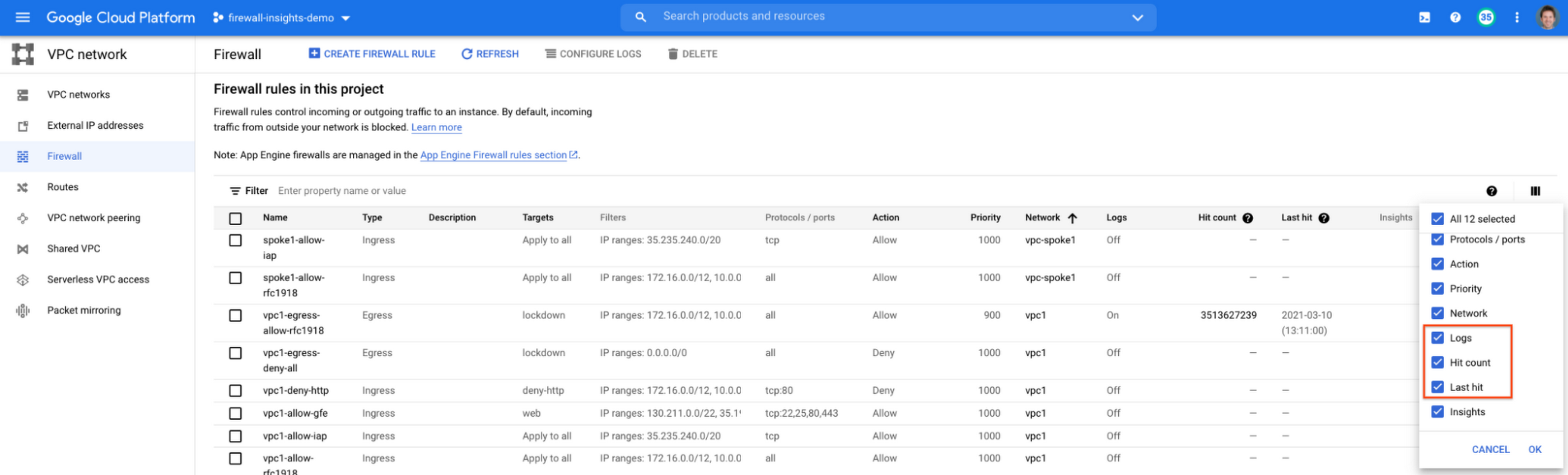
When you navigate to your VPC network and click on Firewall, ensure that you have selected Logs, Hit count and also Last hit in the column display options:
After this is enabled, now you should be able to see your VPC firewall rules with the hit count and last hit metrics. In the image below you can see that if logs are not enabled for rules, hit count and last hit metrics will not be collected. If logs are enabled, these details are collected, and shown in the VPC firewalls console.
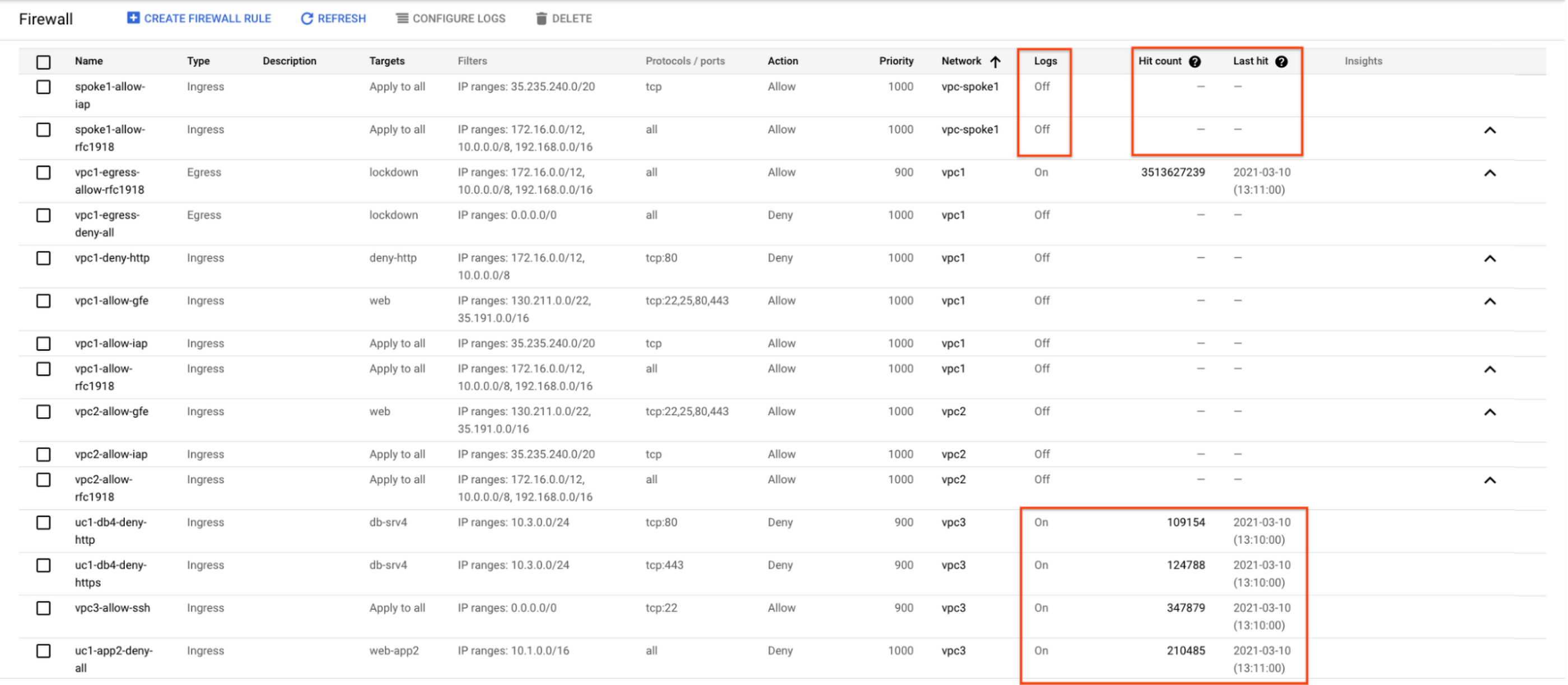
As you can see in Figure 1.2, each firewall rule which has logging enabled will show hit counts, so based on the example above, the rule “uc1-db4-deny-http” has been hit 109,154 times, the last time being 2021-03-10 (13:10:00). If you want to dive even deeper, you can click on the hit count and this will bring you to the logs viewer page where you can expand these logs and analyze all the details:
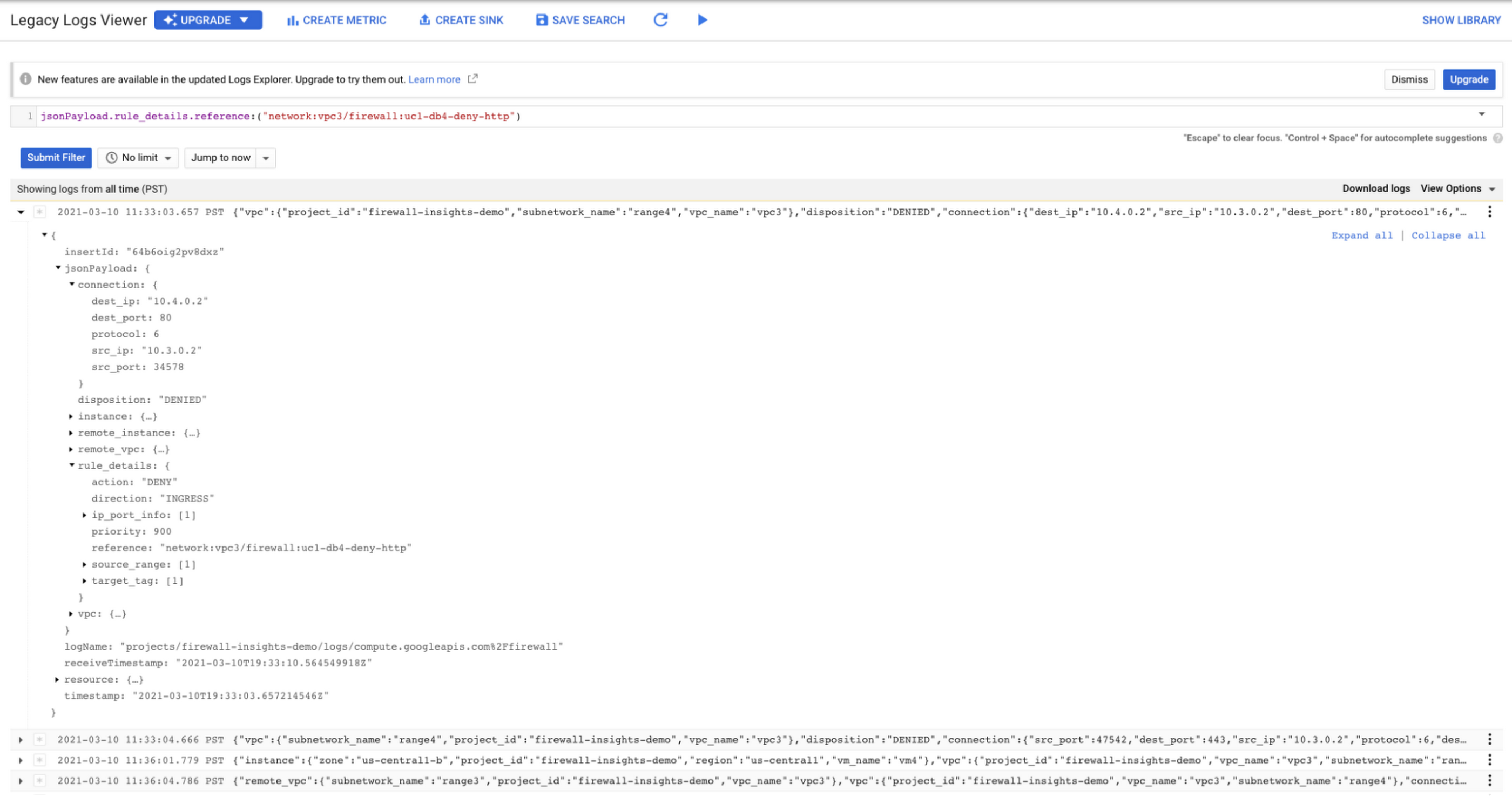
In order to enable logs for a particular firewall rule, you can edit it and turn logs on. By default, metadata is added in firewall logs. If you want to reduce the log size, you can do so by excluding these additional fields. Excluding these metadata fields will not impact the functionality of Firewall Insights.
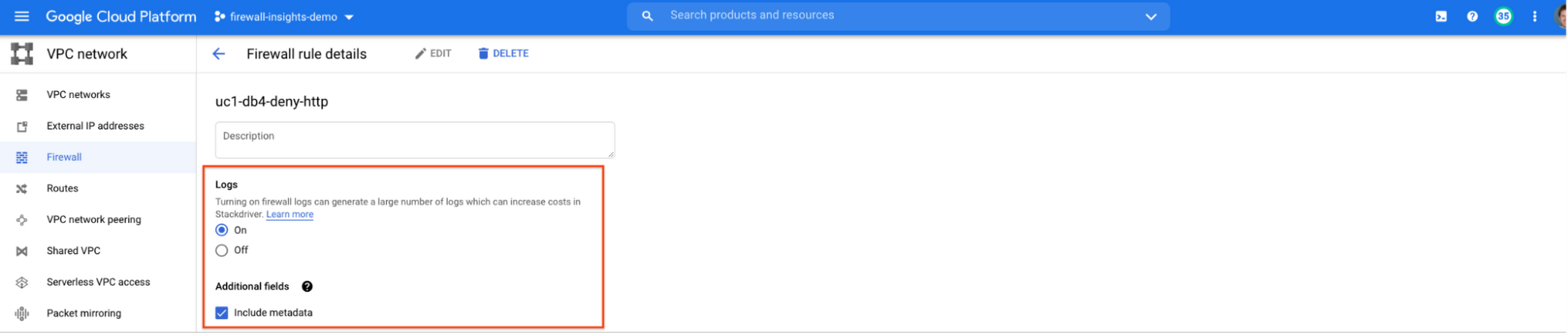
From the “Firewall” page, you can also multi-select a group of firewall rules and turn on all logs at once.
Firewall rule usage metrics are accurate only for the period of time during which Firewall Rules Logging is enabled.
Insights Report, a deeper dive
Insights Report provides an intelligent analysis of the configuration of your firewalls. A report can contain one or more insights.
We will see examples now about the different insight reports which include:
- Shadowed firewall rules
- Allow rules with no hit in the last six weeks
- Deny rules with hits in the last 24 hours
By definition, a shadowed rule is a VPC firewall rule that is completely overshadowed by one or more firewall rules with higher or equal priority. We call that shadowing rules. Let’s see an example on how to find shadowed rules:Let’s say that you try to use ping between two VMs but it fails. Let’s take a look at the firewall rules applied to the VM:
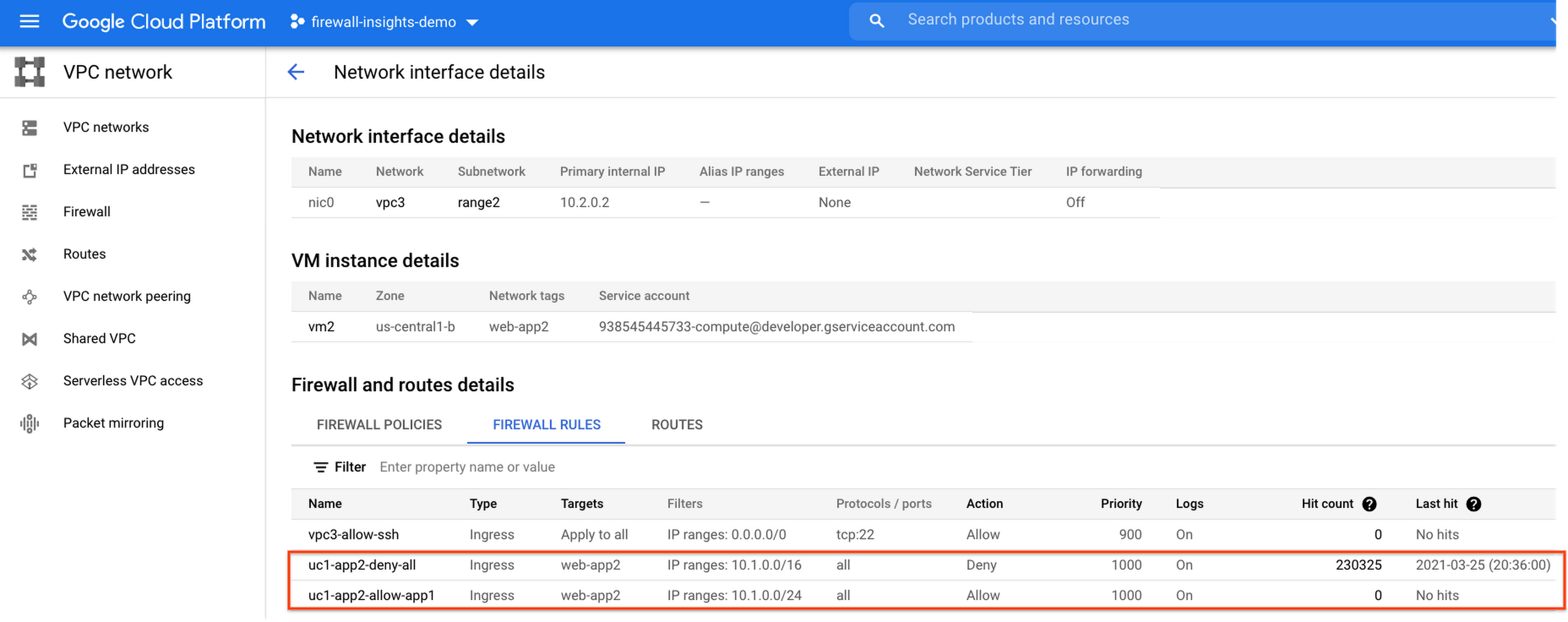
If we look closely, we can see that there are two rules with the same target tag, and those are almost identical except their source IP range. The IP range of the deny rule “uc1-app2-deny-all” includes the IP range of the rule allow “uc1-app2-allow-app1”. Therefore, we can see that “uc1-app2-allow-app1” is shadowed by “uc1-app2-deny-all”, and the ping between these VMs failed due to that.
To avoid such incidents in the future, Firewall Insights provides you with a convenient list of rules overshadowed by other firewall rules.
To see shadowed rules, you can click on the column selector, and add “Insights” to the firewall and route details:

Once this is applied, you will be able to see shadowed rules here:

Alternatively, you can navigate to Network Intelligence > Firewall Insights, where we will see the shadowed rule report:
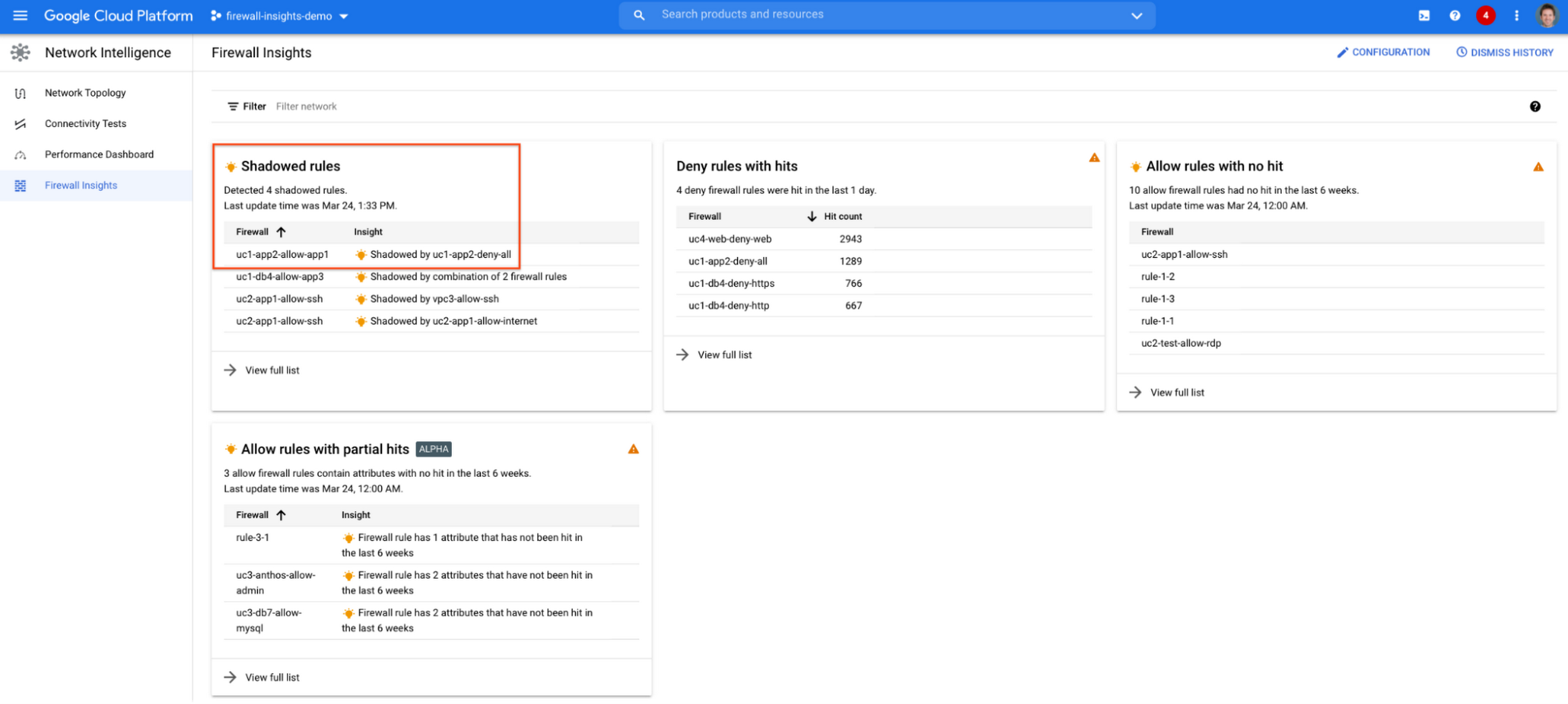
If we click on the insight we will get more details:

Going back to the firewall insights card (Figure 1.8), we can also identify that “uc1-db4-allow-app3” is shadowed by a combination of two rules and if we clicked on the insight this would provide all the details.
From the Firewall Insights dashboard, let’s move on to “allow rules with no hit”, where we can see firewall rules that have not logged any hits in the past six weeks. Such rules could be as a result of a misconfiguration, or leftover rules from past deployments. Tighten your security boundaries by identifying and removing such rules. If we go back to Network Intelligence > Firewall Insights, we can see allow rules with no hit:

We can drill down to view the full list of rules with no hit. We can see, for instance, one of the rules, the bottom one “uc2-app1-allow-internet”, might be a leftover rule to allow internet access from a past deployment, which means it has little likelihood of being hit in the future. So you may want to consider removing it from the rule set:

Click on the firewall rule to review all the details, and take a look at the prediction, which is made based on the hit pattern that we saw for similar rules in the same organization:

Let’s go back to the Firewall Insights dashboard and move on to the last category, “deny rules with hits in the last 24 hours”, which help you capture the traffic blocked by deny rules. These traffic types could indicate external attacks into your VPC network, or compromised VM instances attempting to send traffic out of your network. Let’s examine future hit prediction on a firewall rule. Navigate to Network Intelligence > Firewall Insights and take a look at the deny rules with hits card:

If your click on the “uc4-web-deny-web” rule, you can see the hit count monitoring, and if you click on the hit number we can dive deeper in the logs:
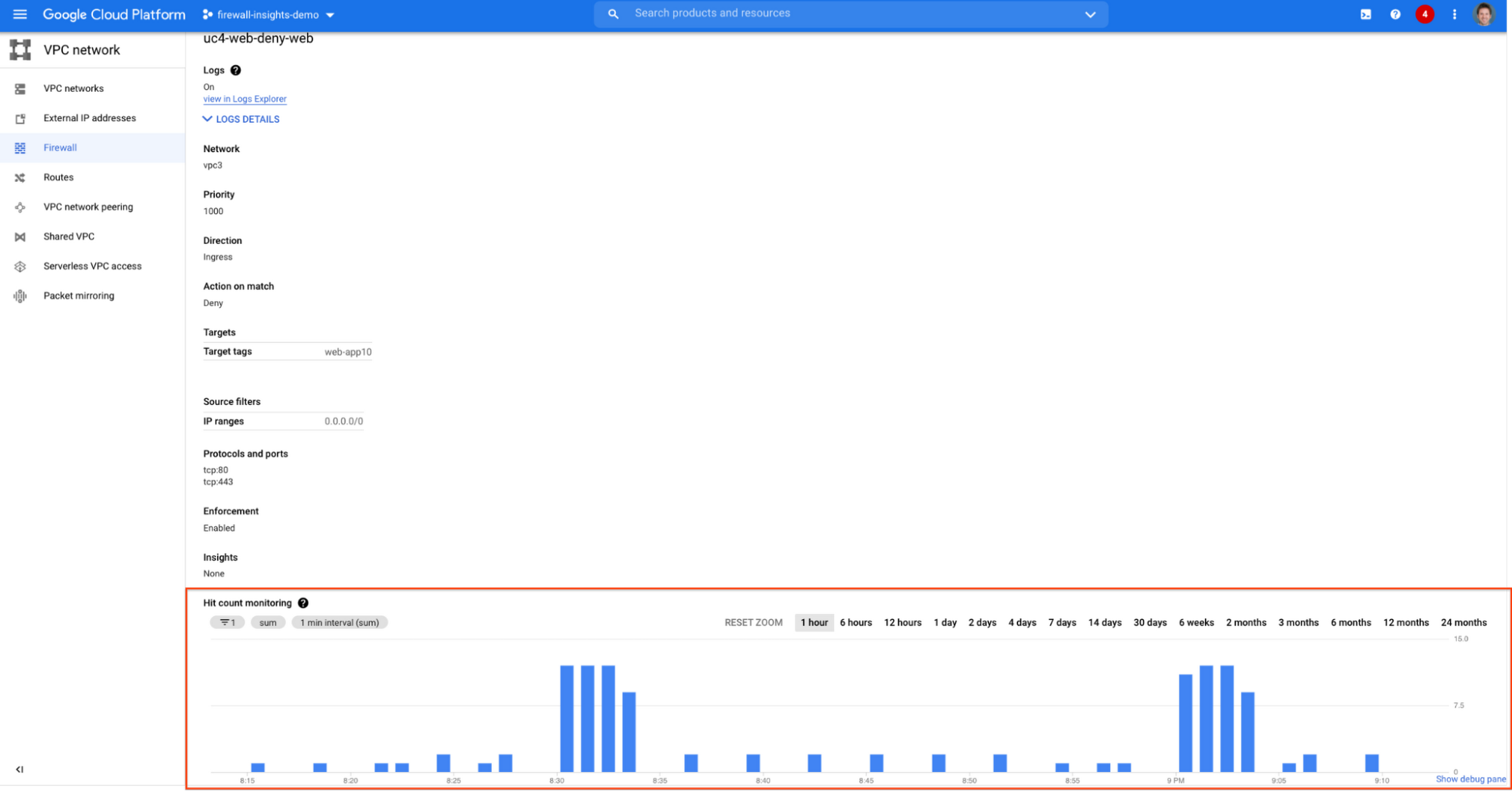

These tips should help you effectively leverage Firewall Insights to gain better control over a massive firewall rule set. Automate shadowed rule detection, quickly troubleshoot misconfigured rules, effortlessly pinpoint the overgranting rules hidden in the rule set, and identify the failed attempts to break into your network that were rejected by your firewall rules.
To learn more about Firewall Insights, please refer to our documentation. Additionally, to see how we’re advancing intelligent automation in network security, check our recent blog post.
Gmail’s BIMI Increases Confidence about Security and Delivers Immersive Email Experiences

5472
Of your peers have already read this article.
3:00 Minutes
The most insightful time you'll spend today!
Creating a secure-by-default experience based on robust defenses has always been a core design principle for Gmail. That’s why we’ve established a strong baseline of security in Gmail, with built-in protections to help automatically filter out potentially malicious messages. While these defenses help keep Gmail users safe, email functions as part of a large, complex, interconnected ecosystem that we continually invest in and work to protect. After first announcing Gmail’s Brand Indicators for Message Identification (BIMI) pilot last year, today we’re announcing that over the coming weeks we’re rolling out Gmail’s general support of BIMI, an industry standard that aims to drive adoption of strong sender authentication for the entire email ecosystem. BIMI provides email recipients and email security systems increased confidence in the source of emails, and enables senders to provide their audience with a more immersive experience.


“Bank of America has a wide range of security measures in place to support our customers, and we constantly evolve our program to deliver best in class protection. Part of this effort is our partnership with Google on BIMI, which provides an easy way to validate if correspondence is from us.” — Bank of America
BIMI enables organizations that authenticate their emails using Domain-based Message Authentication, Reporting, and Conformance (DMARC)—a standard for providing strong sender authentication that allows security systems to perform better filtering, separating legitimate messages from potentially spoofed ones—to validate ownership of their logos and securely transmit them to Google. BIMI is designed to be easy: for organizations with DMARC in place, validated logos display on authenticated emails from their domains and subdomains.
Here’s how it works: Organizations who authenticate their emails using Sender Policy Framework (SPF) or Domain Keys Identified Mail (DKIM) and deploy DMARC can provide their validated trademarked logos to Google via a Verified Mark Certificate (VMC). BIMI leverages Mark Verifying Authorities, like Certification Authorities, to verify logo ownership and provide proof of verification in a VMC. Once these authenticated emails pass our other anti-abuse checks, Gmail will start displaying the logo in the existing avatar slot.
“Gmail’s support of BIMI is a win for email authentication, brand trust, and consumers alike. BIMI gives organizations the opportunity to provide their customers with a more immersive email experience, strengthening email sender authentication across the entire email ecosystem.” — Seth Blank, Chair of the AuthIndicators Working Group
This is just the start for BIMI. The standard expects to expand support across logo types and validators. For logo validation, BIMI is starting by supporting the validation of trademarked logos, since they are a common target of impersonation. Today, Entrust and DigiCert support BIMI as Certification Authorities, and in the future the BIMI working group expects this list of supporting validation authorities to expand further. To learn more about BIMI and see the latest news, visit the working group’s website.
To take advantage of BIMI, ensure that your organization has adopted DMARC, and that you have validated your logo with a VMC. For Gmail users, no action is required. We’re proud to be one of the leading members in both establishing and supporting the BIMI standard and will continue to support efforts that contribute to security for the entire email ecosystem.
More Relevant Stories for Your Company

The Tech Tightrope: How the U.S. State & Local Agencies Strive to Balance between Innovation and Budget
State and local government (SLG) agencies are reeling from a combination of unbudgeted COVID-related expenses and reduced tax revenue caused by unemployment and business closures. Any way you look at it, the situation is challenging. To understand how SLG agencies are coping, Google Cloud collaborated with MeriTalk to survey 200

Customer Voices: How Firms from Across Industries Leverage Google Cloud
From powering everyday operations and accelerating application innovation, to providing tools for specific business needs and executing on big ideas, to advancing the security of technology solutions, companies from across industries have leveraged Google Cloud for business benefits. Companies from across industries have turned to Google Cloud for transforming their



AppSheet: Reduce Shadow IT and Accelerate Development of Enterprise-grade Apps
Google Cloud findings suggest that nearly 40 percent of organizations' investments are consumed by shadow IT and can be a detractor to the adoption of cutting-edge tools and solutions. Also, about 51 percent of the surveyed executives are of the opinion that the inability to adapt to digital transformation trends

Launches and Stories on Google Cloud Security from Q1: Fresh off the Boat!
The security world keeps changing, with new tools and new threats in the ever-evolving arms race that is cybersecurity. To keep you up to speed on all that Google Cloud is doing to help safeguard your data and your applications, welcome to the first installment of the Security Roundup. In
