





Next-Level Ecommerce Engagement: Transforming User Identities with GCIP

924
Of your peers have already read this article.
2:30 Minutes
The most insightful time you'll spend today!
One of the fundamental questions that retailers constantly ask themselves is how well they know their customers and how they can build deeper relationships. Knowing who their customers are can have a direct impact on improving customer engagement, which can lead to increased conversion rates, customer loyalty, lifetime value, and higher return on marketing spend.
Retailers have started to use innovative new methods like identity graphs, which connect information from multiple sources such as internal databases, marketing systems, online interactions and social media platforms. While these new methods have shown promise, the best and most effective approach remains customer self-identification through an authentication process.
As a result, retailers require a sophisticated user identity platform that protects customer information with proper authentication and authorization, one which incorporates advanced mechanisms like multi-factor authentication and intelligent account protection, to ensure customer information is protected throughout its lifecycle.
Google Cloud Identity Platform (GCIP) is a customer identity and access management (CIAM) solution that can enable retailers (and any other organization) to add identity and access management capabilities to online applications. GCIP is easy to administer and develop with, and is able to grow with an organization’s online user base.
With a customer identity and access management (CIAM) solution like GCIP, a retailer can quickly and easily implement powerful identity management and security capabilities such as:
- Advanced authentication through email or SMS/text messaging.
- Quicker onboarding with social logins from Google, Facebook and others.
- Flexibility to support external identity providers through identity federation.
- Support for multi-tenant B2B use cases with the ability to create unique silos of users and configurations.
- Easy to use interfaces and libraries to help web/mobile application developers quickly integrate and launch.
- Broad authentication protocol support, including SAML 2.0, OAuth/OIDC or simple email- and password-based authentication.
- Built on Google Cloud’s planet-scale infrastructure to support a growing customer base.
How does it work?
GCIP allows end users to authenticate to web and mobile applications. For retailers, this could be their online shopping app for mobile devices or an ecommerce website accessible over the internet through a web browser.
Users can sign-in with their email/passwords, phone numbers or using their social logins . If the organization uses an existing OpenID Connect (OIDC) provider, a Security Assertion Markup Language (SAML 2.0) provider or even a custom authentication system which issues signed tokens, Google Cloud Identity platform can be used as the authentication orchestrator.
Using Google Cloud Identity Platform as the primary authentication system
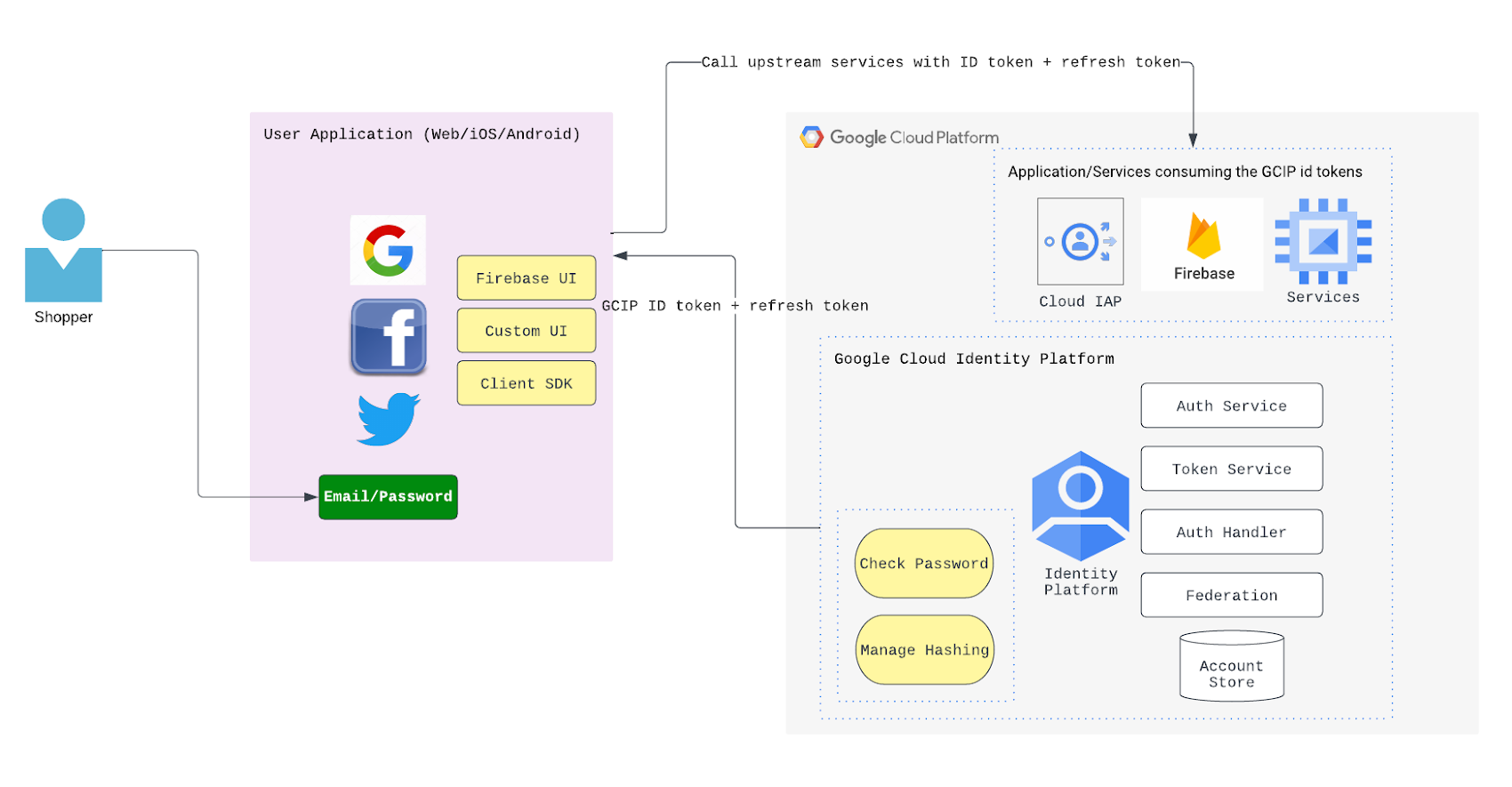
GCIP can serve as the primary authentication system, meaning users are provisioned into GCIP. In this case, the end user identities are securely persisted in the “account store” database. The database is a part of fully managed GCIP services and needs no provisioning or scaling from the retailer as their end user base grows. A high level architectural overview of how this flow may look like is shown below:
Using Google Cloud Identity Platform with social logins
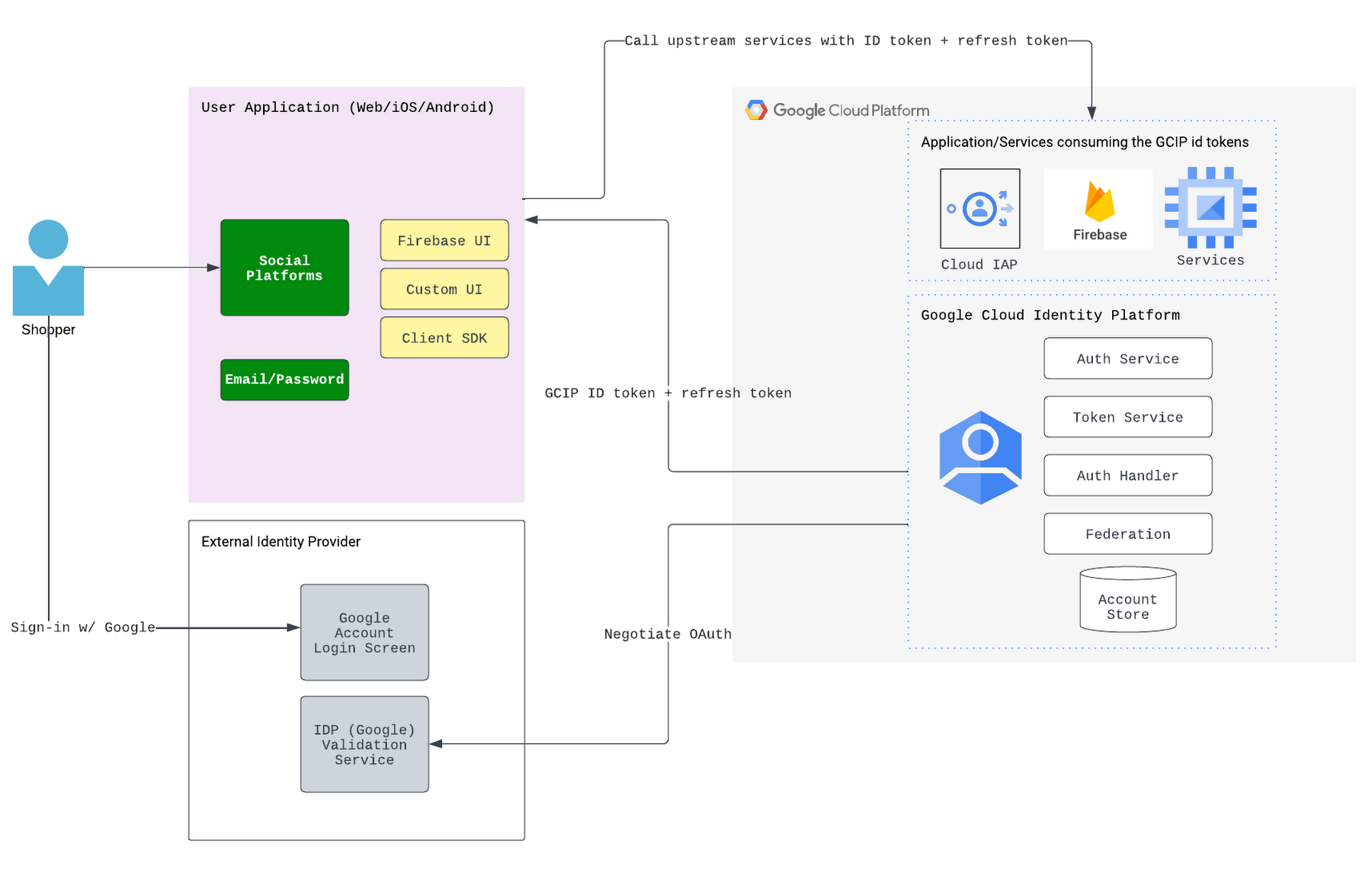
Google Cloud Identity Platform can also be used with popular social logins such as Google, Facebook and others. This gives users a familiar option and eliminates the need to provision users in the GCIP identity store. Below is a high-level architecture diagram showing how GCIP integrates with the social login providers.
Customizing user flows
Many organizations want to be able to customize their login flows. Sometimes, an organization wants to make data related to new user creation and user logins (barring the passwords) available to other systems. These systems can include analytical systems, recommendations or promotions engines (such as sending welcome emails and promotions upon new sign-ups,) security operations (for example, to run analysis on sign-in requests to help detect account takeover attempts,) customer master data management systems, and customer data platforms. GCIP supports blocking functions and asynchronous functions to help customize the login flows and enable syndication of the login or sign-up activity related data to external systems.
Next steps
Google Cloud Identity Platform can provide a robust, scalable, secure-by-design mechanism for managing and authenticating users to online apps. To learn more about GCIP and how it can benefit your organization, please check out the documentation.
2924
Of your peers have already watched this video.
15:00 Minutes
The most insightful time you'll spend today!
What Makes Google Cloud the Go-to Platform to Build Next-gen Security Services
Join the discussion by the panel of security experts and IT leaders from renowned organizations to examine the role of Google Cloud for security companies in building next-generation security services. Watch the video from the security session of Google Cloud Next ’21 to deep dive into Google Cloud’s security and partnership models to explore the security-related aspects of building robust, security based SaaS products.
reCAPTCHA & Cloud Armor: Helping Organizations Adopt Bot Management Strategies

3034
Of your peers have already read this article.
2:00 Minutes
The most insightful time you'll spend today!
Unwelcome web traffic from bots has proliferated, becoming a significant contributor to business and operational risk. The motivations of bot controllers range from disruption of business through DDoS attacks to fraud such as credential stuffing, denial of inventory, scraping, and fraudulent card use. Google is well positioned to help detect and mitigate these risks by leveraging both our AI/ML strengths for combatting bot traffic as well as the global scale of our network to absorb even the largest threats.
Today we are announcing the public preview of Cloud Armor bot management with reCAPTCHA Enterprise.This new set of capabilities is centered around a new deep integration between reCAPTCHA Enterprise and Cloud Armor as part of our overall Web-App and API Protection (WAAP) solution, which also includes Apigee. You can now leverage the power of reCAPATCHA’s intelligence gained from protecting 5+ million sites directly in Cloud Armor to comprehensively manage risk from bots and other application layer threats. You can enable this protection using an easy-to-configure policy in Cloud Armor without any server-side changes to your applications. Because detection and enforcement happens in-line, at the edge of Google’s network, you can mitigate threats before they have a chance to impact your applications, whether they run on GCP, on premise, or in a hybrid or multi-cloud deployment.
Google Cloud Armor
Cloud Armor is the DDoS mitigation service and web-application firewall (WAF) that brings to bear the global scale of Google’s network – blocking unwelcome traffic upstream from your infrastructure. Cloud Armor helps protect your websites and applications from volumetric and protocol based (Layer 3/4) DDoS attacks, application level DDoS attacks, and mitigates the rest of the OWASP Top 10. With Cloud Armor, you can enforce custom Layer 7 filtering and rate-limiting policies at the edge to ensure availability of your workloads and meet security and compliance requirements.
reCAPTCHA Enterprise
reCAPTCHA Enterprise is Google’s fraud detection service that leverages over a decade of experience defending the internet and data from Google’s network of over 5 million sites. reCAPTCHA Enterprise can be used to prevent fraud and attacks perpetrated by scripts, bot software, or humans. When installed on a web page at the point of action, such as login, purchase, or account creation, reCAPTCHA Enterprise provides a frictionless user experience that allows legitimate users to proceed using a web page while fake users and bots are blocked.
The Cloud Armor and reCAPTCHA Enterprise integration
Users can now configure their Cloud Armor security policies to block requests that reCAPTCHA determines to be coming from a bot. There are several ways to do this:
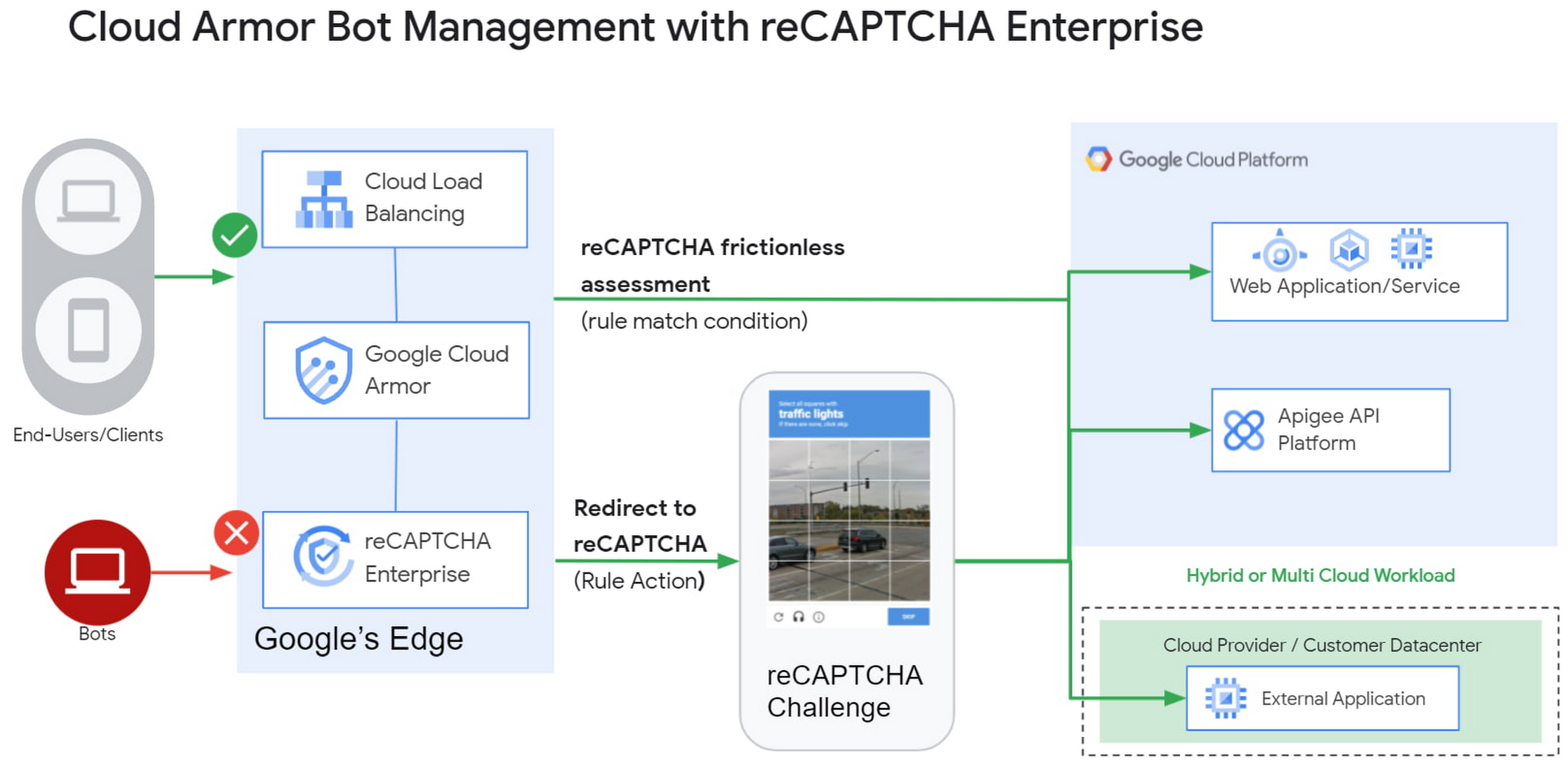
1) Enforce reCAPTCHA Enterprise frictionless assessment
reCAPTCHA Enterprise assigns risk scores to interactions on your website (e.g., logins, signups, gift card redemption, checking out, etc.) Based on these interactions, it returns a score between 0.0 and 1.0, with 0.0 being a likely fraudulent interaction and 1.0 being a likely legitimate interaction. To reduce fraud, you might choose to take action on returned scores for logins below 0.5, but allow users with higher scores to continue their login with zero friction.
With this new integration, you can also have Cloud Armor take action based on the score, including blocking or redirecting the request based on reCAPTCHA’s assessment from the client-side instrumentation. The client-side instrumentation can be enabled by installing reCAPATCHA’s javascript library into browser applications or using the reCAPTCHA SDK with mobile applications. By the time the user’s request leaves the client, it will have a reCAPTCHA assessment and bot score attached to it. This scoring is accomplished in-line, as the user’s request is being evaluated through your Cloud Armor security policy. Crucially, this occurs without incurring the latency of an additional request/response back to the reCAPTCHA service.
2) Serve reCAPTCHA Challenge in Cloud Armor
In this scenario, suspicious users are blocked by Cloud Armor until they solve the reCAPTCHA Enterprise challenge.You can configureCloud Armor to serve a reCAPTCHA challenge for any requests that match on a Cloud Armor security policy rule. To do so, you can configure a rule in through the Google Cloud CLI with an action to redirect to reCAPTCHA Enterprise in order to serve a CAPTCHA:
gcloud beta compute security-policies rules create 1000--security-policy my-policy--expression "request.path.matches("/login.html")"--action redirect--redirect-type google-recaptcha
In the above example, we are choosing to have reCAPTCHA Enterprise deployed to assess every request attempting to access the login page to prevent bots from logging into our service. With Cloud Armor first requiring reCAPTCHA Enterprise to assess the bot risk of reach request, unwelcome traffic from bots would be blocked at the edge.
3) Redemption Flow
While we aim to make the initial reCAPTCHA assessment as accurate as possible, some organizations prefer to give the end-user another chance by solving a challenge in the event that the reCAPTCHA score is lower than their defined threshold. As part of this release, you can combine both the frictionless assessment and manual challenge into what we call the “redemption flow”. To do so, you can configure the match condition of a Cloud Armor rule to detect a low reCAPTCHA token score and configure the action of the same rule to redirect to a reCAPTCHA challenge.
gcloud beta compute security-policies rules create 1000--security-policy my-policy--expression "request.path.matches(\"/login.html\") && token.recaptcha.score <= 0.3"--action redirect--redirect-type google-recaptcha
By combining both of these scenarios into the redemption flow, you can give suspicious clients the opportunity to redeem themselves by proving they are not a bot.
These bot detection and mitigation use cases, taken together or separately, allow your bot management strategy to scale up without impacting your protected workloads, as all decisions are made at the edge of Google’s network.
Additional bot management capabilities
In addition to the integration with reCAPTCHA Enterprise, Cloud Armor has added more capabilities to help you implement an effective bot management strategy:
- Redirect actions – Cloud Armor rules now support a redirect action to redirect end-clients to a user-configured URL. Requests that match on such rules would respond with an HTTP 302 to the end-client in order to send them to an alternative destination.
- Insert Header – With the ability to conditionally insert a custom header and value into an incoming request, users can now tag requests based on the criteria in the match condition of any Cloud Armor rule. This allows you to treat tagged requests differently downstream in your applications. For example, you can choose to route suspicious requests to a honeypot or silently not process their transaction so as not to tip off the bot that it has been detected.
Learn more
Cloud customers can get started right now by configuring a rule to redirect to reCAPTCHA in their Cloud Amor security policies through the command line interface. Learn more in these documentation links:
5133
Of your peers have already watched this video.
18:00 Minutes
The most insightful time you'll spend today!
Trusted Collaboration for Hybrid Workplace with Google Workspace
Hybrid workspace need high levels of security, data privacy, and trust for seamless collaboration across workforce. As we navigate to the new normal, your enterprise can learn about the security and privacy specific innovations Google Workspace utilizes to help customers realize powerful, trusted, cloud-native collaboration.
Protect Corporate Apps with BeyondCorp Enterprise

2676
Of your peers have already read this article.
2:30 Minutes
The most insightful time you'll spend today!
As part of our efforts to democratize Zero Trust, Google Cloud has designed our BeyondCorp Enterprise solution to be an extensible platform where customers can choose to integrate signals from other technology vendors and incorporate these into their Zero Trust access policies. Following our integrations announcements earlier this year, we are excited to announce a new BeyondCorp Enterprise integration with Microsoft Intune, now available in Preview.
This integration allows organizations to craft Zero Trust access policies and protect private applications and SaaS applications, including Office 365, based on data collected from the Intune graph API, including device posture and other trust signals. It can also be leveraged to configure context-aware access policies for Workspace applications.
These policies can be applied across end-user devices, no matter where they are located. The ability to leverage device information to make access decisions is a critical component of a Zero Trust approach. Intune is a widely used mobile device management (MDM) tool and many of our customers will be able to benefit from this integration to help ensure that their distributed workforce can appropriately access corporate resources.
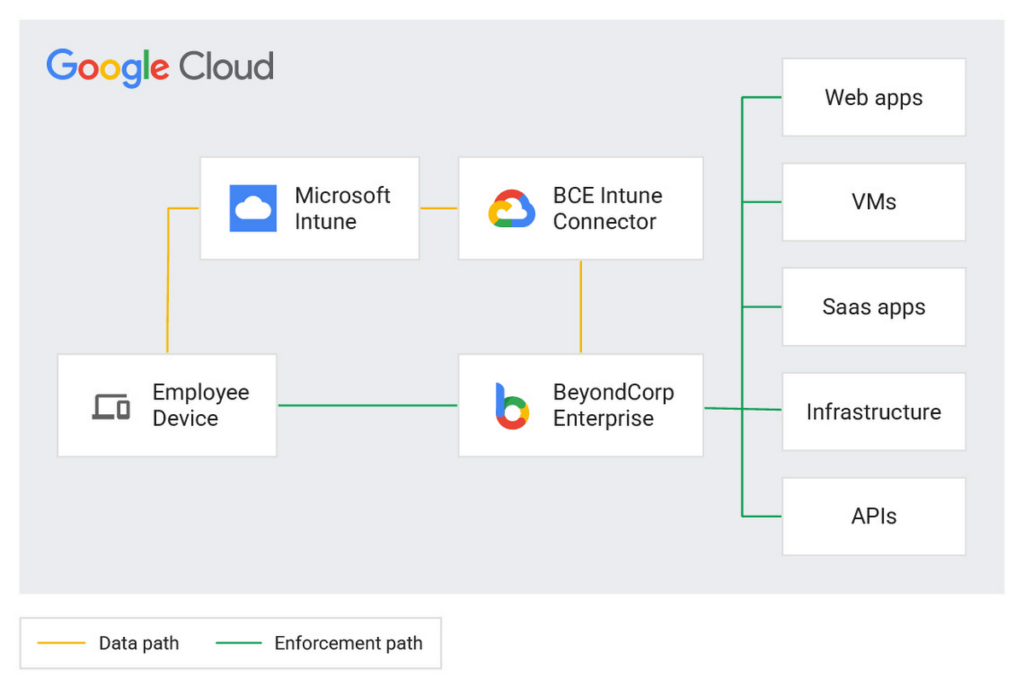
The BeyondCorp Enterprise integration with Microsoft Intune collects data from Intune using the Microsoft Graph API. End-user device information collected by the connector is then fed into Access Context Manager, a component of BeyondCorp Enterprise, to gate access to resources based on policies and access levels.
Customers are already seeing the benefits of the BeyondCorp Enterprise integration with Microsoft Intune. For example, one of our customers, a global ecommerce vendor, uses it to ensure their corporate-owned devices comply with internal policies before they are able to connect to corporate resources. With the Intune integration, they are then able to quickly and easily configure context-aware access policies with an attribute that company-owned devices must be in compliance in order to access the specific applications.
Previously, without the integration, they would need to set up a custom integration and manage both the code and the infrastructure where it was running. This integration not only alleviates the need to create custom code, but the customer has also seen a reduction in the time it takes to onboard new devices and build these policies.
If you’re interested in learning more or joining the preview, a full reference guide to the Intune integration can be found in our documentation here.
We believe that customers should be able to leverage their existing technology investments to build a more secure ecosystem. BeyondCorp Enterprise can help ensure that the right people have access to the right resources—only authorized users should be able to access only the resources that they have been approved for, based on their identity and device information. Google Workspace customers can also incorporate signal information from other vendors, including Intune, to create context-aware access policies for securing Workspace applications.
Earlier this year, we announced Netskope as a new member of the BeyondCorp Alliance to enable integration of a user’s risk score between Netskope Cloud Exchange and Google Cloud. We also announced new integrations with Jamf Pro for MacOS, which shares the Jamf-determined compliance state with BeyondCorp Enterprise so admins can incorporate this information into context-aware policies to restrict or allow access to protected applications.
You can learn more about BeyondCorp Enterprise integrations by registering for Google Cloud Next ‘22 on October 11-13, and attending the “What’s New in Zero Trust” session. Google Cloud will also be featured at the upcoming Jamf Nation User Conference (JNUC), September 27-29, to discuss BeyondCorp Enterprise integrations with Jamf.
Chrome OS’s Hybrid Work Model Powers Google’s Return to Work Strategy

7490
Of your peers have already read this article.
1:30 Minutes
The most insightful time you'll spend today!
The pandemic continues to deeply affect our lives around the globe. In some places, new cases are surging and returning to work is the last thing on people’s minds. In other areas, conditions are improving and companies are starting to think about transitioning their workforce back to the office.
Exactly when and how to do this remains complex and varies by country, industry, and company. What’s certain is that hybrid work will become an essential part of the business world moving forward. And finding solutions that bridge the gap between “in-person” and “somewhere else” are crucial.
At Google, we’ve been focused on what the hybrid transformation means for us. To prepare for hybrid work, using modern solutions is a key enabler.
Chrome OS: Supporting Google’s return to office strategy
At Google, we’ll move to a hybrid work week where most Googlers spend approximately three days in the office and two days wherever they work best. It’s no surprise that as the modern, secure, cloud-first platform, Chrome OS is playing a key role in our transition to a hybrid work model. Because Chrome OS devices can easily be shared, more flexible working models and spaces are now possible. And with user profiles stored in the cloud and collaboration solutions like Google Workspace, employees can log in to any Chrome OS device, access what they need and pick up where they left off.
Here are just a few ways we are using Chrome OS and its tools to support the return to the office:
- In select office locations, Googlers can reserve desks through an internal booking tool set up with a high-performance Chromebox, keyboard, mouse, and monitor. Employees can log in to the Chromebox which syncs their cloud profile, and start working with the same environment they have on all their Chrome OS devices.
- We’re announcing new docking stations that are designed for Chrome OS devices and allow employees to bring in their Chromebook from home, connect to the dock with one USB-C cable, and use a monitor, keyboard, and mouse for a full desktop experience.
- Every Chrome OS device enables a zero-trust security working model with BeyondCorp Enterprise providing our workforce with simple and secure access to applications while providing additional security controls for IT.
- We’ve deployed the new Chrome OS Readiness Tool to our extended workforce to identify employees that are able to switch to Chrome OS. This allows us to expand the latest security, deployment, and manageability benefits to more of the workforce.
Additional ways Chrome OS is helping organizations with return to office
We aren’t the only ones supporting our return to office and hybrid work strategy with Chrome OS. We’ve heard more ways our customers are using Chrome OS to make the transition as smooth as possible. These include:
- Streamlining deployment and management of Chrome OS devices using zero-touch enrollment which allows devices to automatically enroll into a corporate domain without IT configuration.
Grab & Go Chromebooks being used for frontline and hybrid information workers, allowing employees to grab a Chromebook from a cart and get to work right away. - Parallels Desktop for Chrome OS being deployed to allow employees to access Windows or legacy apps locally on their Chrome OS devices.
- Existing Windows and Mac devices being modernized and repurposed to run a Chrome OS experience using CloudReady. (Google is currently offering a CloudReady promotion. Learn more here.)
While the Chrome OS team has been working towards making remote working as seamless as possible for IT, we’ve also made advancements in supporting traditional technology that’s required in the office.
- In October, we announced Chrome Enterprise Recommended: a collection of identity, printing, productivity, communications, and virtualization solutions that are verified to run great on Chrome OS.
- With the increased usage of video conferencing on Chrome OS devices, we’ve made improvements to Google Meet and Zoom performance including camera and video improvements to reduce any unnecessary processing and features that intelligently adapt to your device, your network, and what you are working on.
- For improved access to Windows and legacy apps, VMware Horizon introduced multi-monitor support and USB redirection and Citrix Workspace released a tech preview with webcam enhancements and Microsoft Teams optimizations.
- We integrated with the Okta Workflows platform, so IT administrators can include Chrome OS in it’s access logic and deploy quickly without code. Recently, we’ve added the ability to require users to reauthenticate on their Chrome OS device once Okta has detected that the user has changed their password. Try out this new capability by signing up for our Trusted Tester program.
- We’ve increased our support for direct IP printing with additional printer models since the beginning of 2020. In addition, we have made improvements to management features, including support for multiple print servers and launched policy APIs to provide a better IT admin experience.
Join us for a digital event with Modern Computing Alliance and its newest member HP
Last year we announced the launch of the Modern Computing Alliance—a collaboration of industry leaders including Box, Chrome Enterprise, Citrix, Dell, Google Workspace, Imprivata, Intel, Okta, RingCentral, Slack, VMware, and Zoom aim to create the pioneering solutions that businesses need. We are thrilled to introduce HP, who brings their innovative hardware and enterprise hardware expertise to the Modern Computing Alliance and has been working closely with the alliance to ensure true silicon-to-cloud innovation.
As an alliance, we’ve been deeply engaged in the hybrid work shift. We invite you to join us for a digital event where we discuss questions about returning to work. Like how product design can encourage participation and collaboration regardless of where employees are, important security issues to keep in mind, and what factors businesses should consider to support a safe, working environment.
Home. Heading back. Hybrid.
Hear from the experts on hybrid work and return to office.
Date: May 20th, 2021
Register here.
If you are ready to try Chrome OS today, it’s easy to get started. You can contact us to get connected to a partner, sign up for a free 30-day trial of Chrome Enterprise Upgrade to start managing Chrome OS devices, or deploy the Chrome OS Readiness Tool to identify employees that are ready to switch to Chrome OS.POSTED IN:
More Relevant Stories for Your Company

Google Unveils New Cloud Region in Delhi NCR to Power India’s Digitization
In the past year, Google has worked to surface timely and reliable health information, amplify public health campaigns, and help nonprofits get urgent support to Indians in need. Now, we are continuing to focus on helping India’s businesses accelerate their digital transformation, deepening our commitment to India’s digitization and economic recovery.

New Certificate Manager Helps Leverage Google’s Network Security and Performance
We’re excited to announce the public preview of Certificate Manager and its integration with External HTTPS Load Balancing. Certificate Manager enables you to use External HTTPS Load Balancing with as many certificates or domains as you need. You can bring your own TLS certificates and keys if you have an

Strategic Consulting, Training & Implementation Guidelines with Public Sector PSO Helps Governments Stay Compliant
Did you know that by 2025, enterprise IT spending on public cloud computing will overtake traditional IT spending? In fact, 51% of IT spend in application software, infrastructure software, business process services, and system infrastructure will transition to the public cloud, compared to 41% in 20221.. As enterprises continue to

Case Study: How Exabeam Unlocked its Ability to Scale for Storage & Ingest Data from More Than 500 Security Vendors
Editor’s note: The post is part of a series highlighting our awesome partners, and their solutions, that are Built with BigQuery. Exabeam, a leader in SIEM and XDR, provides security operations teams with end-to-end Threat Detection, Investigation, and Response (TDIR) by leveraging a combination of user and entity behavioral analytics (UEBA)
