





5222
Of your peers have already watched this video.
17:00 Minutes
The most insightful time you'll spend today!
AppSheet: Reduce Shadow IT and Accelerate Development of Enterprise-grade Apps
Google Cloud findings suggest that nearly 40 percent of organizations’ investments are consumed by shadow IT and can be a detractor to the adoption of cutting-edge tools and solutions. Also, about 51 percent of the surveyed executives are of the opinion that the inability to adapt to digital transformation trends and practices are at the risk of going out of business in the next 3-4 years. However, enterprises need not be blindsided by the mounting expenses involved with the implementation and optimization of solutions and tools meant for empowering employees. AppSheet, Google Cloud’s no-code application development and automation platform is at the helm of empowering organizations to custom build apps for employees without relying on third-party services.
Watch the video from the Google Workspace sessions of Next ’21 to hear experts’ insights on AppSheet to effectively govern workforce and ward off security threats to helps employees build enterprise-grade applications!
Broadcom’s Journey to Simplified Compliance with Google Cloud’s Assured Workloads
1218
Of your peers have already read this article.
3:00 Minutes
The most insightful time you'll spend today!
Broadcom is a global technology leader that designs, develops, and supplies many semiconductor and infrastructure software solutions. Broadcom’s category-leading product portfolio serves critical markets including data center, networking, software, broadband, wireless, storage, and industrial sectors.
Our customers, many of whom operate in the federal public sector, need ready-made SaaS solutions to secure their infrastructure while meeting compliance requirements. As head of platform engineering for Broadcom and its subsidiaries, my team is responsible for designing, testing, and building the common orchestration platform and services for our federal customers.
Since early 2021, we’ve partnered with Google Cloud to deliver best-in-class cloud solutions for our multinational customers with speed, scale and efficiency, which earned us the Google Cloud Customer of the Year Award. When it came to creating plug-and-play security and compliance solutions for federal organizations in the United States, we turned to Assured Workloads.
Simplifying the path to compliance
Assured Workloads provides out-of-the-box capabilities that allow us to easily create and maintain controlled environments that address security and compliance needs across different verticals and sectors. This includes enforcement of data residency, administrative and personnel controls, and managing encryption keys.
For example, in the United States, federal government agencies need to use solutions that comply with FedRAMP, the government-wide standard for cloud computing security, while the Department of Defense (DoD) needs to comply with Impact Level (IL) standards. Assured Workloads helps us create solutions with built-in guardrails to ensure our customers automatically operate within whichever standard applies.
Additionally, Assured Workloads guarantees that only personnel with the necessary clearance and permissions have access to information, and it offers integrated cryptographic control over data, including customer-managed encryption keys based on the chosen compliance program.
As a result of using Assured Workloads, our Symantec Security suite can provide a comprehensive set of security services that are being certified for FedRAMP. These include Web Security Service, Data Loss Prevention, Cloud Access Security Broker, and Symantec Endpoint Protection (SEP).
We also offer our enterprise software products as services through Google Cloud. Rally Software, our enterprise agility tool, and Clarity PPM, our project and portfolio management tool, are already certified for FedRAMP. Additionally Clarity PPM is undergoing certification for IL4 compliance for our DoD clients.
Sophisticated solutions for a secure future
Given the intricate nature of securing the cloud environment and the business processes it handles, integrating Assured Workloads into our service offering has been simple and streamlined. Many of our services already run on Google Cloud, using Google Kubernetes Engine and Google Compute Engine, and since those Google Cloud services can be configured for all programs in an Assured Workloads environment, we were able to provide solutions to federal agencies without making significant changes to our deployment or configurations. This has helped save enormous engineering effort by avoiding a customized one-off effort to manage a Federal environment.
Google Kubernetes Engine (GKE) is one of the critical services in our environment, and Google Cloud releases many new GKE capabilities each year. Assured Workloads allows us to benefit from all the latest GKE innovations that come through automatic updates, maintaining parity with the commercial cloud without compromising on security and compliance requirements.
Compliance is a must-have for our federal clients, and our duty as providers of security and software services is to supply them with easy-to-use, efficient solutions they can trust. With the power of Assured Workloads streamlining our infrastructure software solutions hosted in Google Cloud, we can better support our regulated customers and further grow our software and security service businesses.
Security Talks: Addressing the Toughest SOC Challenges with SolarWinds, Chrome, Zero Trust, and More

2509
Of your peers have already read this article.
1:30 Minutes
The most insightful time you'll spend today!
Security operations teams are facing a “perfect storm” of challenges from nation-state actors turning their attention to financial crime, to rising uncertainty and potential complexities because of rapidly advancing cloud migration and IoT adoption, to the long-lamented skills shortage.
Now imagine having to face this trifecta without visibility into your IT and security infrastructure because scale and cost concerns have impeded your ability to ingest and monitor critical telemetry. To help organizations rethink threat detection and broader security team efforts, we showcased at this month’s Google Cloud Security Talks a keynote on why DEI is a cybersecurity imperative, Mandiant’s review of lessons for organizations two years after SolarWinds, how Google Chrome already helps protect your business (and what more you can make do with it,) how best to encourage your organization to pursue Zero Trust, and three key ways in which Chronicle Security Operations can help your organization scale threat detection and actionable outcomes. These include:
1. Operationalizing threat intelligence
Harnessing the power of threat intelligence to acquire context, prioritize risk, and act on detections requires more than just ingesting a set of indicator of compromise (IOC) feeds. Threat intelligence must have breadth and depth of coverage to provide custom details on the tools, tactics, and procedures of threat actors. Explore why part of the “magic” behind Google Cloud’s security is the sheer scale of threat intelligence we can share with our customers.
2. Driving detection as code
We want to enable organizations that are more advanced in their cybersecurity maturity to build their own custom detections and rules, which means offering our customers a powerful detection-authoring platform. Chronicle Security Operations can help analysts build specific detections around, for example, known bad files or a specific registry key change. We also demonstrated how to create more complex detections, such as flagging process execution patterns or crafting a suspicious-behavior trigger from a specific activity sequence.
3. Leveraging curated detections
With curated detections, which we announced in August, we are putting the power of Google Cloud’s intelligence in the hands of security operations teams everywhere. Our detections offer actionable, ready-to-use threat detection content curated, built, and maintained by Google Cloud Threat Intelligence (GCTI) researchers. These detection sets cover a wide variety of threats for your network and beyond, including attacks such as ransomware, remote-access tools (RAT), infostealers, data exfiltration, and suspicious activity.
You can watch all nine of our Security Talks recorded sessions here, and keep an eye out for our next Security Talks, coming in March 2023.
Google Cloud Announces General Availability of BigQuery Row-level Security

6595
Of your peers have already read this article.
3:00 Minutes
The most insightful time you'll spend today!
Data security is an ongoing concern for anyone managing a data warehouse. Organizations need to control access to data, down to the granular level, for secure access to data both internally and externally. With the complexity of data platforms increasing day by day, it’s become even more critical to identify and monitor access to sensitive data. In many cases, sensitive data is co-mingled with non-sensitive data, and access restrictions to sensitive data need to be enabled based on factors like data location or presence of financial information. There may also be nuances where data is sensitive for some groups of users, while for others, it is not.
Today, we’re pleased to announce the general availability of BigQuery row-level security, which gives customers a way to control access to subsets of data in the same table for different groups of users. Row-level security (RLS) extends the principle of least privilege access and enables fine-grained access control policies in BigQuery tables. BigQuery currently supports access controls at the project-, dataset-, table- and column-level. Adding RLS to the portfolio of access controls now enables customers to filter and define access to specific rows in a table based on qualifying user conditions—providing much needed peace of mind for data professionals.
“Our digital transformation and migration of data to the cloud magnifies the business value we can extract from our information assets. However, granular data access control is essential to comply with international regulatory and contractual requirements. BigQuery row-level security helps us comply with data residency and export restrictions,” says Jarrett Garcia, Iron Mountain’s Enterprise Data Platform Senior Director. “It enables us to manage fine-grained access controls without replicating data. What used to take months for approval and access provisioning can now be done more efficiently and effectively. We are looking forward to implementing additional data security capabilities on the BigQuery roadmap to address other critical business use cases.”
How BigQuery row-level security works
Row-level security in BigQuery enables different user personas access to subsets of data in the same table. Customers who are currently using authorized views to enable these use cases can leverage RLS for ease of management. To express the concept of RLS, we have introduced a new entity in BigQuery called row access policy. Row access policies map a group of user principals to the rows that they can see, defined by a SQL filter predicate.
Secure logic rules created by data owners and administrators determines which user can see which rows through the creation of a row-level access policy. The row-level access policies created on a target table by administrators or data owners are applied when a query is run on the table. One table can have multiple policies applied to it.
Below is an example, where row-level access policies have been created to filter data based on users’ “region”.

In the illustrated scenario above, row-level access policies have been created to verify a querying user’s region and to give them access only to the subset of data relevant to that region. Access policies are granted to a grantee list which support all types of IAM principles such as individual users, groups, domains or service accounts. In this example, when a user queries the table, row-level access policies are evaluated to assess which, if any, policies are applicable to that user. The group ‘sales-apac’ is granted access to view a subset of rows where region = ‘APAC’ whereas the group ‘sales-us’ is granted access to view a subset of rows where the region = ’US’. Likewise, users in both groups will see rows in both regions, and users in neither group will not see any rows.
Row-level access policies can also be created using the SESSION_USER() function to restrict access only to rows that belong to the user running the query. If none of the row access policies are applicable to the querying user, the user will have no access to the data in the table.
When a user queries a table with a row-level access policy, BigQuery displays a banner notice indicating that their results may be filtered by a row-level access policy. This notice displays even if the user is a member of the `grantee_list`.

When to put BigQuery row-level security to work
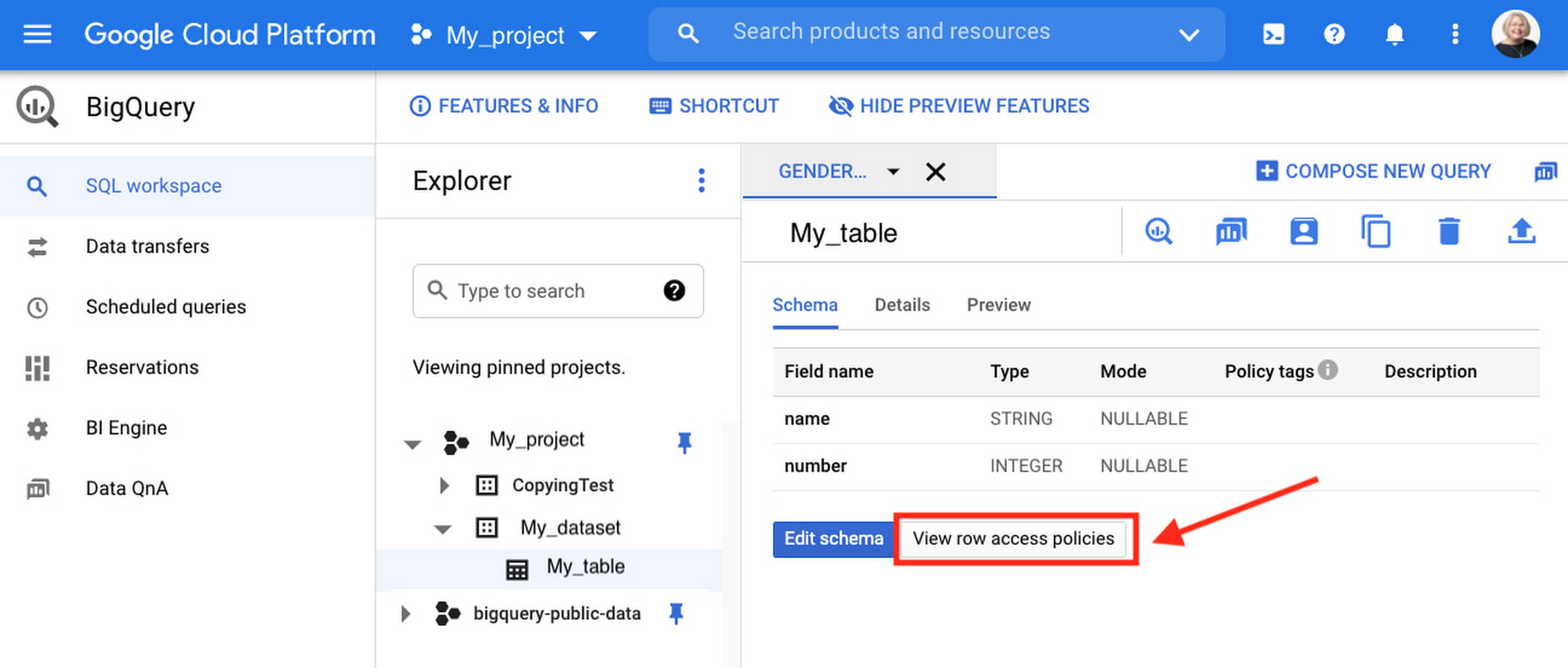
Row-level access policies are useful when you have a need to limit access to data based on filter conditions. The row-access policies’ filter predicate supports arbitrary SQL, and is conceptually similar to the WHERE clause of a SQL query. Filter predicates support the SESSION_USER() function to restrict access only to rows that belong to the user running the query. If none of the row access policies are applicable to the querying user, the user will have no access to the data in the table. Currently, the column used for filtering must be in the table, but we anticipate adding support for subqueries in the filter expression, opening up access to use cases where data is filtered based on lookup tables and calculated values. Row-level access policies can be created, updated and dropped using DDL statements. You will be able to see the list of row-level access policies applied to a table using the BigQuery schema pane in the Cloud Console, which simplifies the management of policies per table, or by using the bq command-line tool.
Row-level security is compatible with other BigQuery security features, and can be used along with column-level security for further granularity. Since row-level access policies are applied on the source tables, any actions performed on the table will inherit the table’s associated access policies, to ensure access to secure data is protected. Row-level access policies are applicable to every method used to access BigQuery data (API, Views, etc).
Try it out
We’re always working to enhance BigQuery’s (and Google Cloud’s) data governance capabilities, to provide more controls around managing your data. With row-level security, we are adding deeper protections for your data. You can learn more about BigQuery row-level security in our documentation and best practices.
New Capabilities in Cloud Asset Inventory Allow Better Visibility into Google Cloud Environments

4709
Of your peers have already read this article.
2:00 Minutes
The most insightful time you'll spend today!
Businesses that operate in complex cloud environments, large fleets, or sophisticated security operations all require visibility into their cloud assets in order to keep their teams nimble and their data secure. Cloud Asset Inventory (CAI) helps these teams understand their Google Cloud and Anthos environments by providing complete visibility, real-time monitoring, and powerful asset analysis capabilities. Today, Cloud Asset Inventory gets four new capabilities that help you understand your environment more clearly and easily than ever before.
New user interface eases asset and insight discovery
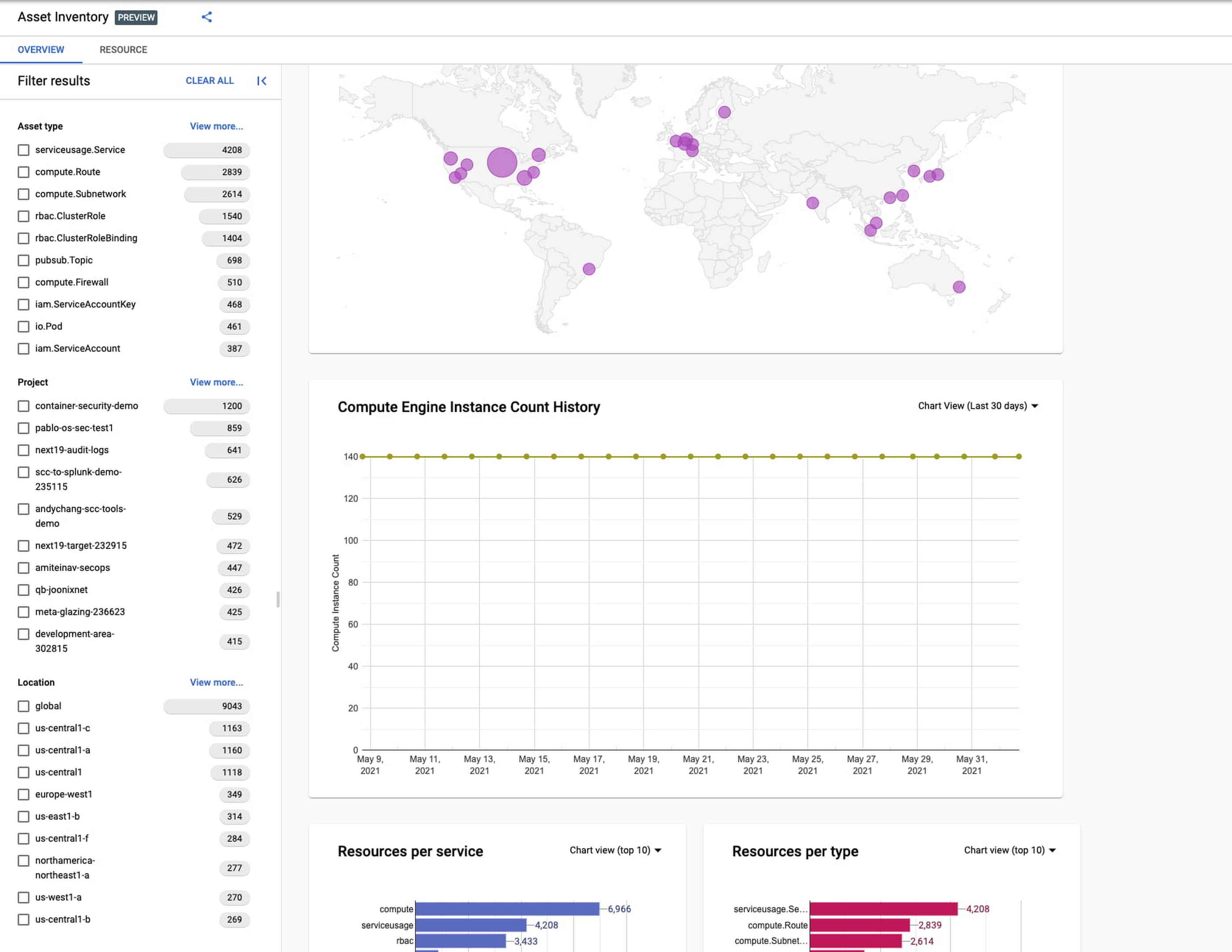
Cloud Asset Inventory console preview is now publicly available for GCP and Anthos customers. This preview provides insights into your cloud footprint, history and details of resource usage with powerful filtering and search capabilities. For example, you can view your global distribution of resources and policies, how your GCE VM footprint has been changing over time, as well as full metadata and change history for all your assets. The CAI console can be filtered at the organization, folder, or project-level, so each user can view the resources they have permissions for down to project level granularity.
Asset discovery and Datadog integration
A new asset list service in CAI provides quick and comprehensive asset discovery, including asset history, without needing to export the data to a storage destination. Datadog, a leading multi-cloud monitoring and security service provider, relies on deep integration with CAI for service and asset discovery. Datadog has been piloting and taking full advantage of the newly released asset list service. Datadog Product Manager, Steve Harrington, commented:
“Google’s new Cloud Asset Inventory API provides us with an immensely valuable, single source of truth for determining the resources present in a given GCP environment. Along with its rich metadata, this enables us to enhance multiple aspects of our integration with GCP, including streamlined metric collection and ingestion of custom labels. We plan to continue building around Cloud Asset Inventory in the future to improve existing features, and are envisioning ways it could help us provide entirely new insights to our customers.”
Answer “who can access what resources?”
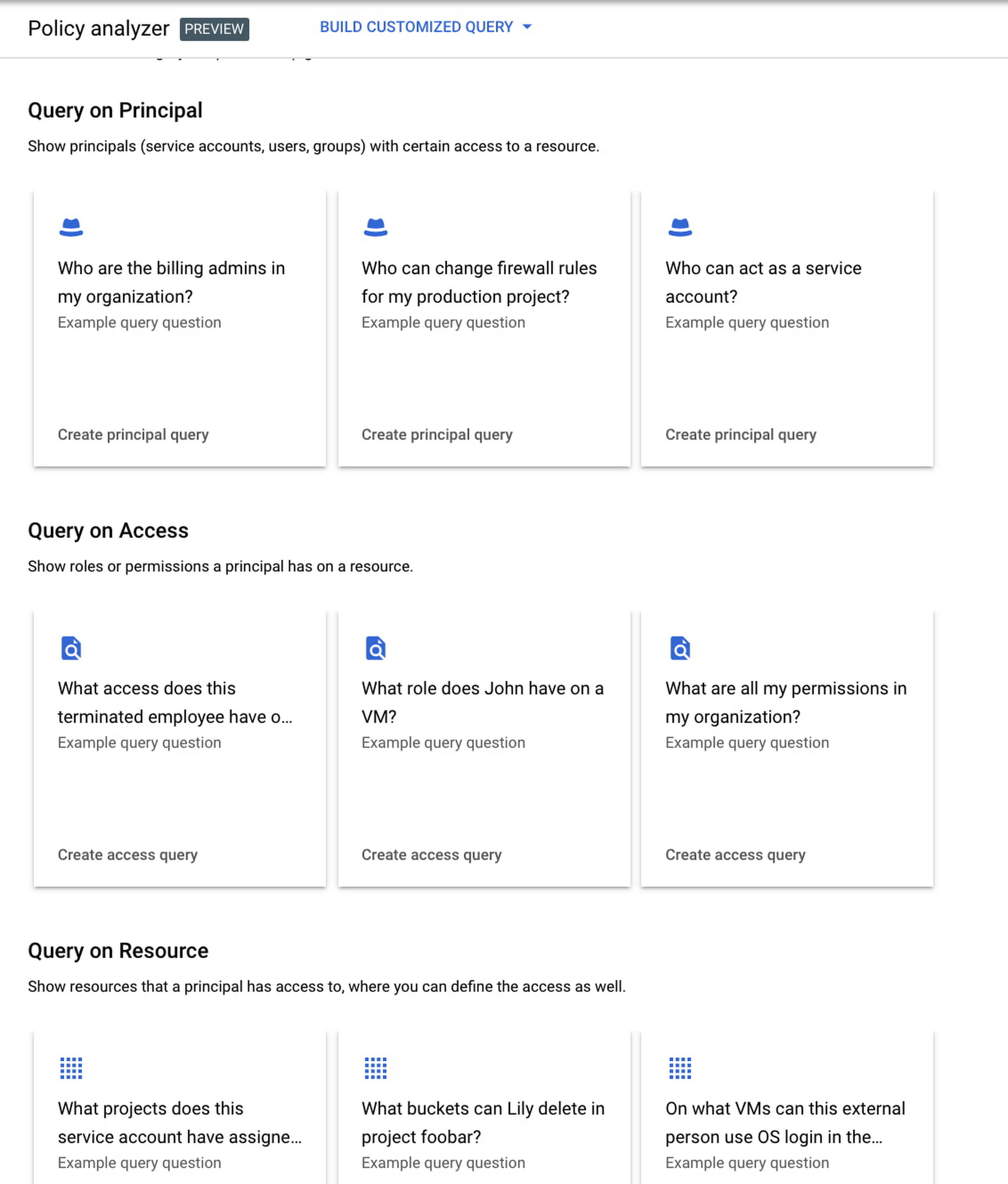
Determining authoritative answers to security-related questions like “Who can read data from my storage bucket that contains PII?” or “Does a terminated employee still have any remaining access to my system?” can be difficult and time consuming. This is why access management and identity certification is one of the top security priorities for enterprises running workloads in the cloud. To help alleviate this challenge, the new Policy Analyzer capability in CAI thoroughly analyzes the relationship between IAM policies and resources. The analysis includes powerful and efficient group expansion, service account impersonation, conditional access analysis, resource expansion, and more. You can even export the results to a BigQuery table or Cloud Storage bucket for further analysis and record keeping. CAI’s enhanced UI makes it even easier for you to build your own flexible queries and quickly get to a comprehensive answer.
Create asset posture visibility
Cloud Asset Inventory now provides seven types of Asset Insights through the Active Assist platform. These new asset insights help proactively detect anomalies within your organization’s IAM policies, which may be opportunities to improve your security posture. The insights can be aggregated at the Organization, Folder or Project level.
The seven new Asset Insights include:
- External members in IAM policies.
- External users that impersonate your service accounts.
- External members as policy editors.
- External users who can view cloud storage buckets.
- Terminated users/groups that are still in IAM policies
- IAM policies containing all users or all authenticated users.
- Projects with only terminated users as owners.
As a Google Cloud customer you can get started and use all the recently released capabilities and features immediately; check out our documentation to see how. We’d love to hear your feedback; email us with any questions or concerns!
Thwart Ransomware Threats with Google Cloud’s 5 Pillars of Protection

3132
Of your peers have already read this article.
2:00 Minutes
The most insightful time you'll spend today!
Ransomware, a form of malware that encrypts a user’s or organization’s most important files or data rendering them unreadable, isn’t a novel threat in the world of computer security. These destructive, financially-motivated attacks where cybercriminals demand payment to decrypt data and restore access have been studied and documented for many years. Today’s reality shows us that these attacks have become more pervasive, impacting essential services like healthcare or pumping gasoline. Yet despite attempts to stop this threat, ransomware continues to impact organizations across all industries, significantly disrupting business processes and critical national infrastructure services and leaving many organizations looking to better protect themselves. Organizations that continue to rely on legacy systems are especially vulnerable to ransomware threats, as these systems may not be regularly patched and maintained.
For more than 20 years Google has been operating securely in the cloud, using our modern technology stack to provide a more defensible environment that we can protect at scale. We strive to make our security innovations available in our platforms and products for customers to use as well. This underpins our work to be the industry’s most trusted cloud, and while the threat of ransomware isn’t new, our responsibility to help protect you from existing or emerging threats never changes. In this post, we share guidance on how organizations can increase their resilience to ransomware and how some of our Cloud products and services can help.
Develop a comprehensive, defensive security posture to protect against ransomware
Robust protection against ransomware (and many other threats) requires multiple layers of defense. The National Institute of Standards and Technology (NIST) outlines five main functions in the Cybersecurity Framework that serve as the primary pillars for a successful and comprehensive cybersecurity program in any public or private sector organization. Below are the recommendations from NIST and examples of how our Cloud technologies can help address ransomware threats:
Pillar #1 – Identify: Develop an understanding of what cybersecurity risks you need to manage for the scope of your assets, systems, data, people, and capabilities. In the case of ransomware, this covers which systems or processes are most likely to be targeted in a ransomware attack, and what the business impact would be if specific systems were rendered inoperable. This will help prioritize and focus efforts to manage risks.
Our CISO Guide to Security Transformation whitepaper outlines steps for a risk-informed, rather than risk-avoidance, approach to security with the cloud. A risk-informed approach can help you address the most important security risks, instead of addressing the risks that you already know how to mitigate. Cloud service providers make this risk-informed approach easier and more efficient for you by developing and maintaining many of the controls and tools that you need to mitigate modern security threats. Services like Cloud Asset Inventory provide a mechanism to discover, monitor, and analyze all your assets in one place for tasks like IT ops, security analytics, auditing, and governance.
Pillar #2 – Protect: Create safeguards to ensure delivery of critical services and business processes to limit or contain the impact of a potential cybersecurity incident or attack. In the case of ransomware, these safeguards may include frameworks like zero trust that protect and strongly authenticate user access and device integrity, segment environments, authenticate executables, reduce phishing risk, filter spam and malware, integrate endpoint protection, patch consistently and provide continuous controls assurance. Some examples of products and strategies to involve in this step include:
- A cloud-native, inherently secure email platform: Email is at the heart of many ransomware attacks. It can be exploited to phish credentials for illegitimate network access and/or to distribute ransomware binaries directly. Advanced phishing and malware protection in Gmail provides controls to quarantine emails, defends against anomalous attachment types, and protects from inbound spoofing emails. Security Sandbox detects the presence of previously unknown malware in attachments. As a result, Gmail prevents more than 99.9 percent of spam, phishing, and malware from reaching users’ inboxes. Unlike frequently-exploited legacy on-premises email systems, Gmail is continually and automatically updated with the latest security improvements and protections to help keep your organization’s email safe.
- Strong protection against account takeovers: Compromised accounts allow ransomware operators to gain a foothold in victim organizations, perform reconnaissance, get unauthorized access to data and install malicious binaries. Google’s Advanced Protection Program provides the strongest defense against account takeovers and has yet to see a user that participates in the program be successfully phished. Further, Google Cloud employs many layers of machine learning systems for anomaly detection to differentiate between safe and anomalous user activity across browsers, devices, application logins, and other usage events.
- Zero trust access controls that limit attacker access and lateral movement: BeyondCorp Enterprise provides a turnkey solution for implementing zero trust access to your key business applications and resources. In a zero trust access model, authorized users are granted point-in-time access to individual apps, not the entire corporate network, and permissions are continuously evaluated to determine if access is still valid. This prevents the lateral movement across the network that ransomware attackers rely on to hunt for sensitive data and spread infections. BeyondCorp’s protections can even be applied to RDP access to resources, one of the most common ways that ransomware attackers gain and maintain access to insecure legacy Windows Server environments.
- Enterprise threat protections for Chrome: Leveraging Google Safe Browsing technology, Chrome warns users of millions of malware downloads each week. Threat protection in BeyondCorp Enterprise delivered through Chrome can prevent infections from previously unknown malware including ransomware, with real-time URL checks and deep scanning of files.

- Endpoints designed for security: Chromebooks are designed to protect against phishing and ransomware attacks with a low on-device footprint, read-only, constantly invisibly updating Operating System, sandboxing, verified boot, Safe Browsing and Titan-C security chips. Rollout of ChromeOS devices for users who work primarily in a browser can reduce an organization’s attack surface, such as relying too much on legacy Windows devices, which have been found to often be vulnerable to attacks.
Pillar #3 – Detect: Define continuous ways to monitor your organization and identify potential cybersecurity events or incidents. In the case of ransomware, this may include watching for intrusion attempts, deploying Data Loss Prevention (DLP) solutions to detect exfiltration of sensitive data from your organization, and scanning for early signs of ransomware execution and propagation.
The ability to spot and stop malicious activity associated with ransomware as early as possible is key to preventing business disruptions. Chronicle is a threat detection solution that identifies threats, including ransomware, at unparalleled speed and scale. Google Cloud Threat Intelligence for Chronicle surfaces highly actionable threats based on Google’s collective insight and research into Internet-based threats. Threat Intel for Chronicle allows you to focus on real threats in the environment and accelerate your response time.
DLP technologies are also useful in helping detect data that could be appealing to ransomware operators. With data discovery capabilities like Cloud DLP, you can detect sensitive data that’s accessible to the public when it should not be and detect access credentials in exposed code.
Pillar #4 – Respond: Activate an incident response program within your organization that can help contain the impact of a security (in this case, ransomware) event.
During a ransomware attack or security incident, it’s critical to secure your communications both internally to your teams and externally to your partners and customers. Many organizations with legacy Office deployments have shifted to Google Workspace because it offers a more standardized and secure online collaboration suite, and in the event of a security incident, a new instance can quickly be stood up to provide a separate, secure environment for response actions.
Pillar #5 – Recover: Build a cyber resilience program and back-up strategy to prepare for how you can restore core systems or assets affected by a security (in this case, ransomware) incident. This is a critical function for supporting recovery timelines and lessening the impact of a cyber event so you can get back to operating your business.
Immediately after a ransomware attack, a safe point-in-time backup image that is known not to be infected must be identified. Actifio GO provides scalable and efficient incremental data protection and a unique near-instant recovery capability for data. This near-instant recovery facilitates identifying a clean restore point quickly, enabling resumption of business functions rapidly. Actifio GO is infrastructure-agnostic and can protect applications on-premises and in the cloud.
In Google Workspace, if files on your computer were infected with malware but you sync them to Google Drive, you may be able to recover those files. Additionally, ensuring that you have a strong risk transfer program in place, like our Risk Protection Program, is a critical element of a comprehensive approach to managing cyber risk.
Key ransomware prevention and mitigation considerations for business and IT leaders
As you plan for a comprehensive defense posture against ransomware threats, here are some key questions to consider:
- Does your organization have a ransomware plan, and what does it entail? Remember to demand a strong partnership with your cloud providers based on a shared understanding of risk and security objectives.
- How are you defending your organization’s data, systems and employees against malware?
- Are your organization’s systems up to date and patched continuously?
- Are you watching for data exfiltration or other irregularities?
- What is your comprehensive zero trust approach, especially strongly authenticating my employees when they access information?
- Are you taking the right back ups to high assurance immutable locations and testing that they are working properly? This should include testing that does a periodic restore of key assets and data.
- What drills are you conducting to battle-test your organization’s risk management and response to cyber events or incidents?
Ransomware attacks will continue to evolve
Recently, ransomware groups have evolved their tactics to include stealing data prior to it being encrypted, with the threat of extorting this data through leaks. Additionally, some ransomware operators have used the threat of distributed-denial-of-service (DDoS) attacks against victim organizations as an attempt to further compel them to pay ransoms. DDoS attacks can also serve as a distraction, occupying security teams while attackers seek to accomplish other objectives such as data exfiltration or encryption of business-critical data. By deploying Google Cloud Armor — which can scale to absorb massive DDoS attacks— you can help protect services deployed in Google Cloud, other clouds, or on-premise against DDoS attacks.
Protecting against ransomware is a critical issue for all organizations, and these questions and best practices are only the start of building a mature and resilient cybersecurity posture. It’s important to remember that you can’t focus on a single piece of defense; you need a comprehensive cybersecurity program that enables you to identify, prevent, detect, respond, and recover from threats. Above all, you need a range of solutions from a battle-tested and highly-resilient cloud platform that works across these elements in an integrated way with your business. To learn more about how Google Cloud can help you implement a comprehensive cybersecurity program to protect against threats like ransomware and more, visit our Google Cloud Security Best Practices Center.
More Relevant Stories for Your Company

The Right Datawarehouse Helps Fight Climate Change, While Improving Customer Experience
When you think about climate change, you might not consider a daily commute to work or a drive around town as big contributing factors. And yet, transport is the fastest growing source of CO2 emissions from fossil fuel, which in turn is the largest contributor to climate change. This is the key insight

Announcing easier de-identification of Google Cloud Storage data
Many organizations require effective processes and techniques for removing or obfuscating certain sensitive information in the data they store. An important tool to achieve this goal is de-identification. Defined by NIST as a technique that “removes identifying information from a dataset so that individual data cannot be linked with specific

A Look Back on Google Cloud’s Data Analytics Development Efforts from June
June is the month that holds the summer solstice, and some of us in the northern hemisphere get to enjoy the longest days of sunshine out of the entire year. We used all the hours we could in June to deliver a flurry of new features across BigQuery, Dataflow, Data
Google Cloud’s Invisible Security Vision: Key Highlights
Yesterday we held our final Google Cloud Security Talks event of 2021. Our event focused on zero trust and covered everything from Google’s history with BeyondCorp to our strategic thinking when it comes to applying zero trust principles to production environments. We shared product updates across the portfolio and talked about how
