





Cloud Spanner & Bigtable Helps Sabre Build Consistency & Scalability to Serve 1 Billion Travellers

3639
Of your peers have already read this article.
1:30 Minutes
The most insightful time you'll spend today!
Sabre is an innovative software and technology company that leverages highly scalable databases and artificial intelligence (AI) to power travel industry partners around the globe. Our company processes more than 12 billion shopping requests and serves over 1 billion travelers every year.
The companies that partner with us include airlines, travel websites, agencies, and hotels. We are distinguished by a long history of integrating cutting edge technology into our operations. Our earliest innovations include building one of the first transaction processing systems in existence and a travel distribution network that predates the Internet! Through our next generation of AI-powered solutions, we are focused on optimizing the retailing, distribution, and fulfillment experience of the travel industry.
In my role as chief architect for Sabre Labs, I spearhead the long-term technology choices we are making to enhance the development, deployment, and operation of our software. We’ve embarked on a multi-year strategy to transform our technology and solutions. Rearchitecting our infrastructure to become fully cloud native is a central tenet of this transformation. In these early iterations of our plan, we have seen the significant impact of machine learning and its potential in bringing truly personalized travel experiences to customers. As part of this effort, we’ve established a 10-year partnership with Google to help accelerate our transformation and bring innovation to the travel industry.
Database choices require tradeoffs
The complexity and scale of the travel industry places high demands on the cloud services we utilize. We tend to place more emphasis on how a particular cloud service will impact an application’s reliability, performance, or development time, rather than choosing a service purely for its functionality. When it comes to databases, this can often mean making a tradeoff between latency and consistency.
The tradeoff exists for any database that serves multiple copies of its data in different availability zones or geographic regions for reliability. A database designed to ensure that everyone sees a consistent view of the latest data might update those copies synchronously using a consensus algorithm, which affects how quickly the data can be served. On the other hand, a database that’s optimized for faster data serving might update each copy asynchronously and not guarantee consistent reads across records.
Cloud Spanner and Bigtable–two of Google Cloud’s managed databases–are both highly effective services, and each one could support many of our travel applications. But as you will see, the latency vs. consistency tradeoff made it clear which one was best suited for two of our most critical cases.
Google Cloud Spanner facilitates strong, global consistency for Sabre
An airline’s reservation database stores a passenger’s booking information, seat selection, tickets, special requests, and other critical information about their trip. As a result, this data sits at the consistency end of that consistency/latency spectrum. Sabre typically processes thousands of reservation updates per second on behalf of our carrier customers. An airline’s reservation database must be served from many availability zones (and data is replicated across these availability zones) so that it remains available in the event of an outage. It also requires ACID properties for transactional updates across records since airlines often make changes to multiple passengers and multiple flights at the same time.
We needed a system that can handle bursts of concurrent updates, as would occur during a snowstorm when hundreds of thousands of passengers might be automatically moved to alternate flights. Spanner is a great fit for the reservations case because of its unique consistency guarantees. It processes over 1 billion requests per second at peak and provides five 9s SLA (99.999 percent) to support our applications. Spanner also helps us maintain compliance, business continuity, redundancy, and reliability using the same secure-by-design infrastructure, built-in data protection and replication, and multi-layered security that are essential to our Google Cloud workloads.
Spanner’s client libraries also provide built-in mechanisms to handle retrying in the event of write conflicts with another transaction and allow developers to choose stale reads in read-only transactions for improved performance. Of course, consistency across multiple zones or regions doesn’t come for free. It means higher write latencies than if we wrote to a comparable database running in a single availability zone, but for an application that manages flight reservations, it’s a tradeoff that makes sense.
Bigtable provides predictable, low latency at scale
Our flight shopping systems sit at the other end of the latency/consistency spectrum. Sabre’s shopping engine generates millions of itineraries per second on behalf of travelers using mobile apps, third-party travel websites, and airline call centers. Each itinerary requires significant compute resources to calculate: We need to find which combinations of flights make sense and evaluate complex rules about their availability and pricing. Users are typically less patient while searching for a flight than they are when booking it, so we needed a low latency solution. But we can cache many of these shopping results to reduce our compute usage. For instance we can decide how long to cache results based on factors like how far the flight results are from the departure.
Bigtable makes an excellent choice for this shopping cache. It’s a NoSQL database service built to handle high-throughput, low-latency applications, with more than 10 exabytes of data under management. Bigtable’s unique latency properties—such as predictability and single-digit millisecond response time even for multi-petabyte tables—enable us to serve large volumes of shopping results cost effectively, while providing low response times to travelers.
Google Cloud supports a focus on innovation
Managed databases like Bigtable and Spanner are a significant part of Sabre’s cloud strategy. The combination of unique tools like Key Visualizer for Bigtable and Spanner as well as integration with other Google Cloud services like Cloud IAM, Cloud Monitoring, and now Datastream, make the experience of operating managed databases with Google Cloud much easier than it is with several of their self-hosted counterparts. As a result of their granular pricing models and ability to be deployed and automated by SREs, the managed databases we use also end up with a lower total cost of ownership.
We’re particularly excited about a few recent database-related announcements from Google Cloud. Bigtable’s SLA update gives us more concrete expectations in terms of multi-cluster, multi-region uptime. Spanner’s change to provisioning in Processing Units increases its cost efficiency when deploying in non-production environments where we may need many isolated instances, but won’t come close to the limits of a single node. In those cases, Spanner instances may now be configured in one-tenth of a node increments.
Our cloud transformation depends on having a choice of databases for different use cases, trade offs, and migration schedules. In addition to managed databases, we expect to use self-hosted databases, database solutions available in Cloud Marketplace, and transitional services like Cloud SQL for a few more years. In an industry as demanding as travel, accelerating our most critical applications using technology unique to Google Cloud means less time spent optimizing latency and consistency, and more time spent innovating.
Learn more about how your organization can use Bigtable and Spanner.
How to Enhance Incremental Pipeline Performance while Ingesting Data into BigQuery

6347
Of your peers have already read this article.
3:00 Minutes
The most insightful time you'll spend today!
When you build a data warehouse, the important question is how to ingest data from the source system to the data warehouse. If the table is small you can fully reload a table on a regular basis, however, if the table is large a common technique is to perform incremental table updates. This post demonstrates how you can enhance incremental pipeline performance when you ingest data into BigQuery.
Setting up a standard incremental data ingestion pipeline
We will use the below example to illustrate a common ingestion pipeline that incrementally updates a data warehouse table. Let’s say that you ingest data into BigQuery from a large and frequently updated table in the source system, and you have Staging and Reporting areas (datasets) in BigQuery.

The Reporting area in BigQuery stores the most recent, full data that has been ingested from the source system tables. Usually you create the base table as a full snapshot of the source system table. In our running example, we use BigQuery public data as the source system and create reporting.base_table as shown below. In our example each row is identified by a unique key which consists of two columns: block_hash and log_index.
CREATE TABLE reporting.base_table --156 GB processedPARTITION BY TIMESTAMP_TRUNC(block_timestamp, DAY) ASSELECT log_index, data, topics, block_timestamp, block_hashFROM bigquery-public-data.crypto_ethereum.logsWHERE block_timestamp BETWEEN TIMESTAMP '2020-01-01' AND TIMESTAMP '2020-11-30';
In data warehouses it is common to partition a large base table by a datetime column that has a business meaning. For example, it may be a transaction timestamp, or datetime when some business event happened, etc. The idea is that data analysts who use the data warehouse usually need to analyze only some range of dates and rarely need the full data. In our example, we partition the base table by block_timestamp which comes from the source system.
After ingesting the initial snapshot you need to capture changes that happen in the source system table and update the reporting base table accordingly. This is when the Staging area comes into the picture. The staging table will contain captured data changes that you will merge into the base table. Let’s say that in our source system on a regular basis we have a set of new rows and also some updated records. In our example we mock the staging data as follows: first, we create new data, than we mock the updated records:
CREATE TABLE staging.load_delta AS --5 GB processedSELECT log_index, data, topics, block_timestamp, block_hashFROM bigquery-public-data.crypto_ethereum.logsWHERE block_timestamp BETWEEN TIMESTAMP '2020-12-01' AND TIMESTAMP '2020-12-07';INSERT INTO staging.load_delta --2 GB processedSELECT log_index, CONCAT(data, RAND()), topics, block_timestamp, block_hashFROM bigquery-public-data.crypto_ethereum.logs TABLESAMPLE SYSTEM (5 PERCENT)WHERE block_timestamp BETWEEN TIMESTAMP '2020-10-01' AND TIMESTAMP '2020-11-30';
Next, the pipeline merges the staging data into the base table. It joins two tables by unique key and than updates the changed value or inserts a new row
MERGE INTO reporting.base_table T --161 GB processedUSING staging.load_delta SON T.block_hash = S.block_hashAND T.log_index = S.log_indexWHEN MATCHED THEN UPDATE SETT.data = S.dataWHEN NOT MATCHED THEN INSERT (log_index, data, topics, block_timestamp, block_hash)VALUES (log_index, data, topics, block_timestamp, block_hash);
It is often the case that the staging table contains keys from various partitions but the number of those partitions are relatively small. It holds, for instance, because in the source system the recently added data may get changed due to some initial errors or ongoing processes but older records are rarely updated. However, when the above MERGE gets executed, BigQuery scans all partitions in the base table and processes 161 GB of data. You might add additional join condition on block_timestamp:
MERGE INTO reporting.base_table T --161 GB processedUSING staging.load_delta SON T.block_hash = S.block_hashAND T.log_index = S.log_indexAND T.block_timestamp = S.block_timestampWHEN MATCHED THEN UPDATE SETT.data = S.dataWHEN NOT MATCHED THEN INSERT (log_index, data, topics, block_timestamp, block_hash)VALUES (log_index, data, topics, block_timestamp, block_hash);
But BigQuery would still scan all partitions in the base table because condition T.block_timestamp = S.block_timestamp is a dynamic predicate and BigQuery doesn’t automatically push such predicates down from one table to another in MERGE.
Can you improve the MERGE efficiency by making it scan less data? The answer is Yes.
As described in the MERGE documentation, pruning conditions may be located in a subquery filter, a merge_condition filter, or a search_condition filter. In this post we show how you can leverage the first two. The main idea is to turn a dynamic predicate into a static predicate.
Steps to enhance your ingestion pipeline
The initial step is to compute the range of partitions that will be updated during the MERGE and store it in a variable. As was mentioned above, in data ingestion pipelines, staging tables are usually small so the cost of the computation is relatively low.
DECLARE src_range STRUCT<date_min TIMESTAMP, date_max TIMESTAMP> --115 MB processedDEFAULT(SELECT STRUCT(MIN(block_timestamp) AS date_min,MAX(block_timestamp) AS date_max) FROM staging.load_delta);
Based on your existing ETL/ELT pipeline, you can add the above code as-is to your pipeline or you can compute date_min, data_max as part of some already existing transformation step. Alternatively, date_min, data_max can be computed on the Source System side while capturing the next ingestion data batch.
After computing date_min, date_max you pass those values to the MERGE statement as static predicates. There are several ways to enhance the MERGE and prune partitions in the base table based on precomputed date_min, data_max.
If your initial MERGE statement uses a subquery, you can incorporate a new filter into it:
BEGINDECLARE src_range STRUCT<date_min TIMESTAMP, date_max TIMESTAMP> --115 MB processedDEFAULT(SELECT STRUCT(MIN(block_timestamp) AS date_min,MAX(block_timestamp) AS date_max) FROM staging.load_delta);MERGE INTO reporting.base_table T --41 GB processedUSING (SELECT *FROM staging.load_deltaWHERE block_timestamp BETWEEN src_range.date_min AND src_range.date_max) SON T.block_hash = S.block_hashAND T.log_index = S.log_indexAND T.block_timestamp = S.block_timestampWHEN MATCHED THEN UPDATE SETT.data = S.dataWHEN NOT MATCHED THEN INSERT (log_index, data, topics, block_timestamp, block_hash)VALUES (log_index, data, topics, block_timestamp, block_hash);END;
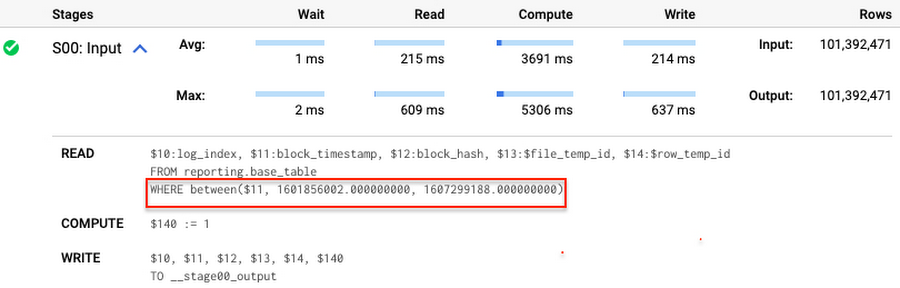
Note that you add the static filter to the staging table and keep T.block_timestamp = S.block_timestamp to convey to BigQuery that it can push that filter to the base table. This MERGE processes 41 GB of data in contrast to the initial 161 GB. You can see in the query plan that BigQuery pushes the partition filter from the staging table to the base table:
This type of optimization, when a pruning condition is pushed from a subquery to a large partitioned or clustered table, is not unique for MERGE. It also works for other types of queries. For instance:
SELECT * -- 41 GB processedFROM reporting.base_table TINNER JOIN staging.load_delta SON T.block_hash = S.block_hashAND T.log_index = S.log_indexAND T.block_timestamp = S.block_timestampWHERE S.block_timestamp BETWEEN TIMESTAMP '2020-10-05' AND TIMESTAMP '2020-12-07'
And you can check the query plan to verify that BigQuery pushed down the partition filter from one table to another.
Moreover, for SELECT statements, BigQuery can automatically infer a filter predicate on a join column and push it down from one table to another if your query meets the following criteria:
- The target table must be clustered or partitioned.
- The result size of the other table, i.e. after applying all filters, must qualify for broadcast join. Namly, the result set must be relatively small, less than ~100MB.
In our running example, reporting.base_table is partitioned by block_timestamp. If you define a selective filter on staging.load_delta and join two tables, you can see an inferred filter on the join key pushed to the target table
SELECT *FROM reporting.base_table TINNER JOIN staging.load_delta SON T.block_timestamp = S.block_timestampWHERE S.block_hash = '0x0c1caa16b34d94843aabfebc0d5a961db358135988f7498a6fdc450ad55f0870'
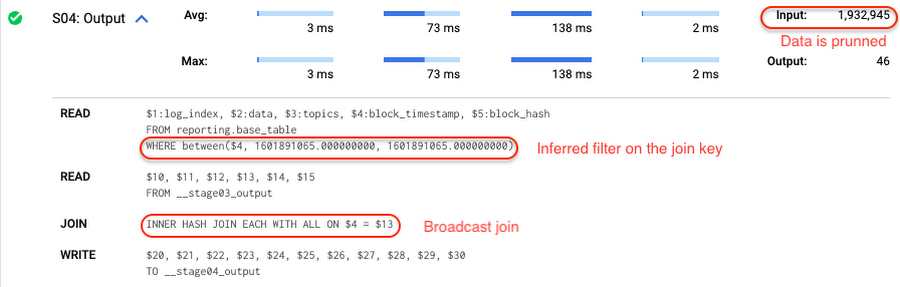
There is no requirement to join tables by partitioning or clustering key to kick off this type of optimization. However, in this case the pruning effect on the target table would be less significant.
But let us get back to the pipeline optimizations. Another way to enhance MERGE is to modify the merge_condition filter by adding static predicate on the base table:
BEGINDECLARE src_range STRUCT<date_min TIMESTAMP, date_max TIMESTAMP> --115 MB processedDEFAULT(SELECT STRUCT(MIN(block_timestamp) AS date_min,MAX(block_timestamp) AS date_max) FROM staging.load_delta);MERGE INTO reporting.base_table T --41 GB processedUSING staging.load_delta SON T.block_hash = S.block_hashAND T.log_index = S.log_indexAND T.block_timestamp BETWEEN src_range.date_min AND src_range.date_maxWHEN MATCHED THEN UPDATE SETT.data = S.dataWHEN NOT MATCHED THEN INSERT (log_index, data, topics, block_timestamp, block_hash)VALUES (log_index, data, topics, block_timestamp, block_hash);END;
To summarize, here are the steps that you can perform to enhance incremental ingestion pipelines in BigQuery. First you compute the range of updated partitions based on the small staging table. Next, you tweak the MERGE statement a bit to let BigQuery know to prune data in the base table.
All the enhanced MERGE statements scanned 41 GB of data, and setting up the src_range variable took 115 MB. Compare it with the initial 161 GB scan. Moreover, given that computing src_range may be incorporated into some existing transformation in your ETL/ELT, it results in a good performance improvement which you can leverage in your pipelines.
In this post we described how to enhance data ingestion pipelines by turning dynamic filter predicates into static predicates and letting BiQuery prune data for us. You can find more tips on BigQuery DML tuning here.
Special thanks to Daniel De Leo, who helped with examples and provided valuable feedback on this content.
Canadian Bank’s SAP Workload Moved to BigQuery Helps Unlock New Business Opportunities

7375
Of your peers have already read this article.
2:00 Minutes
The most insightful time you'll spend today!
When ATB Financial decided to migrate its vast SAP landscape to the cloud, the primary goal was to focus on things that matter to customers as opposed to IT infrastructure. Based in Alberta, Canada, ATB Financial serves over 800,000 customers through hundreds of branches as well as digital banking options. To keep pace with competition from large banks and FinTech startups and to meet the increasing 24/7 demands of customers, digital transformation was a must. To support this new mandate, in 2019, ATB migrated its extensive SAP backbone to Google Cloud. In addition to SAP S/4 HANA, ATB runs SAP financial services, core banking, payment engine, CRM and business warehouse on Google Cloud.
In parallel, changes were needed to ATB’s legacy data platform. The platform had stability and reliability issues and also suffered from a lack of historical data governance. Analytics processes were ad hoc and manual. The legacy data environment was also not set up to tackle future business requirements that come with a high dependency on real-time data analysis and insights.
After evaluating several potential solutions, ATB chose BigQuery as a serverless data warehouse and data lake for its next-generation, cloud-native architecture. “BigQuery is a core component of what we call our data exposure enablement platform, or DEEP,” explains Dan Semmens, Head of Data and AI at ATB Financial. According to Semmens, DEEP consists of four pillars, all of which depend on Google Cloud and BigQuery to be successful:
- Real-time data acquisition: ATB uses BigQuery throughout its data pipeline, starting with sourcing, processing, and preparation, moving along to storage and organization, then discovery and access, and finally consumption and servicing. So far, ATB has ingested and classified 80% of its core SAP banking data as well as data from a number of its third-party partners, such as its treasury and cash management platform provider, its credit card provider, and its call center software.
- Data enrichment: Before migrating to Google Cloud, ATB managed a number of disconnected technologies that made data consolidation difficult. The legacy environment could handle only structured data, whereas Google Cloud and BigQuery lets the bank incorporate unstructured data sets, including sensor data, social network activity, voice, text, and images. ATB’s data enrichment program has enabled more than 160 of the bank’s top-priority insights running on BigQuery, including credit health decision models, financial reporting, and forecasting, as well as operational reporting for departments across the organization. Jobs such as marketing campaigns and month-end processes that used to take five to eight hours now run in seconds, saving over CA$2.24 million in productivity.
- Self-service analytics: Data for self-service reporting, dashboarding, and visualization is now available for ATB’s 400+ business users and data analysts. Previously, bringing data and analytics to the business users who needed it while ensuring security was burdensome for IT, fraught with recurrent data preparation and other highly manual elements. Now, ATB automates much of its data protection and governance controls through the entire data lifecycle management process. Data access is not only open to more team members but it is faster and easier to acquire without compromising security. And it’s not just raw data that users can access. ATB uses BigQuery to define its enterprise data models and create what it calls its data service layer to make it easier for team members to visualize their data.
- AI-assisted analytics and automation: Through Google Cloud and BigQuery, ATB has been able to publish data and ML models that provide alerts and notifications via APIs to customer service agents. These real-time recommendations allow customer service agents to provide more tailored service with contextualized advice and suggested new services. So far, the company has deployed more than 40 ML models to generate over 20,000 AI-assisted conversations per month. Thanks to improved customer advocacy and less churn, the bank has realized more than CA$4 million in operating revenue. During the ongoing COVID crisis, the system was also able to predict when business and personal banking customers were experiencing financial distress so that a relationship manager could proactively reach out to offer support, such as payment deferral or loan restructuring. The AI tools provided by BigQuery are also helping ATB detect fraud that previously evaded rules-based fraud detection by using broader sets of timely and accurate data.
Thanks to the speed and ease of moving data from SAP to BigQuery, ATB is using artificial intelligence (AI) and machine learning (ML) to do things it previously hadn’t thought possible, including sophisticated fraud prevention models, product recommendations, and enriched CRM data that improves the customer experience.
Using the power of Google Cloud and BigQuery, ATB Financial has been able to draw more value from its SAP data while lowering cost and improving security and reliability. Speed to provide data sets and insights to internal team members has improved 30%. The bank also has seen a 15x reduction in performance incidents while improving data governance and security. Dan Semmens projects that the digital transformation strategy built on Google Cloud and BigQuery has both saved millions compared to its on-premises environment and has also realized millions in new business opportunities.
Semmens is looking toward the future that includes initiatives like Open Banking and greater ability to provide real time personalized advice for customers to drive revenue growth. “We see our data platform as foundational to ATB’s 10-year strategy,” he says. “The work we’ve undertaken over the past 18 months has enabled critical functionality for that future.”
Learn more about how ATB Financial is leveraging BigQuery to gain more from SAP data. Visit us here to explore how Google Cloud, BigQuery, and other tools can unlock the full value of your SAP enterprise data.
How We Built a Brand New Bank on Google Cloud and Cloud Spanner: The First Scalable, Enterprise-grade, Database Service

6577
Of your peers have already read this article.
6:30 Minutes
The most insightful time you'll spend today!
Editor’s note: Technology today lets companies of any size take on entire industries simply with an innovative business model plus digital distribution. Take Shine, a French startup whose platform helps freelancers manage their finances — and their administrative commitments. Here, Raphael Simon, Shine’s CTO and co-founder, talks about why Shine built a new bank on Google Cloud Platform, and in particular Cloud Spanner.
More and more people are deciding to take the plunge and start a freelance career. Some of them by choice, others out of necessity. One of their biggest pain points is dealing with administrative tasks.
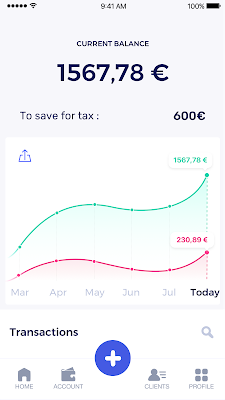
In some countries, especially in Europe, the administrative burden of being a freelancer is similar to what a company of 10 or more people deals with. A freelancer doesn’t necessarily have the time or skills to manage all this paperwork. So we are building a new bank for freelancers from the ground up that helps automate administrative tasks associated with their business.
Shine’s banking services and financial tools make it as easy to work as a freelancer as it is to work for a larger company. We deal with administrative tasks on behalf of the freelancer so that he or she can focus on their job: finding and wowing clients.

Building our infrastructure
As a new bank, we had the opportunity to build our infrastructure from the ground up. Designing an infrastructure and choosing a database presents tough decisions, especially in the financial services world. Financial institutions come under tremendous scrutiny to demonstrate stability and security. Even a tiny leak of banking data can have tremendous consequences both for the bank and its clients, and any service interruption can trigger a banking license to be suspended or a transaction to be declined.
At the same time, it’s vital for us to optimize our resources so we can maximize the time we spend developing user-facing features. In our first six months, we iterated and validated a prototype app using Firebase, and secured our seed funding round (one of the largest in Europe in 2017).
Based on our positive experience with Firebase, plus the ease-of-use and attractive pricing that Google Cloud offered, we decided to build our platform on Google Cloud Platform (GCP).
We were drawn to GCP because it has a simple, consistent interface that is easy to learn. We chose App Engine flexible environment with Google Cloud Endpoints for an auto-scaling microservices API. These helped us reduce the time, effort, and cost in terms of DevOps engineers, so we could invest more in developing features, while maintaining our agility.
We use Cloud Identity and Access Management (Cloud IAM) to help control developer access to critical parts of the application such as customer bank account data. It was quite a relief to lean on a reliable partner like Google Cloud for this.
Database decisions
Next came time to choose a database. Shine lives at the financial heart of our customers’ businesses and provides guidance on things like accounting and tax declaration. The app calculates the VAT for each invoice and forecasts the charges they must pay each quarter.
Due to the sensitivity of our customers’ data, the stakes are high. We pay careful attention to data integrity and availability and only a relational database with support for ACID transactions (Atomicity, Consistency, Isolation, Durability) can meet this requirement.
At the same time, we wanted to focus on the app and user experience, not on database administration or scalability issues. We’re trying to build the best possible product for our users, and administering a database has no direct value for our customers. In other words, we wanted a managed service.
Cloud Spanner combines a globally distributed relational database service with ACID transactions, industry-standard SQL semantics, horizontal scaling, and high availability. Cloud Spanner provided additional security, high-availability, and disaster recovery features out-of-the-box that would have taken months for us to implement on our own. Oh, and no need to worry about performance — Cloud Spanner is fast. Indeed, Cloud Spanner has been a real asset to the project, from the ease-of-use of creating an instance to scaling the database.
Cloud Spanner pro tips
We began working with Cloud Spanner and have learned a lot along the way. Here are some technical notes about our deployment and some best practices that may be useful to you down the road:
- Cloud Spanner allows us to change a schema in production without downtime. We always use a NOT NULL constraint, because we generally think that using NULL leads to more errors in application code. We always use a default value when we create an entity through our APIs and we use Cloud Dataflow to set values when we change a schema (e.g., adding a field to an entity).
- With microservices, it’s generally a good practice to make sure every service has its own database to ensure data isolation between the different services. However, we adopted a slightly different strategy to optimize our use of Cloud Spanner. We have an instance on which there are three databases — one for production, one for staging and one for testing our continuous integration (CI) pipeline. Each service has one or more interleaved tables that are isolated from others services’ tables (we do not use foreign-keys between tables from different services). This way our microservices data are not tightly “coupled”.
- We created an internal query service that performs read-only queries to Cloud Spanner to generate a dashboard or do complex queries for analytics. It is the only service where we allow joins between tables across services.
- We take advantage of Cloud Spanner’s scalability, and thus don’t delete any data that could one day be useful and/or profitable.
- We store all of our business logs on Cloud Spanner, for example connection attempts to the application. We append the ‘-Logs’ suffix to them.
- When possible, we always create an interleave.
In short, implementing Cloud Spanner has been a good choice for Shine:
- It’s saved us weeks, if not months, of coding.
- We feel we can rely on it since it’s been battle-tested by Google.
- We can focus on building a disruptive financial services product for freelancers and SMBs.
And because Cloud Spanner is fully managed and horizontally scalable, we don’t have to worry about hardware, security patches, scaling, database sharding, or the possibility of a long and risky database migration in the future. We are confident Cloud Spanner will grow with our business, particularly as we expand regionally and globally. I strongly recommend Cloud Spanner to any company looking for a complete database solution for business-critical, sensitive, and scalable data.
Creating and Using Storage Buckets for Your Data Needs

1393
Of your peers have already read this article.
2:30 Minutes
The most insightful time you'll spend today!
So, you want to store objects on the cloud? But you’re really new to Google Cloud or Cloud Storage and would like someone to walk you through the process step by step?
Today is your lucky day!
I will help you understand the big steps involved in setting up and using Cloud Storage. For a walkthrough of all the steps involved that even includes highlighting of things to select so you don’t spend all your time playing “Where’s Waldo” on the page looking for that one button, click try the tutorial!
Creating buckets, storing objects in them, and adjusting permissions may feel challenging at first, but after you’ve walked through these steps, you’ll be able to create and use the Cloud Storage your project needs.
Resource Hierarchy
Projects contain all of the related parts of your application. Inside projects, you may have buckets, the top level containers in Cloud Storage. Files and folders are stored in buckets. You can grant access to a bucket, folder, or file using Identity and Access Management.

You can do all of that in this interactive tutorial. So let’s get started. I suggest you follow along in the tutorial so you can see the specific keys and screens as I describe them.
Creating a project
Everything in your application will be in a project, even if the only service you are using is storage. Projects need to be associated with a billing account, so if you don’t have one, consider signing up for the Free Trial. You’ll start in the Cloud Console.
Creating a bucket
Once you have a project, you can use storage by navigating to the Cloud Storage page by using either the Navigation menu at the top left of the console or by searching for “Cloud Storage” using the search box at the top of the console.
At the Buckets page of Cloud Storage, you’ll be able to create a bucket. The name of your bucket needs to be globally unique; that is no other bucket in Google Cloud Storage can have the same name. This is because if you or your organization allow your bucket to be accessible on the Internet, it will be at the URL https://storage.googleapis.com/<bucket name>. You can also consider implementing a security feature to prevent data exfiltration, organization restriction headers when you’re finished creating your bucket.. Pick a region close to you for your bucket. In some cases it may make sense to use multi-region or dual-region, but the details are more than I want to get into here. Don’t worry; you can find lots more information on them! Additionally, I won’t go into the details about selecting the appropriate storage class based on access frequency and longevity, but more information can be found here as well our recently introduced Autoclass tiering feature..
Since buckets can be accessed from the Internet, you need to be careful to only make the things you want to be public, public. The default value is to keep your data off of the Internet, so when you create the bucket, there’s an option to “Enforce public access prevention on this bucket” that is already selected. Since we’ll be making items in this bucket public later on, clear the option before confirming the bucket information. Don’t worry; you’ll see how to set that option back later.
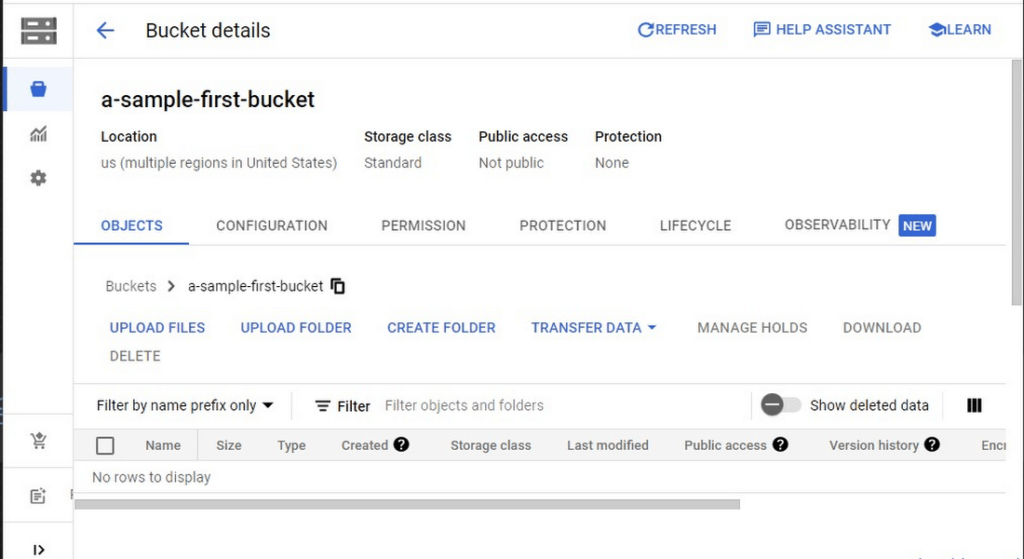
Take a look at the Bucket detail page. There are tabs to see the objects in the bucket, the permissions on the bucket, and much more. There are commands to create folders and to upload files and folders. We’ll do some of this in the next section. You can even find out much more from the Learn option in the upper right.
Adding items to the bucket
Find a file you’d like to upload to this bucket, remembering it will be made public to the Internet later. If you don’t have anything available, there’s a picture of a cat (of course, it’s a cat picture, this is the Internet!) in the interactive tutorial.
Go to the bucket details for your bucket. Using the “Upload files” button, you’ll just upload the file to the bucket by selecting the file from your computer. We won’t get into service classes here, but when you’re ready, there are links in the references.
Of course, if you have a lot of files in a bucket, you probably will want some sort of organization. You can do this by creating folders in your bucket with the “Create Folder” option. Once you’ve done that, you can go to the overflow menu (three vertical dots at the end line with the object information) and select Move. Remember, if you need help finding this, the interactive tutorial will point it out.
Making a bucket public
No surprise, the Bucket details hold lots of information about your bucket. You’ll change the bucket’s permissions in the Permission tab. (I hope that’s not a surprise.) You can then give access to individuals, groups, or all users. For this tutorial, follow the steps to grant access to allUsers. There are a variety of different levels of access you can grant to a user. In this case, just grant the ability to view the object using Storage Object Viewer.
Then go into the Objects tab to find the URL for the object you uploaded. Copy that URL and ensure you can indeed access the object from another tab or incognito window.
Now that you’ve done that, go back to the Permission tab for the bucket and select Prevent Public Access to secure the bucket again.
So, in a nutshell, to make all files in a bucket public, in the Permissions tab:
- Uncheck the option “Remove Public Access Prevention”
- Use Grant Access to give allUsers the Storage Object Viewer role in Cloud Storage.
To make all files in a bucket private, in the Permissions tab select Prevent Public Access.
Cleaning up
There is a charge to keep items in Cloud Storage, so you’ll probably want to delete the object you uploaded by selecting it and pressing Delete. You can delete the bucket in a similar way. The tutorial has details, of course.
While there are lots more details about Cloud Storage, you’ve got the big picture now. Go do something creative and useful with it!
So what now?
If you haven’t walked through the interactive tutorial, give it a try!
Insurer Uses Google Cloud AI to Battle Slow Growth: It Improves Sales by 5% in 8 Weeks

8865
Of your peers have already read this article.
7:30 Minutes
The most insightful time you'll spend today!
For a business to succeed in the long term, it needs to learn not just to adapt to inevitable change, but to harness it. South Africa-based PPS has been an insurance company since 1941 and today is the biggest mutual insurance provider in the country.
As a mutual company, PPS is owned by more than 200,000 members, making them shareholders. In recent years, PPS and other companies like it have been affected by a number of external factors.
“For one thing, technology platforms have brought in a new gig economy that has all kinds of implications for insurance,” says Avsharn Bachoo, CTO at PPS. “What we’ve been seeing is basically a disruption of the South African insurance industry. We chose to see that as an opportunity.”
“Our servers were at the end of their life cycle and we had to decide whether to refresh them or switch completely. To embrace the world of AI and machine learning effectively, we knew we needed a cloud-based infrastructure. We’ve found the answer in Google Cloud Platform.”
—Avsharn Bachoo, CTO, PPS
In early 2018, faced with an uncertain economic environment that was squeezing growth and profitability, PPS decided to transform itself from a traditional broker-based business into a digital insurance provider. A key pillar of this new strategy was to overhaul the company’s technology infrastructure. To turn the strategy into reality, Avsharn and his team chose Google Cloud Platform (GCP).
“Our servers were at the end of their life cycle and we had to decide whether to refresh them or switch completely,” says Avsharn. “To embrace the world of AI and machine learning (ML) effectively, we knew we needed a cloud-based infrastructure. We’ve found the answer in Google Cloud Platform.”
Power, speed, flexibility with Google Cloud Platform
Previously, PPS maintained an on-premises IT infrastructure, which worked for its traditional business but was unsuited for its new way of working. In early 2018, the company started working on new products for its members but this required large amounts of compute power that proved prohibitively expensive with on-premises servers. Even existing products were starting to require more than the infrastructure could deliver. Aging equipment meant that it’s testing and quality assurance environments bore little resemblance to the actual production environment.
“We had no pre-production environments at all,” says Avsharn, resulting in more work for developers after products had been released. Meanwhile, the capital required to buy and configure more servers for new projects meant fewer resources available for innovation, and left the company less able to react to changes in the market. PPS knew it had to find a cloud-based alternative.
Shortly after devising a new digital strategy, PPS engineers attended a training session on cloud infrastructure given by leading South African Google Cloud Partner Siatik. Impressed with the presentation, PPS engaged Siatik to help run a proof of concept for a cloud-based infrastructure, running on GCP. With on-site engineers and constant communication, Siatik formed a very close working relationship with PPS. “The team at Siatik was exemplary,” recalls Avsharn. “They were well-organized, with cutting-edge technical acumen and very creative solutions to our problems. They were real game-changers.”
“We wanted the platform to retrain its models in response to new data and improve its recommendations with more information. Normally this would be a manual process but Google Cloud ML Engine lets the models do this automatically.”
—Kimoon Kim, Lead Solution Architect and Data Engineer, Siatik
The proof of concept was successful, with GCP outperforming the existing infrastructure in terms of how it handled compute demands, databases, and storage.
“It’s the speed of GCP that really impresses us,” says Avsharn. PPS saw that GCP wasn’t just an opportunity to migrate its existing infrastructure to the cloud. With Siatik’s help, it redesigned its monolithic core architecture to one based around microservices using Google Kubernetes Engine (GKE). For data processing and storage, Cloud Dataflow and Cloud Datastore proved invaluable, while Stackdriver helped the IT team stay on top of logging and monitoring the system.
“Google Cloud makes migrations very easy,” says Brett St. Clair, CEO at Siatik. “It takes care of all the hard work with configurations and replications, so when we switch the machines on, everything is ready and working.”
The ease with which PPS migrated to GCP means that it can now tackle strategic goals much more quickly than before. The most ambitious of these is an AI-powered product recommendation platform. Information is collected from customers who opt in at a defined point in their journey, this database is queried using BigQuery, and the information is fed into the platform. The AI model then calculates the most appropriate products for each member, according to their personal history.
“Most of the product recommendation engines out there are based on clustering, where you’re offered products based on your peer groups,” explains Avsharn. “For the first time, we can make recommendations to members based on their individual preferences and historical behavior. That’s really powerful for us.”
Siatik helped PPS use TensorFlow and Cloud Machine Learning Engine to build the AI platform. For the engineers, these easy-to-use tools helped speed up the process considerably, allowing them to host the models locally without any fuss. Previously, it took one to three months to manually build the model and match an offer to a customer. With the AI platform, a match takes just a few minutes. Cloud ML Engine, in particular, helped the platform adapt to new information on the fly and easily make adjustments to its hyperparameters, that is, preset variables which define the model-training process.
“We wanted the platform to retrain its models in response to new data and improve its recommendations with more information,” says Kimoon Kim, Lead Solution Architect and Data Engineer at Siatik. “Normally this would be a manual process but Google Cloud ML Engine lets the models do this automatically.”
“Google Cloud helped us cancel out a lot of the noise around machine learning and AI. We don’t have to build new complicated algorithms or hire huge teams of data scientists to benefit. We just bring our data and use the right tools to focus on what’s really important.”
—Avsharn Bachoo, CTO, PPS
Harnessing artificial intelligence for real-world results
PPS deployed its new AI recommendation platform in December, 2018. Just a couple of months later, its impact was clear. “In around eight weeks, we saw a 5 percent growth in sales,” says Avsharn. “It’s been a direct result of building our recommendation platform with Google Cloud. We can offer the right products to the right members.”
For developers and engineers at PPS, working with Google Cloud gives them access to high performance technology and automation options with GKE. As a result, the infrastructure runs 70 percent faster than before with fewer cores and less memory. Developers can also work in mature testing environments, and for the first time, are able to build pre-production environments, leading to better quality products. More strategically, moving to a serverless, cloud-based infrastructure has helped PPS take control of its budget, moving away from intermittent, large capital spends to more manageable, project-to-project flows of operational expenditure. The company expects to see savings of around 50 percent, or $695,000.
“We have a lot more flexibility with our resources thanks to Google Cloud,” says Avsharn. “When we have a new idea, we don’t have to outlay new capital such as servers before we can even start working on it. We just spin up instances when we want and spin them back down when we’re done.”
With the AI platform deployed and working well, PPS is already looking at ways to improve it, including real-time updates and further automation. Soon, the company will integrate the platform with more sales campaigns for more effective targeting to boost sales even further. Meanwhile, it’s also experimenting with machine learning to spot patterns in data at scale for fraud analytics and risk assessment.
For PPS, working with Google Cloud has helped it transform quickly and effectively from disrupted to disruptor. The company is now looking to gain the same transformative effects by implementing G Suite for increased productivity and collaboration.
“Google Cloud helped us cancel out a lot of the noise around machine learning and AI,” says Avsharn. “We don’t have to build new complicated algorithms or hire huge teams of data scientists to benefit. We just bring our data and use the right tools to focus on what’s really important.”
More Relevant Stories for Your Company

Autoclass: Simplify and Automate Cost Optimization for Cloud Storage
There is a data explosion challenge that most IT admins and companies are tackling regularly. The cost-effectiveness, durability and scalability make object storage the first choice for unstructured data. Cloud Storage is an object storage service capable of storing data at exabyte scale and easily managing billions, if not trillions,

Quick Recap on Google Cloud: Latest News, Launches, Updates, Events and More
Want to know the latest from Google Cloud? Find it here in one handy location. Check back regularly for our newest updates, announcements, resources, events, learning opportunities, and more. Tip: Not sure where to find what you’re looking for on the Google Cloud blog? Start here: Google Cloud blog 101: Full list

Cloud Bigtable brings database stability and performance to Precognitive
At Precognitive, we were able to start with a blank technology slate to support our fraud detection software products. When we started building the initial version of our platform in 2017, we had some decisions to make: What coding language to use? What cloud infrastructure provider to choose? What database




The True Story of How HotStar Broke a World-Record–Thanks to Firebase and Google BigQuery
Hotstar, India’s largest video streaming platform with 150 million monthly active users around the world, provides live-streaming of TV shows, movies, sports, and news on the go. By using a combination of Firebase products together, Hotstar safely rolled out new features to its watch screen during a major live-streaming event
