





Quick Recap on Google Cloud: Latest News, Launches, Updates, Events and More

12896
Of your peers have already read this article.
2:00 Minutes
The most insightful time you'll spend today!
Want to know the latest from Google Cloud? Find it here in one handy location. Check back regularly for our newest updates, announcements, resources, events, learning opportunities, and more.
Tip: Not sure where to find what you’re looking for on the Google Cloud blog? Start here: Google Cloud blog 101: Full list of topics, links, and resources.
Week of May 24-May 28 2021
- Google Cloud for financial services: driving your transformation cloud journey–As we welcome the industry to our Financial Services Summit, we’re sharing more on how Google Cloud accelerates a financial organization’s digital transformation through app and infrastructure modernization, data democratization, people connections, and trusted transactions. Read more or watch the summit on demand.
- Introducing Datashare solution for financial services–We announced the general availability of Datashare for financial services, a new Google Cloud solution that brings together the entire capital markets ecosystem—data publishers and data consumers—to exchange market data securely and easily. Read more.
- Announcing Datastream in Preview–Datastream, a serverless change data capture (CDC) and replication service, allows enterprises to synchronize data across heterogeneous databases, storage systems, and applications reliably and with minimal latency to support real-time analytics, database replication, and event-driven architectures. Read more.
- Introducing Dataplex: An intelligent data fabric for analytics at scale–Dataplex provides a way to centrally manage, monitor, and govern your data across data lakes, data warehouses and data marts, and make this data securely accessible to a variety of analytics and data science tools. Read more.
- Announcing Dataflow Prime–Available in Preview in Q3 2021, Dataflow Prime is a new platform based on a serverless, no-ops, auto-tuning architecture built to bring unparalleled resource utilization and radical operational simplicity to big data processing. Dataflow Prime builds on Dataflow and brings new user benefits with innovations in resource utilization and distributed diagnostics. The new capabilities in Dataflow significantly reduce the time spent on infrastructure sizing and tuning tasks, as well as time spent diagnosing data freshness problems. Read more.
- Secure and scalable sharing for data and analytics with Analytics Hub–With Analytics Hub, available in Preview in Q3, organizations get a rich data ecosystem by publishing and subscribing to analytics-ready datasets; control and monitoring over how their data is being used; a self-service way to access valuable and trusted data assets; and an easy way to monetize their data assets without the overhead of building and managing the infrastructure. Read more.
- Cloud Spanner trims entry cost by 90%–Coming soon to Preview, granular instance sizing in Spanner lets organizations run workloads at as low as 1/10th the cost of regular instances, equating to approximately $65/month. Read more.
- Cloud Bigtable lifts SLA and adds new security features for regulated industries–Bigtable instances with a multi-cluster routing policy across 3 or more regions are now covered by a 99.999% monthly uptime percentage under the new SLA. In addition, new Data Access audit logs can help determine whether sensitive customer information has been accessed in the event of a security incident, and if so, when, and by whom. Read more.
- Build a no-code journaling app–In honor of Mental Health Awareness Month, Google Cloud’s no-code application development platform, AppSheet, demonstrates how you can build a journaling app complete with titles, time stamps, mood entries, and more. Learn how with this blog and video here.
- New features in Security Command Center—On May 24th, Security Command Center Premium launched the general availability of granular access controls at project- and folder-level and Center for Internet Security (CIS) 1.1 benchmarks for Google Cloud Platform Foundation. These new capabilities enable organizations to improve their security posture and efficiently manage risk for their Google Cloud environment. Learn more.
- Simplified API operations with AI–Google Cloud’s API management platform Apigee applies Google’s industry leading ML and AI to your API metadata. Understand how it works with anomaly detection here.
- This week: Data Cloud and Financial Services Summits–Our Google Cloud Summit series begins this week with the Data Cloud Summit on Wednesday May 26 (Global). At this half-day event, you’ll learn how leading companies like PayPal, Workday, Equifax, and many others are driving competitive differentiation using Google Cloud technologies to build their data clouds and transform data into value that drives innovation. The following day, Thursday May 27 (Global & EMEA) at the Financial Services Summit, discover how Google Cloud is helping financial institutions such as PayPal, Global Payments, HSBC, Credit Suisse, AXA Switzerland and more unlock new possibilities and accelerate business through innovation. Read more and explore the entire summit series.
- Announcing the Google for Games Developer Summit 2021 on July 12th-13th–With a surge of new gamers and an increase in time spent playing games in the last year, it’s more important than ever for game developers to delight and engage players. To help developers with this opportunity, the games teams at Google are back to announce the return of the Google for Games Developer Summit 2021 on July 12th-13th. Hear from experts across Google about new game solutions they’re building to make it easier for you to continue creating great games, connecting with players and scaling your business. Registration is free and open to all game developers. Register for the free online event at g.co/gamedevsummit to get more details in the coming weeks. We can’t wait to share our latest innovations with the developer community. Learn more.
Daffodil Software Saves Hundreds of Hours Managing Databases with Google Cloud SQL

4716
Of your peers have already read this article.
4:30 Minutes
The most insightful time you'll spend today!
Daffodil Software is an India-based information technology services company with 180 employees and satellite offices in the US, Singapore, and the United Arab Emirates.
Its product: A suite of web-based applications, including a business customer relationship management (CRM) program and an enterprise resource planning (ERP) app for schools.
Daffodil’s Challenge
Daffodil needed a cloud-based hosting platform for its applications that would save money and time over in-house hosting. The company tried Amazon Elastic Cloud Compute (EC2) with MySQL to manage the databases that its applications depended on. The potential was there, but building, testing and deploying the applications took too long, and scalability was also an issue.
“The old system provided the option to scale up if many users accessed our applications at the same time, but we had to do this manually,” says Gaurav Sharma, assistant head of Daffodil’s product team.
Soon, Daffodil switched to Google App Engine, which allows businesses to build and host web apps on the same infrastructure that powers Google applications.
Integration with App Engine lets Sharma and his team quickly build, test and deploy applications and allows them to automatically accommodate fluctuations in the number of users so they don’t have to manually manage the system when demand increases.
Although App Engine’s built-in Datastore was useful, they found that they wanted more SQL-like functionality for their data-driven programs.
Google’s Solution
At Google’s suggestion, Daffodil migrated to Cloud SQL three months later to take advantage of the system’s database indexing and dynamic filtering abilities, which speed up data sorting for Daffodil’s end users.
“Using Google App Engine and Google Cloud SQL make our applications go live in half the time and have provided us with hassle-free control over all processes.”
—Yogesh Agarwal, CEO, Daffodil Software
Besides indexing and dynamic filtering, Cloud SQL has simplified database management for the Daffodil team. Sharma can easily import their databases and administer them through an intuitive interface, while Google handles backend maintenance and administration.
Google Cloud SQL replicates data among multiple geographic regions, giving Daffodil CEO Yogesh Agarwal peace of mind that users’ data held by the applications is protected.
“The safety of our customers’ data is a major concern, so we appreciate that we don’t need to worry about data loss,” he says.
The Results
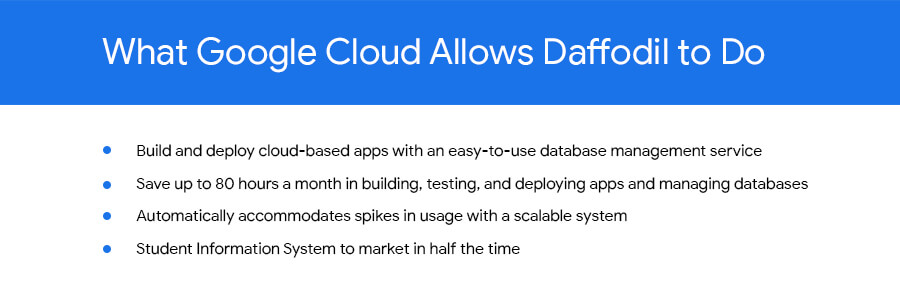
With App Engine and Cloud SQL, the Daffodil team is saving about 80 hours of development time every month because of easier deployment, no active management for scaling, and simplified database management. They have also slashed the time it takes to bring new products to market.
“The shift to Google Cloud SQL has allowed us to focus on making our applications even better.”
—Yogesh Agarwal, CEO, Daffodil Software
“Using Google App Engine and Google Cloud SQL make our applications go live in half the time and have provided us with hassle-free control over all processes, such as development, deployment and monitoring,” Agarwal says. “We’re able to deploy our applications much faster and spend less time managing them.”
Going forward, the Daffodil team plans to add other Google services to their applications, including Prediction API, which allows CRM application users to better predict the probability of a lead becoming a customer, and App Engine’s Full Text Search API, which helps users retrieve customer data more easily.
Agarwal is happy with the move to App Engine and Cloud SQL. “The shift has allowed us to focus on making our applications even better,” he says.
Meesho’s Zero Downtime Success: Cloud CDN Migration Made Easy

1986
Of your peers have already read this article.
4:30 Minutes
The most insightful time you'll spend today!
Meesho is an Indian online marketplace that serves millions of customers every day. Recently, the company decided to adopt a multi-cloud strategy, leveraging Google Cloud’s scalable and reliable infrastructure to drive operational efficiency, modernize and scale for growth. To do so, they needed to migrate billions of static files and images to Google Cloud, to render the static content that serves their web and mobile applications. But with over a petabyte of data in their object storage system, and 10 billion requests per day, Meesho needed to perform this gigantic migration gradually, with zero downtime — a huge challenge.
In this blog post, we look at how Meesho did this using Storage Transfer Service, Cloud Storage and Cloud CDN. We also look at how it saved on storage capacity by resizing static images as needed on the fly, using Cloud Run.
CDN migration requirements
Migrating from one cloud to another isn’t easy. To pull it off, Meesho identified the following requirements:
- Petabyte-scale data transfer: Meesho needed to migrate billions of image files from their existing object storage server to Cloud Storage.
- Dynamic image resizing: To save on storage costs, Meesho wanted the ability to dynamically resize the images based on the end user platform and store the smaller images in the Cloud CDN cache.
- High-throughput data transfer: To support consumer demand, Meesho needed images to be served at a throughput of thousands of requests per second.
- Zero downtime: Since any downtime involves potential loss of revenue, Meesho needed to perform the migration without taking any systems offline.
Migration architecture
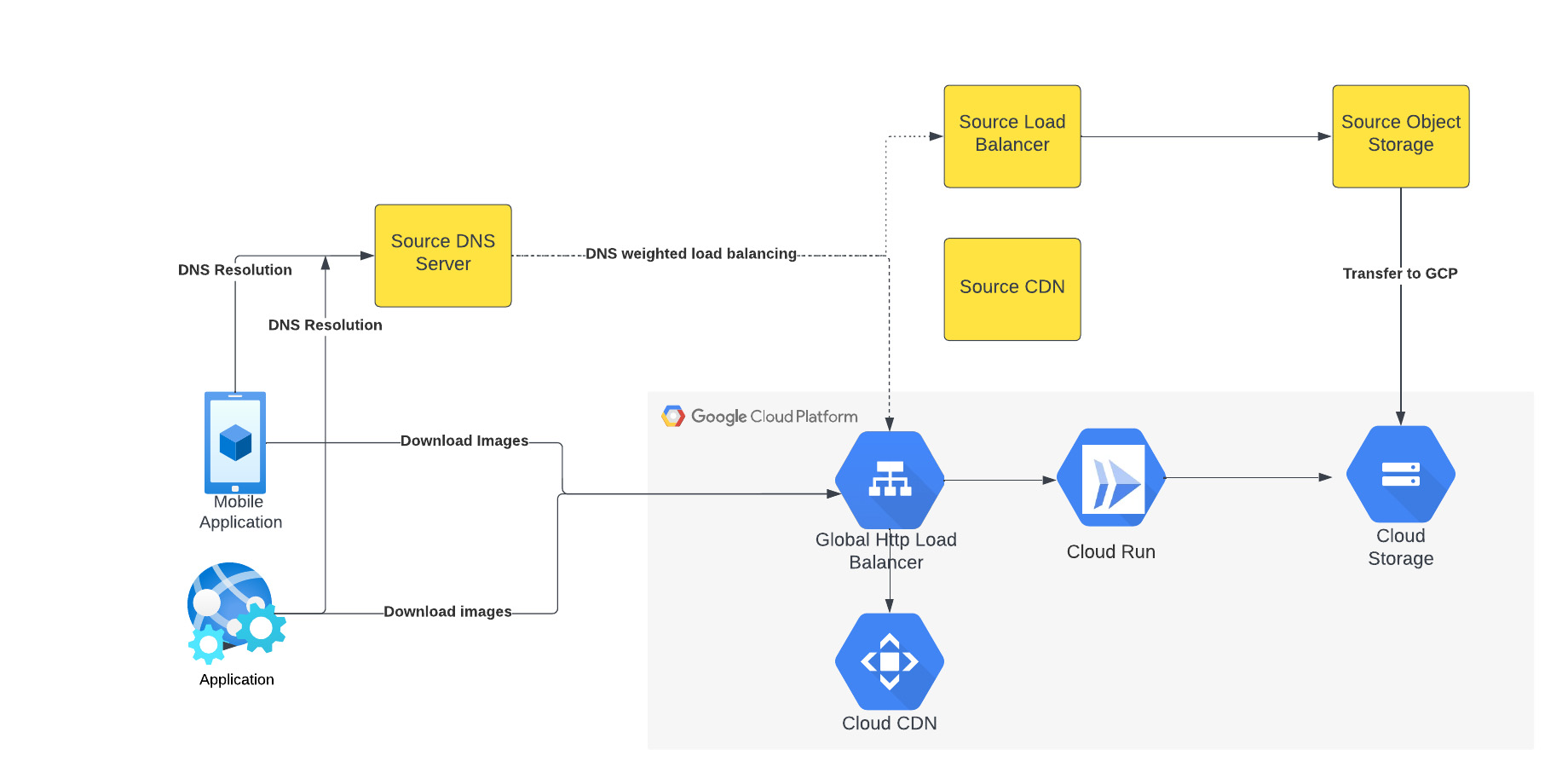
The above figure depicts the CDN migration architecture implemented in Meesho. The existing DNS server points to both the source load balancer as well as Google External HTTP Load Balancer with weighted distribution. The source load balancer points to the source object storage. Images were transferred from the source object storage to Google Cloud Storage.
The Google External HTTP Load Balancer was deployed with Cloud CDN to serve static images that are stored in the CDN cache to users. The Google Load Balancer public IP is configured as an end point on their existing DNS server. The Load Balancer is connected to Cloud Run, which talks to the Cloud Storage bucket. When a request reaches the Load Balancer in the edge, it first checks if the content is available in Cloud CDN, and returns the object from the closest edge network. If the image is not available in the Cloud CDN cache, the request is sent to Cloud Run which obtains the image from the Cloud Storage bucket and performs dynamic resizing of the image if necessary.
Data transfer
Meesho used Google Cloud’s Storage Transfer Service to transfer data from their current object storage to Cloud storage bucket over the internet. Since the number of files and total size of the data to be transferred was huge, Meesho executed multiple parallel transfers by specifying folders and subfolders as prefixes in a Storage Transfer Service job.
Dynamic image resizing
Meesho delivers static images to multiple end user platforms — mobile, laptop — at multiple resolutions. Rather than store each image at multiple image resolutions, Meesho opted to store a single high-resolution mezzanine image. It then attached Cloud Run as a serverless network endpoint group to a Cloud Load Balancer. Application requests for images specify the name of the object, the format of the image, and its resolution (for example, abc.jpeg with 750*450 resolution). If the specific image exists for the requested resolution, then it is returned from the Cloud Storage bucket to the end user and stored in the Cloud CDN cache. If an image for a specified resolution and/or format is not found, the mezzanine image (in our example, abc.jpeg) is resized to the specified resolution and format, then stored in Cloud Storage bucket and returned to the end user. The dynamic resizing and formatting is only performed the first time for a specific resolution.
In this architecture, it is important to configure Cloud Run to scale appropriately as it handles a bulk of “CDN cache-miss” requests. Meesho performed the following configuration steps:
- Configured the number of concurrent requests that a single instance of Cloud Run can handle
- Ensured a sufficient minimum of Cloud Run instances were available to serve user traffic to avoid cold-start latency
- Reviewed limits of Cloud Run maximum instance size for the region and increased the limits if necessary to handle peak load
- Set up smaller start-up times for Cloud Run containers, so that the application could quickly autoscale to handle a surge in traffic
- Optimized the memory and CPU configuration to handle processing requirements
CDN configuration
Cloud CDN was configured to ensure a high cache hit ratio > 99 %. This not only sped up the rendering of the images, but also reduced the load on Cloud Run, saving cost and improving performance.
Achieving zero downtime
Meesho followed well-established DevOps principles to achieve a zero-downtime migration:
- Metrics and alerts were configured in Cloud Monitoring to oversee the load balancer.
- The DNS server was configured to point to Cloud Load Balancer IP addresses in addition to their current load balancer, which served status assets.
- Weight-based DNS load balancing was employed to gradually shift the traffic to Google Cloud, while monitoring application performance and HTTP response codes.
- The initial migration process distributed .1% of traffic during non-peak hours. The metrics, end user performance and response codes were continuously monitored.
- Traffic was gradually incremented over a two-week period by increasing the weight of the Google Cloud Load balancer in DNS. By gradually shifting traffic, Meesho ensured a healthy cache-hit ratio, allowing Cloud Run to learn traffic patterns gradually and scale seamlessly.
Meesho learned a lot through this experience, and has the following advice for anyone undertaking a similar migration:
- While transferring data using Storage Transfer Service of Google Cloud, split the transfer process into multiple transfers.
- Ensure that applications do not pin certificates, which could create problems while migrating to the newer certificates in Google Cloud.
- Plan a gradual migration process to gradually increase the traffic to Google Cloud.
Summary
When all is said and done, Meesho considers its migration to Google Cloud a big success. After migrating the static images to Cloud CDN, Meesho held two major sales that each had three times the normal peak traffic, all with no issues. The CDN migration helped Meesho reduce its costs, improve performance and reduce load balancer errors when fetching static images. To learn more about Cloud CDN and how you can use it in your environment, check out the documentation.
Serverless for Startups, the Best Way to Succeed: Expert Says

7037
Of your peers have already read this article.
1:30 Minutes
The most insightful time you'll spend today!
As Google Cloud has become a choice for more startups, I’ve experienced an increase in founders asking how they should think about cloud services. Though each startup is different and requirements may vary across industries and regions, I’ve seen a few core best practices that help startups to succeed—as well as several traps to avoid.
For example, If you go with a public cloud provider, you’re ideally not starting from ground zero like you would running your own data center, but it’s important not to introduce similar complexity in a virtualized environment. Just because you’re using public cloud infrastructure doesn’t mean you want to manage it.
Instead, you want to leverage platforms that abstract away complexity so your team can focus on delivering value to customers. That’s where serverless comes in. Serverless platforms are fully managed by the provider, offering automatic scaling for workloads, as well as provisioning, configuring, patching, and management of servers and clusters. Freed from these resource-intensive tasks, your technical talent can focus on the things that differentiate your business, not on IT curation.
This applies to not only running stateless applications, but also managing and analyzing data. You should be collecting data points about which features are most popular on your platform, what people are buying, the types of activities that help your customers get their jobs done, and so on. This information is essential to building and executing on a product roadmap that will serve your customers. However, it’s not enough to collect this data, you need to make your data accessible, secure, and easy for your team to analyze—so where do you run and host it?
On Google Cloud, this is where options like Spanner and Cloud SQL can play a large role, as can BigQuery for analysis. You won’t have to worry about standing up infrastructure or patching servers—you can just stream your data to our data management platforms, where it’s available whenever someone needs to run a query. By leveraging a serverless architecture, your startup can be data-driven without having to invest in the traditional complexity of database administration and management—and that can significantly change your playing field.
Serverless is just one of the factors you should consider as you build out your tech stack. To hear my thoughts on a range of other topics relevant to startups — such as security, cloud credits, and the differences among managed services — check out the below video or visit our Build and Grow page.
Optimizing Bigtable Performance: Unveiling 20-50% Increase in Single-Row Read Throughput

1270
Of your peers have already read this article.
3:30 Minutes
The most insightful time you'll spend today!
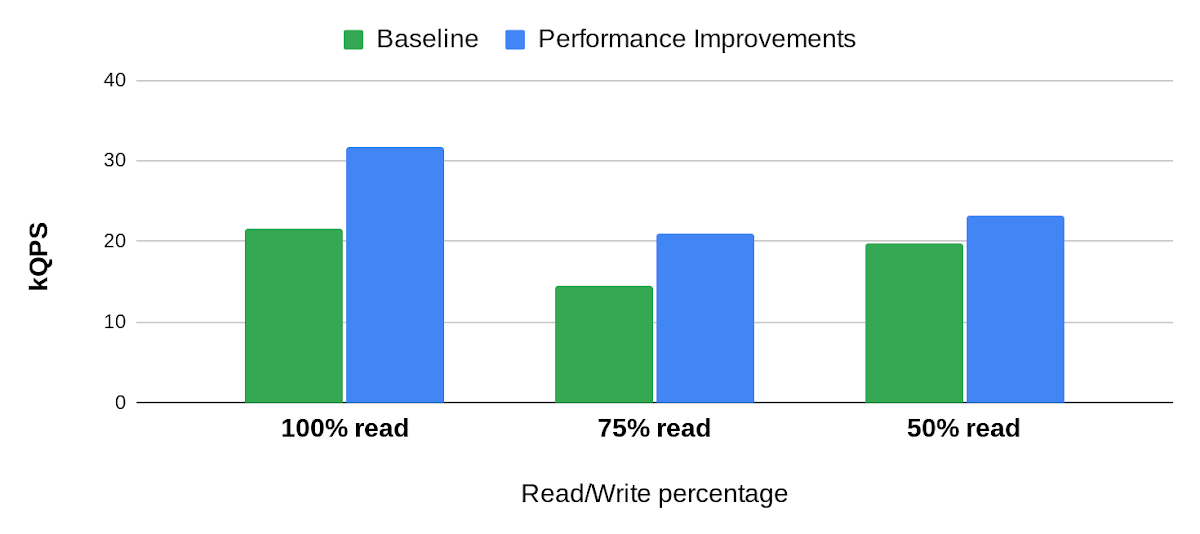
Bigtable is a scalable, distributed, high-performance NoSQL database that processes more than 6 billion requests per second at peak and has more than 10 Exabytes of data under management. Operating at this scale, Bigtable is highly optimized for high-throughput and low-latency reads and writes. Even so, our performance engineering team continually explores new areas to optimize. In this article, we share details of recent projects that helped us push Bigtable’s performance envelope forward, improving single-row read throughput by 20-50% while maintaining the same low latency.
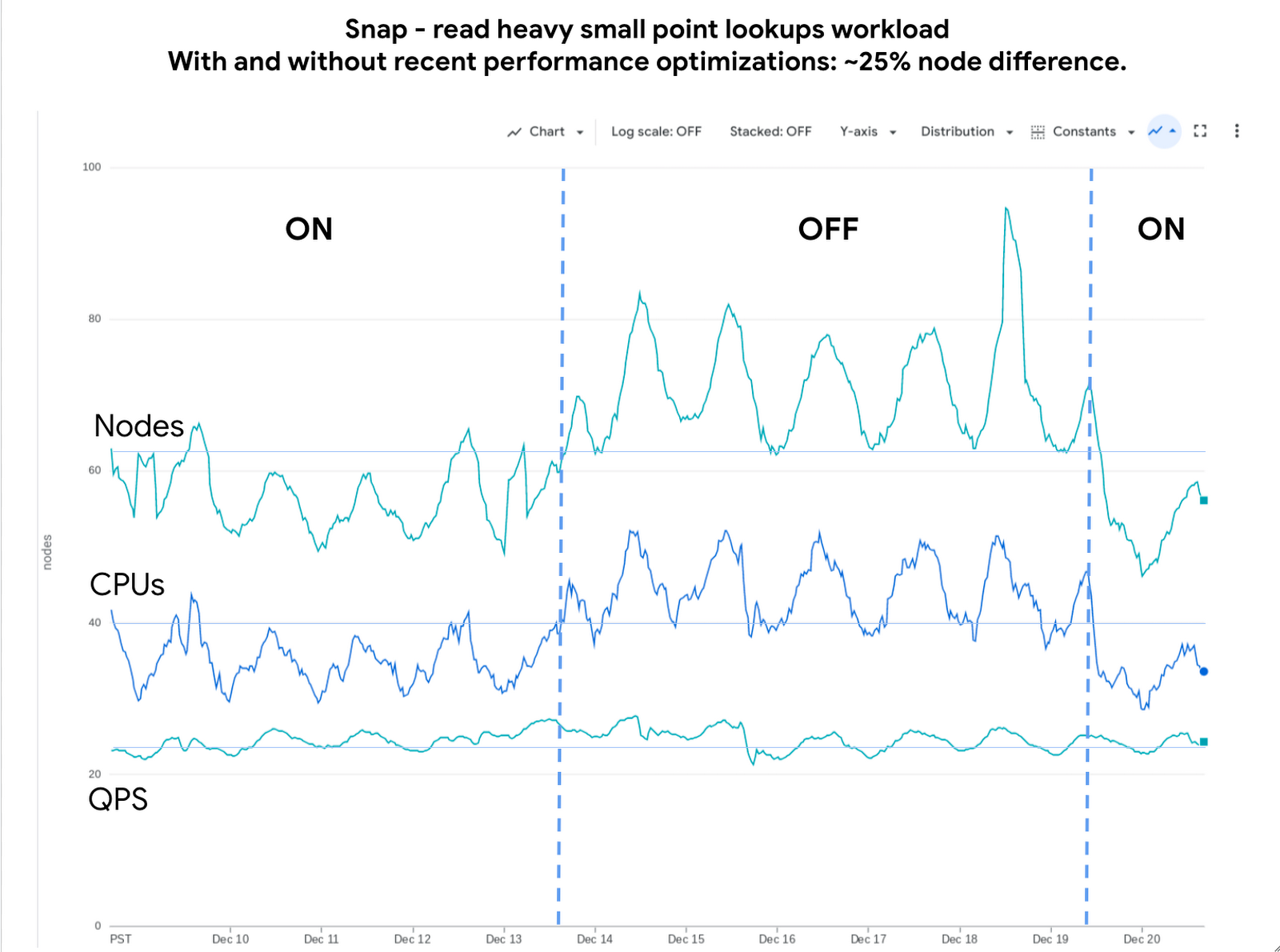
Below is an example of the impact we delivered to one of our customers, Snap. The compute cost for this small-point read-heavy workload reduced by 25% while maintaining the previous level of performance.
Performance research
We use a suite of benchmarks to continuously evaluate Bigtable’s performance. These represent a broad spectrum of workloads, access patterns and data volumes that we see across the fleet. Benchmark results give us a high-level view of performance opportunities, which we then enhance using sampling profilers and pprof for analysis. This analysis plus several iterations of prototyping confirmed feasibility of improvements in the following areas: Bloom filters, prefetching, and a new post-link-time optimization framework, Propeller.
Bloom filters
Bigtable stores its data in a log-structured merge tree. Data is organized into row ranges and each row range is represented by a set of SSTables. Each SSTable is a file that contains sorted key-value pairs. During a point-read operation, Bigtable searches across the set of SSTables to find data blocks that contain values relevant to the row-key. This is where the Bloom filter comes into play. A Bloom filter is a space-efficient probabilistic data structure that can tell whether an item is in a set, it has a small number of false positives (item may be in the set), but no false negatives (item is definitely not in the set). In Bigtable’s case, Bloom filters reduce the search area to a subset of SSTables that may contain data for a given row-key, reducing costly disk access.
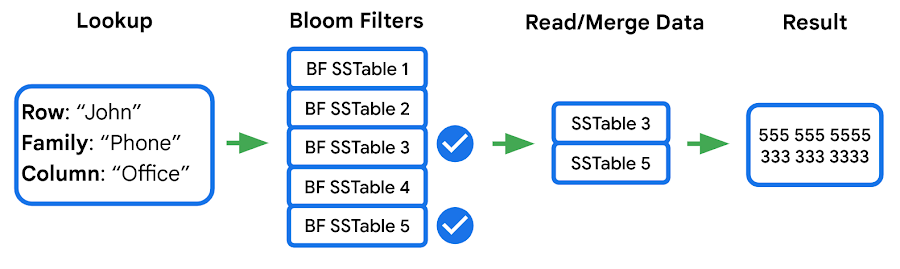
We identified two major opportunities with the existing implementation: improving utilization and reducing CPU overhead.
First, our statistics indicated that we were using Bloom filters in a lower than expected percentage of requests. This was due to our Bloom filter implementation expecting both the “column family” and the “column” in the read filter, while a high percentage of customers filter by “column family” only — which means the Bloom filter can’t be used. We increased utilization by implementing a hybrid Bloom filter that was applicable in both cases, resulting in a 4x increase in utilization. While this change made the Bloom filters larger, the overall disk footprint increased by only a fraction of a percent, as Bloom filters are typically two orders of magnitude smaller than the data they represent.
Second, the CPU cost of accessing the Bloom filters was high, so we made enhancements to Bloom filters that optimize runtime performance:
- Local cache for individual reads: When queries select multiple column families and columns in a single row, it is common that the query will use the same Bloom filter. We take advantage of this by storing a local cache of the Bloom filters used for the query being executed.
- Bloom filter index cache: Since Bloom filters are stored as data, accessing them for the first time involves fetching three blocks — two index blocks and a data block — then performing a binary search on all three. To avoid this overhead we built a custom in-memory index for just the Bloom filters. This cache tracks which Bloom filters we have in our block cache and provides direct access to them.
Overall these changes decreased the CPU cost of accessing Bloom filters by 60-70%.
Prefetching
In the previous section we noted that data for a single row may be stored in multiple SSTables. Row data from these SSTables is merged into a final result set, and because blocks can either be in memory or on disk, there’s a risk of introducing additional latency from filesystem access. Bigtable’s prefetcher was designed to read ahead of the merge logic and pull in data from disk for all SSTables in parallel.
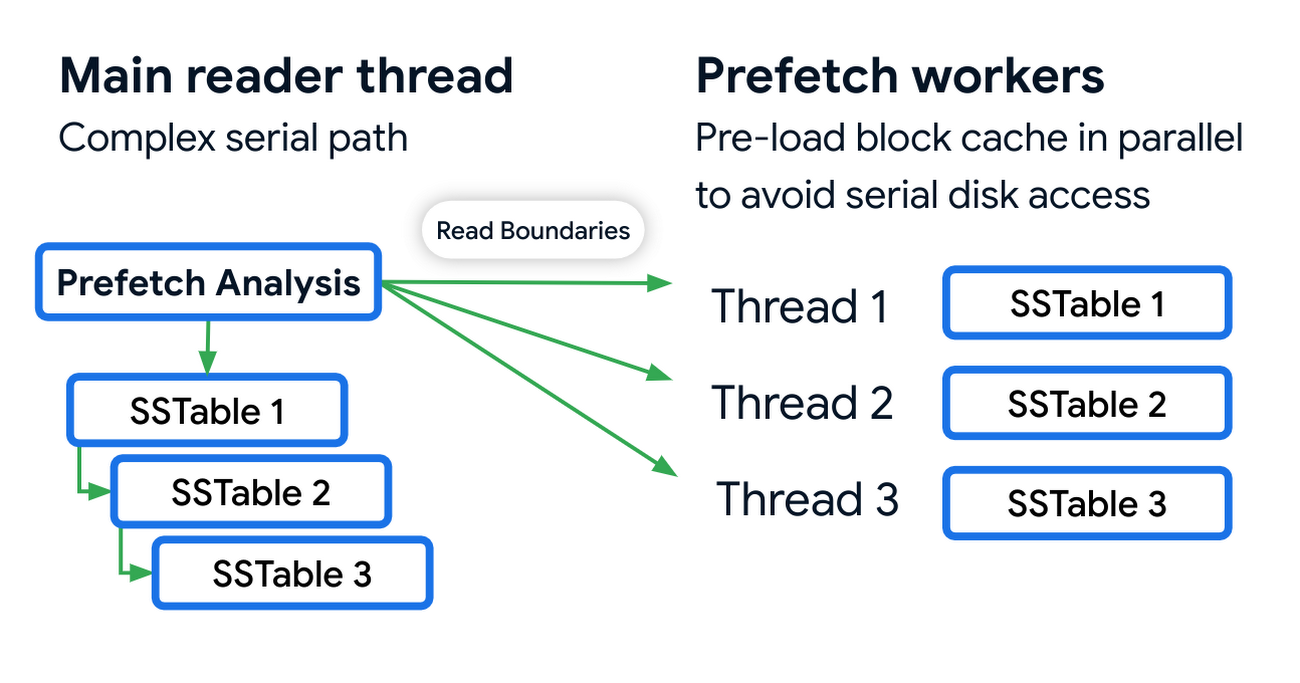
Prefetching has an associated CPU cost due to the additional threading and synchronization overhead. We reduced these costs by optimizing the prefetch threads through improved coordination with the block cache. Overall this reduced the prefetching CPU costs by almost 50%.
Post-link-time optimization
Bigtable uses profile guided optimizations (PGO) and link-time optimizations (ThinLTO). Propeller is a new post-link optimization framework released by Google that improves CPU utilization by 2-6% on top of existing optimizations.
Propeller requires additional build stages to optimize the binary. We start by building a fully optimized and annotated binary that holds additional profile mapping metadata. Then, using this annotated binary, we collected hardware profiles by running a set of training workloads that exercise critical code paths. Finally, using these profiles as input, Propeller builds a new binary with an optimized and improved code layout. Here is an example of the improved code locality.
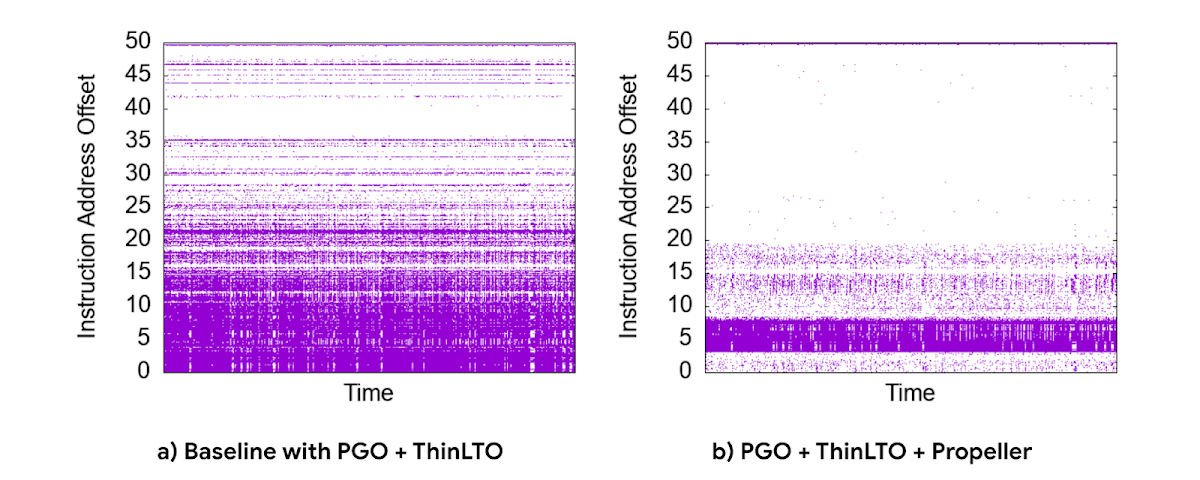
The new build process used our existing performance benchmark suite as a training workload for profile collection. The Propeller optimized binary showed promising results in our tests, showing up to 10% improvement in QPS over baseline.
However, when we released this binary to our pilot production clusters, the results were mixed. It turned out that there was overfitting for the benchmarks. We investigated sources of regression by quantifying profile overlap, inspecting hardware performance counter metrics and applied statistical analysis for noisy scenarios. To reduce overfitting, we extended our training workloads to cover a larger and more representative set of use cases.
The result was a significant improvement in CPU efficiency — reducing fleetwide utilization by 3% with an even more pronounced reduction in read-heavy workloads, where we saw up to a 10% reduction in CPU usage.
Conclusion
Overall, single-row read throughput increased by 20-50% whilst maintaining the same latency profile. We are excited about these performance gains, and continue to work on improving the performance of Bigtable. Click here to learn more about Bigtable performance and tips for testing and troubleshooting any performance issues you may encounter.
Memorystore for Redis Read Replicas to Scale App Read Requests by 6X

5512
Of your peers have already read this article.
2:00 Minutes
The most insightful time you'll spend today!
Modern applications need to process large-scale data at millisecond latency to provide experiences like instant gaming leaderboards, fast analysis of streaming data from millions of IoT sensors, or real-time threat detection of malicious websites. In-memory datastores are a critical component to deliver the scale, performance, and availability required by these modern applications.
Memorystore makes it easy for developers building applications on Google Cloud to leverage the speed and powerful capabilities of the most loved in-memory store: Redis. Memorystore for Redis standard tier instances are a popular choice for applications requiring a highly available Redis instance. Standard tier provides a failover replica across zones for redundancy and provides fast failover with a 99.9% SLA. However, in some cases, your applications will require more read throughput from a standard tier instance. One of the common patterns customers use to scale read queries in Redis is leveraging read replicas.
Introducing Memorystore for Redis Read Replicas
Today we are excited to announce the public preview of Memorystore for Redis Read Replicas, which allows you to seamlessly scale your application’s read requests by 6X with the click of a button.
With read replicas, you can easily add up to five replicas and leverage the read endpoint to automatically load balance read queries across all the available replicas, increasing read performance linearly with each replica added. Additionally, Memorystore’s support for Redis 6 introduced multi-thread I/O, increasing performance significantly for M3 and higher configurations. Combined, you can achieve read requests of more than a million requests per second.
You will benefit from this new functionality in several ways. You will be able to scale on demand with up to five read replicas and use read endpoint with any redis client to easily load balance read queries across multiple replicas. This new functionality will also improve availability with automatic distribution of replicas across multiple zones. With read replicas, you will also be able to minimize application downtime with fast failover to the replica with the least replication lag. In the future, Memorystore will also easily enable read replicas on existing standard tier instances to increase read throughput.
You can learn more about how to configure and use read replicas in the Read Replicas Overview.
Improving performance with Read Replicas and Redis 6
With the launch of read replicas, you can easily increase the read throughput of a Memorystore instance. You can further enhance the read performance by leveraging Redis version 6 along with read replicas.
To understand why combining read replicas and Redis 6 can significantly improve your application’s read performance, let’s look at the various Memorystore configurations that you can use with your applications today. Memorystore Basic and Standard offerings provide different capacity tiers. The capacity tier determines the single node performance of a basic and standard tier instance.
The table below outlines the configuration of the various capacity tiers:
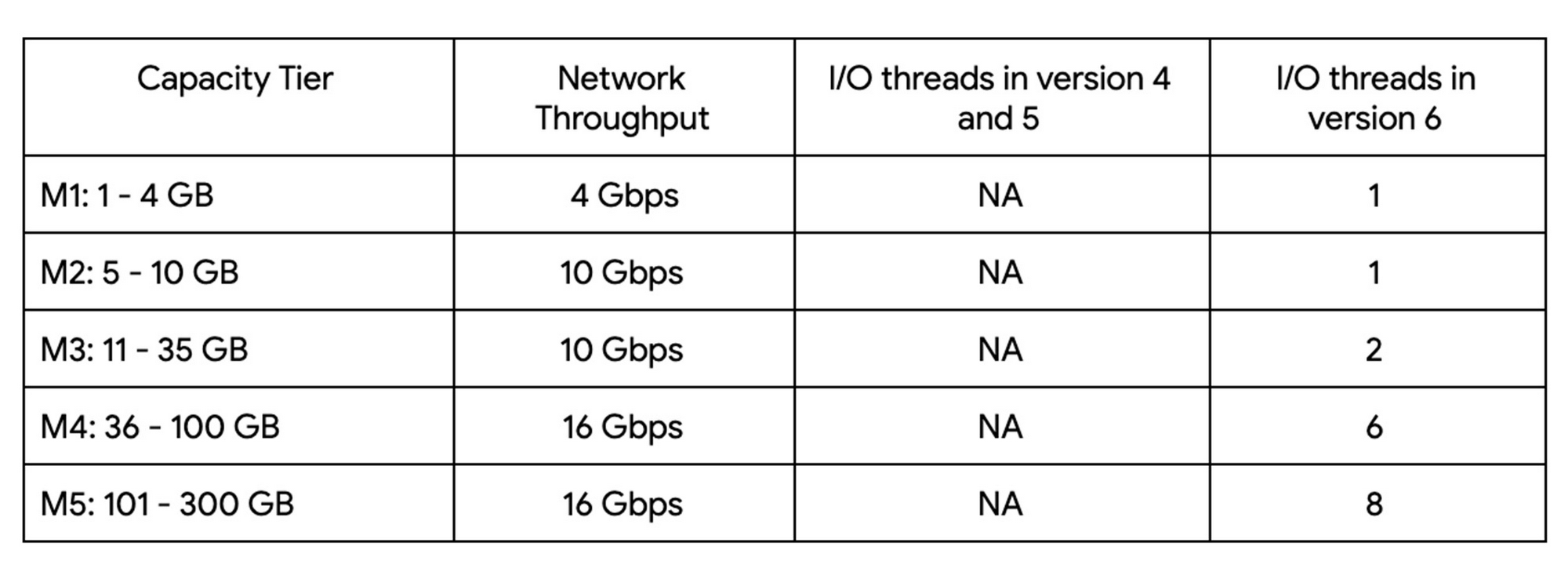
Up until version 5, Redis processed commands using a single thread. The processing involved reading the request, parsing the request, processing the request, and writing the response back to the socket. This approach means that all of the processing, which includes writing the response, was sequentially processed by a single vCPU regardless of the number of vCPUs available in the instance.
Redis 6 introduced I\O threading which allows writing the response using parallel threads. This functionality enables Redis 6 to more effectively leverage available vCPUs, thereby increasing the overall throughput compared to lower versions. Memorystore for Redis version 6 leverages I\O threading and automatically configures the optimal number of I\O threads to achieve the best possible performance for the various capacity tiers. We have also improved the overall network throughput for all redis versions by leveraging improvements in the Google Cloud infrastructure. Together these improvements deliver significant performance improvements and come at no additional cost to you.
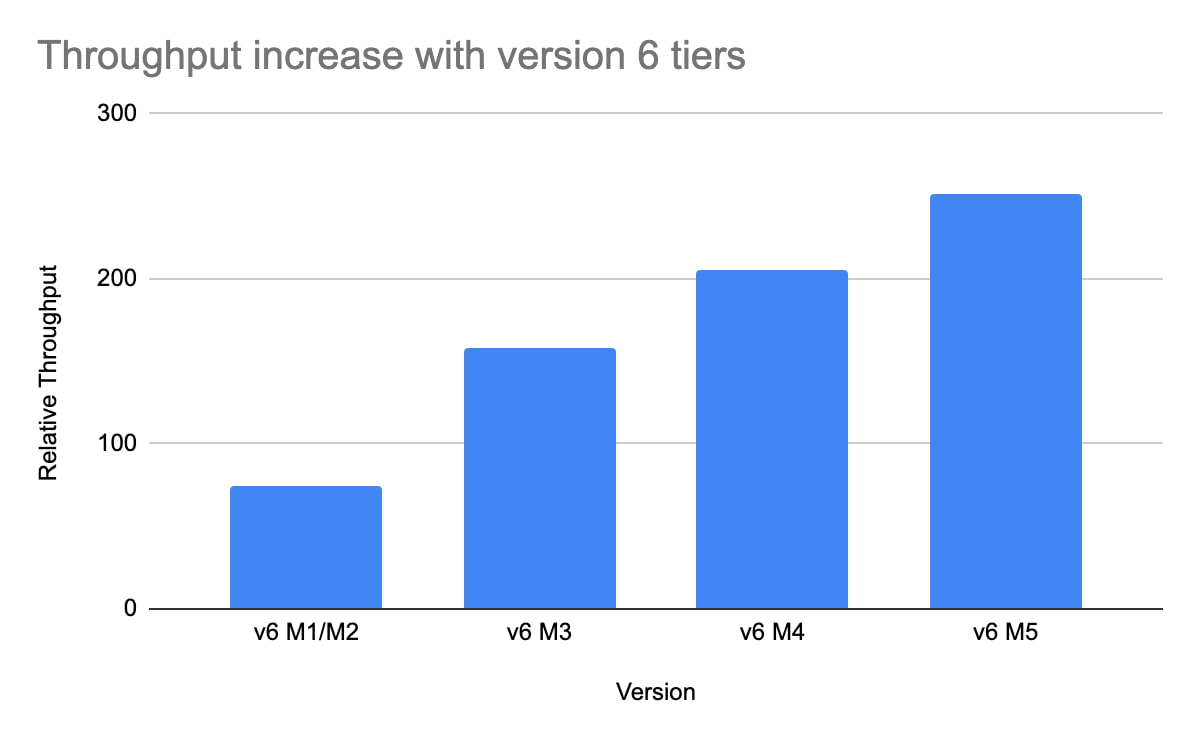
So what can you expect from using Redis 6? As outlined in the table, Redis version 5 and lower uses a single thread to process the write requests for all tiers while Redis 6 uses a larger number of I\O threads at higher capacity tiers which provides substantially incremental throughput for higher capacity tiers.
For example, using a Redis 6 standard tier instance with a capacity of 101 GB (M5), we have observed up to a 200% improvement in read/write performance compared to version 5, though the actual value you’ll see is dependent on your workload. You can get the benefits of Redis 6 by upgrading an existing instance or by deploying a new instance.
By enabling read replicas on an instance using Redis 6, you can further improve the read performance. Read throughput scales linearly with the number of replicas so you can increase your read queries on an instance by up to 500% using five read replicas. By combining Redis 6 and read replicas, you can see a 10X increase in read performance compared to a version 5 standard tier instance with no read replicas.
We are excited about the launch of read replicas but this is just one step in our journey to deliver the scale you need at the best price-performance. You can learn more about read replicas pricing on our Memorystore pricing page and get started using the Read Replicas Overview.
More Relevant Stories for Your Company

How AI-powered ML Models Helps Run Unemployment Claims Verification at Scale
With unemployment application submissions reaching record numbers over the past year, state and local agencies in the United States have faced the challenge of processing unprecedented numbers of claims per week. The digital infrastructure most agencies have in place is unable to handle this volume, resulting in constituents waiting longer,

Migrating MySQL to Spanner? Here’s What You Need to Know
Since its initial release in 1995, MySQL has not only been the de-facto database for many data storage needs, but has gathered much attention over the years as one of the most well-recognized databases around when it comes to Relational Database Management Systems and transactional data processing. Any application in

Built with BigQuery: Retailers Unlock the Value of Data with SoundCommerce
As economic conditions change, retail brands’ reliance on ever-growing customer demand puts these companies at financial and even existential risk. Top-line revenue and active customer growth do not equal profitable growth. Despite multi-billion dollar valuations for some brands, especially those operating the direct-to-consumer model, the rising costs of meeting shoppers’


Business Modernization with Oracle Workloads in Google Cloud
With today's ever-changing business dynamics, business continuity is a key focus for all of us, and enterprise databases like Oracle play a critical role. We’ll explore how running Oracle workloads in Google Cloud creates a variety of solutions, from a Bare Metal Solution to open source and cloud-native databases, to
