





Build Open Data Platform on GCP with Delta Lake, Presto and Dataproc

3409
Of your peers have already read this article.
5:00 Minutes
The most insightful time you'll spend today!
Organizations today build data lakes to process, manage and store large amounts of data that originate from different sources both on-premise and on cloud. As part of their data lake strategy, organizations want to leverage some of the leading OSS frameworks such as Apache Spark for data processing, Presto as a query engine and Open Formats for storing data such as Delta Lake for the flexibility to run anywhere and avoiding lock-ins.
Traditionally, some of the major challenges with building and deploying such an architecture were:
- Object Storage was not well suited for handling mutating data and engineering teams spent a lot of time in building workarounds for this
- Google Cloud provided the benefit of running Spark, Presto and other varieties of clusters with the Dataproc service, but one of the challenges with such deployments was the lack of a central Hive Metastore service which allowed for sharing of metadata across multiple clusters.
- Lack of integration and interoperability across different Open Source projects
To solve for these problems, Google Cloud and the Open Source community now offers:
- Native Delta Lake support in Dataproc, a managed OSS Big Data stack for building a data lake with Google Cloud Storage, an object storage that can handle mutations
- A managed Hive Metastore service called Dataproc Metastore which is natively integrated with Dataproc for common metadata management and discovery across different types of Dataproc clusters
- Spark 3.0 and Delta 0.7.0 now allows for registering Delta tables with the Hive Metastore which allows for a common metastore repository that can be accessed by different clusters.
Architecture
Here’s what a standard Open Cloud Datalake deployment on GCP might consist of:
- Apache Spark running on Dataproc with native Delta Lake Support
- Google Cloud Storage as the central data lake repository which stores data in Delta format
- Dataproc Metastore service acting as the central catalog that can be integrated with different Dataproc clusters
- Presto running on Dataproc for interactive queries
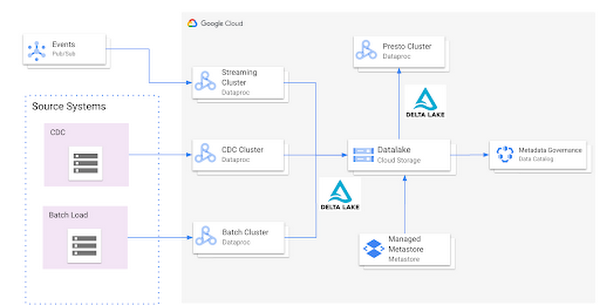
Such an integration provides several benefits:
- Managed Hive Metastore service
- Integration with Data Catalog for data governance
- Multiple ephemeral clusters with shared metadata
- Out of the box integration with open file formats and standards
Reference implementation
Below is a step by step guide for a reference implementation of setting up the infrastructure and running a sample application
Setup
The first thing we would need to do is set up 4 things:
- Google Cloud Storage bucket for storing our data
- Dataproc Metastore Service
- Delta Cluster to run a Spark Application that stores data in Delta format
- Presto Cluster which will be leveraged for interactive queries
Create a Google Cloud Storage bucket
Create a Google Cloud Storage bucket with the following command using a unique name.
gsutil mb gs://<your-bucket-name>
Create a Dataproc Metastore service
Create a Dataproc Metastore service with the name “demo-service” and with version 3.1.2. Choose a region such as us-central1. Set this and your project id as environment variables.
REGION=<your-region>PROJECT_ID=<your-project-id>gcloud metastore services create demo-service \--hive-metastore-version=3.1.2 \--location=${REGION}
Create a Dataproc cluster with Delta Lake
Create a Dataproc cluster which is connected to the Dataproc Metastore service created in the previous step and is in the same region. This cluster will be used to populate the data lake. The jars needed to use Delta Lake are available by default on Dataproc image version 1.5+
gcloud dataproc clusters create delta-cluster \--dataproc-metastore=projects/${PROJECT_ID}/locations/us-central1/services/demo-service \--region=${REGION} \--image-version=2.0.0-RC22-debian10
Create a Dataproc cluster with Presto
Create a Dataproc cluster in us-central1 region with the Presto Optional Component and connected to the Dataproc Metastore service.
gcloud dataproc clusters create presto-cluster \--dataproc-metastore=projects/${PROJECT_ID}/locations/us-central1/services/demo-service \--region=${REGION} \--image-version=2.0-debian10 \--optional-components=PRESTO \--enable-component-gateway
Spark Application
Once the clusters are created we can log into the Spark Shell by SSHing into the master node of our Dataproc cluster “delta-cluster”.. Once logged into the master node the next step is to start the Spark Shell with the delta jar files which are already available in the Dataproc cluster. The below command needs to be executed to start the Spark Shell. Then, generate some data.
spark-shell --jars /usr/lib/delta/jars/delta-core.jarimport io.delta.tables._import org.apache.spark.sql.functions._// Simulate application dataval orig_df = Seq((1L, 3.0), (2L, -1.0), (3L, 0.0)).toDF("x", "y")
# Write Initial Delta format to GCS
Write the data to GCS with the following command, replacing the project ID.
orig_df.write.mode("append").format("delta").save("gs://<your-bucket-name>/first-delta-table")
# Ensure that data is read properly from Spark
Confirm the data is written to GCS with the following command, replacing the project ID.
spark.read.format("delta").load("gs://<your-bucket-name>/first-delta-table").show()
Once the data has been written we need to generate the manifest files so that Presto can read the data once the table is created via the metastore service.
# Generate manifest files
val deltaTable = DeltaTable.forPath("gs://<your-bucket-name>/first-delta-table")deltaTable.generate("symlink_format_manifest")
With Spark 3.0 and Delta 0.7.0 we now have the ability to create a Delta table in Hive metastore. To create the table below command can be used. More details can be found here
# Create Table in Hive metastore
spark.sql("CREATE TABLE my_first_table (x bigint,y double) ROW FORMAT SERDE 'org.apache.hadoop.hive.ql.io.parquet.serde.ParquetHiveSerDe' STORED AS INPUTFORMAT 'org.apache.hadoop.hive.ql.io.SymlinkTextInputFormat' OUTPUTFORMAT 'org.apache.hadoop.hive.ql.io.HiveIgnoreKeyTextOutputFormat' LOCATION 'gs://<your-bucket-name>/first-delta-table/_symlink_format_manifest'")
Once the table is created in Spark, log into the Presto cluster in a new window and verify the data. The steps to log into the Presto cluster and start the Presto shell can be found here.
#Verify Data in Presto
presto:default> select * from hive.default.my_first_table;x | y----+------2 | -1.03 | 0.01 | 3.0
Once we verify that the data can be read via Presto the next step is to look at schema evolution. To test this feature out we create a new dataframe with an extra column called “z” as shown below:
# Schema Evolution in Spark
Switch back to your Delta cluster’s Spark shell and enable the automatic schema evolution flag
spark.sql("SET spark.databricks.delta.schema.autoMerge.enabled = true")
Once this flag has been enabled create a new dataframe that has a new set of rows to be inserted along with a new column
val merge_df = Seq((10L, 30.0, "a"), (20L, -10.0, "b"), (30L, 100.0, "c")).toDF("x", "y", "z")
Once the dataframe has been created we leverage the Delta Merge function to UPDATE existing data and INSERT new data
# Use Delta Merge Statement to handle automatic schema evolution and add new rows
deltaTable.alias("o").merge(merge_df.as("n"),"o.x = n.x").whenMatched.updateAll().whenNotMatched.insertAll().execute()
As a next step we would need to do two things for the data to reflect in Presto:
- Generate updated schema manifest files so that Presto is aware of the updated data
- Modify the table schema so that Presto is aware of the new column.
When the data in a Delta table is updated you must regenerate the manifests using either of the following approaches:
- Update explicitly: After all the data updates, you can run the generate operation to update the manifests.
- Update automatically: You can configure a Delta table so that all write operations on the table automatically update the manifests. To enable this automatic mode, you can set the corresponding table property using the following SQL command.
ALTER TABLE delta.<path-to-delta-table> SET TBLPROPERTIES(delta.compatibility.symlinkFormatManifest.enabled=true)
However, in this particular case we will use the explicit method to generate the manifest files again
deltaTable.generate("symlink_format_manifest")
Once the manifest file has been re-created the next step is to update the schema in Hive metastore for Presto to be aware of the new column. This can be done in multiple ways, one of the ways to do this is shown below:
# Promote Schema Changes via Delta to Presto
val schema_evolution = "ALTER TABLE my_first_table ADD COLUMN ( " + merge_df.schema.toDDL.replace(orig_df.schema.toDDL,"").substring(1) + ")"spark.sql(s"$schema_evolution")
Once these changes are done we can now verify the new data and new column in Presto as shown below:
# Verify changes in Presto
presto:default> select * hive.default.from my_first_table;x | y | z----+-------+------20 | -10.0 | b2 | -1.0 | NULL3 | 0.0 | NULL30 | 100.0 | c10 | 30.0 | a1 | 3.0 | NULL
In summary, this article demonstrated:
- Set up the Hive metastore service using Dataproc Metastore, spin up Spark with Delta lake and Presto clusters using Dataproc
- Integrate the Hive metastore service with the different Dataproc clusters
- Build an end to end application that can run on an OSS Datalake platform powered by different GCP services
Next steps
If you are interested in building an Open Data Platform on GCP please look at the Dataproc Metastore service for which the details are available here and for details around the Dataproc service please refer to the documentation available here. In addition, refer to this blog which explains in detail the different open storage formats such as Delta & Iceberg that are natively supported within the Dataproc service.

Google Leads the Database-as-a-Service Market: Forrester Research
DOWNLOAD RESEARCH REPORTS5488
Of your peers have already downloaded this article
3:00 Minutes
The most insightful time you'll spend today!
Database-as-a-service (DBaaS) has become critical for all businesses to build and support modern business applications and operational systems. It is changing the way companies build and support business applications and operational systems. With DBaaS, organizations can provision a relational or non-relational database of any size in minutes, without needing any technical expertise.
For app developers, it offers a database platform to build simple to sophisticated applications quickly, allowing them to focus on application logic rather than deal with database administration challenges. DBaaS automates the provisioning, administration, backup, recovery, availability, security, and scalability of the database without the need for a database administrator (DBA).
In addition, DBaaS helps enterprises migrate from their on-premises databases to the cloud to save money, support elastic scale, and deliver higher performance for expanding workloads.
Analyst firm Forrester Research in its recent report on the Database-as-a-Service market has named Google Cloud a leader in this space as it supports a broader set of use cases, automation, high-end scalability and performance, and security.
Download this Forrester Research report to understand why enterprises are turning to DBaaS and why Google Cloud is a leader in this space.
Google Cloud Helped Digitec Galaxus Personalize Over 2 Million Newsletters in a Week

8313
Of your peers have already read this article.
3:00 Minutes
The most insightful time you'll spend today!
Digitec Galaxus AG is the biggest online retailer in Switzerland, operating two online stores: Digitec, Switzerland’s online market leader for consumer electronics and media products, and Galaxus, the largest Swiss online shop with a steadily growing range of consistently low-priced products for almost all daily needs.
Known for its efficient, personalized shopping experiences, it’s clear that Digitec Galaxus understands what it takes to deliver a platform that is interesting and relevant to customers every time they shop.
The problem: Personalizing decisions for every situation
Digitec Galaxus already had established an engine to help them personalize experiences for shoppers when they reached out to Google Cloud. They had multiple recommendation systems in place and were also extensive early adopters of Recommendations AI, which already enabled them to offer personalized content in places like their homepages, product detail pages, and their newsletter.
But those same systems sometimes made it difficult to understand how best to combine and optimize to create the most personalized experiences for their shoppers. Their requirements were threefold:
- Personalization: They have over 12 recommenders they can display on the app, however they would like to contextualize this and choose different recommenders (which in turn select the items) for different users. Furthermore they would like to exploit existing trends as well as experiment with new ones.
- Latency: They would like to ensure that the solution is architected so that the ranked list of recommenders can be retrieved with sub 50 ms latency.
- End-to-end easy to maintain & generalizable/modular architecture: Digitec wanted the solution to be architected using an easy to maintain, open source stack, complete with all MLops capabilities required to train and use contextual bandits models. It was also important to them that it is built in a modular fashion such that it can be adapted easily to other use cases which have in mind such as recommendations on the homepage, Smartags and more .
To improve, they asked us to help them implement a machine learning (ML) contextual bandit based recommender system on Google Cloud taking all the above factors into consideration to take their personalization to the next level.
Contextual bandits algorithms are a simplified form of reinforcement learning and help aid real-world decision making by factoring in additional information about the visitor (context) to help learn what is most engaging for each individual. They also excel at exploiting trends which work well, as well as exploring new untested trends which can yield potentially even better results. For instance, imagine that you are personalizing a homepage image where you could show a comfy living room couch or pet supplies.
Without a contextual bandit algorithm, one of these images would be shown to someone at random without considering information you may have observed about them during previous visits. Contextual bandits enable businesses to consider outside context, such as previously visited pages or other purchases, and then observe the final outcome (a click on the image) to help determine what works best.
Creating a personalization system with contextual bandits
While Digitec Galaxus heavily personalizes their website homepages, they are very very sensitive and also require more cross-team collaboration to update and make changes.
Together with the Digitec Galaxus team, we decided to narrow the scope and focus on building a contextual bandit personalization system for the newsletter first. The digitec Galaxus team has complete control over newsletter decisions and testing various ML experiments on a newsletter would have less chance of adverse revenue impact than a website homepage.
The main goal was to architect a system that could be easily ported over to the homepage and other services offered by Digitec with minimal adaptations. It would also need to satisfy the functional and non-functional requirements of the homepage as well as other internal use cases.
Below is a diagram of how the newsletter’s personalization recommendation system works:

- The system is given some context features about the newsletter subscriber such as their purchase history and demographics. Features are sometimes referred to as variables or attributes, and can vary widely depending on what data is being analyzed.
- The contextual bandit model trains recommendations using those context features and 12 available recommenders (potential actions).
- The model then calculates which action is most likely to enhance the chance of reward (a user clicking in the newsletter) and also minimize the problem (an unsubscribe).
Calculating whether a click was a newsletter or an unsubscribe enabled the system to optimize for increasing clicks and avoid showing non-relevant content to the user (click-bait). This enabled Digitec Galaxus to exploit popular trends while also exploring potentially better-performing trends.
How Google Cloud helps
The newsletter context-driven personalization system was built on Google Cloud architecture using the ML recommendation training and prediction solutions available within our ecosystem.
Below is a diagram of the high-level architecture used:
The architecture covers three phases of generating context-driven ML predictions, including:
ML Development: Designing and building the ML models and pipeline
Vertex Notebooks are used as data science environments for experimentation and prototyping. Notebooks are also used to implement model training, scoring components, and pipelines. The source code is version controlled in Github. A continuous integration (CI) pipeline is set up to automatically run unit tests, build pipeline components, and store the container images to Cloud Container Registry.
ML Training: Large-scale training and storing of ML models
The training pipeline is executed on Vertex Pipelines. In essence, the pipeline trains the model using new training data extracted from BigQuery and produces a trained, validated contextual bandit model stored in the model registry. In our system, the model registry is a curated Cloud Storage.
The training pipeline uses Dataflow for large scale data extraction, validation, processing, and model evaluation, and Vertex Training for large-scale distributed training of the model. AI Platform Pipelines also stores artifacts, the output of training models, produced by the various pipeline steps to Cloud Storage. Information about these artifacts are then stored in an ML metadata database in Cloud SQL. To learn more about how to build a Continuous Training Pipeline, read the documentation guide.
ML Serving: Deploying new algorithms and experiments in production
The training pipeline uses batch prediction to generate many predictions at once using AI Platform Pipelines, allowing Digitec Galaxus to score large data sets. Once the predictions are produced, they are stored in Cloud Datastore for consumption. The pipeline uses the most recent contextual bandit model in the model registry to evaluate the inference dataset in BigQuery and give a ranked list of the best newsletters for each user, and persist it in Datastore. A Cloud Function is provided as a REST/HTTP endpoint to retrieve the precomputed predictions from Datastore.
All components of the code and architecture are modular and easy to use, which means they can be adapted and tweaked to several other use cases within the company as well.
Better newsletter predictions for millions
The newsletter prediction system was first deployed in production in February, and Digitec Galaxus has been using it to personalize over 2 million newsletters a week for subscribers. The results have been impressive, 50% higher than our baseline. However, the collaboration is still ongoing to improve the results even more.
“Working at this level in direct exchange with Google’s machine learning experts is a unique opportunity for us. The use of contextual bandits in the targeting of our recommendations enables us to pursue completely new approaches in personalization by also personalizing the delivery of the respective recommender to the user. We have already achieved good results in our newsletter in initial experiments and are now working on extending the approach to the entire newsletter by including more contextual data about the bandits arms. Furthermore, as a next step, we intend to apply the system to our online store as well, in order to provide our users with an even more personalized experience. To build this scalable solution, we are using Google’s open source tools such as TFX and TF Agents, as well as Google Cloud Services such as Compute Engine, Cloud Machine Learning Engine, Kubernetes Engine and Cloud Dataflow.”—Christian Sager, Product Owner, Personalization ( Digitec Galaxus)
Since the existing architecture and system is also dynamic, it will automatically adapt to new behaviours, trends, and users. As a result, Digitec Galaxus plans to re-use the same components and extend the existing system to help them improve the personalization of their homepage and other current use cases they have within the company. Beyond clicks and user engagement, the system’s flexibility also allows for future optimization of other criteria. It’s a very exciting time and we can’t wait to see what they build next!
How We Built a Brand New Bank on Google Cloud and Cloud Spanner: The First Scalable, Enterprise-grade, Database Service

6563
Of your peers have already read this article.
6:30 Minutes
The most insightful time you'll spend today!
Editor’s note: Technology today lets companies of any size take on entire industries simply with an innovative business model plus digital distribution. Take Shine, a French startup whose platform helps freelancers manage their finances — and their administrative commitments. Here, Raphael Simon, Shine’s CTO and co-founder, talks about why Shine built a new bank on Google Cloud Platform, and in particular Cloud Spanner.
More and more people are deciding to take the plunge and start a freelance career. Some of them by choice, others out of necessity. One of their biggest pain points is dealing with administrative tasks.
In some countries, especially in Europe, the administrative burden of being a freelancer is similar to what a company of 10 or more people deals with. A freelancer doesn’t necessarily have the time or skills to manage all this paperwork. So we are building a new bank for freelancers from the ground up that helps automate administrative tasks associated with their business.
Shine’s banking services and financial tools make it as easy to work as a freelancer as it is to work for a larger company. We deal with administrative tasks on behalf of the freelancer so that he or she can focus on their job: finding and wowing clients.

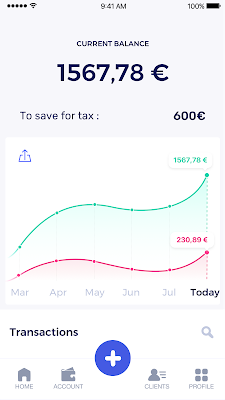
Building our infrastructure
As a new bank, we had the opportunity to build our infrastructure from the ground up. Designing an infrastructure and choosing a database presents tough decisions, especially in the financial services world. Financial institutions come under tremendous scrutiny to demonstrate stability and security. Even a tiny leak of banking data can have tremendous consequences both for the bank and its clients, and any service interruption can trigger a banking license to be suspended or a transaction to be declined.
At the same time, it’s vital for us to optimize our resources so we can maximize the time we spend developing user-facing features. In our first six months, we iterated and validated a prototype app using Firebase, and secured our seed funding round (one of the largest in Europe in 2017).
Based on our positive experience with Firebase, plus the ease-of-use and attractive pricing that Google Cloud offered, we decided to build our platform on Google Cloud Platform (GCP).
We were drawn to GCP because it has a simple, consistent interface that is easy to learn. We chose App Engine flexible environment with Google Cloud Endpoints for an auto-scaling microservices API. These helped us reduce the time, effort, and cost in terms of DevOps engineers, so we could invest more in developing features, while maintaining our agility.
We use Cloud Identity and Access Management (Cloud IAM) to help control developer access to critical parts of the application such as customer bank account data. It was quite a relief to lean on a reliable partner like Google Cloud for this.
Database decisions
Next came time to choose a database. Shine lives at the financial heart of our customers’ businesses and provides guidance on things like accounting and tax declaration. The app calculates the VAT for each invoice and forecasts the charges they must pay each quarter.
Due to the sensitivity of our customers’ data, the stakes are high. We pay careful attention to data integrity and availability and only a relational database with support for ACID transactions (Atomicity, Consistency, Isolation, Durability) can meet this requirement.
At the same time, we wanted to focus on the app and user experience, not on database administration or scalability issues. We’re trying to build the best possible product for our users, and administering a database has no direct value for our customers. In other words, we wanted a managed service.
Cloud Spanner combines a globally distributed relational database service with ACID transactions, industry-standard SQL semantics, horizontal scaling, and high availability. Cloud Spanner provided additional security, high-availability, and disaster recovery features out-of-the-box that would have taken months for us to implement on our own. Oh, and no need to worry about performance — Cloud Spanner is fast. Indeed, Cloud Spanner has been a real asset to the project, from the ease-of-use of creating an instance to scaling the database.
Cloud Spanner pro tips
We began working with Cloud Spanner and have learned a lot along the way. Here are some technical notes about our deployment and some best practices that may be useful to you down the road:
- Cloud Spanner allows us to change a schema in production without downtime. We always use a NOT NULL constraint, because we generally think that using NULL leads to more errors in application code. We always use a default value when we create an entity through our APIs and we use Cloud Dataflow to set values when we change a schema (e.g., adding a field to an entity).
- With microservices, it’s generally a good practice to make sure every service has its own database to ensure data isolation between the different services. However, we adopted a slightly different strategy to optimize our use of Cloud Spanner. We have an instance on which there are three databases — one for production, one for staging and one for testing our continuous integration (CI) pipeline. Each service has one or more interleaved tables that are isolated from others services’ tables (we do not use foreign-keys between tables from different services). This way our microservices data are not tightly “coupled”.
- We created an internal query service that performs read-only queries to Cloud Spanner to generate a dashboard or do complex queries for analytics. It is the only service where we allow joins between tables across services.
- We take advantage of Cloud Spanner’s scalability, and thus don’t delete any data that could one day be useful and/or profitable.
- We store all of our business logs on Cloud Spanner, for example connection attempts to the application. We append the ‘-Logs’ suffix to them.
- When possible, we always create an interleave.
In short, implementing Cloud Spanner has been a good choice for Shine:
- It’s saved us weeks, if not months, of coding.
- We feel we can rely on it since it’s been battle-tested by Google.
- We can focus on building a disruptive financial services product for freelancers and SMBs.
And because Cloud Spanner is fully managed and horizontally scalable, we don’t have to worry about hardware, security patches, scaling, database sharding, or the possibility of a long and risky database migration in the future. We are confident Cloud Spanner will grow with our business, particularly as we expand regionally and globally. I strongly recommend Cloud Spanner to any company looking for a complete database solution for business-critical, sensitive, and scalable data.
MerPay Platform Scales its Reach to Millions of Users using Cloud Spanner

5290
Of your peers have already read this article.
2:00 Minutes
The most insightful time you'll spend today!
Editor’s note: To launch a new mobile payment platform, Mercari needed a database solution strong on scalability, availability, and performance. Here’s how Cloud Spanner delivered those results.
E-commerce companies need to connect customers to their services securely, reliably, with zero downtime. When Mercari, Inc. launched a new mobile payment platform, we chose Cloud Spanner as part of our data portfolio, which provided us with easy scalability to handle millions of new users, a fully managed service that minimized overhead costs, and deep integration with other Google Cloud services.
Mercari, Inc., Japan’s largest C2C marketplace, launched its app in 2013, which allows 18.2million monthly users to easily and securely buy new and used items. Mercari expanded into the United States and in 2014 and launched Merpay, a mobile payment service that can be used through Mercari in Japan in 2017. With more than 85 million users, Merpay is now accepted at 1.8 million merchants and e-commerce sites in Japan, supporting payments via the DOCOMO ID contactless system and QR code.
Prioritizing availability and scalability
When we started building Merpay, we were looking for a new database. In the past, Mercari had used MySQL with bare metal hardware. Because of the amount of data, we required additional expertise to manage and maintain the hardware, software and MySQL implementation. Having built much of the microservices architecture for our Mercari app using Google Kubernetes Engine (GKE), it was natural to look at Google Cloud’s managed services when deciding upon our new database infrastructure for Merpay.
For the database, we were focusing especially on requirements around availability, scalability, and performance. To do a single payment transaction, there were multiple steps each with writes, requiring high-write-throughput and low-latency from the database. Needing a solution that would support reliable payment processing 24/7/365, we chose Spanner, which offers up to 99.999% availability with zero downtime for planned maintenance and schema changes.
We worked closely with Google Cloud’s Premium Support, Technical Account Management (TAM), and Strategic Cloud Engineer and Cloud Consultant teams to implement Spanner, including separating the payment processing— originally one of the functions in Mercari—as a microservice.
A nod to easier nodes and better scale
After launch, the number of Merpay users reached 2 million in only a few months. We had 45 Spanner nodes at the time of launch of Merpay and about 50 nodes four months later. Because we’d optimized the application side during those four months, we didn’t have to add many nodes to keep up with the growing traffic.
Whenever we needed to scale up the serving and storage resources in our instances, Spanner made it easy to increase nodes as needed in the Cloud Console. To optimize costs, it’s easy to add nodes during a marketing campaign and remove them afterward. Even if the traffic count is different from expected, we can change the number of nodes immediately. That’s one incredible convenience of Cloud Spanner.
Building powerful pipelines
Our data pipelines are used for KPI analytics, fraud detection, credit scoring, and customer support use cases. Because Cloud Spanner integrates so easily with other Google Cloud data services, the data in Spanner is easily accessible for analytics. From the Spanner database for each microservice, we create both batch and streaming data pipelines using Pub/Sub and Dataflow, as well as Apache Flink, and load the data into BigQuery and Google Cloud Storage. We’re able to quickly aggregate the data required for data platforms such as BigQuery and Cloud Storage. The original data is stored in Spanner and managed by microservices, but analysis through BigQuery is centrally managed by the Data Platform team. This team determines the confidentiality level of data and centrally manages BigQuery permissions using Terraform. By centrally managing data access permissions on the data platform rather than on individual microservices, we’re able to set appropriate security for individual users.
Our full data portfolio also includes Looker, which we use for product analysis, accounting analysis, test performance visualization, operation monitoring, development efficiency analysis, and HR analysis. We also use Dataproc, Cloud Composer, Data Catalog, and Data Studio. The Dataflow template created for the pipeline is also published as OSS.
With Spanner and other Google Cloud services, our Merpay platform is flexible, secure, scalable and highly available. As Spanner eliminates overhead, we can devote engineering resources to developing new tools and solutions for our customers. We’re looking ahead at providing cryptocurrency service, for example, and are now working on a project to migrate Mercari’s monolithic system that is still on premises entirely over to Google Cloud.
Read more about Mercari and Merpay. Or check out our recent blog: three reasons to consider Cloud Spanner for your next project.
GCP Launches Datastream, A Serverless Change Data Capture and Replication Service

5610
Of your peers have already read this article.
1:30 Minutes
The most insightful time you'll spend today!
Today, we’re announcing Datastream, a serverless change data capture (CDC) and replication service, available now in preview. Datastream allows enterprises to synchronize data across heterogeneous databases, storage systems, and applications reliably and with minimal latency to support real-time analytics, database replication, and event-driven architectures. You can now easily and seamlessly deliver change streams from Oracle and MySQL databases into Google Cloud services such as BigQuery, Cloud SQL, Google Cloud Storage, and Cloud Spanner, saving time and resources and ensuring your data is accurate and up-to-date.
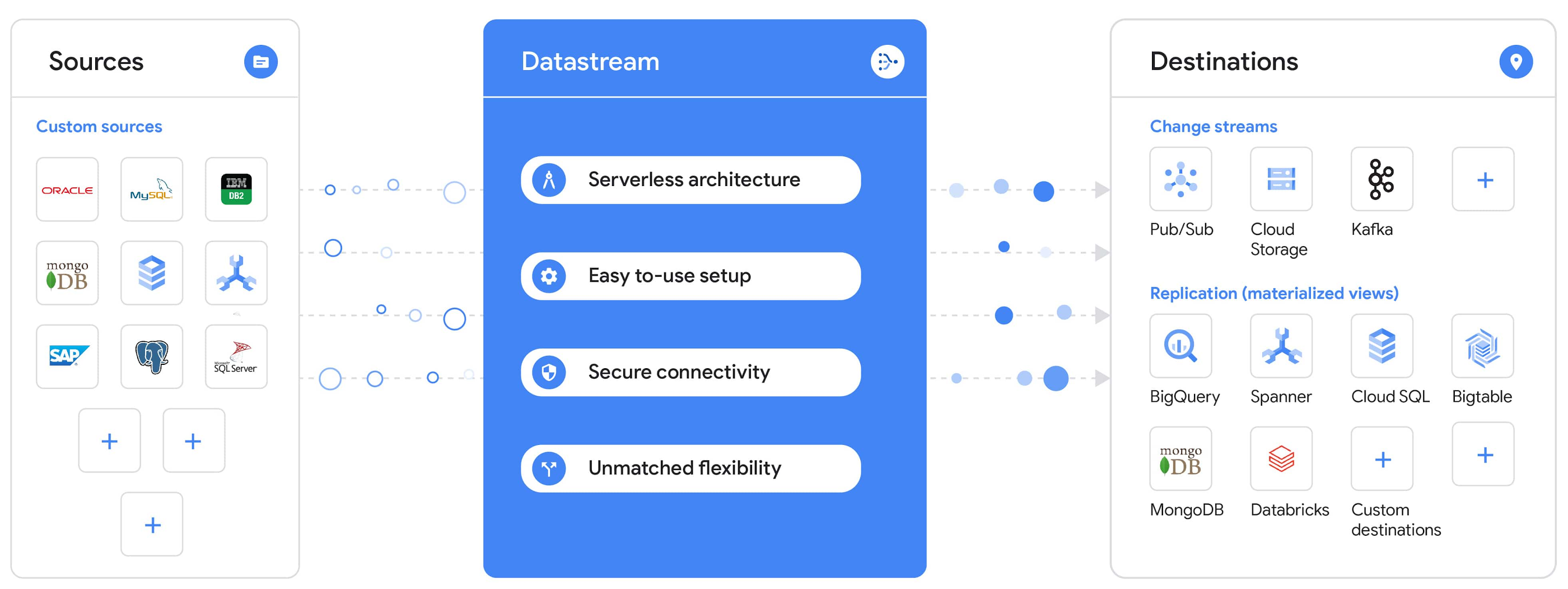
“Global companies are demanding change data capture to provide replication capabilities across disparate data sources, and provide a real-time source of streaming data for real-time analytics and business operations,” says Stewart Bond, Director, Data Integration and Intelligence Software Research at IDC.
However, companies are finding it difficult to realize these capabilities because commonly used data replication offerings are costly, cumbersome to set up, and require significant management and monitoring overhead to run flexibly or at scale. This leaves customers with a difficult-to-maintain and fragmented architecture.
Datastream’s differentiated approach
Datastream is taking on these challenges with a differentiated approach. Its serverless architecture seamlessly and transparently scales up or down as data volumes shift in real time, freeing teams to focus on delivering up-to-date insights instead of managing infrastructure. It also provides the streamlined customer experience, ease of use, and security that our customers have come to expect from Google Cloud, with private connectivity options built into the guided setup experience.
Datastream integrates with purpose-built and extensible Dataflow templates to pull the change streams written to Cloud Storage, and create up-to-date replicated tables in BigQuery for analytics. It also leverages Dataflow templates to replicate and synchronize databases into Cloud SQL or Cloud Spanner for database migrations and hybrid cloud configurations.
Datastream also powers a Google-native Oracle connector in Cloud Data Fusion’s new replication feature for easy ETL/ELT pipelining. And by delivering change streams directly into Cloud Storage, customers can leverage Datastream to implement modern, event-driven architectures.
Customers tell us about the benefits they’ve found using Datastream. That includes Schnuck Markets, Inc., “Leveraging Datastream, we’ve been able to replicate data from our on-premises databases to BigQuery reliably and with little impact to our production workloads. This new method replaced our batch processing and allowed for insights to be leveraged from BigQuery quicker,” says Caleb Carr, principal technologist from Schnuck Markets. “Furthermore, implementing Datastream removed the need for our analytics group to reference on-premises databases to do their work and support our business users.”
Cogeco Communications, Inc. used Datastream to also realize the value of low-latency data access. “Datastream unlocked new customer interaction opportunities not previously possible by enabling low-latency access in BigQuery to our operational Oracle data.” says Jean-Lou Dupont, Senior Director, Enterprise Architecture, Cogeco Communications, Inc. “This streamlined integration process brings data from hundreds of disparate Oracle tables into a unified data hub. Datastream enabled us to achieve this with 10X time and effort efficiency.”
In addition, Major League Baseball (MLB) used Datastream’s replication capabilities to migrate their data from Oracle to Cloud SQL for PostgreSQL. “As we’re modernizing our applications, replicating the database data reliably out of Oracle and into Cloud SQL for PostgreSQL is a critical component of that process,” says Shawn O’Rourke, manager of technology at MLB. “Using Datastream’s CDC capabilities, we were able to replicate our database securely and with low latency, resulting in minimal downtime to our application. We can now standardize on this process and repeat it for our next databases, regardless of scale.”
Our partner HCL has worked with many organizations looking to get more out of their data and plan for the future. “HCL customers across every industry are looking for ways to extract more value out of their vast amounts of data,” says Siva G. Subramanian, Global Head for Data & Analytics at HCL Google Business Unit. “CDC plays a big part in the solutions we offer to our customers using Google Cloud. Datastream enables us to deliver a secure and reliable solution to our customers that’s easy to set up and maintain. CDC is a key and integrated part of Google Cloud Data Solutions.”
“Google Cloud’s new CDC offering, Datastream, is a differentiator for Google among hyperscale cloud service providers, by supporting replication of data from Oracle and MySQL databases into the Google Cloud environment using a serverless cloud-native architecture, which removes the burden of infrastructure management for organizations, and provides elastic scalability to handle real-time workloads,” says Stewart Bond, Director, Data Integration and Intelligence Software Research at IDC.
Datastream under the hood
Datastream reads CDC events (inserts, updates, and deletes) from source databases, and writes those events with minimal latency to a data destination. It leverages the fact that each database source has its own CDC log—for MySQL it’s the binlog, for Oracle it’s LogMiner—which it uses for its own internal replication and consistency purposes. Using Google-native, agentless, high-scale log reader technology, Datastream can quickly and efficiently generate change streams populated by events based on the database’s CDC log while minimizing performance impact on the source database.
Each generated event includes the entire row of data from the database, with the data type and value of each column. The original source data types, whether it’s, for example, an Oracle NUMBER type or a MySQL NUMERIC type, are normalized into Datastream unified types. The unified types represent a lossless superset of all possible source types, and the normalization means data from different sources can easily be processed and queried downstream in a source-agnostic way. Should a downstream system need to know the original source data type, it can perform a quick API call to Datastream’s Schema Registry, which stores up-to-date, versioned schemas for every data source. This also allows for in-flight downstream schema drift resolution as source database schemas change.
The generated streams of events, referred to as “change streams,” are then written as files, either in JSON or Avro format during preview or in other formats like Parquet in the future, into a Cloud Storage bucket organized by source table and event times. Files are rotated as table schemas change, so events in a single file always have the same schema, as well as on a configurable file size or rotation frequency setting. This way customers can find the best balance between the speed of data availability and the file size that makes the most sense for their business use case.
Through its integration with Dataflow, Datastream powers up-to-date, replicated tables for analytics over BigQuery, and for data replication and synchronization to Cloud SQL and Spanner. Datastream refers to these constantly updated tables as “materialized views.” They are kept up-to-date via Dataflow template-based upserts into Cloud SQL or Spanner, or through consolidations into BigQuery. The consolidations, performed as part of the Dataflow template, take the change streams that are written into a log table in BigQuery, and push those changes into a final table, which mirrors the table from the source.

Datastream offers a variety of secure connectivity methods to sources, so your data is always safe in transit. And with its serverless architecture, Datastream can scale up and down readers and processing power to seamlessly keep up with the speed of data and ensure minimal latency end to end. As data volumes decrease, Datastream automatically scales back down—the result is a “pay for what you use” pricing model, where you never have to pay for idle machines or worry about bottlenecks and delays during data peaks.
Get started with Datastream
Datastream, now available in preview, supports streaming change data from Oracle and MySQL sources, hosted either on-premises or in the cloud, into Cloud Storage. You can start streaming your data today for $2 per GB of data processed by Datastream.
To get started, head over to the Datastream area of your Google Cloud console, under Big Data, and click Create Stream. There you can:
- Initiate stream creation, and see what actions you need to take to set up your source and destination for successful streaming.
- Define your source and destination, whose connectivity information is saved as connection profiles you can re-use for other streams. Sources support multiple connectivity options, with both private and public connectivity options to suit your business needs.
- Select the source data you’d like to stream, and which you’d like to exclude.
- Test your stream to ensure it will be successful when you’re ready to go.
Start your stream and your database’s CDC data will start to flow to your Cloud Storage bucket! From there you can integrate with Dataflow templates to load data into BigQuery, Spanner, or Cloud SQL. Datastream’s preview is supported in us-central1, europe-west1, and asia-east1, with additional regions coming soon.https://www.youtube.com/embed/FZG4w4Vbj38?enablejsapi=1&
Datastream will become generally available later this year, and will soon expand its support to also include PostgreSQL and SQL Server as sources, as well as out-of-the-box integration with BigQuery for easy delivery of up-to-date replicated tables for analytics, and message queues like Pub/Sub for real-time change stream access.
For more resources to help get you started with change streaming, check out the Datastream documentation.
More Relevant Stories for Your Company

Canadian Bank’s SAP Workload Moved to BigQuery Helps Unlock New Business Opportunities
When ATB Financial decided to migrate its vast SAP landscape to the cloud, the primary goal was to focus on things that matter to customers as opposed to IT infrastructure. Based in Alberta, Canada, ATB Financial serves over 800,000 customers through hundreds of branches as well as digital banking options. To

The Divercity Story: Using Google Cloud to Achieve a More Inclusive and Sustainable Workforce
Despite a growing number of diversity, equity, and inclusion (DEI) initiatives, Black and Latinx people remain highly underrepresented in tech. Although comprising 12.6% and 18% of the U.S. labor force respectively, Black professionals hold only 5% of tech positions, while Latinx professionals fill just 6% of tech roles. Long-standing biases

Query Insights for Spanner: A blessing for developers and DBAs
Today, application development teams are more agile and are shipping features faster than ever before. In addition to these rapid development cycles and the rise of microservices architectures, the end-to-end ownership of feature development (and performance monitoring) has moved to a shared responsibility model between advanced database administrators and full-stack

An AI-Powered Cost Cutting Guide: 8 Strategies for Maximizing Profits
We are increasingly seeing one question arise in virtually every customer conversation: How can the organization save costs and drive new revenue streams? Everyone would love a crystal ball, but what you may not realize is that you already have one. It's in your data. By leveraging Data Cloud and
