





BigQuery’s User-friendly SQL is Like a Cool Drink for Hot Summer

5675
Of your peers have already read this article.
2:30 Minutes
The most insightful time you'll spend today!
With summer just around the corner, things are really heating up. But you’re in luck because this month BigQuery is supplying a cooler full of ice cold refreshments with this release of user-friendly SQL capabilities.
We are pleased to announce three categories of BigQuery user-friendly SQL launches: Powerful Analytics Features, Flexible Schema Handling, and New Geospatial Tools.
Powerful Analytics Features
These powerful SQL analytics features provide greater flexibility to analysts for organizing, filtering, and rendering data in BigQuery than ever before. You can enable spreadsheet-like functionality on summarized data using PIVOT and UNPIVOT and filter irrelevant data in analytic functions using QUALIFY.
Through this section, we will become familiar with these new features through examples using the BigQuery Public dataset, usa_names.
PIVOT/UNPIVOT (Preview)
One of the most time-consuming tasks for data analytics practitioners is wrangling data into the right shape. SQL is great for wrangling data, but sometimes you want to reformat a table as you would in a spreadsheet, pivoting rows and columns interchangeably. To support this use case, we are pleased to introduce PIVOT and UNPIVOT operators in BigQuery. PIVOT creates columns from unique values in rows by aggregating values, and UNPIVOT reverses this action.The example below uses PIVOT on bigquery-public-data.usa_names.usa_1910_current to show the number of males and females born each year, representing each gender as a column. Then UNPIVOT reverses this action.
Language: SQL
-- we start with SQL to create a simple table-- we only include gender, year, and number.CREATE TABLEmydataset.sampletable1 AS (SELECTGender,Year,SUM(Number) AS NumberFROM`bigquery-public-data.usa_names.usa_1910_current`WHEREYear >= 2017GROUP BYGender, Year);-- The resulting table:--+----------------------------------------+--| Gender | Year | Number |--+----------------------------------------+--| F | 2019 | 1353716 |--| F | 2017 | 1403989 |--| F | 2018 | 1380382 |--| M | 2018 | 1568678 |--| M | 2019 | 1538056 |--| M | 2017 | 1604609 |--+----------------------------------------+-- use PIVOT to create columns for “female” and “male”CREATE TABLEmydataset.Pivoted ASSELECTyear, male, femaleFROMmydataset.sampletable1PIVOT( SUM(Number) FOR gender IN ('M' AS male,'F' AS female))ORDER BYyear;-- The resulting pivoted table:--+----------------------------------------+--| Year | female | male |--+----------------------------------------+--| 2017 | 1403989 | 1604609 |--| 2018 | 1380382 | 1568678 |--| 2019 | 1353716 | 1538056 |--+----------------------------------------+-- UNPIVOT reverses the row/column rotation of PIVOT.SELECT*FROMmydataset.PivotedUNPIVOT(number FOR gender IN (male AS 'M',female AS 'F'));
QUALIFY (Preview)
More advanced users of SQL know the power of analytic functions (aka window functions). These functions compute values over a group of rows, returning a single result for each row. For example, customers use analytic functions to compute a grand total, subtotal, moving average, rank, and more. With the announcement of support for QUALIFY, BigQuery users can now filter on the results of analytic functions by using the QUALIFY clause.
QUALIFY belongs in the family of query clauses used for filtering along with WHERE and HAVING. The WHERE clause is used to filter individual rows in a query. The HAVING clause is used to filter aggregate rows in a result set after aggregate functions and GROUP BY clauses. The QUALIFY clause is used to filter results of analytic functions.
To show the utility of QUALIFY, the example below uses QUALIFY to return the top 3 female names from each year in the last decade using from bigquery-public-data.usa_names.usa_1910_current.
Language: SQL
-- QUALIFY filters the result of the RANK functionSELECTname,year,SUM(number) AS total,RANK() OVER (PARTITION BY yearORDER BY SUM(number) DESC) AS rankFROM`bigquery-public-data.usa_names.usa_1910_current`WHEREgender = 'F'AND YEAR >= 2010GROUP BY 1,2QUALIFY RANK <= 3ORDER BY 2,4;
Flexible Schema Handling
New SQL for administrators and data engineers enables table renaming for data pipeline processes, as well as flexible column management.
Table Rename (GA)
In data pipeline processes, tables are often created and then renamed so that they can make way for the next iteration of the pipeline run. To accomplish this, customers need a mechanism by which they can create a table and then subsequently rename it. Now if customers want to change this name using SQL, they can. Using the simple syntax that ALTER TABLE RENAME TO provides, customers will be able to rename a table after creation to clear the way for the next iteration of tables in the data pipeline.
Language: SQL
-- create a sample table “tablename” in “mydataset”.-- You will rename this table.CREATE OR REPLACE TABLE dataset.tablename(col1 STRING,col2 NUMERIC);-- if this table “tablename” becomes obsolete-- perform Table Rename to “obsoletetable”ALTER TABLEmydataset.name RENAME TO obsoletetable;
DROP NOT NULL constraints on a column (GA)
While BigQuery has historically provided many tools available in the UI, CLI and APIs, we know that many administrators prefer interfacing with the database using SQL. BigQuery recently released DDL statements which enable data administrators to provision and manage datasets and tables, greatly simplifying provisioning and management. Today, we continue the next addition in this line of releases by announcing ALTER COLUMN DROP NOT NULL constraint on a column:
- ALTER COLUMN DROP NOT NULL allows the administrator to remove the NOT NULL constraint from a column in BigQuery.
Language: SQL
-- create a table to store credit card numbers-- the business requires this field, so-- include a NOT NULL constraintCREATE TABLEmydataset.customers(credit_card_number STRING NOT NULL);-- if needs of the business no longer require this field,-- the customer can allow null entries in this column-- by dropping the constraintALTER TABLEmydataset.customersALTER COLUMN credit_card_number DROP NOT NULL;
CREATE VIEW with column list (GA)
Views are used ubiquitously by BigQuery customers to capture business logic. Oftentimes, BigQuery users have business requirements to assign aliases to columns in views. Now BigQuery supports doing so upon view creation in a column name list format with the release of CREATE VIEW with column list syntax.
Language: SQL
-- aliases list1 and list2 can be assigned in a list formatCREATE VIEWmyview (list1, list2) ASSELECTcolumn_1, column_2FROMmydataset.exampletable
New Geospatial Tools
ST_POINTN, ST_STARTPOINT, and ST_ENDPOINT
Geospatial data is incredibly valuable to data analytics customers dealing with data from the physical world. BigQuery has very strong geospatial function support to help customers process marketing data, track storms, or manage self-driving cars. Particularly for analyzing vehicle or location tracking data, we’re thrilled to provide three new functions to allow users to easily extract or filter on key points:
For example, when working with vehicle histories, ST_POINTN, ST_STARTPOINT, and ST_ENDPOINT allow users to extract elements such as the start and the end of a trip. For identifying origin-destination pairs these functions will make that task much easier.
Language: SQL
-- pull the first, second, penultimate and final points-- from a linestringWITH linestring as (SELECT ST_GeogFromText('linestring(1 1, 2 1, 3 2, 3 3)') g)SELECTST_StartPoint(g) AS first, ST_EndPoint(g) AS last,ST_PointN(g,2) AS second, ST_PointN(g, -2) as second_to_lastFROMlinestring+--------------+--------------+--------------+----------------+| first | last | second | second_to_last |+--------------+--------------+--------------+----------------+| POINT(1 1) | POINT(3 3) | POINT(2 1) | POINT(3 2) |+--------------+--------------+--------------+----------------+
As sure as a hot summer day pairs well with an ice-cold beverage, these new user-friendly SQL features in BigQuery pair well with your data analytics workflows. To learn more about BigQuery, visit our website, and get started immediately with the free BigQuery Sandbox.
Spark on Google Cloud: How this Helps Customers with Agility, Cost Reduction and Time Spent on Spark

4870
Of your peers have already read this article.
1:30 Minutes
The most insightful time you'll spend today!
Apache Spark has become a popular platform as it can serve all of data engineering, data exploration, and machine learning use cases. However, Spark still requires the on-premises way of managing clusters and tuning infrastructure for each job. Also, end to end use cases require Spark to be used along with technologies like TensorFlow, and programming languages like SQL and Python. Today, these operate in silos, with Spark on unstructured data lakes, SQL on data warehouses, and TensorFlow in completely separate machine learning platforms. This increases costs, reduces agility, and makes governance extremely hard; prohibiting enterprises from making insights available to the right users at the right time.
Announcing Spark on Google Cloud, now serverless and integrated
We are excited to announce Spark on Google Cloud, bringing industry’s first autoscaling serverless Spark, seamlessly integrated with the best of Google Cloud and open source tools, so you can effortlessly power ETL, data science, and data analytics use cases at scale. Google Cloud has been running large scale business critical Spark workloads for enterprise customers for 6+ years, using open source Spark in Dataproc. Today, we are furthering our commitment by enabling customers to:
- Eliminate time spent managing Spark clusters: With serverless Spark, users submit their Spark jobs, and let them do auto-provision, and autoscale to finish.
- Enable data users of all levels: Connect, analyze, and execute Spark jobs from the interface of users’ choice including BigQuery, Vertex AI or Dataplex, in 2 clicks, without any custom integrations.
- Retain flexibility of consumption: No one size fits all. Use Spark as serverless, deploy on Google Kubernetes Engine (GKE), or on compute clusters based on the requirements.
With Spark on Google Cloud, we are providing a way for customers to use Spark in a cloud native manner (serverless), and seamlessly with tools used by data engineers, data analysts, and data scientists for their use cases. These tools will help customers on their way to realize the data platform redesign they have embarked on.
“Deutsche Bank is using Spark for a variety of different use cases. Migrating to GCP and adopting Serverless Spark for Dataproc allows us to optimize our resource utilization and reduce manual effort so our engineering teams can focus on delivering data products for our business instead of managing infrastructure. At the same time we can retain the existing code base and knowhow of our engineers, thus boosting adoption and making the migration a seamless experience.”—Balaji Maragalla, Director Big Data Platform, Deutsche Bank
“We see serverless Spark playing a central role in our data strategy. Serverless Spark will provide an efficient, seamless solution for teams that aren’t familiar with big data technology or don’t need to bother with idiosyncrasies of Spark to solve their own processing needs. We’re excited about the serverless aspect of the offering, as well as the seamless integration with BigQuery, Vertex AI, Dataplex and other data services.” —Saral Jain, Director of Engineering, Infrastructure and Data, Snap Inc.
Dataproc Serverless for Spark
Per IDC, developers spend 40% time writing code, and 60% of the time tuning infrastructure and managing clusters. Furthermore, not all Spark developers are infrastructure experts, resulting in higher costs and productivity impact. With serverless Spark, developers can spend all their time on the code and logic. They do not need to manage clusters or tune infrastructure. They submit Spark jobs from their interface of choice, and processing is auto-scaled to match the needs of the job. Furthermore, while Spark users today pay for the time the infrastructure is running, with serverless Spark they only pay for the job duration.
Spark through BigQuery
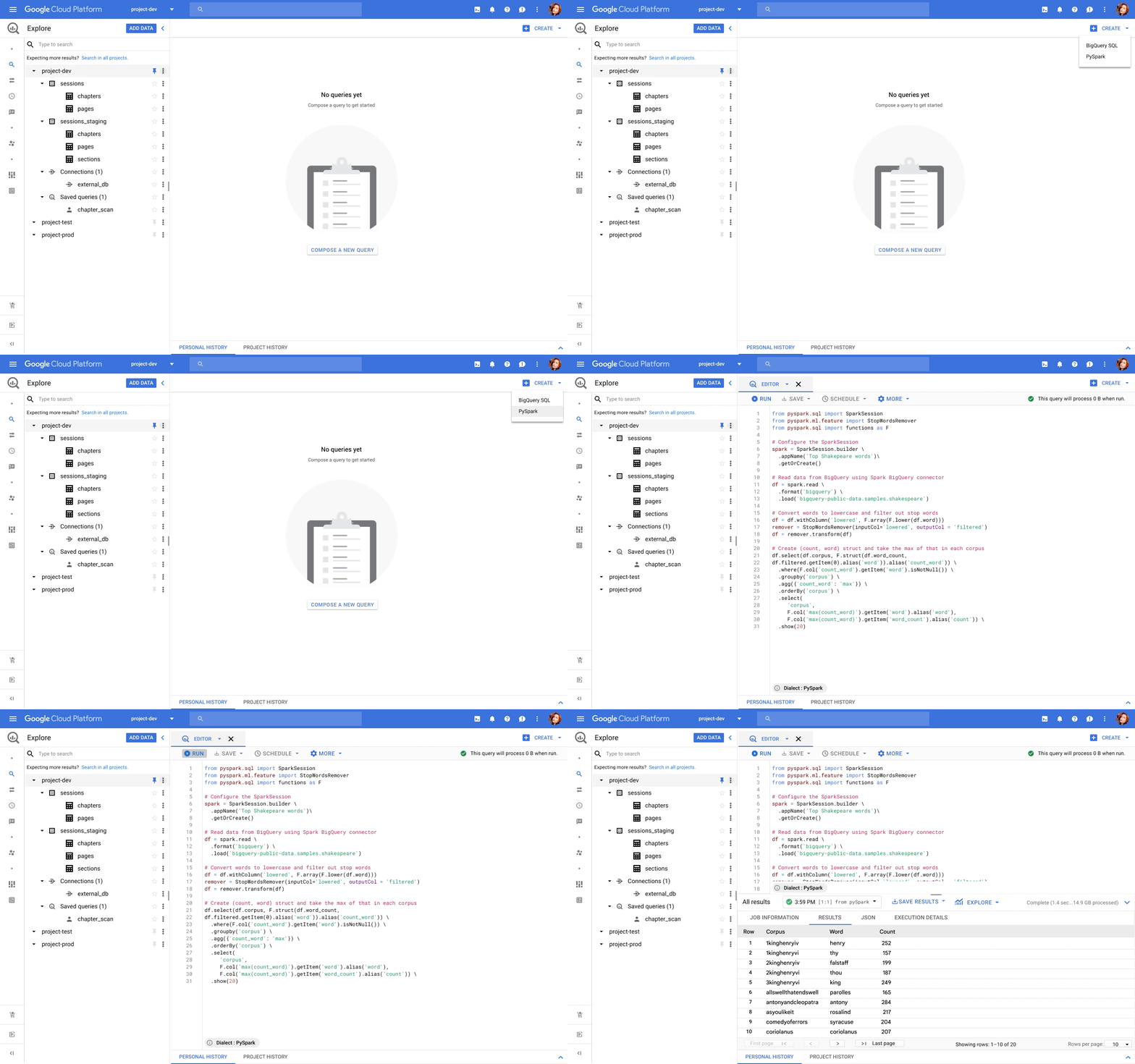
BigQuery, the leading data warehouse, now provides a unified interface for data analysts to write SQL or PySpark. The code is executed using serverless Spark seamlessly, without the need for infrastructure provisioning. BigQuery has been the pioneer for serverless data warehousing, and now supports serverless Spark for Spark-based analytics.
Spark through Vertex AI
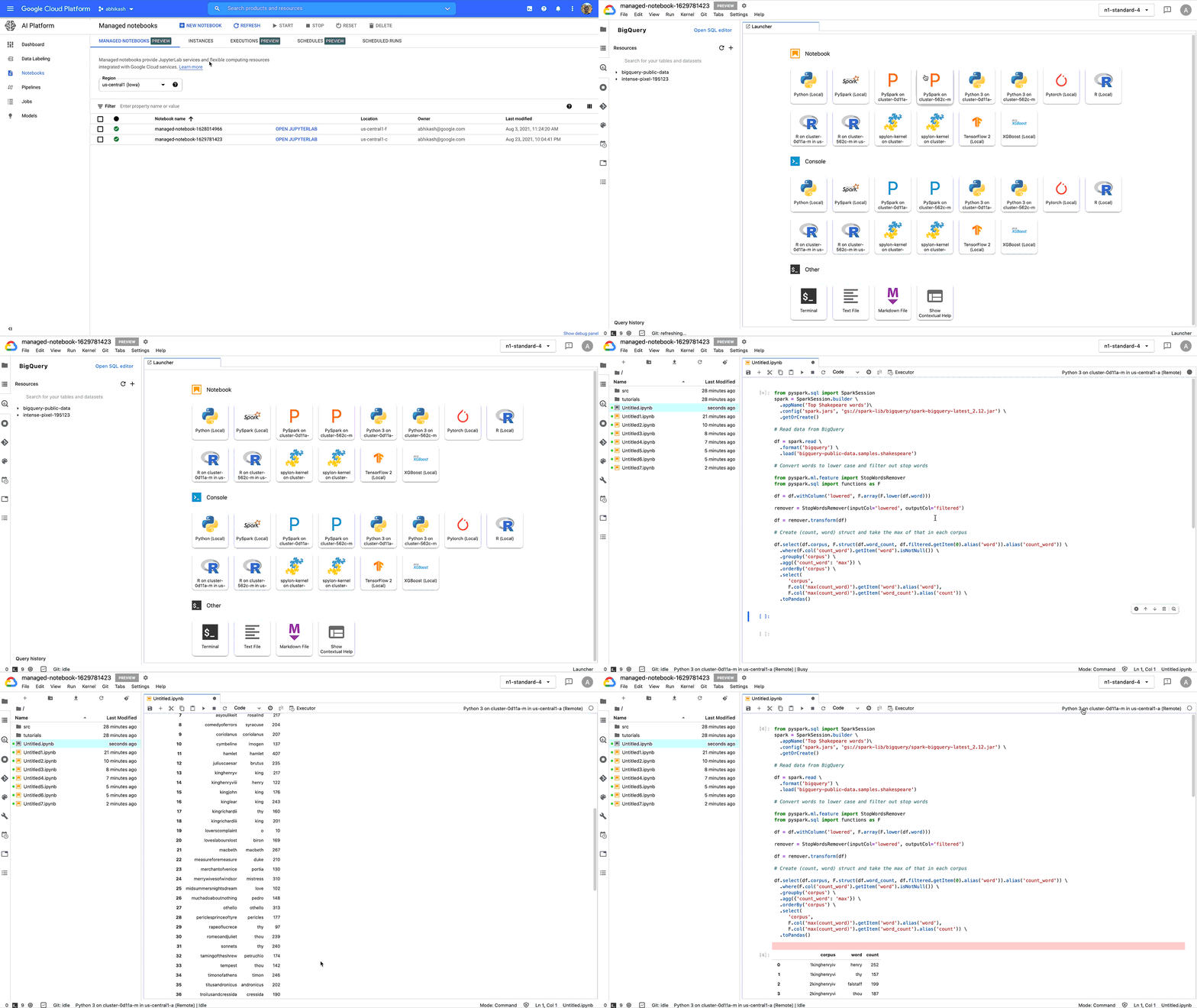
Data scientists no longer need to go through custom integrations to use Spark with their notebooks. Through Vertex AI Workbench, they can connect to Spark with a single click, and do interactive development. With Vertex AI, Spark can easily be used together with other ML frameworks like TensorFlow, Pytorch, Sci-kit learn, and BigQuery ML. All the Google Cloud security, compliance, and IAM are automatically applied across Vertex AI and Spark. Once you are ready to deploy the ML models, the notebook can be executed as a Spark job in Dataproc, and scheduled as part of Vertex AI Pipelines.
Spark through Dataplex
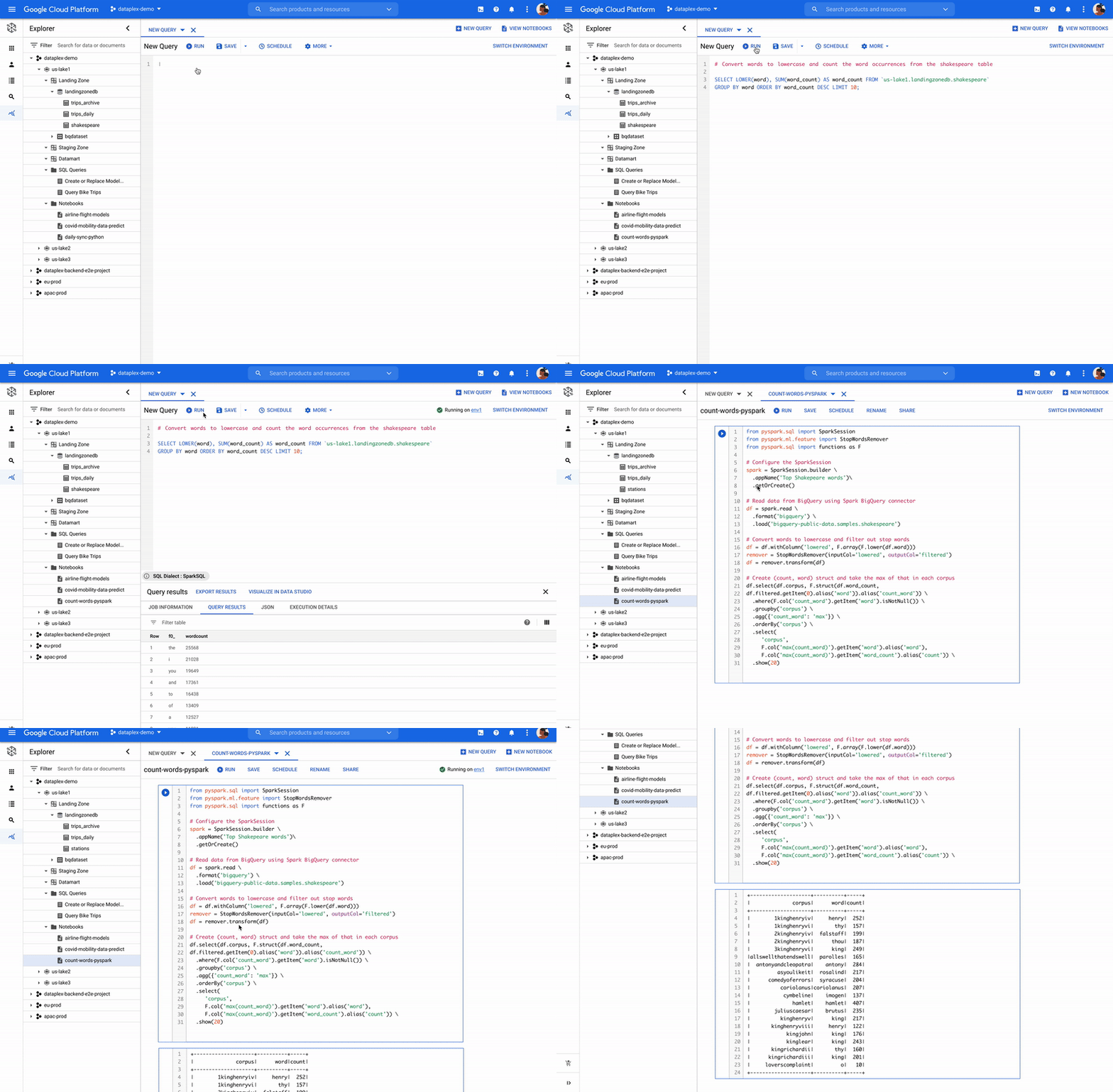
Dataplex is an intelligent data fabric that enables organizations to centrally manage, monitor, and govern their data across data lakes, data warehouses, and data marts with consistent controls, providing access to trusted data and powering analytics at scale. Now, you can use Spark on distributed data natively through Dataplex. Dataplex provides a collaborative analytics interface, with 1-click access to SparkSQL, Notebooks, or PySpark, and the ability to save, share, search notebooks and scripts alongside data.
Flexibility of consumption
We understand one size does not fit all. Spark is available for consumption in 3 different ways based on your specific needs. For customers standardizing on Kubernetes for infrastructure management, run Spark on Google Kubernetes Engine (GKE) to improve resource utilization and simplify infrastructure management. For customers looking for Hadoop style infrastructure management, run Spark on Google Compute Engine (GCE). For customers, who’re looking for no-ops Spark deployment, use serverless Spark!
ESG Senior Analyst Mike Leone commented, “Google Cloud is making Spark easier to use and more accessible to a wide range of users through a single, integrated platform. The ability to run Spark in a serverless manner, and through BigQuery and Vertex AI will create significant productivity improvement for customers. Further, Google’s focus on security and governance makes this Spark portfolio useful to all enterprises as they continue migrating to the Cloud.”
Getting started
Dataproc Serverless for Spark will be Generally Available within a few weeks. BigQuery and Dataplex integration is in Private Preview. Vertex AI workbench is available in Public Preview, you can get started here. For all capabilities, you can request for Preview access through this form.
You can work with Google Cloud partners to get started as well.
“We are excited to partner with Google Cloud as we look to provide our joint customers with the latest innovations on Spark. We see Spark being used for a variety of analytics and ML use cases. Google is taking Spark a step further by making it serverless, and available through BigQuery, Vertex AI and Dataplex for a wide spectrum of users.” —Sharad Kumar, Cloud First data and AI Lead at Accenture
For more information, visit our website or the watch announcement video and our conversation with Snap at Next 2021.
Turning the Tide: How PrestaShop Regained Trust in Data

4270
Of your peers have already read this article.
3:30 Minutes
The most insightful time you'll spend today!
Since 2007, PrestaShop has helped companies unlock the power of e-commerce through its open-source platform. Over 300,000 merchants worldwide use the PrestaShop platform to grow their business and serve online shoppers.
“Our open-source strategy to ecommerce enablement sets us apart,” says Rémi Paulin, Ph.D., Data Architect at PrestaShop. “Customization is becoming more crucial to retailers, and our open-source platform allows companies to continually evolve their sites and services to stand out from competitors.”
As PrestaShop grew, it wished to derive more value from its data, but the company ran into issues caused by a legacy, siloed architecture that negatively impacted data consistency and accessibility.
Let’s look at how PrestaShop works with Google Cloud and partners Fivetran and Hightouch to gain more control over data, enable a beyond-BI data strategy, and increase employee engagement from less than 10% to more than 40%.
Improving trust in data
Core systems at PrestaShop, including SQL and NoSQL databases, and SaaS Applications, were siloed; each presenting its own data, often captured from different sources such as support tickets, marketing engagement, purchase activity, and product usage. This setup made data overall inconsistent as no single system would contain a source of truth, resulting in many inefficiencies, poor collaboration across teams, and a reluctance to use data to support key decisions.
“Not long ago, less than 10% of the company regularly relied on data, so we were missing opportunities to make more data-driven decisions,” says Paulin. “Data was underutilized, and people were rapidly losing trust in data.”
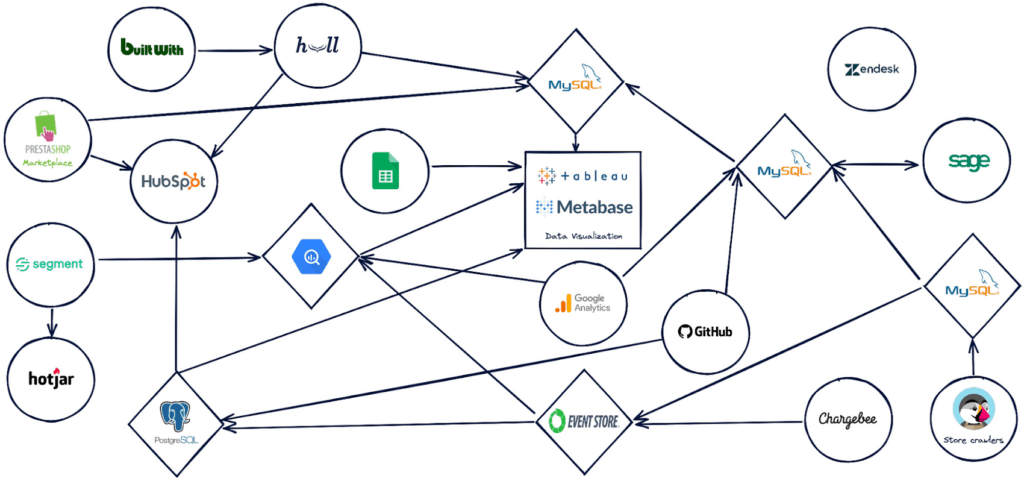
PrestaShop set out to design a new architecture to address past challenges, such as lack of data consistency, and improve data accessibility.
“Google Cloud, along with Hightouch and Fivetran, allowed us to build a modern stack to solve these challenges and support our beyond-BI data strategy.”
Building a modern data stack
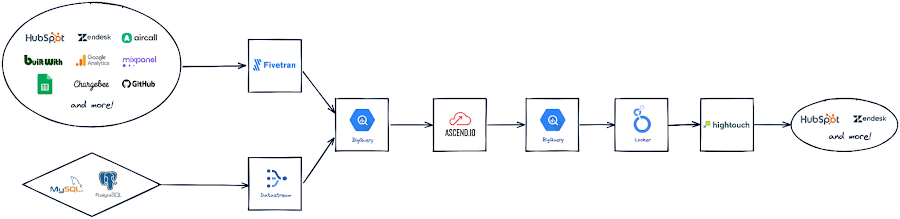
The first step was to build a robust data ingestion pipeline. After considering several vendors, PrestaShop chose to work with Fivetran to extract data from SaaS applications, including Zendesk, HubSpot, and GitHub, to load into BigQuery. They also use Datastream to stream Change Data Capture (CDC) data from transactional databases into BigQuery in real-time.
“Fivetran and Datastream are no-ops, efficient and highly reliable, and relieve our Data Engineers of management tasks. This brings us a high degree of confidence to build the rest of the stack atop these services,” says Paulin.
PrestaShop relies on several Google Cloud solutions, including Dataflow, and a managed Spark service by Ascend.io, for data transformation. It also uses Looker for its semantic modeling capacities and as a self-serve data platform.
As the company continued on its journey to transform how it manages and benefits from data, it engaged Hightouch to enable data accessibility through activation. Sitting on top of Looker, Hightouch unlocks all data models for operational intelligence. For example, in just a few days, the team built a customer knowledge model combining data from multiple sources and used Hightouch to sync data from the semantic layer to Zendesk via Reverse ETL. This allowed the care team to make more data-informed decisions, speeding up the time to resolve support tickets submitted through Zendesk by 33%.
“Hightouch feels like a natural extension of Looker and reinforces the position of the semantic data model as the single source of truth,” says Paulin. “It powers a variety of Data Activation use cases, supporting our beyond-BI strategy by providing teams with access to data when and where they need it to improve everyday operations. This has a big impact on the company, bolstering employee trust in available data.”
Becoming data-driven
In less than six months, PrestaShop managed to get the entire data stack up and running, build over 30 data models and engage over 120 employees with a small team of only two Data Engineers.
“Data is now accessible to every stakeholder within the company, regardless of their technical abilities,” says Paulin.
PrestaShop has already seen much progress in its shift to a more data-driven company and is excited to roll out more self-service intelligence capabilities in the future.
“Google Cloud drives home a culture of simplicity around our data stack, which is essential for us, especially given the small size of our engineering team,” says Paulin. “Fivetran and Hightouch share this culture of simplicity. Together, they offer strong foundations to support our data needs.”
Dashboards, which the company had always had an appetite for, are seamlessly created today. Before moving to Looker, a full-fledged dashboard would take an average of six weeks to develop. Now, it takes less than two days – and a simple dashboard can be created autonomously by business users in as little as 15 minutes.
Furthermore, data usage goes beyond dashboards. Thanks to Looker’s self-service exploration capabilities, many stakeholders can now glean insights surrounding product issues and business opportunities. Thanks to Hightouch, teams can activate their data to make better and smarter operational decisions.
“This is a big leap forward and one of many to come as we continue to add new models, activate our data, and onboard more users,” says Paulin. “Given our global reach and unique approach to e-commerce enablement, we know this is just the start of the great things we can accomplish with Google Cloud, Fivetran, and Hightouch.”
Check out Fivetran on Google Cloud Marketplace, or sign up for a free Hightouch workspace to learn more about what partners can do for your business.
Lending DocAI Shortens Borrowers’ Journey on Roostify

11802
Of your peers have already read this article.
3:00 Minutes
The most insightful time you'll spend today!
The home lending journey entails processing an immense number of documents daily from hundreds of thousands of borrowers. Currently, home lending document processing relies on some outdated digital models and a high dependency on manual labor, resulting in slow processing times and higher origination costs. Scaling a business that sorts through millions of documents daily, while increasing efficacy and accuracy, is no small feat. When it comes to applying for a mortgage loan, consumers expect a digital experience that’s as good as the in-person one. Roostify simplifies the home lending journey for lenders and their customers.
No time to spare: Overcoming document processing challenges with AI
Roostify provides enterprise cloud applications for mortgage and home lenders. In order to empower its customers to deliver a better, more personalized lending experience, they needed to automate and scale their in-house document parsing functionality.
As a key component of its document intelligence service, Roostify is leveraging Google Cloud’s Lending DocAI machine learning platform to automate processing documents required during a home loan application process, such as tax returns or bank statements with multi-language support. This partnership delivers data capture at scale, enabling Roostify customers to automatically identify document types from the uploaded file and to extract relevant entities such as wages, tax liabilities, names, and ID numbers for further processing, and make things move faster in the cumbersome lending process.
Roostify’s solutions leverage Google Cloud’s Lending DocAI, which is built on the recently announced Document AI platform, a unified console for document processing. Customers can easily create and customize all the specialized parsers (e.g., mortgage lending documents and tax returns parsers) on the platform without the need to perform additional data mapping or training. All Google Cloud’s specialized parsers are fine-tuned to achieve industry-leading accuracy, helping customers and partners confidently unlock insights from documents with machine learning. Learn more about the solution from the GA launch blog and the overview video.
Integrating Lending DocAI’s intelligent document processing capabilities into the Roostify platform means more innovation for their customers and tangible results: faster loan processing times, fewer document intake errors, and lower origination costs. Additional support in Google Lending DAI for other languages and more documents like global Know Your Customer (KYC) documents or payroll reports is in the near future.
Full integration of AI solutions
Working together with Roostify’s platform team, we were able to help them solve their document processing challenge through integration of various GCP products such as Lending DocAI (LDAI), Data Loss Prevention (DLP) for redacting sensitive data, BigQuery for data warehousing and analytics, and Firestore for API status. To make it very safe and secure, all data was encrypted end-to-end at Rest and in Transit. LDAI won’t require any training data to process. It is an easy plug and play API.
Here is a sneak peek in the high level deployment architecture for LDAI in Roostify environment:

Here are the steps for processing data:
- Receives document processing request from the client.
- API Function directs requests to the pre-processing service. For Async requests a processing ID is generated and returned to the caller.
- Pre-processing service sends the request for further processing (Long/short PDF conversion), calling other microservices and receives back the responses. Any error in the response received is then sent to the response processing service.
- If the response is synchronous, the pre-processing service directs it to the LDAI Invoker service.
- If the response is asynchronous, the pre-processing service feeds it into the Cloud Pub/Sub service.
- Cloud Pub/Sub service feeds the response back to the LDAI Invoker service.
- LDAI Invoker service routes the request to the Google LDAI API for classification if there are multiple pages in the document.
- Document will be split based on LDAI response and then saved in a GCS bucket for temporary storage.
- LDAI entity interface for single page processing and then LDAI Invoker sends LDAI results to LDAI Response Processing
- If a request is a synchronous request the LDAI Response Processor sends results to the API Function so that it can complete the synchronous call and respond to the rConnect caller.
- If the request is an asynchronous request the LDAI Response Processor will respond to the caller’s webhook and complete the transaction.
- Finally, Data stored in the GCP bucket will be deleted.
All the responses that come from the LDAI API can optionally feed into BigQuery via the Response Processor, after parsing it through Data Loss Prevention (DLP) API to redact the PII/sensitive information. Throughout the processing of both asynchronous and synchronous requests all transactions are logged using Cloud Logging. For asynchronous transactions, the state is maintained throughout the process using Cloud Firestore.
Roostify currently uses this technology to power two different solutions: Roostify Document Intelligence and Roostify Beyond™. Roostify Document Intelligence is a real-time document capture, classification, and data extraction solution built for home lenders. It ingests documents uploaded by borrowers and loan officers, identifies the relevant documents, and extracts and classifies key information. Roostify Document Intelligence is available as a standalone API service to any home lender with any digital lending infrastructure already in place.
Roostify Beyond™ is a robust suite of AI-powered solutions that enables home lenders to create intelligent experiences from start to close. It combines powerful data, insightful analytics, and meaningful visualization to streamline the underwriting process. Roostify Beyond™ is currently available only to Roostify customers as part of an Early Adopter program and will be rolled out to the market later this year.


Through this partnership, Roostify has enabled its customers to adopt a data-first approach to their home lending processes, which will lead to improved user experiences and significantly reduced loan processing times.
Fast track end-to-end deployment with Google Cloud AI Services (AIS)
Google AIS (Professional Services Organization), in collaboration with our partner Quantiphi, helped Roostify deploy this system into production and fast-tracked the development multifold to generate the final business value.
The partnership between Google Cloud and Roostify is just one of the latest examples of how we’re providing AI-powered solutions to solve business problems.
6192
Of your peers have already watched this video.
13:00 Minutes
The most insightful time you'll spend today!
Google Cloud’s 2021 Data Analytics Launches
Google Cloud announced closed to 15 services and programs spanning database, analytics, business intelligence and AI to help businesses gain value out of their data. Here’s a rundown of announcements throughout 2021 on analytics solutions and services such as Dataplex, an intelligent data fabric solution, Datastream, a serverless change data capture and replication service and Google Cloud analytics hub. Watch the video to get started with Google Cloud’s Data Analytics offerings.
Key Highlights on Data Analytics to Smooth Your Organization’s Data Journey

4855
Of your peers have already read this article.
2:00 Minutes
The most insightful time you'll spend today!
As the Olympics kicked off in Tokyo at the end of July, we found ourselves reflecting on the beauty of diverse countries and cultures coming together to celebrate greatness and sportsmanship. For this month’s blog, we’d like to highlight some key data and analytics performances that should help inspire you to reach new heights in your data journey.
Let’s review the highlights!
BigQuery ML Anomaly Detection: A perfect 10 for augmented analytics
Identifying anomalous behavior at scale is a critical component of any analytics strategy. Whether you want to work with a single frame of data or a time series progression, BigQuery ML allows you to bring the power of machine learning to your data warehouse.
In this blog released at the beginning of last month, our team walked through both non-time series and time-series approaches to anomaly detection in BigQuery ML:
- Non-time series anomaly detection
- Autoencoder model (now in Public Preview)
- K-means model (already in GA)
- Time-series anomaly detection
- ARIMA_PLUS time series model (already in GA)
These approaches make it easy for your team to quickly experiment with data stored in BigQuery to identify what works best for your particular anomaly detection needs. Once a model has been identified as the right fit, you can easily port that model into the Vertex AI platform for real-time analysis or schedule it in BigQuery for continued batch processing.
App Analytics: Winning the team event
Google provides a broad ecosystem of technologies and services aimed at solving modern day challenges. Some of the best solutions come when those technologies are combined with our data analytics offerings to surface additional insights and provide new opportunities.
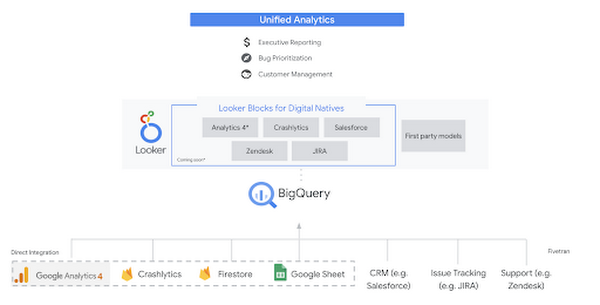
Firebase has deep adoption in the app development community and provides the technology backbone for many organization’s app strategy. This month we launched a design pattern that shows Firebase customers how to use Crashlytics data, CRM, issue tracking, and support data in BigQuery and Looker to identify opportunities to improve app quality and enhance customer experiences.
Crux on BigQuery: Taking gold in the all-around data competition
Crux Informatics provides data services to many large companies to help their customers make smarter business decisions. While they were already operating on a modern stack and not on the hunt for a modern data warehouse, BigQuery became an enticing option due to performance and a more optimal pricing model. Crux also found advantages with lower-cost ingestion and processing engines like Dataflow that allow for streaming analytics.… when it came to building a centralized large-scale data cloud, we needed to invest in a solution that would not only suit our current data storage needs but also enable us to tackle what’s coming, supporting a massive ecosystem of data delivery and operations for thousands of companies.
Mark Etherington
Chief Technology Office, Crux Informatics
Technology is a team sport, and Crux found our support team responsive and ready to help. This decision to more deeply adopt Google Cloud’s data analytics offerings provides Crux with the flexibility to manage a constantly evolving data ecosystem and stay competitive.
You can read more about Crux’s decision to adopt BigQuery in this blog.
Google Trends: A classic emerges a champion
Following up on the launch of our Google Trends dataset in June, we delivered some examples of how to use that data to augment your decision making.
As a quick recap of that dataset, Google Cloud, and in particular BigQuery, provide access to the top 25 trending terms by Nielsen’s Designated Market Area® (DMA) with a weekly granularity. These trending terms are based on search patterns and have historically only been available on the Google Trends website.https://www.youtube.com/embed/9FJAXMF0ASc?enablejsapi=1&
The Google Trends design pattern addresses some common business needs, such as identifying what’s trending geographically near your stores and how to match trending terms to products to identify potential campaigns.
Dataflow GPU: More power than ever for those streaming sprints
Dataflow is our fully-managed data processing platform that supports both batch and streaming workloads. The ability of Dataflow to scale and easily manage unbounded data has made it the streaming solution of choice for large workloads with high-speed needs in Google Cloud.
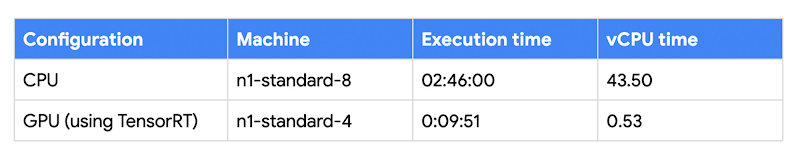
But what if we could take that speed and provide even more processing power for advanced use cases? Our team, in partnership with NVIDIA, did just that by adding GPU support to Dataflow. This allows our customers to easily accelerate compute-intensive processing like image analysis and predictive forecasting with amazing increases in efficiency and speed.
Take a look at the times below:
Data Fusion: A play-by-play for data integration’s winning performance
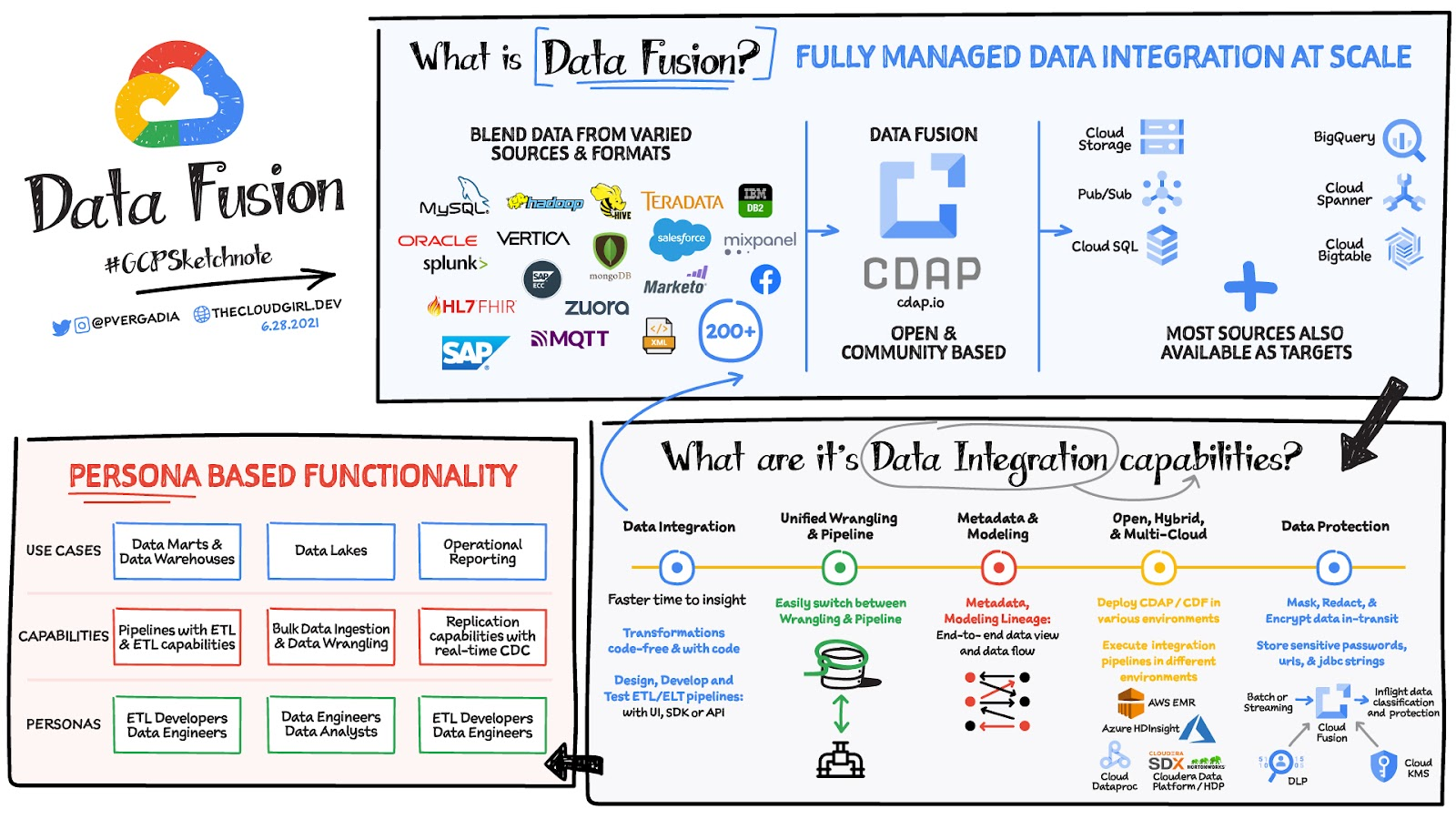
Data Fusion provides Google Cloud customers with a single place to perform all kinds of data integration activities. Whether it’s ETL, ELT, or simply integrating with a cloud application, Data Fusion provides a clean UI and streamlined experience with deep integrations to other Google Cloud data systems. Check out our team’s review of this tool and the capabilities it can bring to your organization.
More Relevant Stories for Your Company

How TapClicks’ Google Cloud Migration Makes Life Easy for Marketers
Editor’s note: In this blog post we learn how TapClicks migrated to Google Cloud to offer their marketing customers a unified platform for data management, operations, insights, and analysis. TapClicks is a smart marketing cloud, powered by data, that unifies our customer’s marketing. By choosing to migrate our core applications last

Daffodil Software Saves Hundreds of Hours Managing Databases with Google Cloud SQL
Daffodil Software is an India-based information technology services company with 180 employees and satellite offices in the US, Singapore, and the United Arab Emirates. Its product: A suite of web-based applications, including a business customer relationship management (CRM) program and an enterprise resource planning (ERP) app for schools. Daffodil’s Challenge




Crux Accelerates Data Operations with Google BigQuery
Being in the constantly evolving and changing data business, Crux Informatics has integrated with Google Cloud and BigQuery to achieve the benefits of a data cloud, including fully managed global scale, load management, high performance, and genuinely good support. Watch this video to learn more about how this partnership will

Data to Business Outcomes with Google’s Data Analytics Design Pattern
Companies today are inundated with vast amounts of data from various sources. This overwhelming amount of data is meant to benefit the company, but often leaves data teams feeling overwhelmed, which can create data bottlenecks and result in a slow time to value. In fact, only twenty seven percent of
