





How Google is Showing the Way to the Differently-abled: A Blind Program Manager’s Account

4242
Of your peers have already read this article.
3:30 Minutes
The most insightful time you'll spend today!
What does “accessibility” mean to businesses? It’s not just about making sure that your office or retail space is accessible to workers and customers who have mobility challenges, it’s also about making sure that your apps, digital tools and content are also more accessible to everyone.
Our product teams work every day to ensure that tools like G Suite have built-in accessibility features. As a Program Manager, I help create those features and use many of them myself, as I’m blind. I would like to give an overview of product accessibility features that have been available for some time, as well as some new ones.
Listen to content with help from screen readers.
A screen reader is a helpful tool for people who are blind or have low vision. It provides methods to interact and control applications and also converts content on screen into spoken text. With a screen reader and keyboard shortcuts, you can read, edit, and comment on files. Getting started is easy: In Google Docs, Slides, or Sheets, go to the Tools menu, and in “Accessibility settings,” check the “Turn on screen reader support” box. Learn how to turn on screen reader support in Docs.
G Suite supports several screen readers, including ChromeVox, Google’s own screen reader. ChromeVox is automatically built into Chrome devices, like Chromebooks. You just have to enable it. There are many other screen readers you can use with G Suite too; this support guide explains which screen readers work best with which web browsers.
Another way to listen to content is with Select-to-speak, a feature that reads content aloud to you using text-to speech (TTS) to verbalize highlighted content. To try it out, highlight text and activate the select-to-speak button. An example of a select-to-speak tool is the one built into ChromeOS.
See a summary of changes to your documents.
To make it easier for people to keep track of collaborators’ contributions in Google Docs (without having to actively watch every single change), we recently added a feature called Live Edits. Helpful if you use a screen reader or magnification, Live Edits periodically summarizes changes made to a document by collaborators within the sidebar. Learn how to comment and collaborate in Docs using a screen reader.
And for people who are sensitive to visual crowding, we also introduced eight different Lexend font families that have varied widths and spacing to accommodate different reading speeds. Read more details about these font options.
Use voice typing to “write” by speaking.
Voice typing is a powerful productivity tool for everyone, including those who do not use a keyboard. It’s especially useful for people with low vision or with motor disabilities that may prevent them from using keyboards, mice or trackpads. When you speak into the computer’s microphone, voice typing uses artificial intelligence (AI) to convert your voice into text. In Docs, you can even use voice commands to select and edit text—for example, bolding words or cutting and pasting text.
5123
Of your peers have already watched this video.
18:00 Minutes
The most insightful time you'll spend today!
Trusted Collaboration for Hybrid Workplace with Google Workspace
Hybrid workspace need high levels of security, data privacy, and trust for seamless collaboration across workforce. As we navigate to the new normal, your enterprise can learn about the security and privacy specific innovations Google Workspace utilizes to help customers realize powerful, trusted, cloud-native collaboration.
Tau VMs Joins Google Cloud to Offer Cost-effective Performance of Scale-out Workloads

5598
Of your peers have already read this article.
2:00 Minutes
The most insightful time you'll spend today!
Scale-out workloads demand the best combination of performance and price to bring down the cost of delivering applications, all while providing an excellent user experience. We are excited to announce a new virtual machine (VM) family, Tau VMs, coming to Google Cloud. Tau VMs extend Compute Engine’s VM offerings with a new option optimized for cost-effective performance of scale-out workloads.
T2D, the first instance type in the Tau VM family, is based on 3rd Gen AMD EPYCTM processors and leapfrogs the VMs for scale-out workloads of any leading public cloud provider available today, both in terms of performance and workload total cost of ownership (TCO). The x86 compatibility provided by these AMD EPYC processor-based VMs gives you market-leading performance improvements and cost savings, without having to port your applications to a new processor architecture.
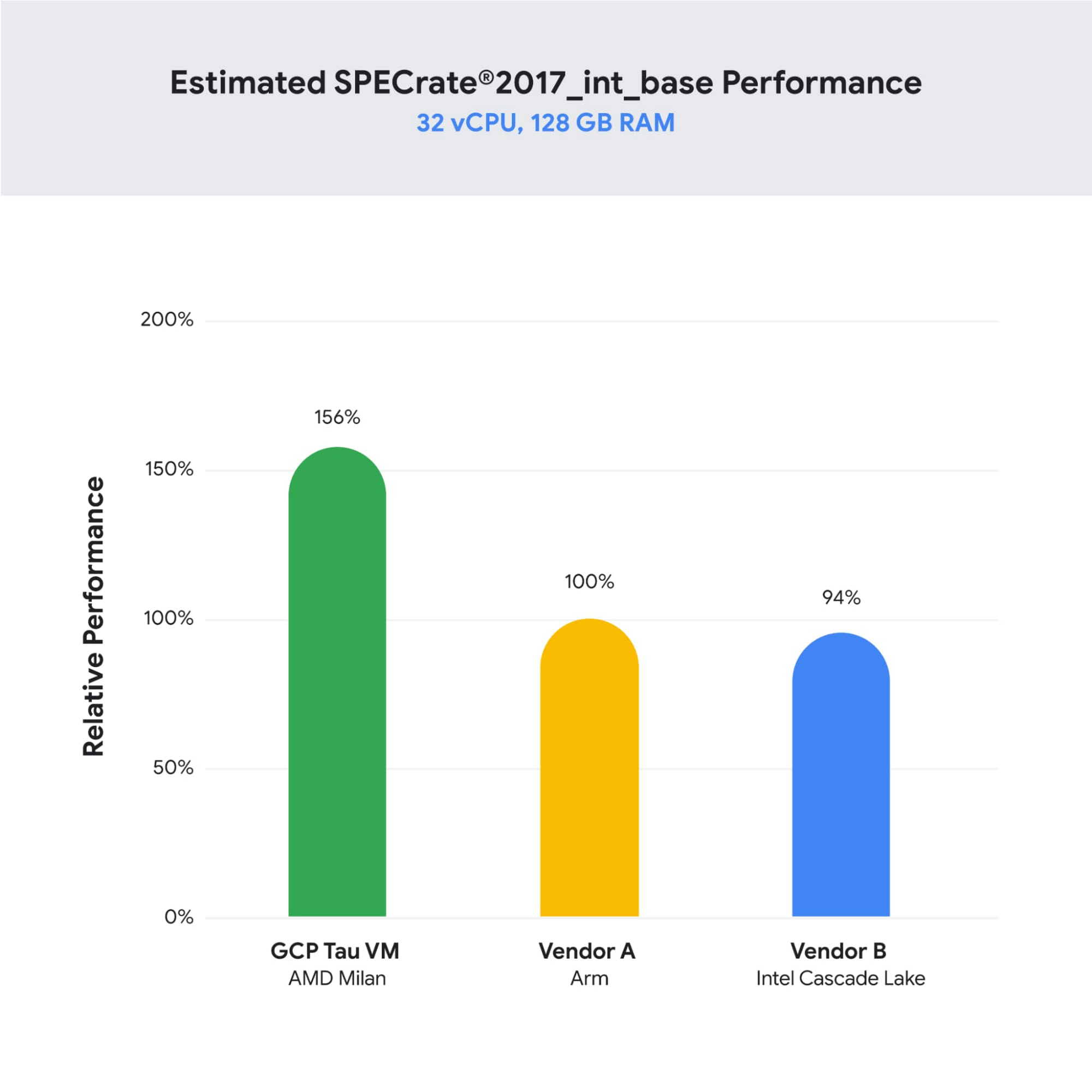
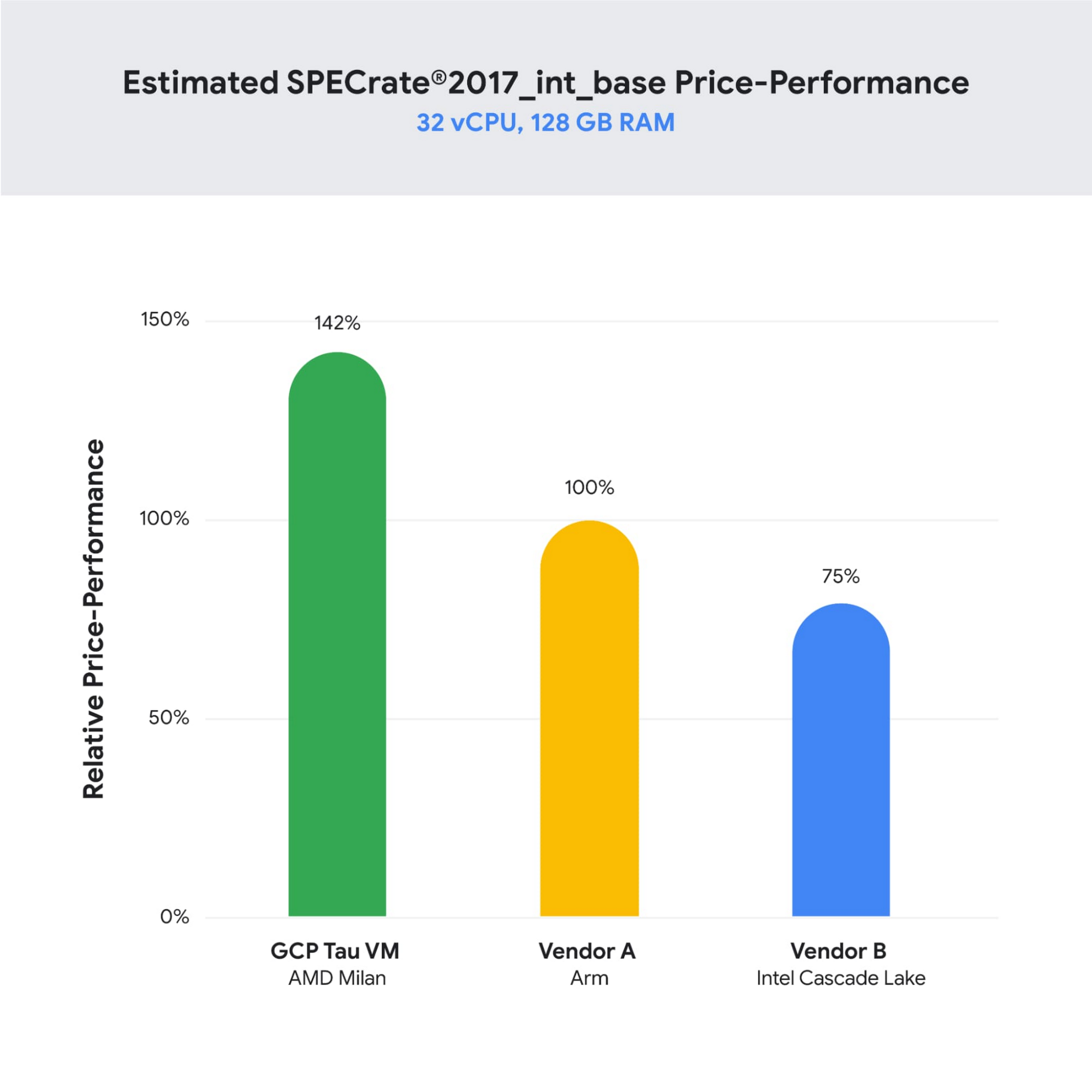
As illustrated below, Tau VMs offer 56% higher absolute performance and 42% higher price-performance (est. SPECrate2017_int_base) compared to general-purpose VMs from any of the leading public cloud vendors.
SPECrate is a trademark of the Standard Performance Evaluation Corporation. More information available at www.spec.org
What our customers and partners are saying
Snap
“At Snap, it is critical for our business to continue improving our scale-out compute infrastructure for key Snapchat capabilities like AR, Lenses, Spotlight and Maps,” said Cody Powell, Senior Engineering Manager, Snap Inc. “We were impressed when we tested Google Cloud’s new Tau VMs with Google Kubernetes Engine. While it’s early days, we believe we can gain double digits in infrastructure performance improvements for key workloads—enabling us to do more with less and invest even more in new features for our amazing Snapchat community.”
Twitter
“High performance at the right price point is a critical consideration as we work to serve the global public conversation,” said Nick Tornow, Platform Lead, Twitter. “We are excited by initial tests that show potential for double digit performance improvement. We are collaborating with Google Cloud to more deeply evaluate benefits on price and performance for specific compute workloads that we can realize through use of the new Tau VM family.”
DoiT
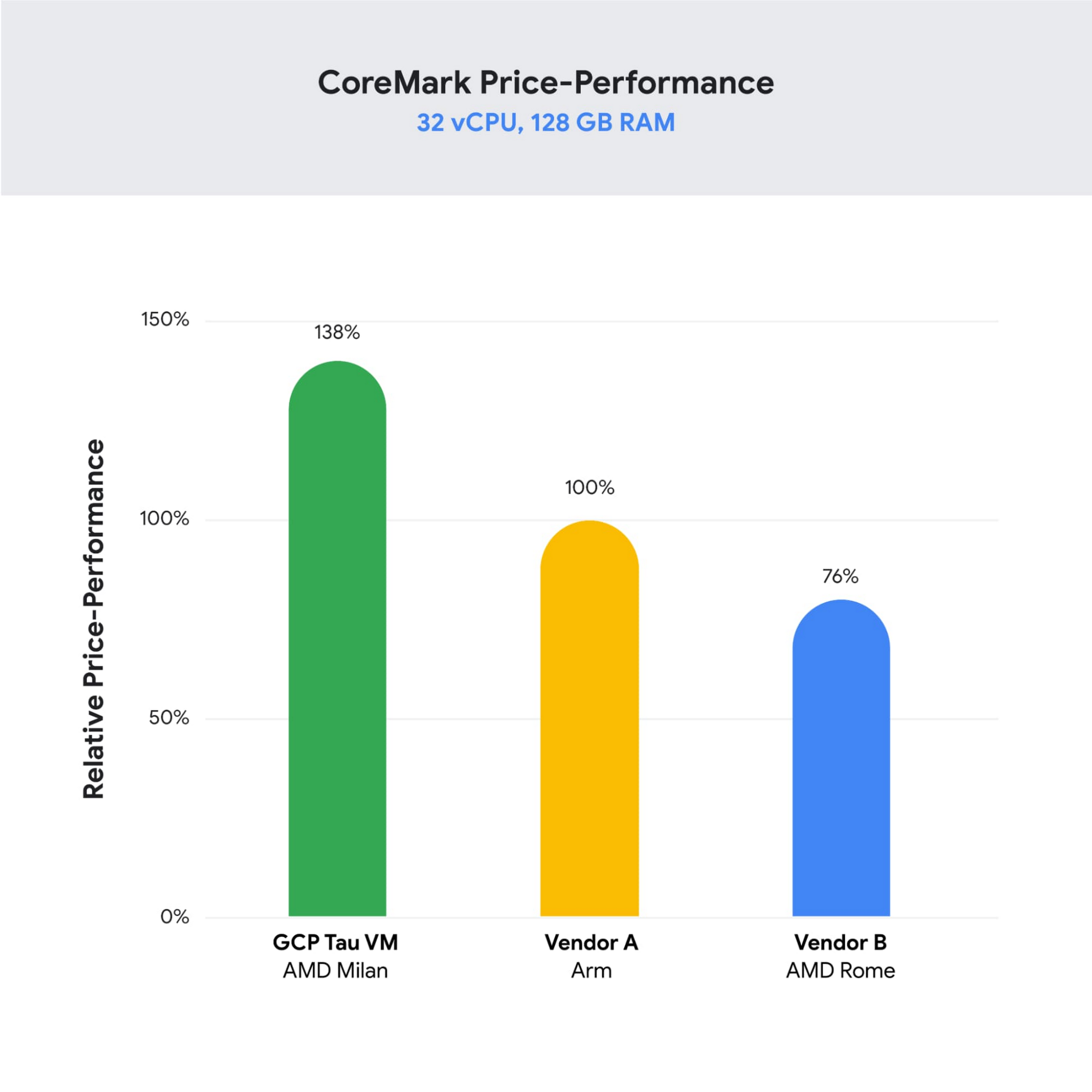
“DoiT partners with leading cloud vendors who are focused on growth and cost optimization,” said Yoav Toussia-Cohen, CEO, DoiT International. “In our preliminary testing of Google’s new Tau VMs with the Coremark benchmark, we were thrilled to see the incredible performance at 50% better than a comparable ARM-based offering from another leading public cloud. With Tau VMs, Google Cloud has set a new bar for price-performance, making the cloud even more accessible to digital-native companies. We are excited to bring Google’s Tau VMs to our joint customers.”
Designed for demanding scale-out workloads
Tau VMs bring the benefit of Google’s long-standing experience engineering platforms for scale-out workloads to our customers. They come in multiple predefined VM shapes, with up to 60vCPUs per VM, and 4GB of memory per vCPU. They offer up to 32 Gbps networking bandwidth and a wide range of network attached storage options, making Tau VMs ideal for scale-out workloads including web servers, containerized microservices, data-logging processing, media transcoding, and large-scale Java applications.
Google Kubernetes Engine support
Google Kubernetes Engine (GKE) is the de facto standard for organizations looking for advanced container orchestration, delivering the highest levels of reliability, security, and scalability. GKE supports Tau VMs on day 1, helping you optimize price-performance for your containerized workloads. You can add Tau VMs to your GKE clusters by specifying the T2D machine type in your GKE node-pools.
Pricing
Tau VMs will be priced to support significant TCO and price-performance improvements for your cloud applications. A 32vCPU VM with 128GB RAM will be priced at $1.3520 per hour for on-demand usage in us-central1.
Coming soon to a Google Cloud region near you
If you are interested in trying out T2D VMs when they become available in Q3 2021 please sign-up here.
8355
Of your peers have already watched this video.
3:00 Minutes
The most insightful time you'll spend today!
Colgate-Palmolive: The Story of a Large Company Transforming Itself in 6 Months
What started as a small soap and candle company in 1806 in New York, has today transformed into a household name: Colgate-Palmolive. Over 200 years hence, the company has diversified into oral care, personal care, home care, and pet nutrition businesses and sells its products in over 200 countries across the world.
In order to stay competitive and quicken decision-making and time-to-market, the company knew it needed to find a better way to collaborate and communicate with teams spread across geographies—in real-time. It needed a cloud-based productivity suite.
Its employees wanted the ability to store files in a single location, conduct face-to-face video meetings, and minimize time spent logging into different tools.
The company decided to switch to G Suite, Google Cloud’s collaboration and productivity tool that brings together the power of Gmail, Docs, Drive, and Calendar—and more—all in one place.
“Some have said that moving to G Suite was unusual for a large enterprise company, but it worked well for Colgate,” says Mitch Cohen, Senior Manager Collaboration Services, Colgate-Palmolive. “As someone once said: Don’t skate to where the puck is, skate to where it’s going.”
You can too.
How We Proved Everyone Wrong and Scaled Our Sports Apparel Company Across Continents

5606
Of your peers have already read this article.
4:30 Minutes
The most insightful time you'll spend today!
There were several reasons why Suddora and CustomOnIt shouldn’t have been successes. My friend Adam and I were working in a Michigan video store and knew next to nothing about running a business. We started with an idea to sell sweatbands, like the ones I used to wear in my band, and over several months managed to launch it legitimately. This led us to bail on the video store and move to Vegas—smack in the middle of the 2008 financial crisis. We lived on ramen noodles and little else for two years while we got the company going. Our friends took bets on how long we’d stay in business.
But 11 years later, we have not one but several successful sports apparel businesses, I’m running a bunch of other e-commerce companies (including SweatBands.com), and we’re selling in the United Kingdom and soon in Asia Pacific.
How did two broke-but-determined guys working in a video store get this far? We always believed in moving ahead, no matter what obstacles came our way—and we learned a lot about how technology like G Suite can make a small business look and operate like a bigger one, and how searching Google for business resources can pay off.
Starting with an idea, a domain and…ramen noodles
In my band days in Michigan, we tried to think of ways to get our name out there. Instead of the usual T-shirts or stickers, I pitched the idea of custom sweatbands since I wore sweatbands when I played guitar. I figured other people might like sweatbands with the names of their bands.
We knew we needed a web domain and email addresses so we could sell online. We found out about G Suite during a Google search, and it seemed like the most pain-free way to get started by buying the domains Customonit.com and Suddora.com (Adam made up that name. “Sudor” is Spanish for “sweat,” which is what the businesses were about, and we added the “d” and the “a” to make the name stand out.).
Even though the company was just me and Adam, we needed to look professional (and also a bit bigger than we actually were). With G Suite, we set up email aliases for various business functions, like help@suddora.com and sales@suddora.com, and arranged to route email from these addresses into our regular Gmail inboxes; that way, customers could easily reach us.
Scaling our business in the Las Vegas heat
Next, we decided to move to Las Vegas because, in the aftermath of the recession, we could live cheaply there. When we got our first big sweatband order from a major NCAA football team, the momentum started. Now we had to scale up the business so we could handle more orders and deal with suppliers, even though we were still working out of our living room.
We grew to a five-person team, including a customer service person and a designer, and G Suite made it easy to onboard everyone quickly. In addition to giving new employees their own email addresses with the Suddora.com or STbands.com domain names, we routed emails to various people from the “help” and “sales” email aliases we had set up. We also made sure that all of our employees were set up on G Suite, too.
Once orders started to roll in from major fast-food restaurants, football teams, and sports apparel companies, our roles constantly changed. G Suite helped us shave off precious time by helping us manage email less manually—we automatically re-routed emails depending on who’s working on what. If I wanted to take on more sales work, I forwarded emails from sales@suddora.com to my inbox with one click. Same thing with customer service: We never want to lose track of customer service inquiries, which are a high priority.
In 2009, a year after starting the business, Adam and I left our part-time jobs at a local department store to run the business full-time. We promised ourselves that when we hit a revenue target of $15,000 in one month we’d buy a TV for the apartment—and we got that TV!
Going international (without leaving our office)
The business was taking off. We decided to split STbands.com into two websites: Suddora.com for sports sweatbands and CustomOnIt.com for custom apparel and party goods. We recognized that half our customers wanted athletic wear and accessories, while the other half wanted custom items like T-shirts and wristbands. It was a move that would allow each business to thrive.
Creating products and managing suppliers was getting more complicated. Once again, G Suite helped us move our business forward. We used Google search to find suppliers in China, and were able to set up supplier relationships and talk one-on-one with the people making our products—without extensive and time-consuming travel to China. You can accomplish so much with video meetings and chat.
With more suppliers and more customers, we needed to constantly up our game in terms of product design. When we create new designs it generates a ton of files and iterations, which get shared back and forth between pattern designers, photo editors, writers, and marketing professionals. To help centralize these files, we store everything in Google Drive so they can be shared and accessed anytime, from anywhere. For example, we use Sheets to house updated data on our products across all of our e-commerce platforms.
Lessons learned
Eleven years on, I’m still learning every day about what it takes to run and grow a business. I think what helps is finding tools like G Suite that are so easy to use, you don’t need much ramp-up time to get started—nor do your employees. That means we’re all productive much faster.
Also, you might be thinking about a million ideas for starting a business. But the truth is, you only need one—an opportunity that makes you think, “Okay, this is going to be big.” So go for it. You can’t afford not to.
Gmail’s BIMI Increases Confidence about Security and Delivers Immersive Email Experiences

5443
Of your peers have already read this article.
3:00 Minutes
The most insightful time you'll spend today!
Creating a secure-by-default experience based on robust defenses has always been a core design principle for Gmail. That’s why we’ve established a strong baseline of security in Gmail, with built-in protections to help automatically filter out potentially malicious messages. While these defenses help keep Gmail users safe, email functions as part of a large, complex, interconnected ecosystem that we continually invest in and work to protect. After first announcing Gmail’s Brand Indicators for Message Identification (BIMI) pilot last year, today we’re announcing that over the coming weeks we’re rolling out Gmail’s general support of BIMI, an industry standard that aims to drive adoption of strong sender authentication for the entire email ecosystem. BIMI provides email recipients and email security systems increased confidence in the source of emails, and enables senders to provide their audience with a more immersive experience.


“Bank of America has a wide range of security measures in place to support our customers, and we constantly evolve our program to deliver best in class protection. Part of this effort is our partnership with Google on BIMI, which provides an easy way to validate if correspondence is from us.” — Bank of America
BIMI enables organizations that authenticate their emails using Domain-based Message Authentication, Reporting, and Conformance (DMARC)—a standard for providing strong sender authentication that allows security systems to perform better filtering, separating legitimate messages from potentially spoofed ones—to validate ownership of their logos and securely transmit them to Google. BIMI is designed to be easy: for organizations with DMARC in place, validated logos display on authenticated emails from their domains and subdomains.
Here’s how it works: Organizations who authenticate their emails using Sender Policy Framework (SPF) or Domain Keys Identified Mail (DKIM) and deploy DMARC can provide their validated trademarked logos to Google via a Verified Mark Certificate (VMC). BIMI leverages Mark Verifying Authorities, like Certification Authorities, to verify logo ownership and provide proof of verification in a VMC. Once these authenticated emails pass our other anti-abuse checks, Gmail will start displaying the logo in the existing avatar slot.
“Gmail’s support of BIMI is a win for email authentication, brand trust, and consumers alike. BIMI gives organizations the opportunity to provide their customers with a more immersive email experience, strengthening email sender authentication across the entire email ecosystem.” — Seth Blank, Chair of the AuthIndicators Working Group
This is just the start for BIMI. The standard expects to expand support across logo types and validators. For logo validation, BIMI is starting by supporting the validation of trademarked logos, since they are a common target of impersonation. Today, Entrust and DigiCert support BIMI as Certification Authorities, and in the future the BIMI working group expects this list of supporting validation authorities to expand further. To learn more about BIMI and see the latest news, visit the working group’s website.
To take advantage of BIMI, ensure that your organization has adopted DMARC, and that you have validated your logo with a VMC. For Gmail users, no action is required. We’re proud to be one of the leading members in both establishing and supporting the BIMI standard and will continue to support efforts that contribute to security for the entire email ecosystem.
More Relevant Stories for Your Company


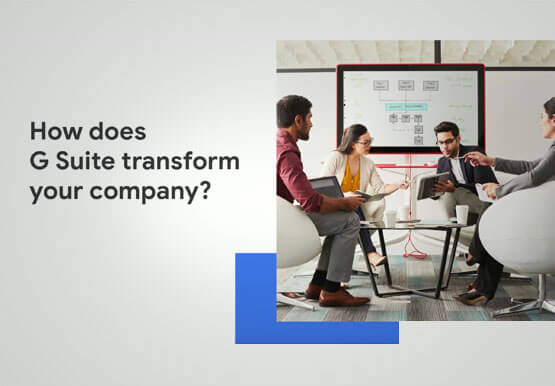

On-Demand Webinar: 3 Ways Collaboration Transforms How Your Company Works
A majority of your employees and teams spend 38% of their time unsuccessfully searching and recreating content, according to IDC. They also spend 20% of their time looking for information, according to McKinsey. That’s 58% of time lost in unproductive tasks that could have been spent coming up with the

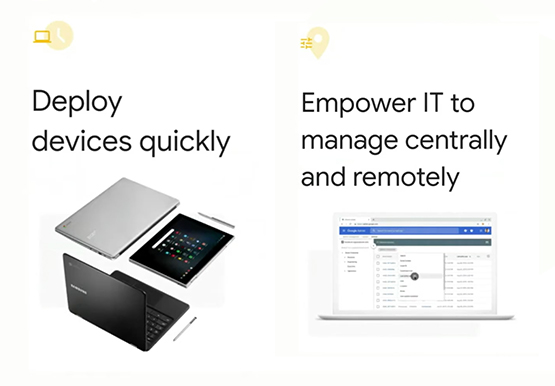
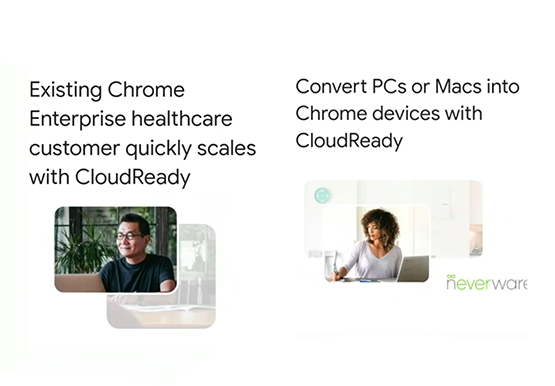
Enabling a Remote Workforce with Chrome Enterprise
The recent COVID-19 pandemic has mandated that organizations take unprecedented efforts to enable their employees to work remotely. This recent Gartner survey indicated that 88% of organizations have encouraged or required employees to work from home. Even before this year's events, remote working has been a growing consideration for employees



How Manish Malhotra Created Masterpieces on G Suite for the World’s Biggest Names
From Hillary Clinton’s golden outfit at Isha Ambani’s wedding to scores of Indian movies, Manish Malhotra has been a household name for over two decades. It was in 1990 that Malhotra first designed outfits for an Indian movie and since then he has won several awards in the Best Costume

Active Assist Expands Globally: Unleashing Cloud Optimization Insights Worldwide
Active Assist provides insights and recommendations to help Google Cloud customers proactively optimize their cloud environments for cost, security, performance, and sustainability. If you’re like most customers, you’ve likely encountered these insights and recommendations in the console — either in the Recommendations Hub or embedded on a resource page, like IAM or
