





How Google Classroom Helps State of Iowa Employees Serve the Public Better

5572
Of your peers have already read this article.
1:30 Minutes
The most insightful time you'll spend today!
Organizations are pressed with the need to engage, retain, and upskill employees with many positions staying fully or partially remote as the pandemic continues. The Center for Digital Government (CDG) reports that 74% of state and local governments believe they will continue hybrid operations for the long-term. This transition is the latest in a long list of reasons agencies are looking for solutions to help train their workforce digitally. Some have found Google Classroom to be the perfect solution.
The State of Iowa knew about the advantages of digital classrooms even before the pandemic. They were already successfully using Google Classroom for in-person training, making the transition to digital seamless when the state closed down. Jessica Van Heuveln, a Google support specialist for the State of Iowa CIO’s Office, says the switch to digital doesn’t deprive workers of hands-on training. “You can use Google Classroom for many different environments, so if you’re doing self-taught, in-person or virtual training, it’s going to work with all those approaches.”
The logistics of a digital classroom
Iowa uses Google Classroom to onboard and upskill employees as well as train volunteers. When the pandemic shifted the state’s workforce to 70% working from home, they needed a platform that could not only handle a vast range of topics and teaching styles to support remote workers but also scale to meet their demand. Van Heuveln notes that Google Classroom was particularly helpful for handling compliance training, especially with its integration with Google Meet. These trainings often require an entire sector of the workforce to attend a single class with more than 100 attendees, according to Van Heuveln. The logistics of these larger sessions cuts down on the number of total sessions the state needs to host. Iowa also found that employees were less apprehensive about learning when they could do it from the comfort of their own homes.
Iowa follows a train-the-trainer model to train employees expected to instruct using Google Classroom. Trainers working in departments across the state learn to use Google Classroom to create and host virtual learning experiences specific to their own departments.
Collaborative classrooms made simple
Google Classroom meets many needs for Iowa, such as setting up training, managing attendance, reviewing uploaded coursework, and communicating with attendees. Both course attendees and trainers have everything they need in one place, and robust engagement tools help attendees stay focused while giving trainers the feedback they need from their lessons. Built-in survey options let trainers gauge attendee knowledge, and the chat function ensures no one ever misses a question. The reporting dashboard gives trainers access to analytics to track engagement and attendance, providing insights that can improve future training sessions.
Google Classroom also makes it easier to ensure attendees stay on board throughout the training program. Coursework can be uploaded directly into Google Classroom, and training sessions can be recorded and archived. This feature allows employees to work at their own pace or lets them catch up when a scheduling conflict means they might miss a session.
The enterprise version of Google Classroom Iowa uses interfaces with other Google Workspace tools such as Google Meet, Google Calendar, Google Drive, and Gmail, which streamlines training and leads to more collaboration between employees and trainers. It can also interface with applications from other providers, further boosting its utility as an effective virtual classroom. Google Drive stores training materials securely. Lastly, Google Classroom enterprise comes with 24/7 support to make sure agencies always have everything they need for success.
Helping employees be better prepared to serve
Google Classroom can be a powerful part of any training program, whether it be digital or in-person. Building virtual connections empowers organizations to deliver better experiences. Google Classroom is helping the State of Iowa accomplish this for their constituents. Designed to scale and be accessible from anywhere, the platform helps public employees better serve the public. Virtual training strategies are essential for agencies that are looking to grow their workforce and build employee skill levels. The most important thing, however, is that training programs enable employees to further your agency’s mission. To learn more about Google Classroom and see more solutions designed with government in mind, check out the Google Cloud for government page.
Tau VMs Joins Google Cloud to Offer Cost-effective Performance of Scale-out Workloads

5604
Of your peers have already read this article.
2:00 Minutes
The most insightful time you'll spend today!
Scale-out workloads demand the best combination of performance and price to bring down the cost of delivering applications, all while providing an excellent user experience. We are excited to announce a new virtual machine (VM) family, Tau VMs, coming to Google Cloud. Tau VMs extend Compute Engine’s VM offerings with a new option optimized for cost-effective performance of scale-out workloads.
T2D, the first instance type in the Tau VM family, is based on 3rd Gen AMD EPYCTM processors and leapfrogs the VMs for scale-out workloads of any leading public cloud provider available today, both in terms of performance and workload total cost of ownership (TCO). The x86 compatibility provided by these AMD EPYC processor-based VMs gives you market-leading performance improvements and cost savings, without having to port your applications to a new processor architecture.
As illustrated below, Tau VMs offer 56% higher absolute performance and 42% higher price-performance (est. SPECrate2017_int_base) compared to general-purpose VMs from any of the leading public cloud vendors.
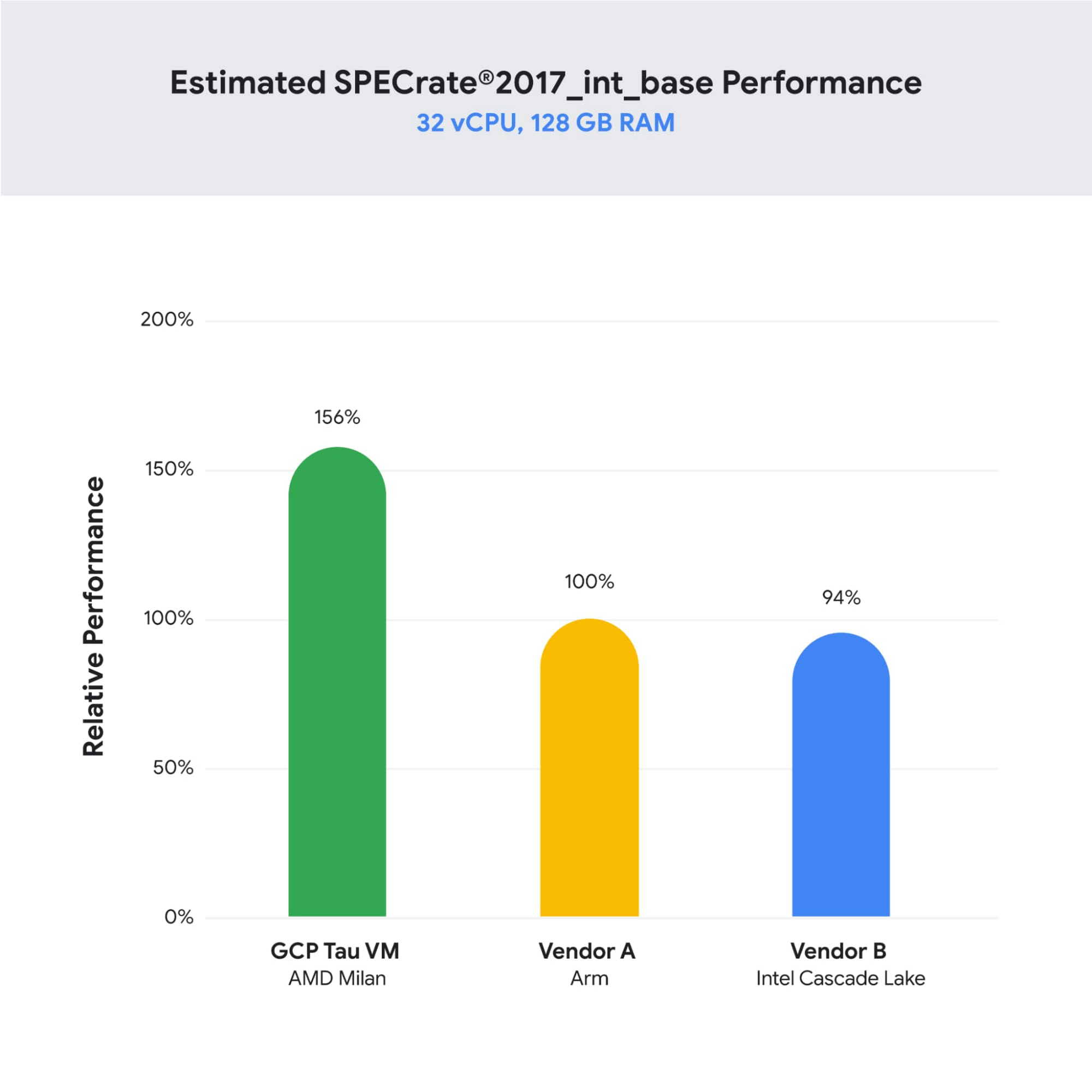
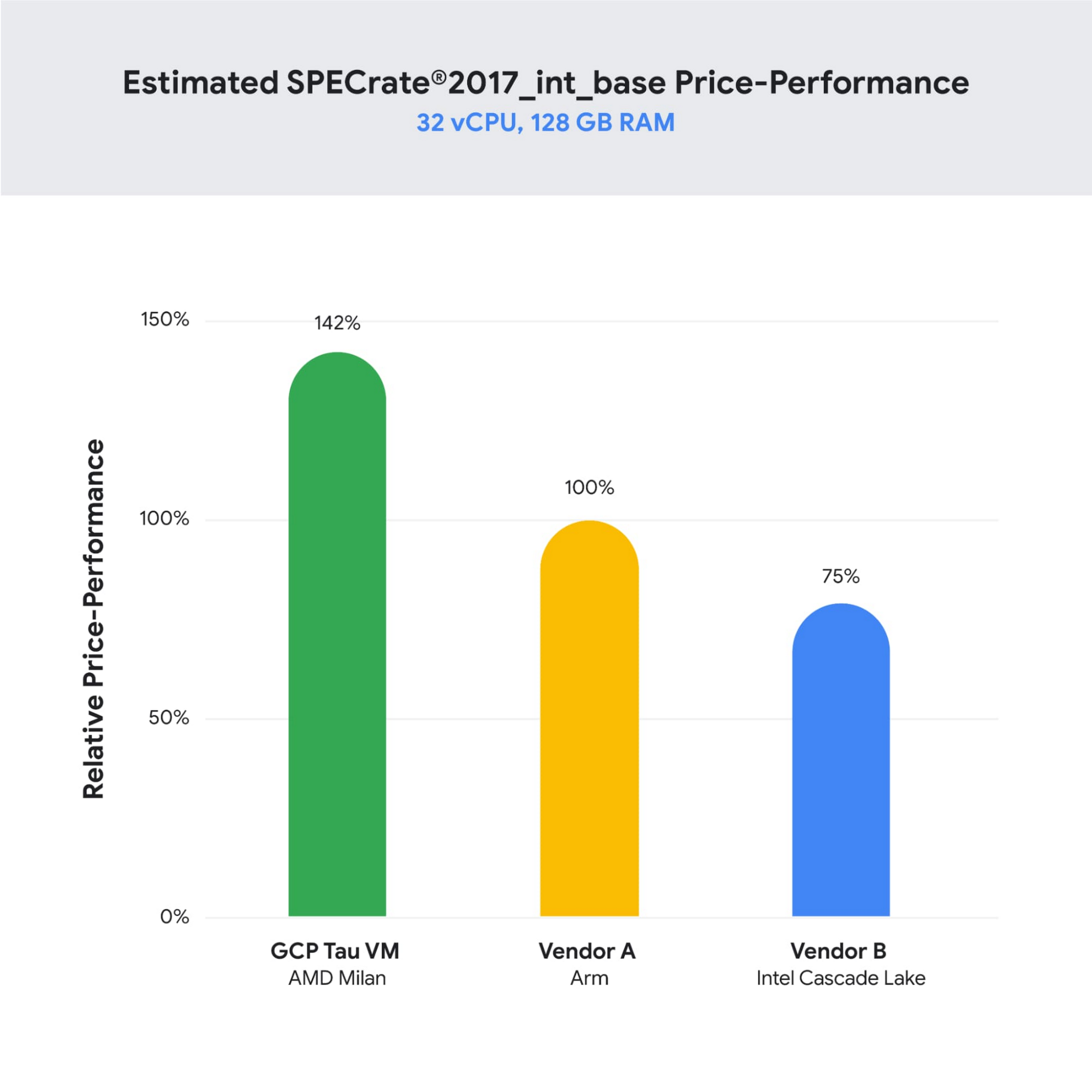
SPECrate is a trademark of the Standard Performance Evaluation Corporation. More information available at www.spec.org
What our customers and partners are saying
Snap
“At Snap, it is critical for our business to continue improving our scale-out compute infrastructure for key Snapchat capabilities like AR, Lenses, Spotlight and Maps,” said Cody Powell, Senior Engineering Manager, Snap Inc. “We were impressed when we tested Google Cloud’s new Tau VMs with Google Kubernetes Engine. While it’s early days, we believe we can gain double digits in infrastructure performance improvements for key workloads—enabling us to do more with less and invest even more in new features for our amazing Snapchat community.”
Twitter
“High performance at the right price point is a critical consideration as we work to serve the global public conversation,” said Nick Tornow, Platform Lead, Twitter. “We are excited by initial tests that show potential for double digit performance improvement. We are collaborating with Google Cloud to more deeply evaluate benefits on price and performance for specific compute workloads that we can realize through use of the new Tau VM family.”
DoiT
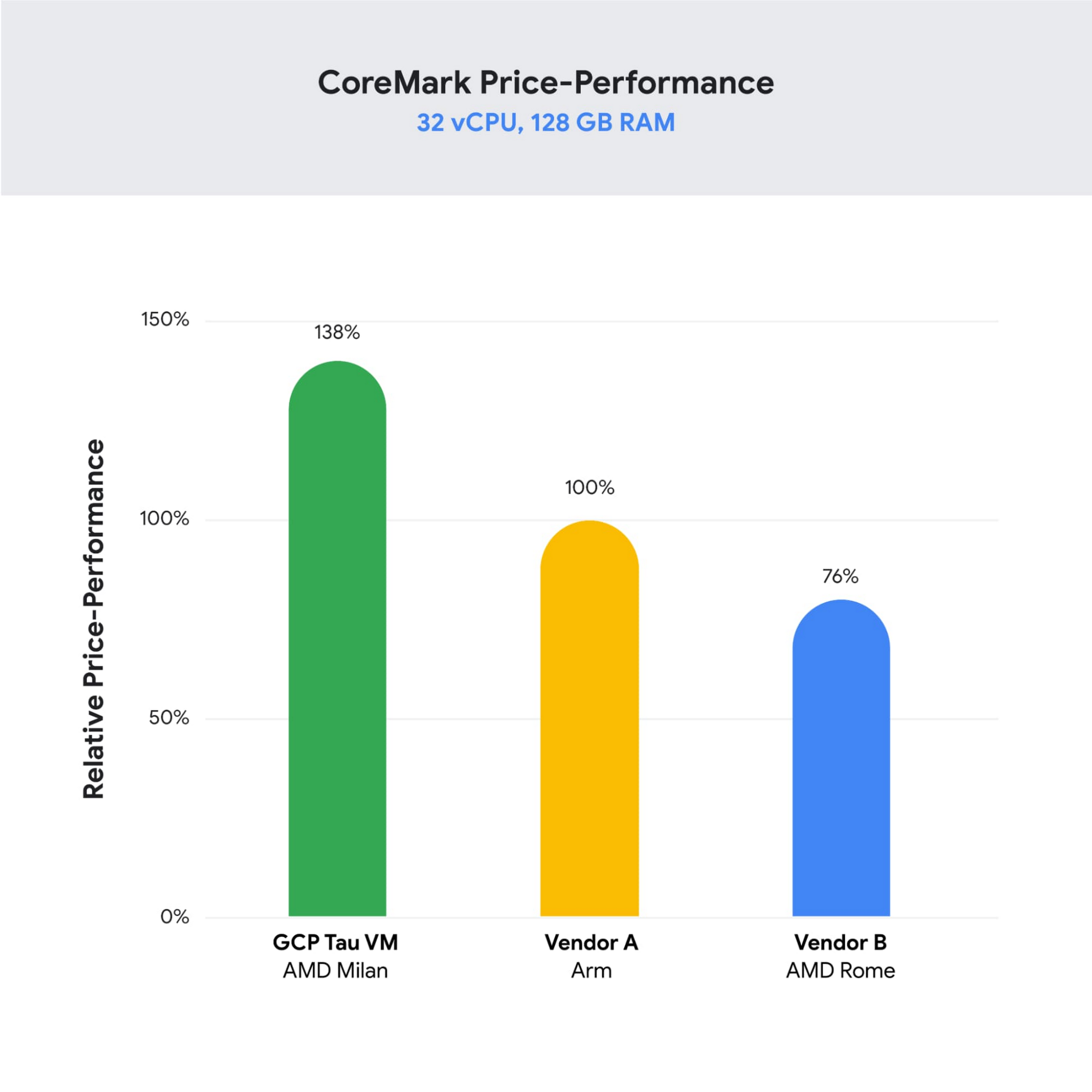
“DoiT partners with leading cloud vendors who are focused on growth and cost optimization,” said Yoav Toussia-Cohen, CEO, DoiT International. “In our preliminary testing of Google’s new Tau VMs with the Coremark benchmark, we were thrilled to see the incredible performance at 50% better than a comparable ARM-based offering from another leading public cloud. With Tau VMs, Google Cloud has set a new bar for price-performance, making the cloud even more accessible to digital-native companies. We are excited to bring Google’s Tau VMs to our joint customers.”
Designed for demanding scale-out workloads
Tau VMs bring the benefit of Google’s long-standing experience engineering platforms for scale-out workloads to our customers. They come in multiple predefined VM shapes, with up to 60vCPUs per VM, and 4GB of memory per vCPU. They offer up to 32 Gbps networking bandwidth and a wide range of network attached storage options, making Tau VMs ideal for scale-out workloads including web servers, containerized microservices, data-logging processing, media transcoding, and large-scale Java applications.
Google Kubernetes Engine support
Google Kubernetes Engine (GKE) is the de facto standard for organizations looking for advanced container orchestration, delivering the highest levels of reliability, security, and scalability. GKE supports Tau VMs on day 1, helping you optimize price-performance for your containerized workloads. You can add Tau VMs to your GKE clusters by specifying the T2D machine type in your GKE node-pools.
Pricing
Tau VMs will be priced to support significant TCO and price-performance improvements for your cloud applications. A 32vCPU VM with 128GB RAM will be priced at $1.3520 per hour for on-demand usage in us-central1.
Coming soon to a Google Cloud region near you
If you are interested in trying out T2D VMs when they become available in Q3 2021 please sign-up here.
3912
Of your peers have already watched this video.
15:11 Minutes
The most insightful time you'll spend today!
Communication in G Suite: The Future of Gmail, Chat, Meet, and More
Let’s take a step back and acknowledge the sudden shift that many of our businesses and employees have recently faced in the workplace.
A lot of people, who for a really long time relied on physical office space and infrastructure to both communicate and collaborate, have had to shift how they work and quickly. The crisis at hand has become a massive catalyst to remote, distributed and flexible work. And almost 3/4 of CFOs actually predict that these changes will permanently affect how companies choose to work moving forward.
While we’re well into this new reality, I want to quickly recap a few ways we’ve adapted to try to make this change to flexible work easier on people and organizations. First, we made premium Meet features available to all G Suite users, which meant that every customer, from schools to startups to small businesses to large enterprises, could leverage larger meeting sizes, live streams, recordings, and more.
In this video, find out more about how Google Workspace (formerly G Suite) is changing the future of work.
Ease Your Migration and Modernization Journey with Microsoft and Windows on Google Cloud Demo Center

8273
Of your peers have already read this article.
2:00 Minutes
The most insightful time you'll spend today!
If you’re looking to migrate and modernize your Microsoft and Windows workloads, Google Cloud is your premiere destination. No matter what migration strategy you’ve selected or what value you’re looking to achieve, with Google Cloud you’re able to:
- simplify your migration and modernization journey
- reduce your on-prem footprint and increase agility
- optimize license usage to reduce costs
- modernize to reduce single-vendor dependencies
- rely on enterprise-class support backed by Microsoft
Whether you’re looking to migrate applications running on Windows virtual machines, adopt Windows containers in Google Kubernetes Engine (GKE), convert SQL databases to Cloud SQL, or something else, Google Cloud offers you the first-class experience you need.
But we don’t want you to take our word for it. Try it out yourself with our new online Microsoft and Windows on Google Cloud Demo Center without any commitment or friction.

The demo center uses hands-on guided simulations to walk you through several scenarios for solving business critical challenges with Google Cloud’s Microsoft and Windows solutions. Because these are all simulated, you’ll see how it works without any deployment, configuration, or commitment. It’s a seamless way for you to see exactly how Google Cloud can help you.
Run dedicated hardware and optimize with sole tenant
Sometimes you might want to run your workloads on dedicated hardware (with oversubscription options) for compliance, licensing, and management. Google Cloud provides sole-tenant nodes that allow you to easily deploy your virtual machines onto dedicated machines to avoid “noisy neighbor” issues, address regulatory or licensing constraints, and optimize inter-VM communications.
Plus, the CPU Overcommit option allows oversubscribing sole-tenant node resources by up to 2x, therefore helping save on per-physical core licensing for many licensed workloads like SQL Server.
Learn how to set up a sole tenant group and node.
Optimize license costs with premium images & custom VMs
One of the easiest ways to optimize your cloud experience with virtual machines (VM) is to pick the right VM image. Google Cloud provides premium license-included VM images that are thoroughly tested and optimized, including SQL Server options with pay-as-you-go licensing. These are great for workloads that don’t need to run all the time or when you do not have spare licenses for bring your own license (BYOL).
Explore some Windows & SQL images and learn how CPU/Memory options can help optimize deployment and save on licensing.
Modernize your databases with Managed SQL Server
Sometimes you need to manage your SQL Server instance to achieve certain business or operational goals. But more often, managing SQL Server deployments can be undifferentiated: backups, high-availability, updates, and patching are just some of the many things you have to take care of when going the do-it-yourself route. One way to modernize your database tier is to migrate to a managed service like Cloud SQL, which is a fully managed Relational Database service for SQL.
Explore the process of creating an instance in just a few clicks!
Extract apps from VMs and move to containers in GKE with Migrate for Anthos
Many Windows workloads running on virtual machines such as Internet Information Services (IIS) are ideal candidates for migrating to containers without major changes like rewriting or rearchitecting. However, doing this migration manually can be tedious, which is why Migrate for Anthos can help easily re-platform a .NET app running on IIS into a container-based app.
Simulate intelligently extracting, migrating, and modernizing applications to run natively on containers in GKE and Anthos clusters.
Move .NET applications to GKE on Windows without code changes
When you’re looking to go fully cloud native, you can leverage Windows containers in GKE without rewriting your .NET applications. Simply create clusters with Windows nodes and deploy containerized Windows workloads in a few clicks, even alongside Linux containers. These deployments reduce operational overhead with features such as auto-upgrade, auto-repair, and release channels.
Learn how easy it is to build a GKE cluster with a Windows node and deploy an app.
Now that you’ve gotten a feel for what’s available, go check out the Demo Center. You can also visit us at Windows and Microsoft on Google Cloud to learn more.
Iroquois Healthcare Association Leverages Chrome OS to Keep Staff, Patients and Families Remotely Connected

3966
Of your peers have already read this article.
3:00 Minutes
The most insightful time you'll spend today!
Editor’s note: Today’s post is by Eileen Murphy, Senior Director of Special Projects, and Andrew Nault, Director of Business Development, both from Iroquois Healthcare Association Workforce Investment Organization (IHA WIO). The health association represents 44 hospitals in 32 counties in New York State, providing advocacy, cost-saving initiatives, and business solutions. IHA WIO has provided its participating long-term care organizations with more than 5,000 Chromebooks to support 80 organizations in several ways, including training staff, connecting nursing home residents to their families, and helping administrative staff work safely from home.
Since early 2020, clinicians and staff at IHA WIO participant organizations have had to adapt to constant change—everything from implementing pandemic safety protocols to helping nursing-home residents stay in touch with families. We’re proud of the wonderful work they’ve done and continue to do.
During the pandemic, our use of Chrome OS and Chrome devices was expanded and changed to meet the needs of organizations dealing with an unprecedented event. Chrome devices were used to not only train staff but to enable remote work, as well as to connect residents to their friends and families during long periods of isolation. In the morning, a Chromebook could be in a managed guest session mode, helping a grandmother virtually attend her grandkids’ birthday party; at lunch, a nursing assistant could log in to her latest continuing education classes on that same Chromebook.
That evening, the Chrome OS devices could be found at check-in desks, helping visitors fill out a COVID-19 survey. All it took to change a device’s purpose were a few clicks in the Google Admin console, all of which could be done remotely.
Chrome OS for training
Most of our 5,000 Chrome OS devices came from a New York State grant to provide continued education training for long-term care organizations and its employees. We wanted to offer online classes, which meant we’d have to give people the technology to access that training. Our partner, CDW, recommended Chrome OS for us because it’s an operating system built for the cloud. In addition, devices running Chrome OS are easy to use, easily shared, and cost-effective.
Best of all, Chromebook Enterprise came with all the enterprise capabilities of Chrome OS unlocked. This allowed us to use the Google Admin console to manage our entire Chromebook Enterprise fleet remotely. We were able to set up one high-level organizational unit across IHA, with almost 80 organizational units for facilities and groups.
To support training, Lenovo helped us create a five-minute video that we added to our HealthStream learning platform so staff could learn the basics of using Chromebooks. This video was created because we didn’t realize there were people who have never touched a laptop before. The video and Chrome OS ease of use made it possible to get the folks who needed the most help up to speed quickly.
Chrome OS for connecting residents to loved ones
Once the pandemic began and people could no longer visit nursing home residents, the staff for one of our facilities asked about using a training Chromebook for video calls between residents and families. We loved this idea as it was still in line with our mission: to enable the workforce to provide higher-quality care.
With the Admin console, the process was easy. We changed the managed guest session to auto load, and changed what is populated on startup. With help from healthcare staff, residents were able to choose from several video apps including Google Meet, Zoom, and Facebook.
Chrome OS for remote workers
When office and administrative staff had to work remotely, Chromebooks again came to the rescue. Since staff could access all their work applications via Citrix—like Outlook, office phone systems, and other public documents—we placed the remote-work laptops in managed guest session mode and loaded the Citrix app at startup. All the employees had to do was connect to Wi-Fi and log into Citrix, and they were ready to work.
With our training program still running and virtual remote ability on the rise, we realized we would need more Chromebooks. CDW informed us that Chrome OS device supply was running low, but they located 1,000 Chromebooks for us and sent them to our home office in Clifton Park, New York.
Normally, the job of configuring and shipping 1,000 laptops would strike fear into the hearts of the IT team. Not this time: With zero-touch enrollment, all of the Chromebooks were enrolled in our high-level organizational unit before the boxes arrived at our Clifton Park office. We created a list of Chromebook serial numbers for each IHA location getting a shipment, then packed up the boxes. We never had to open a Chromebook box, or even turn the devices on before preparing them for use by employees.
Chrome OS for telehealth and clinic kiosks
There were more Chromebook transformations to come. In the interest of keeping residents and medical professionals safe, we enabled Chromebooks for non-urgent telehealth sessions. Doctors and nurses could see and talk to nursing home residents, using the same video conferencing apps that residents used to talk to loved ones. In these cases, we had PointClickCare, our electronic medical records app, loaded at startup on doctors’ Chromebooks.
We even turned a few Chromebooks into guest kiosks at IHA member hospitals that have walk-in clinics. If the clinics required visitors to fill out a COVID-19 screening form, the Chromebook, in kiosk mode, was stationed at the front desk. Once visitors submitted the form, a new blank form appeared, ready for the next visitor without any data stored on the device.
Chrome OS for whatever’s needed next
What’s amazing is that we could help people in all these different ways in just a few minutes—without visiting a nursing home, getting someone to ship laptops back to us, or loading software. Chromebooks are so versatile that sometimes they’re used in various modes several times a day. One user can log in, while another user can use managed guest sessions to login as a guest user. No matter what changes come to our healthcare association in the future, we’ll be ready.
Canva: Democratizing design and collaborating closely with Google Workspace

3998
Of your peers have already read this article.
3:30 Minutes
The most insightful time you'll spend today!
Launched in 2013, Canva is a free online design platform with a mission to empower everyone in the world to design. Featuring a simple drag-and-drop user interface and a vast range of templates ranging from presentations, social media graphics, posters, apparel to videos, plus a huge library of fonts, stock photography, illustrations, video footage and audio clips, anyone can take an idea and create something beautiful. The Canva team is located across the globe with offices in the United States, China, the Philippines and Australia.
A long-term user
“To empower our team to undertake deep work, we have a recurring weekly Calendar invitation that keeps an entire day free of meetings across the business.” – Jeff Lai, Internal Infrastructure Specialist, Canva
A business that enables collaboration, innovation, and creativity is a natural fit for Google Workspace, an integrated suite of secure, cloud-native collaboration and productivity applications. Canva is a long-term user of the application suite and Jeff Lai, Internal Infrastructure Specialist, says “being a global business from day one, the company wanted to ensure any technology we used would be able to grow and scale with us.
“Google Workspace certainly met the brief. For example, creating new Google Workspace instances is very easy, you simply connect them to your domain and away you go.”
Canva has 1,850 Google Workspace licenses to cover its approximately 1,200-strong workforce, plus service accounts and shared accounts. The application suite covers the organization’s communication, connectivity and productivity needs, with enough storage to enable the business not to have to pay for supplementary storage services or deploy storage in-house. Canva’s team of designers, developers, marketers, investors and advisers uses Google Workspace for tasks such as scheduling meetings, emailing and chatting to internal and external parties, storing files and tracking activity on spreadsheets.
“Google Workspace is like air and water to us,” says Jeff. “it is part of the natural environment of our workplace.”
Reviewing licensing
With Google Workspace enabling Canva’s global workforce model, the business is exploring ways of further leveraging the features available through the application suite; Jeff reveals Canva is exploring the use of enterprise-class licenses that provide additional reporting and auditing capabilities.
Near-100% availability
“We expect Google Workspace to continue to play a key role in our operations and in supporting an increasingly international workforce.” – Jeff Lai, Internal Infrastructure Specialist, Canva
Supporting a distributed model with an increasing number of employees based outside Australia also requires Canva to use collaboration and productivity tools available 24 hours a day, seven days a week.
Google Workspace applications help the business drive continuous improvement from the bottom up, as well as the top down. Canva uses Forms to capture — in what Jeff describes as ‘no-judgement’ fashion — new ideas, callouts of broken processes, or areas of improvement. These comments and suggestions go directly to founders and senior management for action.
Furthermore, Google Workspace enables Canva to run a continuously productive working environment. “To empower our team to undertake deep work, we have a recurring weekly Calendar invitation that keeps an entire day free of meetings across the business,” says Jeff.
Growth example of ‘new normal’
Canva’s team believes the organization’s accelerated growth is indicative of the ‘new normal’, as more teams realize the need for a more scalable, more collaborative, more affordable and more user-friendly design platform.
Organizations of all sizes are doubling down on building a reliable remote workplace, and are turning to modern productivity and collaboration platforms like Canva to ensure they remain flexible and scalable.
Google Workspace and other Google Cloud products and services also enable Canva to increase the value of its own platform. The business uses Translation API to translate non-English searches into English, allowing it to display appropriate images and other elements.
Furthermore, the Canva editing tool enables users to pull files from Drive to be refined, while the platform also integrates with Google Maps and YouTube to give end users the ability to easily create items such as online brochures with these products integrated into them. Finally, Canva for Education — a tailored product to support student learning — integrates with Google Classroom, helping educators efficiently manage progress and connect with students at school, from home or on the go.
With Google Workspace, Canva is ideally positioned to continue growing its user base and build on the success of a platform that has thousands of templates and fonts, and millions of stock photos, icons and illustrations. Jeff says the business remains focused on the same goal as its founders had right at the start — making design accessible to everyone. “We expect Google Workspace to continue to play a key role in our operations and in supporting an increasingly international workforce,” he says.
More Relevant Stories for Your Company

Transport Platform’s Richly-detailed Geospatial Data Allows Commuters to Track Buses in Real-time!
Vinayak Bhavnani, Co-Founder and CTO of India-based bus transport technology company Chalo, shares how Google Maps Platform is used to improve visibility for commuters and bus operators across India by visualizing geospatial data. Effective public transport networks contribute to the local economy and help make cities safe, pleasant, and sustainable.

How Swiggy’s UK Competitor Expanded to 14 Countries in Just Three Years
Deliveroo is the fastest-growing technology company in the United Kingdom, and the first-ever to win Deloitte's UK Technology Fast 50 two years in a row. Founded in 2013, the food courier service achieved a three-year growth rate of over 15,000% to 2018, expanding beyond its London base to operate in 14 countries in

In sync for better efficiency: Effective collaboration strategies for distributed workforces
Workplace collaboration continues to evolve as hybrid work expands its footprint. While both “same-time” and “staggered-time” (or asynchronous) collaboration modes each have their place in the hybrid work environment, organizations and teams sometimes overuse one mode over another. That’s probably because in-person meetings or collaborating in real time have been

How Kisan Network is Connecting Over 30,000 Farmers to Help them Reap Over 10% More Profits from Their Crops
For many people, an Ivy League education is a promise of a better future. But Aditya Agarwalla, who studied computer science at Princeton, didn’t want to limit that future to just himself. He wanted to share his good fortune and create a positive social impact in his home country of
