





Elevate Your SRE Practice: Streamlining Your SLO Design Process

1482
Of your peers have already read this article.
2:30 Minutes
The most insightful time you'll spend today!
Poll three Site Reliability Engineers with the question “What is SRE?” and you’re likely to get five different answers: an implementation of DevOps, a role, a set of practices, a cultural shift, a snazzy title. While these definitions may not necessarily align with those in the SRE books, there is one throughline differentiating SRE from other ways of working: Service Level Objectives (SLOs). While simple to understand – intentionally! – SLOs are frequently challenging to define in practice. And even though the specifics of an SLO vary across industries and verticals, we have found there are a number of practices and strategies common amongst teams that have successfully implemented SLOs for their workloads.
Bringing together product, development, and SRE teams to achieve a common understanding of the workload in question, and in particular its critical user journeys (CUJ), is a key first step. For many teams this means writing down, often for the first time, detailed sequence or flow diagrams for these CUJs. The maturity of and the relationship between the three “legs of the stool” (development, product, and SRE) will play a role in the level of effort required to complete this first step of the journey. Having a common understanding of your users’ expectations of your workload is a prerequisite to writing effective SLOs.
While modeling user journeys and decomposing them into SLOs is an art and no two applications are alike, there are a few key aspects upon which to anchor your discussion. The main question we recommend you keep top-of-mind when going through this process is “What do my users care about?” Framing your thought process in this way prevents implementation snafus and strategies that don’t approximate user expectations. Other aspects to consider include:
- Are there breakpoints where the user may choose not to take an action?
- Which parts of the interaction are we capable of measuring and which are we not (e.g., third-party dependencies)?
- Which parts of the user journey are common across many user journeys and thus are possible candidates for factoring out as their own CUJ (example: login)?
- Which parts of the journey can be measured in aggregate, and which must be separated because of differences in criticality, request rates, or other factors?
- Which steps of the journey have strict dependencies between one another?
Armed with answers to these questions, a detailed request diagram, and your application code, you’re ready to start putting pen to paper! Before jumping into your monitoring consoles, we recommend writing up an SLO design document which lays out the technical details of your chosen SLOs. We’ve made a template available to you to jump start this process (if you have a Google account, you can make a copy using this link). In it, you’ll find an empty template along with worked examples for reference as you create your own specifications. Whether you use this template or not, we recommend the following as you document your SLOs:
- Be pedantic with technical specifications – they will matter during implementation
- Maintain a section outlining clarifications, caveats, and/or tradeoffs made as a part of the design process
- Consider where you’re measuring – make sure it’s feasible
- Beware of summaries, averages, and other non-aggregatable statistics for latency SLOs
- Keep compliance periods consistent across your workload(s)
- We recommend the following defaults:
- 28 days rolling for operational needs (error budget alerting)
- Fixed calendar quarters for prioritization and lookback
- Changelog: Include one, even if your documentation tool has version history, so you can track major changes
- Put your SLO documentation in a location accessible by your team and company stakeholders
- Once your SLO PRD is finalized, treat your implementation as code and store it in your version control system
- Remember – DRY!
We hope these recommendations and template give you a head start in bringing your SLOs to production. If you find yourself in need of a tool to implement your SLOs, consider Google Cloud SLO Monitoring which allows you to create SLOs for any metric available in Google Cloud Monitoring and computes your error budget automatically, enabling burn rate-based alerting. If this process still feels daunting or you find your team in need of help with any of the above, our reliability engineering professional services team can assist. For more information, visit cloud.google.com/sre or you can contact your Google Cloud account team.
No-code Development Platforms Help Employees Reclaim their Time and Talent

3881
Of your peers have already read this article.
4:00 Minutes
The most insightful time you'll spend today!
As offices reopen, businesses aren’t keeping to a single formula. Many are embracing hybrid models, with employees splitting time between home and the office. Some are staying 100% remote. Others are returning the full workforce to offices with a greater focus on digitization.
Regardless of their model, one thing is certain: technology is more central than ever to organizations’ ability to work smarter and more effectively. In particular, organizations need technology that can be tailored to specific business needs. For example, a retail store manager may need a way to ensure improved sanitation practices, or office workers may need to create an app to manage desk reservations.
Google Workspace can help by bringing together everything you need to get things done, all in one place—including the ability to build custom apps and automations with AppSheet. AppSheet, Google Cloud’s no-code development platform, lets employees–even those with no programming experience–reclaim their time and talent by building custom apps and automations.
Building solutions with AppSheet is often easier and faster than traditional coding, as AppSheet leverages Google’s machine learning expertise to help you quickly go from idea to solution, helping your business to match the pace and agility that today’s landscape requires. In this article, we’ll explore how you can use AppSheet to create custom solutions that will help your business adapt to shifting business needs. To illustrate, we’ll focus on a use case many businesses face: reservation and management of meeting rooms and other office resources, but this process can easily be adapted for a wide variety of use cases, from apps for retail pickup to incident reporting and more.
Simplify and centralize with apps
The first thing to consider is whether your solution would be best managed via a custom interface. If you’re trying to simplify a process for someone, such as inspections or inventory tracking, or centralize information, such as resource portals or events calendars, creating a custom app is the way to go.
For this example app, we created a simple Google Sheet to hold our backend data. Sheets are ideal backend data sources when we know the amount of data will not grow exponentially, especially when piloting to a first office or group of users. We can switch our data seamlessly at any time to a scalable Google Cloud SQL database or other database if needed.
The example app has several worksheets to manage the different buildings, rooms, checkpoints and people (including their roles).

We can build an app in AppSheet directly from our Sheet by selecting Tools > AppSheet > Create an App.
After creating our app, we see an overview of the data that we’ve connected, how pieces of data relate to each other, the views that are presented to the user, and a live interactive preview of the app. Refining the app is intuitive. When you input keywords, for instance, AppSheet surfaces appropriate functionality options that can be further customized. If we have address or location data, it’s automatically turned into a map view that we can further customize.
Our office management app will offer building managers and cleaners administrative features for managing equipment, disinfection schedules, and maintenance information, and it will also offer views for employees to check occupancy and safely reserve desks and equipment.
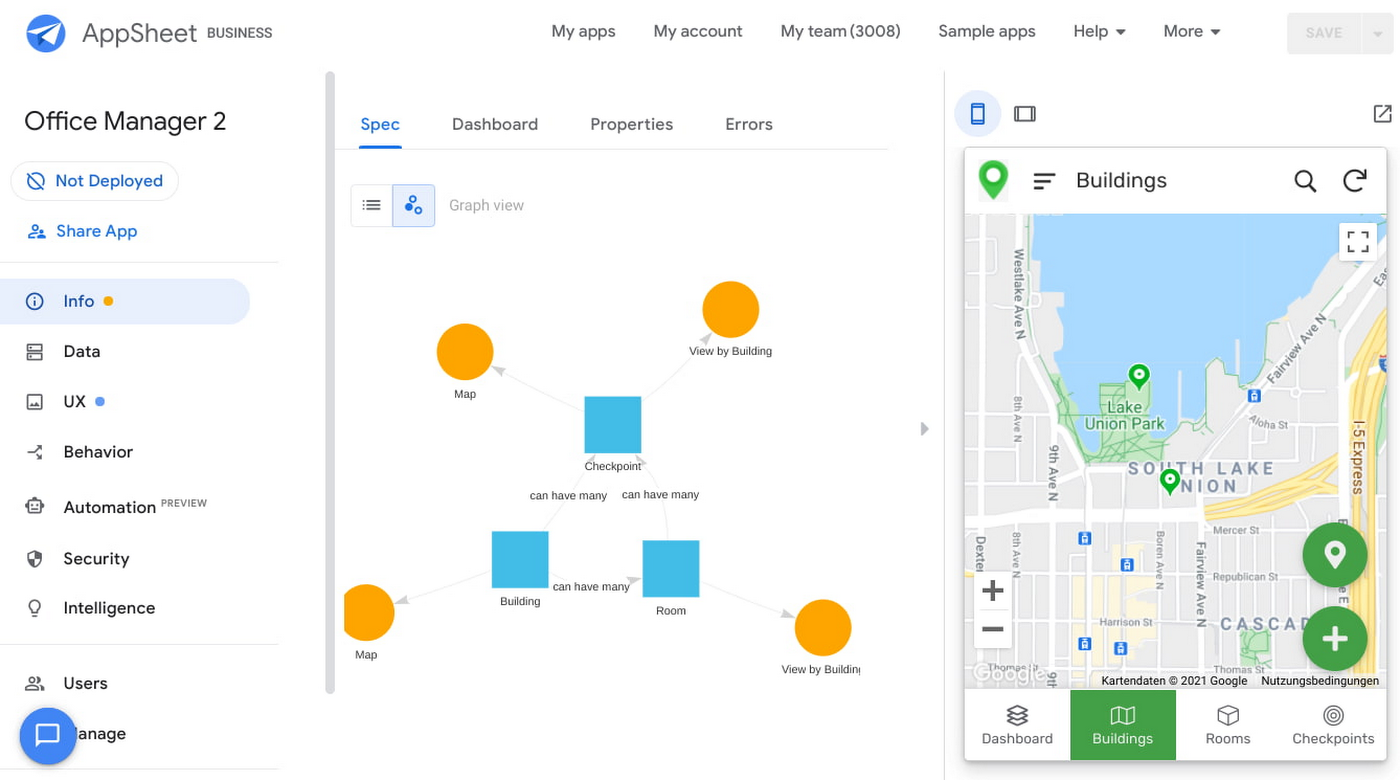
Opening an office and then a room in the app gives us an overview of both the floorplan and the occupancy and reservations for spaces and equipment in the room.
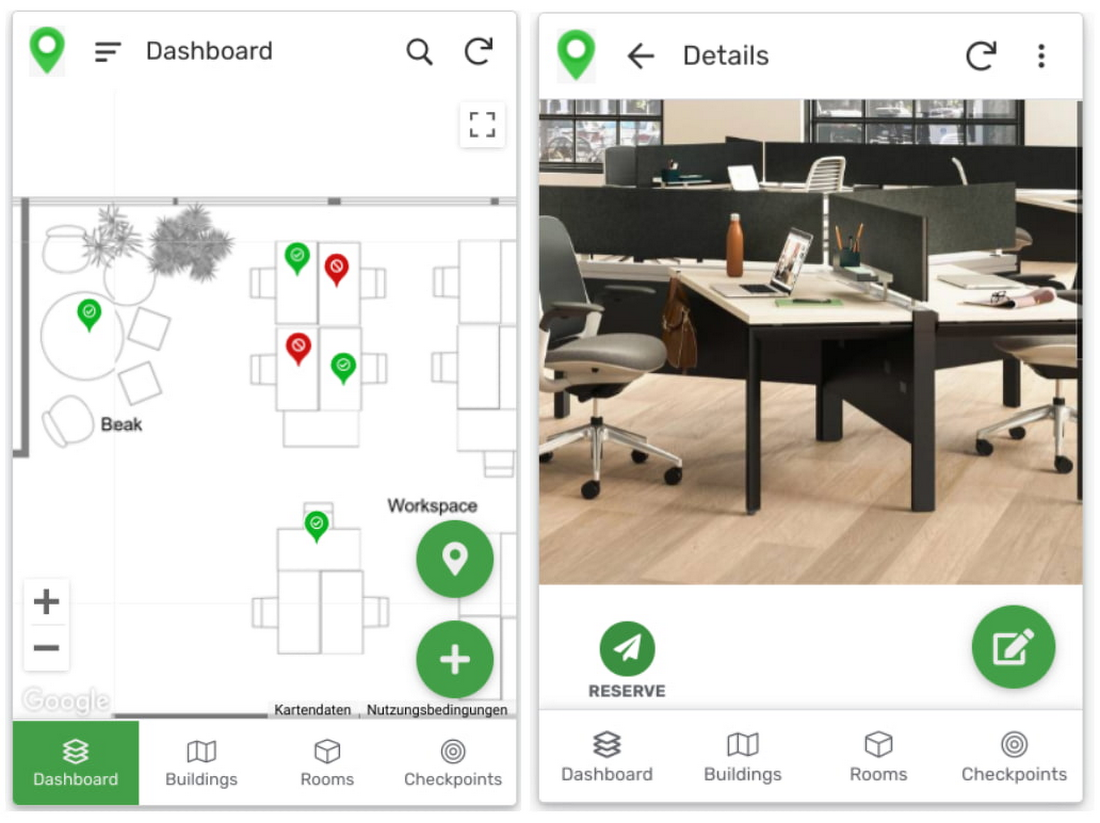
Users can then reserve spaces and equipment in the app, without having to first search for a form or page in the intranet, or even log onto their work computer. The reservation is an automation routine in AppSheet, which performs pre-configured actions when triggered.
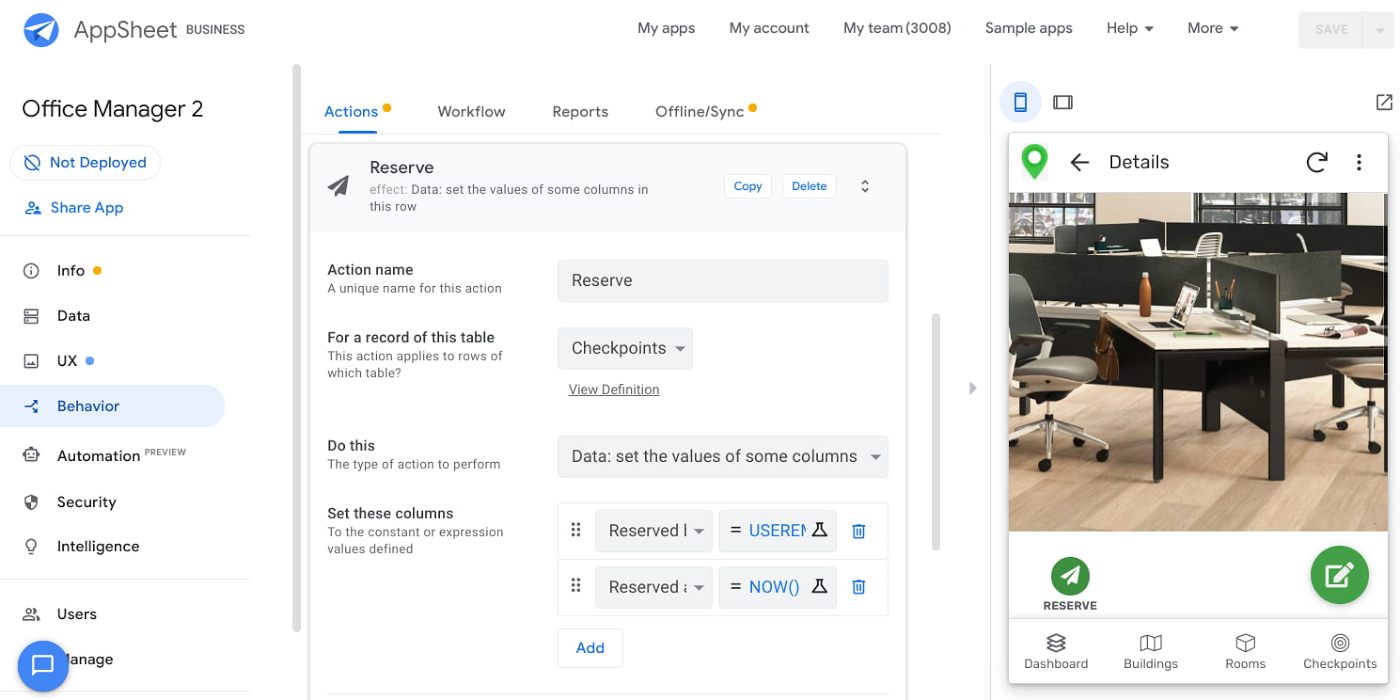
As illustrated in the screenshot above, when the action is triggered either by pressing a button in the app, scanning a QR code, or tapping an RFC tag, the action simply sets the “Reserved by” and “Reserved at” columns to the current user and timestamp.
Streamline with automations
AppSheet Automation, which was recently made generally available, makes it possible to reduce repetitive tasks and streamline processes even further.
In this example, one challenge you may encounter is that users often forget to release a desk or resource when they’re finished, which means those reservations stay blocked until an administrator releases all blocked reservations. However, it’s also important that resources aren’t immediately released, as they first need to be cleaned and disinfected before being made available to new users.
AppSheet Automation can solve this challenge by periodically checking all resources that have been reserved for longer than four hours, then alerting the user to either re-reserve them or release them to be cleaned. If there is no answer, the automation can trigger the resources to be cleaned, then released.

We can configure this as a recurring event, and create a bot that sends the notifications and triggers actions based on the user input (or lack of input).
Optimize for multiple roles
Creating an app for one user is one thing–creating an app that fits the needs of multiple types of users is another. AppSheet has you covered for this kind of complexity because it lets you build multiple roles into a single app.
In our office management app, for example, the office manager can have a particular view and dashboard, and workers in the office can have their own views and functionalities front and center. This makes it possible to automate tasks for all types of users with a single app.
Likewise, AppSheet Automation lets you easily react to real-time changes in data, send notifications to groups of users, and initiate additional workflows using data shared between the app and the users. If a group needs to reserve a conference space for an important late-breaking meeting, for example, there might be ripple effects across a number of user groups. The ability to automate all these updates and interactions can ultimately save a lot of time and effort.
AppSheet also supports advanced features such as QR codes, NFC, and bluetooth sensor integration. This could help users check into locations or workspaces, further streamlining the task of helping people safely navigate and collaborate within the office.
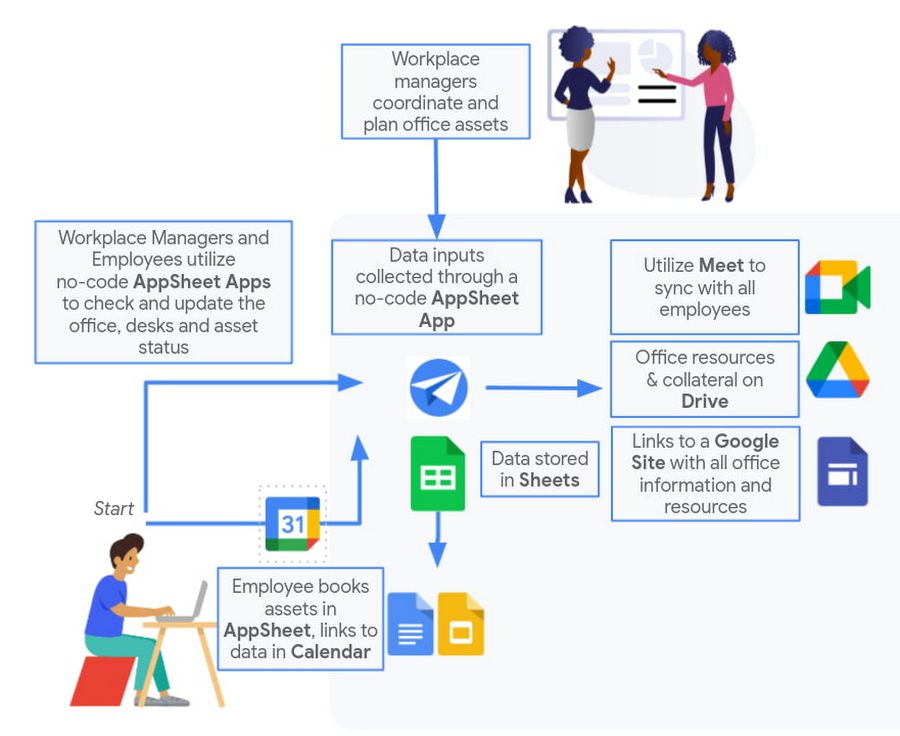
Mission critical solutions, faster than ever
In the past, the type of app explored in this article would have required a central data store, distribution to specific groups of users, management and dashboard capabilities, as well as smartphone sensor integration for NFC and image capturing. This would have necessitated a mammoth implementation project and a team of professional coders.
But with no-code, you can effectively design and implement these requirements in hours and days rather than months and years. Changes can be made on the fly in any browser, including pushing out new versions to users. Though AppSheet opens up app building and digital automations to any knowledge worker, it also includes robust security and governance controls, ensuring that as you manage getting employees back into office, you don’t neglect IT security.
Try out your own back-to-the-office app for free today at AppSheet.com, or explore and copy our sample app.
Canva: Democratizing design and collaborating closely with Google Workspace

3996
Of your peers have already read this article.
3:30 Minutes
The most insightful time you'll spend today!
Launched in 2013, Canva is a free online design platform with a mission to empower everyone in the world to design. Featuring a simple drag-and-drop user interface and a vast range of templates ranging from presentations, social media graphics, posters, apparel to videos, plus a huge library of fonts, stock photography, illustrations, video footage and audio clips, anyone can take an idea and create something beautiful. The Canva team is located across the globe with offices in the United States, China, the Philippines and Australia.
A long-term user
“To empower our team to undertake deep work, we have a recurring weekly Calendar invitation that keeps an entire day free of meetings across the business.” – Jeff Lai, Internal Infrastructure Specialist, Canva
A business that enables collaboration, innovation, and creativity is a natural fit for Google Workspace, an integrated suite of secure, cloud-native collaboration and productivity applications. Canva is a long-term user of the application suite and Jeff Lai, Internal Infrastructure Specialist, says “being a global business from day one, the company wanted to ensure any technology we used would be able to grow and scale with us.
“Google Workspace certainly met the brief. For example, creating new Google Workspace instances is very easy, you simply connect them to your domain and away you go.”
Canva has 1,850 Google Workspace licenses to cover its approximately 1,200-strong workforce, plus service accounts and shared accounts. The application suite covers the organization’s communication, connectivity and productivity needs, with enough storage to enable the business not to have to pay for supplementary storage services or deploy storage in-house. Canva’s team of designers, developers, marketers, investors and advisers uses Google Workspace for tasks such as scheduling meetings, emailing and chatting to internal and external parties, storing files and tracking activity on spreadsheets.
“Google Workspace is like air and water to us,” says Jeff. “it is part of the natural environment of our workplace.”
Reviewing licensing
With Google Workspace enabling Canva’s global workforce model, the business is exploring ways of further leveraging the features available through the application suite; Jeff reveals Canva is exploring the use of enterprise-class licenses that provide additional reporting and auditing capabilities.
Near-100% availability
“We expect Google Workspace to continue to play a key role in our operations and in supporting an increasingly international workforce.” – Jeff Lai, Internal Infrastructure Specialist, Canva
Supporting a distributed model with an increasing number of employees based outside Australia also requires Canva to use collaboration and productivity tools available 24 hours a day, seven days a week.
Google Workspace applications help the business drive continuous improvement from the bottom up, as well as the top down. Canva uses Forms to capture — in what Jeff describes as ‘no-judgement’ fashion — new ideas, callouts of broken processes, or areas of improvement. These comments and suggestions go directly to founders and senior management for action.
Furthermore, Google Workspace enables Canva to run a continuously productive working environment. “To empower our team to undertake deep work, we have a recurring weekly Calendar invitation that keeps an entire day free of meetings across the business,” says Jeff.
Growth example of ‘new normal’
Canva’s team believes the organization’s accelerated growth is indicative of the ‘new normal’, as more teams realize the need for a more scalable, more collaborative, more affordable and more user-friendly design platform.
Organizations of all sizes are doubling down on building a reliable remote workplace, and are turning to modern productivity and collaboration platforms like Canva to ensure they remain flexible and scalable.
Google Workspace and other Google Cloud products and services also enable Canva to increase the value of its own platform. The business uses Translation API to translate non-English searches into English, allowing it to display appropriate images and other elements.
Furthermore, the Canva editing tool enables users to pull files from Drive to be refined, while the platform also integrates with Google Maps and YouTube to give end users the ability to easily create items such as online brochures with these products integrated into them. Finally, Canva for Education — a tailored product to support student learning — integrates with Google Classroom, helping educators efficiently manage progress and connect with students at school, from home or on the go.
With Google Workspace, Canva is ideally positioned to continue growing its user base and build on the success of a platform that has thousands of templates and fonts, and millions of stock photos, icons and illustrations. Jeff says the business remains focused on the same goal as its founders had right at the start — making design accessible to everyone. “We expect Google Workspace to continue to play a key role in our operations and in supporting an increasingly international workforce,” he says.
Ease Your Migration and Modernization Journey with Microsoft and Windows on Google Cloud Demo Center

8264
Of your peers have already read this article.
2:00 Minutes
The most insightful time you'll spend today!
If you’re looking to migrate and modernize your Microsoft and Windows workloads, Google Cloud is your premiere destination. No matter what migration strategy you’ve selected or what value you’re looking to achieve, with Google Cloud you’re able to:
- simplify your migration and modernization journey
- reduce your on-prem footprint and increase agility
- optimize license usage to reduce costs
- modernize to reduce single-vendor dependencies
- rely on enterprise-class support backed by Microsoft
Whether you’re looking to migrate applications running on Windows virtual machines, adopt Windows containers in Google Kubernetes Engine (GKE), convert SQL databases to Cloud SQL, or something else, Google Cloud offers you the first-class experience you need.
But we don’t want you to take our word for it. Try it out yourself with our new online Microsoft and Windows on Google Cloud Demo Center without any commitment or friction.

The demo center uses hands-on guided simulations to walk you through several scenarios for solving business critical challenges with Google Cloud’s Microsoft and Windows solutions. Because these are all simulated, you’ll see how it works without any deployment, configuration, or commitment. It’s a seamless way for you to see exactly how Google Cloud can help you.
Run dedicated hardware and optimize with sole tenant
Sometimes you might want to run your workloads on dedicated hardware (with oversubscription options) for compliance, licensing, and management. Google Cloud provides sole-tenant nodes that allow you to easily deploy your virtual machines onto dedicated machines to avoid “noisy neighbor” issues, address regulatory or licensing constraints, and optimize inter-VM communications.
Plus, the CPU Overcommit option allows oversubscribing sole-tenant node resources by up to 2x, therefore helping save on per-physical core licensing for many licensed workloads like SQL Server.
Learn how to set up a sole tenant group and node.
Optimize license costs with premium images & custom VMs
One of the easiest ways to optimize your cloud experience with virtual machines (VM) is to pick the right VM image. Google Cloud provides premium license-included VM images that are thoroughly tested and optimized, including SQL Server options with pay-as-you-go licensing. These are great for workloads that don’t need to run all the time or when you do not have spare licenses for bring your own license (BYOL).
Explore some Windows & SQL images and learn how CPU/Memory options can help optimize deployment and save on licensing.
Modernize your databases with Managed SQL Server
Sometimes you need to manage your SQL Server instance to achieve certain business or operational goals. But more often, managing SQL Server deployments can be undifferentiated: backups, high-availability, updates, and patching are just some of the many things you have to take care of when going the do-it-yourself route. One way to modernize your database tier is to migrate to a managed service like Cloud SQL, which is a fully managed Relational Database service for SQL.
Explore the process of creating an instance in just a few clicks!
Extract apps from VMs and move to containers in GKE with Migrate for Anthos
Many Windows workloads running on virtual machines such as Internet Information Services (IIS) are ideal candidates for migrating to containers without major changes like rewriting or rearchitecting. However, doing this migration manually can be tedious, which is why Migrate for Anthos can help easily re-platform a .NET app running on IIS into a container-based app.
Simulate intelligently extracting, migrating, and modernizing applications to run natively on containers in GKE and Anthos clusters.
Move .NET applications to GKE on Windows without code changes
When you’re looking to go fully cloud native, you can leverage Windows containers in GKE without rewriting your .NET applications. Simply create clusters with Windows nodes and deploy containerized Windows workloads in a few clicks, even alongside Linux containers. These deployments reduce operational overhead with features such as auto-upgrade, auto-repair, and release channels.
Learn how easy it is to build a GKE cluster with a Windows node and deploy an app.
Now that you’ve gotten a feel for what’s available, go check out the Demo Center. You can also visit us at Windows and Microsoft on Google Cloud to learn more.
IT Team Figures Out Easiest Way to Build Data Pipelines and Create ML Models

14051
Of your peers have already read this article.
5:15 Minutes
The most insightful time you'll spend today!
Building a strong brand in today’s hyper-competitive business environment takes vision. It also requires a flexible, easily managed approach to digital asset management (DAM), so marketing professionals and other stakeholders can easily share, store, track, and manipulate assets to build the brand.
Many of today’s leading companies, including JetBlue, Slack, TripAdvisor, Lyft, and HealthONE, rely on Brandfolder to deliver consistent, organized, and efficient brand experiences. Brandfolder provides an easy-to-use platform that can scale across an entire company with little end-user training, empowering customers to distribute digital assets wherever they are needed. Customers also gain much greater insight into how those assets are used, and how to use them more effectively in marketing campaigns and brand messaging.
“Google Cloud made it easy to build an ML platform to quickly iterate through different brand intelligence use cases and release data-driven product features into the Brandfolder platform.”
—Ajay Rajasekharan, Head of Data Science, Brandfolder
Brandfolder is constantly advancing its development efforts to introduce new data-driven features without complicating the user experience. Big data, artificial intelligence (AI), and machine learning (ML) are key to meeting customers’ unique business needs, and essential for Brandfolder to compete in the fast-moving DAM industry. To enhance these capabilities, Brandfolder sought a public cloud provider that could help it scale its data pipeline cost effectively while providing access to advanced AI technologies.
After graduating from the Techstars startup accelerator program in 2013, Brandfolder tried two other cloud providers before standardizing on Google Cloud Platform (GCP).
“We saw a difference with Google Cloud from the very beginning because the interactions felt like a strategic relationship,” says Jim Hanifen, Head of Product at Brandfolder. “Google gave us startup credits and a lot of face-to-face support, which we hadn’t experienced with other cloud providers. We decided to move our entire infrastructure to Google Cloud Platform.”
Building an ML platform for brand intelligence
After performing an initial lift-and-shift migration of virtual machines (VMs) onto Compute Engine, Brandfolder built an ML platform using GCP managed services to seamlessly deliver its data products. The platform leverages Cloud SQL, Cloud Storage as the data lake, Cloud Dataproc for cloud-native Apache Spark computing clusters, Cloud Composer as the batch job scheduler, Cloud Pub/Sub as the backbone data pipeline, Container Registry to store Docker images, and Google Kubernetes Engine (GKE) as the application orchestrator. Cloud Dataflow brings data into the data lake and into BigQuery for analysis.
“Google Cloud made it easy to build an ML platform to quickly iterate through different brand intelligence use cases and release data-driven product features into the Brandfolder platform,” says Ajay Rajasekharan, Head of Data Science at Brandfolder, who describes the architecture in a detailed blog. “We simply ingest raw application and event data on one end and output an ML service on the other.”
“Moving to Google Cloud Platform allows us to complete more sophisticated data analysis and ML models much faster, and at a much lower cost. We can create brand-specific ML models 12x faster and get them into production quickly to address our customers’ unique business needs.”
—Brett Nekolny, Head of Engineering, Brandfolder
For many general use cases, Brandfolder does not need to build custom ML models, and instead relies on pre-trained API models from GCP. For example, it uses Vision API and Video Intelligence API to auto-tag creative assets on import to enable fast, intuitive searches across images and videos. When more product- and brand-specific modeling is required to address unique customer use cases, Brandfolder builds and trains custom ML models using its GCP pipeline or Cloud AutoML, a suite of products built on Google transfer learning and neural architecture search technology. For example, if a Brandfolder customer makes different types of grills, Brandfolder can use AutoML Vision to train a model to recognize the different grills.
“Moving to Google Cloud Platform allows us to complete more sophisticated data analysis and ML models much faster, and at a much lower cost,” explains Brett Nekolny, Head of Engineering at Brandfolder. “We can create brand-specific ML models 12x faster and get them into production quickly to address our customers’ unique business needs.”
Industry-leading security and performance
Google Cloud’s security model helps Brandfolder give existing and prospective customers peace of mind that their data will be protected. Cloud Identity & Access Management (Cloud IAM) provides enterprise-grade access control, while Cloud Identity-Aware Proxy (Cloud IAP) enables remote users to work more securely without the hassles of a VPN client. GCP also isolates cloud resources into projects, making it easy to assign permissions and keep data and VMs organized and segregated.
“With Google Cloud, everything begins and ends with security, which makes things very easy for us,” says Jim. “If we’re under a security review, we can submit a Google security white paper. If a potential customer has security concerns, we tell them we are hosted on GCP, and those concerns go away.”
To give customers even better application performance for accessing their brand assets, Brandfolder uses Cloud Memorystore, an in-memory data store service for Redis, to cache data and provide sub-millisecond data access for production applications.
“It was much easier for us to use Cloud Memorystore versus running Redis on our compute instances,” says Brett. “The high availability, replication across zones, and automatic failover with no data loss are big for us.”
Global private network interconnects between Google Cloud and the Fastly content delivery network (CDN) dramatically reduce latency, allowing Brandfolder’s customers to deliver and update even very large creative assets quickly around the world.
“What’s beautiful about the relationship between Google and Fastly is that if one of our customers uploads a new version of an asset, we can propagate that out to Fastly, and the new version will automatically show up in all the places where it’s referenced,” says Brett.
“The ability to quickly solve problems with AI has a substantial impact on our revenue, and that’s more apparent every quarter. Few of our competitors are doing product- or brand-specific modeling because it takes a lot of time and resources. We overcame those hurdles with Google Cloud.”
—Jim Hanifen, Head of Product, Brandfolder
Improving employee and customer productivity
Brandfolder also uses Google solutions for real-time collaboration and productivity, using G Suite to connect employees with intuitive, cloud-based apps. Teams use Gmail, Calendar, Docs, Drive, Sheets, Slides, and Hangouts Meet every day to move the business forward. Many of Brandfolder’s customers are also G Suite users, and Brandfolder offers a plug-in that allows them to view their creative assets inside of Docs and pull images in as needed. Customers can also log into Brandfolder with their G Suite credentials, making the solution even easier to use.
“We’ve been using G Suite since the beginning, and it’s helped us collaborate efficiently to build a successful, growing company,” says Jim. “Our teams expect to have that kind of close collaboration, and everyone here enjoys the G Suite experience.”
Driving 99 percent annual business growth
With automated tagging and other innovative AI-based features, Brandfolder is helping customers locate and distribute assets faster. As a result, Brandfolder is building customer loyalty and increasing sales, growing its business by 99 percent year-over-year. Since moving to GCP, Brandfolder has been able to scale its analytics and data pipeline 50x without a corresponding increase in costs and has not had to expand its development team.
“The ability to quickly solve problems with AI has a substantial impact on our revenue, and that’s more apparent every quarter,” says Jim. “Few of our competitors are doing product- or brand-specific modeling because it takes a lot of time and resources. We overcame those hurdles with Google Cloud.”
Expert Takeaways on API Strategies from The State of API Economy 2021 Report

5730
Of your peers have already read this article.
8:00 Minutes
The most insightful time you'll spend today!
Did you know API traffic for Apigee customers increased 46% year-over-year, to 2.21 trillion calls, between 2019 and 2020? If you have more questions on APIs trends and their role in disrupting enterprises digitally, you can catch up on key take aways from the Google Cloud’s State of API Economy 2021 report and insights from Google’s experts on API-best practices.
More Relevant Stories for Your Company




Video: How Google App Maker Helps Businesses Build Mobile Apps in No Time
Analysts estimate that the right custom mobile app can save each employee 7.5 hours per week (that’s a week’s worth of lunch breaks!). Yet, too few businesses have the means, let alone the resources, to invest time and effort in building customized mobile apps. Why? That's because their budgets center on

How G Suite helps businesses evolve to more flexible and distributed work models
There are many inspiring stories of businesses reacting swiftly to the global pandemic. Some companies have enabled their teams to re-imagine not only how they communicate and collaborate with each other remotely, but also how they continue to serve their own customers and support the communities they belong to. From

Chrome OS’s Hybrid Work Model Powers Google’s Return to Work Strategy
The pandemic continues to deeply affect our lives around the globe. In some places, new cases are surging and returning to work is the last thing on people’s minds. In other areas, conditions are improving and companies are starting to think about transitioning their workforce back to the office. Exactly

Snap and Google Cloud Team Up to Upskill Teams Worldwide
Snap inc., the developer of the Snapchat platform, has become a global leader in the social media industry. Snap runs its business on Google Cloud, and relies on Premium Support to optimize its cloud business imperatives. Snap sought new ways to extract business value from their cloud data, so turned
