





A Pro’s Tip on Choosing the Right Google Cloud Compute Options

5736
Of your peers have already read this article.
2:00 Minutes
The most insightful time you'll spend today!
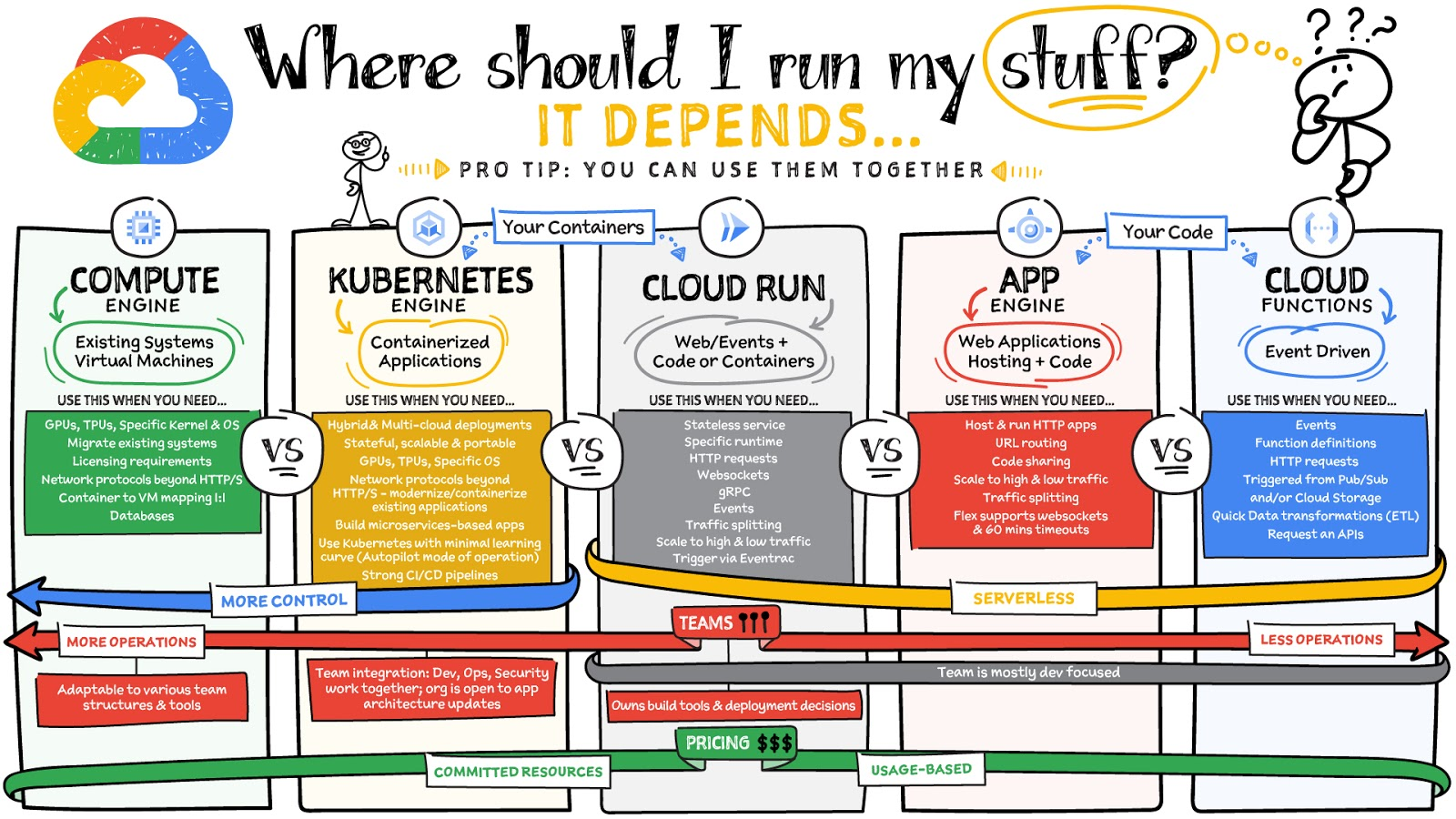
Where should you run your workload? It depends…Choosing the right infrastructure options to run your application is critical, both for the success of your application and for the team that is managing and developing it. This post breaks down some of the most important factors that you need to consider when deciding where you should run your stuff!
What are these services?
- Compute Engine – Virtual machines. You reserve a configuration of CPU, memory, disk, and GPUs, and decide what OS and additional software to run.
- Kubernetes Engine – Managed Kubernetes clusters. Kubernetes is an open-source system for automating deployment, scaling, and management of containerized applications. You create a cluster and configure which containers to run; Kubernetes keeps them running and manages scaling, updates and connectivity.
- Cloud Run – A fully managed serverless platform that runs individual containers. You give code or a container to Cloud Run, and it hosts and auto scales as needed to respond to web and other events.
- App Engine – A fully managed serverless platform for complete web applications. App Engine handles the networking, application scaling, and database scaling. You write a web application in one of the supported languages, deploy to App Engine, and it handles scaling, updating versions, and so on.
- Cloud Functions – Event-driven serverless functions. You write individual function code and Cloud Functions calls your function when events happen (for example, HTTP, Pub/Sub, and Cloud Storage changes, among others).
What level of abstraction do you need?
- If you need more control over the underlying infrastructure (for example, the operating system, disk images, CPU, RAM, and disk) then it makes sense to use Compute Engine. This is a typical path for legacy application migrations and existing systems that require a specific OS.
- Containers provide a way to virtualize an OS so that multiple workloads can run on a single OS instance. They are fast and lightweight, and they provide portability. If your applications are containerized then you have two main options.
- You can use Google Kubernetes Engine, or GKE, which gives you full control over the container down to the nodes with specific OS, CPU, GPU, disk, memory, and networking. GKE also offers Autopilot, when you need the flexibility and control but have limited ops and engineering support.
- If, on the other hand, you are just looking to run your application in containers without having to worry about scaling the infrastructure, then Cloud Run is the best option. You can just write your application code, package it into a container, and deploy it.
- If you just want to code up your HTTP-based application and leave the scalability and deployment of the app to Google Cloud then App Engine — a serverless, fully-managed option that is designed for hosting and running web applications — is a good option for you.
- If your code is a function and just performs an action based on an event/trigger, then deploying it with Cloud Functions makes sense.
What is your use case?
- Use Compute Engine if you are migrating a legacy application with specific licensing, OS, kernel, or networking requirements. Examples: Windows-based applications, genomics processing, SAP HANA.
- Use GKE if your application needs a specific OS or network protocols beyond HTTP/s. When you use GKE, you are using Kubernetes, which makes it easy to deploy and expand into hybrid and multi-cloud environments. Anthos is a platform specifically designed for hybrid and multi-cloud deployments. It provides single-pane-of-glass visibility across all clusters from infrastructure through to application performance and topology. Example: Microservices-based applications.
- Use Cloud Run if you just need to deploy a containerized application in a programming language of your choice with HTTP/s and websocket support. Examples: websites, APIs, data processing apps, webhooks.
- Use App Engine if you want to deploy and host a web based application (HTTP/s) in a serverless platform. Examples: web applications, mobile app backends
- Use Cloud Functions if your code is a function and just performs an action based on an event/trigger from Pub/Sub or Cloud Storage. Example: Kick off a video transcoding function as soon as a video is saved in your Cloud Storage bucket.
Need portability with open source?
If your requirement is based on portability and open-source support take a look at GKE, Cloud Run, and Cloud Functions. They are all based on open-source frameworks that help you avoid vendor lock-in and give you the freedom to expand your infrastructure into hybrid and multi-cloud environments. GKE clusters are powered by the Kubernetes open-source cluster management system, which provides the mechanisms through which you interact with your cluster. Cloud Run for Anthos is powered by Knative, an open-source project that supports serverless workloads on Kubernetes. Cloud Functions use an open-source FaaS (function as a service) framework to run functions across multiple environments.
What are your team dynamics like?
If you have a small team of developers and you want their attention focused on the code, then a serverless option such as Cloud Run or App Engine is a good choice because you won’t have to have a team managing the infrastructure, scale, and operations. If you have bigger teams, along with your own tools and processes, then Compute Engine or GKE makes more sense because it enables you to define your own process for CI/CD, security, scale, and operations.
What type of billing model do you prefer?
Compute Engine and GKE billing models are based on resources, which means you pay for the instances you have provisioned, independent of usage. You can also take advantage of sustained and committed use discounts.
Cloud Run, App Engine, and Cloud Functions are billed per request, which means you pay as you go.
Conclusion
It’s important to consider all the relevant factors that play a role in picking appropriate compute options for your application. Remember that no decision is necessarily final; you can always move from one option to another.
To explore these points in more detail, please take a look at the “Where Should I Run My Stuff?” video.
For more #GCPSketchnote, follow the GitHub repo & thecloudgirl.dev. For similar cloud content follow us on Twitter at @pvergadia and @briandorsey
Payhawk Becomes a Unicorn with Google Cloud-Powered Automated Financing Software

2729
Of your peers have already read this article.
3:30 Minutes
The most insightful time you'll spend today!
For far too long, managing employee expenses has been a time-consuming process that requires manual data entry and reconciliation to bridge the gap between business bank accounts and ERP systems. In the absence of an integrated workflow, finance teams use multiple systems to manage credit card and cash payments, and finding receipts. In most cases, they also lack real-time visibility into company spending.
The complexity grows exponentially as businesses expand, especially into new regions. Extra administration required to manage new bank accounts, card issuers, and local accounting systems impedes decision making and negatively impacts revenues and growth. Businesses of all sizes struggle with this, but it can be especially challenging for medium to large enterprises.
Payhawk set out to help businesses overcome these challenges when we founded the company in 2018. We combine VISA company cards, reimbursable expenses, and accounts payable into a single product. Our customers can automate manual processes, maximize efficiency, and accelerate business expansion.

Setting up our first cloud cluster in less than a week
To support growth and attract investment we were keen to launch our solution on a scalable, future-proof IT architecture that didn’t require extensive technical support. This is where Google Cloud made a big impression, especially the user interface and documentation which massively reduces the resources required to set up clusters and put them into production.
I’m a CTO, not a DevOps specialist, but in less than a week I was able to set up a secure, reliable operating infrastructure. This enabled us to fast-track our application development and we were able to issue our first card in just eight months. Our Google Cloud partner, Cloud Office also gave us valuable assistance, guiding us through the deployment process and advising on Google Cloud’s extensive range of solutions.
Google Kubernetes Engine (GKE) played a critical role, accelerating the deployment and management of our cloud native applications. We use Cloud SQL as our database while other important tools include Cloud Memorystore, Vision AI, Cloud Storage and Artifact Registry for our wider data storage and application needs. With Firebase we’ve been able to build a notification system for mobile devices.
Another incentive is that most other cloud solutions require add-on services to build and keep your product live. With Google Cloud, all the services that Payhawk needs including logging, metrics, monitoring of resources, and utilization of CPU memory come as standard.
For instance, I was really impressed by Google Cloud’s operations suite, which includes Cloud Logging and Cloud Monitoring. If there are any anomalies in our cloud architecture, we can track and resolve them with minimal disruption to our operations. This also removes the need to invest in an additional observability solution.
Reliability that builds customer trust
Google Cloud also supports Payhawk’s mission to put customers at the center of our organization. Thanks to Google Cloud error reporting and tracking and Google Cloud single sign on, Payhawk’s engineering team can anticipate customer issues and correct them in less than one hour. Trust is everything, and Google Cloud gives us the tools to boost customer satisfaction and build long-term relationships.
As a young business, managing costs is also a priority. The Google for Startups Cloud Program, which includes credits for Google software and tools, enabled us to push the business forward without having to worry about financing our infrastructure, especially in the first year. This gave us breathing room to work through funding, application development, and the onboarding of our first customers.
In addition, Google Cloud gives us confidence that we can grow the business fast. In most months we have seen more than 10% growth — in some cases it’s been 20%. In the first half of 2022, the business doubled in size, but Google Cloud gave us the flexibility to scale our infrastructure, adding storage, memory, and processing power as we onboarded new customers. The pricing model is also generous so that we can grow our revenues while keeping control of operational expenditure.
Since launch we have acquired a valuable mix of customers from startups to large businesses that want to reduce the costs of their expenses programs and increase employee satisfaction. They include ATU, a German automobile servicing company, which has successfully digitized its entire procurement process, and Discordia, a Bulgarian logistics business with 10,000 trucks, which has issued Payhawk cards to all its drivers.
Looking to the future, it’s no exaggeration to say that Google Cloud is a foundation of our business and has given investors confidence in our operations. From a first seeding round of €3 million, early this year we closed a Series B extension of $100 million. This gives us a valuation of $1bn and makes Payhawk the first ever Bulgarian unicorn.
We now operate in 32 countries in Europe and the US, and plan to double our team by the end of the year. It feels like we’ve come a long way since we first started using Google Cloud, and I’m thrilled that we have Google Cloud as a global technology partner supporting our mission to transform expense management and financial operations worldwide.

If you want to learn more about how Google Cloud can help your startup, visit our page here to get more information about our program, and sign up for our communications to get a look at our community activities, digital events, special offers, and more.
3195
Of your peers have already watched this video.
12:00 Minutes
The most insightful time you'll spend today!
Google’s Tau VMs Help Nylas Reach New Heights!
Nylas is a leading provider of scalable and secure communications data platform that powers business process and productivity automation and drive digital engagement for its customers that are fast-growing start-ups as well as large enterprises. The company approached Google Cloud with a complex challenge involving its legacy architecture that gave rise to cost and scalability issues. Nylas processed 30 terrabytes of data, billions of messages and hundreds of millions of APIs per day! Moreover, to serve Nylas’ large enterprise customer in the Financial Services industry with stringent security needs and data storage infrastructure requirements to avoid in-memory hacks, they rewrote the entire infrastructure in Go and Kubernetes on top of Google.
Watch the video to learn how Google Cloud has been the best distributed technology and a true partner for Nylas, helping them achieve 40 percent in savings by moving to Tau VMs!
Southwire Completes SAP Migration to Google Cloud as a First Step of its Tech Evolution

4945
Of your peers have already read this article.
1:30 Minutes
The most insightful time you'll spend today!
“Talk about tough times, right?”
That’s how Dan Stuart, Senior Vice President of IT Services at Southwire Company, refers to the months following a December 2019 ransomware event, and the COVID crisis that began in spring of 2020. Those events hit just as the company was preparing for an overhaul of their SAP environment. This comprehensive plan included three key elements. First, the company wanted to upgrade their SAP ECC environment to take advantage of the latest functionality available for this critical ERP system. Second, Southwire aimed to deploy SAP Business Warehouse on SAP HANA to accelerate vital reporting for all business users. Third, the company wanted to upgrade to the latest version of SAP Process Orchestration—an essential component that touches key manufacturing interfaces in all Southwire facilities.
Southwire had looked at multiple options for the upgrades, including remaining entirely on-premises, colocation, and full cloud migration. “Going to the cloud seemed a lot more compelling,” says Joe Schleupner, Southwire’s Senior Director of PMO & ITS planning and implementation. “We were going to the cloud eventually, so why take these intermediary steps? Let’s just get it done.”
After looking at several options, Southwire decided to migrate to Google Cloud. “We wanted to be on a platform for SAP that was flexible, scalable, and secure; that we could count on to get up and running quickly,” says Stuart. “We chose Google Cloud not only for those reasons, but also because we recognize that Google has other assets that we may be able to take advantage of down the line, such as technologies like artificial intelligence (AI).”
More stability, less worry
As one of the leading manufacturers of wire and cable used in the transmission and distribution of electricity, Southwire aids the delivery of power to millions of people worldwide. They have more than 30 manufacturing facilities across the United States running 24/7. Any downtime directly affects productivity and revenue. With help from Google Cloud and their implementation partner NIMBL, Southwire completed the SAP migration to Google Cloud over a planned maintenance weekend on July 4th.
The migration itself, while complex, went quickly and smoothly. “Just moving to the cloud was quite a feat because we were dealing with so much data, but in total the SAP system was down for only ~16 hours,” says Schleupner.
“As a project manager, I always felt that Google Cloud had my back” Schleupner says. The Process Orchestration (PO) migration was of particular concern, considering that it controlled all of Southwire’s manufacturing interfaces across the entire company. “Every critical piece of information that goes from SAP down to the manufacturing system goes through that system,” says Schleupner.
Even after migrating, Southwire discovered that making changes to the system was fast, easy, and resulted in no downtime. Normally, certain types of changes would have involved taking down SAP for at least an hour.
The Southwire team also appreciates the fact that the modern cloud architecture means spending less time on routine infrastructure maintenance. “It’s one less thing for me to worry about,” Stuart says, “I can focus on the business side of the house and move the technology and responsibilities to what we do within the Google Cloud Platform.”
What comes next?
While the cloud migration will increase stability, uptime, performance, and security, there is much more to come. Southwire is currently working on a disaster recovery implementation for their SAP environment on Google Cloud. Stuart and Schleupner are excited about where Google Cloud can further take Southwire. They are considering an SAP Hybris e-commerce implementation as well as connected factory and/or factory automation initiatives that can take advantage of artificial intelligence and machine learning.
To Stuart and Schleupner, the migration of Southwire’s SAP environment to Google Cloud, as important as it was, really represents the first step in the company’s tech evolution. Now that much of the heavy lifting is complete, Southwire’s digital transformation can begin in earnest. “There’s no shortage of areas where I think Google Cloud will come into play,” Stuart says, “and we intend to look at these things with an open mind to understand how we can leverage current investments to take our organization where we want to go.”
Learn more about Southwire’s SAP on Google Cloud deployment and how Google Cloud can transform the way you work with your SAP enterprise applications. Visit cloud.google.com/solutions/sap.
Manipal Group: Delivering High-Quality Patient Care with Google Cloud

6486
Of your peers have already read this article.
4:30 Minutes
The most insightful time you'll spend today!
One of India’s best-known healthcare brands, Manipal Group prides itself on clinical excellence and a patient-centric approach. From humble beginnings in 1953 as a single teaching hospital—the Kasturba Medical College—in a university town in Karnataka, India, Manipal Group has grown to a presence in seven cities in India and operations in Malaysia and Nigeria. “Our founder, Dr T. M. A. Pai, established Kasturba Medical College just six years after India gained independence,” says C. G. Muthana, Chief Operating Officer, Teaching Hospitals, Manipal Health Enterprises Pvt. Ltd, part of Manipal Group.
Manipal Health Enterprises Pvt. Ltd operates 11 corporate, or for-profit, hospitals and five teaching hospitals. “We have about 7,000 beds India-wide, and on that measure, we are the third-largest private-sector healthcare provider in India today,” says Muthana. The organization now employs about 6,000 people in its corporate hospitals and 5,000 people in its teaching hospitals.
Manipal Health Enterprises Pvt. Ltd acquires and operates world-class medical technologies in its teaching and corporate hospitals. However, with 75% of corporate hospital wards allocated to fee-paying private patients—compared to just 25% of the wards in teaching hospitals—the differences in information technology budgets are significant. “In the general wards that comprise most of the wards in teaching hospitals, patients are typically treated for free or at heavily subsidized rates,” explains Muthana. “So revenues and costs of delivery vary between hospitals, while employee costs remain similar.”
Rostering nurses a critical task
Rostering nurses to work shifts is one of the most important tasks at Manipal Group corporate and teaching hospitals. As at all hospitals, nurses administer medications, monitor patients, maintain records, manage intravenous lines, and work with doctors to heal patients. They can also provide advice and support to patients and loved ones, including teaching them how to administer medication outside a hospital setting. If too few nurses are rostered for a particular shift, the quality of patient care may suffer.
Google Cloud results
- Enabled the hospital to correctly size its nursing workforce
- Lowers stress on nurses by delivering more equitable rostering
- Presents opportunity to better manage nurses’ leave and other administration tasks
However, rostering at the group’s hospitals was a time-consuming exercise. Senior nurses on each ward would have to spend up to 45 minutes per day manually amending paper-based rosters to accommodate requested changes to duty shifts for personal or other circumstances. The organization began receiving complaints from patients, doctors, and other hospital staff that, on occasion, too few nurses were rostered on for certain shifts—particularly at its flagship hospital in Bangalore. “We had based our rostering calculations on the number of beds occupied by patients and, when we investigated, we found at a macro level, we were rostering on the correct number of nurses,” says Muthana. “However, on some days, on wards optimally staffed by, say, 10 nurses per shift, we might have 14 nurses rostered on for one shift and seven rostered on for another shift. Those times we had seven, we had a clear shortage.”
In 2012, Muthana asked a consultant to develop algorithms to help automate the rostering. “Unfortunately, there were so many variables, the consultant failed to solve the problem,” he says. The Chief Operating Officer’s next step was to ask the founder and Chief Executive Officer of predictive analytics business Retigence Technologies—already working with the business on a materials management project—to develop an application to manage rostering.
Removing the daily drudgery
“Our plan with the automation project was to relieve our senior nurses of the daily drudgery of amending the rosters and to deliver rosters that were as fair as possible to all our staff,” says Muthana. “We also saw an opportunity to reduce our costs by reducing the overall number of nurses needed to look after our patients.”
Retigence Technologies’ team members then worked with the group’s nurses to capture the variables and requirements for the project. For example, a minimum number of nurses with one year experience or more needs to be rostered on for each shift. Retigence Technologies then started building an application using compute resources available through Compute Engine, a Google Cloud product. “We selected Google primarily because of its pioneering work in artificial intelligence (AI) and machine learning,” says Srinibas Behera, founder and Chief Executive Officer of Retigence Technologies.
With the nurses rostering application developed, Manipal Health Enterprises Pvt. Ltd undertook several pilots to build user acceptance. “Some of our senior nurses took time to accept the fact automation removed their control over rostering assignments, but were finally convinced by the better transparency the product offered,” says Muthana. The organization deployed the application to a smaller hospital and secured user support before rolling out the application to its Bangalore flagship.
Eliminating stress
Deploying the application has enabled Manipal Health Enterprises Pvt. Ltd to remove a buffer of about 100 nurses retained to accommodate the variations in number of nurses rostered for individual shifts. “The savings on those salaries more than paid for the cost of developing the application,” says Muthana.
The application also enabled the organization to reduce the stress on nurses—both the nurses in charge of the rosters and the nurses subject to the rosters. “Night shifts were more equitably distributed among the nurses, while we have been able to reduce the 45 minutes per day required to amend rosters to just 10 minutes,” says Muthana. “In Bangalore alone, we have 51 nurses in charge of rostering—so the combined saving there equates to nearly 30 hours per day.” This is freeing up these senior nurses to complete more important tasks.
The application was subsequently implemented at Kasturba Hospital, Manipal, again reducing the time needed to generate complete nursing rosters to less than 10 minutes.
Managing leave and training
The organization now plans to extend the application to manage leave and training for its nurses and other employees. “I would like to see every employee given an annual leave plan that is added to the roster at the start of the year,” says Muthana. “The flexibility and control afforded by the application would enable us to address challenges such as managing leave across a workforce with high attrition rates.” The organization would also be able to create a calendar to ensure nurses receive all their required training.
“We also plan to keep fine-tuning the application to deploy nurses more efficiently and continue to reduce their stress levels,” adds Muthana. “We also want to create a nursing load indicator tailored to patients’ specific circumstances. For example, a sedated patient may not require much nursing care, whereas a patient who comes in with a broken leg and may be on a ventilator may require assistance from three nurses at once.” The business plans to use Google’s AI and machine learning APIs in the future to improve the value and user experience of the product.
4824
Of your peers have already watched this video.
2:30 Minutes
The most insightful time you'll spend today!
Haaretz on Google Cloud Guarantees Faster, Reliable & Responsive Services to its Audience
Israeli centenarian newspaper, Haaretz relied on on-prem infrastructure to serve readers digitally. As the need for scalability, security and business intelligence grew alongside their readership, Haaretz was looking for more than just a cloud-based solution to replace their infrastructure. Inon Gershovitz, CTO, Haaretz takes us through the journey of recreating digital news experience, serving growing reader traffic and keeping up the editorial standards with Google Cloud.
Watch the video to hear from Haaretz’ leaders on delivering personalized content to readers with Google Cloud solutions!
More Relevant Stories for Your Company


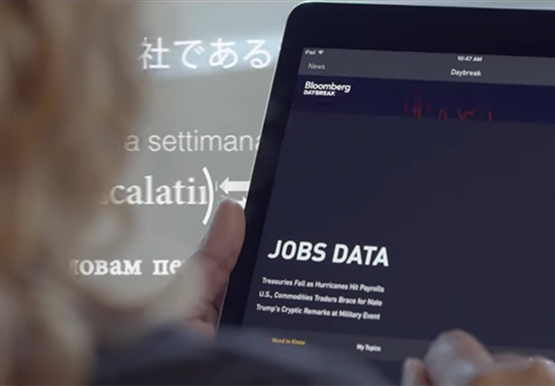

How Bloomberg uses Google Translate to Share Breaking News with the World
Bloomberg uses Google Translate to instantly share news with customers in more than 170 countries. Financial markets can move within seconds of a story breaking, so speed matters. With Google's automated translation Bloomberg can quickly disseminate breaking financial news to customers around the world in 40 different languages.

Financial Firms Can Enjoy These 8 Benefits by Migrating and Running on Google Cloud VMware Engine
The COVID-19 pandemic brought dramatic changes to the financial services industry. Already under pressure from nimble young fintechs to modernize, established banks and insurers were undergoing incremental digital transformation. But in 2020, they hit the gas pedal. Branches closed and remote work became the norm. Almost overnight, employees needed secure remote access

Marxent Leverages Google Cloud to Elevate Customer Journeys on Retail Apps with 3D Shopping Experiences
As ecommerce for home goods exploded in popularity during COVID, furniture and DIY retailers looked to find new ways to grow online transaction sizes to in-store levels. Shopping for furniture and home improvement projects has always been challenging online. Furniture, kitchen cabinets, fixtures, and appliances become a part of daily

Accelerating Success: Tips and Techniques for Optimizing and Scaling Your Startup
At Google Cloud, we want to provide you with the access to all the tools you need to grow your business. Through the Google Cloud Technical Guides for Startups, leverage industry leading solutions with how-to video guides and resources curated for startups. This multi-series contains 3 chapters: Start, Build and
