





100 Stores. 5 States. How Schnucks Pulled Off a Mammoth Collaboration Feat

4405
Of your peers have already read this article.
4:30 Minutes
The most insightful time you'll spend today!
As a family supermarket chain since 1939, Schnuck Markets Inc. depends on driving efficiency and volume sales to achieve its mission, identifying customer service and community partnerships among its key differentiators.
In order to commit its maximum resources for success, Schnucks continues to focus on streamlining operations and achieving greater efficiency. Management and administrative staff throughout the company’s 100 stores in five states need to be able to collaborate effortlessly while enjoying an accurate, centralized information exchange platform. These efficiencies have the potential to impact productivity, customer service, and employee engagement.
Fast-tracking data sharing
Before adopting G Suite, Schnucks found collaborative workflows to be a challenge. Managers from different stores, often in different states, had to provide data that could be compiled and shared. Collaborative documents on traditional platforms faced challenges at Schnucks, where limits of simultaneous users would result in user lockouts. Schnucks managers often exchanged many different versions of the same documents and spreadsheets. However, reconciling all those versions was time-consuming and limited real-time collaboration.
“When we share a Google sheet and request data, 200 people can add their responses immediately at the same time from any device. They don’t walk away and forget and need a reminder. The result is near-effortless compliance,” says Kim Anderson, Director of Procurement and Replenishment at Schnucks.
Schnucks has been successful using the entire range of G Suite tools, with Drive, Docs, Slides, Sheets, and Forms contributing to enhanced collaboration. Google Keep is a popular productivity tool for meeting notes and tasks and creating reminders. Schnucks also uses Hangouts Meet and Hangouts Chat to reduce time and costs spent in face-to-face meetings, and Calendar as the central source for scheduling company events and meetings.
The partnership between Schnucks and Agosto helped with a successful G Suite deployment for the retailer. Agosto helped coordinate the logistics of the move and tackled the G Suite migration with a three-part strategy: IT staffers would move to Google first before employee “Google Guide” experts came in who could help answer teammate G Suite questions.
“Agosto’s deployment plan helped our G Suite deployment run smoothly,” says Dave Steck, Schnucks Vice President of Development and IT Infrastructure. “Their thorough planning helped mitigate the inevitable disruption a change of this size would make.”
Enhanced security and reliability
Previously, Schnucks relied on email to exchange information and any outages added even more lag time to its operations. With Gmail and the entire G Suite, Schnucks now experiences virtually no downtime, allowing for effective communication with enhanced levels of reliability and security.
“We were able to take advantage of the security benefits of G Suite right away,” says Joey Smith, Vice President and Chief Information Security Officer at Schnucks. “Our administrators are able to quickly configure, test, and manage our G Suite security settings to fit the security needs of our business while maintaining compliance with all regulatory obligations.”
On top of the CapEx and OpEx savings with Google providing infrastructure for its office productivity software, Schnucks has gained increased security and high availability, as well as robust disaster recovery. These features are included in G Suite, without any need for IT intervention.
“G Suite automatically encrypts our data with a unique encryption key for each piece and distributes it across multiple data centers for performance, security, and reliability,” says Joey. “This saves us a significant amount of time and money while achieving top notch security.”
Another way Schnucks benefits from Google security is the availability of data loss protection (DLP) features native to Gmail. With DLP, Schnucks can automatically audit outgoing emails for Personal Identifiable Information (PII), Protected Health Information (PHI), and other information the store requires.
“DLP is very powerful because it provides detailed visibility,” says Joey. “We can isolate emails, analyze patterns of false positives, and follow up with education or enhanced restrictions to increase security.”
Spam reduction
An unexpected advantage of adopting G Suite was an instantaneous reduction in spam emails. That’s more administrative time saved for employees. In fact, Gmail native spam prevention is so effective that Schnucks was able to replace its third-party spam filter with a simpler technology that costs 80% less.
Savings on hardware and software
Converting to G Suite saves Schnucks the operational costs of an infrastructure for office and communications solutions, but its web interface also provides substantial savings on application maintenance, anti-virus software, and hardware.
With G Suite files and applications residing in the cloud, the need for employees to use heavyweight installable applications is increasingly rare. As laptops age, Schnucks is replacing them with Chromebooks, saving approximately $1,250 per computer. Because Chromebooks don’t require additional anti-virus software or many other endpoint security measures, the need for software licenses and other security and maintenance costs are simultaneously reduced.
Schnucks also finds that Chromebooks instantly increase productivity. “What’s great about the Chromebook is the productivity savings we get from the speed and ease of use and management,” says Dave Steck, Vice President of Development and IT Infrastructure at Schnucks. “You’re not waiting for applications to start up. As a result, Chromebooks are the only laptops we need for the majority of our teammates.”
Aligning the company across sites
More than just providing a common set of office tools, intuitive collaboration in G Suite enables the grocery chain to provide consistent messaging and a central information hub across all store locations. With posters, presentations, and communications, Schnucks worked hard to help ensure that the entire company understood the value of the tools. The Operations and IT teams rolled out the changeover in three phases, using Google Guides to show the benefits of adoption and then rolling out to larger groups over time.
“Adopting G Suite as a collaborative platform helped us to integrate individual store activities and increase operational efficiency,” says Dave.
Investing in the future
Employees who were already familiar with G Suite because they used it in school or in their personal lives have found the move eases communications company-wide, and Schnucks believes that the move will also help attract prospective employees who already use G Suite.
“Knowing that more and more prospective employees are already familiar with G Suite is a big win for us,” says Joey. “To them, it helps demonstrate our commitment to innovation.”
New Study Suggests Public Sector Firms Must Move Over Legacy Productivity Tools

5014
Of your peers have already read this article.
6:00 Minutes
The most insightful time you'll spend today!
Prior to joining Google Cloud, I spent 20 years in the public sector serving in various security roles, most recently as the head of the cybersecurity division at the newly established Cybersecurity and Infrastructure Security Agency (CISA). I was responsible for delivering services and capabilities to about 100 civilian agencies, as well as our critical infrastructure for state and local partners across the country.
Throughout my time serving in the U.S. government, I spent a great deal of energy working to keep bad actors out of our systems. What I eventually realized was that we were at a disadvantage. We didn’t just have legacy systems to deal with; we also had a legacy mindset. Our policies and capabilities were overly reliant on a perimeter-based approach to defense and introduced layers of friction with tools like VPNs, which inhibited productivity and increased frustration.
I spent the last few years of my time in the government doing my best to modernize this approach to security and supporting the many people who shared this vision. While most of them are still there, doing excellent work, repeated cybersecurity breaches of U.S. government systems have interrupted vital work and cost taxpayers billions of dollars. The SolarWinds breach in 2020, for example, may have cost governments and businesses more than $100 billion and the loss of vital national security information. Yet many government agencies continue to rely on the same legacy productivity software.
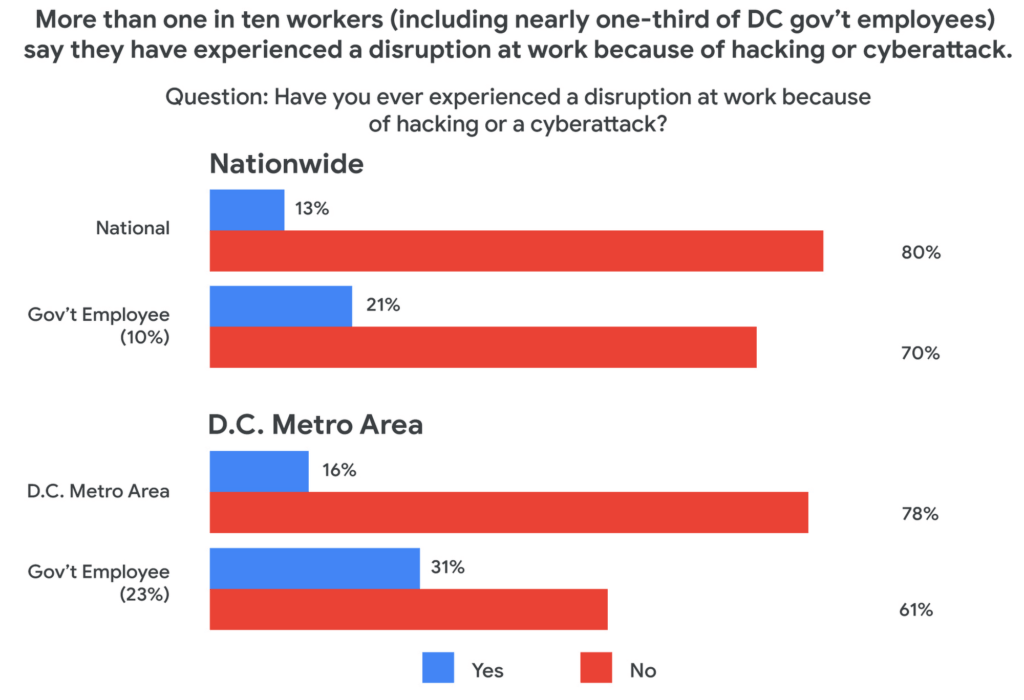
Today, a new survey conducted by Public Opinion Strategies and commissioned by Google Cloud shows that many government workers echo these concerns. The survey—which polled 2,600 working Americans, includes 600 workers from the D.C. metro area and 338 workers employed by federal, state, or local governments across the country—found that the majority of government employees surveyed reported being “very” concerned about cyberattacks striking their employers in the coming years. And nearly one-third of surveyed government employees in the D.C. metro area say they have experienced a disruption at work because of a cyberattack.
Results from the survey also showed a lack of satisfaction with legacy software, with more than 50% of government workers nationally responding that there are other products and services that could help them do their jobs better.
These new findings not only speak to the challenges our government employees face, but also outline an opportunity for improved innovation and security that can help government employees better achieve their missions.
Concerns about cybersecurity
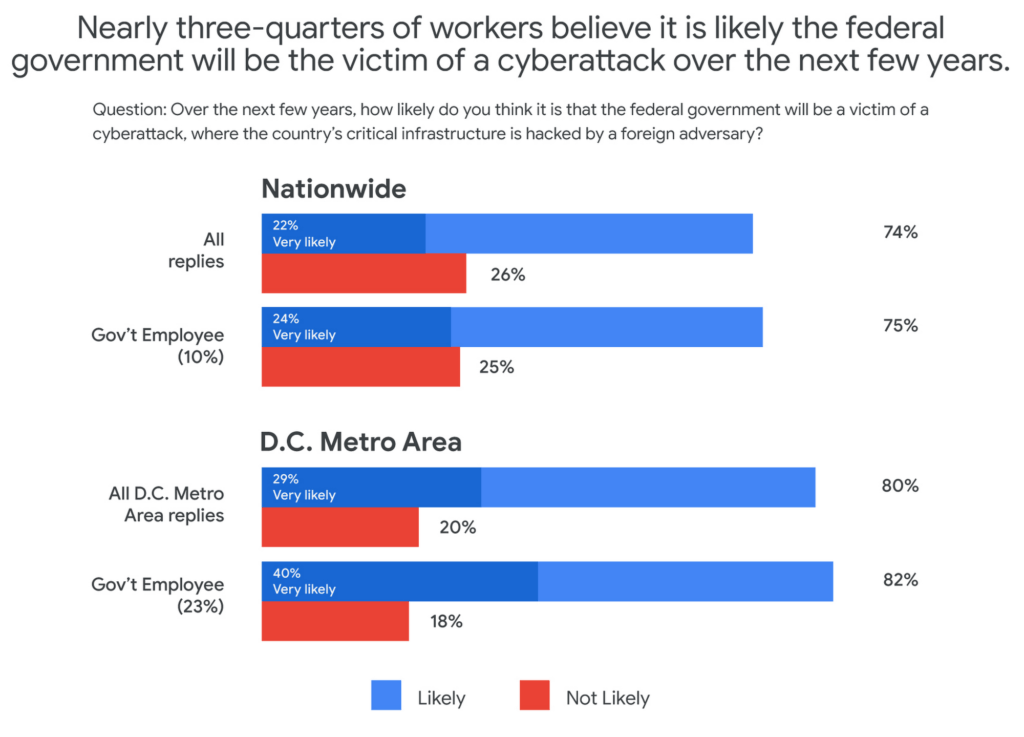
The majority of respondents said they believed it was likely that the federal government would be the victim of a cyberattack in the next few years. This percentage was even higher in the D.C. metro area and among government employees, with 40% of government workers living in metro D.C. saying it was “very likely.”
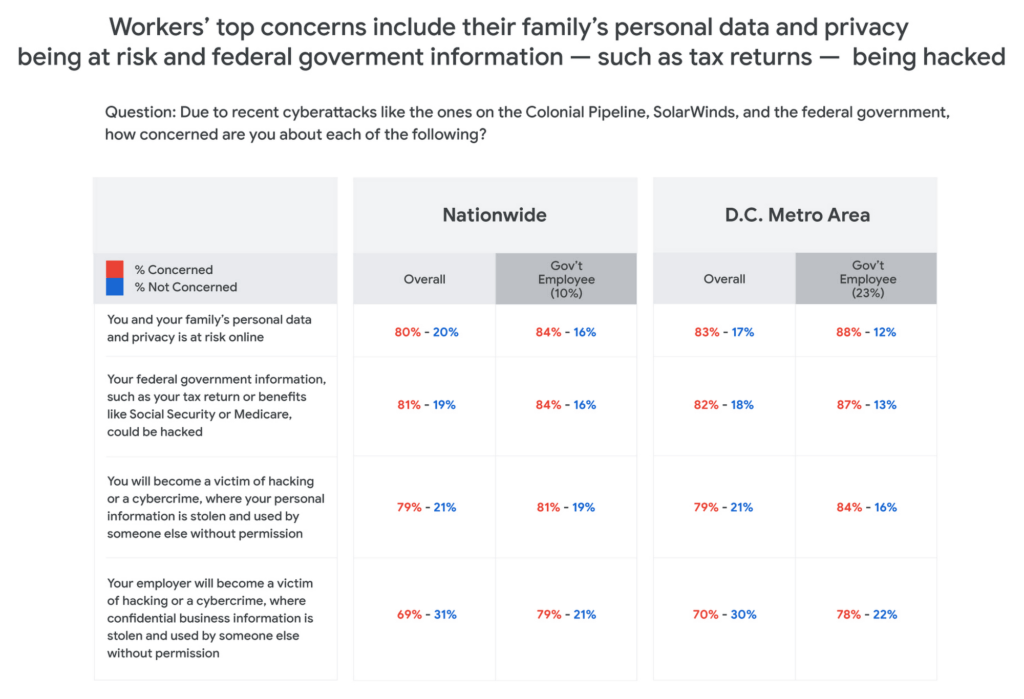
Respondents in all groups—national, D.C. metro, and government employees—were more likely to be concerned about cyberattacks as the perceived threat moved closer to home. For example, 80% of those surveyed said that recent attacks have them concerned about their personal data and privacy, and that of their family members. And for those in the D.C. area or in government jobs, the numbers were consistently higher than the national average.
One likely reason for such broad concern about cyberattacks is that many respondents reported experiencing a cyberattack at work. And while more than one-in-ten workers nationally have experienced disruptions from a cyberattack, the number increased to nearly one-in-three for D.C.-based government employees—nearly three times higher than the national average.
The problem with IT ‘monoculture’
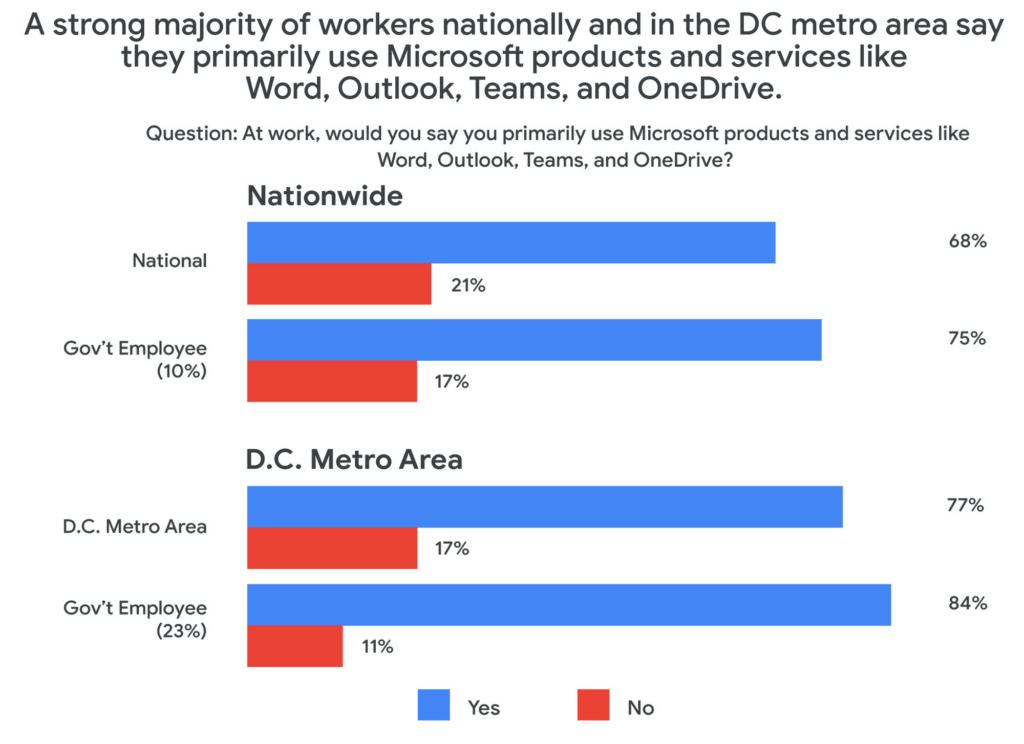
According to survey respondents, 84% of D.C. metro government employees primarily use Microsoft products at work, including Word, Outlook, Teams, and OneDrive. This is confirmed by another recent study by Omdia that found 85% of government employees use Microsoft productivity software, far and away the largest IT productivity vendor by market share.
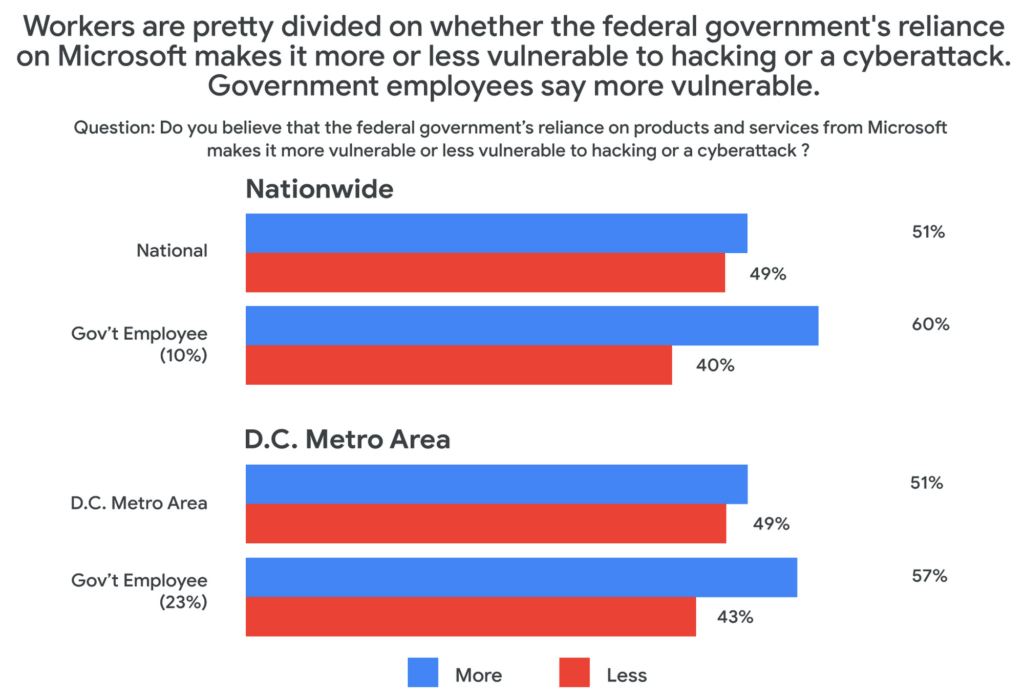
This reliance on a single software suite might suggest that these products are safe and secure, but the Public Opinion Strategies survey found that more than half of all respondents said that the government’s reliance on these Microsoft products actually made the federal government more vulnerable to hacking or cyberattacks.
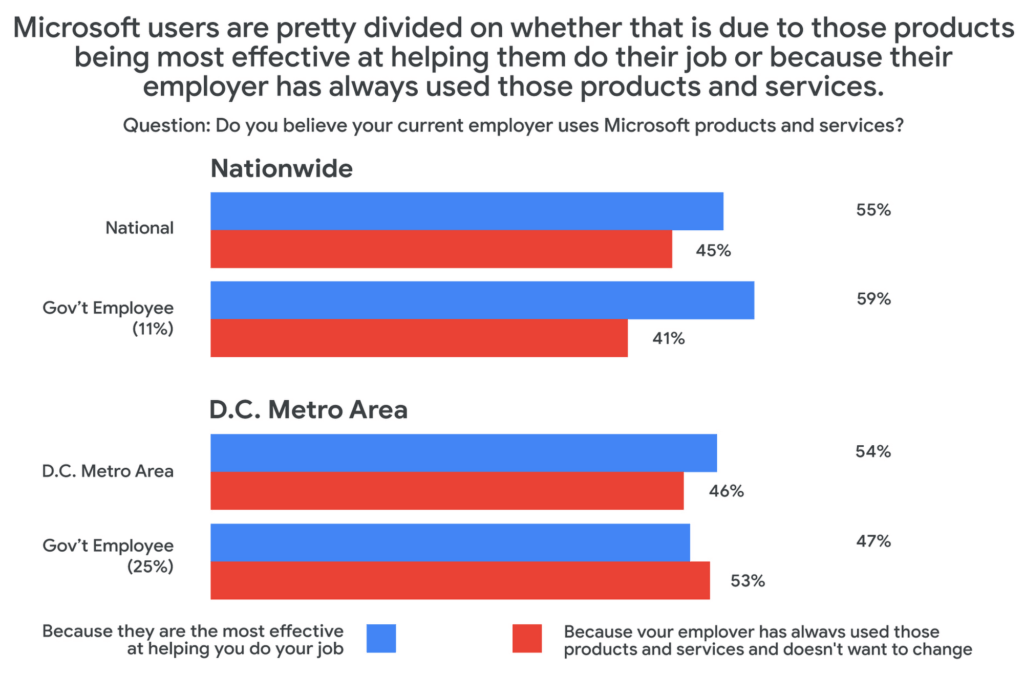
Given these vulnerabilities, why does government IT continue to rely on the same set of productivity tools in the workplace? The reason, according to survey respondents, has more to do with inertia than innovation. When asked why their employers used Microsoft services, around half said that the reason their employer continues to choose legacy, incumbent vendors was more about not wanting to change than wanting the most effective tool for the job.
Choice and shadow IT
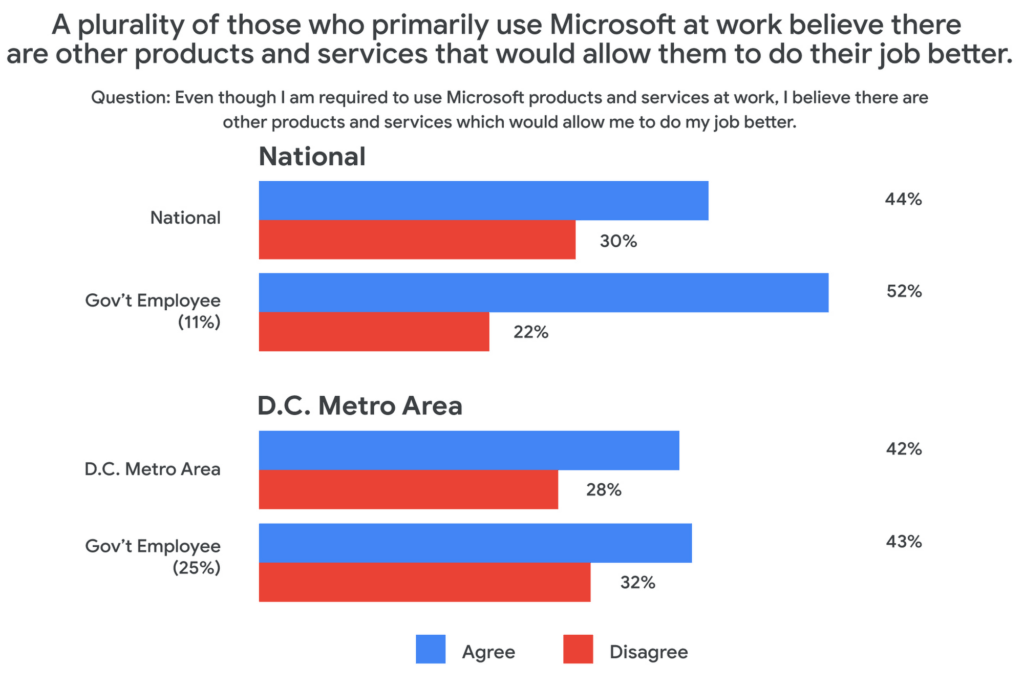
Coupled with these concerns about vulnerabilities comes a noted sentiment among those surveyed that their current IT solutions are not best for their needs. About half of those surveyed who primarily use Microsoft at work said that they would prefer to have a choice to use products and services from other companies. And among those who use Microsoft at work, 43% believe there are other products and services that would allow them to do their job better.
This may be leading workers to adopt “shadow IT,” or using products and services that are not officially approved or endorsed by their IT departments. In fact, the Public Opinion Strategies survey found that 35% of D.C. metro government workers have used shadow IT to get their jobs done. And among workers aged 20 to 34, that number jumps to 41%.
Rethinking IT purchasing priorities
With so many survey respondents reporting that they are dissatisfied with their legacy IT solutions, it may be time for the government to rethink its approach to procurement. In a separate research survey from Omdia in December 2021, 250 people responsible for technology purchasing decisions in the U.S. federal, state, and local governments said that government technology and procurement practices often are more about making things easier for IT vs. choosing what employees feel would be the best solution. In fact, only 27% of officials surveyed in that research cited “user demand” as a factor affecting their purchasing decisions.
As governments work to meet the demands and preferences of their constituents—and their employees—it’s clear that there’s an overreliance on legacy solutions, despite a track record of cybersecurity vulnerabilities and poor user perception.
At Google Cloud, we believe it’s time for more diversity and choice in the tools available for our civil servants across the nation—70% of whom use Gmail outside of work, according to our survey. Government workers have the right to benefit from the same flexible, secure-by-design tools at the office that they use in their personal lives. You can learn more about Google Workspace for Government here.
How a Former Refugee is Using Tech to Transform the Lives of Women in Afghanistan

4386
Of your peers have already read this article.
4:15 Minutes
The most insightful time you'll spend today!
Born in Iran as a refugee during the Soviet invasion of Afghanistan, I understand the challenges many people face there to get access to formal education. I was one of eight children in a progressive, yet financially limited, family. We left everything behind in Herat to move to a new country. To make ends meet, my mother sold handmade clothing. She invested what little she earned in my education, which made it possible for me to finish high school.
While opportunities for education in Afghanistan have increased over the past few decades, there are still many barriers that stand in the way of education for Afghan women—familial expectations, socioeconomic circumstances, cultural stigmas, societal norms and even safety issues. These circumstances make it challenging for women to find work and explain why only 19 percent participate in the workforce, 84 percent lack formal education and are often illiterate, and just 2 percent have access to higher education.
2001 marked the fall of the Taliban in Afghanistan, and many Afghan families, including my own, found hope in their motherland again. The next year, I returned to Herat. Seeing my peers —women just like me with so much potential—I felt compelled to do something. But I knew that in order to help others, I first needed to further my own education. I earned a bachelor’s degree in Computer Science, and later a Master’s degree from the Technical University of Berlin in Germany.
When I returned to Afghanistan after school, I hoped to share my newly-minted tech skills with Herat women by teaching at the local university. At the time, few women were participating in the public workforce and there were still many extremist, conservative views in the country. I was vocal about inequalities and faced backlash from the community; because of these threats, I came to the United States as an asylum seeker in 2012.
After arriving in the United States, I was inspired to start Code to Inspire, the first coding school for girls in Afghanistan between the ages of 15 and 25 that provides free after school education in gaming, web development, graphic design, mobile applications and full stack development. Our goal is to empower women with the skills they need to program so that they can drive change in their communities and gain equal access to opportunities and financial independence.
Determined to make this coding school happen, I found myself faced with an interesting obstacle: how could I build an education center in Afghanistan without ever leaving the US?
To make this possible, I turned to technology—just as I had hoped my future students would. I took a side job teaching Farsi to pay my bills, and built the blueprint for Code to Inspire from a laptop in Brooklyn. I managed everything from my computer working from cafes in New York: fundraising, shipping equipment, recruiting mentors, registering applicants, and developing the curriculum.
To move things forward day-to-day, I use G Suite to communicate and collaborate with my team. I use Hangouts Meet to connect with students remotely during weekly calls and monthly check-ins. We use Google Docs, Sheets and Slides to create essential documents and keep track of our operations. We even used Slides for our first pitch deck, which I shared with my board to get their feedback. This power and connectivity enabled a refugee to make her dream come true, and built up the digital literacy of the women I was working with back home!
Since opening its doors, 150 girls have studied with us, and the students have created so many interesting projects. One inspiring example is the popular mobile game, Afghan Hero Girl, which has taken off in Afghanistan and abroad, and was even recognized by the local government. The girls developed the game to show a female protagonist dressed in traditional Afghan garb, who undergoes obstacles that are relatable to them.
Over 50 women have graduated from Code to Inspire, and 20 have secured remote full-time employment and freelance projects. Many of these women are even out-earning their male relatives who have become huge supporters of the program.
By 2030, we hope to open two additional schools in Kabul and Mazar that can serve up to 500 girls and provide employment opportunities within six months of graduation. From the ruins of a shattered nation and shattered lives of refugees can come treasure, if we know where to find it. For me, the girls in Afghanistan are the treasure and investing in their education is the future of a peaceful Afghanistan.
CARTO’s Data Visualization Powered by Google Cloud and deck.g

4085
Of your peers have already read this article.
7:00 Minutes
The most insightful time you'll spend today!
Editor’s note: Today’s blog post is from Alberto Asuero, CTO of CARTO, the location intelligence platform. Today he shares more details about the source of the data for advanced data visualizations created with Google Maps Platform and deck.gl and how the CARTO platform enables this workflow.
During Google Cloud Next in October, the Google team announced the newest release of the deck.gl visualization library, thanks to a collaboration with our geospatial company CARTO and the vis.gl Technical Steering Committee (TSC). The deck.gl release includes a deep integration with the new WebGL-powered features in the Maps JavaScript API that allows deck.gl to render 2D and 3D visualizations directly on the Google basemap.
Our team built an example app that visualizes a variety of data sources that show the potential for electrification of truck fleets in Texas. This app showcases the different types of advanced data visualizations that can be created with Google Maps Platform and deck.gl. Today, I want to share more details about the source of the data for these visualizations and how the CARTO platform enables this workflow.
Google Cloud provides a strong serverless data warehousing solution, BigQuery, with support for geospatial queries. When you are dealing with spatial data, creating maps to explore and visualize these datasets is an important and common need. The CARTO Spatial Extension for BigQuery provides an easy way to create connections to the data warehouse, design a map with data coming from BigQuery tables, and then add these visualizations to a web app using deck.gl.
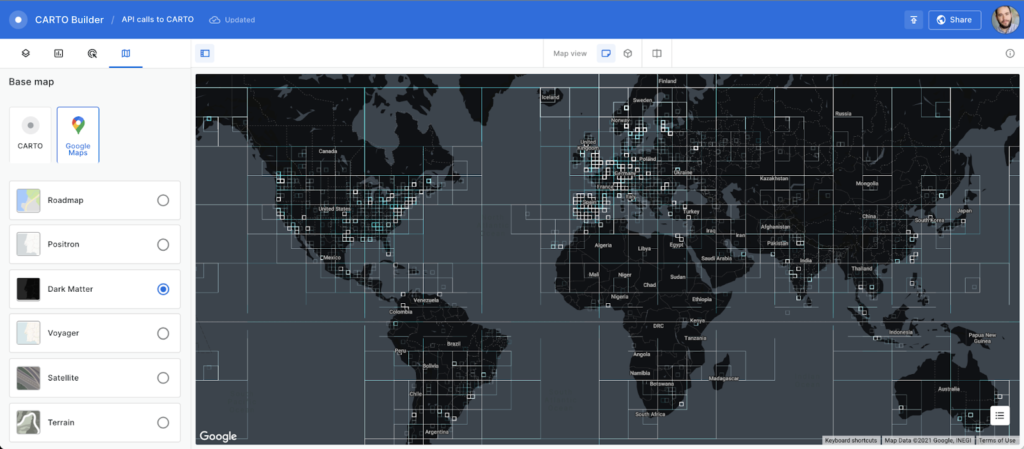
Making a simple map
To create a simple map using the CARTO platform, you can sign up for a trial account. Once you have signed in, you can set up a connection to your BigQuery instance using a service account. Then, you can go to the Data Explorer and browse the available datasets to find the table you want to use as the datasource in your map. For more information, check out the CARTO documentation.
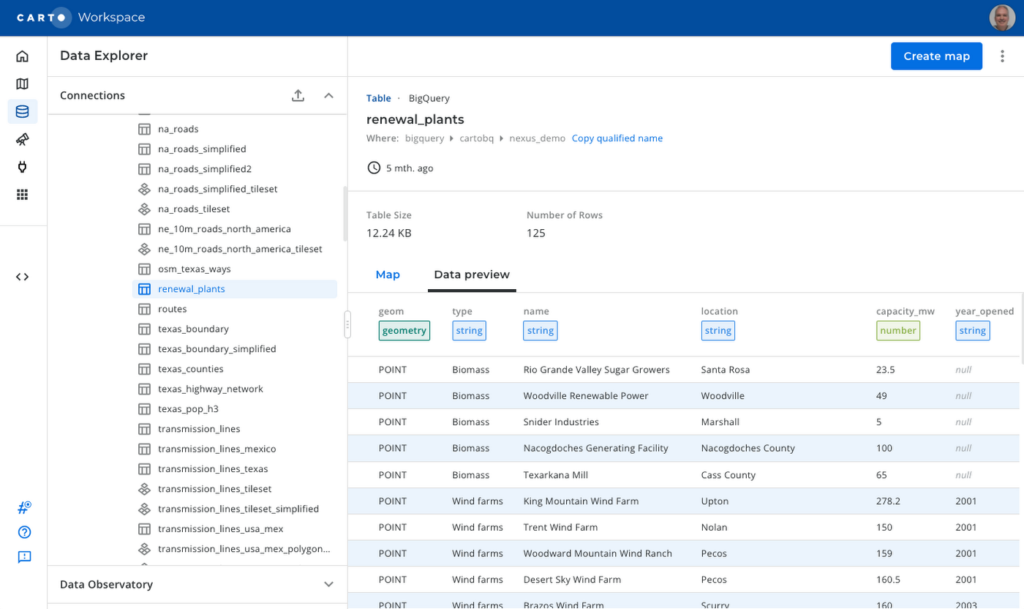
To create a visualization of power transmission lines in Texas, you can start with the Texas state boundary to provide some context. In the Data Explorer, you can preview the table and click the “Create map” button in the top-right corner to start designing your visualization.
Using the CARTO Builder map making tool, select one of the available Google vector basemap styles and customize the layer style.
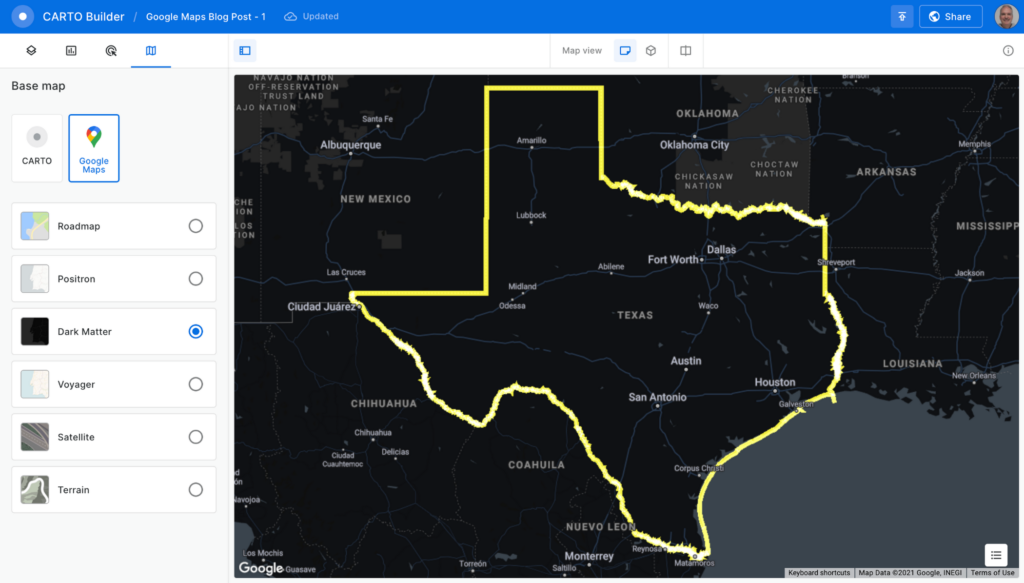
You can visualize tables and the results from queries executed in the data warehouse, which is a powerful feature because you can also execute spatial analysis functions using SQL, including those from the CARTO Analytics Toolbox. In this case, you can intersect the lines in the table containing all the U.S. transmission lines within the Texas boundary. Click on the “Add source from…” button and select the “Custom Query (SQL)” option to add the following query:
SELECT *FROM cartobq.nexus_demo.transmission_linesWHERE ST_INTERSECTS(geometry,(SELECT geom FROM cartobq.nexus_demo.texas_boundary_simplified));
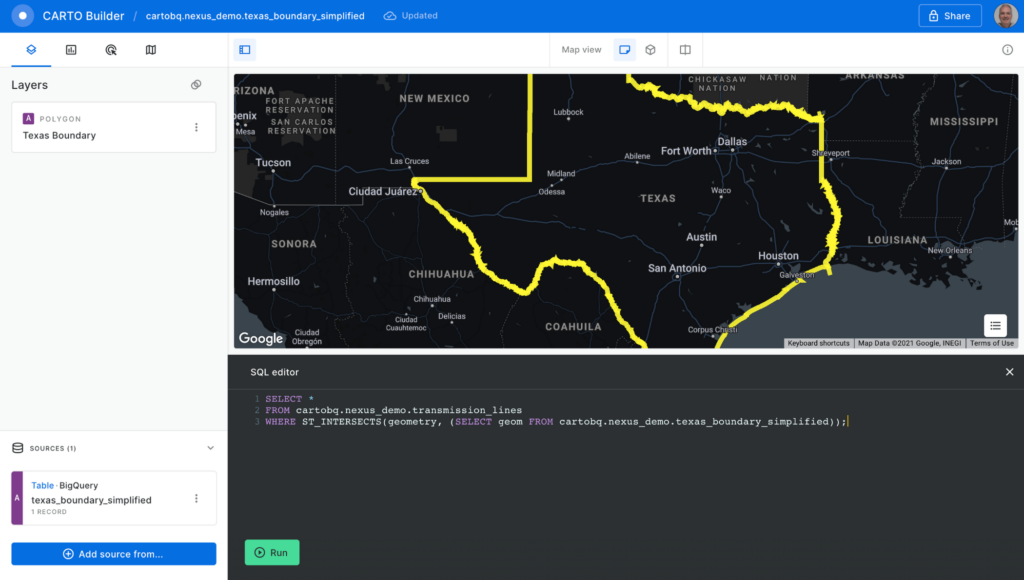
Click the “Run” button, and the query is executed in BigQuery. The results are sent back to the Builder tool. Perform some style customizations in the new layer, and your map is ready.

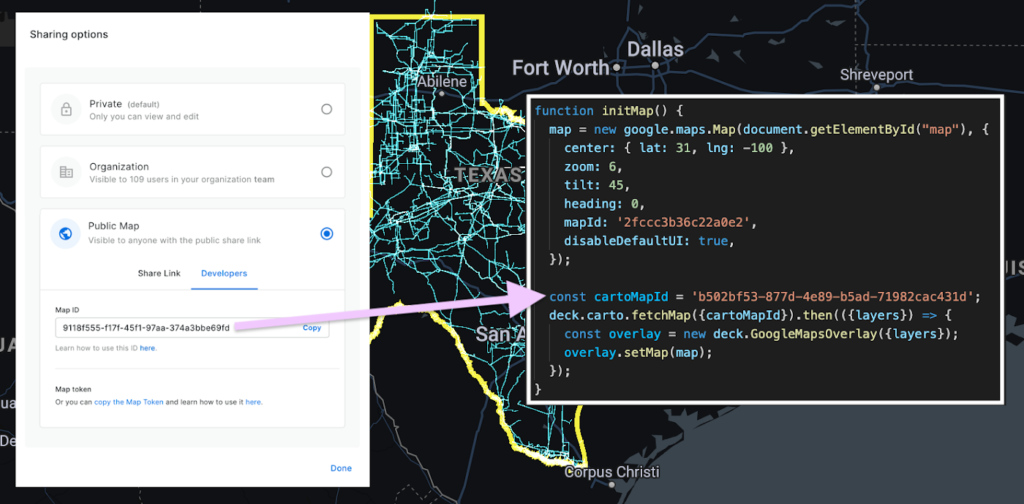
Before adding the map to the Google Maps Platform application, you’ll need to make it public. Click on the “Share” button and select the “Developers” tab to copy the map ID.
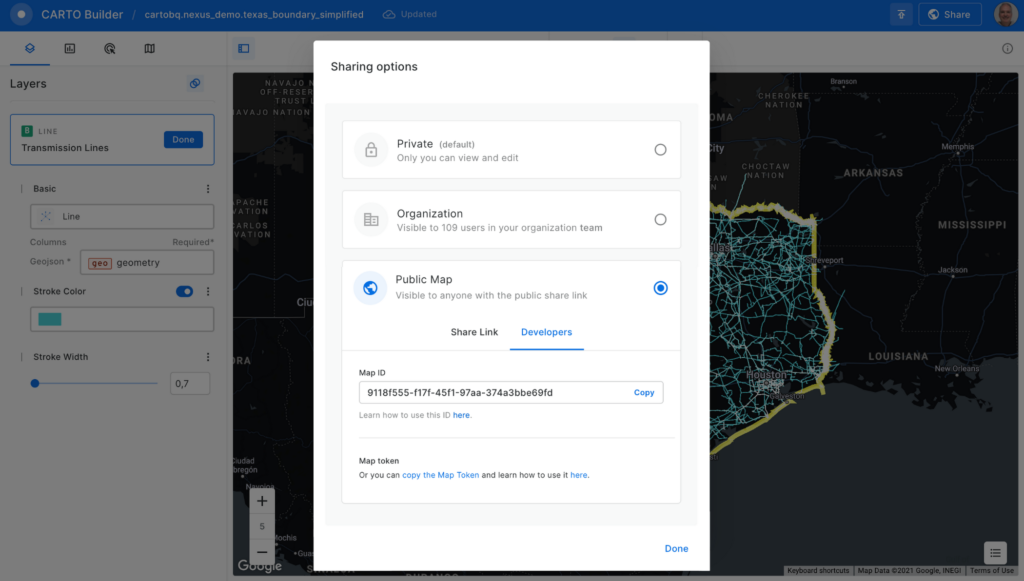
Now, you can add the visualization into your Google Maps Platform application, which is as easy as adding these four lines of code:
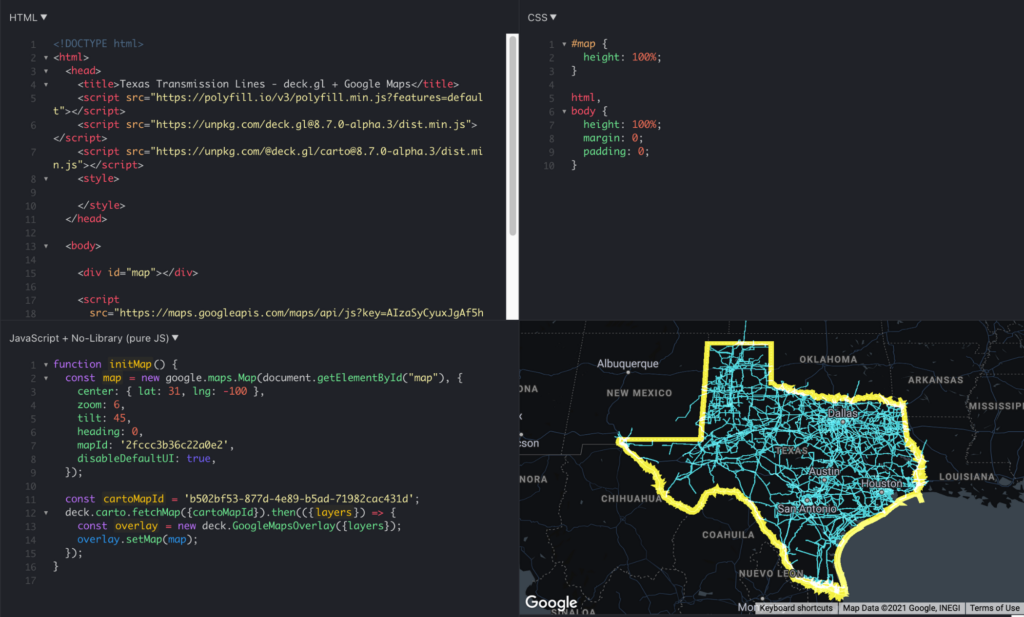
const cartoMapId = 'b502bf53-877d-4e89-b5ad-71982cac431d'; deck.carto.fetchMap({cartoMapId}).then(({layers}) => { const overlay = new deck.GoogleMapsOverlay({layers}); overlay.setMap(map); });
You can use the map ID copied from CARTO Builder to call the fetchMap function. This function connects to the platform and retrieves all the information needed for the visualization, including a collection of deck.gl layers with all the styling properties you’ve specified. Create an instance of the deck.gl GoogleMapsOverlay with this collection of layers and add it to the map.
You can see the full example in this fiddle.
Visualizing very large datasets
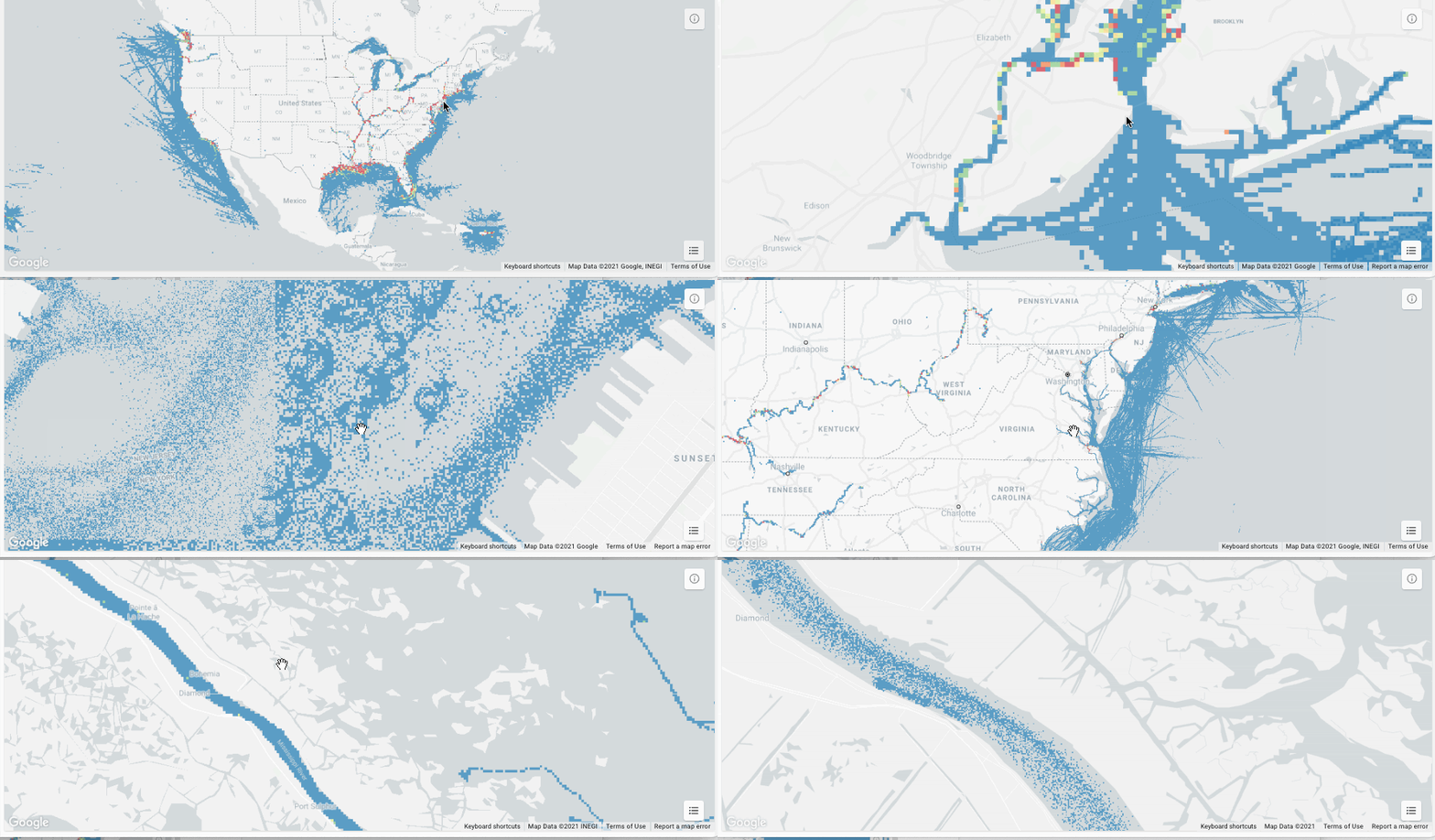
One of the main features of BigQuery is the ability to scale processing to massive datasets. With the CARTO platform, you can also visualize very large datasets using tilesets, an optimized data structure containing pre-generated vector tiles for fast visualization. Tilesets are generated within BigQuery using the Analytics Toolbox functions in a parallelized process that can handle billions of points.
For example, you can create a visualization using tilesets with the whole dataset of transmission lines for the U.S., more than 100MB of geometries.
The issue with these large datasets is that they do not fit in memory all at once, so you need to split them into tiles for them to be rendered progressively. CARTO takes care of this, allowing you to create tilesets directly in BigQuery or dynamically generate them on the fly.

This method for data loading in maps can scale as much as needed; for example, take a look at this 17 billion point visualization of vessel data.
What about live data?
BigQuery supports streaming data that is continuously updated. In these scenarios, you want to be able to update your visualization at regular intervals, as the data changes. It’s easy to update this visualization using deck.gl. You just need to set the autoRefresh parameter to true when fetching the map and specify the function you want to execute when new data is downloaded:
const {layers} = await deck.carto.fetchMap({ cartoMapId, autoRefresh: true, onNewData: (parsedMap) => { … } });
You can add points to a table with an INSERT function on the BigQuery console and see the data updated on the map in real time.

Going further
In addition to the simple ways to create visualizations shown above, deck.gl has the flexibility to create a wide variety of visualizations. The CARTO platform provides you with the functionality to access data from your data warehouse and create these data visualizations with advanced cartographic capabilities, but you can extend it and go beyond that using any of the advanced visualizations available in the deck.gl layer catalog.
There are two additional options that give you more control over the deck.gl code. The first one is to use the CartoLayer directly without fetchMap. You’ll need to indicate the connection to use from the CARTO platform and the data source type and name or query. Then we can specify the styling properties.
const overlay = new deck.GoogleMapsOverlay({layers: [new deck.carto.CartoLayer({connection: 'bqconn',type: deck.carto.MAP_TYPES.TABLE,data: `cartobq.public_account.retail_stores`,getFillColor: [238, 77, 90],pointRadiusMinPixels: 6,}),],});
The second option is to use the fetchLayerData function that allows you to have more control over the format used for data transfer between BigQuery and your application and can be used with advanced visualizations that require an specific data format like ArcLayer, H3HexagonLayer or TripsLayer.
deck.carto.fetchLayerData({type: deck.carto.MAP_TYPES.TABLE,source: `cartobq.geo_for_good_meetup.texas_pop_h3`,connection: 'bqconn',format: deck.carto.FORMATS.JSON,credentials: {accessToken: 'eyJhbGciOiJIUzI1NiJ9.eyJhIjoiYWNfbHFlM3p3Z3UiLCJqdGkiOiI1YjI0OWE2ZCJ9.Y7zB30NJFzq5fPv8W5nkoH5lPXFWQP0uywDtqUg8y8c'}}).then(({data}) => {const layers= [new deck.H3HexagonLayer({id: 'h3-hexagon-layer',data,extruded: true,getHexagon: d => d.h3,getFillColor: [182, 0, 119, 150],getElevation: d => d.pop,elevationScale: 2.5,parameters: {blendFunc: [luma.GL.SRC_ALPHA, luma.GL.DST_ALPHA],blendEquation: luma.GL.FUNC_ADD}})];const overlay = new deck.GoogleMapsOverlay({layers});overlay.setMap(map);});
For complete code using both options, take a look at these examples.

Learn more
You can access demos and documentation on the deck.gl docs website and the CARTO Documentation Center. If you have questions, you can ping the CARTO team on the CARTO Users Slack workspace.
For more information on Google Maps Platform, visit the Google Maps Platform website.
4128
Of your peers have already watched this video.
23:18 Minutes
The most insightful time you'll spend today!
Securing Remote Workers with Google and Chrome Enterprise
With the proliferation of COVID-19 across the globe, the need for a remote working strategy has become paramount to keep businesses running.
A Gartner survey found that 88% of organizations have asked their employees to work remotely. And 97% of the organizations canceled work-related travel. However, only 10% of the organizations planned to reduce working hours. For us, this shows that despite the prevalence of coronavirus across the world, business demands require that work must go on.
Technologies such as Chromebooks, Chrome Browser, and SaaS applications have helped make this strategy a reality, providing access to critical data wherever employees may be working from during this challenging time.
However, this way of working has created new security challenges for IT departments, who may not be equipped to address these issues.
This session provides a walkthrough of many of Google’s solutions, such as Chrome devices, Chrome Enterprise Upgrade, BeyondCorp Remote Access, and Chrome Browser Cloud Management to ensure your business can keep secure, even in a remote working environment.
Google’s Intelligent Products Essentials Assist Manufacturers in Product Development Journey

6939
Of your peers have already read this article.
3:00 Minutes
The most insightful time you'll spend today!
Expectations for both consumer and commercial products have changed. Consumers want products that evolve with their needs, adapt to their preferences, and stay up-to-date over time. Manufacturers, in turn, need to create products that provide engaging customer experiences not only to better compete in the marketplace, but also to provide new monetization opportunities.
However, embedding intelligence into new and existing products is challenging. Updating hardware is costly, and existing connected products do not have the capability to add new features. Furthermore, manufacturers do not have sufficient customer insights due to product telemetry and customer data silos, and may lack the AI expertise to quickly develop and deploy these features.
That’s why today we’re launching Intelligent Products Essentials, a solution that allows manufacturers to rapidly deliver products that adapt to their owners, update features over-the-air using AI at the edge, and provide customer insights using analytics in the cloud. The solution is designed to assist manufacturers in their product development journeys—whether developing a new product or enhancing existing ones.
With Intelligent Products Essentials, manufacturers can:
- Personalize customer experiences: Provide a compelling ownership experience that evolves over the lifetime of the product. For example, a chatbot that contextualizes responses based on product status and customer profile.
- Manage and update products over-the-air: Deploy updates to products in the field, gather performance insights and evolve capabilities over time with monetization opportunities.
- Predict parts and service issues: Detect operating thresholds, anomalies and predict failures to proactively recommend service using AI, reducing warranty claims, decreasing parts shortages and increasing customer satisfaction.
In order to help manufacturers quickly deploy these use cases and many more, Intelligent Products Essentials provides the following:
- Edge connections: Connect and ingest raw or time-series product telemetry from various device platforms utilizing IoT Core or Pub/Sub and enable deployment and management of firmware over-the-air and machine learning models with Vertex AI at the edge.
- Ownership App Template: Easily build connected product companion apps that work on smartphones, tablets, and computers. Use a pre-built API and accompanying sample app that can incorporate product or device registration, identity management, and provide application behavior analytics using Firebase.
- Product fleet management: Manage, update and analyze fleets of connected products via APIs, Google Kubernetes Engine, and Looker.
- AI services: Create new features or capabilities for your products using AI and machine learning products such as DialogFlow, Vision AI, AutoML, all from Vertex AI.
Enterprise data integration: Integrate data sources such as Enterprise Asset Management (EAM), Enterprise Resource Planning (ERP), Customer Relationship Management (CRM) systems and others using Dataflow and BigQuery.
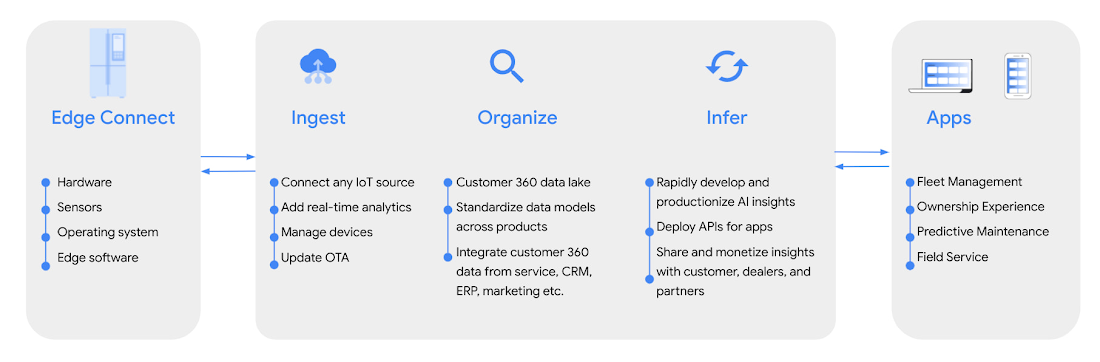
Intelligent Products Essentials helps manufacturers build new features across consumer, industrial, enterprise, and transportation products. Manufacturers can implement the solution in-house, or work with one of our certified solution integration partners like Quantifi and Softserve.
“The focus on intelligent products that Google Cloud is deploying provides a digital option for manufacturers and users. At its heart, systems like Intelligent Product Essentials are all about decision making. IDC sees faster and more effective decision-making as the fundamental reason for the drive to digitize products and processes. It’s how you can make faster and more effective decisions to meet heightened customer expectations, generate faster cash flow, and better revenue realization,” said Kevin Prouty, Group Vice President at IDC. “Digital offerings like Google’s Intelligent Product Essentials potentially go the last mile with the ability to connect the digital thread all the way through to the final user.”
Customers adopting Intelligent Products Essentials
GE Appliances, a Haier company, are enhancing their appliances using new AI-powered intelligent features to enable:
- Intelligent cooking: Help cook the perfect meal to personal preferences, regardless of your expertise and abilities in the kitchen.
- Frictionless service: Build smart appliances that know when they need maintenance and make it simple to take action or schedule services.
- Integrated digital lifestyle: Make appliances useful at every step of the way by integrating them with digital lifestyle services – for example, automating appliance behaviors according to customer calendars, such as oven preheating or scheduling the dishwasher to run in the late evening.
“Intelligent Products Essentials enhances our smart appliances ecosystem, offering richer consumer habit insights. This enables us to develop and offer new features and experiences to integrate with their digital lifestyle.“ —Shawn Stover, Vice-president Smart Home Solutions at GE Appliances.https://www.youtube.com/embed/zaWAJN8aKOw?enablejsapi=1&
Serial 1, Powered by Harley-Davidson, is using Intelligent Product Essentials to manage and update its next generation eBicycles, and personalize its customers’ digital ownership experiences.
“At Serial 1, we are dedicated to creating the easiest and most intuitive way to experience the fun, freedom, and adventure of riding a pedal-assist electric bicycle. Connectivity is a key component of delivering that mission, and working together to integrate Intelligent Product Essentials into our eBicycles will ensure that our customers enjoy the best possible user experience.”— Jason Huntsman, President, Serial 1.
Magic Leap, an augmented reality pioneer with industry-leading hardware and software, is building field service solutions with Intelligent Products Essentials with the goal of connecting manufacturers, dealers, and customers to more proactive and intelligent service.
“We look forward to using Intelligent Products Essentials to enable us to rapidly integrate manufacturers’ product data with dealer service partners into our field service solution. We’re excited to partner with Google Cloud as we continue to push the boundaries of physical interaction with the digital world.” — Walter Delph, Chief Business Officer, Magic Leap
Intelligent Product Essentials is available today. To learn more, visit our website.
More Relevant Stories for Your Company

How to Use Data to Tell Compelling Stories and Win New Deals
A picture is worth a thousand words--especially at work. The data we present every day is what helps us drive decision-making in the workplace. But understanding how to visualize a story can be difficult if you’re left staring at numbers sitting stagnant in rows or columns within a spreadsheet. This

A Road to Possibilities: Google Maps Platform Website
For more than 15 years, developers have used Google Maps Platform to deliver location-based experiences to their end users and used location intelligence to optimize their businesses. Along this journey, we’ve made a variety of changes to better support our community as needs have changed and new industries and technologies
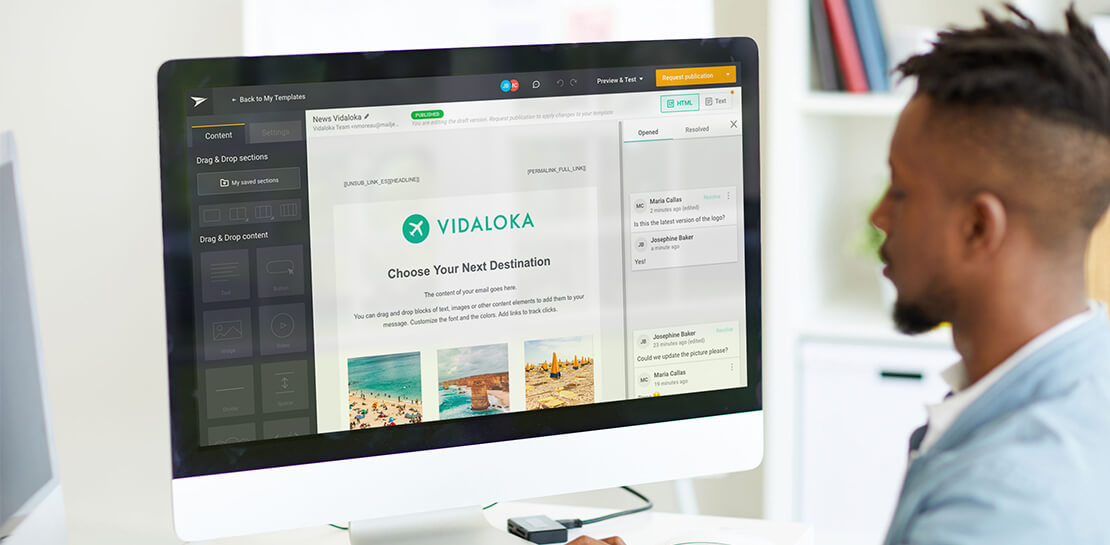
How Mailjet Sends 1.5 billion Emails a Month with Google Cloud
Mailjet allows companies to create, send, and track millions of emails to their customers and prospects around the world each month. The company’s offerings range from routing these emails to tailor-made tools that allow clients to design and send marketing campaigns with messages related to sales, user clubs, coupons and discounts,

Quick Recap on Google Cloud: Latest News, Launches, Updates, Events and More
Want to know the latest from Google Cloud? Find it here in one handy location. Check back regularly for our newest updates, announcements, resources, events, learning opportunities, and more. Tip: Not sure where to find what you’re looking for on the Google Cloud blog? Start here: Google Cloud blog 101: Full list
