





100 Stores. 5 States. How Schnucks Pulled Off a Mammoth Collaboration Feat

4413
Of your peers have already read this article.
4:30 Minutes
The most insightful time you'll spend today!
As a family supermarket chain since 1939, Schnuck Markets Inc. depends on driving efficiency and volume sales to achieve its mission, identifying customer service and community partnerships among its key differentiators.
In order to commit its maximum resources for success, Schnucks continues to focus on streamlining operations and achieving greater efficiency. Management and administrative staff throughout the company’s 100 stores in five states need to be able to collaborate effortlessly while enjoying an accurate, centralized information exchange platform. These efficiencies have the potential to impact productivity, customer service, and employee engagement.
Fast-tracking data sharing
Before adopting G Suite, Schnucks found collaborative workflows to be a challenge. Managers from different stores, often in different states, had to provide data that could be compiled and shared. Collaborative documents on traditional platforms faced challenges at Schnucks, where limits of simultaneous users would result in user lockouts. Schnucks managers often exchanged many different versions of the same documents and spreadsheets. However, reconciling all those versions was time-consuming and limited real-time collaboration.
“When we share a Google sheet and request data, 200 people can add their responses immediately at the same time from any device. They don’t walk away and forget and need a reminder. The result is near-effortless compliance,” says Kim Anderson, Director of Procurement and Replenishment at Schnucks.
Schnucks has been successful using the entire range of G Suite tools, with Drive, Docs, Slides, Sheets, and Forms contributing to enhanced collaboration. Google Keep is a popular productivity tool for meeting notes and tasks and creating reminders. Schnucks also uses Hangouts Meet and Hangouts Chat to reduce time and costs spent in face-to-face meetings, and Calendar as the central source for scheduling company events and meetings.
The partnership between Schnucks and Agosto helped with a successful G Suite deployment for the retailer. Agosto helped coordinate the logistics of the move and tackled the G Suite migration with a three-part strategy: IT staffers would move to Google first before employee “Google Guide” experts came in who could help answer teammate G Suite questions.
“Agosto’s deployment plan helped our G Suite deployment run smoothly,” says Dave Steck, Schnucks Vice President of Development and IT Infrastructure. “Their thorough planning helped mitigate the inevitable disruption a change of this size would make.”
Enhanced security and reliability
Previously, Schnucks relied on email to exchange information and any outages added even more lag time to its operations. With Gmail and the entire G Suite, Schnucks now experiences virtually no downtime, allowing for effective communication with enhanced levels of reliability and security.
“We were able to take advantage of the security benefits of G Suite right away,” says Joey Smith, Vice President and Chief Information Security Officer at Schnucks. “Our administrators are able to quickly configure, test, and manage our G Suite security settings to fit the security needs of our business while maintaining compliance with all regulatory obligations.”
On top of the CapEx and OpEx savings with Google providing infrastructure for its office productivity software, Schnucks has gained increased security and high availability, as well as robust disaster recovery. These features are included in G Suite, without any need for IT intervention.
“G Suite automatically encrypts our data with a unique encryption key for each piece and distributes it across multiple data centers for performance, security, and reliability,” says Joey. “This saves us a significant amount of time and money while achieving top notch security.”
Another way Schnucks benefits from Google security is the availability of data loss protection (DLP) features native to Gmail. With DLP, Schnucks can automatically audit outgoing emails for Personal Identifiable Information (PII), Protected Health Information (PHI), and other information the store requires.
“DLP is very powerful because it provides detailed visibility,” says Joey. “We can isolate emails, analyze patterns of false positives, and follow up with education or enhanced restrictions to increase security.”
Spam reduction
An unexpected advantage of adopting G Suite was an instantaneous reduction in spam emails. That’s more administrative time saved for employees. In fact, Gmail native spam prevention is so effective that Schnucks was able to replace its third-party spam filter with a simpler technology that costs 80% less.
Savings on hardware and software
Converting to G Suite saves Schnucks the operational costs of an infrastructure for office and communications solutions, but its web interface also provides substantial savings on application maintenance, anti-virus software, and hardware.
With G Suite files and applications residing in the cloud, the need for employees to use heavyweight installable applications is increasingly rare. As laptops age, Schnucks is replacing them with Chromebooks, saving approximately $1,250 per computer. Because Chromebooks don’t require additional anti-virus software or many other endpoint security measures, the need for software licenses and other security and maintenance costs are simultaneously reduced.
Schnucks also finds that Chromebooks instantly increase productivity. “What’s great about the Chromebook is the productivity savings we get from the speed and ease of use and management,” says Dave Steck, Vice President of Development and IT Infrastructure at Schnucks. “You’re not waiting for applications to start up. As a result, Chromebooks are the only laptops we need for the majority of our teammates.”
Aligning the company across sites
More than just providing a common set of office tools, intuitive collaboration in G Suite enables the grocery chain to provide consistent messaging and a central information hub across all store locations. With posters, presentations, and communications, Schnucks worked hard to help ensure that the entire company understood the value of the tools. The Operations and IT teams rolled out the changeover in three phases, using Google Guides to show the benefits of adoption and then rolling out to larger groups over time.
“Adopting G Suite as a collaborative platform helped us to integrate individual store activities and increase operational efficiency,” says Dave.
Investing in the future
Employees who were already familiar with G Suite because they used it in school or in their personal lives have found the move eases communications company-wide, and Schnucks believes that the move will also help attract prospective employees who already use G Suite.
“Knowing that more and more prospective employees are already familiar with G Suite is a big win for us,” says Joey. “To them, it helps demonstrate our commitment to innovation.”
Bringing Multiple Security Elements Together: Chrome

5394
Of your peers have already read this article.
2:00 Minutes
The most insightful time you'll spend today!
Security and the way we’ve been able to advance user protections over the years is hands down one of my favorite topics when it comes to Chrome. I’ve been on the Chrome team for over 14 years and have seen the browser evolve to become a critical tool that helps people get work done at home or in the office. At the same time, Chrome is often the best line of defense to protect users against malicious software on the internet.
Now more than ever, security has to be top of mind for IT and security teams. Cybercrime is up 600% due to the COVID-19 pandemic, and remote work has increased the average cost of a data breach by $137,000. Those numbers are staggering. And IT teams need to make sure every piece of their tech stack helps support their security needs.
Chrome has worked for years to quickly mitigate risks, block malicious sites and content, and proactively improve web security to keep your users and corporate data safe, pioneering new layered defenses like sandboxing and site isolation. When we think of security and Chrome, we believe it takes multiple elements of security coming together to give organizations the best protection possible.
Security you don’t have to think about: Chrome has many built in protections in place by default that benefit all users. This includes our team’s work to minimize zero days and roll out fixes quickly. With auto updates enabled, Chrome offers enterprises fast and automatic fixes for zero day vulnerabilities. The Chrome security team recently published a post explaining the state of in-wild-bugs that’s worth a read. More examples of the defense-in-depth Chrome offers include capabilities like site isolation and sandboxing that keep malicious code from affecting other visited sites or impacting user machines. Our scanning infrastructure helps us detect and remove harmful extensions from the Chrome Web Store (in fact, last year we saw an almost 90% drop in malware) to prevent your end users from getting infected with malicious extensions. These are protections built directly into Chrome that automatically keep your users and organization safe.
Protections for Chrome users: We provide additional layers of protection that keep your end users safe while they’re on the web and give them helpful information whenever there are potential security risks. For example, Safe Browsing, offered natively in Chrome, helps protect devices by showing warnings to users when they attempt to navigate to dangerous sites or download malicious files. We also give users insights into the safety of their passwords, letting them know if their passwords have been compromised, or even prompting them to change their corporate password if they try to re-use it against company policies. You users are working hard to get things done, and Chrome’s layered security supports their workflows while helping them stay safe on the web.
Enterprise Controls: Every organization has unique security needs. That’s why Chrome provides enterprises with advanced safeguards and granular policy management to help meet those security goals. With hundreds of policy options, admins can use a variety of management tools, including Chrome Browser Cloud Management, to customize the browser. Chrome Browser Cloud Management goes even further, providing powerful enterprise extension management, a security priority for many organizations. Our extension request workflow allows end users to request extensions and admins to allow or deny extension requests. We also recently released extension pinning that allows admins to pin to specific versions of extensions to support any internal security review processes.
Visibility and reporting is another focus area to support IT teams. Through Chrome Browser Cloud Management, administrators can get more insight into their browser environment. This data can help IT teams make security decisions, better understand the devices running Chrome and investigate if issues arise.
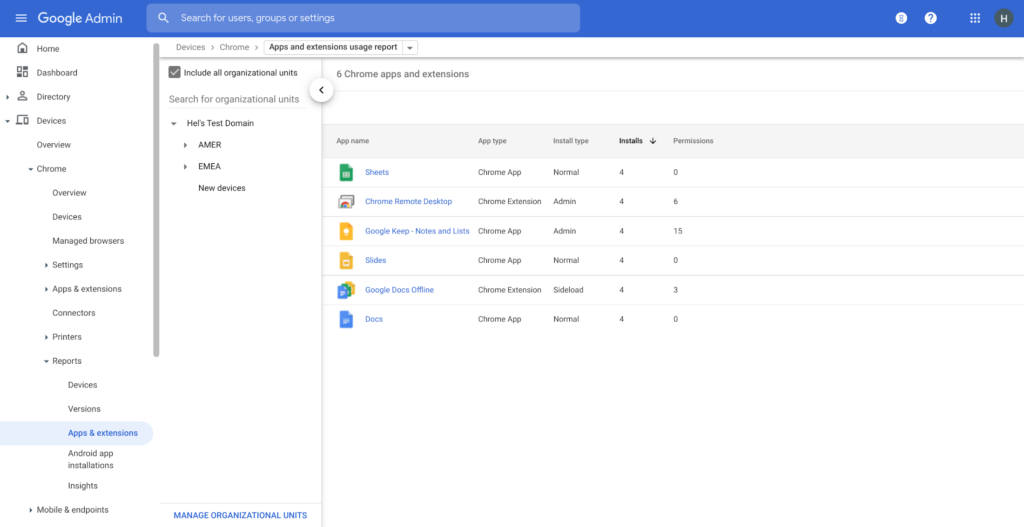
Zero trust security: Finally, Chrome can help modernize an enterprise’s security strategy by migrating to Zero Trust access models. BeyondCorp Enterprise helps secure endpoints by directly integrating Threat and Data Protection in Chrome. This protects against intentional or accidental data loss and prevents malware and phishing in real-time. Additionally, Chrome and BeyondCorp Enterprise provide device trust and endpoint security signals directly from the browser, significantly easing deployment of zero-trust in your environment. In 2022, we plan to partner with leading players in the cybersecurity and zero trust space to add additional integrations.
For security recommendations, check out the new Chrome 2.1 CIS Benchmark that covers independent recommendations on which Chrome policies to configure to help support organizations’ security and compliance needs.
3814
Of your peers have already watched this video.
28:27 Minutes
The most insightful time you'll spend today!
Power your business with search and AI in G Suite
More than ever, businesses are dealing with major challenges like increased competition, data and information overload, and processes slowing people down.
To overcome these challenges, businesses need to move faster, harness data and resources and remove friction from getting things done.
We know that countless hours are wasted every day by information workers doing mundane tasks that distract and take time away from the creative knowledge work where they can uniquely add value. In 2019, we commissioned a total economic impact analysis with Forrester Research, and based on a number of interviews with our customers, we have learned that G Suite* is delivering value in four key ways, revenue growth, employee efficiency, risk mitigation, and IT cost savings.
The numbers are all based on a composite customer with 20,000 users generating $3 billion a year in revenue. For highly collaborative employees, the time savings of mundane tasks with G Suite is huge. Almost an extra month’s worth of time every year, with 20% of that time reallocated towards value-added tasks that are important to your business.
In this video, find out how G Suite can help with employee efficiency, saving people time, boosting productivity, and reducing frustration.
(G Suite* is now Google Workspace)
How Japan’s Vaccine Locator Platform Became A One-stop Shop for COVID-19 and Vaccination-related Information

3915
Of your peers have already read this article.
4:00 Minutes
The most insightful time you'll spend today!
Editor’s Note: David Moore, Founder and CEO of Navagis, shares his story of teaming up with the Google Maps Platform team to help people across Japan get vaccinated amid COVID-19 pandemic.
The roots of Navagis go back to Hurricane Katrina, when I led an Army Corps of Engineers team that deployed 3D mapping technologies with Google Earth to respond to critical needs on the U.S. Gulf Coast. As a Google Cloud Premier Partner we work across various industries and organizational types to solve location intelligence challenges with our software solutions.
The experience taught me how powerful mapping insights can be in protecting lives when disaster strikes. The COVID-19 crisis brought a brand new human challenge to the world and like other countries, Japan found itself struggling to vaccinate its 125 million people, while trying to communicate about where (and under what circumstances) people could get their vaccines.
Our end goal was to build a reliable, enriched, real-time dataset on Japan’s vaccination centers. Living in Japan, seeing some confusion and anxiety, I felt great urgency when I accepted the mission on behalf of our team.
From the very beginning we faced many challenges. Japan was experiencing unique difficulties in building an accurate real-time vaccine locator. First, we noticed the fragmentation of address information across thousands of local governments, from Hokkaido in the north to subtropical Okinawa in the south. Second, Japan’s Ministry of Health, Labor and Welfare had launched a website of nationwide vaccination sites, which they were constantly updating data sources. We noticed the location information was prone to inconsistencies due to its dispersion at the local level, and different conventions among prefectures on writing addresses. In order to ensure the integrity of a massive amount of decentralized data, mostly in Japanese, we required on-the-ground presence and experience.
In addition, we needed to go beyond simply mapping the location of vaccination centers. Each one needed to be a one-stop shop for all information regarding vaccination, including opening hours, safety precautions, and qualifications for getting the COVID-19 vaccine.
Round-the-clock teamwork builds a helpful, informative mapping solution
People might think of mapping as all about AI, advanced satellites, and cloud computing power. Of course, these are essential. What is less known is the massive amount of human toil and dedication that goes into making vaccine location information available especially for an urgent health mission for a country as large and complex as Japan.
Realizing our task was urgent, we worked with the Google Maps Platform team across time zones and over weekends to make this happen fast. In some cases a vaccine center was at a place where one would not normally expect to get a vaccine—like a pop-up location at a convention center. So we matched vaccine center addresses from the government website against Google Maps Platform’s Places data.
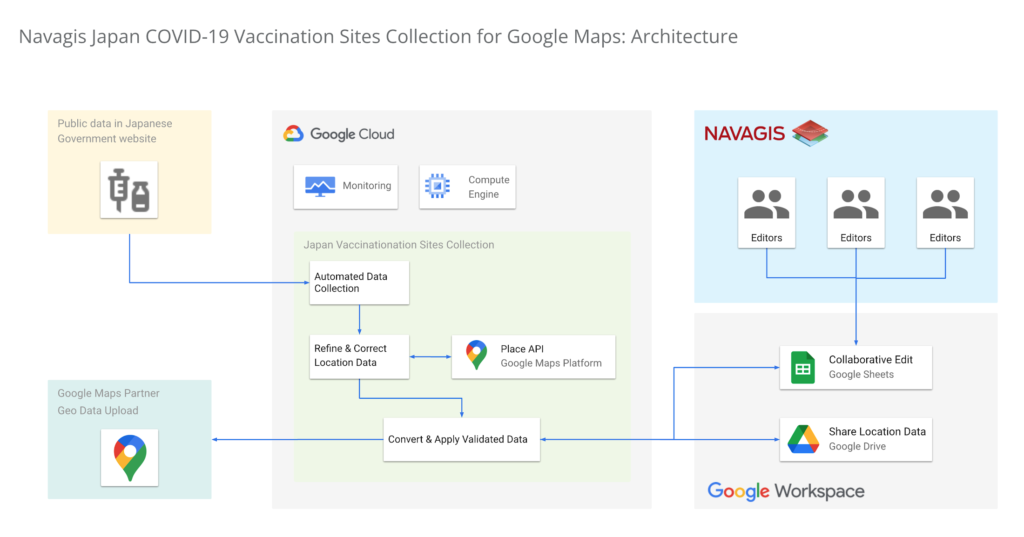
In under two weeks, we had identified, matched and marked tens of thousands of locations as vaccination centers around the country. Moreover, the power of the Geolocation API and Places API enabled us to provide richer details for many of the centers.

One of the unique aspects of this project was being able to surface our work across multiple channels to accomplish a single goal. We were able to work with Google to ensure the vaccine centers appeared on the consumer user-facing Google Maps apps and website, with information to help citizens learn where and how to get their vaccine. Our team was in hourly contact with requests such as “this center is mission-critical, can we get it mapped?” They were able to quickly get the site listed and visible on the map for end-users. This was a big human mobilization.
Powerful mapping APIs for pinpointed vaccine location information
We couldn’t have accomplished the massive task of validating 35,000 vaccination sites in such a short period of time without Google’s mapping APIs. The Maps Geocoding API and Places API enabled us to take location data from the government website, and quickly verify whether the location existed, or not, with up-to-date places intelligence.
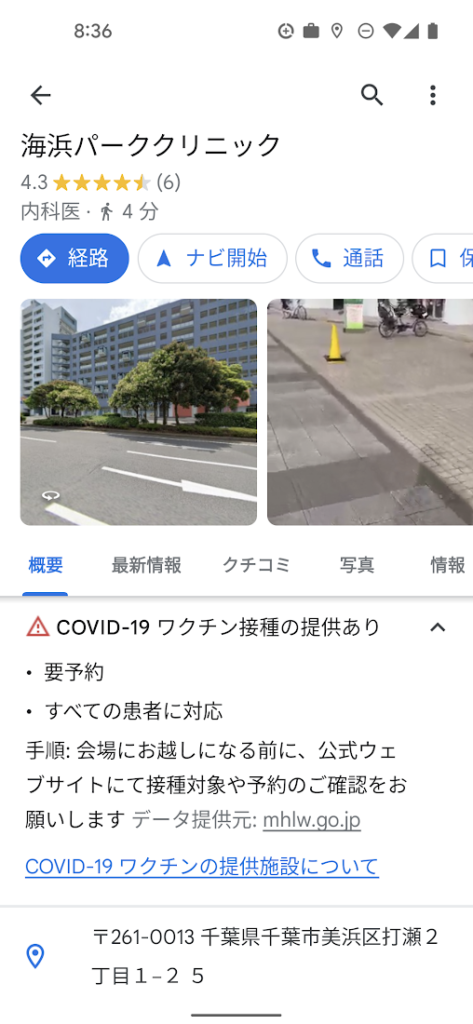
The Places API served a critical role in two ways: breadth of information (covering Japan’s entire territory), and depth of information (complex insight into each place, such as landmarks and phone numbers).
The ability to take the addresses provided by the government of vaccination sites, run them through the Places API, and assess the address quality helped enormously. Google Street View, meanwhile, provided a further level of validation, enabling us to visually identify the specific locations where errors remained, and manually identifying clinics and hospitals before identifying their precise latitude and longitude within cities in Japan.
Looking beyond COVID-19
Japan went from being a laggard in global vaccination rates before the summer of 2021 to one of the leaders, with nearly 80% of the population fully vaccinated. And, daily confirmed cases had been as low as 100 nationwide prior to Omicron emerging globally.
The prospect of putting to bed our adventure with the Japan Vaccine Locator couldn’t bring us more joy.
Except perhaps, the prospect of helping people rediscover the joy of a return to normalcy—in partnership with Google Maps Platform.
For more information on Google Maps Platform, visit our website.
How Recommendation AI Helps Retailers Optimize Click-through and Conversion Rates

7086
Of your peers have already read this article.
3:00 Minutes
The most insightful time you'll spend today!
Time to go outside again, I guess. I’ll need a sun hat. Sunscreen. Maybe some new sandals? What else?
With the Recommendations AI service, I might be reminded to grab a reusable water bottle and a swimsuit. Or some after-sun aloe lotion. Good thing, cause I’ll need it.

Recommendations AI is a solution that uses machine learning to bring product recommendations to their shoppers across any catalog or client list. This service is part of our full suite of Retail solutions. When you integrate with the Retail API, you get the benefit of Google’s Product Discovery. Integrating once to reap the benefits over and over. Recommendations is the starting point, and you can easily extend into Retail Search and Vision Product Search in the upcoming future.
The Recommendations solution is fully managed, global-scale and powered by deep learning, so you can focus on a great shopping experience and let someone else worry about the infrastructure.
Compared to baseline recommendation systems used by customers, Recommendations AI showed double digit uplift in conversion and clickthrough rates in A/B experiments controlled by the customers. You can optimize for click-through, conversion or session revenue, and fine tune the models to make sure you omit out-of-stock items or duplicates, for example.

So how does it work, and how do you get started? Read on, and we’ll walk you through the pipeline, starting with the data you already have to placement in your online store.
Formula: Data -> Model -> Placement
You start with your catalog, the list of all the things (postcards, movies, pie recipes) that you want to show your customers. Then you ingest your PII-redacted user events -this is the historic event data like home page views, add to cart events and more along with real time user events. This user event is joined with the product catalog and items that allows us to construct the sequence of shoppers’ activity, thus being able to predict what the shopper has a high propensity to purchase next. The user events can come from both online activity across devices or offline store purchases
The recommendation model will return a list of products, which are the recommendations. The brains of the operation, if you will. This model is trained using all the data that you ingest, using the latest neural network models and techniques that Google has built expertise over the years in flagship products like Youtube and News, that allows us to uncover shopper intent, so it can best predict the right recommendations to show to the right people.
Every model outputs a list of product identifiers, but where do they go? They go into placements, the spots, panels, carousels on your customer’s journey interacting with your brand that you’ve set aside to highlight recommendations. A model can send recommendations to one or more placements, but each placement only receives information from one recommendation model. Your pages will then need to render the products with the right images, text or other metadata, using the product ID that is returned by the model.
What do recommendations look like?
Let’s start by browsing our postcard-selling website, where I’ve been buying some vintage California postcards already. The recommendations algorithm has caught on to my interest, showing me other potential cards to purchase based on my history:

Put your data to work
To get started we need to bring your data into the recommendation model, so it can understand your customers, your inventory, and your sales patterns.
The model takes in the product catalog you use, and metadata about those products to better understand nuances in assortment, pricing and variables like size and style. You might already have this data stored in BigQuery or Merchant Center, and hence we provide easy integrations that you can leverage to get started even faster.
As for the user events, don’t worry if you already have systems in place to capture web and mobile activity. We make it easy to bring in your real time event logs by providing seamless integrations with Google Tag Manager, Javascript pixel, or even historic events from Cloud Storage, BigQuery or using inline API or JSON, so you can immediately train the models on this imported data. All this allows you to kickstart integrating with Recommendations AI in a matter of days.
The models then construct a sequence of activities that the user went through and joins with the products that the user engaged with. Once your data is ready to go, it takes a few days to train the model. Next onto making the data work for you.
Quickly customize your model
Setting up your own recommendations project in the console gives you the ability to choose what sort of model to train (based on what recommendations you want to generate) and your objective. Are you optimizing for click-through rate–more people click on the recommendation links or products–or for conversion rate–more people choose or buy what was suggested or revenue ?
Different models can be optimized for different optimization goals.; the GCP console explains what each one can do and how you can choose to optimize it.

Let’s unpack some of this terminology real quick.
We’ve got three model types:
- Recommended for you – Means we think these are items you’ll want to buy, based on your history; this is usually used on a home page to showcase items.
- Others you may like – Means if you’re browsing the page of a water bottle, we will recommend alternative brands of water bottles that you may like as well as a backpack, based on your engagement history.
- Frequently bought together – Means that when anyone buys sunscreen, we notice that they often also buy aloe lotion, so we will surface those items when someone adds any one of them to their cart.
And then we have three business objectives that the models optimize for:
- Click-through rate – How frequently did somebody click on a recommended item?
- Conversion rate– How frequently did somebody add a recommended item to their cart?
- Revenue per session – How much money did the recommendations generate for you?
Deliver anywhere along the journey
Now that you’re all set up in the Retail AI console, you can test out the recommendations in the console, even before you deploy to production.

You can integrate Recommendations into your frontend by calling the Predict APIt. The placements of recommendations will report data back into the dashboard and you can analyze and measure success for future iterations.
On top of that you can use the recommendations for other parts of your customer’s journey. Email promotions, storefront kiosks, display ads or follow-up notifications can include recommendations based on past activity and cart contents. The model gives you useful product recommendations for a wide variety of touchpoints and steps in the purchasing process.
More best practices, and guides, are available inside our documentation.
How to get started
Training your own models can be tedious, time-consuming, and expensive. On top of that it requires deeper data science expertise to set up. Let us do it instead!
You can see how IKEA Retail uses Recommendations AI in this recent talk and blog from the Google Cloud Retail Summit..
To get started today you’ll need to make a Cloud project and enable the Retail API, which then allows you to access all the recommendation tools in one menu. Bring in your catalog and purchasing data, define a placement or two, and you can start putting recommendations on your site in a matter of days.
4480
Of your peers have already watched this video.
9:49 Minutes
The most insightful time you'll spend today!
Quick Tips: How to Set Up a Business Without Investing Too Much
Running a business is everybody’s dream but only a few get to realize it. Among the many hurdles that entrepreneurs face, setting up the business with everyday tools like business emails, calendars, and finding cost-effective ways to collaborate are imperatives.
But it isn’t a struggle in the age of the cloud. Cloud computing takes care of infrastructure costs, breaks geographical boundaries, and makes collaboration across continents a walk in the park.
Google’s G Suite—a cloud-based collaboration and productivity platform—helps organizations achieve exactly that. G Suite is an affordable option to keeping your business organized. It’s the one stop shop for collaborating, creating consistency, and developing the professionalism your business needs.
What does that essentially mean?
Your marketing teams can create pitch presentations on Slides by collaborating in real time. All of them can work on the same version of the presentation all at once, ensuring everybody is on the same page.
Your finance teams can move over complex spreadsheet formulas and analyse costs just by asking—in words—Google Sheets to throw up answers to questions like: “What was our average spend last month?”
Your executive boards can meet on Hangouts from wherever they are, leading to faster decision-making.
Amber Hurdle, author of The Bombshell Business Woman, expands on the Tech Tools chapter of her book, by walking through how she uses G Suite to streamline her business.
More Relevant Stories for Your Company

How Google Cloud Platform Delivers 5X Performance Boost to SMBs
Small and medium-sized businesses are increasingly adopting cloud solutions, with Google Cloud Platform offering significant benefits. IDC interviews reveal that SMBs using Google Cloud Platform experience improved performance, reliability, and scalability while reducing costs. Key findings include: Empowering application development teams with infrastructure agility and scalability Enabling business growth by




Are You Suffering from Spreadsheet Paralysis?
Today, within the four walls of your office there’s just one concern everyone has: What do the numbers say? The answer to that question almost always rests with you. If they get it wrong, everybody gets it wrong. But does it have to be so hard to get it right?

Bigbasket: Delivering Groceries Across 25 Cities in India
When Bigbasket was founded in December 2011, it guaranteed to deliver goods within a one-hour delivery slot of its customers' choosing or it would refund them 10 percent of their orders. The company also introduced an express service, delivering groceries within 90 minutes of an order being placed. Bigbasket needed

Reactive Programming on Google Maps Platform: Watch Video to Learn
The Google Maps Platform Android SDK supports extensions for reactive programming, which helps you write code to handle asynchronous operations. Write reactive and responsive mapping applications with Google Maps Platform In mobile apps, asynchronous events can happen at any point in time: user touch events, waiting for network calls to complete, or
