






Is it Cheaper to Run Oracle Workloads on Google Cloud Than On-Prem? Yes, By 78%
READ FULL INTRODOWNLOAD AGAIN4232
Of your peers have already downloaded this article
3:30 Minutes
The most insightful time you'll spend today!
Spark on Google Cloud: How this Helps Customers with Agility, Cost Reduction and Time Spent on Spark

4875
Of your peers have already read this article.
1:30 Minutes
The most insightful time you'll spend today!
Apache Spark has become a popular platform as it can serve all of data engineering, data exploration, and machine learning use cases. However, Spark still requires the on-premises way of managing clusters and tuning infrastructure for each job. Also, end to end use cases require Spark to be used along with technologies like TensorFlow, and programming languages like SQL and Python. Today, these operate in silos, with Spark on unstructured data lakes, SQL on data warehouses, and TensorFlow in completely separate machine learning platforms. This increases costs, reduces agility, and makes governance extremely hard; prohibiting enterprises from making insights available to the right users at the right time.
Announcing Spark on Google Cloud, now serverless and integrated
We are excited to announce Spark on Google Cloud, bringing industry’s first autoscaling serverless Spark, seamlessly integrated with the best of Google Cloud and open source tools, so you can effortlessly power ETL, data science, and data analytics use cases at scale. Google Cloud has been running large scale business critical Spark workloads for enterprise customers for 6+ years, using open source Spark in Dataproc. Today, we are furthering our commitment by enabling customers to:
- Eliminate time spent managing Spark clusters: With serverless Spark, users submit their Spark jobs, and let them do auto-provision, and autoscale to finish.
- Enable data users of all levels: Connect, analyze, and execute Spark jobs from the interface of users’ choice including BigQuery, Vertex AI or Dataplex, in 2 clicks, without any custom integrations.
- Retain flexibility of consumption: No one size fits all. Use Spark as serverless, deploy on Google Kubernetes Engine (GKE), or on compute clusters based on the requirements.
With Spark on Google Cloud, we are providing a way for customers to use Spark in a cloud native manner (serverless), and seamlessly with tools used by data engineers, data analysts, and data scientists for their use cases. These tools will help customers on their way to realize the data platform redesign they have embarked on.
“Deutsche Bank is using Spark for a variety of different use cases. Migrating to GCP and adopting Serverless Spark for Dataproc allows us to optimize our resource utilization and reduce manual effort so our engineering teams can focus on delivering data products for our business instead of managing infrastructure. At the same time we can retain the existing code base and knowhow of our engineers, thus boosting adoption and making the migration a seamless experience.”—Balaji Maragalla, Director Big Data Platform, Deutsche Bank
“We see serverless Spark playing a central role in our data strategy. Serverless Spark will provide an efficient, seamless solution for teams that aren’t familiar with big data technology or don’t need to bother with idiosyncrasies of Spark to solve their own processing needs. We’re excited about the serverless aspect of the offering, as well as the seamless integration with BigQuery, Vertex AI, Dataplex and other data services.” —Saral Jain, Director of Engineering, Infrastructure and Data, Snap Inc.
Dataproc Serverless for Spark
Per IDC, developers spend 40% time writing code, and 60% of the time tuning infrastructure and managing clusters. Furthermore, not all Spark developers are infrastructure experts, resulting in higher costs and productivity impact. With serverless Spark, developers can spend all their time on the code and logic. They do not need to manage clusters or tune infrastructure. They submit Spark jobs from their interface of choice, and processing is auto-scaled to match the needs of the job. Furthermore, while Spark users today pay for the time the infrastructure is running, with serverless Spark they only pay for the job duration.
Spark through BigQuery
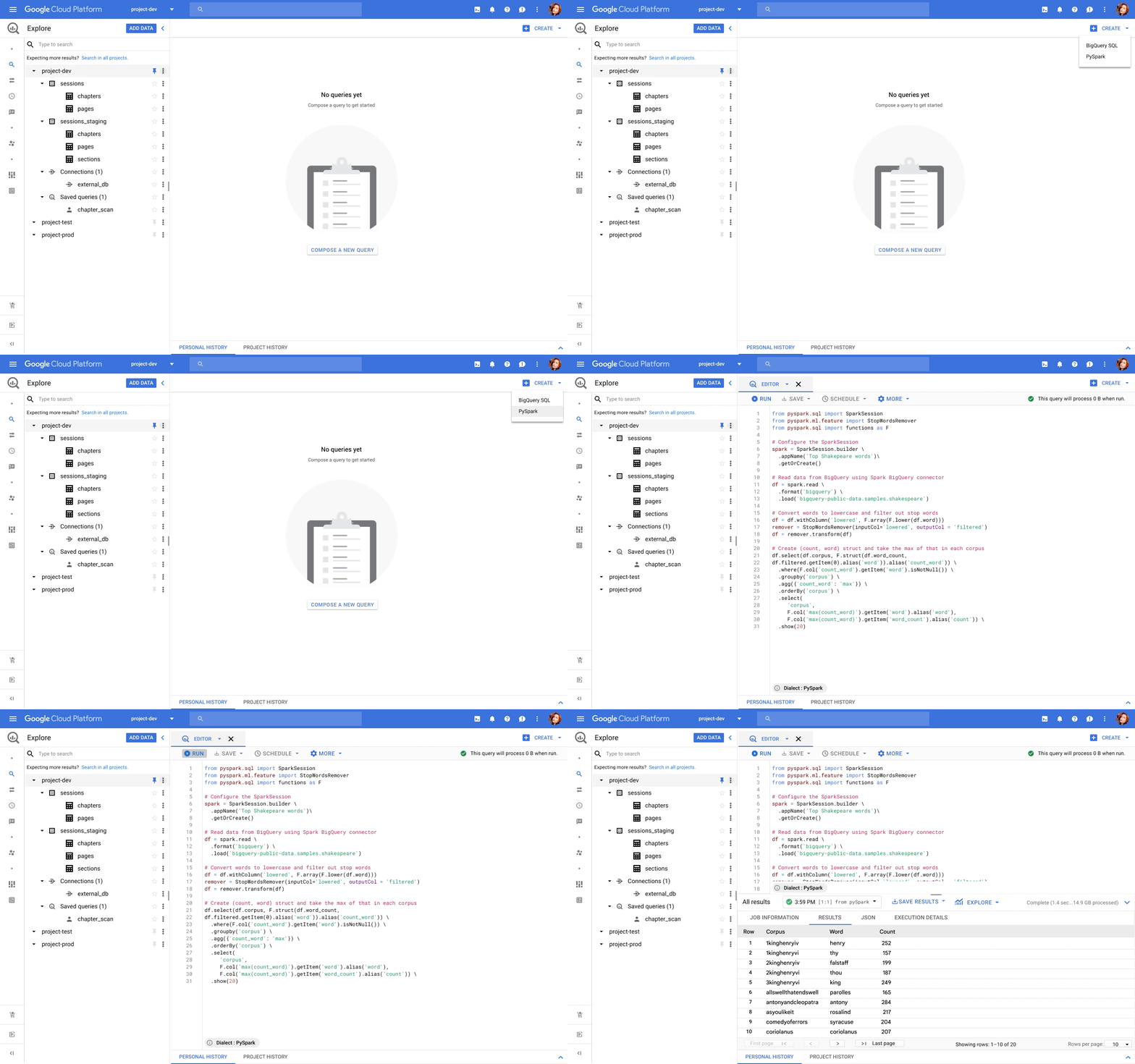
BigQuery, the leading data warehouse, now provides a unified interface for data analysts to write SQL or PySpark. The code is executed using serverless Spark seamlessly, without the need for infrastructure provisioning. BigQuery has been the pioneer for serverless data warehousing, and now supports serverless Spark for Spark-based analytics.
Spark through Vertex AI
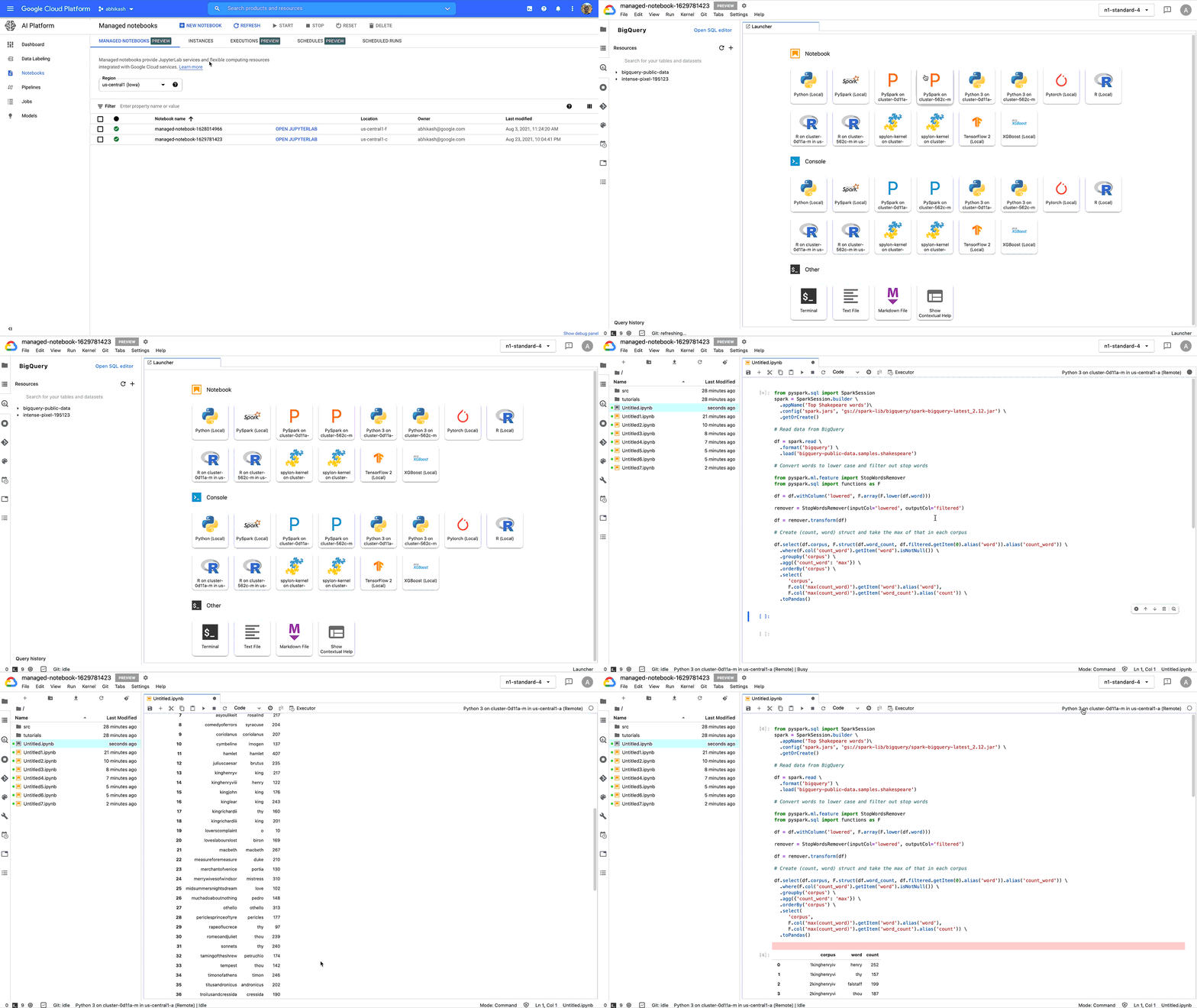
Data scientists no longer need to go through custom integrations to use Spark with their notebooks. Through Vertex AI Workbench, they can connect to Spark with a single click, and do interactive development. With Vertex AI, Spark can easily be used together with other ML frameworks like TensorFlow, Pytorch, Sci-kit learn, and BigQuery ML. All the Google Cloud security, compliance, and IAM are automatically applied across Vertex AI and Spark. Once you are ready to deploy the ML models, the notebook can be executed as a Spark job in Dataproc, and scheduled as part of Vertex AI Pipelines.
Spark through Dataplex
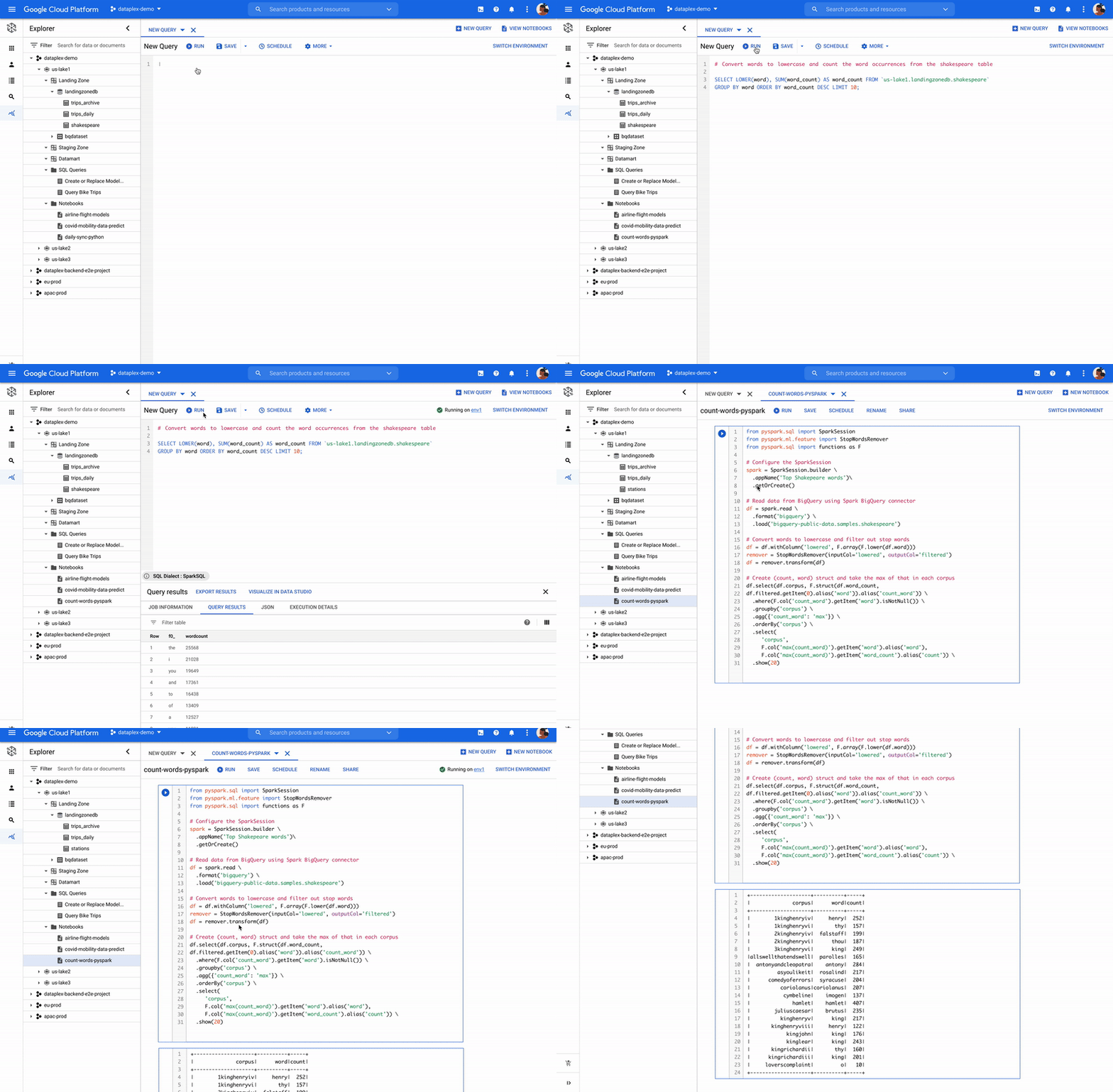
Dataplex is an intelligent data fabric that enables organizations to centrally manage, monitor, and govern their data across data lakes, data warehouses, and data marts with consistent controls, providing access to trusted data and powering analytics at scale. Now, you can use Spark on distributed data natively through Dataplex. Dataplex provides a collaborative analytics interface, with 1-click access to SparkSQL, Notebooks, or PySpark, and the ability to save, share, search notebooks and scripts alongside data.
Flexibility of consumption
We understand one size does not fit all. Spark is available for consumption in 3 different ways based on your specific needs. For customers standardizing on Kubernetes for infrastructure management, run Spark on Google Kubernetes Engine (GKE) to improve resource utilization and simplify infrastructure management. For customers looking for Hadoop style infrastructure management, run Spark on Google Compute Engine (GCE). For customers, who’re looking for no-ops Spark deployment, use serverless Spark!
ESG Senior Analyst Mike Leone commented, “Google Cloud is making Spark easier to use and more accessible to a wide range of users through a single, integrated platform. The ability to run Spark in a serverless manner, and through BigQuery and Vertex AI will create significant productivity improvement for customers. Further, Google’s focus on security and governance makes this Spark portfolio useful to all enterprises as they continue migrating to the Cloud.”
Getting started
Dataproc Serverless for Spark will be Generally Available within a few weeks. BigQuery and Dataplex integration is in Private Preview. Vertex AI workbench is available in Public Preview, you can get started here. For all capabilities, you can request for Preview access through this form.
You can work with Google Cloud partners to get started as well.
“We are excited to partner with Google Cloud as we look to provide our joint customers with the latest innovations on Spark. We see Spark being used for a variety of analytics and ML use cases. Google is taking Spark a step further by making it serverless, and available through BigQuery, Vertex AI and Dataplex for a wide spectrum of users.” —Sharad Kumar, Cloud First data and AI Lead at Accenture
For more information, visit our website or the watch announcement video and our conversation with Snap at Next 2021.
4495
Of your peers have already watched this video.
4:00 Minutes
The most insightful time you'll spend today!
How to Create, Manage and Run SQL Instances in Google Cloud SQL
Database admins and application developers can easily create a database on Google Cloud SQL, which helps manage mundane administrative tasks so that they can focus on what matters the most. From MySQL to Postgres databases, they can spin up an instance in just a few simple steps.
An instance can easily be created in just a few clicks by navigating to Cloud SQL in the GCP console, selecting the database of choice, and naming it and setting a password. Users can configure options like instance size, the number of cores, the amount of memory, and storage amount and type, from the same place. In addition, users can also isolate the database from failures by selecting the high availability option.
Once they click on create, the database instance spins up in just a few minutes. Once the instance is created, all the users would have to do is to connect to the database. Users can connect using Google App Engine, Compute Engine, or Container Engine or from anywhere else by authorizing the IP address or by using the Cloud SQL Proxy.
In just a few clicks and in a matter of minutes, users can easily spin up a database instance and manage routine administrative tasks.
Cloud Spanner & Bigtable Helps Sabre Build Consistency & Scalability to Serve 1 Billion Travellers

3635
Of your peers have already read this article.
1:30 Minutes
The most insightful time you'll spend today!
Sabre is an innovative software and technology company that leverages highly scalable databases and artificial intelligence (AI) to power travel industry partners around the globe. Our company processes more than 12 billion shopping requests and serves over 1 billion travelers every year.
The companies that partner with us include airlines, travel websites, agencies, and hotels. We are distinguished by a long history of integrating cutting edge technology into our operations. Our earliest innovations include building one of the first transaction processing systems in existence and a travel distribution network that predates the Internet! Through our next generation of AI-powered solutions, we are focused on optimizing the retailing, distribution, and fulfillment experience of the travel industry.
In my role as chief architect for Sabre Labs, I spearhead the long-term technology choices we are making to enhance the development, deployment, and operation of our software. We’ve embarked on a multi-year strategy to transform our technology and solutions. Rearchitecting our infrastructure to become fully cloud native is a central tenet of this transformation. In these early iterations of our plan, we have seen the significant impact of machine learning and its potential in bringing truly personalized travel experiences to customers. As part of this effort, we’ve established a 10-year partnership with Google to help accelerate our transformation and bring innovation to the travel industry.
Database choices require tradeoffs
The complexity and scale of the travel industry places high demands on the cloud services we utilize. We tend to place more emphasis on how a particular cloud service will impact an application’s reliability, performance, or development time, rather than choosing a service purely for its functionality. When it comes to databases, this can often mean making a tradeoff between latency and consistency.
The tradeoff exists for any database that serves multiple copies of its data in different availability zones or geographic regions for reliability. A database designed to ensure that everyone sees a consistent view of the latest data might update those copies synchronously using a consensus algorithm, which affects how quickly the data can be served. On the other hand, a database that’s optimized for faster data serving might update each copy asynchronously and not guarantee consistent reads across records.
Cloud Spanner and Bigtable–two of Google Cloud’s managed databases–are both highly effective services, and each one could support many of our travel applications. But as you will see, the latency vs. consistency tradeoff made it clear which one was best suited for two of our most critical cases.
Google Cloud Spanner facilitates strong, global consistency for Sabre
An airline’s reservation database stores a passenger’s booking information, seat selection, tickets, special requests, and other critical information about their trip. As a result, this data sits at the consistency end of that consistency/latency spectrum. Sabre typically processes thousands of reservation updates per second on behalf of our carrier customers. An airline’s reservation database must be served from many availability zones (and data is replicated across these availability zones) so that it remains available in the event of an outage. It also requires ACID properties for transactional updates across records since airlines often make changes to multiple passengers and multiple flights at the same time.
We needed a system that can handle bursts of concurrent updates, as would occur during a snowstorm when hundreds of thousands of passengers might be automatically moved to alternate flights. Spanner is a great fit for the reservations case because of its unique consistency guarantees. It processes over 1 billion requests per second at peak and provides five 9s SLA (99.999 percent) to support our applications. Spanner also helps us maintain compliance, business continuity, redundancy, and reliability using the same secure-by-design infrastructure, built-in data protection and replication, and multi-layered security that are essential to our Google Cloud workloads.
Spanner’s client libraries also provide built-in mechanisms to handle retrying in the event of write conflicts with another transaction and allow developers to choose stale reads in read-only transactions for improved performance. Of course, consistency across multiple zones or regions doesn’t come for free. It means higher write latencies than if we wrote to a comparable database running in a single availability zone, but for an application that manages flight reservations, it’s a tradeoff that makes sense.
Bigtable provides predictable, low latency at scale
Our flight shopping systems sit at the other end of the latency/consistency spectrum. Sabre’s shopping engine generates millions of itineraries per second on behalf of travelers using mobile apps, third-party travel websites, and airline call centers. Each itinerary requires significant compute resources to calculate: We need to find which combinations of flights make sense and evaluate complex rules about their availability and pricing. Users are typically less patient while searching for a flight than they are when booking it, so we needed a low latency solution. But we can cache many of these shopping results to reduce our compute usage. For instance we can decide how long to cache results based on factors like how far the flight results are from the departure.
Bigtable makes an excellent choice for this shopping cache. It’s a NoSQL database service built to handle high-throughput, low-latency applications, with more than 10 exabytes of data under management. Bigtable’s unique latency properties—such as predictability and single-digit millisecond response time even for multi-petabyte tables—enable us to serve large volumes of shopping results cost effectively, while providing low response times to travelers.
Google Cloud supports a focus on innovation
Managed databases like Bigtable and Spanner are a significant part of Sabre’s cloud strategy. The combination of unique tools like Key Visualizer for Bigtable and Spanner as well as integration with other Google Cloud services like Cloud IAM, Cloud Monitoring, and now Datastream, make the experience of operating managed databases with Google Cloud much easier than it is with several of their self-hosted counterparts. As a result of their granular pricing models and ability to be deployed and automated by SREs, the managed databases we use also end up with a lower total cost of ownership.
We’re particularly excited about a few recent database-related announcements from Google Cloud. Bigtable’s SLA update gives us more concrete expectations in terms of multi-cluster, multi-region uptime. Spanner’s change to provisioning in Processing Units increases its cost efficiency when deploying in non-production environments where we may need many isolated instances, but won’t come close to the limits of a single node. In those cases, Spanner instances may now be configured in one-tenth of a node increments.
Our cloud transformation depends on having a choice of databases for different use cases, trade offs, and migration schedules. In addition to managed databases, we expect to use self-hosted databases, database solutions available in Cloud Marketplace, and transitional services like Cloud SQL for a few more years. In an industry as demanding as travel, accelerating our most critical applications using technology unique to Google Cloud means less time spent optimizing latency and consistency, and more time spent innovating.
Learn more about how your organization can use Bigtable and Spanner.
Google Cloud Next 21 for Data Analytics Unplugged

4947
Of your peers have already read this article.
4:30 Minutes
The most insightful time you'll spend today!
October 23rd (this past Saturday!) was my 4th Googlevarsery and we are wrapping an incredible Google Next 2021!
When I started in 2017, we had a dream of making BigQuery Intelligent Data Warehouse that would power every organization’s data driven digital transformation.
This year at Next, It was amazing to see Google Cloud’s CEO, Thomas Kurian, kick off his keynote with CTO of WalMart, Suresh Kumar , talking about how his organization is giving its data the “BigQuery treatment”.
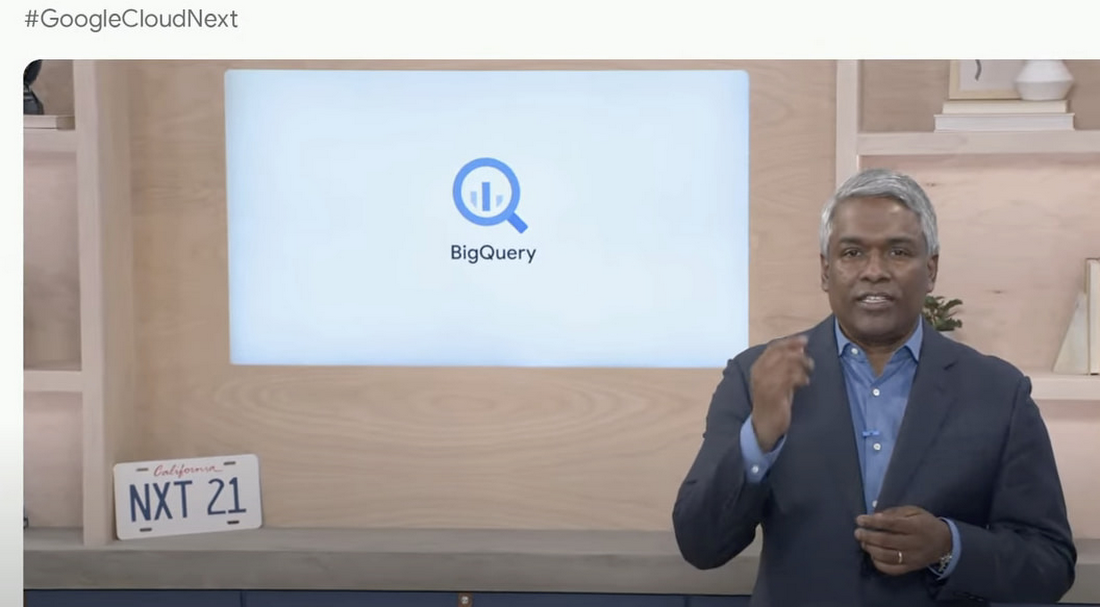
AS I recap Next 2021 and reflect on our amazing journey over the past 4 years, I’m so proud of the opportunity I’ve had to work with some of the world’s most innovative companies from Twitter to Walmart to Home Depot, Snap, Paypal and many others.
So much of what we announced at Next is the result of years of hard work, persistence and commitment to delivering the best analytics experience for customers.
I believe that one of the reasons why customers choose Google for data is because we have shown a strong alignment between our strategy and theirs and because we’ve been relentlessly delivering innovation at the speed they require.
Unified Smart Analytics Platform
Over the past 4 years our focus has been to build industries leading unified smart analytics platforms. BigQuery is at the heart of this vision and seamlessly integrates with all our other services. Customers can use BigQuery to query data in BigQuery Storage, Google Cloud Storage, AWS S3, Azure Blobstore, various databases like BigTable, Spanner, Cloud SQL etc. They can also use any engine like Spark, Dataflow, Vertex AI with BigQuery. BigQuery automatically syncs all its metadata with Data Catalog and users can then run a Data Loss Prevention service to identify sensitive data and tag it. These tags can then be used to create access policies.
In addition to Google services, all our partner products also integrate with BigQuery seamlessly. Some of the key partners highlighted at Next 21 included Data Ingestion (Fivetran, Informatica & Confluent), Data preparation (Trifacta, DBT), Data Governance (Colibra), Data Science (Databricks, Dataiku) and BI (Tableau, PowerBI, Qlik etc).
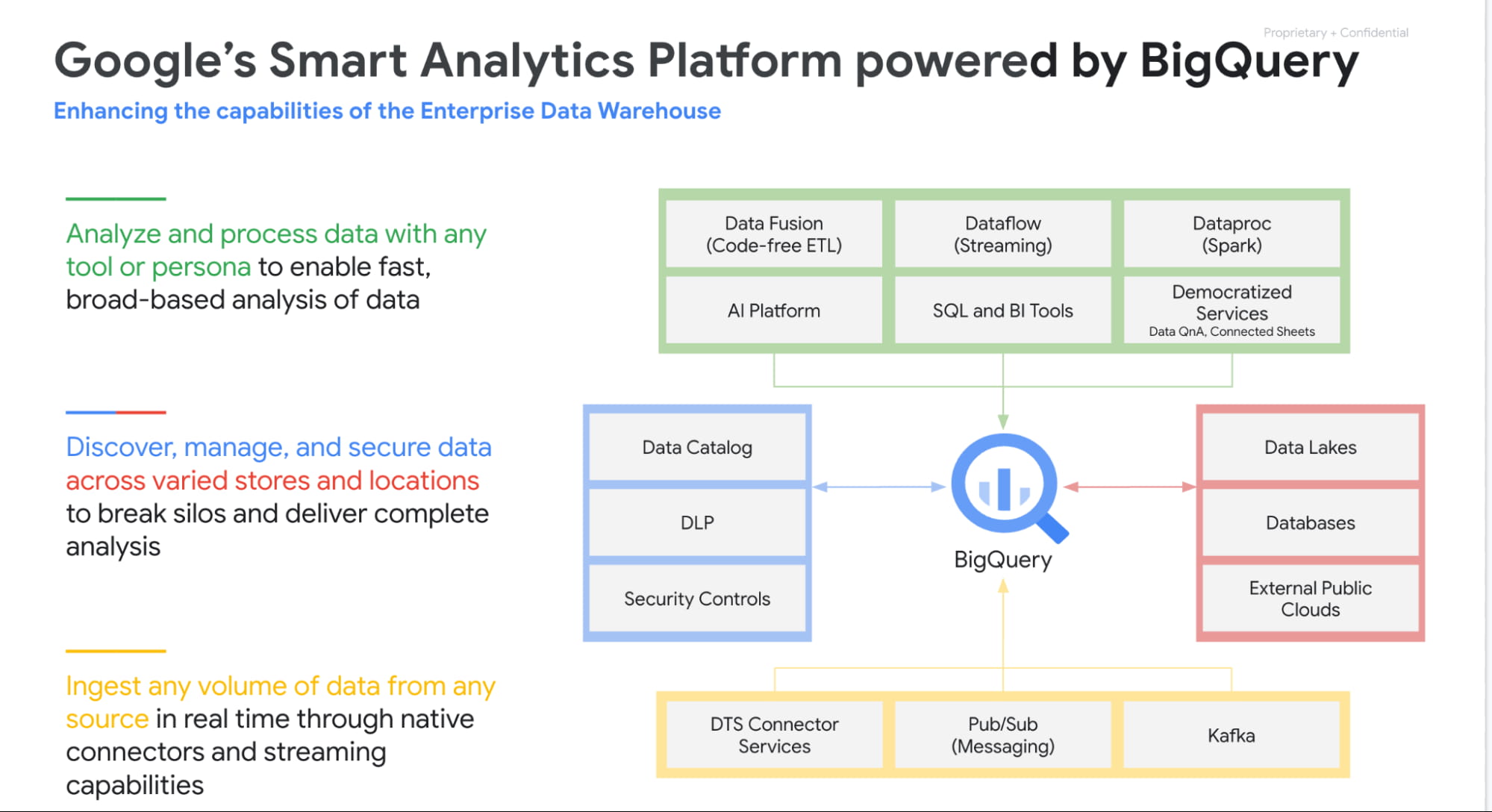
Planet Scale analytics with BigQuery
BigQuery is an amazing platform and over the past 11 years we have continued to innovate in various aspects. Scalability has always been a huge differentiator for BigQuery. BigQuery has many customers with more than 100 petabytes of data and our largest customer is now approaching an exabyte of data. Our large customers have run queries over trillions of rows.
But scale for us is not just about storing or processing a lot of data. Scale is also how we can reach every organization in the world. This is the reason we launched BigQuery Sandbox which enables organizations to get started with BigQuery without a credit card. This has enabled us to reach tens of thousands of customers. Additionally to make it easy to get started with BigQuery we have built integrations with various Google tools like Firebase, Google Ads, Google Analytics 360, etc.
Finally, to simplify adoption we now provide options for customers to choose whether they would like to pay per query, buy flat rate subscriptions or buy per second capacity. With our autoscaling capabilities we can provide customers best value by mixing flat rate subscription discounts with auto scaling with flex slots.
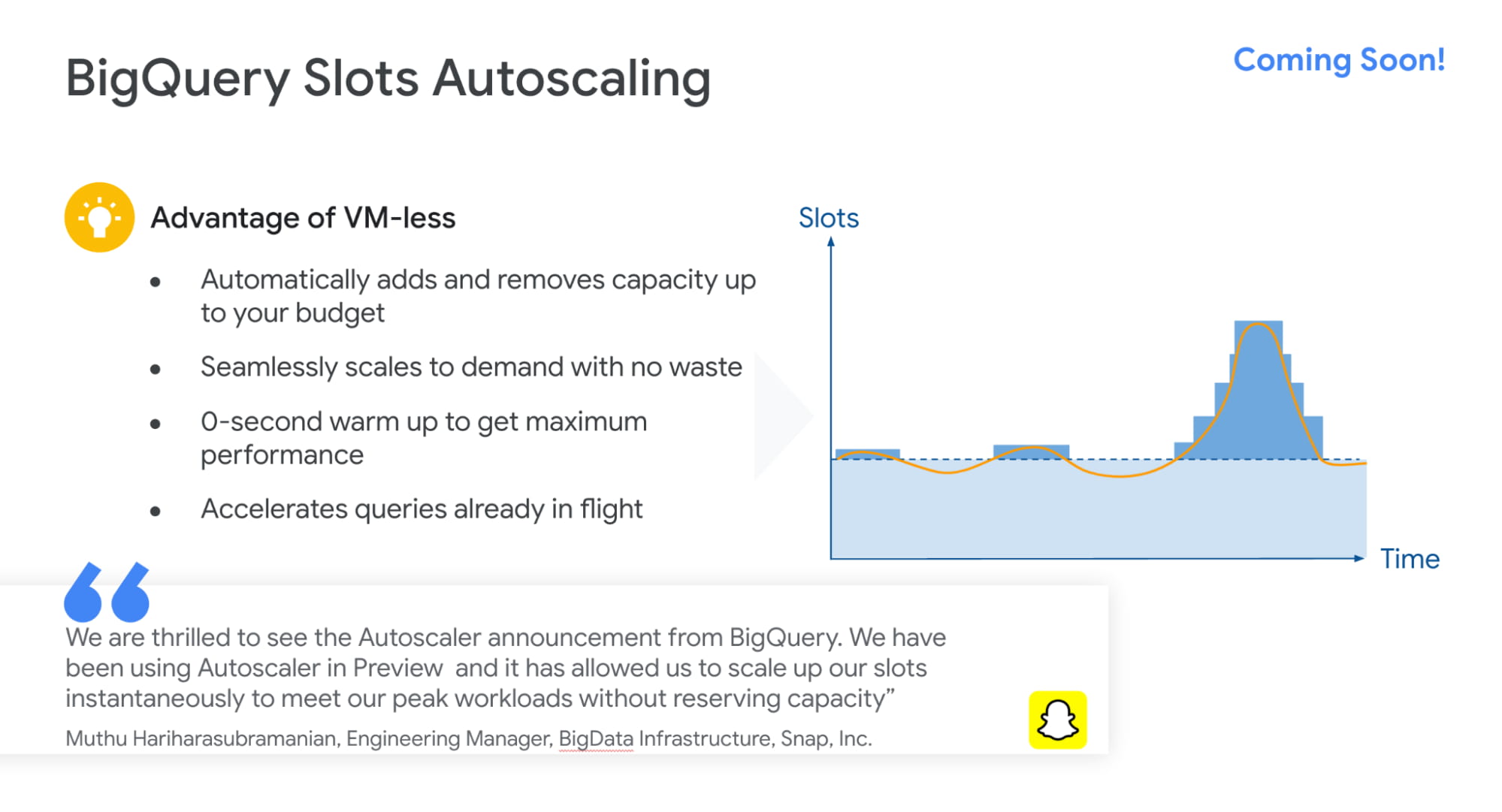
Intelligent Data Warehouse to empower every data analyst to become a data scientist
BigQuery ML is one of the biggest innovations that we have brought to market over the past few years. Our vision is to make every data analyst a data scientist by democratizing Machine learning. 80% of time is spent in moving, prepping and transforming data for the ML platform. This also causes a huge data governance problem as now every data scientist has a copy of your most valuable data. Our approach was very simple. We asked:”what if we could bring ML to data rather than taking data to an ML engine?”
That is how BigQuery ML was born. Simply write 2 lines of SQL code and create ML models.
Over the past 4 years we have launched many models like regression, matrix factorization, anomaly detection, time series, XGboost, DNN etc. These models are used by customers to solve complex business problems simply from segmentation, recommendations, time series forecasting, package delivery estimation etc. The service is very popular: 80%+ of our top customers are using BigQueryML today. When you consider that the average adoption rate of ML/AI is in the low 30%, 80% is a pretty good result!

We announced tighter integration of BQML with Vertex AI. Model explainability will provide the ability to explain the results of predictive ML classification and regression models by understanding how each feature contributes to the predicted result. Also users will be able to manage, compare and deploy BigQuery ML models in Vertex; leverage Vertex Pipelines to train and predict BigQuery ML models.
Real-time streaming analytics with BigQuery
Customer expectations are changing and everyone wants everything in an instant: according to Gartner, by the end of 2024, 75% of enterprises will shift from piloting to operationalizing AI, driving a 5X increase in streaming data and analytics infrastructures.
The BigQuery’s storage engine is optimized for real-time streaming. BigQuery supports streaming ingestion of 10s of millions of events in real-time and there is no impact on query performance. Additionally customers can use materialized views and BI Engine (which is now GA) on top of streaming data. We guarantee always fast, always fresh data. Our system automatically updates MVs and BI Engine.
Many customers also use our PubSub service to collect real-time events and process these through Dataflow prior to ingesting into BigQuery. This is a streaming ETL pattern which is very popular. Last year,we announced PubSub Lite to provide customers with a 90% lower price point and aTCO that is lower than any DIY Kafka deployment.
We also announced Dataflow Prime, it is our next generation platform for Dataflow. Big Data processing platforms have only focused on horizontal scaling to optimize workloads. But we have seen new patterns and use cases like streaming AI where you may have a few steps in pipelines that perform data prep and then customers have to run a GPU based model. Customers want to use different sizes and shapes of machines to run these pipelines in the most optimum manner. This is exactly what Dataflow Prime does. It delivers vertical auto scaling with the right fitting for your pipelines. We believe this should lower costs for pipelines significantly.
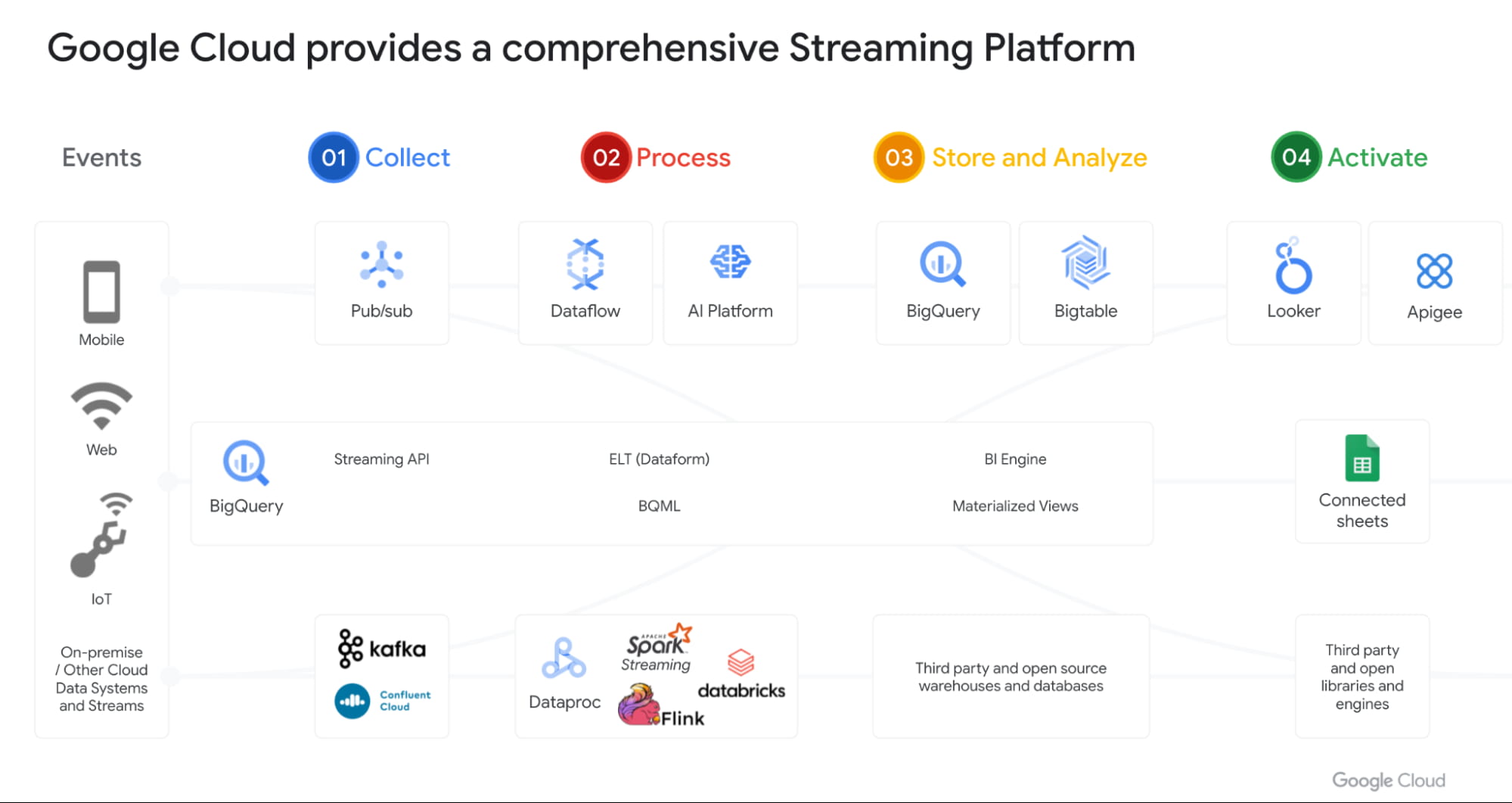
With Datastream as our change data capture service (built on Alooma technology), we have solved the last key problem space for customers. We can automatically detect changes in your operational databases like MySQL, Postgres, Oracle etc and sync them in BigQuery.
Most importantly, all these products work seamlessly with each other through a set of templates. Our goal is to make this even more seamless over next year.
Open Data Analytics with BigQuery
Google has always been a big believer in Open Source initiatives. Our customers love using various open source offerings like Spark, Flink, Presto, Airflow etc. With Dataproc & Composer our customers have been able to run various of these open source frameworks on GCP and leverage our scale, speed and security. Dataproc is a great service and delivers massive savings to customers moving from on-prem Hadoop environments. But customers want to focus on jobs and not clusters.
That’s why we launched Dataproc Serverless Spark (GA) offering at Next 2021. This new service adheres to one of our key design principles we started with: make data simple.
Just like with BigQuery, you can simply RUN QUERY. With Spark on Google Cloud, you simply RUN JOB. ZDNet did a great piece on this. I invite you to check it out!
Many of our customers are moving to Kubernetes and wanted to use that as the platform for Spark. Our upcoming Spark on GKE offering will give the ability to deploy spark workloads on existing Kubernetes clusters.
But for me the most exciting capability we have is, the ability to run Spark directly on BigQuery Storage. BigQuery storage is highly optimized analytical storage. By running Spark directly on it, we again bring compute to data and avoid moving data to compute.
BigSearch to power Log Analytics
We are bringing the power of Search to BigQuery. Customers already ingest massive amounts of log data into BigQuery and perform analytics on it. Our customers have been asking us for better support for native JSON and Search. At Next 21 we announced the upcoming availability of both these capabilities.
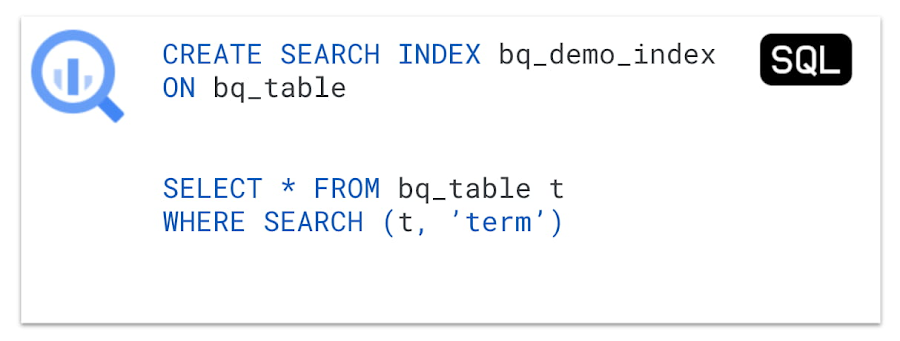
Fast cross column search will provide efficient indexing of structured, semi-structured and unstructured data. User friendly SQL functions let customers rapidly find data points without having to scan all the text in your table or even know which column the data resides in.
This will be tightly integrated with native JSON, allowing customers to get BigQuery performance and storage optimizations on JSON as well as search on unstructured or constantly changing data structures.
Multi & Cross Cloud Analytics
Research on multi cloud adoption is unequivocal — 92% of businesses in 2021 report having a multi cloud strategy. We have always believed in providing customers choice to our customers and meeting them where they are. It was clear that all our customers wanted us to take our gems like BigQuery to other clouds as their data was distributed on different clouds.
Additionally it was clear that customers wanted cross cloud analytics not multi-cloud solutions that can just run in different clouds. In short, see all their data with a single pane of glass, perform analysis on top of any data without worrying about where it is located, avoid egress costs and finally perform cross cloud analysis across datasets on different clouds.
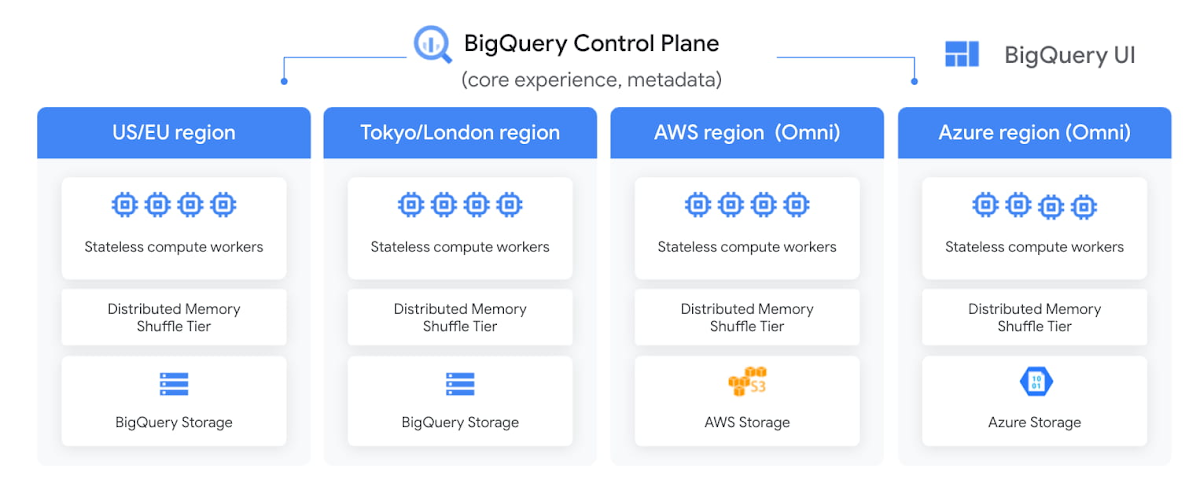
With BigQuery Omni, we deliver on this vision, with a new way of analyzing data stored in multiple public clouds. Unlike competitors, BigQuery Omni does not create silos across different clouds. BigQUery provides a single control plane that shows an analyst all data they have access to across all clouds. Analyst just writes the query and we send it to the right cloud across AWS, Azure or GCP to execute it locally. Hence no egress costs are incurred.
We announced BQ Omni GA for both AWS and Azure at Google Next 21 and I’m really proud of the team for delivering on this vision. Check out Vidya’s session and learn from Johnson and Johnson how they innovate in a multi-cloud world.
Geospatial Analytics with BigQuery and Earth Engine
We have partnered with our Google Geospatial team to deliver GIS functionality inside BigQuery over the years. At Next we announced that customers will be able to integrate Earth Engine with BigQuery, Google Cloud’s ML technologies, and Google Maps Platform.
Think about all the scenarios and use-cases your team’s going to be able to enable sustainable sourcing, saving energy or understanding business risks.
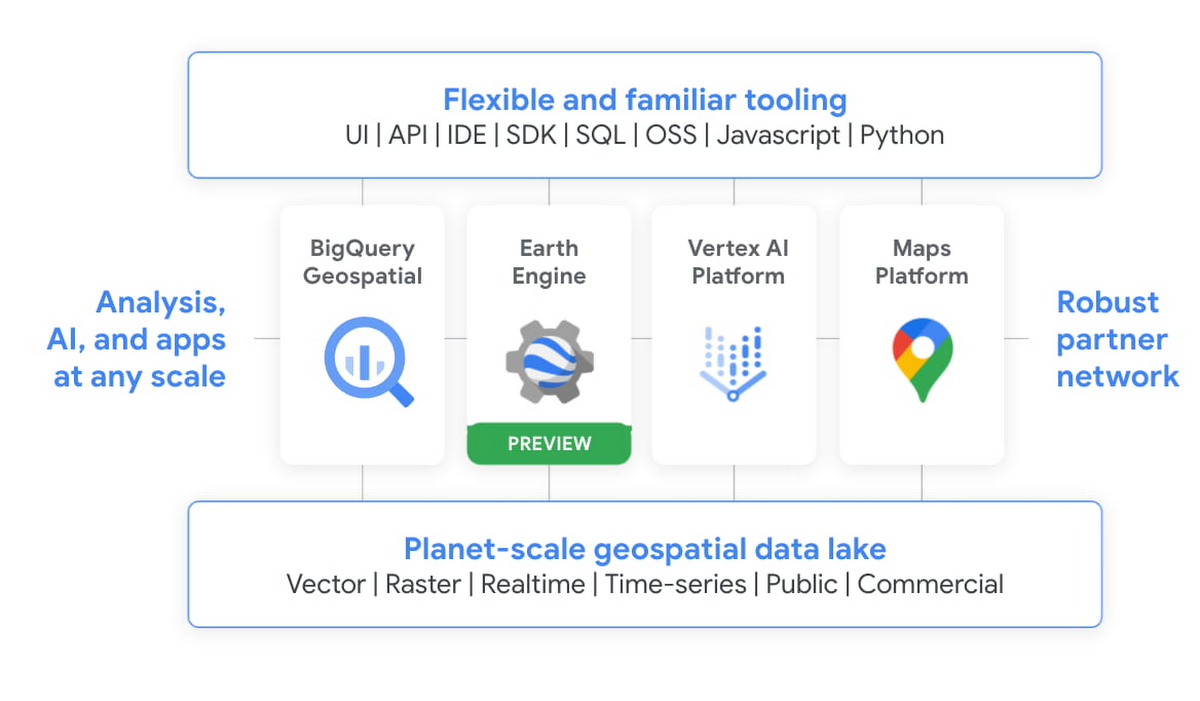
We’re integrating the best of Google and Google Cloud together to – again – make it easier to work with data to create a sustainable future for our planet.
BigQuery as a Data Exchange & Sharing Platform
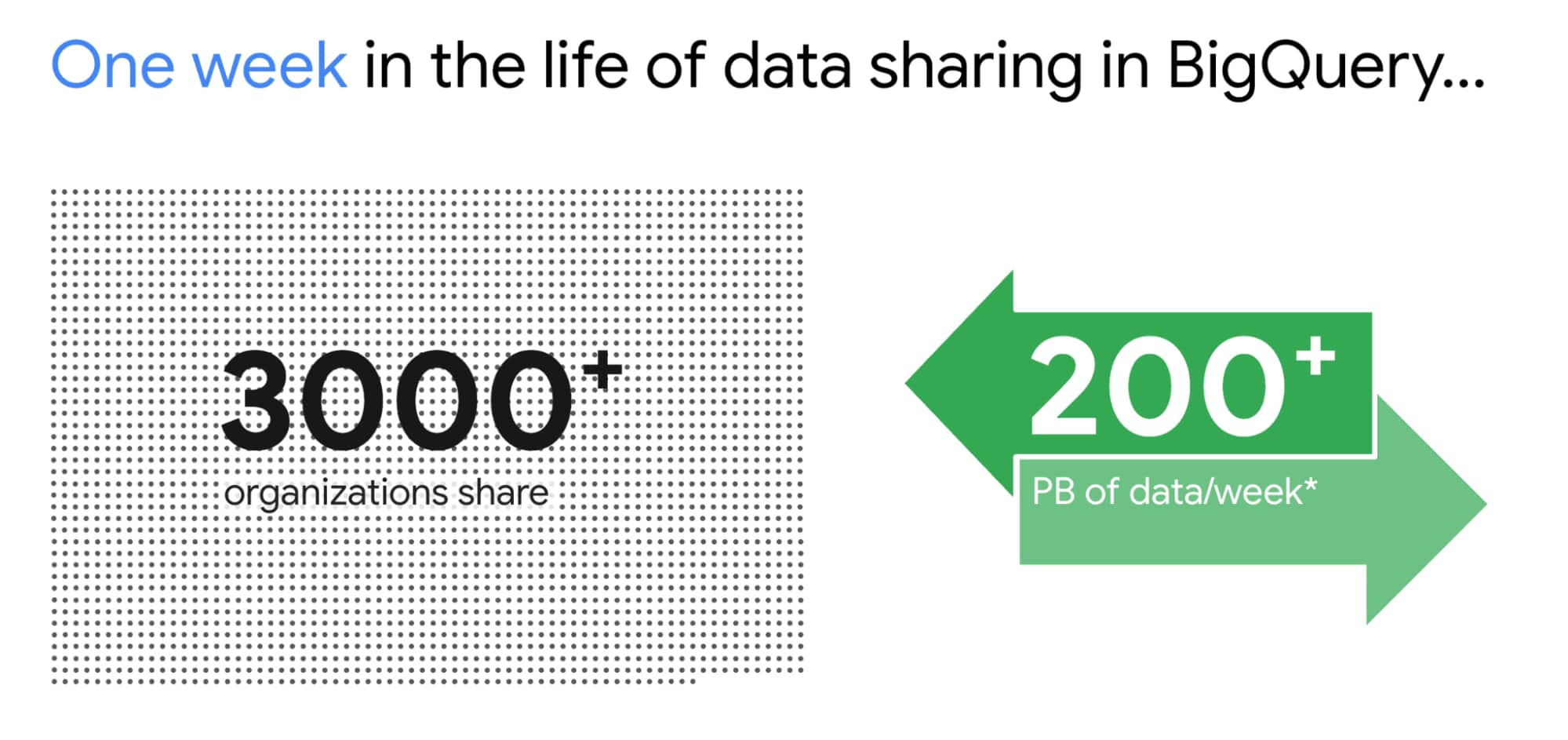
BigQuery was built to be a sharing platform. Today we have 3000+ organizations sharing more than 250 petabytes of data across organizations. Google also brings more than 150 public datasets to be used across various use cases. In addition to this, we are also bringing some of the most unique datasets like Google Trends to BigQuery. This will enable organizations to understand in real-time trends and apply to their business problems.
I am super excited about the Analytics Hub Preview announcement. Analytics Hub will provide the ability for organizations to build private and public analytics exchanges. This will include data, insights, ML Models and visualizations. This is built on top of the industry leading security capabilities of BigQuery.

Breaking Data Silos
Data is distributed across various systems in the organization and making it easy to break the data silo and make all this data accessible to all is critical. I’m also particularly excited about the Migration Factory we’re building with Informatica and the work we are doing for data movement, intelligent data wrangling with players like Trifacta and FiveTran, with whom we share over 1,000 customers (and growing!). Additionally we continue to deliver native Google service to help our customers.
We acquired Cask in 2018 and launched our self service Data Integration service in Data Fusion. Now Fusion allows customers to create complex pipelines with just simple drag and drop. This year we focused on unlocking SAP data for our customers. We have launched various SAP connectors and accelerators to achieve this.
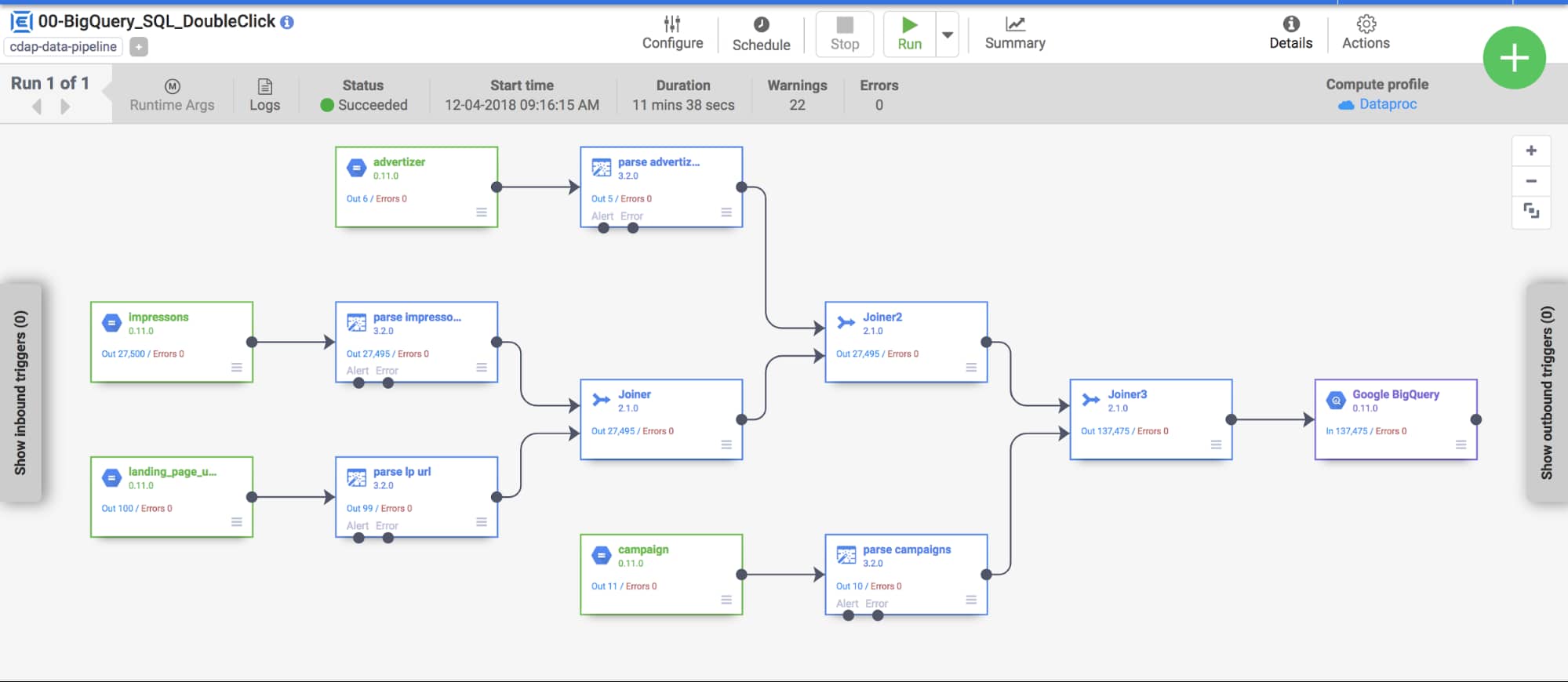
At GCP Next we also announced our BigQuery Migration service in preview. Many of our customers are migrating their legacy data warehouses and data lakes to BigQuery. BigQuery Migration Service provides end-to-end tools to simplify migrations for these customers.
And today, to make migrations to BigQuery easier for even more customers, I am super excited to announce the acquisition of CompilerWorks. CompilerWorks’ Transpiler is designed from the ground up to facilitate SQL migration in the real world and will help our customers accelerate their migrations. It supports migrations from over 10 legacy enterprises data warehouses and we will be making it available as part of our BigQuery Migration service in the coming months.
Data Democratization with BigQuery
Over the past 4 years we have focused a lot on making it very easy to derive actionable insights from data in BigQuery. Our priority has been to provide a strong ecosystem of partners that can provide you with great tools to achieve this but also deliver native Google capabilities.
With our BI engine GA announcement which we introduced in 2019, previewed earlier this year and showcased with tools like Microsoft PowerBI and Tableau, is now available for all to play with.

BigQuery + Data Studio are like peanut butter and Jelly. They just work well together. We launched BI Engine first with Data Studio and scaled it to all the users. More than 40% of our BigQuery customers use Data Studio. Once we knew BI Engine works extremely well we now have made it an integral part of BigQuery API and launched it for all our internal and partner BI tools.
We announced GA for BI Engine at Next 2021 but we were already GA with Data Studio for the past 2 years. We recently moved the Data Studio team back into Google Cloud making the partnership even stronger. If you have not used Data Studio, I encourage you to take a look and get started for free today here!!
Connected Sheets for BigQuery is one of my favorite combinations. You can give every business user in your organization the ability to analyze billions of records using standard Google Sheets experience. I personally use it everyday to analyze all our product data.
We acquired Looker in Feb 2020 with a vision of providing a semantic modeling layer to our customers with a governed BI solution. Looker is tightly integrated with BigQuery including BigQuery ML. Our latest partnership with Tableau where Tableau customers will soon be able to leverage Looker’s semantic model, enabling new levels of data governance while democratizing access to data.
Finally, I have a dream that one day we will bring Google Assistant to your enterprise data. This is the vision of Data QnA. We are in early innings on this and we will continue to work hard to make this vision a reality.
Intelligent Data Fabric to unify the platform
Another important trend that shaped our market is the Data Mesh. Earlier this year, Starburst invited me to talk about this very topic. We have been working for years on this concept, and although we would love for all data to be neatly organized in one place, we know that our customers’ reality is that it is not (If you want to know more about this, read about my debate on this topic with Fivetran’s George Fraser, a16z’s Martin Casado and Databricks’ Ali Ghodsi).
Everything I’ve learned from customers over my years in this field is that they don’t just need a data catalog or a set of data quality and governance tools, they need an intelligent data fabric. That is why we created Dataplex, whose general availability we announced at Next.
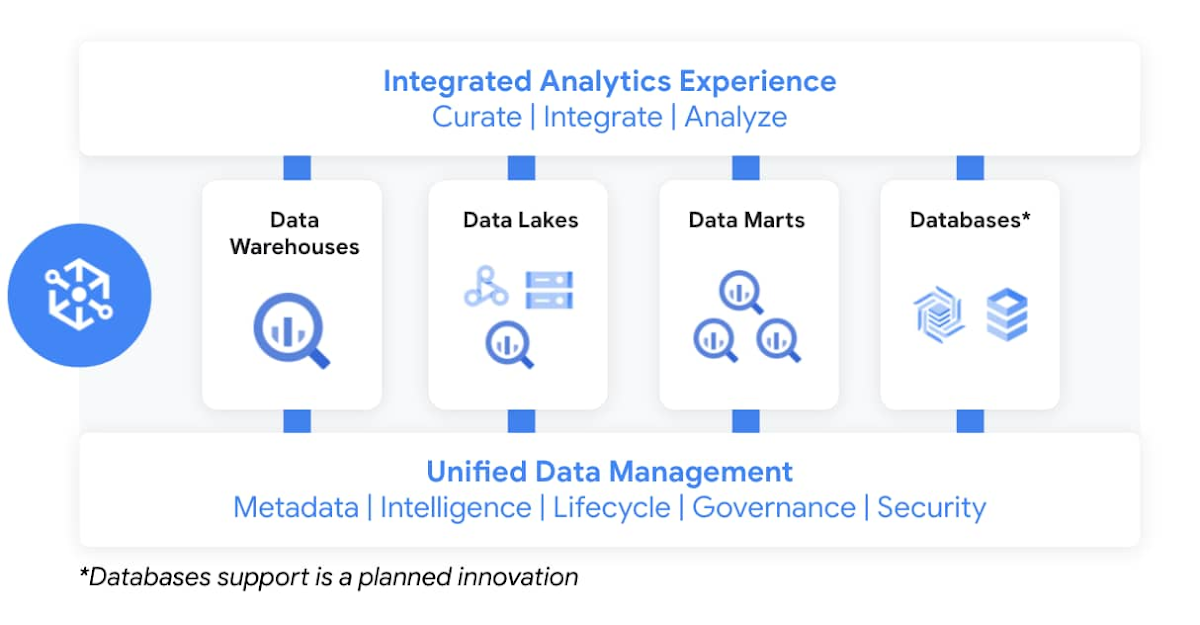
Dataplex enables customers to centrally manage, monitor, and govern data across data lakes, data warehouses, and data marts, while also ensuring data is securely accessible to a variety of analytics and data science tools. It lets customers organize and manage data in a way that makes sense for their business, without data movement or duplication. It provides logical constructs – lakes, data zones, and assets – which enable customers to abstract away the underlying storage systems to build a foundation for setting policies around data access, security, lifecycle management, and so on. Check out Prajakta Damle’s session and learn from Deutsche Bank how they are thinking about a unified data mesh across distributed data.
Closing Thoughts
Analysts have recognized our momentum and, as I look back at this year, I couldn’t thank our customers and partners enough for the support they provided my team and I across our large Data Analytics portfolio: in March, Google BigQuery was named a Leader in The Forrester Wave™: Cloud Data Warehouse, Q1 2021. And in June, Dataflow was named a Leader in The Forrester Wave™: Streaming Analytics, Q2 2021 report.
If you want to get a taste for why customers choose us over other hyperscalers or cloud data warehousing, I suggest you watch the Data Journey series we’ve just launched, which documents the stories of organizations modernizing to the cloud with us.
The Google Cloud Data Analytics portfolio has become a leading force in the industry and I couldn’t be more excited to have been part of it. I do miss you, my customers and partners, and I’m frankly bummed that we didn’t get to meet in person like we’ve done so many times before (see a photo of my last in-person talk before the pandemic), but this Google Next was extra special, so let’s dive into the product innovation and their themes.
I hope that I will get to see you in person next time we run Google Next!
New Capabilities in BigQuery to Ease Anomalies Detection in the Absence of Labeled Data

6333
Of your peers have already read this article.
4:00 Minutes
The most insightful time you'll spend today!
When it comes to anomaly detection, one of the key challenges that many organizations face is that it can be difficult to know how to define what an anomaly is. How do you define and anticipate unusual network intrusions, manufacturing defects, or insurance fraud? If you have labeled data with known anomalies, then you can choose from a variety of supervised machine learning model types that are already supported in BigQuery ML. But what can you do if you don’t know what kind of anomaly to expect, and you don’t have labeled data? Unlike typical predictive techniques that leverage supervised learning, organizations may need to be able to detect anomalies in the absence of labeled data.
Today we are announcing the public preview of new anomaly detection capabilities in BigQuery ML that leverage unsupervised machine learning to help you detect anomalies without needing labeled data. Depending on whether or not the training data is time series, users can now detect anomalies in training data or on new input data using a new ML.DETECT_ANOMALIES function (documentation), with the following models:
- Autoencoder model, now in Public Preview (documentation)
- K-means model, already GA (documentation)
- ARIMA_PLUS time series model, already GA (documentation)
How does anomaly detection with ML.DETECT_ANOMALIES work?
To detect anomalies in non-time-series data, you can use:
- K-means clustering models: When you use
ML.DETECT_ANOMALIESwith a k-means model, anomalies are identified based on the value of each input data point’s normalized distance to its nearest cluster. If that distance exceeds a threshold determined by the contamination value provided by the user, the data point is identified as an anomaly. - Autoencoder models: When you use
ML.DETECT_ANOMALIESwith an autoencoder model, anomalies are identified based on the reconstruction error for each data point. If the error exceeds a threshold determined by the contamination value, it is identified as an anomaly.
To detect anomalies in time-series data, you can use:
- ARIMA_PLUS time series models: When you use
ML.DETECT_ANOMALIESwith an ARIMA_PLUS model, anomalies are identified based on the confidence interval for that timestamp. If the probability that the data point at that timestamp occurs outside of the prediction interval exceeds a probability threshold provided by the user, the datapoint is identified as an anomaly.
Below we show code examples of anomaly detection in BigQuery ML for each of the above scenarios.
Anomaly detection with a k-means clustering model
You can now detect anomalies using k-means clustering models, by running ML.DETECT_ANOMALIES to detect anomalies in the training data or in new input data. Begin by creating a k-means clustering model:
Language: SQL
CREATE MODEL `mydataset.my_kmeans_model`OPTIONS(MODEL_TYPE = 'kmeans',NUM_CLUSTERS = 8,KMEANS_INIT_METHOD = 'kmeans++') ASSELECT* EXCEPT(Time, Class)FROM`bigquery-public-data.ml_datasets.ulb_fraud_detection`;
With the k-means clustering model trained, you can now run ML.DETECT_ANOMALIES to detect anomalies in the training data or in new input data.
To detect anomalies in the training data, use ML.DETECT_ANOMALIES with the same data used during training:
Language: SQL
SELECT*FROMML.DETECT_ANOMALIES(MODEL `mydataset.my_kmeans_model`,STRUCT(0.02 AS contamination),TABLE `bigquery-public-data.ml_datasets.ulb_fraud_detection`);
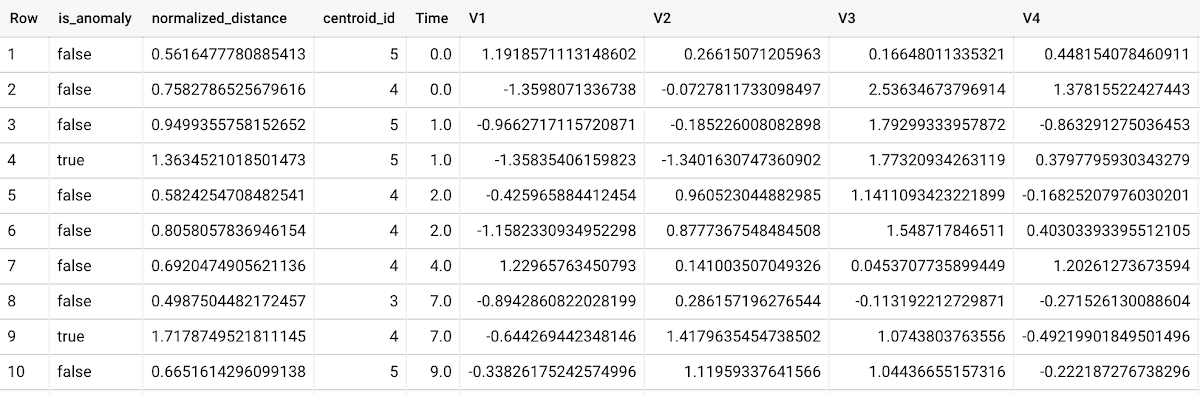
To detect anomalies in new data, use ML.DETECT_ANOMALIES and provide new data as input:
Language: SQL
SELECT*FROMML.DETECT_ANOMALIES(MODEL `mydataset.my_kmeans_model`,STRUCT(0.02 AS contamination),(SELECT * FROM `mydataset.newdata`));

How does anomaly detection work for k-means clustering models?
Anomalies are identified based on the value of each input data point’s normalized distance to its nearest cluster, which, if exceeds a threshold determined by the contamination value, is identified as an anomaly. How does this work exactly? With a k-means model and data as inputs, ML.DETECT_ANOMALIES first computes the absolute distance for each input data point to all cluster centroids in the model, then normalizes each distance by the respective cluster radius (which is defined as the standard deviation of the absolute distances of all points in this cluster to the centroid). For each data point, ML.DETECT_ANOMALIES returns the nearest centroid_id based on normalized_distance, as seen in the screenshot above. The contamination value, specified by the user, determines the threshold of whether a data point is considered an anomaly. For example, a contamination value of 0.1 means that the top 10% of descending normalized distance from the training data will be used as the cut-off threshold. If the normalized distance for a datapoint exceeds the threshold, then it is identified as an anomaly. Setting an appropriate contamination will be highly dependent on the requirements of the user or business.
For more information on anomaly detection with k-means clustering, please see the documentation here.
Anomaly detection with an autoencoder model
You can now detect anomalies using autoencoder models, by running ML.DETECT_ANOMALIES to detect anomalies in the training data or in new input data.
Begin by creating an autoencoder model:
Language: SQL
CREATE MODEL `mydataset.my_autoencoder_model`OPTIONS(model_type='autoencoder',activation_fn='relu',batch_size=8,dropout=0.2,hidden_units=[32, 16, 4, 16, 32],learn_rate=0.001,l1_reg_activation=0.0001,max_iterations=10,optimizer='adam') ASSELECT* EXCEPT(Time, Class)FROM`bigquery-public-data.ml_datasets.ulb_fraud_detection`;
To detect anomalies in the training data, use ML.DETECT_ANOMALIES with the same data used during training:
Language: SQL
SELECT*FROMML.DETECT_ANOMALIES(MODEL `mydataset.my_autoencoder_model`,STRUCT(0.02 AS contamination),TABLE `bigquery-public-data.ml_datasets.ulb_fraud_detection`);
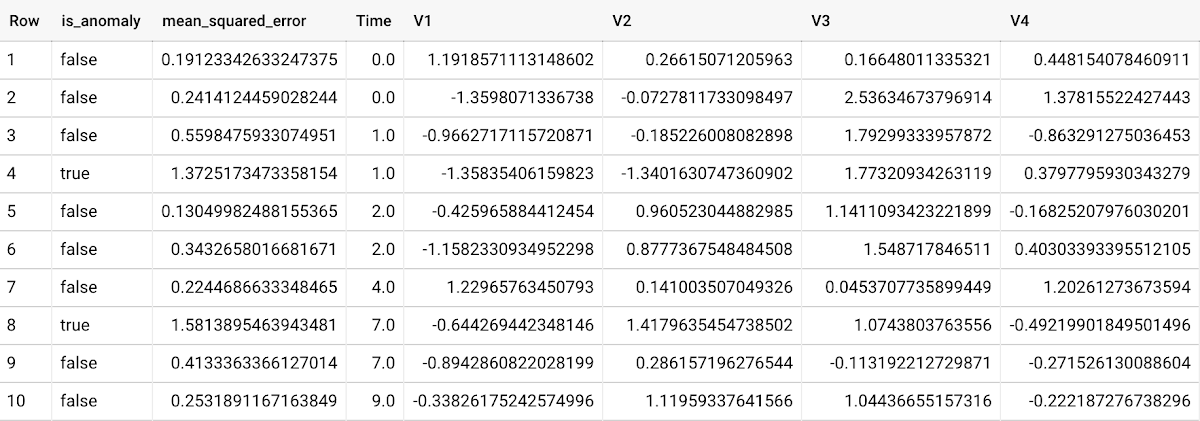
To detect anomalies in new data, use ML.DETECT_ANOMALIES and provide new data as input:
Language: SQL
SELECT*FROMML.DETECT_ANOMALIES(MODEL `mydataset.my_autoencoder_model`,STRUCT(0.02 AS contamination),(SELECT * FROM `mydataset.newdata`));

How does anomaly detection work for autoencoder models?
Anomalies are identified based on the value of each input data point’s reconstructed error, which, if exceeds a threshold determined by the contamination value, is identified as an anomaly. How does this work exactly? With an autoencoder model and data as inputs, ML.DETECT_ANOMALIES first computes the mean_squared_error for each data point between its original values and its reconstructed values. The contamination value, specified by the user, determines the threshold of whether a data point is considered an anomaly. For example, a contamination value of 0.1 means that the top 10% of descending error from the training data will be used as the cut-off threshold. Setting an appropriate contamination will be highly dependent on the requirements of the user or business.
For more information on anomaly detection with autoencoder models, please see the documentation here.
Anomaly detection with an ARIMA_PLUS time-series model
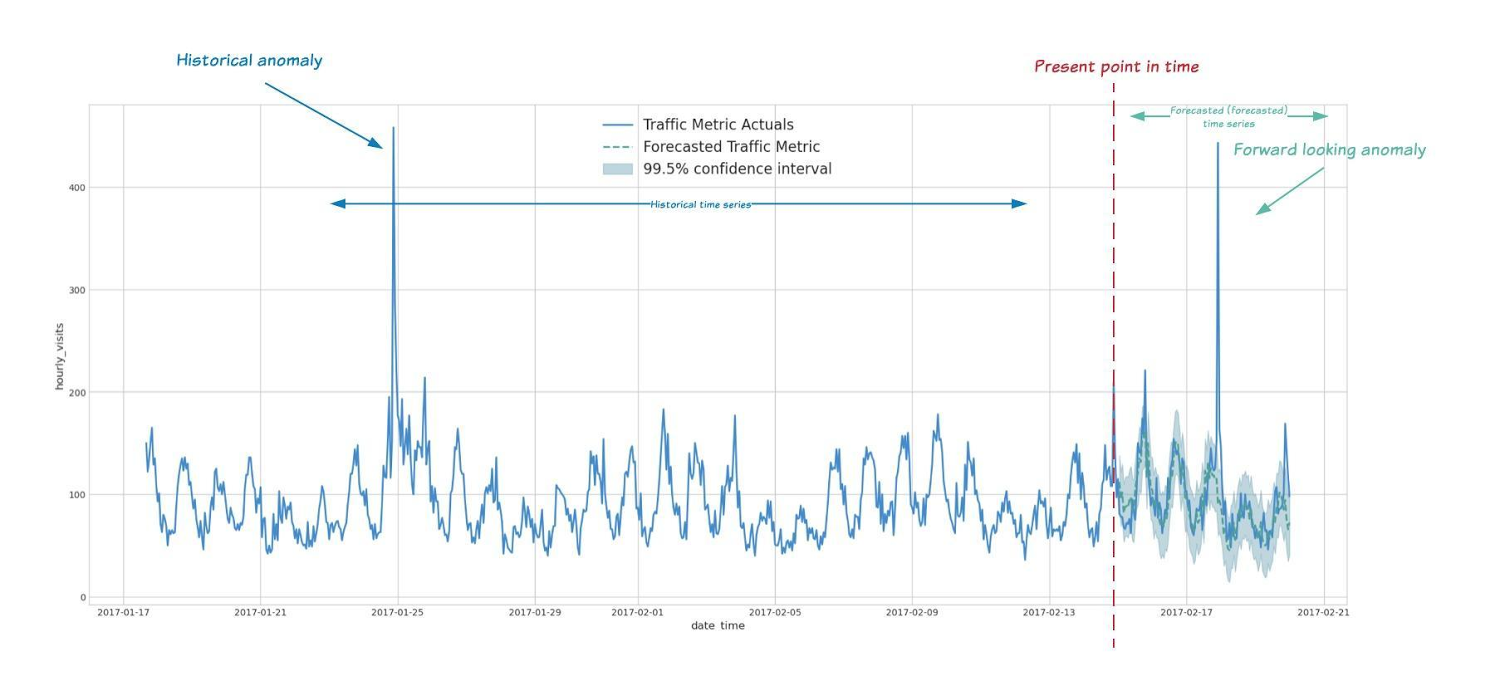
With ML.DETECT_ANOMALIES, you can now detect anomalies using ARIMA_PLUS time series models in the (historical) training data or in new input data. Here are some examples of when might you want to detect anomalies with time-series data:
Detecting anomalies in historical data:
- Cleaning up data for forecasting and modeling purposes, e.g. preprocessing historical time series before using them to train an ML model.
- When you have a large number of retail demand time series (thousands of products across hundreds of stores or zip codes), you may want to quickly identify which stores and product categories had anomalous sales patterns, and then perform a deeper analysis of why that was the case.
Forward looking anomaly detection:
- Detecting consumer behavior and pricing anomalies as early as possible: e.g. if traffic to a specific product page suddenly and unexpectedly spikes, it might be because of an error in the pricing process that leads to an unusually low price.
- When you have a large number of retail demand time series (thousands of products across hundreds of stores or zip codes), you would like to identify which stores and product categories had anomalous sales patterns based on your forecasts, so you can quickly respond to any unexpected spikes or dips.
How do you detect anomalies using ARIMA_PLUS? Begin by creating an ARIMA_PLUS time series model:
Language: SQL
CREATE OR REPLACE MODEL mydataset.my_arima_plus_modelOPTIONS(MODEL_TYPE='ARIMA_PLUS',TIME_SERIES_TIMESTAMP_COL='date',TIME_SERIES_DATA_COL='total_amount_sold',TIME_SERIES_ID_COL='item_name',HOLIDAY_REGION='US') ASSELECTdate,item_description AS item_name,SUM(bottles_sold) AS total_amount_soldFROM`bigquery-public-data.iowa_liquor_sales.sales`GROUP BYdate,item_nameHAVINGdate BETWEEN DATE('2016-01-04') AND DATE('2017-06-01')AND item_name IN ("Black Velvet", "Captain Morgan Spiced Rum","Hawkeye Vodka", "Five O'Clock Vodka", "Fireball Cinnamon Whiskey");
To detect anomalies in the training data, use ML.DETECT_ANOMALIES with the model obtained above:
Language: SQL
SELECT*FROMML.DETECT_ANOMALIES(MODEL `mydataset.my_arima_plus_model`,STRUCT(0.8 AS anomaly_prob_threshold));
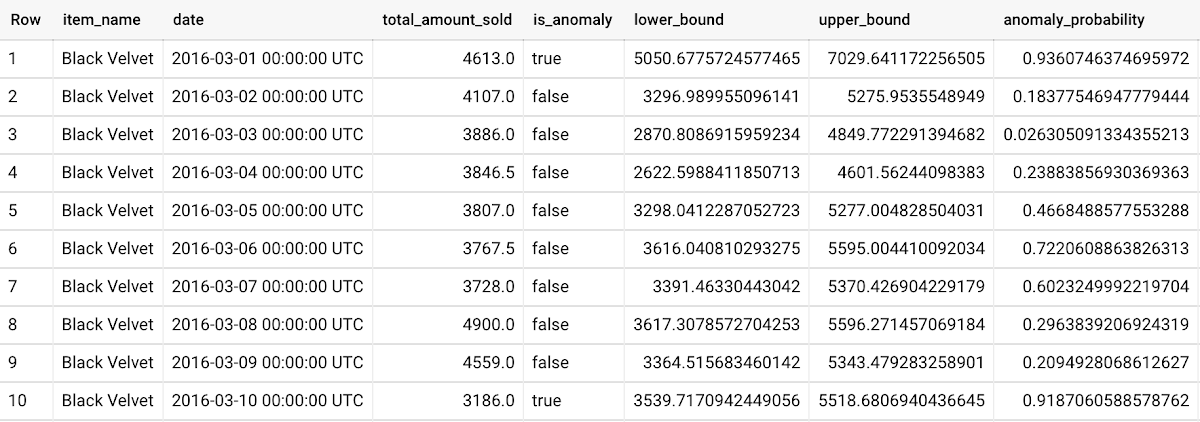
To detect anomalies in new data, use ML.DETECT_ANOMALIES and provide new data as input:
Language: SQL
WITHnew_data AS (SELECTdate,item_description AS item_name,SUM(bottles_sold) AS total_amount_soldFROM`bigquery-public-data.iowa_liquor_sales.sales`GROUP BYdate,item_nameHAVINGdate BETWEEN DATE('2017-06-02')AND DATE('2017-10-01')AND item_name IN ('Black Velvet','Captain Morgan Spiced Rum','Hawkeye Vodka',"Five O'Clock Vodka",'Fireball Cinnamon Whiskey') )SELECT*FROMML.DETECT_ANOMALIES(MODEL `mydataset.my_arima_plus_model`,STRUCT(0.8 AS anomaly_prob_threshold),(SELECT*FROMnew_data));
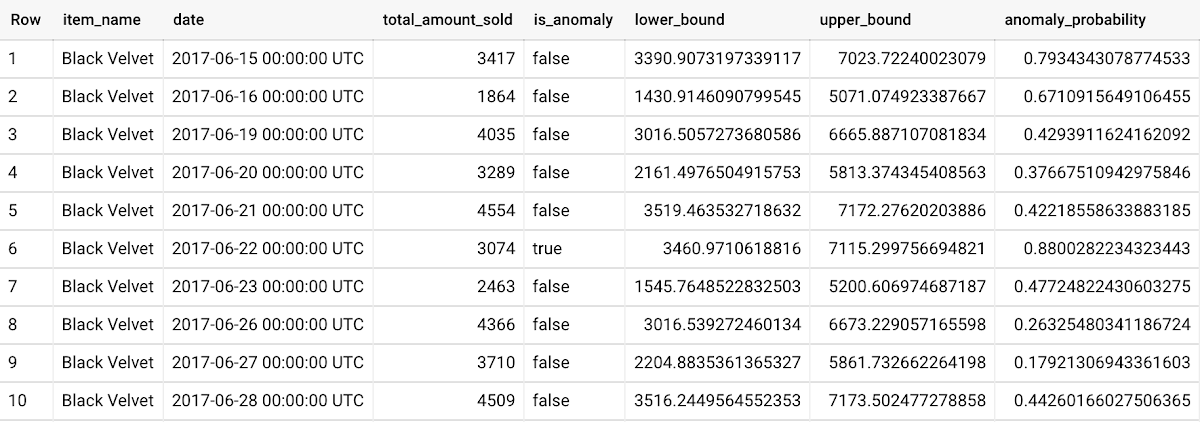
For more information on anomaly detection with ARIMA_PLUS time series models, please see the documentation here.
Thanks to the BigQuery ML team, especially Abhinav Khushraj, Abhishek Kashyap, Amir Hormati, Jerry Ye, Xi Cheng, Skander Hannachi, Steve Walker, and Stephanie Wang.
More Relevant Stories for Your Company

AgroStar: Small farms in India getting big help from the cloud
AgroStar has launched a cloud-based mobile app that is helping to boost crop yields and encourage best practices for small farmers in India. Launched as an on-premises ecommerce platform selling farm tools in 2008, the firm turned to Google Cloud Platform (GCP) to expand its offering. It now uses cloud-based analytics and is

Google Cloud and Climate Engine Collaborate to Support Climate Action in Public Sector
While there is uncertainty about how much the climate will change in the future, we know it won’t look like the past. Extreme weather events will increase in frequency and severity; the world will continue to warm, and the cost of climate change will increase. Government plays a vital role

How Google Cloud & NGIS’ Partnership Powers Sustainability & Responsible Sourcing for Consumer Brands
In the competitive world of consumer goods, sustainability matters more than ever. In recent Google survey, 82% of consumers said sustainability is more top of mind now than it was before COVID-191 and 78% said that big businesses have a role to play in helping to fight climate change.2 As well as delivering on

How to Enhance Incremental Pipeline Performance while Ingesting Data into BigQuery
When you build a data warehouse, the important question is how to ingest data from the source system to the data warehouse. If the table is small you can fully reload a table on a regular basis, however, if the table is large a common technique is to perform incremental
