





How to Get Your Cloud Migration Journey Started Off on the Right Foot

3610
Of your peers have already read this article.
2:30 Minutes
The most insightful time you'll spend today!
When moving to the cloud, many organizations concentrate their focus on the change in technology, and overlook an area just as complex: cultural change.
At Google, we’ve spent years nurturing our culture and workforce to best operate in the cloud, and the Google Cloud Professional Services team leverages the lessons we’ve learned for the benefit of enterprise customers embarking on their own cloud journeys.
While it can be tempting to believe in a universally ‘correct’ strategy for change management, there is no one-size-fits-all answer. Every organization will have its own unique considerations. But with that said, there are some core strategies we’ve found to be relevant and useful across a broad range of businesses.
1. Define your purpose for moving to Cloud
While pockets of cloud use and experimentation can evolve independently and in parallel across an organization, it’s important to make some deliberate decisions before starting a larger migration. At this stage, we recommend having a detailed answer to two key questions to ensure a successful cloud migration:
- Where do you want to go? (Or “What’s your cloud vision?”)
- How do you plan to get there?
Start by having a conversation with leaders and those who will be key to the journey about how far you want to push your cloud vision. This alignment ensures everyone is on the same page—and will provide greater direction, allowing more deliberate action.
2. Find the change path which is right for you
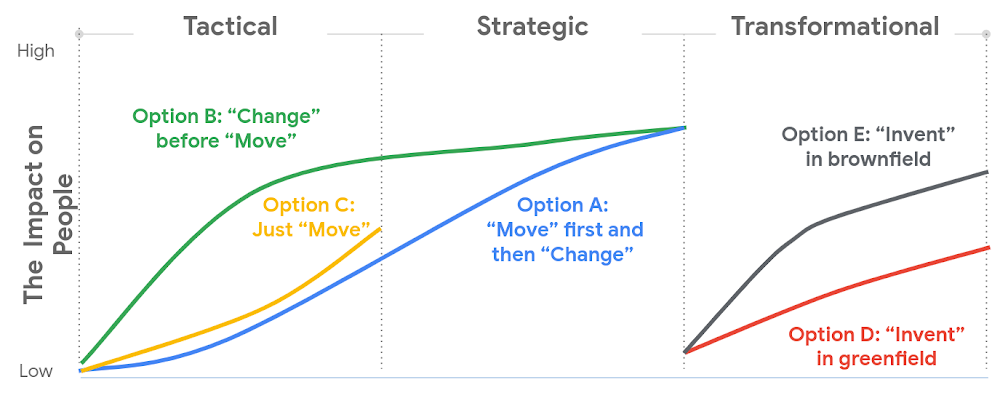
Whether a ‘lift and shift’ approach to the cloud is right for you, or a more transformative approach with a lot of re-architecting—the most important thing is to find the flavor of change which is appropriate to your context and level of ambition.This will both shape your key migration activities, but also the level of impact to be managed within your organization.
There are many ways to embark on a change journey for cloud migration (which one can find in the chart below). It is important to deeply understand the needs of your business and its people and determine what strategy makes the most sense.
3. Learn from best practices
Based on the lessons we’ve learned along our own journey, and the work we’ve done with customers, there are a number of recommendations we can share that can make a cloud migration more successful. We go into these in more detail in our new whitepaper, but below you can find the ones we think are most relevant:
- Share the vision—and measure, measure, measure. Once you’ve crystallised your cloud vision with leadership and key stakeholders, share that vision widely. Set success goals and communicate them to hold yourself accountable.
- Be clear about the capabilities you will need in the future—and where you’ll get them. For example, if your vision is to become a cloud-first, data and AI-led organization, ensuring you have the right data science skills and machine learning capabilities in your organization to achieve that vision becomes a critical step—be they home-grown or bought-in.
- Find the right balance between capabilities that should be under central control, and capabilities that should be decentralized, or agile. For example, should machine learning be something that sits centrally, or should it be spread across your organization? For every business, the solution will be a little different, and there’s no “one true answer.” There’ll be lots of different opinions about this, so the sooner the conversation starts, the better.
- Start thinking about the needed tech and non-tech skills now, and how you’ll fill the gaps. Building the tech skills will take time, and not everyone will feel comfortable with the future picture of collaboration, innovation, and agility.
To help businesses navigate their own cloud journeys, Google Cloud Professional Services has released a new whitepaper that can help guide organizations. “Managing Change in the Cloud” is closely aligned with the Google Cloud Adoption Framework and is a practical guide for organizations looking to maintain momentum in their cloud adoption. You can download the whitepaper here.
Why the C-suite Can No Longer Ignore Cloud Computing

3554
Of your peers have already read this article.
2:30 Minutes
The most insightful time you'll spend today!
Gone are the days when technology was relegated to the sidelines of a business, only considered essential for industries and professionals directly dealing with it. Today, it is not just a value-add, but an integral part of every enterprise’s operations and ultimately, its success. This has wrought many changes in the way we work, the most noteworthy of which is creating the necessity for every executive – not just the CIO & CTO – to familiarise themselves with the technologies of the future.
Among these is cloud computing, which is essential to doing business in the 21st century. As the IT infrastructure needs of enterprises grow, and we inch closer to true mobility, it’s no surprise that cloud adoption is increasing by leaps and bounds. Unfortunately, too many C-suite executives dismiss cloud computing as being outside of their area of expertise. And while ignoring the technology aspect may have been possible for CEOs and CFOs in the past, it has now infiltrated every aspect of work, and arguably life itself. This makes it essential for executives across different functions and departments to familiarise themselves with at least the very basics of up-and-coming innovations.
One myth that has followed cloud computing is that it is a one-size-fits-all solution that businesses can merely install and use for storage. And while cookie-cutter solutions do exist, they end up doing more harm than good in the long term. To avoid this pitfall, it’s important for enterprises to understand the range of offerings at their disposal, and pick the one that most closely aligns with their needs.
Most people associate cloud deployment with subscribing to a third-party cloud service provider, which owns and manages all the resources that a firm might require. Known as the public cloud, this is the most popular option, especially for small and medium businesses that cannot bear the cost of IT infrastructure. Cost-effectiveness isn’t the only upside of this technology, though, since public clouds offer the added benefits of increased security, greater scalability, maximum uptime and ease of setting up.
Though the public cloud is the most widely used, it’s far from the only option that a business has. Enterprises seeking an added degree of customisation might find private cloud solutions to their liking. These offer an added layer of privacy, which may be mandated by the industry or jurisdiction that they operate in. Moreover, private clouds can allow access even in cases where geography or connectivity is unreliable. One of the factors that has held people back from switching to the private cloud has been the fact that they might need to buy and maintain the requisite infrastructure. In such cases, the Virtual Private Cloud (VPC) lets businesses tap into resources stored on a public cloud, within an isolated environment, with more granular control over virtual networks.
A fourth solution, known as the hybrid cloud, also offers the best of two worlds by utilising resources that are on-prem as well as on the public cloud. It is ideal for companies that already have money invested in IT infrastructure, but still want to make the most of the emerging technology. It can also serve as a stepping stone for ventures that are looking to make the switch, but have their reservations about the public cloud.
Each of these offerings comes with its own set of advantages and disadvantages. The key lies in evaluating your needs against the options at your
What You Need to Know About Compute Engines

6547
Of your peers have already read this article.
1:30 Minutes
The most insightful time you'll spend today!
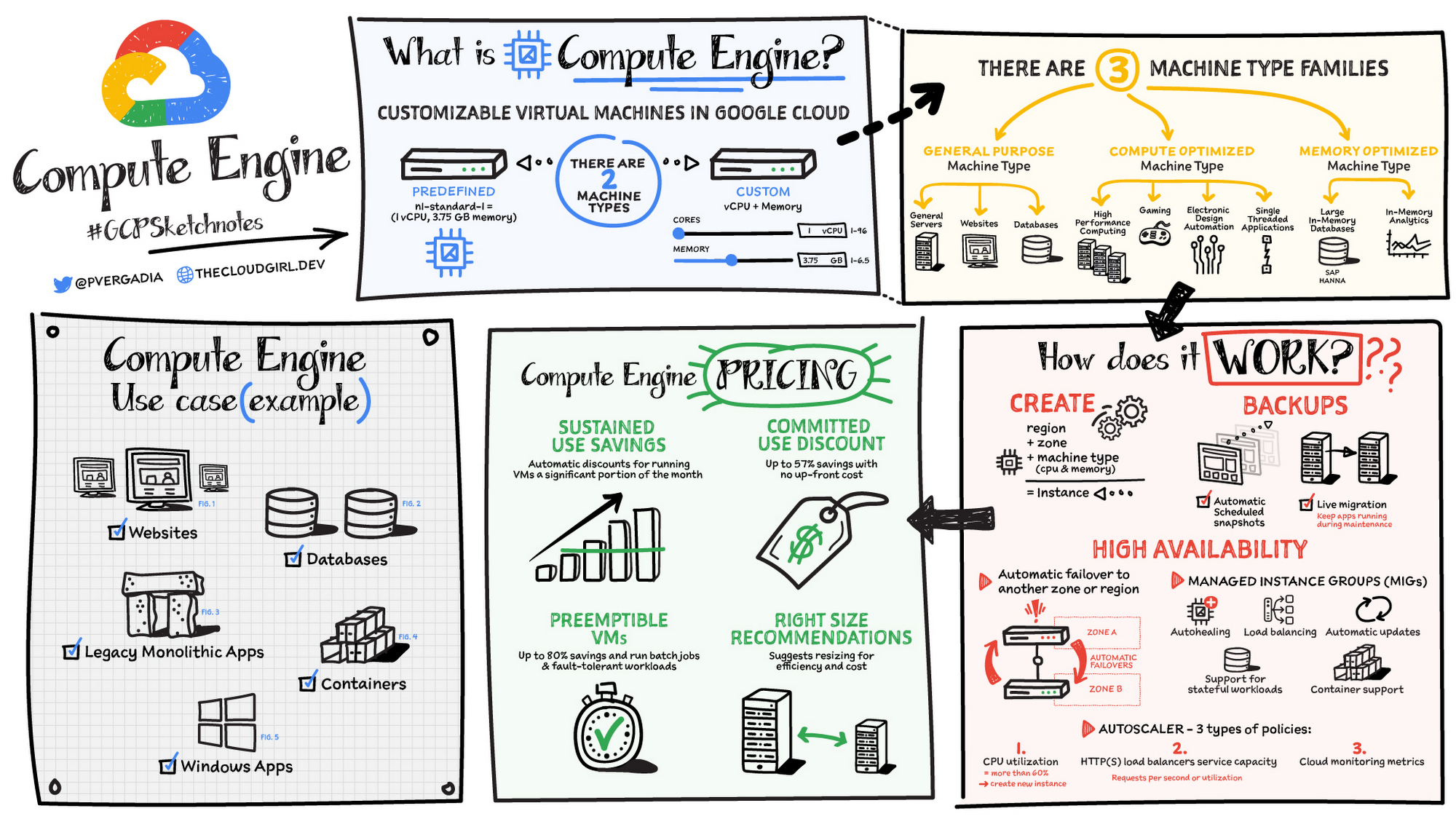
Compute Engine is a customizable compute service that lets you create and run virtual machines on Google’s infrastructure. You can create a Virtual Machine (VM) that fits your needs. Predefined machine types are pre-built and ready-to-go configurations of VMs with specific amounts of vCPU and memory to start running apps quickly. With Custom Machine Types, you can create virtual machines with the optimal amount of CPU and memory for your workloads. This allows you to tailor your infrastructure to your workload. If requirements change, using the stop/start feature you can move your workload to a smaller or larger Custom Machine Type instance, or to a predefined configuration.
Machine types
In Compute Engine, machine types are grouped and curated by families for different workloads. You can choose from general-purpose, memory-optimized, compute-optimized and accelerator-optimized families.
- General-purpose machines are used for Day-to-day computing at a lower cost and for balanced price/performance across a wide range of VM shapes. The use cases that best fit here are web serving, app serving, back office applications, databases, cache, media-streaming, microservices, virtual desktops, development environments.
- Memory-Optimized machine are recommended for ultra high-memory workloads such as in-memory analytics and large in-memory databases such as SAP HANA
- Compute-Optimized machines are recommended for ultra high performance workloads such as High Performance Computing (HPC), Electronic Design Automation (EDA), gaming, video transcoding, single-threaded applications.
- Accelerator-Optimized machines are optimized for high performance computing workloads such as Machine learning (ML), Massive parallelized computations and High Performance Computing (HPC)
How does it work?
You can create a VM instance using a boot disk image, a boot disk snapshot, or a container image. The image can be a public operating system (OS) image or a custom one. Depending on where your users are you can define the zone you want the virtual machine to be created in. By default all traffic from the internet is blocked by the firewall and you can enable the HTTP(s) traffic if needed.
Use snapshot schedules (hourly, daily, or weekly) as a best practice to back up your Compute Engine workloads. Compute Engine offers live migration by default to keep your virtual machine instances running even when software or hardware update occurs. Your running instances are migrated to another host in the same zone instead of requiring your VMs to be rebooted.
Availability
For High Availability (HA) Compute Engine offers automatic failover to other regions or zones in event of a failure. Managed instance groups (MIGs) help keep the instances running by automatically replicating instances from a predefined image. They also provide application based autohealing health checks. If an application is not responding on a VM, the auto healer automatically recreates that VM for you. Regional MIGs let you spread app load across multiple zones. This replication protects against zonal failures. MIGs work with load balancing services to distribute traffic across all of the instances in the group.
Compute Engine offers autoscaling to automatically add or remove VM instances from a managed instance group based on increases or decreases in load. Autoscaling lets your apps gracefully handle increases in traffic, and it reduces cost when the need for resources is lower. You define the autoscaling policy for automatic scaling based on the measured load, CPU utilization, requests per second or other metrics.
Active Assist’s new feature, predictive autoscaling, helps improve response times for your applications–When you enable predictive autoscaling, Compute Engine forecasts future load based on your Managed Instance Group’s (MIG) history and scales it out in advance of predicted load, so that new instances are ready to serve when the load arrives. Without predictive autoscaling, an autoscaler can only scale a group reactively, based on observed changes in load in real time. With predictive autoscaling enabled, the autoscaler works with real-time data as well as with historical data to cover both the current and forecasted load. That makes predictive autoscaling ideal for those apps with long initialization times and whose workloads vary predictably with daily or weekly cycles. For more information, see How predictive autoscaling works or check if predictive autoscaling is suitable for your workload, and to learn more about other intelligent features, check out Active Assist.
Pricing
You pay for what you use. But you can save cost by taking advantage of some discounts! Sustained use saving are automatic discounts applied for running instances for a significant portion of the month. If you know your usage upfront, you can take advantage of committed use discounts which can lead up to significant savings without any upfront cost. And by using short lived preemptive instances you can save up to 80%, they are great for batch jobs and fault tolerant workloads. You can also optimize resource utilization with automatic recommendations. For example if you are using a bigger instance for a workload that can run on a smaller instance you can save costs applying these recommendations.
Security
Compute Engine provides you default hardware security. Using Identity and Access Management (IAM) you just have to ensure that proper permissions are given to control access to your VM resources. All the other basic security principles apply, if the resources are not related and don’t require network communication amongst themselves, consider hosting them on different VPC networks. By default, users in a project can create persistent disks or copy images using any of the public images or any images that project members can access through IAM roles. You may want to restrict your project members so that they can create boot disks only from images that contain approved software that meet your policy or security requirements. You can define an organization policy that only allows Compute Engine VMs to be created from approved images. This can be done by using the Trusted Images Policy to enforce images that can be used in your organization.
By default all VM families are Shielded VMs. Shielded VMs are virtual machine instances that are hardened with a set of easily configurable security features to ensure that when your VM boots, it’s running a verified bootloader and kernel — is the default for everyone using Compute Engine, at no additional charge. For more details on Shielded VMs refer to the documentation here.
For additional security, you also have the option to use Confidential VM to encrypt your data in use, while it’s being processed in Compute Engine. For more details on Confidential VM refer to the documentation here.
Use cases
There are many use cases Compute Engine can serve in addition to running websites and databases. You can also migrate your existing systems onto Google Cloud, with Migrate for Compute Engine, enabling you to run stateful workloads in the cloud within minutes rather than days or weeks. Windows, Oracle or VMware applications have solution sets enabling a smooth transition to Google Cloud. To run windows applications either bring your own license leveraging Sole-tenant nodes or using the included licenced images.
Conclusion
Whatever your application use case may be, from legacy enterprise applications to digital native applications, Compute Engine’s families will fit it. For a more in-depth look into Compute Engine check out the documentation.
For more #GCPSketchnote, follow the GitHub repo. For similar cloud content follow me on Twitter @pvergadia and keep an eye out on thecloudgirl.dev
Thinking of a Multicloud Journey? Here’s What Our Experts Want You to Consider

4803
Of your peers have already read this article.
3:00 Minutes
The most insightful time you'll spend today!
Do you want to fire up a bunch of techies? Talk about multicloud! There is no shortage of opinions. I figured we should tackle this hot topic head-on, so I recently talked to four smart folks—Corey Quinn of Duckbill Group, Armon Dadgar of Hashicorp, Tammy Bryant Butow of Gremlin, and James Watters of VMware—about what multicloud is all about, key considerations, and why you should (or shouldn’t!) do it.
Five important insights came out of these discussions. If you’re on a multicloud journey or considering one, keep reading.
Do: Choose to do multicloud for the right reasons
Don’t do multicloud because Gartner says so, implores Corey Quinn. Before embarking on a multicloud, define a “why” focused on business value journey, says Armon Dadger. For example, you might want to use services from each public cloud because of their differentiated services, according to Tammy Bryant Butow. Armon also calls out regulatory reasons, existing business relationships, and accommodating mergers and acquisitions. On the topic of M&A, Corey points out that if you acquire a company that uses another cloud, it’s usually expensive and difficult to consolidate. It can be smarter to stay put.
https://youtube.com/watch?v=xFSDexQhCUY%3Fenablejsapi%3D1%26
Don’t: Over-engineer for workload or data portability
Thinking that you’ll build a system that moves seamlessly among the various cloud providers? Hold up, says our group of experts. Armon points out that aspects of your toolchain or architecture may be multicloud—think of some of your workflows or global network routing—but that shifting workloads or data is far from simple. Corey says that trying to engineer for “write once, run anywhere” can slow you down, and ignores the inherent uniqueness that’s part of each platform. Specifically, Corey calls out the per-cloud stickiness of identity management, security features, and even network functionality. And data gravity is still a thing, says James, that causes some to dismiss multicloud outright.
If you’re using multiple public clouds, you take advantage of the distinct value each offers, Armon says. Use native cloud services where possible so that you see the benefits from useful innovations, built-in resilience, and baked-in best practices. The value from that cloud-infused workload may outweigh the benefits of seamless portability.
https://youtube.com/watch?v=B1VH56_L8f8%3Fenablejsapi%3D1%26
Do: Recognize different stakeholder interests and needs
James smartly points out that many multicloud debates happen because people are arguing from different perspectives. Context matters. If you’re an infrastructure engineer who invests heavily in a given cloud’s identity and access management model, multicloud looks tricky. Or if you’re a data engineer with petabytes of data homed in a particular cloud, multicloud may look unrealistic. James highlights that many developers default to multicloud because their local tools—where all the work happens—are multicloud. A developer’s IDE and preferred code framework(s) aren’t tied to any given cloud. Be aware that groups within your organization will come at multicloud from distinct directions. And this may impact your approach!
https://youtube.com/watch?v=I9sqXDqkKBM%3Fenablejsapi%3D1%26
Don’t: Go it alone
Corey talks about the importance of asking others what worked, and what didn’t. Tammy offers her best practices around sharing results from experiments. It’s about sharing knowledge and tapping into it for community benefit. Others have probably tried what you’re trying, and can help you avoid common pitfalls. If you’ve just made an architectural choice that didn’t work out, share it, and help others avoid the pain.
Read research from analysts, go to conferences or watch videos to observe case studies, and join online communities that offer a safe place to share mistakes and learn from others.
https://youtube.com/watch?v=mrSb5vqOfuI%3Fenablejsapi%3D1%26
Do: Experiment first using techniques like multi-region deployments
If you think you can operate systems across clouds, how about you first try doing it across regions in a specific cloud, suggests Corey. Getting a system to properly work across cloud regions isn’t trivial, he says, and that experience can help you uncover where you have architectural or operational constraints that will be even worse across cloud providers.
This is great guidance if your multicloud aspirations involve using multiple clouds to power one application—versus the more standard definition of multicloud where you use different clouds for different applications—but can also surface issues in your support process or toolchain that fail when faced with distributed systems. Start with muti-region deployments and chaos engineering experiments before aggressively jumping into multicloud architectures.
The Google Cloud take
Do the things above. It’s great advice. I’ll add three more things that we’ve learned from our customers.
- Don’t fear multicloud. You’re already doing it. You don’t single-source everything. As Corey mentioned, you probably already have one cloud for productivity tools, another for source code, another for cloud infrastructure. You’ll use software and application services from a mix of providers for a single app. You have that experience in your team and have been doing that for decades. What people do rightly worry about is using more than one infrastructure service beneath an application, as that can introduce latency, security, and logistical hurdles. Make sure you know which model your team is considering.
- Embrace the right foundational components, including Kubernetes. Will everything run on Kubernetes? Of course not. Don’t try to do that. But it also represents the closest thing we have to a multicloud API. Companies are using Kubernetes to stripe a consistent experience across clouds. And this isn’t just to orchestrate containers, but also to manage infrastructure and cloud-native services. Also, consider where you need other fundamental consistency across clouds, including areas like provisioning and identity federation.
- Use Google Cloud as your anchor. Here’s a fundamental question you have to decide for yourself: Are you going to bring your on-premises technology and practices to the cloud, or bring cloud technology and practices on-prem? We sincerely believe in the latter. Anchor to where you’re trying to get to. We offer Anthos as a way to build and run distributed Kubernetes fleets in Google Cloud and across clouds. By using a cloud-based backplane instead of an on-prem one, you’re offloading toil, leveraging managed services for scale and security, and introducing modern practices to the rest of your team.
We learned a lot about multicloud through these discussions, and it seems like others did too. That’s why we’re going to do a second round of interviews with a new crop of experts so that we can keep digging deeper into this topic. Stay tuned!

3553
Of your peers have already downloaded this article
1:30 Minutes
The most insightful time you'll spend today!
In a study of 360 business and technology decision makers and influencers from Indian enterprises, conducted by Forrester Consulting, it is revealed that public cloud adoption in India is on the rise with 2 in 3 organizations planning to increase their cloud spending by 5% or more in the next 12 months.
According to the study, public cloud platforms help organizations to:
- Enable digital customer experience
- Improve digital operational excellence
- Power digital ecosystem expansion
- Accelerate digital innovation
Download this infographic to understand why Indian companies are adopting a cloud-first approach to accelerate digital transformation.
DB Corp Opts For Google Cloud to Drive Transformation to Real-Time Operation

3873
Of your peers have already read this article.
2:30 Minutes
The most insightful time you'll spend today!
About DB Corp
DB Corp is India’s largest newspaper publisher delivering 62 editions in four languages and selling about 62 million copies per day. The business also has an extensive online and mobile presence.

Google Cloud Result
- Reduced time to complete sales reports and updates from a week to two hours
- Delivered a single source of truth and real-time data to support decision-making
- Hindi news source material with 95 percent accuracy
Headquartered in Bhopal, India, and listed on the Bombay Stock Exchange, DB Corp is India’s largest newspaper group. DB Corp publishes 62 editions in four languages and sells about 6 million newspaper copies per day. Beyond newspapers, DB Corp operates 29 radio stations, 13 portals and two mobile apps.
Like the media industry in general, DB Corp is having to adapt to readers’ increasing preference for accessing news content online – particularly on mobile devices. However, online advertising is yet to fill the gap left by the leakage of advertising revenues from print. Further disruption occurred when the Indian Government’s implemented a demonetization program in November 2016 that prompted a sharp surge in e-commerce transactions and online banking.
Facing a tsunami of change, DB Corp is developing and executing new strategies to engage consumers and build revenues. These plans include evolving from an IT-supported business to an IT enabled company, and finally to an IT-led business that complements its newspapers with online news and updates throughout the day. DB Corp is building e-commerce properties that leverage its print brands and is moving to increase advertising across its mobile services. Furthermore, the business is looking to capture information about readers and customers to tailor its publications and services more closely to their needs.
Expertise in managing large data volumes behind GCP selection
However, DB Corp’s on-premises infrastructure and traditional applications could not deliver the flexibility and agility needed to support the transition to real-time news delivery. In late 2015, DB Corp started evaluating public and private cloud services, including cloud-based application suites and platform as a service offerings. This process led the business to deploy G-Suite and start working with Google Cloud Platform (GCP). “We selected GCP due to Google’s experience in delivering cloud services, and because nobody else manages data volumes of the magnitude that they do,” says R D Bhatnagar, Chief Technology Officer, DB Corp. “We were also impressed by the fact GCP had a local team with the skills and expertise to educate us about how best to use its products.”
DB Corp is migrating its websites and key applications to GCP. The business is also upgrading its network to remove bandwidth restrictions that could impede the value provided by GCP services. The scale and scope of DB Corp’s G Suite and GCP projects has required the business to engage four partners and access technical expertise and support from Google itself. Technical and business experts from the platform as a service provider are providing monthly updates and training sessions with various groups within the organisation, including user communities and the board of directors.
The Google projects at DB Corp are driving a sharp increase in the speed, agility and performance of the business. “As a senior leader within the organisation, I see the key benefits of GCP and other technologies being lower cost; greater efficiency; and improved business continuity,” says Bhatnagar. “For example, the current data center team can be redeployed to other initiatives as the technical experts at GCP will be undertaking most of the management and maintenance tasks.
DB Corp is already making business and financial performance data available in real time from a single source, enabling business teams to make sound, consistent decisions about digital strategies and other key activities. These teams may also address issues or problems before they compromise the quality of content and services provided to consumers.
Deploying Chrome for Meetings across various offices has enabled teams to communicate and collaborate effectively in real time, breaking down geographic barriers, ensuring each member is on the same page and ensuring the business transformation proceeds smoothly. Sales teams are using Google Forms and Google Sheets to centralize and control tasks such as sales forecasting, reducing the time required to complete reports and updates from up to a week to two hours.
Furthermore, various teams are using calendars to improve organization and productivity. For example, editorial teams are using calendars to track Indian holidays and festivals and deliver relevant content to readers. Reporters are also using Google Cloud Speech API and Google Cloud Translation API services to capture and document interviews and source material for articles at accuracy rates of 95 percent for Hindi alone.
More Relevant Stories for Your Company

Media CDN to Intelligently Deliver Streaming Experiences to Viewers around the World!
The digital media and entertainment industry is experiencing dramatic growth, as audiences migrate to online experiences and content providers seek to deliver new and innovative content. According to The Global Internet Phenomena Report, streaming video accounted for 53.7% of internet bandwidth traffic, up by 4.8% from a year ago. This

You Can Now ‘Listen’ to Over 50 Tech Blogs on Google Cloud Reader
🎧 Prefer to listen? Check out this episode on the Google Cloud Reader podcast If you’re anything like me, you love reading, but also appreciate that sometimes your eyes need to be doing other things; whether it’s finding your exit off the highway, or keeping your puppy from destroying the couch. And

10 Reasons that Make Google Cloud the Champion of IaaS
When you choose to run your business on Google Cloud you benefit from the same planet-scale infrastructure that powers Google’s products such as Maps, YouTube, and Workspace. We have picked 10 ways in which Google Cloud Infrastructure services outshine alternatives in the market in how they simplify your operations, save

Mambu’s Journey: Modernizing Core Banking with Google Cloud
When our founders began Mambu in 2011, their goal was to bring the latest digital technologies to the banking and finance world. Banking, in particular, is an industry built on decades of deep legacy technology. So initially, Mambu was embraced by microfinance — 100 organizations in 26 countries in just
