





You Can Now ‘Listen’ to Over 50 Tech Blogs on Google Cloud Reader

4870
Of your peers have already read this article.
1:30 Minutes
The most insightful time you'll spend today!
🎧 Prefer to listen? Check out this episode on the Google Cloud Reader podcast
If you’re anything like me, you love reading, but also appreciate that sometimes your eyes need to be doing other things; whether it’s finding your exit off the highway, or keeping your puppy from destroying the couch.
And sometimes the thought of sitting down to read something just feels like it’s going to take valuable multi-tasking time away from my day. I know, I know, multitasking can be frowned upon, but it’s the way I live a good chunk of my life, and it’s working out so far. And while I’m not alone in my multitasking, I’m also not alone in my desire for a non-visual way to get this content, or any content.
*Google Cloud Reader enters the chat*
Google Cloud Reader is a podcast that lets you listen to the Google Cloud Blog posts that aren’t as dependent on visuals. This means they’re articles that are, or are adapted to be, less focused on graphs, or code samples, and instead describe the meaning behind those visual aids.
It’s an easy, audible way to absorb content around all things new in Cloud, while still being able to make sure Ruthie doesn’t eat my work from home equipment.

So by now you’re probably thinking “OK, so you started a podcast during the pandemic, even though you definitely seemed like the type to start making sourdough”—and you’re right. My 53 plants agree with you. But rest assured, one can listen to an episode of this podcast *while* creating a macramé plant hanger, or waiting for bread to rise—multitasking, am I right?
We’re a little over 50 episodes/macrame plant hangers in, so you should check it out (Ruth and I would appreciate it).
Some of my personal favorites
- Beginners Guide to Painless Machine Learning – Learn how to get started with Google Cloud AI tools
- Introducing GKE Autopilot: A Revolution in Managed Kubernetes – Learn more about GKE Autopilot, a revolutionary mode of operations for managed Kubernetes that lets you focus on your software, while GKE Autopilot manages the infrastructure.
- Cook up your own ML recipes with AI Platform – Learn about Mars Wrigley’s new ML-inspired recipe experiment on Google Cloud and how you can get started with your own.
- Recovering Global Wildlife Populations using ML – Review Google’s Wildlife Insight’s ML project and help users create an image classification model for motion-sensor cameras (called camera traps) used to help protect wildlife in an non-invasive way by collecting and tagging species via pictures.
Let me know your favorite episodes, and what other articles you’d like to hear on Twitter @jbrojbrojbro!
No matter why you prefer an audio format, we’ve got you covered; Google Cloud Reader, where we read the tech blog for you, and to you.
Get all the Google Cloud Reader on your favorite podcast platform, including Google Podcasts, Apple Podcasts, and Spotify.
3985
Of your peers have already watched this video.
1:20 Minutes
The most insightful time you'll spend today!
Philips Looks to Google Cloud for its Connected Lighting Solution
Philips Lighting wanted to transform the way people use lighting in their homes. The company aimed to connect light bulbs to the Internet, tie them to usage data, and make them interactive in order to offer benefits beyond basic lighting—for creating amazing experiences, home security, or to support well-being, like providing the right light for daily activities.
To do that, Philips Lighting launched Philips Hue connected lighting, designed so people could control their lighting from smartphone apps. But Philips Lighting needed a cloud platform that would let the apps securely access, monitor, and interact with the new lighting system. The company decided to build the backend using Google Cloud Platform.
Google Cloud Platform has dramatically cut the costs and resources required to handle the Philips Hue backend and scales on demand. Philips Lighting runs the platform with 10 times the scale of other similar projects, but with only one-tenth of the workforce.
Watch the video to find out how.
Taking Partnership forward: Google Cloud VMware Engine Now in VMware Cloud Universal

3473
Of your peers have already read this article.
1:30 Minutes
The most insightful time you'll spend today!
As the pace of digital transformation accelerates, our partnership with VMware continues to focus on helping customers successfully navigate their cloud journey and achieve their business objectives through seamless and rapid migration of business critical VMware workloads.
We announced the general availability of Google Cloud VMware Engine in May 2020. Since then we have worked closely with VMware to make it easier for customers to quickly migrate and run business-critical, VMware-based workloads on Google Cloud. Customers are already leveraging the service across a variety of use cases including application migration, datacenter exit, virtual desktop infrastructure, disaster recovery, and spinning up new capacity quickly to meet business needs.
For example, retailer Carrefour migrated its on-premises VMware workloads to Google Cloud without disruption to shoppers or employees while reducing operating costs by 40% and energy consumption by 45%. Once in the cloud, Carrefour was able to leverage its data and AI to deliver innovative customer experiences across online and in-store channels. Similarly, telecommunications provider Mitel migrated thousands of VMware instances across 30 data centers to Google Cloud in less than 90 days, quickly achieving increased stability, scale, and security.
Today, we announced the continued growth of the Google Cloud and VMware partnership with the addition of Google Cloud VMware Engine within VMware Cloud Universal. Google Cloud VMware Engine delivers a cloud-native VMware experience and enables you to rapidly migrate to the cloud without changes to your apps, policies, or tools. Once you migrate your VMware workloads to Google Cloud, you can accelerate digital transformation through seamless access to services such as BigQuery for real-time data analytics and cloud-native container-based architectures on Kubernetes.
With VMware Cloud Universal, you will be able to accelerate migrations of your workloads and applications to Google Cloud through purchase of Google Cloud VMware Engine from VMware and its partners, allowing you to flexibly purchase credits, and leverage existing spend and unused VMware Cloud Universal credits. The program will offer the following benefits:
- Financial flexibility by letting you redeem VMware Cloud Universal credits for Google Cloud VMware Engine
- Streamlined consumption by enabling you to burn down your Google Cloud commits while purchasing from VMware
- Use of existing VMware licensing investments through the VMware Cloud Universal program for Google Cloud VMware Engine
With Google Cloud VMware Engine, you can take advantage of Google Cloud’s highly performant, scalable infrastructure with fully redundant and dedicated 100 Gbps networking, providing 99.99% availability to meet the needs of the most demanding workloads at very low costs. By providing a consistent VMware environment natively in Google Cloud, you can quickly migrate your VMware workloads to Google Cloud without changes. Deep and unique networking integrations and capabilities such as multi-region and multi-VPC connectivity, further ease the migration of complex enterprise networking topologies to Google Cloud. With rapid provisioning of private clouds across 13 global regions, you can also take advantage of on-demand capacity to serve your infrastructure needs with a cloud-native VMware environment in Google Cloud.Once in the cloud, you can take advantage of other Google Cloud services such as BigQuery and Cloud Operations to gain data-driven insights and unify operations.
Getting started
With Google Cloud VMware Engine as part of VMware Cloud Universal, Google Cloud is a compelling cloud destination for your VMware workloads. You can learn more about how to get started with the service and get additional detail around use cases and pricing on our website.

3357
Of your peers have already downloaded this article
10:00 Minutes
The most insightful time you'll spend today!
Operational resilience continues to be a key focus for financial services firms. Regulators from around the world are refocusing supervisory approaches on operational resilience to support the soundness of financial firms and the stability of the financial ecosystem. Our new white paper discusses the continuing importance of operational resilience to the financial services sector, and the role that a well-executed migration to Google Cloud can play in strengthening it.
Pacemaker’s Automated Alerts and Alert Reporting: No More Outages for SAP Systems on Google Cloud!

3254
Of your peers have already read this article.
6:00 Minutes
The most insightful time you'll spend today!
When critical services fail, businesses risk losing revenue, productivity, and trust. That’s why Google Cloud customers running SAP applications choose to deploy high availability (HA) systems on Google Cloud.
In these deployments Linux operating system clustering provides application and guest awareness for the application state and automates recovery actions in case of failure — including cluster node, resource or node failover or failed action.
Pacemaker is the most popular software Linux administrators use to manage their HA clusters, which includes automating notifications about events — including failover fencing and node, attribute, and resource events — and reporting on events. With automated alerts and reports, Linux administrators can not only learn about events as they happen, but they can also make sure other stakeholders are alerted to take action when critical events occur. They can even discover past events to assess the overall health of their HA systems.
Here, we break down the steps to setting up automated alerts for HA cluster events and alert reporting.
How to Deploy the Alert Script
To set up event-based alerts, you’ll need to take the following steps to execute the script.
1. Download the script file ‘gcp_crm_alert.sh’ from
https://github.com/GoogleCloudPlatform/pacemaker-alerts-cloud-logging
2. Under root user, add exec flag for the script and execute deployment with:
chmod +x ./gcp_crm_alert.sh./gcp_crm_alert.sh -d
3. Confirm that the deployment runs successfully. If it does, you will see the following INFO log messages:
In the Red Hat Enterprise Linux (RHEL) system:
gcp_crm_alert.sh:2022-01-24T23:48:30+0000:INFO:'pcs alert recipient add gcp_cluster_alert value=gcp_cluster_alerts id=gcp_cluster_alert_recepient options value=/var/log/crm_alerts_log' rc=0
In the SUSE Linux Enterprise Server (SLES):
gcp_crm_alert.sh:2022-01-25T00:13:27+00:00:INFO:'crm configure alert gcp_cluster_alert /usr/share/pacemaker/alerts/gcp_crm_alert.sh meta timeout=10s timestamp-format=%Y-%m-%dT%H:%M:%S.%06NZ to { /var/log/crm_alerts_log attributes gcloud_timeout=5 gcloud_cmd=/usr/bin/gcloud }' rc=0Now, in the event of a cluster node, resource, node failover, or failed action, Pacemaker will start the alert mechanism. For further details on the alerting agent, check out the Pacemaker Explained documentation.
How to Use Cloud Logging for Alert Reporting
Alerted events are published in Cloud Logging. Below is an example of the log record payload, where the cluster alert key-value pairs get recorded in the jsonPayload node.
{
"insertId": "ktildwg1o3fbim", "jsonPayload": { "CRM_alert_recipient": "/var/log/crm_alerts_log", "CRM_alert_attribute_name": "", "CRM_alert_kind": "resource", "CRM_alert_status": "0", "CRM_alert_rsc": "STONITH-sapecc-scs", "CRM_alert_rc": "0", "CRM_alert_timestamp_usec": "", "CRM_alert_interval": "0", "CRM_alert_node_sequence": "21", "CRM_alert_task": "start", "CRM_alert_nodeid": "", "CRM_alert_timestamp": "2022-01-25T00:17:06.515313Z", "CRM_alert_timestamp_epoch": "", "CRM_alert_desc": "ok", "CRM_alert_target_rc": "0", "CRM_alert_version": "1.1.15", "CRM_alert_attribute_value": "", "CRM_alert_node": "sapecc-ers", "CRM_alert_exec_time": "" }, "resource": { "type": "global", "labels": { "project_id": "gcp-tse-sap-on-gcp-lab" } }, "timestamp": "2022-01-25T00:17:09.662557309Z", "severity": "INFO", "logName": "projects/gcp-tse-sap-on-gcp-lab/logs/sapecc-ers%2F%2Fvar%2Flog%2Fcrm_alerts_log", "receiveTimestamp": "2022-01-25T00:17:09.662557309Z" }
To get notified of a resource event — for example, when the HANA topology resource monitor fails — you can use the following filter for the alerting definition:
jsonPayload.CRM_alert_node=("hana-venus" OR "hana-mercury") -jsonPayload.CRM_alert_status="0" jsonPayload.CRM_alert_rsc="rsc_SAPHanaTopology_SBX_HDB00" jsonPayload.CRM_alert_task="monitor" To define an alert for a fencing event, your can apply this filter: jsonPayload.CRM_alert_node=("hana-venus" OR "hana-mercury") jsonPayload.CRM_alert_kind="fencing" The fencing log entry gets recorded with warning severity to give you deeper insight, and this additional information is also helpful for more specific filtering criteria: {   "insertId": "1plznskfjsxt82",   "jsonPayload": {     "CRM_alert_attribute_value": "",     "CRM_alert_recipient": "/var/log/crm_alerts_log",     "CRM_alert_rsc": "",     "CRM_alert_rc": "0",     "CRM_alert_timestamp_usec": "529261",     "CRM_alert_desc": "Operation reboot of hana-mercury by hana-venus for crmd.2361@hana-venus: OK (ref=2a9bf814-9adf-4247-af3f-94ac254fc3ca)", "CRM_alert_target_rc": "",     "CRM_alert_nodeid": "",     "CRM_alert_kind": "fencing",     "CRM_alert_node_sequence": "33",     "CRM_alert_task": "st_notify_fence",     "CRM_alert_status": "",     "CRM_alert_exec_time": "",     "CRM_alert_attribute_name": "",     "CRM_alert_timestamp_epoch": "1643072786",     "CRM_alert_version": "1.1.19",     "CRM_alert_timestamp": "2022-01-25T01:06:26.529261Z",     "CRM_alert_interval": "",     "CRM_alert_node": "hana-mercury"   },   "resource": {     "type": "global",     "labels": {       "project_id": "gcp-tse-sap-on-gcp-lab"     }   },   "timestamp": "2022-01-25T01:06:27.267017052Z",   "severity": "WARNING",   "logName": "projects/gcp-tse-sap-on-gcp-lab/logs/hana-venus%2F%2Fvar%2Flog%2Fcrm_alerts_log", "receiveTimestamp": "2022-01-25T01:06:27.267017052Z"
}
Alerts can be delivered through multiple channels, including text and email. Below is an example of an email notification for our earlier example, when we defined an alert for a HANA topology resource monitor failure:
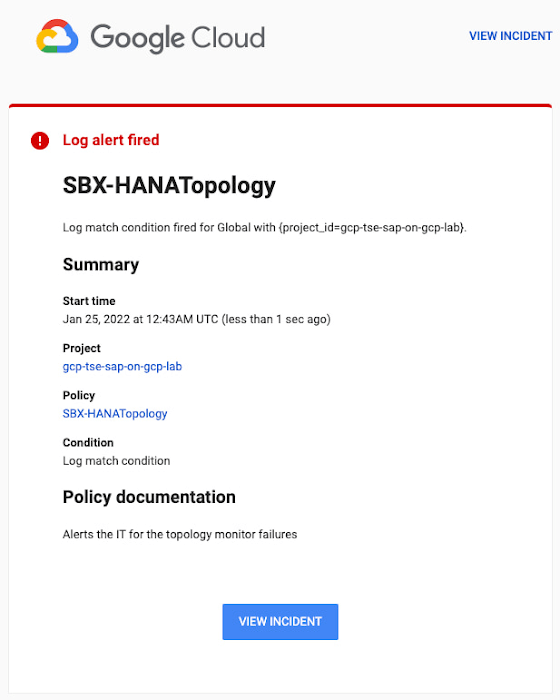
You can write and apply filters to your log-based alerts to isolate certain types of incidents and analyze events over time. For example, the following script will surface a resource event occurring within a two-hour window on a specific date:
timestamp>="2022-01-25T00:00:00Z" timestamp<="2022-01-25T02:00:00Z"
jsonPayload.CRM_alert_kind="resource"
With the ability to analyze these logged alerts over time, determine whether event patterns warrant any action.
[SIDEBAR]
The alert script prints details in the standard output and in the log file /var/log/crm_alerts_log, and this can grow over time. We recommend that the log file is set with the Linux logrotate service in order to limit the file system space. Use the following command to create the necessary logrotate setting for the alerting log file:
cat > /etc/logrotate.d/crm_alerts_log << END-OF-FILE /var/log/crm_alerts_log { create 0660 root root rotate 7 size 10M missingok compress delaycompress copytruncate dateext dateformat -%Y%m%d-%s notifempty } END-OF-FILE [END SIDEBAR]
Tips for Troubleshooting When you first deploy your alert script, how can you tell for certain that you’ve done it correctly? Use the following commands to test it out:
In RHEL:
pcs alert show
In SLES:
sudo crm config show | grep -A3 gcp_cluster_alert
You should see the following if the script is correct:
In RHEL:
Alerts: Alert: gcp_cluster_alert (path=/usr/share/pacemaker/alerts/gcp_crm_alert.sh) Description: "Cluster alerting for hana-node-X" Options: gcloud_cmd=/usr/bin/gcloud gcloud_timeout=5 Meta options: timeout=10s timestamp-format=%Y-%m-%dT%H:%M:%S.%06NZ Recipients: Recipient: gcp_cluster_alert_recepient (value=gcp_cluster_alerts) Options: value=/var/log/crm_alerts_log In SLES:
alert gcp_cluster_alert "/usr/share/pacemaker/alerts/gcp_crm_alert.sh" \ meta timeout=10s timestamp-format="%Y-%m-%dT%H:%M:%S.%06NZ" \ to "/var/log/crm_alerts_log" attributes gcloud_timeout=5 gcloud_cmd="/usr/bin/gcloud" If the commands do not display the alerts properly, re-deploy the script.
In case there is an issue with the script, or if the Cloud Logging records are not presenting as expected, examine the script log file /var/log/crm_alerts_log. The errors and warning can be filtered with:
egrep '(ERROR|WARN)' /var/log/crm_alerts_log
Any Pacemaker alert failures will be recorded in the messages and/or Pacemaker log. To examine recent alert failures, use the following command:
egrep '(gcp_crm_alert.sh|gcp_cluster_alert)' \ /var/log/messages /var/log/pacemaker.log
Keep in mind, though, that the Pacemaker log location may be different in your system from the one in the example above.
From reactive to proactive
Your SAP applications are too critical to risk outages. The most effective way to manage high availability clusters for your SAP systems on Google Cloud is to take full advantage of Pacemaker’s alerting capabilities, so you can be proactive in ensuring your systems are healthy and available.
Learn more about running SAP on Google Cloud.
3569
Of your peers have already downloaded this article
1:30 Minutes
The most insightful time you'll spend today!
IDC’s research demonstrates the value of running SAP environments on Google Cloud. Customers interviewed by IDC described achieving strong value through improved agility, high performance, and cost and staff efficiencies.
The business and operational benefits of running SAP environments on Google Cloud range from lowering downtime to improving productivity to enhanced efficiency.
Download this IDC infographic to understand the business value of migrating SAP environments top Google Cloud.
More Relevant Stories for Your Company
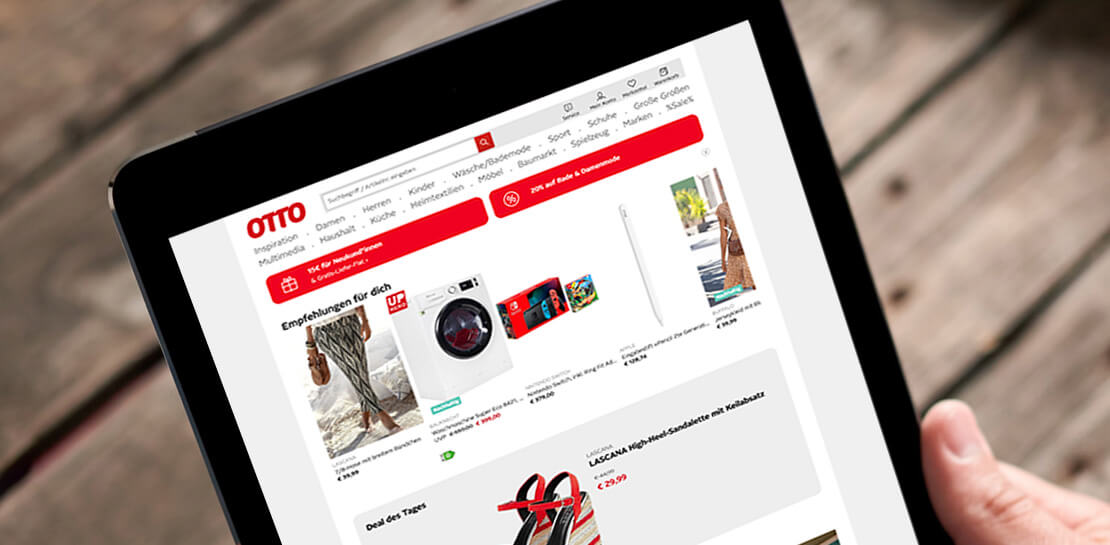
Three German Retail Firms Choose Google Cloud to Migrate SAP Workloads for Business Transformation
The retail industry is rapidly evolving, with customers demanding exceptional digital experiences, and retailers adjusting their businesses to be more efficient. With many retailers relying on SAP for critical business functions like digital transactions, finance, supply chains and more, this shift has led them to look for ways to modernize

Mambu’s Journey: Modernizing Core Banking with Google Cloud
When our founders began Mambu in 2011, their goal was to bring the latest digital technologies to the banking and finance world. Banking, in particular, is an industry built on decades of deep legacy technology. So initially, Mambu was embraced by microfinance — 100 organizations in 26 countries in just

ATB Financial Focuses on Customer Experience with the Speed it Gains in the Cloud
As senior vice president and head of technology enablement for ATB Financial, Barry Hensch has a mission: creating a seamless experience for the Alberta, Canada-based bank’s nearly 800,000 customers by leveraging the latest digital technology. ATB is a purpose-driven financial institution owned and operated by Alberta’s provincial government, with about

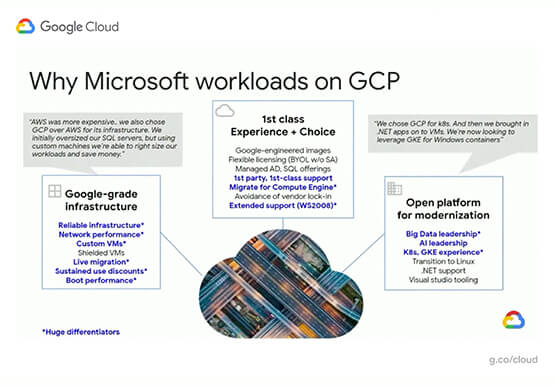
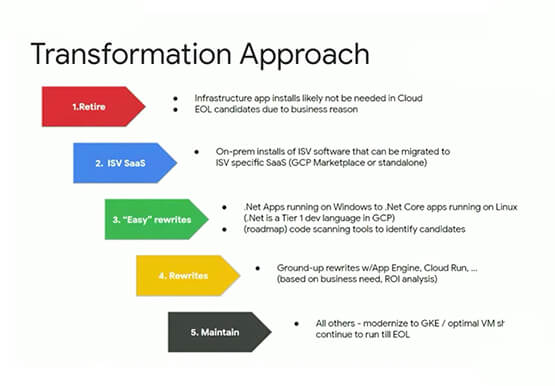

Modernize your Windows Workloads by Migrating them to Google Cloud
Google has plenty to offer when it comes to migrating and modernizing traditional enterprise Windows workloads to the cloud. Explore different approaches for re-hosting, modernizing, and transforming Windows applications, and the benefits of moving to Google Cloud. Learn from demos on some of the cutting-edge technologies that can offload some
