






Benchmarking Report for Indian Businesses: The State of Digital Commerce APIs
READ FULL INTRODOWNLOAD AGAIN5820
Of your peers have already downloaded this article
1:40 Minutes
The most insightful time you'll spend today!
3311
Of your peers have already watched this video.
27:00 Minutes
The most insightful time you'll spend today!
Unburden Your Operations and Development Teams with Anthos
VMs are used to run the majority of services in enterprises. Whether due to specific technical requirements, developer preferences, or simply time and budget constraints, many applications are not moving to containers and Kubernetes yet.
Think services first
Microservices architectures present numerous benefits but also introduce challenges like added complexity and fragmentation for different workloads. The Anthos platform unburdens your operations and development teams by simplifying service delivery across the board, from traffic management and mesh telemetry to securing communications between services. Anthos Service Mesh, Google’s fully managed service mesh, lets you easily manage these complex environments and enjoy the benefits they promise.
Learn how to incorporate these existing VM workloads into Anthos Service Mesh. Also, see how to use Compute Engine to simplify the installation and management of the Envoy proxy and how to add VMs to the mesh. Lastly, explore how you can modernize your VMs in place or develop a strategy to migrate your VMs to containers. Regardless of the path chosen, we show how the VMs can participate in the mesh and get all the same benefits of security, policy, and telemetry that Anthos Service Mesh provides to Kubernetes workloads.
How Recommendation AI Helps Retailers Optimize Click-through and Conversion Rates

7078
Of your peers have already read this article.
3:00 Minutes
The most insightful time you'll spend today!
Time to go outside again, I guess. I’ll need a sun hat. Sunscreen. Maybe some new sandals? What else?
With the Recommendations AI service, I might be reminded to grab a reusable water bottle and a swimsuit. Or some after-sun aloe lotion. Good thing, cause I’ll need it.

Recommendations AI is a solution that uses machine learning to bring product recommendations to their shoppers across any catalog or client list. This service is part of our full suite of Retail solutions. When you integrate with the Retail API, you get the benefit of Google’s Product Discovery. Integrating once to reap the benefits over and over. Recommendations is the starting point, and you can easily extend into Retail Search and Vision Product Search in the upcoming future.
The Recommendations solution is fully managed, global-scale and powered by deep learning, so you can focus on a great shopping experience and let someone else worry about the infrastructure.
Compared to baseline recommendation systems used by customers, Recommendations AI showed double digit uplift in conversion and clickthrough rates in A/B experiments controlled by the customers. You can optimize for click-through, conversion or session revenue, and fine tune the models to make sure you omit out-of-stock items or duplicates, for example.

So how does it work, and how do you get started? Read on, and we’ll walk you through the pipeline, starting with the data you already have to placement in your online store.
Formula: Data -> Model -> Placement
You start with your catalog, the list of all the things (postcards, movies, pie recipes) that you want to show your customers. Then you ingest your PII-redacted user events -this is the historic event data like home page views, add to cart events and more along with real time user events. This user event is joined with the product catalog and items that allows us to construct the sequence of shoppers’ activity, thus being able to predict what the shopper has a high propensity to purchase next. The user events can come from both online activity across devices or offline store purchases
The recommendation model will return a list of products, which are the recommendations. The brains of the operation, if you will. This model is trained using all the data that you ingest, using the latest neural network models and techniques that Google has built expertise over the years in flagship products like Youtube and News, that allows us to uncover shopper intent, so it can best predict the right recommendations to show to the right people.
Every model outputs a list of product identifiers, but where do they go? They go into placements, the spots, panels, carousels on your customer’s journey interacting with your brand that you’ve set aside to highlight recommendations. A model can send recommendations to one or more placements, but each placement only receives information from one recommendation model. Your pages will then need to render the products with the right images, text or other metadata, using the product ID that is returned by the model.
What do recommendations look like?
Let’s start by browsing our postcard-selling website, where I’ve been buying some vintage California postcards already. The recommendations algorithm has caught on to my interest, showing me other potential cards to purchase based on my history:

Put your data to work
To get started we need to bring your data into the recommendation model, so it can understand your customers, your inventory, and your sales patterns.
The model takes in the product catalog you use, and metadata about those products to better understand nuances in assortment, pricing and variables like size and style. You might already have this data stored in BigQuery or Merchant Center, and hence we provide easy integrations that you can leverage to get started even faster.
As for the user events, don’t worry if you already have systems in place to capture web and mobile activity. We make it easy to bring in your real time event logs by providing seamless integrations with Google Tag Manager, Javascript pixel, or even historic events from Cloud Storage, BigQuery or using inline API or JSON, so you can immediately train the models on this imported data. All this allows you to kickstart integrating with Recommendations AI in a matter of days.
The models then construct a sequence of activities that the user went through and joins with the products that the user engaged with. Once your data is ready to go, it takes a few days to train the model. Next onto making the data work for you.
Quickly customize your model
Setting up your own recommendations project in the console gives you the ability to choose what sort of model to train (based on what recommendations you want to generate) and your objective. Are you optimizing for click-through rate–more people click on the recommendation links or products–or for conversion rate–more people choose or buy what was suggested or revenue ?
Different models can be optimized for different optimization goals.; the GCP console explains what each one can do and how you can choose to optimize it.

Let’s unpack some of this terminology real quick.
We’ve got three model types:
- Recommended for you – Means we think these are items you’ll want to buy, based on your history; this is usually used on a home page to showcase items.
- Others you may like – Means if you’re browsing the page of a water bottle, we will recommend alternative brands of water bottles that you may like as well as a backpack, based on your engagement history.
- Frequently bought together – Means that when anyone buys sunscreen, we notice that they often also buy aloe lotion, so we will surface those items when someone adds any one of them to their cart.
And then we have three business objectives that the models optimize for:
- Click-through rate – How frequently did somebody click on a recommended item?
- Conversion rate– How frequently did somebody add a recommended item to their cart?
- Revenue per session – How much money did the recommendations generate for you?
Deliver anywhere along the journey
Now that you’re all set up in the Retail AI console, you can test out the recommendations in the console, even before you deploy to production.

You can integrate Recommendations into your frontend by calling the Predict APIt. The placements of recommendations will report data back into the dashboard and you can analyze and measure success for future iterations.
On top of that you can use the recommendations for other parts of your customer’s journey. Email promotions, storefront kiosks, display ads or follow-up notifications can include recommendations based on past activity and cart contents. The model gives you useful product recommendations for a wide variety of touchpoints and steps in the purchasing process.
More best practices, and guides, are available inside our documentation.
How to get started
Training your own models can be tedious, time-consuming, and expensive. On top of that it requires deeper data science expertise to set up. Let us do it instead!
You can see how IKEA Retail uses Recommendations AI in this recent talk and blog from the Google Cloud Retail Summit..
To get started today you’ll need to make a Cloud project and enable the Retail API, which then allows you to access all the recommendation tools in one menu. Bring in your catalog and purchasing data, define a placement or two, and you can start putting recommendations on your site in a matter of days.
New Visual Interface for Google Cloud’s Speech-to-Text API Makes API Easy to Use !

4678
Of your peers have already read this article.
2:00 Minutes
The most insightful time you'll spend today!
At Google Cloud, we’re committed to making artificial intelligence (AI) accessible to everyone and easier to harness for new use cases. That’s why we’re excited to announce the general availability of our intuitive, new visual user interface for Google Cloud’s Speech-to-Text (STT) API, right in Google Cloud Console, which makes the API much simpler and easier for developers to use.
The STT API lets developers convert speech into text by leveraging Google’s years of research in automatic speech recognition and transcription technology. As advancements in AI continue to bring speech to new interfaces and devices, the STT API helps developers add speech functionality to their applications in order to better meet consumer demands.
The STT API covers a wide variety of use cases, from dictation and short commands, to captioning and subtitles. Getting the most of STT, however, can be a complicated process. To achieve the highest accuracy on any AI use case requires careful testing and tuning.
Previously, developers building on the STT API had to do this work manually by carefully experimenting with our API. Just to get started, developers needed familiarity with GCP integration concepts and had to either build their own tools or manage various scripts and API calls to fully understand the API documentation. These actions required cumbersome and time-consuming effort and made measuring, customizing, and improving models even more difficult.
Today’s announcement significantly simplifies the process, facilitating iteration and integration of models into developers’ applications by letting developers perform every API function from within the Google Cloud Console. These tools will make it easier for developers to integrate the STT API with their products or services. This update also gives developers the ability to manage and quickly iterate on their STT model customizations with Model Adaptation.
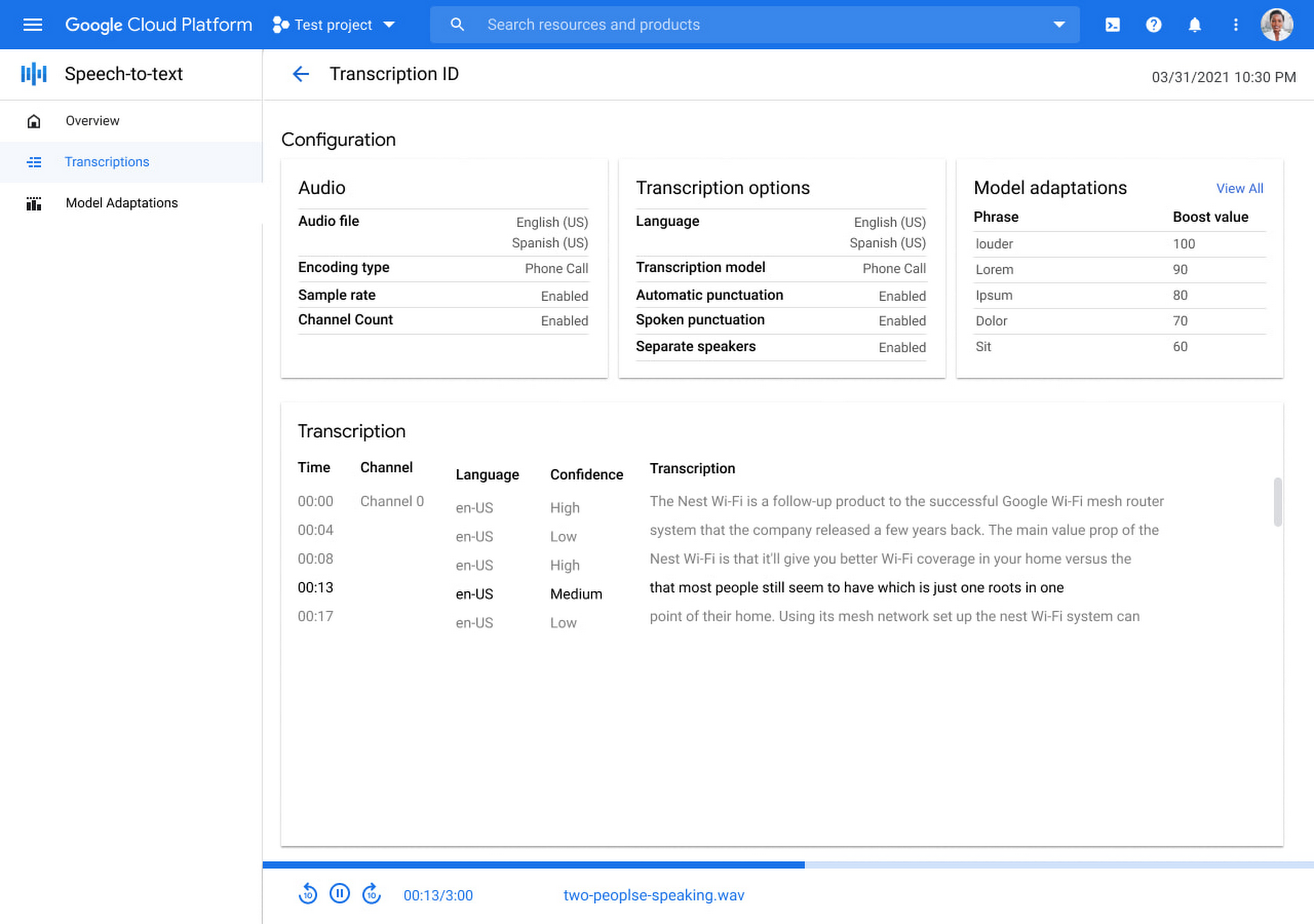
Model Adaptation allows developers to customize STT specifically for their domains or use cases. Developers can maintain lists of words and weights that will be applied to either every request or just single requests, depending on their needs. Model adaptations are reusable and composable, so once developers have seen good results in the STT Cloud Console, they can deploy to their entire solution.
The Speech-to-Text Cloud Console and Model Adaptation API is available now in all Google Cloud regions and languages and is accessible to all GCP users with no additional cost to that of the underlying API usage. The STT API supports over 70 languages in 120 different local variants. If you’re a developer looking for an easy to use, easy to integrate, and high-quality STT experience, sign up for our free trial and try our new interface on your own datasets today!
A Guide to Anthos Hybrid Environment Reference Architecture
1281
Of your peers have already read this article.
1:30 Minutes
The most insightful time you'll spend today!
To help improve your security posture, improve the reliability of your applications, and reduce configuration drift in your environment, we’re excited to announce a new Anthos reference architecture.
Written in collaboration across our product, engineering, support, and field teams, this new reference architecture helps you plan, deploy, and configure the required components for Anthos hybrid environments.
Anthos hybrid environments give you the flexibility to deploy on-premises components that run container-based workloads and VMs using Anthos clusters on VMware and Anthos clusters on bare metal. You can continue to utilize existing investments in your on-premises infrastructure, and start to add components like Anthos Config Management. When you’re ready to bring everything together, you can add additional Google Cloud-based services like Artifact Registry, Cloud Monitoring, and Identity and Access Management (IAM).
The following sneak peek covers some of our best practices for architecting an Anthos hybrid environment. For more detailed guidance and planning information, see the full Anthos hybrid environment reference architecture.
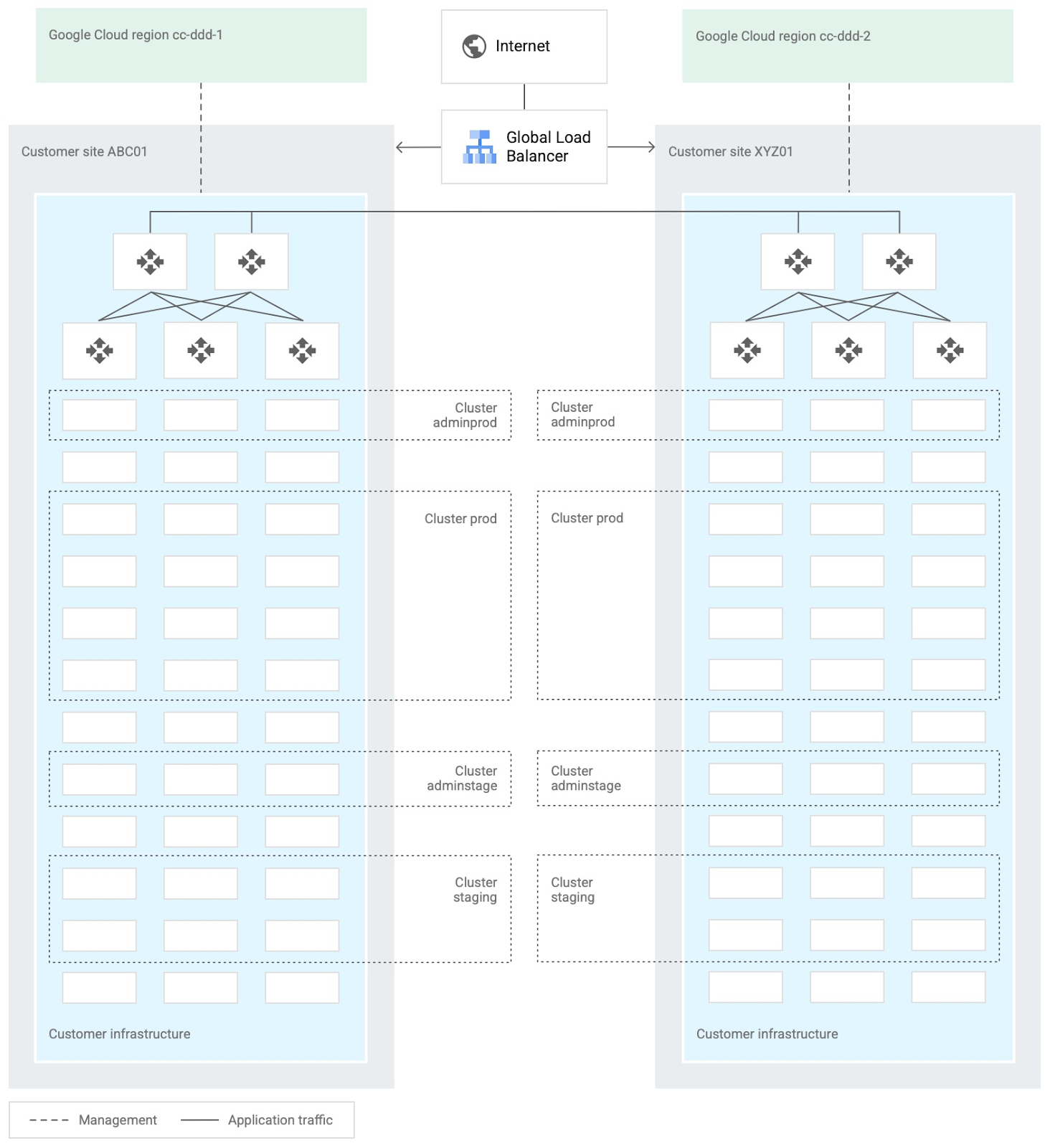
When you design and deploy an Anthos hybrid environment, we recommend that you use two or more on-premises computing customer sites and two or more Google Cloud regions. In your sites, run multiple clusters. This approach is recommended for several reasons, such as:
- Disaster recovery. If one cluster or site fails, you can continue to run workloads.
- Multiple environments, like production and staging, to test infrastructure changes.
- Different cluster types in each environment: admin clusters and user clusters. This approach separates administrative resources, which is a security best-practice.
The following diagram shows an example of an Anthos hybrid environment that’s spread across customer sites and regions, with different clusters for admin and user workloads and for production and staging:
In each site, you can use Anthos clusters on VMware or Anthos clusters on bare metal. For both products, we recommend the following:
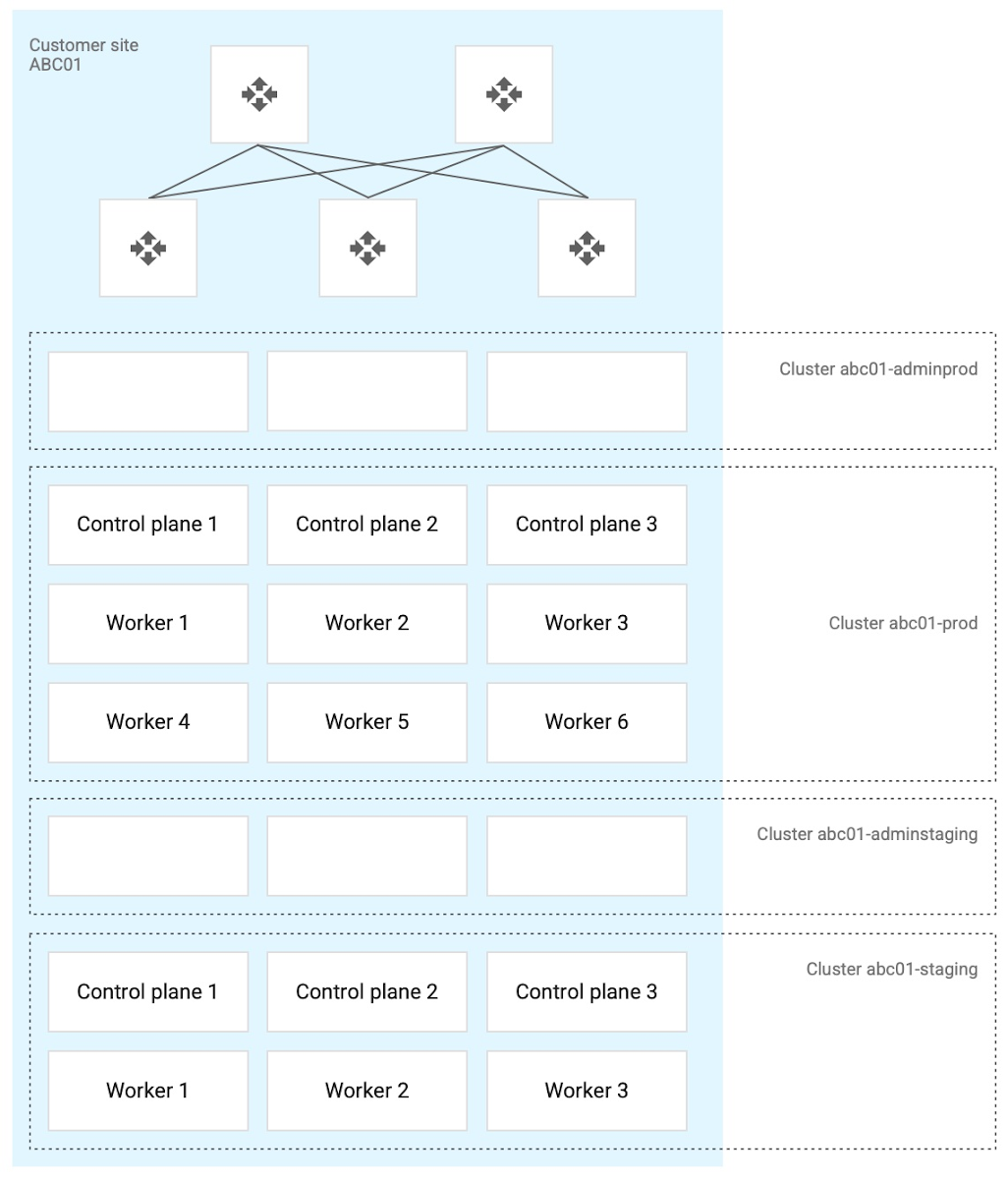
- Use a highly available (HA) control plane with three members for continued control plane availability concurrently with operating system upgrades, control plane software updates, or single-machine hardware or kernel failures.
- Deploy two admin clusters so that admin cluster configuration changes and updates can be tested in the staging environment first.
The following diagram shows an example of Anthos clusters on bare metal with control plane and worker nodes spread across physical machines. With Anthos clusters on VMware, the control plane and worker nodes are spread across VMware VMs:
Configure your on-premises clusters and applications to send logging and monitoring data back to Google Cloud for analysis and review. Different personas should only be granted access to the environments they need. The following diagram shows how application developers and application or platform operators can then view logging and monitoring data in Google Cloud:
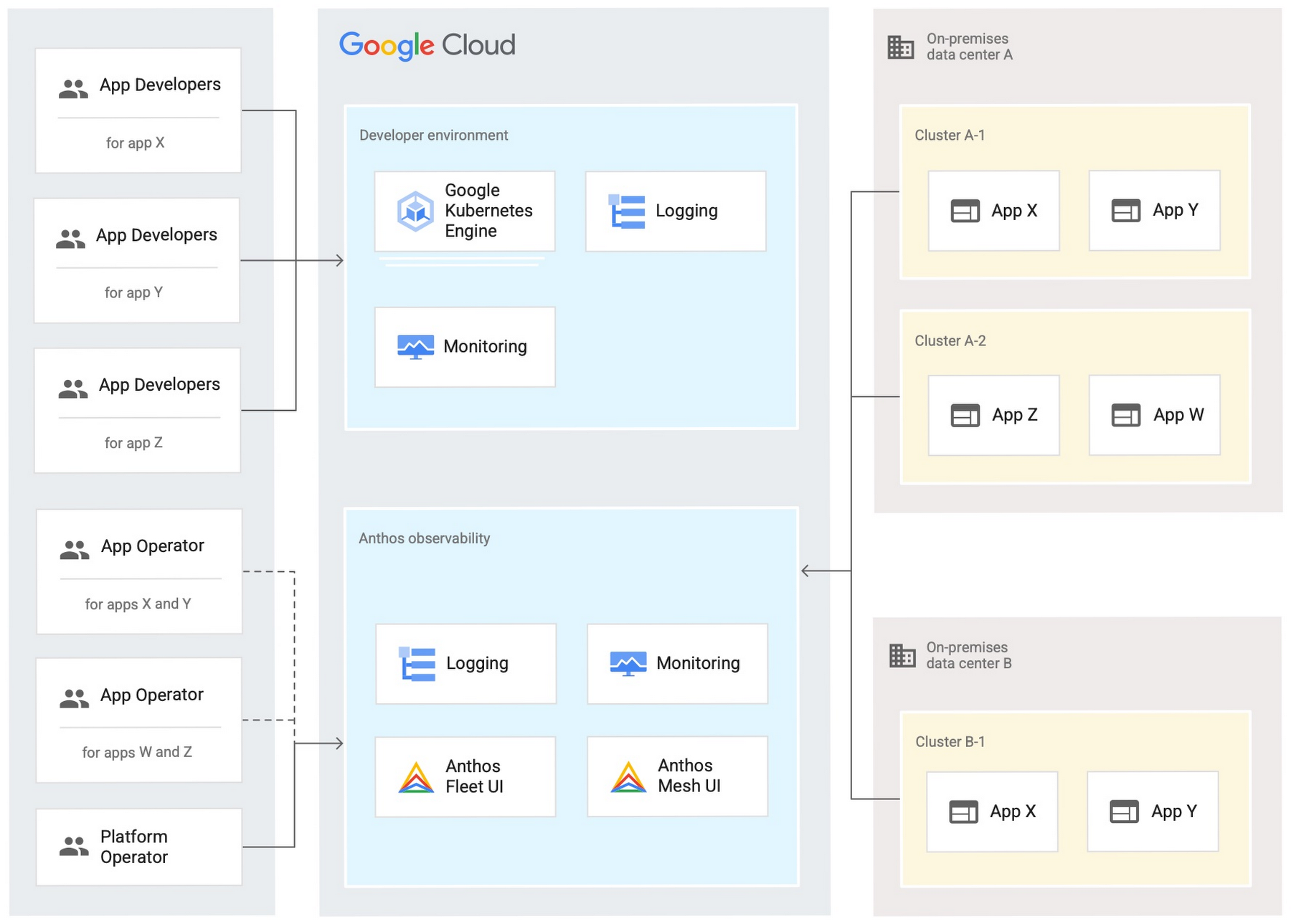
Use Anthos Config Management to manage Kubernetes objects in your clusters. Anthos Config Management is a GitOps-style tool that uses a Git repository or Open Container Initiative (OCI) as its storage mechanism and source of truth. Git provider workflows allow multiple stakeholders to participate in review of changes.
As shown in the following diagram, a common Anthos Config Management deployment uses one folder containing configuration for all clusters. Use separate additional folders to hold configuration data, one for application:
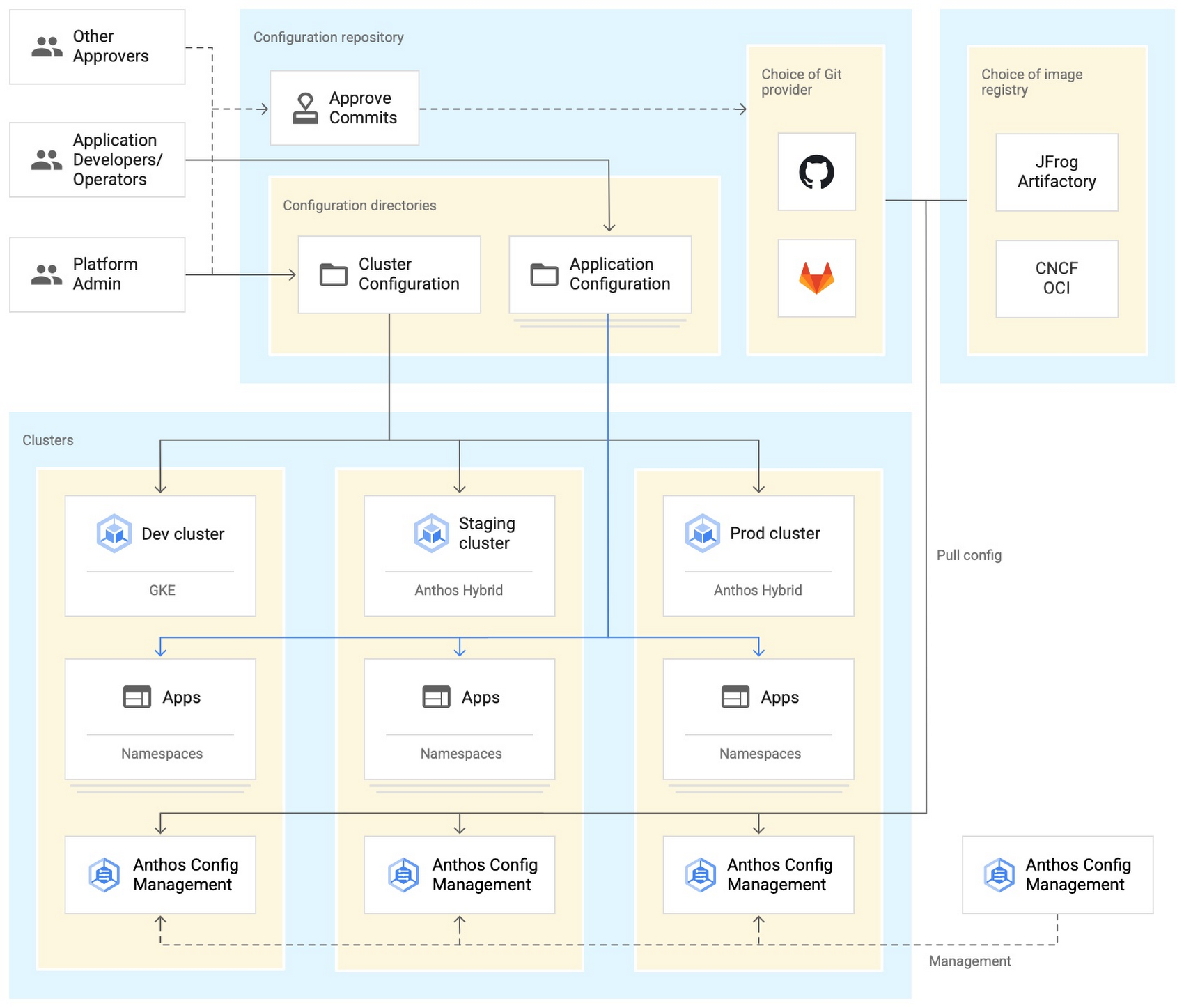
Plan and implement a way to secure the network traffic in your Anthos hybrid environment. The following services help with authentication, connectivity, and communication in a cluster:
- Anthos Identity Service connects clusters to on-site identity providers to authenticate local access.
- Connect gateway and workforce identity federation can provide secure cloud-mediated access to mobile workforce clusters without using a VPN.
- Workload Identity provides on-premises workloads with managed short-lifetime credentials for access to cloud resources.
- Anthos Service Mesh encrypts and controls communication between services in the same cluster.
The following diagram shows how Anthos Service Mesh can control the flow of traffic between services within your clusters:
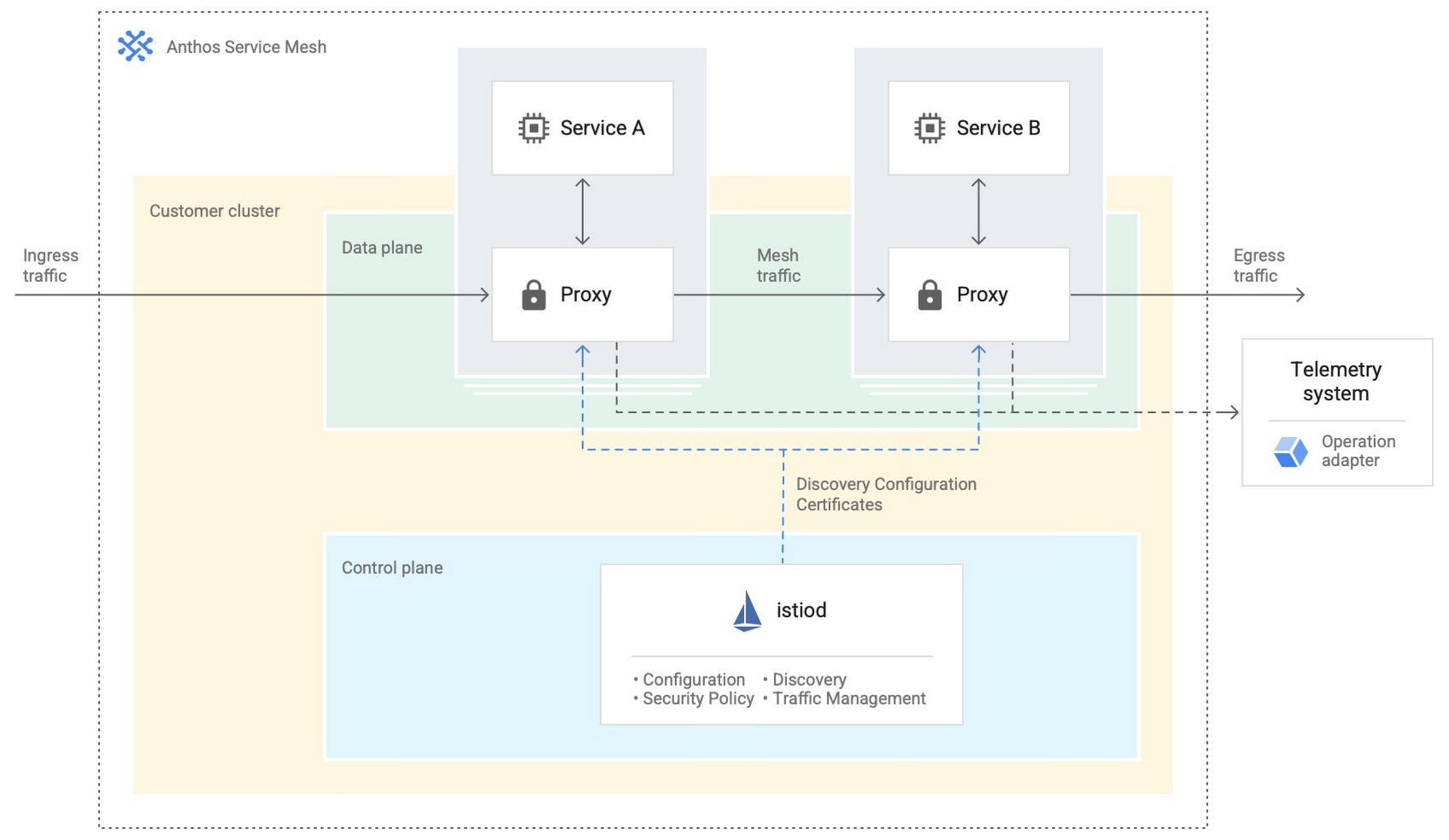
You don’t have to implement all these cloud-based services as part of your initial on-premises deployments. As you become more comfortable and want to expand your capabilities, you can add in some of these hybrid offerings. But, we hope that this blog post has given you some ideas to think about when you start to plan and design your own Anthos hybrid environments.
For more detailed guidance and planning information, see the full Anthos hybrid environment reference architecture. Let us know what you think!
Arab Bank Accelerates its App Development and Testing Using Apigee and Anthos

6179
Of your peers have already read this article.
3:30 Minutes
The most insightful time you'll spend today!
Founded in 1930 and headquartered in Jordan, Arab Bank is one of the oldest banks in the Middle East. Operating out of 28 countries, we’ve earned our customers’ trust with a prudent approach to operations and respect for the cultures and customs in the region.
With a few exceptions where cloud providers have hosted their datacenter in a Middle Eastern or North African country, the banking sector, in general, in the region has been slow to adopt cloud technology for a number of reasons, including concern about data security, maturity and security controls of cloud services (PaaS and SaaS), and regulations in place. But on the other hand, we saw the opportunity to accelerate our development and testing using the cloud, as well as to partner with the fintech community and digital service providers to integrate their solution in the banking ecosystem. We needed more flexibility to connect with the outside world, and a more open architecture to help us drive our internal innovation at a faster rate with the help of the fintech industry. By collaborating with Google Cloud, we reached those goals and accelerated app development and testing through products like Apigee and Anthos. We’re now offering innovative apps and services to our customers and employees that leverage new technological capabilities to give more agility and flexibility, and to optimize our workloads.
Embracing the cloud in a regulated industry
To get started with the cloud, we needed to create internal awareness about cloud technology, the API layer, containers and their benefits amongst our leaders and staff. Google helped us educate and get buy-in from key functions by organizing open technology demonstration sessions and discussion panels. When considering potential cloud providers we had four decision criteria: maturity of security controls, ease of use, cost, and scalability / agility for new deployments and continuous innovation. This last factor was critical, and we were impressed by Google Cloud’s innovation roadmap, both via direct conversations and at Google’s Next conference, where we met a lot of people passionate about technology, innovation and building something new.
Going back to our journey, given the above-mentioned regional limitations, we started to develop a hybrid cloud approach. This helped us continue to operate on-premises for a number of services in production, particularly those that have personally identifiable information (PII) or other sensitive data attached, and to leverage the cloud for development, testing and production workloads that don’t contain customer data.
In the short term, we didn’t anticipate that our many jurisdictions would allow data to be transported to other countries. But cloud tools will allow us to tokenize or anonymize customer data while maintaining customer data on-premises. This applies to many digital journeys such as customer onboarding, credit facility online applications, or marketplace navigation. In the coming years, we predict our API integration with partners will accelerate and enrich the overall digital value proposition of our business segments, namely consumer banking, small and medium-size businesses and large corporate and institutional clients.
Building connections and cornerstones in the cloud
The first move in our digital transformation was to implement Apigee, Google Cloud’s API management platform, to connect to the world’s digital banking ecosystem. Apigee provides the security, sharing, mediation policies, and developer portal capabilities for us to successfully meet Open Banking standards while focusing on innovation.
On the back of the Apigee implementation, we created an accelerator program to incubate Fintech ideas that can, in turn, integrate into our digital platforms and be offered to our customers. We also developed various banking APIs, all designed and documented in accordance with PSD2 and Open Banking regulations, and made them available to our partners. These APIs exposed on our API development portal offer the needed code structure for fintech companies to design creative solutions around them.
Next, we adopted Anthos, Google Cloud’s managed application platform. Anthos has become a cornerstone of our operations because it works across hybrid cloud, offering integration of microservice containers and fueling collaborative opportunities with external parties. Our current Anthos infrastructure includes several hundreds of microservices now running on containers in Google Kubernetes Engine (GKE) and on-premises. We now use the cloud for collaboration, development and testing, but not for production, which is done on-premises.
Along the way, Google Cloud’s Professional Services Organization (PSO) helped us through the entire cloud setup process, and with the adoption of Anthos. We originally built on the cloud tools through an iterative process, learning from our successes and errors along the way. Now that we have a better sense of how Anthos operates, we’re building a fresh infrastructure atop a sound, stable, and resilient foundation that will let us scale easily as we work to transform Arab Bank into a digital-first enterprise, that is our ambition.
Currently products running on Anthos include customer acquisition and onboarding via mobile apps, and our Arabi-Pay app, which allows customers to instantly pay each other via WhatsApp or other messaging platforms. Leveraging Anthos, our instant loan service for Arab Bank salaried employees can grant and disburse loans up to $7,000 in less than seven minutes.
In addition, we’ve built a number of digital journeys for our Small and Medium Enterprise (SME) customers, such as our SME client digital onboarding process and paperless SME lending platform.
While some may think that digital adoption in this part of the world can be slow, as customer contact remains anchored in our customs, the recent COVID-19 pandemic has accelerated the adoption of digital banking services and electronic payments, inspiring more confidence to buy and pay online. Thanks to our rich and user-friendly banking app that relies on Apigee and Anthos for critical customer journeys, over 90% of new-to-bank customers are using our mobile apps. Within the next 18 months, we predict that number will be closer to 100%.
Of course, with higher customer adoption comes the challenge of potential service interruptions. A single moment of downtime can be highly visible to many digital customers. But Google Cloud’s Anthos and Apigee give us the flexibility to resume processes at a fast rate, so any interruptions are almost invisible to our customers. In fact, when the COVID-19 pandemic hit, though our branches could be open only for limited hours each day, our consumer clients in particular were able to take advantage of our digital services in a very self-sufficient manner. Being well positioned with Google Cloud, we could also keep our internal teams and external partners connected and productive. Without Google Cloud, continuing the digital transformation of the bank at the pace we wanted would have been a big challenge.
Collaborating across borders and time zones
With Google Cloud, our ability to collaborate and partner has transformed significantly. We operate 24/7 now because our developers are scattered across multiple geographies and different time zones. Because testing and deployment can run around the clock, including on weekends, we currently deploy a new digital journey in a few weeks, faster than ever before. This has given our organization a spirited mindset that prioritizes innovation, and raised the bar in terms of our operating model.
Another consideration about Google Cloud tools is the elimination of inefficient processes typically seen in a software development lifecycle. We now build in a completely agile manner, from design squads until deployment in production. Compared to where we were two years ago, when we had an annual maximum of two systems releases in production, we now have close to monthly releases of our digital packages. In addition, we also supplement those monthly releases with additional ad-hoc releases and fixes in between. As a result, we have removed internal silos and improved tremendously the collaboration between the product and sales teams, operations, IT Dev Factory and Infrastructure, as well as our supporting functions.
Through the agile process facilitated by APIs, we introduced Design Thinking workshops involving external customers and prospects early on to understand their true pain points better and emotions during the existing journeys and how to make new digital journeys frictionless. As a result, the relevance of our products for various customer personas has improved tremendously.
Transcending banking
With Google Cloud, we can offer our customers so much more than just banking. We’ve become more digitally relevant to their lives. For example, we recently launched a mortgage app that helps customers all the way from home selection through mortgage negotiations and closing, and even to getting the home decorated. It’s an end-to-end journey in which API integration with key regional players was a cornerstone to our success.
For other digital products, we have an extensive roadmap of lifestyle-based solutions relevant to each segment and age group. We’ve only scratched the surface of the services we can provide, and we see the cloud as the future for everything we want to do.
Read more about Google Cloud’s Open Banking solution to learn how you can simplify and accelerate the process of delivering open banking as required by PSD2. You can also view our video on Open Banking, powered by Apigee API Management.
More Relevant Stories for Your Company
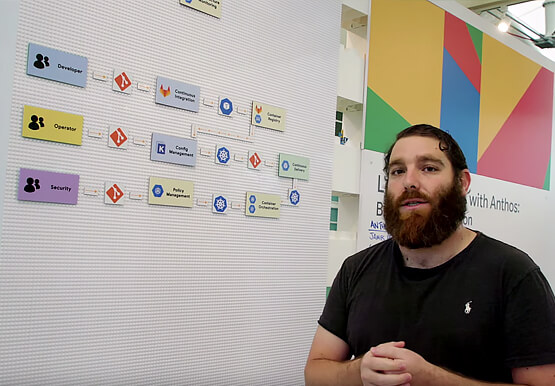
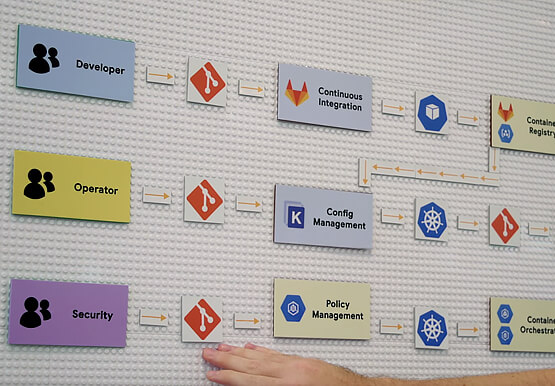

Building a Software Delivery Platform with Anthos
Understand the architecture of a GitOps based CI/CD pipeline. In a CI/CD pipeline, there are three different personas -- developers, operators, and security engineers. This demo includes common developer, operator, and security engineer tasks to show how the patterns can improve your company’s software delivery performance.

Transform ‘Dark Data’ from Documents with Document AI, Cloud Functions and Workflows
At enterprises across industries, documents are at the center of core business processes. Documents store a treasure trove of valuable information whether it's a company's invoices, HR documents, tax forms and much more. However, the unstructured nature of documents make them difficult to work with as a data source. We

How to Pick a Database that is Suitable for Your Application
Picking the right database for your application is not easy. The choice depends heavily on your use case—transactional processing, analytical processing, in-memory database, and so on—but it also depends on other factors. This post covers the different database options available within Google Cloud across relational (SQL) and non-relational (NoSQL) databases

Expert Takeaways on API Strategies from The State of API Economy 2021 Report
Did you know API traffic for Apigee customers increased 46% year-over-year, to 2.21 trillion calls, between 2019 and 2020? If you have more questions on APIs trends and their role in disrupting enterprises digitally, you can catch up on key take aways from the Google Cloud's State of API Economy
