





3530
Of your peers have already watched this video.
1:30 Minutes
The most insightful time you'll spend today!
Building a Software Delivery Platform with Anthos
Understand the architecture of a GitOps based CI/CD pipeline. In a CI/CD pipeline, there are three different personas — developers, operators, and security engineers.
This demo includes common developer, operator, and security engineer tasks to show how the patterns can improve your company’s software delivery performance.

6363
Of your peers have already downloaded this article
3:30 Minutes
The most insightful time you'll spend today!
Application programming interfaces, or APIs, are the way software talks to other software so by definition, they’re a technology that connects systems.
Many enterprise leaders think of them primarily in these terms. For example, 57 percent of respondents to Google’s Enterprise Digital Maturity Assessment Tool, Apigee Compass, characterize APIs as systems integration technology.
But APIs are much more. They’re interfaces that enable developers to repeatedly leverage data, functions, and applications to build new products and services. They’re how a business expresses itself via software, and they enable that business to rapidly expand into new contexts or adapt to meet changing user needs and preferences.
Take ridesharing apps. They exist partly because they can leverage existing capabilities made available via others’ APIs. When people order a car, a ridesharing app leverages services such as Google Maps APIs for navigation. In turn, those ridesharing companies express their businesses as APIs. This lets developers build ridesharing into new experiences, such as allowing an end user to order a ride via a voice assistant. When the user pays for a ride with a given digital payments platform, an API enables that transaction too.
Download the E-book and learn quick tricks on you can leverage APIs to delight your customers.
Google Cloud Helps LiveRamp Capture, Manage, Process and Visualize Data at Scale
4924
Of your peers have already read this article.
2:30 Minutes
The most insightful time you'll spend today!
Editor’s note: Today we’re hearing from Sagar Batchu, Director of Engineering at LiveRamp. He shares how Google Cloud helped LiveRamp modernize its data analytics infrastructure to simplify its operations, lower support and infrastructure costs and enable its customers to connect, control, and activate customer data safely and securely.
LiveRamp is a data connectivity platform that provides best in class identity resolution, activation and measurement for customer data so businesses can create a true customer 360 degree view. We run data engineering workloads at scale, often processing petabytes of customer data every day via LiveRamp Connect platform APIs.
As we integrated more internal and external APIs and the sophistication of our product offering grew, the complexity of our data pipelines increased. The status quo for building data pipelines very quickly became painful and cumbersome as these processes take time and knowledge of an increasingly complex data engineering stack. Pipelines became harder to maintain as the dependencies grew and the codebase became increasingly unruly.
Beginning last year, we set out to improve these processes and re-envision how we reduce time to value for data teams by thinking of our canonical ETL/LT analytics pipelines as a set of reusable components. We wanted teams to spend their time adding new features which encapsulate business value rather than spending time figuring out how to run workloads at scale on cloud infrastructure. This was even more pertinent with data science, data analyst and services teams whose daily wheelhouse was not the nitty gritty of deploying pipelines.
With all this in mind, we decided to start a data operations initiative, a concept popularised in the last few years, which aims to accelerate the time to value for data-oriented teams by allowing different personas in the data engineering lifecycle to focus on the “what” rather than the “how.”
We chose Google Cloud to execute on this initiative to speed up our transformation. Our architectural optimizations, coupled with Google Cloud’s platform capabilities simplified our operational model, reduced time to value, and greatly improved the portability of our data ecosystem for easy collaboration. Today, we have ten teams across LiveRamp running hundreds of workloads a day, and in the next quarter, we plan to scale to thousands.
Why LiveRamp Chose Google Cloud
Google Cloud provides all the necessary services in a serverless fashion to build complex data applications and run massive infrastructure. Google Cloud offers data analytics capabilities that help organizations like LiveRamp to easily capture, manage, process and visualize data at scale. Many of the Google Cloud data processing platforms also have open source roots making them extremely collaborative. One such platform is CDAP (Cask Data Application Platform), which Cloud Data Fusion is built on. We were drawn to this for the following reasons:
- CDAP is inherently multicloud. Pipeline building blocks known as Plugins define individual units of work. They can be run through different provisioners which implement managed cloud runtimes.
- The control plane is a set of microservices hosted on Kubernetes, whereas the data plane leverages the best of breed big data cloud products such as Dataproc.
- It is built as a framework and is inherently extensible, and decoupled from the underlying architecture. We can extend it both at the system and user-level through “extensions” and “plugins” respectively. For example, we were able to add a system extension for LiveRamp specific authorisation and build a plugin that encompasses common LiveRamp identity operations.
- It is open sourced, and there is a dedicated team at Google Cloud building and maintaining the core codebase as well as a growing suite of source, transform and sink connectors.
- It aligns with our remote execution and non-data movement strategy. CDAP executes pipelines remotely and manages through a stream of metadata via public cloud APIs.
- CDAP supports an SRE mindset by providing out of the box monitoring and observability tooling.
- It has a rich set of APIs backed by scalable microservices to provide ETL as a Service to other teams.
- Cloud Data Fusion, Google Cloud’s fully managed, native data integration platform is based on CDAP. We benefit from the managed security features of Data Fusion like IAM integration, customer manager encryption keys, role based access controls and data residency to ensure stricter governance requirements around data isolation.
How are teams using the Data Operations Platform?
Through this initiative, we have encouraged data science and engineering teams to focus on business logic and leave data integrations and infrastructure as separate concerns. A centralised team runs CDAP as a service, and custom plugins are hosted in a democratized plugin marketplace where any team can contribute their canonical operations.
Adoption of the platform was driven by one of our most common patterns of data pipelining: The need to resolve customer data using our Identity APIs. LiveRamp Identity APIs connect fragmented and inaccurate customer identity by providing a way to resolve PII to pseudonymous identifiers. This enables client brands to connect, control, and activate customer data safely and securely.
The reality of customer data is that it lives in a variety of formats, storage locations, and often needs bespoke cleanup. Before, technical services teams at LiveRamp had to develop expensive processes to manage these hygiene and validation processes even before the data was resolved to an identity. Over time, a combination of bash and python scripts and custom ETL pipelines became untenable.

By implementing our most used Identity APIs, a series of CDAP plugins, our customers were able to operationalise their processes by logging into a Low Code user interface, select a source of data, run standard validation and hygiene steps, visually inspect using CDAP’s Wrangler interface for especially noisy cases, and channel data into our Identity API. As these workflows became validated, they have been established as standard CDAP pipelines that can now be parameterized and distributed on the internal marketplace. These technical services teams have not only reduced their time to value but have also enabled future teams to leverage their customer pipelines without worrying about the portability to other team’s infrastructures.
What’s Next ?
With critical customer use cases now powered by CDAP, we plan on scaling out usage of the platform to the next batch of teams. We plan on taking on more complex pipelines, cross-team workloads, and adding support for the ever growing LiveRamp platform API suite.
In addition to the Google Cloud community and the external community, we have a growing base of LiveRamp developers building out plugins on CDAP to support routine transforms and APIs. These are used by other teams who push the limits and provide feedback — spinning a flywheel of collaboration between those who build and those who operate. Furthermore, teams internally can continue to use their other favorite data tools like BigQuery and Airflow as we continue to deeply integrate CDAP into our internal data engineering ecosystem.
Our data operations platform powered by CDAP is quickly becoming a center point for data teams – a place to ingest, hygiene, transform, and sink their data consistently.
We are excited by Google Cloud’s roadmap for CDAP and Data Fusion. Support for new execution engines, data sources and sinks, and new features like Datastream and Replication will mean LiveRamp teams can continue to trust that their applications will be able to interoperate with the ever evolving cloud data engineering ecosystem.
Enhance Your GKE Deployment with Improved Control Plane Connectivity and Isolation

2709
Of your peers have already read this article.
3:00 Minutes
The most insightful time you'll spend today!
Once upon a time, all Google Kubernetes Engine (GKE) clusters used public IP addressing for communication between nodes and the control plane. Subsequently, we heard your security concerns and introduced private clusters enabled by VPC peering.
To consolidate the connectivity types, starting in March 2022, we began using Google Cloud’s Private Service Connect (PSC) for new public clusters’ communication between the GKE cluster control plane and nodes, which has profound implications for how you can configure your GKE environment. Today, we’re presenting a new consistent PSC-based framework for GKE control plane connectivity from cluster nodes. Additionally, we’re excited to announce a new feature set which includes cluster isolation at the control plane and node pool levels to enable more scalable, secure — and cheaper! — GKE clusters.
New architecture
Starting with GKE version 1.23 and later, all new public clusters created on or after March 15th, 2022 began using Google Cloud’s PSC infrastructure to communicate between the GKE cluster control plane and nodes. PSC provides a consistent framework that helps connect different networks through a service networking approach, and allows service producers and consumers to communicate using private IP addresses internal to a VPC.
The biggest benefit of this change is to set the stage for using PSC-enabled features for GKE clusters.
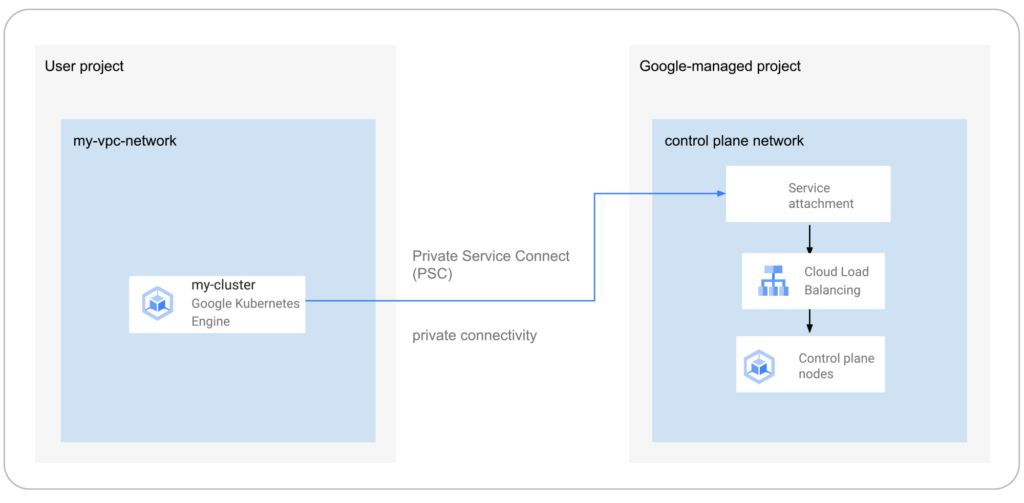
The new set of cluster isolation capabilities we’re presenting here is part of the evolution to a more scalable and secure GKE cluster posture. Previously, private GKE clusters were enabled with VPC peering, introducing specific network architectures. With this feature set, you now have the ability to:
- Update the GKE cluster control plane to only allow access to a private endpoint
- Create or update a GKE cluster node pool with public or private nodes
- Enable or disable GKE cluster control plane access from Google-owned IPs.
In addition, the new PSC infrastructure can provide cost savings. Traditionally, control plane communication is treated as normal egress and is charged for public clusters as a normal public IP charge. This is also true if you’re running kubectl for provisioning or other operational reasons. With PSC infrastructure, we have eliminated the cost of communication between the control plane and your cluster nodes, resulting in one less network egress charge to worry about.
Now, let’s take a look at how this feature set enables these new capabilities.
Allow access to the control plane only via a private endpoint
Private cluster users have long had the ability to create the control plane with both public and private endpoints. We now extend the same flexibility to public GKE clusters based on PSC. With this, if you want private-only access to your GKE control plane but want all your node pools to be public, you can do so.
This model provides a tighter security posture for the control plane, while leaving you to choose what kind of cluster node you need, based on your deployment.
To enable access only to a private endpoint on the control plane, use the following gcloud command:
gcloud container clusters update CLUSTER_NAME \
--enable-private-endpoint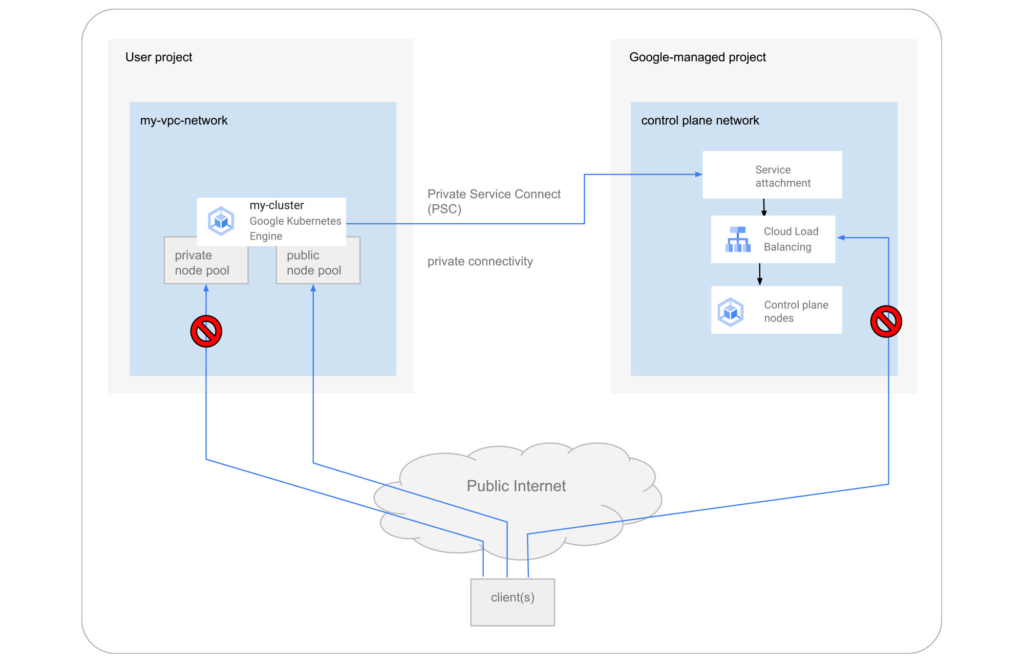
Allow toggling and mixed-mode clusters with public and private node pools
All cloud providers with managed Kubernetes offerings offer both public and private clusters. Whether a cluster is public or private is enforced at the cluster level, and cannot be changed once it is created. Now you have the ability to toggle a node pool to have private or public IP addressing.
You may also want a mix of private and public node pools. For example, you may be running a mix of workloads in your cluster in which some require internet access and some don’t. Instead of setting up NAT rules, you can deploy a workload on a node pool with public IP addressing to ensure that only such node pool deployments are publicly accessible.
To enable private-only IP addressing on existing node pools, use the following gcloud command:
gcloud container node-pools update POOL_NAME \
--cluster CLUSTER_NAME \
--enable-private-nodes
To enable private-only IP addressing at node pool creation time, use the following gcloud command:
gcloud container node-pools create POOL_NAME \
--cluster CLUSTER_NAME \
--enable-private-nodes
Configure access from Google Cloud
In some scenarios, users have identified workloads outside of their GKE cluster, for example, applications running in Cloud Run or any GCP VMs sourced with Google Cloud public IPs were allowed to reach the cluster control plane. To mitigate potential security concerns, we have introduced a feature that allows you to toggle access to your cluster control plane from such sources.
To remove access from Google Cloud public IPs to the control plane, use the following gcloud command:
gcloud container clusters update CLUSTER_NAME \
--no-enable-google-cloud-access
Similarly, you can use this flag at cluster creation time.
Choose your private endpoint address
Many customers like to map IPs to a stack for easier troubleshooting and to track usage. For example — IP block x for Infrastructure, IP block y for Services, IP block z for the GKE control plane, etc. By default, the private IP address for the control plane in PSC-based GKE clusters comes from the node subnet. However, some customers treat node subnets as infrastructure and apply security policies against it. To differentiate between infrastructure and the GKE control plane, you can now create a new custom subnet and assign it to your cluster control plane.
gcloud container clusters create CLUSTER_NAME \
--private-endpoint-subnetwork=SUBNET_NAME
What can you do with this new GKE architecture?
With this new set of features, you can basically remove all public IP communication for your GKE clusters! This, in essence, means you can make your GKE clusters completely private.
You currently need to create the cluster as public to ensure that it uses PSC, but you can then update your cluster using gcloud with the --enable-private-endpoint flag, or the UI, to configure access via only a private endpoint on the control plane or create new private node pools.
Alternatively, you can control access at cluster creation time with the --master-authorized-networks and --no-enable-google-cloud-access flags to prevent access from public addressing to the control plane.
Furthermore, you can use the REST API or Terraform Providers to actually build a new PSC-based GKE cluster with the default (thus first) node pools to have private nodes. This can be done by setting the enablePrivateNodes field to true (instead of leveraging the public GKE cluster defaults and then updating afterwards, as currently required with gcloud and UI operations).
Lastly, the aforementioned features extend not only to Standard GKE clusters, but also to GKE Autopilot clusters.
When evaluating if you’re ready to move these PSC-based GKE cluster types to take advantage of private cluster isolation, keep in mind that the control plane’s private endpoint has the following limitations:
- Private addresses in URLs for new or existing webhooks that you configure are not supported. To mitigate this incompatibility and assign an internal IP address to the URL for webhooks, set up a webhook to a private address by URL, create a headless service without a selector and a corresponding endpoint for the required destination.
- The control plane private endpoint is not currently accessible from on-premises systems.
- The control plane private endpoint is not currently globally accessible: Client VMs from different regions than the cluster region cannot connect to the control plane’s private endpoint.
All public clusters on version 1.25 and later that are not yet PSC-based are currently being migrated to the new PSC infrastructure; therefore, your clusters might already be using PSC to communicate with the control plane.
To learn more about GKE clusters with PSC-based control plane communication, check out these references:
- GKE Concept page for public clusters with PSC
- How-to: Change Cluster Isolation page
- How-to: GKE node pool creation page with isolation feature flag
- How-to: Schedule Pods on GKE Autopilot private nodes
- gcloud reference to create a cluster with a custom private subnet
- Terraform Providers Google: release v4.45.0 page
- Google Cloud Private Services Connect page.
Here are the more specific features in the latest Terraform Provider, handy to integrate into your automation pipeline:
Transform ‘Dark Data’ from Documents with Document AI, Cloud Functions and Workflows

8213
Of your peers have already read this article.
2:00 Minutes
The most insightful time you'll spend today!
At enterprises across industries, documents are at the center of core business processes. Documents store a treasure trove of valuable information whether it’s a company’s invoices, HR documents, tax forms and much more. However, the unstructured nature of documents make them difficult to work with as a data source. We call this “dark data” or unstructured data that businesses collect, process and store but do not utilize for purposes such as analytics, monetization, etc. These documents in pdf or image formats, often trigger complex processes that have historically relied on fragmented technology and manual steps. With compute solutions on Google Cloud and Document AI, you can create seamless integrations and easy to use applications for your users. Document AI is a platform and a family of solutions that help businesses to transform documents into structured data backed by machine learning. In this blog post we’ll walk you through how to use Serverless technology to process documents with Cloud Functions, and with workflows of business processes orchestrating microservices, API calls, and functions, thanks to Workflows.
At Cloud Next 2021, we presented how to build easy AI-powered applications with Google Cloud. We introduced a sample application for handling incoming expense reports, analyzing expense receipts with Procurement Document AI, a DocAI solution for automating procurement data capture from forms including invoices, utility statements and more. Then organizing the logic of a report approval process with Workflows, and used Cloud Functions as glue to invoke the workflow, and do analysis of the parsed document.

We also open sourced the code on this Github repository, if you’re interested in learning more about this application.

In the above diagram, there are two user journeys: the employee submitting an expense report where multiple receipts are processed at once, and the manager validating or rejecting the expense report.
First, the employee goes to the website, powered by Vue.js for the frontend progressive JavaScript framework and Shoelace for the library of web components. The website is hosted via Firebase Hosting. The frontend invokes an HTTP function that triggers the execution of our business workflow, defined using the Workflows YAML syntax.
Workflows is able to handle long-running operations without any additional code required, in our case we are asynchronously processing a set receipt files. Here, the Document AI connector directly calls the batch processing endpoint for service. This API returns a long-running operation: if you poll the API, the operation state will be “RUNNING” until it has reached a “SUCCEEDED” or “FAILED” state. You would have to wait for its completion. However, Workflows’ connectors handle such long-running operations, without you having to poll the API multiple times till the state changes. Here’s how we call the batch processing operation of the Document AI connector:
- invoke_document_ai:call: googleapis.documentai.v1.projects.locations.processors.batchProcessargs:name: ${"projects/" + project + "/locations/eu/processors/" + processorId}location: "eu"body:inputDocuments:gcsPrefix:gcsUriPrefix: ${bucket_input + report_id}documentOutputConfig:gcsOutputConfig:gcsUri: ${bucket_output + report_id}skipHumanReview: trueresult: document_ai_response
Machine learning uses state of the art Vision and Natural Language Processing models to intelligently extract schematized data from documents with Document AI. As a developer, you don’t have to figure out how to fine tune or reframe the receipt pictures, or how to find the relevant field and information in the receipt. It’s Document AI’s job to help you here: it will return a JSON document whose fields are: line_item, currency, supplier_name, total_amount, etc. Document AI is capable of understanding standardized papers and forms, including invoices, lending documents, pay slips, driver licenses, and more.
A cloud function retrieves all the relevant fields of the receipts, and makes its own tallies, before submitting the expense report for approval to the manager. Another useful feature of Workflows is put to good use: Callbacks, that we introduced last year. In the workflow definition we create a callback endpoint, and the workflow execution will wait for the callback to be called to continue its flow, thanks to those two instructions:
- create_callback:call: events.create_callback_endpointargs:http_callback_method: "POST"result: callback_details...- await_callback:try:call: events.await_callbackargs:callback: ${callback_details}timeout: 3600result: callback_requestexcept:as: esteps:- update_status_to_error:...
In this example application, we combined the intelligent capabilities of Document AI to transform complex image documents into usable structured data, with Cloud Functions for data transformation, process triggering, and callback handling logic, and Workflows enabled us to orchestrate the underlying business process and its service call logic.
Going further
If you’re looking to make sense of your documents, turning dark data into structured information, be sure to check out what Document AI offers. You can also get your hands on a codelab to get started quickly, in which you’ll get a chance at processing handwritten forms. If you want to explore Workflows, quickstarts are available to guide you through your first steps, and likewise, another codelab explores the basics of Workflows. As mentioned earlier, for a concrete example, the source code of our smart expense application is available on Github. Don’t hesitate to reach out to us at @glaforge and @asrivas_dev to discuss smart scalable apps with us.
Headless e-Commerce is the Next Big Thing in Retail

5007
Of your peers have already read this article.
2:00 Minutes
The most insightful time you'll spend today!
Headless Ecommerce
In the last couple of years there has been a shift in the way retailers approach ecommerce: where in the past development efforts were prioritized around building a solid foundation for backend transactions and operations now it is clear that companies in this space are focusing on differentiating themselves by creating unique shopping experiences that increase engagement and reduce friction.
But how can development teams spend the necessary time designing and writing code for this kind of interactions while also having to seamlessly maintain ecommerce vital components like online catalogs, shopping carts and checkout payment processes? Enter headless commerce.
Headless commerce (HC) helps companies of all sizes to innovate, develop and launch in less time and using fewer resources by decoupling backend and frontend. Headless solution providers empower online retailers by offering a balance between flexibility and optimization through pre-built api-accessible modules and components that can be easily plugged into their frontend architecture. This translates into rapid development while keeping desired levels of security, compliance, integration and responsiveness.
This composable approach enables dev teams not only to create new features but also connect other ecommerce components with less effort which is critical when responding to business trends. But above all, the main benefit retailers receive from HC, is owning and controlling the frontend for an engaging customer journey as well as quickly launching new experiences.
Google Cloud + commercetools
commercetools, a leader in the headless commerce space, has partnered with Google Cloud to make their cloud-native SaaS platform available in the Google Cloud Marketplace. With a flexible API system (REST API and GraphQL), commercetools’ architecture has been designed to meet the needs of demanding omnichannel ecommerce projects while offering real flexibility to modify or extend its features. It supports a variety of storefront providers like Vue Storefront, offers a large set of integrations and supports microservice-based architectures. All this while providing access to multiple programming languages (PHP, JS, Java) via its SDK tools.
commercetools and Google Cloud provide development teams with all the tools to build high-quality digital commerce systems. Google Cloud’s scalability, AI/ML components, API management capabilities and CI/CD tools are a perfect fit to build frontend shopping experiences that easily integrate with the commercetools stack. Developers can take advantage of this compatibility by:
- Integrating systems with Google’s Retail Search, Recommendations AI and Vision Product Search
- Injecting serverless functions into commercetools using Google Cloud Functions
- Extending and integrating commercetools via Events handled by Pub/Sub
- Managing 3rd party, legacy, microservices and commercetools APIs with Apigee
- Selecting the Google Cloud region commercetools uses for zero latency for custom apps
- Expanding their microservice ecosystem with components like Cloud Storage, Cloud SQL, Firestore and BigQuery
Additionally, commercetools allows ecommerce solutions to tap into the wider Google Ecosystem by providing authoritative data via Merchant Center, advertising via product listing ads and selling via Google Shopping.
Architecture Overview
As mentioned previously, headless commerce is increasingly preferred by retailers who want to own and control the ‘front-end’ for providing and enabling an engaging and differentiated user and shopping experiences.
The approach involves a loosely coupled architecture that separates ‘front end’ from the ‘back end’ of a digital commerce application. The front end is typically built and managed by the retailer. They want to leverage an independent software vendor (ISV) offered, ready-to-use ‘back-end’ commerce building blocks for capabilities, such as product catalog, pricing, promotions, cart, shipping, account and others.

Most retailers want to invest their time and resources in building a front end that requires an agile development model to introduce new and tweaking existing user experiences to acquire and retain customers. A few retailers that do not have an in-house web development team may choose an ISV that offers ready to use front end. The front end is a web app and designed as a progressive web application (PWA) on Google Cloud. The backend is a headless commerce offered by an ISV, such as commercetools. The backend commerce capabilities are built as a set of microservices, exposed as APIs, run cloud-native and implemented as headless. It is commonly referred to as the “MACH” solution. The API-first approach of the architecture allows easily integrating ‘best of breed’ capabilities built internally and/or offered by 3rd party ISVs.
Leveraging Google Cloud Components
The architecture of the front end will be implemented on Google Cloud and will integrate with the ISV’s headless commerce back end that runs natively in Google Cloud.
The front end will be designed using cloud-native services for
- PWA web app development (Google Kubernetes Engine, CI/CD services),
- Google Product Discovery solution that includes Retail Search and Vision API Product Search for serving product search (text and image) and Recommendations AI for serving recommendations.
- Storage (Cloud Storage), Database (Cloud SQL, Cloud Firestore), and edge caching for content delivery (Cloud CDN)
- Networking (Cloud DNS, Global Load Balancing), and
- Security (Cloud Armor for DDoS, API Defense for API protection)
Additionally, API management (Apigee on Google Cloud) can be used to orchestrate interactions of the front end with the APIs of the backend commerce services. The API management’s capability will be used for accessing the services of on-premises systems, such as ERP, order management system (OMS), warehouse management system (WMS) as needed to support the functioning of digital commerce application. Alternatively, depending on the frontend capabilities, developers can use middleware to build custom services and route requests.
What’s next?
A considerable number of retailers have adopted headless commerce and are now focusing on adopting best practices and leveraging the agility that comes with this approach. Just like commercetools offers robust components that meet the retailer’s backend operational needs (Product Catalog, Order Management, Carts, Payments, etc), Google Cloud’s Compute, Networking, Severless and AI/ML services provide the agility and flexibility required by development teams to quickly and easily extend their frontend capabilities.
commercetools and Google Cloud work seamlessly together because they both prioritize ease of integration, scalability, security and iterability while providing ready-to-use building blocks. It also helps that commercetools backend runs on Google Cloud. Once an initial foundation of Google Cloud and commercetools has been established, adding new commerce modules and extending functionally of the current ones becomes a straightforward process that allows to route efforts to innovation initiatives. In the end, the main beneficiaries of this technical synergy are the shoppers that enjoy experiences which increase engagement and minimize friction.
Alternatively, retailers can also save time and resources by relying on frontend integrations. commercetools offers a variety of third-party solutions that can effortlessly be added to a headless commerce architecture. These integrations as well as other important headless commerce extensions will be explored in future blog entries. In the meantime, all the necessary tools to leverage headless commerce can be found in just one place:
Get started with commercetools on the Google Cloud Marketplace today!
More Relevant Stories for Your Company




Learn Modern App Development Practices to Ship Software Faster
Cloud-native, Kubernetes, Serverless have been the hottest and most widely discussed topics given the velocity and agility benefits. Learn more about how you can leverage these modern app development practices to ship software faster, while reducing costs and improving security and compliance. Learn how Google Cloud lets you modernize existing

2,602 Uses of AI for Social Good, and What We Learned from Them
For the past few years, we’ve applied core Google AI research and engineering to projects with positive societal impact, including forecasting floods, protecting whales and predicting famine. Artificial intelligence has incredible potential to address big social, humanitarian and environmental problems, but in order to achieve this potential, it needs to be accessible to organizations

How to Become a Hero by Metering and Understanding Your Utilization on GKE
It's hard to believe that GKE is already celebrating its fifth birthday. Over these last five years it's been inspiring to see what businesses have accomplished with Google Cloud and GKE—from powering multi-million QPS retail services, to helping a game publisher deploy 1700 times to production in the week of

Latest News: Secure Digital Infrastructure Services with Apigee Advanced API Security for Google Cloud
Organizations in every region and industry are developing APIs to enable easier and more standardized delivery of services and data for digital experiences. This increasing shift to digital experiences has grown API usage and traffic volumes. However, as malicious API attacks also have grown, API security has become an important
