





5352
Of your peers have already watched this video.
26:00 Minutes
The most insightful time you'll spend today!
On-Demand Webinar: 3 Ways Collaboration Transforms How Your Company Works
A majority of your employees and teams spend 38% of their time unsuccessfully searching and recreating content, according to IDC.
They also spend 20% of their time looking for information, according to McKinsey. That’s 58% of time lost in unproductive tasks that could have been spent coming up with the next big innovative idea that actually impacts business.
Now you know why there are no new ideas, no new innovations, no room for business to grow. Savvy organizations like Nielsen, Whirlpool, and Colgate-Palmolive have had enough of that and are embracing the cloud to collaborate in real-time and transform how their companies work.
The only way to achieve business growth and beat competition is to invest less time in unproductive tasks—like looking for information—and more time innovating with intelligent systems that provide your teams with information they need without even having to look for it: The ability to search smart, find fast, collaborate in real-time, and build new ideas quickly. Embracing Artificial Intelligence enabled-cloud collaboration platforms is one way to get there.
In this webinar, Allen Yang, Product Manager, Google Cloud, talks about how big corporations are turning to the power of the cloud to enable real-time collaboration, faster decision making, smarter and more productive employees and teams, and embracing a new way of working.
Transport Platform’s Richly-detailed Geospatial Data Allows Commuters to Track Buses in Real-time!

5643
Of your peers have already read this article.
3:00 Minutes
The most insightful time you'll spend today!
Vinayak Bhavnani, Co-Founder and CTO of India-based bus transport technology company Chalo, shares how Google Maps Platform is used to improve visibility for commuters and bus operators across India by visualizing geospatial data.
Effective public transport networks contribute to the local economy and help make cities safe, pleasant, and sustainable. In India, buses make up around 90% of the public transport offering, but when you talk to the people who ride them every day, you find that there’s a lot of room for improvement. Heavy traffic means there are rarely any fixed schedules and it’s impossible to know exactly when your bus is coming. We’ve found that people tend to wait at a bus stop for up to 30 minutes a day, which creates a lot of frustration and wasted time.
When we founded Chalo, our aim was to make the daily city commute a more positive experience. Reliability is synonymous with visibility: when you know exactly when the bus is coming, you can plan your day better. If you’re in your office, for example, and see the next bus is in 10 minutes, you can be at the stop at the exact time it arrives, instead of waiting around. To enable this, we base our solutions on richly-detailed geospatial data provided by Google Maps Platform.
Eliminating wait times and increasing revenue with geospatial data
In India, bus passengers tend to have fewer resources. The Chalo App, which can be downloaded for free, allows them to see exactly where their bus is on its route and when it will arrive at their nearest stop. They also tend to be late adopters of mobile technology, meaning we had to create an interface that was user-friendly, reassuring and adapted to all age groups and backgrounds. One of the main reasons we opted for Google Maps Platform is that it’s very present in India and other emerging markets and is familiar to our users, which inspires trust. At the same time, we like the fact that Google Maps Platform provides rich geospatial data while being simple to implement and work with. We use the Geocoding API, Reverse Geocoding, and the Directions API to enable location search and provide directions.
We also worked with MediaAgility to identify the Google Maps Platform products most suited to our needs and the best practices to be followed. This helped to ensure that our business objectives could be met efficiently.
The Chalo App also enables digital ticketing, alongside the Chalo Card, a payment card for those who don’t own a smartphone. India, like the rest of the world, is gradually moving away from cash payments, but the public transport system is proving slow to catch up, meaning people still must have cash in hand when they board the bus. Digital ticketing not only makes commuting more convenient, it also helps protect passengers, drivers and conductors during the COVID-19 health crisis by limiting physical contact.
Chalo also offers solutions aimed at bus operators that help them improve their services and their bottom line. In major Indian cities, buses are run by a combination of public and private agencies and small private individual bus operators, with the majority of the latter only operating one or two buses. The market is very fragmented and there’s not much incentive for bus operators to invest in infrastructure or customer experience – especially when they have little to no visibility on where their fleet is at a given time, how many kilometers it travels in a day, or how much money it takes.
The Chalo dashboard provides operators with a map-based real-time overview of bus locations, alongside scheduling features and route, ticketing, and passenger statistics. Geospatial intelligence and insight into passenger demand enable operators to explore new avenues of revenue and adapt routes and services to passenger needs. Operators who’ve partnered with Chalo report an average improvement of 10% to 30% of their bus fleet operations.
Chalo is currently powering about 100 million rides a month on 15,000 buses in 37 cities. We’d like to see the number of rides increase tenfold over the next few years. To do that, we’re looking to broaden our offer and expand to other parts of the country and across international borders. A pilot is underway in Bangkok, and we’re considering expansion into South-East Asia, Africa, and the Middle East. Having access to detailed geospatial data anywhere in the world via Google Maps Platform, without having to make any major investments or changes to our technology stack, will make this considerably easier.
At the same time, we’re exploring artificial intelligence and machine learning to improve the accuracy of our scheduling features and we’re introducing video-based solutions for people-counting on buses. Our aim is to continually improve our offering and optimize our services. We’re looking forward to working closely with Google to make that happen.
For more information on Google Maps Platform, visit our website.
3941
Of your peers have already watched this video.
19:57 Minutes
The most insightful time you'll spend today!
Work beyond borders: How to use G Suite with Microsoft and your favorite third-party applications
The average enterprise uses 129 different applications on a day to day basis. These applications enable critical workflows that drive businesses forward. But when these apps don’t work well together that leads to lost time, frustration, and missed opportunities.
Professionals have access to dozens of applications in their organization. Apps like DocuSign, Box, or Trello can simplify individual processes and drive businesses to adopt newer ways of work. It’s really great that there seems to be an app specifically designed for what we need to get done for each task.
But there’s a downside to this proliferation of apps. The flood of notifications and disconnected processes frustrates users. Our work is spread across more apps than ever before, which inevitably leads to lots of apps switching, and reduces our ability to focus. Context-switching between applications cuts into time spent on value-additive work.
Learn how G Suite works seamlessly with Microsoft and other third-party applications to support key workflows, enhance collaboration, and help teams get to impact quickly.
*Google Workspace, formerly known as G Suite.
Usha Martin Consolidates and Modernizes with Google

5268
Of your peers have already read this article.
4:30 Minutes
The most insightful time you'll spend today!
About Usha Martin
Founded more than 50 years ago and headquartered in Kolkata, India, Usha Martin is a leading steel and wire rope manufacturer. The company’s products are used in sectors such as oil and gas, aerial haulage, and general engineering.

Usha Martin operates several wire and rope manufacturing plants in India, Thailand, the United Arab Emirates, and the United Kingdom. In 1974, Usha Martin established an integrated alloy steel plant in Jamshedpur, India.
The business operates a range of joint ventures internationally, including a partnership with Joh Pengg AG of Austria to produce oil-tempered wire for the automotive industry and a venture with TESAC of Japan to manufacture and sell specialized wire rope.
Usha Martin’s ICT strategy had traditionally been highly localized, with independent IT infrastructures in all the manufacturing plants and businesses globally. These infrastructures were not integrated, leading to extensive duplication of effort and activities across the business.
In 2016, Usha Martin corporate started a project to integrate ICT across the business and establish centralized financial and technology controls.
“We established a program to integrate our communications infrastructure, security policies, and software licenses and implement a centralized enterprise resource planning system across our business,” says Jayanta Bhowmik, SVP-IT and CIO, Usha Martin. This program is being initiated primarily in Usha Martin’s Indian businesses before being extended to international markets.
In parallel with these initiatives, Usha Martin decided to consolidate the disparate email infrastructures and systems used by its corporate team, plants, and business units.
“We faced security threats and control problems managing and interconnecting all our very different email systems,” Bhowmik says.
“For example, we experienced on average about three to four ransomware attacks every year. We decided there was no alternative but to deploy a centralized email system.”
Usha Martin weighed its options and went so far as to purchase a license to run a single email system on its in-house infrastructure. However, the challenges of migrating a 4,000-strong workforce from up to seven existing email systems to an in-house platform proved difficult to overcome.
“We would have had to plan for server infrastructure, backups, security, and disaster recovery and execute smoothly, which would have been a time-consuming, expensive exercise,” Bhowmik says. “We estimated an in-house deployment would take seven to eight months to complete.”
“We looked at cloud-based services and Google presented a unique opportunity for us to consolidate our email without having to plan for our own infrastructure and worry about project planning, architectures, and deployment,” Bhowmik says.
“We also considered another service, but realized Google also gave us the opportunity to move our personal productivity applications to G Suite.”
A competitive evaluation regarding hosting and disaster recovery confirmed Usha Martin’s positive impressions. Google technology and processes in these areas outstripped the capabilities of the company’s own data centers.
“Google came up with a migration timeline and process that met our needs, with an expert partner to ease the transition,” Bhowmik says. “This was extremely important as the change represented a paradigm shift for a business that is very traditional and conservative.”
The Google partner worked closely with the internal Usha Martin team to complete phase one of the migration to the senior executive team. The partner also undertook training and worked with the IT team to hold meetings at various plants and locations to explain the changes. In addition, the partner conducted a skills transfer exercise to enable Usha Martin team members to complete the remaining phases of the project.
The business migrated the 1,500 team members in its Indian operations, as well as those in its Austrian joint venture, to the new platform.
“Using Google gives us wonderful alternatives to traditional systems,” Bhowmik says. “For example, using Google Hangouts Meet for video calls means we can reduce the number of video conferences that occupy large rooms and help ensure there are enough time-slots to meet demand.”
Improved Security of Information and Systems
One of the key differences between Usha Martin’s existing email systems and Gmail is the improvement in security and online safety.
“We had an anti-spam engine but, despite this, our employees received a lot of spam emails and messages carrying ransomware viruses,” Bhowmik says.
“With G Suite, we don’t receive these messages anymore and we minimize the risk of our network being compromised by malicious infections that could prevent us from accessing our files.”
Using G Suite has reduced team members’ use of USB drives to share large files that would otherwise be blocked due to email attachment limits.
“In addition, people are reducing the practice of printing documents for meetings. One person in each meeting can now steer and control documents, reducing duplication and the possibility of errors.”
“Document sharing is now happening much more in the cloud rather than through external media, improving control and security,” Bhowmik says.
Manage Calendars More Effectively
G Suite now enables Usha Martin team members to manage their calendars more effectively and share documents with multiple people without having to aggregate feedback or manage version control.
“Thanks to G Suite, our people are coming into a world of collaboration and modernization,” Bhowmik says.
Google Workspace: All in One Place for Everyone to Get Things Done!

3895
Of your peers have already read this article.
2:00 Minutes
The most insightful time you'll spend today!
Since the launch of Gmail in 2004, and Google Docs two years later, we’ve been building flexible, helpful and innovative solutions that allow people to connect, create and collaborate securely — from anywhere on the planet and on any device. When we debuted Google Workspace last October, we not only introduced a new brand, but also our vision for a single, integrated experience for everyone: Everything you need to get anything done, now in one place. Across apps like Gmail, Chat, Calendar, Drive, Docs, Sheets, Meet and more, our consumer, enterprise and education users choose Google Workspace to stay in touch, share ideas and get more done together every day.
Over the last year, we’ve delivered innovations that bring together the content, communications and tasks that help millions of businesses, nonprofits and classrooms transform how they collaborate, make the most of their time, and have more impact. Now we’re bringing those same innovations to everyone else. Starting today, all of Google Workspace is available to anyone with a Google account.
Bring your projects and passions to life in Google Workspace
By bringing Google Workspace to everyone, we’re making it easy for people to stay connected, get organized and achieve more together, whether it’s advancing a cause, planning your family reunion, assigning next steps for the PTA or discussing this month’s book club pick.
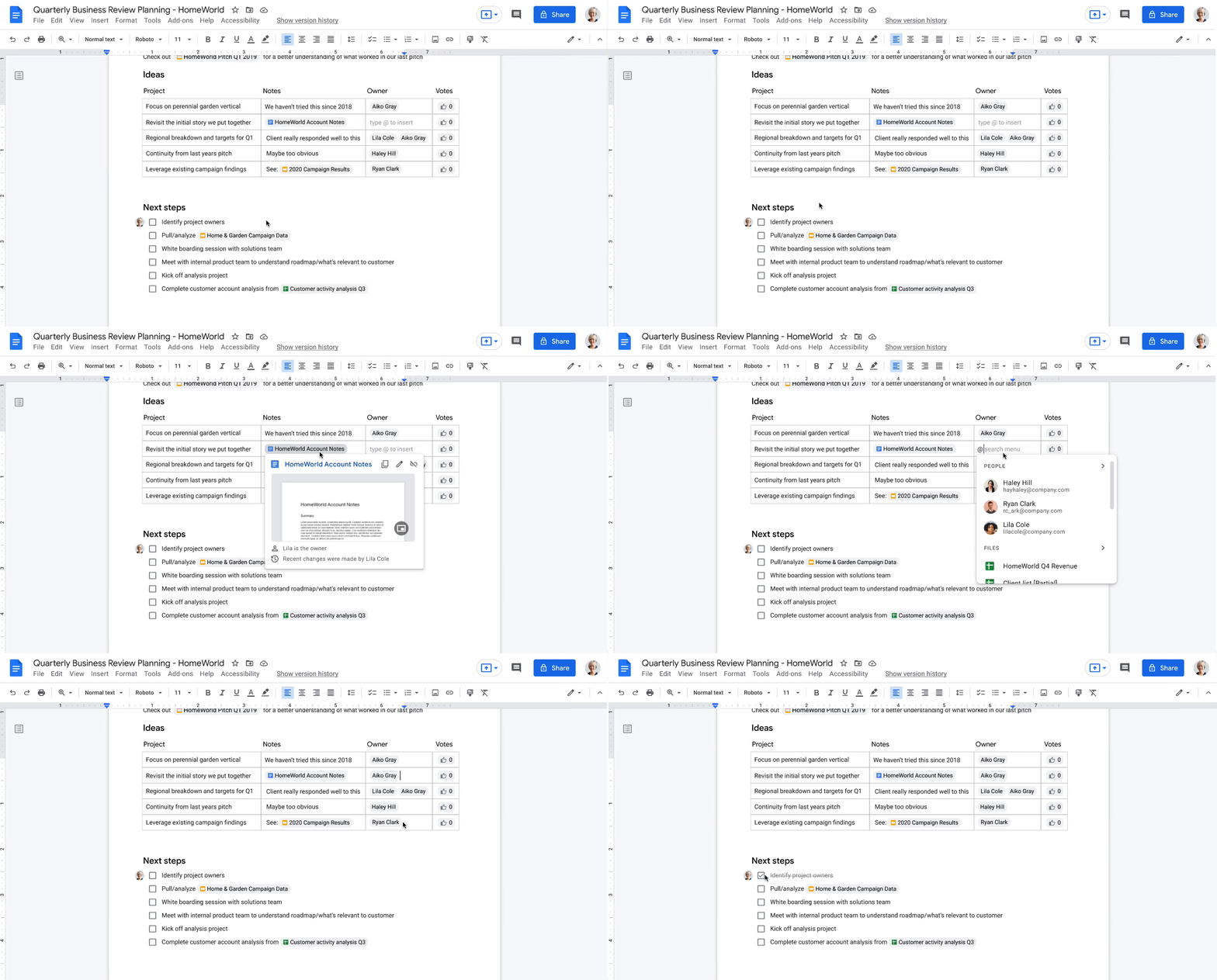
You can create a secure collaboration space in Google Chat to keep everyone up-to-date, share ideas, and keep track of all your important info in one place, from videos and pictures of your last trip, to a Google Sheet of your family’s annual budget. Smart suggestions help you bring in recommended files and quickly include the right people with @-mentions, whether you’re drafting a message in Gmail to the whole group or scheduling a meeting invite in a shared Calendar. To keep things moving, you can use smart canvas to generate a checklist in Google Docs and quickly assign roles and next steps. And if your project calls for a spontaneous conversation, you can present the Doc, Sheet or Slide you’re working on together directly into a Google Meet call with just one click.
What’s more, you’ll have peace of mind as you work with others knowing that we designed Google Workspace to operate on a secure foundation, with the protections needed to keep you safe, your data secure, and your information private.
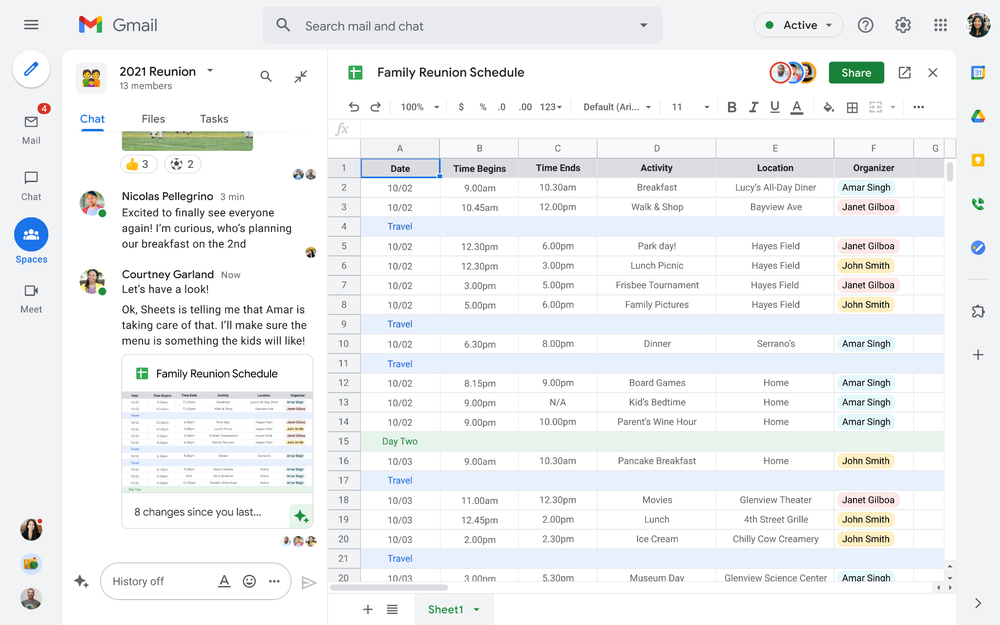
Starting today, you can enable the integrated experience in Google Workspace by turning on Google Chat. Use Rooms in Google Chat as a central place to connect, create and collaborate with others. Over the summer, we’ll evolve Rooms to become Spaces and introduce a streamlined and flexible user interface that helps you stay on top of everything that’s important. Powered by new features like in-line topic threading, presence indicators, custom statuses, expressive reactions, and a collapsible view, Spaces will seamlessly integrate with your files and tasks, becoming your new home in Google Workspace for getting more done — together. Learn more about our vision for collaborating in Spaces.
Introducing Google Workspace Individual
For some people, pursuing their passion and getting involved in the community leads to great business ideas. For other entrepreneurs, a single Google account is the basis for managing their long-established businesses or getting the word out about their next big endeavor. With Google Workspace Individual, we’re delivering a powerful, easy-to-use solution that was built to help people grow, run and protect their business.
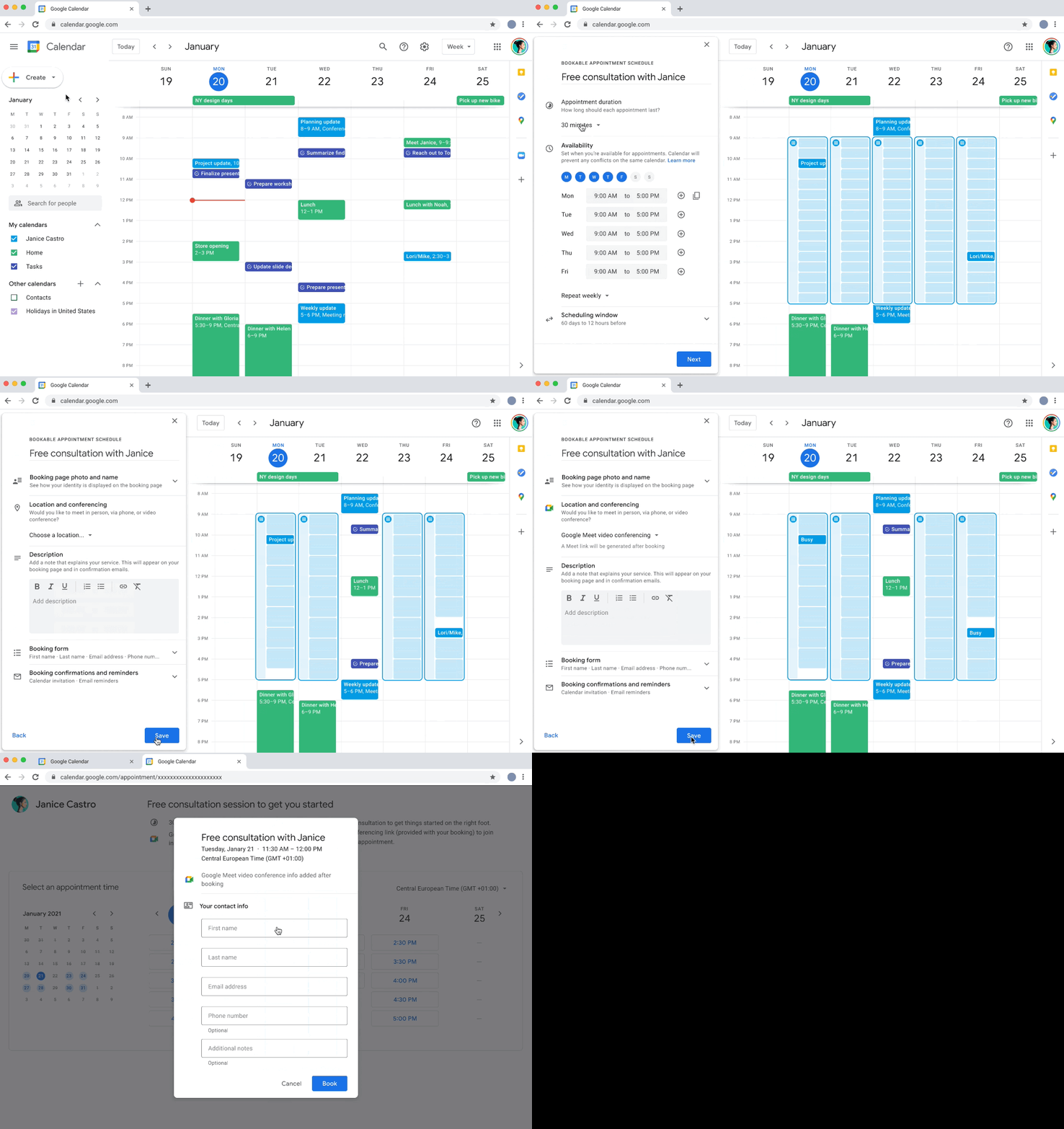
With this new Google Workspace subscription offering, individual small business owners can get more done, show up more professionally and better serve their customers. Building on the integrated Google Workspace experience now available to everyone, the solution provides premium capabilities, including smart booking services, professional video meetings, personalized email marketing and much more on the way. Within their existing Google account, subscribers can easily manage all their personal and professional commitments from one place with access to Google support to get the most out of their solution.
Workspace Individual was created to help people focus their time on doing what they love — like meeting with customers and designing personalized services — and less time on everyday tasks like scheduling appointments and emailing customers. Workspace Individual is rolling out soon to six markets, including the United States, Canada, Mexico, Brazil, Australia and Japan. Sign up to receive updates on Google Workspace Individual.
Google Workspace: How it’s done
Every day, the world’s most innovative companies, schools, nonprofits and governments use Google Workspace to transform how people work and achieve more together. It’s a daily part of how leading healthcare providers revolutionize patient care, schools turn remote learning into an immersive, personalized experience, and aerospace companies rethink flight. Now, with Google Workspace for everyone, you can organize your junior sports league with ease, take that fundraiser to the next level, or even turn your hobby into a business. Whatever it is, Google Workspace helps people (teams, families, friends, volunteers, neighbors…) connect, create and collaborate. Google Workspace is how it’s done.
The New Google Workspace Essentials: Bring Modern Collaboration to Work!

3732
Of your peers have already read this article.
1:30 Minutes
The most insightful time you'll spend today!
More than 3 billion users stay in touch, share ideas, and get more done together in Google Workspace, across apps like Meet, Chat, Drive, Docs, Sheets, Slides, and more. And starting today, we’re rolling out a new version designed to help people bring the apps they know and love to use in their personal lives to their work life. The new Google Workspace Essentials Starter Edition is a no-cost solution for business users looking to enhance teamwork and unlock innovation with secure-by-design collaboration. With Essentials Starter, we’re making it easy for employees to choose their own productivity tools and bring modern collaboration to work.
Work easily and securely within your current environment
As the world of work continues to evolve in unprecedented ways, secure collaboration—at speed, at scale, across platforms, on multiple devices—has never been more important. Essentials Starter helps employees and their teams break down silos and work together in new ways, even if their organization still relies on legacy productivity tools that weren’t built for the hybrid era of work. There’s no need for a new email address, file conversions, new plug-ins, or desktop software. All of the tools in Essentials Starter will work quickly and easily within your existing environment. And because we designed Google Workspace to operate on our industry-leading cloud foundation, Essentials Starter provides encrypted and secure access to files, helping keep users safe and their information private.
How Essentials Starter works
- Sign up with your work email for a no-cost Essentials Starter account. No credit card required and there’s no limited trial period.
- Invite teammates to collaborate using Google Docs, Slides, Sheets, Chat, Drive, and Meet.
- Unlock innovation with new ways of working with immersive, virtual meetings, and by storing, sharing, and collaborating on 100+ file types, including Microsoft Office, without the need for file conversions.
Collapse the boundaries between people, places, and timezones
In our recently commissioned hybrid work global survey with Economist Impact, when workers were asked what was most important to realize the benefits of hybrid work, their number one choice was “new technologies that allow for time and location flexibility.”*
Google Workspace was born in the cloud and designed for maximum flexibility; to be used from the location and device of your choice. Google Workspace brings chat, files, meetings, and your favorite apps into an intelligent hub so you—and your team—can connect, create, and collaborate from your PCs, tablets, and smartphones, across locations and time zones.

Modern collaboration capabilities
Using the cloud-first approach of Google Workspace, teams can:
- Experience modern collaboration without the burden of version control or email attachments. Brainstorm, build presentations, and glean insights from data using Google Sheets, Slides, and Docs.
- Host secure video meetings to bring everyone together in one place. Conduct one-to-one video meetings (unlimited) and immersive team meetings (3-100 people; up to 60 minutes in duration each).
- Real-time messaging with Google Chat. Share quick updates, files, and high-fives across the team with Google Chat, from one-to-one messages to larger group conversations.
- A dedicated place for team collaboration in Spaces. Spaces are tightly integrated with Google Workspace tools like Chat, Drive, Docs, Sheets, Slides, and Meet, providing a better way for people to engage in topic-based discussions, share knowledge and ideas, move projects forward, and build communities and team culture.
- Access work content securely from your devices. With 15 GB of storage in Google Drive, you can store, share, and access work content from your mobile device, tablet, or computer, and Drive for desktop can enable you to sync files and folders to your PC or Mac. Your Drive storage limits remain separate across your personal and Google Workspace Essentials Starter user accounts.
- Work with existing tools without file conversions. Store, share, or co-edit 100+ file types, including Microsoft Office documents and PDFs without the need for file conversions.
- Easily manage your team of collaborators. Add and remove team members effortlessly using a simple dashboard.

Over the past two years, organizations around the world have relied on Google Workspace to reimagine how work happens and enable modern collaboration across their teams to unlock innovation. During a time of enormous uncertainty, our customers have launched game-changing products, reached new audiences, accelerated lifesaving research, and digitally transformed their own customer experiences. Along the way, they’ve used Google Workspace to empower their employees—across homes, offices, and on the frontlines—to connect, create, and collaborate in powerful new ways. And starting today, with Essentials Starter, employees can make the switch from legacy productivity tools and experience the difference with Google Workspace.
* Economist Impact survey commissioned by Google in October 2021. The most popular answer when workers were asked about the most important condition needed to achieve the long-term success of hybrid work models was based on 42% of 1,244 respondents.
More Relevant Stories for Your Company

YoungCapital Scales Up with Ease With Chrome Enterprise and G Suite
When your business is rapidly adding new employees, expanding to new countries, and always focused on staying ahead of the competition, you have to take a hard look at the tools that are slowing you down—and swap them out for better ones that can keep pace with the company. We’re

BHI: Embracing Google Workspace and AppSheet to transform the workplace
In the last two decades, BHI, once a small construction company in Vernal, Utah, has expanded its operations to dozens of industries in over 25 states. But while the company grew, its technology trailed behind. File sharing and emails both ran off a single server. Editing a document was a grueling

Nubian Skin Beats Spikes in Customer Interest with G Suite
“Nude” comes in all shapes, sizes and colors. But for Ade Hassan, finding undergarments to match her skin tone took more effort than necessary. Born in the U.K. to Nigerian parents, Hassan searched unsuccessfully for underwear and swimwear that matched her skin—a problem that continued to frustrate her through college

How One of the World’s Largest Insurers Improved Sales Performance with Better Collaboration
When Generali Hungary, one of Hungary’s leading insurance agencies and one of the world’s largest insurance companies, was looking for a way to provide the company’s more than 1,800 employees and 2,200 self-employed agents with a tool to communicate efficiently, it turned to Google. For insurance companies whose agents are
