





5075
Of your peers have already watched this video.
27:00 Minutes
The most insightful time you'll spend today!
On-Demand Webinar: How to Create Compelling Pitch Presentations That Win New Business
Innovation is a word that’s thrown around too often without much thought behind it, isn’t it?
So much so that it has become a vague measurement of a team’s success—when you can’t really label success under a more specific or appropriate title. We can see you nodding in agreement.
But your innovation or your next big idea could actually go places if you know how to present it. Yes, all of it boils down to your presentation because, at the end of the day, that’s what your customers, your boss, and your employees are going to remember: What did that slide say?
Of course, you know how to create an arresting presentation but making it effective, changing on-the-fly, and fast—all at once—is quite something else. Google Cloud is making it easy for you. Slides from G Suite is a quick and easy way to leverage presentation templates, collaborate with team members in real-time—where all of you can work on the same presentation at the same time—and create impactful presentations in no time.
In this on-demand webinar, Adam Tishok, Product Manager, Google Cloud, talks about how enterprises can use Slides to create compelling pitch presentations that win new business.
ShareChat Builds its Diverse, Hyperlocal Social Network. Thanks to Google Cloud

9246
Of your peers have already read this article.
3:00 Minutes
The most insightful time you'll spend today!
Editor’s note: Today’s guest post comes from Indian social media platform ShareChat. Here’s the story of how they improved performance, app development, and analytics for serving regional content to millions of users using Google Cloud.
How do you create a social network when your country has 22 major official languages and countless active regional dialects? At ShareChat, we serve more than 160 million monthly active users who share and view videos, images, GIFs, songs, and more in 15 different Indian languages. We also launched a short video platform in 2020, Moj, which already supports over 80 million monthly active users.
Connecting with people in the language they understand
As mobile data and smartphones have become more affordable in India, we noticed a large new segment of people, many in rural areas, being welcomed onto the internet. However, many of them didn’t speak English, and when it comes to accessing content and information—language plays a significant role. Instead of joining other social media sites where English reigned supreme, new internet users chose to join language or dialect-specific Whatsapp groups where they felt more comfortable instead.
So, we set out to build a platform where people can share their opinions, document their lives, and make new friends, all in their native language. ShareChat simplifies content and people discovery by using a personalized content newsfeed to deliver language-specific content to the right audience.
Given the high-intensity data and high volume of content and traffic, we rely heavily on IT infrastructure. On top of that, a large number of our users rely on 2G networks to post, like, view, or follow each other. Our platform needs to deliver great experiences to people who are spread out across the country and different networks without any reduction in performance.
The right cloud partner to support future growth
ShareChat was born in the cloud—we already knew how to scale systems to serve a large customer base with our existing cloud provider. But like many companies, we struggled with over-provisioning compute and storage to accommodate unpredictable traffic and avoid running out of storage. With demand rising for local language content and an increase in online interactions in response to the COVID-19 crisis, we realized that we would need a more efficient way to scale dynamically and allocate resources as needed.
Google Cloud was a natural choice for us. We wanted to partner with a technology-first company that would make it easy (and cost-effective) to manage a strong technology portfolio that would allow us to build whatever we wanted. Google is at the forefront of technology innovation and provided everything we needed to build, run, and manage our applications (including creating an efficient DevOps pipeline to fix and release new features quickly).
We had a few issues in mind at the start of discussions with the Google Cloud team, but over time, as we got information and support from them, we realized that these were the partners we wanted in our corner when it came time to tackle our most challenging problems. In the end, we decided to take our entire infrastructure to Google Cloud.
To support millions of users, we deploy and scale using Google Kubernetes Engine. While we analyze our data using a combination of managed data cloud services, such as Pub/Sub for data pipelines, BigQuery for analytics, Cloud Spanner for real-time app serving workloads, and Cloud Bigtable for less-indexed databases. We also rely on Cloud CDN to help us distribute high-quality and reliable content delivery at low latency to our users.
We now use just half the total core consumption of our legacy environment to run ShareChat’s existing workloads.
Google Cloud delivers better outcomes at every level
By moving to Google Cloud, we saw major benefits in several key areas:
Zero-downtime migration for users
At the time of migration, we had over 70 terabytes of data, consisting of 220 tables—some of which were up to 14 terabytes with nearly 50 billion rows. Due to our data’s interdependencies, moving services over one at a time wasn’t an option for us.
Even though we were migrating such large volumes of data, we didn’t want to impact any of our customers. Latency spikes for out-of-sync data might affect message delivery. For instance, if a message or notification was delayed, we didn’t want to risk a bad user experience causing someone to abandon ShareChat.
To prepare for the move, we ran a proof-of-concept cluster for over four months to test database performance in a real-world scenario for handling more than a million queries per second. Using an open-source API gateway, we replicated our legacy data environment into Google Cloud for performance testing and capacity analysis. As soon as we were confident Google Cloud could handle the same traffic as our previous cloud environment, we were ready to execute.
Using wrappers, we were able to migrate without having to change anything in our existing application code. The entire migration of 60 million users to Google Cloud took five hours—without any data loss or downtime. Today, ShareChat has grown to 160 million users, and Google Cloud continues to give us the support we need.
Scaling globally to meet unexpected demand
We rely on real-time data to drive everything on ShareChat by tracking everything that goes on in our app—from messages and new groups to content people like or who they follow. Our users create more than a million posts per day, so it’s critical that our systems can process massive amounts of data efficiently.
We chose to migrate to Spanner for its global consistency and secondary index. Unlike our legacy NoSQL database, we could scale without having to rethink existing tables or schema definitions and keep our data systems in sync across multiple locations. It’s also cost-effective for us—moving over 120 tables with 17 indexes into Cloud Spanner reduced our costs by 30%.
Spanner also replicates data seamlessly in multiple locations in real time, enabling us to retrieve documents if one region fails. For instance, when our traffic unexpectedly grew by 500% over just a few days, we were able to scale horizontally with zero lines of code change. We were also launching our Moj video app simultaneously, and we were able to move it to another region without a single issue.
Simplifying development and deployment
On average, we experience about 80,000 requests per second (RPS) –nearly 7 billion RPS per day. That means daily push notifications sent out to the entire user base about daily trending topics can often result in a spike of 130,000 RPS in just a few seconds.
Instead of over-provisioning, Google Kubernetes Engine (GKE) enables us to pre-scale for traffic spikes around scheduled events, such as holidays like Diwali, when millions of Indians send each other greetings.
Migrating to GKE has also enabled us to adopt more agile ways of work, such as automating deployment and saving time with writing scripts. Even though we were already using container-based solutions, they lacked transparency and coverage across the entire deployment funnel.
Kubernetes features, such as sidecar proxy, allows us to attach peripheral tasks like logging into the application without requiring us to make code changes. Kubernetes upgrades are managed by default, so we don’t have to worry about maintenance and stay focused on more valuable work. Clusters and nodes automatically upgrade to run the latest version, minimizing security risks and ensuring we always have access to the latest features.
Low latency and real-time ML predictions
Even though many of our users may be accessing ShareChat outside of metropolitan areas, it doesn’t mean they’re more patient if the app loads slowly or their messages are delayed. We strive to deliver a high-performance experience, regardless of where our users are.
We use Cloud CDN to cache data in five Google Cloud Point of Presence (PoP) locations at the edge in India, allowing us to bring content as close as possible to people and speeding up load time. Since moving to Cloud CDN, our cache hit ratio has improved from 90% to 98.5%—meaning our cache can handle 98.5% of content requests.
As we expand globally, we’d like to use machine learning to reach new people with content in different languages. We want to build new algorithms to process real-time datasets in regional languages and accurately predict what people want to see. Google Cloud gives us an infrastructure optimized to handle compute-intensive workloads that will be useful to us both now—and in the future.
The confidence to build the best platform
Our current system now performs better than before we migrated, but we are continuously building new features on top of it. Google’s data cloud has provided us with an elegant ecosystem of services that allows us to build whatever we want, more easily and faster than ever before.
Perhaps the biggest advantage of partnering with Google Cloud has been the connection we have with the engineers at Google. If we’re working to solve a specific problem statement and find a specific solution in a library or a piece of code, we have the ability to immediately connect with the team responsible for it.
As a result, we have experienced a massive boost in our confidence. We know that we can build a really good system because we not only have a good process in place to solve problems—we have the right support behind us.
Google Workspace Now Available to Over 3 Billion Users!

3800
Of your peers have already read this article.
3:00 Minutes
The most insightful time you'll spend today!
Over the past year, Google Workspace rapidly evolved to meet the needs of users as we collectively grappled with remote and hybrid work. First, we launched Google Workspace to commercial customers, which brought together the powerful individual apps people know and love into a single, integrated solution. Then we made Google Workspace available to nonprofits, governments, and schools. And in June, we brought the power of Google Workspace to everyone, enabling more than 3 billion users to transform the way they connect, create, and collaborate. To extend these experiences further, we’ve seen a stunning 4.8 billion apps installed in Google Workspace to date. We’re excited to see so many users personalize their experience by adding third-party apps or by building their own to create a more powerful engine for productivity and collaboration.
As we celebrate the more than 5,300 public apps in the Google Workspace Marketplace that provide users with the opportunity to extend their experience, we’re increasing our investment in the underlying platform. Developers have been able to build applications that integrate with Gmail, Drive, and Docs for years. And today, we’re announcing significant enhancements to the Google Workspace platform by making it just as easy for developers to build applications and integrate with Google Meet, Chat and Spaces.
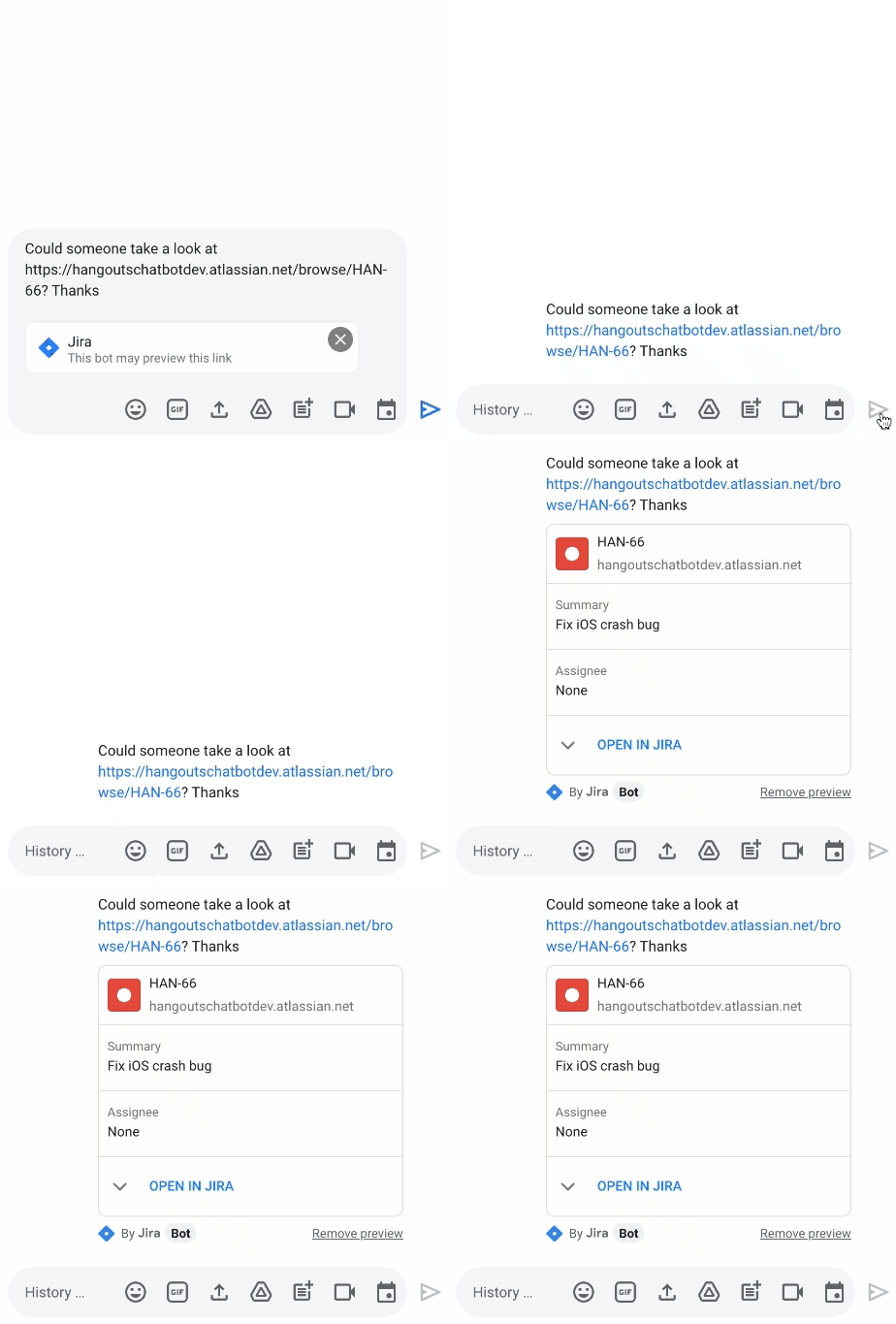
We’re releasing a new Jira integration for Google Chat and Spaces. This integration enables users to create new tickets quickly, see actionable previews, and monitor issues as they come into the space they’re already using for collaboration.
“Modern work requires people to switch contexts and tools faster than ever before. We believe an open ecosystem and tight integrations among the tools that users rely on every day is vital to their success. Since 2017, our Trello integration with Gmail has been installed by more than 7 million people. Today, we are excited to build on the partnership between Atlassian and Google to propel work collaboration further with the integration of Jira with Google Chat and Spaces,” said Joff Redfern, Chief Product Officer, Atlassian.
As work continues to evolve, we’re especially committed to the concept of collaboration equity: the ability for everyone to participate and drive impact no matter their location, technical ability, language preference, or device. Carrefour Property – Carmila is evolving how they innovate by connecting frontline workers to those in the office with our no-code development platform AppSheet. For example, after discovering a problem, onsite managers previously had to send an email, enter data into a spreadsheet, and sometimes attend a meeting to explain the issue. Now, with AppSheet, they can simply input the data on their phone in a single step, and the team back at headquarters can see and act on the issue while also tracking all the other issues being reported from other locations.
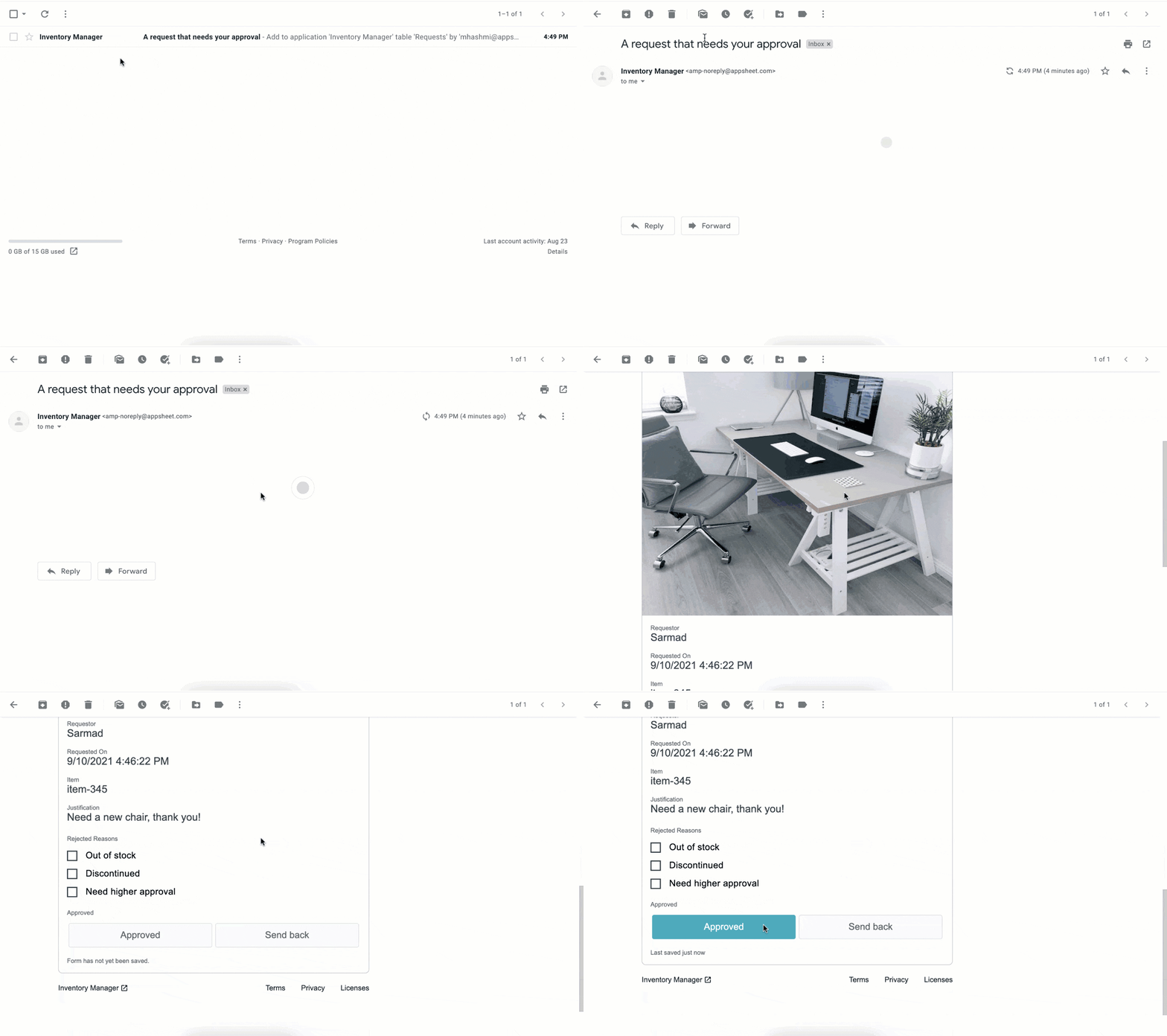
We continue to empower frontline workers and IT teams alike, bringing more flexibility into Google Workspace by integrating AppSheet into Gmail. This new integration allows anyone—regardless of their coding experience—to reclaim time with custom, no-code apps and automations. Budgets and vacation requests can be approved, inventories and asset management systems can be updated, and much more—all with AppSheet and directly from your inbox.
New investments in security
As we continue to deliver delightful new experiences for users, we are keeping security at the forefront; it’s infused in every layer of our product design so that customers have the flexibility and trust needed to operate in a secure environment. To build on this commitment, we’re announcing Google’s new Work Safer offering to help organizations, their employees, and partners collaborate and communicate securely and privately in today’s hybrid work environment. Work Safer will provide companies with access to best-in-class security for email, meetings, and messages, documents, and more. It uniquely brings together the cloud-native, zero-trust solutions of Google Workspace with industry-leading solutions from across Google and its cybersecurity partners, CrowdStrike and Palo Alto Networks.
To further strengthen security and privacy across the Google Workspace platform, we’re also announcing four key new capabilities:
- In June, we announced that Client-side encryption (CSE) was available in beta for Drive, Docs, Sheets, and Slides. Now we’re bringing CSE to Google Meet, giving customers complete control over encryption keys while helping them meet data sovereignty and compliance requirements. We’re also pleased to announce the beta of our Key Access Service Public APIs, which enables customers to directly manage their encryption keys without the need for a third-party partner.
- Data Loss Prevention (DLP) for Chat is now in beta. This is a continuation of our ongoing commitment to help organizations protect their sensitive data and information from getting into the wrong hands, without impacting the end-user experience. With DLP for Chat, you can enable the power of spontaneous conversation between individuals and teams, while preventing sensitive and confidential information from leaving your organization. Interested customers can sign up for the Client-side encryption and DLP for Chat betas today.
- Drive labels are now generally available. Organizations are now able to classify files stored in Drive based on their sensitivity level. Labels integrate with Google Workspace Data Loss Prevention, making it easier to manage external sharing, downloading, and printing of sensitive files.
- We’re rolling out additional protections to safeguard against abusive content and behavior. If a user opens a file that we think is suspicious or dangerous, we’ll display a warning to the user to help protect them and their organization from malware, phishing, and ransomware. This functionality is now available in Google Docs and will be rolling out soon for Google Sheets and Slides.
Fueling the future of work and collaboration
Our mission is to empower everyone with an innovative and seamless experience that gives people—no matter their location or technical ability—the opportunity to drive real impact. At its core, the vision of the Google Workspace platform is to help you build your own innovation momentum, while providing a foundation of security and privacy. I hope you’ll join me at the Google Cloud Next ’21 event where you can learn more about the Google Workspace vision, and even better, see these new experiences in action.
Google Workspace’s Single Connected Experience Makes Workplaces Hybrid-ready

4038
Of your peers have already read this article.
1:30 Minutes
The most insightful time you'll spend today!
Our collective understanding of work—where it takes place and how it gets done—has been transformed over the last year. As companies and organizations across the globe reimagine work, new challenges and opportunities are emerging. How do people working “somewhere else” stay connected and part of the same conversations as those in the office? And if hybrid work is the sum of all the places and ways that work happens, how do employees create a shared experience, better manage their time and attention, and build stronger connections along the way?
For well over a decade, we’ve been building the future of work with products and experiences that transform how teams of all sizes connect, create, and collaborate together—on any device, from any location. Last October, we launched Google Workspace as an integrated solution with a singular promise: everything you need to get anything done, now in one place. In March, we introduced a series of innovations to help people better manage their time and build deeper connections with each other as the future of work continues to evolve. And at Google I/O last month, we took our next big step in transforming collaboration with smart canvas, a new product experience in Google Workspace. And today, we’re delivering additional innovations that address the specific challenges and opportunities of the hybrid work world.
A dedicated space for teamwork and collaboration
Chat and video meetings have been an essential part of work during the last year, serving as a bridge for separated colleagues to collaborate in real time. As we reflect on the lessons of a year where many people were working remotely, we know that distributed teams need a new type of dedicated, shared space. A place in Google Workspace to bring projects to life by connecting the right content, people, and conversations in new and powerful ways.
With the introduction of Spaces, we’re evolving the Rooms experience in Google Chat into a dedicated place for organizing people, topics, and projects in Google Workspace. Over the summer, we’ll evolve Rooms to become Spaces and launch a streamlined and flexible user interface that helps teams and individuals stay on top of everything that’s important. Powered by new features like in-line topic threading, presence indicators, custom statuses, expressive reactions, and a collapsible view, Spaces will seamlessly integrate with files and tasks, becoming a new home in Google Workspace for getting more done—together.

Spaces can provide a place to fuel knowledge sharing and community building for teams of all sizes, where all the relevant information, conversations, and files for a project can be organized, and where topics—even at the organization level—can be intelligently moderated. With the ability to pin messages where everyone can see them, Spaces will play a crucial role in helping people stay connected and informed as hybrid work evolves.
As we transition from Rooms to Spaces in Google Chat this summer we’ll be delivering new features on a rolling basis. Customers can have their admins turn on Google Chat in Gmail so their organizations can start using Rooms today, ensuring a seamless path to Spaces when it becomes available.
Keeping everyone in the conversation during hybrid meetings
Collaboration equity—the ability to contribute equally, regardless of location, role, experience level, language, and device preference—is a cornerstone of Google Workspace. When teammates were fully remote during the last year, everyone experienced meetings in much the same way and had access to the same communication features. But what happens when some colleagues are in a conference room together while others are joining from living rooms, home offices, or a remote co-working space? How do they all participate equally in the same conversation?
At Google I/O, we previewed Companion Mode in Google Meet as a way of fostering collaboration equity in a hybrid work world. Companion Mode is designed to seamlessly connect those in the room with their remote teammates, giving everyone advanced features to participate, while leveraging the best of in-room audio and video conferencing capabilities.

Companion Mode gives every meeting participant, no matter where they are, access to interactive features and controls like screen sharing, polls, in-meeting chat, hand raise, Q&A, live captions, and more. Colleagues who are in the same meeting room together will enable Companion Mode on their personal devices, giving them their own video tile in Meet and helping them to stay connected with their remote teammates. Companion Mode will be available on the web and our upcoming progressive web app in September, and it will be coming soon to mobile.
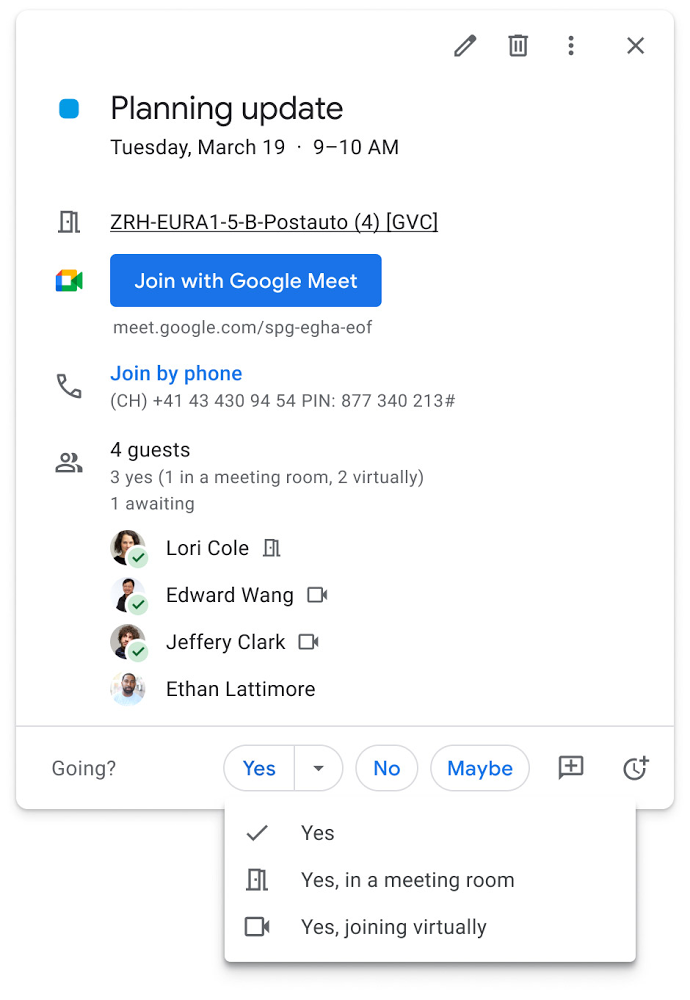
To allow meeting organizers to better plan for hybrid meetings, invitees will soon be able to RSVP with their join location, indicating whether they’ll be joining in a meeting room or remotely.
Updates to improve the in-room experience are also coming to Google Meet hardware in September, including the ability to see and use the hand-raise feature and receive notifications from polls and Q&As. The modular design of Meet’s Series One room kits can easily accommodate a variety of space layouts and be paired with an AV cart for optimum flexibility.
We’re also continually launching new controls to make meetings more safe and secure, including the ability for admins to set policies for who can join meetings, and how participants can engage within meetings. To help everyone stay focused in meetings without interruption, in the next few months we’ll introduce moderation controls for hosts, giving them the ability to prevent the use of in-meeting chat and prohibit presenting during meetings, as well as allowing them full control to mute and prevent participants from unmuting.
Together, these changes will make meetings a safer, more connected, and inclusive experience across all hybrid environments. Register today for our free webinar on how Google Workspace is enabling hybrid work and helping foster collaboration equity.
Trusted hybrid collaboration in Google Workspace
Security, data privacy, and trust continue to be the foundation that make anywhere, anytime collaboration possible. As organizations explore new ways for their teams to collaborate securely in a hybrid work world, we’re introducing several ways that we’re strengthening this foundation in Google Workspace.
Today, we’re announcing new security and privacy capabilities to help Google Workspace customers realize the full power of trusted, cloud-native collaboration. Google Workspace Client-side encryption will help customers strengthen the confidentiality of their data while addressing a range of data sovereignty and compliance needs. It will also strengthen meeting security when it comes to Google Meet this fall. Additionally, we’re rolling out a number of security enhancements for Google Drive, including trust rules for Drive that help control how files can be shared within and outside your organization; Drive labels that classify files and apply controls based on their sensitivity levels; and enhanced phishing and malware protections to help safeguard against insider threats and user error. For full details, please visit our security blog post.
A single, connected experience
As businesses move to a hybrid work environment, the importance of creating secure collaboration spaces and fostering human connection has never been more important. Because Google Workspace was designed to fuel anywhere, anytime collaboration, we’re now helping millions of organizations navigate the challenges and opportunities of the newly emerging work model. Our customers are using Google Workspace to rethink virtual meetings, provide people with modern tools to stay connected and manage their time and attention, and double down on security and privacy. In countless ways, Google Workspace was built for this moment.
See how we’re bringing Google Workspace to everyone. With this change, all of our 3 billion existing users across consumer, enterprise, and education now have access to the full Google Workspace experience, including Gmail, Chat, Calendar, Drive, Docs, Sheets, Meet and more.
Google’s Open Subsea Cable ‘Firmina’ to Improve South Americans’ Access to Google Products
3835
Of your peers have already read this article.
1:30 Minutes
The most insightful time you'll spend today!
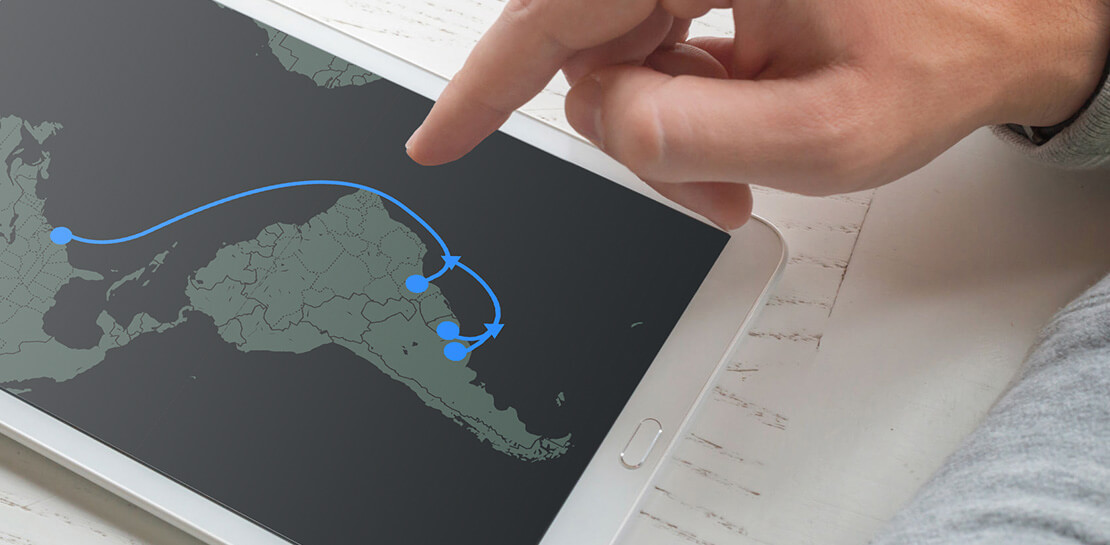
Today, we’re announcing Firmina, an open subsea cable being built by Google that will run from the East Coast of the United States to Las Toninas, Argentina, with additional landings in Praia Grande, Brazil, and Punta del Este, Uruguay. Firmina will be the longest cable in the world capable of running entirely from a single power source at one end of the cable if its other power source(s) become temporarily unavailable—a resilience boost at a time when reliable connectivity is more important than ever.
As people and businesses have come to depend on digital services for many aspects of their lives, Firmina will improve access to Google services for users in South America. With 12 fiber pairs, the cable will carry traffic quickly and securely between North and South America, giving users fast, low-latency access to Google products such as Search, Gmail and YouTube, as well as Google Cloud services.
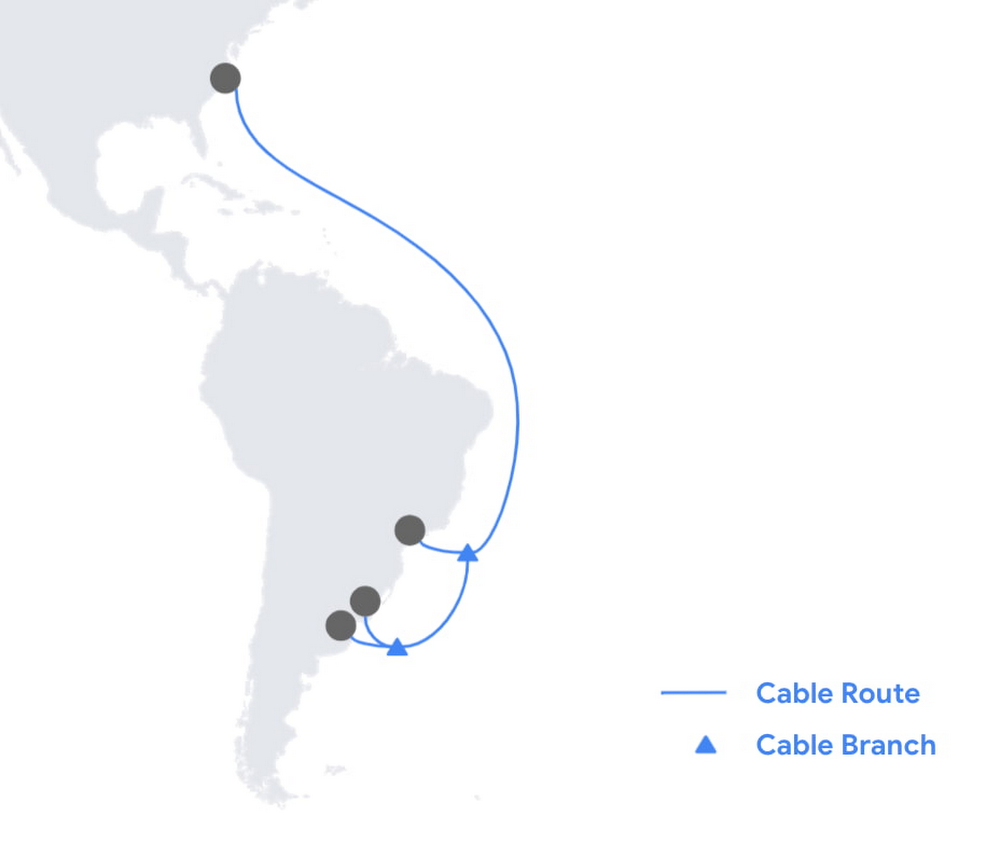
Single-end power source capability is important for reliability, a key priority for Google’s network. With submarine cables, data travels as pulses of light inside the cable’s optical fibers. That light signal is amplified every 100 km with a high-voltage electrical current supplied at landing stations in each country. While shorter cable systems can enjoy the higher availability of power feeding from a single end, longer cables with large fiber-pair counts make this harder to do. Firmina breaks this barrier—connecting North to South America, the cable will be the longest ever to feature single-end power feeding capability. Achieving this record-breaking, highly-resilient design is accomplished by supplying the cable with a voltage 20% higher than with previous systems.
Celebrating the world’s visionaries
We sought to honor a luminary who worked to advance human understanding and social justice. The cable is named after Maria Firmina dos Reis (1825 – 1917), a Brazilian abolitionist and author whose 1859 novel, Úrsula, depicted life for Afro-Brazilians under slavery. A mixed-race woman and intellectual, Firmina is considered Brazil’s first novelist. With this cable, we’re thrilled to draw attention to her pioneering work and spirit. You can learn more about Firmina in this Google Doodle.
Including Firmina, we now have investments in 16 subsea cables, such as Dunant, Equiano and Grace Hopper, and consortium cables like Echo, JGA, INDIGO, and Havfrue. We’re continuing our work of building out a robust global network and infrastructure, which includes Google data centers and Google Cloud regions around the world.
Learn more about our infrastructure.
4085
Of your peers have already watched this video.
1:00 Minutes
The most insightful time you'll spend today!
Say Hello to Google Workspace
Make way for Google Workspace to connect, create, and collaborate with your team and organization. Watch the video to explore how you can achieve more with Google Workspace and how it can transform the future of workplace!
More Relevant Stories for Your Company

How the Telegraph is Reimagining Media with Google Cloud
Whether they’re reading the newspaper on the way to work, or catching up on the latest headlines on their smartphones, readers expect up-to-the-minute news wherever and whenever makes the most sense for them. As a result, media companies are increasingly looking for ways to improve, expand, and simplify their offerings,
New research reveals who’s targeted by email attacks
Every day, we stop more than 100 million harmful emails from reaching Gmail users. Last year, during the peak of the pandemic crisis we saw 18 million daily malware and phishing emails related to COVID-19. This is in addition to more than 240 million COVID-related daily spam messages. Our ML models evolve to understand

Scaling Your Startup: Strategies for Optimization and Growth
Reboot your Startup with our technical guided series At Google Cloud, we want to provide you with the access to all the tools you need to grow your business. Through the Google Cloud Technical Guides for Startups, leverage industry leading solutions with how-to video guides and resources curated for startups. This multi-series contains 3


On-Demand Webinar: 3 Ways Collaboration Transforms How Your Company Works
A majority of your employees and teams spend 38% of their time unsuccessfully searching and recreating content, according to IDC. They also spend 20% of their time looking for information, according to McKinsey. That’s 58% of time lost in unproductive tasks that could have been spent coming up with the
