





New research reveals who’s targeted by email attacks

4075
Of your peers have already read this article.
03:30 Minutes
The most insightful time you'll spend today!
Every day, we stop more than 100 million harmful emails from reaching Gmail users. Last year, during the peak of the pandemic crisis we saw 18 million daily malware and phishing emails related to COVID-19. This is in addition to more than 240 million COVID-related daily spam messages. Our ML models evolve to understand and filter new threats, and we continue to block more than 99.9% of spam, phishing, and malware from reaching our users.
We wanted to explore what factors influence being targeted by email phishing and malware and whether higher-risk users are adopting the strongest protections we have to offer. To do this, we teamed up with researchers at Stanford University to study over a billion phishing and malware emails and their anonymized targets. We recently presented our study at the Internet Measurement Conference (IMC), and it’s now available here.
We found that multiple factors correlate with higher risk: where you live, what devices you use, and whether your information appeared in previous third-party data breaches.
Phishing and malware evolves faster than you think
We aggregated and analyzed all of the phishing and malware campaigns that Gmail automatically blocked over a five-month period to identify patterns.
- We found that users in the United States were the most popular targets (42% of attacks), followed by the United Kingdom (10% of attacks), and Japan (5% of attacks).
- Most attackers don’t localize their efforts, using the same English email template for users in multiple countries.
- There is, however, some evidence of regional attackers: 78% of the attacks targeting users in Japan occurred in Japanese, while 66% of attacks targeting Brazilian users occurred in Portuguese.
We also noticed some patterns among attackers and botnets that distribute phishing and malware emails:
- They rely on fast-churning campaigns. A similar email based on a template is sent to 100–1,000 targets on average.
- The campaigns are brief and bursty, lasting just one to three days on average.
- In a single week, these small-scale campaigns accounted for over 100 million phishing and malware emails in aggregate, targeting Gmail users around the globe.
While the users that attackers target change from week to week, in aggregate these patterns remain largely stable over time.
Factors that correlate with heightened risk
Beyond how attackers operate phishing and malware campaigns, we also analyzed what factors put a user at higher risk of attack. In order to avoid singling out any individual user or their personal data, we used an anonymization technique called “k-anonymity” to ensure any risk trends that we identified applied to a broad group of similar users. We modeled the likelihood of receiving any phishing or malware emails in a given week as a function of geographic location, demographics, security posture, device access, and prior security incidents (such as having personal data revealed by a third-party data breach).
Here is what our model found:
- Having your email or other personal details exposed in a third-party data breach increased the odds of being targeted by phishing or malware by 5X.
- Where you live also affects risk. In Australia, users faced 2X the odds of attack compared to the United States, despite the United States being the most popular target by volume (not per capita).
- With respect to demographics, the odds of experiencing an attack was 1.64X higher for 55- to 64-year-olds, compared to 18- to 24-year-olds.
- Mobile-only users experienced lower odds of attack: 0.80X compared to multi-device users. This may stem from socioeconomic factors related to device ownership and attackers targeting wealthier groups.
These correlations help us understand that risk is not evenly spread across geographic and demographic boundaries.
How to stay safer
Gmail’s phishing and malware protections are automatically turned on by default. Here’s our top recommendations for what you can do today to stay safer.
For individual users:
- Complete a Security Checkup for personalized and actionable security advice.
- If appropriate, consider enrolling in Google’s Advanced Protection program, which provides Google’s strongest security to users at increased risk of targeted online attacks.
- Enable Enhanced Safe Browsing Protection in Google Chrome to substantially increase your defenses against dangerous websites and downloads on the web.
- Browse these additional tips to manage your online security and choose the right level of protection for yourself.
For Workspace admins:
- New research reveals who’s targeted by email attacks. Take a look at our advanced phishing and malware protection. These are turned on by default across all Google Workspace licenses, and you can further customize them according to the unique needs of your organization.
Latest Features and Updates to Globally Bolster Translation Services

5284
Of your peers have already read this article.
2:00 Minutes
The most insightful time you'll spend today!
Let’s face it: in the globalized world, which is now more than ever a digital demand world, you need to scale and reach your customers right where they’re at. Translation is a critical piece of that, whether you’re translating a website in multiple languages or releasing a document, a piece of software, or training materials.
Manual translation does not scale, which is why machine translation, powered by machine learning (ML), is becoming more important to our customers. Machine translation has historically been challenging because of the sheer volume and breadth of content that can add value when translated into multiple languages. Companies acquire and share content in many languages and formats, and scaling translation to meet needs is a tall order due to multiple document formats, integrations with optical character recognition (OCR), and the need to correct for domain-specific terminology.
Our goal is to simplify translation services, while enabling flexibility and control for our customers’ unique needs across industries. Read on to learn more about recent features and updates.
Formatting matters: Document Translation is now GA
In many cases, the layout of a document dictates how it should be interpreted—e.g., readers navigate text and discern meaning based on formatting, like bold or italicized text, or markups for headers, paragraphs, and columns. Previously, to automate translation of documents, text needed to be separated from these layout attributes, meaning the document’s structure was either lost or needed to be recreated later in the developer pipeline, after the text had been translated. This required translation teams to do a lot of extra work and maintain a lot of additional code. But now, those steps are unnecessary. Formatting can be retained throughout the translation process, handled directly by the Translation API Advanced.
This feature lets customers translate documents in 100+ languages and supports document types such as Docx, PPTx, XLSx, and PDF while preserving document formatting.
And if your needs go beyond Document Translation, we can help you translate audio as well. For real-time streaming translation, check out the Media Translation API, and for offline transcription translation, combine the Translation API with the Video Intelligence API.
Real-Time translation when you need it, Batch when you don’t
One of the biggest differentiators for Translation API Advanced’s document translation capabilities is the ability to do real-time, synchronous processing for a single file.
For example, if you are translating a business document such as HR documentation, online translation provides flexibility for smaller files and provides faster results. You can easily integrate with our APIs via REST or gRPC with mobile or browser applications, with instant access to 100+ language pairs so that content can be understandable in any supported language.
Meanwhile, batch translation allows customers to translate multiple files into multiple languages in a single request. For each request, customers can send up to 100 files with a total content size of up to 1 GB or 100 million Unicode codepoints, whichever limit is hit first.
State of the Art (SOTA) accuracy, with flexibility for customization
In order to achieve the highest level of accuracy for your translation, we now support multiple options:
- Use Google’s SOTA translation models: Each year, Google heavily invests to improve the quality of our translations across Apps, Cloud APIs, and Chrome, as well to enable multilanguage answers in Search. A popular metric for automatic quality evaluation of Machine translation systems is the BLEU score, which is based on the similarity between machine translation and the reference translations that were generated by people. While we push out incremental improvements for individual models on a monthly cadence, there are also times where we make significant leaps. In the releases since 2019, we have improved our average BLEU score by 5pts on average across 100+ languages and 7pts on low resource languages.
- Leverage glossaries for specific terms and phrases: Glossary is our terminology control feature. It allows you to import source content to define preferred translations, such as product names or department names. Then, when calling the glossary in the API request, your preferred translations will be enforced. This will work for words as well as phrase translation.
- Pick a pre-trained model with model selection: If you create custom models for machine translation, we don’t think you should have multiple client libraries and multiple APIs to maintain in order for you to use the best model for your needs. Translation API Advanced now supports Model Selection. Pick your pretrained model or pick your custom ML model built on AutoML for any language pair you’ve created and use the same API and the same client library.
- Build custom translation models with AutoML: AutoML Translation is a suite of ML products that enable you to build high quality models for your own use case or data, with limited-to-no ML expertise or coding required. Bring your past human-validated translations to improve translation specificity for your domain.
Keep localization local with Regional Endpoints
If you are a customer operating in the EU, we recently launched an endpoint specifically for EU regionalization. This is a configurable endpoint for customers to store and perform machine translation processing of customer data only in the EU multi region. For now, this only supports our pretrained translation models and glossary, but batch translations will be coming soon.
How Eli Lilly uses Cloud Translation to translate content globally
Historically, translations at Eli Lilly have been complicated: numerous translation vendors have been needed for different languages and organizations, all with their own processes and expectations. On top of that, translations have been costly and slow.
To solve this, Eli Lilly took a codified approach to enable users and systems to spend less time and resources to safely generate quality translations.
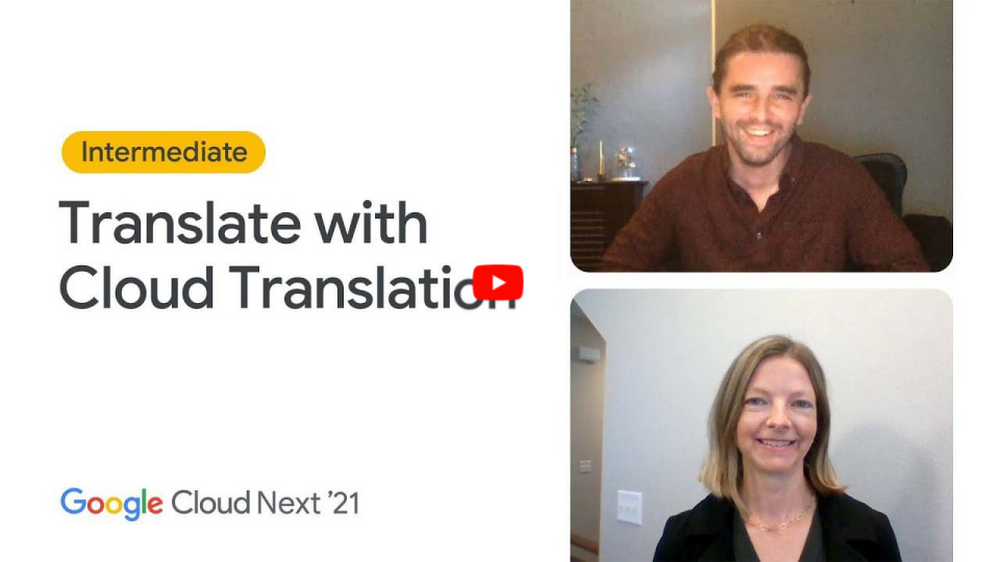
Learn more, and even catch a demo, from Thomas Griffin, Translation Tech Lead & Global Regulatory Architect for Eli Lilly.
Learn more
- To get started using Cloud Translation – Advanced, complete the setup and then try the Translate text (Advanced edition) quickstart.
- Document Translation is priced per page. For more information, see pricing.
2022’s First Cloud CISO Perspectives: Recap of the Megatrends, Releases and News

9333
Of your peers have already read this article.
3:00 Minutes
The most insightful time you'll spend today!
I’m excited to share our first Cloud CISO Perspectives post of 2022. It’s already shaping up to be an eventful year for our industry and we’re only in month one. There’s a lot to recap in this post, including the U.S. government’s recent efforts to address critical security issues, like open source software security and zero trust architectures. We’ve also released new resources from our Google Cybersecurity Action Team like the Cloud Security Megatrends and the Boards of Directors whitepaper on cloud risk governance.
Cloud Security Megatrends
We’re often asked if the cloud is more secure than on-prem (and why) so we shared our answer in a recent blog post. At Google Cloud, security by design is our priority. We’ve long adopted zero-trust principles for our baseline security architectures and built a global network that relies on defense in depth layers to protect against configuration errors and attacks. But security is always evolving and that is why we also take advantage of the following megatrends:
- Economy of scale: Decreasing the marginal cost of security raises the baseline level of security.
- Shared fate: A flywheel of increasing trust drives more transition to the cloud, which compels even higher security and even more skin-in-the-game from the cloud provider.
- Healthy competition: The race by deep-pocketed cloud providers to create and implement leading security technologies is the tip of the spear of innovation.
- Cloud as the digital immune system: Every security update the cloud gives the customer is informed by some threat, vulnerability, or new attack technique often identified by someone else’s experience. Enterprise IT leaders use this accelerating feedback loop to get better protection.
- Software-defined infrastructure: Cloud is software defined, so it can be dynamically configured without customers having to manage hardware placement or cope with administrative toil. From a security standpoint, that means specifying security policies as code, and continuously monitoring their effectiveness.
- Increasing deployment velocity: Because of cloud’s vast scale, providers have had to automate software deployments and updates, usually with automated continuous integration/continuous deployment (CI/CD) systems. That same automation delivers security enhancements, resulting in more frequent security updates.
- Simplicity: Cloud becomes an abstraction-generating machine for identifying, creating and deploying simpler default modes of operating securely and autonomically.
- Sovereignty meets sustainability: The cloud’s global scale and ability to operate in localized and distributed ways creates three pillars of sovereignty. This global scale can also be leveraged to improve energy efficiency.
If you’re an IT decision maker, pay attention to these megatrends that will continue to drive and reinforce cloud security and will outpace the security of on-prem infrastructure well into the future.
U.S. Federal government cybersecurity momentum
- Open source software security: Earlier this month, Google participated in the White House Summit on open source software security. The meeting came at a critical time for the industry following December’s Log4j vulnerabilities and was both a recognition of the challenge and an important first step towards addressing it. The open source software ecosystem is not homogenous, despite the fact that the industry often thinks of or treats it this way. Some of it, like Linux, is highly curated, while other critical software is supported through diffuse communities including technology companies and other stakeholders. There is also a long tail of many other critical projects driven by a dedicated community of maintainers around the world, including Googlers. In light of this reality, we welcomed the chance to share our recommendations to advance the future of open source software security. Some work we’ve done includes founding the Open Source Security Foundation, which has been instrumental already in making security improvements. We’ve also helped drive a number of key security initiatives within the open source community including security scorecards, the SLSA framework to improve the security and integrity of open source packages, and Secure Open Source Rewards to financially incentivize improvements to critical open source security projects.
- OMB’s Federal zero trust strategy: The publication of the Office of Management and Budget’s zero trust architecture strategy marks an important step for the U.S. federal government’s efforts to modernize under Executive Order 14028. Google Cloud supports this approach, which recognizes the immense security benefits offered by modern computing architectures. For the past decade, Google has successfully applied zero trust principles through our BeyondCorp and BeyondProd frameworks for providing end-user access and securing our cloud workloads. And we’ve brought these best practices from our own journey to global governments and businesses of any size through solutions like BeyondCorp Enterprise and capabilities like Binary Authorization and Anthos Service Mesh, which are embedded in Anthos, our managed application platform. For Federal agencies embarking on this zero trust journey, the Google Cybersecurity Action Team will offer our expertise by conducting Zero Trust Foundations strategy workshops, which can help organizations in the public and private sectors develop actionable and achievable strategies and plans for zero trust implementation.
Google Cybersecurity Action Team Highlights
Here are the latest updates, products, services and resources across our security teams this month:
Security
- Democratizing security operations: We recently announced that Siemplify, a leading security orchestration, automation and response (SOAR) provider, is joining Google Cloud to help companies better manage their threat response. Providing a proven SOAR capability with Chronicle’s approach to security analytics is an important step forward in our vision to advance invisible security and democratize security operations for every organization.
- Security by design: The Highmark Health security team is using “secure-by-design” techniques to address the security, privacy, and compliance aspects of its Living Health solution with Google Cloud’s Professional Services Organization (PSO). Google has long advocated for and followed security by design principles, which is why we’re continuously building enhanced security, controls, resiliency and more into our cloud products and services.
- Secure collaboration for hybrid work environments: The Google Workspace team shared its recommendations for businesses as they prepare for the future of work, where the hybrid/flexible work model is becoming standard practice and a new approach to security is essential.
- Anthos Policy Controller CIS Benchmark enforcement: A big part of our shared fate philosophy is to build secure products and not just security products. A recent example of this in action is embedding CIS benchmark policy conformance in the Anthos Policy Controller. We believe the more we embed approaches like this into our products, the more application and infrastructure teams can intrinsically embed security at the start and reduce toil for the security team.
- DevOps for technology-driven organizations and startups: A key success factor for many security programs is the partnership and integration with development teams, and there are some great resources and lessons in our DORA research.
- Security by design with Chrome OS: ABN AMRO’s Asia-Pacific region team recently shared how they are using Chrome OS and CloudReady to work securely in the cloud, reduce total cost of ownership, and add flexibility for employees. This is a great example of secure by design principles in the use of Chromium.
Risk & Compliance
- Boards of Directors summary guide to cloud risk governance: The latest whitepaper from the Google Cybersecurity Action Team outlines how boards of directors can prioritize safe, secure, and compliant adoption processes for cloud technologies within their organizations.
- TruSight Risk Assessment of Google Cloud: TruSight recently released a comprehensive
risk assessment report on Google Cloud. Our Enterprise Trust team collaborated on this robust assessment of Google Cloud services to validate the design and implementation of controls. TruSight’s risk assessment of our security controls will help customers accelerate and complete their risk management due diligence. - Data governance: Check out this new blog series on data governance where our teams explain the role of data governance, its importance, and the necessary processes to run an effective data governance program. Implementing data governance will help maximize value derived from business data, build user trust, and ensure compliance with required security measures.
Controls and Products
- Encrypting Data Fusion: To help meet the security, privacy and compliance requirements of customers in regulated industries like finance or public sector, we announced the general availability of Customer Managed Encryption Keys (CMEK) integration for Cloud Data Fusion, which enables encryption of both user data and metadata at rest with a key that customers can control through our Cloud Key Management Service (KMS).
Don’t forget to sign-up for our newsletter if you’d like to have our Cloud CISO Perspectives post delivered every month to your inbox. We’ll be back next month with more updates and security-related news.
Active Assist Expands Globally: Unleashing Cloud Optimization Insights Worldwide

1282
Of your peers have already read this article.
3:30 Minutes
The most insightful time you'll spend today!
Active Assist provides insights and recommendations to help Google Cloud customers proactively optimize their cloud environments for cost, security, performance, and sustainability. If you’re like most customers, you’ve likely encountered these insights and recommendations in the console — either in the Recommendations Hub or embedded on a resource page, like IAM or the VM list pages. (Note that for the rest of this post, we’ll use the word “recommendations” to mean “insights and recommendations.”)
We heard from customers who love recommendations that it should be easier to discover and work with these valuable suggestions across an entire organization, so last year we launched the Recommendations BigQuery export feature to Preview. This allows you to automatically export the recommendations to a BigQuery dataset, which you can then investigate with tools like DataStudio or Looker, and integrate with your company’s existing monitoring solutions and workflows.
Many of you have told us how powerful this feature is, so we’ve been working hard on improvements to make it even more useful. We’re happy to announce that BQ Export 1.0 is now in GA, and that BQ Export 2.0 is in Preview, with new support for Billing Account-level recommendations and cost optimization recommendations that include discount information. This post will cover what’s new with Active Assist BQ Export, as well as a couple other new features of Active Assist.
New features to Active Assist BigQuery Export
Before we dive into the details, if you’re new to Recommendations BQ Export check out our handy getting started guide. It covers the permissions you’ll need and how to set up the export, including instructions for using a service account. It also includes some sample queries and instructions for interacting with the data using Google Sheets. You may also want to check out our prior blog post showing how to optimize your cloud spend with BigQuery and Looker.
Now, on to what’s new!
1. Non-project scoped recommendations
You can now see non-project scoped recommendations, such as billing account, organization, and folder-level recommendations in your export to BigQuery. This ensures that in your export, you are able to see the full portfolio of recommendations that are available to you.
2. Custom contract Pricing
If you have any applicable custom contract pricing for your company, your cost-related recommendations now take those into account (based on your historical costs) in the cost saving calculation when you export them to BigQuery. This will ensure that you have the most accurate cost savings data we have for you and your organization to help you make the best judgment and prioritization when choosing to adopt recommendations. However, you must have the correct permissions first in order to see the custom contract pricing. If the user executing the export to BigQuery does not have the correct permissions, you may continue to see list pricing in your estimated savings. Also, note that the console UI and the Recommender API already have this support.
3. Export now available globally
Customers outside of the US can now set up an export of recommendations to a BigQuery dataset.
Improvements to Active Assist discoverability and usability
1. Global Recommender Viewer role: You can now add the global Recommender Viewer role, which gives you view access to all insights and recommendations available to you, simplifying permission management for new recommenders. Newly launched recommendations will also automatically be added as they become generally available.
2. Dismiss recommendations via Recommender API: You can now directly dismiss recommendations via our API, allowing you to focus on the recommendations you care about and work more efficiently.
3. Shareable links: Another feature that quietly launched recently is the availability of shareable URLs that link to recommendation details in the console. You can access these links in the UI from the upper right of the details panel of any recommendation.
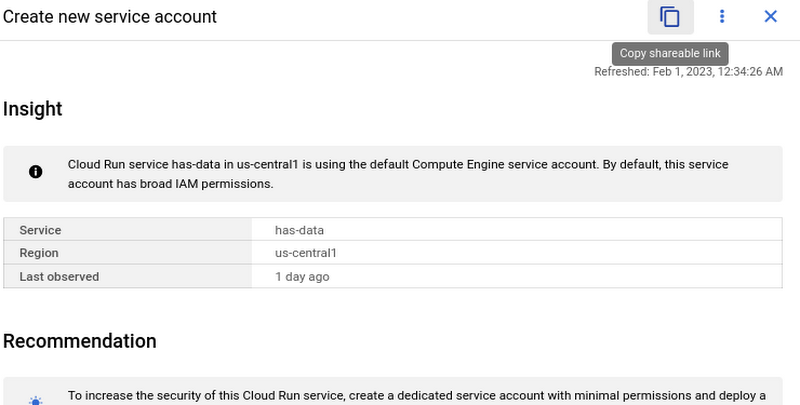
However, these links become even more powerful when combined with Recommendations BigQuery Export. The URLs all have a standard format. This means that within the BigQuery export tables you can easily calculate a new column containing these links using an expression like:
“https://console.cloud.google.com/home/recommendations/view-link/” +
name +
“?project=” +
cloud_entity_id
This example is for project level recommendations (where cloud_entity_type = PROJECT_NUMBER).
For cloud_entity_type = FOLDER, use:
“https://console.cloud.google.com/home/recommendations/view-link/” +
name +
“?folder=” +
cloud_entity_id
For cloud_entity_type = ORGANIZATION, use
“https://console.cloud.google.com/home/recommendations/view-link/” +
name +
“?organizationId=” +
cloud_entity_id
These links can then be embedded in your reports and dashboards, or used by other BigQuery clients.
As a reminder, if you’re interested in setting up reports or dashboards using Recommendations BigQuery Export, take a look at this previous blog post for some great ideas, or you can reference our getting started guide. If you have any feedback, please feel free to reach out to active-assist-feedback@google.com.
You Won’t Believe the Number of Benefits These 3 Companies Achieved Just By Moving to G Suite

4345
Of your peers have already read this article.
3:15 Minutes
The most insightful time you'll spend today!
Businesses of all sizes use G Suite to breakdown information barriers and increase employee collaboration. It’s been especially helpful for start-ups and for those who run their own businesses, where juggling multiple jobs—from operations to administration to accounting—is second nature.
For many of these businesses, G Suite helps them collaborate securely and free up time so that they can focus on what really matters: their customers. Below are how three businesses use G Suite to both scale and mobilize while keeping their customers top of mind.
MobileOne Keeps its Employees Mobile
Workers spend up to 8 hours per week searching for, or consolidating, information. When you sift through emails to find files or dig through folders to attach documents, that time adds up.
MobileOne experienced this firsthand.
The company, which operates more than 125 T-Mobile premium retail stores in the US, found that its employees were sinking unnecessary time in email going back-and-forth searching for files.
Its previous productivity tools made it difficult to collaborate, especially for remote employees, and tough to share the latest information, like growth and performance metrics, at an accelerated pace. With this in mind, MobileOne moved to G Suite.
Revel Stark, MobileOne’s Director of Recruiting and Marketing, was heading to the beach with his family one Sunday when his colleague sent an urgent request for a document from him. It took just seconds to access the requested document in the Google Drive mobile app and share it, rather than having to search through files on a laptop, or wait until Monday when he was back in the office.
In addition, real-time editing in Docs and Sheets allows MobileOne employees to streamline how they share and edit documents since it eliminates version control. The company now creates central repositories of information in Docs and Sheets, ensuring everyone is working with the most up-to-date information, saved securely in the cloud.
JBGoodwin Realtors Streamlines Business Processes to Create New Home Owners
As a real-estate company with multiple offices in Texas and clients across the country, JBGoodwin Realtors needed a secure productivity solution that powered real-time employee collaboration.
But it also looked to a solution to help reduce costly maintenance, archive information securely in the cloud, and open up opportunities to streamline business processes. The company turned to G Suite to help.
By moving to G Suite, JBGoodwin Realtors adopted a cloud-first strategy that improved its data security by catching phishing attempts before they reached employees, and as a result, helped reduce time spent on platform maintenance by 30 percent.
Because Gmail allows users to easily archive emails in the cloud, the company no longer needs to invest in hard drive space to save messages. Its employees can easily access emails securely on any device both online or offline. Plus, the company can rest assured that their information stays secure with the help of built-in phishing protections.
Finally, via resources in the G Suite Marketplace, JBGoodwin Realtors automated its manual processes by connecting G Suite data with its CRM and marketing tools, so that its realtors can focus on making valuable connections with potential clients instead of inputting data in multiple systems.
TrueCar Drove a Smooth Transition to G Suite
More than 1.5 billion people use Gmail everyday. Since employees are often already comfortable with using Gmail in their personal lives, transitioning to using it at work is a smooth process.
This was crucial for TrueCar, an automotive resale marketplace that connects sellers with potential buyers (and arms them with pricing information). Minimal onboarding support and training was needed when implementing G Suite.
The team took advantage of G Suite’s User Interface customizations, which can be tailored to a user’s preference in Settings. For example, at TrueCar, admins customized their Calendar interface to be a side-by-side calendar view so they could easily see multiple schedules on a single screen.
With G Suite, there are many ways to customize your apps to help you stay productive.
Scaling Your Startup: Strategies for Optimization and Growth

2866
Of your peers have already read this article.
2:30 Minutes
The most insightful time you'll spend today!
Reboot your Startup with our technical guided series
At Google Cloud, we want to provide you with the access to all the tools you need to grow your business. Through the Google Cloud Technical Guides for Startups, leverage industry leading solutions with how-to video guides and resources curated for startups.
This multi-series contains 3 chapters: Start, Build and Grow, which matches your startup’s journey:
- The Start Series: Begin by building, deploying and managing new applications on Google Cloud from start to finish.
- The Build Series: Optimize and scale existing deployments to reach your target audiences.
- The Grow Series: Grow and attain scale with deployments on Google Cloud.
Additionally, at Google we have the Google for Startups Cloud Program, which is designed to help your business get off the ground and enable a sustainable growth plan for the future. The start of the Build Series delineates the benefits of the program, the application process, and more to help your business get started on Google Cloud.
A quick recap of the Build Series
Once you have applied for the Google for Startups Cloud Program, there’s so much to explore and try out on Google Cloud.
Figuring out a rapid but solid application development process can be key to many businesses in reducing time to market. Furthermore, learning what database to use to handle application data can be tricky. Deep dive into our Firestore video which walks through how Firestore can help you unlock application innovation with simplicity and speed.
We then move on to a deep dive into BigQuery and how it can help businesses. BigQuery is designed to support analysis over petabytes of data regardless of whether it’s structured or unstructured. This video is the goto video for getting started on BigQuery!If you are someone looking to run your Spark and Hadoop jobs faster and on the cloud, look to Dataproc. To learn more about Dataproc and how this has helped other customers with their Hadoop clusters, click the video below to learn all things Dataproc related.
Next, we find out what Dataflow can bring to your business; some advantages, sample architectures, demos on the console, and how other customers are using Dataflow.
We also talked about Machine Learning, starting from selecting the right ML solution to Machine Learning APIs on cloud to exploring Vertex AI. Following that we look into API management in Google Cloud and how Apigee helps operate your APIs with enhanced scale, security, and automation.
We ended the series with the last two episodes focusing around security deep-dive and using Cloud Tasks and Cloud Scheduler.
Coming up next – The Grow Series
Dive into the next chapter of this multi-series, with our upcoming Grow Series, where we will be focusing on growing and attaining scale with deployments on Google Cloud.
Check out our website and join us by checking out the video series on the Google Cloud Tech channel, and subscribe to stay up to date.
See you in the cloud!
More Relevant Stories for Your Company

Report on API-led Digital Transformations in 2020 and the Future
In 2020, many businesses across industries turned their focus and investments towards digital strategies. APIs being an integral part of every organization's digital disruption, will grow in relevance throughout 2021. Read the report to gain more insights on driving API-led digital transformations and in-depth analysis of Google Cloud's Apigee API

16 Popular Chrome Insider Posts to Help You Simplify Browser Deployments
We launched the Chrome Insider blog in 2019 to share tips and best practices with IT admins so they could better deploy, manage, and secure Chrome browser. Since then, the series has covered everything from supporting legacy browsers to protecting enterprise credentials to simplifying deployments. To make it even easier

Eight Steps to Align Hybrid Work with Diversity, Equity and Inclusion (DEI) Principles
Many executives across the globe are feeling the effects of a recent pivot to hybrid work models. This massive transition represents a significant departure from existing office culture. As business leaders look to operationalize their flexible work model infrastructure, they’re also evaluating what it takes to attract and retain employees

Google Cloud’s Suite of DevOps Speeds Up ForgeRock’s Development
Editor’s note: Today we hear from ForgeRock, a multinational identity and access management software company with more than 1,100 enterprise customers, including a major public broadcaster. In total, customers use the ForgeRock Identity Platform to authenticate and log in over 45 million users daily, helping them manage identity, governance, and access management across
