





Dual Run: A Proven Solution for Secure Mainframe Modernization

947
Of your peers have already read this article.
4:30 Minutes
The most insightful time you'll spend today!
CIOs are again evaluating their mainframe investments, balancing rising operational costs and difficulty finding talent with the perceived costs and risks of moving critical applications to the cloud. Increased business agility, technical innovation, computing elasticity, customer insights, and a growing talent pool all encourage CIOs to migrate and modernize from “Big Iron” onto public cloud platforms.
Google Cloud recently announced Dual Run, a new mainframe modernization solution, to help customers mitigate the risk involved in mainframe migrations and accelerate their migration to the cloud. Leaders can leverage Dual Run in their quest to ensure their mainframe modernization projects will succeed and pay off so let’s dive a little deeper into what Dual Run is, how it works, and how it can help you.
Mainframe modernization with a proven technology
Since so many businesses still run mainframes, we decided to partner with Banco Santander—one of the largest banks in the world—to bring Dual Run to our enterprise customers, since they had already built a solution. In fact, Dual Run was built on top of Banco Santander’s unique technology which has already demonstrated proven results in the regulated financial services industry. Now that Dual Run is available, Banco Santander has been using it to bring their data and workloads onto Google Cloud’s trusted infrastructure.
The concept is not new, but the solution is unique
Dual Run enables you to run a parallel production system, allowing you to simultaneously run workloads on your mainframes and on Google Cloud. While many enterprises running mainframes have thought about parallel production concept and a few even tried before, Google Cloud is unique among the hyperscalers to provide such a solution as an offering to its customers.
With a parallel production run, you can perform real-time testing of your applications on Google Cloud and quickly gather data on performance and stability with no disruption to your business. Once you’re satisfied with the functional and performance equivalence of the two systems, you can make the new Google Cloud environment your system of record, while existing mainframe systems can be used as a backup or decommissioned.
In addition to the transformative benefits you get from moving to Google Cloud–such as AI-based scalability, speed, and security–migrating mainframes with Dual Run offers you even more benefits:
Mitigate migration risk: Dual Run reduces risk during the migration by running your business critical systems in parallel with powerful reporting to track the difference between your current and target systems. This ensures there is no impact or risk to your existing mainframes while migrating to Google Cloud.
Secure migration investments: Avoid costly migration mistakes by basing your decisions and actions on empirical data acquired from your production system.
Reduce business testing effort: Compare the functional equivalence of outcomes in the current and target system with production data and drastically reduce the testing cycles of your migrated workload.
Accelerate migration: Speed up the entire mainframe migration process with a well-defined framework, automation components, predefined dashboards, and a tested approach. Empirical reporting available in Dual Run also enables customers in regulated industries to more readily respond to regulator reviews and requests for information.
Your migration journey with Dual Run
Dual Run is packaged with several automation components to aid your migration journey, from assessment all the way through to production.
This chart shows how Dual Run plays a key role throughout your mainframe modernization journey:
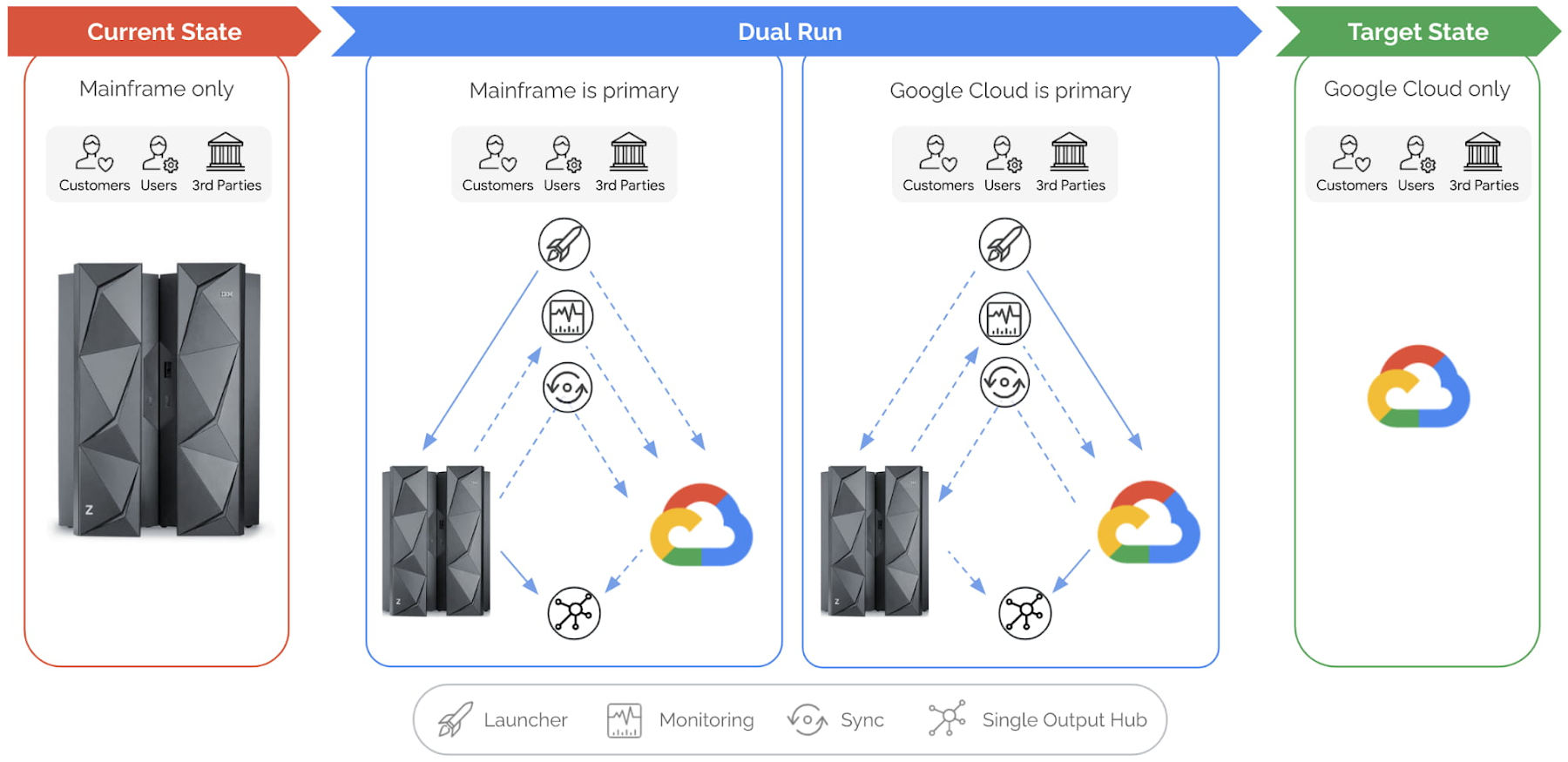
Let’s explore this illustration in a bit more detail, phase by phase:
Current state: This is your starting point, when your production workloads are still running in your mainframe. Dual Run helps you assess your mainframe workload for compatibility on Google Cloud.
After this assessment, Dual Run’s conversion engine helps address the incompatibilities in your current application and then migrates the application and data to Google Cloud. At this stage, you have your current application executing on the mainframe and your migrated application is ready to be executed or tested on Google Cloud.
Dual Run state: In this state, the migrated workload will be executed in two stages.
Dual Run stage 1:
In the first stage of Dual Run, your mainframe will remain as the “primary” system — meaning the response and outputs to other systems are sent from your mainframe — while the migrated workload will be executed in parallel in Google Cloud as “secondary.”
Dual Run performs the following actions as a cyclical process, repeated until you reach your desired migrated application quality is achieved:
- All workloads — batch & transactions — executed in the mainframe are replicated in Google Cloud
- The outcomes from both systems are validated to report any differences, enabling you to take corrective actions in migrated applications
- The functional and performance differences between the two systems will be observed, and the mainframe and Google Cloud data are periodically synchronized to bring both the systems in sync
Typically, most of your migration time will be spent in the first stage of Dual Run until you are satisfied with the results. The key goal for this stage is that your primary, business-critical mainframe workload is not disturbed while your migrated application is tuned to provide the exact same results as your current application.
Dual Run stage 2:
When the Dual Run reporting and results confirm that the migrated application matches your mainframe system, Google Cloud then becomes the “primary” system, while your mainframe will still be executed in parallel as “secondary.” Dual Run will enable you to do a smooth switch between primary and secondary systems through a configuration management system.
Target state: In this final state, the mainframe can be decommissioned while the Dual Run components are removed, enabling an optimal and efficient business execution with Google Cloud.
Summary
For any business or organization that has to migrate or modernize their mainframes, Dual Run offers a unique solution to achieve this with reduced risk and time. In fact, what we’re seeing from our customers is that Dual Run offers the right combination of proven experience, engineering, and strategic partnership that is essential for mainframe migration success. If you would like to learn more, check out our mainframe modernization website.

3351
Of your peers have already downloaded this article
10:00 Minutes
The most insightful time you'll spend today!
Operational resilience continues to be a key focus for financial services firms. Regulators from around the world are refocusing supervisory approaches on operational resilience to support the soundness of financial firms and the stability of the financial ecosystem. Our new white paper discusses the continuing importance of operational resilience to the financial services sector, and the role that a well-executed migration to Google Cloud can play in strengthening it.
6 Tips for Stress-Free Google Cloud Billing

1315
Of your peers have already read this article.
1:30 Minutes
The most insightful time you'll spend today!
If you took one look at the title of this blog and thought, “just show me how, because I already know a million reasons why I’m stressed about billing things” then check out the interactive tutorial right here.
For everyone else, read on, because we’ll walk through some common sense tips, and a few step-by-step tutorials for all things billing related. If you’ve ever wished you could sit down with someone from Google Cloud, and walk through your bill, the console, and your options — you’re in the right place! Consider this Cloud Billing 101 – an intro level course that’ll get you started on the right foot.
6 simple tips to manage your Google Cloud billing accounts:
- Get to know your billing statement and console: Knowledge is power, after all. Take a tour of the billing console so you can better understand your options, along with what’s included in your monthly bill and the different components.
- Set up authorized users, alerts and budgets: Make sure anyone who needs to have access to payment settings is authorized. Allocate budgets for projects, and get notifications when your usage or spending exceeds a certain amount so you can take action as needed.
- Use cost-saving tools: We’ve got a range of tools and services to help you save money, like Committed Use Discounts, and even Recommenders for actionable, AI-powered intelligent recommendations around your cost trends and product usage.
- Optimize your resources: Use the Google Cloud Resource Manager to see how your resources are being used and identify areas for optimization, temporarily suspend, or even shut down unused projects.
- Review your billing history with reporting and data visualization: Regularly check your billing history with reports to help track your spending, identify any trends or patterns, and even anticipate future costs. You can even export your data to BigQuery for detailed analysis, or use a tool like Google Data Studio to visualize your data.
- Use the pricing calculator: Estimate your monthly costs and make informed decisions with the Google Cloud pricing calculator. It can help you get a ballpark figure for your usage, and determine if your use case fits within cost-free parameters.
I hope these common sense pointers and tutorials empower you to effectively manage your Google Cloud billing and stay on top of your spending. Get started right now by managing your billing methods and payment settings in this 5-minute tutorial, and then take a tour of the billing console to get familiar with your setup.
Google Cloud’s Metric Scope Makes Multi-project Monitoring Simple

4744
Of your peers have already read this article.
2:00 Minutes
The most insightful time you'll spend today!
Customers need scale and flexibility from their cloud and this extends into supporting services such as monitoring and logging. Google Cloud’s Monitoring and Logging observability services are built on the same platforms used by all of Google that handle over 16 million metrics queries per second, 2.5 exabytes of logs per month, and over 14 quadrillion metric points on disk, as of 2020. However, you let us know through consistent feedback that the previous construct of Workspaces for Cloud Monitoring was not providing the flexibility needed for your larger scale projects.
Cloud Operation’s New Approach to Multi-Project Monitoring
We’re happy to announce a new model for multi-project monitoring, which replaces the concept of Workspaces. This overhaul is geared toward maximizing the flexibility you have to manage your monitoring environments by introducing Metrics Scopes. Starting today you can associate your Google Cloud projects with multiple Metrics Scopes! Like Workspaces, Metrics Scopes will still be used to store all of the configuration content for dashboards, alerting policies, uptime checks, notification channels, and group definitions. However there is no limit to the number of Metrics Scopes to which you can associate a project. Prior to this change, a project could only be scoped with a single Workspace. Now, there are virtually unlimited possibilities for how you can set up multi-project monitoring. This unlocks a large variety of options, from more granular permissions to mission-focused configurations. At its most simple implementation though: operators/SREs can now create org-wide Metrics Scopes with monitoring configurations focused on infrastructure health. And developers can leverage Metrics Scopes built on a subset of their organization’s projects that allow them to focus on their application’s performance.
How it works
- When you have a collection of projects, Metrics Scopes enable you to view each project’s metrics in isolation as well as in combination with metrics stored by other projects.
- The Metrics Scope is hosted by a scoping project. This scoping project is the Cloud project that is selected in the Cloud Console project picker.
Example
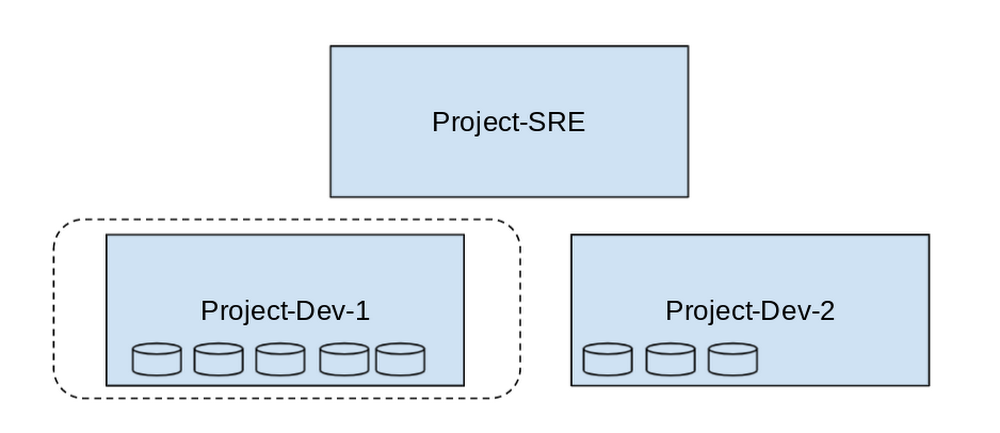
- In this example, Project-SRE is the name of a scoping project to monitor your fleet. You added two developer teams’ projects: Project-Dev-1 and Project-Dev-2, to Project-SRE’s Metrics Scope. If you select Project-SRE with the Cloud Console project picker and then go to the Monitoring page, you view the metrics for all three projects:

- If you select Project-Dev-1 with the Cloud Console project picker and then go to the Monitoring page, you view the Metrics Scope for Project-Dev-1 and you can only see the metrics for that project:
What else is new?
- Metrics Scopes can now monitor up to 375 projects (up from 100).
- New projects automatically start working in Cloud Monitoring without the previous 60-second Workspace creation process.
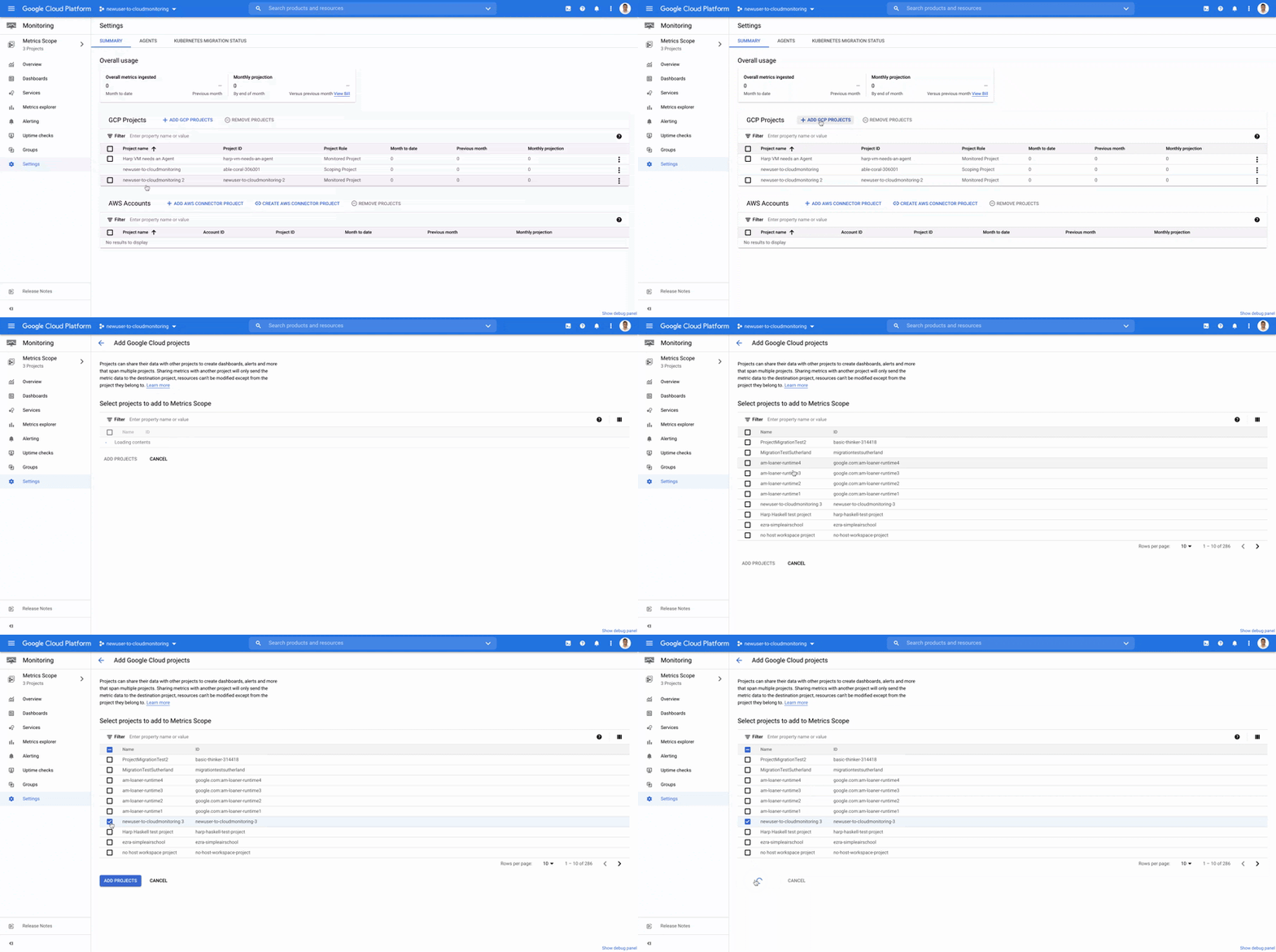
- If you want to monitor more than one project simply add it to your Metrics Scope:
Navigation
- Mentioned earlier, the Project Picker in the Cloud Console can be used to navigate between Metrics Scopes in Cloud Monitoring:
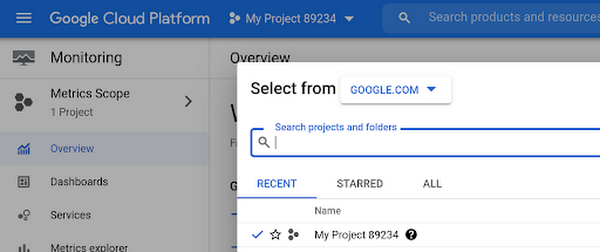
- This is now consistent with many other services across Google Cloud. Specifically, you can see how the project picker stays consistent when navigating from Cloud Monitoring to Cloud Logging:
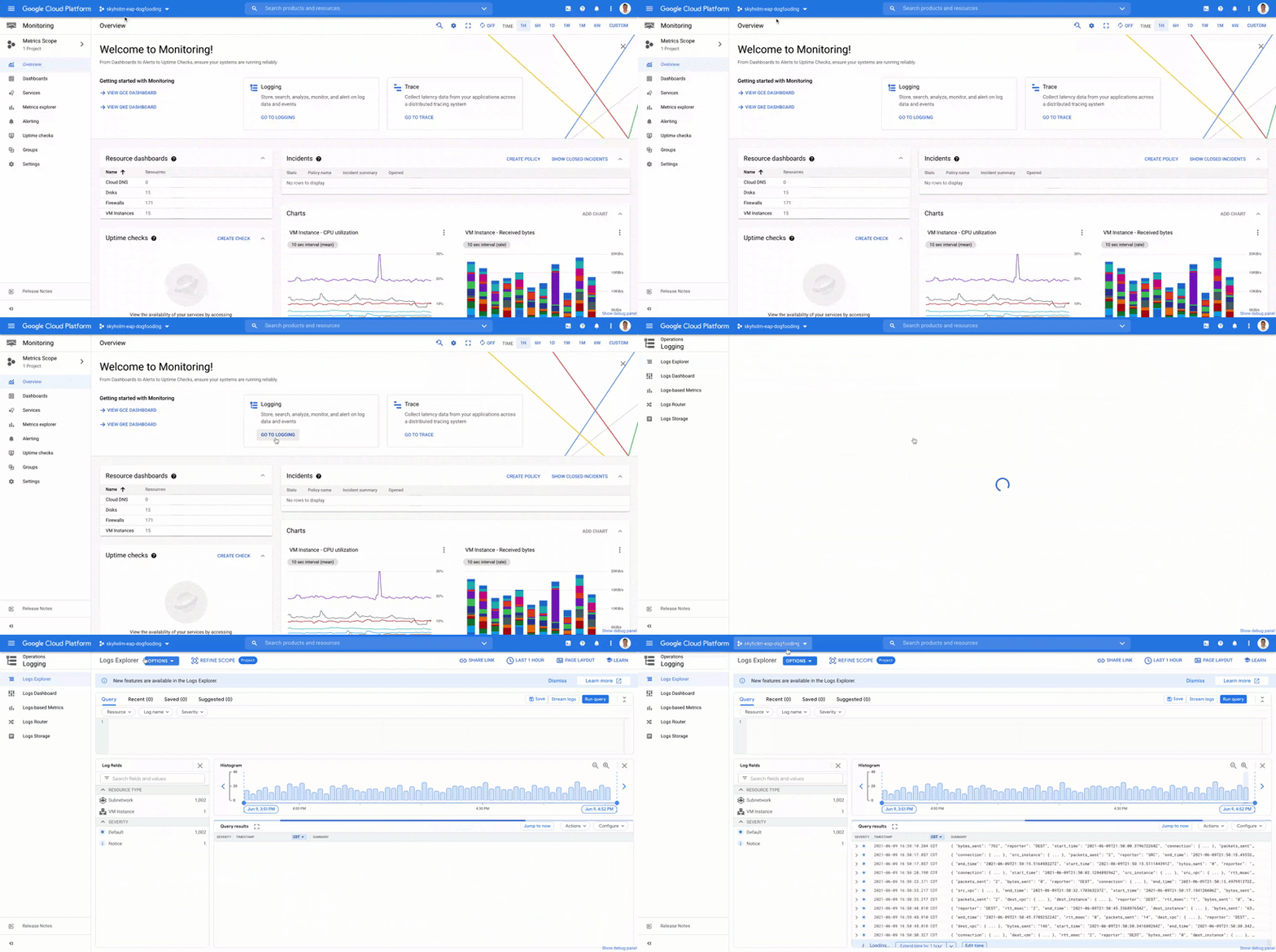
- Additionally, to make your navigation between Metrics Scopes easy we’ve added the new Metrics Scope Tab and Panel in the UI:
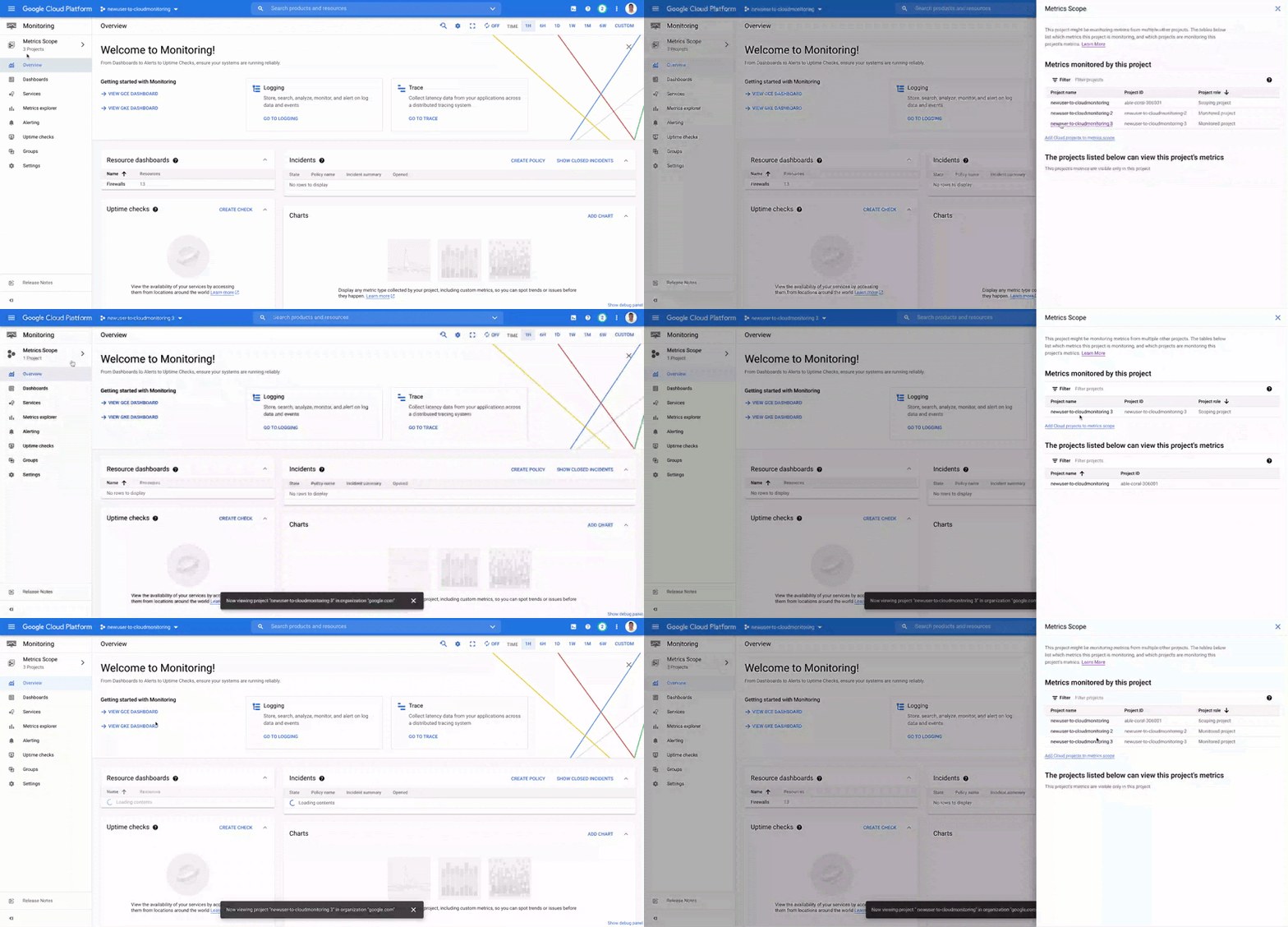
Coming Soon
- The Metrics Scope API is coming within the next quarter! This API will enable you to programmatically manage your monitoring configurations and Metrics Scopes.
Current Workspaces users
If you are already using Workspaces in Cloud Monitoring you may have noticed that they converted to Metrics Scopes weeks ago. There is no additional action required and you can start taking advantage of the additional features of Metrics Scopes today.
Get Started
Companies that are digitally native or in the process of digital transformation have placed an increased operational role on developers and this often creates overlapping sets of responsibilities with Operations and SRE teams. Now multiple developer teams can focus on optimizing the performance of their applications while operators can take a fleet-wide view when maintaining and improving the performance of all of the infrastructure under their purview.For information on configuring a Metrics Scope to include metrics for multiple projects, see Viewing metrics for multiple projects.
3524
Of your peers have already watched this video.
3:30 Minutes
The most insightful time you'll spend today!
Relax: Support on Google Cloud is Easy and Efficient
To navigate the complexity of today’s cloud environment and to get the most out of your investment, you need robust support that is fast, efficient, and available at the time of need. Google Cloud Platform support checks all the boxes and helps you architect for the inevitable and quickly resolve any issues that might arise with your cloud investments.
Google Cloud offers two support options to address the needs in the cloud. While role-based support provides customizable roles and predictable pricing, the enterprise support offers fast incident response with personalized service.
Role-based support is designed to address the support needs for the development and production environments of organizations of different sizes. Organizations can customize their support entitlements by granting support access to the right individuals on their team depending on the organizational needs.
Enterprise support, on the other hand, is ideal for large organizations with business-critical needs and helps maximize business value and minimize risk. Companies can quickly build and execute a Google Cloud strategy by working directly with Technical Account Managers, who bring deep product knowledge and an understanding of cloud adoption best practices to guide you in your journey with monitored success metrics to keep you on track to grow your business with Google Cloud.
Watch this video to understand how GCP support escalation process works and how to use it.
5868
Of your peers have already watched this video.
1:30 Minutes
The most insightful time you'll spend today!
FFF Enterprises See 80% Improvements in Speed at Lower Cost by Moving SAP Data to Google Cloud
FFF Enterprises, a pharmaceutical distributor of lifesaving biopharma products, vaccines and plasma products deployed SAP on Google Cloud to leverage its ability to scale server demands, reduce costs and improve speed and performance. Learn how the migration helps FFF empower healthcare to care!
More Relevant Stories for Your Company

The Cloud-First Imperative To Accelerate Digital Transformation
In a study of 360 business and technology decision makers and influencers from Indian enterprises, conducted by Forrester Consulting, it is revealed that public cloud adoption in India is on the rise with 2 in 3 organizations planning to increase their cloud spending by 5% or more in the next

3 Important Factors to Consider for Moving Large-scale On-prem Data to Cloud with Storage Transfer Service
Organizations have been moving their on-premises data and applications to the cloud for the past several years, driven by reasons as varied as application modernization and content delivery to archival. In particular, we have seen migration momentum pick up in sectors like media and entertainment, where customers are rethinking how

BigQuery’s User-friendly SQL is Like a Cool Drink for Hot Summer
With summer just around the corner, things are really heating up. But you’re in luck because this month BigQuery is supplying a cooler full of ice cold refreshments with this release of user-friendly SQL capabilities. We are pleased to announce three categories of BigQuery user-friendly SQL launches: Powerful Analytics Features,

What’s Google Cloud Firestore Database and What are its Benefits for Business and Developers?
Cloud Firestore is a NoSQL document database that simplifies storing, syncing, and querying data for your mobile and web apps at global scale. Cloud Firestore is a fast, fully managed, serverless, cloud-native NoSQL document database that simplifies storing, syncing, and querying data for your mobile, web, and IoT apps at
