





3 Important Factors to Consider for Moving Large-scale On-prem Data to Cloud with Storage Transfer Service

3515
Of your peers have already read this article.
1:30 Minutes
The most insightful time you'll spend today!
Organizations have been moving their on-premises data and applications to the cloud for the past several years, driven by reasons as varied as application modernization and content delivery to archival. In particular, we have seen migration momentum pick up in sectors like media and entertainment, where customers are rethinking how they monetize and store their valuable historical content, often while exploring Google Cloud’s many analytical and AI solutions.
Many of these customers are interested in moving their unstructured data from on-premises appliances to Google’s Cloud Storage. Over the past year, we’ve noticed an uptick in larger migrations, where customers move tens of petabytes or more of on-premises file data to Google’s flexible, secure object storage.
For customers like Telecom Italia/TIM Brasil, Google’s fully managed Storage Transfer Service played a key role in making this transformation possible by moving data from on-premises filesystems to extensible, low-cost Cloud Storage over the network.
“Storage Transfer Service helped us move petabyte-scale data from on-premises filesystem to Google Cloud in a highly performant and fully-managed way,” said Auana Mattar, CIO at Telecom Italia/TIM Brasil. “Setting up the transfer pipeline required performing some tests to figure out the ideal number of agents and networking settings in our on-prem environment. Once the initial setup was done, transferring data was seamless, and the service was able to saturate a 20 Gbps Partner Interconnect link.”
While large-scale cloud migrations can be intimidating, there are a number of actions that customers can take to ensure that a multi-petabyte data transfer goes as smoothly as possible. In the past, we’ve shared general architectural guidance for customers new to their cloud journey. And for customers looking for options, Google has multiple paths to move on-premises file data to the cloud, including our fully offline Transfer Appliance.
In this blog post, we’ll provide an updated perspective focused on how to use Storage Transfer Service to move data from on-prem to the cloud. Specifically, we’ll look at three different factors to consider prior to moving large amounts of data from your on-premises filesystem to Cloud Storage with our Storage Transfer Service.
Understanding the source files and filesystem
If you are moving data from an on-premises filesystem, you should be aware of how your source files, and your source filesystem, can impact transfer performance.
Each copy you make to Cloud Storage incurs some overhead from associated operations like metadata transfer, checksumming, and encryption. This means that, for a given amount of storage, transferring large numbers of very small files will take longer. As a rule of thumb, Storage Transfer Service will be most performant when moving files that are 16 MB or larger.
If you have a large number of smaller files, you may choose to batch them using tools like tar and upload as a single object. This will improve transfer performance but will limit how you can use those files in Cloud Storage. It’s an option best considered for use cases like archival storage, where the data transferred to Google Cloud may not be managed or accessed regularly. Our Nearline, Coldline, and Archive archival tiers offer excellent performance should you ever need to retrieve the archived data.
The source filesystem may also slow down transfer performance, particularly if the filesystem has limited read throughput. Tools like Fio can be used to test read throughput. We’ve included a command below to run a series of 1MB sequential read operations in Fio and to generate a report:
#Install fio> sudo apt install -y fio#Create a new directory fiotest> TEST_DIR=/mnt/mnt_dir/fiotest> sudo mkdir -p $TEST_DIR#Test read throughput> sudo fio --directory=$TEST_DIR --direct=1 --rw=randread --randrepeat=0 --ioengine=libaio --bs=1M --iodepth=8 --time_based=1 --runtime=180 --name=read_test --size=1G
Fio will then generate a report. The final line labeled ‘bw’ represents the total aggregate bandwidth of all threads, and it can be used as a proxy for read throughput. In general, you should strive for read throughput (‘bw’) that is 1.5x of your desired upload throughput or speed. (And one easy way to increase read throughput is to ensure that the filesystem itself is not imposing any limits on maximum throughput.)
Optimizing Storage Transfer Service resources
Within the Storage Transfer Service, there are a few settings that we can adjust ahead of time to ensure optimal performance for a larger workload.
First, we should ensure that we have the right number of transfer agents for our source data. We would advise that, for any transfer job larger than 1 GB, you start with at least three agents in separate VMs, with each agent assigned at least 4 vCPU and 8 GB of RAM. In addition to providing a foundation for performant data transfer, this architecture also ensures that the transfer is fault tolerant should one agent machine become unavailable.
Google Cloud supports up to 100 concurrent agents for a given Google Cloud project. To help you identify the right number of agents to support your workload, you should start your larger transfer first, then wait three minutes after adding each agent to ensure that throughput has stabilized.
In general, each agent can facilitate roughly 1 Gbps of throughput for up to 10 agents, at which point it may be necessary to add more agents for a very large amount of network bandwidth. For example, in one larger migration, a customer with 20 Gbps of dedicated network capacity ran ~30 agents at once. These numbers illustrate what was required at one enterprise data center. Across all of your environments, it is important to test and monitor your throughput via Cloud Monitoring to ensure you have the right configuration for your transfer goals.
Another area to optimize is where and how you install your agents. As we mentioned earlier, agents should be installed in separate VMs, and each host machine should dedicate at least 4 vCPUs and 8 GB of memory per agent. This is a starting off point, and larger, long-running transfers may require additional CPU or memory. For those longer jobs, we advise that you monitor CPU utilization and unused memory closely to ensure optimal performance. You should provision more CPUs when utilization exceeds 70%. Similarly, you should be ready to provision additional memory when the agent has less than 1GB of unused memory.
Preparing your network for large-scale data transfer
The third and final area to consider is your network connectivity. While it can be easy to reduce this to the bandwidth between the source filesystem and the Google Cloud bucket, the network includes two other components that can be easier to configure: first, the network interface from the on-premises agents to the WAN; and second, the agents’ connection to the on-premises filesystem.
For the first component, the network interface from the on-premises agents to the WAN, the general guidance is to not let this become a bottleneck. Specifically, you should ensure that this interface is greater than or equal to the bandwidth you require to read from the filesystem, plus the upload bandwidth to write to Google Cloud. In other words, if you plan on moving 10 Gbps of data from on-premises to Google Cloud, you will need 20 Gbps of bandwidth between the on-premises agents to the WAN: 10 Gbps to read from the networked filesystem, and 10 Gbps to transfer and write to Google Cloud.
On-premises filesystems, and on-premises networks, come in many flavors. For the second component, how the agents connect to an on-premises filesystem, our general rule is to be mindful of latency and to test regularly. It is essential to ensure that agents run on machines that can access a networked filesystem with very low latency.
Finally, if you are trying to maximize transfer performance, make sure you’ve configured your network to avoid bandwidth restrictions between on-premises filesystem and Google Cloud that might impact transfer speed. Storage Transfer Service will allow you to cap the bandwidth used by transfer, making it easy to minimize any impact on other production applications. Consider using tools like lperf3, tcpdump, and gsutil to measure the network bandwidth available to upload to Cloud Storage.
In particular, gsutil is worth some additional detail. Gsutil is a Python tool that can help you perform a number of object storage management tasks in Google Cloud, including checking your agent’s connection to the Cloud Storage APIs. It can be installed via the Google Cloud SDK, or separately. In this case, you should also ensure that gsutil is available in the same on-premises VM as the Storage Transfer Service agent.
If you’d like to use gsutil to test connectivity to Google Cloud, here’s the command:
gsutil cp test.txt gs://my-bucketReplace:my-bucket with the name of your Cloud Storage bucket.
CP is a copy command that lets you copy data from on-premises to the cloud. In this case, gsutil is copying a test document, test.txt, to ensure that you have a connection with the Google Cloud APIs. You will need to create a test document before running this command.
Test twice, transfer once
One overarching theme across all factors is that testing can help you understand performance. For many customers, a large-scale data transfer from an on-premises filesystem to Google Cloud is an unusual event. And as with any unusual event in enterprise IT, it is a great idea to make sure that each party – from network administrators to filesystem and storage experts to cloud architects – is able to test their domain multiple times, to ensure the event will proceed seamlessly.
As you fine tune your testing in advance of a data transfer, you may want to learn more about your options for obtaining more network bandwidth, orchestrating transfer from SMB filesystems, or even how to make the right choices to save money on object storage. And we plan to share more in our blog about how customers have used our transfer offerings in the months ahead. Advanced agent setup | Cloud Storage Transfer Service Documentation
For more information about Storage Transfer Service and how to get started, please take a look at our documentation or get started via the Google Cloud console.
5153
Of your peers have already watched this video.
24:00 Minutes
The most insightful time you'll spend today!
BK Medical’s Lift and Shift of SAP Environs on Google Cloud Results in Real-time Success
BK Medical is known for designing active imaging systems to help care providers visualize anatomy and provide real-time guidance to aid surgical interventions. After becoming an entity independent of the parent company, Analogic corporation, BK Medical decided to separate its SAP environs from the latter, and move into cloud. After assessing cloud vendors with Managecore, BK Medical chose Google Cloud as its managed service provider that could serve as a single source of truth and also help walk through the lift and shift of SAP ECC systems to the cloud. Watch the video to learn how the migration impacted BK Medical’s goals.
Manipal Group: Delivering High-Quality Patient Care with Google Cloud

6473
Of your peers have already read this article.
4:30 Minutes
The most insightful time you'll spend today!
One of India’s best-known healthcare brands, Manipal Group prides itself on clinical excellence and a patient-centric approach. From humble beginnings in 1953 as a single teaching hospital—the Kasturba Medical College—in a university town in Karnataka, India, Manipal Group has grown to a presence in seven cities in India and operations in Malaysia and Nigeria. “Our founder, Dr T. M. A. Pai, established Kasturba Medical College just six years after India gained independence,” says C. G. Muthana, Chief Operating Officer, Teaching Hospitals, Manipal Health Enterprises Pvt. Ltd, part of Manipal Group.
Manipal Health Enterprises Pvt. Ltd operates 11 corporate, or for-profit, hospitals and five teaching hospitals. “We have about 7,000 beds India-wide, and on that measure, we are the third-largest private-sector healthcare provider in India today,” says Muthana. The organization now employs about 6,000 people in its corporate hospitals and 5,000 people in its teaching hospitals.
Manipal Health Enterprises Pvt. Ltd acquires and operates world-class medical technologies in its teaching and corporate hospitals. However, with 75% of corporate hospital wards allocated to fee-paying private patients—compared to just 25% of the wards in teaching hospitals—the differences in information technology budgets are significant. “In the general wards that comprise most of the wards in teaching hospitals, patients are typically treated for free or at heavily subsidized rates,” explains Muthana. “So revenues and costs of delivery vary between hospitals, while employee costs remain similar.”
Rostering nurses a critical task
Rostering nurses to work shifts is one of the most important tasks at Manipal Group corporate and teaching hospitals. As at all hospitals, nurses administer medications, monitor patients, maintain records, manage intravenous lines, and work with doctors to heal patients. They can also provide advice and support to patients and loved ones, including teaching them how to administer medication outside a hospital setting. If too few nurses are rostered for a particular shift, the quality of patient care may suffer.
Google Cloud results
- Enabled the hospital to correctly size its nursing workforce
- Lowers stress on nurses by delivering more equitable rostering
- Presents opportunity to better manage nurses’ leave and other administration tasks
However, rostering at the group’s hospitals was a time-consuming exercise. Senior nurses on each ward would have to spend up to 45 minutes per day manually amending paper-based rosters to accommodate requested changes to duty shifts for personal or other circumstances. The organization began receiving complaints from patients, doctors, and other hospital staff that, on occasion, too few nurses were rostered on for certain shifts—particularly at its flagship hospital in Bangalore. “We had based our rostering calculations on the number of beds occupied by patients and, when we investigated, we found at a macro level, we were rostering on the correct number of nurses,” says Muthana. “However, on some days, on wards optimally staffed by, say, 10 nurses per shift, we might have 14 nurses rostered on for one shift and seven rostered on for another shift. Those times we had seven, we had a clear shortage.”
In 2012, Muthana asked a consultant to develop algorithms to help automate the rostering. “Unfortunately, there were so many variables, the consultant failed to solve the problem,” he says. The Chief Operating Officer’s next step was to ask the founder and Chief Executive Officer of predictive analytics business Retigence Technologies—already working with the business on a materials management project—to develop an application to manage rostering.
Removing the daily drudgery
“Our plan with the automation project was to relieve our senior nurses of the daily drudgery of amending the rosters and to deliver rosters that were as fair as possible to all our staff,” says Muthana. “We also saw an opportunity to reduce our costs by reducing the overall number of nurses needed to look after our patients.”
Retigence Technologies’ team members then worked with the group’s nurses to capture the variables and requirements for the project. For example, a minimum number of nurses with one year experience or more needs to be rostered on for each shift. Retigence Technologies then started building an application using compute resources available through Compute Engine, a Google Cloud product. “We selected Google primarily because of its pioneering work in artificial intelligence (AI) and machine learning,” says Srinibas Behera, founder and Chief Executive Officer of Retigence Technologies.
With the nurses rostering application developed, Manipal Health Enterprises Pvt. Ltd undertook several pilots to build user acceptance. “Some of our senior nurses took time to accept the fact automation removed their control over rostering assignments, but were finally convinced by the better transparency the product offered,” says Muthana. The organization deployed the application to a smaller hospital and secured user support before rolling out the application to its Bangalore flagship.
Eliminating stress
Deploying the application has enabled Manipal Health Enterprises Pvt. Ltd to remove a buffer of about 100 nurses retained to accommodate the variations in number of nurses rostered for individual shifts. “The savings on those salaries more than paid for the cost of developing the application,” says Muthana.
The application also enabled the organization to reduce the stress on nurses—both the nurses in charge of the rosters and the nurses subject to the rosters. “Night shifts were more equitably distributed among the nurses, while we have been able to reduce the 45 minutes per day required to amend rosters to just 10 minutes,” says Muthana. “In Bangalore alone, we have 51 nurses in charge of rostering—so the combined saving there equates to nearly 30 hours per day.” This is freeing up these senior nurses to complete more important tasks.
The application was subsequently implemented at Kasturba Hospital, Manipal, again reducing the time needed to generate complete nursing rosters to less than 10 minutes.
Managing leave and training
The organization now plans to extend the application to manage leave and training for its nurses and other employees. “I would like to see every employee given an annual leave plan that is added to the roster at the start of the year,” says Muthana. “The flexibility and control afforded by the application would enable us to address challenges such as managing leave across a workforce with high attrition rates.” The organization would also be able to create a calendar to ensure nurses receive all their required training.
“We also plan to keep fine-tuning the application to deploy nurses more efficiently and continue to reduce their stress levels,” adds Muthana. “We also want to create a nursing load indicator tailored to patients’ specific circumstances. For example, a sedated patient may not require much nursing care, whereas a patient who comes in with a broken leg and may be on a ventilator may require assistance from three nurses at once.” The business plans to use Google’s AI and machine learning APIs in the future to improve the value and user experience of the product.
New Capabilities in Cloud Asset Inventory Allow Better Visibility into Google Cloud Environments

4701
Of your peers have already read this article.
2:00 Minutes
The most insightful time you'll spend today!
Businesses that operate in complex cloud environments, large fleets, or sophisticated security operations all require visibility into their cloud assets in order to keep their teams nimble and their data secure. Cloud Asset Inventory (CAI) helps these teams understand their Google Cloud and Anthos environments by providing complete visibility, real-time monitoring, and powerful asset analysis capabilities. Today, Cloud Asset Inventory gets four new capabilities that help you understand your environment more clearly and easily than ever before.
New user interface eases asset and insight discovery
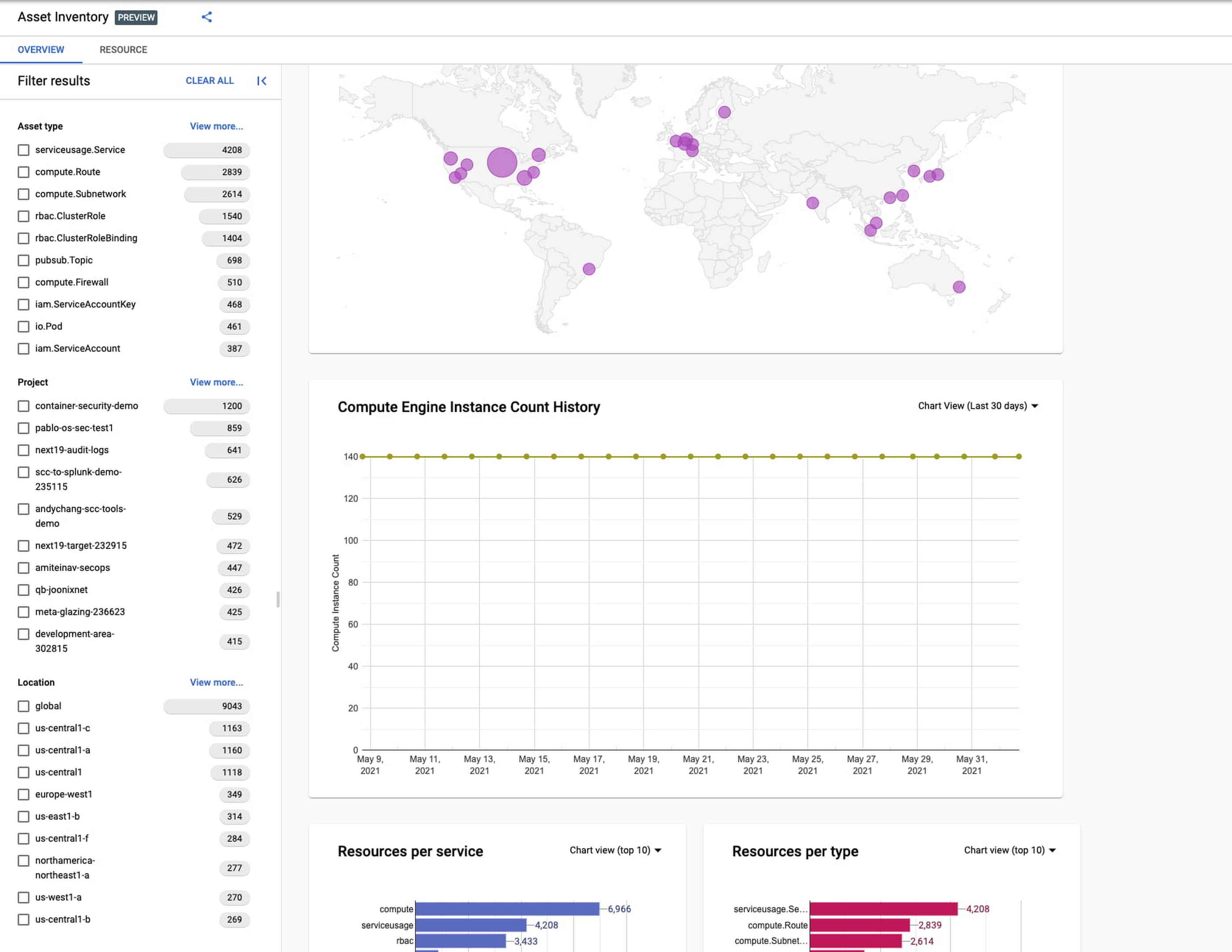
Cloud Asset Inventory console preview is now publicly available for GCP and Anthos customers. This preview provides insights into your cloud footprint, history and details of resource usage with powerful filtering and search capabilities. For example, you can view your global distribution of resources and policies, how your GCE VM footprint has been changing over time, as well as full metadata and change history for all your assets. The CAI console can be filtered at the organization, folder, or project-level, so each user can view the resources they have permissions for down to project level granularity.
Asset discovery and Datadog integration
A new asset list service in CAI provides quick and comprehensive asset discovery, including asset history, without needing to export the data to a storage destination. Datadog, a leading multi-cloud monitoring and security service provider, relies on deep integration with CAI for service and asset discovery. Datadog has been piloting and taking full advantage of the newly released asset list service. Datadog Product Manager, Steve Harrington, commented:
“Google’s new Cloud Asset Inventory API provides us with an immensely valuable, single source of truth for determining the resources present in a given GCP environment. Along with its rich metadata, this enables us to enhance multiple aspects of our integration with GCP, including streamlined metric collection and ingestion of custom labels. We plan to continue building around Cloud Asset Inventory in the future to improve existing features, and are envisioning ways it could help us provide entirely new insights to our customers.”
Answer “who can access what resources?”
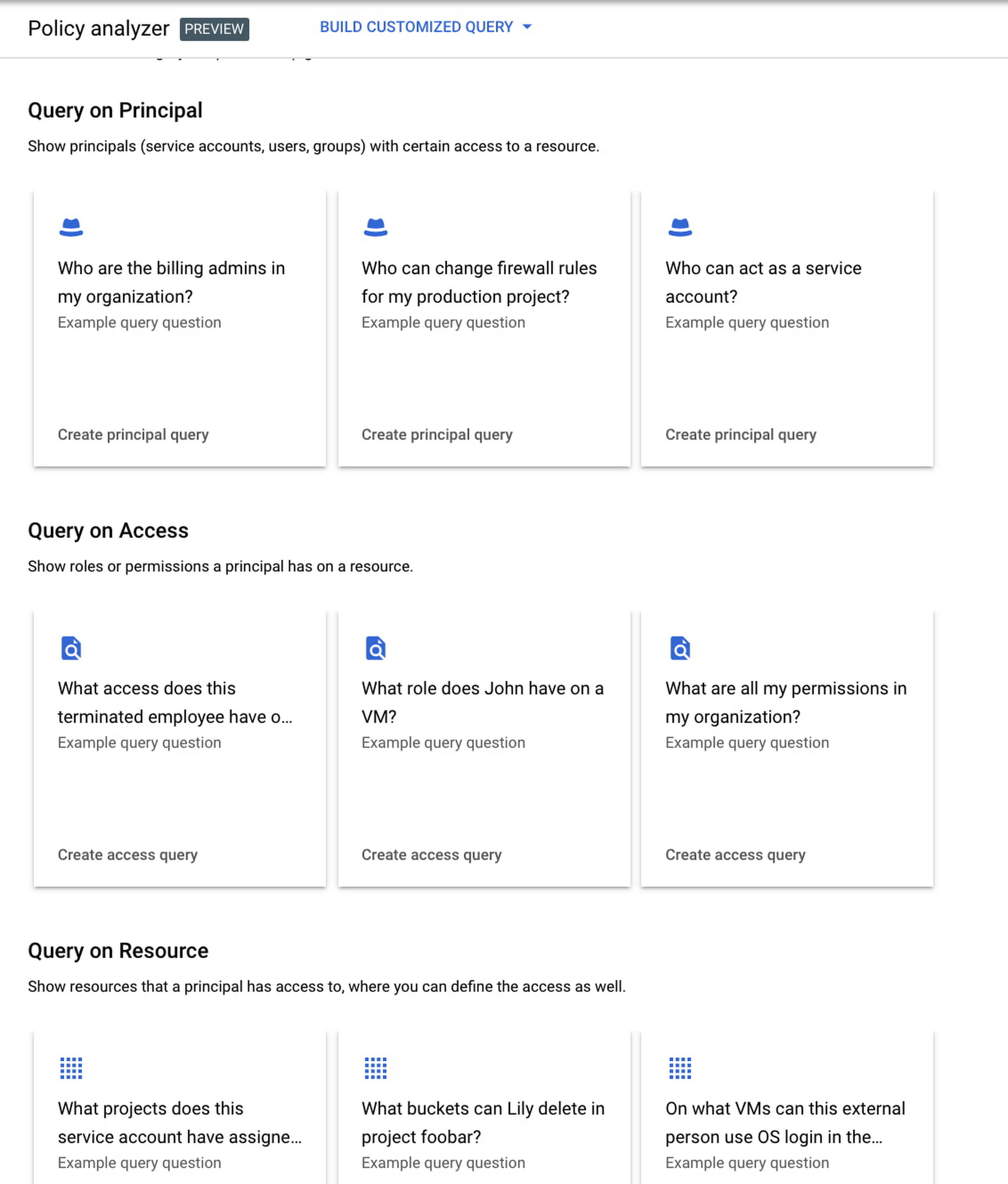
Determining authoritative answers to security-related questions like “Who can read data from my storage bucket that contains PII?” or “Does a terminated employee still have any remaining access to my system?” can be difficult and time consuming. This is why access management and identity certification is one of the top security priorities for enterprises running workloads in the cloud. To help alleviate this challenge, the new Policy Analyzer capability in CAI thoroughly analyzes the relationship between IAM policies and resources. The analysis includes powerful and efficient group expansion, service account impersonation, conditional access analysis, resource expansion, and more. You can even export the results to a BigQuery table or Cloud Storage bucket for further analysis and record keeping. CAI’s enhanced UI makes it even easier for you to build your own flexible queries and quickly get to a comprehensive answer.
Create asset posture visibility
Cloud Asset Inventory now provides seven types of Asset Insights through the Active Assist platform. These new asset insights help proactively detect anomalies within your organization’s IAM policies, which may be opportunities to improve your security posture. The insights can be aggregated at the Organization, Folder or Project level.
The seven new Asset Insights include:
- External members in IAM policies.
- External users that impersonate your service accounts.
- External members as policy editors.
- External users who can view cloud storage buckets.
- Terminated users/groups that are still in IAM policies
- IAM policies containing all users or all authenticated users.
- Projects with only terminated users as owners.
As a Google Cloud customer you can get started and use all the recently released capabilities and features immediately; check out our documentation to see how. We’d love to hear your feedback; email us with any questions or concerns!

Gartner Names Google Cloud a Leader in the 2019 Cloud Infrastructure as a Service Market
DOWNLOAD WHITEPAPER3531
Of your peers have already downloaded this article
2:30 Minutes
The most insightful time you'll spend today!
As increasing amount of cloud IaaS is being bought for traditional IT, with an emphasis on cost reduction, safety and security, service providers are offering a high-quality service, with excellent availability, good performance, high security and good customer support.
In its Magic Quadrant for Cloud Infrastructure as a Service (IaaS), Gartner notes that the distinctions among providers are apparent in the market for cloud IaaS in terms of worldwide enterprise adoption, capabilities and service availability. Infrastructure and operations leaders should evaluate providers with broad capabilities and a positive track record for customer success.
Download the Gartner Magic Quadrant to understand why Google is a leader in the market.
Prepare for the Unknown in Supply Chain with SAP IBP and Google Cloud

3415
Of your peers have already read this article.
3:00 Minutes
The most insightful time you'll spend today!
Responding to multiple, simultaneous disruptive forces has become a daily routine for most demand planners. To effectively forecast demand, they need to be able to predict the unpredictable while accounting for diverse and sometimes competing factors, including:
- Labor and materials shortages
- Global health crises
- Shifting cross-border restrictions
- Unprecedented weather impacts
- A deepening focus on sustainability
- Rising inflation
Innovators are looking to improve demand forecast accuracy by incorporating advanced capabilities for AI and data analytics, which also speed up demand planning. According to a McKinsey survey of dozens of supply chain executives, 90% expect to overhaul planning IT within the next five years, and 80% expect to or already use AI and machine learning in planning.
Google Cloud and SAP have partnered to help customers navigate these challenges and supply chain disruptions starting with the upstream demand planning process, focusing on improving forecast accuracy and speed through integrated, engineered solutions. The partnership is enabling demand planners who use SAP IBP for Supply Chain in conjunction with Google Cloud services to access a growing repository of third-party contextual data for their forecasting, as well use an AI-driven methodology that streamlines workflows and improves forecast accuracy. Let’s take a closer look at these capabilities.
Unify data from SAP software with unique Google data signals
When it comes to demand forecasting and planning, the more high-quality and relevant contextual data you use, the better, because it helps you understand the influencing factors of your product sales to sense trends and react to disruptions or capitalize on market opportunities more timely and accurately.
The expanded Google Cloud and SAP partnership helps customers who use SAP® Integrated Business Planning for Supply Chain (SAP IBP for Supply Chain) bring public and commercial data sets that Google Cloud offers into their own instances of SAP IBP and include them in their demand planning models in SAP IBP. So, in addition to sales history, promotions, stakeholder inputs and customer data that are typically in SAP IBP, a demand planner can incorporate their advertising performance, online search, consumer trends, community health data, and many more data signals from Google Cloud when working through demand scenarios.
More data enables more robust and accurate planning, so Google continues to build an ecosystem of data providers and grow the number of available data sets on Google Cloud. Some current providers include the U.S. Census Bureau, the National Oceanic and Atmospheric Administration, and Google Earth, and partnerships are underway with Crux, Climate Engine, Craft, and Dun & Bradstreet to help companies identify and mitigate risk and build resilient supply chains.
Augmenting demand planning with additional external causal factor data is a starting point to drive more accurate forecasting. For example, knowing what regional events may be happening, or the weather patterns that may impact sales of your products, allows you to react faster to these changes by making sure adequate supply is being provided. The result is a more accurate overall plan that reduces resource waste and out-of-stock events. Planners can respond with more accurate and granular daily predictions about sales, pricing, sourcing, production, inventory, logistics, marketing, advertising, and more based on the expanded data.
Get more accurate forecasts with Google AI inside
Extending the already expansive algorithm selection available in SAP IBP, the release of version 2205 allows SAP IBP customers to access Google Cloud’s supply chain forecasting engine, which is built on Vertex AI — Google Cloud’s AI-as-a-platform offering — from within SAP IBP as part of their forecasting process.
The benefit of using an AI-driven engine for demand forecasting is that it meaningfully improves forecast accuracy. Most demand forecasting today is done through a manually set, rules-based model versus an AI-driven model that is smarter and gets better at predicting demand as it works.
Take the fastest path from data to value with streamlined workflows
Vertex AI can include relevant contextual data sets for demand planning, and the results can be shown in SAP IBP for planners to incorporate when building their workflows.
In addition to more accurate forecasts, planners can work faster and more efficiently as they build potential scenarios, meaning they can do more simulations than they do now so that a wider range of disruptions can be modeled. Customers of SAP IBP don’t have to do any of the heavy lifting. They just have to share their data from SAP IBP with Google, then access the process workflow capabilities to set up automated workflows that use the combined data. Google makes the data available so that planners can use it as they’re setting up their workflows in Vertex AI.
Users of the Google Supply Chain twin and SAP IBP can combine the rich planning data from IBP with additional SAP data and other Google data sources to provide better supply chain visibility. The Google Supply Chain twin is a real-time digital representation of your supply chain based on sales history, open customer orders, past and future promotions, pricing and competitor insights, consumer history signals, external data signals and Google data.
Leverage Google data signals with SAP IBP for more accurate forecasts
It’s not difficult to access these new capabilities, and the benefits are more accurate near-term forecasts and more return on your investments in SAP IBP and Google Cloud. If you happen to be at the Gartner Supply Chain Symposium from June 6-8th in Orlando, Florida, stop by our booth to say hello. Or, get started now
More Relevant Stories for Your Company

ATB Financial Focuses on Customer Experience with the Speed it Gains in the Cloud
As senior vice president and head of technology enablement for ATB Financial, Barry Hensch has a mission: creating a seamless experience for the Alberta, Canada-based bank’s nearly 800,000 customers by leveraging the latest digital technology. ATB is a purpose-driven financial institution owned and operated by Alberta’s provincial government, with about

Google Cloud Garners Highest Score in Forrester New Wave for Computer Vision Platforms
In Forrester's evaluation of the emerging market for computer vision platforms, it identified the 11 most significant providers in the category — Amazon Web Services, Chooch AI, Clarifai, Deepomatic, EdgeVerve, Google, Hive, IBM, Microsoft, Neurala, and SAS — and evaluated them. Its report details its findings about how well each



HSBC Looks to Google Cloud to Transform Banking
HSBC, a global bank that is a central part of global commerce with a presence in 67 countries, serving 38 million customers ranging from individuals to small businesses to corporations and governments, and having over $2.5 trillion assets in its balance sheet, had a vision of being a cloud first

Forrester Focus Report on Indian BFSI: We’re Betting On…
The banking and financial services industry (BFSI) in India is going through a period of unprecedented innovation. Customers in India have more information than ever before to make better-informed decisions and can pick the banking and other financial services they need from a wide range of providers. New players like
