





Redefining Network Security with Google Cloud’s Secure Web Proxy

1195
Of your peers have already read this article.
3:30 Minutes
The most insightful time you'll spend today!
Google Cloud provides multiple layers of security to help customers stay ahead of evolving threats and keep their cloud workloads safe. Today at our annual Security Summit, we are excited to announce the general availability of Secure Web Proxy, a new cloud-first network security offering that provides web egress traffic inspection, protection, and control. Secure Web Proxy (Cloud SWP) can help networking and security teams implement Zero Trust networking principles, discover malicious activity, and support forensic investigations
How Secure Web Proxy works
You configure workloads to use Secure Web Proxy as a gateway. Web requests can originate from virtual machine (VM) instances, containers, serverless environments, and workloads outside of Google Cloud connected by Cloud VPN or Cloud Interconnect. Policies and rules in Cloud SWP will be applied to traffic sent from these workloads to the internet.
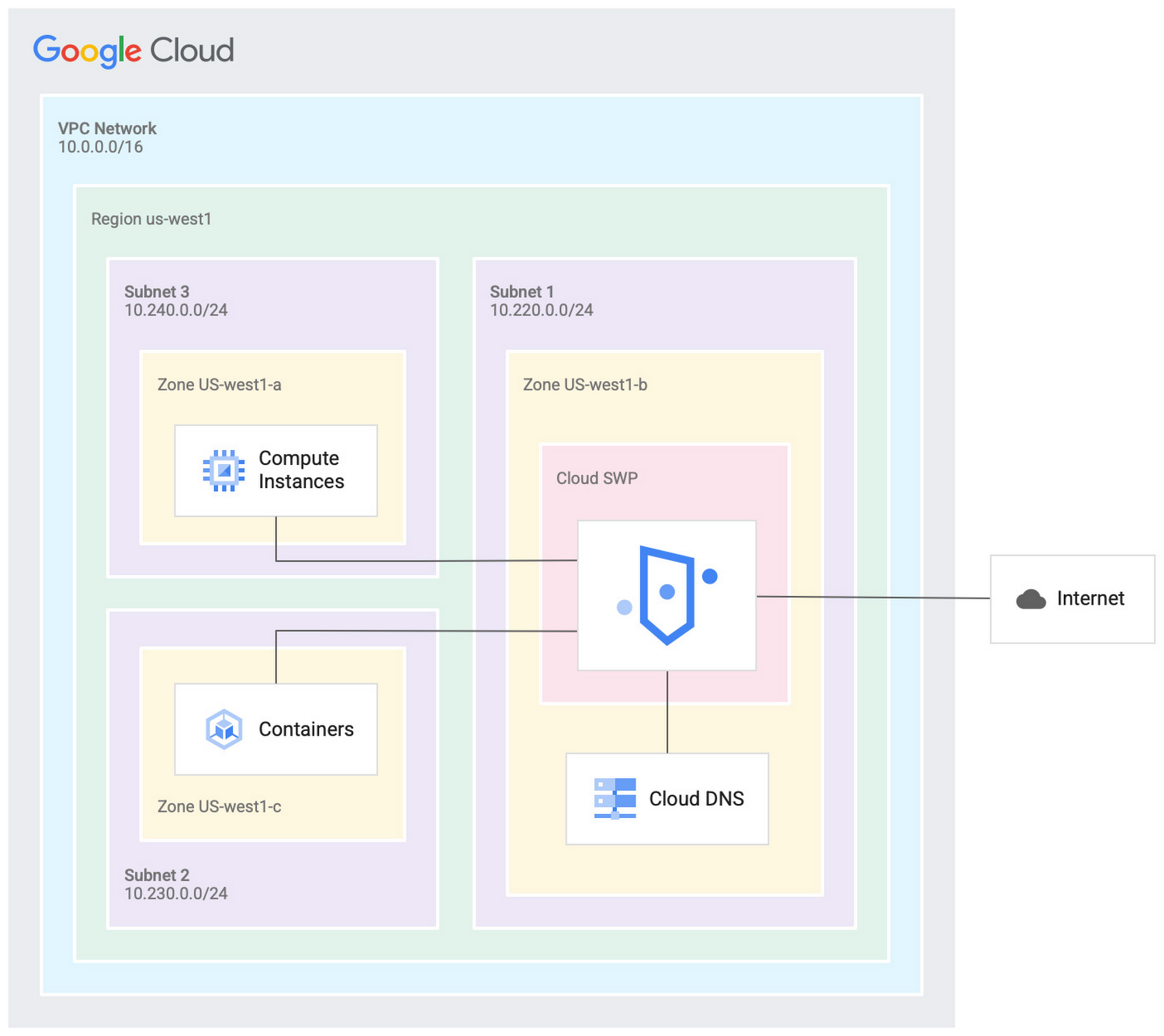
Cloud SWP helps enable organizations to enforce granular access policies, limiting egress web traffic based on source, identities, destination, or request types. With Cloud SWP you can create policies with Google Cloud Identity Access Management (IAM) context using service accounts and secure tags to block egress. For example, you can set a policy to limit a service account to sending traffic to a specific outbound destination.
Secure Web Proxy offers a scalable TLS inspection service that lets you intercept TLS traffic, inspect the encrypted request, and enforce your policies. Cloud SWP integrates with Cloud Logging to record metrics and transaction logs for requests handled by the proxy.
Common use cases for Secure Web Proxy
Many organizations employ a proxy like Cloud SWP to programmatically restrict workload access to only trusted external web services.
You can also use Cloud SWP to monitor outbound access. The proxy identifies traffic that doesn’t conform to policy and logs it to Cloud Logging. This allows you to monitor internet usage, discover and disrupt threats on your network by spotting command and control traffic or anomalous data transfers. Logs can be also used in forensics to investigate security events and incidents involving egress web traffic.
Operational benefits
Secure Web Proxy is another example of how Google Cloud continues to deliver built-in, cloud-first security capabilities that offer operational efficiencies for our customers.
Cloud SWP is easy to deploy and manage because it is a managed service. Unlike frequently deployed proxy solutions, it does not require users to configure virtual machines (VMs) to run and scale the proxy. Security patching is handled automatically. As your business and outbound traffic grows, Cloud SWP takes care of growing your proxy infrastructure for you.
Secure Web Proxy can also help make cloud migrations more seamless. If you are using an on-premises proxy, you can easily port the existing proxy’s policies to Cloud SWP when you migrate the app, maintaining the same egress protection in the cloud as you had on-premises.
Customer testimonials
Preview customers validated the operational and security value of implementing Cloud SWP:
“Google’s Secure Web Proxy is a powerful tool that can help businesses of all sizes protect their cloud workloads from online threats. By using the granular policy controls and TLS inspection, we are ensuring that our cloud applications only access approved external destinations. Additionally we are able to comply with data security regulations,” said David Saleh, director, Cloud Architecture and Application Security, ATB Financial.
“Secure Web Proxy has helped us to improve our security in Google Cloud. We are now able to filter outbound HTTP and HTTPS traffic from our applications. In addition, having a native solution will allow us to replace the VM-based solution we currently have, providing us with cost savings and continuing to deliver on our strategy of replacing products with cloud native services,” said Roberto Vega, cloud analyst, Carrefour.
Getting started with Secure Web Proxy
You can get started with Cloud SWP by visiting our documentation page to learn more about Cloud SWP prerequisite requirements and configuration options. If you want to quickly evaluate Cloud SWP for your cloud environment, use the SWP evaluation guide for step-by-step instructions. Be sure to check out all our sessions at this year’s Google Cloud Security Summit.
Google Cloud’s BeyondCorp Framework Helps Govts Adopt Zero Trust Approach to Security

3076
Of your peers have already read this article.
1:30 Minutes
The most insightful time you'll spend today!
For more than a decade, Google has applied a Zero Trust approach to most aspects of our operations. Zero Trust’s core tenet–that implicit trust in any single component of a complex, interconnected system can create serious security risks–is fundamental to how we operate and build our security architecture.
Early in our security journey, we realized that despite our best efforts user credentials would periodically fall into the hands of malicious actors. This is why we developed the BeyondCorp framework. We needed additional layers of defense against unauthorized access that would not impede user productivity. We also understood that software that interacts with the larger world should not have a perimeter-based trust model. These realizations led to the layered protection in our BeyondProd framework, which extends the Zero Trust paradigm to our production workloads.
Earlier this year, the United States Office of Management and Budget (OMB) released a Federal Strategy to Move the U.S. Government Towards a Zero Trust Architecture. This marks an important step for the U.S. government’s efforts to modernize under Executive Order 14028 on Improving the Nation’s Cybersecurity. In parallel, guidance from the United Kingdom’s National Cyber Security Center (NCSC) has also called for the move to a Zero Trust approach to security and outlined in 2021 its report on Zero Trust architecture design principles.
Adopting a Zero Trust approach can help organizations inside and outside the public sector stay ahead of both regulatory requirements and security threats, but it requires thoughtful planning and execution. Our goal is to bring the best practices for Zero Trust together in one place, leveraging the experiences and knowledge of our existing customers, and Google’s own experience with implementing Zero Trust.
How Google Cloud can help government agencies move toward Zero Trust
Agencies can rely on Google Zero Trust capabilities for remote access, secure collaboration, and boundary security. To better serve the Zero Trust needs of our customers, we introduced BeyondCorp Enterprise in January 2021, a solution that provides Zero Trust secure access to resources and applications in the cloud and on-premises. BeyondCorp Enterprise was built based on years of Google’s own innovation as we implemented Zero Trust globally for ourselves. It leverages the Chrome browser and Google’s global network, and it offers integrated real-time threat and data protection.
Here are five ways BeyondCorp Enterprise can be applied to help organizations adopt the Zero Trust cybersecurity principles set forth in the recent White House memorandum (M-22-09) and other global government guidance for Zero Trust.
- Enable enterprise applications to be used over the public internet: It’s no secret that VPN usage poses daily burdens and long-term challenges for IT and cybersecurity managers, as well as end-users. BeyondCorp Enterprise provides users with seamless and secure access to web applications (including SaaS apps and apps hosted on any cloud), plus central management controls and threat and data protection capabilities, all built-in to the Chrome browser. Through BeyondCorp Enterprise, end-users can access applications simply and still benefit from enterprise-grade security, without sacrificing their productivity or user experience.
- Leverage phishing-resistant MFA to access secure resources: Many cyberattacks start with phishing messages that lead users to infected websites and attempt to steal credentials. The use of phishing-resistant MFA, as recommended by M-22-09, can protect personnel from sophisticated online attacks. BeyondCorp Enterprise supports strong phishing-resistant authentication, by allowing factors such as Titan Security Keys to be used as attributes in access policies that are enforced at the application layer. Organizations can customize how to incorporate phishing-resistant MFA methods into their access policies for individual applications and resources. Phishing protection is also built into the Chrome browser, powered by Google Safe Browsing, and these capabilities block access to malicious content, detect phishing sites, prevent malware transfers, and generate reports of unsafe activity, adding even more protection against bad actors.
- Use context-aware authorization: The U.S. federal strategy states that a Zero Trust architecture should incorporate more granularly and dynamically defined permissions and that every request for access should be evaluated to determine whether it is appropriate. With context-aware authorization, organizations can build and customize access policies to include different contextual signals about a user including their role, their location, and even the time of day. Every interaction between a user and a BeyondCorp-protected resource is evaluated in real-time against the resource’s access policy to ensure users are and remain authorized to access it, with continuous authorization for all interactions at a per request level.
- Incorporate device-level signal into authentication: At Google, we believe that trust must be granted based on what is known about a user’s identity and their device. We are pleased that OMB similarly recommends that authentication incorporate at least one device-level signal alongside identity information. Since BeyondCorp Enterprise supports device-level attributes without requiring users to install agents, this can be done easily by leveraging the Endpoint Verification extension in the Chrome browser, where administrators can gather endpoint security posture information and easily construct and implement granular resource access policies. The ability to collect and utilize this information through an agentless approach is especially helpful for BeyondCorp Enterprise customers who support a workforce with bring-your-own-device policies or unmanaged devices.
- Include the extended workforce in your Zero Trust strategy: A Zero Trust approach aimed to provide secure access to the right users, at the right time, and for the right purposes should be inclusive of all users, not just full-time staff. Government agencies rely on contractors and partners to carry out many important missions. Unfortunately, the extended workforce is often more vulnerable to attacks if they are given too much privileged access or if their security practices are not properly assessed before access is provisioned. At the same time, federal administrators can’t always manage third-party devices or software directly, which can make secure access challenging.
BeyondCorp Enterprise supports a feature called protected profiles, an ideal solution for granting Zero Trust access to the extended workforce. It enables users to securely access resources from unmanaged devices and be protected by the same security capabilities without needing to install agents. Furthermore, administrators can gain visibility into risky activities and view any security events that are generated from within protected profiles.
Applying the NCSC Zero Trust principles on Google Cloud
Last year, the U.K. government’s NCSC launched its Zero Trust architecture design principles to help organizations securely adopt a Zero Trust architecture. To help private and public sector organizations in the U.K., the Google Cybersecurity Action Team (GCAT) released a detailed research paper that outlines how organizations can leverage Google Cloud technologies and services to align with these principles. This is a technical guide aimed at enterprise and security architects charged with developing and executing a Zero Trust strategy under the principles outlined by the NCSC, including:
- Know your architecture, including users, devices, services and data with Google Cloud Professional Services Organization (PSO) who can support discovery, planning and risk mitigation.
- Know your User, Service and Device identities including reference architectures for Cloud Identity.
- Assess your user behavior, device and service health by leveraging built in reporting from Google Cloud and Chronicle.
- Use policies to authorize requests with BeyondCorp Enterprise policy-based authorization.
- Authenticate & Authorize everywhere by reviewing the BeyondCorp and BeyondProd frameworks which combine to deliver ubiquitous authentication and authorization.
- Focus your monitoring on users, devices and services with device management and Cloud native monitoring capabilities.
- Don’t trust any network, including your own. Review details on Google’s Secure by Design infrastructure.
- Choose services designed for Zero Trust. Review how to protect modern and legacy applications with BeyondCorp.
For more detail on how we’re supporting the U.K.’s NCSC, please review our recent research paper for insight into their priorities, and where Google will be discussing Secure by Design principles and how to respond to security incidents.
Zero Trust assessment and planning services for organizations
Organizations that are managing complex environments while undergoing Zero Trust adoption could benefit strongly from experienced support and guidance. The Google Cybersecurity Action Team (GCAT) is committed to helping customers meet Zero Trust security and compliance requirements in the cloud through specialized consulting engagements and workshops for public sector customers. Read more about how growing cybersecurity requirements for U.S. federal government customers via executive orders and White House mandates are being supported through Google Cloud solutions.
GCAT’s multi-week Zero Trust Foundations engagement helps organizations build a strategy to achieve a Zero Trust security model across their operations. Zero Trust Foundations is co-delivered by Google Cloud’s Office of the CISO and our public sector Professional Services Organization. It can help focus and accelerate customers’ Zero Trust efforts by sharing lessons learned from Google’s own BeyondCorp zero-trust journey, and our global implementation of defense-in-depth best practices. Contact us today to learn more.
To learn more about ways Google Cloud can help organizations embarking on a Zero Trust journey, tune into our second annual Google Cloud Security Summit on May 17 and hear directly from customers who are already using our Zero Trust solutions to achieve their organization’s security goals.
About the Authors:
Jeanette Manfra is the former Assistant Director for the Cybersecurity and Infrastructure Security Agency at the Department of Homeland Security. Dan Prieto is the former Director of the Defense Industrial Base Cybersecurity program at the Department of Defense. Both Dan and Jeanette also served in the White House on the staff of the National Security Council’s cybersecurity directorate.
5149
Of your peers have already watched this video.
14:00 Minutes
The most insightful time you'll spend today!
How Google Workspace Helps Manage, Govern and Protect Sensitive Data
The shift towards a hybrid work style and trends accelerated by the pandemic has resulted in data deluge. With companies and individuals sharing increasingly large volumes of information and collaborating with internal and external stakeholders, the need for innovations for higher security also escalates. View this video to learn how Google Workspace approaches security across content lifecycle from client-side encryption updates, data loss prevention, Google Vault, data regions, labels, and more!
4887
Of your peers have already watched this video.
4:00 Minutes
The most insightful time you'll spend today!
Application Development with Kpt
Learn how to create and customize configuration packages with Kpt to build applications and adhere to configuration-as-data philosophy.
Taking Maps Further: New Website Experience for Product Discovery, Budgeting and Access to Dev Documentation

6625
Of your peers have already read this article.
1:30 Minutes
The most insightful time you'll spend today!
For more than 15 years, developers have used Google Maps Platform to deliver location-based experiences to their end users and used location intelligence to optimize their businesses. Along this journey, we’ve made a variety of changes to better support our community as needs have changed and new industries and technologies have emerged. We started rolling out a new website experience, at https://mapsplatform.google.com, to help you better understand the products and solutions best suited to address your objectives. Plus, now you can directly connect to the developer documentation for each product to get started quickly, and you can visualize usage and associated costs to have a better idea of what to expect before getting started.
Getting to your solution faster
Maps, Routes, Places are building blocks that let you develop implementations for any use case. Building for specific use cases, however, typically requires using a combination of APIs and SDKs. To help you quickly understand what’s possible and what you need to build for your use case, you can now visit the solutions tab to select from a list of popular use cases or industries. Once you’ve selected a use case or industry, you’re taken to a page where you can explore relevant products, read helpful blog posts, see how other customers have deployed for similar use cases, and more.

Direct access to developer documentation
Did you know there are more than a thousand pages of developer documentation created to help you get started, unblock you when you’re stuck, and share best practices? Now when you explore a product or solution from the Google Maps Platform website, you can easily navigate back and forth between our website and documentation. Just tap on JS, iOS, Android or API under the product name to get to the documentation you need.

Budgeting for your project
To help you calculate pricing for your project, we’ve introduced a new pricing calculator. Once you find the product and API or SDK you plan to use, pull the slider to reflect your estimated number of monthly requests. This will automatically update the “monthly cost” column for each product and API or SDK you plan to use. If your estimated monthly requests exceed the slider limit, contact our sales team to learn about volume discounts that start at 20% off.

We hope our new website makes it easier to discover our products and solutions, estimate your budget, and start building with our documentation so you can deliver helpful experiences to your users and optimize your business.
For more information on Google Maps Platform, visit https://mapsplatform.google.com.
reCAPTCHA & Cloud Armor: Helping Organizations Adopt Bot Management Strategies

3026
Of your peers have already read this article.
2:00 Minutes
The most insightful time you'll spend today!
Unwelcome web traffic from bots has proliferated, becoming a significant contributor to business and operational risk. The motivations of bot controllers range from disruption of business through DDoS attacks to fraud such as credential stuffing, denial of inventory, scraping, and fraudulent card use. Google is well positioned to help detect and mitigate these risks by leveraging both our AI/ML strengths for combatting bot traffic as well as the global scale of our network to absorb even the largest threats.
Today we are announcing the public preview of Cloud Armor bot management with reCAPTCHA Enterprise.This new set of capabilities is centered around a new deep integration between reCAPTCHA Enterprise and Cloud Armor as part of our overall Web-App and API Protection (WAAP) solution, which also includes Apigee. You can now leverage the power of reCAPATCHA’s intelligence gained from protecting 5+ million sites directly in Cloud Armor to comprehensively manage risk from bots and other application layer threats. You can enable this protection using an easy-to-configure policy in Cloud Armor without any server-side changes to your applications. Because detection and enforcement happens in-line, at the edge of Google’s network, you can mitigate threats before they have a chance to impact your applications, whether they run on GCP, on premise, or in a hybrid or multi-cloud deployment.
Google Cloud Armor
Cloud Armor is the DDoS mitigation service and web-application firewall (WAF) that brings to bear the global scale of Google’s network – blocking unwelcome traffic upstream from your infrastructure. Cloud Armor helps protect your websites and applications from volumetric and protocol based (Layer 3/4) DDoS attacks, application level DDoS attacks, and mitigates the rest of the OWASP Top 10. With Cloud Armor, you can enforce custom Layer 7 filtering and rate-limiting policies at the edge to ensure availability of your workloads and meet security and compliance requirements.
reCAPTCHA Enterprise
reCAPTCHA Enterprise is Google’s fraud detection service that leverages over a decade of experience defending the internet and data from Google’s network of over 5 million sites. reCAPTCHA Enterprise can be used to prevent fraud and attacks perpetrated by scripts, bot software, or humans. When installed on a web page at the point of action, such as login, purchase, or account creation, reCAPTCHA Enterprise provides a frictionless user experience that allows legitimate users to proceed using a web page while fake users and bots are blocked.
The Cloud Armor and reCAPTCHA Enterprise integration
Users can now configure their Cloud Armor security policies to block requests that reCAPTCHA determines to be coming from a bot. There are several ways to do this:
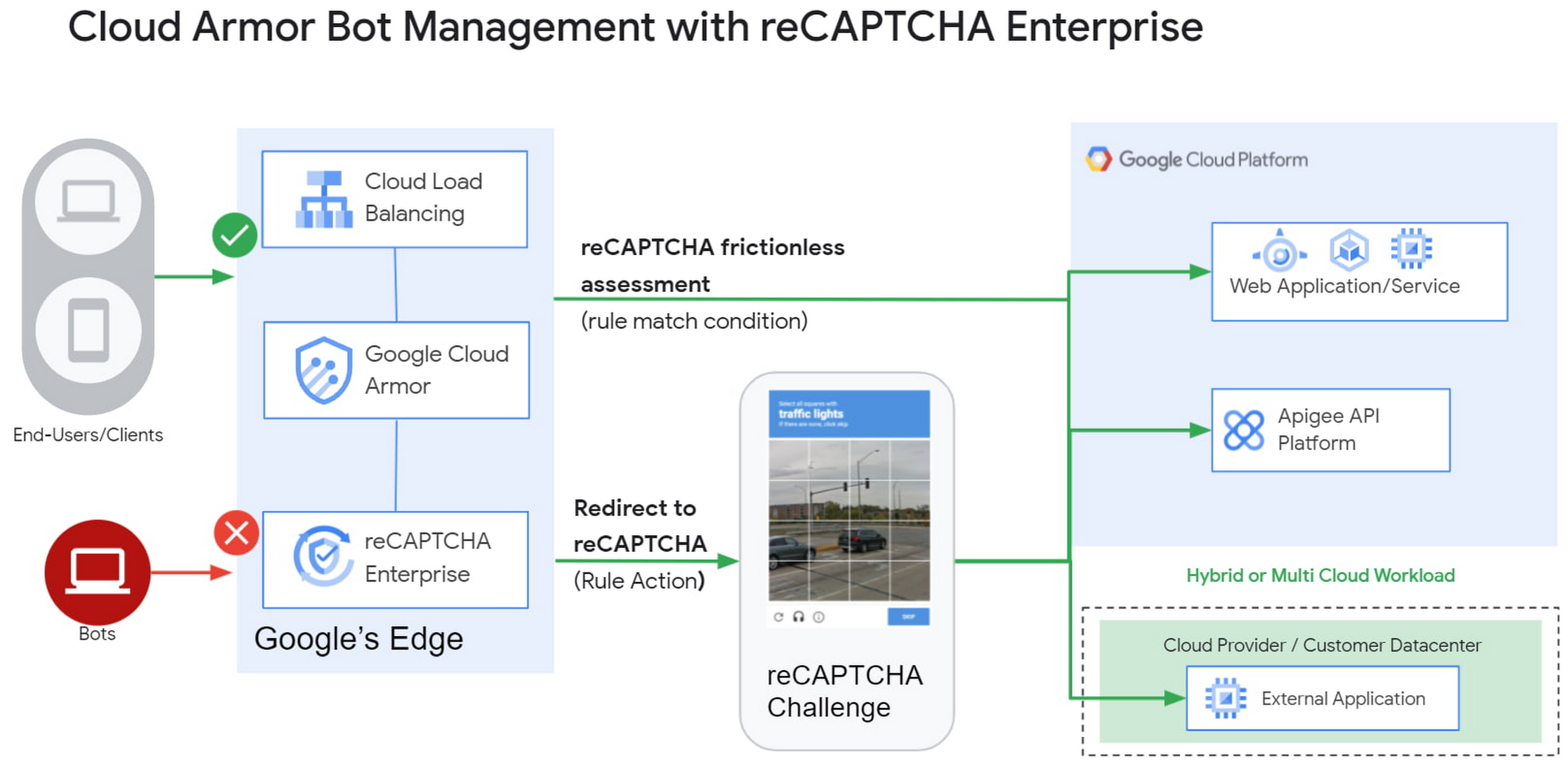
1) Enforce reCAPTCHA Enterprise frictionless assessment
reCAPTCHA Enterprise assigns risk scores to interactions on your website (e.g., logins, signups, gift card redemption, checking out, etc.) Based on these interactions, it returns a score between 0.0 and 1.0, with 0.0 being a likely fraudulent interaction and 1.0 being a likely legitimate interaction. To reduce fraud, you might choose to take action on returned scores for logins below 0.5, but allow users with higher scores to continue their login with zero friction.
With this new integration, you can also have Cloud Armor take action based on the score, including blocking or redirecting the request based on reCAPTCHA’s assessment from the client-side instrumentation. The client-side instrumentation can be enabled by installing reCAPATCHA’s javascript library into browser applications or using the reCAPTCHA SDK with mobile applications. By the time the user’s request leaves the client, it will have a reCAPTCHA assessment and bot score attached to it. This scoring is accomplished in-line, as the user’s request is being evaluated through your Cloud Armor security policy. Crucially, this occurs without incurring the latency of an additional request/response back to the reCAPTCHA service.
2) Serve reCAPTCHA Challenge in Cloud Armor
In this scenario, suspicious users are blocked by Cloud Armor until they solve the reCAPTCHA Enterprise challenge.You can configureCloud Armor to serve a reCAPTCHA challenge for any requests that match on a Cloud Armor security policy rule. To do so, you can configure a rule in through the Google Cloud CLI with an action to redirect to reCAPTCHA Enterprise in order to serve a CAPTCHA:
gcloud beta compute security-policies rules create 1000--security-policy my-policy--expression "request.path.matches("/login.html")"--action redirect--redirect-type google-recaptcha
In the above example, we are choosing to have reCAPTCHA Enterprise deployed to assess every request attempting to access the login page to prevent bots from logging into our service. With Cloud Armor first requiring reCAPTCHA Enterprise to assess the bot risk of reach request, unwelcome traffic from bots would be blocked at the edge.
3) Redemption Flow
While we aim to make the initial reCAPTCHA assessment as accurate as possible, some organizations prefer to give the end-user another chance by solving a challenge in the event that the reCAPTCHA score is lower than their defined threshold. As part of this release, you can combine both the frictionless assessment and manual challenge into what we call the “redemption flow”. To do so, you can configure the match condition of a Cloud Armor rule to detect a low reCAPTCHA token score and configure the action of the same rule to redirect to a reCAPTCHA challenge.
gcloud beta compute security-policies rules create 1000--security-policy my-policy--expression "request.path.matches(\"/login.html\") && token.recaptcha.score <= 0.3"--action redirect--redirect-type google-recaptcha
By combining both of these scenarios into the redemption flow, you can give suspicious clients the opportunity to redeem themselves by proving they are not a bot.
These bot detection and mitigation use cases, taken together or separately, allow your bot management strategy to scale up without impacting your protected workloads, as all decisions are made at the edge of Google’s network.
Additional bot management capabilities
In addition to the integration with reCAPTCHA Enterprise, Cloud Armor has added more capabilities to help you implement an effective bot management strategy:
- Redirect actions – Cloud Armor rules now support a redirect action to redirect end-clients to a user-configured URL. Requests that match on such rules would respond with an HTTP 302 to the end-client in order to send them to an alternative destination.
- Insert Header – With the ability to conditionally insert a custom header and value into an incoming request, users can now tag requests based on the criteria in the match condition of any Cloud Armor rule. This allows you to treat tagged requests differently downstream in your applications. For example, you can choose to route suspicious requests to a honeypot or silently not process their transaction so as not to tip off the bot that it has been detected.
Learn more
Cloud customers can get started right now by configuring a rule to redirect to reCAPTCHA in their Cloud Amor security policies through the command line interface. Learn more in these documentation links:
More Relevant Stories for Your Company

How to Configure GCP for Live Network Forensics
Forensics is the application of science to criminal and civil laws. It is a proven approach for gathering and processing evidence at a crime scene. An integral step in the forensics process is the isolation of the scene without contaminating or modifying the evidence. The isolation step prevents any further

Latest Update: Keep Your Accounts Secure with Sensitive Actions
At Google Cloud, we operate in a shared fate model, working in concert with our customers to help achieve stronger security outcomes. One of the ways we do this is to identify potentially risky behavior to help customers determine if action is appropriate. To this end, we now provide insights

How to overcome the 5 most common SecOps challenges
The success of the modern security operations center, despite the infusion of automation, machine learning, and artificial intelligence, remains heavily dependent on people. This is largely due to the vast amounts of data a security operations center must ingest—a product of an ever-expanding attack surface and the borderless enterprise brought

Latest Enhancements in reCAPTCHA Enterprise Helps Govts Sites Protect against Digital Frauds
Download our guidebook to learn how reCAPTCHA Enterprise can help strengthen your website security quickly. Cyber threats on the rise In 2021, the United States saw 40.5% of website attacks committed through “bad bots” on the internet, with 37.2% of government website traffic being bad bots, according to research by
