





Manage IAM permissions with the Google Cloud mobile app

1217
Of your peers have already read this article.
2:00 Minutes
The most insightful time you'll spend today!
What’s new with Permissions Management on the Cloud Mobile App
Identity and Access Management (IAM) is the foundation of a strong cloud security posture, ensuring that the right access and permissions for cloud resources are granted across your organization. The Google Cloud mobile app gives cloud administrators the ability to quickly and easily manage their organization’s cloud identities and access from the mobile platform of their choice.
Permissions management is one of the top user-requested features for the Cloud mobile app based on feedback we’ve received. The Permissions tab is used by more than half of our mobile users every month, highlighting the importance of easily managing permissions on-the-go.
We are excited to announce the availability of enhanced permissions management on the Google Cloud mobile app. This new capability enables you to easily view, assign and search for all the roles in your organization.
Manage permissions easily on-the-go
The Cloud mobile app has expanded beyond supporting the three basic roles of Owner, Editor, and Reader, to supporting all the roles in your organization. Administrators are not only able to see all the roles but also assign these roles across their organization:
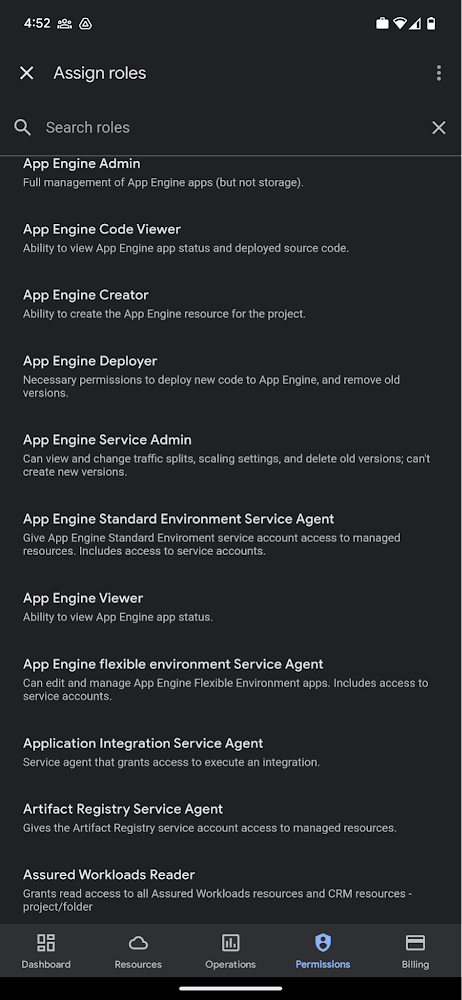
Administrators can also easily view a list of users, and click into each to see all the roles assigned to each user. On top of that, you can easily leverage the search capability to check if a role is assigned and modify its assignment. You can even assign multiple roles at the same time for easy editing. The app will show you a summary of changes before you will proceed.
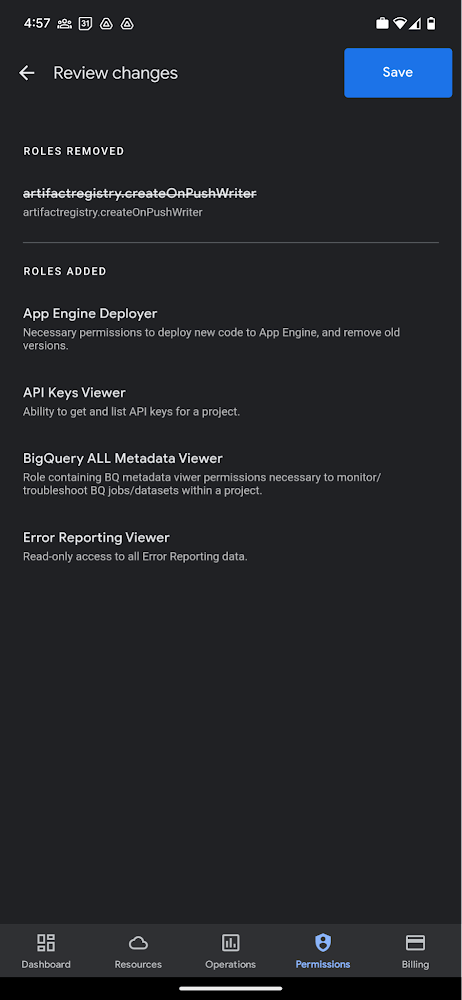
The layout is optimized for mobile, with the categories of information organized for easy viewing. Currently assigned roles are always displayed on the top of the screen so they are easily accessible. Basic roles appear below, followed by all other roles grouped by Google Cloud products.
Get started on the Google Cloud app today
To summarize we’ve enhanced permissions management on the Google Cloud mobile app with:
- Smoother navigation
- Support for all the roles in your organization
- Easy search for assigned roles
- Ability to review changes before applying
Give enhanced permission management a try and explore the possibilities by downloading the app today from Google Play or the Apple App Store. If you have any feedback, we would love to hear from you – simply click on the “send feedback” button in the app to share your experience.
How to Detect and Eliminate New Cloud Security Threats: Tips for Your Security Teams

4059
Of your peers have already read this article.
4:30 Minutes
The most insightful time you'll spend today!
Why do we keep talking about security all the time? Why hasn’t anyone just gone and fixed it?
You’ve probably heard these questions, whether from your leadership, or a board member or just from friends. Then you labor at explaining why security in the cloud is so complex and challenging, the constant arms race, and eventually, their eyes glaze over. But you’re right: It is complex, and it can be hard.
As a security leader today, you likely spend a lot of your time focused on getting information: what’s going on, what new vulnerability just surfaced, what threats are present in your environment, and how to remediate them. And you probably already have a few dozen tools in place to measure, analyze, collect, and search through your data.
Right now, with your set of existing tools, you hopefully have a good sense of your on-prem systems and your overall attack surface. But across all those datasets, you’re juggling incongruous access patterns, stale data, and cluttered information coming from disparate tools—it’s not organized by topic, risk, or project. So unifying and rectifying the data sources, to really give you a full picture, just doesn’t happen.
Then you add cloud systems to the mix, and it’s a whole ‘nother ball of wax. We wanted to detail a few security features we’ve developed—most recently Event Threat Detection, available today in beta—and highlight some information that can help you reduce the complexity of your organization’s security, and improve your security posture.
Gain visibility and control, and prevent threats
With Cloud Security Command Center (Cloud SCC), Google brings a flexible platform to give you wide visibility and rapid response capabilities. Beyond just risk and vulnerability management, Cloud SCC focuses on active defense, showing you threats that have been detected and the path to greater holistic security in your cloud resources.
It integrates with existing partner security solutions you already use and Google Cloud security tools. And its API is accessible to you and your vendors, so any additional data is easy to integrate.
The model above is a centralized dashboard for threat prevention, detection, and response, with views of your current state that you can change based on your needs. For example, you can focus on assets to get a comprehensive list of every firewall, network, disk, bucket, and so on in your organization.
You can also orient your view based on findings (results) of what’s wrong in your Google Cloud Platform (GCP) environment. We recently launched the Vulnerabilities dashboard to show findings from Security Health Analytics. It’s an integrated security product that helps you identify misconfigurations and compliance violations in your GCP resources and take action.
Reduce threat exposure with Event Threat Detection
Reducing your exposure to threats goes hand-in-hand with being able to respond quickly to those threats that are present in your environment. Today, we’re excited to announce the beta of Event Threat Detection, a security product that integrates into Cloud SCC, and was inspired by how Google protects itself. We wanted to extend our scale and threat intelligence to help you protect your environment and improve your security posture.
Event Threat Detection helps you detect threats in your logs and send high-risk threats to your SIEM (Security Information and Event Management system) for further investigation. It also can help you save time and money by focusing your attention on the most worrisome cloud-based threats.
Due to the growth in cloud computing, we’ve seen an increase in the number of customers running VPC Flow logs, Cloud DNS logs, Cloud Audit logs, and syslog delivered via the fluentd agent on GCP. Event Threat Detection uses Google’s threat intelligence to surface threats present in these logs, including anomalous IAM grants, malware, cryptomining, outgoing DDoS, and brute-force SSH.
When Event Threat Detection finds a threat in your logs, it shows up as a finding on the Cloud SCC dashboard. If you need to further analyze any of these threats, you can send them to your SIEM, saving time and money because Event Threat Detection has already determined the high-risk logs you need to investigate further.
Event Threat Detection integrates with Cloud Functions to make it easier for you to export findings to your SIEM of choice. You can also use Cloud Functions to automate responses and changes to Event Threat Detection findings. See the video below for more information.
Respond to threats
Once threats have been detected, the final step is, obviously, responding to them. To help speed up your response game, you can set up automated actions for when threats are detected. When Cloud SCC detects an anomaly, or an active threat, you can have it change a VM configuration, perhaps cutting the VM off from other parts of your network.
You can also change firewall rules automatically. Using these events to trigger Cloud Functions, you can set up any response you like, fully automated. At the same time, you can send incident metrics and data to Stackdriver or your own SIEM to make sure your incident response team has everything they need.
Together, these features give you the power to structure and organize the data you gather, which is key to making cloud security work for large, mature organizations. Cloud SCC lets you create tags for items to assist with incident response or project-based inquiry, and to aid in custom dashboard creation. The constant goal: give you the information you need quickly, so you can take the necessary action.
Cloud SCC details
Now that you have a high-level view of how Cloud SCC and Event Threat Detection can help your organization become more secure, here are some other resources highlighting Google security features that integrate into Cloud Security Command Center, how they work, and how they can help you improve your security posture:
- Find and fix misconfigurations in your Google Cloud resources with Security Health Analytics
- Stop data exfiltration with Cloud Data Loss Prevention
- Detect and remediate security anomalies with Cloud Anomaly Detection
- Catch web app vulnerabilities before they hit production with Cloud Web Security Scanner
These blogs feature step-by-step instructions with screenshots, and each has a companion video. Check them out, and let us know if there are any other issues and solutions you’d like us to detail.
Revamping Cloud Security: Google Introduces Attack Path Simulation to Security Command Center

1170
Of your peers have already read this article.
3:30 Minutes
The most insightful time you'll spend today!
To help secure increasingly complex and dynamic cloud environments, many security teams are turning to attack path analysis tools. These tools can enable them to better prioritize security findings and discover pathways that adversaries can exploit to access and compromise cloud assets such as virtual machines, databases, and storage buckets.
Other attack path tools rely on static, point-in-time snapshots of an organization’s cloud footprint, which often contain sensitive data about their environment, how it is configured, and where the most sensitive data resides.
At Google Cloud, we are taking a different approach. We are excited to announce today at the Google Cloud Security Summit that we are adding attack path simulation to Security Command Center, our built-in security and risk management solution for Google Cloud. This new risk management capability automatically analyzes a customer’s Google Cloud environment to pinpoint where and, importantly, how vulnerable resources may be attacked, so security teams can stay one step ahead of adversaries.
We expect attack path simulation capabilities to be available in Security Command Center Premium later this summer.
Unlike some third-party security products, Security Command Center continuously scans an organization’s cloud environment gathering near real-time data about cloud resources and security vulnerabilities. Our attack path simulation engine uses this information to automatically generate and render high-risk attack paths, without the hands-on toil of having to repeatedly run manual queries.
A different approach to attack path analysis
Other attack path analysis tools involve significant operational toil. The static, point-in-time snapshots that these tools generate have to be sent to an external provider, which can add risk. Then security teams have to follow up with complex queries before they can identify likely attack paths.
Google Cloud’s advanced attack simulation engine leverages our first-party, agentless visibility of Google Cloud assets, the relationships between assets, and the current state of defenses. Attack path simulation is fully automated with no need to manually run queries. Simulations run in the Google Cloud environment, and do not send snapshots outside your environment, avoiding exposure of sensitive information.
See what attackers can see
Effective attack path analysis should mimic how a real-world attacker can reach and compromise high value resources. This is why Security Command Center simulates how attackers try many different ways to infiltrate a cloud environment. SCC then generates attack path graphs to give defenders insight into how adversaries could exploit a single security weakness or various combinations of security vulnerabilities to access valuable assets. SCC also provides detailed information on how to remediate issues and shore up defenses based on its findings
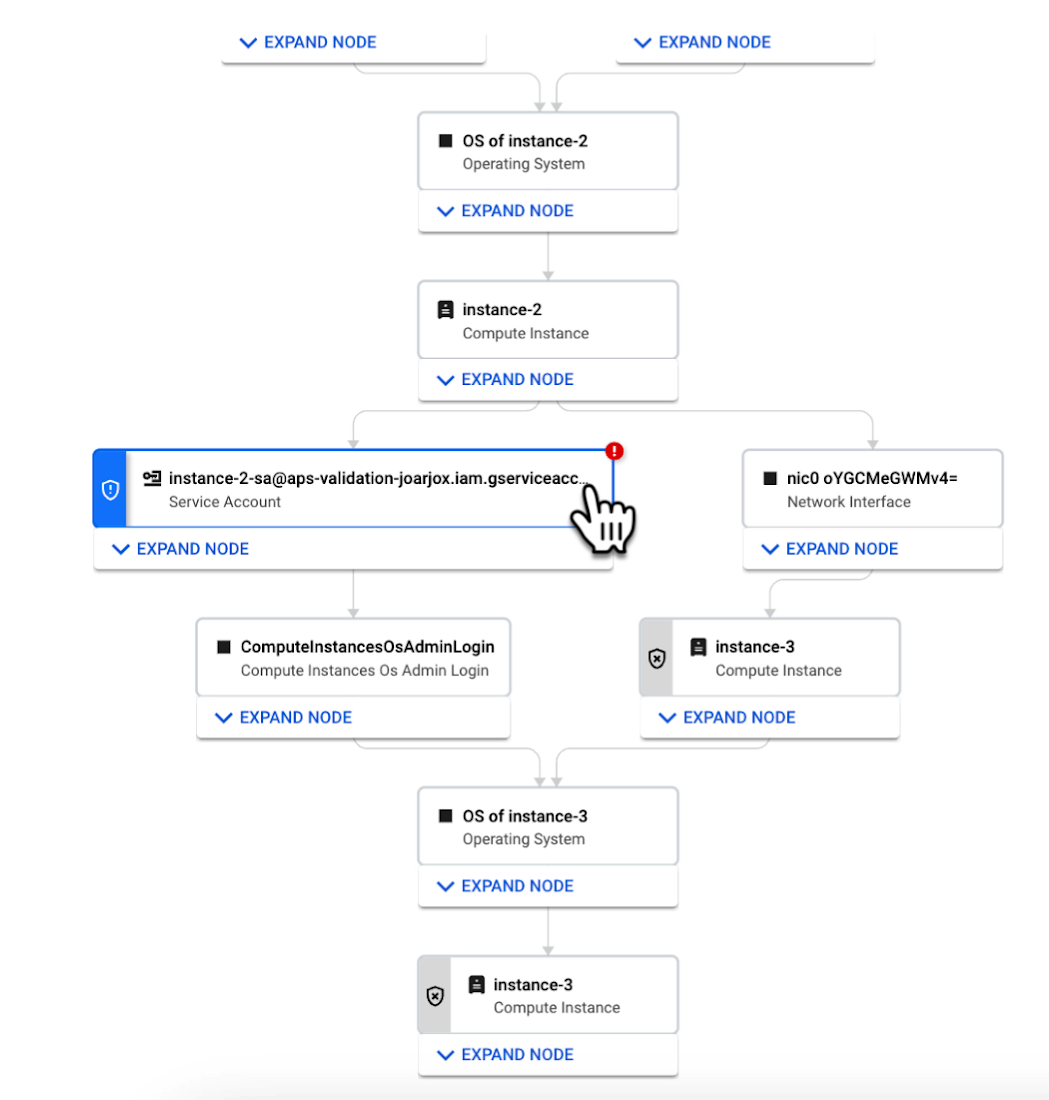
We are delivering combined attack path simulation and analysis as a managed service. There are no agents to install or manage. Results automatically reflect changes in your organization’s Google Cloud environment. Because our attack path simulations are conducted on models of an organization’s cloud resources, there is no performance or operational impact to the live production environment.
Better security prioritization
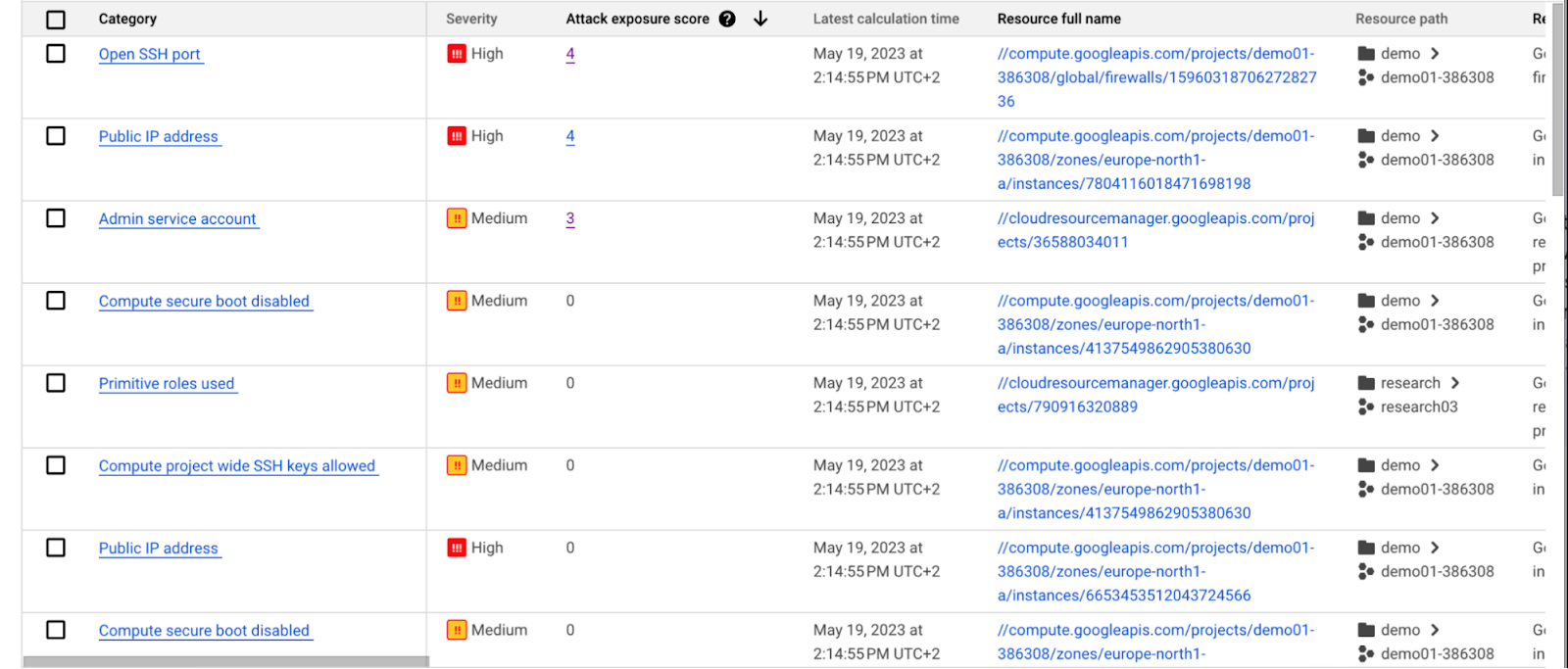
Security Command Center automatically computes an attack exposure score for misconfigurations and vulnerabilities that expose valuable resources to attackers. The score is a measure of cyber risk. It takes into account how exposed valued resources are, and the paths of least resistance for attackers to reach those resources.
Security teams can use these scores to prioritize remediation efforts and improve their overall risk posture.
How attack path analysis has already reduced risk for customers
Dozens of customers have already used our attack path capabilities in private Preview to improve their security posture and reduce their operational risk.
Security Command Center alerted one customer to a finding with a high attack exposure score. The finding was related to a service account whose keys were not being rotated. After reviewing the attack paths related to this finding, the cloud security manager discovered that even though the service account was named “test,” it provided access to storage buckets outside of the test environment.
If an attacker had been able to steal the credentials for this test account, they could have easily accessed production data. The security manager removed administrator privileges on the account. The attack path simulation enhanced their understanding of the severity of the finding, and helped convince them to make it a high-priority fix.
Another customer using attack path simulation needed to assess which security findings created the greatest risk. Two findings related to the same service account with high exposure scores rose to the top of the list. The attack paths revealed that the service account had access to more than 500 storage buckets. If an attacker were to gain access to this account they would be able to read, write, or delete data across any of those buckets, many of which contained sensitive business data and confidential customer information.
Using Security Command Center’s attack path results, the security team remediated the risk by limiting permissions to the storage buckets needed for that specific role.
Next steps
Attack path simulation capabilities are planned for availability later this summer. We expect forthcoming enhancements to use Security AI Workbench to translate complex attack graphs to human-readable explanations of attack exposure, including impacted assets and recommended mitigations.
You can learn more about Nordnet Bank’s experience using attack path simulation at our Security Summit session. To get started with Security Command Center today, please go to the Google Cloud console.
Cloud Bigtable Helps Fraud-detection Company Meet Scalability Demands and Secure Customer Data

7129
Of your peers have already read this article.
3:00 Minutes
The most insightful time you'll spend today!
Editor’s note: Today we are hearing from Jono MacDougall , Principal Software Engineer at Ravelin. Ravelin delivers market-leading online fraud detection and payment acceptance solutions for online retailers. To help us meet the scaling, throughput, and latency demands of our growing roster of large-scale clients, we migrated to Google Cloud and its suite of managed services, including Cloud Bigtable, the scalable NoSQL database for large workloads.
As a fraud detection company for online retailers, each new client brings new data that must be kept in a secure manner and new financial transactions to analyze. This means our data infrastructure must be highly scalable and constantly maintain low latency. Our goal is to bring these new organizations on quickly without interrupting their business. We help our clients with checkout flows, so we need latencies that won’t interrupt that process—a critical concern in the booming online retail sector.
We like Cloud Bigtable because it can quickly and securely ingest and process a high volume of data. Our software accesses data in Bigtable every time it makes a fraud decision. When a client’s customer places an order, we need to process their full history and as much data as possible about that customer in order to detect fraud, all while keeping their data secure. Bigtable excels at accessing and processing that data in a short time window. With a customer key, we can quickly access data, bring it into our feature extraction process, and generate features for our models and rules. The data stays encrypted at rest in Bigtable, which keeps us and our customers safe.
Bigtable also lets us present customer profiles in our dashboard to our client, so that if we make a fraud decision, our clients can confirm the fraud using the same data source we use.

We have configured our bigtable clusters to only be accessible within our private network and have restricted our pods access to it using targeted service accounts. This way the majority of our code does not have access to bigtable and only the bits that do the reading and writing have those privileges.
We also use Bigtable for debugging, logging, and tracing, because we have spare capacity and it’s a fast, convenient location.
We conduct load testings against Bigtable. We started at a low rate of ~10 Bigtable requests per second and we peaked at ~167000 mixed read and write requests per second at absolute peak. The only intervention that was done to achieve this was pressing a single button to increase the number of nodes in the database. No other changes were made.
In terms of real traffic to our production system, we have seen ~22,000 req/s (combined read/write) on Bigtable in our live environment as a peak within the last 6 weeks.
Migrating seamlessly to Google Cloud
Like many startups, we started with Postgres, since it was easy and it was what we knew, but we quickly realized that scaling would be a challenge, and we didn’t want to manage enormous Postgres instances. We looked for a kind of key value store, because we weren’t doing crazy JOINS or complex WHERE clauses. We wanted to provide a customer ID and get everything we knew about it, and that’s where key value really shines.
I used Cassandra at a previous company, but we had to hire several people just for that chore. At Ravelin we wanted to move to managed services and save ourselves that headache. We were already heavy users and fans of BigQuery, Google Cloud’s serverless, scalable data warehouse, and we also wanted to start using Kubernetes. This was five years ago, and though quite a few providers offer Kubernetes services now, we still see Google Cloud at the top of that stack with Google Kubernetes Engine (GKE). We also like Bigtable’s versioning capability that helped with a use case involving upserts. All of these features helped us choose Bigtable.
Migrations can be intimidating, especially in retail where downtime isn’t an option. We were migrating not just from Postgres to Bigtable, but also from AWS to Google Cloud. To prepare, we ran in AWS like always, but at the same time we set up a queue at our API level to mirror every request over to Google Cloud. We looked at those requests to see if any were failing, and confirmed if the results and response times were the same as in AWS. We did that for a month, fine tuning along the way.
Then we took the big step and flipped a config flag and it was 100% over to Google Cloud. At the exact same time, we flipped the queue over to AWS so that we could still send traffic into our legacy environment. That way, if anything went wrong, we could fail back without missing data. We ran like that for about a month, and we never had to fail back. In the end, we pulled off a seamless, issue-free online migration to Google Cloud.
Flexing Bigtable’s features
For our database structure, we originally had everything spread across rows, and we’d use a hash of a customer ID as a prefix. Then we could scan each record of history, such as orders or transactions. But eventually we got customers that were too big, where the scanning wasn’t fast enough. So we switched and put all of the customer data into one row and the history into columns. Then each cell was a different record, order, payment method, or transaction. Now, we can quickly look up the one row and get all the necessary details of that customer. Some of our clients send us test customers who place an order, say, every minute, and that quickly becomes problematic if you want to pull out enormous amounts of data without any limits on your row size. The garbage collection feature makes it easy to clean up big customers.
We also use Bigtable replication to increase reliability, atomicity, and consistency. We need strong consistency guarantees within the context of a single request to our API since we make multiple bigtable requests within that scope. So within a request we always hit the same replica of Bigtable and if we have a failure, we retry the whole request. That allows us to make use of the replica and some of the consistency guarantees, a nice little trade-off where we can choose where we want our consistency to live.https://www.youtube.com/embed/0-eH5u7rrQQ?enablejsapi=1&
We also use BigQuery with Bigtable for training on customer records or queries with complicated WHERE clauses. We put the data in Bigtable, and also asynchronously in BigQuery using streaming inserts, which allows our data scientists to query it in every way you can imagine, build models, and investigate patterns and not worry about query engine limitations. Since our Bigtable production cluster is completely separate, doing a query on BigQuery has no impact on our response times. When we were on Postgres many years ago, it was used for both analysis and real time traffic and it was not the optimal solution for us. We also use Elasticsearch for powering text searches for our dashboard.
If you’re using Bigtable, we recommend three features:
- Key visualizer. If we get latency or errors coming back from Bigtable, we look at the key visualizer first. We may have a hotkey or a wide row, and the visualizer will alert us and provide the exact key range where the key lives, or the row in question. Then we can go in and fix it at that level. It’s useful to know how your data is hitting Bigtable and if you’re using any anti-patterns or if your clients have changed their traffic pattern that exacerbated some issue.
- Garbage collection. We can prevent big row issues by putting size limits in place with the garbage collection policies.
- Cell versioning. Bigtable has a 3d array, with rows, columns, and cells, which are all the different versions. You can make use of the versioning to get history of a particular value or to build a time series within one row. Getting a single row is very fast in Bigtable so as long as you can keep the data volume in check for that row, making use of cell versions is a very powerful and fast option. There are patterns in the docs that are quite useful and not immediately obvious. For example, one trick is to reverse your timestamps (MAXINT64 – now) so instead of the latest version, you can get the oldest version effectively reversing the cell version sorting if you need it.
Google Cloud and Bigtable help us meet the low-latency demands of the growing online retail sector, with speed and easy integration with other Google Cloud services like BigQuery. With their managed services, we freed up time to focus on innovations and meet the needs of bigger and bigger customers.
Learn more about Ravelin and Bigtable, and check out our recent blog, How BIG is Cloud Bigtable?
5241
Of your peers have already watched this video.
17:00 Minutes
The most insightful time you'll spend today!
AppSheet: Reduce Shadow IT and Accelerate Development of Enterprise-grade Apps
Google Cloud findings suggest that nearly 40 percent of organizations’ investments are consumed by shadow IT and can be a detractor to the adoption of cutting-edge tools and solutions. Also, about 51 percent of the surveyed executives are of the opinion that the inability to adapt to digital transformation trends and practices are at the risk of going out of business in the next 3-4 years. However, enterprises need not be blindsided by the mounting expenses involved with the implementation and optimization of solutions and tools meant for empowering employees. AppSheet, Google Cloud’s no-code application development and automation platform is at the helm of empowering organizations to custom build apps for employees without relying on third-party services.
Watch the video from the Google Workspace sessions of Next ’21 to hear experts’ insights on AppSheet to effectively govern workforce and ward off security threats to helps employees build enterprise-grade applications!
Google Maps Platform Can Elevate FinTech Experience with Less Risks and Higher Security

4746
Of your peers have already read this article.
3:00 Minutes
The most insightful time you'll spend today!
The financial services industry is changing—an estimated $68 trillion in wealth transferring from baby boomers to millennials.1 This means financial service providers will have to deliver the speed, ease-of-use, technological sophistication, and tailored services that millennials have come to expect. In fact, half of all millennials are willing to switch to a competing institution if it offers a better digital experience.2 This and many other trends are driving unprecedented growth for mobile Fintech experiences in banking, digital payments, financial management and insurance.3
Google Maps Platform financial services solutions
To help you respond to customer’s changing demands, we’re launching financial services solutions that can help you improve your customer experience, security and operations. We’ve outlined the technical guidance and APIs you need to build out three financial services solutions: Enriched Transactions, Quick and Verified Sign-up, and Branch and ATM Locator Plus. We’ve also highlighted two use cases that customers are using our APIs to solve: Contextual Experiences and Fraud Detection.
Clarify financial statements with Enriched Transactions solution
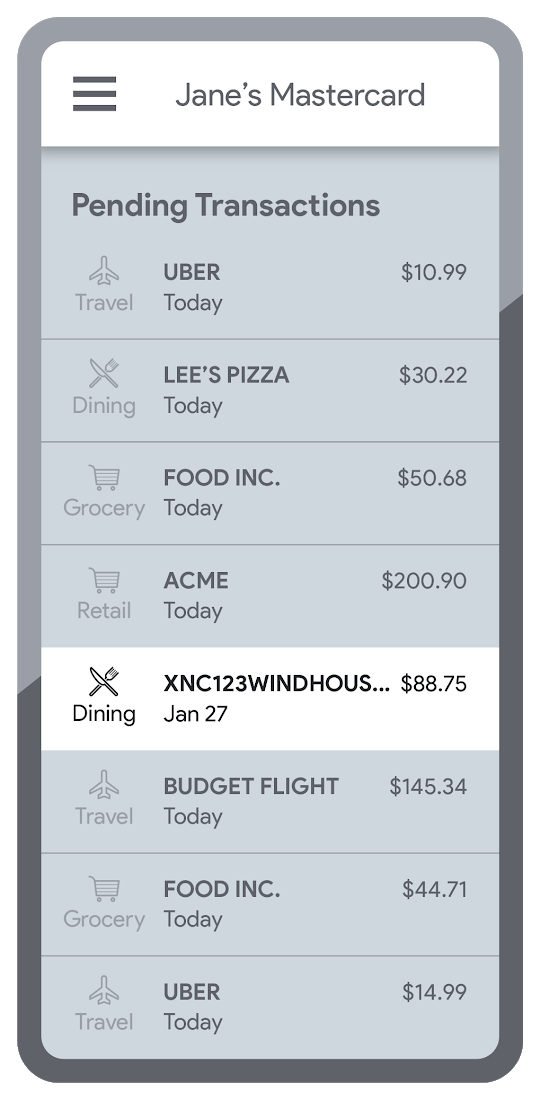
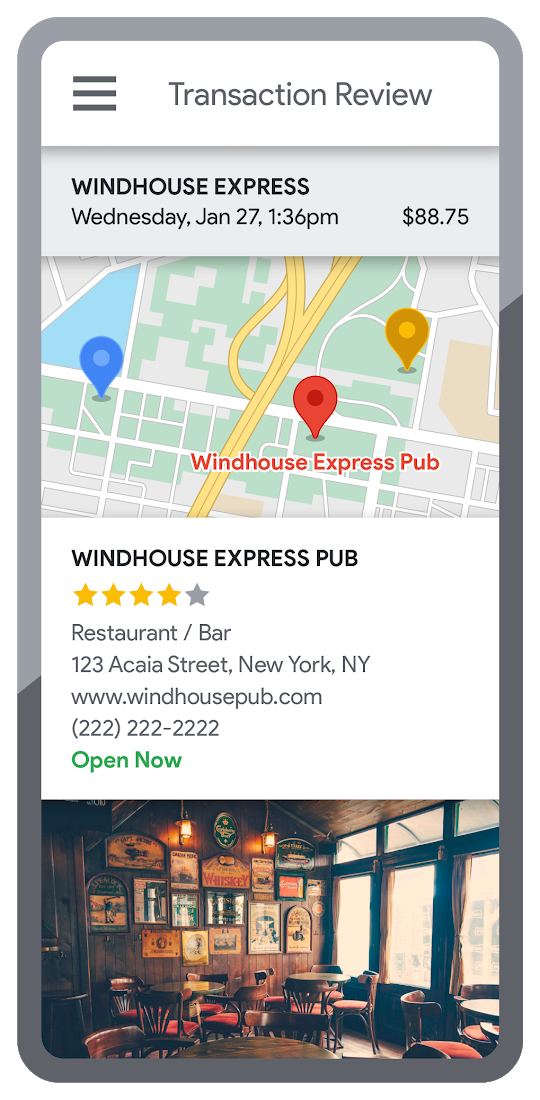
Transaction statements are often hard for customers to understand, using abbreviations like “ACMEHCORP” instead of customer-facing names like “Acme Houseware”. Our Enriched Transactions solution clarifies these transactions and makes them instantly recognizable by adding the merchant name and business category, a photo of the storefront, its location on a map, and full contact info. Making transactions easier to recognize not only boosts consumer confidence, with reported increases in NPS of 15% or higher, but decreases costly support calls by approximately 67%.4
In addition, you can help customers easily visualize a series of transactions by adding the merchant name to the transaction amount and date, and displaying their transactions on a Google map. This enables you to give customers insights about where and how they spend money. See the guide to implement Enriched Transactions today.
Enable faster sign-up with Quick and Verified Sign-up solution
Manually entered addresses can lead to lowered conversions, erroneous customer data, and costly delivery mistakes. Our Quick and Verified Sign-up solution makes sign-up faster, suggesting nearby addresses with just a few thumb taps—cutting sign-up time by up to 64% and increasing conversion rates by up to 15%.5
The solution also provides one additional level of address verification that helps reduce the risk of fraudulent account sign-ups—and companies have decreased fraudulent account setups by approximately 30% through using geospatial data to verify customer identities.4 See the Quick and Verified Sign-up solution guide to get started today.
- Faster sign-ups 1An application form requires an address
- Faster sign-ups 2Autocomplete quickly suggests addresses
- Faster sign-ups 3Select the address with visual confirmation
- Faster sign-ups 4Address verification options are presented
- Faster sign-ups 5Location permission is granted by the user
- Faster sign-ups 6The address is verified
Help customers visit you with Branch and ATM Locator Plus solution
74% of customers now search for specific details prior to their visit, which makes detailed, accurate profiles for each location a must.5 Our Branch and ATM Locator Plus solution enhances your own websites and apps with the same information shown about your branches and ATMs on Google Maps. Include hours of operation, available services, user reviews, photos of the location, driving directions and more.
Financial services companies using geospatial data to provide additional information (e.g. opening hours, available services, etc.) on branch and ATM services have seen a 14% increase in Net Promoter Score (NPS), and a 7% decrease in customer support calls.4 Implement Branch and ATM Locator Plus today using the guide or build it in minutes with Quick Builder.
- ATM locator 1Customers can enable location permissions, or enter their address
- ATM locator 2Quickly enter the address with Autocomplete
- ATM locator 3Nearby location listings, ranked by distance and ETA
- ATM locator 4Map view and directions
Enable offers and rewards with Contextual Experiences
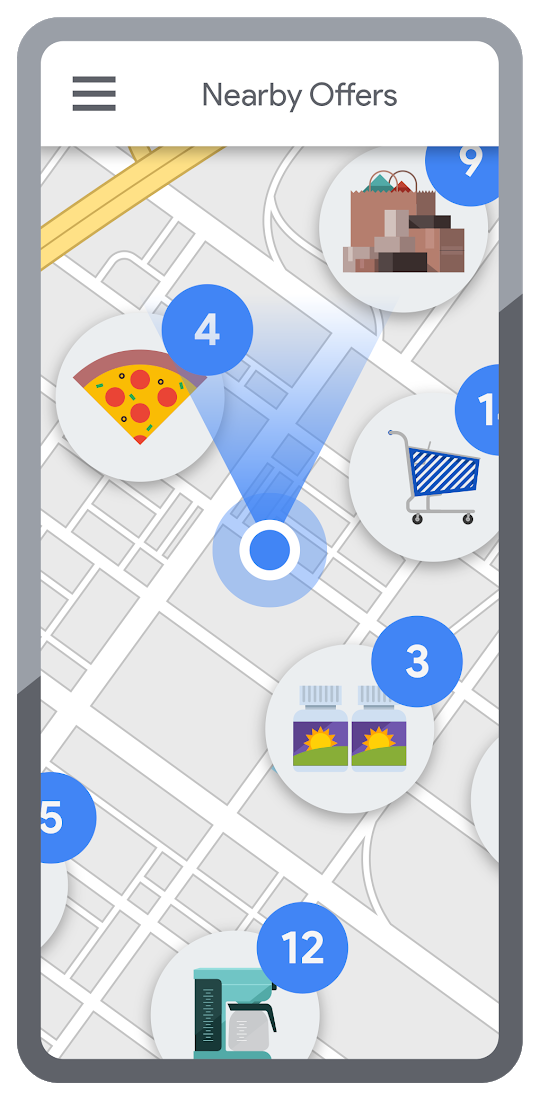
Real-time, geo-targeted offers can power deals, rewards, and cash-back programs—all visualized with rich Google Maps. By combining the insights of purchase histories with customer opt-in to location-based features, companies can implement the Contextual Experiences use case to enable personalized offers and rewards programs that drive engagement with brands while putting money in customers’ pockets at the same time.This is a win for banks and their customers, validated by encouraging metrics like NPS rating boosts of 8% or higher, and an increase of 8% or more time spent in-app.4 Learn how Current uses Google Maps Platform to create innovative customer rewards programs with location intelligence.

Detect suspicious transactions with Fraud Detection
With the Fraud Detection use case, companies can use customer opted-in mobile device location to flag suspicious activity based on geographic distance, such as an ATM withdrawal that is far from the customer’s phone. Our APIs can also help companies recognize suspicious transaction patterns such as a purchase made at a location that is physically distant from a recent transaction.
Financial services companies that use geospatial data to verify customers’ identities have reduced fraudulent transactions by approximately 70%, and false positives in fraud detection by 45%, on average.4 Learn how Starling Bank uses Google Maps Platform to enable real-time notification of transactions and their locations, and enhance data-driven decision-making.
Start elevating customer experiences, reducing risk and increasing efficiency today with our financial services offerings. Visit our financial services solutions page to learn more about how to start implementing these solutions.
For more information on Google Maps Platform, visit our website.
More Relevant Stories for Your Company

Protect Corporate Apps with BeyondCorp Enterprise
As part of our efforts to democratize Zero Trust, Google Cloud has designed our BeyondCorp Enterprise solution to be an extensible platform where customers can choose to integrate signals from other technology vendors and incorporate these into their Zero Trust access policies. Following our integrations announcements earlier this year, we

Announcing New, Faster Search and Investigative Experience in Chronicle Security Operations
In cybersecurity, speed matters. Whether a security analyst is trying to understand the details of an alert that was triggered by an indicator of compromise (IoC), or find additional context for a suspicious asset, speed is often the critical factor that will help thwart a cyberattack before threat actors are

Confidential Computing: Google Cloud Security, Project Zero and AMD Come Together to Secure Sensitive Workloads
At Google Cloud, we believe that the protection of our customers’ sensitive data is paramount, and encryption is a powerful mechanism to help achieve this goal. For years, we have supported encryption in transit when our customers ingest their data to bring it to the cloud. We’ve also long supported

Google Products Helps HMH’s Healthcare Staff Work from Anywhere Efficiently and Securely!
Hackensack Meridian Health (HMH) executive Mark Eimer explains how an ambitiously-timed rollout of a comprehensive suite of Google products helped the entire organization—from doctors to IT staff—achieve better security, cultivate a more equitable work environment, and ultimately, improve patient outcomes. How does a recently merged, 17-hospital healthcare system fast-track a platform migration
