





Google Products Helps HMH’s Healthcare Staff Work from Anywhere Efficiently and Securely!

10260
Of your peers have already read this article.
3:00 Minutes
The most insightful time you'll spend today!
Hackensack Meridian Health (HMH) executive Mark Eimer explains how an ambitiously-timed rollout of a comprehensive suite of Google products helped the entire organization—from doctors to IT staff—achieve better security, cultivate a more equitable work environment, and ultimately, improve patient outcomes.
How does a recently merged, 17-hospital healthcare system fast-track a platform migration and hardware rollout securely and in a way that improves work for everyone, regardless of location or role? These are the questions that kept me up at night in early 2020, when the pandemic demanded a “big bang”—something our legacy laptops and operating systems couldn’t handle.
We began our work with Google in 2020 with the adoption of Chrome as our default browser. As we migrated platforms, keeping patient data safe was of the utmost importance to us, along with providing every staff member with the tools they needed to work virtually. Our staff often experienced issues accessing our web-based applications using Internet Explorer or Edge Browser, a problem that went away when we switched to Chrome. Chrome’s versatile compatibility also made it easier for my team to migrate all of our web-based operations, and Chrome’s security and manageability were key components to making this switch a huge win for the organization.
The success of this migration led us to extend our Google partnership to patient care applications—where Google’s expertise in AI and ML helps scale the use of diagnostics tools and improve other aspects of the patient journey.

Achieving security at every step
Like so many other healthcare organizations, we’ve been concerned about ransomware attacks. This is part of why we moved to Google Workspace and distributed over 3,000 Chrome OS devices in kiosk mode in March of 2020, when many of us went remote due to the pandemic. We were very concerned about team members accessing corporate applications through home devices that were running EOL operating systems (WIN7), as well as a general lack of antivirus and encryption measures.
We were protected by the fact that Google’s software and hardware both had built-in security features that we needed to stave off sophisticated attackers. For example, Chrome OS automatically updates to the latest security update and encrypts data living outside the cloud on the hardware. These features protected us from security-related disruptions, letting us securely move a huge library of file shares and emails across thousands of accounts to Google Chrome OS in just four months.
A year later, in March 2021, we migrated the enterprise over to Google Workspace and saw an immediate reduction in spam by 30% from the inherent built-in AI/ML. This meant staff were less likely to receive (and click through) phishing attempts. My team could connect, create, and collaborate easily and securely—even as more of us were working from home and needed to access sensitive data remotely.
Leveling the playing field
As an organization, we were surprised by how many team members didn’t have personal computers at home. We quickly decided that if we needed team members to work from home, the health network would have to supply hardware. Chromebooks’ lower price tag compared to PCs—on top of their built-in security controls—allowed us to purchase, deploy, and support that initial distribution of 3,000 Chromebooks to team members in less than three weeks, providing devices to every eligible remote employee instead of just a select few. This was vital to reaching our equitable technology goal as part of our diversity and inclusion initiative: everybody has the same tools to do good work.
When all employees have what they need to do their jobs well, we get better patient outcomes. Before we began this cloud adoption journey, patient and staff experiences were different within the hospitals and outside of them.
Now it’s the same wherever our staff is, and we’ve seen efficiency and accessibility benefits extend to the patient side. For example, we built a web-based contact center that supports 80 locations that use Workspace and Chrome OS devices. Since customer service, admin, and providers are all on the same system, it has become a one-stop shop for patients.
Furthermore, through the Grow with Google program, we were able to provide another benefit to employees that drove our equity goals. Google trained 50 non-IT staff members—from environmental services, food and nutrition, and other non-tech areas who were interested in making a career change to IT—on the Google products we were using. They may not have thought about switching to a career in IT before the Grow with Google program came to our organization, but through this partnership, they now have that opportunity.
A strategic, long-term partner
With any large-scale rollout, the work doesn’t end once laptops are in employee hands. Google has shown their commitment to long-term collaboration as they continuously optimize their products for the unique needs of healthcare providers and go the extra mile in tailoring tools to our staff’s workflows.
For example, on the Chrome OS side, the Google team has helped our registration desks and document centers with device integration for hardware like credit card readers and e-signature pads. They’ve also helped us meet security and privacy requirements mandated by state and federal governments around HIPAA, Medicaid, and Medicare reimbursements. Over this next year, we’ll look at a feature roadmap with Google Cloud to deliver further enhancements, iterating on the product itself to meet our needs for the present and the future.

Delivering the future of healthcare
The benefits we’ve seen around security and usability—and the ability to provide all staff with equal access to Google’s technology—are why we’re expanding our partnership with Google to both the administrative and clinical sides of HMH. In addition to further Google rollouts with corporate, next year we’re distributing Chromebooks to all 350 of our ambulatory clinics.
We’re also working with the Google professional services team to create a custom AI model that analyzes 3D mammogram images. This AI model will enable two providers to read mammograms—which adheres to international best practices but is currently rare in the US—without requiring additional time. Conducting double readings of mammograms will yield better health outcomes for our patients, such as a lower patient recall rate and an increased accuracy in detecting breast cancer.
We’re currently building the model using a variety of Google Cloud products, including Cloud Healthcare API. Once complete, this model is expected to be trained, deployed, and maintained in Google’s Vertex AI, allowing our providers to be more productive as they make clinical decisions with AI support. As the model is proven over time, we plan to make the predictive services accessible to other healthcare organizations.
With Google, we’re able to achieve a unified architecture for storing data as well as training and deploying AI models, which enable our staff to work more efficiently and securely from anywhere. While I may not be able to predict the future as accurately as AI can, I foresee our continued partnership with Google as a key part of HMH’s improved provider and patient outcomes.
4895
Of your peers have already watched this video.
1:30 Minutes
The most insightful time you'll spend today!
How does Google Pick its Data Center ?
Google is well known for its sustainable tech and hardware initiatives. Did you know alongside its environmental friendly designs of its data centers, it takes into account various factors such as redundant power supplies, data replication, network connectivity, etc. Watch the video to learn more.
Introducing IAM Deny: Harden Your Security Posture at Scale the Easy Way

2645
Of your peers have already read this article.
1:30 Minutes
The most insightful time you'll spend today!
At Google Cloud, we’re focused on making it easy for organizations to build solutions quickly and securely. Identity and Access Management (IAM) is the core security control for establishing who has access to which cloud resources and making sure access permissions are aligned to your company’s business and security policies.
We are excited to announce the general availability of IAM Deny policies. This new capability helps you easily create access guardrails for Google Cloud resources. With IAM Deny policies, you can create rules that broadly restrict resource access. It provides a powerful, coarse-grained access control to help implement security policies at scale.
Control with IAM Policy – Allow and Deny
IAM Deny policies complement IAM Allow policies as you define access to your resources. Google Cloud’s IAM Allow policy lets you grant granular access to Google Cloud resources. The more coarse-grained Deny policies let you explicitly prohibit access to certain resources regardless of existing Allow rules. IAM Deny policies always supersede IAM Allow policies and override conflicting IAM Allow rules.
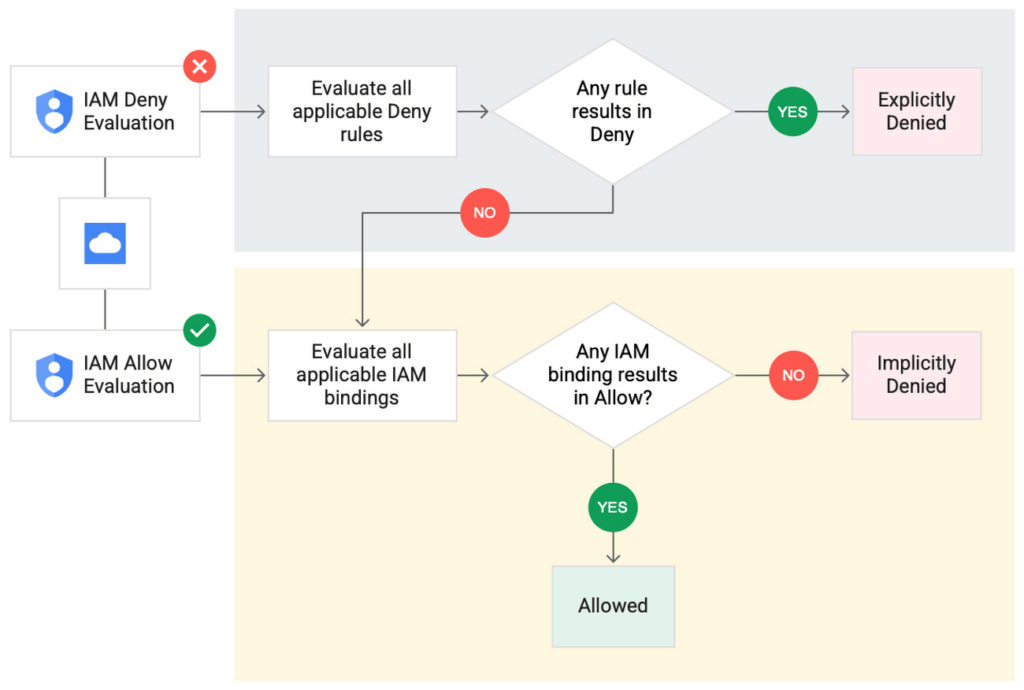
IAM Deny policies can be applied across many Google Cloud resources, such as Compute Engine, Cloud Storage, and Google Cloud Kubernetes Engine. These policies can help reduce toil on administrators as they can set up deny rules that will be enforced at scale without requiring reviews and changes of existing access rules. This makes resource governance simpler.
How to strengthen your security posture with IAM Deny
There are multiple use cases where IAM Deny policies can be used to help strengthen posture. Some of these are:
- Establish a default security baseline: IAM Deny can be used to set base policies at the organization level, folder level, and project level to deny access to resources. For example, you can attach a deny policy at the organization level to deny all users access to sensitive data storage buckets, making an exception for a specific user group.
- Prevent backdoors: IAM Deny rules override any IAM Allow rules. This can help you ensure that no “backdoor” access can be granted. For example, an organization that wants to ensure only central-admin can create projects in a folder can add an IAM Deny policy that restricts all users from creating projects except central-admin. This can help ensure no backdoor users will be added using allow policy rules.
- Prevent data exfiltration: Controlling access to data is a key measure to prevent exfiltration. For example, an organization that wants to restrict access to their personally identifiable information (PII) can set an IAM Deny policy on resources containing PII that denies access to all users except those in a group called PII-admin.
- Demonstrate compliance: Many industry regulations and compliance frameworks require organizations to demonstrate least-privilege access to sensitive resources. IAM Deny policies can create a baseline access restriction that always takes precedence when applied to resources.
Simplify IAM administration
IAM Deny can also help simplify common administrative tasks. It provides a list of permissions for Google Cloud services that you can readily use in your deny policies. Here are a few common situations where you can use IAM Deny to help streamline your access management.
- Centralize administrative privileges: You can use deny policies to restrict certain types of administrative activities to specific users or user groups. For example, if you want to limit custom role management to a single central team, you can create a deny rule that denies the permissions required for custom role management to all users, except users in the central-admin group. This will only let members of the central-admin group manage custom roles, even if other users have the required permissions.
- Create exceptions to access grants: You can use deny policies to deny inherited permissions. For example, you can grant a role at a high level in the resource hierarchy, and then deny the role’s permissions on individual lower-level resources if necessary.
- Block access based on tags: Google Cloud supports key-value based tags and you can use deny policies to deny permissions based on tags without adding an IAM Condition to every role grant. For example, you can create a rule to deny delete permissions for resources tagged as “production” for everyone except project-admins.
IAM Deny in action
The following example illustrates how a deny policy can be used to block all users from deleting projects unless the user is a member of a project-admins group or the project being deleted is tagged as a “test” project. Without a deny policy, you would have to manually track all members who have the permission to delete projects, and ensure that no undesired user has access to this permission. The deny policy makes it easy for the administrator to build this guardrail.
The below deny rule denies permission to everyone except project-admins@example.com for projects not tagged as test. Add this deny rule to a deny policy and attach the policy at the org level. That’s it!
(Note that project-admins@example.com is a security group. Using security groups is a best practice that should be followed to help keep your resources secure.)
{
"name": "policies/cloudresourcemanager.googleapis.com%2Fprojects%2F253519172624/denypolicies/limit-project-deletion",
"uid": "06ccd2eb-d2a5-5dd1-a746-eaf4c6g3f816",
"kind": "DenyPolicy",
"displayName": "Only project admins can delete projects.",
"etag": "MTc1MTkzMjY0MjUyMTExODMxMDQ=",
"createTime": "2021-09-07T23:15:35.258319Z",
"updateTime": "2021-09-07T23:15:35.258319Z",
"rules": [
{
"denyRule": {
"deniedPrincipals": [
"principalSet://goog/public:all"
],
"exceptionPrincipals": [
"principalSet://goog/group/project-admins@example.com"
],
"deniedPermissions": [
"cloudresourcemanager.googleapis.com/projects.delete"
],
"denialCondition": {
"title": "Only for non-test projects",
"expression": "!resource.matchTag('12345678/env', 'test')"
}
}
}
]
}
Getting started with IAM Deny Policies
With IAM Deny, you now have a powerful new capability to build security guardrails and more effectively control access to your Google Cloud resources. IAM Deny is now generally available for all customers through gCloud and APIs. We offer IAM Deny to Google Cloud customers at no additional cost. You can learn more about IAM Deny by visiting our documentation page.
Google Cloud’s Metric Scope Makes Multi-project Monitoring Simple

4764
Of your peers have already read this article.
2:00 Minutes
The most insightful time you'll spend today!
Customers need scale and flexibility from their cloud and this extends into supporting services such as monitoring and logging. Google Cloud’s Monitoring and Logging observability services are built on the same platforms used by all of Google that handle over 16 million metrics queries per second, 2.5 exabytes of logs per month, and over 14 quadrillion metric points on disk, as of 2020. However, you let us know through consistent feedback that the previous construct of Workspaces for Cloud Monitoring was not providing the flexibility needed for your larger scale projects.
Cloud Operation’s New Approach to Multi-Project Monitoring
We’re happy to announce a new model for multi-project monitoring, which replaces the concept of Workspaces. This overhaul is geared toward maximizing the flexibility you have to manage your monitoring environments by introducing Metrics Scopes. Starting today you can associate your Google Cloud projects with multiple Metrics Scopes! Like Workspaces, Metrics Scopes will still be used to store all of the configuration content for dashboards, alerting policies, uptime checks, notification channels, and group definitions. However there is no limit to the number of Metrics Scopes to which you can associate a project. Prior to this change, a project could only be scoped with a single Workspace. Now, there are virtually unlimited possibilities for how you can set up multi-project monitoring. This unlocks a large variety of options, from more granular permissions to mission-focused configurations. At its most simple implementation though: operators/SREs can now create org-wide Metrics Scopes with monitoring configurations focused on infrastructure health. And developers can leverage Metrics Scopes built on a subset of their organization’s projects that allow them to focus on their application’s performance.
How it works
- When you have a collection of projects, Metrics Scopes enable you to view each project’s metrics in isolation as well as in combination with metrics stored by other projects.
- The Metrics Scope is hosted by a scoping project. This scoping project is the Cloud project that is selected in the Cloud Console project picker.
Example
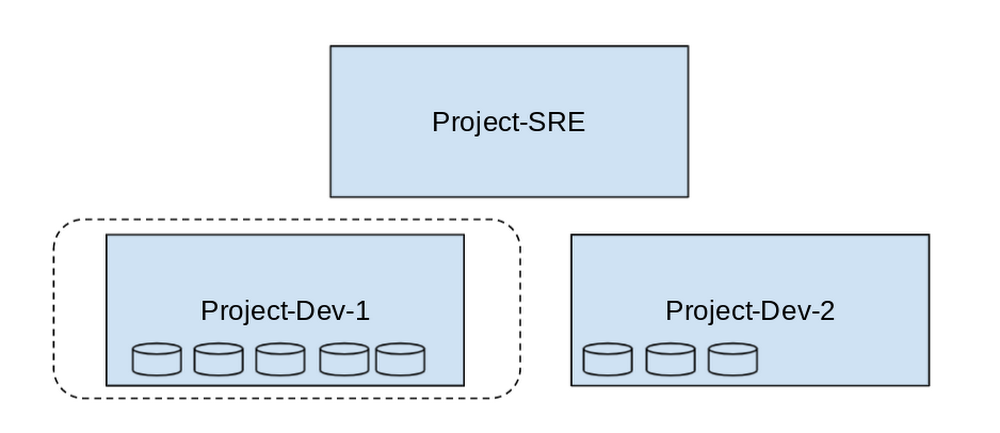
- In this example, Project-SRE is the name of a scoping project to monitor your fleet. You added two developer teams’ projects: Project-Dev-1 and Project-Dev-2, to Project-SRE’s Metrics Scope. If you select Project-SRE with the Cloud Console project picker and then go to the Monitoring page, you view the metrics for all three projects:

- If you select Project-Dev-1 with the Cloud Console project picker and then go to the Monitoring page, you view the Metrics Scope for Project-Dev-1 and you can only see the metrics for that project:
What else is new?
- Metrics Scopes can now monitor up to 375 projects (up from 100).
- New projects automatically start working in Cloud Monitoring without the previous 60-second Workspace creation process.
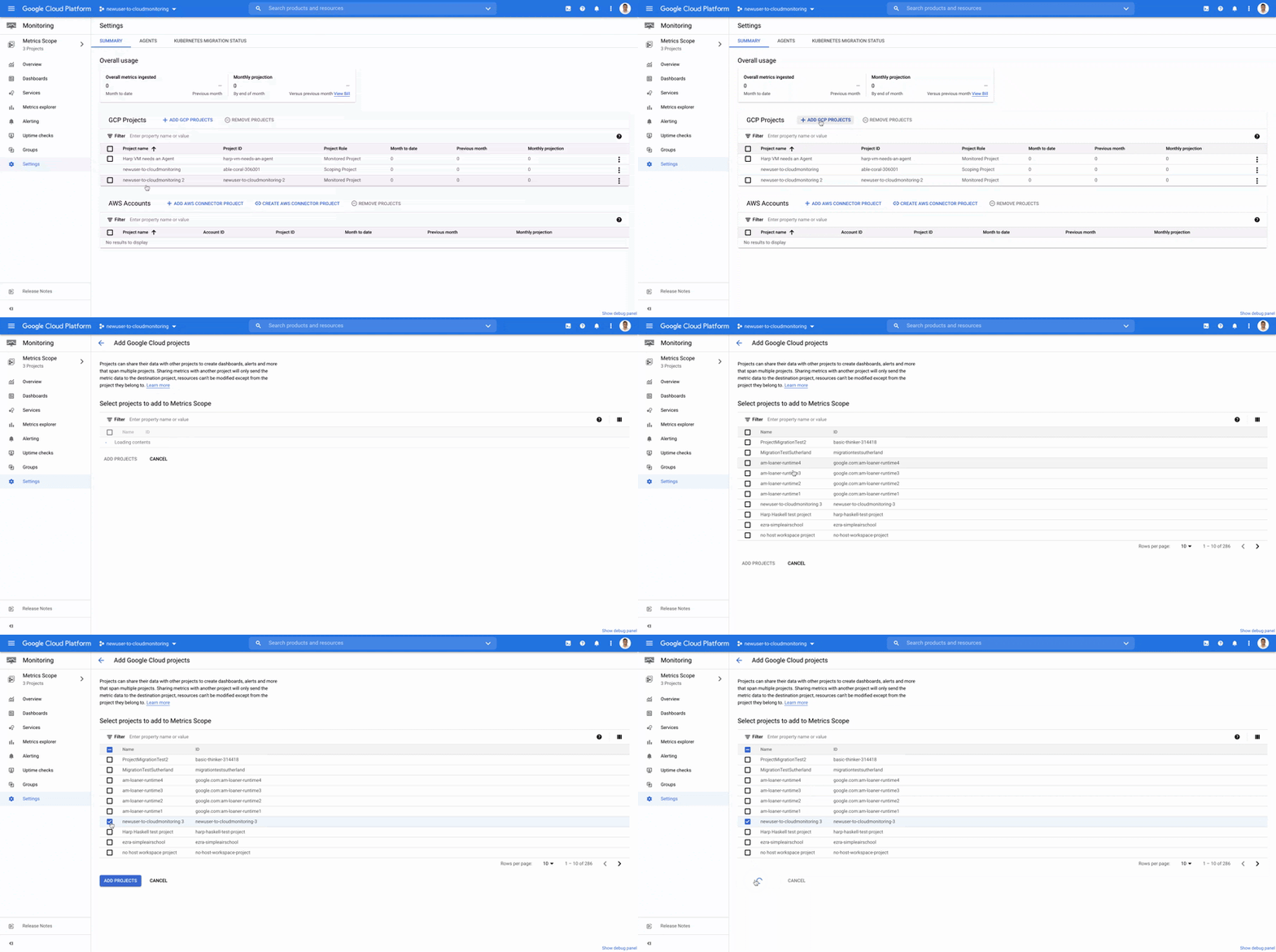
- If you want to monitor more than one project simply add it to your Metrics Scope:
Navigation
- Mentioned earlier, the Project Picker in the Cloud Console can be used to navigate between Metrics Scopes in Cloud Monitoring:
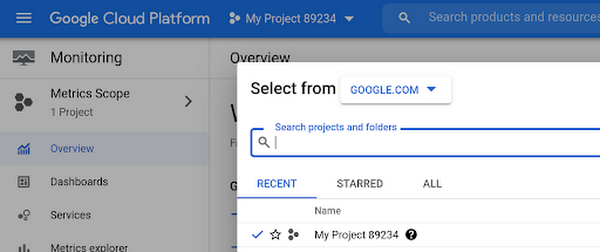
- This is now consistent with many other services across Google Cloud. Specifically, you can see how the project picker stays consistent when navigating from Cloud Monitoring to Cloud Logging:
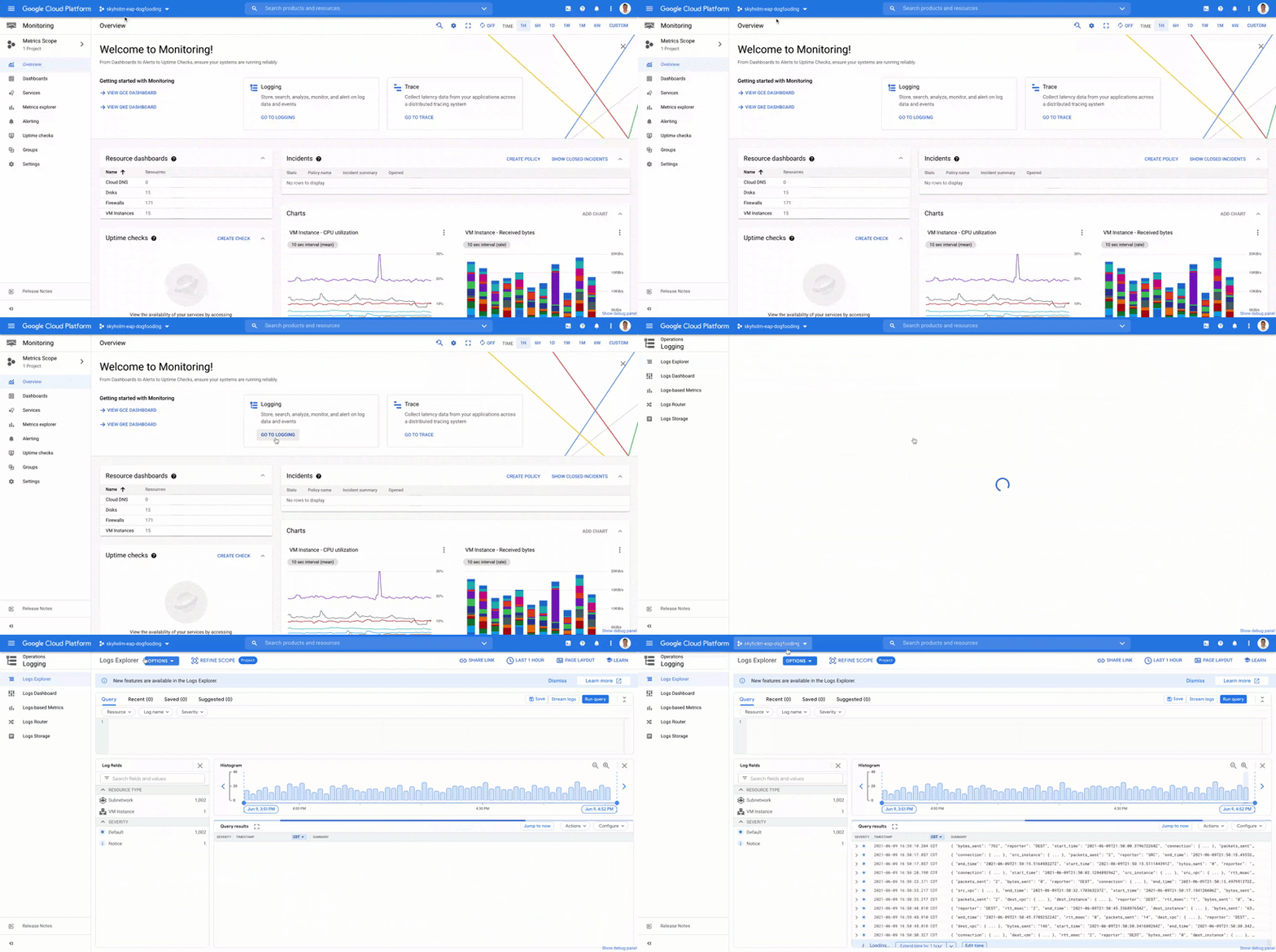
- Additionally, to make your navigation between Metrics Scopes easy we’ve added the new Metrics Scope Tab and Panel in the UI:
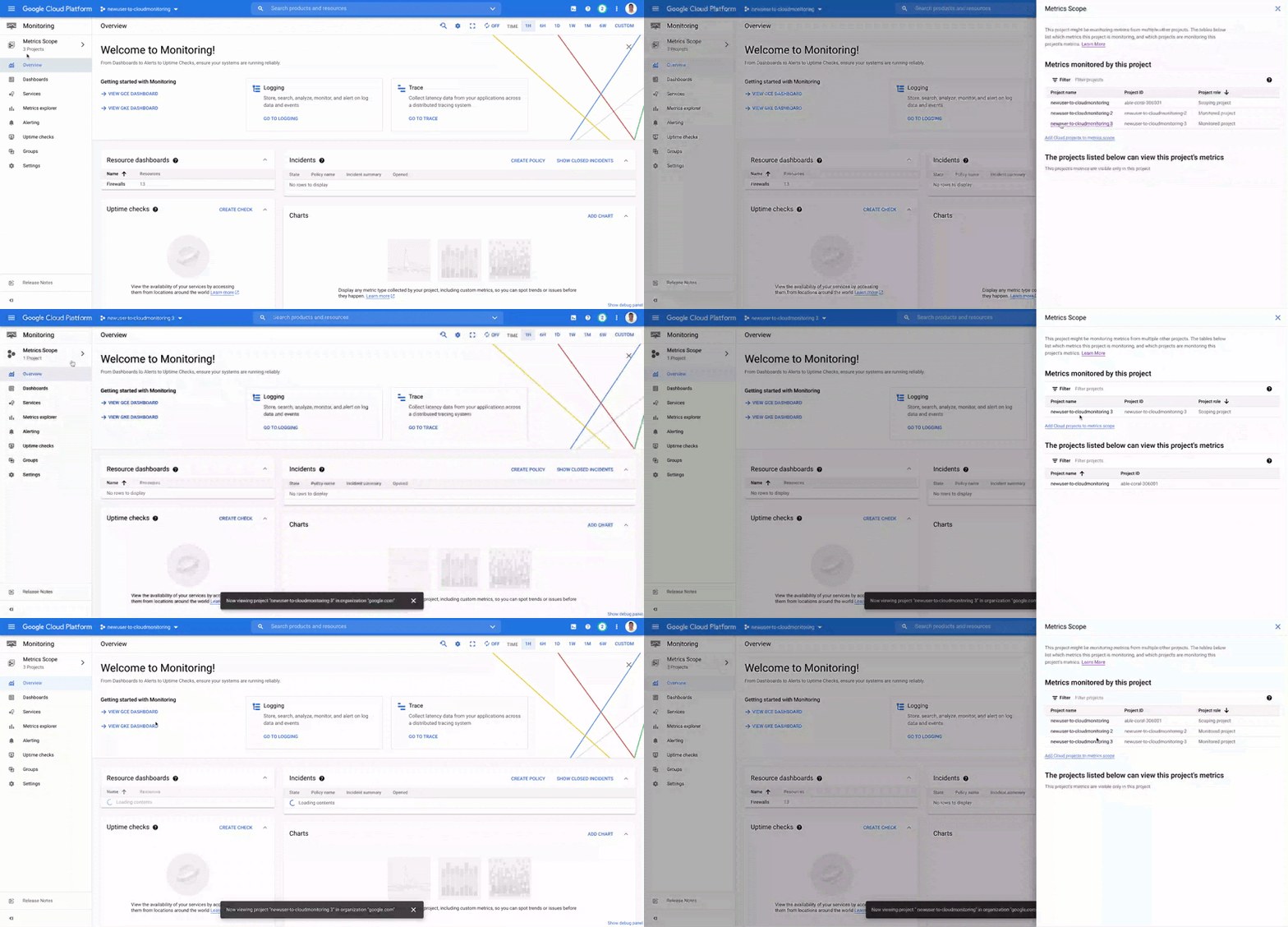
Coming Soon
- The Metrics Scope API is coming within the next quarter! This API will enable you to programmatically manage your monitoring configurations and Metrics Scopes.
Current Workspaces users
If you are already using Workspaces in Cloud Monitoring you may have noticed that they converted to Metrics Scopes weeks ago. There is no additional action required and you can start taking advantage of the additional features of Metrics Scopes today.
Get Started
Companies that are digitally native or in the process of digital transformation have placed an increased operational role on developers and this often creates overlapping sets of responsibilities with Operations and SRE teams. Now multiple developer teams can focus on optimizing the performance of their applications while operators can take a fleet-wide view when maintaining and improving the performance of all of the infrastructure under their purview.For information on configuring a Metrics Scope to include metrics for multiple projects, see Viewing metrics for multiple projects.
Protect Corporate Apps with BeyondCorp Enterprise

2682
Of your peers have already read this article.
2:30 Minutes
The most insightful time you'll spend today!
As part of our efforts to democratize Zero Trust, Google Cloud has designed our BeyondCorp Enterprise solution to be an extensible platform where customers can choose to integrate signals from other technology vendors and incorporate these into their Zero Trust access policies. Following our integrations announcements earlier this year, we are excited to announce a new BeyondCorp Enterprise integration with Microsoft Intune, now available in Preview.
This integration allows organizations to craft Zero Trust access policies and protect private applications and SaaS applications, including Office 365, based on data collected from the Intune graph API, including device posture and other trust signals. It can also be leveraged to configure context-aware access policies for Workspace applications.
These policies can be applied across end-user devices, no matter where they are located. The ability to leverage device information to make access decisions is a critical component of a Zero Trust approach. Intune is a widely used mobile device management (MDM) tool and many of our customers will be able to benefit from this integration to help ensure that their distributed workforce can appropriately access corporate resources.
The BeyondCorp Enterprise integration with Microsoft Intune collects data from Intune using the Microsoft Graph API. End-user device information collected by the connector is then fed into Access Context Manager, a component of BeyondCorp Enterprise, to gate access to resources based on policies and access levels.
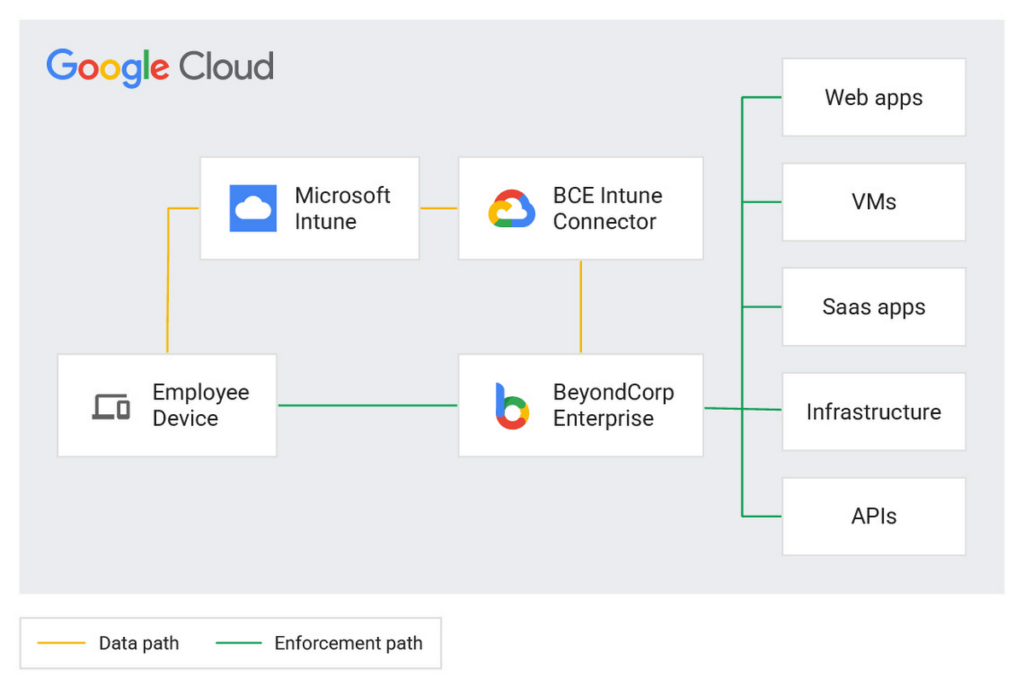
Customers are already seeing the benefits of the BeyondCorp Enterprise integration with Microsoft Intune. For example, one of our customers, a global ecommerce vendor, uses it to ensure their corporate-owned devices comply with internal policies before they are able to connect to corporate resources. With the Intune integration, they are then able to quickly and easily configure context-aware access policies with an attribute that company-owned devices must be in compliance in order to access the specific applications.
Previously, without the integration, they would need to set up a custom integration and manage both the code and the infrastructure where it was running. This integration not only alleviates the need to create custom code, but the customer has also seen a reduction in the time it takes to onboard new devices and build these policies.
If you’re interested in learning more or joining the preview, a full reference guide to the Intune integration can be found in our documentation here.
We believe that customers should be able to leverage their existing technology investments to build a more secure ecosystem. BeyondCorp Enterprise can help ensure that the right people have access to the right resources—only authorized users should be able to access only the resources that they have been approved for, based on their identity and device information. Google Workspace customers can also incorporate signal information from other vendors, including Intune, to create context-aware access policies for securing Workspace applications.
Earlier this year, we announced Netskope as a new member of the BeyondCorp Alliance to enable integration of a user’s risk score between Netskope Cloud Exchange and Google Cloud. We also announced new integrations with Jamf Pro for MacOS, which shares the Jamf-determined compliance state with BeyondCorp Enterprise so admins can incorporate this information into context-aware policies to restrict or allow access to protected applications.
You can learn more about BeyondCorp Enterprise integrations by registering for Google Cloud Next ‘22 on October 11-13, and attending the “What’s New in Zero Trust” session. Google Cloud will also be featured at the upcoming Jamf Nation User Conference (JNUC), September 27-29, to discuss BeyondCorp Enterprise integrations with Jamf.
VCP Peering and Private Endpoints on Vertex AI to Better Security and Predictions in Near Real-time

4498
Of your peers have already read this article.
2:00 Minutes
The most insightful time you'll spend today!
One of the biggest challenges when serving machine learning models is delivering predictions in near real-time. Whether you’re a retailer generating recommendations for users shopping on your site, or a food service company estimating delivery time, being able to serve results with low latency is crucial. That’s why we’re excited to announce Private Endpoints on Vertex AI, a new feature in Vertex Predictions. Through VPC Peering, you can set up a private connection to talk to your endpoint without your data ever traversing the public internet, resulting in increased security and lower latency for online predictions.
Configuring VPC Network Peering
Before you make use of a Private Endpoint, you’ll first need to create connections between your VPC (Virtual Private Cloud) network and Vertex AI. A VPC network is a global resource that consists of regional virtual subnetworks, known as subnets, in data centers, all connected by a global network. You can think of a VPC network the same way you’d think of a physical network, except that it’s virtualized within GCP. If you’re new to cloud networking and would like to learn more, check out this introductory video on VPCs.
With VPC Network Peering, you can connect internal IP addresses across two VPC networks, regardless of whether they belong to the same project or the same organization. As a result, all traffic stays within Google’s network.
Deploying Models with Vertex Predictions
Vertex Predictions is a serverless way to serve machine learning models. You can host your model in the cloud and make predictions through a REST API. If your use case requires online predictions, you’ll need to deploy your model to an endpoint. Deploying a model to an endpoint associates physical resources with the model so it can serve predictions with low latency.
When deploying a model to an endpoint, you can specify details such as the machine type, and parameters for autoscaling. Additionally, you now have the option to create a Private Endpoint. Because your data never traverses the public internet, Private Endpoints offer security benefits in addition to reducing the time your system takes to serve the prediction when it receives the request. The overhead introduced by Private Endpoints is minimal, achieving performance nearly identical to DIY serving on GKE or GCE. There is also no payload size limit for models deployed on the private endpoint.
Creating a Private Endpoint on Vertex AI is simple.
In the Models section of the Cloud console, select the model resource you want to deploy.
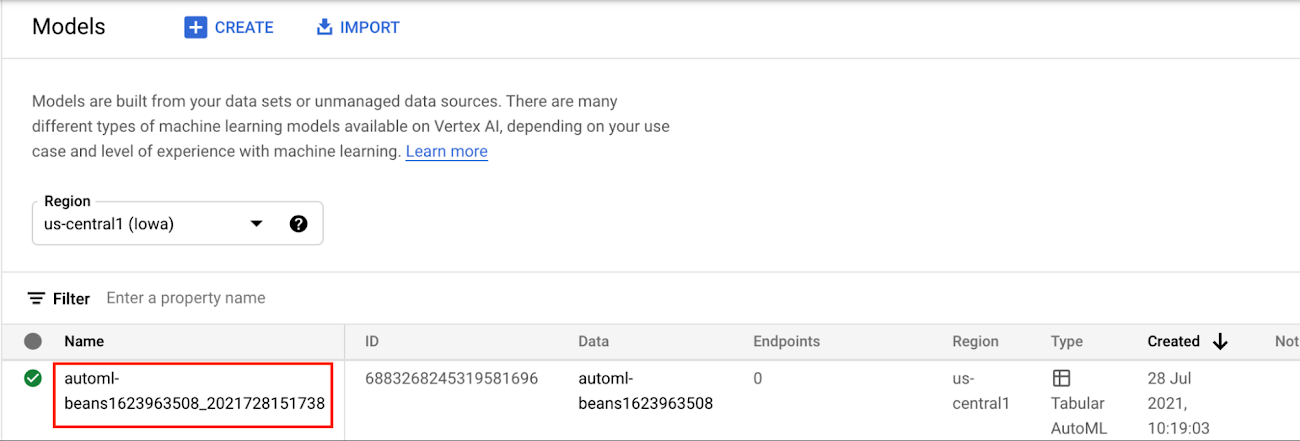
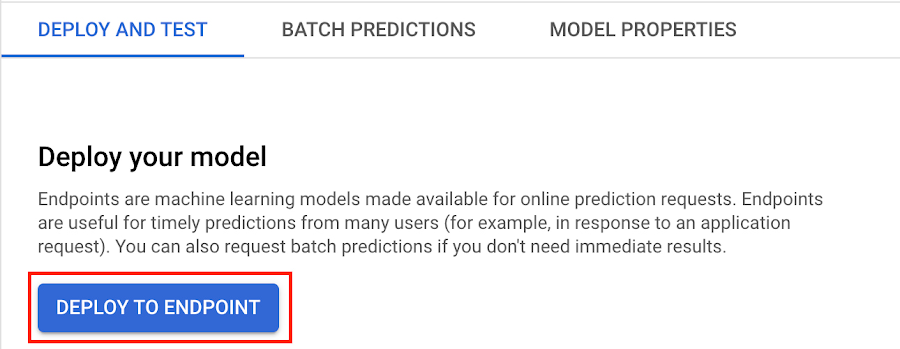
Next, select DEPLOY TO ENDPOINT
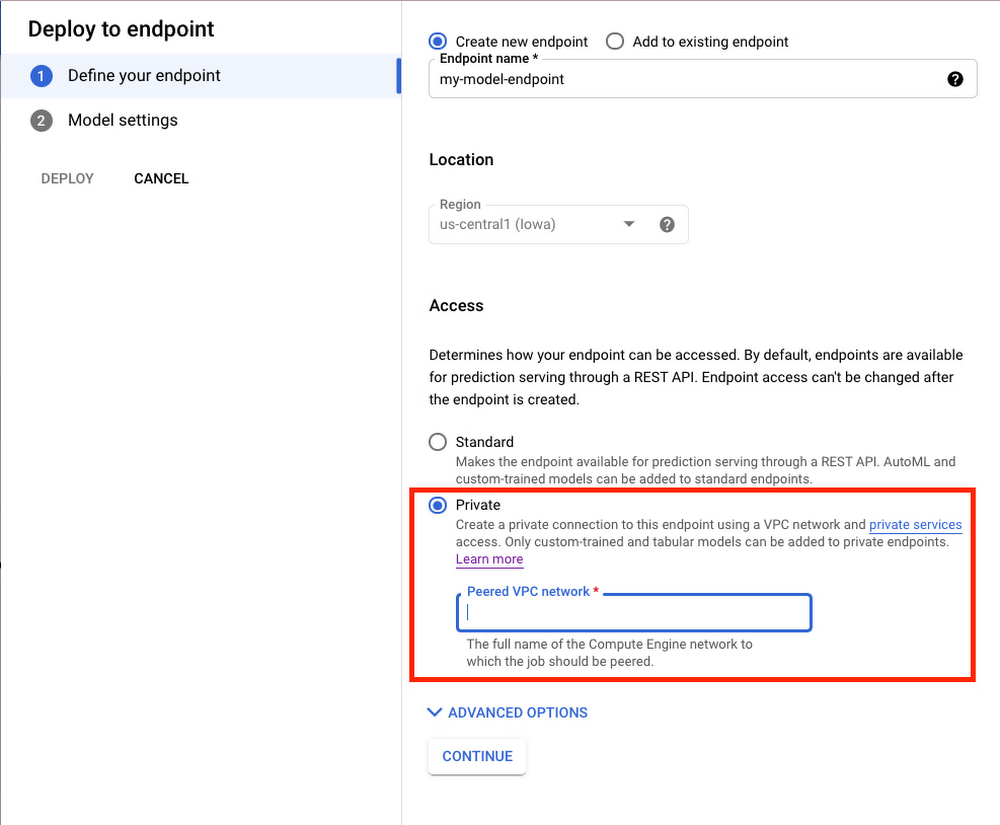
In the window on the right hand side of the console, navigate to the Access section and select Private. You’ll need to add the full name of the VPC network for which your deployment should be peered.
Note that many other managed services on GCP support VPC peering, such as Vertex Training, Cloud SQL, and Firestore. Endpoints is the latest to join that list.
What’s Next?
Now you know the basics of VPC Peering and how to use Private Endpoints on Vertex AI. If you want to learn more about configuring VPCs, check out this overview guide. And if you’re interested to learn more about how to use Vertex AI to support your ML workflow, check out this introductory video. Now it’s time for you to deploy your own ML model to a Private Endpoint for super speedy predictions!
More Relevant Stories for Your Company

Google Launches Smart Canvas to Stir-up Collaboration in Google Workspace
After more than a year of remote collaboration, many people are showing signs of digital fatigue. Throughout the pandemic, millions of employees bridged the physical distances with their colleagues by making themselves more available, joining a deluge of virtual meetings, and leaning into a dizzying array of tools and applications.

Conversations on Government Security with Dmitri Alperovitch, CrowdStrike’s Founder and Former CTO
As I was preparing for my fireside chat with Dmitri Alperovitch, Founder and Former CTO of CrowdStrike and Executive Chairman of the Silverado Policy Accelerator, for the Google Cloud Government Security Summit taking place on Tuesday, July 20th, I was reflecting about recent developments in cybersecurity, Zero Trust best practices – including aspects

Cloud KMS with Cloud Storage: Better Performance for High-intensity Workloads
Encryption is critical for securing sensitive data while it is stored and transits the cloud. Today, Cloud Storage encrypts data server-side with standard Google-managed encryption keys by default, and can also encrypt data with customer-managed encryption keys that are stored and managed by Cloud Key Management Service (Cloud KMS). While customers have

Towards Superior Cybersecurity: How SLSA and SBOM Help Build a Resilient Healthcare Industry
Taking prescription medication at the direction of anyone other than a trained physician is very risky—and the same could be said for selecting technology used to run a hospital, to manage a drug manufacturing facility and, increasingly, to treat a patient for a medical condition. To pick the right medication,
