





Announcing New, Faster Search and Investigative Experience in Chronicle Security Operations

2941
Of your peers have already read this article.
1:30 Minutes
The most insightful time you'll spend today!
In cybersecurity, speed matters. Whether a security analyst is trying to understand the details of an alert that was triggered by an indicator of compromise (IoC), or find additional context for a suspicious asset, speed is often the critical factor that will help thwart a cyberattack before threat actors are able to inflict damage.
With speed in mind, we are pleased to announce the general availability of our new investigative experience in Chronicle Security Operations. We are continuing to deliver on our mission to bring the power of Google to security operations and are raising the bar for search and the investigative experience in the SOC.
With this release, SecOps teams will be able to harness Chronicle’s lightning-fast search across any form of structured data. Additionally, the new investigation experience can provide greater flexibility to pivot and drill-down when conducting complex, open-ended threat investigations and surface insights quickly and easily.
Our Unified Data Model (UDM) schema, with its built-in flexibility that can effectively handle a wide variety of security related events, is at the heart of Chronicle’s powerful search. We have scaled this capability by optimizing query responses across structured data. Additionally, analysts can investigate large datasets and build complex queries with a new and intuitive user experience. With user personalization enhancements, analysts can quickly access saved searches and top queries in their environment to improve routine SOC workflows.
With the new investigative experience, security teams can:
- Drive faster threat understanding with an interactive event results timeline that helps eliminate unnecessary long wait times by streaming results as they are processed to quickly begin threat analysis
- Use enhanced context and operationalize relevant data for threat analysis with one-click filter-to-query conversion
- Personalize the analyst experience with saved search and search history functions for quicker analyst knowledge recall
- Power threat investigation and hunting with a new, improved, highly performant UDM search
Let’s look at an example of how to use the reimagined investigative experience and our new broader, faster search.
In our use-case, a security analyst is investigating a curated detection alert for potentially suspicious behavior on a Windows environment. Additionally, there is a low prevalence domain from host “win-dc-01” with ip “10.166.0.3”. To investigate further, let’s open the UDM Search page and construct a query containing the host and IP information along with destination information of the domain the host was contacting (edge.microsoft.com). Over 70,000 events stream into the investigation interface providing the analyst an immediate picture of data surrounding their alert.
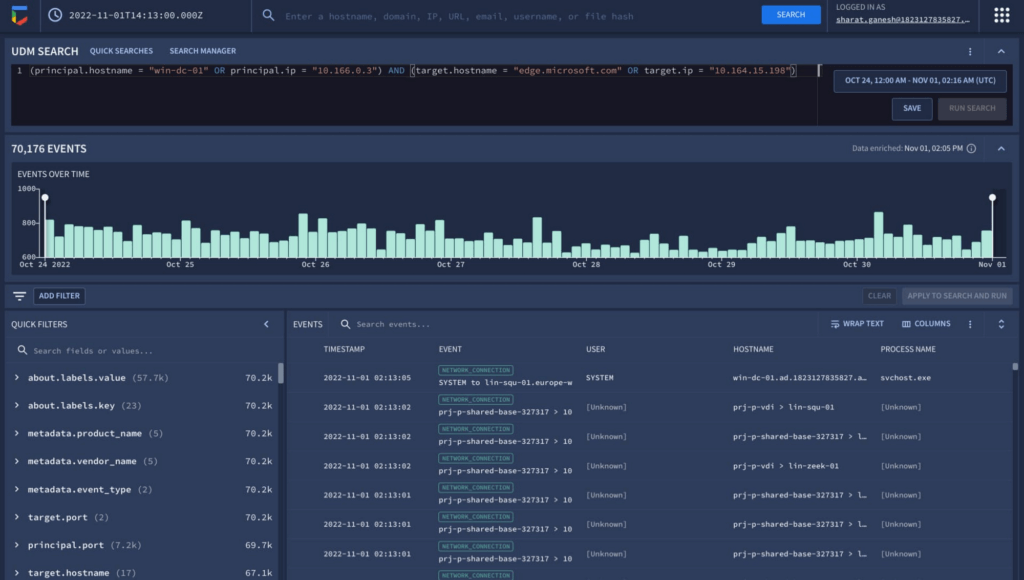
The new interactive events timeline can provide a clear picture of event trends over time with key statistical data which can be easily filtered. Additionally, with the new quick filters, the analyst is able to easily filter out hosts that are known-good to get pertinent information about the domain.
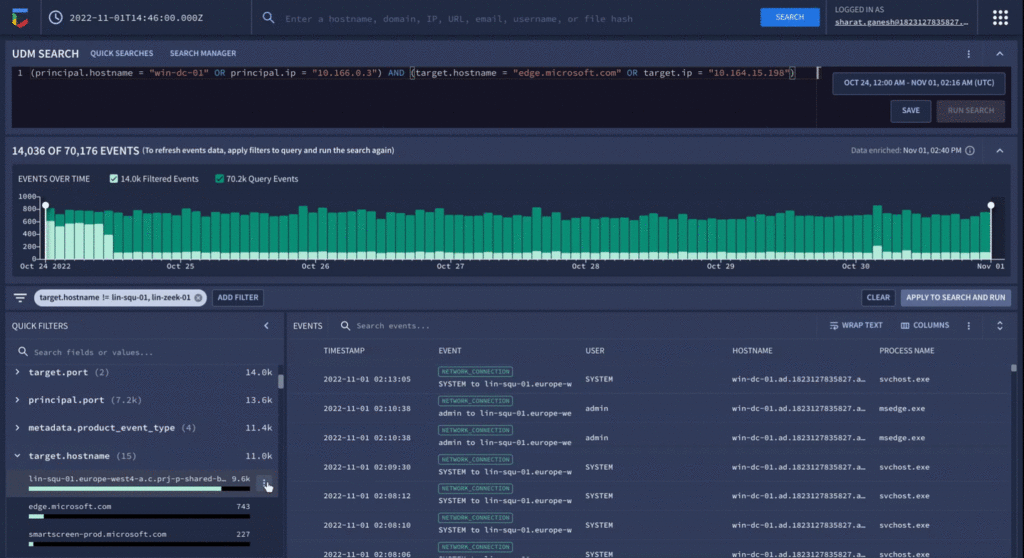
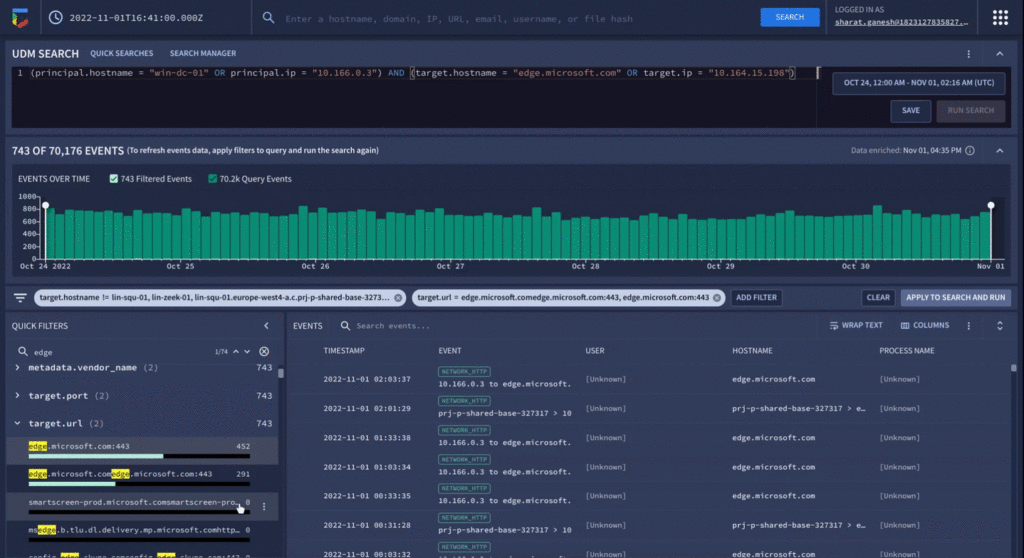
Analyzing value aggregations present in the filter panel, automatically generated by Chronicle, enables analysts to domain values of highest interest, and quickly determine that approximately 800 events were present in the last week that related to edge.microsoft.com URL. Since Microsoft Edge is disallowed in the organization, there should not be any outbound traffic to this type of destination.
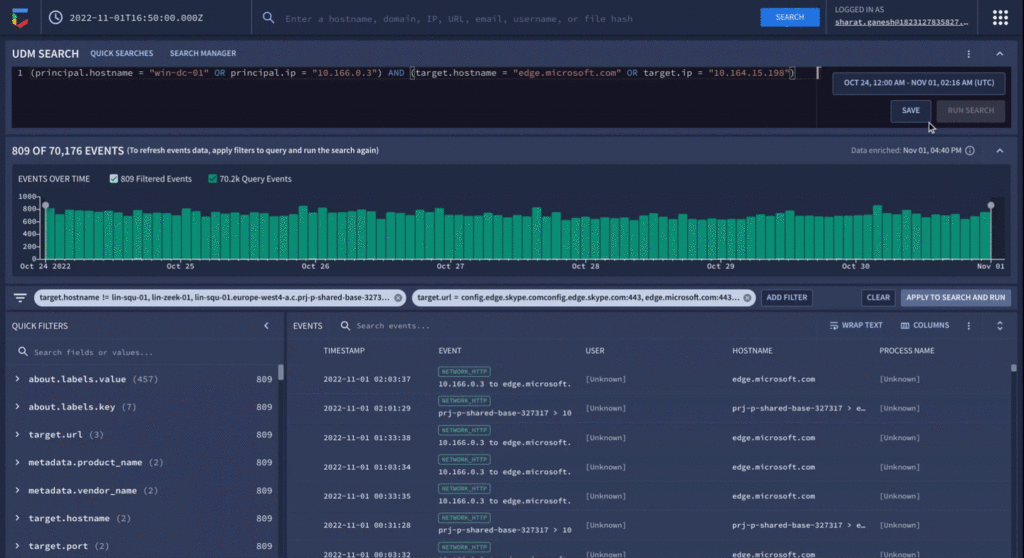
As a final step before orchestrating a response in Chronicle SOAR’s case management, the analyst can save their search to quickly recall the steps they took in the future for related investigations.
We have already seen our customers use these new capabilities in preview to build new use cases, accelerate existing threat hunting workflows, and drive faster threat response. We will continue our mission to bring Google speed, scale, and intelligence to the investigative experience, expediting “time to aha” for security analysts, and driving better, faster responses.
Ready to put Chronicle to work in your Security Operations Center? Contact Google Cloud sales or your customer success CSM team. You can also learn more about all these new capabilities in Google Chronicle in our product documentation.
Utilizing Google Cloud’s PII Security Features

2618
Of your peers have already read this article.
2:30 Minutes
The most insightful time you'll spend today!
BigQuery is a leading data warehouse solution in the market today, and is valued by customers who need to gather insights and advanced analytics on their data. Many common BigQuery use cases involve the storage and processing of Personal Identifiable Information (PII)—data that needs to be protected within Google Cloud from unauthorized and malicious access.
Too often, the process of finding and identifying PII in BigQuery data relies on manual PII discovery and duplication of that data. One common way to do this is by taking an extract of columns used for PII and copying them into a separate table with restricted access. However, creating unnecessary copies of this data and processing it manually to identify PII increases the risks of failure and subsequent security events.
In addition, the security of PII data is often mandated by multiple regulations and failure to apply appropriate safeguards may result in heavy penalties. To address this issue, customers need solutions that 1) identify PII in BigQuery and 2) automatically implement access control on that data to prevent unauthorized access and misuse, all without having to duplicate it.
This blog will discuss a solution developed by Google Professional Services for leveraging Google Cloud DLP to inspect and classify sensitive data and suggest a solution for using these insights to automatically tag and protect data in BigQuery tables.
BigQuery Auto Tagging solution overview
Automatic DLP can help to identify sensitive data, such as PII, in BigQuery. Organizations can leverage Automatic DLP to automatically search across their entire BigQuery data warehouse for tables that contain sensitive data fields and report detailed findings in the console (see Figure 1 below,) in Data Studio, and in a structured format (such as a BigQuery results table.) Newly created and updated tables can be discovered, scanned, and classified automatically in the background without a user needing to invoke or schedule it. This way you have an ongoing view into your sensitive data.
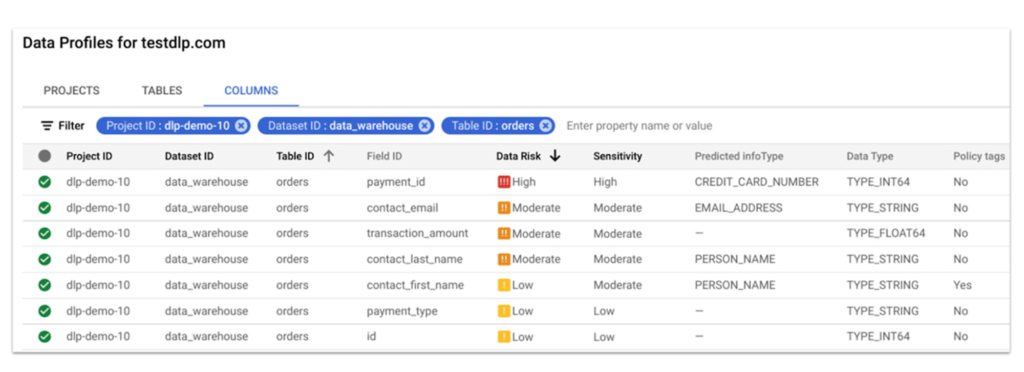
In this blog, we show how a new open source solution called BigQuery Auto Tagging Solution solves our second goal—automating access control on data. This solution sits as a layer on top of Automatic DLP and automatically enforces column-level access controls to restrict access to specific sensitive data types based on user-defined data classification taxonomies (such as high confidentiality or low confidentiality) and domains (such as Marketing, Finance, or ERP System.) This solution minimizes the risk of unrestricted access to PII and ensures that there is only one copy of data maintained with appropriate access control applied down to the column level.
The code for this solution is available on Github at GoogleCloudPlatform/bq-pii-classifier. Please note that while Google does not maintain this code, you can reach out to your Sales Representative to get in contact with our Professional Services team for guidance on how to implement it.
BigQuery and Data Catalog Policy Tags (now Dataplex) have some limitations that you should be aware of before implementing this solution to ensure that it will work for your organization:
- Taxonomies and Policy Tags are not shared across regions: If you have data in multiple regions you will need to create or replicate your taxonomy in each region that you want to apply policy tags.
- Maximum number of 40 taxonomies per project: If you require different taxonomies for different business domains or have replications to support multiple Cloud regions those will count against this quota.
- Maximum number of 100 policy tags per taxonomy: Cloud DLP supports up to 150 infoTypes for classification, however, a single policy taxonomy can only support up to 100 including any nested categories. If you need to support more than 100 data types, you may need to split these across more than one taxonomy.
High-level overview of the solution
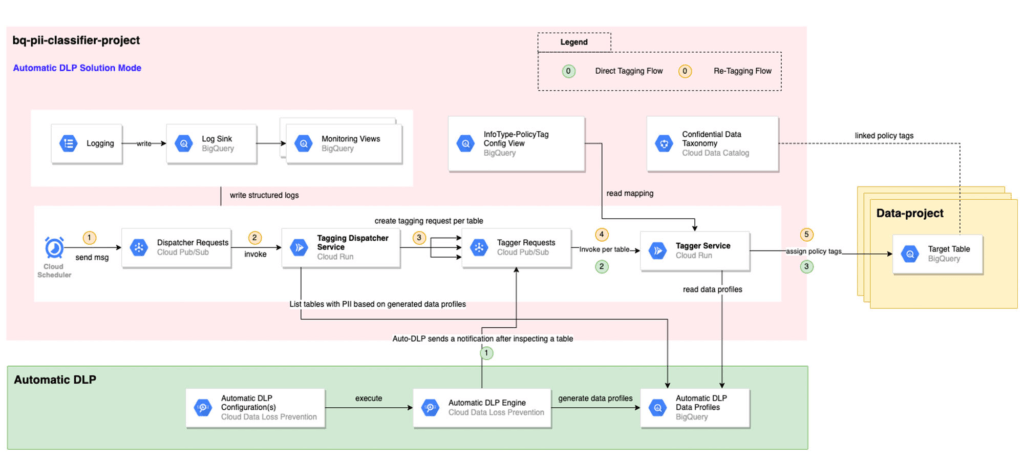
The solution is composed mainly of the following components: Dispatcher Requests topic, Dispatcher service, BigQuery Policy Tagger Requests topic, and BigQuery Policy Tagger service and logging components.
The Dispatcher Service is a Cloud Run service that expects a BigQuery scope to be expressed as inclusion and exclusion lists of projects, datasets, and tables. This Dispatcher service will query Automatic DLP Data Profiles to check if the tables in-scope have data profiles generated. For these tables, it will publish one request per table to the “BigQuery Policy Tagger Requests” PubSub topic. This topic enables rate limiting of BigQuery column tagging operations and apply auto-retries with backoffs.
The “BigQuery Policy Tagger” Service is also a Cloud Run service that receives the information of the DLP scan results of a BigQuery table. This service will determine the final InfoType of each column and apply the appropriate Policy Tags as defined in the InfoType – Policy Tags mapping. Only-one INFO_TYPE is selected and the function assigns the associated policy tag.
Lastly, all Cloud Run services maintain structured logs that are exported by a log sink to BigQuery. There are multiple BigQuery views that help with monitoring and debugging Cloud Run call chains and tagging actions on columns.
Deployment options
After deploying the solution, it can be used in two different ways:
[Option 1] Automatic DLP-triggered immediate tagging:
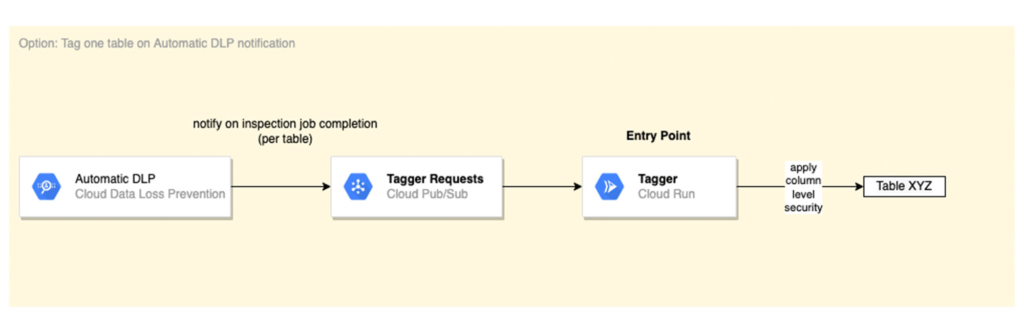
Automatic DLP is configured to send a Pub/Sub notification on each inspection job completion. The Pub/Sub notification includes the resource name and it triggers the Tagger service directly
[Option 2] Scheduled tagging:
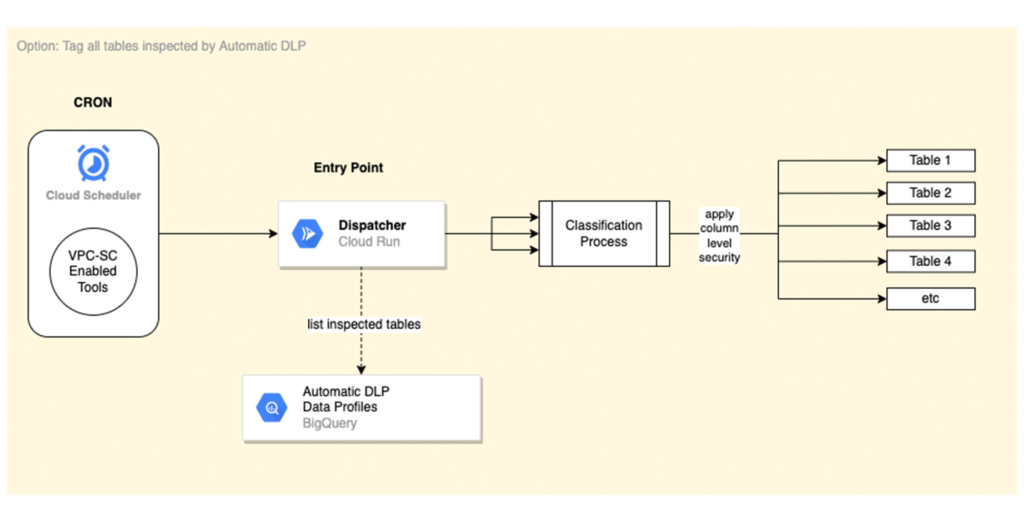
In this scenario, the Dispatcher service is invoked on a schedule with a payload representing a BigQuery scope to list inspected tables by Automatic DLP and create a tagging request per table. You could use Cloud Scheduler (or any Orchestration tool) to invoke the Dispatcher service. If the solution is deployed within a VPC-SC perimeter, other schedulers that support VPC-SC should be used (such as Composer or Custom App.)
In addition, more than one Cloud Scheduler/Trigger could be defined to group projects/datasets/tables that have the same tagging schedule (such as daily or monthly.)
To learn more about Automatic DLP, see our webpage. To learn more about the BQ classifier, see the open source project on Github: GoogleCloudPlatform/bq-pii-classifier and get started today!
Monitoring and defending threats in the cloud

2808
Of your peers have already read this article.
3:00 Minutes
The most insightful time you'll spend today!
As your organization transitions from on-premises to hybrid cloud or pure cloud, how you think about threat detection must evolve as well—especially when confronting threats across many cloud environments. A new foundational framework for thinking about threat detection in public cloud computing is needed to better secure digital transformations.
Because these terms have had different meanings over time, here’s what we mean by threat detection and detection and response. A balanced security strategy covers all three elements of a security triad: prevention, detection, and response. Prevention can improve, but never becomes perfect. Despite preventative controls, we still need to be on the lookout for threats that penetrate our defenses. Finding and confirming malicious activities, and automatically responding to them or presenting them to the security team constitutes detection and response.
Vital changes impact the transition from the traditional environment to the cloud and affect three key areas:
- Threat landscapes
- IT environment
- Detection methods
First, threat landscapes change. This means new threats evolve, old threats disappear, and the importance of many threats changes. If you perform a threat assessment on your environment and then migrate the entire environment to the public cloud, even if you use the lift and shift approach, the threat assessment will look very different. MITRE ATT&CK Cloud can help us understand how some threat activities apply to public cloud computing.
Second, the entire technology environment around you changes. This applies to the types of systems and applications you as a defender would encounter, but also to technologies and operational practices. Essentially, cloud as a realm where you have to detect threats is different —this applies to the assets being threatened and technologies doing the detecting. Sometimes cloud looks to traditional “blue teams” as some alien landscape where they would have only challenges. In reality, cloud does bring a lot of new opportunities for detection. The main theme here is change, some for the worse and some for the better.
After all, cloud is
- Usually distributed—running over many regions and data centers
- Often immutable—utilizes systems that are replaced, rather than updated
- Ephemeral uses workloads often created for the task and then removed
- API driven—enabled by pervasive APIs
- Centered on identity layer—mostly uses identities and not just network perimeter to separate workloads
- Automatically scalable—able to expand with the increasing workload
- Shared with the provider
Sometimes the combination of Distributed, Immutable, and Ephemeral cloud properties is called a DIE triad. All these affect detection for the cloud environment.
Third, telemetry sources and detection methods also change. While this may seem like it’s derived from the previous point we made, that’s not entirely true. For some cloud services, and definitely for SaaS, a popular approach of using an agent such as EDR would not work. However, new and rich sources of telemetry may be available—Cloud Audit Logs are a great example here.
Similarly, the expectation that you can sniff traffic on the perimeter, and that you even will have a perimeter, may not be entirely correct. Pervasive encryption hampers Layer 7 traffic analysis, while public APIs rewrite the rules on what a perimeter is. Finally, detection sources and methods are also inherently shared with the cloud provider, with some under cloud service provider control while others are under cloud user control.
This leads to several domains where we can and should detect threats in the cloud.
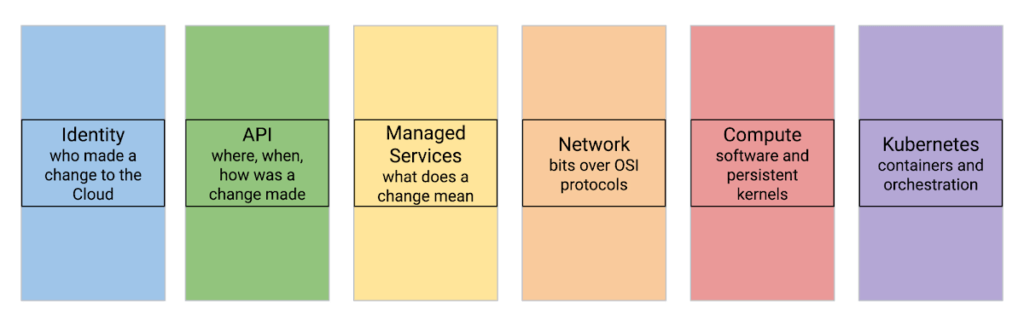
Let’s review a few cloud threat detection scenarios.
Everybody highlights the role of identity in cloud security. Naturally, it matters in threat detection as well—and it matters a lot. While we don’t want to repeat the cliche that in a public cloud you are one IAM mistake away from a data breach, we know that cloud security missteps can be costly. To help protect organizations, Google Cloud offers services that automatically and in real-time analyze every IAM grant to detect outsiders being added—even indirectly.
Detecting threats inside compute instances such as virtual machines (VM) using agents seems to be about the past. After all, VMs are just servers, right? However, this is an area where cloud brings new opportunities. For example, VM Threat Detection allows security teams to do completely agentless YARA rule execution against their entire compute fleet.
Finally, products like BigQuery require new ways of thinking about detecting data exfiltration. Security Command Center Premium detects queries and backups in BigQuery that would copy data to different Google Cloud organizations.
Naturally, some things stay the same in the cloud. These include broad threat categories such as insiders or outsiders; steps in the cyber exploit chain such as coarse-grained stages of an attack; and the MITRE ATT&CK Tactics are largely unchanged. It is also likely that broad detection use cases stay the same.
What does that mean for the defenders?
When you move to the cloud, your threats and your IT change—and change a lot.
This means that using on-premises detection technology and approaches as a foundation for future development may not work well.
This also means that merely copying all your on-premise detection tools and their threat detection content is not optimal.
Instead, moving to Google Cloud is an opportunity to transform how you can achieve your continued goals of confidentiality, integrity, and availability with the new opportunities created by the technology and process of cloud.
Call to action:
- Listen to “Threat Models and Cloud Security” (ep12)
- Listen to “What Does Good Detection and Response Look Like in the Cloud? Insights from Expel MDR” (ep72)
- Listen to “Cloud Threats and How to Observe Them” (ep69) and read the related blog “How to think about cloud threats today”
- Review how to test cloud detections
- Read the guidance on cloud threat investigation with SCC and Chronicle
Cloud Security : The First Priority for Enterprises

3342
Of your peers have already read this article.
2:00 Minutes
The most insightful time you'll spend today!
Cloud-based solutions were a technology life raft for organizations during the COVID-19 pandemic as employees took to the virtual office and companies scrambled to adjust to a distributed, remote reality. However, these rapid and substantial changes in the role of cloud technologies on the business came with an increased focus on security.
The accelerated move to the cloud also meant companies needed to rapidly evolve existing security practices to protect everything that matters at the core of business—from their people and their operational and transactional data to customers and their most sensitive personal information. Suddenly, enterprises were keenly aware of where business practices, employee training, and security policies were falling short.
A recent Google-commissioned study by IDG explored the details behind the heightened focus on security solutions since the start of the pandemic while highlighting the role cloud-based security solutions are playing in helping keep customers safe. The survey of 2,000 global IT leaders serves to illustrate that in this new and unfamiliar world, enterprises are more ready than ever to embrace cloud security.LEARN MOREIT Leaders Research ReportWhat are the biggest IT priorities in 2021? Explore insights from a survey of 2,000 Senior IT leaders conducted by IDG, in collaboration with Google Cloud.
Security is an even higher priority post-pandemic
In the wake of the pandemic, many organizations are facing a broader attack surface than ever before as employees moved to temporarily working from remote home offices (and in some cases, encouraged to stay there for the foreseeable future). With fewer inherent security protections on personal internet connections and more work meetings happening via video conferencing, attackers have launched a cyber pandemic of their own designed to take advantage of and exploit new weaknesses.
However, even as businesses amp up security initiatives and preventative measures, the growing wave of threats continue to keep security top of mind for IT leaders. Security risks and concerns remain one of the top pain points impeding innovation according to the IDG study respondents—only surpassed by insufficient IT and developer skills.
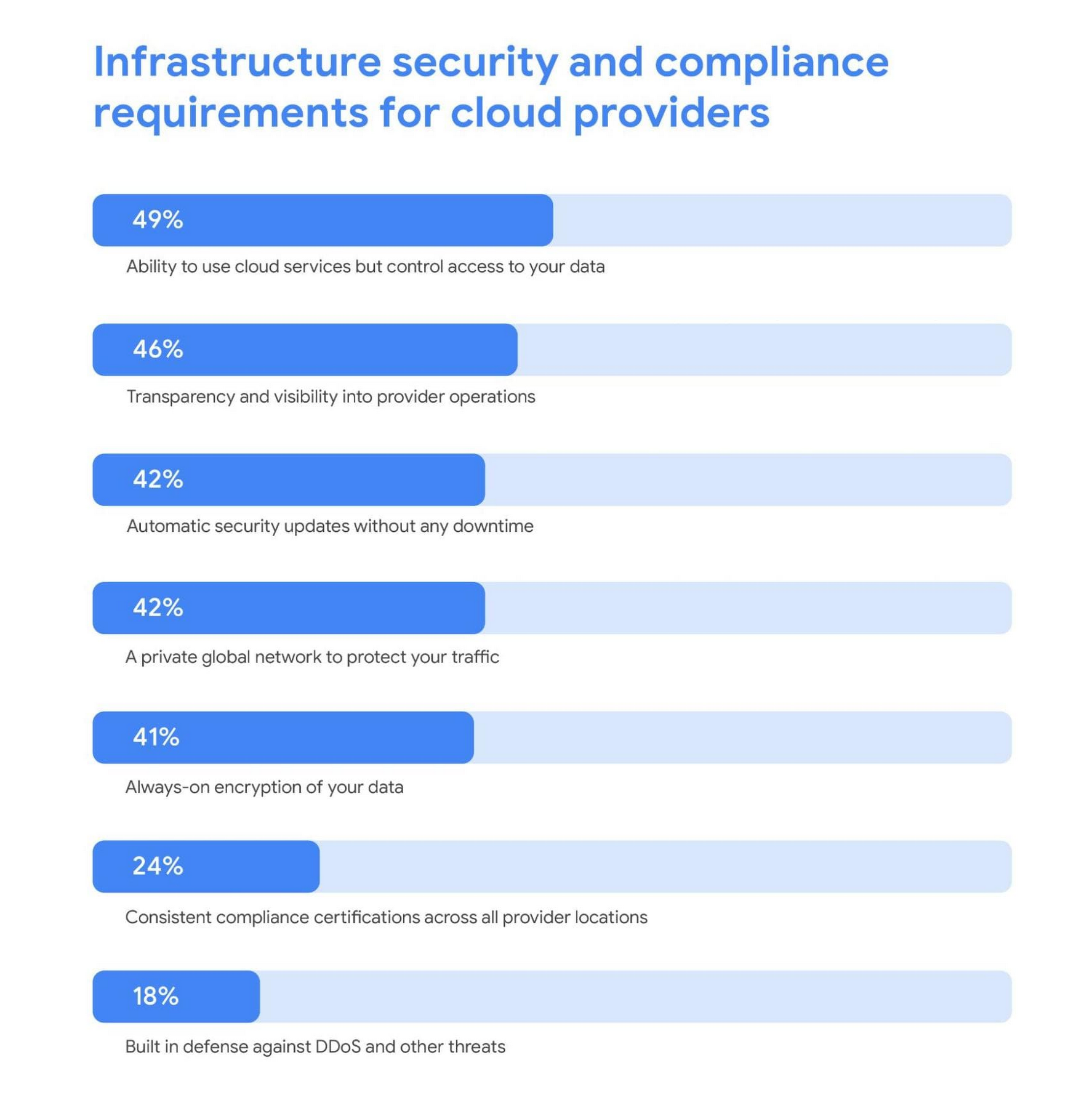
Enterprises looking to cloud providers for help with security
As a result, addressing security risks is a leading area where IT leaders turn to cloud providers for support. For these organizations, the ability to control access to data while using cloud services was the most required infrastructure security and compliance features from a cloud provider.
Cloud security is more trusted than ever
A deeper look into the results also revealed a shift in perspective about whether cloud security is really up to the task of protecting enterprises against modern attacks. Despite skepticism in the past, the majority of IT leaders are now comfortable with using cloud-based security solutions.
Confidence in the security of cloud infrastructure is extremely high with 85% of respondents stating they feel secure (or more secure) than on-premises infrastructure—compared to just 15% who believe on-premises is still safer.
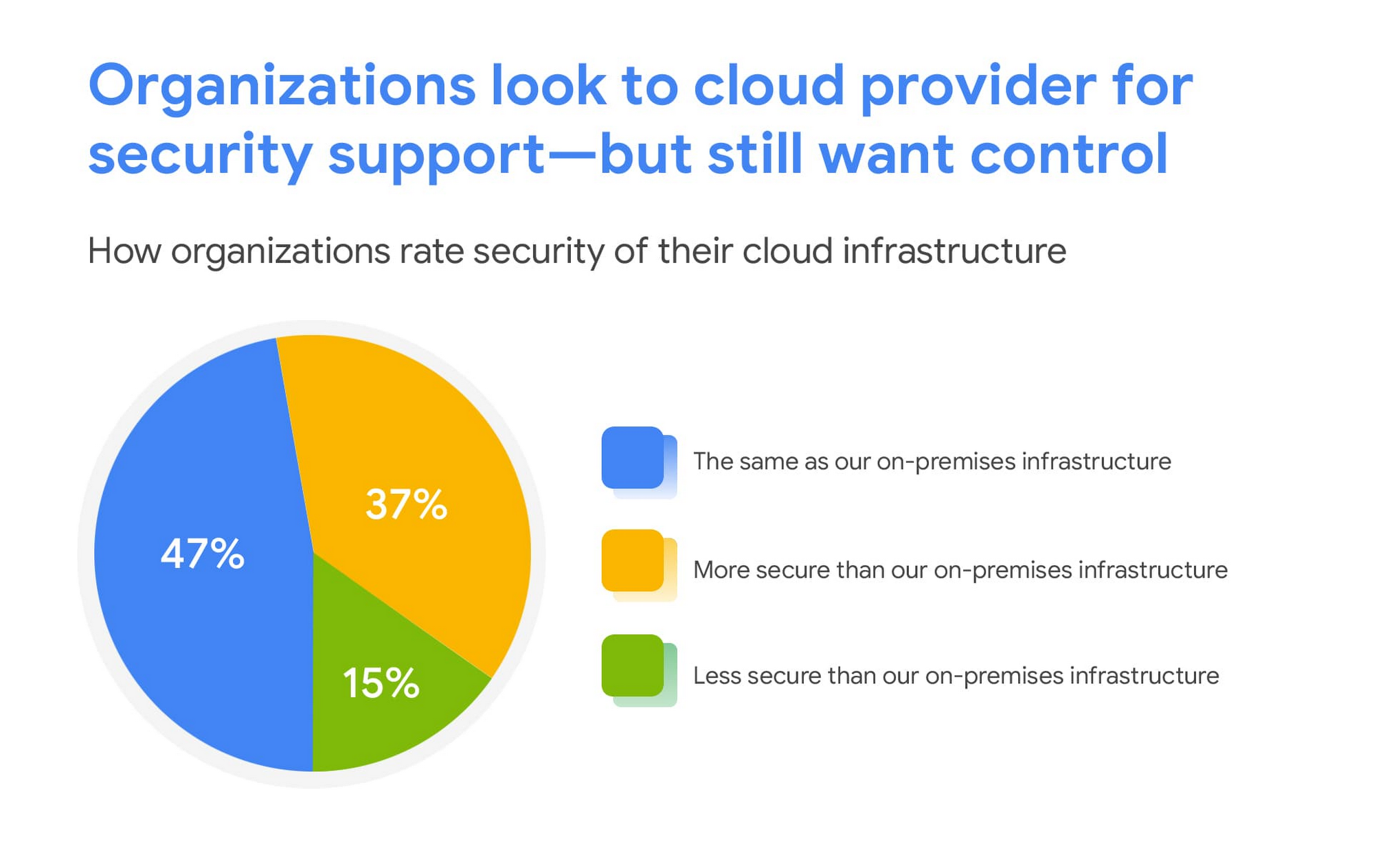
This is a clear indication that there are fewer reservations around the efficacy of cloud-based security solutions, signaling an increase in trust as organizations invest in cloud-based infrastructure and solutions.
We are committed to safe, secure solutions
Google Cloud protects your data, applications, and infrastructure, as well as your customers, from fraudulent activity, spam, and other types of online abuse. We protect you against a growing list of cybersecurity threats using the same infrastructure foundation and security services that we use for our own operations, so you never have to compromise between ease of use and advanced security.
To learn more about the IDG findings and how IT leaders are addressing security concerns post-COVID, download the full report.
Interested in how Google Cloud’s commitment to providing safe, secure solutions helps you address your security needs?
Our networking, data storage, and compute services encrypt data at rest and in transit to ensure the integrity, authenticity, and privacy of your data and your customers’ data. We also offer the ability to encrypt data in use, while it’s being processed in VM and container workloads, and our advanced security tools support compliance and data confidentiality with minimal operational overhead.
5330
Of your peers have already watched this video.
1:30 Minutes
The most insightful time you'll spend today!
Why Enterprises Should Choose Google Cloud for their SAP Workloads
Change is a constant for SAP customers. Now more than ever, SAP customers need solutions that provide them business agility, rock solid availability and security and true economic value.
Learn how Google Cloud can guide your SAP journey to the cloud with simple and no cost migrations, powerful infrastructure and innovation technologies that you can take advantage of today.
Hear from SAP customers who have deployed on Google Cloud and the game changing results they are realizing.
New Study Suggests Public Sector Firms Must Move Over Legacy Productivity Tools

5019
Of your peers have already read this article.
6:00 Minutes
The most insightful time you'll spend today!
Prior to joining Google Cloud, I spent 20 years in the public sector serving in various security roles, most recently as the head of the cybersecurity division at the newly established Cybersecurity and Infrastructure Security Agency (CISA). I was responsible for delivering services and capabilities to about 100 civilian agencies, as well as our critical infrastructure for state and local partners across the country.
Throughout my time serving in the U.S. government, I spent a great deal of energy working to keep bad actors out of our systems. What I eventually realized was that we were at a disadvantage. We didn’t just have legacy systems to deal with; we also had a legacy mindset. Our policies and capabilities were overly reliant on a perimeter-based approach to defense and introduced layers of friction with tools like VPNs, which inhibited productivity and increased frustration.
I spent the last few years of my time in the government doing my best to modernize this approach to security and supporting the many people who shared this vision. While most of them are still there, doing excellent work, repeated cybersecurity breaches of U.S. government systems have interrupted vital work and cost taxpayers billions of dollars. The SolarWinds breach in 2020, for example, may have cost governments and businesses more than $100 billion and the loss of vital national security information. Yet many government agencies continue to rely on the same legacy productivity software.
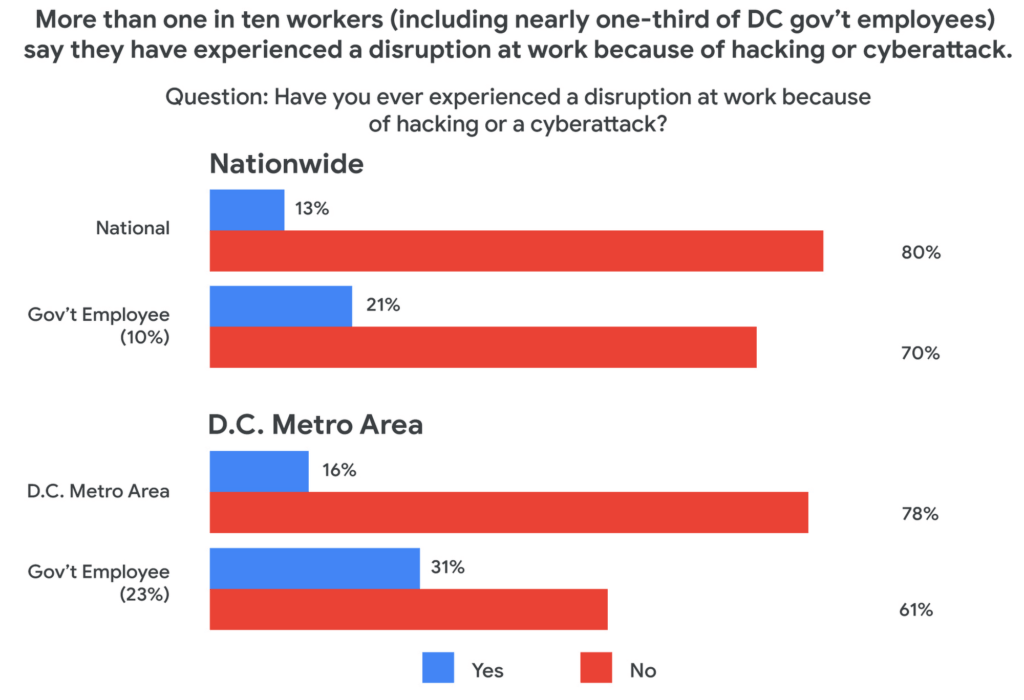
Today, a new survey conducted by Public Opinion Strategies and commissioned by Google Cloud shows that many government workers echo these concerns. The survey—which polled 2,600 working Americans, includes 600 workers from the D.C. metro area and 338 workers employed by federal, state, or local governments across the country—found that the majority of government employees surveyed reported being “very” concerned about cyberattacks striking their employers in the coming years. And nearly one-third of surveyed government employees in the D.C. metro area say they have experienced a disruption at work because of a cyberattack.
Results from the survey also showed a lack of satisfaction with legacy software, with more than 50% of government workers nationally responding that there are other products and services that could help them do their jobs better.
These new findings not only speak to the challenges our government employees face, but also outline an opportunity for improved innovation and security that can help government employees better achieve their missions.
Concerns about cybersecurity
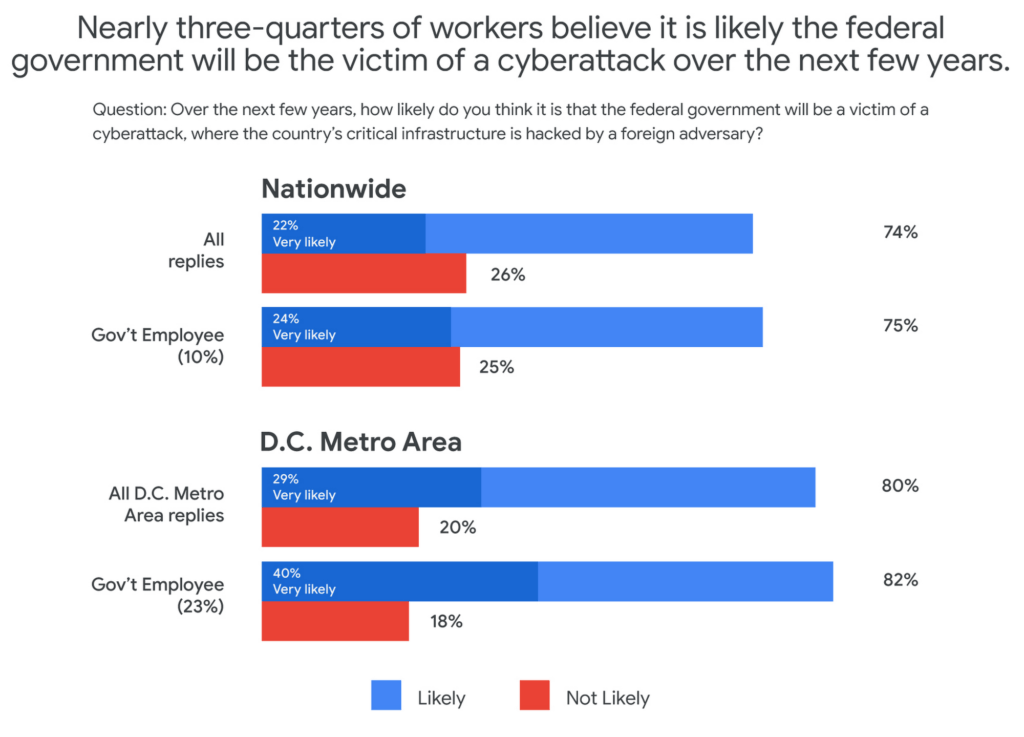
The majority of respondents said they believed it was likely that the federal government would be the victim of a cyberattack in the next few years. This percentage was even higher in the D.C. metro area and among government employees, with 40% of government workers living in metro D.C. saying it was “very likely.”
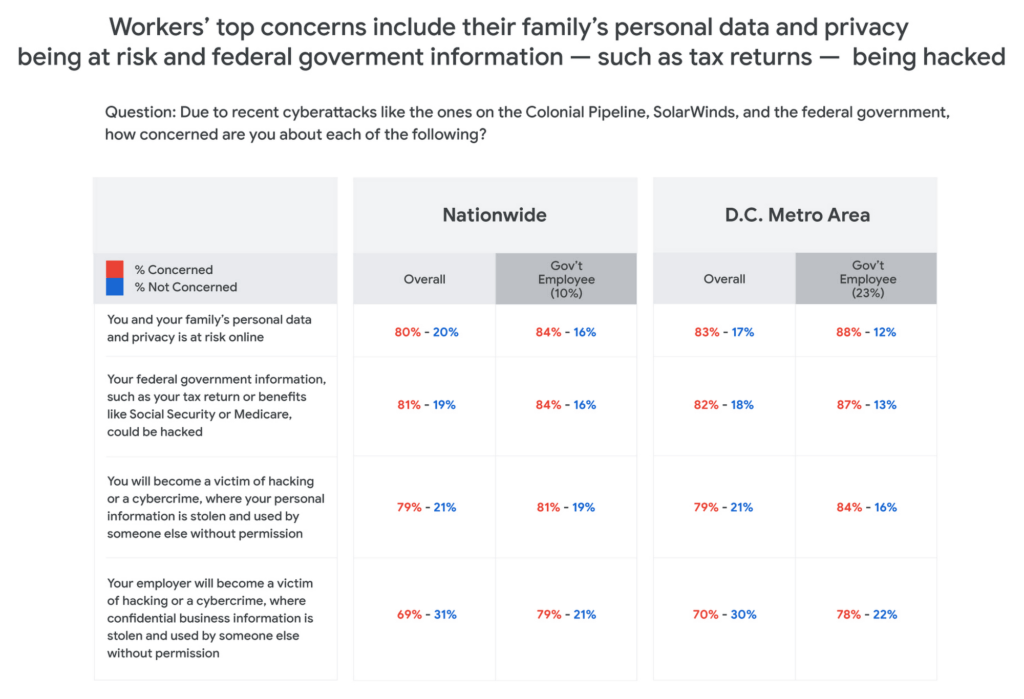
Respondents in all groups—national, D.C. metro, and government employees—were more likely to be concerned about cyberattacks as the perceived threat moved closer to home. For example, 80% of those surveyed said that recent attacks have them concerned about their personal data and privacy, and that of their family members. And for those in the D.C. area or in government jobs, the numbers were consistently higher than the national average.
One likely reason for such broad concern about cyberattacks is that many respondents reported experiencing a cyberattack at work. And while more than one-in-ten workers nationally have experienced disruptions from a cyberattack, the number increased to nearly one-in-three for D.C.-based government employees—nearly three times higher than the national average.
The problem with IT ‘monoculture’
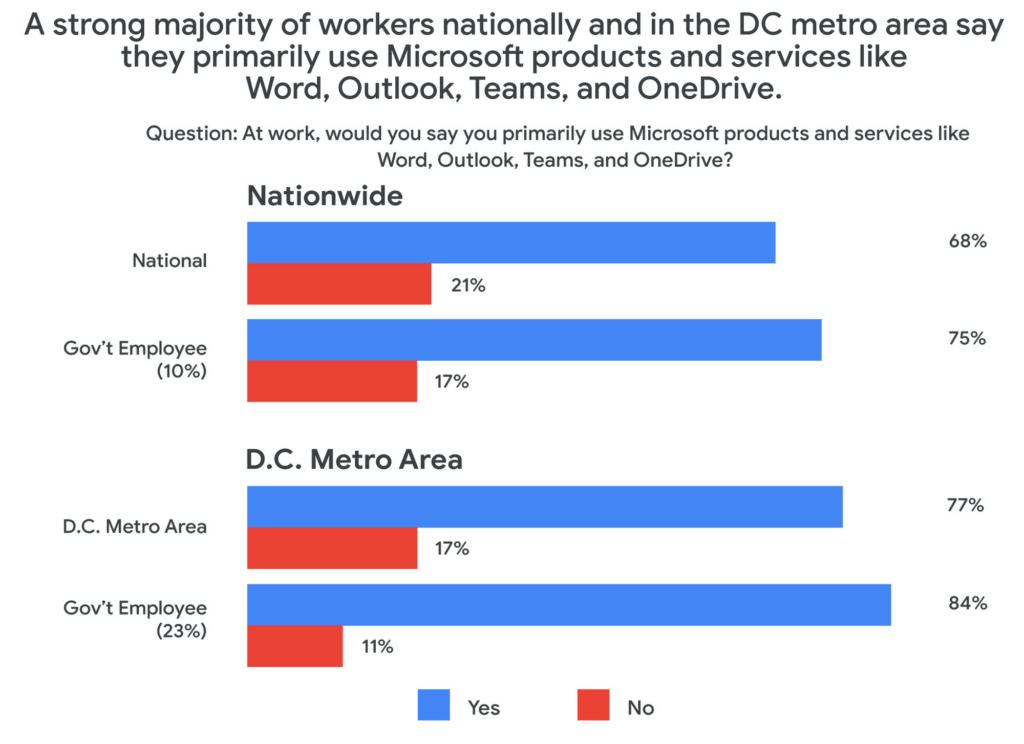
According to survey respondents, 84% of D.C. metro government employees primarily use Microsoft products at work, including Word, Outlook, Teams, and OneDrive. This is confirmed by another recent study by Omdia that found 85% of government employees use Microsoft productivity software, far and away the largest IT productivity vendor by market share.
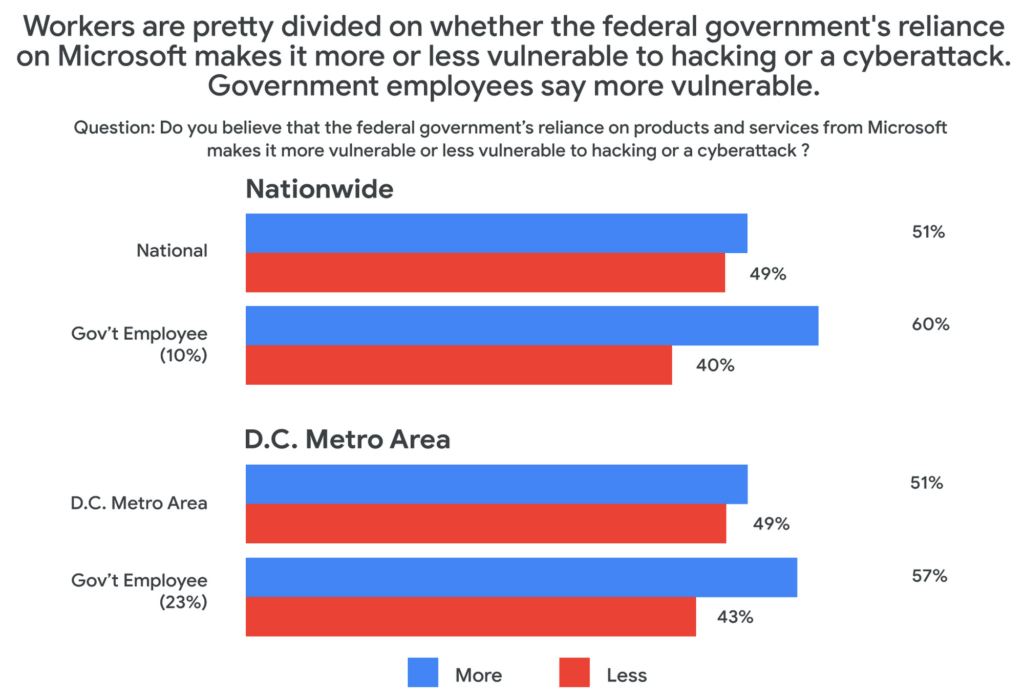
This reliance on a single software suite might suggest that these products are safe and secure, but the Public Opinion Strategies survey found that more than half of all respondents said that the government’s reliance on these Microsoft products actually made the federal government more vulnerable to hacking or cyberattacks.
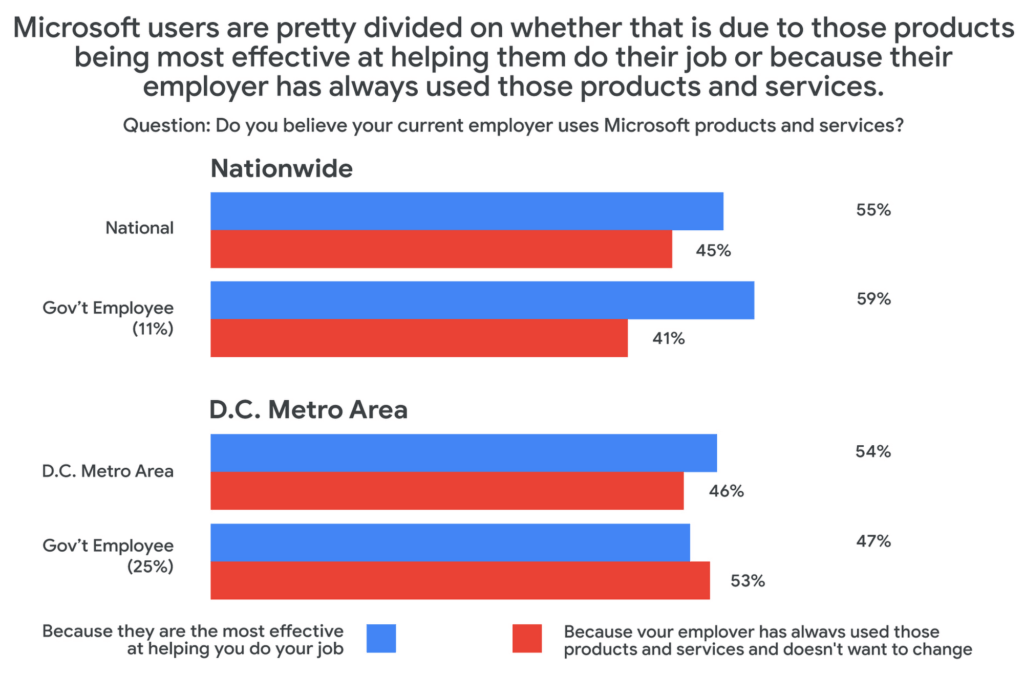
Given these vulnerabilities, why does government IT continue to rely on the same set of productivity tools in the workplace? The reason, according to survey respondents, has more to do with inertia than innovation. When asked why their employers used Microsoft services, around half said that the reason their employer continues to choose legacy, incumbent vendors was more about not wanting to change than wanting the most effective tool for the job.
Choice and shadow IT
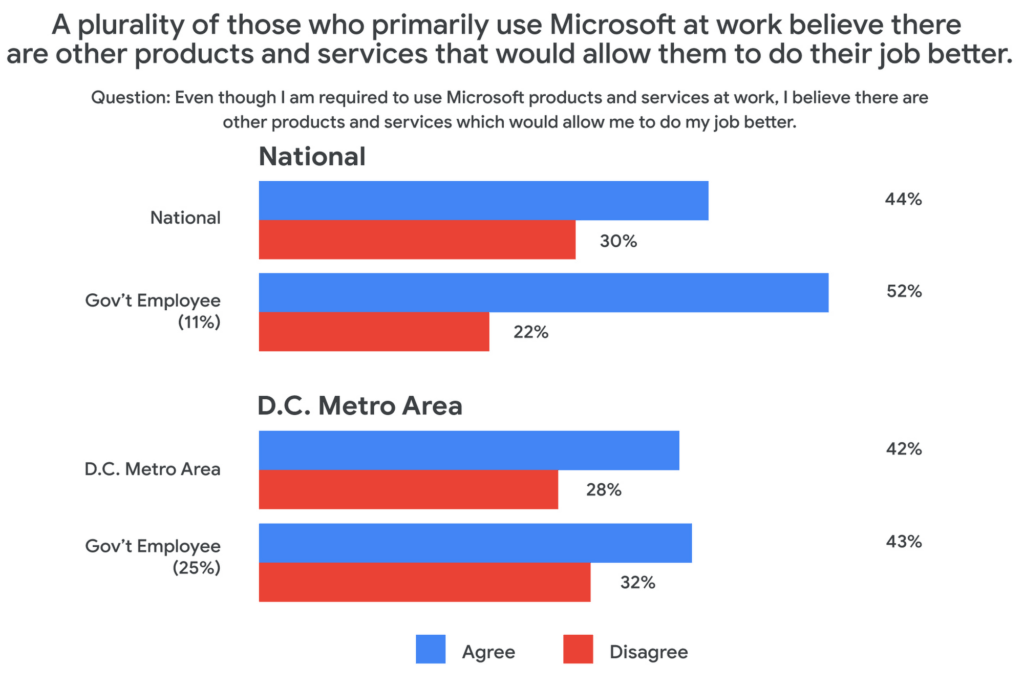
Coupled with these concerns about vulnerabilities comes a noted sentiment among those surveyed that their current IT solutions are not best for their needs. About half of those surveyed who primarily use Microsoft at work said that they would prefer to have a choice to use products and services from other companies. And among those who use Microsoft at work, 43% believe there are other products and services that would allow them to do their job better.
This may be leading workers to adopt “shadow IT,” or using products and services that are not officially approved or endorsed by their IT departments. In fact, the Public Opinion Strategies survey found that 35% of D.C. metro government workers have used shadow IT to get their jobs done. And among workers aged 20 to 34, that number jumps to 41%.
Rethinking IT purchasing priorities
With so many survey respondents reporting that they are dissatisfied with their legacy IT solutions, it may be time for the government to rethink its approach to procurement. In a separate research survey from Omdia in December 2021, 250 people responsible for technology purchasing decisions in the U.S. federal, state, and local governments said that government technology and procurement practices often are more about making things easier for IT vs. choosing what employees feel would be the best solution. In fact, only 27% of officials surveyed in that research cited “user demand” as a factor affecting their purchasing decisions.
As governments work to meet the demands and preferences of their constituents—and their employees—it’s clear that there’s an overreliance on legacy solutions, despite a track record of cybersecurity vulnerabilities and poor user perception.
At Google Cloud, we believe it’s time for more diversity and choice in the tools available for our civil servants across the nation—70% of whom use Gmail outside of work, according to our survey. Government workers have the right to benefit from the same flexible, secure-by-design tools at the office that they use in their personal lives. You can learn more about Google Workspace for Government here.
More Relevant Stories for Your Company

Cloud KMS with Cloud Storage: Better Performance for High-intensity Workloads
Encryption is critical for securing sensitive data while it is stored and transits the cloud. Today, Cloud Storage encrypts data server-side with standard Google-managed encryption keys by default, and can also encrypt data with customer-managed encryption keys that are stored and managed by Cloud Key Management Service (Cloud KMS). While customers have

Google Cloud & Siemplify Join Forces to Empower Companies to Manage Threat Responses Better
At Google Cloud, we are committed to advancing invisible security and democratizing security operations for every organization. Today, we’re proud to share the next step in this journey with the acquisition of Siemplify, a leading security orchestration, automation and response (SOAR) provider. Siemplify shares our vision in this space, and

Deep Dive into Google Cloud’s Security Track at the Next 21
In every industry, in every part of the world, cybersecurity concerns continue to grow in the wake of attacks on critical infrastructure and the software supply chain. Governments and businesses of all sizes recognize that they must do more to protect their employees, customers and citizens. But doing more of

Takeaways from the Google Cloud Public Sector Summit on Prioritizing Tech Investments
Editor’s note: Today’s post highlights five takeaways from our session at the first ever Google Cloud Public Sector Summit. To watch the full session, check out All the Right Moves: Prioritizing Investments in Technology. Now more than ever, government agencies need to invest in digital services to fulfill their missions and better
