





Protect Corporate Apps with BeyondCorp Enterprise

2672
Of your peers have already read this article.
2:30 Minutes
The most insightful time you'll spend today!
As part of our efforts to democratize Zero Trust, Google Cloud has designed our BeyondCorp Enterprise solution to be an extensible platform where customers can choose to integrate signals from other technology vendors and incorporate these into their Zero Trust access policies. Following our integrations announcements earlier this year, we are excited to announce a new BeyondCorp Enterprise integration with Microsoft Intune, now available in Preview.
This integration allows organizations to craft Zero Trust access policies and protect private applications and SaaS applications, including Office 365, based on data collected from the Intune graph API, including device posture and other trust signals. It can also be leveraged to configure context-aware access policies for Workspace applications.
These policies can be applied across end-user devices, no matter where they are located. The ability to leverage device information to make access decisions is a critical component of a Zero Trust approach. Intune is a widely used mobile device management (MDM) tool and many of our customers will be able to benefit from this integration to help ensure that their distributed workforce can appropriately access corporate resources.
The BeyondCorp Enterprise integration with Microsoft Intune collects data from Intune using the Microsoft Graph API. End-user device information collected by the connector is then fed into Access Context Manager, a component of BeyondCorp Enterprise, to gate access to resources based on policies and access levels.
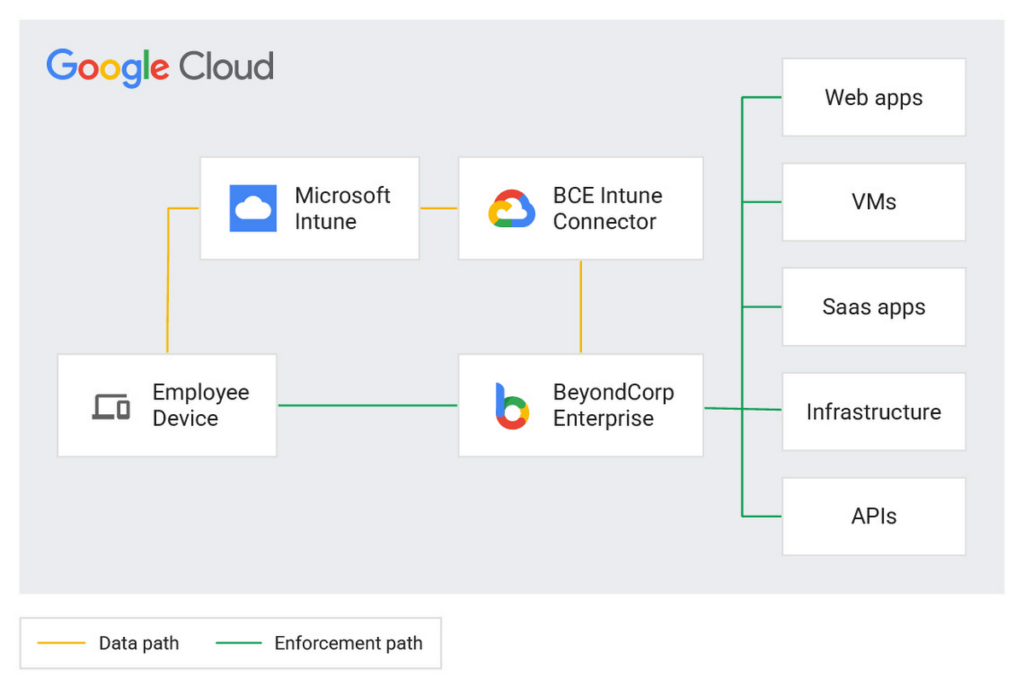
Customers are already seeing the benefits of the BeyondCorp Enterprise integration with Microsoft Intune. For example, one of our customers, a global ecommerce vendor, uses it to ensure their corporate-owned devices comply with internal policies before they are able to connect to corporate resources. With the Intune integration, they are then able to quickly and easily configure context-aware access policies with an attribute that company-owned devices must be in compliance in order to access the specific applications.
Previously, without the integration, they would need to set up a custom integration and manage both the code and the infrastructure where it was running. This integration not only alleviates the need to create custom code, but the customer has also seen a reduction in the time it takes to onboard new devices and build these policies.
If you’re interested in learning more or joining the preview, a full reference guide to the Intune integration can be found in our documentation here.
We believe that customers should be able to leverage their existing technology investments to build a more secure ecosystem. BeyondCorp Enterprise can help ensure that the right people have access to the right resources—only authorized users should be able to access only the resources that they have been approved for, based on their identity and device information. Google Workspace customers can also incorporate signal information from other vendors, including Intune, to create context-aware access policies for securing Workspace applications.
Earlier this year, we announced Netskope as a new member of the BeyondCorp Alliance to enable integration of a user’s risk score between Netskope Cloud Exchange and Google Cloud. We also announced new integrations with Jamf Pro for MacOS, which shares the Jamf-determined compliance state with BeyondCorp Enterprise so admins can incorporate this information into context-aware policies to restrict or allow access to protected applications.
You can learn more about BeyondCorp Enterprise integrations by registering for Google Cloud Next ‘22 on October 11-13, and attending the “What’s New in Zero Trust” session. Google Cloud will also be featured at the upcoming Jamf Nation User Conference (JNUC), September 27-29, to discuss BeyondCorp Enterprise integrations with Jamf.
The Ultimate Guide to VPC Service Controls: Strengthening Your Security Posture

2502
Of your peers have already read this article.
2:30 Minutes
The most insightful time you'll spend today!
While cloud security skeptics might believe that data in the cloud is just one access configuration mistake away from a breach, the reality is that a well-designed set of defense in depth controls can help minimize the risk of configuration mistakes and other security issues. Our Virtual Private Cloud (VPC) Service Controls can play a vital role in creating an additional layer of security while also making it easier to manage your data in a way that most cloud services can’t do today.
Organizations across industries and business models use cloud services for activities such as processing their data, performing analytics, and deploying systems. VPC Service Controls can empower an organization when deciding how users and data can cross the perimeter of the supported cloud services, if at all. While VPC Service Controls are designed to help stop attackers, they can also enable contextual trusted data sharing (similar to how Zero Trust allows contextual access).
What are VPC Service Controls
VPC Service Controls help administrators define a security perimeter around Google-managed services, which can control communication to and between those services. The Service Controls isolate your Google Cloud resources from unauthorized networks, including the internet. For example, this can help you keep a clear separation between services that are allowed to run in production and services that are not.
VPC Service Controls can help you prevent mistakes that lead to costly data breaches because they control access to your data at a granular level. They add context-aware access controls on these services, and can help you achieve your organization’s Zero Trust access goals.
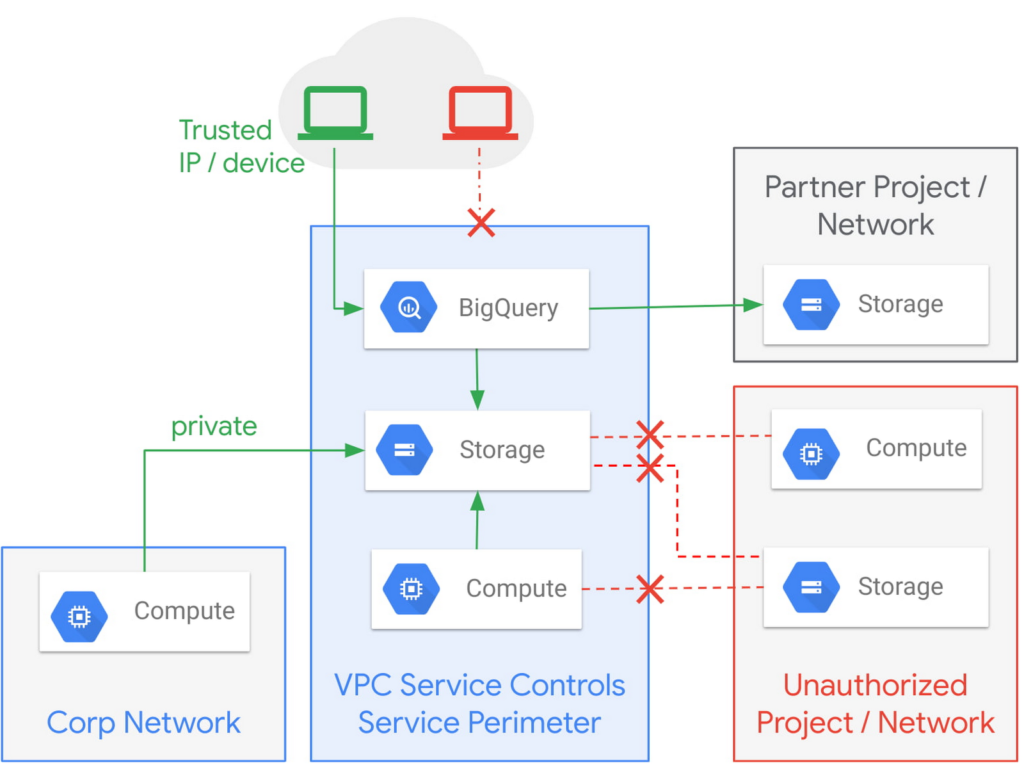
Example of the fine-grained policies based on access context that can be implemented with VPC Service Controls.
Like wearing two layers of clothing made from different fabrics to protect you from winter weather, VPC Service Controls may appear similar to Identity and Access Management (IAM) but they come from a different approach to implementing security. IAM enables granular identity based access control; VPC Service Controls create a security perimeter that protects your cloud resources and sets up private connectivity to Google Cloud’s APIs and services. While it’s recommended to use both, VPC Service Controls have an added bonus: They can support blocking data theft during a breach.
The additional layer of security that VPC Service Controls offer customers is challenging to achieve with on-premise systems or even with other cloud providers. You can think of it as an firewall for APIs that also adds a logical security control around three paths that data can take:
- From the public internet to your resources
- Inside your VPC and the cloud service perimeter
- For service-to-service communication (for example, denying access to someone who wants to load data to BigQuery or exfiltrate data from a BigQuery instance.)
How VPC Service Controls can help stop attackers
VPC Service Controls are used to enforce a security perimeter. They can help isolate resources of multi-tenant Google Cloud services, which can help reduce the risk of data exfiltration or a data breach.
For example, a bank that migrated financial data processing to Google Cloud can use VPC Service Controls to isolate their processing pipeline from public access (or any unauthorized access) by defining a trusted service perimeter.
How VPC Service Controls can enable trusted sharing
VPC Service Controls are used to securely share data across service perimeters with full control over what resource can connect to other resources, or outside the perimeter. This can help mitigate data exfiltration risks stemming from stolen identities, IAM policy misconfigurations, some insider threats, and compromised virtual machines.
Returning to our bank example, that same bank using VPC Service Controls may securely share or access data across Service Perimeters and Organizations. They may allow access to specific partners and for specific operations.
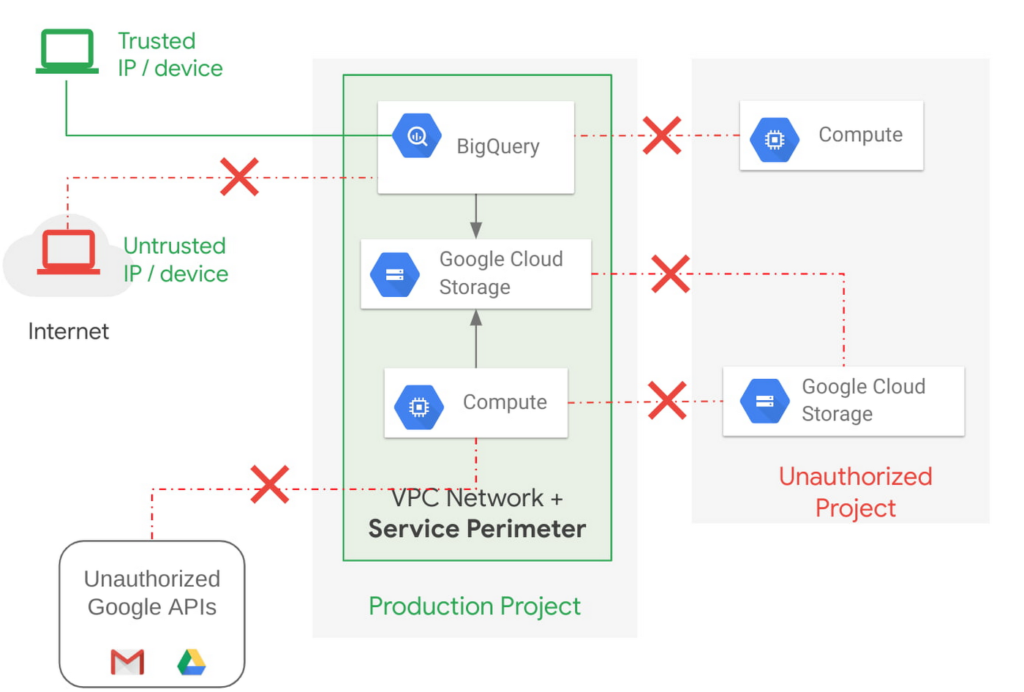
Example of allowing an authorized device plus authorized access.
How VPC Service Controls support Zero Trust access
VPC Service Controls deliver Zero Trust access to multi-tenant Google Cloud services. Clients can restrict access to authorized IPs, client context, user identity, and device parameters while connecting to multi-tenant services from the internet and other services.
A bank can use moving its services to the public cloud as an opportunity to abandon outdated access management approaches and adopt Zero Trust access. VPC Service Controls let them create granular access control policies in Access Context Manager based on attributes such as user location and IP address. For example, it would allow an analyst to only access Big Query from a corporate device on the corporate network during business hours. These policies can help ensure the appropriate security controls are in place when granting access to cloud resources from the Internet.
Next steps with VPC
Check out these pages to learn more about VPC Service Controls for your sensitive cloud deployments, especially for regulated workloads. This blog is the third in our Best Kept Security Secrets series, which includes how to tap into the power of Organization Policy Service and how Cloud EKM can help resolve the cloud trust paradox.
What to Look for from Cloud CISO Perspective
6605
Of your peers have already read this article.
2:30 Minutes
The most insightful time you'll spend today!
May is a big month for the security industry. It’s been over a year since we gathered for RSA in San Francisco for one of 2020’s last major in-person events. While we likely won’t be together in person this year, it’s an important time for the security community to come together and reflect on many accomplishments, and to consider the challenges still ahead of us. As the world focuses on security incidents and all the risks that still need resolving, it is important to stand back, on occasion, and also note that immense progress has been made by large numbers of small, medium and large enterprises to protect themselves and their customers against increased threats. What is also amazing is to see organizations do this while accelerating their digital transformations, supporting and protecting customers and managing ongoing remote working challenges. We are privileged to play our part in supporting those great teams.
It’s also been a busy month for us here at Google Cloud since our inaugural CISO perspectives blog post in April. Today, I’ll recap our cloud security and industry highlights, a sneak peak of what’s ahead from Google at RSA and more.
Thoughts from around the industry
- Risk Governance of Digital Transformation in the Cloud – In our latest Office of the CISO whitepaper, we shared guidance on both the challenges and opportunities of cloud transformation for Chief Risk Officers, Chief Compliance Officers, Heads of Internal Audit and their teams. A misconception we sometimes see among these executives is that moving to the cloud creates more risk to manage. Having held these leadership positions in previous roles, I believe that the cloud is as much a means of managing security, resilience and other risks as it is a risk in its own right. The whitepaper dives deep into considerations for each of these leadership functions as their organization embarks on a digital transformation journey.
- The importance of meeting global compliance requirements – Compliance is critical for building trust with customers in regulated industries, especially the public sector. It is worth remembering that in any critical industry, where there can be material impact from incidents, strong industry practices and standards to protect customers are vital (I wrote about this last summer). At Google Cloud, we’re regularly adding new compliance and security certifications to meet our customers’ needs globally. Recently, we expanded our list of FedRAMP High-certified products to include Cloud DNS, and helped our customers in the Asia-Pacific region address various compliance requirements to meet new government regulations for security and data protections. Google Cloud was also the only cloud service provider to complete an annual pooled audit with the Collaborative Cloud Audit Group (CCAG), which is a syndicate of 39 leading European financial institutions and insurance companies who depend on cloud infrastructure and technologies to deliver innovative solutions and experiences for their customers. Having spent most of my career in the financial services industry, I know firsthand the importance of managing risk assessments for outsourced vendors to provide the necessary assurances customers need from their cloud providers.
RSA 2021
We have a great lineup of speaking sessions and keynotes from Googlers at RSA this year. Below are the highlights you don’t want to miss:
- I’ll be doing a session on May 20 about supply chain resilience, where a panel of experts will dive into how we can adjust risk and security initiatives to handle the next “punch to the supply chain.” Additionally, on May 18 I’ll join many of my esteemed CISO leaders from various industries and governments for a keynote discussion on our top security insights, lessons learned and best practices for how we move forward as an industry to address the next wave of challenges.
- Google’s Senior Director of Information Security Heather Adkins will deliver a session on how to build secure and reliable systems at scale, which will cover principles from Google’s Site Reliability Engineering book with the same title (available for free download here). I’m most looking forward to Heather’s advice for how we as an industry can reshape our security thinking, based on modern architectures and technologies that can help organizations design scalable and reliable systems that are fundamentally secure.
- Nelly Porter, Senior Product Manager at Google Cloud Security, will participate in a panel discussion with security experts on the importance of Confidential Computing technology, how it’s changing the security landscape and where it’s headed. Google Cloud has made great progress in delivering a Confidential Computing portfolio for our customers in regulated industries over the past year, and we’re excited for new milestones in 2021.
Google cloud security highlights
- Infrastructure and SRE spotlight – Before I joined Google Cloud, I always admired the infrastructure and benefits this organization delivers that are uniquely Google – from the subsea cable innovations to SRE inventions and principles. Security and resiliency are baked into every layer of our infrastructure. Many of the Googlers who build and support our platform have sat in the same seat as our customers, so they understand those needs intimately. Over the last few months it’s been amazing to watch our technical infrastructure team grow, and the direct reliability, operational resilience and security benefits that team brings to our customers. For example, we’ve opened a new region in Poland, announced the first subsea cable that will directly connect the U.S. to Singapore with fiber pairs over an express route, and released an SRE book focused on how organizations can complete a successful cloud migration.
- New security foundations blueprint guide – As part of our mission to deliver the industry’s most trusted cloud, we strive to operate in a shared-fate model for risk management in conjunction with our customers. This includes sharing opinionated step-by-step guidance with key decision points and focus areas for how our customers deploy workloads in Google Cloud. This is why we’ve updated our Google Cloud security foundations guide and corresponding Terraform blueprint scripts. These blueprints are tremendously helpful to many stakeholders within an enterprise, like a CISO that needs to understand our key principles for cloud security, or a C-Suite business leader that needs to quickly identify the skills their teams need to meet an organization’s security, risk, and compliance needs on Google Cloud.
When we think about the types of features to build into products, we have many principles we follow. But the two that I keep coming back to as crucial are:
- The need for secure products not just security products. All products should have security built in and while we do build great security products our security and other teams remain focused on constantly enhancing the base levels of security and the security features in all our products.
- Defense in Depth. We don’t just focus on defense in depth from attacks – for ourselves and our customers. We also prioritize defense in depth from configuration errors or other hazards.
As you see below in some of the highlights of new features and products, these represent our commitment to secure products and all forms of defense in depth.
- Workload identity federation – Service account keys are powerful credentials, and can represent a security risk if they are not managed correctly. A safer approach is to use workload identity federation, using IAM to grant external identities IAM roles, including the ability to impersonate service accounts. This lets you access resources directly and eliminates the maintenance and security burden associated with service account keys. We also offered related overall guidance on the best way to use and authenticate service accounts on Google Cloud.
- VPC-SC Directional Policies – With VPC Service Controls (VPC-SC), admins can define a security perimeter around Google-managed services to control communication to and between those services. Using VPC-SC, you can isolate your production GCP resources from unauthorized VPC networks or the internet. But what if you need to transfer data between isolated environments that you’ve set up? VPC-SC directional policies is a new secure data exchange feature that allows you to configure efficient, private, and secure data exchange between isolated environments.
- Anthos service mesh supports VMs as well as clusters – Most enterprise compute resources are still in VMs and many will remain there for a long time to come. In Anthos 1.7, your VM-based workloads can now take advantage of the same mesh functionality as your container-based workloads.
- Cloud Spanner CMEK and Access Approvals – Cloud Spanner is Google Cloud’s fully managed relational database that offers unlimited scale, high performance, strong consistency across regions and high availability. Spanner now supports customer-managed encryption keys (CMEK) and Access Approval, Google Cloud’s industry-leading controls to require approval before access to your content by Google support and engineering teams.
- External Key Manager enhancements – In early 2020 we launched Cloud External Key Manager (Cloud EKM), the industry’s leading Hold-Your-Own-Key (HYOK) product. Using Cloud EKM, the keys used to protect your data stored and processed in Google Cloud are completely hosted and managed outside of Google Cloud infrastructure. Cloud EKM initially launched with support for BigQuery and GCE/PD; we expanded support for Cloud SQL, GKE, Dataflow Shuffle, and Secret Manager, with CMEK support currently in beta. We also provided in-depth documentation on the functionality, architecture and use cases for Cloud EKM in a new whitepaper.
- Web App and API Protection solution – Web applications and public APIs are increasingly important to how organizations interface with their customers and partners, and we’ve seen increased investment in tools to protect these resources from fraud and abuse. Google Cloud’s new Web App and API protection solution is based on the same technology Google uses to protect its public-facing services against web application exploits, DDoS attacks, fraudulent bot activity, and API targeted threats. It provides protection across clouds and on-premises environments.
- Threat Intel for Chronicle – Most threat intelligence feeds require security teams to do the implementation and legwork. With our new Threat Intel for Chronicle offering, however, our intelligence insights are applied automatically across your security telemetry to present unique observations within your environment. Threat Intel for Chronicle is exclusively curated for enterprise customers by Uppercase, Google Cloud’s intelligence research and applications team to provide our perspective on threats across the internet and surface them as relevant alerts.
That wraps up another month of thoughts and highlights. If you’d like to have this Cloud CISO Perspectives post delivered every month to your inbox, click here to sign-up, and we’ll see you in June!
5128
Of your peers have already watched this video.
18:00 Minutes
The most insightful time you'll spend today!
Trusted Collaboration for Hybrid Workplace with Google Workspace
Hybrid workspace need high levels of security, data privacy, and trust for seamless collaboration across workforce. As we navigate to the new normal, your enterprise can learn about the security and privacy specific innovations Google Workspace utilizes to help customers realize powerful, trusted, cloud-native collaboration.
Nine Interesting Google Cloud Identity and Environment Features to Know About!

2911
Of your peers have already read this article.
2:00 Minutes
The most insightful time you'll spend today!
I’ve been at Google Cloud just a few weeks, following years of experience as an AWS Hero and building on other clouds. So last week’s Google Cloud Next–my first!—was a bit of a culture shock. On the GCP podcast, I used the word “intentionality” to describe what I’m seeing: a thoughtful, holistic approach that informs so much of how Google Cloud is put together. Not just in the headline-grabbing new announcements like Google Distributed Cloud, but in the everyday things too.
Things like IAM and project setup. Step 1 of any cloud project is to provision access to an environment, and that’s why I always found it so frustrating in my past life when I had to deal with outdated or clunky stuff like:
- Homebrewed, sketchy SSO tooling and config files
- No centralized identity—I was a different person in every cloud account
- Mysterious logouts, redirects, and missing project context within the cloud console
- Account organization features that were “bolted-on” rather than designed the right way from the beginning
In contrast, I recently shared a Twitter thread about how shockingly right Google Cloud gets identity and environments. It’s probably my favorite thing about Google Cloud so far, and so in this post I want to expand on what I’ve learned. If you’re searching for a better way to access and organize your cloud, let me make you one of today’s lucky 10,000.
Nine things to love about Google Cloud identity and environments
1. You are YOU!
Every user is just a Google account (personal or corporate) that works across projects. For beginners, this lowers the barrier to entry and makes cloud feel like an extension of things you already know. For experts, it reduces the friction of having to juggle a bunch of unrelated identities. I love that you can permit any Google account into a cloud project as a collaborator—even a contributor from outside your organization!
2. No non-IAM root accounts
Google Cloud has been designed from the ground up to avoid the chicken/egg problem of requiring a manually configured superuser that sits outside the rest of the identity management infrastructure. In the Google world, humans use Google accounts, and services use IAM-based service accounts —it’s as straightforward as that. (Even non-Google services can be IAM—yay, workload identity federation!)
3. Project discovery for humans
Project, folder, and organization discovery are baked into the console, like browsing a file system scoped to your access level. This hardly even feels like a feature, it’s so subtle and yet absolutely fundamental. But once you see it, you can’t imagine going back to a world where environments exist in a vacuum with no contextual awareness of each other.
The hierarchical organization model also means that project-per-application-per-environment best practices are the path of least resistance; if anything, I’ve erred on the side of setting up *too many* logical groupings. It’s just too much fun to play with projects and folders!
4. Billing that protects you from yourself
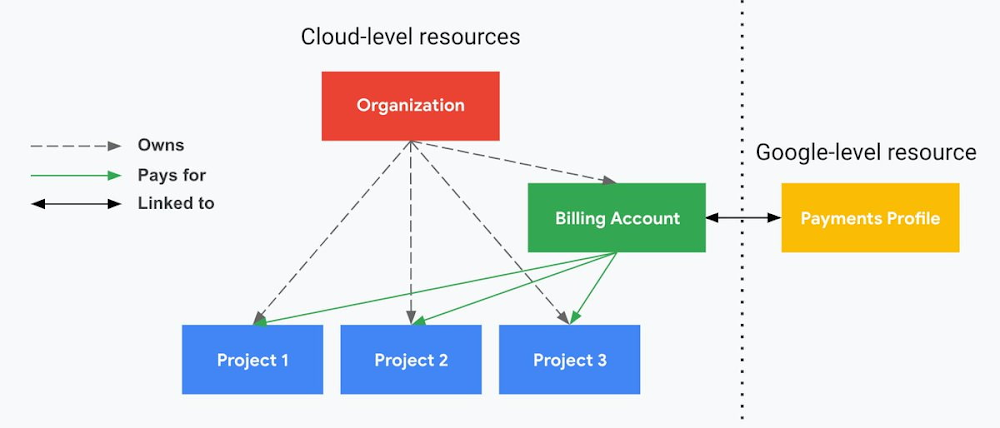
The project context gives you a logical container for the cost of the resources contained within it. My favorite part of this is that your billing entity is managed separately from the project itself. So you can delete a project and feel sure that all associated resources are gone and no longer racking up charges … without also trashing your ability to pay for future projects you might spin up.
(Related: the free tier does not charge you money unless you click a big button that basically says “YES, IT’S OK TO CHARGE ME MONEY.” This guarantee, combined with the familiarity of Google Accounts for access, are the main reasons I now recommend Google Cloud to beginners in my network who are looking for a safe place to learn and explore cloud.)
5. Organizational structure != billing structure
For organizations, billing is decoupled from the organization root. So permissions inheritance is a separate design decision from chargeback, as it should be. This keeps your Google Cloud footprint from converging toward Conway’s Law.
6. SSO that just works
Want to use the CLI? You get SSO out of the box with your Google Account—no corporate organization required, and no manual shuffling with config files and access keys. Or, better yet, you can use Cloud Shell to run gcloud commands right in your browser, even (especially?) on the docs pages. (Random trivia: I think Cloud Shell is the only native cloud service that has the same name across AWS, Azure, and Google Cloud–but Google’s version has been around the longest and as far as I can tell is the most fully-featured.)
7. One group to rule them all
Remember how user entities are just Google accounts? Guess what: you can use Google Groups to manage group access to IAM roles! That’s right: one set of users with permissions across docs, email, and cloud. It’s one reason why Google Workspace makes sense as a core piece of Google Cloud; it really does function like just another cloud service from an identity standpoint.
8. Never lose your place
In other clouds, I’ve experienced a problem I call the Timeout of Doom: when your console session expires, you’re left on a generic error screen and it’s up to you to figure out how to rebuild your context from scratch–starting with remembering what account you used in the first place. Imagine my delight to realize that reaching your Google Cloud console is as easy as bookmarking a single URL. console.cloud.google.com works and remembers who you are (or, at least, suggests the set of people you might be)—no mystery logouts or redirects.
9. Progressive complexity FTW
In my experience it’s been common for cloud providers to design most of their account features for organizations: if you’re an independent developer, you get more exposure to dangerous bills, less access to helpful SSO features, and generally must fend for yourself in a world that wasn’t really created with you in mind.
I love that Google Cloud has found a way to work with enterprises while still maintaining their roots as a cloud that developers love to use. Sign in with your personal Google account, attach it to an organization when-and-if you’re ready, and in the meantime you get the same thoughtfulness around SSO and billing as the giant shop down the street.
I’m not going to tell you my experience has been seamless; there are footguns here (every Google Workspace integration creates a new project?), and I’m still learning. But it’s that “intentionality” thing again. The Google Cloud identity and environment experience feels like it was designed, not just accreted; there’s an elegant simplicity to it that makes cloud feel fresh and exciting to me all over again. I can’t wait to see what’s next.
In the meantime, I highly encourage you to do what I did and spin up a free trial to try things out for yourself. Then hit me up on Twitter with your favorite Google Cloud identity or environment feature!
If You Don’t Have These Features in Your Cloud, You’re Missing the Mark on Security

3296
Of your peers have already read this article.
6:00 Minutes
The most insightful time you'll spend today!
At Google Cloud, we work tirelessly to give our customers increased levels of control and visibility over their data. We’ve come out with new capabilities for data encryption, network security, security analytics, and user protection designed to deliver on that promise.
External Key Manager: Store and manage encryption keys outside of Google Cloud
We give enterprises a broad range of encryption options so you can appropriately balance risk, control, security, and operational complexity when protecting your cloud workloads.
Google Cloud encrypts customer data at-rest by default and offers customers multiple options to control and manage their encryption keys. Today, we’re pleased to announce the next level of control with our new External Key Manager. Coming soon to beta, External Key Manager works with Cloud KMS and lets you encrypt data in BigQuery and Compute Engine with encryption keys stored and managed in a third-party key management system deployed outside Google’s infrastructure. External Key Manager allows you to maintain separation between your data at-rest and your encryption keys while still leveraging the power of cloud for compute and analytics.
To make this new service easy to implement, we are working with five industry-leading key management vendors: Equinix, Fortanix, Ionic, Thales and Unbound.
Key Access Justifications: Decide when and why your data can be decrypted
We believe that trust in the cloud is created through transparency. Google Cloud led the industry in providing meaningful transparency into provider access to customer data, and now we’re extending that transparency to use of encryption keys. Key Access Justifications is a new feature that will work with External Key Manager. It provides a detailed justification each time one of your keys is requested to decrypt data, along with a mechanism for you to explicitly approve or deny providing the key using an automated policy that you set.
Using External Key Manager and Key Access Justifications together, you can deny Google the ability to decrypt your data for any reason. As a result, you are the ultimate arbiter of access to your data–a level of control not available from any other cloud provider. Key Access Justifications is coming soon to alpha for BigQuery, and Compute Engine/Persistent Disk and covers the transition from data-at-rest to data-in-use. Customers interested in becoming early adopters can sign up here.
These new encryption innovations complement other recently released encryption options:
- Customer-managed encryption keys for Cloud SQL, now generally available (GA)
- Customer managed encryption keys for GKE persistent disks, a beta feature for Google Kubernetes Engine (GKE)
- Application layer secrets encryption in GKE, a GA feature which enables envelope encryption for your Kubernetes secrets
- Key import for Cloud HSM, a GA feature which lets users generate and use their own keys with Google Cloud’s managed HSM service
- Cloud HSM availability in all Google Cloud regions and multi-regions (with the exception of global multi-region)
All these updates offer you more control over how your data is protected.
Defend against internet threats
When you stand up applications on Google Cloud, you benefit from DDoS and web attack protection at Google scale. Google Cloud Armor works with our global Cloud Load Balancing infrastructure and provides always-on attack detection and mitigation so you can run your business without interruption.
Today, we’re pleased to announce the beta of Cloud Armor’s new web application firewall (WAF) capabilities to help protect applications against targeted and distributed internet threats. You can now configure Cloud Armor policies with geo-based access controls, pre-configured WAF application protection rules to mitigate OWASP Top 10 risks, and a custom rules language to create custom Layer-7 filtering policies.
Cloud Armor also now integrates with Cloud Security Command Center (Cloud SCC), notifying customers of suspicious application traffic patterns directly in the Cloud SCC dashboard.
Collect and inspect network traffic at scale
As networks grow in complexity, monitoring traffic helps you manage performance and security. In public cloud environments however, capturing network traffic reliably at scale for monitoring has been a challenge.
Our new Packet Mirroring service, now in beta, allows you to collect and inspect network traffic for Compute Engine and GKE; it’s available for all machine types in all of our regions. With this service, you can use third-party tools to more proactively detect threats, better respond to intrusions with signature-based attack detection, and better identify zero-day attacks with anomaly detection. For more, watch this video.
We’ve built an ecosystem of partners so you can use Packet Mirroring with third-party tools of your choice, including products from Awake Security, Check Point, Cisco, Corelight, cPacket Networks, ExtraHop Networks, Flowmon, Ixia by Keysight, Netscout, and Palo Alto Networks.
Protect G Suite and Cloud Identity users
Google’s Advanced Protection Program is our strongest protection for users at risk of targeted attacks. In the enterprise, this includes IT administrators and executives. Today, the Advanced Protection Program is starting to roll out to G Suite and Cloud Identity customers. With the Advanced Protection Program for the enterprise, we’ll enforce a specific set of policies for enrolled users including security key enforcement, blocking access to untrusted apps and enhanced scanning for email threats. Learn more.
We’re also introducing app access control, helping you reduce the risk of data loss by limiting access to G Suite APIs to third-party apps you trust. You can also more easily manage and restrict which Google APIs are available for use by third-party and customer-owned apps, and see which apps are verified by Google. Learn more.
Benefit from unique Google threat intelligence in Cloud Security Command Center
We continue to build products that help our customers benefit from the techniques we’ve developed to defend Google. Whether you are using Cloud Security Command Center to improve your security posture on GCP, or Chronicle Backstory to monitor your data on premise or in other clouds, we’re packaging threat detection and prevention capabilities that are available only from Google, and giving them to you.
Event Threat Detection, now in beta, helps you detect threats targeting your cloud resources using logs, so you can send incidents to your SIEM (Security Information and Event Management system) for further investigation. Event Threat Detection relies on Google threat intelligence to help you spot and stop threats before they result in business damage or loss.
Security Health Analytics helps you prevent incidents by identifying potential misconfigurations and compliance violations in your GCP resources and suggesting appropriate corrective action.
As we continue to innovate and simplify security management on GCP, Event Threat Detection and Security Health Analytics will be bundled in a Premium Edition of Cloud Security Command Center with other new capabilities that help you meet industry compliance requirements, catch web application vulnerabilities, detect compromised VMs, and discover other threats. The Premium Edition will give you a comprehensive, easy-to-deploy set of tools to protect your cloud resources. To learn more about how to use Cloud Security Command Center, check out our recent video series.
Chronicle: security analytics wherever your apps are deployed
Chronicle’s Backstory product was designed by former Google security professionals to enable anyone to use the types of techniques we use to detect threats and investigate security incidents. It brings world-class strengths in data analytics to your security data, privately and easily.
Many organizations leverage a mix of on-prem environments and multiple clouds to run their applications, making it difficult to collect and store security telemetry from various systems and tie individual events together for analysis. Backstory, our flagship offering for hybrid security analytics, offers you this level of intelligence. With just a few clicks, in minutes, you can aggregate and analyze your security telemetry wherever your apps may run, and where they might run in the future.
More Relevant Stories for Your Company



Journey to Transformation and Modernization with Google’s Distributed Cloud
Google Cloud has been leading the way of helping businesses make most from their cloud investments to drive digital transformation through modern application platforms that cater to today's customer needs. Watch the video from the Next '21 to explore three areas where companies are supported by Google Cloud throughout their

Ensuring Ironclad Security: Our Validation Process for the Confidential Space
We’re pleased to announce that Confidential Space, our new solution that allows you to control access to your sensitive data and securely collaborate in ways not previously possible, is now available in public Preview. First announced at Google Cloud Next, Confidential Space can offer many benefits to securely manage data

How to Detect and Eliminate New Cloud Security Threats: Tips for Your Security Teams
Why do we keep talking about security all the time? Why hasn’t anyone just gone and fixed it? You’ve probably heard these questions, whether from your leadership, or a board member or just from friends. Then you labor at explaining why security in the cloud is so complex and challenging,

Redefining Network Security with Google Cloud’s Secure Web Proxy
Google Cloud provides multiple layers of security to help customers stay ahead of evolving threats and keep their cloud workloads safe. Today at our annual Security Summit, we are excited to announce the general availability of Secure Web Proxy, a new cloud-first network security offering that provides web egress traffic inspection, protection,
