





Creating and Using Storage Buckets for Your Data Needs

1376
Of your peers have already read this article.
2:30 Minutes
The most insightful time you'll spend today!
So, you want to store objects on the cloud? But you’re really new to Google Cloud or Cloud Storage and would like someone to walk you through the process step by step?
Today is your lucky day!
I will help you understand the big steps involved in setting up and using Cloud Storage. For a walkthrough of all the steps involved that even includes highlighting of things to select so you don’t spend all your time playing “Where’s Waldo” on the page looking for that one button, click try the tutorial!
Creating buckets, storing objects in them, and adjusting permissions may feel challenging at first, but after you’ve walked through these steps, you’ll be able to create and use the Cloud Storage your project needs.
Resource Hierarchy
Projects contain all of the related parts of your application. Inside projects, you may have buckets, the top level containers in Cloud Storage. Files and folders are stored in buckets. You can grant access to a bucket, folder, or file using Identity and Access Management.

You can do all of that in this interactive tutorial. So let’s get started. I suggest you follow along in the tutorial so you can see the specific keys and screens as I describe them.
Creating a project
Everything in your application will be in a project, even if the only service you are using is storage. Projects need to be associated with a billing account, so if you don’t have one, consider signing up for the Free Trial. You’ll start in the Cloud Console.
Creating a bucket
Once you have a project, you can use storage by navigating to the Cloud Storage page by using either the Navigation menu at the top left of the console or by searching for “Cloud Storage” using the search box at the top of the console.
At the Buckets page of Cloud Storage, you’ll be able to create a bucket. The name of your bucket needs to be globally unique; that is no other bucket in Google Cloud Storage can have the same name. This is because if you or your organization allow your bucket to be accessible on the Internet, it will be at the URL https://storage.googleapis.com/<bucket name>. You can also consider implementing a security feature to prevent data exfiltration, organization restriction headers when you’re finished creating your bucket.. Pick a region close to you for your bucket. In some cases it may make sense to use multi-region or dual-region, but the details are more than I want to get into here. Don’t worry; you can find lots more information on them! Additionally, I won’t go into the details about selecting the appropriate storage class based on access frequency and longevity, but more information can be found here as well our recently introduced Autoclass tiering feature..
Since buckets can be accessed from the Internet, you need to be careful to only make the things you want to be public, public. The default value is to keep your data off of the Internet, so when you create the bucket, there’s an option to “Enforce public access prevention on this bucket” that is already selected. Since we’ll be making items in this bucket public later on, clear the option before confirming the bucket information. Don’t worry; you’ll see how to set that option back later.
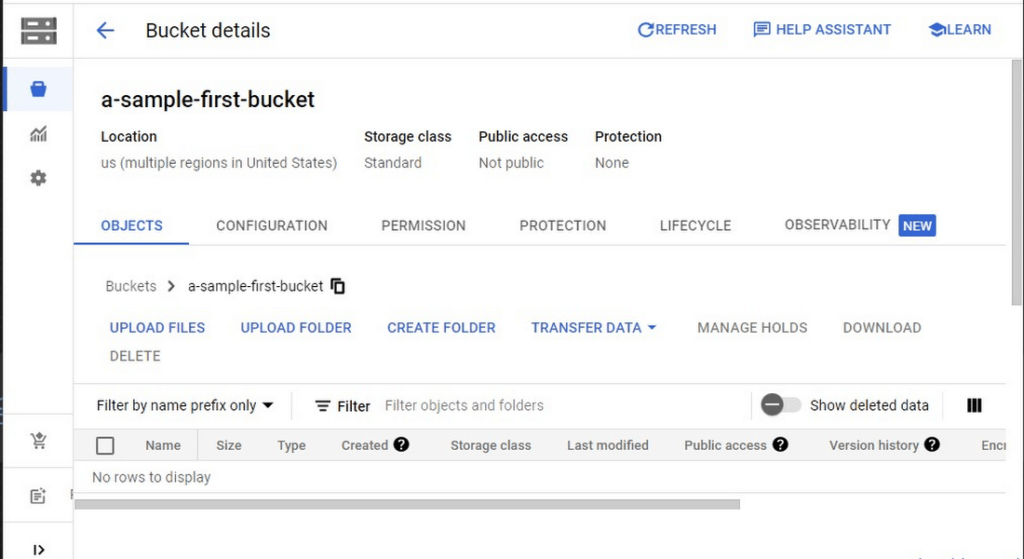
Take a look at the Bucket detail page. There are tabs to see the objects in the bucket, the permissions on the bucket, and much more. There are commands to create folders and to upload files and folders. We’ll do some of this in the next section. You can even find out much more from the Learn option in the upper right.
Adding items to the bucket
Find a file you’d like to upload to this bucket, remembering it will be made public to the Internet later. If you don’t have anything available, there’s a picture of a cat (of course, it’s a cat picture, this is the Internet!) in the interactive tutorial.
Go to the bucket details for your bucket. Using the “Upload files” button, you’ll just upload the file to the bucket by selecting the file from your computer. We won’t get into service classes here, but when you’re ready, there are links in the references.
Of course, if you have a lot of files in a bucket, you probably will want some sort of organization. You can do this by creating folders in your bucket with the “Create Folder” option. Once you’ve done that, you can go to the overflow menu (three vertical dots at the end line with the object information) and select Move. Remember, if you need help finding this, the interactive tutorial will point it out.
Making a bucket public
No surprise, the Bucket details hold lots of information about your bucket. You’ll change the bucket’s permissions in the Permission tab. (I hope that’s not a surprise.) You can then give access to individuals, groups, or all users. For this tutorial, follow the steps to grant access to allUsers. There are a variety of different levels of access you can grant to a user. In this case, just grant the ability to view the object using Storage Object Viewer.
Then go into the Objects tab to find the URL for the object you uploaded. Copy that URL and ensure you can indeed access the object from another tab or incognito window.
Now that you’ve done that, go back to the Permission tab for the bucket and select Prevent Public Access to secure the bucket again.
So, in a nutshell, to make all files in a bucket public, in the Permissions tab:
- Uncheck the option “Remove Public Access Prevention”
- Use Grant Access to give allUsers the Storage Object Viewer role in Cloud Storage.
To make all files in a bucket private, in the Permissions tab select Prevent Public Access.
Cleaning up
There is a charge to keep items in Cloud Storage, so you’ll probably want to delete the object you uploaded by selecting it and pressing Delete. You can delete the bucket in a similar way. The tutorial has details, of course.
While there are lots more details about Cloud Storage, you’ve got the big picture now. Go do something creative and useful with it!
So what now?
If you haven’t walked through the interactive tutorial, give it a try!
Google Cloud Helps Northwell Health to Boost Caregiver Productivity and Access to Right Care Using AI

7938
Of your peers have already read this article.
2:00 Minutes
The most insightful time you'll spend today!
Lung cancer is the leading cause of cancer death in the United States and like any cancer, early detection is crucial to survival. Screening at-risk populations is an important part of reducing mortality, and if concerning nodules are found on imaging, further testing may be required. Today, we’ll share how Northwell Health uses Google Cloud products such as Cloud Healthcare APIs and BigQuery to increase caregiver productivity and deliver better care for patients with findings that indicate potential development of lung cancer.
Northwell is New York’s largest healthcare provider
Northwell Health is New York’s largest healthcare provider with 23 hospitals and nearly 800 outpatient facilities. Northwell’s nearly 4,000 doctors care for millions of patients each year, and at this scale, there is an immense amount of healthcare data to manage. To better manage and leverage this data, Northwell Health partnered with Google Cloud starting in 2018.
Enabling caregivers to spend more time with patients
Nic Lorenzen, the lead developer of Northwell Emerging Technology and Innovation team, has a mission to put together data for caregivers in a way that makes sense. It is no secret that inefficient electronic health records systems have a negative impact on a physician’s ability to deliver quality care. Traditional EHRs have information distributed across many tabs, which forces caregivers to spend considerable time at the computer trying to find information. Moreover, speed of care matters. If care is delayed, patients may have to spend more time in the hospital and may suffer worse health outcomes.
To solve this problem, Nic’s team focused on giving caregivers the most relevant pieces of data at the right time by developing an intelligent clinician rounding app. The data needed to derive these insights can depend on the caregiver’s role–a nurse cares about different things than a cardiologist. This system aggregates multiple data sources, and provides patient-specific insights to caregivers.
This system would not have been possible before with traditional EHRs and data warehouses that have proprietary data models and rarely sync data in real time. Now with data easily accessible through Google Cloud’s Healthcare solutions, Nic’s team can deliver the right clinical information to the right people instantly. These days, Nic says, “instead of spending 75% of our time dealing with architecting the underlying platforms, we spend 75% of our time focused on higher value use cases for clinicians and patients. Google Cloud’s Healthcare solutions have greatly improved our developer productivity and time to value.”
Caregivers have found this new system to be a game changer.Before the implementation of this system, caregivers would spend, on average, seven to nine minutes finding the data needed to make medical decisions for one patient. Now, that aggregated information is delivered to a caregiver’s mobile device in less than a second.
Ensuring patients get the right care with the power of AI
There are a number of reasons why patients might not get the care that they need. For example, patients today can go to multiple hospitals and clinics settings, and coordinating care across multiple facilities is complex. Regional hospitals and clinics have their own siloed view of their data, so pertinent information gathered by one clinic might not be seen by another. These gaps in clinical data lead to gaps in patient care.
When a patient gets radiologic imaging, they may have findings unrelated to the reason they initially got the imaging. For example, a chest CT for a car accident might reveal an incidental lung nodule that could be cancerous. Unfortunately, research shows that a large portion of patients do not get follow up for these incidental findings because it isn’t the primary reason why the patient is seeing a doctor. Moreover, social determinants of health are a factor that affects which patients receive follow-up care. Identifying these patients and providing the necessary follow up care prevents adverse events related to delayed detection of cancer.

With Cloud Healthcare solutions, Northwell built an AI model to identify these patients so that oncologists can appropriately follow up with patients who have findings suspicious for lung cancer. The AI model detects incidental pulmonary nodules in radiology reports so that doctors can then contact the patients that need follow-up care. Nic says his team was able to build this system in a week: “Google Cloud did a lot of heavy-lifting for us and allowed us to get to the AI applications much faster. It allowed us to build a platform that just works.”
Healthcare systems can now rapidly generate healthcare insights with one end-to-end solution, Google Cloud Healthcare Data Engine. It builds on and extends the core capabilities of the Google Cloud Healthcare API to make healthcare data more immediately useful by enabling an interoperable, longitudinal record of patient data. Northwell Health uses Google Cloud as the core of their platform, enabling their developers to create solutions to the most pressing healthcare problems.
Special thanks to Kalyan Pamarthy, Product Management Lead on Cloud Healthcare and Natural Language APIs for contributing to this blog post.
Built with BigQuery: Retailers Unlock the Value of Data with SoundCommerce

3235
Of your peers have already read this article.
3:30 Minutes
The most insightful time you'll spend today!
As economic conditions change, retail brands’ reliance on ever-growing customer demand puts these companies at financial and even existential risk. Top-line revenue and active customer growth do not equal profitable growth.
Despite multi-billion dollar valuations for some brands, especially those operating the direct-to-consumer model, the rising costs of meeting shoppers’ high expectations (i.e. free shipping, free returns) along with the escalating cost of goods, fulfillment operations, and delivery costs, create pressure for brands to turn a profit. The ONLY way brands drive profitable growth is by managing variable costs in real-time. This in turn mandates adopting modern data cloud infrastructure including Google Cloud services such as BigQuery.
To unlock the value of data, Google Cloud has partnered with SoundCommerce, a retail data and analytics platform that offers a unique way of connecting marketing, merchandising, and operations data and modeling it within a retail context – all so brands can optimize profitability across the business.
Profitability can be measured per order through short-term metrics like contribution profit or long-term metrics like Customer Lifetime Value (CLV). Often, retailers calculate CLV as a measure of revenue with no consideration for the variable costs of serving that customer, for instance: the costs of marketing, discounting, delivering orders to the doorstep, or post-conversion operational exceptions (e.g. cancellations, returns).
What may first appear to be a high lifetime value customer through revenue-based CLV models, may not be profitable at all. By connecting marketing, merchandising, and operations data together, brands can understand their most profitable programs, channels, and products through the lens of actual customer value – and optimize accordingly.
The journey for brands starts with the awareness and data enablement of a more complex data set containing all variable revenue, cost, and margin inputs. What does a retailer need to do to achieve this?
- All data together in one place
- Matched and deduplicated disparate data
- Data is organized into entities and concepts that business decision makers can understand
- A common definition of key business metrics (this is especially important yet challenging for retailers because systems are siloed by the department and common KPIs like contribution profit per order may be defined differently across a company)
- Branched outputs for actionability: BI dashboards vs. data activation to improve marginal profit.
Once brands understand these requirements, up next is execution. This responsibility may fall within a ‘build’ strategy on the shoulders of technical IT/data leadership and their team(s) within a brand. This offers maximum control but at maximum cost and time-to-value. Retail data sources are complicated and change often. Technical teams within brands can spend too much time building and maintaining the tactical data ingestion process, which means they are spending less time deriving business value from the data.
But it doesn’t have to be this hard. There are other options in the market that brands can consider, such as a tool like SoundCommerce which provides a library of data connectors, pre-built and customizable date mappings, and outbound data orchestrations all tailor-made and ready-to-go for retail brands.
SoundCommerce empowers retail technology leaders to:
- Maintain data ownership to allow users to send modeled data to external data warehouses or layer-on business analytics tools for greater flexibility
- Provide universal access to data across the organization so every employee can have access to and participate in a low-code or no-code experience
- Expand and democratize data exploration and activation among both technical and non-technical users
For retail business and marketing decision-makers, SoundCommerce makes it easy to:
- Calculate individual customer lifetime value through the lens of profitability – not just revenue.
- Evaluate and predict lifetime shopper performance – identify which programs drive the highest CLV impact
- Set CAC and retention cost thresholds – determine optimal Customer Acquisition Costs (CAC) and retention costs that ensure marketing efforts are profitable through the lens of total lifetime transactions
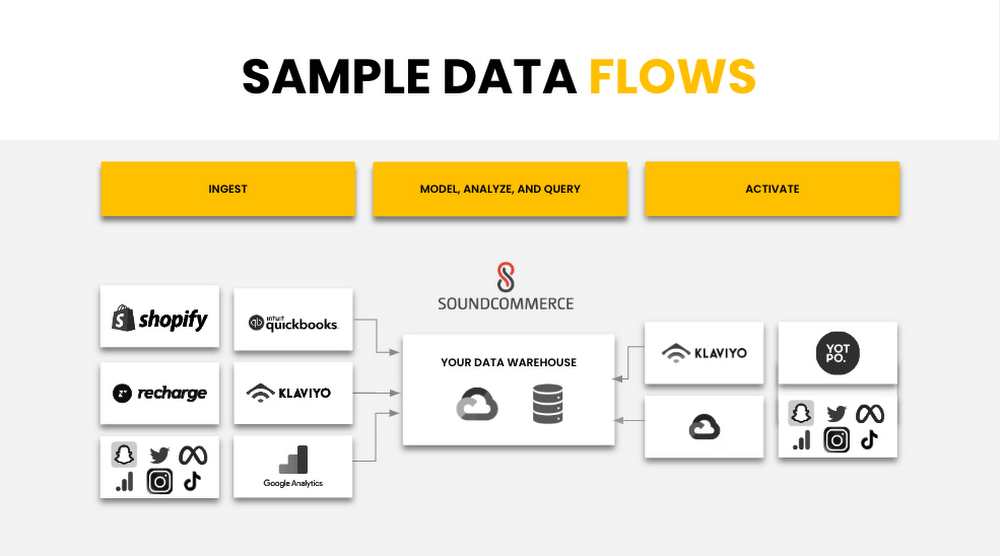
Below is a sample data flow that illustrates how SoundCommerce connects to all the tools a Retailer is using and ingests the first-party data, agnostic of the platform. SoundCommerce then models and transforms the data within the retail context for brands to take immediate action on the insights they gain from the modeled data.
SoundCommerce built on Google Cloud Platform Services
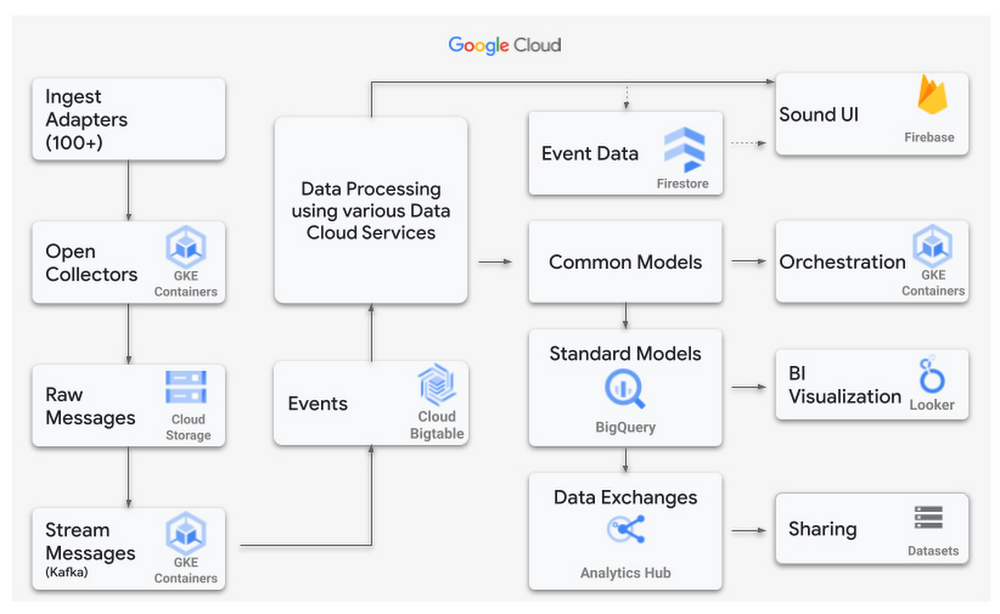
SoundCommerce selected the Google Cloud Platform and its services to achieve what they set out to do – drive profitability for retailers and brands. SoundCommerce perfected this very need of retailers to centralize and harmonize data, map to business users’ needs to infer key metrics and insights by visualizing the data, or reuse the produced datasets to build upon other use cases specific to retailers. SoundCommerce built a cloud-native solution on Google Cloud leveraging the data cloud platform. Data from various sources are ingested in raw format, parsed, and processed as messages in Cloud Storage buckets using Google Kubernetes Engine (GKE) and stored as individual events in Cloud BigTable. A mapping engine maps the data to proprietary data models stored in BigQuery to store the produced data as datasets. Customers use visualization dashboards in Looker to access the data exposed as materialized views from within BigQuery. In many cases, these views are directly accessible by the customer per their use case.
Power Retail Profitable Growth with Analytics Hub
SoundCommerce adopted BigQuery and the recent release of Analytics Hub – a data exchange that enables BigQuery users to efficiently and securely share data. This feature ensures a more scalable direct access experience for SoundCommerce’s current and future customers. It meets brands where they are in their data maturity by giving them the keys to own their data and control their analytics-driven business outcomes. With this feature, retailers can customize their analysis with additional data they own and manage.
“Retail Brands need flexible data models to make key business decisions in real-time to optimize contribution profit and shopper lifetime value,” said SoundCommerce CEO Eric Best. “GCP and BigQuery with Analytics Hub make it easy for SoundCommerce to land and maintain complex data sets, so brands and retailers can drive profitable shopper experiences with every decision.”
SoundCommerce uses Analytics Hub to increase the pace of innovation by sharing datasets with its customers in real time by using the streaming functionality of BigQuery. Customers subscribe to specific datasets through a data exchange as data is generated from external data sources and published into BigQuery. This leads to a natural flow of data that scales easily to hundreds of exchanges and thousands of listings. From the Customer’s viewpoint, Analytics Hub enables them to search listings and coalesce data from other software vendors to produce richer insights. All of the benefits are an add-on to the BigQuery features such as separation of compute and storage, petabyte-scale serverless data warehouse, and tighter integration with several Google Cloud products.
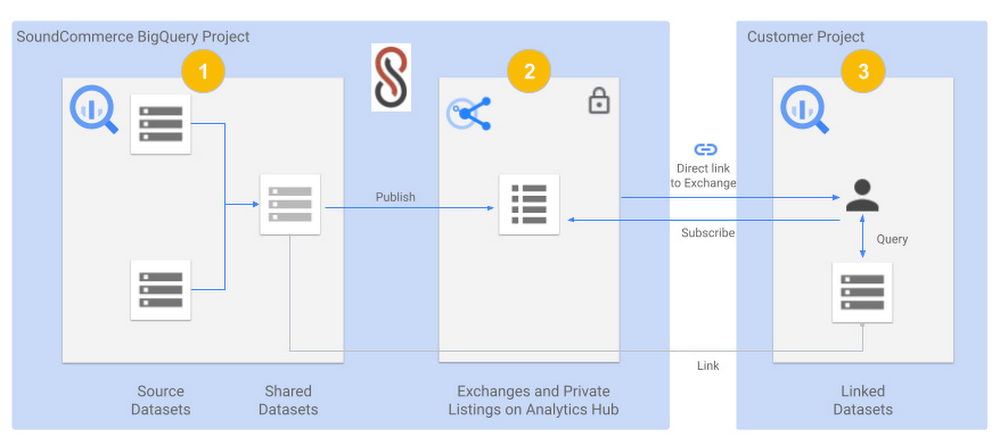
The below diagram shows a view of SoundCommerce sharing datasets with one of its customers:
- A SoundCommerce GCP project that hosts the BigQuery instance contains one or more Source Datasets that are composed into a Shared Dataset for a specific customer. The dataset is wrapped around Materialized views but can include other BigQuery objects such as Tables, Views, Authorized views and datasets, BigQuery ML models, external Tables, etc.
- The same SoundCommerce GCP project contains the data exchange that acts as a container regarding the shared datasets. The exchange is made private to securely share the curated dataset relevant to the customer. The shared dataset is published into the data exchange as a private listing. The listing inherits the security permissions that are configured on the exchange.
- SoundCommerce shares a direct link to the Exchange to the Customer, which they can add as a Linked dataset into their project in their Google Cloud Organization. The shareable link can be pointed to a private listing. From here on, the dataset is visible in the Customer project like any other dataset and immediately available to accept queries and return results. Alternatively, the customer can also view the listing in their own project under Analytics Hub and subscribe to it by adding it as a linked dataset.
SoundCommerce is incrementally onboarding customers to use Analytics Hub for all data sharing use cases. This enables brands to get business insights faster and gain an understanding of their profitable growth quickly. Plus, it gives them the ownership to own their own data and manage it how they see fit for their business. From a technical standpoint, the adoption of Analytics Hub has led to leveraging an inherent capability in BigQuery for data sharing, faster scaling, and reducing operational overhead to onboard customers.
The Built with BigQuery advantage for ISVs
Through Built with BigQuery launched in April as part of the Google Data Cloud Summit, Google is helping tech companies like SoundCommerce build innovative applications on Google’s data cloud with simplified access to technology, helpful and dedicated engineering support, and joint go-to-market programs. Participating companies can:
- Get started fast with a Google-funded, pre-configured sandbox.
- Accelerate product design and architecture through access to designated experts from the ISV Center of Excellence who can provide insight into key use cases, architectural patterns, and best practices.
- Amplify success with joint marketing programs to drive awareness, generate demand, and increase adoption.
BigQuery gives ISVs the advantage of a powerful, highly scalable data warehouse that’s integrated with Google Cloud’s open, secure, sustainable platform. And with a huge partner ecosystem and support for multi-cloud, open source tools, and APIs, Google provides technology companies the portability and extensibility they need to avoid data lock-in.
Click here to learn more about Built with BigQuery.
We thank the many Google Cloud team members including Yemi Falokun in Partner Engineering who contributed to close collaboration with the SoundCommerce team.
Datashare for Financial Services: Securing the Publishers and Consumers’ Access to Market Data

8547
Of your peers have already read this article.
4:30 Minutes
The most insightful time you'll spend today!
Access to the cloud has advanced the distribution and consumption of financial information on a global scale. In parallel, the global financial data landscape has been transformed by an influx of alternative data sources, including social media, meteorological data, satellite imagery, and other data. Exchanges and market data providers now find they need to include these new datasets to enrich their products and compete, which has meant they now must consider cloud-based models to keep up with the demands of their customers who expect easy, quick, flexible and cost-efficient ways to consume market data.
To address these needs, today we’re announcing the general availability of Datashare for financial services, a new Google Cloud solution that brings together the entire capital markets ecosystem—data publishers, and data consumers—to exchange market data securely and easily.
Datashare helps organize third-party financial information, making it accessible and useful to market data publishers and data consumers. We open-sourced the entire Datashare solution so market data publishers can now onboard their licensed datasets to Google Cloud securely, quickly and easily, while data consumers can consume that data as a service in tools of their preference, such as BigQuery.
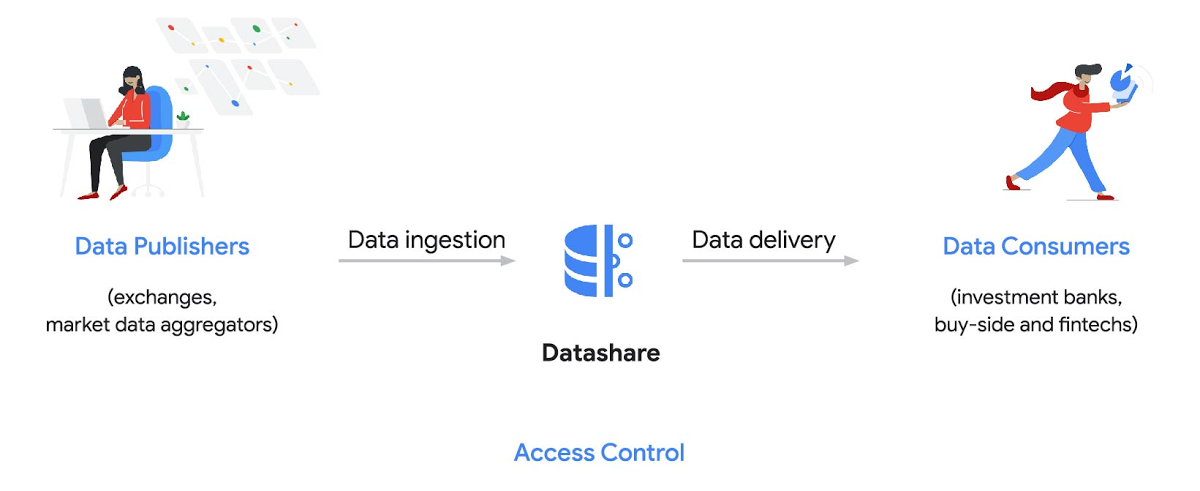
Three ways to distribute and consume your data
Batch data delivery
Datashare provides a batch data delivery mechanism for data publishers to deliver their reference data, historical tick data, alternative market data sources and more via BigQuery, reducing the administrative burden on data consumers to extract insights from data.
Real-time data streaming delivery
By using this event-based data delivery channel for rapidly changing instrument prices, tick data, orders, news and others via Pub/Sub, data consumers can reliably process individual messages or rewind to a point in time to replay a prior market scenario and test model changes.
Monetizing licensed datasets
Market data publishers can onboard their licensed datasets to Google Cloud and make them available via a one-stop-shop on Google Cloud Marketplace, enabling a new sales channel to expand market reach.
Reference architecture
Check out the diagram below to see how you can share your batch and real-time data directly to your Google Cloud customers with BigQuery and Pub/Sub.

As you can see in the above reference architecture, both publishers and consumers can derive several benefits from the solution:
Benefits for data publishers
- You no longer have to maintain your own delivery and licensing infrastructure.
- You can easily package and deliver granular data products and experiments with SQL.
- You can have a solution that scales with your business as data volumes and number of customers grow.
Benefits for data consumers
- Your data is ready for analysis and machine learning (ML)— you no longer have to maintain extract, transform, and load (ETL) pipelines to load files and transform data.
- You can avoid the expense and burden of maintaining multiple copies of large data files.
- You can be more targeted with consumption of data using BigQuery queries, improving performance, and compliance, and reducing cost.
Accessing the datasets
Google Cloud has been working with multiple industry firms on innovating in the market data space. By using Datashare for publishing, data publishers can make their entire datasets available on Google Cloud. Early adopters of Datashare include firms such as OneTick and Accern. OneTick’s datasets include reference and historical futures data (that can be accessed in our console with your login). Accern’s datasets include alternative data such as market sentiment and credit analysis data (that can be accessed in our console with your login).
To make it more helpful, we partnered with Accern to create a hypothetical scenario to describe the data acquisition and analytics process step-by-step.
Accern use case
As a sustainability analyst, you require an economic, social and governance (ESG) dataset to determine which sector is the most widely covered ESG sector by analysts, and to also identify the sector with the lowest ESG sentiment score. Now, you can discover and acquire an ESG dataset in Google Cloud.
Step 1. Navigate to the Financial Services solutions page in the Google Cloud console:

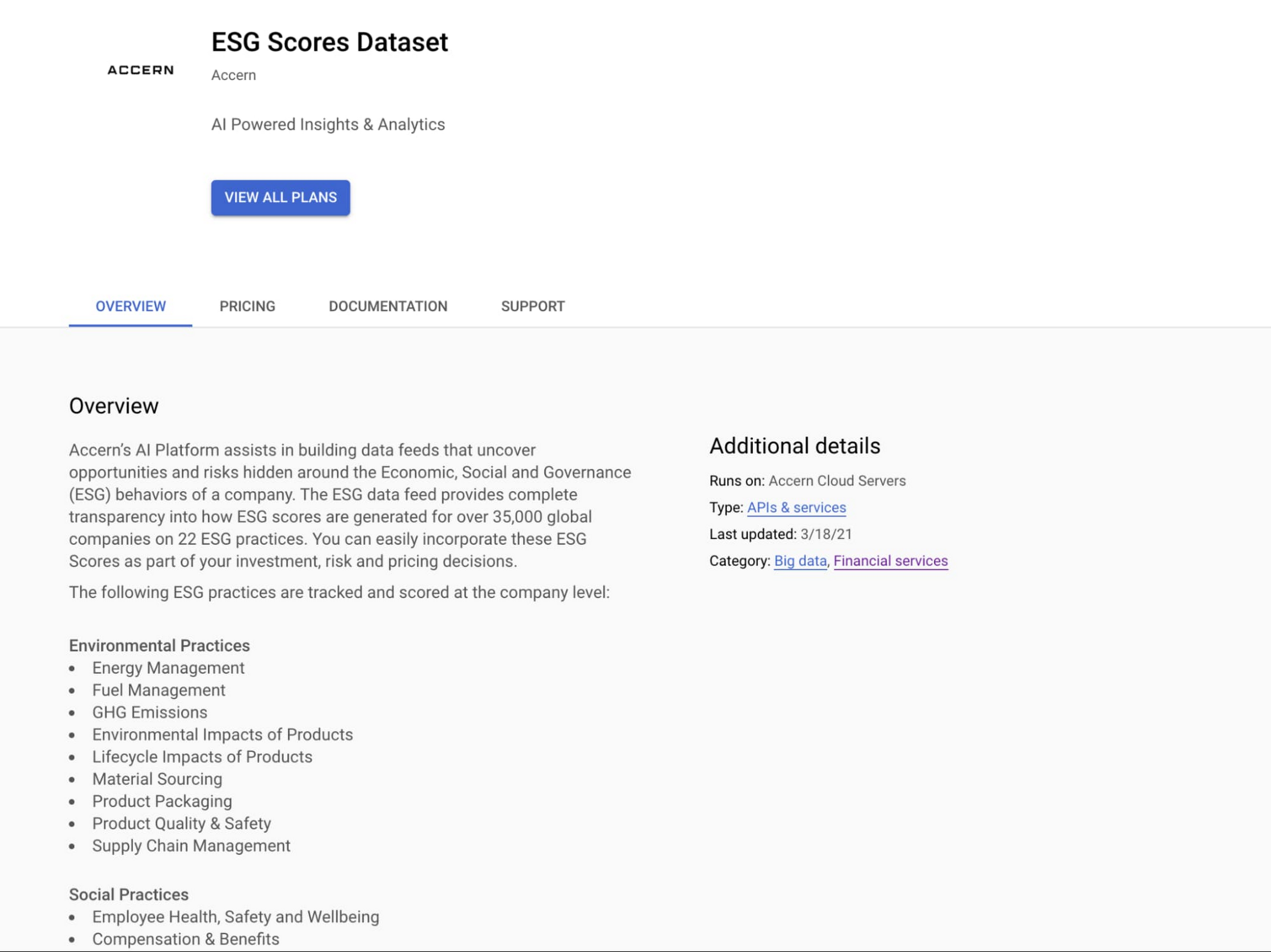
Step 2. Click a dataset, for example Accern AI-Generated ESG Insights, then review the overview details, plans and pricing, documentation and support information. To view the available pricing tiers, click ‘View All Plans’. Once you’ve decided on a tier that you would like to subscribe to, click ‘Select’, choose a billing account and review and accept the terms of service to complete the subscription. Once the steps are complete, click ‘Subscribe’ at the bottom. An overlay window will appear, click ‘Register with Accern’ to activate and complete the subscription.

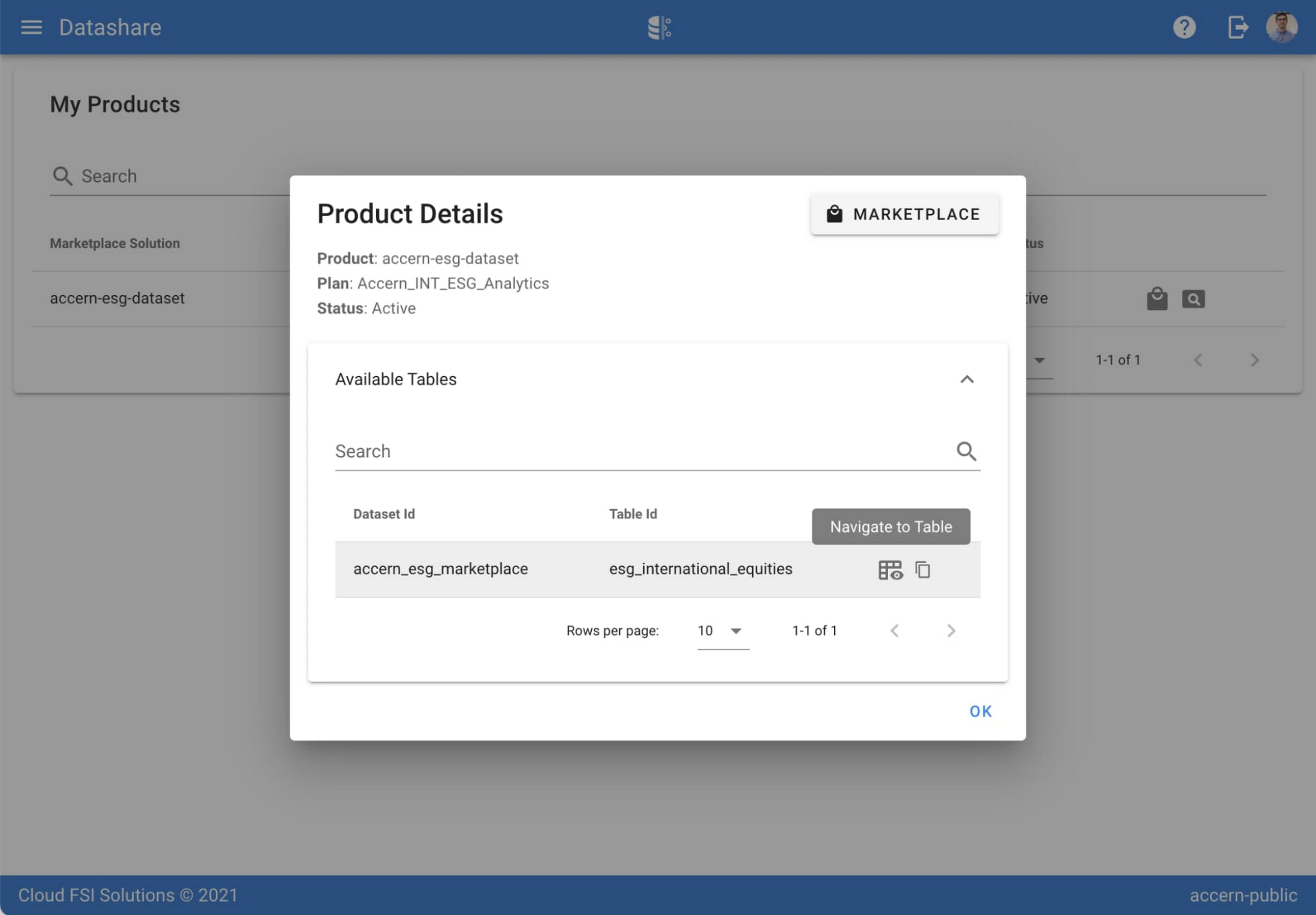
Step 3. Once activation is complete, you’ll be directed to the Datashare ‘My Products’ screen. Voila! You are now subscribed to Accern’s ESG Scores dataset and can access it in your Google Cloud instance using BigQuery. To access the data, click the hour glass icon on the corresponding ‘My Products’ record that you just purchased. An overlay will present you with the details on the dataset and/or table. Click the ‘Navigate to Table’ button to navigate through to the BigQuery console.


Step 4. Now that you have access and are in the BigQuery console, it’s time to generate data insights.
For this example, we’ve eliminated the company identifying information that is included as part of the subscription and aggregated company ESG in a view where each row represents a day, an industry sector, a specific identified ‘ESG Issues’ (event_group and event) and the respective ‘ESG Sentiment’ per issue.

For example, row 1 indicates that within the ‘Healthcare’ sector, there was a ‘Social – Civil Society’ issue identified and it had a negative ESG sentiment score of -15.35.
Step 5. Generate a report by exporting it to Data Studio to build visualizations and conduct additional analysis on the ESG data.
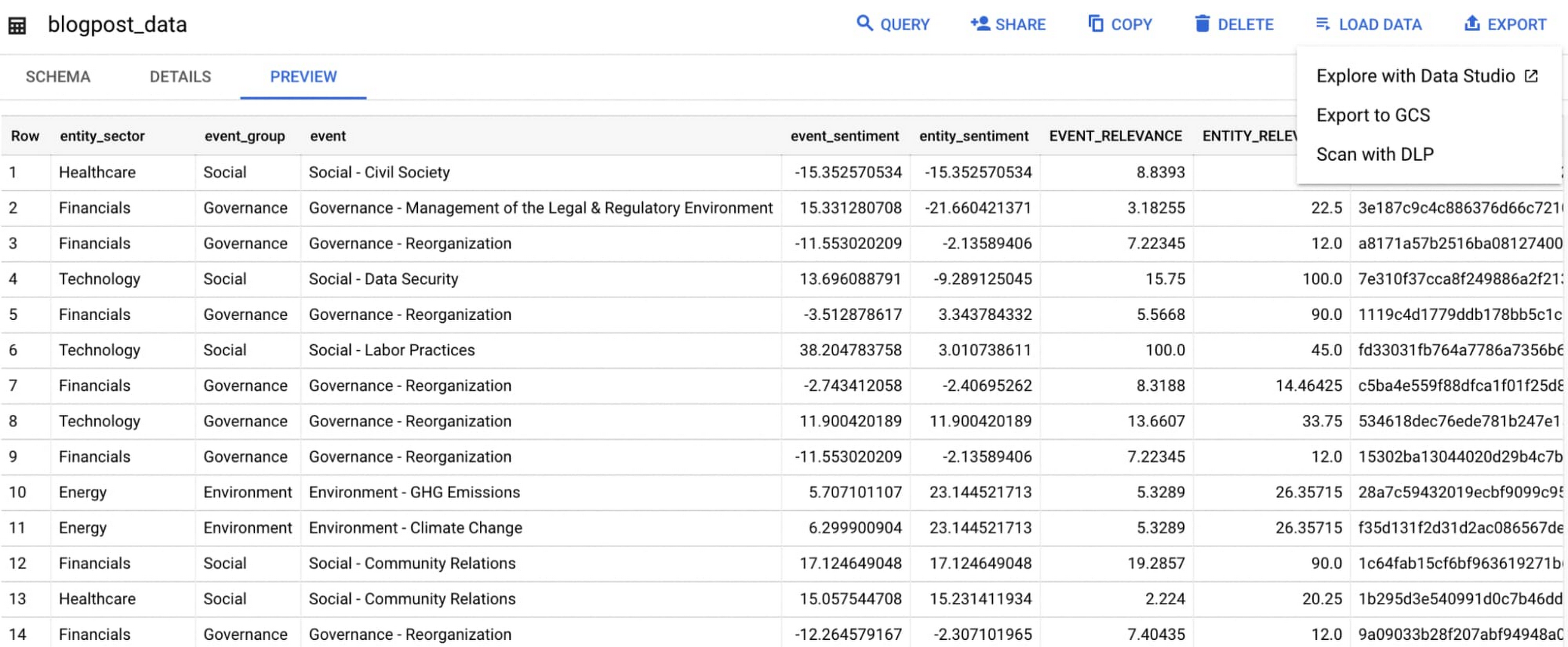
Select ‘Export’ and ‘Explore with Data Studio’.
Step 6. Build a simple/basic report.
Now that the ESG data appears in Data Studio, you can start by building a simple chart to help you understand which industry sectors have the highest volume of discussions around ESG and the overall ESG Sentiment per industry sector.
To build the chart:
- Select the chart type ‘Table’.
- Include
Entity_Sectoras your dimension to aggregate results by ‘Industry Sector.’ - Include
Signal_IDas a measure to count the number of ESG passages identified per ‘Industry Sector.’ - Include
AVG(Event_Sentiment)as a measure to display the overall ESG Sentiment per ‘Industry Sector’ across ESG Issues.

You can see sectors that are most discussed when it comes to ESG related topics and their corresponding ‘ESG Sentiment’ scores.
Step 7. Build your final report in Data Studio.
As a next step you can further drill into the data to understand ESG data specific to each ‘Industry Sector’ and identify positive and negative ESG practices.
Accern has built a more complex sample dashboard and made it available publicly here. You can interact with this report and play around with the data. The dashboard can help to identify material ESG insights for each sector to inform your investment and risk processes. If you have additional questions, you can reach out to Accern directly.

Discovering, accessing and analyzing licensed datasets is quick and easy. Stay tuned for more updates on new licensed datasets.
Publishing your data via Datashare
If you are a publisher of market data, alternative, or exotic data, you can use Datashare to get it published on Google Cloud Marketplace.
Start by joining the Partner Advantage program by registering for the Partner Advantage Portal and applying for the Partner Advantage Build Model engagement. Visit our getting started guide for information to get started on publishing licensed datasets in the Marketplace. Stay tuned for a future blog post about using Datashare to publish datasets in the Marketplace.
More solutions for capital markets
Check out other Google Cloud solutions for capital markets.
Google and AI Researchers Work towards Building Data-centric AI

6065
Of your peers have already read this article.
1:30 Minutes
The most insightful time you'll spend today!
AI researchers and engineers need better data to enable better AI solutions. The quality of an AI solution is determined by both the learning algorithm (such as a deep-neural network model) and the datasets used to train and evaluate that algorithm. Historically, AI research has focused much more on algorithms than datasets, despite their vital importance. As a result, many algorithms are freely available as starting points, but many important problems lack large, high-quality open datasets. Further, creating new datasets is expensive and error-prone.
Recently, the data-centric AI movement has emerged, which aims to develop new methodologies and tools for constructing better datasets to fix this problem. Conferences, workshops, challenges, and platforms are being launched to support improving data quality and to foster data excellence. Thought leaders such as Andrew Ng at Landing.AI and Chris Re at Stanford University are encouraging AI developers to focus more on iterative data engineering than they do tuning their learning algorithms. Our CHI-best-paper-award-winning paper, “Everyone wants to do the model work, not the data work” highlighted the significance of data quality in the practice of ML.
At Google, we are excited to contribute to data-centric AI. Today, Google Cloud is adding a new high value dataset to the Public Dataset Program, and Google researchers are announcing DataPerf, a new multi-organizational effort to develop benchmarks for data quality and data centric algorithms.
Google Cloud is committed to helping users improve their data quality, starting with supporting better public data. The Public Datasets program provides high quality datasets pre-configured on GCP for easy access. Google Cloud is adding a new high-value dataset developed by the MLCommons™ Association (which Google co-founded) to the Public Datasets program: The Multilingual Spoken Words Corpus: a rich audio speech dataset with more than 340,000 keywords in 50 languages with upwards of 23.4 million examples.
This new public dataset is aligned with the MLCommons Association vision for “open” datasets – accessible by all – that are “living” – continually being improved to raise quality and increase representation and diversity.
Google researchers, in collaboration with multiple organizations, are announcing the DataPerf effort at the NeurIPS Data-Centric AI workshop today, to develop benchmarks to improve data quality. Much like the the MLPerf™ benchmarking effort which is now the industry standard for machine learning hardware/software speed, DataPerf brings together the originators of prior efforts including: CATS4ML, Data-Centric AI Competition, DCBench, Dynabench, and the MLPerf benchmarks to define clear metrics that catalyze rapid innovation. DataPerf will measure the utility of training and test data for common problems, and algorithms for working with datasets such as: selecting core sets, correcting errors, identifying under-optimized data slices, and valuing datasets prior to labeling.
Together, supporting open, living datasets for core ML tasks, and the development of benchmarks to direct the rapid evolution of those datasets will empower the researchers and engineers who use Google Cloud to do even more amazing things – and we can’t wait to see what they create!
Acknowledgements: In collaboration with Lora Aroyo and Praveen Paritosh.
Revolutionizing Healthcare Operations with Data Engine Accelerators

1426
Of your peers have already read this article.
3:00 Minutes
The most insightful time you'll spend today!
Healthcare leaders are increasingly challenged to drive operational improvements throughout their facilities, and inefficiencies can cost organizations both time and money and impact patient outcomes. Additionally, staffing shortages and employee burnout remain a major concern in healthcare. Addressing these challenges can help healthcare providers improve organizational operations, patient experiences and care. However, the information that they need to solve these problems is siloed and challenging to access, buried deep in the patient record or spread across IT systems that don’t speak to one another.
To generate a longitudinal patient view and improve patient care, healthcare providers need to reduce fragmentation, unify, and standardize data across siloed systems of records, care facilities and ultimately make it interoperable. This is the heart of Google Cloud’s Healthcare Data Engine.
In partnership with customers, we are prioritizing a ‘use case’ approach to accelerate the adoption of data interoperability. We initially introduced these accelerators a few months ago, and the response has been overwhelmingly positive. Since then, we have been incorporating feedback from early adopters and making improvements to ensure that these accelerators deliver the best possible value to our customers.
The accelerators are deployable use-case configured ‘starter-kits’ within Healthcare Data Engine designed to quickly surface tailored insights with the goal of enabling higher quality of care. Focused on patient flow, transition of care, and social determinants of health, the accelerators provide aggregated data and visualizations to help customers understand a broad range of facility efficiency metrics, patient insight and health equity measures across their patient populations:
- Patient Flow Explorer: Enables health systems to surface a range of facility efficiency metrics to identify trends and potential drivers of bottlenecks, manage patient admissions, transfers and length of stay, while optimizing departmental capacity management.
- Transition of Care Explorer: Provides medical professionals a consolidated view into a patient’s detail and medical history, illustrating their journeys in different settings within the health system and helps caregivers prioritize patient treatment.
- Social Determinants of Health Explorer: Leverages Healthcare Data Engine and social determinants of health data to identify at risk populations of patients in near-real-time and improve care in under-served communities.
The first three accelerator use cases were designed in collaboration with industry healthcare leaders including Highmark Health, Lifepoint Health, and others, helping organizations address common industry challenges.
“Interoperability is at the heart of Highmark Health’s Living Health strategy and we intend to leverage our blended structure of payor and provider to deliver a differentiated health experience for our patients and members,” said Richard Clarke, chief data and analytics officer, Highmark Health. “Healthcare Data Engine is a central component to enabling that strategy and we are excited about the new accelerators being announced today as they will speed up time-to-value for our members.”
“Google Cloud’s solution-oriented approach brings the best of technology and healthcare together to help improve quality, increase access and ensure equitable care for patients no matter where they live,” said Jessica Beegle, senior vice president and chief innovation officer of Lifepoint Health. “Instead of giving us building blocks that need to be assembled, they are delivering custom-built solutions to help us efficiently tackle key problems in our markets and provide more useful data for our clinical teams to take better care of their patients. Lifepoint is proud to partner with Google Cloud and bring the best of Silicon Valley to communities of all sizes across the United States.”
At Google Cloud, we will continue our partnership with healthcare leaders to identify the most impactful Healthcare Data Engine use cases to support, to help organizations accelerate their data transformations to bring better, more timely care to patients and communities. To learn more about Healthcare Data Engine and other solutions tailored to the healthcare and life sciences space, visit cloud.google.com/healthcare.
More Relevant Stories for Your Company

Google Data Cloud: The Catalyst for Modern App Development and Innovation
97 zettabytes was the estimated volume of data generated worldwide in 20221. This sort of explosion in data volume is happening in every enterprise. Now imagine being able to access all this data you own from anywhere, at any time, analyze it, and leverage its insights to innovate your products

The Divercity Story: Using Google Cloud to Achieve a More Inclusive and Sustainable Workforce
Despite a growing number of diversity, equity, and inclusion (DEI) initiatives, Black and Latinx people remain highly underrepresented in tech. Although comprising 12.6% and 18% of the U.S. labor force respectively, Black professionals hold only 5% of tech positions, while Latinx professionals fill just 6% of tech roles. Long-standing biases

Gartner Identifies Critical Capabilities for Data Management Solutions
Data management solutions for analytics offerings are consolidating, with major vendors able to address a range of use cases and smaller vendors addressing a subset of use cases. Data and analytics leaders can use this research to guide evaluation and initial vendor selection for DMSA offerings. For data and analytics

Data Culture Integral for Building Data Platforms in EdTech Firms
With a data strategy and data warehouse in place, EdTechs are building a data culture that helps everyone - from educators and administrators, to employees in marketing and accounting - make more informed decisions with their data. So how do you build a data culture in your organization? It starts
