






Gartner Identifies Critical Capabilities for Data Management Solutions
READ FULL INTRODOWNLOAD AGAIN3994
Of your peers have already downloaded this article
3:30 Minutes
The most insightful time you'll spend today!

Brazilian Insurer Uses Google BigQuery to Underwrite Critical Decisions
DOWNLOAD CASE STUDY3564
Of your peers have already downloaded this article
1:30 Minutes
The most insightful time you'll spend today!
To stay competitive in the rapidly changing insurance marketplace, Mitsui Sumitomo Seguros (MSS) recognized the need to leverage its available data to stabilize and scale existing operations, improve sales decisions and better engage employees.
MSS managers required frequent and easy access to newly organized data (including performance metrics and market intelligence) to make timely decisions. MSS sales teams needed granular-level knowledge to create what-if scenarios, and analytical tools to diagnose problems and offer a range of policies on tight deadlines to their customers. All of these solutions had to be scalable and affordable, growing as Mitsui Sumitomo Seguros grew.
It used Google BigQuery and Compute Engine for secure and economical analytics data storage and, as a result, transformed its corporate culture by facilitating data-driven decisions, spurring 40% yearly sales growth.
HarbourBridge Schema Assistant Allows Quick, Bulk Migration to Cloud Spanner

5462
Of your peers have already read this article.
1:30 Minutes
The most insightful time you'll spend today!
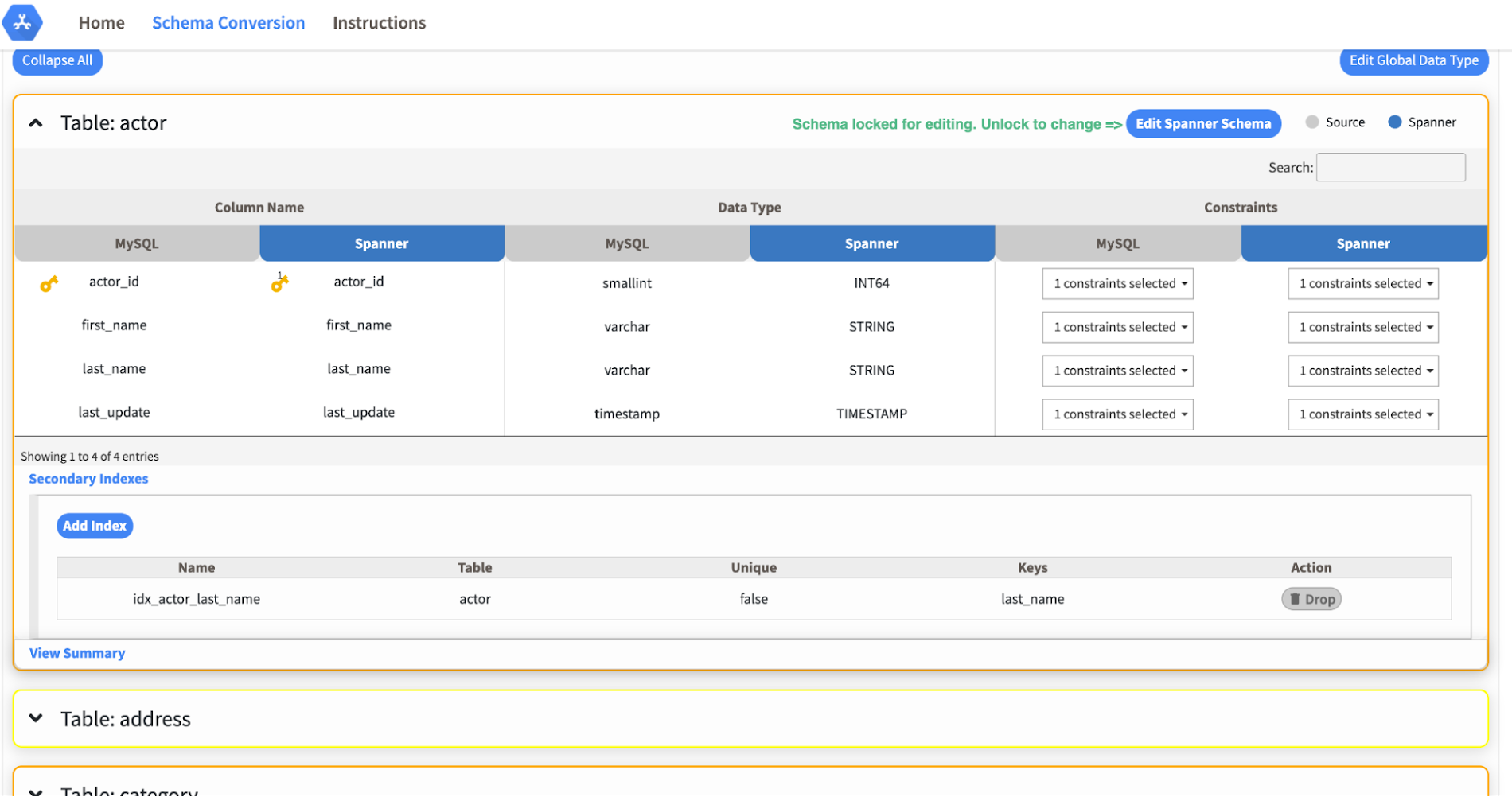
Today we’re announcing the HarbourBridge Schema Assistant, which provides a guided schema-design workflow for migrating from MySQL or PostgreSQL to Spanner. HarbourBridge imports dump files (from mysqldump or pg_dump) or directly connects to your source database, and converts the source database schema to an equivalent Spanner schema. The new Schema Assistant capability displays the source schema and Spanner schema side-by-side, highlights errors and walks you through a series of steps to validate and optimize your Spanner schema. It also produces a browsable assessment report with an overall migration-fitness score for Spanner, a table-by-table detailed analysis of type mappings and a list of features used in the source database that aren’t supported by Spanner. It supports editing of table and column names, column types, primary keys and constraints, as well as dropping of tables, columns, foreign keys and secondary indexes.
The new Schema Assistant complements HarbourBridge’s existing data and schema migration capabilities and is a critical step towards our goal of building a complete open-source migration toolkit. HarbourBridge continues to support command-line schema and data migration and turn-key Spanner evaluation.
Complementing the bulk data migration capabilities of HarbourBridge, we are also announcing the ability to migrate change events from MySQL to Cloud Spanner.
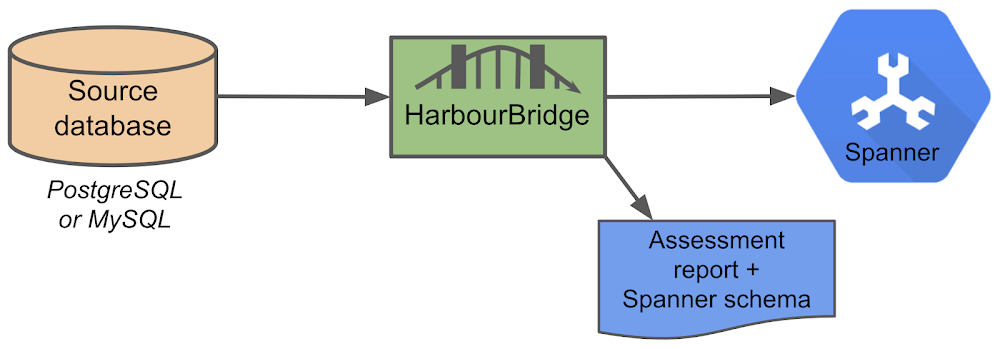
Supported Features in Schema Assistant
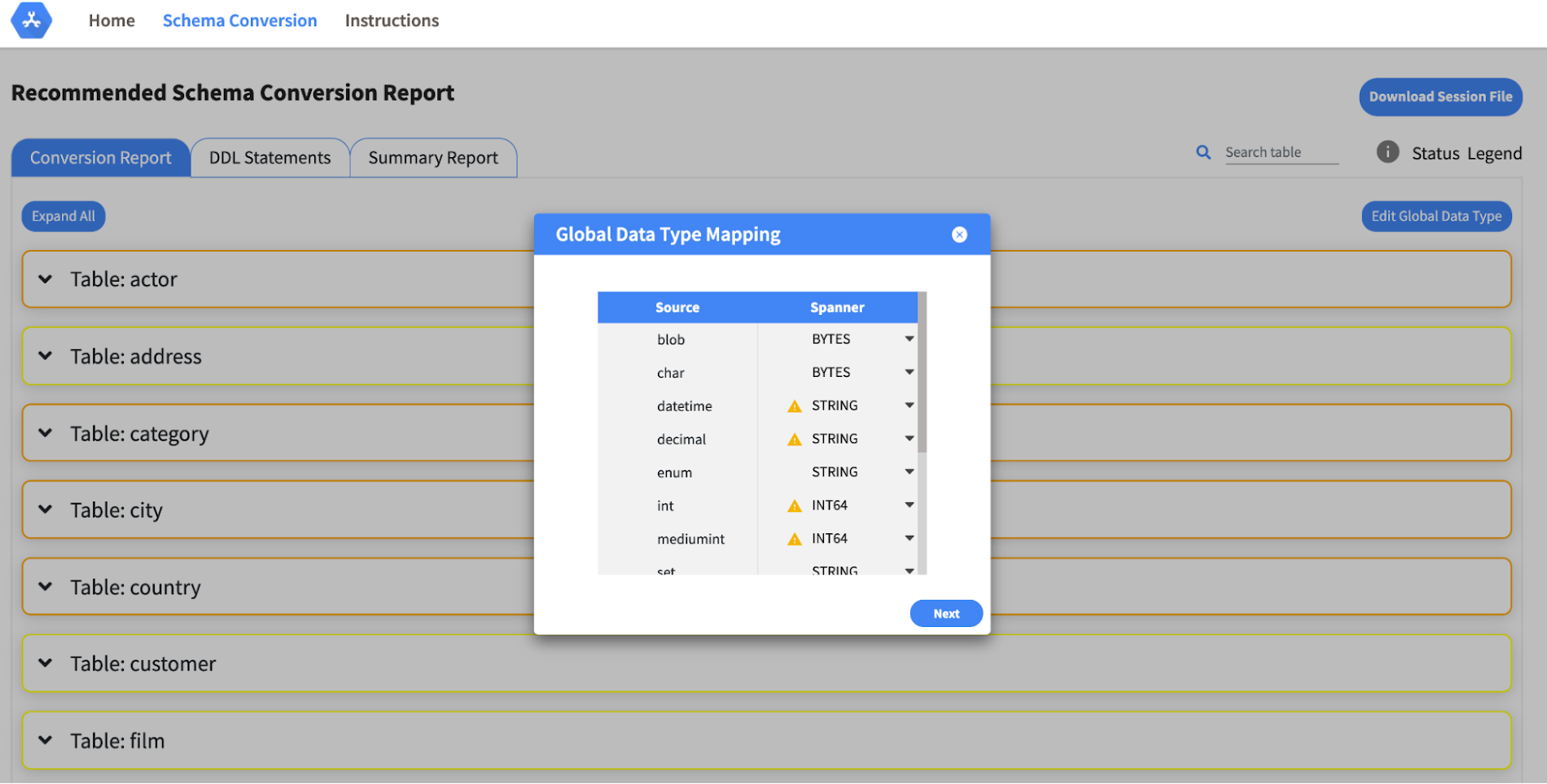
- Global type mapping. Users can customize the global mapping for how types should be mapped to Spanner consistently across the schema. For example, mapping large integers in source schema to Spanner’s NUMERIC.
- Local type mapping. Users can override the custom type mapping for a given table/column.
- Session management. A session keeps track of all the changes made to the schema mapping.
- Customization of secondary indexes. Users can add, edit and delete secondary indexes to optimize their Spanner performance.
- Customization of foreign keys and interleaved tables. Table interleaving is an important design consideration when migrating to Cloud Spanner as explained in more detail in this blog post.
Features in the pipeline
We are already working to further expand the supported set of schema editing features and welcome your feedback. We are particularly excited to expand the Schema Assistant’s design recommendations for optimizing Spanner schemas e.g. in-depth recommendations for primary key design.
HarbourBridge is open source and we gladly accept contributions from the wider community.
Guide for Measuring Cloud Spanner Performance for Your Custom Workload

4828
Of your peers have already read this article.
3:00 Minutes
The most insightful time you'll spend today!
Database migration to a new database platform or technology can be daunting for various reasons. One of the common concerns is database performance. It is hard to evaluate database performance early in the evaluation cycle without performing actual data migration and application changes. This becomes even more important in the case of Cloud Spanner where modernization is required at both the database and application layers.
The traditional approach to evaluate database performance is to deploy the application and database together, migrate historical data to the new database and then simulate load tests by running an application on the new database. Doing all this for an early performance evaluation of Cloud Spanner may feel like a lot of effort.
In this post, we will explore a middle ground to performance testing using JMeter. Performance test Cloud Spanner for a custom workload before making application code changes and executing data migration. More detailed step-by-step guide is published here.
Goals
- Estimate the number of Cloud Spanner nodes needed (and get a cost estimate).
- Performance test the most frequently used set of queries and transactions.
- Demonstrate the ability to scale horizontally.
- Better understand the optimizations needed for schema and sql queries.
- Determine latency of DML operations.
Limitations
- You cannot test using non-java client libraries.
- It is more complex to test non-jdbc compliant features like mutations, parallel reads etc.
Preparing for performance tests
- Identify top SQL queries, latency, frequency / hour and avg number of rows returned or updated for each. This information will also serve as a baseline for the current system.
- Determine Cloud Spanner region / multi-region deployment. Ideally, load should be generated from the Cloud Spanner instance’s leader region for minimum latency and best performance. Read Demystifying Cloud Spanner multi-region configurations for more details on various configurations of Cloud Spanner.
- Estimate the number of Cloud Spanner nodes required for a given workload based on (step 1). It is recommended to have a minimum of 2 nodes for linear scaling.
Note: Peak performance numbers of regional performance and multi regional performance are published. It is based on a 1KB single row transaction with no secondary indexes. - Request quota for Cloud Spanner nodes on a given region / multi-region. It can take up to 1 business day.
Setting up Cloud Spanner
Creating the schema for Cloud Spanner
You can use the following tools to generate a schema for Cloud Spanner if you are migrating from the following source databases. Alternatively, you can model the schema manually. Schema design has a huge performance impact, hence it is recommended to review the schema very carefully.
| Source | Target | Tool(s) | |
| 1. | MySQL / MariaDB | Cloud Spanner | HarbourBridgeStriim |
| 2. | Postgresql | Cloud Spanner | HarbourBridgeStriim |
| 3. | Oracle | Cloud Spanner | Striim |
| 4. | SQL Server | Cloud Spanner | Striim |
Note: Manual review and tuning of schema will be needed to optimize and mitigate potential hotspots. You will need to keep in mind schema design best practices when modeling your schema.
Populating seed data into Cloud Spanner
Performance of a database depends on the amount of data present. Existing data (and indexes) determines how much data is scanned on select queries and therefore performance. Hence, it is important to seed data into Cloud Spanner before performance testing.
For most realistic results, data should be migrated from an existing production source. Sometimes you cannot do that due to schema changes. One way is to utilize a custom ETL job to export and transform data and then import into Cloud Spanner. Another alternative could be to mock seed data using JMeter(More details in later sections).
JMeter performance tests
Writing Tests
JMeter will interact with Cloud Spanner just like your application. It will perform DML operations the same way as your application does. Hence, tests need to simulate production like transactions. For example if a transaction is made up of insert and/or update statements in several tables within transaction boundaries then JMeter should mimic the same.
JMeter has the following hierarchy:
Test Plan > Thread Group(s) > Sampler(s) (aka test)
Test plan is a top level component. It can contain global properties and libraries (like jdbc driver etc).
Thread Group(s) are representative of a database transaction. It contains one or more sampler(s). All the samplers within a thread group execute serially.
Sampler(s) should represent a single DML call. If your transaction needs to have multiple dml calls, you should create multiple samplers. Typically you will use JDBC Sampler for database calls. You can also use JSR 223 Sampler as described here, in case you need to use mutations or parallel reads etc. Results from one sampler can be passed to the next, as in real world application.
Executing tests and collecting results
JMeter tests should be executed as physically close to Cloud Spanner instances as possible to minimize network latency. Therefore it is best to execute them from Compute Engine (via private service connect) from the same region as the Cloud Spanner instance. In-case of multi region Cloud Spanner, GCE instances should be created in the Leader Region of the Cloud Spanner instance for lowest network latency.
JMeter should be executed via command line, it is a CPU intensive application so make sure you have allocated enough resources on the VM.
Refer to the Cloud Spanner monitoring dashboard to ensure that your Cloud Spanner instance’s CPU utilization is at or below the recommended values. In addition, use introspection tools to investigate performance issues with your database.
You might need to optimize your queries (add indexes) and re-execute tests in multiple waves to tune the performance as needed.
Try it yourself
Follow a detailed step by step tutorial on Measure Cloud Spanner performance test using JMeter to test Cloud Spanner performance yourself.
Meesho’s Zero Downtime Success: Cloud CDN Migration Made Easy

1984
Of your peers have already read this article.
4:30 Minutes
The most insightful time you'll spend today!
Meesho is an Indian online marketplace that serves millions of customers every day. Recently, the company decided to adopt a multi-cloud strategy, leveraging Google Cloud’s scalable and reliable infrastructure to drive operational efficiency, modernize and scale for growth. To do so, they needed to migrate billions of static files and images to Google Cloud, to render the static content that serves their web and mobile applications. But with over a petabyte of data in their object storage system, and 10 billion requests per day, Meesho needed to perform this gigantic migration gradually, with zero downtime — a huge challenge.
In this blog post, we look at how Meesho did this using Storage Transfer Service, Cloud Storage and Cloud CDN. We also look at how it saved on storage capacity by resizing static images as needed on the fly, using Cloud Run.
CDN migration requirements
Migrating from one cloud to another isn’t easy. To pull it off, Meesho identified the following requirements:
- Petabyte-scale data transfer: Meesho needed to migrate billions of image files from their existing object storage server to Cloud Storage.
- Dynamic image resizing: To save on storage costs, Meesho wanted the ability to dynamically resize the images based on the end user platform and store the smaller images in the Cloud CDN cache.
- High-throughput data transfer: To support consumer demand, Meesho needed images to be served at a throughput of thousands of requests per second.
- Zero downtime: Since any downtime involves potential loss of revenue, Meesho needed to perform the migration without taking any systems offline.
Migration architecture
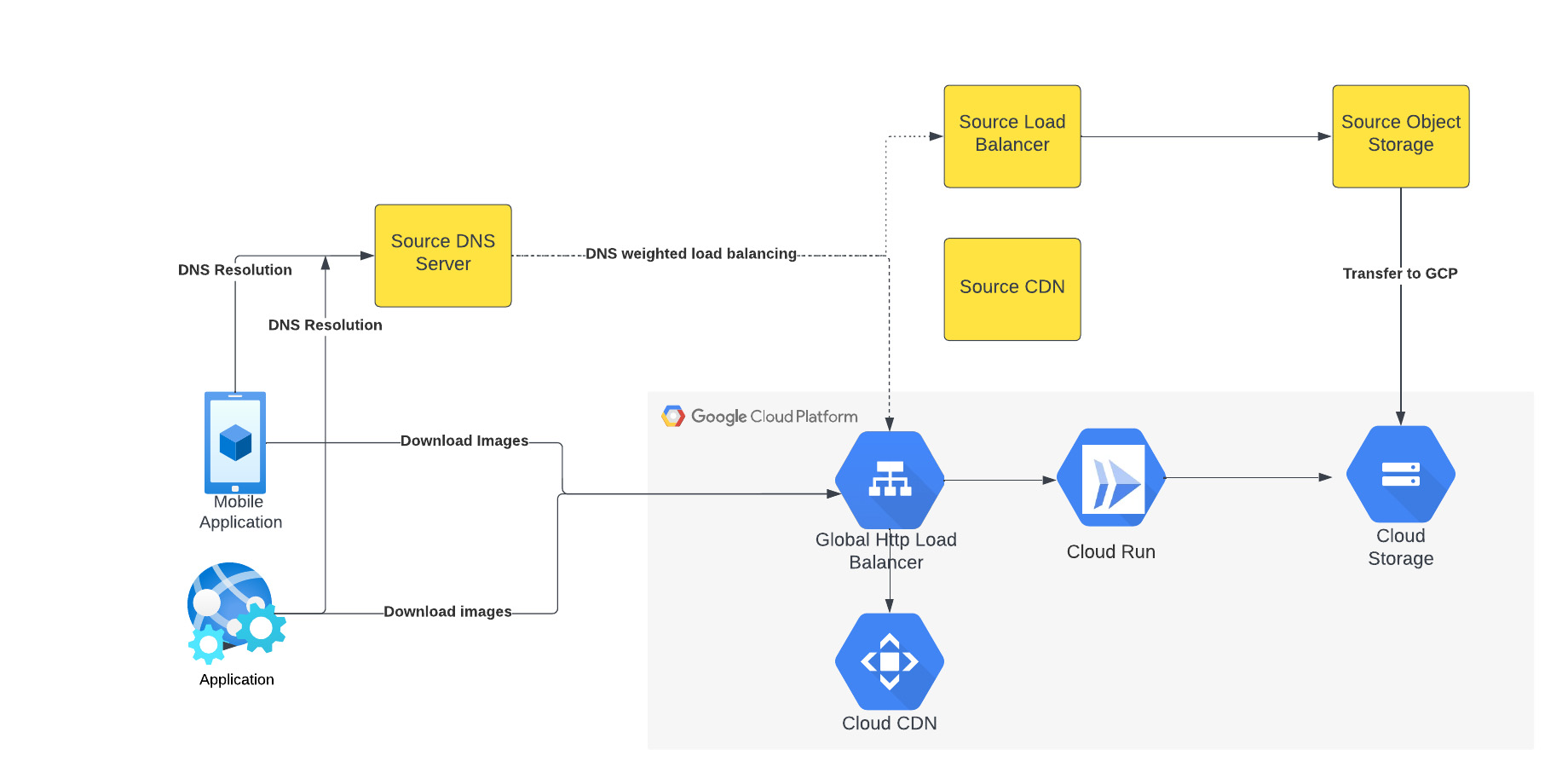
The above figure depicts the CDN migration architecture implemented in Meesho. The existing DNS server points to both the source load balancer as well as Google External HTTP Load Balancer with weighted distribution. The source load balancer points to the source object storage. Images were transferred from the source object storage to Google Cloud Storage.
The Google External HTTP Load Balancer was deployed with Cloud CDN to serve static images that are stored in the CDN cache to users. The Google Load Balancer public IP is configured as an end point on their existing DNS server. The Load Balancer is connected to Cloud Run, which talks to the Cloud Storage bucket. When a request reaches the Load Balancer in the edge, it first checks if the content is available in Cloud CDN, and returns the object from the closest edge network. If the image is not available in the Cloud CDN cache, the request is sent to Cloud Run which obtains the image from the Cloud Storage bucket and performs dynamic resizing of the image if necessary.
Data transfer
Meesho used Google Cloud’s Storage Transfer Service to transfer data from their current object storage to Cloud storage bucket over the internet. Since the number of files and total size of the data to be transferred was huge, Meesho executed multiple parallel transfers by specifying folders and subfolders as prefixes in a Storage Transfer Service job.
Dynamic image resizing
Meesho delivers static images to multiple end user platforms — mobile, laptop — at multiple resolutions. Rather than store each image at multiple image resolutions, Meesho opted to store a single high-resolution mezzanine image. It then attached Cloud Run as a serverless network endpoint group to a Cloud Load Balancer. Application requests for images specify the name of the object, the format of the image, and its resolution (for example, abc.jpeg with 750*450 resolution). If the specific image exists for the requested resolution, then it is returned from the Cloud Storage bucket to the end user and stored in the Cloud CDN cache. If an image for a specified resolution and/or format is not found, the mezzanine image (in our example, abc.jpeg) is resized to the specified resolution and format, then stored in Cloud Storage bucket and returned to the end user. The dynamic resizing and formatting is only performed the first time for a specific resolution.
In this architecture, it is important to configure Cloud Run to scale appropriately as it handles a bulk of “CDN cache-miss” requests. Meesho performed the following configuration steps:
- Configured the number of concurrent requests that a single instance of Cloud Run can handle
- Ensured a sufficient minimum of Cloud Run instances were available to serve user traffic to avoid cold-start latency
- Reviewed limits of Cloud Run maximum instance size for the region and increased the limits if necessary to handle peak load
- Set up smaller start-up times for Cloud Run containers, so that the application could quickly autoscale to handle a surge in traffic
- Optimized the memory and CPU configuration to handle processing requirements
CDN configuration
Cloud CDN was configured to ensure a high cache hit ratio > 99 %. This not only sped up the rendering of the images, but also reduced the load on Cloud Run, saving cost and improving performance.
Achieving zero downtime
Meesho followed well-established DevOps principles to achieve a zero-downtime migration:
- Metrics and alerts were configured in Cloud Monitoring to oversee the load balancer.
- The DNS server was configured to point to Cloud Load Balancer IP addresses in addition to their current load balancer, which served status assets.
- Weight-based DNS load balancing was employed to gradually shift the traffic to Google Cloud, while monitoring application performance and HTTP response codes.
- The initial migration process distributed .1% of traffic during non-peak hours. The metrics, end user performance and response codes were continuously monitored.
- Traffic was gradually incremented over a two-week period by increasing the weight of the Google Cloud Load balancer in DNS. By gradually shifting traffic, Meesho ensured a healthy cache-hit ratio, allowing Cloud Run to learn traffic patterns gradually and scale seamlessly.
Meesho learned a lot through this experience, and has the following advice for anyone undertaking a similar migration:
- While transferring data using Storage Transfer Service of Google Cloud, split the transfer process into multiple transfers.
- Ensure that applications do not pin certificates, which could create problems while migrating to the newer certificates in Google Cloud.
- Plan a gradual migration process to gradually increase the traffic to Google Cloud.
Summary
When all is said and done, Meesho considers its migration to Google Cloud a big success. After migrating the static images to Cloud CDN, Meesho held two major sales that each had three times the normal peak traffic, all with no issues. The CDN migration helped Meesho reduce its costs, improve performance and reduce load balancer errors when fetching static images. To learn more about Cloud CDN and how you can use it in your environment, check out the documentation.
Data Culture Integral for Building Data Platforms in EdTech Firms

5015
Of your peers have already read this article.
2:00 Minutes
The most insightful time you'll spend today!
With a data strategy and data warehouse in place, EdTechs are building a data culture that helps everyone – from educators and administrators, to employees in marketing and accounting – make more informed decisions with their data.
So how do you build a data culture in your organization? It starts by asking these questions:
- Are users able to find answers to their data questions from available data?
- Can they act based on available metrics?
- Can they tell a compelling story with the data at hand?
How well is your company using analytics? The matrix from Looker’s Analytical Maturity eBook, shows ranges from “vanity” (nice to see) metrics to “optimization.”

Adopting and rolling out your organization’s new data platform
As outlined in the previous blog in this series, From data chaos to data-driven: How dedicated data teams can help EdTechs influence the future of education, a comprehensive data team is essential for building a data warehouse. That data team should include a core education intelligence team. This team can align with analytically savvy members of each department they support. It’s critical that the Education Intelligence team understand each department’s reporting needs and can make adjustments based on user feedback.
Include these key components to ensure smooth adoption for internal teams:
- Share a roadmap: An effective rollout team always knows what’s next on their roadmap and communicates that to the entire organization. Launching analytics across an entire company at once usually leads to slow movement, miscommunication, and lack of adoption. A roadmap will ease this transition.
- Train everyone: This approach makes sure everyone is consistent during the data rollout. Show users how to make the most of the platform your data team has created, and be sure they know where they can go for help.
- Monitor and optimize: Monitor your organization’s analytics usage. Understand which individuals are using your education intelligence system to drive their day-to-day operations. These individuals can provide further insight into what is working. Identifying those who may need more guidance and support ensures they don’t miss out on benefits.
Guild Education: Creating a data culture
Guild Education started working with Google Cloud to build a data culture and implemented Looker as their data platform.
The company transformed their student success program—in which coaches work directly with connected employees throughout their educational journey—with Looker. “As enrollments increased, even spreadsheets were not able to accurately keep track of caseloads,” Sean McKeever, Senior Business Intelligence Analyst, recalls. “We needed a singular source of truth that could be updated in almost real-time.” In response, they created “Student Rosters” to manage a coach’s student outreach.
Users were thrilled with the new tools, and when the coaching team grew from 20 to 90, Sean created ambassador groups consisting of data specialists to support each department. This sparked Guild Education’s “data-driven evolution.”
“Unexpectedly, the Student Success task force also became an engine for new BI work,” Sean says. “They blew my highest expectations out of the water and started owning virtually the entire process: building requirements, prototyping, testing, and deploying new dashboards and panels—with hardly any help from the BI team.”
These successes have set Guild Education on its way to becoming a fully data-driven company. Unexpectedly, the Student Success task force also became an engine for new BI work…they blew my highest expectations out of the water and started owning virtually the entire process…with hardly any help from the BI team.
Sean McKeever
Senior Business Intelligence Analyst, Guild Education
Start your journey from data chaos to data-driven
We hope this three-part series has shown how data analytics has an important role to play in transforming the future of education. EdTech companies are unlocking the power of big data to serve their customers. “The education landscape is changing rapidly, and EdTech has a major role to play as institutions adapt to the massive shift in learners’ preferences and expectations,” says Jesus Trujillo Gomez, Strategic Business Executive, Education & Research, Google Cloud.
Feeling inspired? Let’s meet your EdTech challenges together and transform your data culture. Visit Google Cloud for education technology.
More Relevant Stories for Your Company

BigQuery Omni: A Game-Changer for Cross-Cloud Data Analysis
Research shows that over 90% of large organizations already deploy multicloud architectures, and their data is distributed across several public cloud providers. Additionally, data is also increasingly split across various storage systems such as warehouses, operational and relational databases, object stores, etc. With the proliferation of new applications, data is

Real-time analytics for on-time delivery: Mercado Libre
Iteration and innovation fuel the data-driven culture at Mercado Libre. In our first post, we presented our continuous intelligence approach, which leverages BigQuery and Looker to create a data ecosystem on which people can build their own models and processes. Using this framework, the Shipping Operations team was able to

Introducing Cloud Memorystore: A fully Managed In-memory Data Store Service for Redis
At Redisconf 2018 in San Francisco last month, we announced the public beta of Cloud Memorystore for Redis, a fully-managed in-memory data store service. Today, the public beta is available for everyone to try. Cloud Memorystore provides a scalable, more secure and highly available Redis service fully managed by Google. It’s fully




Pega Systems Migrates SAP Servers to Google Cloud in Just 9 Weeks!
Pega Systems' financial data on SAP environs were on a hosting platform that lacked agility. By moving nearly 30 SAP servers to Google Cloud in just 9 weeks, Pega Systems was able to unlock data and integrate BigQuery into SAP HANA to deliver personalization for clients and embark on an
