





Discover Gen App Builder: Transform Search and Conversational Experiences Through Generative AI

1248
Of your peers have already read this article.
3:30 Minutes
The most insightful time you'll spend today!
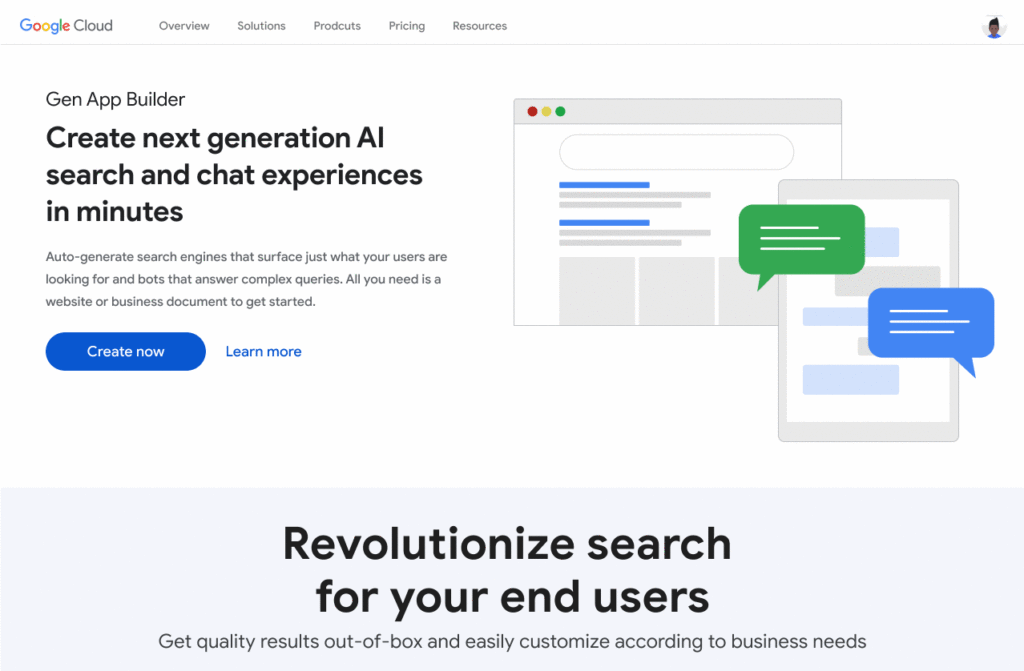
If you’ve been exploring recently-launched consumer generative AI tools like Bard and thinking about how to build similar experiences for your business, Generative AI App Builder, or Gen App Builder for short, is here to get you started.
Gen App Builder is part of Google Cloud’s recently announced generative AI offerings and lets developers, even those with limited machine learning skills, quickly and easily tap into the power of Google’s foundation models, search expertise, and conversational AI technologies to create enterprise-grade generative AI applications.
“Google Cloud’s leading AI technology enables STARZ customers to discover more relevant content, increasing engagement with, and the likelihood of completing the content served to them,” says Robin Chacko, EVP Direct-to-Consumer, STARZ. “We’re excited about how generative AI-powered search will help users find the most relevant content even easier and faster.”
Gen App Builder is exciting because unlike most existing generative AI offerings for developers, it offers an orchestration layer that abstracts the complexity of combining various enterprise systems with generative AI tools to create a smooth, helpful user experience. Gen App Builder provides step-by-step orchestration of search and conversational applications with pre-built workflows for common tasks like onboarding, data ingestion, and customization, making it easy for developers to set up and deploy their apps. With Gen App Builder developers can:
- Build in minutes or hours. With access to Google’s no-code conversational and search tools powered by foundation models, organizations can get started with a few clicks and quickly build high-quality experiences that can be integrated into their applications and websites.
- Combine the power of foundation models with information retrieval to find relevant, personalized information. Enterprises can build apps that understand user intent via natural language, and surface the right information with associated citations and attributions from a company’s public and private data. They can also fully control what data their applications access and the content or topics they want to address.
- Build multimodal apps that can respond with text, images, and other media. Gen App Builder supports not just text, but also other modalities such as images and videos. It allows developers to build apps using a combination of text and images as inputs to find information across documents, photos, and video content, enabling richer customer interactions.
- Combine natural conversations with structured flows. Developers can granularly blend the output of foundation models with controls to ground answers in enterprise content, and step-by-step conversation orchestration to guide customers to the right answers.
- Provide the ability to transact and connect to third party apps and services. Gen App Builder makes it simple to create digital assistants and bots that not only serve content, but also connect to purchasing and provisioning systems to enable transactions from the conversational UI, and escalate customer conversations to a human agent when the context demands.
A new generation of conversational AI experiences and assistants
Consumers of enterprise applications expect to interact with technology in a seamless, conversational way to quickly find the information they need and act on it. Gen App Builder can help reinvent these customer and employee experiences by ingesting large, complex datasets that are specific to your company–from websites, documents, and transactional systems like billing and inventory, to emails, chat conversations, and more. These AI-powered apps can synthesize information across all of these sources to provide specific, actionable responses, using only the data you have provided.
Some of the most popular uses are in customer service, where generative apps can contribute to increasing revenue, customer satisfaction, and customer loyalty. For example, if a retail customer reaches out to modify an order, a virtual agent can help them change it to another product. The customer doesn’t even need to provide the new product name—they can just upload an image and let the agent guide them through the rest. Watch this demo to see how a retail chatbot can use multimodal capabilities to help a consumer navigate various options on the website, including giving the customer ideas on how to use the product and even helping them complete the purchase with the ability to transact within the conversational UI. This scenario could apply to multiple industries and use cases, ranging from consumer goods and public services, to finance and internal corporate systems like intranets.
Combining the power of Google-quality search with foundation models
Finding the right information from data across the organization is a critical requirement within any enterprise. Yet it can be challenging to build high-quality enterprise search experiences with existing tools. Current systems struggle to understand user intent, are difficult to implement and customize, and don’t provide a high-quality user experience.
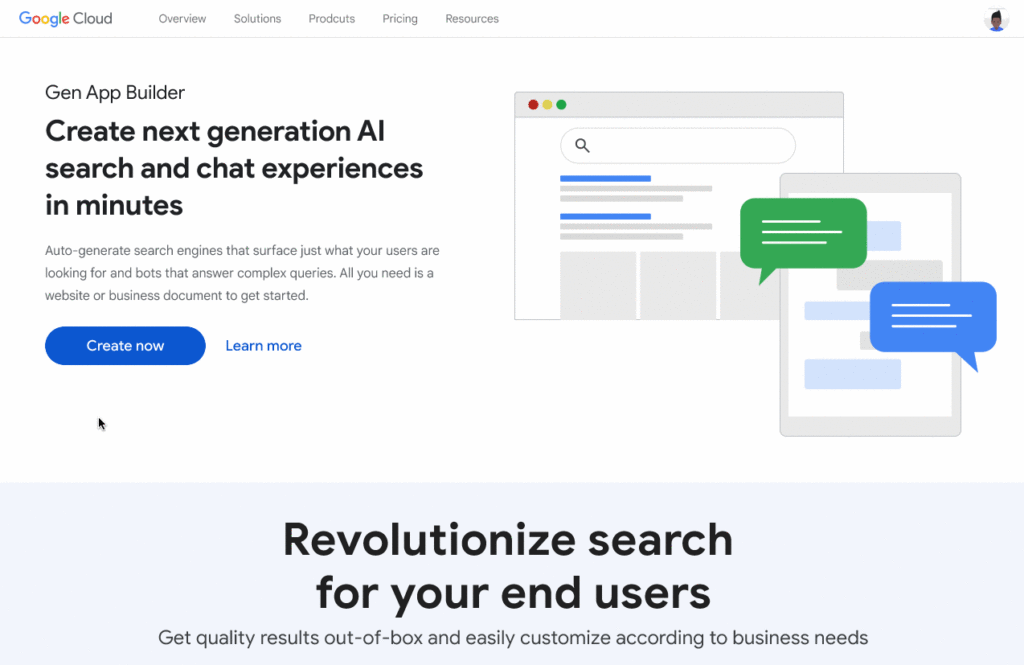
One of the most exciting features of Gen App Builder is the ability to combine the power of Google-quality search with generative AI to help enterprises find the most relevant and personalized information when they need it. With Gen App Builder, enterprises can build conversational search experiences across their public and private data in minutes or hours with no coding experience.
Enabling multimodal search across text, images and video within the enterprise is a key aspect of the search experiences in Gen App Builder. In addition to providing high-quality search results, Gen App Builder can conveniently summarize the results and provide corresponding citations in a natural, human-like fashion. Gen App Builder also automatically extracts key information from the data and enables personalized results for users. Watch this demo to see how these capabilities can come together to transform the search experience for employees at a financial services firm. The ability to integrate Google-quality search within the enterprise’s applications means they can enjoy a new level of data utilization, drive increased process efficiencies, and provide delightful experiences to their employees and customers.
“Customers have been shopping at Macy’s for generations. Being able to deliver 360° personalization and contextual recommendations will help ensure that Macy’s is still providing future generations of shoppers with a seamless, exceptional experience,” said Bennett Fox-Glassman, Senior Vice-President, Customer Journey, Macy’s. “We’ve already realized an increase in revenue per visit and conversion rates had great success using Google Cloud’s AI technology and are looking forward to exploring how these latest announcements bring together Natural Language Processing and Generative AI capabilities to deliver next-gen search and conversational experiences for our customers.”
The ability to intuitively interact with complex data across a variety of sources allows organizations to better serve their customers and deliver more relevant offerings. Combined with conversational and fulfillment abilities, the potential for improving customer engagement and employee productivity is immense. We’re excited to see how developers and enterprises use a mix of these capabilities to power new experiences and revenue opportunities.
If you’re interested in a closer look at the Gen App Builder, tune into this session at the Data Cloud & AI Summit. Take a step forward to getting hands-on and join the waitlist for our trusted tester program. And finally, bookmark our generative AI landing page to keep abreast of the latest news, updates and possibilities from this exciting new world of Gen Apps.
How Connected-Stories Uses BigQuery and AI/ML to Craft Personalized Ad Experiences

4004
Of your peers have already read this article.
4:00 Minutes
The most insightful time you'll spend today!
Editor’s note: The post is part of a series highlighting our awesome partners, and their solutions, that are Built with BigQuery
In the field of producing engaging video content such as ads, many marketers ignore the power of data to improve their creative efforts to meet the consumers’ need for personalized messages. The demand for creative tech to efficiently personalize is real as marketers need personalized video Ads to reach their audience with the right message at the right time. Data, Insights and Technology are the main ingredients to deliver this value while ensuring security and privacy requirements are met. The Connected-Stories team partnered with Google Cloud to build a platform for Ad personalization. Google Data Cloud and BigQuery are at the forefront to assimilate data, leverage ML models, create personalized ads, and capitalize on real-time intelligence as the core features of the Connected-Stories NEXT platform.
Connected-Stories NEXT is an end-to-end creative management platform to develop, serve, and optimize interactive video and display ads that scale across any channel. The platform ingests first-party data to create custom ML models, measure numerous third-party data points to help brands develop unique customer journeys and create videos that their data signals can drive. An intelligent feedback loop passes real-time data back, enabling brands to make data-driven and actionable video ads that take the brand’s campaigns to the next level.
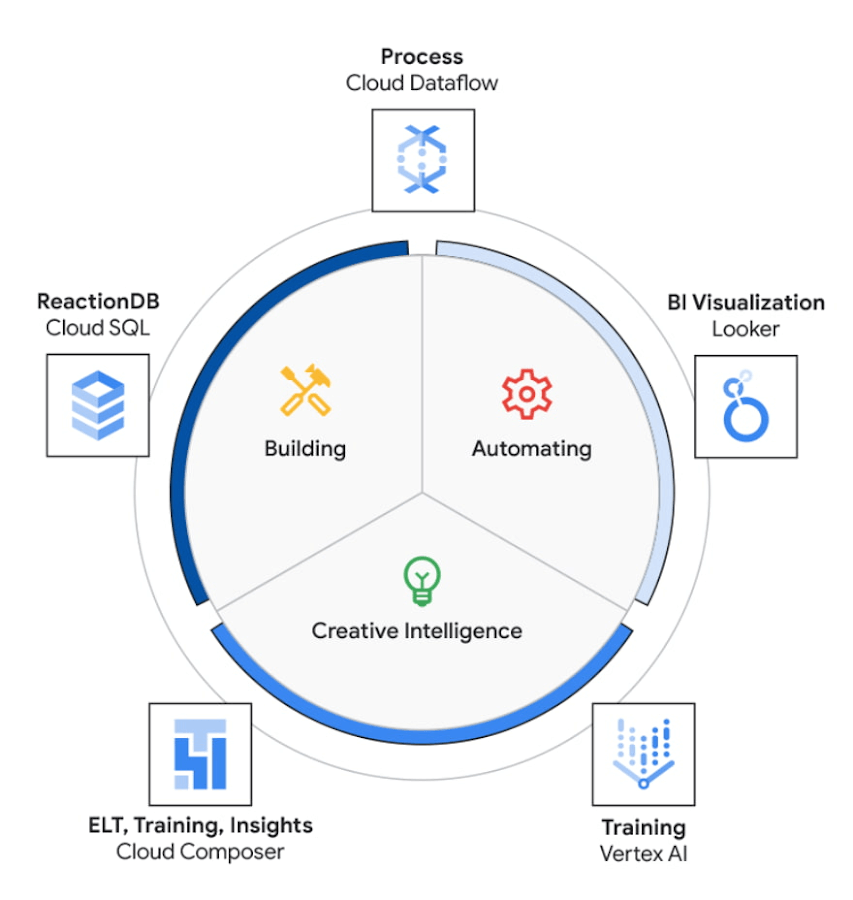
The core use case of the NEXT platform revolves around collecting user’s interaction data and optimizing for precision and speed to create an actionable Ad experience that is personalized for each user. The platform processes complex data points to create interactive data visualizations that allow for accurate analysis. The platform uses Vertex AI to access managed tools, workflows, and infrastructure to build, deploy, and scale ML models that have improved the accuracy to identify segments for further analysis.
The platform ingests 200M data events with peaks and valleys of activity. These events are processed to generate dashboards that enable users to visualize metrics based on filters in real-time. These dashboards have high performance requirements in terms of a responsive user interface under constantly changing data dimensions.
Google Cloud’s serverless stack coupled with limitless data cloud infrastructure has been the core to the NEXT platform’s data-driven innovation. The growing volume of data ingested, streamed and processed were scaled uniformly across the compute, storage and analytical layers of solution. A lean development team at Connected-Stories were able to focus all-in on the solution, while the serverless stack scaled, lowered attack service in terms of security and optimized the cost footprint through pay-as-you-go features.
BigQuery has been the backbone to support the vast amounts of data spreading over multiple geos resulting in workloads running at petabyte scale. BigQuery’s fully managed serverless architecture, real-time streaming, built-in machine learning and rich business intelligence capabilities distinguishes itself from a cloud data warehouse. It is the foundation needed to approach data and serve users in an unlimited number of ways. For an application with zero tolerance for failure, given its fully managed nature, BigQuery handles replication, recovery, data distributed optimization and management.
The platform’s requirements include the need for low maintenance, constantly ingesting and refreshing data and smart-tuning of aggregated data. These capabilities can be implemented by BigQuery’s materialized views feature. Materialized views are useful for precomputed views that regularly cache query results for better performance. These views possess the innate feature to read only the delta change from base tables and calculate the up-to-date aggregations. Materialized views impart faster outputs and consume fewer resources while reducing the cost footprint.
Some key considerations in using Google cloud and focusing on the Serverless stack include: quick onboarding to development, prototyping in short sprints and ease of preparing data in a rapidly changing environment. Typical considerations around low code / no code include data transformation, aggregation and reduced deployment time. These considerations are fulfilled through using serverless capabilities within Google Cloud such as PubSub, Cloud Storage, Cloud Run, Cloud Composer, Dataflow and BigQuery as described in the Architecture diagram below. The use of each of these components and services are described below.
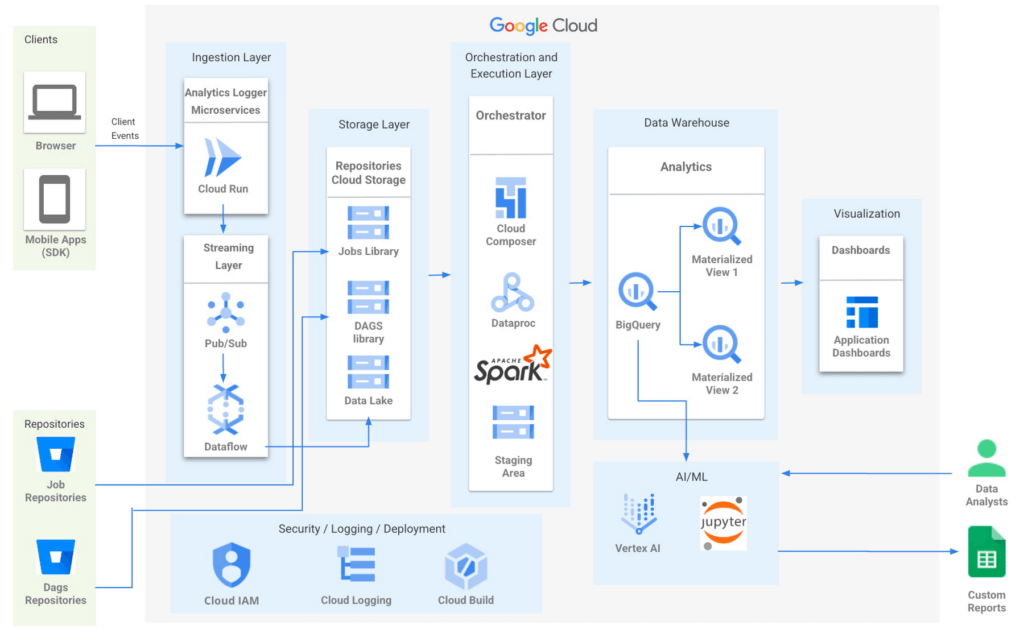
- Input/Ingest: At a high-level, microservices hosted in Cloud Run collect and aggregate incoming Ads events.
- Enrichment: The output of this stage is a Pub-Sub message enriched with more attributes based on a pre-configured campaign.
- Store: a Cloud Dataflow streaming job to create text files in Cloud Storage buckets.
- Trigger: Cloud Composer triggers the spark jobs based on text files to process and group them to produce desired output as one record per impression, a logical group of events.
- Deploy: Cloud Build is then used to automate all deployments.
Thus far, all Google cloud managed services work together to ingest, store and trigger the orchestration, all of which are scalable based on configurations including autoscaling capabilities.
- Visualization: A visualization tool reads data from BigQuery to compute pre-aggregations required for each dashboard.
- Data Model Evolution considerations: Though the solution served the purpose of creating pre-aggregations, as the data model evolved by adding a column or creating a new table, it led to recreating pre-aggregations and querying the data again. Alternatively, creating aggregate tables as an extra output of current ETLs seemed like a viable option. However, this would increase the cost and complexity of jobs. A similar situation to reprocess or update aggregated tables would occur as data is updated.
Precomputed views of data that is periodically cached are critical to reach the audience with the right message at the right time.
- Performance: In order to increase the performance of the platform, we need to have regularly precomputed views of the data, cached .
- Materialized Views: Consumers of these views needed faster response times, to consume fewer resources and output only the changes in comparison to a base table. BigQuery Materialized views were used to solve this very requirement. Materialized views have been highly leveraged to optimize the design resulting in lesser maintenance and access to fresh data with high performance with a relatively low technical investment in creating and maintaining SQL code.
- Dashboards: Application dashboards pointing to the Materialized views are highly performant and provide a view into fresh data.
- Custom Reports with Vertex AI Notebooks: Vertex AI notebooks directly read data from BigQuery to produce custom reports for a subset of customers. Vertex AI has been hugely beneficial to data analysts, where an environment with pre-installed libraries simplifies the readiness to use. Vertex AI Workbench notebooks are used to share these reports within the team allowing them to work always on the cloud without having the need to download data at any time. Besides, it increases the velocity to develop and test ML models faster.
The NEXT platform has yielded benefits such as customers having the ability to create unique consumer journeys powered by AI / ML personalization triggers, using first-party data and business intelligence tools to capitalize on real-time creative intelligence, which is a dashboard to measure campaign performance for cross-functional teams to analyze the impact of Ad content experience at a granular level. All of these while ensuring controlled access to data to enrich data without moving across clouds. The NEXT platform can keep up with increased demands for agility, scalability and reliability through the underlying usage of Google Cloud.
Partnering with Google, in the context of the Google Built with BigQuery program has surfaced the differentiated value in areas of creating interactive personalized Ads by using real-time data. In addition, by sharing this data across organizations as assets, ML models have fueled higher levels of innovation. Connected-Stories plan to deepen the penetration into the entire spectrum of services offered in the AI/ML area to enhance core functionality and provide newer capabilities to the platform.
Click here to learn more about Connected-Stories NEXT Platform capabilities.
The Built with BigQuery Advantage for ISVs
Through Built with BigQuery, launched in April ‘22 as part of Google Data Cloud Summit, Google is helping tech companies like Connected-Stories co-innovate in building applications that leverage Google’s data cloud with simplified access to technology, helpful and dedicated engineering support, and joint go-to-market programs. Participating companies can:
- Get started fast with a Google-funded, pre-configured sandbox.
- Accelerate product design and architecture through access to designated technical experts from the ISV Center of Excellence who can share insights from key use cases, architectural patterns, and best practices encountered in the field.
- Amplify success with joint marketing programs to drive awareness, generate demand, and increase adoption.
The Google Data Cloud spectrum of products and specifically BigQuery give ISVs the advantage of a powerful, highly scalable data warehouse that’s integrated with Google Cloud’s open, secure, sustainable platform. And with a huge and expanding partner ecosystem and support for multi-cloud, open source tools and APIs, Google provides technology companies the portability and extensibility they need to avoid data lock-in and exercise choice.
We thank the Google Cloud and Connected-Stories team members who co-authored the blog: Connected-Stories: Luna Catini, Marketing Director, Google: Sujit Khasnis, Cloud Partner Engineering
3307
Of your peers have already watched this video.
21:26 Minutes
The most insightful time you'll spend today!
What are TPUs and Why Should Data Scientists Care?
When it comes to machine learning, more data means better results.
But processing more data also requires more computing power. CPUs are great for sequential arithmetic calculations. They offer low latency with this type of workload. But to speed up machine learning, models have to perform multiple calculations in parallel. And that’s where GPUs perform better.
TensorFlow Processing Units, or TPUs, represent the most advanced hardware accelerators that has been architected ground up for TensorFlow by Google Cloud. Cloud TPUs deliver accelerated performance to help businesses train deep learning models in a matter of hours instead of weeks.
This allows enterprises to be more productive with their scarcest resource, the ML scientist, and drive more innovations, thanks to the advanced computing capability.
Watch John Barrus, Senior Product Manager, Google Cloud; and Zak Stone, Product Manager, Google Brain, show you benefits of using TPUs and how to get started.
Latest Features and Updates to Globally Bolster Translation Services

5289
Of your peers have already read this article.
2:00 Minutes
The most insightful time you'll spend today!
Let’s face it: in the globalized world, which is now more than ever a digital demand world, you need to scale and reach your customers right where they’re at. Translation is a critical piece of that, whether you’re translating a website in multiple languages or releasing a document, a piece of software, or training materials.
Manual translation does not scale, which is why machine translation, powered by machine learning (ML), is becoming more important to our customers. Machine translation has historically been challenging because of the sheer volume and breadth of content that can add value when translated into multiple languages. Companies acquire and share content in many languages and formats, and scaling translation to meet needs is a tall order due to multiple document formats, integrations with optical character recognition (OCR), and the need to correct for domain-specific terminology.
Our goal is to simplify translation services, while enabling flexibility and control for our customers’ unique needs across industries. Read on to learn more about recent features and updates.
Formatting matters: Document Translation is now GA
In many cases, the layout of a document dictates how it should be interpreted—e.g., readers navigate text and discern meaning based on formatting, like bold or italicized text, or markups for headers, paragraphs, and columns. Previously, to automate translation of documents, text needed to be separated from these layout attributes, meaning the document’s structure was either lost or needed to be recreated later in the developer pipeline, after the text had been translated. This required translation teams to do a lot of extra work and maintain a lot of additional code. But now, those steps are unnecessary. Formatting can be retained throughout the translation process, handled directly by the Translation API Advanced.
This feature lets customers translate documents in 100+ languages and supports document types such as Docx, PPTx, XLSx, and PDF while preserving document formatting.
And if your needs go beyond Document Translation, we can help you translate audio as well. For real-time streaming translation, check out the Media Translation API, and for offline transcription translation, combine the Translation API with the Video Intelligence API.
Real-Time translation when you need it, Batch when you don’t
One of the biggest differentiators for Translation API Advanced’s document translation capabilities is the ability to do real-time, synchronous processing for a single file.
For example, if you are translating a business document such as HR documentation, online translation provides flexibility for smaller files and provides faster results. You can easily integrate with our APIs via REST or gRPC with mobile or browser applications, with instant access to 100+ language pairs so that content can be understandable in any supported language.
Meanwhile, batch translation allows customers to translate multiple files into multiple languages in a single request. For each request, customers can send up to 100 files with a total content size of up to 1 GB or 100 million Unicode codepoints, whichever limit is hit first.
State of the Art (SOTA) accuracy, with flexibility for customization
In order to achieve the highest level of accuracy for your translation, we now support multiple options:
- Use Google’s SOTA translation models: Each year, Google heavily invests to improve the quality of our translations across Apps, Cloud APIs, and Chrome, as well to enable multilanguage answers in Search. A popular metric for automatic quality evaluation of Machine translation systems is the BLEU score, which is based on the similarity between machine translation and the reference translations that were generated by people. While we push out incremental improvements for individual models on a monthly cadence, there are also times where we make significant leaps. In the releases since 2019, we have improved our average BLEU score by 5pts on average across 100+ languages and 7pts on low resource languages.
- Leverage glossaries for specific terms and phrases: Glossary is our terminology control feature. It allows you to import source content to define preferred translations, such as product names or department names. Then, when calling the glossary in the API request, your preferred translations will be enforced. This will work for words as well as phrase translation.
- Pick a pre-trained model with model selection: If you create custom models for machine translation, we don’t think you should have multiple client libraries and multiple APIs to maintain in order for you to use the best model for your needs. Translation API Advanced now supports Model Selection. Pick your pretrained model or pick your custom ML model built on AutoML for any language pair you’ve created and use the same API and the same client library.
- Build custom translation models with AutoML: AutoML Translation is a suite of ML products that enable you to build high quality models for your own use case or data, with limited-to-no ML expertise or coding required. Bring your past human-validated translations to improve translation specificity for your domain.
Keep localization local with Regional Endpoints
If you are a customer operating in the EU, we recently launched an endpoint specifically for EU regionalization. This is a configurable endpoint for customers to store and perform machine translation processing of customer data only in the EU multi region. For now, this only supports our pretrained translation models and glossary, but batch translations will be coming soon.
How Eli Lilly uses Cloud Translation to translate content globally
Historically, translations at Eli Lilly have been complicated: numerous translation vendors have been needed for different languages and organizations, all with their own processes and expectations. On top of that, translations have been costly and slow.
To solve this, Eli Lilly took a codified approach to enable users and systems to spend less time and resources to safely generate quality translations.
Learn more, and even catch a demo, from Thomas Griffin, Translation Tech Lead & Global Regulatory Architect for Eli Lilly.
Learn more
- To get started using Cloud Translation – Advanced, complete the setup and then try the Translate text (Advanced edition) quickstart.
- Document Translation is priced per page. For more information, see pricing.
Medical Data Breakthrough: Google Aids PicnicHealth’s Growth

4884
Of your peers have already read this article.
3:30 Minutes
The most insightful time you'll spend today!
In the fragmented world of U.S. healthcare, patients often have to wait in line or on hold, navigate multiple patient portals, and fill out numerous request forms—all in pursuit of their own medical history. Healthcare technology startup PicnicHealth is on a mission to put control back with the patient, where it belongs.
PicnicHealth’s growth, from closing successful venture rounds to winning machine learning (ML) competitions, speaks to not only improvements and opportunities in healthcare, but also how startups are leveraging Google Workspace and Google Cloud services to accelerate momentum.
The company does the heavy lifting of collecting records and leverages human-in-the-loop ML to transcribe and validate them with an abstraction team of medical professionals. The records are then structured into a complete medical history that patients can access and share with providers to get better care.
But PicnicHealth helps to improve patient health on more than one front. It allows patients to contribute their data to de-identified medical research, building high-quality, anonymized datasets that researchers and life sciences companies can use to better understand disease progression and treatment in the real world.
Google Workspace has been part of PicnicHealth from day one, helping the founders collaborate and shape the company’s vision using cloud-synced documents and spreadsheets to collaborate and model predictions. “I’ve had a Gmail account since 2006, and in college 100% of people worked out of Google Docs. Workspace continues to be the best choice for online collaboration, and that’s why it’s still the default standard for startups,” said Troy Astorino, CoFounder & CTO of PicnicHealth. “When we started PicnicHealth, my co-founder Noga Leviner was in San Francisco and I was in Southern California, and of course we used Workspace.”
Today, Google Workspace continues to play a central role in the company’s collaboration. “We create design documents in Google Docs, primarily for engineering and product changes, and get really healthy, vibrant discussions through comments,” noted Astorino. “This practice has grown beyond engineering and is used for everything from how the company operates to communication norms.”
Google Workspace offers everything the team needs to collaborate, no matter where employees are. PicnicHealth’s team has spread from San Francisco to being distributed across the country and around the world. Instant collaboration is crucial.
“We work in a complex domain where people need a lot of information to make good decisions,” said Astorino. “Google Workspace allows us to operate in a mode of default transparency, where people can easily get the information they need even if it wasn’t intentionally or directly shared with them. Whether it’s working in Docs or scheduling in Calendar, we can operate much more effectively than we could otherwise.”
By any measure, PicnicHealth’s trajectory is one of record success. The startup is a 2014 alumni of Y Combinator, a program that helped launch household names like Airbnb, DoorDash, and Dropbox. Three years later, the team went on to win the $1 million grand prize at Google’s Machine Learning Competition. And the momentum has continued— PicnicHealth has recently announced a $60 million Series C round, bringing the amount raised to date to over $100 million. With the Series C, PicnicHealth is investing in expanding its reach to more patients across over 30 diseases.
As a healthcare startup, PicnicHealth faced a very particular set of challenges, especially when working with and accessing data. Data fragmentation and interoperability are only some of the challenges of realizing the value of big data in the cloud. The healthcare industry is notoriously difficult to navigate due to sensitive data protection laws and regulations like the Health Insurance Portability and Accountability Act (HIPAA).
PicnicHealth started in the cloud on Amazon Web Services (AWS). However, after migrating over to Kubernetes and facing an expanding list of requirements for HIPAA compliance, the company started to explore alternatives.
“We needed to be HIPAA compliant, which was going to be painful on AWS, and we wanted to get away from managing and operating our own Kubernetes clusters,” recalled Astorino. “We had heard good things about GKE (Google Kubernetes Engine). And particularly valuable for us, — many technical requirements you need for HIPAA compliance are configured by default on Google Cloud.”
PicnicHealth would have had to implement a lot of changes and get specialized instance types to get their existing configuration to work. So, they began experimenting with Google Cloud and discovered a much smoother experience.
“It was a lot easier to manage in terms of product setup and developer experience,” said Astorino. “There is a sane product hierarchy of resources you can access and use through Google Cloud and the relationships between them, from coordinated IAM (identity and access management) to using Google Groups for granting permissions. Overall, it’s cleaner.”
Astorino added that the move has also opened the doors to taking advantage of other services in the Google Cloud ecosystem like Cloud SQL, BigQuery, and Cloud Composer. PicnicHealth also uses Security Command Center because it easily integrates with everything but also helps meet various compliance frameworks’ requirements, providing visibility, near-real-time asset discovery, and security information and event management.
But most importantly, the integrated ecosystem has simplified the work needed for PicnicHealth to create a secure environment for employees to use when working with sensitive medical records while still providing all the tools they need. For example, abstractors not only use Google Workspace but also have Chromebooks because they are easy to manage and secure.
Altogether, Google Cloud helps form a technology stack that has enabled the startup to build a massive labeled dataset containing over 100 million labeled medical data concepts. In turn, it accelerates PicnicHealth’s ability to generate highly-performant AI models and feed other ML pipelines, which has been vital for processing and reviewing data at scale.
To learn more about how Google Workspace and Google Cloud help startups like PicnicHealth accelerate their journey, visit our startups solutions pages for Google Workspace and Google Cloud.
6075
Of your peers have already watched this video.
48:30 Minutes
The most insightful time you'll spend today!
Can Your Data Warehouse Handle a 100-Trillion Row Query?
Today’s enterprise demands from data go far beyond the capabilities of traditional data warehousing and for many leaders, the need to digitally transform their businesses is a key driver for data analytics spending.
Businesses want to make real-time decisions from fresh information as well as make future predictions from their data in order to remain competitive.
In this video, Jordan Tigani, Director of Product Management, Google BigQuery reveals the power of Google Cloud’s modern data warehouse, BigQuery, that helps businesses make informed decisions quickly.
In addition, he talks about how big Google BigQuery can get. He shares examples of how one customer ran a query against a giant table of 100 trillion rows. “I think it was something like 19 petabytes of data scanned. It took about took about 20 minutes. It used 39,000 slots, which is about 20,000 cores,” says Tigani.
He also shares examples of how businesses, such as online retailer, Zulily generate real business benefits from being able to query large datasets faster, and more easily than ever–without having to invest time managing infrastructure.
Finally, Amir Aryanpour, Technical Architect, Channel 4, talks abouut how connecting connecting Google BigQuery to other solutions with the Google Cloud Platform, including storage, data visualisation, and a sentiment analysis engine, among others, helped the company.
More Relevant Stories for Your Company

Companies Can Speed-up AI Developments with NVIDIA’s One Stop Catalog for AI Software
NVIDIA GPU-powered instances on Google Cloud provide an optimal platform for organizations to develop their AI applications on the latest hardware and software stack, then seamlessly deploy those applications at scale in production. Simplifying Workflows to Speedup AI Developments NVIDIA recently announced the One Click Deploy feature on the NVIDIA

Achieving MLOps Excellence with Google Cloud and Equinix Collaboration
In recent years, machine learning (ML) has gained tremendous popularity as a powerful tool for solving complex problems across various domains. However, building and deploying ML models at scale can be challenging, as it involves a range of tasks such as data preparation, feature engineering, model training, deployment, monitoring, maintenance

Leading Verve Group’s CX Innovation with Google Cloud Vertex AI
Verve Group is an ecosystem of demand and supply technologies fusing data, media, and technology to deliver results and growth to both advertisers and publishers – no matter the screen or location, no matter who, what, or where a customer is. Classifying massive amounts of this unstructured data at scale is

Document AI: A Platform for Businesses to Simplify Document Automation
As I type this blog in a Google Doc, I can’t help but think about how much we rely on digital documents to communicate, collaborate, and do business. Yet most of the data in documents remains un-analyzed. Even when documents are part of customer-facing workflows like processing a mortgage application
