





Document AI: A Platform for Businesses to Simplify Document Automation

2368
Of your peers have already read this article.
2:30 Minutes
The most insightful time you'll spend today!
As I type this blog in a Google Doc, I can’t help but think about how much we rely on digital documents to communicate, collaborate, and do business. Yet most of the data in documents remains un-analyzed. Even when documents are part of customer-facing workflows like processing a mortgage application or a contract, businesses frequently struggle with the data those documents contain. Often, even finding the right document in a haystack of thousands across the organization can be challenging. To resolve these difficulties, most organizations rely on manual, time-consuming, and resource-intensive processes—all of which are incredibly frustrating for employees at the forefront of document workflows.
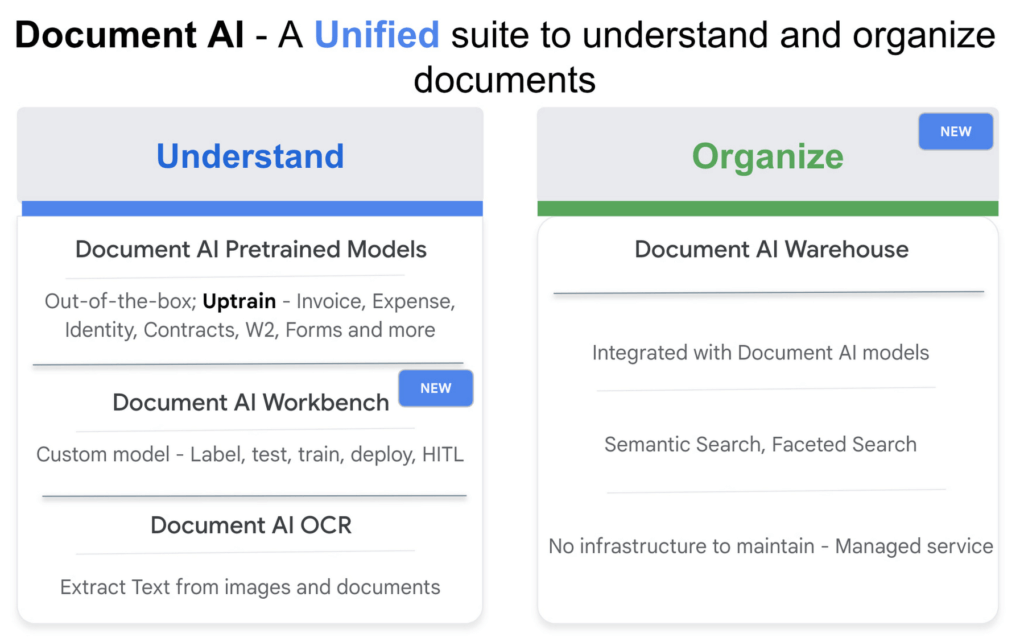
Because of challenges like these, in 2020, we launched Document AI, an AI agent that lets organizations apply machine learning (ML) to their hardest document automation problems. Since then, we have introduced specialized models to extract data for industry-specific use cases such as mortgage processing and procurement. With the launch of Document AI Workbench and Document AI Warehouse at Google Cloud Next ‘22, we’ve continued to take significant steps in our mission to help organizations simplify and automate document processing. Let’s double click on each of these announcements.
Custom document processing with Document AI Workbench
With Document AI Workbench, organizations can process documents by creating custom ML models that are specific to their business needs and extract unstructured data with a high degree of accuracy. Thanks to the user-friendly interface, even business users who do not have extensive ML skills can get started training or uptraining models.
Moreover, if an organization wants to transfer learning from pretrained models and enhance a model further to, say, include new fields, users can now do so by what we call “uptraining.” The uptraining feature is especially valuable for the most common yet complex use cases because it helps to save time and resources, so businesses don’t have to start from scratch. Uptraining for the invoice, purchase order (PO), contracts, W2, 1099-R, payslip, and 1040 pre-trained models unlocks new possibilities for improving accuracy, adding new language support, and schema customization.
We’re continuing to invest in these pretrained models. At Next’22, we announced an update to our invoice and expense pre-trained models with improvements to normalization and line item entities detection, as well as new ID proofing capabilities via a flexible API designed to spot fake, altered, or doctored ID documents. We’ve also added support for five new languages across invoice and expense models, in addition to the 12 previously-supported languages, and expanded availability in Canada and Australia regions, in addition to previously-supported US, EU, and Singapore regions.
According to Daan De Groodt, Managing Director, Deloitte Consulting LLP, Document AI Workbench “is poised to be a game changer, because we can now uptrain various text documents and forms utilizing powerful Google Machine Learning models to get the desired accuracy creating greater time and resource efficiencies for our clients.”
And customers are already seeing benefits. Libeo used Document AI to uptrain an invoice parser with 1,600 documents and increase its testing accuracy from 75.6% to 83.9%. “Thanks to uptraining, the Document AI results now beat the results of a competitor and will help Libeo save ~20% on the overall cost for model training over the long run,” said Libeo chief technology officer, Pierre-Antoine Glandier.
Google-powered document search with Document AI Warehouse
With Document AI Warehouse we are bringing the best of Google’s semantic search to documents. Document AI Warehouse lets enterprises search, store, govern and manage documents and their AI-extracted data and metadata in a single platform. With Document AI Warehouse’s simple and intuitive web accessible user interface, users can explore, view, bulk update and organize documents into folders. Document AI Warehouse offers robust enterprise control and governance so you can control who has access at the document and folder levels and assign users and groups permissions to view, edit, manage (share, delete) documents. You can migrate, sync, or federate documents from other repositories, such as Microsoft SharePoint, Amazon S3, and IBM FileNet. Or if that’s not an option we simply index the content and any extracted/tagged metadata).
We also will consolidate a number of next-generation product enhancements on Document AI OCR and Form Parser by the end of this year – including deeper insights into document quality & semantics, a unified document OCR experience, expanded language coverage for Form Parser, and advanced tooling for model lifecycle management. Google’s DeepMind team developed a new method that allows the creation of document parsing ML models for utility bills and purchase orders with 50%-70% less training data than what was previously needed for Document AI. We’re working on integrating this method into Document AI Workbench in the coming months.
Getting started
I’m very excited about what the future holds for Document AI as a platform for businesses to simplify document automation. Learn more about all these exciting developments in my session at Next’22 or try out one of our offerings today.
How Recommendation AI Helps Retailers Optimize Click-through and Conversion Rates

7075
Of your peers have already read this article.
3:00 Minutes
The most insightful time you'll spend today!
Time to go outside again, I guess. I’ll need a sun hat. Sunscreen. Maybe some new sandals? What else?
With the Recommendations AI service, I might be reminded to grab a reusable water bottle and a swimsuit. Or some after-sun aloe lotion. Good thing, cause I’ll need it.

Recommendations AI is a solution that uses machine learning to bring product recommendations to their shoppers across any catalog or client list. This service is part of our full suite of Retail solutions. When you integrate with the Retail API, you get the benefit of Google’s Product Discovery. Integrating once to reap the benefits over and over. Recommendations is the starting point, and you can easily extend into Retail Search and Vision Product Search in the upcoming future.
The Recommendations solution is fully managed, global-scale and powered by deep learning, so you can focus on a great shopping experience and let someone else worry about the infrastructure.
Compared to baseline recommendation systems used by customers, Recommendations AI showed double digit uplift in conversion and clickthrough rates in A/B experiments controlled by the customers. You can optimize for click-through, conversion or session revenue, and fine tune the models to make sure you omit out-of-stock items or duplicates, for example.

So how does it work, and how do you get started? Read on, and we’ll walk you through the pipeline, starting with the data you already have to placement in your online store.
Formula: Data -> Model -> Placement
You start with your catalog, the list of all the things (postcards, movies, pie recipes) that you want to show your customers. Then you ingest your PII-redacted user events -this is the historic event data like home page views, add to cart events and more along with real time user events. This user event is joined with the product catalog and items that allows us to construct the sequence of shoppers’ activity, thus being able to predict what the shopper has a high propensity to purchase next. The user events can come from both online activity across devices or offline store purchases
The recommendation model will return a list of products, which are the recommendations. The brains of the operation, if you will. This model is trained using all the data that you ingest, using the latest neural network models and techniques that Google has built expertise over the years in flagship products like Youtube and News, that allows us to uncover shopper intent, so it can best predict the right recommendations to show to the right people.
Every model outputs a list of product identifiers, but where do they go? They go into placements, the spots, panels, carousels on your customer’s journey interacting with your brand that you’ve set aside to highlight recommendations. A model can send recommendations to one or more placements, but each placement only receives information from one recommendation model. Your pages will then need to render the products with the right images, text or other metadata, using the product ID that is returned by the model.
What do recommendations look like?
Let’s start by browsing our postcard-selling website, where I’ve been buying some vintage California postcards already. The recommendations algorithm has caught on to my interest, showing me other potential cards to purchase based on my history:

Put your data to work
To get started we need to bring your data into the recommendation model, so it can understand your customers, your inventory, and your sales patterns.
The model takes in the product catalog you use, and metadata about those products to better understand nuances in assortment, pricing and variables like size and style. You might already have this data stored in BigQuery or Merchant Center, and hence we provide easy integrations that you can leverage to get started even faster.
As for the user events, don’t worry if you already have systems in place to capture web and mobile activity. We make it easy to bring in your real time event logs by providing seamless integrations with Google Tag Manager, Javascript pixel, or even historic events from Cloud Storage, BigQuery or using inline API or JSON, so you can immediately train the models on this imported data. All this allows you to kickstart integrating with Recommendations AI in a matter of days.
The models then construct a sequence of activities that the user went through and joins with the products that the user engaged with. Once your data is ready to go, it takes a few days to train the model. Next onto making the data work for you.
Quickly customize your model
Setting up your own recommendations project in the console gives you the ability to choose what sort of model to train (based on what recommendations you want to generate) and your objective. Are you optimizing for click-through rate–more people click on the recommendation links or products–or for conversion rate–more people choose or buy what was suggested or revenue ?
Different models can be optimized for different optimization goals.; the GCP console explains what each one can do and how you can choose to optimize it.

Let’s unpack some of this terminology real quick.
We’ve got three model types:
- Recommended for you – Means we think these are items you’ll want to buy, based on your history; this is usually used on a home page to showcase items.
- Others you may like – Means if you’re browsing the page of a water bottle, we will recommend alternative brands of water bottles that you may like as well as a backpack, based on your engagement history.
- Frequently bought together – Means that when anyone buys sunscreen, we notice that they often also buy aloe lotion, so we will surface those items when someone adds any one of them to their cart.
And then we have three business objectives that the models optimize for:
- Click-through rate – How frequently did somebody click on a recommended item?
- Conversion rate– How frequently did somebody add a recommended item to their cart?
- Revenue per session – How much money did the recommendations generate for you?
Deliver anywhere along the journey
Now that you’re all set up in the Retail AI console, you can test out the recommendations in the console, even before you deploy to production.

You can integrate Recommendations into your frontend by calling the Predict APIt. The placements of recommendations will report data back into the dashboard and you can analyze and measure success for future iterations.
On top of that you can use the recommendations for other parts of your customer’s journey. Email promotions, storefront kiosks, display ads or follow-up notifications can include recommendations based on past activity and cart contents. The model gives you useful product recommendations for a wide variety of touchpoints and steps in the purchasing process.
More best practices, and guides, are available inside our documentation.
How to get started
Training your own models can be tedious, time-consuming, and expensive. On top of that it requires deeper data science expertise to set up. Let us do it instead!
You can see how IKEA Retail uses Recommendations AI in this recent talk and blog from the Google Cloud Retail Summit..
To get started today you’ll need to make a Cloud project and enable the Retail API, which then allows you to access all the recommendation tools in one menu. Bring in your catalog and purchasing data, define a placement or two, and you can start putting recommendations on your site in a matter of days.
Google Cloud Modernized Wisconsin Department of Workforce Development to Process 150K+ Unemployment Claims Per Week

2997
Of your peers have already read this article.
2:00 Minutes
The most insightful time you'll spend today!
When confronted with challenges, resilient organizations adapt and innovate to address changing customer needs. Through its partnership with Google Cloud, the Wisconsin Department of Workforce Development exemplifies this evolutionary approach.
Just a few months ago, challenges created by the antiquated unemployment insurance (UI) system threatened the agency’s ability to serve constituents who lost their jobs during the pandemic. Now, and in the months ahead, that continuing evolution will transform how the DWD serves its constituents with the modernization of their UI system, which includes customer experience workflows, predictive analytics, and streamlining and expediting paper applications.
Like many workforce development agencies nationwide, last year, DWD experienced a deluge of claims filed in response to the COVID-19 economic fallout. Unfortunately, DWD’s legacy UI infrastructure — largely written in the COBOL computing language and hosted on a mainframe server – was no match for the volume and complexity of cases. Wisconsin’s multiple technology systems required a large amount of manual processing, with staff using spreadsheets to manually calculate benefit adjustments. As a result, the state just couldn’t keep up with the surge of claims, and it needed to pivot quickly to a new solution to keep up with demand.
DWD initially responded by staffing up call centers, hiring UI application adjudicators, and deploying other personnel–all told, hiring, contracting with, or reassigning more than 1,300 individuals. However, while this enabled DWD to respond to approximately 7 million calls per month, the massive number of incoming claims surged to create a backlog of more than 750,000 claims. Legacy technology issues continued to significantly slow the query-response time.
DWD leaders recognized that staffing alone was not the solution and that innovation was needed to overcome past, inadequate IT investment. To address the inherited issues, Wisconsin turned to Google Cloud. Working together, we were able to scale the state’s response to claims and speed up overall response time. We were also successful in screening out fraudulent claims so that the UI program could be administered–with integrity–to Wisconsinites who needed financial assistance.
Year-to-date, Wisconsin has now disbursed $2 billion in unemployment benefits, in addition to successfully clearing its entire 2020 UI backlog. As a result of our partnership, the state is now processing an average of 157,000 claims each week and releasing most payments to citizens within two to three business days. Before the new system was in place, the response time could be weeks or even months.
Here is how Wisconsin and Google Cloud are modernizing the state’s current legacy system through a modular approach:
- Artificial intelligence (AI)/ machine learning (ML) for predictive analytics: Through the use of Google AI/ML, the state is creating predictive analytics based on historical data to shorten adjudication decision-making for UI claims, enabling it to release payments to eligible claimants faster. Comprehensive data models and confidence scores analyze the backlog data to determine the shortest route to approval and payments, with a high level of confidence and accuracy. DWD is using Google Cloud technology to identify where in the process the claimant was getting stuck in one of the “hold buckets” for processing a UI claim. Using Google Cloud’s data and AI/ML tools, Wisconsin is able to identify problem areas and quickly resolve those issues. This informed DWD’s rewrite of the UI claim application process. And it also helped DWD identify fraudulent claims.
- Document AI (DocAI) for streamlining paper applications: DWD is also partnering with Google Cloud to streamline paper applications and fax documents as part of UI claims processing–enabling documents to be submitted online instead of by fax or hard-copy mail. Our DocAI solution helps Wisconsin staff make faster decisions by rapidly extracting critical data from documents, saving time, and removing manual processes, which allows employees to focus on high-priority activities.
These modernization steps in Wisconsin are resulting in a bold new vision for state unemployment systems across the United States. Through a combination of design thinking, deep partnership with state officials, and modern technology, DWD’s solutions are tailored to maximize benefits to the constituents they’re designed to serve. By joining forces with Google Cloud and utilizing modernizing technology to make informed, data-driven decisions, Wisconsin DWD is helping residents have a better experience that is easier to understand and navigate–all while better serving the community overall.

5209
Of your peers have already downloaded this article
2:30 Minutes
The most insightful time you'll spend today!
For as long as business intelligence (BI) has been around, visualization tools have played an important role in helping analysts and decision-makers quickly get insights from data.
In our current era of big data analytics, that premise still holds. To provide an integrated platform for building BI dashboards on top of big data, GCP offers the combination of Google BigQuery, a cloud-native data warehouse that helps you analyze petabytes of data quickly, and Google Data Studio, a free tool that helps you quickly create beautiful reports.
First, imagine that you work for an online retailer that bases important decisions on customer interaction data in the form of large amounts (multiple TBs) of usage logs stored as date-partitioned tables in a BigQuery dataset called usage. To get business value out of that data as quickly as possible, you want to build a dashboard for analysts that will provide visualizations of trends and patterns in your data.
The good news is that a connector is available that lets you query data stored in BigQuery directly from Data Studio.
Learn how to build a BI dashboard with Data Studio as the front end, and powered by BigQuery on the back end (with some help from Google App Engine for added efficiency). Download this how-to now.
redBus: Mastering Big Data with Google BigQuery

5399
Of your peers have already read this article.
2:30 Minutes
The most insightful time you'll spend today!
In 2006, online travel agency redBus introduced internet bus ticketing in India, unifying tens of thousands of bus schedules into a single booking operation. (Think of it as Expedia for bus booking.) Using BigQuery, redBus crunches terabytes of booking and inventory data in mere seconds and at a fraction of the cost of other big data services. BigQuery also helps engineers fix glitches quickly, minimize lost sales, and improve customer service.
Challenge
Executives at the Bangalore-based redBus needed a powerful tool to analyze booking and inventory data across their system of hundreds of bus operators serving more than 10,000 routes. They considered using clusters of Hadoop servers to process the data but decided the system would take too much time to set up and would require a specialized staff to maintain it. It also would not provide the lightning-fast analysis they needed.
“It would have taken at least a couple of hours to analyze anything,” says Pradeep Kumar, a technical architect at redBus. “Crunching very large data sets would have been a day’s job. We needed something more powerful to get the real-time analysis we were looking for.”
Solution
Kumar and his colleagues learned about BigQuery and realized it was the right match for their data processing needs. The web-based service, which enables companies to analyze massive datasets using Google’s data processing infrastructure, is easy to set up and manage since its simple, SQL-like query language doesn’t require complex technology or specialized personnel. It also has low overhead costs.
The redBus team uses BigQuery as part of an intricate data collection and analysis process. Applications hosted on a range of servers continually pump information related to customer searches, seat inventory, and bookings into a centralized data collection system. Engineers upload the data to BigQuery, which provides answers to complex queries within seconds. For example, BigQuery helps redBus staff:
- Learn how many times customers searched for seats and found none or very few available, indicating more seats should be added to a route
- Investigate decreases in bookings and notify engineers if a technical problem is the cause
- Identify server problems by quickly analyzing data related to server activity
Results
BigQuery provides near real-time data analysis capabilities at 20% of the cost of maintaining a complex Hadoop infrastructure. Queries that would have required a day to analyze on a Hadoop framework take less than 30 seconds using Google’s web-based service.
“We explored several data analytics solutions. Nothing comes remotely close to the sheer power of Google BigQuery,” Kumar says. “It made large-scale data collection and crunching possible with little effort, which has translated to a significant business advantage.”
Google Cloud Platform results
- Analyzes data sets as large as 2 terabytes in less than 30 seconds using a simple, SQL-like language
- Saves time analyzing technical problems and customer booking trends
- Spends 80% less than they would have on a Hadoop infrastructure and avoids setting up and maintaining a complex infrastructure in-house
- Strengthens the company by improving customer service and engineering quality
The fast insights gained through BigQuery are also making redBus a stronger company. By minimizing the time it takes staff members to solve technical problems, BigQuery has helped improve customer service and reduce lost sales.
“Getting to the root of problems used to be really time-consuming,” Kumar says. “By the time we figured it out, customers might have given up. Now if there are booking problems, BigQuery helps us understand the reason right away. Choosing Google BigQuery was the right decision for our company.”
An AI-Powered Cost Cutting Guide: 8 Strategies for Maximizing Profits

1718
Of your peers have already read this article.
3:30 Minutes
The most insightful time you'll spend today!
We are increasingly seeing one question arise in virtually every customer conversation: How can the organization save costs and drive new revenue streams?
Everyone would love a crystal ball, but what you may not realize is that you already have one. It’s in your data. By leveraging Data Cloud and AI solutions, you can put your data to work to achieve your financial objectives. Combining your data and AI reveals opportunities for your business to reduce expenses and increase profitability, which is especially valuable in an uncertain economy.
Google Cloud customers globally are succeeding in this effort, across industries and geographies. They are improving ROI by saving money and creating new revenue streams. We have distilled the strategies and actions they are implementing—along with customer examples and tips—in our eBook, “Make Data Work for You.” In it, you’ll find ways you can pare costs, increase profitability, and monetize your data.
Find money in your data
Our Google Cloud teams have identified eight strategies that successful organizations are pursuing to trim expenses and uncover new sources of revenue through intelligent use of data and AI. These use cases range from scaling small efficiencies in logistics to accelerating document-based workflows, monetizing data, and optimizing marketing spend.
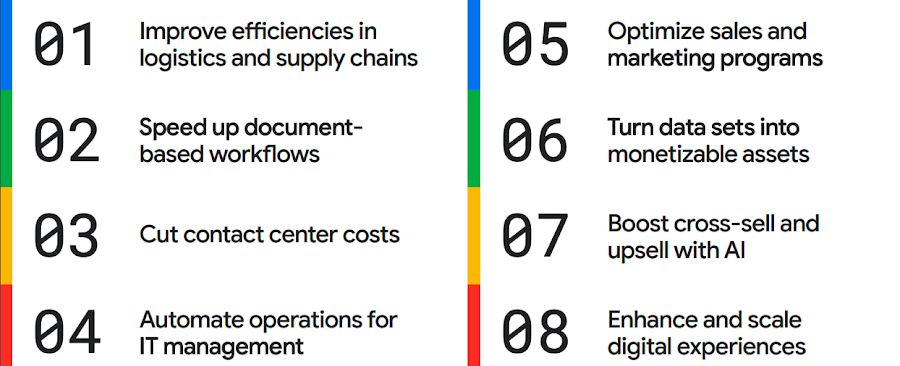
The results are impressive. They include massive cost savings and additional revenue. On-time deliveries have increased sharply at one company, and procure-to-pay processing costs have fallen by more than half at another. Other organizations have reaped big gains in ecommerce upselling and customer satisfaction.
We’ve found that businesses across every industry and around the globe are able to take action on at least one of these eight strategies. Contrary to common misperceptions, implementation does not require massive technology changes, crippling disruption to your business, or burdensome new investments.
What success looks like
If you worry your business is not ready or you need to gain buy-in from leadership, the success stories of the 15 companies in this report are helpful examples. Learning how organizations big and small, in different industries and parts of the world, have implemented these data and AI strategies makes the opportunities more tangible.
Carrefour
Among the world’s largest retailers, Carrefour operates supermarkets, ecommerce, and other store formats in more than 30 countries. To retain leadership in its markets, the company wanted to strengthen its omnichannel experience.
Carrefour moved to Google Data Cloud and developed a platform that gives its data scientists secure, structured access to a massive volume of data in minutes. This paved the way for smarter models of customer behavior and enabled a personalized recommendation engine for ecommerce services.
The company saw a 60% increase in ecommerce revenue during the pandemic, which it partly attributes to this personalization.
ATB Financial
ATB Financial, a bank in the Canadian province of Alberta, uses its data and AI to provide real-time personalized customer service, generating more than 20,000 AI-assisted conversations monthly. Machine learning models enable agents to offer clients real-time tailored advice and product suggestions.
Moreover, marketing campaigns and month-end processes that used to take five to eight hours now run in seconds, saving over CA$2.24 million a year.
Bank BRI
Bank BRI, which is owned by the Indonesian government, has 75.5 million clients. Through its use of digital technologies, the institution amasses a lot of valuable data about this large customer base.
Using Google Cloud, the bank packages this data through more than 50 monetized open APIs for more than 70 ecosystem partners who use it for credit scoring, risk management, and other applications. Fintechs, insurance companies, and financial institutions don’t have the talent or the financial resources to do quality credit scoring and fraud detection on their own, so they are turning to Bank BRI.
Early in the effort, the project generated an additional $50 million in revenue, showing how data can drive new sources of income.
How to get going now
“Make Data Work for You” will help you launch your financial resiliency initiatives by outlining the steps to get going. The process lays the groundwork for realizing your own cost savings and new revenue streams by leveraging data and AI.
Among these steps include building frameworks to operate cost efficiently, make informed decisions related to spending and optimize your data and AI budgets.
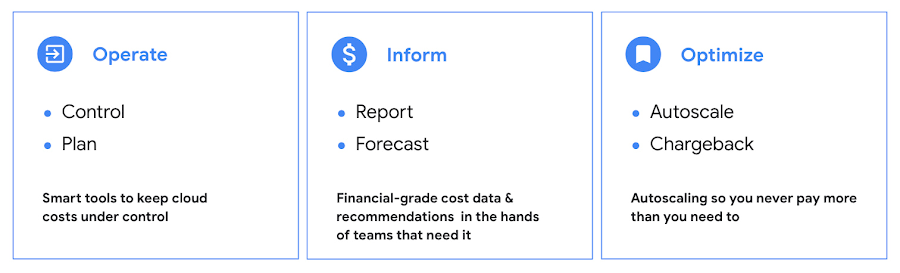
Operate: Billing that’s specific to your use-case
Control your costs by choosing data and analytics vendors who offer industry-leading data storage solutions and flexible pricing options. For example, multiple pricing options such as flat rate and pay-as-you-go allow you to optimize your spend for best price-performance.
Inform: make informed decisions based on usage
Use your cloud vendor’s dashboards or build a billing data report to gain insights on your spending over time. Make use of cost recommendations and other forecasting tools to predict what your future expenses are going to be.
Optimize: Never pay more than you use
While planning data analytics capacity, organizations often overprovision and overpay than what they actually use. Consider migrating your workloads that have unpredictable demand to a data warehousing solution that offers granular level autoscaling features so that you never have to pay for more than what you use.
There are other key moves that will set your initiative up for success including how to shorten time to value in building AI models and measuring impact. You can find details in the report.
A brighter future
The teams at Google Cloud helped the companies in “Make Data Work for You,” along with many more organizations, use their data and AI to achieve meaningful results. Download the full report to see how you can too.
More Relevant Stories for Your Company

Startup Success Blueprint: Insights on Cloud Provider Selection from One AI
From the newsroom to the boardroom, everywhere we turn these days the topic of conversation is artificial intelligence (AI). From the smallest startups to the largest enterprises, every business is looking for ways to incorporate generative AI technology into their products or services. Generative AI is a new breed, able to

Adapting Regulatory Frameworks to Manage AI/ML Risks in Financial Services
Advances in artificial intelligence (AI) and machine learning (ML) have led to increased adoption in the financial services sector. A prominent use for this technology is to assist in key compliance and risk functions, including the detection of fraud, money laundering, and other financial crimes and illicit finance, as well



Driving Business Transformation in Financial Services Using Google Cloud and AI/ML
These are challenging times with financial services institutions navigating the pandemic. Interest rates are an all-time low, and customer expectations are changing with the shift to digital. For example, digital banking has increased from 63 in 2019 to 72 percent today. Then regulatory requirements are evolving and compliance costs are

Bra Fit or Brad Pitt? Fun Moments of Using AI for Contact Centers
For many enterprises, the wish to tap into the power of AI is negated only by a lack of know-how: How AI works, what sort and how much data they will need to gather and structure correctly, and how to use the platforms that make AI adoption easier. Google understands
