





Achieving MLOps Excellence with Google Cloud and Equinix Collaboration

1230
Of your peers have already read this article.
3:30 Minutes
The most insightful time you'll spend today!
In recent years, machine learning (ML) has gained tremendous popularity as a powerful tool for solving complex problems across various domains. However, building and deploying ML models at scale can be challenging, as it involves a range of tasks such as data preparation, feature engineering, model training, deployment, monitoring, maintenance and so on.
According to “The Art of AI maturity” report published by Accenture “87% of data science projects never make it into production.” This is where MLOps comes in – it can help to address the core challenges by providing a framework for managing the entire ML lifecycle, from data collection and preparation to model development, testing, and deployment. It also reduces the time from ML model development to production and increases the success rate of ML projects.
In Google Cloud, we understand how important MLOps is to successfully productionize ML models. So we collaborated with Equinix, the world’s digital infrastructure company™ and a leader in global colocation data center market share, with 248 data centers in 27 countries on five continents. We helped them by providing the advisory services on the MLOps best practices and architecture.
Let’s take a sneak peek at the MLOps requirements at Equinix and the final architecture that was proposed.
What does MLOps mean for Equinix?
After multiple discovery sessions with the Equinix Team, we identified the core requirements and pain points to address in their new MLOps architecture:
- Reusability: Components such as features and pipeline components should be reused across projects to reduce costs and improve efficiency.
- Foundations: The foundations of the infrastructure, such as environments, folder structure, and project hierarchy, should be well-designed to support scalability and reliability.
- Early identification of problems: Problems should be identified early by including data validation, notifications, and retry mechanisms.
- Cost optimization: Costs should be optimized by paying only for what is used.
- Enterprise CI/CD requirements: Enterprise CI/CD requirements should be met by integrating with GitHub and GitActions.
- Scaling: The infrastructure must scale to support future growth.
- Security: Enterprise security requirements should be met in terms of IAM roles, network, etc.
MLOps Architecture
Based on the above requirements from Equinix, key design considerations were made for example – using Vertex AI Feature Store instead of Big Query for online feature serving, using DataFlow for pre-processing vs using the existing python based pre-processing and so on. After carefully assessing all the alternatives, the below reference architecture for MLOps in GCP was proposed:
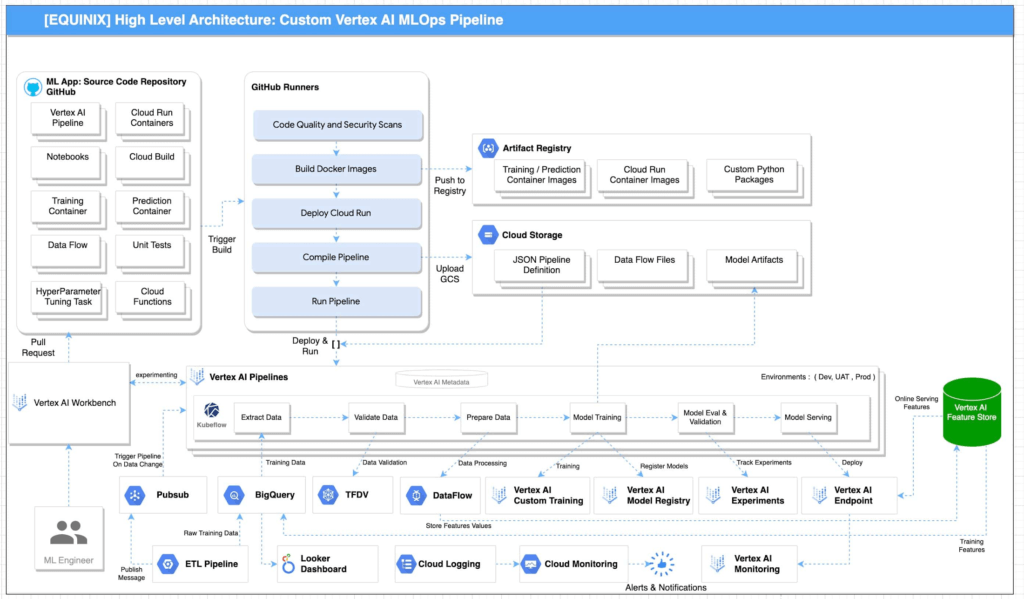
Reference architecture for MLOPs using GCP is illustrated in Figure 1. This architecture includes the following pipeline stages:
- Vertex AI Workbench enables data scientists to quickly explore new ideas and develop/experiment new models. The source code is saved in GitHub repository
- Github Actions with self-hosted runners are integrated with Github as the source code repository. This enables continuous integration of code, quality and security scans. The artifacts generated during the process are saved in Artifact Registry and Google Cloud Storage. These artifacts are deployed to implement the pipeline.
- Unit tests and integration tests can be performed during the continuous integration in Github Actions with self-hosted runners. End-to-end tests are performed on demand in the continuous integration pipeline.
- Metadata about the artifacts is generated and saved in Vertex ML Metadata.
- Automated triggers can be enabled to run pipelines. For example, one trigger is the availability of new training data. These triggers can run the model training pipeline and the new trained model can be pushed to Vertex AI Model Registry.
- To train a new ML model with new data, the deployed Vertex AI Pipeline is executed.
- To train a new ML model with new implementation, a new pipeline will be deployed through CI/CD pipeline.
“The proposed architecture design covers the requirements and scenarios that we were looking for. As our AI and ML portfolio is growing in scale and complexity, it’s important to follow a clear and up-to-date architecture if we want to keep increasing the value delivered by our solutions. As part of the process, the team also acquired the skills required to fully implement it” according to Bernardo Fernandes, Data Science Senior Manager at Equinix.
Below is the snapshot of the features before and after MLOps implementation at Equinix:
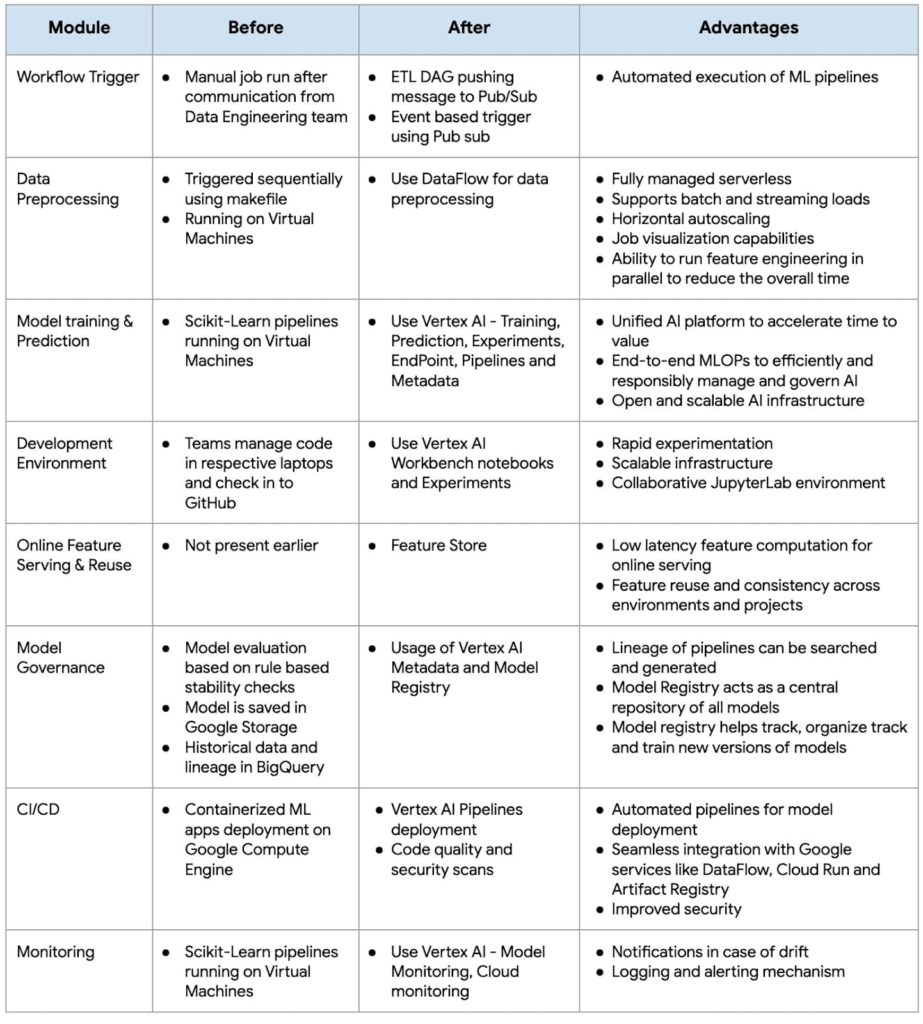
As businesses increasingly rely on machine learning to gain a competitive edge, MLOps has become a critical component of their strategy. By adopting MLOps practices, organizations can achieve faster time-to-market, better performance, and higher ROI for their machine learning initiatives.
Fast track end-to-end deployment with Google Cloud AI Services (AIS)
The partnership between Google Cloud and Equinix is just one of the latest examples of how we’re providing AI-powered solutions to solve complex problems to help organizations drive the desired outcomes. To learn more about Google Cloud’s AI services, visit our AI & ML Products page.
We’d like to give special thanks to Nitin Aggarwal, Vijay Surampudi, Parag Mhatre and Anantha Narayanan Krishnamurthy for their support and guidance throughout the project. We are also grateful to the super awesome collaboration with the Equinix Team (Ravi Pasula and Brendan Coffey, Bernardo Fernandes, Łukasz Murawski, Jakub Michałowski, Sonia Przygocka-Groszyk, Marek Opechowski, Daria Bondara, Nila Velu, Vijay Narayanan, Dharmendra Kumar, Shailesh Sukare, Arunraj Kumar Raje, Seng Cheong Lee).
SystemsResearch@Google (SRG) to Revamp the Future of Hyperscaler Systems

2981
Of your peers have already read this article.
2:00 Minutes
The most insightful time you'll spend today!
For over two decades, Google has helped lead the invention of modern cloud systems—defining, designing and deploying warehouse-scale computing as the foundation for reliable, performant, and secure global-scale information services delivered to billions of users around the world. This leadership involves significant innovation across a broad range of systems technologies, including distributed systems, storage systems, databases, analytics, operating systems, wide area and data center networking, cluster computing, ML, video acceleration and more.
Today, we are announcing a significant step in continuing Google’s tradition of innovation and charting its path into the future: the formation of SystemsResearch@Google (SRG). SRG will be a new research team, positioned in the heart of Google’s Cloud and Infrastructure engineering organization, with the mission of shaping the future of hyperscaler systems design for Google and its ecosystem. It is focused on inventing, incubating, and infusing new concepts, designs, and technologies into Google’s applications, systems, and data centers. The team’s position will allow seamless engagement with engineering and product teams, enabling joint exploration in concert with transformative workloads. Beyond Google, the SRG team will look to forge strong relationships with external research communities working on the most pressing systems-research problems.
Critical research at a pivotal time
We are at a time of enormous transition and opportunity, as nearly all large-scale computing is moving to cloud infrastructure, classical technology trends are hitting limits, new programming paradigms and usage patterns are taking hold, and most levels of systems design are being restructured. We are seeing wholesale change with the introduction of new applications around ML training and real-time inference to massive-scale data analytics and processing workloads fed by globally connected edge and cellular devices. This is all happening while the performance and efficiency gains we’ve relied on for decades are slowing dramatically from generation to generation. And while reliability is more important than ever as we deploy societally-critical infrastructure, we are challenged by increasing hardware entropy as underlying components approach angstrom scale manufacturing processes and trillions of transistors.
In the last twenty years, much of the world’s population has gained real-time access to the world’s information and to one another in ways that were previously the stuff of science fiction. The next decade will see computing and associated capabilities undergo an even more profound transformation, bringing real-time insights, sensing, and actuation to trillions of network-connected devices spanning all of the world’s population. Doing so will require fundamental advances in security, reliability, programming models, data analysis, systems for machine learning, networking, storage systems, hardware architecture, and software systems.
SystemsResearch@Google will be co-led by David Culler and Hank Levy, who bring a combination of academic and industrial experience, plus a long history of successful and impactful research in computer systems. Culler is the former Chair of EECS at UC Berkeley, where he worked to create the Division of Data Sciences and became its founding Dean. His research has focused on parallel architectures, clusters, embedded wireless networks, planetary-scale internet services, and sustainability design. He was the founding faculty director of Intel Research Berkeley, co-founded two startups, and worked with Sun Microsystems for a decade. Levy is the former Chair of Computer Science & Engineering at University of Washington, where he worked to create the Paul G. Allen School and became its founding Director. His research has focused on operating systems, distributed systems, computer architecture, and hardware multithreading. Before UW, Levy spent a decade at Digital Equipment Corporation (DEC), where he worked on operating systems and early-generation clustered computer systems; he has also co-founded two startups. Culler and Levy are both Members of the National Academy of Engineering and Fellows of the IEEE and the ACM.
SRG will be located across sites in Google’s Bay Area and Seattle facilities. We are currently building the SRG team, bringing together leading networked systems thinkers from around the world and inside Google. If you are interested in learning more please reach out to us at systemsresearch@google.com.
Post-COVID: Times Driven by Data Analytics and Intelligence

4558
Of your peers have already read this article.
1:30 Minutes
The most insightful time you'll spend today!
As we think about economic recovery from COVID-19—both inside Google and outside through working with Google Cloud customers—we’ve made many important observations. Among them is the recognition that the ways software developers and IT practitioners work together will shift in the post COVID-19 world. Our economic recovery today will look different than past recoveries, and on a fundamental level, the way we innovate will be different than it’s ever been before.
Right now, we’re entering a new phase of cloud computing, where businesses have shifted from making tactical infrastructure decisions, to making larger IT decisions with an eye towards enabling transformation throughout the company. Data, and what we can do with that data, is key to this transformation. And how companies put data in the hands of every employee to help catalyze transformation and solve the most important and impactful opportunities in their industries is at the core.
A recent Google-commissioned study by IDG highlighted the role of data analytics and intelligent solutions when it comes to helping businesses separate from their competition. The survey of 2,000 IT leaders across the globe reinforced the notion that the ability to derive insights from data will go a long way towards determining which companies win in this new era.
Data analytics and intelligence were prioritized during COVID-19
The results of the IDG study show a separation amongst those organizations that embrace the capabilities of today’s data analytics and AI/ML tools and those that do not. When COVID-19 hit, many organizations cancelled IT initiatives, with 55% of respondents delaying or cancelling at least one technology project. However, 32% of respondents accelerated or introduced initiatives around building out or improving the use of data analytics and intelligence. IT leaders realize how critical data is to their future success, even when resources are scarce.
Digital-focused companies are faster to embrace advanced intelligence tools
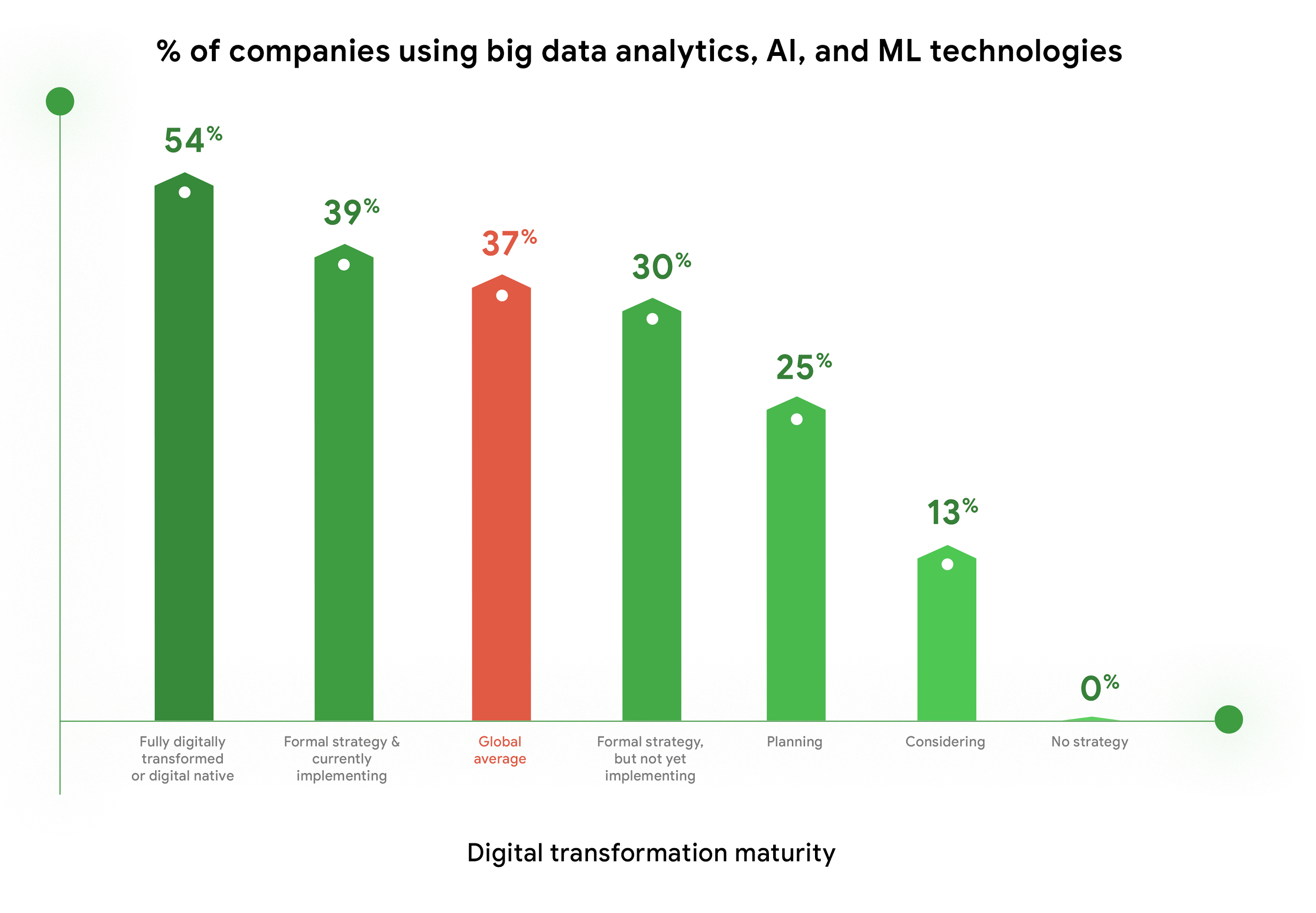
Furthermore, enthusiasm for big data analytics, AI, and ML technologies is highest among companies who are further along in their digital transformation journeys. Fifty-four percent of companies who identify as “Fully digitally transformed” or “Digital native” are using or considering using these tools, vs. the global average of 37%. And, these same organizations are embracing the promise of AI more than their peers. Forty-eight percent felt that “Embedded AI across our full stack of cloud solutions will be critical” vs 39% of digital conservatives. These companies realize these digital tools enable them to be more resilient, agile, and prepared for whatever the future brings.
Companies are turning to cloud to maximize insights from data
As companies tap into the promise of data analytics and AI/ML, they are turning to cloud for help. When considering which cloud providers to work with, 78% of respondents said big data analysis is a “must have” or a “major consideration,” which placed this capability at the top of the list of consideration factors. This is not surprising, as cloud solutions address the most common pain points and barriers to innovation. Three of the respondents’ top four areas impeding innovation are addressed by cloud: Insufficient IT & developer skill sets (1st), security risks and concerns (2nd), and legacy systems and technologies (4th). Plus, cloud makes it easier to quickly launch a project, scale up or scale down, and pay for only what you use.

COVID-19 changed the very nature of business, and of IT. It forced IT leaders to decide where to put their scarce resources and big data analytics and AI/ML were, understandably, at the top of the list. To learn more about the findings, download the IDG report “No turning back: How the pandemic reshaped digital business agendas.”
Unlocking the Power of Computer Vision: Vision AI Made Easy with Spring Boot and Java

1191
Of your peers have already read this article.
1:30 Minutes
The most insightful time you'll spend today!
In today’s era of data-driven applications, leveraging advanced machine learning and artificial intelligence services like computer vision has become increasingly important. One such service is the Vision API, which provides powerful image analysis capabilities. In this blog, we will explore how to create a Computer Vision application using Spring Boot and Java, enabling you to unlock the potential of image recognition and analysis in your projects. The application UI will accept as input, public URLs of images that contain written or printed text, extract the text, detect the language and if it is one of the supported languages, it will generate the English translation of that text.
Spring Boot and Google Cloud
Spring Boot is a powerful open-source framework for creating Spring-based applications. It simplifies development by providing auto-configuration, starter dependencies, and embedded servers. It also offers production-ready features like metrics and health checks. With Spring Boot, you can focus on writing code and deploying efficient applications without worrying about complex configuration or dependencies. Apart from the well-known features that make it an ideal choice for enterprise apps, a new exciting development is the official support for Native Image Builder using GraalVM, enabling the creation of native standalone executables without the need for a Java Runtime and are leaner and offer a super fast startup experience. Try Spring Native on Google Cloud.
The Spring Cloud GCP library makes it easy for Spring Boot applications to use Google Cloud services. It provides Spring Boot APIs for over a dozen Google Cloud services. This means you can take advantage of the benefits of Google Cloud services without having to learn separate Google Cloud client libraries. It is very easy to migrate or create a new Spring Boot application in Google Cloud. With just one command, you can bootstrap your production-ready Spring Boot project structure and start making code changes for your requirement. Refer to the documentation for a full list of features.
Prerequisites
Before diving into the development process, make sure you have the following prerequisites in place:
- A Google Cloud account with a project created and billing enabled
- Vision API, Translation, Cloud Run, and Artifact Registry APIs enabled
- Cloud Shell activated
- Cloud Storage API enabled with a bucket created and images with text or handwriting in local supported languages uploaded (or you can use the sample image links provided in this blog)
Refer to the documentation for steps on how to enable Google Cloud APIs.
Bootstrapping a Spring Boot project
To get started, create a new Spring Boot project using your preferred IDE or Spring Initializr. Include the necessary dependencies, such as Spring Web, Spring Cloud GCP, and Vision AI, in your project’s configuration. Alternatively, you can use Spring Initializr from Cloud Shell using the below steps to bootstrap your Spring Boot application easily:
1. Open a Cloud Shell terminal and make sure it is pointing to the correct project and that you are authorized (if not you can use the command below to set the right project):
gcloud config set project <PROJECT_ID>
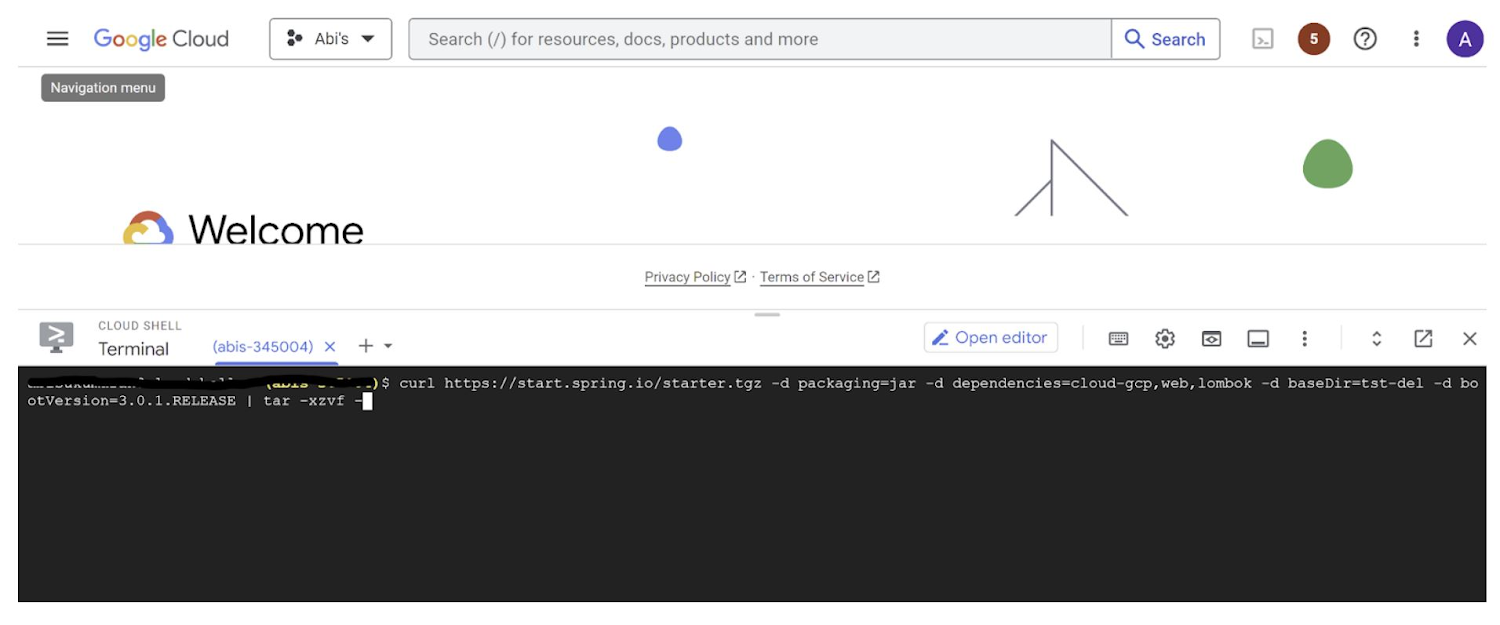
2. Run the following command to create your Spring Boot project:
curl https://start.spring.io/starter.tgz -d packaging=jar -d dependencies=cloud-gcp,web,lombok -d baseDir=spring-vision -d type=maven-project -d bootVersion=3.0.1.RELEASE | tar -xzvf -spring-vision is the name of your project, change it per your requirement.
bootVersion is the version of Spring Boot, make sure to update it if required at the time of your implementation.
type is the version of project build tool type, you can change it to gradle if preferred.
This creates a project structure under “spring-vision” as below:
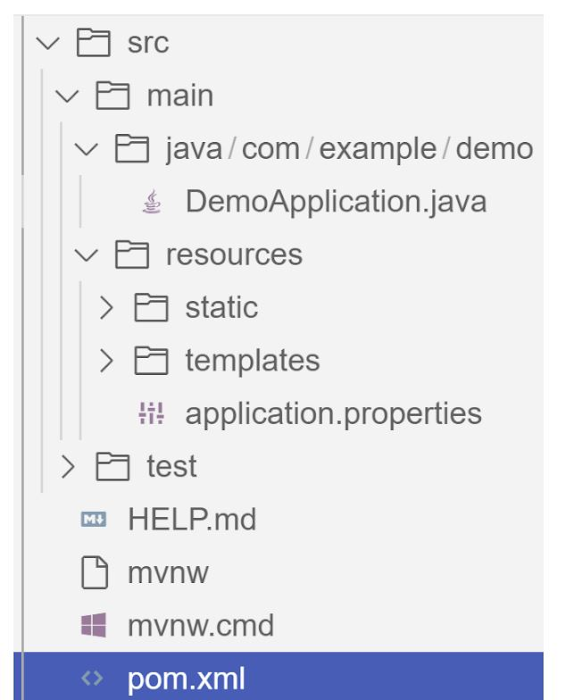
pom.xml contains all the dependencies for the project (dependencies you configured using this command are already added in your pom.xml).src/main/java/com/example/demo has the source classes .java files.resources contain the images, XML, text files and the static content the project uses that are maintained independently.application.properties enable you to maintain the admin features to define profile specific properties of the application.
Configuring the Vision API
Once you have the Vision API enabled, you have the option to configure the API credentials in your application. You can optionally use Application Default Credentials for setting up authentication. In this demo implementation however I have not implemented the use of credentials.
Implementing the vision and translation services
Create a service class that interacts with the Vision API. Inject the necessary dependencies and use the Vision API client to send image analysis requests. You can implement methods to perform tasks like image labeling, face detection, recognition, and more, based on your application’s requirements. In this demo, we will use handwriting extraction and translation methods. For this make sure you include the following dependencies in pom.xml
<dependency>
      <groupId>org.springframework.cloud</groupId>
      <artifactId>spring-cloud-gcp-starter-vision</artifactId>
</dependency>
<dependency>
<groupId>com.google.cloud</groupId>
<artifactId>google-cloud-translate</artifactId>
</dependency>Clone / Replace the following files from the repo and add them to the respective folders / path in the project structure:
Application.java(/src/main/java/com/example/demo)TranslateText.java(/src/main/java/com/example/demo)VisionController.java(/src/main/java/com/example/demo)index.html(/src/main/resources/static)result.html(/src/main/resources/templates)pom.xml
The method extractTextFromImage in the service org.springframework.cloud.gcp.vision.CloudVisionTemplate lets you extract text from your image input. The method getTranslatedText from the service com.google.cloud.translate.v3 lets you pass the extracted text from your image and get the translated text in the desired target language as response (if the source is in one of the supported languages list).
Building the REST API
Design and implement the REST endpoints that will expose the Vision API functionalities. Create controllers that handle incoming requests and utilize the Vision API service to process the images and return the analysis results.
In this demo, our VisionController class implements the endpoint, handles the incoming request, invokes the Vision API and Cloud Translation services and returns the result to the view layer. Implementation of the GET method for the REST endpoint is as follows:
@GetMapping("/extractText")
  public String extractText(String imageUrl) throws IOException {
    String textFromImage =
   this.cloudVisionTemplate.extractTextFromImage(this.resourceLoader.getResource(imageUrl));


    TranslateText translateText = new TranslateText();
    String result = translateText.translateText(textFromImage);
    return "Text from image translated: " + result;
  }
The TranslateText class in the above implementation has the method that invokes the Cloud Translation service:
String targetLanguage = "en";
 TranslateTextRequest request =
         TranslateTextRequest.newBuilder()
             .setParent(parent.toString())
             .setMimeType("text/plain")
             .setTargetLanguageCode(targetLanguage)
             .addContents(text)
             .build();
     TranslateTextResponse response = client.translateText(request);
     // Display the translation for each input text provided
     for (Translation translation : response.getTranslationsList()) {
       res = res + " ::: " + translation.getTranslatedText();
        System.out.printf("Translated text : %s\n", res);
     }
With the VisionController class, we have the GET method for the REST implemented.
Integrating Thymeleaf for frontend development
When building an application with Spring Boot, one popular choice for frontend development is to leverage the power of Thymeleaf. Thymeleaf is a server-side Java template engine that allows you to seamlessly integrate dynamic content into your HTML pages. Thymeleaf provides a smooth development experience by allowing you to create HTML templates with embedded server-side expressions. These expressions can be used to dynamically render data from your Spring Boot backend, making it easier to display the results of image analysis performed by the Vision API service.
To get started, ensure that you have the necessary dependencies for Thymeleaf in your Spring Boot project. You can include the Thymeleaf Starter dependency in your pom.xml:
<dependency>
<groupId>org.springframework.boot</groupId>
<artifactId>spring-boot-starter-thymeleaf</artifactId>
</dependency>
In your controller method, retrieve the analysis result from the Vision API service and add it to the model. The model represents the data that will be used by Thymeleaf to render the HTML template. Once the model is populated, return the name of the Thymeleaf template that you want to render. Thymeleaf will take care of processing the template, substituting the server-side expressions with the actual data, and generating the final HTML that will be sent to the client’s browser. Example:
return new ModelAndView("result", <<YOUR RESULT>>);In the case of the extractText method in VisionController, we have returned the result as a String to and not added to the model. But we have invoked the GET method extractText method on the index.html on page submit.
<form action="/extractText">

        Web URL of image to analyze:

        <input type="text"

               name="imageUrl"

               value=""

        <input type="submit" value="Read and Translate" />

</form>
With Thymeleaf, you can create a seamless user experience, where users can upload images, trigger Vision API analyses, and view the results in real-time. Unlock the full potential of your Vision AI application by harnessing the power of Thymeleaf for frontend development.
Deploying your Spring Boot application with Cloud Run
Write unit tests for your service and controller classes to ensure proper functionality under the /src/test/java/com/example folder. Once you’re confident in its stability, package it into a deployable artifact, such as a JAR file, and deploy it to Cloud Run, a serverless compute platform on Google Cloud. In this step, we will focus on deploying your containerized Spring Boot application using Cloud Run.
a. Package your application by executing the following steps from Cloud Shell(make sure the terminal is prompting at the project root folder)
Build:
./mvnw package
Once the build is successful, run locally to test:
./mvnw spring-boot:run
b. Containerize your Spring Boot Application with Jib:
Instead of manually creating a Dockerfile and building the container image, you can use the Jib utility to simplify the containerization process. Jib is a plugin that integrates directly with your build tool (such as Maven or Gradle) and allows you to build optimized container images without writing a Dockerfile. Before proceeding, you need to enable the Artifact Registry API (Use of Artifact Registry is encouraged over container registry). Then Run Jib to build a Docker image and publish to the Registry:
$ ./mvnw com.google.cloud.tools:jib-maven-plugin:3.1.1:build -Dimage=gcr.io/$GOOGLE_CLOUD_PROJECT/vision-jib
Note: In this experiment, we did not configure the Jib Maven plugin in pom.xml, but for advanced usage, it is possible to add it in pom.xml with more configuration options
c. Deploy the container (that we pushed to Artifact Registry in the previous step) to Cloud Run. This is again a one-command step:
gcloud run deploy vision-app --image gcr.io/$GOOGLE_CLOUD_PROJECT/vision-jib --platform managed --region us-central1 --allow-unauthenticated --update-env-vars
You can alternatively do this from the UI as well. Navigate to the Google Cloud Console and locate the Cloud Run service. Click on “Create Service” and follow the on-screen instructions. Specify the container image you previously pushed to the registry, configure the desired deployment settings (such as CPU allocation and autoscaling), and choose the appropriate region for deployment. You can set environment variables specific to your application. These variables can include authentication credentials (API keys etc.), database connection strings, or any other configuration needed for your Vision AI application to function correctly. When the deployment is completed successfully, you should get an endpoint to your application.
For our demo, the endpoint Cloud Run created for us is: https://vision-app-********-uc.a.run.app
Playing with your Vision AI app
For demo purposes, you can use the image URL below for your app to read and translate:
https://storage.googleapis.com/img_public_test/tamilwriting1.jfif
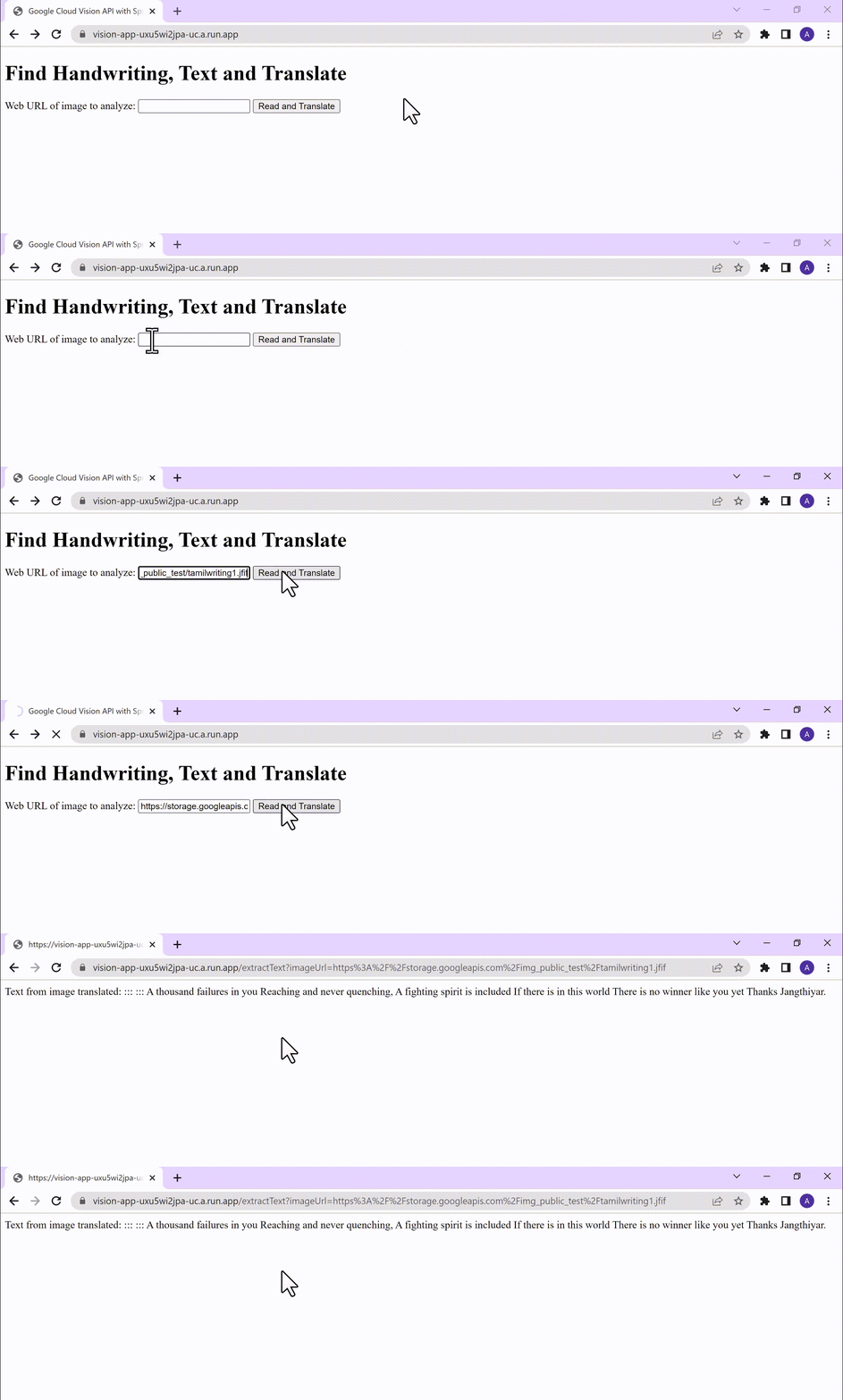
Conclusion
Congratulations! You have successfully created a Vision AI application using Spring Boot and Java. With the power of Vision AI, your application can now perform sophisticated image analysis, including labeling, face detection, and more. The integration of Spring Boot provides a solid foundation for building scalable and robust Google Cloud Native applications. Continue exploring the vast capabilities of Vision AI, Cloud Run, Cloud Translation and more to enhance your application with additional features and functionalities. To learn more, check out the Vision API, Cloud Translation, and GCP Spring docs. Try out the same experiment with the Spring Native option!! Also as a sneak-peak to Gen-AI world, checkout how this API shows up in Model Garden.
Accuracy and Real-time Updates with Google Maps’ On-Demand Rides and Delivery Solution Impacts CX

5636
Of your peers have already read this article.
3:00 Minutes
The most insightful time you'll spend today!
Last year we launched our on-demand rides and delivery solution to help businesses improve operations as well as transform the driver and customer journey from booking to arrival or delivery. When it comes to on-demand rides and deliveries, every minute matters. When users book a ride or order food, they want a seamless experience and real-time accurate updates. Today, we’re taking a closer look into data quality improvements for location, time and distance accuracy, and motorbike routes.
Machine learning helps drive location accuracy
Location accuracy stands at the base of our customers’ operation. The location signals that are coming from mobile devices can sometimes be off for various reasons and a driver’s location can get stuck, or jump around.
Recently we developed mechanisms in our fleet management product that can take in multiple location signals and determine the most reliable location to use for a given vehicle. With that, we noticed drastic improvements:
- Eliminated long periods of location ‘stuckness’ almost completely; a vehicle is considered ‘stuck’ when we think it’s moving but the measured location is not
- Reduced the jumpiness of the location signal by 52%-86%: ‘jumpiness’ is when a vehicle shows a sudden and usually drastic change in location. A jump is determined to exist when the speed the vehicle had to go at in order to cover the distance it did is unrealistic
- Reduced the average jump distance by 44%-86% : ‘jump distance’ is the distance between two consecutive location pings when we determined a ‘location jump’ has occurred.
Dunzo, a local e-commerce platform in India, explains how integrating the order tracking capability within Google Maps Platform’s On Demand Rides and Delivery solution has helped reduce support calls by 90%. The out-of-the-box solution helped Dunzo’s motorbike delivery partners with updating location sync to reduce stuckness and jumpiness as well as deliver premium user experiences.
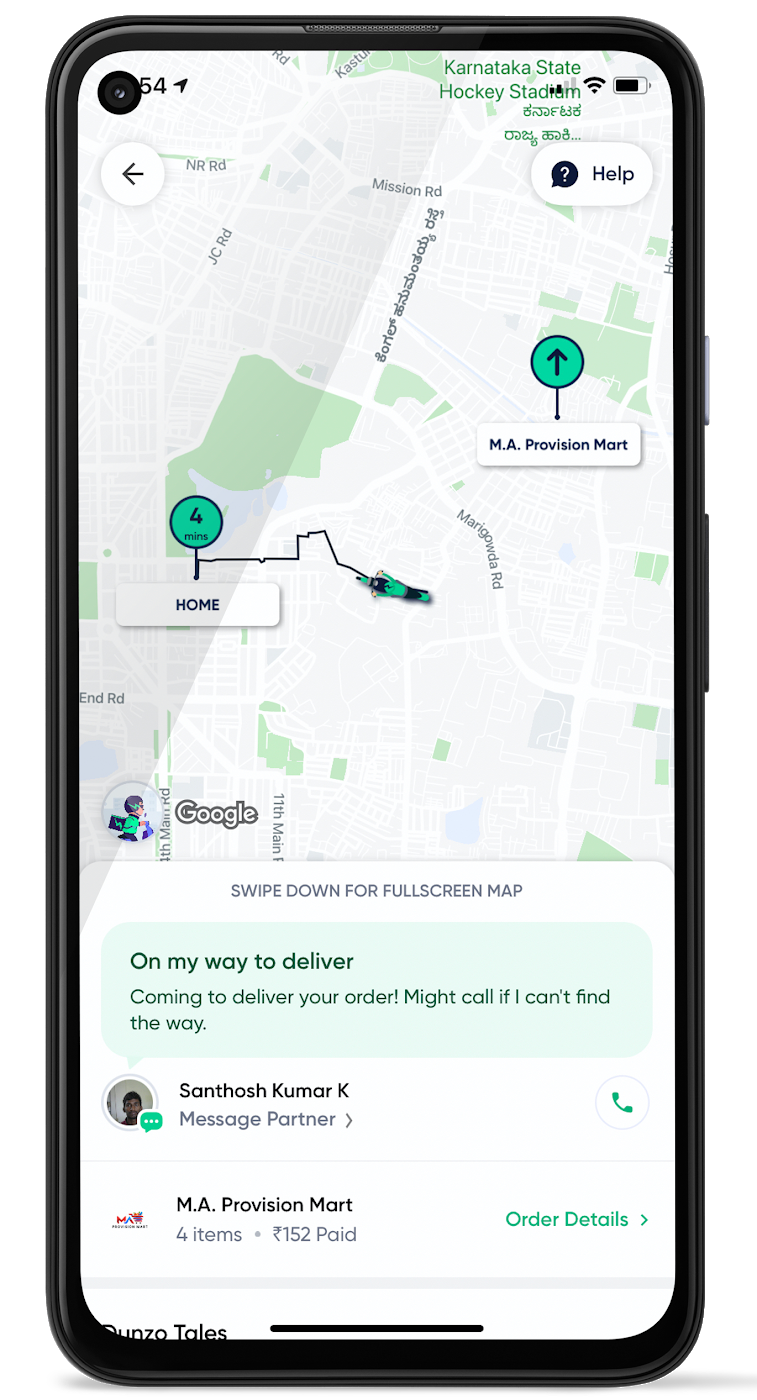
When the vehicle location is more reliable, the dispatch decision is of higher quality, meaning there is a higher chance you will be able to make the optimal decision. This can lead to less wait time for consumers, increased driver happiness and fewer cancellations.
Improvements in ETA accuracy in motorbike routes
In many geographic areas, road space is limited and car ownership is prohibitively expensive so motorbike is a prominent transportation mode. Motorbike mapping requires unique routing, ETA models, and navigation capabilities. Improvements in motorbike routing and ETA estimation have enabled customers like Gojek to offer better overall services, even in geographies with poor wifi or missing roads.
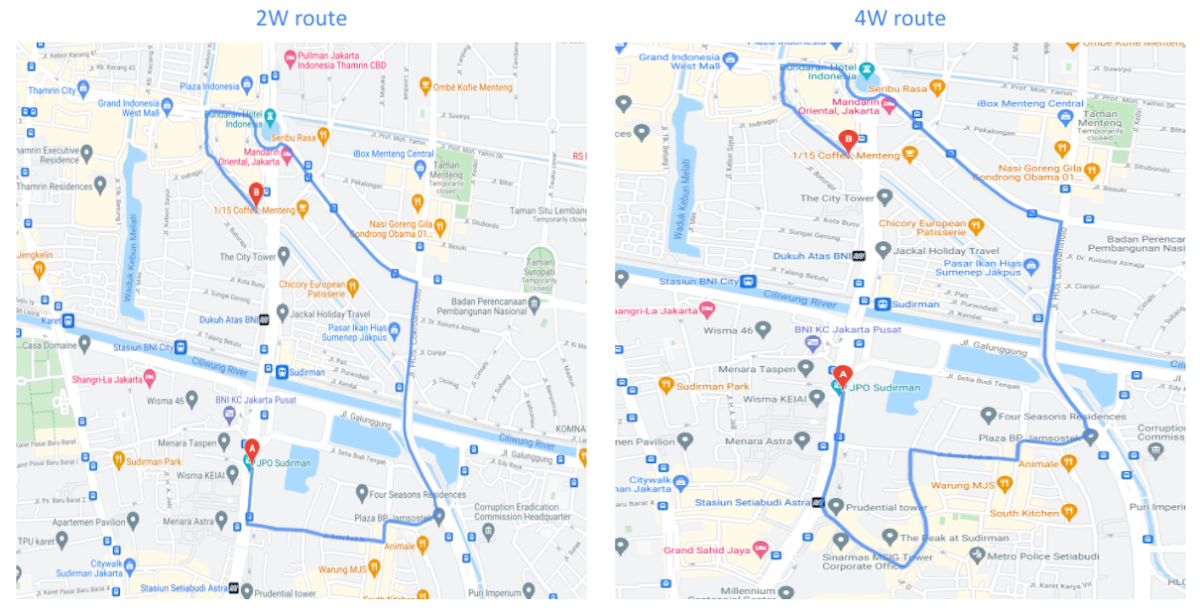
Recently, we further improved ETA outcomes by developing new machine learning models trained specifically for motorbikes. These models help our systems account for differences in congestion and traffic flow that arise in different regions and scenarios.
Globally, we measured an ~8% improvement in ETA accuracy for riders in the general public, and a ~6% improvement in on-demand rides and deliveries ETA accuracy. In this on-demand economy, where consumers are accustomed to real-time trip and order progress, these improvements will significantly improve their experience.
We will continue to innovate on both our car and motorbike on-demand rides and deliveries capabilities based on customer demand and requirements. We are committed to the success of our customers by building a seamless experience for all parties—consumers, drivers, and fleet operators—in the rides and deliveries journey.
For more information on Google Maps Platform, visit our website.
Streamline Your Business Processes with Google Cloud’s Custom Document Splitter

928
Of your peers have already read this article.
3:30 Minutes
The most insightful time you'll spend today!
Businesses rely on processing an inflow of documents to drive processes and make decisions. Many such documents are combined into a single file. For example, a loan application may have a driver’s license, paystub, W2, bank statement, and other document types within a single file. The complexity of handling many document types within a single file makes it difficult for businesses to manage at scale.
At Google Cloud, we’re committed to solving these challenges with continued investment in our Document AI solutions suite which offers machine learning products for document processing and insights. Document AI Workbench helps users quickly build ML models with world-class accuracy, trained for their specific use cases. In February 2023, we launched the Custom Document Extractor (CDE) in General Availability (GA) to help users extract structured data from documents in production use cases. In March 2023, we launched the Custom Document Classifier (CDC) in GA to help automatically classify document types. Today, we announce the newest feature of Document AI Workbench, Custom Document Splitter (CDS) in GA to help users automatically split and classify multiple documents within a single file.
CDS provides tangible business value to customers by helping them sort and classify documents. For example, businesses can validate if they have all the needed documents from an applicant. Furthermore, individually classified documents enable businesses to better automate downstream processes, including selecting the proper storage, analysis, or processing steps based on the document type. The efficiencies enabled by CDS helps businesses lower their document processing time and cost.
Benefits of splitting and classification models in Document AI Workbench
Document AI Workbench can save time and money by simplifying model training, from dataset management, to testing, to deployment. CDS helps businesses achieve higher automation rates to scale processes while lowering costs.
Sean Earley, VP of Delivery Services at Zencore said, “We completed a project for a large bank using Document AI Workbench to split, classify, and extract data from documents to automate Home Mortgage Disclosure Act reporting. Given the accuracy of the models we built, our client estimated increasing loan reporting coverage from 20% to 100% while eliminating thousands of errors per year, drastically reducing the operational cost of the bank’s compliance reporting procedures.”
Fabian Beckmann, Manager Artificial Intelligence & Data at Deloitte Consulting GmbH said, “By leveraging Document AI’s Custom Document Splitter, our client, Commerzbank, a large european bank, can effortlessly segment customer submissions tailored to their back-office requirements, significantly diminishing the need for extra manual sorting or routing. This integration paves the way towards seamless automation within the Document AI pipeline, delivering substantial business benefits.“
According to Kaïs Albichari – ML Tribe Tech Lead, G Cloud at IT services firm Devoteam, “Custom Document Splitter (CDS) has helped one of our clients in the financial services industry save significant time and improve data accuracy. By identifying which parts of documents they can discard and which they retain for entity extraction, CDS has helped the company automate its document processing tasks. The implementation resulted in a more efficient and streamlined workflow, freeing employees to focus on other tasks. Devoteam’s G Cloud team helped the company implement CDS and achieve these benefits.”
Frank Neugebauer, a Google Cloud Insurance Solutions Consultant, worked with a Fortune 100 insurance company and used CDS to create a model to split and classify millions of insurance documents with up to 98% accuracy. With this information, the insurer can better understand the nature of their unstructured data to inform business strategy, including volume for specific document types to inform extraction work. The customer considers this level of insight unprecedented in their 200+ year history.
How to use Custom Document Splitter
You can leverage a simple interface in the Google Cloud Console and a set of public APIs to prepare training data, create and evaluate models, deploy a model into production, and call an API endpoint to split and classify document types. You can follow the documentation for instructions to create, train, evaluate, deploy, and run predictions with models.
Import and prepare training data
To get started, import and label documents to train and evaluate an ML model.
To quickly build a training dataset, import single documents, one document per file, and bulk label them with the relevant document type. You can import one folder or multiple folders at once and choose the correct document type per folder. As shown in the next image, one import could have a folder with 200 bank statements, another folder with 200 W2s, another folder with 200 paystubs, etc., all of which are labeled at once while imported. Up to 30,000 documents and 100,000 pages can be inputted for training. This way, you can build a training dataset with hundreds of labeled documents per class in minutes. As always, if documents are already labeled using other tools, simply import labels with JSON in the Document format.
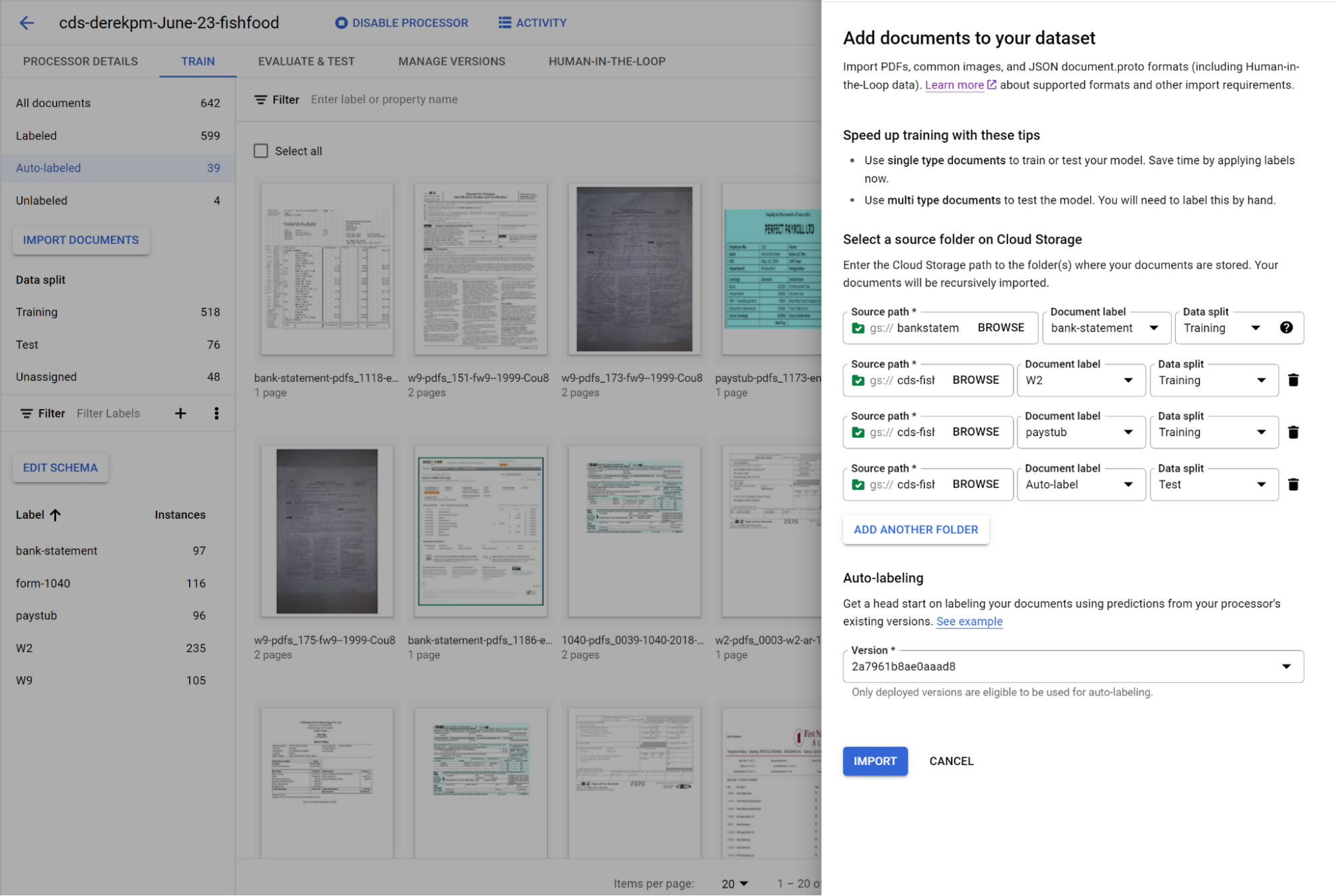
You can initiate training with a click of a button. Once you have trained a model, you can use it to automatically label documents added to your dataset, letting you quickly build robust test and training datasets to evaluate and improve model performance.
To accurately evaluate a CDS model, import files which contain multiple document types within the same file and assign them to the test dataset. Then, use a simple interface to define document boundaries and types.
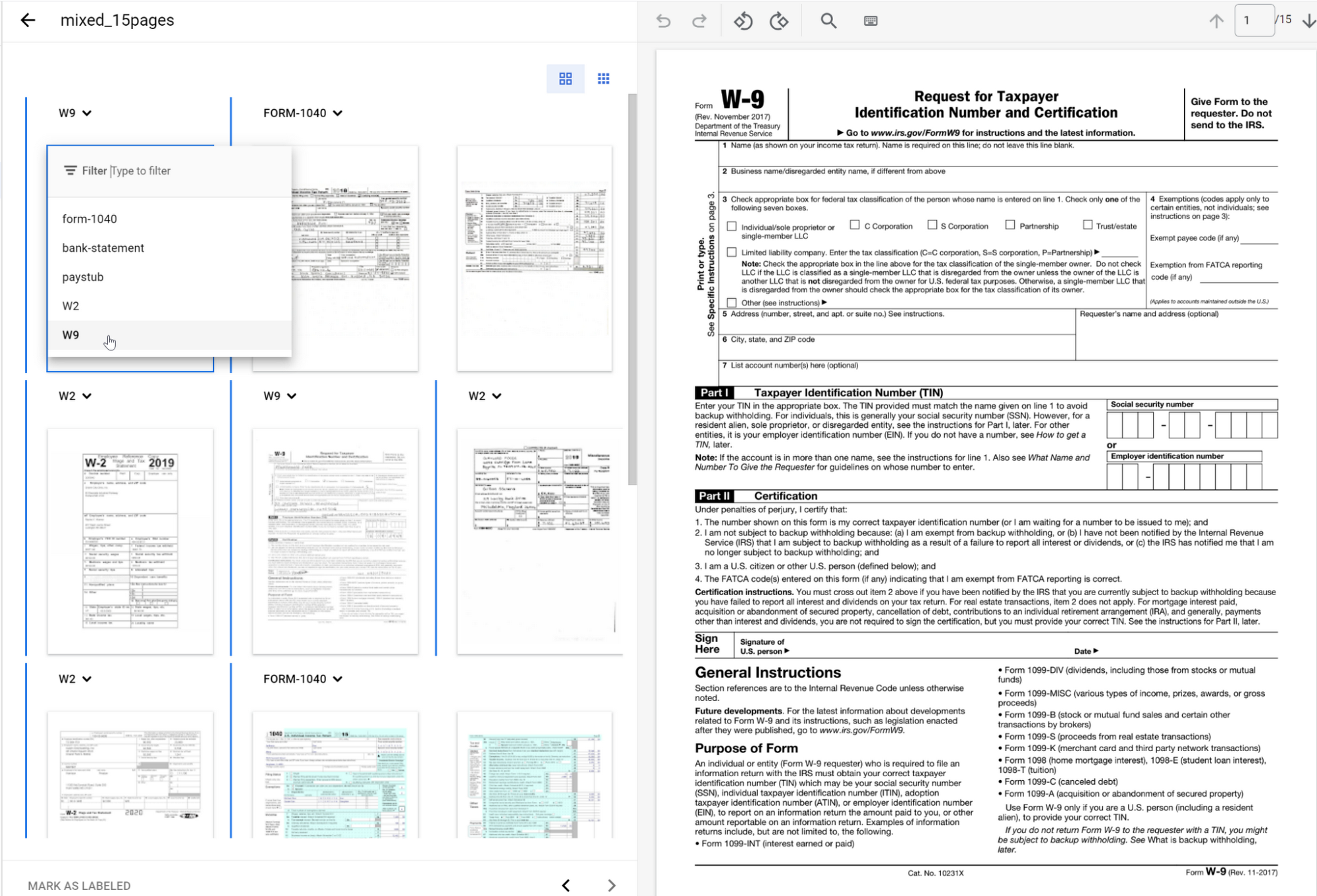
The ground truth you label in the test dataset is used to evaluate splitting and classification predictions from the CDS model.
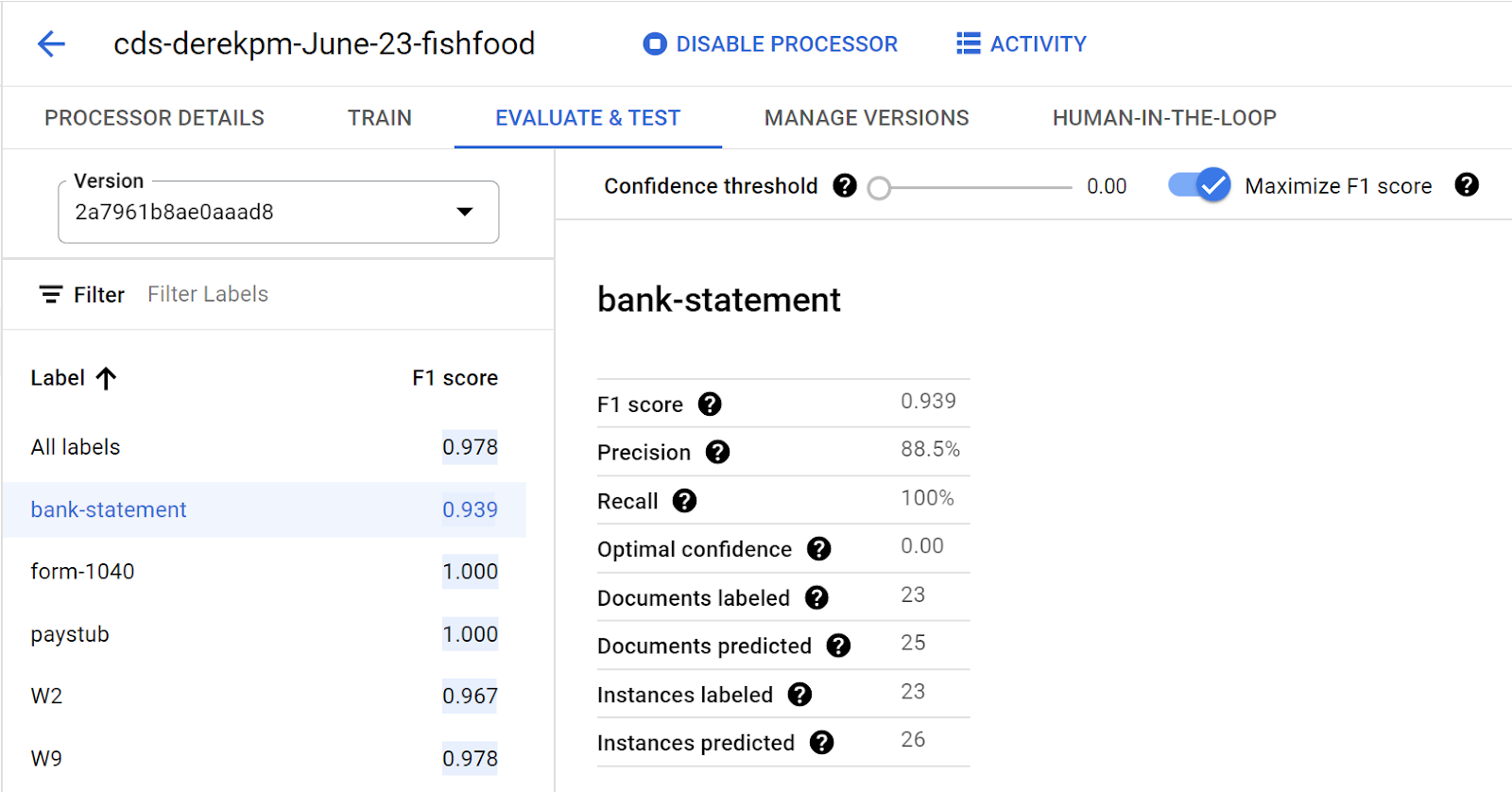
Going into production
Once a model meets accuracy targets, it’s time to deploy into production and call the API endpoint to split and classify document types.
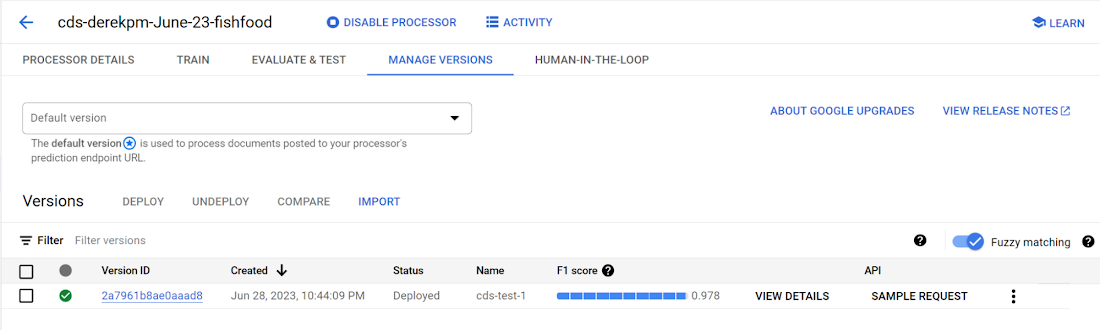
Getting started with Document AI Workbench
Custom Document Splitter is publicly available in GA and ready to help customers automate document splitting and classification. Learn more via our Document AI Workbench web page, Document AI Workbench documentation or try it out in the Google Cloud Console.
More Relevant Stories for Your Company

Google’s Latest ‘Carbon Footprint’ can Flag Users about Carbon Emission Levels from their Cloud Usage
Google Cloud is proud to support our customers with the cleanest cloud in the industry. For the past four years, we’ve matched 100% of our electricity use with renewable energy purchases, and we were the first company of our size to commit going even further by running on carbon-free energy 24/7

Unlocking Data Value: Latest Data Platforms and Announcements at the Next 21
Today at Google Cloud Next we are announcing innovations that will enable data teams to simplify how they work with data and derive value from it faster. These new solutions will help organizations build modern data architectures with real-time analytics to power innovative, mission-critical, data-driven applications. Too often, even the best minds

Speech Analytics and AI: Leverage Every Customer Interaction as a Data Point
Contact centers can transform customer experience using AI-driven speech analytics to evaluate every customer interaction and use it as a 'data point' to identify key patterns, enquiries, pain points, reviews and feedback to enhance customer experience with real-time, personalized recommendations. Knowlarity's AI-based cloud telephony solutions for businesses built with Google



90-Sec Demos of Truly Incredible Customer Care Calls Powered By AI
How real, fast, and easy do you think an AI-powered call center experience is for customers today? It's likely you have seen AI-powered chatbots and are deeply unimpressed with the static nature of the interaction between customers and service representatives. But that's not how Google Cloud's AI-powered contact centers are.
