





IT Prediction: The Importance of Workload-Optimized, Ultra-Reliable Infrastructure in Today’s World

2551
Of your peers have already read this article.
2:30 Minutes
The most insightful time you'll spend today!
Editor’s note: This post is part of an ongoing series on IT predictions from Google Cloud experts. Check out the full list of our predictions on how IT will change in the coming years.
Prediction: By 2025, over half of cloud infrastructure decisions will be automated by AI and ML
Google’s infrastructure is designed with scale-out capabilities to support billions of people, powering services like Search, YouTube, and Gmail every day. To do that, we’ve had to pioneer global-scale computing and storage systems and shorten network latency and distance limitations with new innovations. Along the way, we’ve come to see cloud infrastructure as more than a simple commodity — it’s a source of inspiration and new capabilities.
But even as the demand on the industry’s cloud infrastructure continues to increase, there are simultaneously plateaus in the efficiency available from the underlying hardware. In the past, we saw annual performance gains of 30-40%, levels that often enabled a single infrastructure configuration to meet the needs of the vast majority of workloads. As these improvements have slowed and new workloads such as AI/ML and analytics have emerged, we have seen a corresponding explosion in the variety and capability of infrastructure. While empowering, the burden of picking the right combination of infrastructure components for a given workload still falls on an organization’s cloud architects.
But by 2025, we predict that the burden and complexity of infrastructure decision making will disappear through the power of AI and ML automation, which will automatically combine purpose-built infrastructure, prescriptive architectures, and an ecosystem to deliver a workload-optimized, ultra-reliable infrastructure. The focus for cloud architects will therefore be on enabling business logic and innovation, rather than how that logic maps to underlying infrastructure.
Already, we are making investments to turn this vision into reality, building custom silicon like the Infrastructure Processing Unit (IPU) for our new C3 VMs or a liquid-cooled board for the new tensor processing unit. The latter, the TPU v4 platform, is likely the world’s fastest, largest, and most efficient machine learning supercomputer. It can train large-scale workloads up to 80% faster and 50% cheaper than alternatives. Put another way, TPU v4 will nearly double the performance of critical ML and AI services at half the cost, unlocking new possibilities for what organizations can achieve when leveraging large-scale learning and inference for business services.

The TPUv4
These same IPUs and TPUs represent the foundation that will make it possible to automate cloud infrastructure decisions. They’ll be able to support the telemetry data and ML-based analytics for proactive infrastructure recommendations that will increase the performance and reliability of workloads.
Instead of determining hardware specifications and building the right infrastructure, you’ll only need to specify a workload. AI and ML will take over the burden and recommend, configure, and identify the best options based on your budgetary, performance, and scaling requirements. What is most exciting for us is how this will enable a much more rapid pace of service innovation, which is the primary end goal of great cloud infrastructure.
4356
Of your peers have already watched this video.
7:00 Minutes
The most insightful time you'll spend today!
Baking Gets Sweeter: Build ML Models that Help Predict the Best Recipe!
Baking recipes and ML models have one thing in common—they follow a pattern. Machine Learning is all about finding pattern in data sets, you can predict what you are baking based on the core ingredients and their respective amounts! Bread, cake or cookies, watch the video to make you make your baking experiences and learning with ML sweeter.
AutoML Tables, a no-code Google Cloud tool for ML models analyzes data from the databases and spreadsheets to help creates an automatic stats and dashboard with lists of ingredients and their values to predict a new recipe. Watch more episodes from Making with Machine Learning.
6807
Of your peers have already watched this video.
2:30 Minutes
The most insightful time you'll spend today!
What is BigQuery?
BigQuery is Google Cloud’s enterprise data warehouse designed to help you ingest, store, analyze, and visualize big data with ease.
Organizations rely on data warehouses to aggregate data from disparate sources, process it, and make it readily available for data analysis that supports their strategic decision-making.
You can ingest data into BigQuery either through batch uploading or streaming data directly to deliver real-time insights.
As a fully-managed data warehouse, Google takes care of the infrastructure so you can focus on analyzing your data up to petabyte scale.
BigQuery supports the same Structured Query Language, or SQL, for analyzing your data, which you may be familiar with if you’ve worked with ANSI-compliant relational databases in the past.
If you’re looking to create machine learning models using your enterprise data, you can do so with BigQuery ML.
With only a few lines of SQL, you can train and execute models on your BigQuery data without needing to move it around.
When it comes time to visualize your data, BigQuery integrates with Looker, as well as several other business intelligence tools across our partner ecosystem.
Now, how do you use BigQuery?
Luckily, it’s straightforward to get up and running with BigQuery.
After creating a GCP project, you can immediately start querying public data sets, which Google Cloud hosts and makes available to all BigQuery users, or you can load your own data into BigQuery to analyze.
Interacting with BigQuery to load data, run queries, or even create ML models can be done in three different ways.
First is by using the UI and the Cloud Console. Second is by using the BigQuery command line tool. And third is by making calls to the BigQuery API, using client libraries available in several languages.
BigQuery is integrated with Google Cloud’s Identity and Access Management Service so you can securely share your data and analytical insights across the organization.
What does it cost to use BigQuery?
With BigQuery, you pay for storing and querying data and streaming inserts.
Loading and exporting data are free of charge.
Storage costs are based on the amount of data stored and have two rates based on how often the data is changing.
Query costs can be either on demand, meaning you are charged per query by the amount of data processed, or flat rate for customers who want to purchase dedicated resources.
1172
Of your peers have already watched this video.
5:30 Minutes
The most insightful time you'll spend today!
Prototyping Language Applications Made Easy with Generative AI
Did you know generative AI allows developers to prototype applications quickly? With Generative AI Studio on Google Cloud, developers can quickly explore and customize AI models that can be leveraged in Google Cloud applications. Watch along and see how developers, with the right tools, can experiment with new ideas in minutes instead of months.
Chapters:
0:00 – Intro
0:29 – Get started with Vertex Generative AI Studio
1:06 – Write your first prompt in Generative AI Studio
1:47 – Prototyping Q&A systems from background text
3:00 – How to save prompts
4:05 – How do LLMs produce output text?
4:41 – Wrap up
Check out more Generative AI for Developers videos → https://goo.gle/GenAIforDevs
Subscribe to Google Cloud Tech → https://goo.gle/GoogleCloudTech
VertexAI #GenerativeAI
3049
Of your peers have already watched this video.
20:00 Minutes
The most insightful time you'll spend today!
Driving Business Transformation in Retail Using AI
Retailers face numerous challenges in their business every day. Especially today.
Watch this discussion of how retailers are working with Google Cloud on machine learning and AI to transform their business.
This video presents an overview of the AI Platforms, products, and solutions Google Cloud is building to address those challenges across digital and omnichannel personalization, merchandising, the supply chain, and optimizing operations.
You will also get to hear real-world examples of how enterprises leveraging are using Google Cloud AI in practice today.
ML Models Built on Google Cloud Solutions Help You Virtually Participate in National Muffin Day!

2954
Of your peers have already read this article.
2:00 Minutes
The most insightful time you'll spend today!
If you’re here you’re probably wondering: what on Earth is the connection between muffins and machine learning, and what is National Muffin Day? To understand this, let’s start with National Muffin Day: an annual holiday co-founded by Jacob and his friend Julia Levy in 2015 to bake muffins and raise money for homelessness. National Muffin Day will occur on Sunday, February 20 this year. For more information on how to participate in National Muffin Day (which involves delicious baked goods and donations to people in need), please see the information at the bottom of this post. Last year, a colleague connected Jacob with Sara, who had done several baking projects that used machine learning to generate new recipes. They decided to collaborate for this year’s National Muffin Day, adding a new muffin recipe created with the help of machine learning.
In this post, we’ll explain how Sara used Google Cloud to develop a new muffin recipe, show you how you can participate virtually in National Muffin Day, and of course—share the recipe.
Machine learning for muffins
At its core, machine learning is the process of finding patterns in data and using those patterns to make predictions on new data. After a lot of baking over the past few years, Sara learned that baking is also based on patterns. For example, the ratio of flour, fat, liquid, and sugar that make up a cookie is very different from the ratio of those ingredients for a bread, a pie crust, or a muffin. She used that discovery to create a recipe for a hybrid cake + cookie, and a cake filled with Maltesers. Next up: muffins!
The first step was figuring out how to translate the task of generating a new muffin recipe into a machine learning task. To solve this, she planned to use numerical data on the amounts of different ingredients in a muffin recipe to train the model. Sara considered two types of models for this task: classification and regression. A classification model would categorize muffin recipes into different muffin types based on their ingredient amounts, and a regression model would do the reverse: take a type of muffin and return the amount of each ingredient needed to make it. She decided to build a regression model, since it would be more fun for the model to return ingredient amounts, rather than tell you which type of muffin recipe you’re already making.
Implementing this first required identifying a few muffin categories and collecting recipe data. This presented a new challenge, since her previous baking models used categories for distinct baked goods (i.e. cakes, cookies, breads). After scouring through quite a few recipes, Sara discovered that many muffins fall into two types: those that use only traditional ingredients as their base (flour, sugar, butter, milk, etc.), and those that include an alternative ingredient, most commonly a pureed fruit, to make the base (like bananas, applesauce, or pumpkin). Using those two categories, the model would take the type of muffin as input and return the amounts of base ingredients required to make that recipe. Here, the inputs can be any values adding up to 100%:
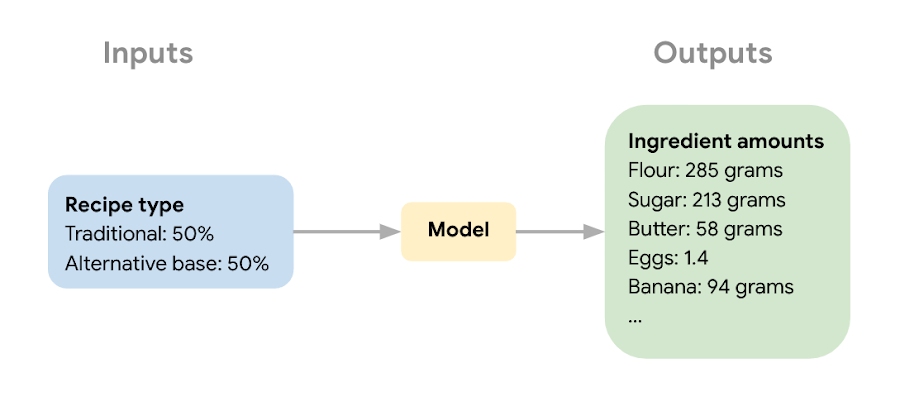
The next step in the ML process was collecting recipe data to use for model training and narrowing down the ingredients used to train the model. Sara wanted the model to learn the combination of core ingredients that make up a muffin batter, rather than flavorings and additions like blueberries, vanilla extract, or chocolate chips. These tasty additions could be added after the model helped create the muffin batter. Once she gathered enough recipes, she removed extra ingredients for training purposes and converted ingredients from different recipes into the same unit (grams, milliliters, and teaspoons).
Building a muffin model with Vertex AI
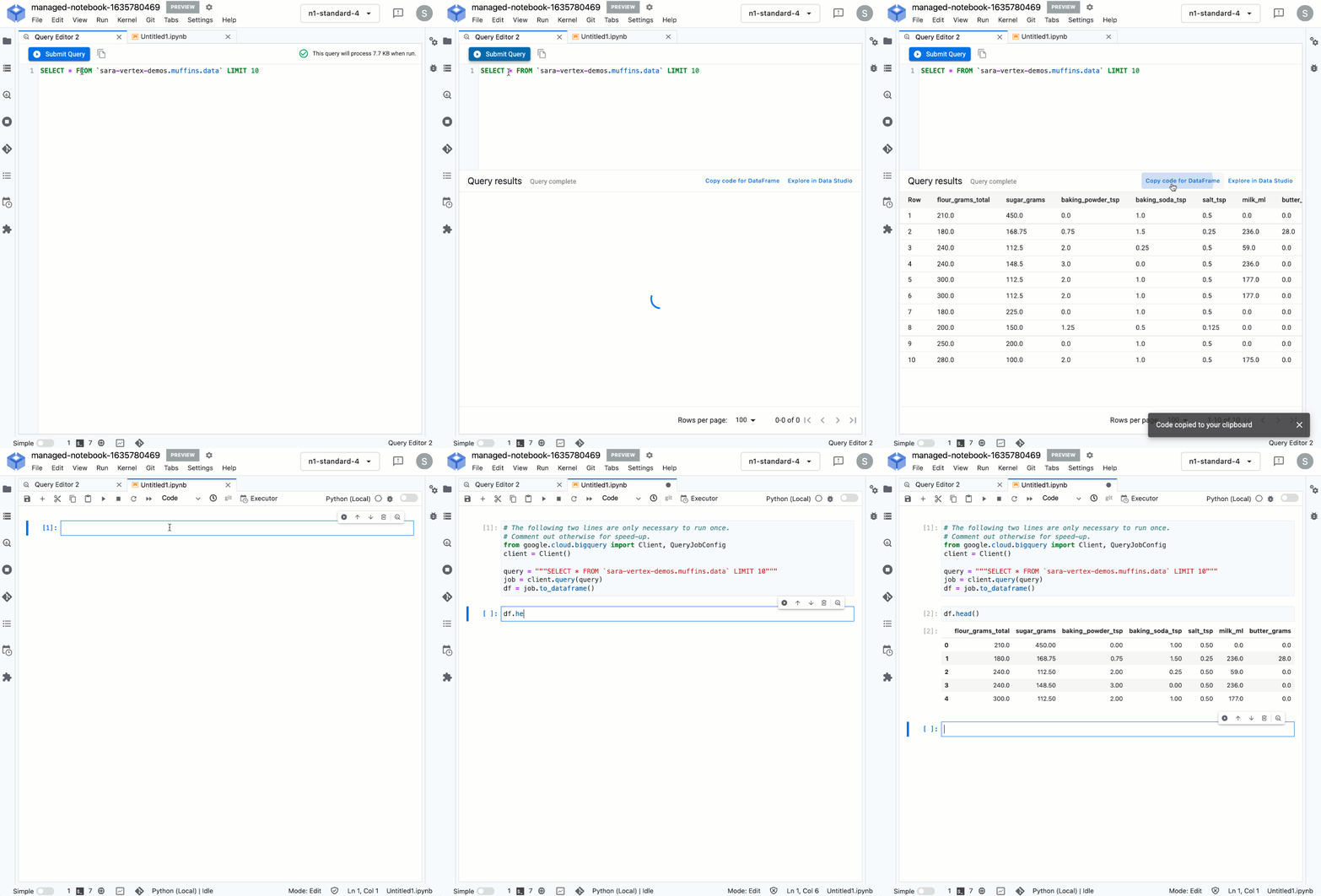
Sara uploaded the muffin ingredient data into BigQuery, and then created a notebook instance in Vertex AI Workbench to analyze the data. With the new Workbench managed instances, you can interactively query BigQuery tables directly from your instance and copy the code to download your data to a notebook as a Pandas DataFrame:
From her notebook instance, Sara experimented with different ML frameworks and model types. She landed on a Scikit-learn regression model to solve this task, and to mimic a real-world production environment, decided to convert this workflow into a ML pipeline. Using the Kubeflow Pipelines SDK, she ran the following on Vertex Pipelines:
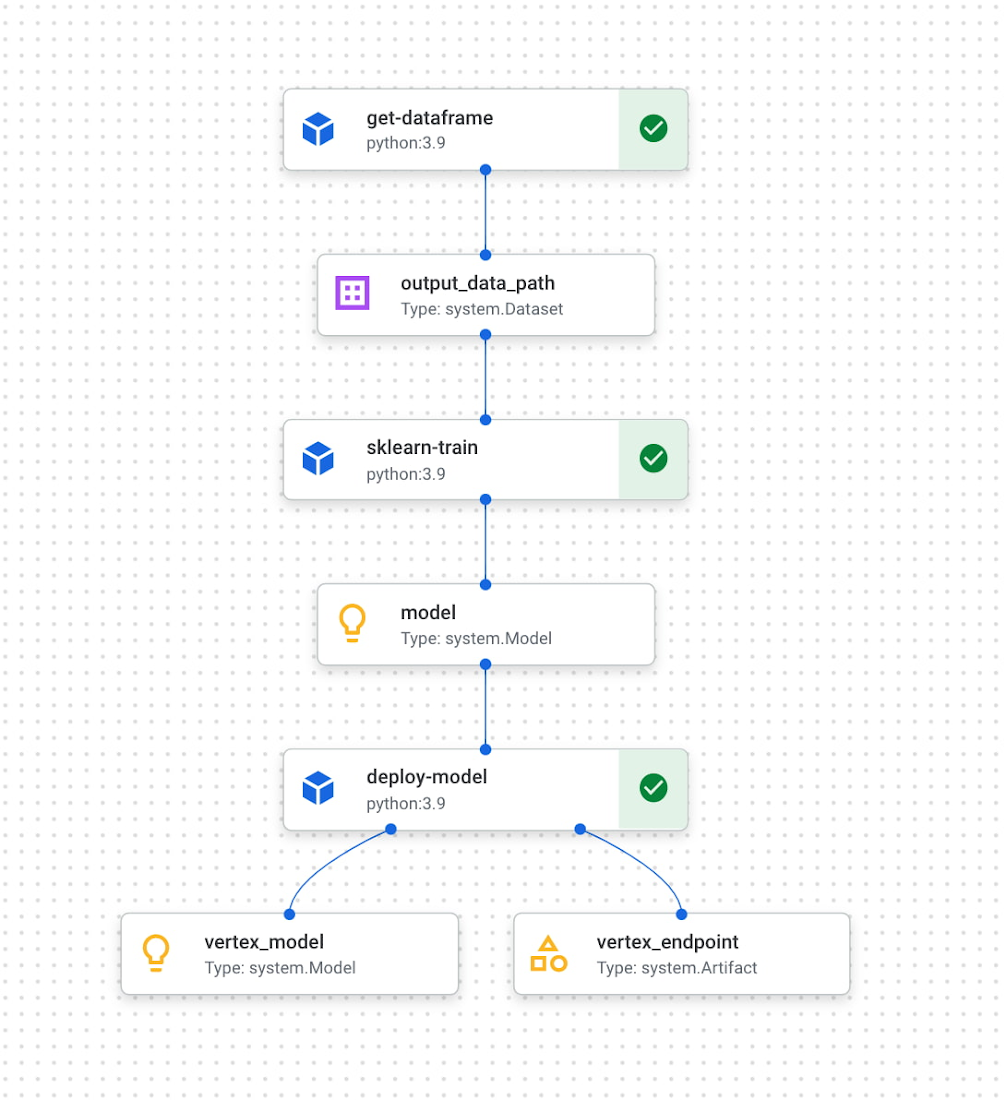
The first component reads the ingredient data from BigQuery and converts it into a Pandas DataFrame which is passed to the next pipeline step. In this step, we train a custom Scikit-learn model on the recipe data. Finally, this model is deployed to an endpoint in Vertex AI. To put it all together, Sara built a web app that allowed her to easily generate ingredient amounts for different muffin types. The web app uses the Vertex AI SDK to call the deployed model endpoint and return ingredient amounts.
The recipe
With a deployed recipe generation model, the only thing left to do was test recipes in the kitchen! Because the model only returns ingredient amounts, there were still many key human elements to complete the baking process: adding yummy additions to the core muffin batter, making adjustments to optimize taste, determining the method for adding ingredients, baking time, and more. After testing a few recipes generated by the model, we landed on a favorite which we’re very excited to share with you here.
Berry ML Muffins
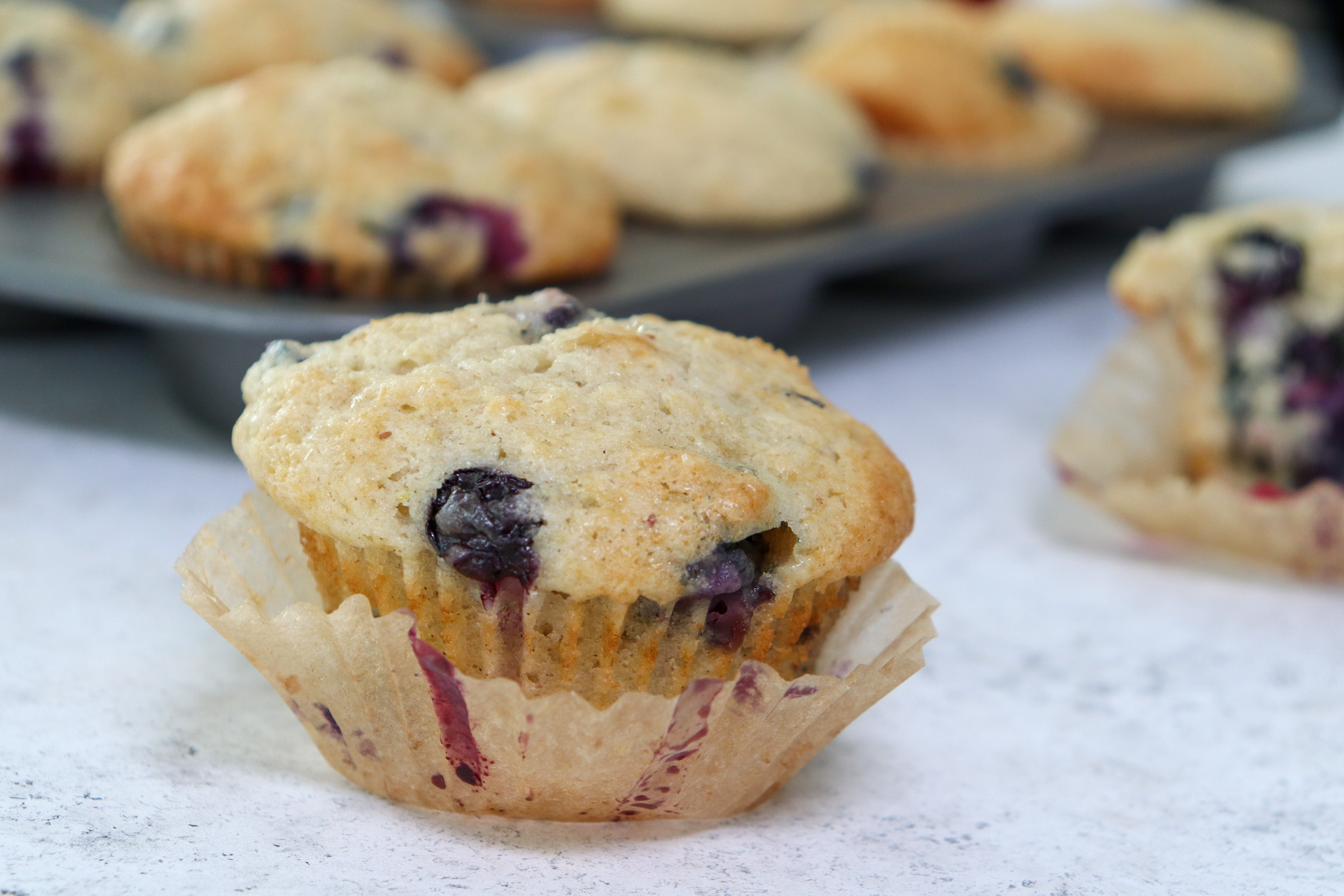
Makes 12 muffins
Flour 285 grams (2 cups)
Granulated sugar 250 grams (1 cup)
Baking powder 2 teaspoons
Baking soda ¼ teaspoon
Salt ½ teaspoon
Cinnamon ½ teaspoon
Milk 170 ml (⅔ cup), room temperature
Butter 55 grams (¼ cup), melted and slightly cooled
Eggs 1 egg plus 1 egg white, room temperature
Canola or vegetable oil 50 grams (¼ cup)
Sour cream 50 grams (3 tablespoons + ¾ teaspoon), room temperature
Vanilla extract 1 ½ teaspoons
Blueberries or raspberries 240 grams (1 ½ cups)
Coarse sugar, like demerara or turbinado (optional for topping) 1 tablespoon
- Measure your three cold ingredients and allow them to come to room temperature: 1 egg + 1 egg white, sour cream, and milk.
- Preheat the oven to 375 F / 190 C. Line a 12-muffin tin with cupcake liners or lightly grease with baking spray.
- In a large bowl, whisk together flour, baking powder, baking soda, salt, and cinnamon. Set aside.
- Melt your butter in a medium heat proof bowl, and allow it to cool slightly for a few minutes. Whisk in sugar until combined. Then add egg, oil, and vanilla, milk, and sour cream and whisk until fully incorporated.
- Pour the wet ingredients into the dry ingredients, mixing with a spatula until just combined. Be careful not to overmix, it’s ok if there are a few lumps in your batter.
- Prepare your fruit. If you can’t decide whether to use blueberries or raspberries, divide your batter into two bowls and do both! Crush half of your fruit and fold it into the batter. Then mix in the remaining whole berries.
- Divide the mixture evenly into the muffin tin. Optionally (but extra tasty), sprinkle the tops of each muffin with about ⅛ teaspoon of coarse sugar. Turbinado or demerara sugar work well for this. This will caramelize and add a nice texture to the tops of your muffins.
- Bake at 375 for 22 – 24 minutes, or until a toothpick inserted in the center comes out clean. For best results, do a toothpick test in a few muffins since not all ovens have an even temperature throughout. Let the muffins cool in the muffin tin for a few minutes, then transfer to a wire rack to cool completely.
- Enjoy!
How can you participate in National Muffin Day?
Participation in National Muffin Day is as easy as 1-2-3!
- On February 20, Bake Muffins. It’s time to dust those muffin tins, grab your blueberries, chocolate chips, rhubarb, and favorite ingredients, and create some magical scrumdiddlyumptiousness! If you want to join Jacob in a virtual baking party, you can register here.
- Then, Give. In non-pandemic years, we asked our bakers to personally hand muffins to hungry folks in their cities. While this is a valuable and rewarding experience, the current state of Covid means this practice is still unsafe, so we request that you refrain from doing this. Instead, if it feels safe, we encourage you to take your delicious baked goods and donate them to local homeless shelters, which can distribute them to those in need. Alternatively, you can share your muffins with friends and families and then make a donation to an organization that benefits people experiencing homelessness, like the ones listed below in step 3.
- Share Your Muffin Pics on Social Media. We’d love to see your muffins! Share your pictures on Twitter or Instagram with the hashtags #givemuffins, or share them to our official Facebook Event page. For each individual baker who participates, we will make donations to Project Homeless Connect, which provides much needed resources to people experiencing homelessness in San Francisco, Family promise, which supports unhoused families nationwide, and Pine Street Inn which provides resources for people experiencing homelessness in Boston. Donations will be on a per-baker basis (with up to $80 donated per baker!), so please feel free to loop in your significant others, kids, nieces and nephews, roommates, friends, and anybody else with a giving spirit who loves deliciousness!
More Relevant Stories for Your Company

Manhattan Associates and Google Cloud: How the Partnership Accelerates Future of Digital Retail
While the shift to digital business and the cloud has been well under way for some years now, organizations today have a new sense of urgency due to COVID-19. Delivering digital transformation is no longer a ‘nice to have’ option, rather, it is an operational imperative. Taking advantage of the

Transform ‘Dark Data’ from Documents with Document AI, Cloud Functions and Workflows
At enterprises across industries, documents are at the center of core business processes. Documents store a treasure trove of valuable information whether it's a company's invoices, HR documents, tax forms and much more. However, the unstructured nature of documents make them difficult to work with as a data source. We

Improving Patient Outcomes with SAVI and Google Cloud’s Innovative Surgical Instrument Tracking
Powered by Vertex AI (Google Cloud’s platform for accelerating development and deployment of machine learning models into production), SAVI (Semi Automated Vision Inspection)1 is transforming surgical instrument identification and cataloging, leading to fewer canceled surgeries and easing pressure on surgery waitlists. Max Kelsen, an analytics and software agency that specializes

Custom AI Solutions, Global Delivery Centers and More Resources Dedicated for Customer Success
At Google Cloud, our customers are at the forefront of digital transformation—launching entirely new businesses and products built in the cloud, redefining entire industries with data and artificial intelligence, delivering innovative new consumer experiences, or committing to sustainable new ways of doing business. We’re committed to our customers’ success, and
