





2919
Of your peers have already watched this video.
15:00 Minutes
The most insightful time you'll spend today!
What Makes Google Cloud the Go-to Platform to Build Next-gen Security Services
Join the discussion by the panel of security experts and IT leaders from renowned organizations to examine the role of Google Cloud for security companies in building next-generation security services. Watch the video from the security session of Google Cloud Next ’21 to deep dive into Google Cloud’s security and partnership models to explore the security-related aspects of building robust, security based SaaS products.
Thwart Ransomware Threats with Google Cloud’s 5 Pillars of Protection

3127
Of your peers have already read this article.
2:00 Minutes
The most insightful time you'll spend today!
Ransomware, a form of malware that encrypts a user’s or organization’s most important files or data rendering them unreadable, isn’t a novel threat in the world of computer security. These destructive, financially-motivated attacks where cybercriminals demand payment to decrypt data and restore access have been studied and documented for many years. Today’s reality shows us that these attacks have become more pervasive, impacting essential services like healthcare or pumping gasoline. Yet despite attempts to stop this threat, ransomware continues to impact organizations across all industries, significantly disrupting business processes and critical national infrastructure services and leaving many organizations looking to better protect themselves. Organizations that continue to rely on legacy systems are especially vulnerable to ransomware threats, as these systems may not be regularly patched and maintained.
For more than 20 years Google has been operating securely in the cloud, using our modern technology stack to provide a more defensible environment that we can protect at scale. We strive to make our security innovations available in our platforms and products for customers to use as well. This underpins our work to be the industry’s most trusted cloud, and while the threat of ransomware isn’t new, our responsibility to help protect you from existing or emerging threats never changes. In this post, we share guidance on how organizations can increase their resilience to ransomware and how some of our Cloud products and services can help.
Develop a comprehensive, defensive security posture to protect against ransomware
Robust protection against ransomware (and many other threats) requires multiple layers of defense. The National Institute of Standards and Technology (NIST) outlines five main functions in the Cybersecurity Framework that serve as the primary pillars for a successful and comprehensive cybersecurity program in any public or private sector organization. Below are the recommendations from NIST and examples of how our Cloud technologies can help address ransomware threats:
Pillar #1 – Identify: Develop an understanding of what cybersecurity risks you need to manage for the scope of your assets, systems, data, people, and capabilities. In the case of ransomware, this covers which systems or processes are most likely to be targeted in a ransomware attack, and what the business impact would be if specific systems were rendered inoperable. This will help prioritize and focus efforts to manage risks.
Our CISO Guide to Security Transformation whitepaper outlines steps for a risk-informed, rather than risk-avoidance, approach to security with the cloud. A risk-informed approach can help you address the most important security risks, instead of addressing the risks that you already know how to mitigate. Cloud service providers make this risk-informed approach easier and more efficient for you by developing and maintaining many of the controls and tools that you need to mitigate modern security threats. Services like Cloud Asset Inventory provide a mechanism to discover, monitor, and analyze all your assets in one place for tasks like IT ops, security analytics, auditing, and governance.
Pillar #2 – Protect: Create safeguards to ensure delivery of critical services and business processes to limit or contain the impact of a potential cybersecurity incident or attack. In the case of ransomware, these safeguards may include frameworks like zero trust that protect and strongly authenticate user access and device integrity, segment environments, authenticate executables, reduce phishing risk, filter spam and malware, integrate endpoint protection, patch consistently and provide continuous controls assurance. Some examples of products and strategies to involve in this step include:
- A cloud-native, inherently secure email platform: Email is at the heart of many ransomware attacks. It can be exploited to phish credentials for illegitimate network access and/or to distribute ransomware binaries directly. Advanced phishing and malware protection in Gmail provides controls to quarantine emails, defends against anomalous attachment types, and protects from inbound spoofing emails. Security Sandbox detects the presence of previously unknown malware in attachments. As a result, Gmail prevents more than 99.9 percent of spam, phishing, and malware from reaching users’ inboxes. Unlike frequently-exploited legacy on-premises email systems, Gmail is continually and automatically updated with the latest security improvements and protections to help keep your organization’s email safe.
- Strong protection against account takeovers: Compromised accounts allow ransomware operators to gain a foothold in victim organizations, perform reconnaissance, get unauthorized access to data and install malicious binaries. Google’s Advanced Protection Program provides the strongest defense against account takeovers and has yet to see a user that participates in the program be successfully phished. Further, Google Cloud employs many layers of machine learning systems for anomaly detection to differentiate between safe and anomalous user activity across browsers, devices, application logins, and other usage events.
- Zero trust access controls that limit attacker access and lateral movement: BeyondCorp Enterprise provides a turnkey solution for implementing zero trust access to your key business applications and resources. In a zero trust access model, authorized users are granted point-in-time access to individual apps, not the entire corporate network, and permissions are continuously evaluated to determine if access is still valid. This prevents the lateral movement across the network that ransomware attackers rely on to hunt for sensitive data and spread infections. BeyondCorp’s protections can even be applied to RDP access to resources, one of the most common ways that ransomware attackers gain and maintain access to insecure legacy Windows Server environments.
- Enterprise threat protections for Chrome: Leveraging Google Safe Browsing technology, Chrome warns users of millions of malware downloads each week. Threat protection in BeyondCorp Enterprise delivered through Chrome can prevent infections from previously unknown malware including ransomware, with real-time URL checks and deep scanning of files.

- Endpoints designed for security: Chromebooks are designed to protect against phishing and ransomware attacks with a low on-device footprint, read-only, constantly invisibly updating Operating System, sandboxing, verified boot, Safe Browsing and Titan-C security chips. Rollout of ChromeOS devices for users who work primarily in a browser can reduce an organization’s attack surface, such as relying too much on legacy Windows devices, which have been found to often be vulnerable to attacks.
Pillar #3 – Detect: Define continuous ways to monitor your organization and identify potential cybersecurity events or incidents. In the case of ransomware, this may include watching for intrusion attempts, deploying Data Loss Prevention (DLP) solutions to detect exfiltration of sensitive data from your organization, and scanning for early signs of ransomware execution and propagation.
The ability to spot and stop malicious activity associated with ransomware as early as possible is key to preventing business disruptions. Chronicle is a threat detection solution that identifies threats, including ransomware, at unparalleled speed and scale. Google Cloud Threat Intelligence for Chronicle surfaces highly actionable threats based on Google’s collective insight and research into Internet-based threats. Threat Intel for Chronicle allows you to focus on real threats in the environment and accelerate your response time.
DLP technologies are also useful in helping detect data that could be appealing to ransomware operators. With data discovery capabilities like Cloud DLP, you can detect sensitive data that’s accessible to the public when it should not be and detect access credentials in exposed code.
Pillar #4 – Respond: Activate an incident response program within your organization that can help contain the impact of a security (in this case, ransomware) event.
During a ransomware attack or security incident, it’s critical to secure your communications both internally to your teams and externally to your partners and customers. Many organizations with legacy Office deployments have shifted to Google Workspace because it offers a more standardized and secure online collaboration suite, and in the event of a security incident, a new instance can quickly be stood up to provide a separate, secure environment for response actions.
Pillar #5 – Recover: Build a cyber resilience program and back-up strategy to prepare for how you can restore core systems or assets affected by a security (in this case, ransomware) incident. This is a critical function for supporting recovery timelines and lessening the impact of a cyber event so you can get back to operating your business.
Immediately after a ransomware attack, a safe point-in-time backup image that is known not to be infected must be identified. Actifio GO provides scalable and efficient incremental data protection and a unique near-instant recovery capability for data. This near-instant recovery facilitates identifying a clean restore point quickly, enabling resumption of business functions rapidly. Actifio GO is infrastructure-agnostic and can protect applications on-premises and in the cloud.
In Google Workspace, if files on your computer were infected with malware but you sync them to Google Drive, you may be able to recover those files. Additionally, ensuring that you have a strong risk transfer program in place, like our Risk Protection Program, is a critical element of a comprehensive approach to managing cyber risk.
Key ransomware prevention and mitigation considerations for business and IT leaders
As you plan for a comprehensive defense posture against ransomware threats, here are some key questions to consider:
- Does your organization have a ransomware plan, and what does it entail? Remember to demand a strong partnership with your cloud providers based on a shared understanding of risk and security objectives.
- How are you defending your organization’s data, systems and employees against malware?
- Are your organization’s systems up to date and patched continuously?
- Are you watching for data exfiltration or other irregularities?
- What is your comprehensive zero trust approach, especially strongly authenticating my employees when they access information?
- Are you taking the right back ups to high assurance immutable locations and testing that they are working properly? This should include testing that does a periodic restore of key assets and data.
- What drills are you conducting to battle-test your organization’s risk management and response to cyber events or incidents?
Ransomware attacks will continue to evolve
Recently, ransomware groups have evolved their tactics to include stealing data prior to it being encrypted, with the threat of extorting this data through leaks. Additionally, some ransomware operators have used the threat of distributed-denial-of-service (DDoS) attacks against victim organizations as an attempt to further compel them to pay ransoms. DDoS attacks can also serve as a distraction, occupying security teams while attackers seek to accomplish other objectives such as data exfiltration or encryption of business-critical data. By deploying Google Cloud Armor — which can scale to absorb massive DDoS attacks— you can help protect services deployed in Google Cloud, other clouds, or on-premise against DDoS attacks.
Protecting against ransomware is a critical issue for all organizations, and these questions and best practices are only the start of building a mature and resilient cybersecurity posture. It’s important to remember that you can’t focus on a single piece of defense; you need a comprehensive cybersecurity program that enables you to identify, prevent, detect, respond, and recover from threats. Above all, you need a range of solutions from a battle-tested and highly-resilient cloud platform that works across these elements in an integrated way with your business. To learn more about how Google Cloud can help you implement a comprehensive cybersecurity program to protect against threats like ransomware and more, visit our Google Cloud Security Best Practices Center.
Find the Best Kept Security Secrets to Harness the Power of Organization Policy Service

2684
Of your peers have already read this article.
2:30 Minutes
The most insightful time you'll spend today!
The canvas of cloud resources is vast, ready for an ambitious organization to craft their digital masterpiece (or perhaps just their business.) Yet before the first brush of paint is applied, a painter in the cloud needs to think about their frame: What shape should it take, what material is it made of, how will it look as a border against the canvas of their cloud service. Google Cloud’s Organization Policy Service is just such a frame, a broad set of tools for our customer’s security teams to set broad yet unbendable limits for engineers before they start working.
Google Cloud’s Organization (org) Policy Service is one of our most dramatic features but is often under-appreciated by security teams. It provides for a separation of duties by focusing on what users can do, and lets the administrator set restrictions on specific resources to determine how they can be configured. This drives defense in depth from configuration errors as well as defense in depth from attacks. An org policy lets the administrator enforce compliance and conformance at a higher level than Identity and Access Management, which focuses on which users can access specific resources.
Org policies can reduce toil and can improve security at the scale needed by today’s cloud users. Financial services provider HSBC is one of Google Cloud’s largest customers and has been using org policies for years to help it manage cloud resources across its highly-regulated enterprise environment. As the company explains in this video, HSBC’s creative use of org policies manages more than 15,000 service accounts and 40,000 IT professionals. They control 6.5 million virtual machines per year. That’s 22,500 virtual machines per day, and only 2,500 of those VMs exist for more than 24 hours
HSBC prefers org policies instead of other preventative controls because they are native to Google Cloud and can be enforced independently of how the request originated (such as from Infrastructure-as-Code, Google Cloud services interacting with each other, or a user in the UI.) Detecting resource violations is expensive for many customers, and often comes too late to prevent harm. Org Policies can be deployed to prevent violations from occurring and eliminate detection and remediation costs.
Importantly, HSBC’s custom installation is designed so that org policy violations are immediately discoverable, which can help HSBC personnel quickly understand how to quickly and accurately correct an error condition. When an action violates org policy, an error code is returned telling the resource requester which policy was violated. Corresponding logs are generated for administrators to monitor and provide further troubleshooting.
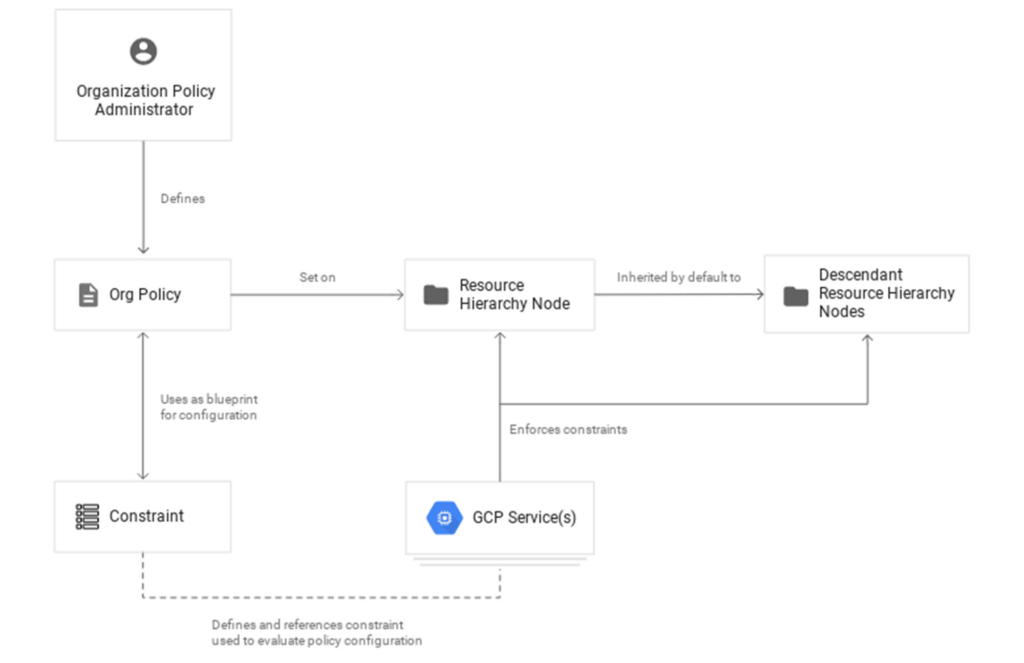
Here are two additional use cases that further illustrate the power of organization policies.
- Organizations that operate in a region with rigorous data residency requirements can configure and enable the Location org policy to help ensure that all resources created (such as VMs, clusters, and buckets) are deployed in a particular cloud region.
- Admins who want to ensure that only trusted workloads are deployed for Google Kubernetes Engine (GKE) or Cloud Run may want to restrict developers to only use verified images in their deployment processes. They can create a custom org policy that targets GKE cluster resource type and create and update methods to block the creation or update of any clusters that do not have binary authorization enforced.
How it works
Google Cloud offers more than 80 org policies that can be used to restrict and govern interactions with Google Cloud services and resources across important domains such as security, reliability, and compliance. Org policies can help:
- Restrict resource and service access to the organization domain only, secure public access to resources, or stop service account key abuse.
- Enforce use of global or regional DNS, and global or regional load balancing, to Improve service reliability and availability.
- Specify which services can access resources, in which regions, and at what times in support of compliance objectives.
- Secure Virtual Private Cloud (VPC) networks and reduce data exfiltration risk by preventing data from leaving a specific perimeter.
See the Organization Policy Service list of constraints for more about org policies and constraints.
You can also use the recently introduced Custom Organization Policies to tailor guardrails so they meet your specific compliance and security requirements. With Custom Organization Policies, security administrators can create their own constraints using Common Expression Language (CEL) to define which resource configurations are allowed or denied. Administrators can develop and deploy new policies and constraints in minutes.
With great power comes great responsibility, so with that in mind we will soon be introducing Dry Run for Custom Org Policies. It will let users put a policy in an audit-only mode to observe behavior during real operations without putting production workloads at risk.
Getting started
1. Setting up your first org policy is straightforward. An organization policy administrator enables a new organization policy on a Google Cloud organization, folder, or project in scope. Once set, the administrator then determines and applies the constraints. Here’s how it works:Design your constraint, which is a particular type of restriction against either a single Google Cloud service or a group of Google Cloud services. You can choose from the list of available built-in constraints by configuring desired restrictions and exceptions (based on tags) or create custom org policies.
It’s important to remember that descendants of the targeted resource hierarchy node inherit the org policy. By applying an organization policy to the root organization node, you can drive enforcement of that organization policy and configuration of restrictions across your organization.
2. Deploy the org policy to evaluate and allow or deny resource Create, Update, and Delete operations. This can be done through the Google Cloud console, gCloud, or via API.
3. Monitor audit logs and your Security Command Center Premium findings to detect and respond to policy violations.
Do I need an org policy?
Org policies can help maintain security and compliance at scale while also allowing development teams to work rapidly. Because they give you the ability to set broad guardrails, they can help ensure compliance without adding operational overhead and monitor policy violations.
To learn more about org policy, please review these resources:
- Read the Creating and Managing Organizations page to learn how to acquire an organization resource.
- Read about how to create and manage organization policies with the Google Cloud console.
- Learn how to define organization policies using constraints.
- Explore the solutions you can accomplish with organization policy constraints.
- Listen to the podcast where Vandy Ramadurai, Google Cloud’s Org Policy product manager, explains it all.
4654
Of your peers have already watched this video.
1:30 Minutes
The most insightful time you'll spend today!
Best Practices to Protect APIs against 6 Common Threats
APIs are exposed to a set of vulnerabilities that are both, unique and similar to that of software and web apps. Watch the video to learn six common API threats and best practices to protect from unwanted attacks.
Announcement: Merger of Google’s Data Processing Terms into CDPA

2898
Of your peers have already read this article.
1:30 Minutes
The most insightful time you'll spend today!
At Google, we are constantly looking to improve our products, services, and contracts so that we can better serve our customers. To this end, we are pleased to announce that we have updated and merged our data processing terms for Google Cloud, Google Workspace (including Workspace for Education), and Cloud Identity (when purchased separately) into one combined Cloud Data Processing Addendum (the “CDPA”).
The CDPA maintains the benefits of the previously separate Data Processing and Security Terms for Google Cloud customers and Data Processing Amendment for Google Workspace and Cloud Identity customers, while streamlining and strengthening Google’s data processing commitments. A corresponding new CDPA (Partners) offers equivalent commitments to Google Cloud partners.
As part of this update, we have also incorporated the new international data transfer addendum issued by the U.K. Information Commissioner (“U.K. Addendum”). The U.K. Addendum allows the EU Standard Contractual Clauses (“SCCs”) to be used for transfers of personal data under the U.K. GDPR, replacing the separate U.K. SCCs that previously formed part of our terms. For an overview of the European legal rules for data transfers and our approach to implementing the EU SCCs and U.K. Addendum, please see our updated whitepaper. You can view our SCCs here.
While our data processing terms have been renamed, consolidated, and updated, our commitment to protecting the data of all Google Cloud, Workspace and Cloud Identity customers and all Google Cloud partners, and to enabling their compliance with data transfer and other regulatory requirements, remains unchanged.
For more information about our privacy commitments for Google Cloud, Google Workspace, and Cloud Identity, please see our Privacy Resource Center.
Collaboration with Google Cloud: Introducing Cloud Analytics by MITRE Engenuity Center
3022
Of your peers have already read this article.
3:30 Minutes
The most insightful time you'll spend today!
The cybersecurity industry is faced with the tremendous challenge of analyzing growing volumes of security data in a dynamic threat landscape with evolving adversary behaviors. Today’s security data is heterogeneous, including logs and alerts, and often comes from more than one cloud platform. In order to better analyze that data, we’re excited to announce the release of the Cloud Analytics project by the MITRE Engenuity Center for Threat-Informed Defense, and sponsored by Google Cloud and several other industry collaborators.
Since 2021, Google Cloud has partnered with the Center to help level the playing field for everyone in the cybersecurity community by developing open-source security analytics. Earlier this year, we introduced Community Security Analytics (CSA) in collaboration with the Center to provide pre-built and customizable queries to help detect threats to your workloads and to audit your cloud usage. The Cloud Analytics project is designed to complement CSA.
The Cloud Analytics project includes a foundational set of detection analytics for key tactics, techniques and procedures (TTPs) implemented as vendor-agnostic Sigma rules, along with their adversary emulation plans implemented with CALDERA framework. Here’s a overview of Cloud Analytics project, how it complements Google Cloud’s CSA to benefit threat hunters, and how they both embrace Autonomic Security Operations principles like automation and toil reduction (adopted from SRE) in order to advance the state of threat detection development and continuous detection and response (CD/CR).
Both CSA and the Cloud Analytics project are community-driven security analytics resources. You can customize and extend the provided queries, but they take a more do-it-yourself approach—you’re expected to regularly evaluate and tune them to fit your own requirements in terms of threat detection sensitivity and accuracy. For managed threat detection and prevention, check out Security Command Center Premium’s realtime and continuously updated threat detection services including Event Threat Detection, Container Threat Detection, and Virtual Machine Threat Detection. Security Command Center Premium also provides managed misconfiguration and vulnerability detection with Security Health Analytics and Web Security Scanner.
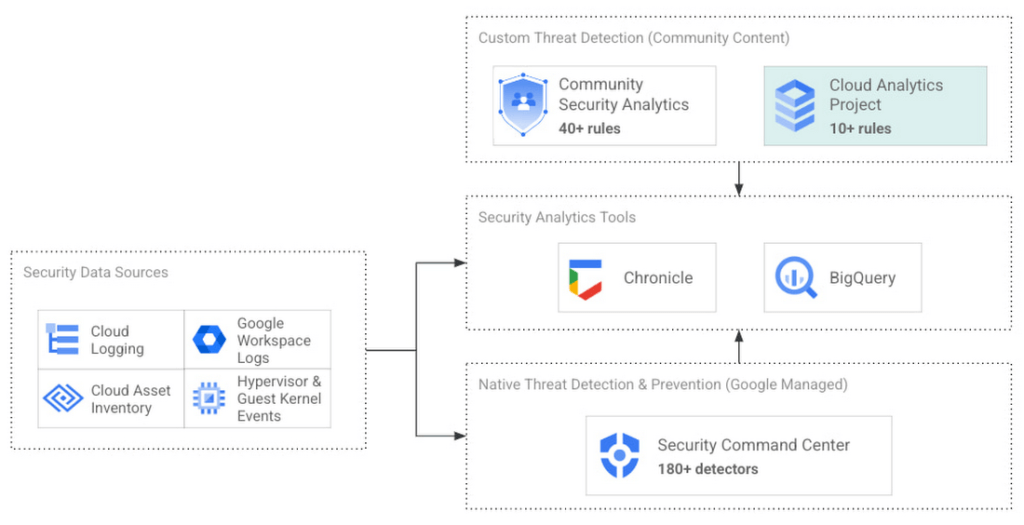
Cloud Analytics vs Community Security Analytics
Similar to CSA, Cloud Analytics can help lower the barrier for threat hunters and detection engineers to create cloud-specific security analytics. Security analytics is complex because it requires:
- Deep knowledge of diverse security signals (logs, alerts) from different cloud providers along with their specific schemas;
- Familiarity with adversary behaviors in cloud environments;
- Ability to emulate such adversarial activity on cloud platforms;
- Achieving high accuracy in threat detection with low false positives, to avoid alert fatigue and overwhelming your SOC team.
The following table summarizes the key differences between Cloud Analytics and CSA:
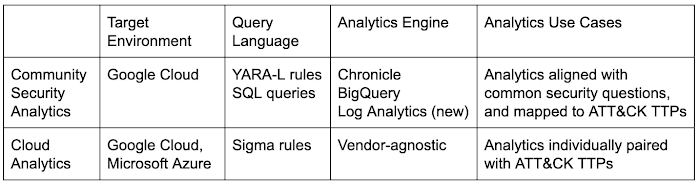
Together, CSA and Cloud Analytics can help you maximize your coverage of the MITRE ATT&CK® framework, while giving you the choice of detection language and analytics engine to use. Given the mapping to TTPs, some of these rules by CSA and Cloud Analytics overlap. However, Cloud Analytics queries are implemented as Sigma rules which can be translated to vendor-specific queries such as Chronicle, Elasticsearch, or Splunk using Sigma CLI or third party-supported uncoder.io, which offers a user interface for query conversion. On the other hand, CSA queries are implemented as YARA-L rules (for Chronicle) and SQL queries (for BigQuery and now Log Analytics). The latter could be manually adapted to specific analytics engines due to the universal nature of SQL
Getting started with Cloud Analytics
To get started with the Cloud Analytics project, head over to the GitHub repo to view the latest set of Sigma rules, the associated adversary emulation plan to automatically trigger these rules, and a development blueprint on how to create new Sigma rules based on lessons learned from this project.
The following is a list of Google Cloud-specific Sigma rules (and their associated TTPs) provided in this initial release; use these as examples to author new ones covering more TTPs.
Sigma rule example
Using the canonical use case of detecting when a storage bucket is modified to be publicly accessible, here’s an example Sigma rule (copied below and redacted for brevity):
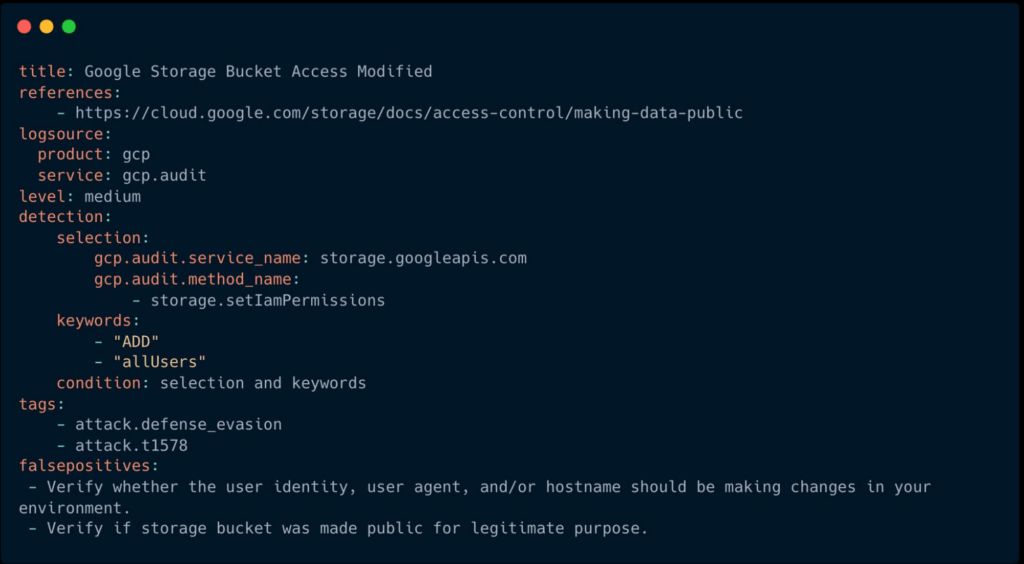
The rule specifies the log source (gcp.audit), the log criteria ( storage.googleapis.com service and storage.setIamPermissions method) and the keywords to look for (allUsers, ADD) signaling that a role was granted to all users over a given bucket. To learn more about Sigma syntax, refer to public Sigma docs.
However, there could still be false positives such as a Cloud Storage bucket made public for a legitimate reason like publishing static assets for a public website. To avoid alert fatigue and reduce toil on your SOC team, you could build more sophisticated detections based on multiple individual Sigma rules using Sigma Correlations.
Using our example, let’s refine the accuracy of this detection by correlating it with another pre-built Sigma rule which detects when a new user identity is added to a privileged group. Such privilege escalation likely occurred before the adversary gained permission to modify access of the Cloud Storage bucket. Cloud Analytics provides an example of such correlation Sigma rule chaining these two separate events.
What’s next
The Cloud Analytics project aims to make cloud-based threat detection development easier while also consolidating collective findings from real-world deployments. In order to scale the development of high-quality threat detections with minimum false positives, CSA and Cloud Analytics promote an agile development approach for building these analytics, where rules are expected to be continuously tuned and evaluated.
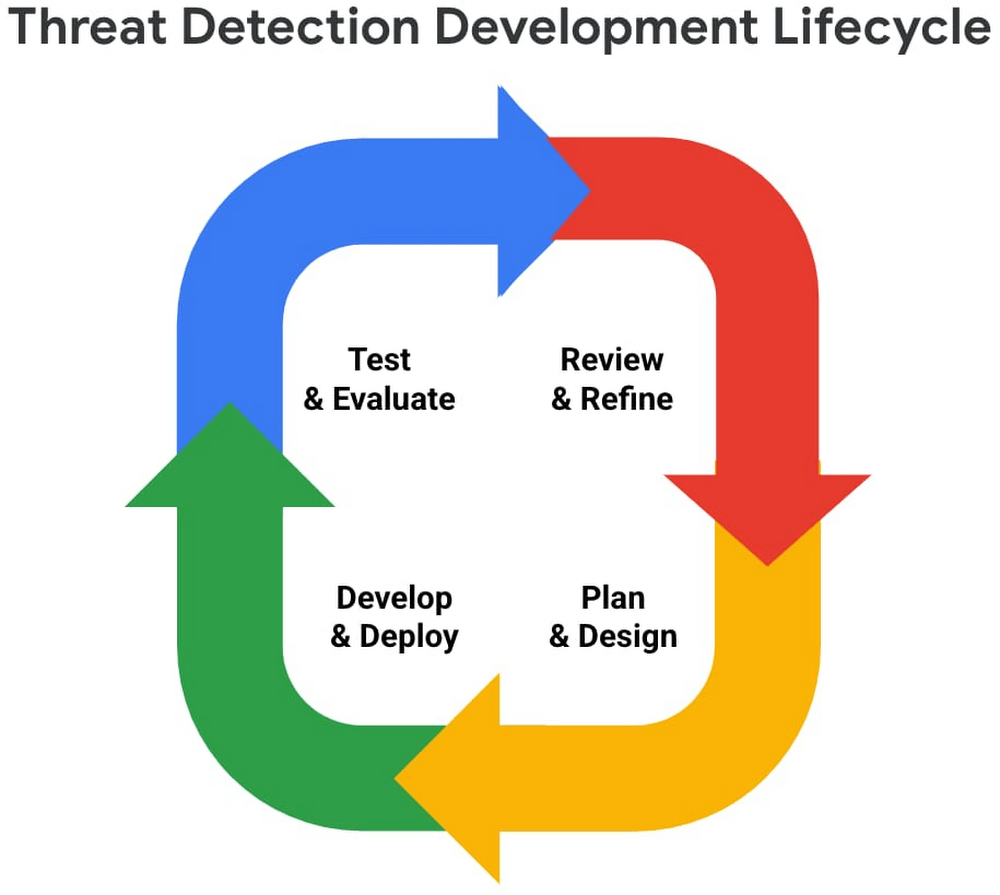
We look forward to wider industry collaboration and community contributions (from rules consumers, designers, builders, and testers) to refine existing rules and develop new ones, along with associated adversary emulations in order to raise the bar for minimum self-service security visibility and analytics for everyone.
Acknowledgements
We’d like to thank our industry partners and acknowledge several individuals across both Google Cloud and the Center for Threat-Informed Defense for making this research project possible:
Desiree Beck, Principal Cyber Operations Engineer, MITRE
Michael Butt, Lead Offensive Security Engineer, MITRE
Iman Ghanizada, Head of Autonomic Security Operations, Google Cloud
Anton Chuvakin, Senior Staff, Office of the CISO, Google Cloud
More Relevant Stories for Your Company

How Firewall Insights can Simplify Corporate Firewall Rules
Corporate firewalls typically include a massive number of rules, which accumulate over time as new workloads are added. When rules stack up piecemeal like this, misconfigurations occur that, at best, create headaches for security administrators, and at worst, create vulnerabilities that lead to security breaches. To address this, we have

Google Cloud Content Protection: Unlock the Power of CSAP for Security
Content production is increasingly happening in the cloud. While moving a creative process that spans three centuries into the modern era brings challenges and risks, MovieLabs is one organization that takes digital transformation seriously. A nonprofit research and development group founded by a consortium of the major Hollywood studios, MovieLabs describes their mission as

Next-Level Ecommerce Engagement: Transforming User Identities with GCIP
One of the fundamental questions that retailers constantly ask themselves is how well they know their customers and how they can build deeper relationships. Knowing who their customers are can have a direct impact on improving customer engagement, which can lead to increased conversion rates, customer loyalty, lifetime value, and

Public Cloud’s Zero Trust Architecture Keeps Enterprise Data Safe
Over the past decade, cybersecurity has posed an increasing risk for organizations. In fact, cyber incidents topped the recent Allianz Risk Barometer for only the second time in the survey’s history. The challenges in combating these risks only continue to grow. Adversaries tend to be agile and are consistently looking
