





4321
Of your peers have already watched this video.
20:00 Minutes
The most insightful time you'll spend today!
The New and Upcoming Infrastructure for Google Cloud’s AI and ML Solutions
How does Google manage to provide its customers a differentiated compute platform experience and define ways to fully leverage its infrastructure supporting its cutting-edge AI and ML offerings? Easy-to-use, scalable and ability to create innovative products and services to end-users at low cost of ownership is the narrative behind Google Cloud’s AI and ML solutions. Explore Google Cloud’s ML infrastructure and accelerator innovation for 2021.
Watch the video to find out how Google Cloud’s leadership in AI through Google research, Deep Mind and also practical application of AI within Google Products drive innovative platforms and offerings that cater to customers’ AI and ML use cases!
Experts’ Guideline for Personalizing Platforms with the Right Recommendation System on Google Cloud

5001
Of your peers have already read this article.
5:00 Minutes
The most insightful time you'll spend today!
Over the past two decades, consumers have become accustomed to receiving personalized recommendations in all facets of their online life. Whether that be recommended products while shopping on Amazon, a curated list of apps in the Google Play store, or relevant videos to watch next on YouTube. In fact, in a Verge article “How YouTube perfected the feed: Google Brain gave YouTube new life,” the Google Brain team reveals how their recommendation engine has impacted the platform with “more than 70 percent of the time people spend watching videos on the site being driven by YouTube’s algorithmic recommendations” thereby increasing time spent on the platform by 20X in three years.
It’s become clear that personalized recommendations are no longer a differentiator for an organization but rather something consumers have come to expect in their day-to-day experiences online. So what should you do if you are behind the curve and want to get started or simply want to improve upon what you already have? While there are all sorts of techniques, from content-based systems to deep learning methods, our goal in this recommender-focused blog series is to demystify three available approaches to building recommendation systems on Google Cloud: Matrix Factorization in BigQuery Machine Learning (BQML), Recommendations AI, and deep retrieval techniques available via the Two-Tower built-in algorithm.
One of these approaches can be used to meet you where you are in your personalization journey, no matter if you are just starting or if you are well into it. This first blog post will introduce our three approaches and when to use them.
What is Matrix Factorization and how does it work?
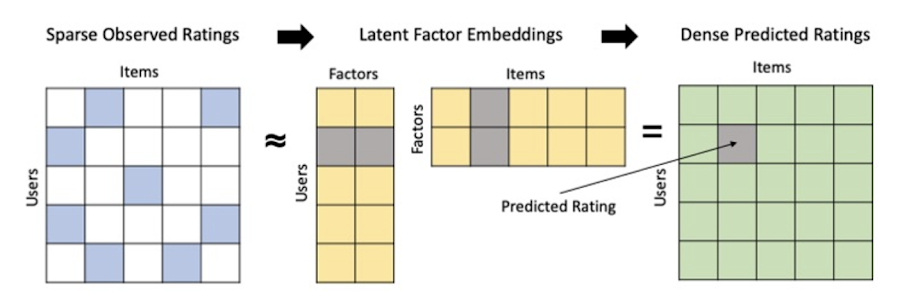
Collaborative filtering is a foundational model for building a recommendation system as the input dataset is simple and the embeddings are learned for you. How does Matrix factorization fit into the mix you might be wondering? Matrix factorization is simply the model that applies collaborative filtering. BQML enables users to create and execute a matrix factorization model by using standard SQL directly in the data warehouse.
Collaborative filtering begins by creating an interaction matrix. The interaction matrix represents users as a row and items as columns in your dataset. This interaction matrix often is sparse in nature as not all users will have interacted with many items in your catalog. This is where embeddings come into play. Generating embeddings for users and items not only allows you to collapse many sparse features into a lower dimensional space but they also allow you to derive a similarity measure so that similar users/items fall nearby in the embedding space. These similarity measures are key as collaborative filtering uses similarities between users and items to make the end recommendations. The underlying assumption being that similar users will like similar items whether that be movies or handbags.
What’s required to get started?
To train a matrix factorization model you need a table that includes three input columns: user(s), item(s), and an implicit or explicit feedback variable (e.g., ratings is an example of explicit feedback). With the base input dataset in place, you can then easily run your model in BigQuery after specifying several hyperparameters in your CREATE MODEL SQL statement. Hyperparameters are available to specify the number of embeddings, the feedback type, the amount of L2 regularization applied and so on.
Why use this approach and who is it a good fit for?
As mentioned earlier, Matrix Factorization in BQML is a great way for those new to recommendation systems to get started. Matrix factorization has many benefits:
- Little ML Expertise: Leveraging SQL to build the model lowers the level of ML expertise needed
- Few Input Features: Data inputs are straightforward, requiring a simple interaction matrix
- Additional Insight: Collaborative filtering is adept at discovering new interests or products for users
While Matrix Factorization is a great tool for deriving recommendations it does come with additional considerations and potential drawbacks depending upon the use case.
- Not Amenable to Large Feature Sets: The input table can only contain two feature columns (e.g., user(s), item(s)). If there is a need to include additional features such as contextual signals, Matrix factorization may not be the right method for you.
- New Items: If an item is not available in the training data, the system can’t create an embedding for it and will have difficulty recommending similar items. While there are some workarounds available to address this cold-start issue, if your item catalog often includes new items, Matrix factorization may not be a good fit.
- Input Data Limitations: While the input matrix is expected to be sparse, training examples without feedback can cause problems. Filtering for items and users that have at least a handful of feedback (e.g., ratings) examples can improve the model. More information on limitations can be found here.
In summary, for users with a simplified dataset looking to iterate quickly and develop a baseline recommendation system, Matrix Factorization is a great approach to begin your personalization AI journey.
What is Recommendations AI and how does it work?
Recommendations AI is a fully managed service which helps organizations deploy scalable recommendation systems that use state-of-the-art deep learning techniques, including cutting-edge architectures such as two-tower encoders, to serve personalized and contextually relevant recommendations throughout the customer journey.
Deep learning models are able to improve the context and relevance of recommendations in part because they can easily address the previously mentioned limitations of Matrix Factorization. They incorporate a wide set of user and item features, and by definition they emphasize learning successive layers of increasingly meaningful representations from these features. This flexibility and expressivity allows them to capture complex relationships like short-lived fashion trends and niche user behaviors. However, this increased relevance comes at a cost, as deep learning recommenders can be difficult to train and expensive to serve at scale.
Recommendations AI helps organizations take advantage of serving these deep learning models and handles the MLOps required to serve these models globally with low latency. Models are automatically retrained daily and tuned quarterly to capture changes in customer behavior, product assortment, pricing, and promotions. Newly trained models follow a resilient CI/CD routine which validates they are fit to serve and promotes them to production without service interruption. The models achieve low serving latency by using a scalable approximate nearest neighbors (ANN) service for efficient item retrieval at inference time. And, to maintain consistency between online and offline tasks, a scalable feature store is used, preventing common production challenges such as data leakage and training-serving skew.
What’s required to get started?
To get started with Recommendations AI we first need to ingest product and user data into the API:
- Import product catalog: For large product catalog updates, ingest catalog items in bulk using the catalogItems.import method. Frequent catalog updates can be schedule with Google Merchant Center or BigQuery
- Record user events: User events track actions such as clicking on a product, adding items to cart, or even purchasing an item. These events need to be ingested in real time to reflect the latest user behavior and then joined to items imported in the product catalog
- Import historical user events: The models need sufficient training data before they can provide accurate predictions. The recommended user event data requirements are different across model types (learn more here)
Once the data requirements are met, we are able to create one or multiple models to serve recommendations:
- Determine your recommendation types and placements: The location of the recommendation panel and the objective for that panel impact model training and tuning. Review the available recommendations types, optimization objectives, and other model tuning options to determine the best options for your business objectives.
- Create model(s): Initial model training and tuning can take 2-5 days depending on the number of user events and size of the product catalog
- Create serving configurations and preview recommendations: After the model is activated, create serving configurations and preview the recommendations to ensure your setup is functioning as expected before serving to production traffic
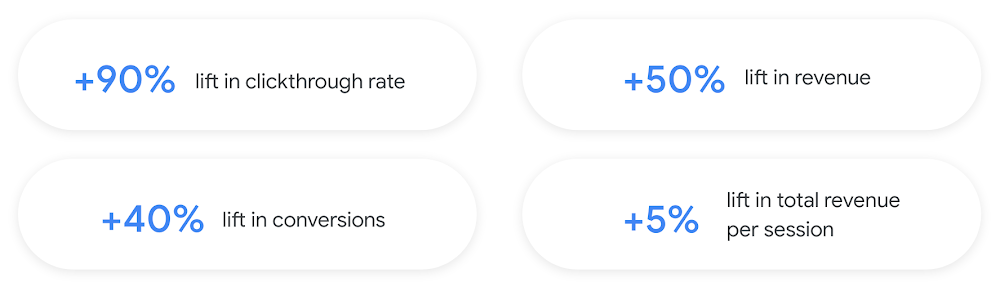
Once models are ready to serve, consider setting up A/B experiments to understand how newly trained models impact your customer experience before serving them to 100% of your traffic. In the Recommendations AI console, see the Monitoring & Analytics page for summary and placement-specific metrics (e.g., recommender-engaged revenue, click-through-rate, conversion rate, and more).
Why use this approach and who is it a good fit for?
Recommendations AI is a great way to engage customers and grow your online presence through personalization. It’s used by teams who lack technical experience with production recommendation systems, as well as customers who have this technical depth but want to allocate their team’s effort towards other priorities and challenges. No matter your team’s technical experience or bandwidth, you can expect several benefits with Recommendations AI:
- Fully managed service: no need to preprocess data, train or hypertune machine learning models, load balance or manually provision you infrastructure – this is all taken care of for you. The recommendation API also provides a user-friendly console to monitor performance over time.
- State-of-the-art AI: take advantage of the same modeling techniques used to serve recommendations across Google Ads, Google Search, and YouTube. These models excel in scenarios with long-tail products and cold-starts users and items
- Deliver at any touchpoint: serve high-quality recommendations to both first-time users and loyal customers anywhere in their journey via web, mobile, email, and more
- Deliver globally: serve recommendations in any language anywhere in the world at low-latency with a fully automated global serving infrastructure
- Your data, your models: Your data and models are yours. They’ll never be used for any other Google product nor shown to any other Google customer
For users looking to leverage state of the art AI to fuel their recommendation systems but need an existing solution to get up and running more quickly, Recommendations AI is the right solution for you.
What are Two Tower encoders and how do they work?
As a reminder, in recommendation system design, our objective is to surface the most relevant set of items for a given user or set of users. The items are usually referred to as the candidate(s) where we might include information about the items such as the title or description of the item, other metadata about the item like language, number of views, or even clicks on the item over time. User(s) are often represented in the form of a query to a recommendation system where we might provide details about the user such as the location of the user, preferred languages, and what they have searched for in the past.
Let’s start with a common example. Imagine that you are creating a movie recommendation system. The input candidates for such a system would be thousands of movies and the query set can consist of millions of viewers. The goal of the retrieval stage is to select a smaller subset of movies(candidates) for each user and then score and rank order them before presenting the final recommended list to the query/user.
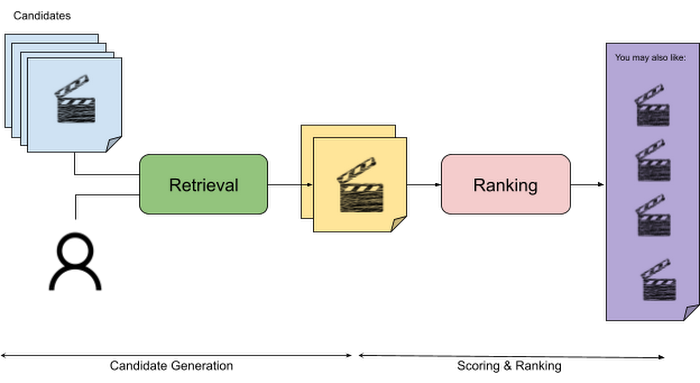
The retrieval stage is able to refine our list of candidates by encoding both the candidate and the query data so they share the same embedding space. A good embedding space will place candidates which are similar to one another closer together and dissimilar items/queries farther apart in the embedding space.
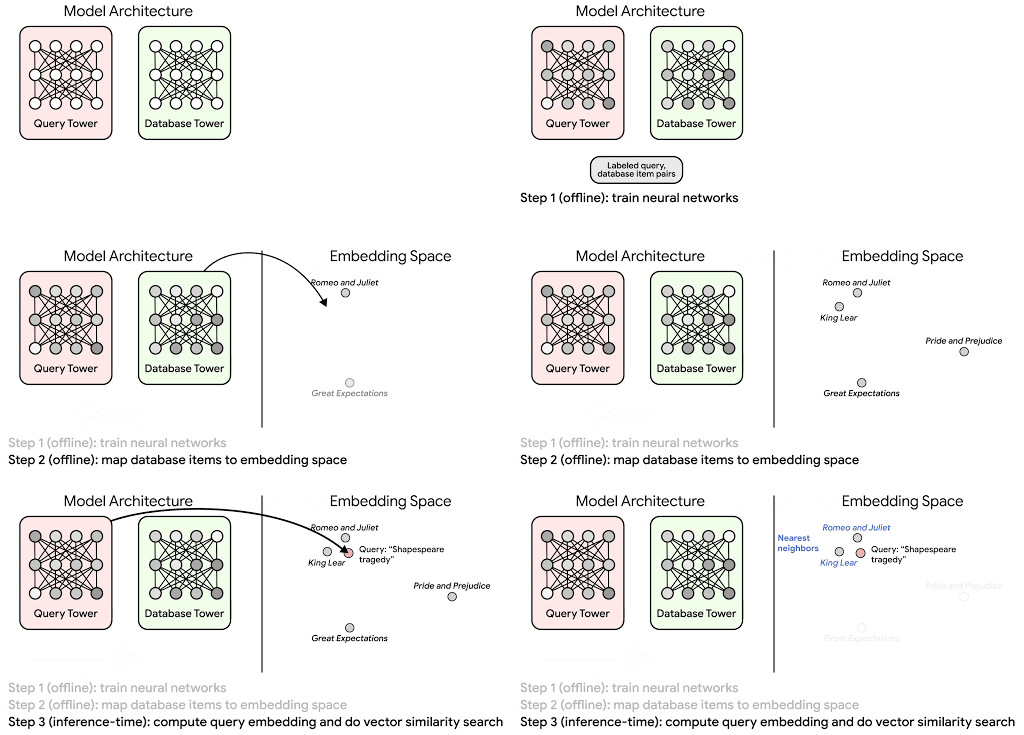
Once we have a database of query and candidate embeddings we can then use an approximate nearest neighbor search method to then generate a list of final “like” candidates, i.e. find a certain number of nearest neighbors for a given query/user and surface final recommendations.
What’s required to get started?
At the most basic level, in order to train a two-tower model you need the following inputs:
- Training Data: Training data is created by combining your query/user data with data about the candidates/items. The data must include matched pairs, cases where both user and item information is available. Data in the training set can include many formats from text, numeric data, or even images.
- Input Schema: The input schema describes the schema of the combined training data along with any specific feature configurations.
Several services within Vertex AI have come available that complement the existing Two-Tower built-in algorithm and can be leveraged in your execution:
- Nearest Neighbor (ANN) Service: Vertex AI Matching Engine and ScANN provide a high-scale and low-latency Approximate Nearest Neighbor (ANN) service so you can more easily identify similar embeddings.
- Hyperparameter Tuning Service: A hyperparameter tuning service such as Vizier can help you identify the optimal hyperparameters such as the number of hidden layers, the size of the hidden layers, and the learning rate in fewer trials.
- Hardware Accelerators: Specialized hardware, such as GPUs or TPUs, can be valuable in your recommendation system to help accelerate experiments and improve the speed of training cycles.
Why use this approach and who is it a good fit for?
The Two-Tower built-in algorithm can be considered the “custom sports car” of recommendation systems and comes with several benefits:
- Greater Control: While Recommendations AI uses the two-tower architecture as one of the available architectures it doesn’t provide granular control or visibility into model training, example generation, and model validation details. In comparison, the Two-Tower built in algorithm provides a more customizable approach as you are training a model directly in a notebook environment.
- More Feature Options: The Two Tower approach can handle additional contextual signals ranging from text to images.
- Cold Start Cases: Leveraging a rich set of features not only enhances performance but also allows the candidate generation to work for new users or new candidates.
While the Two-Tower built in algorithm is an excellent and best-in class solution for deriving recommendations, it does come with additional considerations and potential drawbacks depending upon the use case.
- Technical ML Expertise Required: Two tower encoders are not a “plug and play” solution like the other approaches mentioned above. In order to effectively leverage this approach, appropriate coding and ML expertise is required.
- Speed to Insight: Building out a custom solution via two-tower encoders may require additional time as the solution is not pre-built for the user.
For users looking for greater control, increased flexibility, and have the technical chops to easily work within a managed notebook environment – the two-tower built in algorithm is the right solution for them.
What’s next?
In this article, we explored three common methods for building recommendation systems on Google Cloud Platform. As you can see thus far, there are alot of considerations to take into account before choosing a final approach. In an effort to help you align more quickly we have distilled the decision criteria down to a few simple steps (see below for more details).
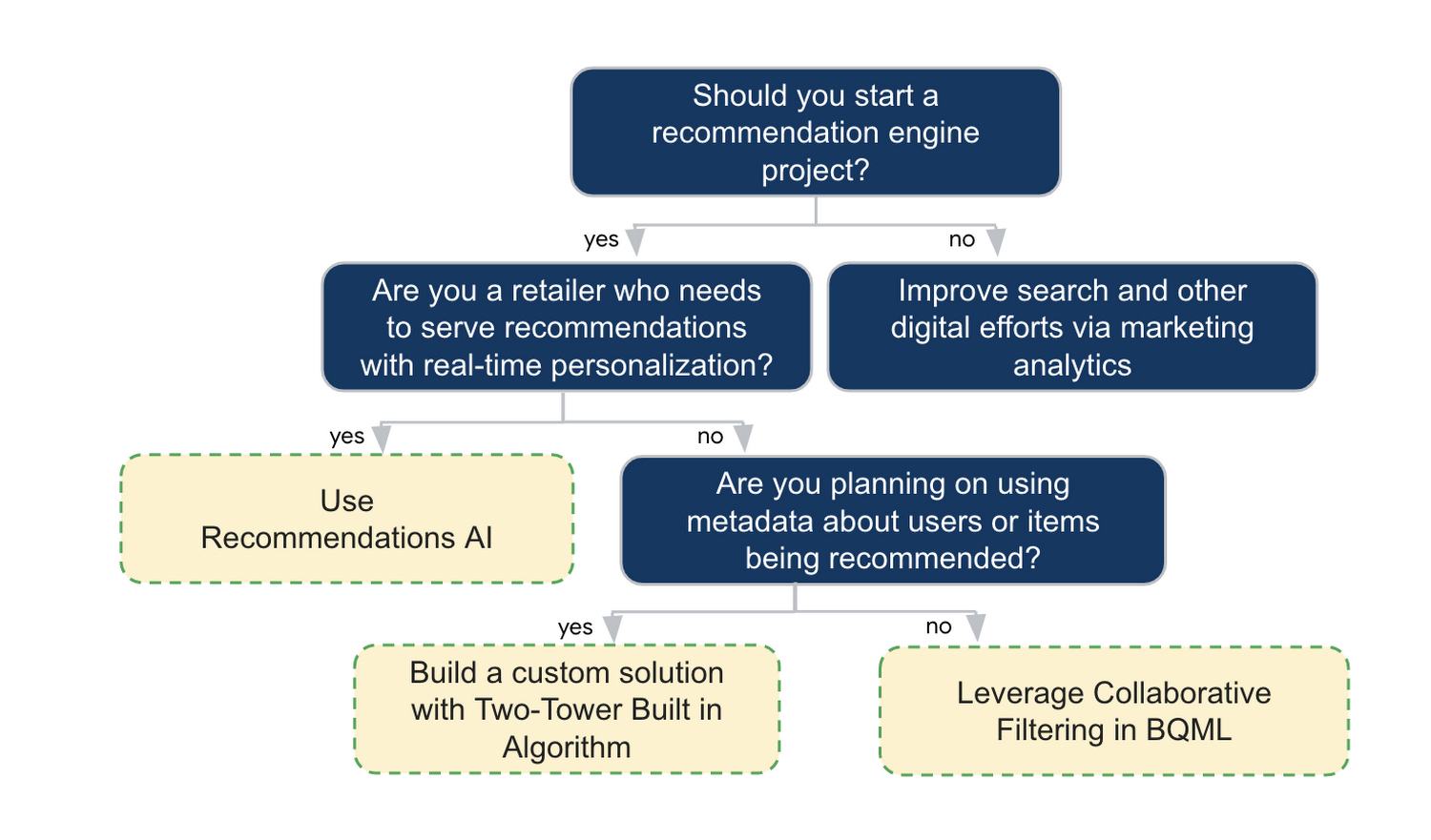
In the next installments of this series, we will dive more deeply into each method, explore how hardware accelerators can play a key role in recommendation system design, and discuss how recommendation systems may be leveraged in key verticals. Stay tuned for future posts in our recommendation systems series. Thank you for reading! Have a question or want to chat? Find authors here – R.E. [Twitter | LinkedIn], Jordan [LinkedIn], and Vaibhav [LinkedIn].
Acknowledgements
Special thanks to Pallav Mehta, Henry Tappen,Abhinav Khushraj, and Nicholas Edelman for helping to review this post.
References
Speak Now to Book a Flight: easyJet’s Uses AI to Improve Customer Experience

3474
Of your peers have already read this article.
4:30 Minutes
The most insightful time you'll spend today!
With a growing fleet of 325 aircraft that cover more than 1,000 routes across 158 airports, easyJet is one of Europe’s most popular airlines. And easyJet serves an average of 90 million passengers each year, so a helpful mobile experience for its customers is a top priority.
Travellers today are inherently mobile-first, so finding new ways to make it easier for them to search and book flights is key. To do exactly that, easyJet partnered with technology company Travelport to develop Speak Now, a new feature on easyJet’s mobile app that interprets voice searches to deliver accurate and relevant flight information to travelers.
See how it works:
Powered by Dialogflow, Google Cloud’s natural language understanding tool for building conversational experiences, Speak Now lets customers ask questions to determine exactly what they’re looking for—from destinations, to dates and times, to airports they want to fly from.
Dialogflow, a core component of Google Cloud Contact Center AI, makes it easy to build accurate, flexible conversation interfaces that allow users to ask questions and accomplish tasks in everyday language.
How do we create conversational experiences across devices and platforms for enterprises?
It’s clear that the rise in voice search is changing the way we go about our daily lives. Twenty-seven percent of the global online population already uses voice search on mobile, and the rapid adoption of this technology is reshaping entire industries. It’s no surprise that easyJet looked to adopt this technology to positively transform experiences for their customers.
Dialogflow, a core component of Google Cloud Contact Center AI, makes it easy to build accurate, flexible conversation interfaces that allow users to ask questions and accomplish tasks in everyday language. It understands the nuances of human language and translates end-user text or audio during a conversation to structured data that apps and services can understand.
Speak Now is a great example of how we’re using cloud technologies and AI to make the experience of buying and managing travel continually better for everyone.
Daniel Young, Head of Digital Experience, easyJet
Daniel Young, Head of Digital Experience at easyJet commented: “We picked Dialogflow due to its strengths and ease with which a powerful conversational agent can be built. Speak Now is a great example of how we’re using cloud technologies and AI to make the experience of buying and managing travel continually better for everyone. This is the latest in a series of innovative features that will make booking travel as easy as it can possibly be, giving easyJet customers a helpful digital experience.”
Consumers already rely on voice assistants to play their favorite music, add items to a shopping list, and order taxis, Speak Now is a great example of how voice assistants can now make the customer experience better and more intuitive for travel.

4460
Of your peers have already downloaded this article
3:00 Minutes
The most insightful time you'll spend today!
Contact centers can transform customer experience using AI-driven speech analytics to evaluate every customer interaction and use it as a ‘data point’ to identify key patterns, enquiries, pain points, reviews and feedback to enhance customer experience with real-time, personalized recommendations. Knowlarity’s AI-based cloud telephony solutions for businesses built with Google Cloud takes speech analytics to another level!
Download the article to empower your contact centers with AI-powered speech analytics to make predictive analysis, reduce call handling time and volume as well as train contact center agents to provide customers with quick and real-time feedback.
Pay-as-you-go AI Management Platform Available on Google Cloud Marketplace

3082
Of your peers have already read this article.
2:30 Minutes
The most insightful time you'll spend today!
Editor’s note: Prevision.io has built the first ever pay-as-you-go AI management platform that simplifies the machine learning project lifecycle while offering powerful analytics capabilities. Now available exclusively on Google Cloud Marketplace, users can experiment, build, deploy, and manage AI projects in the cloud in weeks—without having extensive data science knowledge.
Similar to the momentum that cloud technology has had in the business world, AI and machine learning are quickly becoming essential to the enterprise. 86% of companies now view AI as a “mainstream technology,” and corporate AI adoption rose 50% in 2021 from the year prior for initiatives such as service-operations optimization and product enhancement. But for companies that don’t fall into the Fortune 500, initiating AI projects can come with several challenges, ranging from one-size-fits-all subscription models to skills gaps and resource-heavy monitoring requirements.
My team of data scientists saw a real need for software that could democratize machine learning innovation by removing these common barriers. We knew that features like automation could make building and deploying AI much more doable for other data scientists, as well as citizen data scientists. So, we launched Prevision.io, a first-of-its-kind dedicated AI management platform built on Google Cloud and now available exclusively on Google Cloud Marketplace.
As a Google Cloud Partner Advantage Member, we knew the benefits of an elastic infrastructure, full integration with BigQuery, and access to a large library of complementary tools, such as Kubeflow on Google Cloud. As a result, it’s easier for our users to improve upon their robust AI projects.
Set up in minutes, deploy a machine learning model in weeks
Users can start building and deploying models in Prevision.io immediately after subscribing through Google Cloud Marketplace. Instead of taking weeks to onboard and months to launch a real-world model into production, Prevision.io’s intuitive interface and powerful predictive analytics capability makes it possible to set up in minutes–and have models up and running in three to four weeks. Since we believe in cost-efficient scaling, our platform operates on a pay-as-you-go model with no long-term contracts, licensing, or per-user fees.
Simply connect Prevision.io with your data–whether it exists in buckets or in an SQL data source like BigQuery. No matter your data source, set up is quick. There are even tutorials to help if you’re using APIs. Follow this tutorial for step-by-step set up details in Google Cloud.
Once historical data is imported, you can start applying your own models inside Prevision.io, or use Prevision.io to build a bespoke model. There’s more good news: expenditures on Prevision.io’s platform are applied toward customers’ Google Cloud spend commitments.
Full lifecycle AI project management made easy
By automating the complexity of AI project management with a no-code approach, businesses do not have to add more data scientists to their teams, risk data drift or outdated models, spend hundreds of thousands on unused software, or massively expand IT budgets. By connecting BigQuery or other datastores to Prevision.io, you can launch high-performing machine learning projects and manage them across the entire lifecycle. With Prevision.io you can:
- Experiment with iteration and optimization to get an effective model into production from the start. Track performance and compare versions to identify the most reliable model. Because there is no infrastructure to manage, users can focus only on the project and see ROI sooner.
- Automate training and prediction tasks to improve collaboration, reduce time-consuming manual operations, and boost results. Users can implement automation across the production pipeline with built-in features like AutoML and a scheduler for recurring tasks. Retrain automations and integrate custom code to keep processes aligned and relevant.
- Deploy scalable working models securely and reliably in one-click. Tailor deployments using REST APIs or as a component to generate batch predictions. Create dashboards to share with stakeholders, and swiftly update your model without worrying about service interruptions or breakages.
- Monitor infrastructure and model behavior to understand resource utilization and how data changes over time—without requiring more of IT. Put an end to endless maintenance meetings with reliable, real-time monitoring applications around drift, data in-and-out, and prediction distribution. If an issue arises, Prevision.io provides detailed alerts and analysis to understand the root of a problem.
Any business can benefit
Regardless of industry or department, we’ve seen Prevision.io help businesses solve some of their biggest challenges. Utilities companies are relying on better forecasts of the energy consumption (gas or electricity).. Transportation companies have deployed machine learning models that can inform logistical operations based on fluctuating supply and demand. Doing more with data not only improves what a business can offer their customers but can also yield significant savings. Here are a few real-life examples:
La Poste: delivery data saves the day
Global delivery company La Poste was having trouble meeting customers’ demand for speed and visibility, and inaccurate estimated arrival times for packages was costing them money. The team wanted to put its tracking and tracing data to work, and turned to Prevision.io to select technical metrics, set up personalized machine learning models for delivery rounds of all personnel, and speed up the iteration and training process. After deploying its model in four weeks, La Poste achieved an 89% accuracy rate for delivery times and saw a 10x improvement in IT infrastructure and operational costs. And of course, happier customers who keep coming back.
BPCE: machine learning helps us help our clients
An arm of BPCE Group, the second largest banking group in France, was feeling the effects of the pandemic’s impact on customers. It needed a more efficient way of determining who would need what type of help—and when–to reduce the number of customers entering the collections process. Using its wealth of data to create and deploy a machine learning model in Prevision.io, the firm was able to rapidly identify the most at-risk customers and better understand the root causes behind potential debt default—some of which are easily fixable. As a result, the firm has seen a fifteen-fold increase in the sums they have been able to recover, and decreased the number of collection cases by 50%.
Pharmaceutical company: marketing medicine with MLOps
The marketing department at a healthcare company serving pharmacies was able to reduce customer churn and improve growth by using Prevision.io to compute market segmentation based on anticipated customer revenue. This helped the company determine the best way to engage with each pharmacy—and when. Being able to make strategic decisions based on automated predictions and more targeted data saved the company $1.3M Euros in two fiscal quarters.
See how AI project management and MLOps made easy can transform your business. Access Prevision.io on Google Cloud Marketplace and take advantage of the 14-day free trial.
How Toyota’s Google Cloud-powered Voice Assistant Gives a Turboboost to Drivers’ Experience

4812
Of your peers have already read this article.
2:00 Minutes
The most insightful time you'll spend today!
Over the decades, technology has helped us organize large amounts of physical information in ways that are streamlined, efficient, and easily accessible. Rows upon rows of encyclopedias are no longer needed; simply punch in or speak a query into Google Search and find numerous results at your fingertips. There’s no need to haul around cases of CDs or cassettes either, when you can access hundreds of thousands of songs on music streaming services.
We wanted to bring that same level of accessibility to one specific type of publication: the printed car manual. Here’s how we shifted the paper manual to become an easy-to-access, voice-activated digital experience for owners of the all-new Sienna. It’s helped this resource become just as modern and useful as Toyotas themselves.
Putting cloud technology in the driver’s seat
Far too often, the printed car manual remains unused, collecting dust in the glove compartment—that is, until it’s needed during a roadside emergency or to solve the meaning of a mysterious light popping up on the dashboard. Even then, thumbing through hundreds of pages during high-stakes moments can be stressful. On top of that, these manuals can be expensive to print and update.
Digital versions, such as a PDF file, are a nice start. But, they’re often little more than reformatted flat documents. In poor visual conditions on the side of a road, the last thing a driver wants to do is squint at a phone or scroll through pages of tiny text. And similar to printed manuals, digital versions don’t facilitate ongoing, real-time conversations between drivers and automakers when it matters the most; they’re often only text and pictures, and at best, schematic drawings.
With that in mind, we set out to elevate and personalize the car manual by creating a voice-activated digital owner’s manual experience, all powered by Google Cloud. A voice-based assistant was the clear choice because, as it felt like the most intuitive, natural option, especially while driving. In fact, 51% of U.S. adults have used a voice assistant while driving, and 95% of all drivers expect to use a voice assistant in the next three years.
We’re now putting this technology on the road by powering the Toyota Driver’s Companion for the all-new 2021 Toyota Sienna model. Accessible through the existing Toyota app, this companion provides real-time assistance, any time of the day. Drivers can ask questions and the companion will efficiently provide helpful answers in convenient ways, from voice to 3D walkthroughs and explorable environments.
What a modern car manual should do
The Toyota Driver’s Companion has interactive features to help drivers discover the Sienna’s dashboard, set up the car’s interior and exterior appearance, better understand vehicle maintenance, and explore Dynamic Radar Cruise Control, Lane Departure Alert and other features.
Here are a few other additional key features to call out within the Toyota Driver’s Companion:
- An easily accessible virtual voice through the Toyota Driver’s Companion lets app users ask personal questions about their 2021 Sienna such as “what’s the height of my car?” and receive immediate answers either by voice, display or interactive input.
- The manual automatically connects with the purchased vehicle’s VIN number to create a completely personalized experience, curated specifically for the driver. For example, if an unfamiliar light on the dashboard pops up, the Toyota Driver’s Companion can help identify the light’s meaning.
- Interactive hotspots throughout the vehicle’s interior let drivers explore the cabin virtually. Drivers can discover button functionalities, find specific dials, and learn more about car functions, such as how to slide seats or open doors, to become acclimated with their new vehicle.
To bring this experience to life, we tapped into some of our key Google Cloud solutions:
- APIs powered by Google Cloud artificial intelligence technology make accessing specific vehicle information easy and effortless, by leveraging Google’s natural language processing:
- Google Cloud DialogFlow API serves as the decision tree that gives intelligence for both finding an answer for a question, i.e., how the Companion responds to the end user’s questions.
- One of our Text-to-Speech APIs—called Wavenet—creates the Companion’s realistic voice.
- And finally, our Speech-to-Text API “listens” to the user’s voice and finds the correct information to craft responses. That means a driver can ask a question multiple ways, and the Companion will still respond with the right answer.
Our Firebase mobile app dev platform gleans analytic insights that help improve the overall experience and services for OEMs and drivers alike.https://www.youtube.com/embed/66QxWS-PzIM?enablejsapi=1&
We’re encouraging better consumer experiences by providing faster access to fresh information, in a natural, accessible format—voice. But these new voice-activated experiences aren’t only an opportunity to help out drivers; it’s also about strengthening connections between drivers, their vehicles, and automakers, too.
Our hope is that through this information exchange, drivers can provide feedback on the most frequently misunderstood features, enabling OEMs to address questions early on. By understanding the most requested features, OEMs can also predict and inform driver questions about features. We’re incredibly excited to help make the driver’s experience more connected and helpful.
More Relevant Stories for Your Company

Master AI Prompt Engineering with 6 Proven Tips
As AI-powered tools become increasingly prevalent, prompt engineering is becoming a skill that developers need to master. Large language models (LLMs) and other generative foundation models require contextual, specific, and tailored natural language instructions to generate the desired output. This means that developers need to write prompts that are clear,

Latest Features and Updates to Globally Bolster Translation Services
Let’s face it: in the globalized world, which is now more than ever a digital demand world, you need to scale and reach your customers right where they’re at. Translation is a critical piece of that, whether you’re translating a website in multiple languages or releasing a document, a piece

Pindrop and Google Cloud Get Together to Make Way for Next Wave, Voice-first Interfaces!
If you’ve ever used only your voice to authenticate a payment, place an order, or check an account over the phone, there is a good chance that Pindrop’s technology made it possible. Founded in Atlanta in 2011, Pindrop provides software and technology that uses machine learning, voice recognition, and behavioral
VCP Peering and Private Endpoints on Vertex AI to Better Security and Predictions in Near Real-time
One of the biggest challenges when serving machine learning models is delivering predictions in near real-time. Whether you’re a retailer generating recommendations for users shopping on your site, or a food service company estimating delivery time, being able to serve results with low latency is crucial. That’s why we’re excited
