





Pindrop and Google Cloud Get Together to Make Way for Next Wave, Voice-first Interfaces!

2952
Of your peers have already read this article.
2:00 Minutes
The most insightful time you'll spend today!
If you’ve ever used only your voice to authenticate a payment, place an order, or check an account over the phone, there is a good chance that Pindrop’s technology made it possible.
Founded in Atlanta in 2011, Pindrop provides software and technology that uses machine learning, voice recognition, and behavioral analytics to help detect and prevent fraud in voice channels like AI-powered call centers and solve the long standing identity problem commonly encountered in customer care and contact center experiences. Demand for Pindrop’s technology has grown considerably over the past decade, as more organizations and people adopt voice as an interface for customer service, transactions, entertainment and more. As that demand has grown, safeguarding these voice interactions from fraud or authentication loops continues to be a unique challenge.
Now, with frictionless voice-driven customer experiences at an all-time high, cybersecurity is more critical than ever. In fact, research shows that fraudsters are able to accurately answer knowledge-based authentication questions 92% of the time, as opposed to only 46% for actual customers. To address this, Pindrop is bringing its products and technology to Google Cloud in order to scale and develop new capabilities that will help enable the next wave of voice-first interfaces and call centers.
The new partnership will enable Pindrop’s teams to accelerate their development of new capabilities to address an ever-shifting landscape – like detecting deep fakes and robocalls, helping banks authenticate transactions, providing retailers with AI-powered call center support, and helping IoT makers optimize for security, speed and simplicity.
More specifically, the partnership will help Pindrop scale its own businesses, and meet ever-growing customer needs in several ways.
First, Pindrop is bringing its SaaS platform to Google Cloud, enabling customers to deploy it at global scale, on secure, sustainable, and highly performant cloud infrastructure. Not only does this give Pindrop the ability to deliver secure voice interactions with low-latency, it also aligns with its mission to enable customer choice when selecting and implementing security technology. And for customers already operating on Google Cloud, getting started with Pindrop can be done directly within their cloud environment, now that the company is making its solutions available on Google Cloud Marketplace.
Second, Pindrop plans to offer its voice secure technology with Google Cloud’s Contact Center AI (CCAI) capabilities to develop new solutions that will enhance call center experiences. CCAI capabilities in understanding, augmenting, and ML-processing conversations allows companies to deliver interactions that are helpful and keep costs low. These capabilities alongside Pindrop’s authentication and anti-fraud solutions will enable the company with the tools and technologies needed to create the next evolution of frictionless experiences in a secure way.
Finally, building on top of Google Cloud will equip Pindrop with multicloud capabilities that will offer new channels to increase revenues through. Using technologies like Google Kubernetes Engine, frequently chosen by startups and tech companies, to quickly launch and scale new ML applications up or down will also support Pindrop’s growth as it adds to its suite of technologies.
Supporting innovative startups and digital native businesses like Pindrop is in Google’s DNA, and we’re delighted to support Pindrops’ growth, and the success of their customers, with Google Cloud infrastructure, Contact Center AI, and go to market expertise.
You can learn more about Pindrop on Google Cloud here, and Google Cloud’s Contact Center AI solution here.
Contact Center AI (CCAI) with Agent Assist can Lower Opex and Handle 28% More Chats

4802
Of your peers have already read this article.
1:30 Minutes
The most insightful time you'll spend today!
Contact Center AI (CCAI) brings Google’s innovation in conversational AI to solve the most challenging customer service needs while lowering operational costs. More than a thousand customers have deployed CCAI and are steadily turning it on to power their production contact centers.
Today, we’re excited to announce that we’ve made CCAI even stronger with Agent Assist for Chat, now in public preview.
Agent Assist provides your human agents with continuous support during their calls and now chats by identifying the customers’ intent and providing them with real-time recommendations such as articles and FAQs as well as responses to customer messages to more effectively resolve the conversation.
Customers using Agent Assist for Chat have been able to manage up to 28% more conversations concurrently, while also driving up customer satisfaction by 10%. Additionally, we’ve seen them respond up to 15% faster to chats, reducing chat abandonment rates and solving more customer problems.
Agent Assist provides two key components to help agents manage conversations better:
- Smart Reply provides response suggestions to agents so they can quickly and appropriately respond to customer messages. These suggestions can be taken from your top performing agents as well as modified even further to ensure suggestions properly reflect the tone and voice of your brand. Agent Assist learns when and what recommendations to make by building a custom model that’s trained on your (and only your) data.
- Knowledge Assist unlocks the power of your knowledge base to provide articles and FAQ suggestions to agents in real-time as the conversation progresses. When using Knowledge Assist, agents no longer need to make the customer wait while they navigate multiple applications and data to find the resolution to the customer’s issue — the answer is delivered right to them.
“We’ve been very impressed by the chat capabilities of Agent Assist,” said Chris Smith, Vice President of Digital Service at Optus, one of the largest telecommunications companies in Australia
Optus has been using CCAI Dialogflow CX to send queries to virtual agents and sees great potential to use Agent Assist to provide recommendations to their customer support representatives. They expect Agent Assist to help minimize repetitive tasks by providing response and typeahead suggestions, helping improve the efficiency of their agents and the quality and consistency of service they provide.
Another customer, LoveHolidays, is using Agent Assist to support their agents and customers in the travel industry.
“Agent Assist has been a beneficial aid to agents and our customers alike… It gives us the power to flex our contact center staff levels in hours not weeks,” said Eugene Neale, Director of CX Engineering & Business IT at LoveHolidays
Analysts say online chat is becoming one of the most popular ways to reach out to businesses for customer support. IDC research finds that single-function contact centers worldwide are increasingly rare — in 2020, although phone/voice is still responsible for most interactions (at around 18%); email is responsible for around 13% of interactions, and live chat (without automation) is responsible for around 8% of interactions, according to IDC, Toward the AI-Powered Contact Center, Doc # EUR147017320, December 2020.
Deploying CCAI with Agent Assist for Chat
As part of Google’s Contact Center AI suite, Agent Assist provides a seamless handoff from chats managed by your Dialogflow CX virtual agents. If a conversation or customer requires a live agent, Agent Assist will help your team pick it up quickly and drive it to a satisfying resolution.
Historically, when managers saw contact center volumes increase they had two choices: allow customers to wait longer to speak to someone (lowering customer satisfaction) or bring on more agents (increasing cost to serve). Deploying CCAI provides contact center leaders with a third choice: equip agents with tools like, Agent Assist for Chat, to efficiently manage customer interactions while maintaining high quality service.
Global CCAI partners support Agent Assist for Chat
Agent Assist for Chat is a set of public APIs that your engineering team can integrate directly into an agent desktop to control the agent experience from end-to-end. For a more out-of-the-box solution, we have partnered with LivePerson and 247.ai to build Agent Assist directly into their agent desktops.
“Integrating our Conversational Cloud directly with Agent Assist means agents can leverage cutting-edge productivity AI to build even further on the massive ROI of conversational commerce, from reduced agent effort and time-to-respond to increased customer satisfaction and revenue,” said Alex Spinelli, CTO of LivePerson.
More Agent Assist resources
To learn more, check out the Agent Assist webpage. Give Agent Assist a try by training a model and then testing it using the Agent Assist simulator.
3126
Of your peers have already watched this video.
17:00 Minutes
The most insightful time you'll spend today!
How FLYR and Google Cloud Help Airlines Forecast Demand and Set Prices
FLYR Labs is an international team of industry experts and specialists in revenue management that works to bring in intelligence to the airlines companies. FLYR uses machine learning and AI to help predict demand and optimize price so that every airline is operating its complete capacity. Watch the video from Architecting with Google Cloud to deep-dive into a use case with FLYR involving the use of historic data, competitors data and future information to build model for outputting demand, set prices and optimize revenue. You can can even have a quick view of the FLYR ML platform!
You Can Now ‘Listen’ to Over 50 Tech Blogs on Google Cloud Reader

4867
Of your peers have already read this article.
1:30 Minutes
The most insightful time you'll spend today!
🎧 Prefer to listen? Check out this episode on the Google Cloud Reader podcast
If you’re anything like me, you love reading, but also appreciate that sometimes your eyes need to be doing other things; whether it’s finding your exit off the highway, or keeping your puppy from destroying the couch.
And sometimes the thought of sitting down to read something just feels like it’s going to take valuable multi-tasking time away from my day. I know, I know, multitasking can be frowned upon, but it’s the way I live a good chunk of my life, and it’s working out so far. And while I’m not alone in my multitasking, I’m also not alone in my desire for a non-visual way to get this content, or any content.
*Google Cloud Reader enters the chat*
Google Cloud Reader is a podcast that lets you listen to the Google Cloud Blog posts that aren’t as dependent on visuals. This means they’re articles that are, or are adapted to be, less focused on graphs, or code samples, and instead describe the meaning behind those visual aids.
It’s an easy, audible way to absorb content around all things new in Cloud, while still being able to make sure Ruthie doesn’t eat my work from home equipment.

So by now you’re probably thinking “OK, so you started a podcast during the pandemic, even though you definitely seemed like the type to start making sourdough”—and you’re right. My 53 plants agree with you. But rest assured, one can listen to an episode of this podcast *while* creating a macramé plant hanger, or waiting for bread to rise—multitasking, am I right?
We’re a little over 50 episodes/macrame plant hangers in, so you should check it out (Ruth and I would appreciate it).
Some of my personal favorites
- Beginners Guide to Painless Machine Learning – Learn how to get started with Google Cloud AI tools
- Introducing GKE Autopilot: A Revolution in Managed Kubernetes – Learn more about GKE Autopilot, a revolutionary mode of operations for managed Kubernetes that lets you focus on your software, while GKE Autopilot manages the infrastructure.
- Cook up your own ML recipes with AI Platform – Learn about Mars Wrigley’s new ML-inspired recipe experiment on Google Cloud and how you can get started with your own.
- Recovering Global Wildlife Populations using ML – Review Google’s Wildlife Insight’s ML project and help users create an image classification model for motion-sensor cameras (called camera traps) used to help protect wildlife in an non-invasive way by collecting and tagging species via pictures.
Let me know your favorite episodes, and what other articles you’d like to hear on Twitter @jbrojbrojbro!
No matter why you prefer an audio format, we’ve got you covered; Google Cloud Reader, where we read the tech blog for you, and to you.
Get all the Google Cloud Reader on your favorite podcast platform, including Google Podcasts, Apple Podcasts, and Spotify.
Master AI Prompt Engineering with 6 Proven Tips

1036
Of your peers have already read this article.
2:30 Minutes
The most insightful time you'll spend today!
As AI-powered tools become increasingly prevalent, prompt engineering is becoming a skill that developers need to master. Large language models (LLMs) and other generative foundation models require contextual, specific, and tailored natural language instructions to generate the desired output. This means that developers need to write prompts that are clear, concise, and informative.
In this blog, we will explore six best practices that will make you a more efficient prompt engineer. By following our advice, you can begin creating more personalized, accurate, and contextually aware applications. So let’s get started!
Tip #1: Know the model’s strengths and weaknesses
As AI models evolve and become more complex, it is essential for developers to comprehend their capabilities and limitations. Understanding these strengths and weaknesses can help you, as a developer, avoid making mistakes and create safer, more reliable applications.
For example, an AI model that is trained to recognize images of blueberries may not be able to recognize images of strawberries. Why? Because the model was only trained on a dataset of blueberry images. If a developer uses this model to build an application that is supposed to recognize both blueberries and strawberries, the application would likely make mistakes, leading to an ineffective outcome, and poor user experience.
It’s important to note that AI models have the ability to be biased. This is due to AI models being trained on data that is collected from the real world, and so it can reflect the inequitable power dynamics inherently rooted in our social hierarchy. If the data that is used to train an AI model is biased, then the model will also be biased. This can lead to problems if the model is used to make decisions that affect people by reinforcing societal biases. Addressing these biases is important to ensure that data is fair, promoting equality, and ensuring the responsibility of AI technology. Prompt engineers should be aware of training limitations or biases so they can craft prompts more effectively and understand what kind of prompting is even possible for a given model.
Tip #2: Be as specific as possible
AI models have the ability to comprehend a variety of prompts. For instance Google’s PaLM 2 can understand natural language prompts, multilingual text, and even programming codes like Python and JavaScript. Although AI models can be very knowledgeable, they are still imperfect, and have the ability to misinterpret prompts that are not specific enough. In order for AI models to navigate ambiguity, it is important to tailor your prompts specifically to your desired outcome.
Let’s say you would like your AI model to generate a recipe for 50 vegan blueberry muffins. If you prompt the model with “what is a recipe for blueberry muffins?”, the model does not know that you need to make 50 muffins. It is thus unlikely to list the larger volume of ingredients you’ll need or include tips to help you more efficiently bake such a large number of muffins. The model can only go off the context that is provided. A more effective prompt would be “I am hosting 50 guests. Generate a recipe for 50 blueberry muffins.” The model is more likely to generate a response that is relevant to your request and meets your specific requirements.
Tip #3: Utilize contextual prompts
Utilize contextual information in your prompts to help the model gain an in-depth understanding of your requests. Contextual prompts can include the specific task you want the model to perform, a replica of the output you’re looking for, or a persona to emulate, from a marketer or engineer to a high school teacher. Defining a tone and perspective for an AI model gives it a blueprint of the tone, style, and focused expertise you’re looking for to improve the quality, relevance, and effectiveness of your output.
In the case of the blueberry muffins, it is important to prompt the model using the context of the situation. The model might need more context than generating a recipe for 50 people. If it needs to be aware that the recipe must be vegan friendly, you might prompt the model by asking it to answer by emulating a skilled vegan chef.
By providing contextual prompts, you can help ensure that your AI interactions are as seamless and efficient as possible. The model will be able to more quickly understand your request and it will be able to generate more accurate and relevant responses.
Tip #4: Provide AI models with examples
When creating prompts for AI models, it is helpful to provide examples. This is because prompts act as instructions for the model, and examples can help the model to understand what you are asking for. Providing a prompt with an example looks something like this: “here are several recipes I like – create a new recipe based on the ones I provided.” The model can now understand the your ability and needs in order to make this pastry,
Tip #5: Experiment with prompts and personas
The way you construct your prompt impacts the model’s output. By creatively exploring different requests, you will soon have an understanding of how the model weighs its answers, and what happens when you interfuse your domain knowledge, expertise, and lived experience with the power of a multi-billion parameter large language model.
Try experimenting with different keywords, sentence structures, and prompt lengths to discover the perfect formula. Allow yourself to step into the shoes of various personas, from work personas such as “product engineer” or “customer service representatives,” to parental figures or celebrities such as your grandmother, a celebrity chef, and explore everything from cooking to coding!
By crafting unique, and innovative, requests replete with your expertise and experience, you can learn which prompts provide you with your ideal output. Further refining your prompts, known as ‘tuning,’ allows the model to have a greater understanding and framework for your next output.
Tip #6: Try chain-of-thought prompting
Chain of thought prompting is a technique for improving the reasoning capabilities of large language models (LLMs). It works by breaking down a complex problem into smaller steps, and then prompting the LLM to provide intermediate reasoning for each step. This helps the LLM to understand the problem more deeply, and to generate more accurate and informative answers. This will help you to understand the answer better and to make sure that the LLM is actually understanding the problem.
Conclusion
Prompt engineering is a skill that all workers, across industries and organizations, will need as AI-powered tools are becoming more prevalent. Remember to incorporate these five essential tips the next time you communicate with an AI model, so you can generate the accurate outputs that you desire. AI will forever continue to develop, constantly refining itself as we use it, so I encourage you to remember that learning, for mind and machine, is a never ending journey. Happy Prompting!
Introducing Duet AI on Google Cloud: AI-Powered Developer Productivity Unleashed

1234
Of your peers have already read this article.
3:30 Minutes
The most insightful time you'll spend today!
Last week we announced the private preview of Duet AI for Google Cloud, an always-on AI collaborator that uses generative AI to provide help to developers and cloud users. This article gives you a detailed look at Duet AI for developers, showing how Duet AI can help provide developers with real-time code suggestions, chat assistance, and enterprise-focused customization. You can sign-up here to join our waitlist for Google Cloud’s AI trusted tester program.
We believe that addressing these use cases with large language models (LLMs) will usher in a major leap in productivity in enterprise development. Duet AI uses Codey, a family of code models built on PaLM 2.
Developers continuously seek ways to improve their productivity and, over the past few decades, these efforts have resulted in massive productivity leaps due to technological changes. From advanced debuggers and online developer communities, to modern IDEs/notebooks and cloud computing, each advance brought massive changes in productivity. Despite these improvements, developers still face numerous challenges, some of which are unique to cloud development:
- Disruptive context switching and friction when integrating a new tool or service
- Excessive time spent on repetitive tasks
- Time required to understand a new code base or project
- Large cognitive workload when working on large code bases or complex APIs
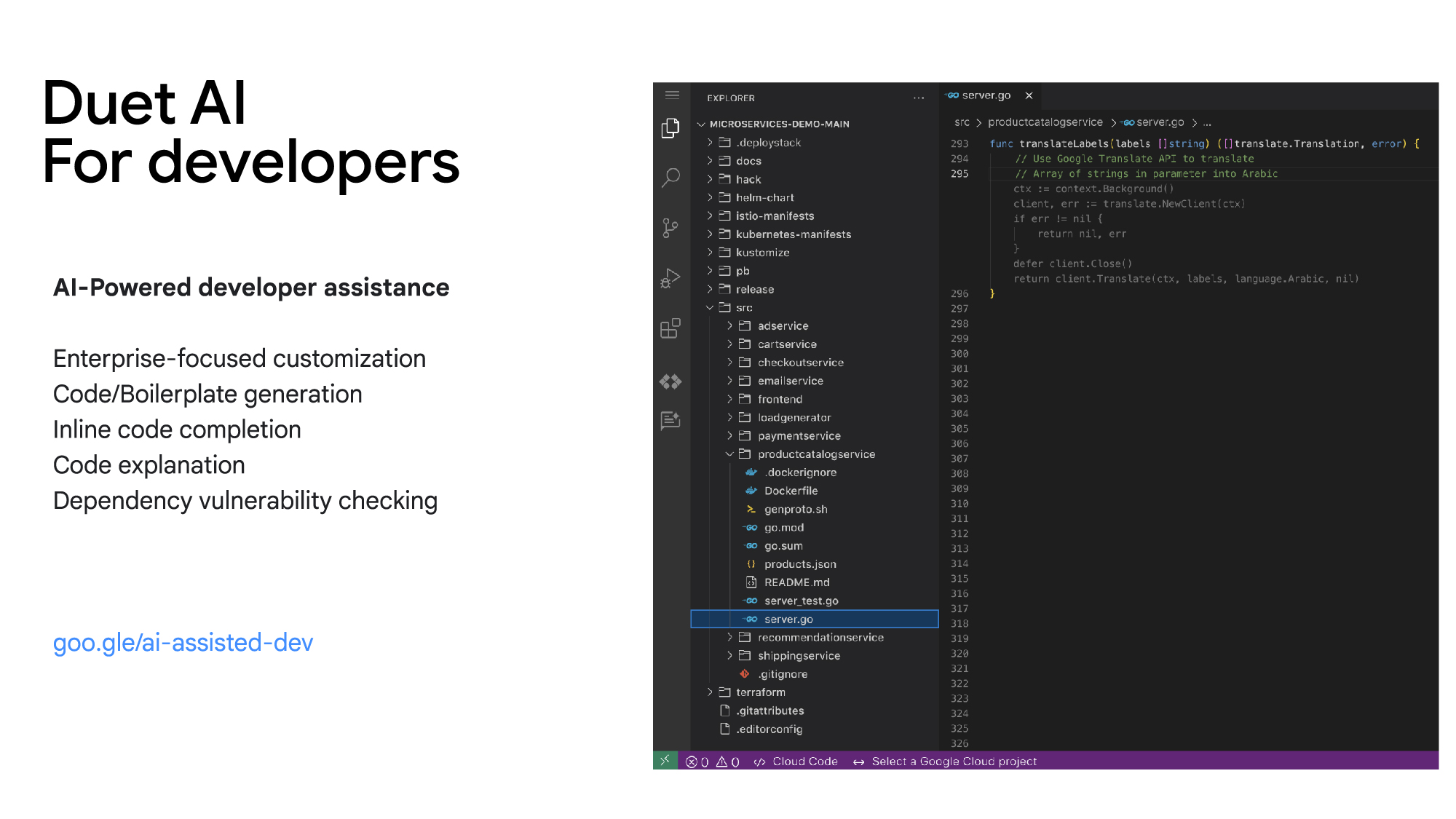
Duet AI for developers focuses on challenges and tasks across the development lifecycle:
Code/Boilerplate Generation — Developers can describe the tasks they have in mind as a comment or function name, such as creating a Cloud Pub/Sub topic. Duet AI will generate a reference implementation that can be reviewed and modified, so developers don’t need to spend time reading through multiple documentation pages.

Inline Code Completion — To reduce the time spent on repetitive tasks and minimize the cognitive workload of tasks such as writing repetitive code or retrieving variable names, Duet AI provides intelligent, context-aware code completion, helping reduce the time spent on coding and enhancing the quality of the written code.
Enterprise Customization — Organizations frequently have massive code bases and specific recommended frameworks and best practices, which generic code assistance solutions may not be best positioned to support. With Vertex AI, developers will be able to tune and customize the underlying models and connect them to the Duet AI experience, allowing for assistance optimized to the needs of the organization.
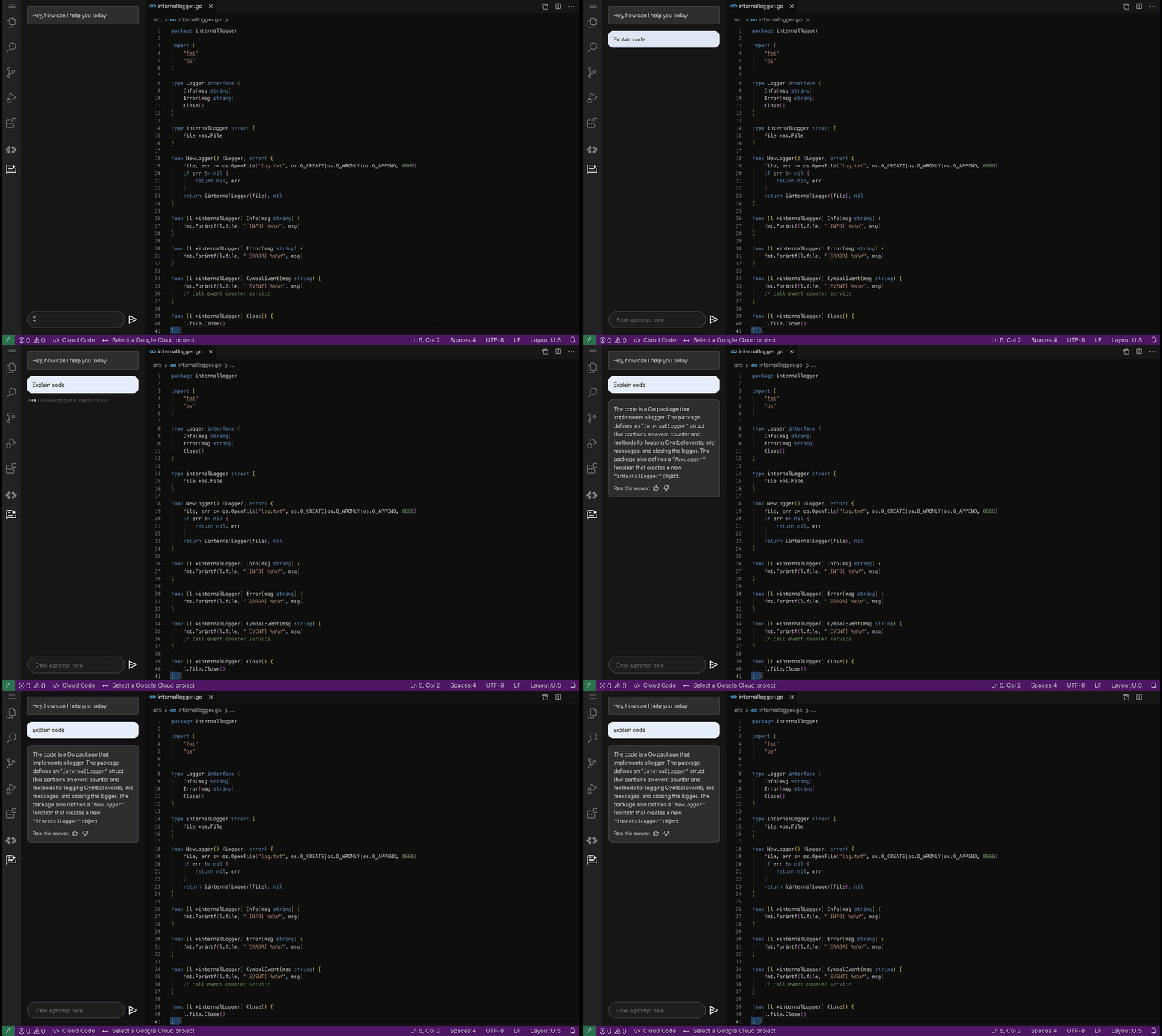
Code Explanation — Developers spend significant time and effort reading and understanding code written by their peers or external contributors. To help assist in this process, Duet AI for code assistance provides an “Explain this code” option available whenever a developer selects their code, allowing them to more quickly understand, map, and navigate unfamiliar code bases.
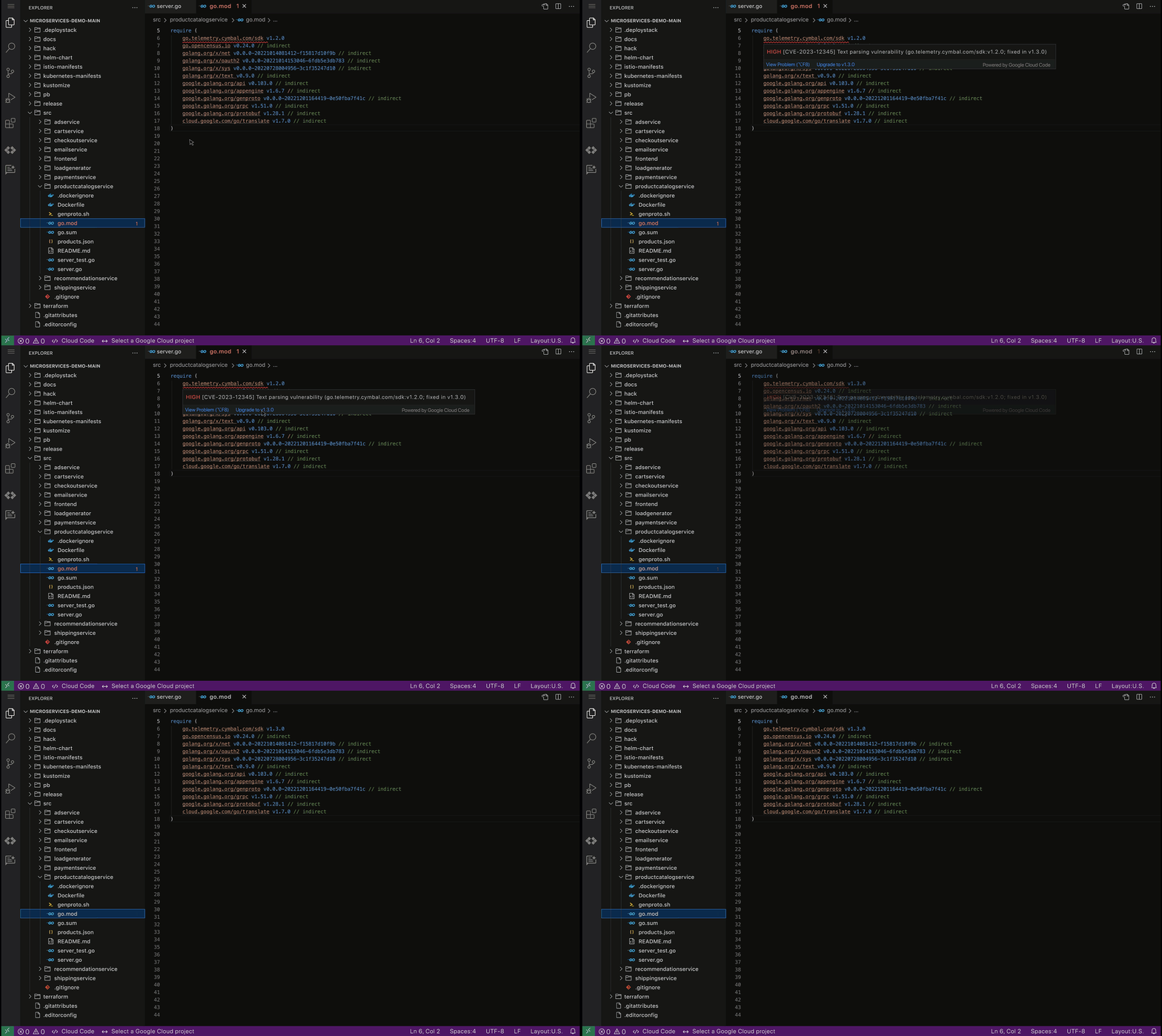
Code security guardrails — Code generated by Duet AI can also be scanned for vulnerable dependencies via Source Protect, helping surface known public vulnerabilities impacting code, along with suggested fixes when available, bringing additional security.
By harnessing the power of AI-driven developer assistance such as the one provided by Duet AI for developers, businesses can unlock unprecedented levels of productivity and efficiency in software development, paving the way for a new era of innovation and growth.
These early features of Duet AI for Google Cloud will be available for limited users and we will be expanding access very soon. Sign up here to join Google Cloud’s AI Trusted Tester Program.
More Relevant Stories for Your Company

Geospatial Data for Business Apps Drive Sustainable and Accurate Decision-making
Organizations that collect geospatial data can use that information to understand their operations, help make better business decisions, and power innovation. Traditionally, organizations have required deep GIS expertise and tooling in order to deliver geospatial insights. In this post, we outline some ways that geospatial data can be used in

Google Cloud’s Firebase Realtime Database and BigQuery AllowsCastbox to Ramp Up Customer Experience
Demand for spoken audio content such as podcasts remains robust despite the proliferation of video services and other entertainment options for consumers. Shibin Li, Co-founder of Castbox, credits growth of the global podcast platform to the following: speed and availability, market-leading features, the proliferation of smart devices to deliver audio content,

Post-COVID: Times Driven by Data Analytics and Intelligence
As we think about economic recovery from COVID-19—both inside Google and outside through working with Google Cloud customers—we’ve made many important observations. Among them is the recognition that the ways software developers and IT practitioners work together will shift in the post COVID-19 world. Our economic recovery today will look




Navigating the AI Landscape: The Future of AI for ML Engineers
A podcast-style video series exploring how AI is shaping our future and how to prepare for changes. Developer advocate, Arwen Hauzhenga, shares his 10+ years of experience in machine learning and generative AI. He discusses the evolution of the field from data mining to data science and large-scale machine learning.
