





How BigQuery’s Unique Features Support Your Data at Petabyte-scale

4788
Of your peers have already read this article.
3:00 Minutes
The most insightful time you'll spend today!
Organizations rely on data warehouses to aggregate data from disparate sources, process it, and make it available for data analysis in support of strategic decision-making. BigQuery is the Google Cloud enterprise data warehouse designed to help organizations to run large scale analytics with ease and quickly unlock actionable insights. You can ingest data into BigQuery either through batch uploading or by streaming data directly to unlock real-time insights. As a fully-managed data warehouse, BigQuery takes care of the infrastructure so you can focus on analyzing your data up to petabyte-scale. BigQuery supports SQL (Structured Query Language), which you’re likely already familiar with if you’ve worked with ANSI-compliant relational databases.
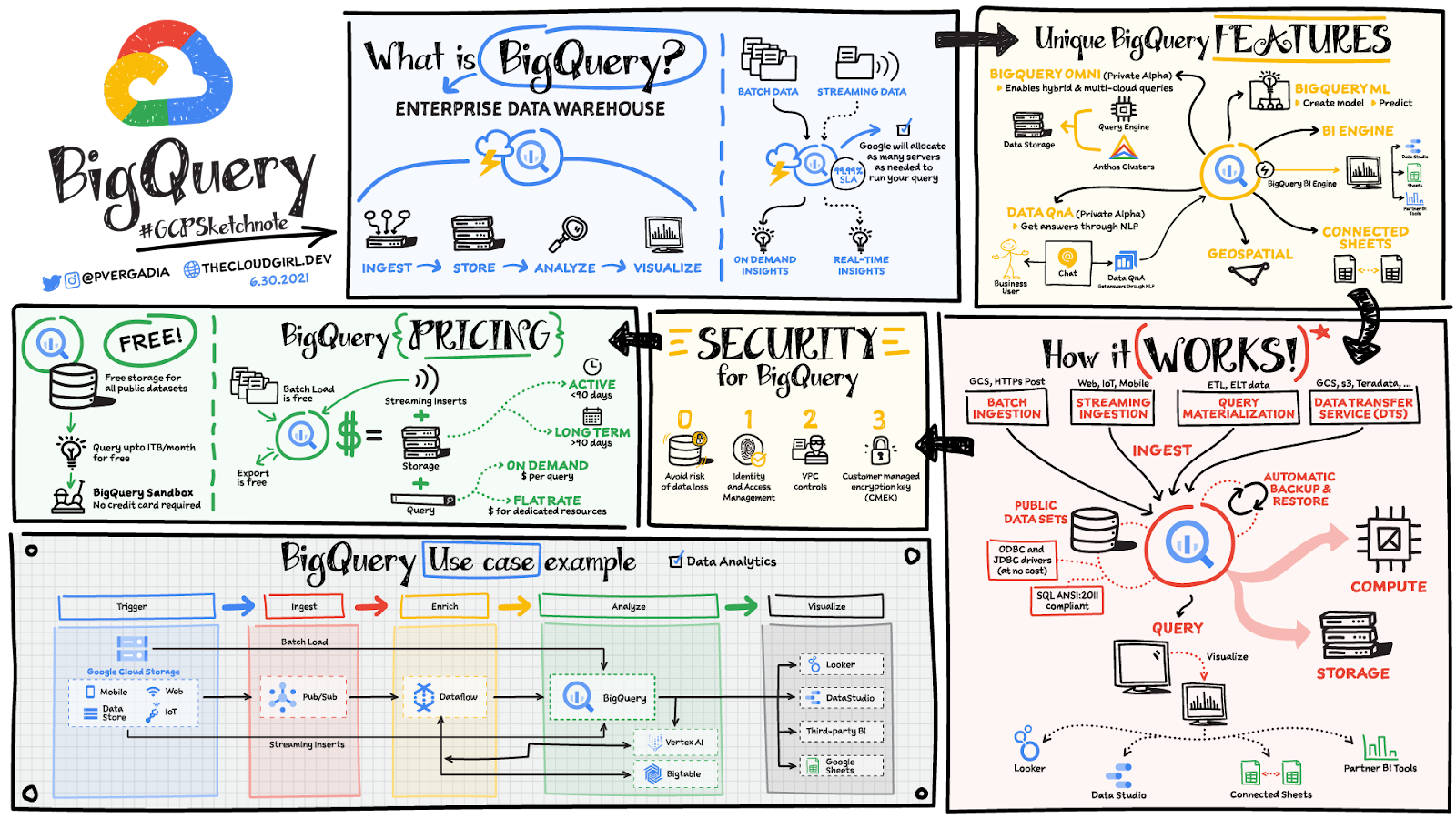
BigQuery unique features
BI Engine – BigQuery BI Engine is a fast, in-memory analysis service that provides subsecond query response times with high concurrency. BI Engine integrates with Google Data Studio and Looker for visualizing query results and enables integration with other popular business intelligence (BI) tools.
BigQuery ML: BigQuery ML is unlocking machine learning for millions of data analysts. It enables data analysts and data scientists to build and operationalize machine learning models directly within BigQuery, using simple SQL.
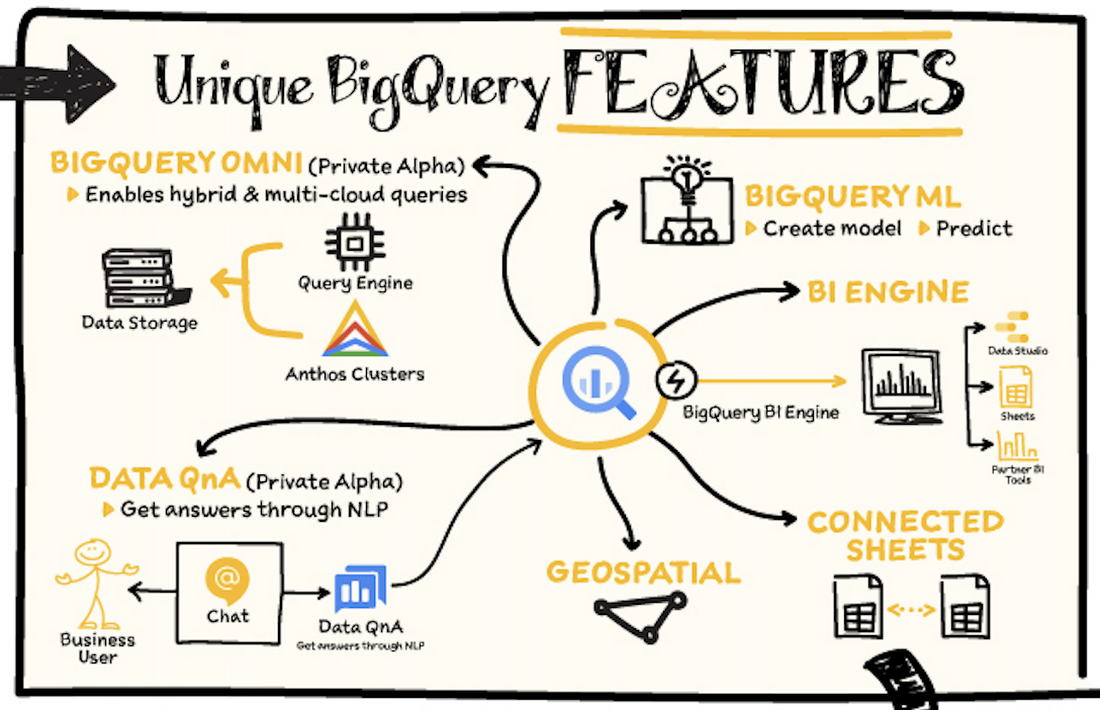
BigQuery Omni – BigQuery Omni is a flexible, multi-cloud analytics solution powered by Anthos that lets you cost-effectively access and securely analyze data across Google Cloud, Amazon Web Services (AWS), and Azure, without leaving the BigQuery user interface (UI). Using standard SQL and familiar BigQuery APIs, you can break down data silos and gain critical business insights from a single pane of glass.
Data QnA: Data QnA enables self-service analytics for business users on BigQuery data as well as federated data from Cloud Storage, Bigtable, Cloud SQL, or Google Drive. It uses Dialogflow and enables users to formulate free-form text analytical questions, with auto-suggested entities while users type a question.
Connected Sheets -The native integration between Sheets and BigQuery makes it possible for all business stakeholders, who are already quite familiar with spreadsheet tools, to get their own up-to-date insights at any time.
Geospatial data – BigQuery offers accurate and scalable geospatial analysis with geography data types. It supports core GIS functions – measurements, transforms, constructors, and more – using standard SQL.
How does it work?
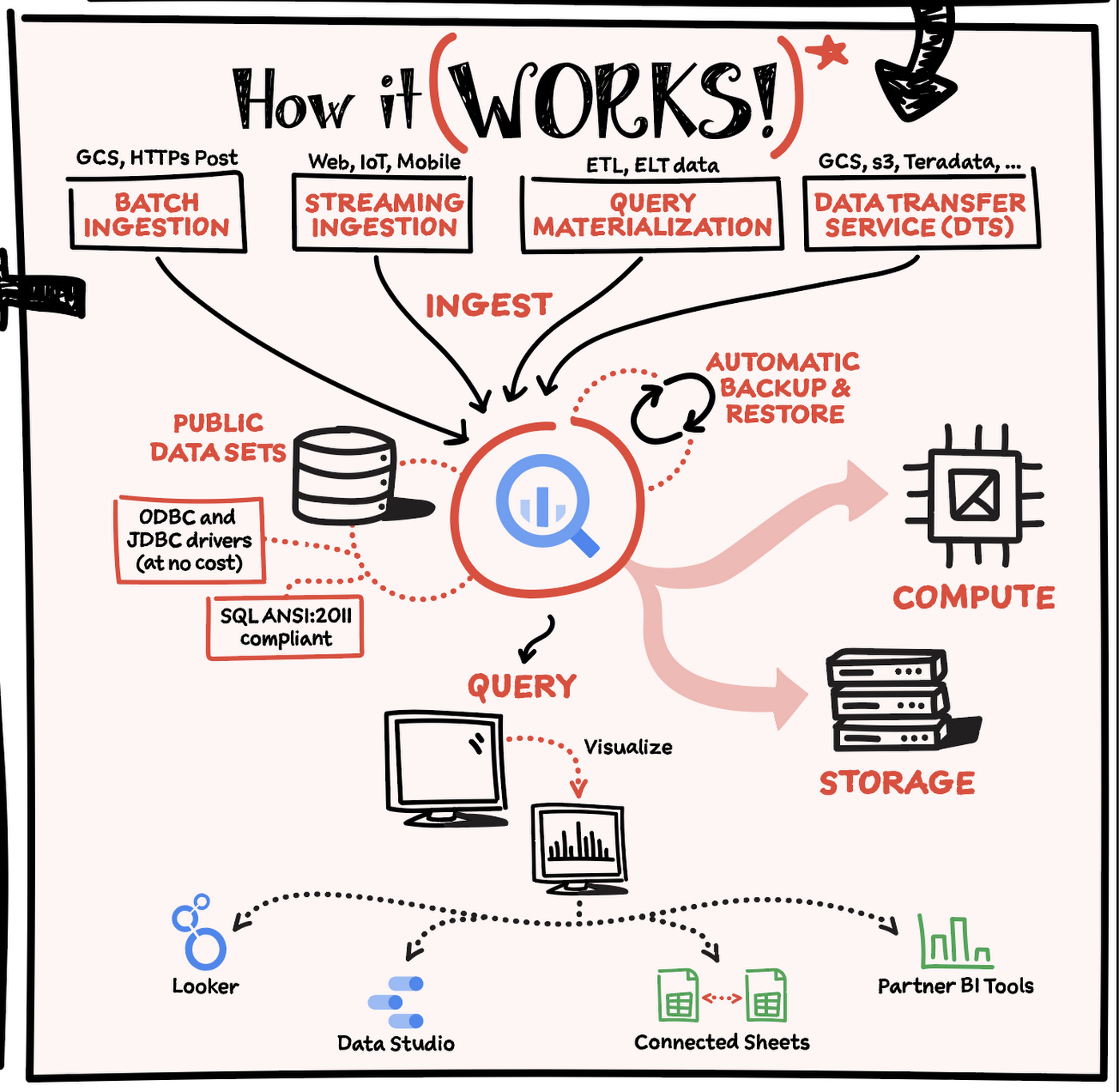
Here’s how it works: You ingest your own data into BigQuery or use data from the public datasets. Storage and compute are decoupled and can scale independently on demand. This offers immense flexibility and cost control for your business as you don’t need to keep expensive compute resources up and running all the time. As a result, BigQuery is much more cost-effective than traditional node-based cloud data warehouse solutions or on-premises systems. BigQuery also provides automatic backup and restore of your data.
You can ingest data into BigQuery in batches or stream real-time data from web, IoT, or mobile devices via Pub/Sub. You can also use Data Transfer Service to ingest data from other clouds, on-premises systems or third-party services. BigQuery also supports ODBC and JDBC drivers to connect with existing tools and infrastructure.
Interacting with BigQuery to load data, run queries, or create ML models can be done in three different ways. You can use the UI in the Cloud Console, the BigQuery command-line tool, or the API via client libraries available in several languages.
When it comes time to visualize your data, BigQuery integrates with Looker as well as several other business intelligence tools across the Google partner ecosystem.
What about security?
BigQuery offers built-in data protection at scale. It provides security and governance tools to efficiently govern data and democratize insights within your organization.
- Within BigQuery, users can assign dataset-level and project-level permissions to help govern data access. Secure data sharing ensures you can collaborate and operate your business with trust.
- Data is automatically encrypted both while in transit and at rest, ensuring that your data is protected from intrusions, theft, and attacks.
- Cloud DLP helps you discover and classify sensitive data assets.
- Cloud IAM provides access control and visibility into security policies.
- Data Catalog helps you discover and manage data.
How much does it cost?
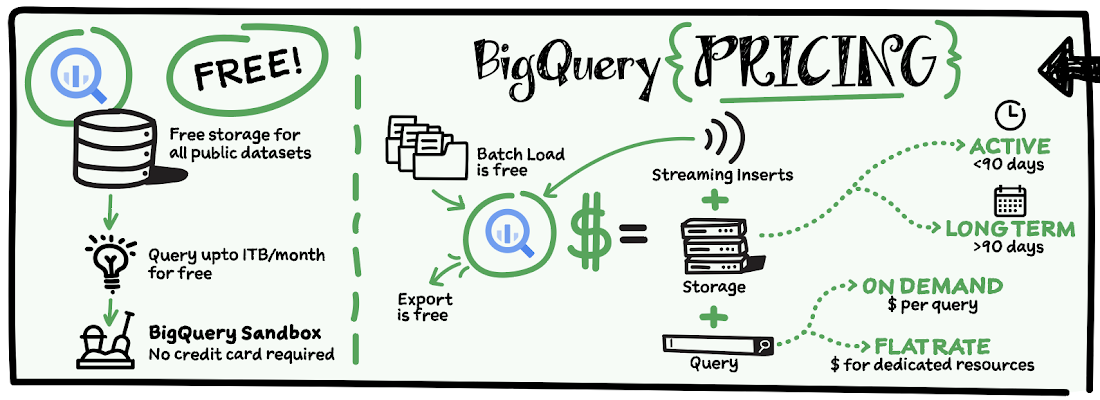
The BigQuery sandbox lets you explore BigQuery capabilities at no cost and confirm that BigQuery fits your needs. With BigQuery you get predictable price-performance: you pay for storing and querying data, and for streaming inserts. Loading and exporting data are free of charge. Storage costs are based on the amount of data stored, and have two rates based on how often the data is changing. Query costs can be either:
- On-demand – you are charged per query by the amount of data processed
- Flat-rate – if you prefer to purchase dedicated resources
You can start with the pay-as-you-go, on-demand option and later move to flat-rate if that better suits your usage. Or, start with flat-rate, get a better understanding of your usage and move to the pay-as-you-go models for additional workloads.
To explore BigQuery and its capabilities a bit more, check out the sandbox; and when you’re ready to modernize your data warehouse with BigQuery then check out the documentation to streamline your migration process here. https://www.youtube.com/embed/So-tVyBQt8E?enablejsapi=1&
For more #GCPSketchnote, follow the GitHub repo. For similar cloud content follow me on Twitter @pvergadia and keep an eye out on thecloudgirl.dev.
UKG Ready: Meeting the Needs of Complex Machine Learning Models and Distributed Data Sets

3966
Of your peers have already read this article.
2:30 Minutes
The most insightful time you'll spend today!
Business Problem
UKG Ready primarily operates in the Small and Medium Business (SMB) space, so inherently many customers are forced to operate and make key business decisions with less Workforce Management (WFM) / Human Capital Management (HCM) data. In addition to volume, SMB lacks the variety of data needed to create a dynamic and agile organization. This puts SMB at a major disadvantage compared to larger segments.
Project Goals
People Insights module is committed to surfacing insights to customers in the context of their day-to-day duties and aid in decision making. With the SMB customer data limitations mentioned above, the goal of this project was to create a global dataset that augments individual customer data to bring light to less obvious, yet important information.
Challenges
UKG Ready is a highly configurable application that gives customers the opportunity to build solutions on a platform that meets their specific business needs. High configurability gives high flexibility to customers in their usage of the software. However, it becomes nearly impossible to create a global dataset for machine learning and data insights. UKG Ready manages just under 4 million of the US workforce and some 30,000+ customers. Despite the large employee dataset size, machine learning models that are specific to customers are starved for data because the individual customers have a relatively small employee population. Does that mean we cannot support our SMB customers’ decision making with ML?
Result
Partnering with Google, we were able to develop an approach that allowed us to standardize various domain entities (pay categories, time off codes, job titles, etc.) so that we could build a global dataset to augment SMB customer data. Using machine learning we were able to build a common vocabulary across our customer base. This common vocabulary encapsulates the nuances of how our customers manage their business and yet is generalized and standardized such that the data can be aggregated over the variety of customer configurations. This allows us to serve up practical insights to customers through various use cases. Our partnership allowed us to leverage Google Cloud Services to meet the needs of our complex machine learning models, distributed data sets and CI/CD processes.
How
UKG Ready decided to partner with Google for an end-to-end solution for the analytics offering. This allowed us to focus on our core business logic without having to worry about the platform, environment configurations, performance and scalability of the entire solution. We make use of various Google Cloud services such as Cloud Triggers, Cloud Storage, Cloud Functions, Cloud Composer, Cloud Dataflow, Big Query, Vertex AI, Cloud Pub/Sub… to host our analytics solution. Jenkins manages the entire CI/CD pipelines and cloud environments are configured and deployed using Terraform.
The standardization of business entities problem was solved in three distinct steps:
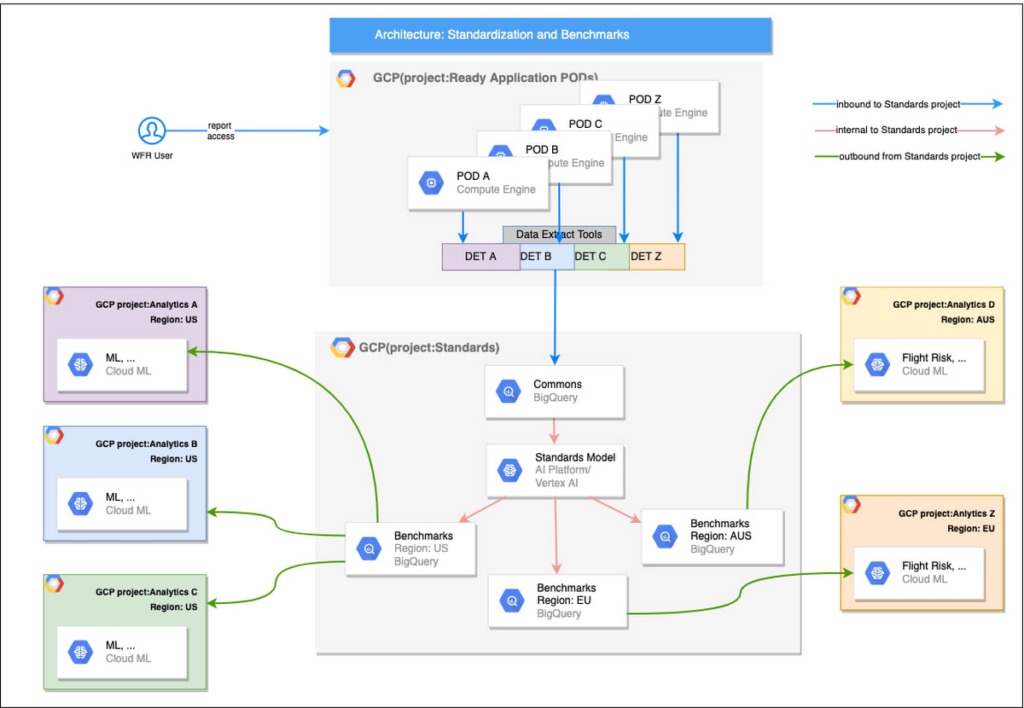
Step 1: Collecting aggregated data
We needed an approach to collect aggregated data from our highly distributed, sharded, multi-tenant data sources. We developed a custom solution that allows us to extract data aggregated at source for PII and GDPR considerations and transfer to Google Cloud Storage in the fastest manner possible. Data is then transformed and stored in Big Query. Services used: GCS, Cloud Functions, DataFlow, Cloud Composer and Big Query. All processes are orchestrated using Cloud Composer and detailed logging is available in Cloud Logging (Stackdriver).
Step 2: Applying NLP (Natural Language Processing)
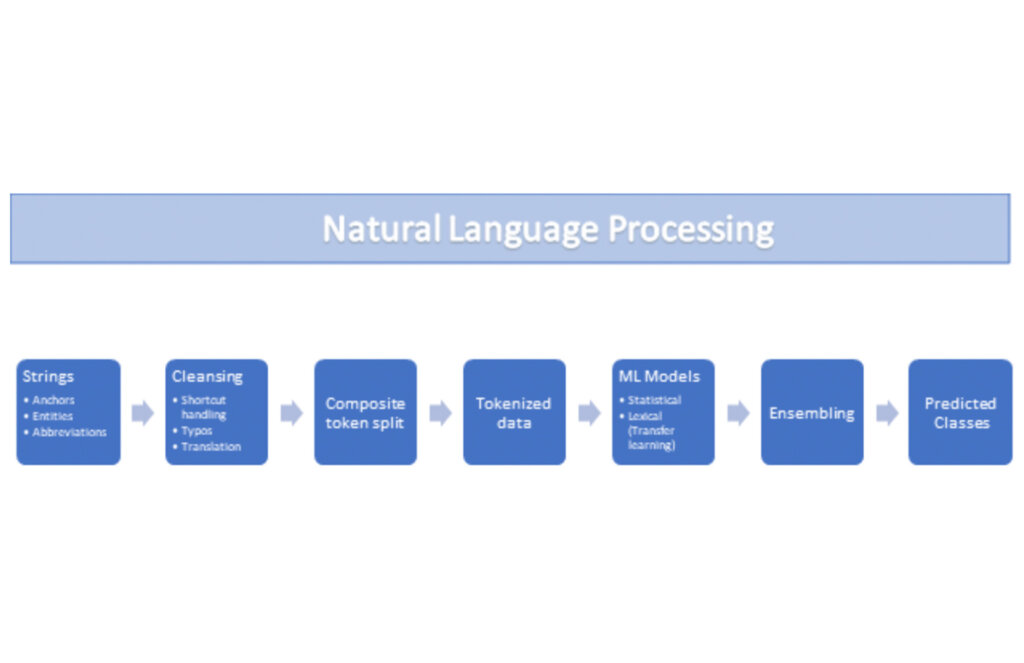
Once we had the variety of customer configurations or the business entities available, we then applied NLP algorithms to categorize and standardize these in buckets. This approach assumes that customers use natural language for configurations like job titles, pay codes etc.
String Preparation
The input data for string preparation process is an entity string or several strings, that describe one entity object (like name-description pair or code-name pair). The output represents set of tokens that may be used to run a classification/clustering model. The process of string preparation tokenizes strings, replaces shortcuts, handles abbreviations, translates tokens, handles grammatical errors and mistypes
ML Models
Statistical
The idea of the model is to use defined target classes (clusters) and assign several tokens (anchors) to each of them an entity that has any of those tokens would be “attracted” to appropriate class. All other tokens are weighted according to frequencies of usage of theses tokens in the entities with anchor tokens:
Using anchor tokens, we are building kind-of Word2Vec - dimensionality of vector is equal to number of target classes. The higher the specific dimension (cluster) value, the higher the probability of entity to be included in appropriate cluster. Final prediction for entity tokens list for specific class is sum of weights of all the tokens included. Predicted cluster is a cluster that has maximal prediction score.
Lexical Model
We managed to generate reasonable amount of labeled data during statistical model implementation and testing. That opens a possibility to build “classical” NLP model that uses labeled data to train classification neural network using pretrained layers to produce token embeddings or even string embeddings. We started experimentation with pre-trained models like GloVe and got good results with single words and bi-grams but started getting issues in handling of n-grams. Our Google account team came to our rescue and recommended some white papers that helped formulate our strategy. We now use Tensorflow nnlm-en-dim128 model to produce string embeddings – it was trained on 200B records English Google News corpus and produces for each input string 128-dimensional vector. After that we use several Dense and Dropout layers to build a classification model.
Ensembling
To perform ensembling all the model results for each class are cast to probabilities using softmax transformation with scale normalization. Final predicted probability is maximal average score of both models among all the classes scores – appropriate class is predicted class.
The machine learning models are deployed on Vertex AI and are used in batch predictions. Model performance is captured at every prediction boundary and monitored for quality in production.
Step 3: Making available common vocabulary
Having the standardized vocabulary, we then needed a mechanism to have the results be available in UKG Ready reports and customer specific models like Flight Risk and Fatigue. For this we again used Google Services for orchestration, data transformation and data storage.
Once the modeling is complete, we made the customer specific models leveraging the above architecture be available in Reports. We utilized our proven existing technology choices in GCP for orchestration, data transformation and data storage
Results
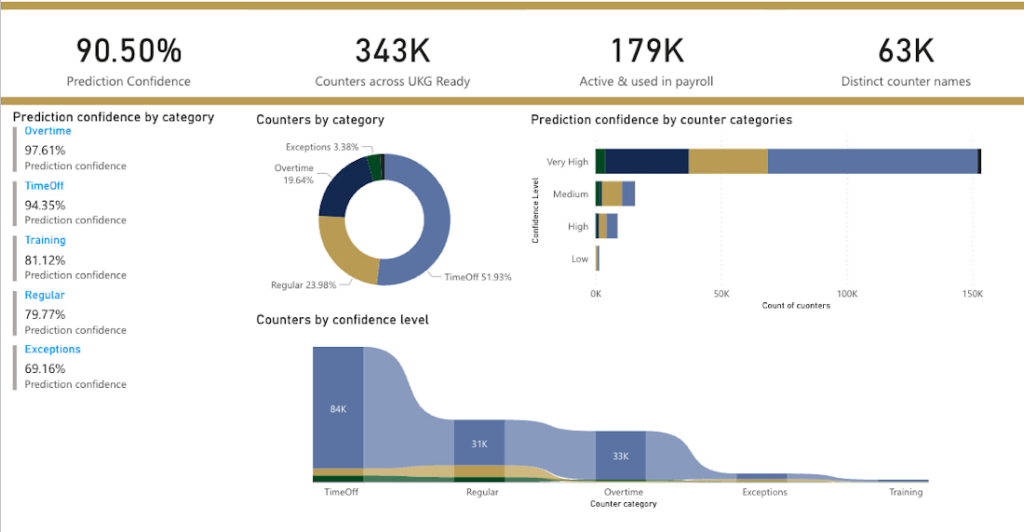
We are able to build a common vocabulary of our customers’ business entities with good confidence. And be an expert advisor to our SMB customers in their decision-making using machine learning. With the advice of our Google account team and using Google services we can add value to our product in a relatively short amount of time. And we are not done! We continue to use this platform for new use cases, complex business problems and innovative machine learning solutions.
Sample result:
Special thanks to Kanchana Patlolla , AI Specialist, Google for the collaboration in bringing this to light
Bigtable’s High Performance and Low Opex is Great for Building Personalization

3740
Of your peers have already read this article.
3:00 Minutes
The most insightful time you'll spend today!
Customer expectations have shifted as a result of evolving needs. Across industries, customers expect that you treat them as individuals, and demonstrate how well you understand and serve their unique needs. This concept—personalization—is the idea that you’re delivering a tailored experience to each customer corresponding to their needs and preferences; you’re setting up a process to create individualized interactions that improves the customer’s experience. According to Salesforce, 84% of consumers say being treated like a person, not a number, is very important to winning their business.
Entire industries are undergoing digital transformation to better serve their customers through personalized experiences. For example, retailers are improving engagement and conversion with personalized content, offers, and product recommendations. Advertising technology organizations are increasing the relevance and effectiveness of their ads using customer insights like their specific interests, purchasing intent, and buying behavior. Digital music services are helping their customers discover and enjoy new music, playlists, and podcasts based on their listening behavior and interests.
As customers want more and more personalization, modern technology is making it possible for many more businesses to achieve this. In this post, we’ll look at some common challenges to implementing personalization capabilities and how to solve them with transformative database technologies like Google Cloud’s Bigtable. Bigtable powers core Google services such as Google Maps that supports more than a billion users, and its petabyte scale, high availability, high throughput, and price-performance advantages help you deliver personalization at scale.
Challenges with personalization
Data is at the heart of personalization. To deliver personalization at scale, an application needs to store, manage, and access large volumes of data (a combination of customer-specific data and anonymized aggregate data across customers) to develop a deep understanding of the behavior, needs, and preferences of each customer. Your database needs to very quickly write large volumes of data concurrently for all active customers. You need to continuously capture data on customer behavior because each step potentially informs the next, e.g., adding an item to a shopping cart can be used to trigger new recommendations for related or complementary products. Much of this data needed for personalization is semi-structured and sparse, and therefore requires a database with a flexible data model.
Personalization at scale requires large volumes of data to be read in near real-time so that it can be in the critical serving path to deliver a seamless user experience, often with a total application latency of less than 100ms. This means your requests to the database need to return results with latencies of single-digit milliseconds. You need to ensure that application latencies do not degrade as you onboard more customers. Data needs to be organized efficiently and integrated with other tools so that you can run deep analytical queries and use machine learning (ML) models to develop personalized recommendations, and store the aggregates in your operational database for serving your customers. You also need the ability to run large batch reads for analytics without affecting the serving performance of your application.
In addition, you need to ensure that your database costs do not explode with the popularity of your application. Your database needs to consistently deliver low total cost of ownership (TCO), and high price-performance as your data volumes and throughput needs grow. Your database needs to scale seamlessly and linearly to deliver consistent, predictable performance to all users around the world. Additionally, your database needs to be easy to manage, so that you can focus on your application instead of managing the complexity of your database.
Why a NoSQL database is the right fit for personalization
Every database reflects a set of engineering tradeoffs. When relational databases were designed 40 years ago, storage, compute, and memory were thousands of times more expensive than they are today. Databases were deployed on a single server to a relatively small number of concurrent users, whose access to the systems tended to be during normal business hours when users had network access. Relational databases were designed with these resources, costs, and use in mind. They work very hard to be storage and memory efficient, and assume a single server for deployments.
As the costs of storage, memory, and compute decreased, and as data and workloads grew to exceed the capacity of commodity hardware, engineers began to reconsider these tradeoffs with different goals in mind. New types of databases later emerged that assumed distributed architectures so they could be easier to scale, especially with cloud infrastructure. With this approach the tradeoff in turn was to forego the sophistication of SQL and much of the data integrity and transactional capabilities developed in relational systems. These systems are commonly called NoSQL databases.
Traditional relational databases assume a fixed schema that will change infrequently over time. While this predictability of data structure allows for many optimizations, it also makes it difficult and cumbersome to add new and varying data elements in your application. NoSQL databases, such as key value stores and document databases, relax the rigidity of the schema and allow for data structures to evolve much more easily over time. Flexible data models speed the pace of innovation in your application, and increase your ability to iterate on your ML models, which is essential for personalization. In addition, the scalability of systems like Cloud Bigtable allow you to deliver personalization to millions of concurrent users while you continue to evolve how you personalize experiences for your customers.
How Cloud Bigtable enables personalization at scale
Cloud Bigtable supports personalization at scale with its ability to handle millions of requests per second, cost-effectively store petabytes of data1, and deliver consistent single-digit millisecond latencies for reads and writes. Bigtable delivers a unique mix of high performance and low operating cost to reduce your TCO.
We’ve heard from Spotify, Segment, and Algolia about how they’ve built personalized experiences for their customers with Bigtable. Check out this presentation to hear Peter Sobot of Spotify describe how they use Bigtable for personalization.
Let’s imagine a scenario where your application takes off like a rocketship, and grows to 250 million users. Let’s assume a peak 1.75 million concurrent users of your application2, with each user sending two requests per minute to your database. This will drive 3.5 million requests per minute to your database, or approximately 58.3K requests per second. Pricing for Bigtable to run this workload will start at under $400 per day3.
Bigtable scales throughput linearly with additional nodes. With separation of compute and storage, Bigtable automatically configures throughput by adjusting the association of nodes and data to provide consistent performance. When a node is experiencing heavy load, Bigtable automatically moves some of the traffic to a node with lower load to improve the overall performance. Bigtable also supports cross-region replication, with local writes in each region. This allows you to manage your data near your customers’ geographic locations, reducing network latency and bringing predictable, low-latency reads and writes to your customers in different regions around the world.
Bigtable is a NoSQL database developed and operated by Google Cloud. Bigtable provides a column family data model that allows you to flexibly store varying data elements for customers associated with their behavior and preferences, store a very large number of such data elements across your customers, and quickly iterate on your application. Bigtable supports trillions of rows with millions of columns. Each row in Bigtable supports up to 256 MB of data, so that you can easily store all personalized data for a customer in a single row. Bigtable tables are sparse, and there is no storage penalty for a column that is not used in a row; you only pay for the columns that store values.
BigQuery ML allows you to create and run ML models directly in BigQuery to develop personalization recommendations that you can bring back to Bigtable. You can easily pipe Bigtable data into BigQuery to run deep analytical queries and develop recommendations. These aggregates, like computed recommendations, are brought back to Bigtable so your application can serve those recommendations to users with low latency and massive scale.
Bigtable integrates with the Apache Beam ecosystem and Dataflow to make it easier for you to process and analyze your data. With application profiles and replication in Bigtable, you can isolate your workloads so that batch reads do not slow down your serving workload that has a mix of reads and writes. This enables your application to perform near real-time reads at scale to develop and train machine learning models in TensorFlow for personalization. Bigtable gives you the right operational data platform to develop personalization recommendations offline or in real-time, and serve them to your customers.

Here’s a look at conceptual schema examples for personalization in ecommerce:

And here’s a quick overview of what personalization use cases require, and how Bigtable addresses them.

Bigtable is fully managed to free you from the complexity of managing your database, so that you can focus on delivering a deeply personalized experience to your customers. Learn more about Bigtable.
1. Storage pricing (HDD) starts at $0.026 per GB/mo (us-central1)
2. Assumes application is used 24 hours a day, average user session is 5 minutes (Android app average), and daily peak is 2x the average. (250 million / (24 hours / 5 minutes) *2 = 1,736,111 peak concurrent users (us-central1 region)
3. Cloud Bigtable pricing for us-central1 region. Assumes 25 TB SSD storage (100 KB per user, for 250 million users) per month, 10 compute nodes per month (with no replication), includes data backup. Bigtable pricing details.
5 Reasons Your Legacy Data Warehouse Won’t Cut It

4472
Of your peers have already read this article.
8:15 Minutes
The most insightful time you'll spend today!
As we engage with enterprises across the globe, one thing is becoming clear: Today’s businesses are solving complex business problems that are data-intensive.
But often, their data platform infrastructure is holding them back. Data platform architectures that were designed in the 1990s are not ready to solve business problems for 2020. We don’t have to tell you about the explosive data growth that’s going on for businesses around the world. If you’re managing data infrastructure today, you already know plenty about that data growth.
Ever faster and larger data streams, global business needs, and tech-savvy users are all putting the pressure on IT teams to move faster, with more agility.
Despite all these changes, it is often the legacy, traditional data warehouse where most of the data analytics tasks take place, and they’re underprepared for those demands.
When we talk to people working in IT today, we hear a lot about the constraints that come with operating legacy technology while trying to build a modern data strategy. Those legacy data warehouses likely aren’t cutting it anymore. Here’s why—and here’s what you can do about it.
1. Business agility is hard to achieve with legacy tools.
Business agility is the main goal as organizations move toward completely digital operations. Think of online banking, or retailers staying ahead of always-on e-commerce needs in a competitive environment. All these great, cutting-edge innovations reflect cultural and technical change, where flexibility is essential. A business has to be able to manage and analyze data quickly to understand how to better serve customers, and allow its internal teams to do their best work with the best data available.
We hear that lots of data warehouses running today are operating at 95% or 100%, maxing out what they can provide to the business.
Whether it’s on-premises or an existing data warehouse infrastructure moved wholesale to cloud, those warehouses aren’t keeping up with all the data requests users have. Managing and preventing these issues can take up a lot of IT time, and the problems often compound over time. Hitting capacity limits slows down users and ties up database administrators too.
From a data infrastructure perspective, separating the compute and storage layers is essential to achieve business agility. When a data warehouse can handle your scalability needs and self-manage performance, that’s when you can really start being proactive.
2. Legacy data warehouses require a disproportionate degree of management.
Most of the reports and queries your business runs are probably time-sensitive, and that sense of urgency is only increasing as users and teams see the possibilities of data analytics.
In our engagements with customers, we often observe that they are spending a majority of the time on systems engineering, so that only about 15% of the time is spent analyzing data. That’s a lot of time spent on maintenance work.
Because legacy infrastructure is complex, we often hear that businesses continue to invest in hiring people to manage those outdated systems, even though they’re not advancing data strategy or agility.
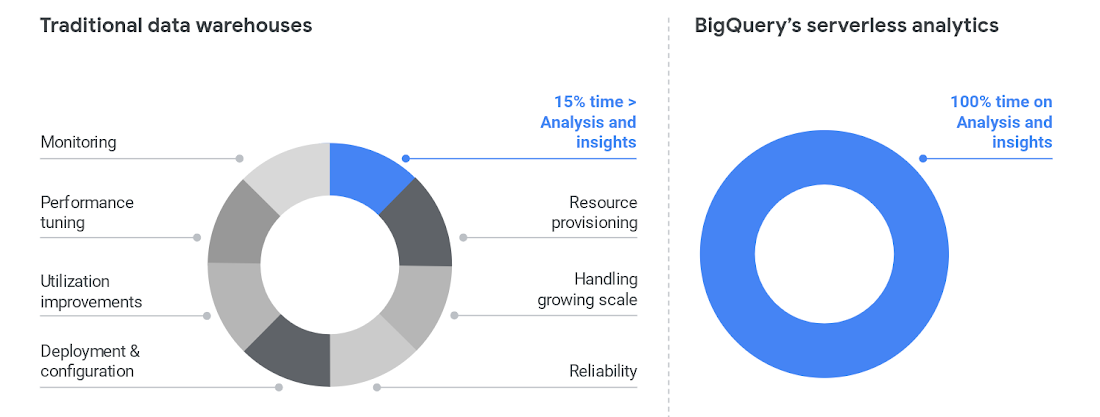
To cut time on managing a data warehouse, it helps to automate the system engineering work away from the analytics work, like BigQuery enables.
Once those functions are separated, the analytics work can take center stage and let users become less dependent on administrators. BigQuery also helps remove the user access issues that are common with legacy data warehouses. Once that happens, users can focus on building reports, exploring datasets, and sharing trusted results easily.
3. Legacy data warehouse costs make it harder to invest in strategy.
Like other on-prem systems, data warehouses adhere to the old-school model of paying for technology, with the associated hardware and licensing costs and ongoing systems engineering.
This kind of inefficient architecture drives more inefficiency. When the business is moving toward becoming data-driven, they’ll continue to ask your team for more data. But responding to those needs means you’ll run out of money pretty quickly.
Cloud offers much more cost flexibility, meaning you’re not paying for, or managing, the entire underlying infrastructure stack. Of course, it’s possible to simply port an inefficient legacy architecture into the public cloud.
To avoid that, we like to talk about total cost of ownership (TCO) for data warehouses, because it captures the full picture of how legacy technology costs and business agility aren’t matching up.
Moving to BigQuery isn’t just moving to cloud—it’s moving to a new cost model, where you’re cutting out that underlying infrastructure and systems engineering. You can get more detail on cloud data warehouse TCO comparisons from ESG.
4. A legacy data warehouse can’t flexibly meet business needs.
While overnight data operations used to be the norm, the global opportunities for businesses mean that a data warehouse now has to load streaming and batch data while also supporting simultaneous queries. Hardware is the main constraint for legacy systems as they struggle to keep up.
Moving your existing architecture into the cloud usually means moving your existing issues into the cloud, and we hear from businesses that doing so still doesn’t allow for real-time streaming.
That’s a key component for data analysts and users. Using a platform like BigQuery means you’re essentially moving your computational capabilities into the data warehouse itself, so it scales as more and more users are accessing analytics.
Unlimited compute is a pretty good way to help your business become digital. Instead of playing catch-up with user requests, you can focus on developing new features. Cloud brings added security, too, with cloud data warehouses able to do things like automatically replicate, restore and back up data, and offer ways to classify and redact sensitive data.
5. Legacy data warehouses lack built-in, mature predictive analytics solutions.
Legacy data warehouses are usually struggling to keep up with daily data needs, like providing reports to departments like finance or sales. It can be hard to imagine having the time and resources to start doing predictive analytics when provisioning and compute limits are holding your teams back.
We hear from customers that many of them are tasked with simplifying infrastructure and adding modern capabilities like AI, ML and self-service analytics for business users.
The best stories about digital transformation are those where the technology changes and business or cultural changes happen at the same time. One customer told us that because BigQuery uses a familiar SQL interface, they were actually able to shift the work of data analytics away from a small, overworked group of data scientists into the hands of many more workers.
Doing so also eliminated a lot of the siloed data lakes that had sprung up as data scientists extracted data one project at a time into various repositories to train ML models.
These large-scale computational possibilities save time and overhead, but also let businesses explore new avenues of growth. AI and ML are already changing the face of industries like retail, where predictive analytics can provide forecasting and other tasks to help the business make better decisions. BigQuery lets you take on sophisticated machine learning tasks without moving data or using a third-party tool.
We designed BigQuery so that our engineers deploy the resources needed for you to scale. It means your focus can change entirely toward meeting the needs the business has put forth, and bringing a lot more flexibility.
BigQuery is fully serverless and runs on underlying Google infrastructure, so it integrates with our ecosystem of data and analytics partner tools. This architecture means you’re continually getting the most up-to-date software stack—analytics that scale, real-time insights, and cutting-edge functionality that includes geospatial and machine learning right from the SQL interface.
Streamline your path to data warehouse modernization with BigQuery by learning about Google Cloud’s proven migration methodology and get started with your data warehouse by applying for our migration offer.
The Divercity Story: Using Google Cloud to Achieve a More Inclusive and Sustainable Workforce

4744
Of your peers have already read this article.
2:30 Minutes
The most insightful time you'll spend today!
Despite a growing number of diversity, equity, and inclusion (DEI) initiatives, Black and Latinx people remain highly underrepresented in tech. Although comprising 12.6% and 18% of the U.S. labor force respectively, Black professionals hold only 5% of tech positions, while Latinx professionals fill just 6% of tech roles.
Long-standing biases in hiring practices and non-inclusive work environments are the primary contributors to this lack of diversity. Even when underrepresented professionals are successfully recruited, invisible barriers to promotion and layoffs that disproportionally impact Black and Latinx employees make it extremely challenging for tech firms to retain top talent.
We founded Divercity to help employers build diverse workforces that are more inclusive and sustainable. With our comprehensive recruiting and retention platform, tech companies can accurately measure employee diversity and gender parity, seamlessly connect with underrepresented talent, and significantly reduce turnover.
As Divercity continues to grow, we’ll introduce new services and solutions that empower the tech world to build inclusive companies while improving compliance with state and federal equal opportunity laws. We also hope to expand the reach of Divercity to support DEI initiatives in non-tech industries and bolster recruiting underrepresented professionals in other countries as well.

Scaling Divercity with the help of the Google for Startups Black Founders Fund
Shortly after founding Divercity, we participated in the 2021 Techstars Workforce Development Accelerator. The incredible support and guidance we received during and after the program highlighted the importance of long-term collaboration with reliable technology partners who actively champion diversity and inclusion.
That’s why we became part of the Google for Startups Cloud Program. After completing the program, we used Google Cloud credits and Google for Startups Black Founders Fund funding to cost-effectively trial, deploy, and scale key Google Cloud solutions. In just months, we rolled out new inclusion tracking and recruiting tools on the highly secure-by-design infrastructure of Google Cloud to expedite the sourcing and hiring of underrepresented talent in the tech industry.
With the support and mentorship of the Google for Startups Cloud Program and the Black Founders Fund, Divercity is well on its way to becoming one of the industry’s most trusted sites for DEI measurement, recruitment, and retention.
Delivering predictive diversity analyses with a 99% accuracy rate
We rely on the expansive Google Cloud ecosystem to power all the services offered on the Divercity platform. Specifically, we leverage Colab to write and execute the sophisticated TensorFlow machine learning (ML) models that deliver our predictive diversity analyses with a 99% accuracy rate.
We also use BigQuery to democratize insights and run analytics at scale with 27% lower three-year TCO than cloud data warehouse alternatives. BigQuery seamlessly integrates with Looker and Data Studio to display company diversity and recruitment data on interactive dashboards—and automatically populate reports with detailed demographic information.
We also accelerate the development, launch, and management of new Divercity tools with Firebase, while taking advantage of key features such as A/B testing and messaging campaigns to boost user engagement.
In the future, we plan to explore how Google Cloud AI and machine learning products such as Vertex AI and AutoML can further refine our diversity score analyses and applicant recruiting pipeline. We’ll also continue leveraging the many resources provided by the Google Black Founders Fund, including opportunities for technical project partnerships, early access to new Google Cloud products and tools, and collaboration with dedicated Google experts.
The Google for Startups Cloud Program and Google Black Founders Fund have been invaluable to our success. Since completing the Black Founders Accelerator program, we’ve been named a top 10 HR tech product by HR Tech Outlook, significantly increased our subscriber base, and received positive feedback from investors. We can’t wait to see what we accomplish next as we empower tech companies to build more diverse, inclusive, and sustainable workforces.
If you want to learn more about how Google Cloud can help your startup, visit our page here to get more information about our program, and sign up for our communications to get a look at our community activities, digital events, special offers, and more.
3686
Of your peers have already watched this video.
61:30 Minutes
The most insightful time you'll spend today!
How to Move From Redshift to BigQuery Easily
Enterprise data warehouses are getting more expensive to maintain. Traditional data warehouses are hard to scale and often involve lots of data silos. Business teams need data insights quickly, but technology teams have to grapple with managing and providing that data using old tools that aren’t keeping up with demand. Increasingly, enterprises are migrating their data warehouses to the cloud to take advantage of the speed, scalability, and access to advanced analytics it offers.
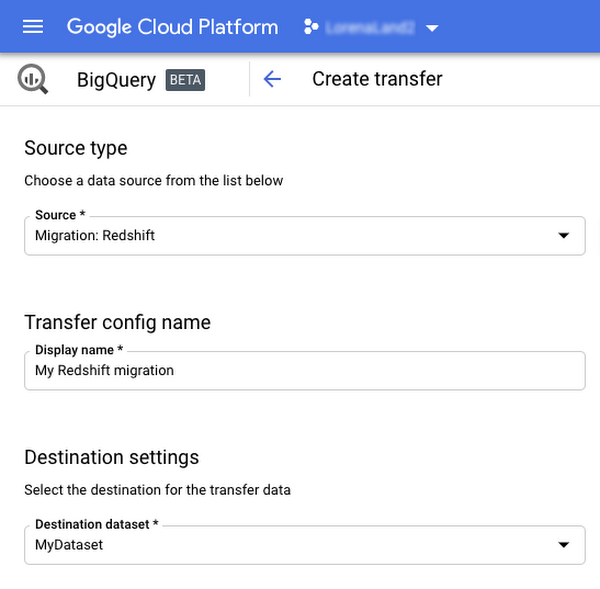
With this in mind, we introduced the BigQuery Data Transfer Service to automate data movement to BigQuery, so you can lay the foundation for a cloud data warehouse without writing a single line of code. Earlier this year, we added the capability to move data and schema from Teradata and S3 to BigQuery via the BigQuery Data Transfer Service. To help you take advantage of the scalability of BigQuery, we’ve now added a service to transfer data from Amazon Redshift, in beta, to that list.
Data and schema migration from Redshift to BigQuery is provided by a combination of the BigQuery Data Transfer Service and a special migration agent running on Google Kubernetes Engine (GKE), and can be performed via UI, CLI or API. In the UI, Redshift to BigQuery migration can be initiated from BigQuery Data Transfer Service by choosing Redshift as a source.
The migration process has three steps:
- UNLOAD from Redshift to S3—The GKE agent initiates an UNLOAD operation from Redshift to S3. The agent extracts Redshift data as a compressed file, which helps customers minimize the egress costs.
- Transfer from S3 to Cloud Storage—The agent then moves data from Amazon S3 to a Cloud Storage bucket using Cloud Storage Transfer Service.
- Load from Cloud Storage to BigQuery—Cloud Storage data is loaded into BigQuery (up to 10 million files).
Watch the video to learn more!
More Relevant Stories for Your Company

A Breakdown of Cloud-based Data Ingestion Practices
Businesses around the globe are realizing the benefits of replacing legacy data silos with cloud-based enterprise data warehouses, including easier collaboration across business units and access to insights within their data that were previously unseen. However, bringing data from numerous disparate data sources into a single data warehouse requires you

The Power of Personalization: Ocado Retail’s Strategy to Boost Revenue and Lower Churn
Retailers are becoming more skilled at making individual customers feel heard and valued. This is a necessity given the fact that 66% of respondents to a McKinsey survey stated that they expect email marketing messages to be tailored to their needs. While marketing personalization expertise is growing, it’s still difficult to manage,

Incorporating Custom Holidays into Your Time-Series Models with BigQuery ML
About three years ago, JCB, one of the biggest Japanese payment companies, launched a project to develop new high-value services with agility. We set up a policy of starting small from scratch without using the existing system, which we call the concept of “Dejima”, where we focused on improving various aspects

Groupe Dauphinoise Grows it Customer Base with G Suite and Google Cloud Platform
As a leading French agricultural cooperative, Groupe Dauphinoise places collaboration at the heart of its philosophy. Working with farmers in the Rhone-Alpes region, Groupe Dauphinoise takes on a diverse range of activities from agricultural production to research and development to running retail outlets. As its operations expanded and strained its
