





The Power of Personalization: Ocado Retail’s Strategy to Boost Revenue and Lower Churn

1713
Of your peers have already read this article.
3:30 Minutes
The most insightful time you'll spend today!
Retailers are becoming more skilled at making individual customers feel heard and valued. This is a necessity given the fact that 66% of respondents to a McKinsey survey stated that they expect email marketing messages to be tailored to their needs. While marketing personalization expertise is growing, it’s still difficult to manage, especially at scale.
Ocado Retail, one of the world’s largest dedicated online grocery retailers, delivering to over 645,000 customers in the U.K., has made personalization integral to its success.
Let’s look at how Ocado retail worked with Google Cloud and partner Cognizant to develop a new data platform to power its personalization efforts from the ground up.
Unifying data for more holistic, powerful personalization
To achieve its goals of personalization at scale, Ocado Retail needed a central data warehouse that could turn all forms of merchandising, advertising, business, and customer intelligence data into actionable insights. It wanted a means to accelerate customer segment identification, as well as the ideation and launch of relevant campaigns.
“We standardized on Google Cloud, including BigQuery, as the foundation for our data platform because we knew it was the right solution for now and the future,” says Kieren Johnson, Head of IT at Ocado Retail. “We have an incredibly lean team and we needed a partner with exceptional expertise to help build an ambitious enterprise data warehouse to provide powerful insights. Cognizant was also the clear choice to help us get there.”
Cognizant worked closely with Ocado Retail to make sure its expertise in Google Cloud and other technologies aligned with Ocado Retail’s vision to drive more advanced personalization at higher scales using machine learning. The partner helped build the foundation on BigQuery, and then incorporated other Google Cloud tools such as Cloud Run, Vertex AI, and Vertex AI Natural Language to provide no-ops, all-code warehousing, and analytics capabilities.
Cognizant also took advantage of the Google Cloud Partner Success Services (PSS) program to ensure best practices were being followed throughout the project. PSS provided advisory services that guided Cognizant through the highly complex process of building the new data warehouse for Ocado Retail on Google Cloud.
Building the enterprise data platform in this way allows Ocado Retail to leverage the full power of cloud-based analytics while maintaining a lean team. It also allows the company to greatly scale up its personalization efforts.
Making customers feel valued at every touch
The work Ocado Retail has done with Google Cloud and Cognizant has positioned it to make its growing customer base feel valued, understood, and supported in every interaction. Before launching the project with Cognizant and Google Cloud, Ocado Retail was only able to run a couple of campaigns per week and knew it lacked optimal insight into each campaign’s efficacy.
“We now run 10 times the number of campaigns we used to with the help of the data platform Cognizant built on Google Cloud,” says Kieren. “We run multiple campaigns every day for different customer segments, and all of that increased activity is entirely driven by data insights. The positive impacts on our marketing and customer service performance have been clear. We’re now working to expand what we do.”
Ocado Retail has enjoyed solid growth since the new data platform went live, including a 13% rise in active customers during fiscal year 2022, and has also seen a reduction in churn. It attributed these improvements to being better able to tailor products and communications to specific customer preferences.
Throughout the project, Cognizant supported data clean up while maximizing the scalable, flexible, and future-proofed data analytics infrastructure offered by Google Cloud.
Increasing data-driven actions
Ocado Retail plans to provide more data-driven insights to its commercial suppliers through a product called Beet Insights. So far, Beet Insights offers suppliers with intelligence about how their products are performing on the shelves. The result has been improving the role data plays throughout the supply chain, from production to purchase and beyond.
“By putting real-time insights about costs, marketing spend, and supply-funded activities into the hands of our commercial team and buyers, we are better positioned to improve our profits,” says Kieren. “At the same time, building data analytics into every part of our business will allow us to build on our personalization efforts.”
From the project’s inception, Ocado Retail ensured that the platform would be scalable and dynamic. Now, it is working to feed more data sources and streams into the warehouse to accelerate time to insights. Ocado Retail believes this next step in the evolution of the platform will unlock even more opportunities to initiate high-impact programs that transform personalization and every customer interaction.
Learn more about what Google Cloud and partners like Cognizant can do for your customer intelligence and personalization.
Firestore Cheatsheet to Unlock Application Innovation

3730
Of your peers have already read this article.
2:00 Minutes
The most insightful time you'll spend today!
Your product teams might ask – “Why does it take so long to build a feature or application?” Building applications is a heavy lift due to the technical complexity, which includes the complexity of backend services that are used to manage and store data. Every moment focused on this technical complexity is a distraction from delivering on core business value. Firestore alters this by having Google Cloud manage your backend complexity through a complete backend-as-a-service!
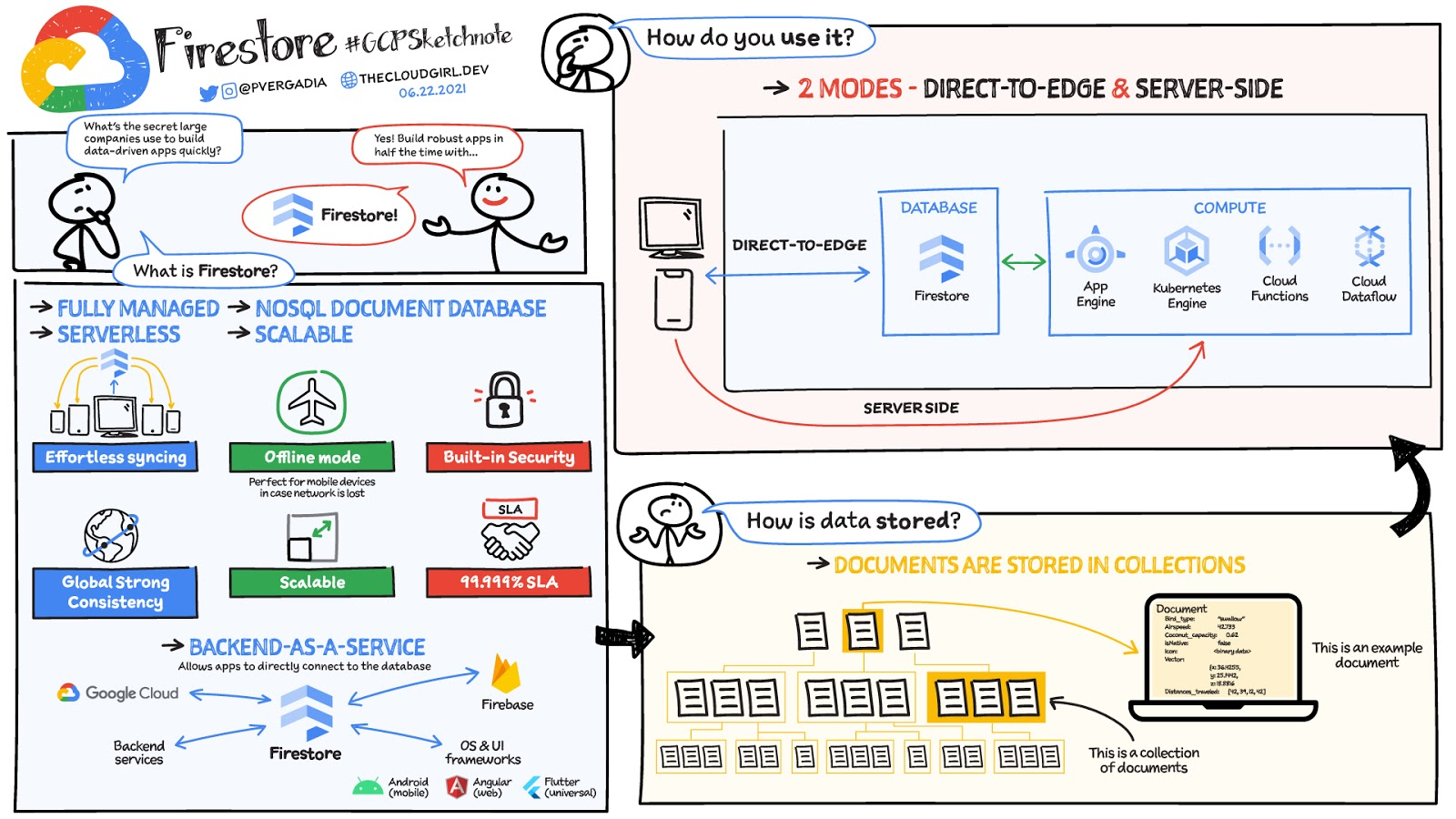
Firestore is a serverless, NoSQL document database that unlocks application innovation with simplicity, speed and confidence.
It acts as a glue that intelligently brings together the complete Google Cloud backend ecosystem, in-app services from Firebase and core UI frameworks & OS from Google.
What is Firestore?
Firestore is a serverless, fully managed NoSQL document database that scales from zero to global scale without configuration or downtime. Here’s what makes Firestore unique:
- Ideal for rapid, flexible and scalable web and mobile development with direct connectivity to the database.
- Supports effortless real time data synchronization with changes in your database as they happen.
- Robust support for offline mode, so your users can keep interacting with your app even when the internet isn’t available or is unreliable.
- Fully customizable security and data validation rules to ensure the data is always protected
- Built-in strong consistency, elastic scaling, high performance & best in class 99.999% availability
- Integration with Firebase and Google Cloud services like Cloud Functions and BigQuery, serverless data warehouse.
- In addition to a rich set of Google Cloud service integrations, Firestore also offers deep one-click integrations with a growing set of 3rd party partners via Firebase Extensions to help you even more rapidly build applications.
Document-model database

Firestore is a Document-model database. All of your data is stored in “documents” and then “collections”. You can think of a document as a JSON object. It’s a dictionary with a set of key-value mappings, where the values can be several different supported data types including strings, numbers or binary values..
These documents are stored in collections. Documents can’t directly contain other documents, but they can point to subcollections that contain other documents, which can point to subcollections, and so on. This structure brings with it a number of advantages. For starters, all queries that you make are shallow, meaning that you can grab a document without worrying about grabbing all the data underneath it. And this means that you can structure your data hierarchically in a way that makes sense to you logically, without having to worry about grabbing tons of unnecessary data.
How to use Firestore?
Firestore can be used in two modes:
- Firestore in Native Mode: This mode is differentiated by its ability to directly connect your web & mobile app to Firestore. Native Mode supports up to 10K writes per second, and over a million connections.
- Firestore in Datastore Mode: This mode supports only server-side usage of Firestore, but supports unlimited scaling, including writes.
Conclusion
Whatever your application use case may be, if you want to build a feature or an application quickly using Firestore backend-as-a-service. For a more in-depth look into Firestore check out the documentation. https://www.youtube.com/embed/moglAjmwmUQ?enablejsapi=1&
For more #GCPSketchnote, follow the GitHub repo. For similar cloud content follow me on Twitter @pvergadia and keep an eye out on thecloudgirl.dev.
5 Best Practices for Cloud Cost Optimization

5785
Of your peers have already read this article.
3:30 Minutes
The most insightful time you'll spend today!
When customers migrate to Google Cloud Platform (GCP), their first step is often to adopt Compute Engine, which makes it easy to procure and set up virtual machines (VMs) in the cloud that provide large amounts of computing power. Launched in 2012, Compute Engine offers multiple machine types, many innovative features, and is available in 20 regions and 61 zones!
Compute Engine’s predefined and custom machine types make it easy to choose VMs closest to your on-premises infrastructure, accelerating the workload migration process cost effectively. Cloud allows you the pricing advantage of ‘pay as you go’ and also provides significant savings as you use more compute with Sustained Use Discounts.
As Technical Account Managers, we work with large enterprise customers to analyze their monthly spend and recommend optimization opportunities. In this blog, we will share the top recommendations that we’ve developed based on our collective experience working with GCP customers.
Getting ready to save
Before you get started, be sure to familiarize yourself with the VM instance pricing page—required reading for anyone who needs to understand the Compute Engine billing model and resource-based pricing. In addition to those topics, you’ll also find information about the various Compute Engine machine types, committed use discounts and how to view your usage, among other things.
Another important step to gain visibility into your Compute Engine cost is using Billing reports in the Google Cloud Console and customizing your views based on filtering and grouping by projects, labels and more. From there you can export Compute Engine usage details to BigQuery for more granular analysis. This allows you to query the datastore to understand your project’s vCPU usage trends and how many vCPUs can be reclaimed. If you have defined thresholds for the number of cores per project, usage trends can help you spot anomalies and take proactive actions. These actions could be rightsizing the VMs or reclaiming idle VMs.
Now, with these things under your belt, let’s go over the five ways you can optimize your Compute Engine resources that we believe will give you the most immediate benefit.
1. Apply Compute Engine rightsizing recommendations
Compute Engine’s rightsizing recommendations feature provides machine type recommendations that are generated automatically based on system metrics gathered by Stackdriver Monitoring over the past eight days. Use these recommendations to resize your instance’s machine type to more efficiently use the instance’s resources. It also recommends custom machine types when appropropriate. Compute Engine makes viewing, resizing and other actions easier right from the Cloud Console as shown below.
Recently, we expanded Compute Engine rightsizing capabilities from just individual instances to managed instance groups as well. Check out the documentation for more details.

For more precise recommendations, you can install the Stackdriver Monitoring agent which collects additional disk, CPU, network, and process metrics from your VM instances to better estimate your resource requirements. You can also leverage the Recommender API for managing recommendations at scale.
2. Purchase Commitments
Our customers have diverse workloads running on Google Cloud with differing availability requirements. Many customers follow a 70/30 rule when it comes to managing their VM fleet—they have constant year-round usage of ~70%, and a seasonal burst of ~30% during holidays or special events.
If this sounds like you, you are probably provisioning resources for peak capacity. However, after migrating to Google Cloud, you can baseline your usage and take advantage of deeper discounts for Compute workloads. Committed Use Discounts are ideal if you have a predictable steady-state workload as you can purchase a one or three year commitment in exchange for a substantial discount on your VM usage.
We recently released a Committed Use Discount analysis report in the Cloud Console that helps you understand and analyze the effectiveness of the commitments you’ve purchased. In addition to this, large enterprise customers can work with their Technical Account Managers who can help manage their commitment purchases and work proactively with them to increase Committed Use Discount coverage and utilization to maximize their savings.
3. Automate cost optimizations
The best way to make sure that your team is always following cost-optimization best practices is to automate them, reducing manual intervention.
Automation is greatly simplified using a label—a key-value pair applied to various Google Cloud services. For example, you could label instances that only developers use during business hours with “env: development.” You could then use Cloud Scheduler to schedule a serverless Cloud Function to shut them down over the weekend or after business hours and then restart them when needed. Here is an architecture diagram and code samples that you can use to do this yourself.
Using Cloud Functions to automate the cleanup of other Compute Engine resources can also save you a lot of time and money. For example, customers often forget about unattached (orphaned) persistent disk, or unused IP addresses. These accrue costs, even if they are not attached to a virtual machine instance. VMs with the “deletion rule” option set to “keep disk” retain persistent disks even after the VM is deleted. That’s great if you need to save the data on that disk for a later time, but those orphaned persistent disks can add up quickly and are often forgotten! There is a Google Cloud Solutions article that describes the architecture and sample code for using Cloud Functions, Cloud Scheduler, and Stackdriver to automatically look for these orphaned disks, take a snapshot of them, and remove them. This solution can be used as a blueprint for other cost automations such as cleaning up unused IP addresses, or stopping idle VMs.
4. Use preemptible VMs
If you have workloads that are fault tolerant, like HPC, big data, media transcoding, CI/CD pipelines or stateless web applications, using preemptible VMs to batch-process them can provide massive cost savings. In fact, customer Descartes Labs reduced their analysis costs by more than 70% by using preemptible VMs to process satellite imagery and help businesses and governments predict global food supplies.
Preemptible VMs are short lived— they can only run a maximum of 24 hours, and they may be shut down before the 24 hour mark as well. A 30-second preemption notice is sent to the instance when a VM needs to be reclaimed, and you can use a shutdown script to clean up in that 30-second period. Be sure to fully review the full list of stipulations when considering preemptible VMs for your workload. All machine types are available as preemptible VMs, and you can launch one simply by adding “-preemptible” to the gcloud command line or selecting the option from the Cloud Console.
Using preemptible VMs in your architecture is a great way to scale compute at a discounted rate, but you need to be sure that the workload can handle the potential interruptions if the VM needs to be reclaimed. One way to handle this is to ensure your application is checkpointing as it processes data, i.e., that it’s writing to storage outside the VM itself, like Google Cloud Storage or a database. As an example, we have sample code for using a shutdown script to write a checkpoint file into a Cloud Storage bucket. For web applications behind a load balancer, consider using the 30-second preemption notice to drain connections to that VM so the traffic can be shifted to another VM. Some customers also choose to automate the shutdown of preemptible VMs on a rolling basis before the 24-hour period is over, to avoid having multiple VMs shut down at the same time if they were launched together.
5. Try autoscaling
Another great way to save on costs is to run only as much capacity as you need, when you need it. As we mentioned earlier, typically around 70% of capacity is needed for steady-state usage, but when you need extra capacity, it’s critical to have it available. In an on-prem environment, you need to purchase that extra capacity ahead of time. In the cloud, you can leverage autoscaling to automatically flex to increased capacity only when you need it.
Compute Engine managed instance groups are what give you this autoscaling capability in Google Cloud. You can scale up gracefully to handle an increase in traffic, and then automatically scale down again when the need for instances is lowered (downscaling). You can scale based on CPU utilization, HTTP load balancing capacity, or Stackdriver Monitoring metrics. This gives you the flexibility to scale based on what matters most to your application.
High costs do not compute
As we’ve shown above, there are many ways to optimize your Compute Engine costs. Monitoring your environment and understanding your usage patterns is key to understanding the best options to start with, taking the time to model your baseline costs up front. Then, there are a wide variety of strategies to implement depending on your workload and current operating model.
For more on cost management, check out our cost management video playlist. And for more tips and tricks on saving money on other GCP services, check out our blog posts on Cloud Storage, Networking and BigQuery cost optimization strategies. We have additional blog posts coming soon, so stay tuned!
Seven-Eleven Japan Leverages Google Cloud’s Performance and Speed for Real-time Business Insights

6829
Of your peers have already read this article.
4:00 Minutes
The most insightful time you'll spend today!
With the rise of technologies like smartphones, retailers have felt the pressure to meet evolving consumer needs and expectations. Seven-Eleven Japan(“SEJ”) has long been on the forefront of this thanks to the way they develop and invest in IT. However, in recent years, Japan’s leading convenience store chain has struggled to maintain its complex legacy systems at the rate needed to keep up with today’s rapid digitization, spurred on by the increasing proliferation of smartphones and an IT vendor-dependent structure.
Legacy systems limiting real-time responsiveness and innovation
Since its early days, SEJ has been proactive in adopting information technology, mainly relying on technology solutions from Japan’s leading vendors. But as the systems have grown, key business issues have been resolved using a vendor-dependent structure rather than being driven by SEJ’s own needs.
Datasets and business logic were combined and built into legacy environments, gradually leading to data silos. As a result, data was distributed across multiple systems, causing a variety of problems, including the inability to efficiently retrieve data when needed, delays in accessing data collected in individual stores, and difficulties taking measurements at the right time in business operations that require real-time responsiveness.
Connecting different systems also takes time and money, and the lead time for introducing new services—from planning to development and launch—has been longer than expected.
To solve these problems, SEJ’s IT department built “Seven Central”—a new platform for practical data use launched in 2020 to support the company’s future IT strategies and digital transformation initiatives.
At its core, Seven Central’s ultimate purpose is to allow real-time data views. Versatile, real-time datasets—such as point-of-sale (POS) data from 7-Eleven stores—are consolidated into a centralized location in the cloud. They created a simple data mart that provides data via an API to enable them to respond more quickly to requests from individual departments.
“In such uncertain times, it’s vital to use data to make quick decisions,” says Izuru Nishimura, Executive Officer and Head of ICT Department. “Each department across the entire company will be able to gain an immediate understanding of the situation based on the most up-to-date data and respond accordingly. This is why we built Seven Central.”
Google Cloud selected to help SEJ build and grow their data cloud
Today’s rapidly changing business environment has also highlighted the risk of IT support becoming a bottleneck. The long-term strategy is to gradually expand the datasets managed and collected in Seven Central according to business needs.
In the first phase, SEJ collected POS data from all 21,000+ stores to enable real-time analysis. Moving forward, they would like to collect other relevant data—for example, unstructured data, such as images and videos, or master datasets that are currently stored externally.
Google Cloud was already a top contender when SEJ started developing Seven Central in 2019. They compared various public cloud services besides Google Cloud, focusing on three main capabilities.
“We placed particular emphasis on service scalability to drive future digital transformation; security when handling data, which is the lifeline of our company; and finally, openness,” says Nishimura. He emphasizes that openness was perhaps the most important factor for choosing Google Cloud. Breaking away from the negative aspects of an entirely vendor-dependent system enabled them to build an agile development system with multiple vendors.
Google Cloud technologies including BigQuery and API management platform, Apigee, play a vital role in Seven Central. BigQuery’s high-speed processing at petabyte scale and fully managed infrastructure helped keep costs low during development and verification.
“Data is stored in a way that allows you to share it easily across organizations, which helps solve the issue of data silos from the perspective of scalability. I also like the fact there are some interesting features that could be used in the future—like BigQuery ML, which enables machine learning on BigQuery,” says Nishimura.
Apigee allows SEJ to separate datasets and business logic, which is one of the key points of Seven Central. While the trend these days is to standardize interfaces using an API, the reality tends to involve many different APIs rather than the introduction of one unified API. With Apigee, SEJ provides a single unified API for all of its data cloud, and they can now understand what data is used thanks to Apigee’s API usage visualizations.
“Right now, we collect data from all 21,000+ stores,” says Nishimura. “But in anticipation of a future expansion in business operations, we have designed a system that can scale up and run without issue, even if we were to have 30,000 stores, with 1,000 customers per store per day, purchasing five items per person.”
Real-time insights with BigQuery and Cloud Spanner
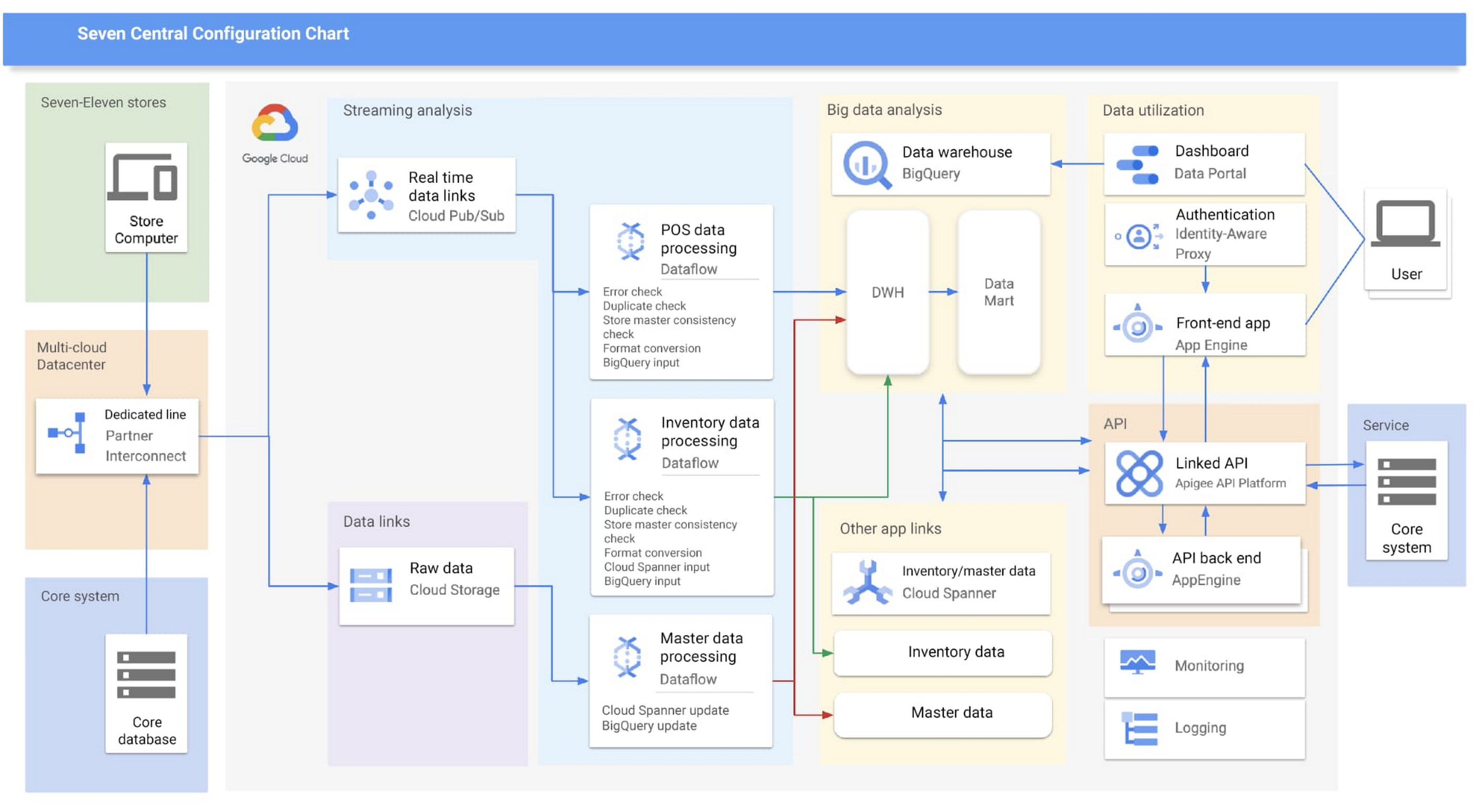
Google Cloud partner Cloud Ace came on board early in the planning phases. Based on their recommendations, SEJ decided to continue making full use of BigQuery to analyze data collected from all 21,000+ stores throughout Japan, while also using Cloud Spanner’s availability, near-unlimited scalability and transactional consistency to help achieve the real-time results needed for the project.
“Given that both the data and the regularity with which it is accessed are expected to steadily increase in the future, we chose Cloud Spanner as backend storage for data delivery via API. We consider it a good choice,” says Shota Kikuchi, General Manager, Consulting Department, Technology Division, Cloud Ace Co., Ltd.
Finally, they chose to use Google Cloud’s Stream Analytics Solutions messaging service for collecting POS data in real time, which can then be put to immediate use with Cloud Spanner and BigQuery.
High-speed responses exceed targets and create new value
Seven Central went live in September 2020 with surprising results.
They initially set a target time of one hour from when a customer makes a purchase to the point when Seven Central can use that data. But when the final system was first tried—it took barely a minute. Moving forward they estimate that the latest inventory data from the service side will become available within a few minutes of being added to the system.
“This is real innovation, and I must admit that I am quite surprised. As well as being able to solve existing issues, we also hope it will lead to new improvements and services that have been unimaginable up until now,” says Nishimura.
The team hopes to roll out the Seven Central platform in all companies affiliated with Seven & i Holdings—not just SEJ. They also plan to explore Google Cloud AI and machine learning technologies to take on challenges in new areas. For example, they are investigating the idea of clustering individual stores using BigQuery ML.
Seven Central has already attracted attention from many departments and received a lot of requests. Nishimura and his team say they hope to continue to grow Seven Central while still observing their fundamental principles—not including business logic, maintaining real-time results, and staying true to the uniqueness of SEJ.
Learn more about Google Cloud smart analytics solutions.
How Kinguin Notched Up Shopping Experience with Google Recommendations AI

6440
Of your peers have already read this article.
3:00 Minutes
The most insightful time you'll spend today!
Over 2.14 billion people worldwide are expected to buy online this year, according to Statista. Online retail sales will account for 22% of all purchases by 2023. But in a competitive retail landscape, positive interactions can mean the difference between a sale and an abandoned shopping cart.
One of the leading global marketplaces – Kinguin.net is a haven for gamers. Their bustling ecommerce business conducts over 500,000 new transactions monthly. Users will encounter over 50,000 unique digital products, from video games, gift cards, in-game items to computer software and services. With over 10 million registered users, Kinguin improved their experience by helping users find items quickly and deliver service at scale.
Helping customers find what they want, fast
Because of Kinguin’s high volume of users—both buyers and sellers—and breadth of digital products, browsing and shopping can be challenging. “Customers shop online for choice and convenience, but it can sometimes be overwhelming. We want anyone who shops at Kinguin to find what they are looking for quickly and easily,” says Viktor Romaniuk Wanli, Kinguin CEO and Founder.
Today’s retailers know that creating personalized shopping experiences is crucial for establishing and maintaining customer loyalty. Kinguin discovered their users were getting a rather standard retail experience. They wondered how they could offer them a more tailored, personalized experience.
They knew product recommendations were a great way to personalize experiences because they help customers discover products that match their tastes and preferences. But it’s not that easy to recommend products. Various shifting factors make recommendations much more complex:
- Customer behavior. Understanding customers is tough. How do you recommend something to a cold start user who’s never been to your site before? What happens when their behavior changes?
- Omnichannel context. According to Harvard Business Review, 73% of all customers use many channels when they buy. What happens when they go from desktop to mobile or from social media shopping to a proprietary app?
- Product data challenges. How do you recommend new products within a large catalog of items? What if your product data has sparse labeling or unstructured metadata?
Data wasn’t a problem for Kinguin. They had data orders, history, wishlists, and could collect events based on their platform interactions. It was the machine learning model expertise they lacked. So rather than building their own solution, they determined it was more cost effective for them to find a reliable partner. It was also essential that the solution integrated easily with Kubernetes, which enabled their global network.
With these considerations in mind, they applied for the Google Recommendations AI beta program. Kinguin became the first gaming e-commerce platform in Europe to use Recommendations AI when it launched in 2020.
Pro gamer move: using a fully managed AI service
Google Recommendations AI uses algorithms to deliver highly personalized suggestions tailored to a customer’s preferences. Google Cloud based these algorithms on the same research that powers models by YouTube search and Google Shopping. Algorithms are always being tuned and adjusted to focus on individuals themselves—not just items.
Many shopping AIs rely on manually provisioning infrastructure and training machine learning models. Instead, Recommendations AI’s deep learning models use item and user metadata to gain insights. It processes Kinguin’s thousands of products at scale, iterating in real time. First, Kinguin pieces together a customer’s history and shopping journey. Then, using Recommendations AI, they can serve up personalized products—even for long-tail products and cold-start users.
By leveraging internal tools, Kinguin didn’t need to start implementation from scratch. After a few trial sessions with Google Cloud engineers, they got started right away. Due to the fast-paced nature of a marketplace—i.e., price changes, out-of-stock items—Kinguin needed their recommendations to be as close to real time as possible. They used internal event buses to stream events and their product catalog directly to the recommendations API.
Kinguin rolled out in high-traffic areas, including their home page, product page, and category pages. They analyzed heat maps and scroll maps to figure out where to test placements. They also experimented with different recommendation models such as “recently bought together” and “you may like.” Engineers also factored in where they were implementing the models. For example, the “others you might like” model would fit best on the homepage, while “frequently bought together” made sense at checkout.
Understanding how product recommendations influence financials is critical for demonstrating the impact of personalization. Using BigQuery, Kinguin could analyze different cost projection models. BigQuery helped them dig into specific financial data to understand their margins and revenue gains.
Playing to win: enhanced customer experience
Since adopting Recommendations AI, Kinguin has improved both customer experience and satisfaction. Search times have shortened by 20 seconds. Additionally, their average cart value has increased by 5 EUR. Conversion rates have quadrupled since the outset. Click-thru rates have doubled, increasing by 2.16 on product pages and 2.8 times on recommendations pages.
“Google Recommendations AI has helped us evolve our service, increase customer loyalty and satisfaction. It has also contributed to a significant rise in sales,” says Wanli. Kinguin is already thinking about other ways of enhancing user experiences with recommendations. Ideas include their checkout process, other landing pages, and email marketing.
Kinguin’s journey with Google Cloud shows how companies can leverage AI to optimize sales and deliver high-performing, low-latency recommendations to any customer touchpoint.
Learn more about Recommendations AI and Google Cloud AI and machine learning solutions.
Renaulution: Renault’s story of migrating to 70 applications in 2 years

3313
Of your peers have already read this article.
3:00 Minutes
The most insightful time you'll spend today!
Editor’s note: Renault, the French automaker, embarked on a wholesale migration of its information systems—moving 70 applications to Google Cloud. Here’s how they migrated from Oracle databases to Cloud SQL for PostgreSQL.
The Renault Group, known for its iconic French cars has grown to include four complementary brands, and sold nearly 3 million vehicles in 2020. Following our company-wide strategic plan, “Renaulution,” we’ve shifted our focus over the past year from a car company integrating tech, to a tech company integrating cars that will develop software for our business. For the information systems group, that meant modernizing our entire portfolio and migrating 70 in-house applications (our quality and customer information systems) to Google Cloud. It was an ambitious project, but it’s paid off. In two years we migrated our Quality and Customer Satisfaction information systems applications, optimized our code, and cut costs thanks to managed database services. Compared to our on-premises infrastructure, using Google Cloud services and open-source technologies comes to roughly one dollar per user per year, which is significantly cheaper.
An ambitious journey to Google Cloud
We began our cloud journey in 2016 with digital projects integrating a new way of working and new technologies. These new technologies included those for agility at scale, data capabilities and CI/CD toolchain. Google Cloud stood out as the clear choice for its data capabilities. Not only are we using BigQuery and Dataflow to improve scaling and costs, but we are also now using fully managed database services like Cloud SQL for PostgreSQL. Data is a key asset for a modern car maker because it connects the car maker to the user, allows car makers to better understand usage and better informs what decisions we should make about our products and services. After we migrated our data lake to Google Cloud, it was a natural next step to move our front-end applications to Google Cloud so they would be easier to maintain and we could benefit from faster response times. This project was no small undertaking. For those 70 in-house applications (e.g. vehicle quality evaluation, statistical process control in plants, product issue management, survey analysis), for our information systems landscape, we had a range of technologies—including Oracle, MySQL, Java, IBM MQ, and CFT—with some applications created 20 years ago.
Champions spearhead each migration
Before we started the migration, we did a global analysis of the landscape to understand each application and its complexity. Then we planned a progressive approach, focusing on the smallest applications first such as those with a limited number of screens or with simple SQL queries, and saving the largest for last. Initially we used some automatic tools for the migration, but we learned very quickly nothing can replace the development team’s institutional knowledge. They served as our migration champions.
The apps go marching one by one
When we migrated our first few Oracle databases to Cloud SQL for PostgreSQL we tracked our learnings in an internal wiki to share common SQL patterns, which helped us speed up the process. For some applications, we simplified the architecture and took the opportunity to analyze and optimize SQL queries during the rework. We also used monitoring tools like Dynatrace and JavaMelody to ensure we improved the user experience.
The approach we developed was very successful—where database migration was initially seen as insurmountable, the entire migration project was completed in two years.
With on-premises applications it was hard for our developers to separate code performance from infrastructure limitations. So as part of our migration to Google Cloud, we optimized our applications with monitoring services. With these insights our team has more control over resources, which has reduced our maintenance and operations activity and resulted in faster, more stable applications. Plus, migrating to Cloud SQL has made it much easier for us to change our infrastructure as needed, add more power when necessary or even reduce our infrastructure size.
A new regime on Cloud SQL
Now that we’re running on Cloud SQL, we’ve improved performance even on large databases with many connected users. Thanks to built-in tools in the Google Cloud environment, we can now easily understand performance issues and quickly solve them. For example, we were able to reduce the duration of a heavy batch processing by a factor of three from nine to three hours. And we don’t have to wait for the installation of a new server, so our team can move faster. Beyond speed, we’ve also been able to cut costs. We optimized our code based on insights from monitoring tools, which not only enabled a more responsive application for the user, but it also reduced our costs because we’re not overprovisioned.
Learn more about the Renault Group and try out Cloud SQL today.
More Relevant Stories for Your Company

AirAsia Turns to Google Cloud to refine Pricing, Increase Revenue, and Improve Customer Experience
AirAsia needed a platform incorporating products that could capture, process, analyze, and report on data, while delivering value for money and meeting its speed and availability requirements. The airline also wanted to minimise infrastructure management and system administration demands on its technology team members. The airline conducted a proof of

Google Data Cloud: The Catalyst for Modern App Development and Innovation
97 zettabytes was the estimated volume of data generated worldwide in 20221. This sort of explosion in data volume is happening in every enterprise. Now imagine being able to access all this data you own from anywhere, at any time, analyze it, and leverage its insights to innovate your products

Cloud Spanner & Bigtable Helps Sabre Build Consistency & Scalability to Serve 1 Billion Travellers
Sabre is an innovative software and technology company that leverages highly scalable databases and artificial intelligence (AI) to power travel industry partners around the globe. Our company processes more than 12 billion shopping requests and serves over 1 billion travelers every year. The companies that partner with us include airlines, travel

Neo4J & Google Cloud: Graph Data in Cloud to Address Challenges in FinServ Industry
Over the last decade, financial service organizations have been adopting a cloud-first mindset. According to InformationWeek, lower costs and enhanced scalability were the biggest drivers for cloud adoption in financial services, and cloud-native applications allow access to the latest technology and talent, enabling adopters to rebuild transaction processing systems capable of
