





Google’s Default Messaging Apps for AT&T Android Users Ensure Richer Conversations

5562
Of your peers have already read this article.
1:30 Minutes
The most insightful time you'll spend today!
Today, we’re announcing that we’re working with AT&T to establish Messages by Google as the default messaging application for all AT&T customers in the United States using Android phones. The collaboration aims to help accelerate the industry toward global Rich Communication Services (RCS) coverage and interoperability to offer a consistent, secure, and enhanced messaging experience for all Android users around the world.
“Many AT&T customers have enjoyed the advantages of RCS for years when texting with friends and family,” said David Christopher, executive vice president and general manager – AT&T Mobility. “We look forward to working closely with Google to extend these benefits to even more of our customers as they enjoy richer conversations with others around the world.”
Working together, AT&T and Google will continue the momentum to upgrade SMS with enhanced messaging features offered in Messages, which includes the support of chat features based on the open RCS standard. With Messages as the default messaging application, all AT&T customers using Android devices will get enhanced features so they can:
- Share full-resolution pictures from a recent event or vacation
- Send a higher-quality video of that soccer goal and the celebration that followed
- Know when someone is replying to a text
- Send and receive messages over Wi-Fi or data
- Participate in group chats where it’s easy to add someone else to the conversation, or let someone leave, without starting a brand new thread

In addition to these features, we’re also rolling out end-to-end encryption for one-on-one RCS conversations between people using Messages and people who have chat features enabled.
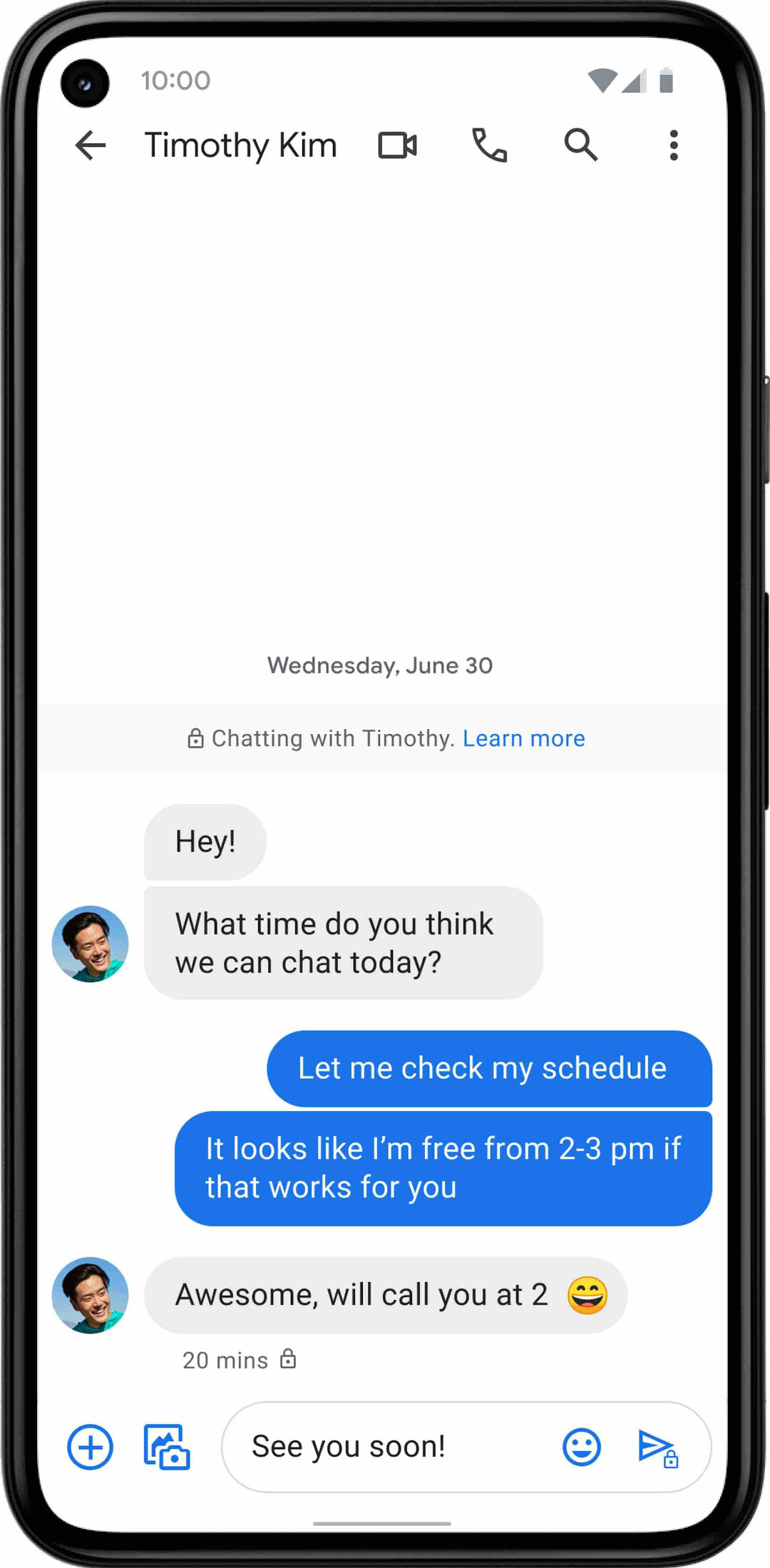
For years, we’ve been working with the mobile industry and device makers to bring enhanced and secure messaging to everyone on Android. Today’s announcement—that AT&T customers using Android devices will soon be able to enjoy these features by default—is a major step forward.
How Recommendation AI Helps Retailers Optimize Click-through and Conversion Rates

7082
Of your peers have already read this article.
3:00 Minutes
The most insightful time you'll spend today!
Time to go outside again, I guess. I’ll need a sun hat. Sunscreen. Maybe some new sandals? What else?
With the Recommendations AI service, I might be reminded to grab a reusable water bottle and a swimsuit. Or some after-sun aloe lotion. Good thing, cause I’ll need it.

Recommendations AI is a solution that uses machine learning to bring product recommendations to their shoppers across any catalog or client list. This service is part of our full suite of Retail solutions. When you integrate with the Retail API, you get the benefit of Google’s Product Discovery. Integrating once to reap the benefits over and over. Recommendations is the starting point, and you can easily extend into Retail Search and Vision Product Search in the upcoming future.
The Recommendations solution is fully managed, global-scale and powered by deep learning, so you can focus on a great shopping experience and let someone else worry about the infrastructure.
Compared to baseline recommendation systems used by customers, Recommendations AI showed double digit uplift in conversion and clickthrough rates in A/B experiments controlled by the customers. You can optimize for click-through, conversion or session revenue, and fine tune the models to make sure you omit out-of-stock items or duplicates, for example.

So how does it work, and how do you get started? Read on, and we’ll walk you through the pipeline, starting with the data you already have to placement in your online store.
Formula: Data -> Model -> Placement
You start with your catalog, the list of all the things (postcards, movies, pie recipes) that you want to show your customers. Then you ingest your PII-redacted user events -this is the historic event data like home page views, add to cart events and more along with real time user events. This user event is joined with the product catalog and items that allows us to construct the sequence of shoppers’ activity, thus being able to predict what the shopper has a high propensity to purchase next. The user events can come from both online activity across devices or offline store purchases
The recommendation model will return a list of products, which are the recommendations. The brains of the operation, if you will. This model is trained using all the data that you ingest, using the latest neural network models and techniques that Google has built expertise over the years in flagship products like Youtube and News, that allows us to uncover shopper intent, so it can best predict the right recommendations to show to the right people.
Every model outputs a list of product identifiers, but where do they go? They go into placements, the spots, panels, carousels on your customer’s journey interacting with your brand that you’ve set aside to highlight recommendations. A model can send recommendations to one or more placements, but each placement only receives information from one recommendation model. Your pages will then need to render the products with the right images, text or other metadata, using the product ID that is returned by the model.
What do recommendations look like?
Let’s start by browsing our postcard-selling website, where I’ve been buying some vintage California postcards already. The recommendations algorithm has caught on to my interest, showing me other potential cards to purchase based on my history:

Put your data to work
To get started we need to bring your data into the recommendation model, so it can understand your customers, your inventory, and your sales patterns.
The model takes in the product catalog you use, and metadata about those products to better understand nuances in assortment, pricing and variables like size and style. You might already have this data stored in BigQuery or Merchant Center, and hence we provide easy integrations that you can leverage to get started even faster.
As for the user events, don’t worry if you already have systems in place to capture web and mobile activity. We make it easy to bring in your real time event logs by providing seamless integrations with Google Tag Manager, Javascript pixel, or even historic events from Cloud Storage, BigQuery or using inline API or JSON, so you can immediately train the models on this imported data. All this allows you to kickstart integrating with Recommendations AI in a matter of days.
The models then construct a sequence of activities that the user went through and joins with the products that the user engaged with. Once your data is ready to go, it takes a few days to train the model. Next onto making the data work for you.
Quickly customize your model
Setting up your own recommendations project in the console gives you the ability to choose what sort of model to train (based on what recommendations you want to generate) and your objective. Are you optimizing for click-through rate–more people click on the recommendation links or products–or for conversion rate–more people choose or buy what was suggested or revenue ?
Different models can be optimized for different optimization goals.; the GCP console explains what each one can do and how you can choose to optimize it.

Let’s unpack some of this terminology real quick.
We’ve got three model types:
- Recommended for you – Means we think these are items you’ll want to buy, based on your history; this is usually used on a home page to showcase items.
- Others you may like – Means if you’re browsing the page of a water bottle, we will recommend alternative brands of water bottles that you may like as well as a backpack, based on your engagement history.
- Frequently bought together – Means that when anyone buys sunscreen, we notice that they often also buy aloe lotion, so we will surface those items when someone adds any one of them to their cart.
And then we have three business objectives that the models optimize for:
- Click-through rate – How frequently did somebody click on a recommended item?
- Conversion rate– How frequently did somebody add a recommended item to their cart?
- Revenue per session – How much money did the recommendations generate for you?
Deliver anywhere along the journey
Now that you’re all set up in the Retail AI console, you can test out the recommendations in the console, even before you deploy to production.

You can integrate Recommendations into your frontend by calling the Predict APIt. The placements of recommendations will report data back into the dashboard and you can analyze and measure success for future iterations.
On top of that you can use the recommendations for other parts of your customer’s journey. Email promotions, storefront kiosks, display ads or follow-up notifications can include recommendations based on past activity and cart contents. The model gives you useful product recommendations for a wide variety of touchpoints and steps in the purchasing process.
More best practices, and guides, are available inside our documentation.
How to get started
Training your own models can be tedious, time-consuming, and expensive. On top of that it requires deeper data science expertise to set up. Let us do it instead!
You can see how IKEA Retail uses Recommendations AI in this recent talk and blog from the Google Cloud Retail Summit..
To get started today you’ll need to make a Cloud project and enable the Retail API, which then allows you to access all the recommendation tools in one menu. Bring in your catalog and purchasing data, define a placement or two, and you can start putting recommendations on your site in a matter of days.
6609
Of your peers have already watched this video.
8:00 Minutes
The most insightful time you'll spend today!
Hospitals Can Offer Interconnected Patient Experiences Using Google’s Natural Language Services
Machine Learning (ML) in healthcare helps extract data from conversations, medical records, forms, research reports, insurance claims and other documents across the care value-chain to help care providers have a holistic view of their patients to draw insights for diagnoses and treatments. With Natural Language Processing(NLP), healthcare organizations can program computers and systems to process and analyse large volumes of human communication in form of spoken texts, written documentation and utterances. Watch the video to learn how the healthcare community can leverage Google’s NLP services to process structured and unstructured data to offer interconnected experiences for patients.
How We Proved Everyone Wrong and Scaled Our Sports Apparel Company Across Continents

5619
Of your peers have already read this article.
4:30 Minutes
The most insightful time you'll spend today!
There were several reasons why Suddora and CustomOnIt shouldn’t have been successes. My friend Adam and I were working in a Michigan video store and knew next to nothing about running a business. We started with an idea to sell sweatbands, like the ones I used to wear in my band, and over several months managed to launch it legitimately. This led us to bail on the video store and move to Vegas—smack in the middle of the 2008 financial crisis. We lived on ramen noodles and little else for two years while we got the company going. Our friends took bets on how long we’d stay in business.
But 11 years later, we have not one but several successful sports apparel businesses, I’m running a bunch of other e-commerce companies (including SweatBands.com), and we’re selling in the United Kingdom and soon in Asia Pacific.
How did two broke-but-determined guys working in a video store get this far? We always believed in moving ahead, no matter what obstacles came our way—and we learned a lot about how technology like G Suite can make a small business look and operate like a bigger one, and how searching Google for business resources can pay off.
Starting with an idea, a domain and…ramen noodles
In my band days in Michigan, we tried to think of ways to get our name out there. Instead of the usual T-shirts or stickers, I pitched the idea of custom sweatbands since I wore sweatbands when I played guitar. I figured other people might like sweatbands with the names of their bands.
We knew we needed a web domain and email addresses so we could sell online. We found out about G Suite during a Google search, and it seemed like the most pain-free way to get started by buying the domains Customonit.com and Suddora.com (Adam made up that name. “Sudor” is Spanish for “sweat,” which is what the businesses were about, and we added the “d” and the “a” to make the name stand out.).
Even though the company was just me and Adam, we needed to look professional (and also a bit bigger than we actually were). With G Suite, we set up email aliases for various business functions, like help@suddora.com and sales@suddora.com, and arranged to route email from these addresses into our regular Gmail inboxes; that way, customers could easily reach us.
Scaling our business in the Las Vegas heat
Next, we decided to move to Las Vegas because, in the aftermath of the recession, we could live cheaply there. When we got our first big sweatband order from a major NCAA football team, the momentum started. Now we had to scale up the business so we could handle more orders and deal with suppliers, even though we were still working out of our living room.
We grew to a five-person team, including a customer service person and a designer, and G Suite made it easy to onboard everyone quickly. In addition to giving new employees their own email addresses with the Suddora.com or STbands.com domain names, we routed emails to various people from the “help” and “sales” email aliases we had set up. We also made sure that all of our employees were set up on G Suite, too.
Once orders started to roll in from major fast-food restaurants, football teams, and sports apparel companies, our roles constantly changed. G Suite helped us shave off precious time by helping us manage email less manually—we automatically re-routed emails depending on who’s working on what. If I wanted to take on more sales work, I forwarded emails from sales@suddora.com to my inbox with one click. Same thing with customer service: We never want to lose track of customer service inquiries, which are a high priority.
In 2009, a year after starting the business, Adam and I left our part-time jobs at a local department store to run the business full-time. We promised ourselves that when we hit a revenue target of $15,000 in one month we’d buy a TV for the apartment—and we got that TV!
Going international (without leaving our office)
The business was taking off. We decided to split STbands.com into two websites: Suddora.com for sports sweatbands and CustomOnIt.com for custom apparel and party goods. We recognized that half our customers wanted athletic wear and accessories, while the other half wanted custom items like T-shirts and wristbands. It was a move that would allow each business to thrive.
Creating products and managing suppliers was getting more complicated. Once again, G Suite helped us move our business forward. We used Google search to find suppliers in China, and were able to set up supplier relationships and talk one-on-one with the people making our products—without extensive and time-consuming travel to China. You can accomplish so much with video meetings and chat.
With more suppliers and more customers, we needed to constantly up our game in terms of product design. When we create new designs it generates a ton of files and iterations, which get shared back and forth between pattern designers, photo editors, writers, and marketing professionals. To help centralize these files, we store everything in Google Drive so they can be shared and accessed anytime, from anywhere. For example, we use Sheets to house updated data on our products across all of our e-commerce platforms.
Lessons learned
Eleven years on, I’m still learning every day about what it takes to run and grow a business. I think what helps is finding tools like G Suite that are so easy to use, you don’t need much ramp-up time to get started—nor do your employees. That means we’re all productive much faster.
Also, you might be thinking about a million ideas for starting a business. But the truth is, you only need one—an opportunity that makes you think, “Okay, this is going to be big.” So go for it. You can’t afford not to.
3861
Of your peers have already watched this video.
21:30 Minutes
The most insightful time you'll spend today!
The future of meetings in G Suite: Vision and roadmap
A study from MIT Sloan school in early April showed that 47% of US workers were already working from home. Compare that to just 13% before the pandemic. And these numbers are likely to be even greater today.
Video meetings help us connect in a human way, whether it’s for work, a personal commitment, or for education. We have seen Meet’s day-over-day growth surpass 60%. Meet daily usage is more than 30 times what it was in January 2020. And we have been able to scale to this demand easily. Scalability, security, reliability, come naturally to Google Cloud and are in-built into all our services. Our customers have been reaching out to tell us how much this has helped them shift to remote work rapidly during the pandemic.
G Suite continues to innovate on how teams communicate effectively, regardless of whether they are located in the same office or thousands of miles apart. In this video, we share our vision for the future of meetings, small and large, and how these innovations will help build human connections in a video-first world. We’ll also provide a sneak peek into what we’re doing to transform the overall life cycle of a meeting, from scheduling to follow-up.
Apigee Helps Bank BRI Rewrite its Digital Future and Achieve Financial Inclusion

6104
Of your peers have already read this article.
3:00 Minutes
The most insightful time you'll spend today!
About Bank BRI
Bank Rakyat Indonesia is one of the largest banks in Indonesia and is committed to increasing financial inclusions among un-banked Indonesians. Bank BRI specializes in using modern digital banking to facilitate microfinance lending across its network of over 10,000 branches and thousands of branchless agents.
Google Cloud Results
- Contributes $50M in revenue through the Apigee monetization feature
- Wins recognition for best digital bank in Indonesia from The Asian Banker in 2019
- Achieves ISO 27001 information security for open APIs, earning distinction as the only bank in ASEAN to receive certification to date
- Reduces partner onboarding from 6 months to under 1 hour with Apigee developer portal
Bank Rakyat Indonesia is making waves in Asia with its award-winning digital strategy. As a government-owned bank, Bank BRI is dedicated to changing the lives of its customers through accelerating financial inclusion across Indonesia. With an aggressive target of 84 percent of Indonesians participating in the banking system by 2022, Bank BRI is leapfrogging fintech competition thanks to its innovative digital strategy that has APIs at its core. By the end of 2019, Bank BRI expects to have reached a 70 percent financial inclusion rate among the country’s population, in part due to the adoption of the Cloud Apigee API Management Platform as the bank’s digital nucleus.
Transforming a legacy into a digital future
In the banking business, trust is essential, not only between the bank and its customers, but also between the bank and its partners. Recognizing that gaining and maintaining this trust would be key to customer and partner adoption of the new Bank BRI products and services, the bank decided to pursue ISO 27001 certification in 2018, becoming the first bank in ASEAN (the Association of Southeast Asian Nations) to become certified as information security compliant. Now the international community of partners and customers who use the bank’s APIs have yet another reason to place their trust Bank BRI.
“Apigee has become the central nervous system for all communications between the digital core banking, the microservices, the frontend, and the apps. Apigee has become our sun. Everything rotates around Apigee.”—Kaspar Situmorang, Executive Vice President, Bank Rakyat Indonesia
Kaspar Situmorang, Executive Vice President of Bank BRI, had the original vision for how the bank could transform itself into a fintech with digital technology and APIs. His team got started by implementing a web-native frontend over a new technology stack with Apigee as a second layer. This was a big change from the legacy technologies that existed when Situmorang joined the bank in 2017. Previously all of the bank’s products had their own public APIs, which were very difficult to manage, secure, and monetize.
Since deploying Apigee, it’s become much easier to manage the entire API lifecycle. Situmorang’s digital bank team of 15 uses the Apigee monetization and developer portal features while managing and securing APIs and conducting big data integrations. Apigee has become Bank BRI’s center of communications, handling all transactions between the bank and third parties.
Whereas previously it could take up to six months to onboard a new partner using host-to-host and VPN technology, now it takes less than an hour for partners to self-onboard using the Bank BRI Apigee developer portal. On the portal, partners can register, browse APIs, test in the sandbox, and go into production — all in less than an hour.
“Apigee has become the central nervous system for all communications between the digital core banking, the microservices, the frontend, and the apps. Apigee has become our sun. Everything rotates around Apigee,” says Situmorang.
Increasing financial inclusions
With more than 10,000 offices across Indonesia, Bank BRI has the largest network of any bank in ASEAN. The bank is also the biggest microfinance lender in the region. Though already present in even the most far-flung corners of Indonesia, Bank BRI is still working on increasing financial inclusion among un-banked Indonesians. With 56 million people that haven’t accessed banking services, Indonesia is in the bottom four countries for financial literacy in the world, along with Bangladesh, India, and China. It’s estimated that there is up to $8.3 billion in currency being held outside the banking system.
In order to reach this mostly rural, subset of the population, the bank launched Agent BRILink, a nationwide network of branchless agents. These agents can open new accounts, take deposits, pay out withdrawals, and process and disburse loans in under two minutes with the Pinang microfinance mobile app. To date, over 30,000 customers have received loans through Pinang. Handling its own risk-scoring and automatic payroll deductions for payments has translated into less risky and more profitable loans for Bank BRI.
“Customers download the app and scan their ID, capturing their credit score in just a few seconds. The digital offer letter says how much they’re approved for. They can then accept it, go to the approval screen, and do facial recognition. The money is disbursed immediately. GCP has transformed us into a fintech.”—Kaspar Situmorang, Executive Vice President, Bank Rakyat Indonesia
BRILink agents are bank customers who have been scored highly for reliability by the bank’s big data analyses and who maintain a minimum balance of around $800. Combining this data with the Google Maps API, Bank BRI is able to score all 75.5 million of its customers and identify which of them should be recruited as agents for underbanked areas. Since 2018, the bank has been able to appoint more than 200,000 branchless agents using the Agent BRILink app, eliminating the need for logistically challenging face-to-face meetings. This has resulted in an increase in loan volume from branchless business from $15 billion in 2017 to $26 billion in 2018.
To enable branchless agents to sign up new customers and provide banking services, all they need is a mobile phone and internet service. With many parts of rural Indonesia not covered by commercial 3G, Bank BRI has overcome this hurdle by operating its own satellite. With the connectivity the satellite guarantees, branchless agents can help customers obtain microfinancing and open new shops and businesses in all parts of the country. The satellite also provides internet service across the APAC region wherever the bank operates, from Sri Lanka to New Zealand. While it might seem unusual for a bank to operate a satellite, it’s reflective of Bank BRI’s commitment to reaching its financial inclusion targets and meeting its customers wherever they are.
“Pinang was created to win against fintechs trying to compete against us on speed, cost, and security,” says Situmorang. “The truth is that Indonesian regulators closed about 650 fintechs, mainly in the peer-to-peer lending space, because they were unsafe, too expensive, and very slow.”
Using APIs to create and monetize new products
Another way that Bank BRI is leveraging Google Cloud Platform solutions is through an innovative use of the Cloud Vision API, which enables the bank to integrate with the Indonesian government ID database. Identities of new customers — whether they’re coming in via a branch, a BRI Link Agent, or a mobile app — are automatically verified in seconds through facial recognition. With instant credit scoring and identity fraud concerns essentially eliminated, the bank can make more confident lending decisions.
“Monetization is very important to us. It enables us to define our pricing based on API calls and bill automatically based on usage. We’ve already recognized $50 million through the Apigee monetization feature.”—Kaspar Situmorang, Executive Vice President, Bank Rakyat Indonesia
“Customers download the app and scan their ID, capturing their credit score in just a few seconds,” explains Situmorang “The digital offer letter says how much they’re approved for. They can then accept it, go to the approval screen, and do facial recognition. The money is disbursed immediately. GCP has transformed us into a fintech.”
Bank BRI sees a bright digital future, in part thanks to the API product marketplace it’s creating to serve fintechs. With its digital technologies and massive customer base, the bank is sitting on a treasure trove of big data. Bank BRI already packages this data through more than 50 monetized open APIs for more than 70 ecosystem partners wanting to do credit scoring, business assessments, and risk management. Fintechs, insurance companies, and financial institutions don’t have the talent or the financial resources to do quality credit scoring and fraud detection on their own, so they are turning to Bank BRI.
“Monetization is very important to us. It enables us to define our pricing based on API calls and bill automatically based on usage. We’ve already recognized $50 million through the Apigee monetization feature,” says Situmorang.
Bank BRI is meeting and surpassing the goals it has set for itself for digitalization, increasing financial inclusion, and creating new revenue streams with APIs.
More Relevant Stories for Your Company
The Tech Behind Goibibo’s Amazing Collaboration Tool That Employees Love
Founded in 2007 and entering the travel market in 2009, Goibibo has grown to support 21 million users, 98% of whom are based in India. “We specialise in domestic Indian bookings and outbound bookings for Indian residents looking to travel to other countries,” explains Vikalp Sahni, Co-Founder and Chief Technology

Google Workspace’s Single Connected Experience Makes Workplaces Hybrid-ready
Our collective understanding of work—where it takes place and how it gets done—has been transformed over the last year. As companies and organizations across the globe reimagine work, new challenges and opportunities are emerging. How do people working “somewhere else” stay connected and part of the same conversations as those

Latest Features and Updates to Globally Bolster Translation Services
Let’s face it: in the globalized world, which is now more than ever a digital demand world, you need to scale and reach your customers right where they’re at. Translation is a critical piece of that, whether you’re translating a website in multiple languages or releasing a document, a piece



Lessons for the Indian Government: How the State of Arizona Innovates with Emerging Tech
Government agencies of every size and jurisdiction are being called upon to provide accurate and real-time information and deliver essential services across the globe in a world infested by COVID-19. Doug Lange, Chief Strategy Officer, state of Arizona, is primarily responsible for two things. One is Arizona's statewide IT Strategic
