






The Tech Behind Goibibo’s Amazing Collaboration Tool That Employees Love
READ FULL INTRODOWNLOAD AGAIN4409
Of your peers have already downloaded this article
5:30 Minutes
The most insightful time you'll spend today!
Eight Steps to Align Hybrid Work with Diversity, Equity and Inclusion (DEI) Principles

3790
Of your peers have already read this article.
2:00 Minutes
The most insightful time you'll spend today!
Many executives across the globe are feeling the effects of a recent pivot to hybrid work models. This massive transition represents a significant departure from existing office culture. As business leaders look to operationalize their flexible work model infrastructure, they’re also evaluating what it takes to attract and retain employees in this new landscape. Instead of seeing these as separate initiatives, business leaders have a unique opportunity to collectively overhaul corporate culture, focusing on hybrid work and diversity, equity, and inclusion (DEI) strategies in tandem.
Combining DEI and hybrid work strategies provides a more inclusive culture
Focusing on diversity, equity, and inclusion doesn’t mean business leaders are offering an underrepresented individual a specific role or platform because they fit a certain demographic category. Lack of job quality criteria leads to animosity and cultural inequality. Here, diversity means creating a meritocracy with equal pay and equal opportunity for all.
Organizations that thoughtfully combine DEI and hybrid work strategies will produce cultures that improve employee experience and business agility. Integrated DEI and hybrid workplace support better business outcomes by:
Increasing the total available talent pool. A business must cast a wide net for candidates by expanding how and where it searches. Adding a flexible work schedule policy expands potential talent by allowing parents, caregivers, and others to select the hours that work best for their family obligations. Remote work also holds a higher priority in job seekers’ desires. For example, a FlexJobs survey revealed that 24% of workers say the ability to work from home is so important to them that they are willing to take a 10-20% pay cut to work remotely, and 21% would give up some vacation time.
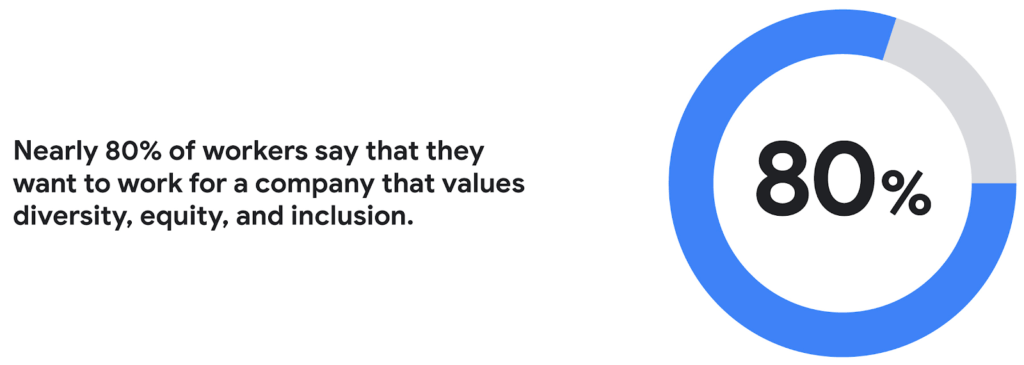
Creating a more inclusive culture. Job seekers want to work for companies that prioritize DEI. According to a recent CNBC and SurveyMonkey Workforce survey, nearly 80% of workers say that they want to work for a company that values diversity, equity, and inclusion. A DEI-centric work culture allows job seekers to feel like there’s a place for them.
Fostering innovation and profitability with broader perspectives. In general, diversity and inclusion promotes the expression of ideas from people with different backgrounds, leading to breakthroughs in creativity, innovation, and attracting new customers. Workplace DEI programs create an employee base that closely mirrors a customer base. A diverse team is less likely to miss potential market opportunities if representative of a broad range of ethnicity, race, age, assigned sex, and socioeconomic backgrounds. A 2020 McKinsey analysis found that companies in the top quartile for ethnic and cultural diversity on executive teams were 36% more likely to have above-average profitability than companies in the fourth quartile.
Hybrid work should not derail DEI efforts
While there are numerous benefits to integrating DEI and hybrid work strategies, it would be naive to think it won’t bring challenges. Businesses run the risk of creating new inequities and exacerbating existing ones as they move to hybrid models. One potential issue lies in which employees can work remotely. An HBR article shared how pre-Covid less than 30% of all workers could work from home; only 16% of Latinx workers and 19% of Black workers had remote flexibility, compared to 37% of Asian workers and 30% of white workers.
Even for employees who can work remotely, it’s essential to eliminate “proximity bias.” A study by SHRM found that 67% of surveyed supervisors admitted to considering remote workers more easily replaceable than onsite workers at their organization. Additionally, 72% said they would prefer all of their teams to be working in the office.
A successful hybrid environment strikes a balance between flexibility and inclusivity where individuals feel valued, and everyone has equal opportunities for advancement. In another study, researchers concluded that remote workers and office workers were promoted at the same rate, but found that remote workers’ salaries grew more slowly. Leading companies recognize that physically being at the office full-time isn’t necessary to produce great results.
8 steps to creating a diverse hybrid work culture
As DEI becomes a new business imperative, organizations must work to minimize unconscious bias, creating market-based salaries for all workers, and introducing educational programs that support talent development. Here are some concrete steps you can take to get started.
- Educate current and future leaders on DEI and hybrid work issues. As you build hybrid work strategies, it’s crucial to discover and understand unconscious biases. According to Deloitte, companies need a holistic DEI learning strategy, including unconscious bias training and developing the conditions for long-term behavior changes.
- Embrace tools that support DEI and hybrid workplaces. Organizations can leverage technology and AI-enabled HR software to support their efforts. Collaboration tools provide everyone with a voice regardless of where they are (for example, using Spaces for team chats in Google Workspace so that everyone has access to the same information). Video call features such as transcriptions and translation can help the hearing-and-vision-impaired and employees who speak different languages. It’s also possible to purchase recruiting solutions with AI technology to reduce the chance of bias or discrimination when reviewing candidates.
- Strengthen culture by marrying DEI with meritocracy. There should also be explicit guidelines to ensure the systems and processes for hiring and promoting individuals are both transparent and equitable. One method for accomplishing this goal is to define detailed job requirements and metrics per role to understand what skills are associated with specific functions. It’s also essential to ensure you’ve designed these processes in a way that screens out bias. Leading companies will deploy analytics tools to evaluate the systems’ fairness and track if the systems are progressing against diversity targets.
- Create upskilling programs to train employees. Many organizations struggle to find talent with the right skill sets. One solution to this problem is to invest in educating existing employees. Companies must develop diverse talent at every level to create a pipeline of candidates that progresses into senior management. Similar to the way companies offered management training programs to college graduates, organizations should design programs that provide skills enhancement for entry and mid-level employees. Almost every job will require a certain level of technical skill—organizations must upskill existing talent.
- Restructure compensation before employees leave. It’s easier to retain an employee than to onboard and train a new hire. According to the Atlanta Federal Reserve Bank’s wage growth tracker, wages for people who have switched jobs have outpaced those who’ve stayed at one employer since 2011. One way to retain talent is to right-size salaries to a competitive market rate.
- Remember that money isn’t everything. While individuals may switch jobs for money, they often stay in a position for the culture. Creating a leading employee experience helps organizations keep talent. Work from home programs, flexible work schedules, and advanced programs such as childcare benefits help build the foundation. But increasingly, individuals are looking for a sense of belonging. According to research from McKinsey, employees who feel included are three times more likely to report being excited about working for their organization and committed to its success. Another McKinsey report focusing on attrition shows that employees primarily leave companies because they don’t feel valued or don’t have a sense of belonging.
- Don’t forget to commit the resources. Most organizations built their cultures before DEI and hybrid work were requirements. These companies must invest in new work tools and educational programs, and create new hiring and talent management practices. A business can make a more significant impact with fewer resources by ensuring purchases and processes support flexible and inclusive work cultures.
- Make sure actions are backed up with DEI transparency measurements. The pressure to support DEI could lead to situations where activities are celebrated over results. While it’s not easy to be vulnerable and transparent about where the problems exist, employers should take stock of where they are today. They should present this authentically, create goals for the future, and design a measurable action plan to track its progress. With so many variables and unknowns, it’s crucial for talent leaders to track the way that hybrid work and DEI efforts advance.
Diversity should be part of your efforts because it’s the culture you want to create. However, ignoring diversity efforts can also come with ramifications. For example, Goldman Sachs announced in 2021 that the firm would only underwrite IPOs in the United States and Europe for companies with at least two diverse board members. Meanwhile, the U.S. Securities and Exchange Commission adopted new rules this summer that require Nasdaq-listed companies to have at least two diverse directors – including one woman and at least one member of an underrepresented community.
In order for the benefits of diversity to emerge in the workplace, companies need to enact cultural and behavioral change. As stated in the ICSM report, “Never become too comfortable with your efforts, as there is always room for improvement with diversity at your organization, whether you see it or not.” It’s clear that what organizations have done to attract talent in the past isn’t resonating the same way today. A diverse workforce delivers better ideas and stronger communities, building deeper relationships with customers along the way. Moving forward, it’s expected that a company’s investment in a diverse, inclusive, and hybrid work culture will set it apart from its competition, leading to increased business agility and better financial outcomes.
Now on Mobile: Manage Your Google Cloud Support Cases Anywhere, Anytime

935
Of your peers have already read this article.
2:30 Minutes
The most insightful time you'll spend today!
We’re excited to announce that Google Cloud Support is now available as Public Preview* in the Google Cloud mobile app.
View and manage Google Cloud Support cases
We understand how important it is to be able to access and collaborate on Cloud Support cases. As such, we’ve made it easy for you to manage your cases via the mobile app. There is no need to log in to the mobile browser, search for a proper website, and navigate to the place where you need to be. Your Cloud Support cases are now available at your fingertips.
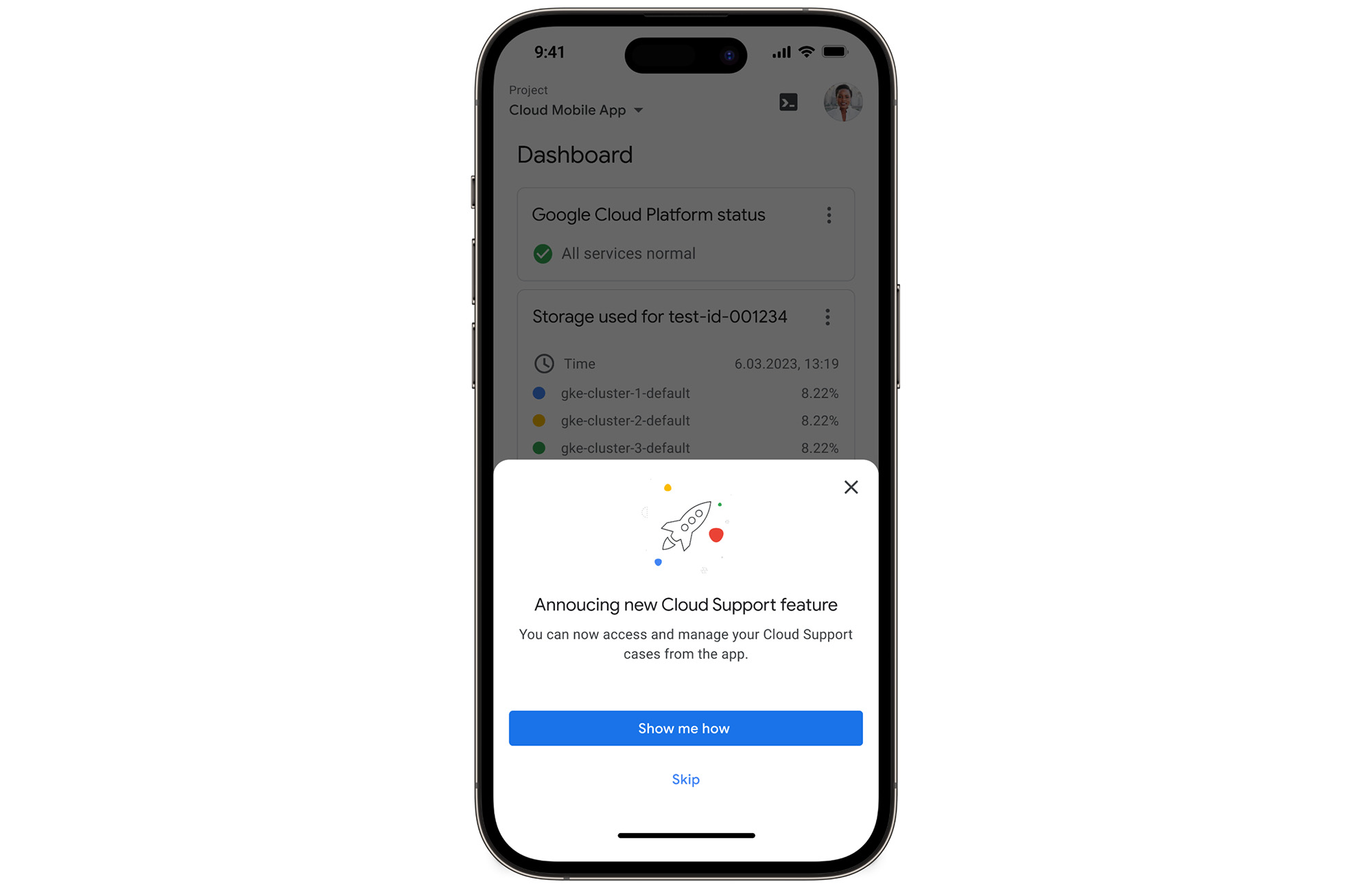
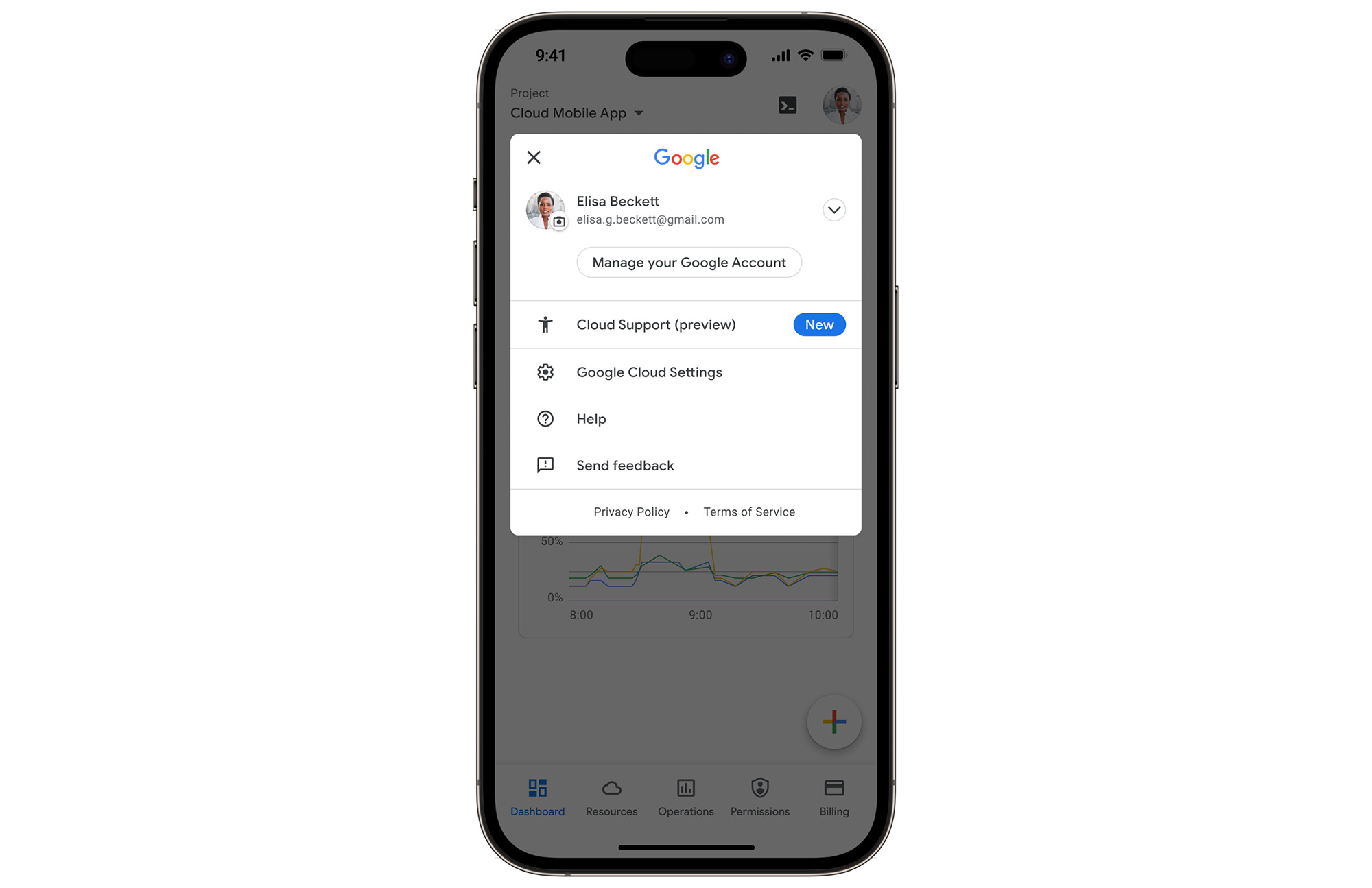
In the Google Cloud mobile app, simply navigate to “Cloud Support (preview)” from any screen by touching your profile picture.
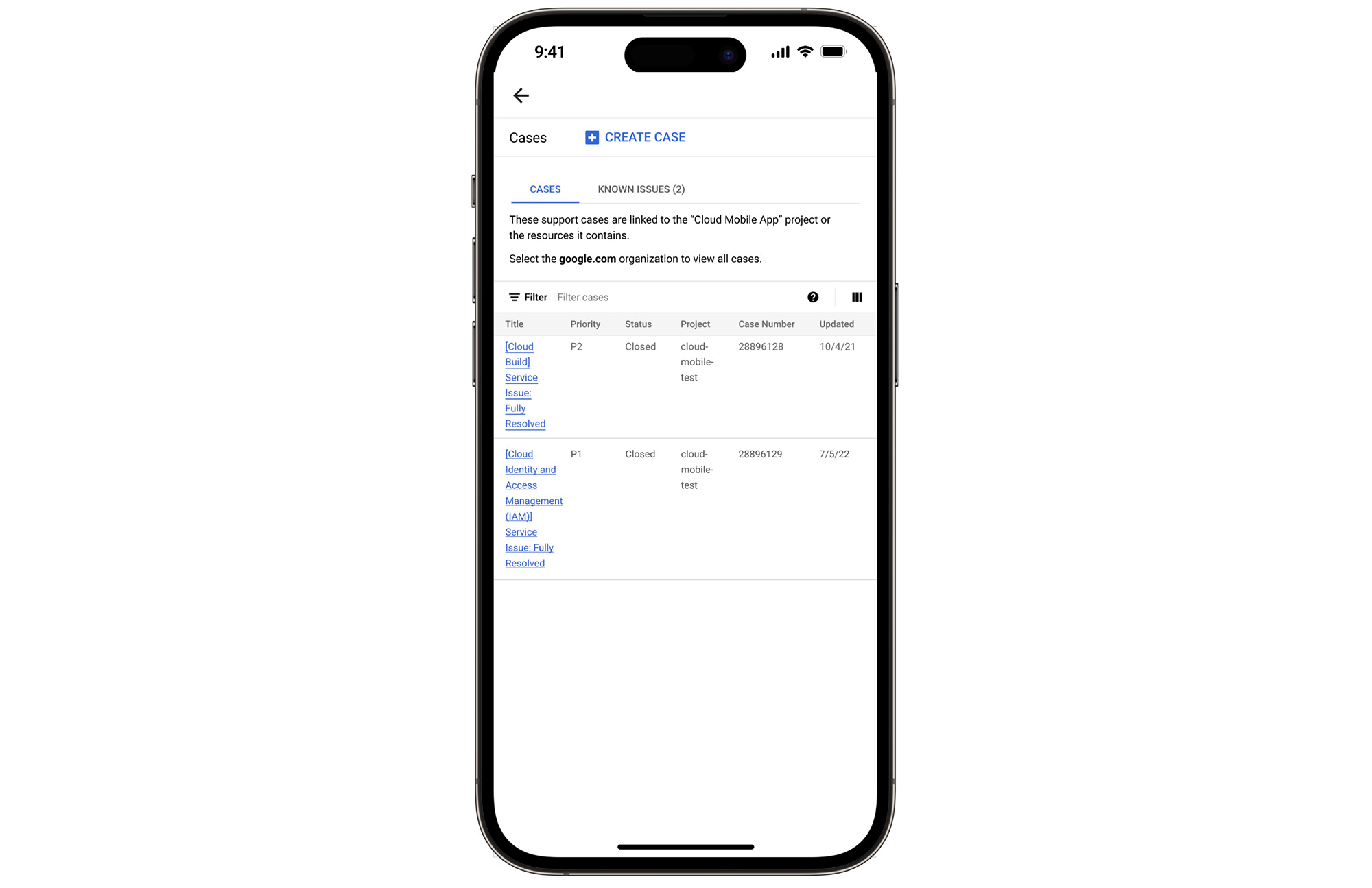
With just one touch you can see the list of all your support cases and easily dive into their important details.
Create Google Cloud Support cases and take action
Not only can you easily view and manage your existing Cloud Support cases, you can also create new ones on the fly with the Google Cloud mobile app.
Seamlessly browse case comments to see the full history of the support case, and respond to the case with new comments.
Download the Google Cloud app today
The Google Cloud app is a powerful tool for managing your Google Cloud environment on the go, and it just got better. To summarize, we’ve added Cloud Support cases to our mobile app, which lets you:
- Read existing conversations with the Google Cloud Support Team
- Respond to Google Cloud Support cases
- Create new Google Cloud Support cases
These new features are available for you to use today in Public Preview. Download the Google Cloud mobile app from Google Play or the Apple App Store to try it out. Check out the Google Cloud app documentation to learn more about what you can do on-the-go. If you have any feedback, we would love to hear from you — simply click on the “send feedback” button in the app to share your experience.
*Preview – This product or feature is covered by the Pre-GA Offerings Terms of the Google Cloud Terms of Service. Pre-GA products and features might have limited support, and changes to pre-GA products and features might not be compatible with other pre-GA versions. For more information, see the launch stage descriptions.
15 Companies–from Korean Air to Salesforce–Share How G-Suite and Google Meet Help Them Battle COVID-19

5046
Of your peers have already read this article.
4:30 Minutes
The most insightful time you'll spend today!
More than a decade ago we introduced secure, easy-to-use business collaboration and productivity apps (now known as G Suite), and we envisioned a new way of working in the cloud. And although we always knew the value of cloud-based collaboration, it is more important than ever at a time like this.
Over the past several weeks, we’ve seen Google Meet—G Suite’s video conferencing solution—help millions of people stay connected, whether it’s colleagues working at home, companies livestreaming to global employees, doctors caring for patients, banks providing loans, retailers and restaurants helping the elderly place orders for home delivery or curbside pickup, social services conducting welfare checks, governments serving citizens, or schools staying in session.
In the first week of April Earlier this week, we surpassed a new milestone, with more than 2 million new users connecting on Google Meet every day, and they’re spending over 2 billion minutes together—that’s more than 3,800 years of secure meetings in a single day. We’re humbled by the huge responsibility that comes with this growth, and we’re determined to continue doing our part to help.
Here’s a little more on what that means.
Meet, and all of G Suite, runs on Google’s secure, resilient global infrastructure, which helps us reliably manage our capacity to keep our services up and running. With Meet, organizations around the world can take advantage of the same secure-by-design infrastructure, built-in protection, and global network that Google uses to secure your information and safeguard your privacy. You can learn more in our Google Meet security blog post.
Last month, we made advanced Google Meet video-conferencing capabilities available at no cost to all G Suite and G Suite for Education customers. We’ve now extended that availability to September 30, 2020 to ensure businesses, organizations, institutions, and educators continue to be supported during this time.
Earlier this year, G Suite also hit another important milestone, surpassing six million paying businesses and organizations. We’re acutely aware of our responsibility to these teams as they support their own constituents, patients, students, and customers during this pandemic. Here are a few stories they’ve shared.
Cambridge Health Alliance, a health system with 140,000 patients in Cambridge, Somerville, and Boston’s Metro North region, has relied on G Suite to support its staff and caregivers. “We didn’t realize how integral G Suite had become to our daily work until dealing with a pandemic where consistent communication with our CHA staff was of utmost importance,” said James LaPlante, Sr. Director, Technology and Biomedical Services. “With one click, staff have been able to connect from their Gmail, Calendar, or from Meet-enabled conference rooms across three hospitals, 15 health centers, or from home.”
In the UK, Hackney Council is using G Suite, Meet and Chromebooks to keep its team of 4,000 staff connected and to make sure that essential services can still be delivered for its citizens.
In Peru, the Judiciary branch is using Meet to continue operating during the nation-wide quarantine. Through video conferences they are carrying out both internal meetings and also hearings. By doing this, attorneys, lawyers and judiciary clerks don’t have to physically attend court, keeping the virus from spreading, while maintaining the administration of justice in the country.
Korean Air has transformed its internal business system with G Suite since July 2019, creating a positive company culture. Employees communicate effectively with G Suite in a variety of ways, including chat, voice, and video, which reduces decision-making time. Korean Air recently opened a ‘Google G Suite Meeting Room’ within the company to further enhance its cloud-native communication capabilities and accelerate mobile-based collaboration.
German manufacturing company KAESER Compressors adopted G Suite in 2018, which allowed them to transition 4,000 employees to working from home smoothly, with minimal disruption. They are using G Suite to connect with customers and job applicants.
When their news anchor voluntarily self-quarantined after suspecting he had been in contact with a person with COVID-19 during a convention, Milenio Televisión, a Mexican television cable news channel, had to figure out how to keep their show on the air. They chose Meet for its security, and high quality image and sound. Milenio Televisión is now broadcasting multiple shows through Meet and has been using the tool to have video conferences with correspondents in other countries.
To help its staff cope with the impact of COVID-19, Italian bank Credem (Credito Emiliano S.p.A.) relied on G Suite, in particular Drive, Docs, and Meet, to seamlessly adapt to a collaborative work-from-home environment. It’s also helping them maintain business continuity, relying on Meet to continue to meet one-on-one with customers.
In the Philippines, the Department of ICT (DICT) is responsible for the planning and development of information and communications technology. As a result of COVID-19, the department has been continuously seeking ways to improve its programs and services to help quarantined workers and citizens, including use of GovMail, which is built on G Suite, Google Chat, and Google Meet. “The migration to cloud-based GovMail which started last year has proven to be particularly useful for remote government operations in this time. Coordination between government agencies is more organized, resulting in faster responses benefitting their constituents,” said Emmanuel Rey Caintic, DICT Assistant Secretary for Digital Philippines.
Kärcher, a German company known for its wide range of cleaning products, had initially planned to roll out G Suite to its workforce by 2021. In response to the pandemic, Kärcher rapidly accelerated their rollout, deploying G Suite to its entire 14,000 workforce in only five days. As of the end of March, Kärcher’s number of weekly active Meet and Chat users has grown by 20X.
Salesforce’s CRM solution brings companies and customers together, and they turned to G Suite to bring their own teams together. “With Salesforce employees working from home given COVID-19, innovative solutions like Meet are even more critical for effective virtual collaboration,” said Andy White, VP, Platform Engineering Salesforce. “Even with 2x our daily video calls—50,000 every workday—Google Cloud’s scale and support keep our teams reliably and seamlessly connected.”
The team at Shopify, a leading global commerce company, is relying on Meet to help them keep their workforce connected. “Even with the demand surges seen around the world, recently we had a 20 person meeting livestream to 4,000 people and there were no issues,” said Garth Pyper, Director of Technical Infrastructure. “Google Meet is our primary means of video conferencing across 5,000 people at Shopify, and we are grateful for the security, reliability, and flexibility it provides.”
With the global move to a fully remote workforce during COVID-19, software company Xero has embraced G Suite to help them make a smooth transition. “Google Meet is vital in keeping our teams socially connected, and Docs, Gmail and the full G Suite family of apps has the team’s productivity and collaboration working as if we were in the office. The reliability and performance of G Suite has allowed the IT team to focus on other challenges we face with a remote workforce.”
In Singapore, NTUC Fairprice Co-Operative, the largest supermarket chain of the island nation, has experienced a surge of 400%+ increase in capacity needs as customers urgently prepare for COVID-19 with in store and online purchases of all the necessities. With the help of G Suite, NTUC was able to handle this increased demand even as they transitioned the vast majority of their workforce to remote work.
Schnucks, a family-owned supermarket retailer with 100 stores in Missouri, Illinois, Indiana, Iowa and Wisconsin, was able to think outside the box to keep their business running and employees safe and connected. “We are running our Helpdesk 24/7 on Google Meet so that both our corporate and in-store employees can join in and get questions answered quickly. Our transportation department is able to practice social distancing by using a Google Meet ‘hotline’ as the WFH dispatch platform.”
Meet had long been the standard collaboration tool for TELUS International, which provides customer experience solutions for global brands. “The Meet platform has helped us maintain and foster our caring culture as we transitioned from an on-site workforce to a work from home model,” said Michael Ringman, Chief Information Officer. “Whether through real-time collaboration, live meetings or a little stress relief with some virtual happy hours, our team’s ability to reliably connect ‘face-to-face’ through Google Meet has been integral to keeping us engaged despite the distance between us.”
These are just a few of the many stories we’ve heard. We’ll continue to support all our users to stay connected in the cloud. Read more on how Google Cloud is supporting businesses and communities here.
A Breakdown of Cloud-based Data Ingestion Practices

8803
Of your peers have already read this article.
3:00 Minutes
The most insightful time you'll spend today!
Businesses around the globe are realizing the benefits of replacing legacy data silos with cloud-based enterprise data warehouses, including easier collaboration across business units and access to insights within their data that were previously unseen. However, bringing data from numerous disparate data sources into a single data warehouse requires you to develop pipelines that ingest data from these various sources into your enterprise data warehouse. Historically, this has meant that data engineering teams across the organization procure and implement various tools to do so. But this adds significant complexity to managing and maintaining all these pipelines and makes it much harder to effectively scale these efforts across the organization. Developing enterprise-grade, cloud-native pipelines to bring data into your data warehouse can alleviate many of these challenges. But, if done incorrectly, these pipelines can present new challenges that your teams will have to spend their time and energy addressing.
Developing cloud-based data ingestion pipelines that replicate data from various sources into your cloud data warehouse can be a massive undertaking that requires significant investment of staffing resources. Such a large project can seem overwhelming and it can be difficult to identify where to begin planning such a project. We have defined the following principles for data pipeline planning to begin the process. These principles are intended to help you answer key business questions about your effort and begin to build data pipelines that address your business and technical needs. Each section below details a principle of data pipelines and certain factors your teams should consider as they begin developing their pipelines.
Principle 1: Clarify your objectives
The first principle to consider for pipeline development is clarify your objectives. This can be broadly defined as taking a holistic approach to pipeline development that encompasses requirements from several perspectives: technical teams, regulatory or policy requirements, desired outcomes, business goals, key timelines, available teams and their skill sets, and downstream data users. Clarifying your objectives clearly identifies and defines requirements from each key stakeholder at the beginning of the process and continually checks development against these requirements to ensure the pipelines built will meet these requirements.This is done by first clearly defining the desired end state for each project in a way that addresses a demonstrated business need of downstream data users. Remember that data pipelines are almost always the means to accomplish your end state, rather than the end state itself. An example of an effectively defined end-state is “enabling teams to gain a better understanding of our customers by providing access to our CRM data within our cloud data warehouse” rather than “move data from our CRM to our cloud data warehouse”. This may seem like a merely semantic difference, but framing the problem in terms of business needs helps your teams make technical decisions that will best meet these needs.
After clearly defining the business problem you are trying to solve, you should facilitate requirement gathering from each stakeholder and use these requirements to guide the technical development and implementation of your ingestion pipelines. We recommend gathering stakeholders from each team, including downstream data users, prior to development to gather requirements for the technical implementation of the data pipeline. These will include critical timelines, uptime requirements, data update frequency, data transformation, DevOps needs, and security, policy, or regulatory requirements by which a data pipeline must meet.
Principle 2: Build your team
The second principle to consider for pipeline development is build your team. This means ensuring you have the right people with the right skills available in the right places to develop, deploy, and maintain your data pipelines. After you have gathered your pipeline requirements, you can begin to develop a summary architecture that will be used to build and deploy your data pipelines. This will help you identify the human talent you will need to successfully build, deploy, and manage these data pipelines and identify any potential shortfalls that would require additional support from either third-party partners or new team members.
Not only do you need to ensure you have the right people and skill sets available in aggregate, but these individuals need to be effectively structured to empower them to maximize their abilities. This means developing team structures that are optimized for each team’s responsibilities and their ability to support adjacent teams as needed.
This also means developing processes that prevent blockers to technical development whenever possible, such as ensuring that teams have all of the appropriate permissions they need to move data from the original source to your cloud data warehouse without violating the concept of least privilege. Developers need access to the original data source (depending on your requirements and architecture) in addition to the destination data warehouse. Examples of this are ensuring that developers have access to develop and/or connect to a Salesforce Connected App or read access to specific Search Ads 360 data fields.
Principle 3: Minimize time to value
The third principle to consider for pipeline development is minimize time to value. This means considering the long-term maintenance burden of a data pipeline prior to developing and deploying it in addition to being able to deploy a minimum viable pipeline as quickly as possible. Generally speaking, we recommend the following approach to building data pipelines to minimize their maintenance burden: Write as little code as possible. Functionally, this can be implemented by:
1. Leveraging interface-based data ingestion products whenever possible. These products minimize the amount of code that requires ongoing maintenance and empower users who aren’t software developers to build data pipelines. They can also reduce development time for data pipelines, allowing them to be deployed and updated more quickly.
- Products like Google Data Transfer Service and Fivetran allow for managed data ingestion pipelines by any user to centralize data from SaaS applications, databases, file systems, and other tooling. With little to no code required, these managed services enable you to connect your data warehouse to your sources quickly and easily.
- For workloads managed by ETL developers and data engineers, tools like Google Cloud’s Data Fusion provide an easy-to-use visual interface for designing, managing and monitoring advanced pipelines with complex transformations.
2. Whenever interface-based products or data connectors are insufficient, use pre-existing code templates. Examples of this include templates available for Dataflow that allow users to define variables and run pipelines for common data ingestion use cases, and the Public Datasets pipeline architecture that our Datasets team uses for onboarding.
3. If neither of these options are sufficient, utilize managed services to deploy code for your pipelines. Managed services, such as Dataflow or Dataproc, eliminate the operational overhead of managing pipeline configuration by automatically scaling pipeline instances within predefined parameters.
Principle 4: Increase data trust and transparency
The fourth principle to consider for pipeline development is increase data trust and transparency. For the purposes of this document, we define this as the process of overseeing and managing data pipelines across all tools. Numerous data ingestion pipelines that each leverage different tools or are not developed under a coordinated management plan can result in “tech sprawl”, which significantly increases the management overhead of data ingestion pipelines as the quantity of data pipelines increases. This becomes especially cumbersome if you are subject to service-level agreements, or legal, regulatory, or policy requirements for overseeing data pipelines. Preventing tech sprawl is, by far, the best strategy for dealing with it by developing streamlined pipeline management processes that automate reporting. Although this can theoretically be achieved by building all of your data pipelines using a single cloud-based product, we do not recommend doing so because it prevents you from taking advantage of features and cost optimizations that come with choosing the best product for your use case.
A monitoring service such as Google Cloud Monitoring Service or Splunk that automates metrics, events, and metadata collection from various products, including those hosted in on-premise and hybrid computing environments, can help you centralize reporting and monitoring of your data pipelines. A metadata management tool such as Google Cloud’s Data Catalog or Informatica’s Enterprise Data Catalog can help you better communicate the nuances of your data so users better understand which data resources are best fit for a given use case. This significantly reduces your pipeline’s governance burden by eliminating manual reporting processes that often result in inaccuracies or lagging updates.
Principle 5: Manage costs
The fifth principle to consider for pipeline development is manage costs. This encompasses both the cost of cloud resources and the staffing costs necessary to design, develop, deploy, and maintain your cloud resources. We believe that your goal should not necessarily be to minimize cost, but rather maximizing the value of your investment. This means maximizing the impact of every dollar spent by minimizing waste in cloud resource utilization and human time. There are several factors to consider when it comes to managing costs:
- Use the right tool for the job – Different data ingestion pipelines will have different requirements for latency, uptime, transformations, etc. Similarly, different data pipeline tools have different strengths and weaknesses. Choosing the right tool for each data pipeline can help your pipelines operate significantly more efficiently. This can reduce your overall cost, free up staffing time to focus on the most impactful projects, and make your pipelines much more efficient.
- Standardize resource labeling – Implement and utilize a consistent labeling schema across all tools and platforms to have the most comprehensive view of your organization’s spending. One example is requiring all resources to be labeled by the cost center or team at time of creation. Consistent labeling allows you to monitor your spend across different teams and calculate the overall value of your cloud spending.
- Implement cost controls – If available, leverage cost controls to prevent errors that result in unexpectedly large bills.
- Capture cloud spend – Capture your spend on all cloud resource utilization for internal analysis using a cloud data warehouse and a data visualization tool. Without it, you won’t understand the context of changes in cloud spend and how they correlate with changes in business.
- Make cost management everyone’s job – Managing costs should be part of the responsibilities of everyone who can create or utilize cloud resources. To do this well, we recommend making cloud spend reporting more transparent internally and/or implementing chargebacks to internal cost centers based on utilization.
Long-term, the increased granularity in cost reporting available within Google Cloud can help you better measure your key performance indicators. You can shift from cost-based reporting (i.e. – “We spent $X on BigQuery storage last month”) to value-based reporting (i.e. – “It costs $X to serve customers who bring in $Y revenue”).
To learn more about managing costs, check out Google Cloud’s “Understanding the principles of cost optimization” white paper.
Principle 6: Leverage continually improving services
The sixth principle is leverage continually improving services. Cloud services are consistently improving their performance and stability, even if some of these improvements are not obvious to users. These improvements can help your pipelines run faster, cheaper, and more consistently over time. You can take advantage of the benefits of these improvements by:
- Automating both your pipelines and pipeline management: Not only should data pipelines be automated, but almost all aspects of managing your pipelines can also be automated. This includes pipeline/data lineage tracking, monitoring, cost management, scheduling, access management and more. This helps reduce long-term operational costs of each data pipeline that can significantly alter your value proposition and prevent any manual configurations from negating the benefits of later product improvements.
- Minimizing pipeline complexity whenever possible: While ingestion pipelines are relatively easy to develop using UI-based or managed services, they also require continued maintenance as long as they are in use. The most easily maintained data ingestion pipelines are typically the ones that minimize complexity and leverage automatic optimization capabilities. Any transformation in a data ingestion pipeline is a manual optimization of the pipeline that may struggle to adapt or scale as the underlying services improve. You can minimize the need for such transformations by building ELT (extract, load, transform) pipelines rather than ETL (extract, transform, load) pipelines. This pushes transformations down to the data warehouse that is use a specifically optimized query engine to transform your data rather than manually configured pipelines.
Next steps
If you’re looking for more information about developing your cloud-based data platform, check out our Build a modern, unified analytics data platform whitepaper. You can also visit our data integration site to learn more and find ways to get started with your data integration journey.
Once you’re ready to begin building your data ingestion pipelines, learn more about how Cloud Data Fusion and Fivetran can help you make sure your pipelines address these principles.
Gmail Turns 18, Has 3 Billion Users! A Product Lead Breaks Down How Gmail Stays Interesting

3800
Of your peers have already read this article.
1:30 Minutes
The most insightful time you'll spend today!
This April, Gmail will be 18 years old. That’s a big milestone, given that email as a medium just turned 50.
Launched in 2004—with its 1 GB free storage, conversation based grouping, and enhanced search capabilities—Gmail quickly became one of the most popular email services in the world.
What started off as Paul Buchheit’s side project is now part of Google Workspace, a solution that’s used by over 3 billion users.
Yet despite this growth and Gmail’s long history, the product continues to find new ways to delight its users with great experiences, new features, and constant innovation.
How does the product team do it?
To help us unpack this question, I interviewed Matthew Izatt, Product Lead for Gmail.
Matthew has been building and growing Gmail for the last 10+ years. He started off in mobile where he built the Android and iOS apps for Gmail, and eventually he became the lead product owner for all of Gmail’s front end. He also led the development of the new Gmail in 2018, which was a complex rebuild of the technical architecture and visual design, along with the addition of multiple enterprise focused features. Since then, he has been leading Google’s charge on redefining how we work as the product lead for the Workspace Platform and Partnerships efforts with a team of over 100.
What follows is an edited version of our interview.
Mustafa Kapadia: Matt, thank you for joining us. Now, before we jump into how your team does its magic, can you please share with me some of the challenges you face when you build a new feature or experience on Gmail?
Matthew Izatt: Thanks Mustafa. And I think this is a great place to start.
One of the biggest challenges is that Google Workspace is used by over 3 billion users, and while that is great, there are many different ways of using our product. It’s not like a doorbell, where there is only one way of using it. With Gmail, it’s like an infinite Swiss army knife, where everyone has their own favorite way of using the product.
Second, Gmail is a critical product for many of our users. Yes, it’s fun to use, but people use it to get important work done—sending job proposals, emailing with their kids’ teachers, or booking medical appointments. This is why we have to be careful about what we experiment with and what we roll out. We can’t just throw things out there and see what works. We have to do our homework.
Third, we have to constantly innovate and think outside the box. Email is an old product, but it continues to evolve. Every day we have new startups reinventing email and challenging the big players. If we are to remain a market leader, we literally have to rethink the product every few years. Which is why creating the new Gmail was so much fun.
Mustafa: I don’t envy you. This is not an easy product to build. Going back to something you touched on: Given these hurdles, how do you build these great experiences? Is there an example that you can share with us?
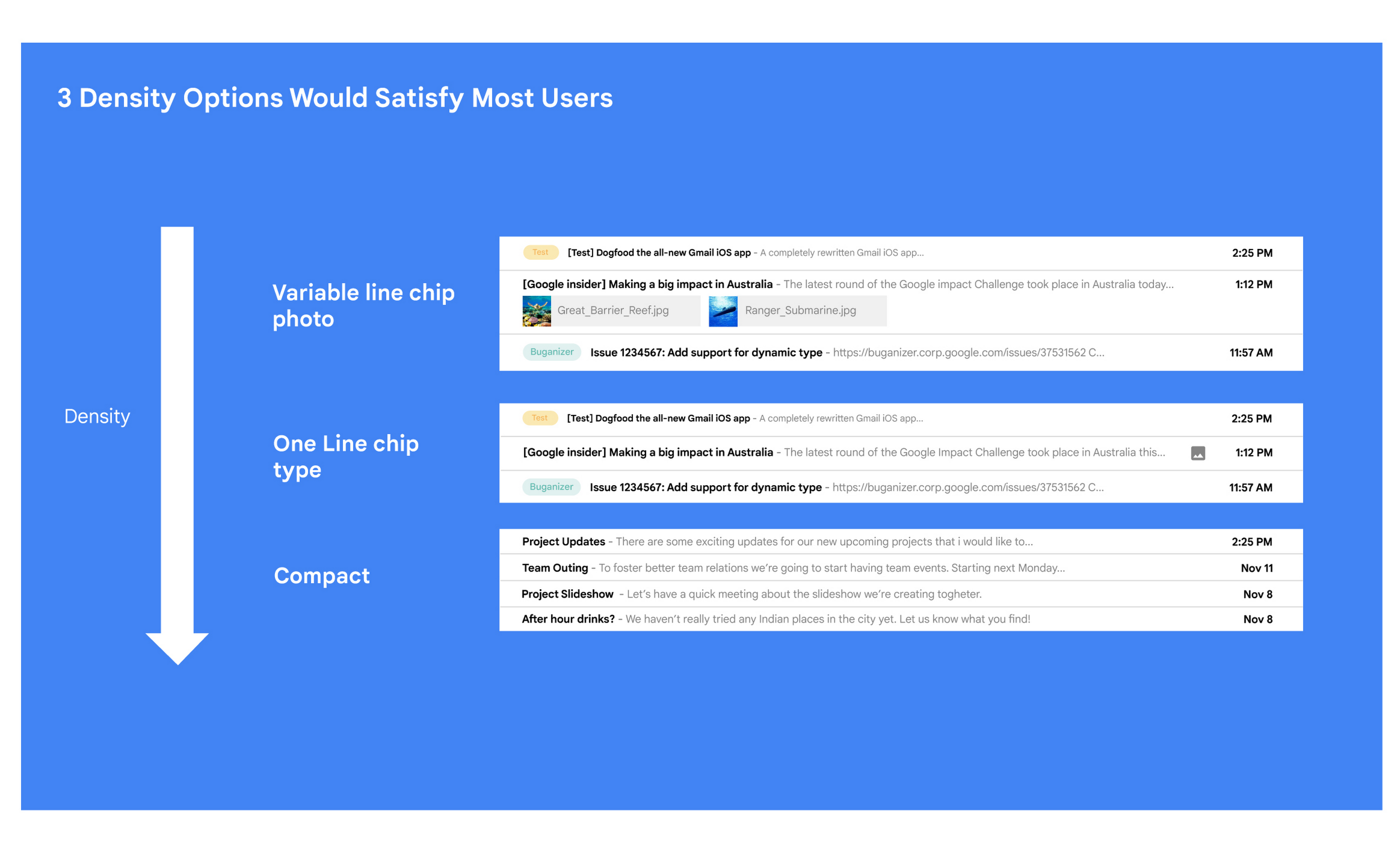
Matt: A specific example I always like to share is the story of how we came up with the right display density on our thread list. The thread list is your inbox; it’s the list of all the messages that you have. The display density is how that information is presented to you.
In Gmail you can choose to have fewer messages with a lot of information about each message. Or you can choose to see a larger number of messages with much less information about each message.
It really comes down to your preferences. And it’s one of the reasons why so many users like using Gmail. In fact, being able to set inbox display preferences is actually one of the top 10 most used settings within Gmail.
Mustafa: So you were really trying to give users choice on how they would like their information presented?
Matt: Exactly. Now, we could have added 100 different levers so that every user could customize their email feed to an infinite degree. While that is possible from a coding perspective, it’s not practical for three reasons.
First, infinite choice sounds good on paper, but in reality, too many options creates a confusing user experience. Second, development would take many months—maybe even a year. And third, it would be a long-term maintenance nightmare.
Mustafa: So how did you go about doing it? Share with me the inner workings of Gmail in Google Workspace. How is the sausage made?
Matt: Well, it came down to four key steps, working closely with our amazing UX Research team.
First came the primary research to find out if building this experience was worth doing. After all, what is the point of building it if no one wants it? For this we actually sat down with real users inside and outside of Google to understand their needs.
Second, we brainstormed 100 potential solutions and narrowed them down to 8 options. Then we mocked up each of the 8 options to see how they looked.

While it would have been easy to just pick the option we liked the most and build it, we wanted to create what our users want, not what we like the most. So we took those options and surveyed the users from step 1 again. We specifically asked them to rank their preferences across three dimensions: Love It, Hate It, or Meh!
Based on the user responses, we realized that 3 configurations would meet the needs of most users. These were the three options we developed and deployed to Google Workplace.
Mustafa: I love how you used data to guide your decision of what to build. This really is Google’s secret sauce—first-hand data collected from users.
Matt: Absolutely. Without their feedback, we would have never been able to narrow down to the 3 options that would satisfy most of our users.
Mustafa: Talking about risks: Getting user feedback and validating before you build is one way to de-risk your product, but you even de-risked your product launch strategy, correct?
Matt: Yes. Sometimes we launch features individually. Sometimes we launch them as a group. In this particular case, we had a lot of moving parts. We had a complete UI redesign, 10 or 12 new features, and architecture changes.
So to de-risk this, we put in place—I kid you not—a 26-stage launch process. We started off with the technical architecture changes—stuff that the user would not notice—to make sure that it was working. And we did it in small increments.
Then we rolled out a few features at a time, launching it first to our early access program—where users have opted in to receive updates. We measured their reaction and satisfaction first, and then moved on to the next group.
At every stage, we kept our blast radius small and put in these checks and balances where we could launch, measure reaction, and then reassess our strategy. And that worked out pretty well for us for this massive launch.
Mustafa: Agreed! Thank you for taking the time to talk to me. And good luck with building the next version of Gmail.
Matt: Thanks for having me.
More Relevant Stories for Your Company

The Secret Behind How ATB Reduced Strategic Planning Time by 50 Percent
ATB Financial (ATB) operates in a highly competitive financial services space, with competitors ranging from big banks to financial technology startups, ready to grab a slice of the provincial market share. To retain its competitive advantage in an industry primed for disruption, ATB took an active role in its evolution by

Enterprises can Push the Limits of Edge Even Further!
Whether with the cloud or within their own data centers, enterprises have undergone a period of remarkable consolidation and centralization of their compute resources. But with the rise of ever more powerful mobile devices, and increasingly capable cellular networks, application architects are starting to think beyond the confines of the

Google Dataflow Named Leader in The 2021 Forrester Wave™: Streaming Analytics
We are excited to announce that Google has been named a Leader in The Forrester Wave™: Streaming Analytics, Q2 2021 report. Thank you to our strong community of customers and partners for working with us to deliver a customer focused product. We believe Forrester’s recognition is an acknowledgement of our leadership

Google’s Intelligent Products Essentials Assist Manufacturers in Product Development Journey
Expectations for both consumer and commercial products have changed. Consumers want products that evolve with their needs, adapt to their preferences, and stay up-to-date over time. Manufacturers, in turn, need to create products that provide engaging customer experiences not only to better compete in the marketplace, but also to provide
