





4582
Of your peers have already watched this video.
41:00 Minutes
The most insightful time you'll spend today!
What IT Managers Really Need to Know About G Suite and Google Cloud Platform
Today, some of the world’s largest organizations are using Google technology to innovate. They are leveraging Google APIs and platform services to find new ways to transform their organizations.
They are also leveraging Google Cloud to empower their G Suite users. But what does the Google Cloud Platform (GCP) really offer?
For starters, GCP brings to the table some of the same capabilities as the G Suite like building globally distributed storage systems and collaboration. GCP has a deep and broad portfolio from moving entire datacenters or providing access to Google APIs so you can build those into your applications and services.
You can also make use of business platforms like Apigee or Orbitera or leverage Google APIs to integrate with your applications. Most organizations today are want don’t want to move any of their infrastructure. And GCP helps organizations achieve exactly that.
Vincent Wienczorkowski, Cloud Sales Manager, Google Cloud, and Nick Pan, Cloud Customer Engineer, Google Cloud, share how IT managers, like you, can help their organizations make the most of Google Cloud Platform.
6884
Of your peers have already watched this video.
14:21 Minutes
The most insightful time you'll spend today!
How Anthos Helps Organizations Implement Multi and Hybrid Cloud Strategy
Organizations have become increasingly focused on using modernization solutions to build competitive advantage, for faster time to market, serve customers better and seamlessly operate in hybrid and multi-cloud environments. Anthos by Google Cloud, a managed application platform plays an important role in application modernization and also in empowering customers to deploy a hybrid or multi-cloud strategy with opensource technologies and platforms like Kubernetes.
Watch the video to refer to the real use-cases of Anthos for application modernization and hybrid/multi cloud deployment across retail, digital natives, banking and manufacturing space.
Also, explore the latest tool, Migrate for Anthos if you are a traditional enterprise looking to skip rewriting of applications and lift-and-shift process!
Rethinking time management: Helping employees manage their time efficiently

3586
Of your peers have already read this article.
3:30 Minutes
The most insightful time you'll spend today!
As business leaders evaluate their hybrid work models, employee productivity is top of mind. They’re trying to understand how to balance organizational needs for productivity with employee needs for autonomy, flexibility, and work/life balance. In my role as Google’s Productivity Advisor, I help organizations and employees realize that being productive means working smartly and efficiently — not overworking. And one key to productivity is developing strong time management skills.
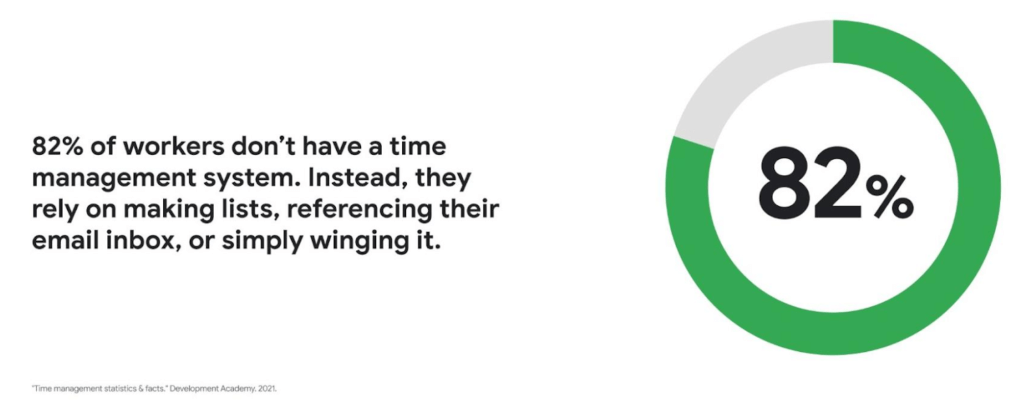
Recent research found that 82% of workers don’t have a proper time management system, however. Instead, they rely on making lists, referencing their inbox, or simply winging it. And the result is telling: 21% of people say “their work is never under control or only under control one day per week.”
Everyone works differently, and one of the best things about hybrid work is that it empowers people to work in their own way, at their own pace. However, if your employees are managing their time inefficiently over the long term, their risk of burnout increases — which can be bad news for employee wellbeing, morale and productivity.
In order for any hybrid work plan to be effective and your teams to be healthy, your employees need to build their time management muscle. You can help them do so with a three-step process:
- Understand how your employees are currently managing their time
- Encourage your employees to identify time management strengths and areas for improvement
- Empower your employees to maximize their time management practices
Step 1: Understanding your employees’ work habits
Before you can help your employees manage their time more effectively, you first need to understand how they spend it. To start, identify habits that might be preventing your employees from establishing productive workflows. For example, some employees might be working too much outside of business hours or spending the majority of their working hours in meetings.
While observation may help you glean some of this information, it’s best to go straight to the source. To find out if your employees feel they’re managing their time efficiently, simply ask them! You can distribute an anonymous questionnaire using a survey tool, like Google Forms, with questions like:
- Are you having trouble getting all your work done?
- Do you feel like you have enough independent working time?
- Do alerts and notifications interrupt or enhance your workflow?
- Which productivity and collaboration tools do you find the most and the least useful?
- How do you communicate best with your coworkers when working on- and off-site?
One major hurdle to effective time management can be too many meetings. To learn if meeting fatigue is plaguing your teams, include a survey question asking employees if they feel like they devote too much time to meetings. Help them get specific by encouraging them to use a tool like Time Insights. With this feature, employees can see exactly how much time they spend in meetings and how much focus time they schedule each week to accurately answer your survey.
Fielding an anonymous questionnaire is a great way to start your time management audit. The learnings that emerge can help you identify patterns in your workplace and among your teams — but they won’t reveal how individual employees work. For that, you’ll need to reach out to them directly.
Step 2: Identifying individual strengths to harness and areas for improvement
Once you have a general idea of how your team works, you can dig deeper into your individual employees’ time management methods and working styles. With this information, you can then help them identify the practices that work — and don’t work — for them.
Suggest to your employees that they spend a week observing their productivity patterns and time management methods. You might encourage people to look at:
- Their level of energy at different times during the day and/or on different days of the week
- The different types of work, such as strategic or administrative, they like doing and when
- How much time they spend doing work versus communicating about work
- How they feel during and after group meetings
- The amount of time they spend in deep-focus versus time spent switching among different tasks
If your organization uses digital timesheets, your employees can consult built-in, automatic time-tracking insights to see where they’re spending their time. Otherwise, you can easily create a custom time-tracking app using a no-code solution like AppSheet to help your employees measure the time they devote to their various responsibilities.
Once everyone has completed their weeklong study, set up dedicated meetings to review your employees’ observations with them individually. Armed with this new understanding, you and your employees can clarify when and how each person does their best work, identify areas for improvement, and start adjusting accordingly.
Step 3: Empowering your employees to flex their time management muscle
Now that you have clarity on how your employees spend their time, you can work with them to develop personal time management practices. To set them up for success, look for opportunities that take advantage of their strengths and offset their challenges — no matter how they like to work.
It’s important to remember there’s no one-size-fits-all solution to using time productively. Some workers love to tackle the most difficult tasks first thing in the morning; others feel more energized at the end of their day. Some people think best in conversation while others prefer to be alone with their thoughts. To help your employees develop time management practices that fit their working style, they need to feel empowered to decide how they can use their time and tools productively.
When it comes to time management, calendars are your best friend, so encourage your employees to take advantage of simple features. Google Calendar lets everyone see availability; by glancing at a shared calendar, coworkers will know when to reach out to someone (and when not to). You can also prompt your employees to block off quiet time during windows when they feel most productive, and use tools like Focus time to protect the time they need for heads-down work.
Email and chat are important, but they can also become a distraction if not used intentionally. Most people open email first thing in the morning, leave it open all day, and check it often. Instead, when you and your employees need to focus, try closing the email tab or using Gmail features to snooze and star emails to stay on task. The same approach applies to chat: check it strategically and turn off notifications when you need deep focus.
Finally, be intentional about building and maintaining trust with your teams as they develop new time management skills. If you decide to use Google Meet for regular check-ins, partner with your employees to develop meeting agendas directly inside Calendar invites to ensure your shared time will be used efficiently.
Valuing impact over output
Hybrid work offers an opportunity for business leaders to rethink their perspective on employee time management and what it means to be productive. Remember, the goal of building effective time management skills isn’t always to become more efficient so one can take on additional work. Often times, taking a step back helps us simplify how we work in order to deepen our impact. When you empower your employees to create a personal time management system, I think you’ll find they will be happier and healthier, with more to contribute to your organization.
Cloud-Native Observability: Google Cloud and Chronosphere Join Forces

1343
Of your peers have already read this article.
2:30 Minutes
The most insightful time you'll spend today!
As digital transformation continues apace, cloud native adoption has skyrocketed — and so has the volume, velocity, and variety of data that organizations must monitor to maintain visibility over their IT environments. Rather than a fixed number of virtual machines (VMs) running a single application each, systems are more flexible and ephemeral — with thousands of containers and microservices emitting data — and services and systems have greater interdependencies. All of this has led to an explosion in complexity that makes it nearly impossible to reliably and efficiently operate cloud-native services using traditional observability solutions without dramatically increasing overhead.
Built on Google Kubernetes Engine (GKE), Chronosphere is the only cloud-native observability solution that helps teams quickly resolve incidents before they affect the customer experience and the bottom line. And the relationship between Google Cloud and Chronosphere has developed into a growing partnership. Chronosphere brings the ability to rapidly and reliably control observability data and costs to Google Cloud customers, while maintaining open source compatibility. Recently, GV (Google Ventures) participated in Chronosphere’s $115 million round of Series C funding. Chronosphere is also available on Google Cloud Marketplace, making it easy for customers to procure and deploy.
Why Chronosphere chose to build on Google Cloud
Chronosphere’s founders, CEO, Martin Mao, and CTO, Rob Skillington, wanted to build an observability solution that solved some of the same problems they encountered when leading the observability team at Uber. The challenges at Uber focused on scale, reliability and cost, with a key emphasis on how these were not easily solvable for monitoring of cloud-native applications. Martin and Rob were looking to build a solution that was cloud-native, highly reliable, and capable of managing the high volume of data that modern organizations process every day. For those reasons, Martin and Rob chose to build Chronosphere on top of Google Kubernetes Engine (GKE):
Cloud-native mindset: When Martin and Rob launched Chronosphere, one of the first considerations was this: A cloud-native problem needs a cloud-native solution. Google Cloud and Chronosphere work together to provide a purpose-built software-as-a-service (SaaS) observability solution platform for cloud-native technologies like Kubernetes. Chronosphere runs much of its critical infrastructure on Google Cloud, using the service’s global infrastructure to deliver secure and reliable services to hypergrowth customers.
Open platform: Martin and Rob have a commitment to openness — a commitment that Google Cloud makes to its customers as well. All of the ins and outs of Chronosphere are open source compatible –built on GKE, the platform ingests both metric and trace data in a variety of open source formats, such as Prometheus, OpenTelemetry, and StatsD, so teams can get onboard easily while avoiding vendor lock-in. And they remain fully in control of how much data to ingest, how it’s ingested, how it’s stored, and for how long. That way, customers remain in control of their observability costs while their systems and data continue to grow, and can troubleshoot and remediate issues more quickly.
Mission-critical performance: Observability is a mission-critical service because it is essential for the reliability and performance of mission-critical systems. For this reason, Martin and Rob wanted to offer the strongest service level agreements (SLAs) possible for availability, reliability, and performance. Google Cloud provides the secure global infrastructure that allows them to do so.
Data volume: Modern organizations emit huge volumes of data that they have to sift through in near-real time to gain full visibility. Google Cloud offers the same infrastructure and networks that Google uses to support billions of users every day, capable of processing petabytes of data with ease.
How Chronosphere works with Google Cloud
GKE provides specific technical benefits that Chronosphere leverages to offer customers the performance and availability they need to spend less time managing their observability systems and more time creating value.
The Chronosphere collector is a Kubernetes-native, Prometheus-compatible agent that collects, processes, and exports telemetry data, including metrics and traces. When you install the collector in a Kubernetes cluster, it automatically discovers all your workloads and starts to gather data from them.
The Chronosphere UI tailors the experience to each user based on what services that individual owns or which teams that person belongs to. This makes the overall user experience friendlier and less overwhelming while helping people get to the bottom of issues faster.
Running on GKE means that Chronosphere can leverage Google Cloud’s multiple zones in each geographic region to distribute workloads evenly, ensure customer data stores are isolated from each other, and build tolerance for zonal failures. It also allows for data persistence across multiple zones. At the same time, Google Cloud’s global load balancers bring the data physically closer to the customer, shortening the time it takes for a data point to be visible to a user after its emission.
What this means for customers
The partnership brings together the best in cloud-native services and cloud-native observability. With the power of Google Cloud and Chronosphere, observability teams can transform their observability data based on need, context, and utility, storing only the useful data to reduce costs and improve performance. With purpose-built solutions for a cloud-native world, teams gain faster issue detection and resolution, and also benefit from Chronosphere’s 99.99% availability and open source compatibility — eliminating vendor lock-in.
“Companies growing their online infrastructure risk huge hits to their bottom line if they don’t also manage increased complexity and cost,” says Martin. “Our partnership with Google Cloud brings together the world’s leading cloud services platform with our powerful observability solution to unlock the benefits of a cloud-native world, while optimizing for efficiency, reliability, and cost.”
Google Cloud and Chronosphere: The perfect match
Google Cloud and Chronosphere offer an industry-leading observability solution built from the ground up to abstract away the complexities of cloud computing for already stressed teams. And the future of this partnership is sure to bring new innovations around performance, reliability, and cost efficiency as both companies continue to invest in these three areas. The goal: to deliver the best performance for cost in the industry.
Learn more about what Chronosphere and Google Cloud are doing for customers, and check out the Chronosphere listing on Google Cloud Marketplace.
Google Cloud Accelerates Financial Organizations’ Journey towards Digital Transformation

10463
Of your peers have already read this article.
2:00 Minutes
The most insightful time you'll spend today!
When I reflect back on the past year and the pandemic, I’m struck by how the reliance on remote work and operations has changed the fundamentals of business forever. For the financial services industry, this rings particularly true. Many conversations I’m having right now with organizations revolve around embracing a transformation cloud, and thinking of cloud computing not just as an infrastructure decision, but also as the locus for transformation throughout the company.
Today, as we welcome the industry to our Financial Services Summit, we’ll demonstrate just how Google Cloud accelerates a financial organization’s digital transformation through app and infrastructure modernization, data democratization, people connections, and trusted transactions. We hope you’ll join us.
How we’re helping financial services firms build their transformation clouds
At Google Cloud, we continue to focus on areas where we can bring the best of our capabilities to banking, capital markets, insurance, and payments customers around the world. Our work with financial services industry customers has given us a deep understanding of the real-world, specific use cases that matter most to them. This groundwork led us to engineer products and solutions that are open and flexible, not ones that force them to rip out existing investments in ERP or other early IaaS cloud implementations.
It’s why we’ve engineered solutions such as Lending DocAI, Open Banking with Apigee, and Datashare for financial services to help transform the industry. These solutions were created with our customers’ security and compliance top-of-mind and are built at the intersection of user-optimized experience, technology, and sovereignty.
At their core, financial institutions want to drive growth, reduce costs, mitigate risk, stay compliant, and increase efficiency. As a result, when we partner with them on their transformation journeys, we consider three essential focus areas:
- Enabling the human experience and connected interactions
- Building an open and intelligent data foundation for better insights
- Providing the most trusted and secure cloud in the industry
Enabling humans and connected interactions
A company’s transformation is about more than technology; people and culture ultimately drive change. HSBC, for example, recognized its business users would benefit from guided answers to common questions around risk policy compliance, and turned to Google Cloud to leverage AI and machine learning bots to assist employees, ease the burden on policy experts, and improve the user experience. Using Dialogflow, a core component of Contact Center AI, HSBC was able to build a conversational platform that quickly and accurately addresses user needs at scale.
Another example is Equifax, which used Google Workspace to support collaboration not only internally between employees, but also externally with customers. Customers can use Google Cloud solutions for financial services to build these sorts of technology-enabled human interactions quickly and easily—supporting organizational change at scale.
Building an open and intelligent data foundation for smarter, faster insights
The real impact of Google Cloud solutions for financial services comes when the whole company has access to the right information at the right time, and can act more intelligently on that data. Our solutions help businesses safely leverage their data and get a complete 360-degree view of their customers’ information, which can often be scattered across multiple systems (CRM, lending, credit, etc.). This helps financial institutions improve the overall customer experience—and sometimes even develop new products quickly.
Indeed, all financial institutions are looking for ways to grow revenue and reduce expenses, and data can be a critical ingredient to doing both effectively. As daily transactions rise, so does the volume and complexity of data. But to implement new customer experience innovations (and new revenue streams), financial institutions must first capture data effectively. This is why AXA Switzerland, for example, uses real-time analytics on Google Cloud to gain cross-industry insights about future trends and customer preferences.
Financial services organizations also need the confidence of building on a platform that provides choice, flexibility, and agility to move fast. It’s why we have an open cloud approach that allows Google Cloud services to run in different physical locations such as on-premises, other public clouds, and the edge. Customers can also harness the power of data and AI through our open APIs, machine-learning services, and analytics engines on any major cloud platform. This is why companies like Macquarie Bank are taking advantage of Google Cloud’s open, hybrid architecture to modernize and empower its developers.
Compliant and secure to address risk and regulatory needs
As a highly regulated industry, financial services is focused on security and compliance, risk and regulations, and fraud detection and prevention. Google Cloud offers unique capabilities to earn customers’ trust as part of our continuing work to be the most trusted cloud in the industry. Google Cloud provides a secure foundation that you can verify and independently control. Our cloud technology reduces risk and data loss, because it is built on comprehensive zero-trust architecture. Finally, we offer a shared-fate model built on best practices in risk management via automation, guidance, and insurance. This is why customers like BBVA have confidence anywhere their systems may operate.
On the regulatory front, global legislators and regulators continue to focus on the stability of the industry that only a decade ago went through one of the biggest liquidity crises in history. With this oversight comes strong expectations of risk mitigation. Google Cloud offers a single, global set of controls, reviewed by financial institutions and regulators around the world, and verified in collaborative audits—making compliance simpler and less costly for our customers.
Finally, Google Cloud allows financial services firms to operate confidently with advanced security tools that help protect data, applications, and infrastructure, as well as their customers from fraudulent activity, spam, and abuse. We help protect your data against threats, using the same infrastructure and security services we use for our own operations, ensuring you never have to trade-off between ease of use and security. Google Cloud encrypts data at-rest and in-transit. And we now also offer the ability to encrypt data-in use, while it’s being processed for customer VM and container workloads.
Let us help you with your transformation cloud journey
We’ve seen leading financial services companies embrace Google Cloud to help them move beyond infrastructure toward the next phase of their cloud evolution. This is an era where no company is better positioned to lead than Google Cloud, and we’re excited to help you with your journey.
Learn more about Google Cloud for financial services.

How Machine Learning in G Suite Helps Employees of Dalmia Bharat Discover the Next Big Idea
DOWNLOAD CASE STUDY5533
Of your peers have already downloaded this article
5:30 Minutes
The most insightful time you'll spend today!
Creating expense reports, Email management, formatting documents: Your time is caught in the quicksand of formatting, tracking, analysis or other mundane tasks. These are just some of the time-sinks that can affect your—and your employees’—productivity at work. At Google Cloud, this is referred to as “overhead”—time spent working on tasks that do not directly relate to creative output—and it happens a lot.
According to a Google Cloud study, the average worker spends only about 5 percent of his or her time actually coming up with the next big idea.
That’s where machine learning can help.
Machine learning algorithms observe examples and make predictions based on data. In G Suite—Google Cloud’s collaboration and productivity platform—machine learning models make your workday more efficient by taking over menial tasks, like scheduling meetings, or by predicting information you might need and surfacing it for you.
“Smart Reply, (in Gmail) for example, uses machine learning to generate three natural language responses to an email. So if you find yourself on the road or pressed for time and in need of a quick way to clear your inbox, let Smart Reply do it for you,” says Sunil Tewari, Head of Technology and Business Services, Dalmia Bharat.
More Relevant Stories for Your Company




Video: How Whirlpool’s 90,000 Employees Collaborate to Bring 100 New Products to Market Every Year
As one of the world’s largest manufacturing companies, Whirlpool needs no introduction. The 104-year-old company manufactures home appliances from over 70 manufacturing and technology research centers around the world. Innovation has been the company’s focus since its inception and that’s evident from the fact that it introduced close to 100

How This Online Shoe Retailer Transformed Itself by Reducing its Workload by Two Hours Per Day
By offering customers a choice of 30,000 shoe styles at reasonable prices with a straightforward returns policy, Footway has become one of the largest online shoe retailers in Europe. Founded in 2011 and based in Kista, Sweden, the company has grown to become a market leader and four years ago acquired the

Google Workspace Now Available to Over 3 Billion Users!
Over the past year, Google Workspace rapidly evolved to meet the needs of users as we collectively grappled with remote and hybrid work. First, we launched Google Workspace to commercial customers, which brought together the powerful individual apps people know and love into a single, integrated solution. Then we made Google Workspace

15 Companies–from Korean Air to Salesforce–Share How G-Suite and Google Meet Help Them Battle COVID-19
More than a decade ago we introduced secure, easy-to-use business collaboration and productivity apps (now known as G Suite), and we envisioned a new way of working in the cloud. And although we always knew the value of cloud-based collaboration, it is more important than ever at a time like
